lane assist AUDI S6 2010 User Guide
[x] Cancel search | Manufacturer: AUDI, Model Year: 2010, Model line: S6, Model: AUDI S6 2010Pages: 368, PDF Size: 86.82 MB
Page 141 of 368

_________________________________________________ A_ u_d _ i_ s_i d_ e_ a_s _s_ i_s _t __ _
The detection~ page 138, fig. 131 of the radar sensor detection
area is made up of :
• the approach area (light green area)
(D, about 230 feet (70 m)
behind the vehicle, and
• the "blind spot" (dark green area)@.
The radar sensors cover the adjacent left and right lanes. Other lanes are
not cove red by the radar sensors.
rn Tip s
Side assist does not measure act ual lane width. The system assumes
a fixed lane w idth. Detection in the left and right lanes is based on
this assumed lane w idth. When driving on narrow roads or when
driving to the left or right of the center of a travel lane, it is possible
that vehicles will be detected that are
not in the lane next to the lane
you are using~
page 143. •
Applie s to ve hicl es: w ith s id e a ssist
Operation
Side assist compares the distance and difference in speed of detected
vehicles with the speed of your vehicle . Whenever the difference in
speed and distance is registered as notab le if you were to change
lanes, a signa l light appears on the respect ive m irror .
The signa l can light up if you are passed by a vehicle or if you are
passing another vehicle.
If you pass another vehicle slowly (d ifference in speed less than 9
mph, or 15 km/h) , the signa l light will come on as soon as the other
vehicle is in your blind spot and is detected by side ass ist . When the
difference in speed is greater, the signal light wi ll not come on. •
Controls and equip
ment Safety first
A
pp lies to ve hicles : w ith side assist
Informational and alert stage signals
S ide assis t has two signa l st ages:
• the informational stage signal, and
• t he ale rt stage signal.
S ide assist helps you by using the appropr iate s ignal stage,
depending on whether or not you have activated the turn signal, and
thus have indicated that you are or are not changing lanes .
Informat ional stage signal
As long as you have not activated the turn signal, side assist informs
you of detected vehicles that are registered as being in a notable loca
tion if you were to change lanes . Wheneve r the detected vehicle 's
difference in speed and distance is registered by side assist as
notable, the signal l ight on the respective m irror produces muted
illumination .
Th e br ightness of the info rmationa l stage signal is designed no t to be
as intense, so that it does not interfere w ith your v iew of the road
when you are driving and have no in tention of chang ing lanes. When
you look in the outside mirror, you can clearly see the informat ional
stage signal.
Alert stage signal
Whe n you act ivate the tu rn s ignal, a nd side assist has de tected a
vehicle in a notable location on that particular side, the signal light on
this side mirro r flashes b rightly. The repeated brief and bright
flash ing of the alert stage signal reminds you to carefully check
traffic to the rear in the outside mirror and over your shoulder, so t hat
you can safely complete the lane change~
& in "Safety tips" on
page 144.
rn Tips
The brightness of the signa l light on the outside mirrors can be
adjusted with the MMI
~ page 142. •
Vehicle care Technical data
Page 142 of 368
1111..__A_ u_ d_ i_ s_ i_ d_ e _ a_ s_s _i_s _t _________________________________________________ _
Applie s to vehi cles : w ith si de assist
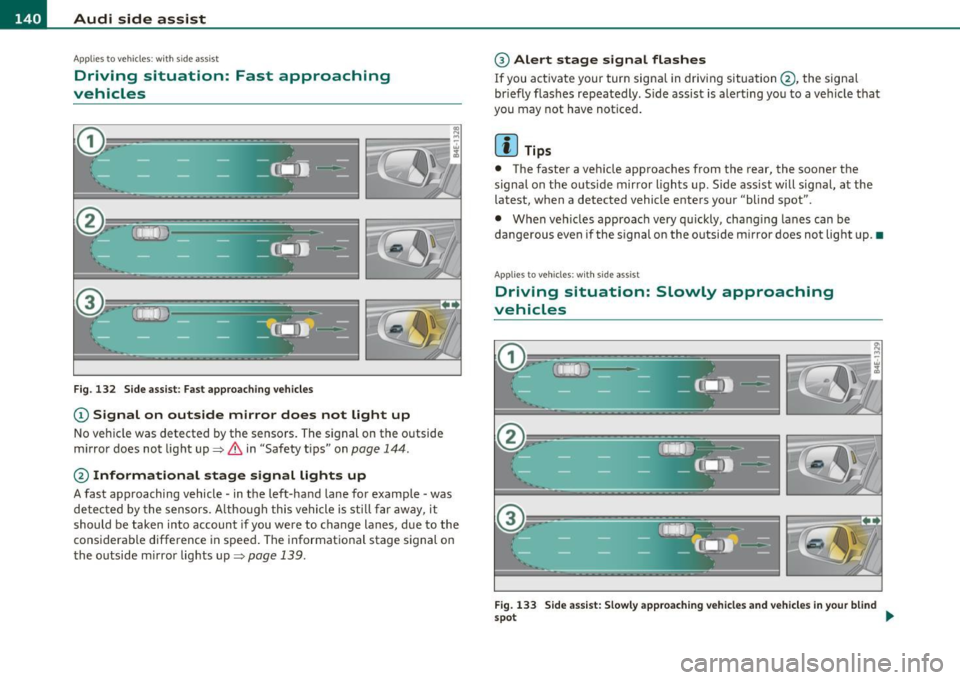
Driving situation: Fast approaching
vehicles
l!l
~----- "'
i
Fig. 132 Side assist: Fast approaching vehicles
(D Signal on outside mirror does not light up
No veh icle was detected by the sensors. The signal on the outside
mirror does not light up~
& in "Safety tips" on page 144.
@ Informational stage signal lights up
A fast approaching vehicle· in the left-hand lane for example· was
detected by the sensors. A lthough this vehicle is stil l far away, it
should be taken into account if you were to change lanes, due to the
considerable difference in speed. The informational stage signal on
the outside m irror lights up~
page 139.
@ Alert stage signal flashes
If you activate your turn signal in driving situation@, the signal
br iefly flashes repeatedly . Side assist is alerting you to a veh icle that
you may not have noticed.
[I] Tips
• The faster a vehicle approaches from the rear, the sooner the
signa l on the outs ide mirror lights up. S ide assist will signal, at the
latest, when a detected vehicle enters your "blind spot".
• When veh icles approach very qu ickly, chang ing lanes can be
dangerous even if the s ignal on the outside m irror does not light up. •
Applies to vehicles : w ith si de assist
Driving situation: Slowly approaching
vehicles
Fig. 133 Side assist: Slowly approach ing vehicles and vehicles in your blind
spo t ..
Page 143 of 368

_________________________________________________ A ___ u...:d _ i_ s ---- id ___ e_.:.; a..::s ...:s...: i..::s ...:t _ ___,J_
CD S ignal on out sid e mirror do es n ot light up
A vehicle approach ing slow ly- in the left -hand lane for example -was
detected by the sensors . Because of the small difference in speed and
the conside rable d istance from your vehicle, the signal on the outside
mirror will not light up=>
& in "Safety tips" on page 144.
@ Informational stage signal light s up
The distance between your veh icle and that of the slowly approach ing
vehicle has narrowed. The informational stage signal on the outside
m irror lig hts up.
As soon as the difference in speed and distance is registered as
notable if you we re to change la nes, a sig nal on the m irror lights up.
Side ass ist wi ll signal at the latest when a detected vehicle enters
your "b lind spot" .
@ Alert stage signal flashes
If you activate your turn signa l in drivi ng situa tion @, the signa l light
briefly flashes repeatedly. Side assist is alerting you of a vehicle t hat
you may not have no tic ed.
[ i ] Tips
• T he faste r a vehicle approaches from the rear, the soone r the
signal on the outs ide mirror lights up. Side assist will signal, at the
latest, when a detected vehicle enters your "blind spot".
• When veh icles approach very quickly, chang ing lanes can be
dangerous even if the s ignal on the outside mi rror does not light up. •
Con tro ls a nd e quip
m en t Vehicle
OP-eration
Applies to ve hicles : w ith side assist
Driving situation: Vehicles dropping back
slowly
Fi g. 13 4 Side as sis t : V ehi cle s dro ppi ng b ack slowly
CD S ignal on outside m irror does not light up
T he vehicle that you passed has not yet been detected by s ide assist .
T he signa l on the outside mirror does not light up=>
& in "Safety
tips" on
page 144.
@ Informational stage signal lights up
A veh icle dropping back slow ly on the r ight (d if f erence in speed of
less than 9 mph, or 15 km/h) has been detected by side ass ist . The
informational stage signa l on the outside mirror lights up .
@ Alert stage signal flashes
If you act ivate your turn signa l in dr iv ing si tua tion @, the signa l
briefly flashes repeatedly. Side assist is alerting you of a vehicle that
you may not have not iced .•
Vehicle care Do-it-yourselt service iTechnical data
Page 144 of 368
111'..__A_ u_ d_ i_ s_ i_ d_ e _ a_ s_s _i_s _t _________________________________________________ _
Applie s to vehi cles : w ith si de assist
Driving situation: Vehicles dropping back
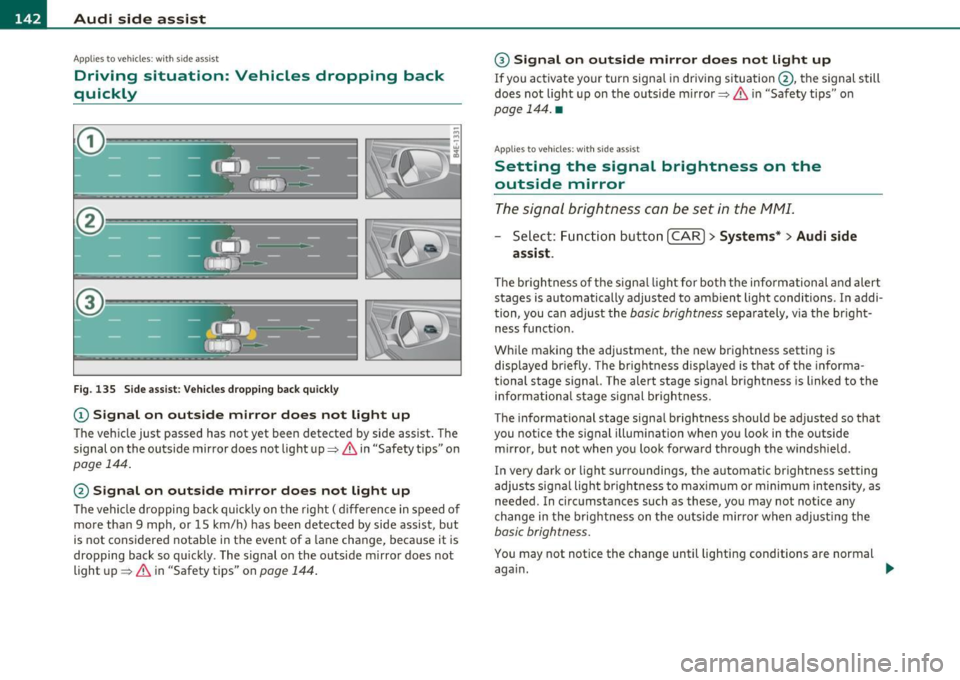
quickly
Fig. 135 Side assist: Vehicles dropping back quickly
(D Signal on outside mirror does not light up
The vehicle just passed has not yet been detected by side assist. The
signal on the outside mirror does not light up~
& in "Safety tips" on
page 144.
@ Signal on outside mirror does not light up
The vehicle dropping back quickly on the right ( difference in speed of
more than 9 mph, or 15 km/h) has been detected by side assist, but
is not considered notable in the event of a lane change, because it is
dropping back so quickly . The signal on the outside mirror does not
light up~
& in "Safety tips" on page 144.
@ Signal on outside mirror does not light up
If you activate your turn signal in driving situation @, the signal still
does not light up on the outside mirror~ &, in "Safety tips" on
page 144. •
Applies to vehicles : w ith si de ass ist
Setting the signal brightness on the
outside mirror
The signal brightness can be set in the MMI.
-Select : Function button [CAR]> Systems* > Audi side
assist .
The brightness of the signal light for both the informational and alert
stages is automatically adjusted to ambient light conditions. In addi
tion , you can adjust the
basic brightness separately, via the bright
ness function .
While making the adjustment, the new brightness setting is
displayed briefly . The brightness displayed is that of the informa
tional stage signal. The alert stage signal brightness is linked to the
informational stage signal brightness.
The informational stage signal brightness should be adjusted so that
you notice the signal illumination when you look in the outside
mirror, but not when you look forward through the windshield .
I n very dark or light surroundings, the automatic brightness setting
adjusts signal light brightness to maximum or minimum intensity, as
needed. In circumstances such as these, you may not notice any
change in the brightness on the outside mirror when adjusting the
basic brightness.
You may not notice the change until lighting conditions are normal
again. .._
Page 145 of 368
![AUDI S6 2010 User Guide _________________________________________________ A_ u _ d_ i_ s_ id_ e_ a _ s_s _ i_s _t _ __._
(]] Tips
• Side assist is not active when the basic brightness is adjusted. The
signal](/img/6/57594/w960_57594-144.png "AUDI S6 2010 User Guide _________________________________________________ A_ u _ d_ i_ s_ id_ e_ a _ s_s _ i_s _t _ __._
(]] Tips
• Side assist is not active when the basic brightness is adjusted. The
signal")
_________________________________________________ A_ u _ d_ i_ s_ id_ e_ a _ s_s _ i_s _t _ __._
(]] Tips
• Side assist is not active when the basic brightness is adjusted. The
signal light comes on br iefly to help you make the adjustment.
• Your settings are automat ically stored and assigned to the remote
control key being used .•
A ppli es to ve hicles : w it h s ide ass ist
General information
Side assist has limits and cannot detect vehicles under all road and
weather conditions . Please remember system limitations and n ever
re ly on the system, especially when :
• driving through curves=>
page 143,
• lanes are of different widths=> page 143. •
Ap plies to vehicles: w ith sid e assist
When driving through curves
Side assist cannot detect vehicles in curves with a turning radius of
less than 328 feet (100 m).
When driving through a curve, it is possible that side assist may
register a vehicle two lanes over, and the signal on the outside mirror
will light up.•
Con tro ls a nd e quip
m en t Vehicle
OP-eration
Applies to vehicles : with side assist
Lane width
Fig. 136 Lanes of a
n orma l width are in
detection area
Fig . 137 Narrow
lanes: Side assist may
detect vehicles two
lanes away
Side assist's detection area is designed to cover lanes of standard
w idth to the left and rig ht of your travel lane, depending on whether
you drive in the center of your lane or closer to the edge.
If you drive in narrow lanes, side assist's detection area may also
include other lanes -especially if you tend to drive on t he edge of your
lane => fig. 137. Under these conditions, vehicl es can also be
detected that are two lanes away, and side assist then could switch
between the informationa l and warning stage signals .
When driving in very wide lanes, vehicles in the adjacent lane may not
be detected because they are not inside the detection area .•
Vehicle care Do-it-yourselt service iTechnical data
Page 146 of 368
1111....__A_ u_ d_i_ s_id _e_ a_s _s_ i_ s _t _________________________________________________ _
Notes
Applies to v ehicl es : w it h sid e ass ist
Messages in instrument cluster display
I f si de ass ist tur ns off automatica lly, t he in dicator light on the butto n
w ill go out a nd you w ill s ee a m essag e in t he i nstrumen t cluste r
display:
Audi side assist not available: sensors blocked
Th e side ass is t se nsors ar e built i nto th e rear bump er on th e le ft and
r igh t (no t vis ib le o n the out sid e)=>
pag e 137, fig. 128 . To ensur e
that yo u do not a dve rsely affect t he way si de assist funct ions, foreign
obj ects (such as st ick ers or bicycle rac ks) should not b e atta ch ed t o
the area on t he rear bum per whe re t he sensors are located. If side
assi st funct ions a re adve rse ly aff ected, y ou wi ll see th is m essage in
the inst rument cl uster disp lay. R emove anyth ing that may b e
b locking t he sens ors .
If no ve hicl e is detect ed for a lo nger p eriod of t im e w hile driving , side
assist w ill also sw itc h
off automati ca lly .
Audi side ass ist currently not available
I f the re i s a t empora ry problem (s u ch as the vehicle 's battery char ge
b ein g low), s ide ass ist ca nnot b e act ivated t em porar ily .
Audi side assist: system fault
Have the system checked by an a utho riz ed Aud i dealer or qualified
wo rk shop. •
Applies to ve hicl es : w ith sid e ass is t
Safety tips
T he s ide assist detection may be limited w hen driving aro und narrow
str eet co rn ers, on hill y stree ts, and under p oor we ath er co nditions . It is possib
le that the radar senso rs may also detect other objects,
such a s high or st agg ere d gu ardr ails.
Side assis t does not measure ac tual lane wid th . T he sys tem assumes
a fixe d lane w idth . Detection in the le ft and rig ht lanes is based on
th is ass um ed lan e width . Wh en drivi ng on narrow ro ads or w hen
driv ing to t he left or r ight of t he cente r of a t ravel lane, it is possib le
that vehicles will be de te ct ed th at are
no t in th e lan e nex t to th e lane
you a re us ing.
& WARNING
• Improper reliance on the side assist system can cause collisions
and serious personal injury:
-Never rely only on side assist when changing lanes.
- Always check rear view mirrors to make sure that it is safe to
change lanes.
• Side assist cannot detect all vehicles under all conditions
danger of accident!
• Side assist cannot detect vehicles in time to alert you when
they approach from behind at very high speed , or fall drop back
very quickly.
• The radar sensor's
vision can be reduced or entirely blocked by
rain, snow, and heavy spray. This can result in side assist not
adequately detecting vehicles or, in some cases, not detecting
them at all . Always keep an eye on the direction you are traveling
and the relevant area around the vehicle .
• Please note that side assist indicates there are approaching
vehicles, or vehicles in your blind spot , only after your vehicle has
reached a driving speed of at least 19 mph (30 km/h).
• Side assist signal does not work around tight corners (turning
radius less than 328 feet, or 100 m) .
• Side assist is no replacement for the driver's full attention . The
driver alone is responsible for lane changes and similar driving
maneuvers. Always keep an eye on the direction you are traveling
and the relevant area around the vehicle.
~
Page 330 of 368
.,.,___F_ u_ s_e _ s_ a_n_ d_ b_u _ l_ b_ s _______________________________________________ _
No. Equipment Amps
9 Heated seats, front 30
10 MMI
7,5
11 Seat adjustment (passenger) 10
12 Communication 5
Fuse holder (brown)
1 Electric fuel pump 20/30
2 Adaptive Air Suspension
15
3 Lane assist 10
4 Audi side assist
5
5 Adaptive Air Suspension 5
6 Shift gate automatic transmission/clutch switch 5
7 Parking System 5
8 Control module Gateway 5
9
Automatic headlight range control (auxiliary 5
driving lights), headlight electronics, right-side
10 Airbag 5
11 Heated rear seats 5
12 Telephone
5 •
Fuse Location, Luggage Compartment
right
Fig. 237 Fuse panel
layout
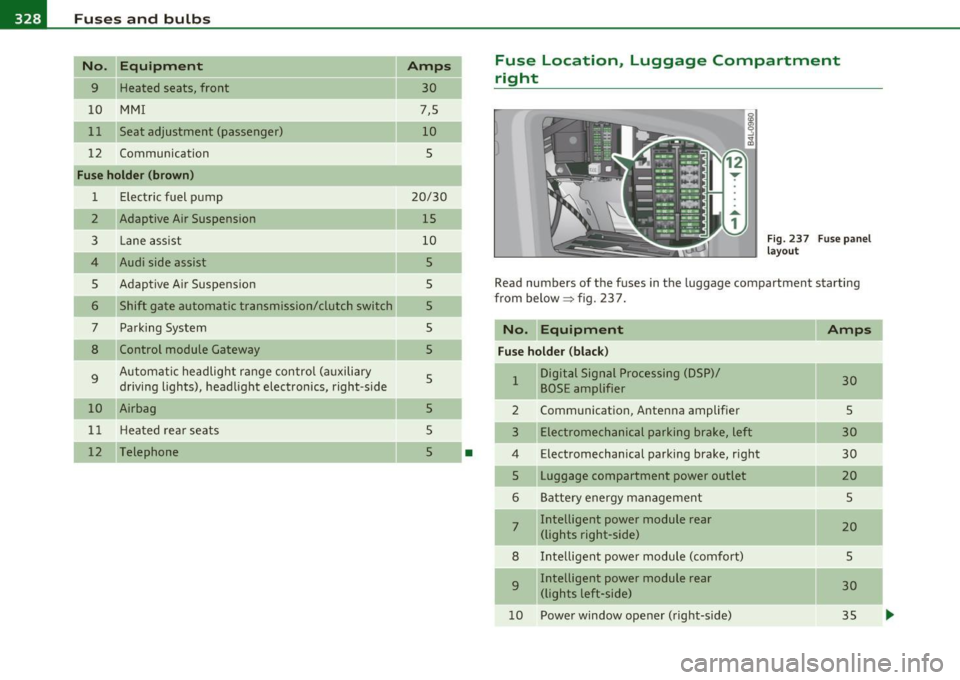
Read numbers of the fuses in the luggage compartment starting
from below :::::> fig. 23 7.
No. Equipment
Amps
Fuse holder (black)
1 Digital Signal Processing (DSP)/ 30 BOSE amplifier
2 Communication, Antenna amplifier 5
3 Electromechanical parking brake, left 30
4 Electromechanical parking brake, right
30
5 Luggage compartment power outlet
20
6 Battery energy management 5
7 Intelligent power module rear
20 (lights right-side)
8 Intelligent power module (comfort)
5
9 Intelligent power module rear
30
(lights left-side)
10 Power window opener (right-side)
35
-
-
-
...
Page 358 of 368

___ A_ l_. p_ h _ a_b_ e_ t_ic _a_ l_ in_ d_e _ x ____________________________________________ _
Heated seats Improperly worn safety belts .... .. .. . 193
Front ....................... ... 103
Indicator lights . . . . . . . . . . . . . . . . . . . . . . 12
Rear ....... ...... .............. 103
Airbag system ....... .. ... ... 206, 207
Heated steering wheel ............ ... 104 PASSENGER AIR BAG OFF .......... 207
Heated washer jets Infant seats ............ .. .. .. .. ... 222
Wiper and washer system ....... .. . 66
Inside rear view mirror ..... .. ... .. . 69, 70
Heating Installing child safety seats
Climate controls .......... .... .... 96
Safety belts ......... ...... ... .. . 227
Heavy clothing and safety belts ........ 188
Installing the upper tether strap on the
H igh beam ............ .. .... .. .. 58, 62 anchorage .
.. .... ........... .. . 236
Warning/ind icator lights . .......... 16 Instrument cluster illumination .. .... .. 11
High voltage warning label ........... 338 Instruments and controls .............. 8
HomeLink ® universal remote control ... 169 General illustration .
. . . . . . . . . . . . . . . . 7
Hood Interior lights ................
.... .. . 63
Open ing . ....... ........ .... .. .. 276 Rear
......................... 63, 64
Release lever . ............. .... .. 276 Interm ittent wip ing
Horn ...... .......... .... ... .. ...... 7 Rain
sensor ................ .... .. 66
How are child restraint system anchors related
to child safety ....... ....... .... 230
J
How many airbags does my vehicle have? ....
202
How often should I check my tire pressures? . 301 Jack ..
........... .. .. .. .. .... .. ... 316
Jumper cables .................... .. 332
Jump-starting ............... .. ... .. 331
How safety belt pretensioners work .... 193
Hydroplaning ...................... 305
K
I
Ignition key .... ................. ... 108
Ignition lock .. .. .. .. .. .. .. ......... 108
Ma lfunct ion .. ....... .... .. .. .. 29, 32
Ignition lock positions .. .. .. .... ..... 108
Important things to do before driving .. 175 Key ........
...... ... .. .... ........ 37
Battery replacement ... .... ........ 39
Coded settings ....... .. .. .. .... .. 96
Convenience opening and closing of w indows .. .. ........... ...... .. 52
Emergency key . . . . . . . . . . . . . . . . . . . 3 7
Key replacement . . . . . . . . . . . . . . . . . . 3 7 Master key
... .. ... ........... .... 37
Valet key . . . . . . . . . . . . . . . . . . . . . . . . 3 7
Key coded settings Climate controls . . . . . . . . . . . . . . . . . . 96
Keyless entry remote contro l ..... .... . 38
Kick-down multitronic ® ... .. .. ............. 156
tiptronic ® 149
L
Lane assist
Act ivat ing and deactivating 134
Description ........ ............. 134
Instrument cluster indicator light . .. 134
MMI settings .... .... .. .... .... .. 135
Notes on instrument cluster display . 134
LATC H ......... ...... .. . .. .. .. .. .. 230
Description .. .............. ..... 232
Gu idance fixtures for lower anchorages ..
233
Installing a child restraint ... .. .. .. 234
Location . ........... ...... .... .. 231
Mounting and releasing the anchorage hook .............. .... ..... .. 234
Leather .................... ... ... . 266
Cleaning ................. .. .. .. 267
Level adjustment
See Adaptive Air Suspension ... .... 166
Lifting jack ............ .. .. .... .. .. 321
Lifting vehicle ....... ...... ......... 336