lights AUDI S6 2010 User Guide
[x] Cancel search | Manufacturer: AUDI, Model Year: 2010, Model line: S6, Model: AUDI S6 2010Pages: 368, PDF Size: 86.82 MB
Page 19 of 368

Anti-lock brake system (ABS)
A ...
.j {USA models) /..., {Canada models)
This warning/indicator light monitors the ABS and the
electronic differential lock (EDL) .
The warning/indicator light will come on for a few seconds when the
ign ition is switched on . The light w ill go out after an a utomat ic check
sequence is comp leted .
There is a malfunction in the ABS when:
• Th e warn ing/ indic ator light does not ill uminate when you swi tch
on the ig nit io n.
• Th e warn ing/ in dic ator lig ht does not go out a fter a few se conds .
• The warning/ind icator light illuminates while d riving.
The brake sy stem will still re spond even without the a ssistance of
the ABS system . See your authorized Audi dealer as soon as
possible to restore full braking performance.
For more i nformat ion
regarding the ABS=>
page 244.
The ABS warning l ight and the brake warning light come on
together. The ABS will not work and you will noti ce a change in
brak ing response and performance.
Malfunction in the brake system
If the brake warning light=> page 18 and the ABS warning ill uminate
together there may be a malfu nction in t he A BS, a nd there may a lso
be a malfunction in the brake system itself=>& .
In the even t of a
malfunction in the b rake system the warning/ indi
ca tor light
BRAKE (U SA mode ls)/ ((])) (Canada models) in the instrume nt
cl uster flashes . By p ressing the
I C H ECK ) button, you ca n bring up a
dr iver message w hic h explains the malfunc tion in mo re de tail. Please
not e=>
pag e 26.
Controls and equip
ment Safety first
Instruments and warning
/indicator lights
Malfunction in the electroni c differential lock (EDL)
Th e ED L wor ks toge ther w it h the ABS . The A BS wa rning light will
come on if t he re is a malfunction in the EDL system=>
page 241. See
your authorized Aud i dea le r as soon as poss ible.
& WARNING
• If the ... Is~ (USA models)/ d (Canada models ) warning light
does not go out , o r if it comes on while driving, the ABS system is
not working properly . The vehicle can then be stopped only with
the standard brakes (without ABS ). You w ill not have the protec
tion ABS provide s. Contact your Aud i dealer as soon as pos sible.
• USA models: If the BRAKE warning light and the 9 warning
light come on together, the rear wheel s could lock up fir st under
hard braking. Rear wheel lock-up can cau se los s of vehicle control
and an accident . Have your vehicle repaired immediately by you r
authorized Audi dealer or a qualified work shop. Drive slowly and
avoid sudden, hard brake applications.
• Canada models : If the brake warning light «D> and the ABS
warning light come on together , the rear wheels could lock up
first under hard braking . Rear wheel lock -up can cause loss of
vehicle control and an accident. Have your vehicle repaired imme
diately by your authorized Audi dealer or a qualified work shop.
Drive slowly and a void sudden, hard brake applications. •
Electromechanical parking brake
~E {USA models) /(®) {Canada models)
The warning/indicator light monit ors the electromechan
ical parking brake.
With the parking bra ke app lied and the ignition turned o n, t he
warning/indicator light illum inates. After the ign ition has been
t u rned
off, the wa rni ng/ind icator light co nti nu es to i llumi nate for
abou t 30 seconds . If the parki ng brake is applied w it h the ignition _,,
Vehicle care Technical data
Page 20 of 368
Instruments and warning/indicator lights
tu rned off, the warning/ind icator light illum inates for abo ut 30
s e co nd s.
Th e warn ing/i ndicator lig ht w ill go out whe n the parking brake is
re lease d.
If the w arn ing/ indi ca tor li ght flas hes c ontinuou sly
after applying th e
park ing brake, braking force is not suffic ient to p revent the vehicle
fro m rolling unin te n ti onally. Pleas e note the following:
• If th e slope of the g round is too ste ep to pa rk the vehicle, the addi
tional drive message ap pea rs
Caution: Vehicle parked too steep .
• In th e eve nt of a pa rk ing bra ke malfunc tion, t he yellow symbol
appea rs in the inst rument cluste r display a nd the dr ive r message
Parking brake auto release: system fault is displayed . Have the
ma lf u nctio n re paire d as soo n as poss ible by a qualified Audi
dea le rs hi p.•
Brake system BRAKE (USA
models)
/ {Q)) (Canada models)
The war ning/in dic ator li ght flash es i f br ake fluid le vel is
low , if t he re i s an A BS sys te m malfu nction or a pa rking
b rake malf unct ion.
The lig ht ill um inates when the ign it io n is tu rned on . It goes out afte r
t he engi ne has been st arted. This indicat es tha t the b ra k e war ning
light is functioning proper ly.
If the brake warning light does not light up when the engine is
cranking, there may be a malfunction in the electrical system. In
this case, contact your Audi dealer.
If the b ra ke sys tem w arning/i nd ic a tor light flashes, there is a br ake
system malfunction . By press ing the [
CHECK ] button, you can bring
up a driver mess age whi ch expl ain s t he m alfunc tion in mo re de ta il
=>page 26 .
If the ABS fa ils, t he ABS war ning/ indica to r li ght (USA
mod els)/ (Canada mo dels) fla shes toge ther wi th th e bra ke syste m
warni ng/ind icator light=> &.
(USA models):
If the warning light BRAKE and the wa rnin g light illu
m inate toge ther, im media tely con tac t you r author ized A udi dealer or
qualif ied workshop to have all brake pads inspected=>
page 31.
When the ligh t comes on, an a udible w arnin g signal is also give n.
& WARNING
• USA models: If the BRAKE warning light and the r i,~ warning
light come on together, the rear wheels could lock up first under
hard braking . Rear wheel lock-up can cause loss of vehicle control
and an accident . Have your vehicle repaired immediately by your
authorized Audi dealer or a qualified workshop . Drive slowly and
avoid sudden, hard brake applications.
• Canada models : If the brake warning light (CD) and the ABS
warning light :::; come on together, the rear wheels could lock up
first under hard braking. Rear wheel lock -up can cause loss of
vehicle control and an accident. Have your vehicle repaired imme di ately by your authorized Audi dealer or a qualified workshop .
Drive slowly and avoid sudden, hard brake applications.
• If the brake warning/indicator light does not go out after a few
seconds and the parking brake released, or lights up while you are
driving, the fluid level in the brake fluid reservoir is too low. If you
believe that it is safe to do so, proceed immediately at low speed
to the nearest authorized Audi dealer or qualified repair facility
and have the brake system inspected.
• Always keep in m ind that after several brake applications , you
will need greater pressure on the brake pedal to stop your vehicle.
Do not rely on strained brakes to respond with maximum stopping
power in critical situations. You must allow for increased braking
distances. The extra distance used up by fading brakes could lead
to an accident. •
Page 28 of 368

Driver info rmation d isplay
• Speed warnings threshold 1 B (USA models)/ 8 (Canada models)
and thresho ld 2
9, (USA mode ls)/ 8, (Canada models) are also shown
as red symbols . The warning is always shown as a small symbol in the
upper area of th e display ~
page 32. •
Alternator malfunction 0
If the D symbol in the instrument panel d isplay flashes, then there
is a malfunction in the alternator or the vehicle electronics . A warning
to the driver will appear, too. The driver warning goes out after about
5 seconds, but it can be brought up at any time by pressing the
[CHECK] button again .
Us ua lly, you can still drive to the next dea lership. Tu rn off all but the
mos t necessary elec trical consumers, since these drain the vehicle 's
battery.
0 Note
If the _ f_ warning symbol (coolant system malfunction) a lso lights up
on the instrument panel during the trip~
page 27, then you have to
stop immediate ly and turn off the engine. The coo lant pump is not
work ing anymore - danger of damage to the engine! •
Brake system malfunction
A malfunction in the brake system must be repaired as
soon as possible.
If the warning /indicator light BRAKE (USA models)/ (©)
(Canada models) in the instrument cluster flashes, there is a
brake system malfunction . By pressing the [CHECK] bu tton,
you can bring up a driver message which expla ins the
malfunct ion in more deta il.
Stop vehicle and check brake fluid level
- Pull off the road .
- Stop the vehicle .
- Turn off the engine .
- Chec k the bra ke fluid level=>
page 287 .
-Contact your nearest authorized repair facility if neces-
sary.
Warning! Fault in brake system. Conta ct
workshop
- Drive carefully to the nearest authorized repair facility and
have the malfunct ion corrected=> &,.
Parking brake! Please contact workshop
-If the warning/indicator light flashes when the vehicle is
statio nary or afte r the ignition is turned on, check to see if
the parking brake can be released. Drive to an authorized
repair facility as soon as possible and have the malfunc
tion corrected . If the parking brake cannot be re leased,
contact your neares t authorized repa ir facility .
If the warning/indicator light flashes while you are
dr iv ing , it is possible that the traction control or the emer
gency brake has malfunctioned. It is poss ible that the
park ing brake cannot be applied . It is also poss ible that
the parking brake cannot be released after it has been
applied . Drive to an authorized Audi dealer to have the
ma lfunction corrected .
If the ABS system malfunctions, th e ABS warn ing/indicator light i llu
m inates together w ith the brake system malfunction warning/indi-
cator light~& . .,_
Page 29 of 368

& WARNING
• Always observe the warnings in~ page 269 , "Engine compart
ment ", before opening the hood and che cking the brake fluid.
• Driving w ith low brake fluid is a safety haza rd. Stop the car and
get profe ssional a ssistan ce.
• USA models : If the BRAKE warning light and the warning
light come on tog ether, the rear wheel s could lock up fir st under
hard b raking. Rear wheel lock -up can cause loss of vehicle cont rol
and an a ccident . Have your vehicle repaired immediately by your
authorized Audi dealer or a qualified workshop. Drive slowly and
avoid sudden, hard brake application s.
• Canada models : If the brake warning light((])) and the ABS
warning light come on together , the rear wheel s could lock up
first under hard braking. Rear wheel lock-up can cause loss of
vehicle control and an accident. Have your vehicle repaired imme diately by your authorized Audi dealer or a qualified workshop.
Drive slowly and avoid sudden , hard brake applications. •
Engine cooling system malfunction _t_
A malfunction in the engin e cooling system must be
repaired as soon as possible.
When t he J_ symbol in the disp lay blinks , th en e ither the
engine coola nt
temperature is too high, or t he coolan t level
is too low. A n add itiona l dr iver messa ge ca n also be d isp layed
by pressing t he
[CHECK) bu tton :
Switch off engine and check coolant level
-Pull off the road.
- Sto p the v ehicl e.
- Turn off the eng ine.
Controls and equip
ment Safety first Driver information display
-
Check coolant level => page 284 .
- Add coola nt if necessa ry=> page 285.
- Continue driv ing on ly after the eng ine coolant
war ning/i ndica tor light goes ou t.
- Contact your authorized Audi dea ler for assistance if
necessary.
If the eng ine coolan t leve l is correct, then the radiator fan may be the
cause of the malfu nction.
If the
D wa rning symbol (alternator ma lfunction) also lights up on
t he ins trumen t pa ne l~
page 2 6, the n th e fan b elt may be d amaged.
& WARNING
• If your vehicle should break down for mechanical or other
reasons, park at a safe distance from moving t raffic , turn off the
engine and turn on the hazard warning lights~
page 61, "Emer
gency fl asher
A ".
• Never open the hood if you see or hear steam or coolant
escaping from the engine compartment -you risk being scalded.
Wait until you can no longer see or hear steam or coolant escaping .
• The engine compartment of any vehicle is a dangerous area. Before you perform any wo rk in the engine compartment, turn of
the engine and allow it to cool. Follow the warning stickers
~ page 269, "Engine compartment" .
0 Note
Do not continue driving if the -F-symbol illum inates. There is a
m alfu nct ion in the engine cooling system -yo u co uld da mage yo ur
engine. •
Vehicle care Technical data
Page 32 of 368
Driver information display
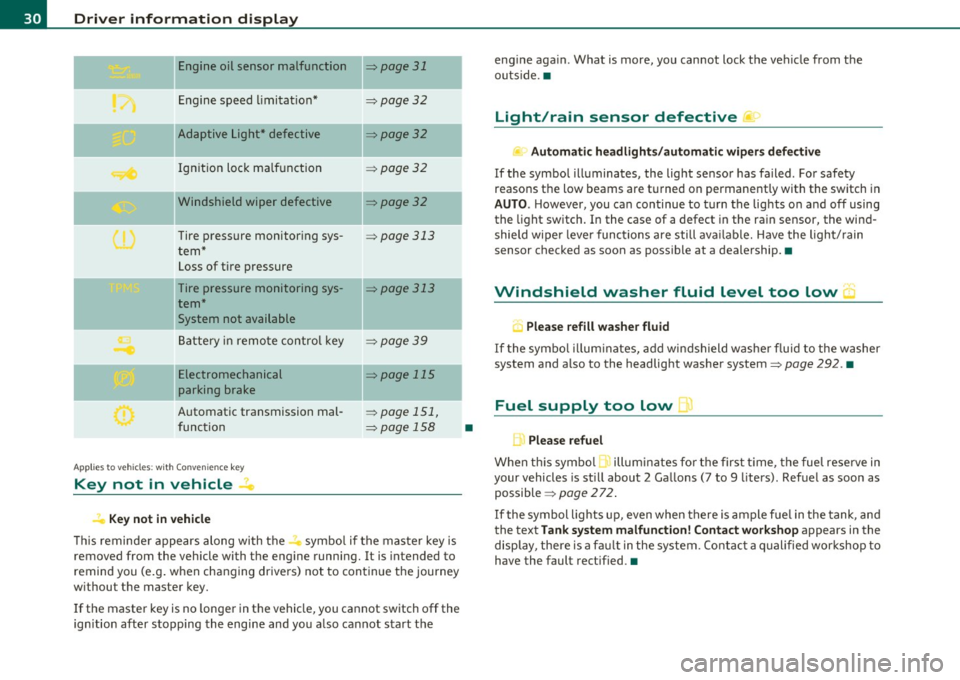
Engine oil sensor malfunction :::::, page 31
._ --
Engine speed limitation* :::::, page 32
-- -Adaptive Light* defective :::::, page 32
Ignition lock malfunction :::::, page 32
--Windshield wiper defective :::::, page 32
Tire pressure monitoring sys
tem*
Loss of tire pressure
Tire pressure monitoring sys
tem*
System not available
Battery in remote control key
--
=> page 313
:::::, page 313
:::::, page 3 9
Electromechanical :::::, page 115
parking brake
Automatic transmission mal
function
Ap plies to vehicles: w ith Conven ience key
Key not in vehicle
Key not in vehicle
:::::, page 151,
=> page 158
-
-
This reminder appears along with the...., symbol if the master key is
removed from the vehicle with the engine running. It is intended to
remind you (e.g. when changing drivers) not to continue the journey
without the master key.
If the master key is no longer in the vehicle, you cannot switch off the
ignition after stopping the engine and you also cannot start the
•
engine again . What is more, you cannot lock the vehicle from the
outside. •
Light/rain sensor defective )
Automatic headlights/automatic wipers defective
If the symbol illuminates, the light sensor has failed . For safety
reaso ns the low beams are turned on permanently with the switch in
AUTO. However, you can continue to turn the lights on and off using
the light switch. In the case of a defect in the rain sensor, the wind
shield wiper lever functions are still available. Have the light/rain
sensor checked as soon as possible at a dealership. •
Windshield washer fluid level too low 5
, Please refill washer fluid
If the symbol illuminates, add windshield washer fluid to the washer
system and also to the headlight washer system:::::,
page 292. •
Fuel supply too low )
L Please refuel
When this symbol 1. illuminates for the first time, the fuel reserve in
your vehicles is still about 2 Gallons (7 to 9 liters). Refuel as soon as
possible :::::,
page 272.
If the symbol lights up, even when there is ample fuel in the tank, and
the text
Tank system malfunction! Contact workshop appears in the
display, there is a fault in the system . Contact a qualified workshop to
have the fault rectified.•
Page 34 of 368
Driver information display
Applies to veh icles : w ith eng ine s peed limitat ion
Engine speed limitation .?i
11'1 Do not exceed max. engine speed of XXXX rpm
The -symbol illuminates when there is an engine control malfunc
tion. The indicator light in the instrument cluster also illuminates.
The engine speed is limited to the speed displayed in the driver infor
mation system. Keep in mind that the engine speed will not exceed
the value d isp layed in the drive r informat ion system, for example
when downshifting.
Please go to an authorized Audi dealer or other qualified workshop to
have the malfunction repaired.•
Applies to vehicles: wi th Adap tive Light
Adaptive Light defective
adaptive light defective • r
When this symbol illuminates, it means that Adaptive Light is
defective. Go to an authorized dealership to have the headlights or
the control unit for the Adaptive Light repaired. •
Ignition lock malfunction ..e
If the symbol in the display comes on, there is a malfunc-
t ion in the electronic ignition lock. An additional driver
message can be displayed by pressing the [CHECK] button:
Defective ignition switch
-Drive to an aut horized service facility at your earliest
convenience to have the malfunction corrected.•
Windshield wipers faulty , . .>
.... Windshield wiper malfunction
When this symbol . illuminates, it means that the electronics for
the windshield wipers are defective . Please go to an authorized deal
ership to have the windshield wiper system repaired. •
Speed warning system
Overview
The speed warning system helps you to keep your driving
speed below a set speed limit.
Th e speed warning system warns the driver if he exceeds a previously
stored maximum speed. A warning tone will sound as soon as the
vehicle speed exceeds the set speed by about 3 mph (3 km/h). At the
same time, a warning symbol appears in the display.
The speed warning system has
two warning thresholds that function
independently of each other and that have somewhat different
purposes :
Speed warning 1
You can use speed warning 1 to set the maximum speed while you are
driving. This setting w ill remain in effect until you turn off the igni
tion, assum ing that you have not changed or reset the setting .
Th e speed warning symbo l
'8 (USA models)/ 8 (Canada mode ls) in
the warning 1 display appears when you exceed the maximum speed.
It goes out when the speed falls be low the stored maximum speed.
Th e speed warning symbol will also go out if the speed
exceeds the
stored maximum speed by more than about 25 mph (40 km/h) for at
least 10 seconds. The stored maximum speed is deleted.
Sett ing speed warn ing 1
=> page 33. ~
Page 43 of 368

Exceptions
If the ign ition has been switched on usi ng the master key, yo u can
st ill open the g love compartment .
As long as the ign it ion is switched off, you can st ill open the rear lid
using the rear lid butto n on t he
master key c::5 . The same holds tr ue
fo r using the rear lid re lease hand le in conjunction w ith the Conve
nience key *.
For this reason, be sure to only ha nd over the
valet key to the perso n
who w ill take charge of your veh icle.
[ i ] Tips
Be sure to activate the funct ion before han ding over the va let key to
someone e lse. The va let key o nly fi ts the lock in the d river's door and
the ignition lock. •
Power locking system
General description
The po wer lockin g sys tem l ocks or un locks all d oors an d
the r ear lid sim ulta neously.
The power loc king system in your vehicle incorpora tes the fo llowing
fu nction s:
• Centra l locking function
• Selective unloc k fe ature =>
page 44
• Remote cont rol featu re => page 38
• Conven ience key*=> page 47
• Anti -theft ala rm system => page 49
All the doors and the rea r lid are locked by the centra l loc king system
when you loc k the vehicle. You can set whether generally on ly the
dr ive r's door o r all doo rs and t he rea r lid sho uld be unlocked when yo u
Controls and equip
ment Safety first
Opening and closing
open the vehicle in
the MMI men u Central locking to suit you r indi
vidu al d esires =>
page 44.
Unlocking the vehicle
Yo u can unloc k the vehi cle from o utside eithe r by using the remote
control
or by inse rting and turning the key in the driver 's door lock .
Whe n you
unlock yo ur vehi cle:
• T he anti-theft alarm system is deactivated briefly .
• T he vehicle interior lights illumina te for approximate ly 30
seconds.
• All tur n sign al ligh ts will flash twice whe n the c ar is un lo cked.
• After un locking the ve hicle, you have 60 seconds to open a doo r or
t he rear lid. Afte r 60 seco nds , th e veh icle automati cally loc ks and the
anti-theft alarm system activates again.
Th e rear lid can be loc ked or unlo cked eit h e r b y using the remote
cont rol
or by inserting and t urnin g the key in the dr ive r's door lock .
U nlocking the vehicle wi th the remote con trol will on ly
unlock the
rea r lid, to
open it, t he lid hand le needs to be pressed .
Locking the vehicle
You can lock the vehicle from o utside either by using the remote
cont rol
or by inse rting and t urning the key in the drivers 's doo r lock .
Whe n you
lock the ve hicle:
• All doors and the rear lid are locked.
• All tur n signal ligh ts will flash once when t he car is locked.
• Th e anti-theft alarm system is activated. The hor n of the anti
t heft a la rm system w ill sound and t he anti-theft a larm system readi
ness lig ht, located in the upper part of the driver's door pane l, w ill
st art to blink.
• T he vehicle interior lights tu rn off.
Unlocking and locking with Convenience key*
O n vehicles wh ich are equippe d wi th the Convenience key* au th ori za
tion system, the doors are unloc ked
without a key by means of a prox-
im ity senso r in th e door h andle. T he do or s ar e sim ila rly locked ...
Vehicle care Technical data
Page 45 of 368

To lock the vehicle CT'.!
- Press button®=> & in "General description" on
page 41.
-Watch that all turn signal lights flash once.
To unlock r ear lid only c::;
- Press but ton @ for approximately one second.
PANIC Button
Push the red button @ to activate the panic function. The
horn sounds and the turn signals flash .
- Push the button @ aga in to deactivate the panic function .
On vehicles with Convenience key*, the se lector lever must be in the P
position, otherwise the vehicle cannot be locked .
& WARNING
Read and follo w all W ARNIN GS~ & in "Ge ner al d escripti on " o n
page 41 .
[ i ] Tips
• In order to make sure the locking function is working, you should
always keep your eye on the vehicle to make sure it is properly locked .
• Do not use the remote co ntro l if yo u are inside the car, otherwise
you may un intent ionally lock the veh icle, and then you would set off
the anti-theft alarm when you try to start the engine or open a door.
I n case th is happens anyhow, push the unlock button
0.
• Use the panic function on ly if you are in an emergency situation. •
Controls and equip
ment Safety first
Op
ening and closing
Op era ting lo cks with th e key
To lock and unlock the vehicle from the outside, turn the
key in the lock of the driver's door .
,,~
fl-=- -==-- OO~j @
To unlock the vehicle
Fig. 29 Key turn s fo r
opening and clos ing .
- Insert the key into the lock of the driver's door.
- Turn the key
one time to position @ to unlock the driver's
door .
- Turn the key
two times to posit ion @ => fig . 29 to unlock
all doors and the rear lid.
To lock the vehicle
- Close a ll windows and doors properly.
- Turn the key in the lock of the driver's door to the loc k
position ®=>
& in "General description" on page 41.
& WARNING
Read and foll ow all WARNING S~ & in "Gene ral de scription " on
pag e 41 . •
Vehicle care Technical data
Page 60 of 368
Clear vision
Clear vision
Lights
Switching the headlights on and off ·"ti-·
In the "AUTO" position, a light sensor automatically
switches the head- and taillights on and off in response to light condi tions.
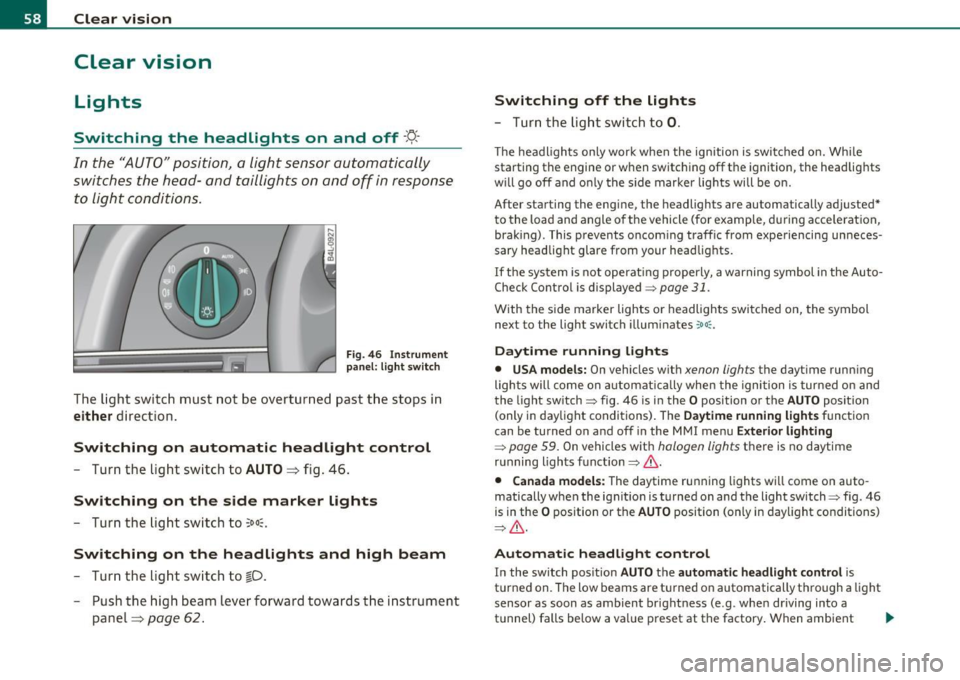
Fi g. 46 In strument
p an el: li gh t swit ch
The ligh t switc h must not be overtur ned past t he stops in
either d irection.
Switching on automatic headlight control
- Turn the lig ht sw itch to AUTO => fig. 46 .
Switching on the side marker lights
-Turn the lig ht swi tch to ~oo~.
Switching on the headlights and high beam
- Tur n the lig ht sw itch to ~D.
- Push the high beam leve r forward tow ards the in strument
panel=>
page 62 .
Switching off the lights
- Tu rn th e lig ht swi tch to 0.
T he headlights on ly work when the ignitio n is switc hed on. Whi le
starting the engine or w hen switching off t he ignition, the headlig hts
w ill go off and o nly the s ide marke r lights will be o n.
After starting the eng ine, the headlights are automatically adjusted*
to the load and angle o f th e vehicle (for example, during acce lerat ion,
brak ing) . This prevents oncom ing traff ic from experiencing unneces
sary headlight glare from your head lig hts.
If the system is not operat ing p roperly, a warning symbol in the Auto
Check Control is displayed=>
page 31.
With the side marker lights o r headlights switc hed on, the symbol
next to the light switch illum inates
':o oc .
Daytime running lights
• USA models: On vehicles w ith xenon lights the dayt ime runn ing
lights will come on automat ica lly when the ignition is turned o n and
the light switch=> fig. 46 is i n the
O position or the AUTO position
(only i n day light conditions) . The
D aytime running light s function
can be turned on and off in the MMI menu
Exterior lighting
=> page 59. On vehicles wit h halogen lights there is no daytime
r u nning lights fu nctio n=>
& -
• Canada models: The daytime ru nning lights wi ll come o n auto
matically w hen the ignit io n is t urned on and t he light switch=> fig. 46
is in the
O p osition or the AUTO position (on ly in day light co nditions)
=> & -
Automatic headlight control
In the switch pos ition AUTO the automatic headlight control is
t u rned on. The low beams are t urned on automatically t hrough a light
sensor as soon as ambient br ight ness (e .g . when dr iving into a
t u nnel) falls below a val ue p reset at the factory . When ambient .,.
Page 61 of 368
brightness increases again, the low beams are turned off again auto
matically =>& .
In the
AUTO position the low beams are switched off automatically
when the ignition is turned off.
Light Sensor Malfunction
In the event of a light sensor ma lfunct ion, the driver is notified in the
instrument cluster display:
Automatic headlights/automatic wipers defective
For safety reasons the low beams are turned on permanently with t he
switch in
AUTO. However, you can continue to turn the lights on and
off using the light switch. Have the light sensor checked as soon as
possible at a dealership.
& WARNING
• Never use daytime running lights to see where you are going.
They are not bright enough and will not let you see far enough
ahead for safety, especially at dusk or when it is dark. Always
switch on the low beams at dusk or when it is dark.
• Automatic headlights are only intended to assist the driver .
They do not relieve the driver of his responsibility to check the
headlights and to turn them on manually according to the current
light and visibility conditions. For example, fog and rain cannot be
detected by the light sensors. So always switch on the headlights
under these weather conditions and when driving in the dark
io.
• Crashes can happen when you cannot see the road ahead and
when you cannot be seen by other motorists.
- Always turn on the headlights so that you can see ahead and
so that others can see your car from the back.
[ i ) Tips
• With the switch in AUTO front fog lights and rea r fog ligh ts cannot
be turned on in addition .
Controls and equip
ment Safety first
Clear vision
•
The light sensor for headlight control is located in the rear view
mirror mount. Do not apply any stickers to the winds hield in this area
to prevent malfunctions or failures .
• If you remove the ignition from the ignitio n lock w hile the head
lights are still on, a buzzer will sound as long as the dr iver's door is
open to remind you to turn off the lights.
• Always observe the specific loca l regulations for your area as to
when to use your lights .•
Adjusting exterior lighting
The functions are set in the MMI.
-Select: Function button [CAR]> Systems* > Exterior
lighting .
Coming home
The Coming home function ensures tha t after turning off the igni
tion and opening the driver's door
the vehicle per iphery is illum i
nated in the dark. In addition, the front fog lights, the tail lights and
the license plate light are turned on. On-time can be set for a per iod
from O (off) to 60 seconds .
Leaving home
The Leaving home function ensu res that when unlocking the vehicle
per iphery is illuminated in the dark. In addition, the front fog lights,
the tail lights and the license plate light are turned on. This function
can be turned on and off .
Daytime running lights
USA models: On vehicles with xenon lights the daytime running
lights can be turned on or off using this function . On vehicles with
halogen lights there is no daytime running lights function .
Canada models: The function cannot be turned off. It is activated
automatically each time the ignition is tur ned on. This menu item is
shown "greyed out". •
Vehicle care Technical data