esp AUDI S6 2011 User Guide
[x] Cancel search | Manufacturer: AUDI, Model Year: 2011, Model line: S6, Model: AUDI S6 2011Pages: 370, PDF Size: 87.15 MB
Page 39 of 370
Opening and closing
Keys
Key set
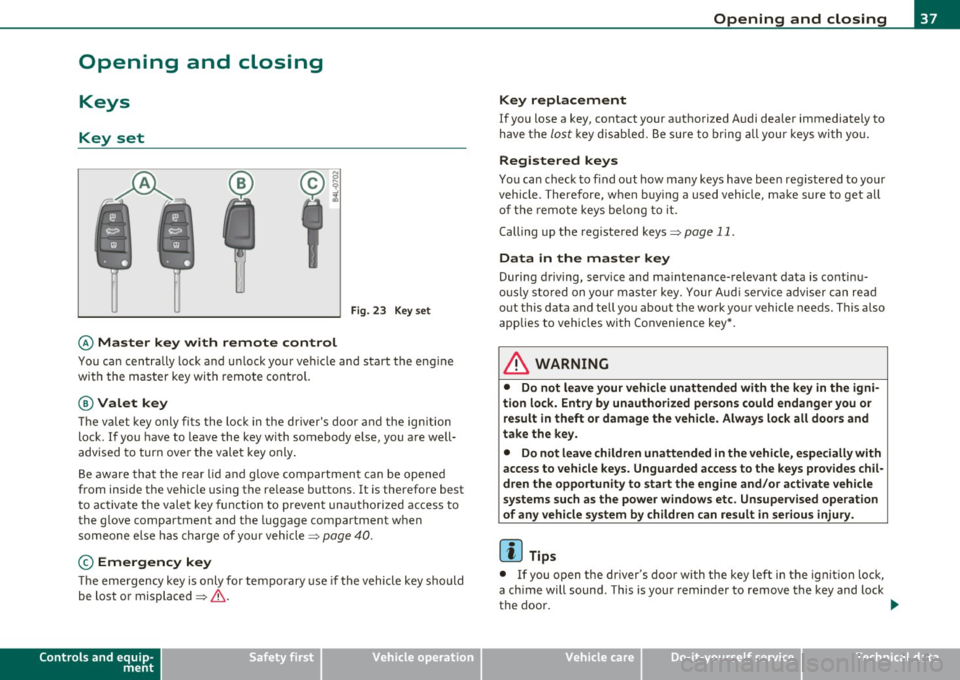
Fig. 23 Key set
© Ma ster key with remote control
You can centrally lock a nd u nlock your ve hicle and start the eng ine
with the master key with remote contro l.
@Valet key
The va let key only fi ts the lock in the d river's door and the ig nition
lock . If you have to leave the key with somebody e lse, you are well
advised to turn over the vale t key only .
Be aware tha t the rear lid a nd g love compartment can be opened
from inside the vehicle using the re lease buttons. It is therefore best
t o activa te the vale t key function to preven t una uth o rized access to
the glove compartment and the luggage compartment when
someone else h as charge of your vehicle::::>
page 40.
© Emergency key
The emergency key is only for tempo rary use if the vehicle key should
be lost or misplaced =>
&.
Controls and equip
ment Safety first
Opening and closing
Key replacement
If you lose a key, contact your a
uthorized A udi dea ler immediately to
have t he
lost key d isab led. Be sure to bring all you r keys wi th yo u.
Registered keys
You can chec k to f ind out how many keys have been reg iste red to yo ur
vehicle . Therefore, w hen b uy ing a used vehicle, make sure to get all
of the remote keys be long to it .
Calling up the registered keys=>
page 11.
Da ta in the master key
During driving, serv ice and ma intenance- relevant data is continu
o u sly sto red on yo ur maste r key. Your Aud i serv ice adviser c an re ad
out this data and tell you about the work your vehicle needs. This a lso
applies to vehicles wi th Co nvenience key *.
& WARNING
• Do not leave your vehicle unattended with the key in the igni
tion lock. Entry by unauthorized persons could endange r you or
re sult in theft or dam age the vehicle. Alway s lock all doors and
take the key.
• Do not leave children unattended in the vehicle, especially with
access to vehicle keys. Unguarded access to the keys p rovides chil
dr en the opportunity to start the engine and /or activate vehicle
systems such as the power windows etc . Unsupervised operation
of any vehicle system by children can result
in serious injury.
[ i ] Tips
• If you open t he dr iver 's door wi th the key left in the ignit ion lo ck,
a ch ime will sound . This is your reminde r to remove the key and lock
the doo r.
IJ),,,
Vehicle care Technical data
Page 44 of 370

Opening and closing
Unlocking and locking with Convenien ce key *
On vehicles wh ich a re equipped with the Con venience key* a uthoriza
t ion system, the doo rs a re unlocked
without a key by means of a prox
im ity sensor in the door handle . The doors are s imilarly locked
without a key us ing the locking button . Eac h door has a prox imity
sensor and a locking button.
Automat ic locking
T he a utomatic locking feature locks all t he vehicle doo rs and the rea r
lid when you d rive faste r than 9 mph (15 km/h). This funct ion can be
t u rned on and off in the MMI
Central locking Men u:::) page 44 .
You ca n unlo ck the vehi cle from the ins ide by:
• removing the key from the ignit ion sw itch (the ve hicle w ill auto
matically un lock itself) or
• pressing the unlock part of the power lock switch
!i::il or
pulling the door handle (twice to open the rear doo rs) .
& WARNING
• When you lock your vehi cle from outside, nobody · especially
children -should remain inside the vehicle . Remember, when you
lock the vehicle from the out side the windows cannot be opened
from the inside .
• When you leave the vehicle, always remove the ignition key
and take it with you. This w ill prevent passengers (children, for
example ) from accidentally being locked in the vehicle should
they accidentally press the power locking switch in the front doors.
• Do not leave children ins ide the vehicle unsuperv ised . In an
emergency it would be impossible to open the doo rs from the
outside without the key .
[I] Tips
• In the event of a cras h w it h ai rbag deploy ment all locked doo rs
w ill be automatically u nlocked to give access to t he vehicle occupants
from t he outside .
• If the power lock ing system should malfunction, you ca n lock each
door ind iv id u ally using the ve hicl e key :::)
page 45.
• If the power locking system sho uld fail, yo u can still open t he fuel
t ank flap in a n emergency:::)
page 277 .
• You a re we ll a dvised not to keep v aluables ins ide an unatten ded
veh icle, v isib le or not. Even a properly locked veh icle cannot provide
the security of a safe. •
Unlocking and locking the vehicle with the
remote control
How the remote control works.
Fig. 28 R emote
control : fu nctio n
bu ttons
Whether on ly the d river's door or the entire vehicle is
u nlocked w hen t he open ing but ton @ is pressed once,
depe nds o n the s ettings in the MM I
Central locking menu
~ page
44.
Page 48 of 370

Opening and closing
The door can be opened from the inside by pulling once respectively
twice ( rear doors) on the doo r handle.
If the ch ild safety lock is
engaged in one of the rear doors, the door has to be opened from the
outs ide after pul ling o n the handle once from the inside. •
Rear lid
Opening and closing rear lid
You can open the rear lid from inside the vehicle usi ng a
s w itch in th e driver's door.
Fig. 33 Driv er' s do or:
re m ote rea r lid re lea se
Fig. 3 4 Posi tion of
han dle in t he rea r li d
Opening the rear lid
- Press t he center button ?::5 on the master key or pull th e
r e lease button
?::5 in the driv er 's door=:> fig. 33. The rear
lid is u nlocked and ope ns.
Closing the rear lid
- Pull t he rear lid dow n and allow it to drop gently into the
latch =:>&, .
& WARNING
• After closing the rear lid , always pull up on it to make sure that
it is prop erly closed. Otherwise it could open suddenly when the
vehicle is mo ving.
• To help prevent poisonous exhaust gas from being drawn into
the vehicle , always keep the rear lid closed while driving. Never
transport objects larger than tho se which fit completely into the
luggage area, because then the rear lid cannot be fully closed .
• Never leave your vehicle unattended especially with the rear lid
left open. A child could crawl into the car through the luggage
compartment and pull the lid shut, becoming trapped and unable
to get out. To reduce the risk of personal injury, ne ve r let ch ildren
play in or around your veh icle . Always keep the rear lid as well a s
the vehicle doors closed when not in use.
• Alway s ensure that no one is within range of th e rear lid when
i t is mov ing , in particular clos e to the h inges· fingers or hands can
be pinched .
(I) Tips
• If the rear l id is open or not properly close d w hen t he ig nit ion is
turned on, the door and rear lid warning~
page 21 appears in the
ins trumen t cluste r dis play .
• Should you not be able to open the rear lid as described, make sure
t he valet key f unct io n is not activa ted ~
page 40. ..
Page 49 of 370

• If the central locking system fails (power supply), you can also
open the rear lid using the trunk escape handle from the inside
~page318. a
Child safety lock
Power child safety lock for the rear doors t
The power child safety lock prevents the rear doors from
being opened from the inside.
Fig. 35 Section from
driver's door: controls
The rear doors are equipped with a power child safety lock. It
is operated with the two safety buttons(!) in the driver's door
~ fig. 35.
- Press the left and/or right safety button to disable the
rear power window(s) and prevent the respective rear door
from being opened from the inside. The LED in the button
will light up when the child safety lock is turned
on.
- Press the illuminated button again to turn the child safety
features
off.
When the child safety lock is activated, the interior door opening
lever is inope rative; the door can only be opened from the outside. In
Contro ls a nd e quip
m en t Vehicle
OP-eration
Opening and closing
addition, the window regulator for that door is also inoperative when
the child safety lock is activated.
[ i] Tips
• In order to activate the child safety lock on the left and the right
side, you have to press the two safety buttons in succession.
• Make certain that the check light comes on in the corresponding
safety switch when the child safety lock is activated. •
Convenience key
Ap plies to v ehicles: w ith Con ven ience key
Description
Access and vehicle operation based on: Master key
remains in driver's pocket.
Th e Convenience key vehicle authorization system allows keyless
unlocking, locking and starting of the vehicle . You only have to carry
the master key on your person.
It makes nod ifference whether the master key is in your jacket pocket
or in your brief case. As soon as you approach your vehicle, the Conve
nience key recognizes the request for access , checks for authorization
and enables the following functions:
• Unlocking the vehicle~
page 48.
• Locking the vehicle~ page 49.
• Switching on ignition and starting the engine by pressing the
[START ) button; the master key does not have to be in the ignition
switch ~
page 110.
& WARNING
• When you lock your vehicle from outside, nobody -especially
children -should remain inside the vehicle. Remember, when you .,_
Vehicle care Do-it-yourselt service iTechnical data
Page 50 of 370

Opening and closing
& WARNING (conti nu ed )
lock the vehicle from the outs ide the windows cannot be opened
from the inside .
• When you leave the vehicle, always remo ve the ignition key
and take it with you. This w ill prevent passengers (children, for
e x ample ) from accidentally being locked in the vehicle should
they accidentally pre ss the power locking switch in the front
doors .
• Do not leave children ins ide the vehicle unsupervised . In an
emergency it would be impossible to open the doo rs from the
out side without the key .
[JJ Tips
• In order for Conve nien ce key to fu nction, yo u m ust alw ays carry
the master key with you.
• In order to be able to un lock or lo ck the vehicle, the aut hori ze d
master key must be within a range o f about 1.5 meters from the door
or the re a r lid.
• Of co urse, yo u can still unlock and lock your veh icle us ing the
bu ttons on the ma ste r k ey. The se lec tor lever mus t be in t he P posi
tion.
• For Declaration of Compliance to United States FCC and Industry
Canada regulations =>
page 349. •
Applie s to ve hicles : with Conve nien ce key
Unlocking the vehicle
The doors and the rear lid can be unlocked without oper
ating the m aster key.
Fig. 36 Co nv en ience
key : u nlo cki ng vehicle
d oor
- Take hold of the door hand le. The doo r is unlocked auto -
matical ly .
- P ull the ha ndle to open t he door.
A door is un lo ck ed as soon as yo u approach t he door handle and the
system recognizes an authori zed maste r key. The vehicle can be
unlocked at a ny door. The autho rized master key on ly has to be within
a range of about S feet ( 1.5 meters) from t he respect ive door .
When a door is un locked, the drive r's door is always unlocked as we ll.
It depends on the settings in t he central lo cking menu in t he M MI
w hether the ent ire vehicle is unlocked or only certain doors
:::> page 44.
[JJ Tips
If yo ur ve hicle has been stand ing for an extende d perio d, p lease note
the following: .,,,
Page 51 of 370

• The proximity sensors are deactivated after a few days to save
power . You then have to pull on the door handle once to unlock the
vehicle and a second time to open the vehicle.
• To prevent the battery from being discharged and to preserve your
vehicle's ability to start for as long as possible, the energy manage
ment system gradually switches off unnecessary convenience func
tions . It is possible that you will not be able to unlock your vehicle
using these convenience functions. •
Appli es to ve hicle s: wit h Co nven ience key
Locking the vehicle
The vehicle can be locked without operating the mastery
key.
(
i
Fig . 37 Convenience
key: Locking the
vehicle
- Move the selector lever to the P position.
- Press the locking button in the door handle to lock the
vehicle ~& .
The vehicle can be locked at any door . The authorized master key only
has to be within a range of about 1.5 meters from the particular door.
Th e se lecto r lever must be in the P position , otherwise the vehicle
cannot be locked .
Controls and equip
ment Safety first
Opening and closing
& WARNING
•
When you lock your vehicle from outside, nobody -especially
children -should remain inside the vehicle. Remember, when you
lock the vehicle from the outside the windows cannot be opened
from the inside.
• When you leave the vehicle, always remove the ignition key
and take it with you. This will prevent passengers (children, for
example ) from accidentally being locked in the vehicle should
they accidentally press the power locking switch in the front
doors .
• Do not leave children inside the vehicle unsupervised. In an
emergency it would be impossible to open the doors from the
outside without the key.
[ i ] Tips
It is not possible to re-open the door for a brief period directly after
closing it. This allows you to ensure that the doors are properly
locked. •
Anti-theft alarm system
Description
The anti-theft alarm triggers an alarm if anyone
attempts to break into the vehicle.
The anti-theft alarm system triggers an audible alarm and turns on
the emergency flasher if an unauthorized interf erence with the
vehicle is sensed by the system.
How is the anti-theft alarm system switched on?
The anti-theft alarm system is switched on when you lock the veh icle.
Th e system is activated approximate ly 30 seconds after the vehicle is .,,_
Vehicle care Technical data
Page 53 of 370

Safety switch
® Safety swi tch for rea r window operat ion .
& WARNING
• Do not leav e children unattended in the vehicle, especially with
access to vehicle keys. Unsupervised use of the keys can result in
starting of the engine and u se of veh icle systems su ch a s power
windows, etc. which could result in se rious injury .
• Remember -you can still open or close the power window s for
about ten minutes a fter the ignition is switched off. Only when
either of the front doors are opened are the power windows
switched off.
• Be careful when closing the window s. Check to see that no one
is in the way, o r serious injury could result !
• Alway s remove the ignition key whenever you leave your
vehicle.
• If you lo ck your v ehicle from the outside, no one, e specially
children, should remain in the vehicle.
• Do not stick anything on the windows or the windshield that
may interfere with the dr iver's field of vi sion.
[ i ] Tips
In ad dition to the switches in the d river's doo r there is a separate
switch in each door for the powe r window in that door~
page 52,
fig.39. •
Switches in the driver 's door
T he driver can operate all wind ows.
If the res pective sw itch is pushe d or pulled t he window will
o pen or c los e. Th e powe r window swi tches have a
two-posi
tion function:
Controls and equip
ment Safety first
Opening and closing
Opening the windows
- Push the switch to the first stop and h old i t th ere until the
window has lowered to the desired posi tion .
- Push the switch br iefly to t he
second stop : the window
will automatica lly open a ll the way .
Closing the windows
- Pull the swi tch up to the first stop a n d ho ld it t her e u ntil
the window h as r is e n to t he desir ed posit ion.
- P ull the swi tch qu ickly to th e
second position: the window
w ill automatica lly cl os e a ll th e way ~
& in "Co ntro ls" on
page SO.
Activating/deactivating rear windows
- Press the le ft Cf) sw itch ~ page 50, fi g. 38 to deactivate
o nly the wi ndow reg ulator in the left door. The in dicator
light in the switch illumi nates .
- Press t he r ight
Cf) switc h~ page 50, fig . 38 to deactivate
only the w indow regulator in the right door. The ind icator
lig ht in t he switch illumi nates .
- Press the
[fl switch agai n to reactivate the wi ndow regu-
lator. T he ind icator lig ht in the switch goes out .
This function can a lso deact ivate d. Press both(!) switches ® in
s u ccession.
• If
only the left(!) switch was pressed, only the window regu lator
s w itch in the
left rear door is de acti vated. In a ddi tion , the door i s
locked.
• If
only the right(!) switch wa s pressed, only the window regu lator
switch in the
right rear door is deact ivated. In addition, the door is
locked.
~
Vehicle care Technical data
Page 54 of 370
![AUDI S6 2011 User Guide Open ing and closing
This feature has been provided for the safety of small ch ildren riding
in the rear of the vehicle.
[ i ] T ips
• The windows can still be opened and c](/img/6/57593/w960_57593-53.png "AUDI S6 2011 User Guide Open ing and closing
This feature has been provided for the safety of small ch ildren riding
in the rear of the vehicle.
[ i ] T ips
• The windows can still be opened and c")
Open ing and closing
This feature has been provided for the safety of small ch ildren riding
in the rear of the vehicle.
[ i ] T ips
• The windows can still be opened and closed for about ten minutes
after the ignition has been turned off . The power windows are not
shut off unt il one of the front doors is opened .
• In order to activate the child safety lock on the left and the right
side, you have to press the two safety switches in succession. Make
certain that the check light comes on the corresponding safety sw itch
when the child safety lock is activated .•
Switch in the front passenger 's door and on
the rear doors
"' 5 N
F ig. 39 Switch loca·
t ion front pass enge rs
doo r
The power window switch has a two-po sitio n funct ion :
Op ening the windows
- Press the switch to the fi rs t position and hold it unti l you
have opened the window as far as you want .
- Press the switch quickly to the
second pos iti on and the
window will automatically open all the way.
Closing the windows
- Pull the switch to the fi rst positi on and hold it until you
have closed the window as far as you want.
- Pull the switch quickly to the
second po sitio n and the
window will automatically close all the way.
(I] Ti ps
The windows can still be opened and closed for about ten minutes
after the ignition has been turned off. The power windows are not
shut off until one of the front doors is opened .•
Convenience close/open feature with the
lock in the driver 's door
You can close or open the windows from outside when you
lock or unlock your car with the key in the driver's door
lock.
, ,~
f~ -==--- 00--$] @
Closing windows
Fig . 4 0 Key turns fo r
openi ng a nd closi ng
- Insert the key into the lock of the driver's door.
Make sure that the windows are not blocked
==> & .
Page 57 of 370

& WARNING (continued)
• Be careful when closing the power sunroof. Not paying atten
tion could cause you or others to be trapped and injured as the roof
closes.
• Always take the key with you when you leave the vehicle to
prevent injuries caused by the roof closing.
• Never leave children or persons requiring assistance alone in
the vehicle, especially when they could access the vehicle keys.
Unsupervised use of the keys can result in the engine being started
or use of vehicle systems such as the power windows, etc. which
could result in serious injury. The doors could be locked with the
remote key, delaying help in an emergency.
• The power sunroof will continue to operate until the ignition
key has been removed and one of the front doors has been
opened. •
Applies to veh icl es: w ith s lid in g/ti lt ing powe r sunroof
Convenience closing feature
The power sunroof can be closed from outside with the
key in the driver 's door lock.
- Insert the key into the d river 's door lock .
- Turn and hold th e ke y in the lock position®=:>
page 43,
fig. 29 until the sunroof is completely closed=:>&, in
"Closing the power sunroof " on
page 54.
& WARNING
Be careful when closing the power sunroof. Not paying attention
could cause you or others to be trapped and injured as the roof
closes. •
Controls and equip
ment Safety first Opening and closing
App
lies to vehicles : w ith sliding/tilting power sunroof
Power emergency closing
The sunroof can still be closed electrically if for some
reason the overload protection function becomes acti
vated.
The power sunroof is equipped with an overload protection
feature. If, under normal conditions, the power sunroof will
not close, you can close it using this feature .
- Turn the rotary switch to position@=:>
page 53, fig. 41.
- Now pull the switch
and hold it in this position until the
power sunroof closes completely .
& WARNING
Improper use of the power sunroof can cause serious personal
injury.
• Be careful when closing the power sunroof. Not paying atten
tion could cause you or others to be trapped and injured as the roof
closes.
• Always take the key with you when you leave the vehicle to
prevent injuries caused by the roof closing.
• Never leave children or persons requiring assistance alone in
the vehicle, especially when they could access the vehicle keys.
Unsupervised use of the keys can result in the engine being started
or use of vehicle systems such as the power windows, etc. which
could result in serious injury. The doors could be locked with the
remote key, delaying help in an emergency.
• The power sunroof will continue to operate until the ignition
key has been removed and one of the front doors has been
opened. •
Vehicle care Technical data
Page 60 of 370
Clear vision
Clear vision
Lights
Switching the headlights on and off ·"ti-·
In the "AUTO" position, a light sensor automatically
switches the head- and taillights on and off in response to light condi tions.
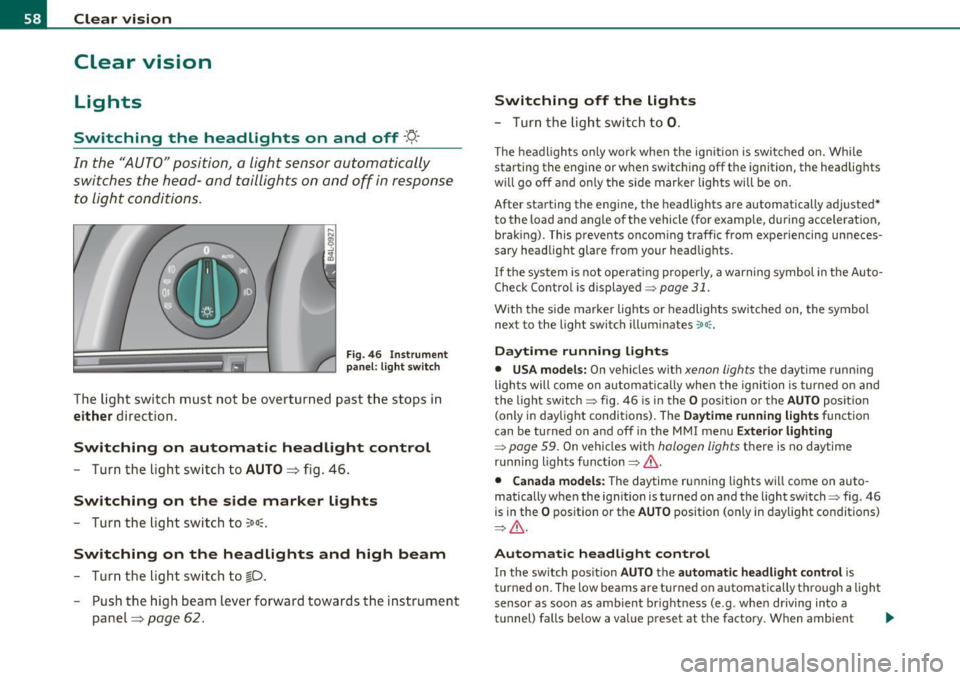
Fi g. 46 In strument
p an el: li gh t swit ch
The ligh t switc h must not be overtur ned past t he stops in
either d irection.
Switching on automatic headlight control
- Turn the lig ht sw itch to AUTO => fig. 46 .
Switching on the side marker lights
-Turn the lig ht swi tch to ~oo~.
Switching on the headlights and high beam
- Tur n the lig ht sw itch to ~D.
- Push the high beam leve r forward tow ards the in strument
panel=>
page 62 .
Switching off the lights
- Tu rn th e lig ht swi tch to 0.
T he headlights on ly work when the ignitio n is switc hed on. Whi le
starting the engine or w hen switching off t he ignition, the headlig hts
w ill go off and o nly the s ide marke r lights will be o n.
After starting the eng ine, the headlights are automatically adjusted*
to the load and angle o f th e vehicle (for example, during acce lerat ion,
brak ing) . This prevents oncom ing traff ic from experiencing unneces
sary headlight glare from your head lig hts.
If the system is not operat ing p roperly, a warning symbol in the Auto
Check Control is displayed=>
page 31.
With the side marker lights o r headlights switc hed on, the symbol
next to the light switch illum inates
':o oc .
Daytime running lights
• USA models: On vehicles w ith xenon lights the dayt ime runn ing
lights will come on automat ica lly when the ignition is turned o n and
the light switch=> fig. 46 is i n the
O position or the AUTO position
(only i n day light conditions) . The
D aytime running light s function
can be turned on and off in the MMI menu
Exterior lighting
=> page 59. On vehicles wit h halogen lights there is no daytime
r u nning lights fu nctio n=>
& -
• Canada models: The daytime ru nning lights wi ll come o n auto
matically w hen the ignit io n is t urned on and t he light switch=> fig. 46
is in the
O p osition or the AUTO position (on ly in day light co nditions)
=> & -
Automatic headlight control
In the switch pos ition AUTO the automatic headlight control is
t u rned on. The low beams are t urned on automatically t hrough a light
sensor as soon as ambient br ight ness (e .g . when dr iving into a
t u nnel) falls below a val ue p reset at the factory . When ambient .,.