mirror AUDI S6 2012 User Guide
[x] Cancel search | Manufacturer: AUDI, Model Year: 2012, Model line: S6, Model: AUDI S6 2012Pages: 298, PDF Size: 74.43 MB
Page 92 of 298
90 Audi side assist
@ Alert stage signal flashes
If you activate your turn signal in driving sit
uation @, th e signa l br iefly f lashes repeated
l y. Side assist is a lerting yo u to a vehicle that
you may not have noticed.
@ Tips
- The faster a vehicle approaches from the
rear, the sooner the signa l on the outs ide
mirror lights up. Side assist will signa l,
at the latest, when a detected vehicle en
ters your "blind spot".
- When vehicles approach very quickly,
changing lanes can be dangerous even if
the signal on the outside mirror does not
li ght up.
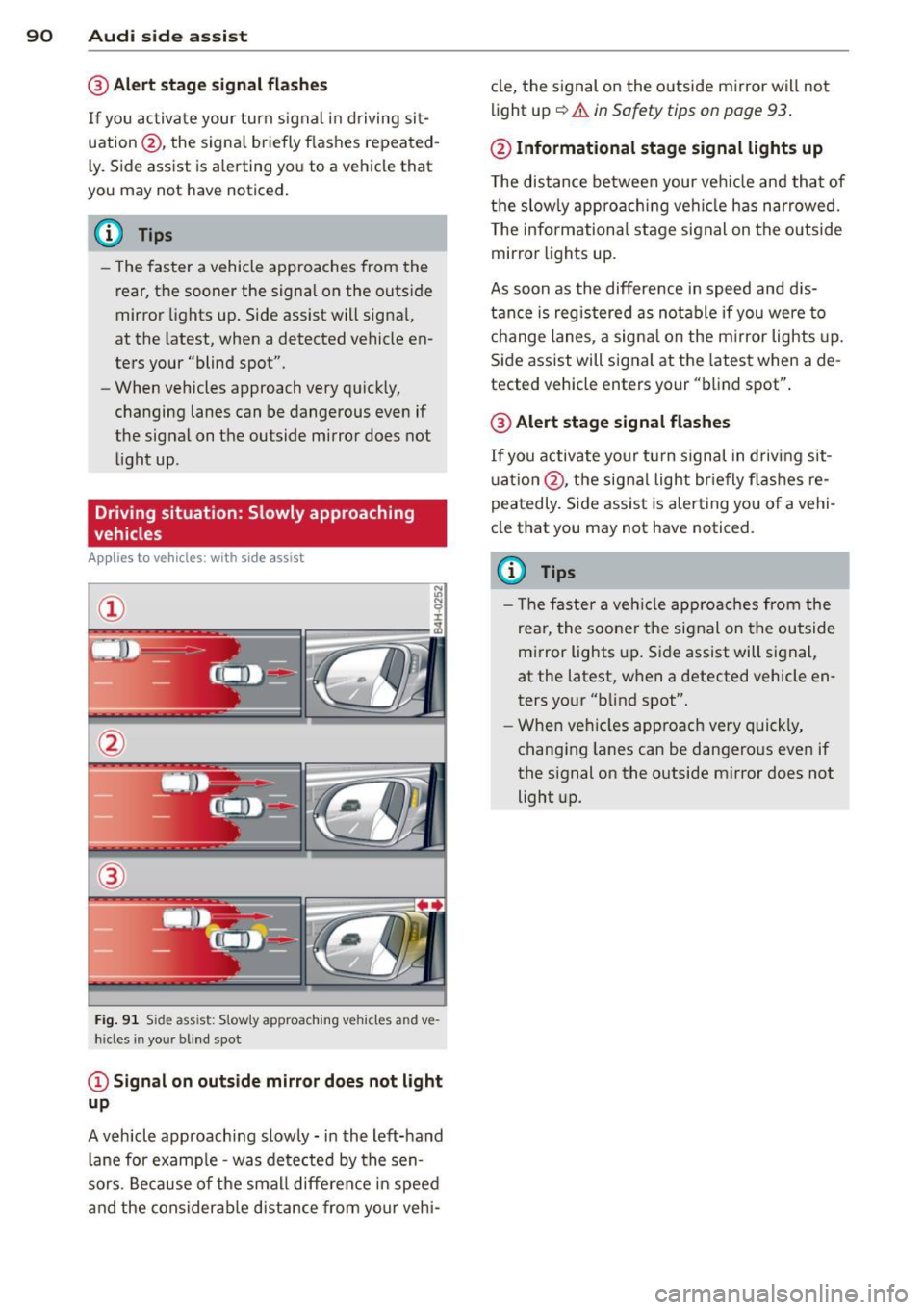
Driving situation: Slowly approaching
vehicles
Applies to vehicles : w it h side ass ist
®
Fig. 91 S ide ass ist: S lowly approaching vehicles and ve
hicles in your blind spot
© Signal on outside mirror does not light
up
A vehicle approaching slowly -in the left-hand
lane for example -was detected by the sen
sors. Because of the small difference in speed
and the considerab le distance from your vehi- cle,
the signal on the outside mirror will not
light up
c::> &. in Safety tips on page 93 .
@ Informational stage signal lights up
The distance between your vehicle and that of
the slowly approaching vehi cle has narrowed.
T he informational stage signal on the outside
mirror lights up.
As soon as the difference in speed and dis
tance is registered as notable if you were to
change lanes, a signal on the mirror lights up.
Side assist will signal at the latest when a de
tected vehicle enters your "blind spot".
@ Alert stage signal flashes
If you activate your turn signal in driving sit
uation @, the signal light br ie fly flashes re
peatedly. Side assist is alerting you of a vehi
cle that you may not have noticed.
(D Tips
- Th e faster a veh icle approaches from the
rea r, the sooner the signal on the outside
mirror lights up. Side assist will signal,
at the latest, when a detected vehicle en
ters your "blind spot".
- When vehicles app roach very quickly,
changing lanes can be dangero us even if
the signal on the outside mirror does not light up.
Page 93 of 298
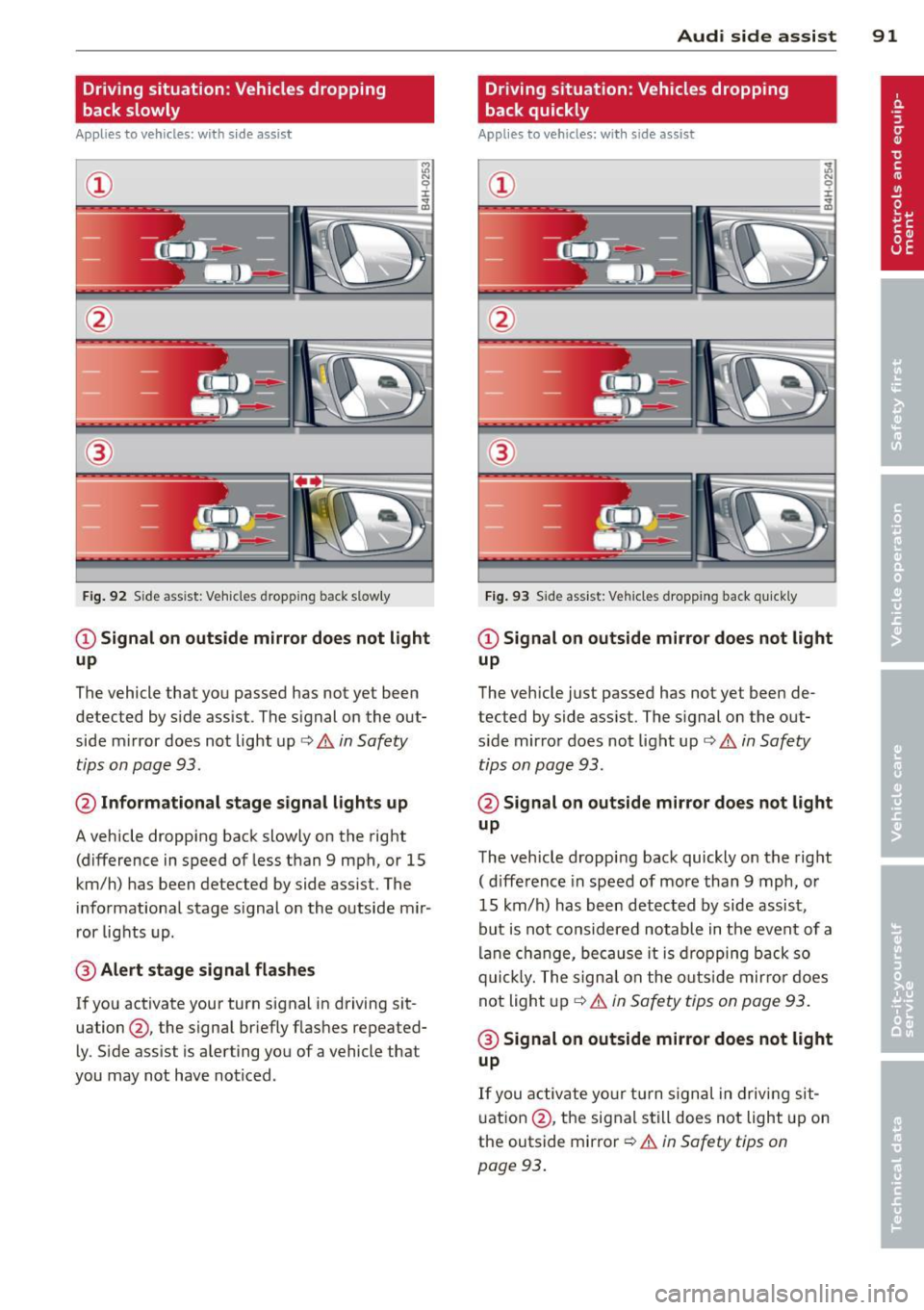
Driving situation: Vehicles dropping
back slowly
Applies to vehicles: with s ide assis t
~ 9 I
---- ----:~
®
Fig . 92 S ide ass ist: Vehicles dropping back s low ly
CD Signal on outside mirror does not light
up
The vehicle that you passed has not yet been
detected by side assist. The signal on the out
side mirror does not light up ¢
& in Safety
tips on page 93.
@ Informational stage signal lights up
A vehicle dropping back slowly on the right
(difference in speed of less than 9 mph, or 15
km/h) has been detected by side assist. The
informational stage s ignal on the outside mir
ror lights up.
@ Alert stage signal flashes
If you activate your turn signal in driving sit
uation @, the signal briefly flashes repeated
ly. Side assist is alerting you of a vehicle that
you may not have noticed.
Audi side assist 91
Driving situation: Vehicles dropping
back quickly
Applies to vehicles: wi th side assist
®
Fig. 93 Side assist: Vehicles dropping back qui ck ly
CD Signal on outside mirror does not light
up
The vehicle just passed has not yet been de
tected by side assist. The signal on the out
side mirror does not light up ¢
& in Safety
tips on page 93 .
@ Signal on outside mirror does not light
up
The vehicle dropping back quickly on the right
( d ifference in speed of more than 9 mph, or
15 km/h) has been detected by side assist,
but is not considered notable in the event of a
lane change, because it is dropping back so
quickly. The signa l on the outs ide mirror does
not light up
Q &. in Safety tips on page 93.
@ Signal on outside mirror does not light
up
If you activate your turn signal in driving sit
uation @, the signal still does not light up on
the outside mirror
Q & in Safety tips on
page 93.
Page 94 of 298
92 Audi side a ssis t
MMI settings
App lies to vehicles: wit h side ass ist
The basic brightness setting of the signal on
the outside mirror can be adjusted via the
MMI.
,. Select : I CARI function button > Car s ystem s
control button > Driver assist > Audi s ide
a ss is t.
The brightness of the signal lig ht for both the
informationa l and alert stages is automatical
ly adjusted to amb ient light conditions. In ad
d it ion, you can adjust the
basic brightness
sepa rately, via the brightness fun ction.
While making the adjustment, the new brightness setting is displayed briefly . The
brightness displayed is that of the informa
tional stage signal. The alert stage signa l
b rightness is lin ked to the informational st age
signal brightness.
The informational stage signa l br ightness
should be adjusted so tha t you not ice the sig
na l ill uminat ion when yo u loo k in the outside
mirror, but not when you look forward
throug h the windshield.
I n very da rk or light surroundings, the au to
mat ic brightness setting adjusts s ignal light
brightness to maxim um or minimum intensi
ty, as needed. In circumstances such as these,
you may not notice any change in the bright
ness on the outside mirror when ad justing the
basic brightness . You may not notice the
cha nge unt il lighting conditions are norma l
aga in .
(D Tips
- Side assist is not active when the basic
brightness is adjusted. The signal light
comes on br iefly to help you make the
adjustment .
- Your settings are automatically stored
and ass igned to the remote control key
being used.
General information
Applies to veh icles : w it h side assist
S ide assist has limits and cannot dete ct vehi
cl es unde r all road and weat he r c ondit ions .
Please remember sys tem limita tions and nev
er rely on the system, especially when :
- driving thro ugh curves ~
page 92,
- lanes are of d ifferent widths~
page 92.
· When driving through curves
Applies to veh icles: w it h side assist
S ide assist cannot detect ve hicles in c urves
with a turning rad ius o f less than 3 28 fee t
(10 0 m).
When driving thro ugh a curve, it is poss ible
that side assist may reg iste r a veh icle two
l anes over, a nd the signa l o n the ou ts ide mir
ror will ligh t up.
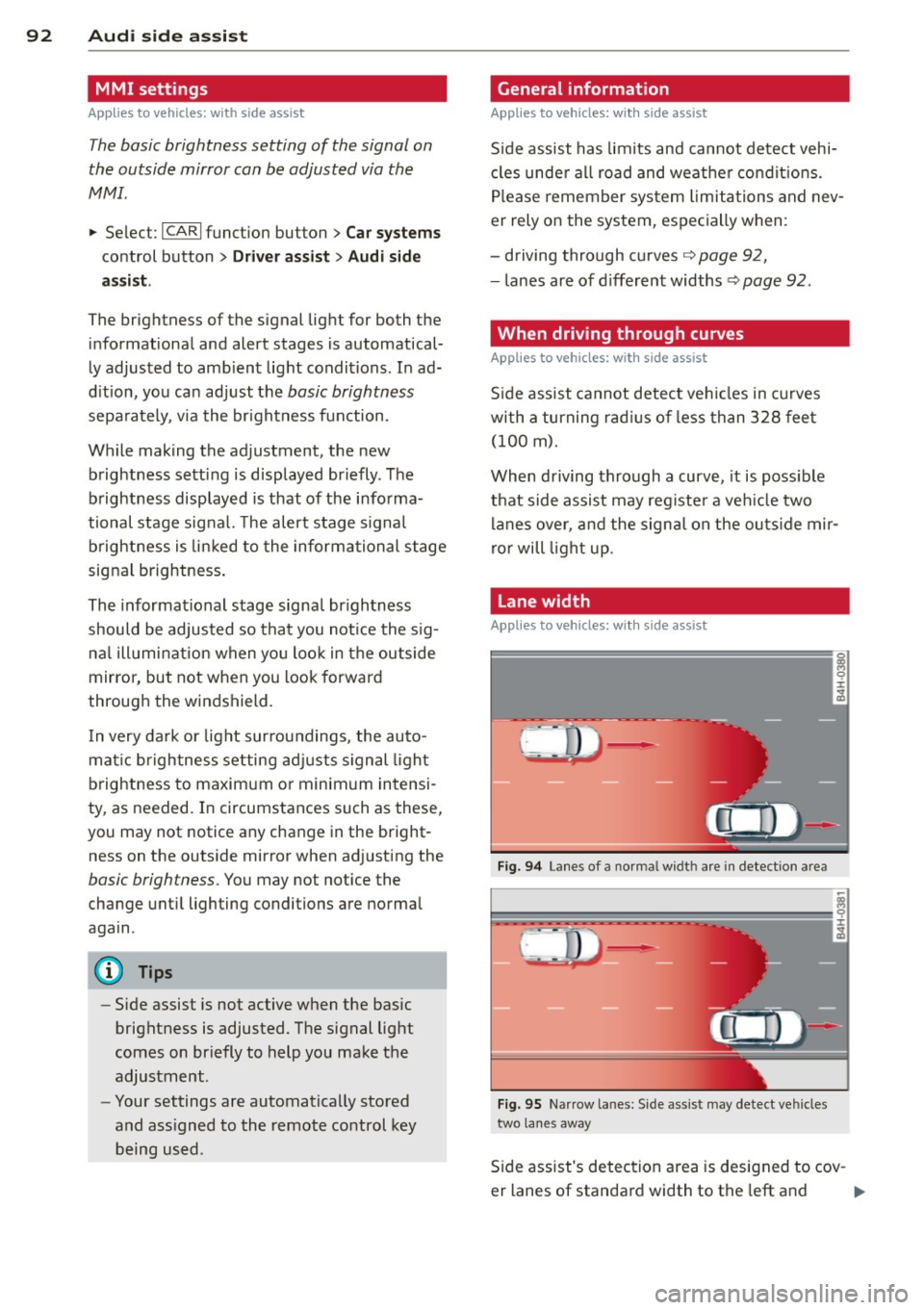
Lane width
Appl ies to veh icles : w ith side assist
0
Fi g. 94 La nes o f a norma l widt h are in detect ion area
Fi g. 95 Narrow la nes: S ide ass ist may detect ve hicles
two lanes away
S ide assist's detec tion a rea is designed to cov -
er lanes of standa rd width to the left and
ll-
Page 95 of 298
right of your travel lane, depending on wheth
er you driv e in the center of your lane or closer
to the edge .
I f yo u drive in narrow lanes, s ide ass ist's de
tection area may a lso include other lanes -es
pecia lly if you tend to drive on the edge of
your lane¢
fig. 95. Under these condit ions,
ve hicles can also be detected that are two
lanes away, and side assist then could sw itch
between the informat ional and warn ing stage
sig nals .
When driving in very w ide lanes, vehicles in
the adjacent lane may not be detected be
cause they are not inside the detection area .
Notes
Messages in instrument cluster display
Applies to vehicles: with side assist
If side assist turns off automatically, the indi
cator light on the button wi ll go out and you
will see a message in the instrument cl uster
d isplay:
Aud i side a ssist : not availab le. s en sors
blocked
T he side assist sensors are built into the rear
bumper on the left and right (not visible on
the outside) ¢
page 87, fig. 87. To ensure that
you do not adversely affect the way side assist functions, foreign objects (such as stickers o r
b icycle racks) shou ld not be attached to the
a rea on the rear bumper where the sensors
a re loca ted.
If side ass ist func tions a re ad
versely affected, yo u will see this message in
the instrument cluster display. Remove any
thing that may be blocking the sensors .
If no vehicle is detected for a longer period of
time while driving, side assis t will a lso switch
off a utomatica lly.
Audi side as sist currently not available
If there is a tempora ry problem (such as the
veh icle's battery charge being low), s ide ass ist
cannot be activated tempo rarily.
Audi side a ssis t 93
Audi side assist: system fault
Have the system checked by an author ized Au
di dealer or qualified workshop .
Audi side assist: not available when
to wing
T he radar sensor's view is limited when tow
ing a trai ler . F or vehicles with a facto ry instal
led towing hitch or a trailer hitch that was in
stalled later according to factory specifica
tions, side assist is automatically deactivated
a s soon as the electrical connection to the
trailer 's electrical socket is made, and this sta
tus message appears in the instrument clus
ter display . Deactivation cannot be guaran
teed when using a ret rofitted towing hitch
that was
not installed acco rd ing to facto ry
spe cifica tions.
Safety tips
Applies to vehicles: with side assist
T he side assist detection may be limited when
driving around narrow street corners, on hi lly
streets, and under poor weather conditions.
It is possible that the radar sensors may a lso
detect other objects, s uch as high or stag
gered guardrails .
S ide assist does not measure act ual lane
width. The system assumes a fixed lane width.
Detection in the left and right lanes is based
on this ass umed lane width . When driving on
narrow roads or when driving to the left or
right of the center of a travel lane, it is poss i
ble that vehicles will be detected that are
not
in the lane next to the lane you are using .
A WARNING
-Improper reliance on the side assist sys
tem can cause coll is ions and serio us pe r
sonal injury:
- Never rely on ly on side assist when
changing lanes .
- Always check rear view mirrors to make
sure that it is safe to change lanes.
- Side assist cannot detect all vehicles un-
der all conditions- danger of accident!
~
Page 116 of 298

114 Park in g s yste m
segments move closer to the vehicle. The col
lision area has been reached when the next to
l ast segment is displayed. Do not cont inue
driving farther
c:> &.!
A WARNING
-Sensors have blind spots in which objects
cannot be detected . Pay special attention
to small children and animals because
the sensors cannot always detect them .
- The parking system cannot replace the
dr ive r's attention. The driver alone is re
sponsible for parking and similar driving
maneuvers.
- Always keep your eyes on the veh icle's
surround ings, using the rear view mirror
as well.
(D Note
Low obstacles al ready signaled by a warn
ing can disappear from the system's detec
tion range as they are approached and will
not con tinue to be signa le d . Obje cts such
as barrier cha ins, trailer draw bars, thin
pa inted vertical poles or fences may not be
detected by the system, posing risk of
damage.
@ Tips
- The sensors must be kept clean a nd free
of snow and ice for the park assist to op
erate.
- You can change the volume and pitch of
the signals as well as the display
<=>page 118.
-What appears in the display is time -de
l ayed.
Audi parking system
plus with rear view
camera
Introduction
Applies to vehicles : pa rkin g system p lus wit h rear view
came ra
Fig. 121 Parking mode 1: reverse parking
Fig. 122 Park ing mode 2: parallel parkin g
This park ing system integ rates a r e arvi ew
cam era
in addition to the audio and v isual
parking system signa ls
<=> page 113.
0 ± .. a,
You can choose between two modes to assist
yo u w ith parking. For example, you can use
"pa rking mode 1" when parking in a park ing
space or garage
c:> fig. 121. When you want to
park para llel to the edge of the st ree t, select
"pa rking mode 2"
<=>fig. 122.
Page 117 of 298
General Information
Applies to vehicles: with parking system plus wit h rea r
view came ra
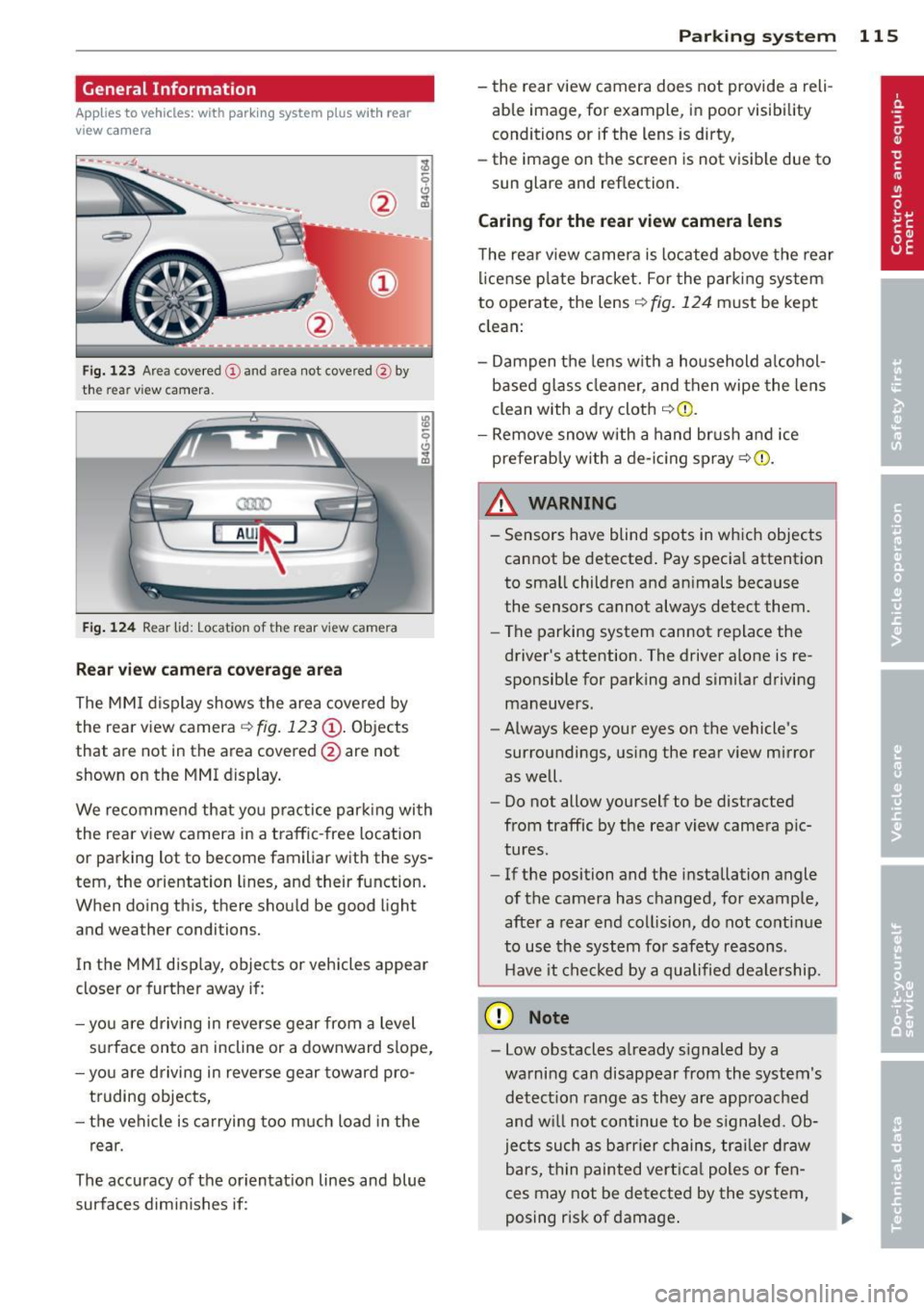
Fig. 123 Area cove red (D and area not covered @by
the rear vi ew camera.
Fig. 124 Rear lid: Loc ation of the rear view came ra
Rear view camera coverage area
The MMI display shows the area covered by
the rear view camera
c::> fig. 123 @. Objects
that are not in the area covered @are not
shown on the MMI display.
We recommend that you practice parking with
the rear view camera in a traffic -free location
or parking lot to become familiar with the sys
tem, the orientation lines, and their function.
When doing this, there should be good light
and weather conditions.
In the MMI display, objects or vehicles appear
closer or further away if:
- you are driving in reverse gear from a level
surface onto an incline or a downward slope,
- you are driving in reverse gear toward pro
truding objects,
- the vehicle is carrying too much load in the
rear.
The accuracy of the orientation lines and blue
surfaces dimin ishes if:
Parking system 115
- the rear view camera does not provide a reli
able image, fo r example, in poor visibility
conditions or if the lens is dirty,
- the image on the screen is not visible due to
sun glare and reflection.
Caring for the rear view camera lens
The rear view camera is located above the rear
l icense plate bracket. For the parking system
to operate, the lens
c::> fig. 124 must be kept
clean:
- Dampen the lens with a household alcohol
based glass cleaner, and then wipe the lens
clean with a dry cloth
c::> Q) .
-Remove snow with a hand brush and ice
preferably with a de-icing spray
c::> (i) .
_& WARNING .. --- Sensors have blind spots in which objects
cannot be detected. Pay special attention
to small children and animals because
the sensors cannot always detect them.
- The parking system cannot replace the
driver's attention. The driver alone is re
sponsible for parking and similar driving
maneuvers.
- Always keep your eyes on the vehicle's
surroundings, using the rear view mirror
as well.
- Do not allow yourself to be distracted
from traffic by the rear view camera pic
tures.
- If the position and the installation angle
of the camera has changed, for example,
after a rear end collision, do not continue
to use the system for safety reasons .
Have it checked by a qualified dealership.
(D Note
-Low obstacles already signaled by a
warning can disappear from the system's detection range as they are approached
and w ill not continue to be s ignaled. Ob
jects such as barrier chains, trailer draw
bars, thin painted vertical poles or fen
ces may not be detected by the system,
posing risk of damage .
Page 119 of 298

Reverse Parking
Applies to vehicles: with parking system plus with rear
view camera
Parking mode 1 can be used when parking in
a garage or into a parking space.
Fig. 125 MMI display: a iming at a park ing spot
Fig. 126 MMI display: aligning the vehicle
• Switch the MMI on and select reverse gear.
• Turn the steering wheel until the orange
orientation lines
(D appear in the parking
spot¢
fig. 125. Use the markings @to help
you estimate the distance from an obstacle .
Each marking represents 3
ft (1 meter). The
blue area represents an extension of the ve
hicle's outline by approximately 16
ft (5 me
ters) to the rear.
• While driving in reverse gear, adjust the
steering wheel angle to fit the parking space
with the aid of the orange orientation lines ¢ (D. @ marks the rear bumper. Stop the
vehicle when the red orientation line© bor
ders an object¢ £!
A WARNING
-The rear view camera does not show the
entire area beh ind the veh icle
¢p age 115, fig. 123. Watch out espe
cially for smal l children and animals. The
Parking system 117
rear view camera cannot always detect
them, posing risk of an accident!
- Please note that objects not touching the
ground can appear to be further away
than they really are (for example, the bumper of a parked vehicle, a trailer
hitch, or the rear ofa truck). In this case,
you shou ld not use the help lines to help
with parking, which poses danger of an accident!
(D Note
In the MMI d isplay, the direction of travel
of the vehicle rear is represented depend
ing on the steering wheel angle. The vehi
cle front swings out more than the vehicle
r ear. Maintain plenty of distance so that
your outside mirror or a corner o f your ve
hicle does not collide with any obstacles.
This can damage to your vehicle.
Parallel Parking
Applies to vehicles: with parking system plus with rear
view camera
Use parking mode 2 to help you parallel park
along the side of a street.
Fig. 127 MMI display: blue surface in the park ing spot
Fi g. 128 MMI display: Blue curve on the curb
Page 203 of 298

Trailer towing Driving with a trailer
General information
Your Audi was designed primarily for passen
ger transportation .
If you plan to tow a tra iler, p lease remember
that the addit ional load will affect durab ility,
economy and performance .
T railer towing not on ly places more stress on
the vehicle, it also calls for more concentra
tion from the driver.
F or this reason, a lways fo llow the operating
and driving instructions provided and use
common sense.
Technical requirements
Traile r hitch
Use a weight-carrying hitch conforming to the
gross trailer we ight. The hitch must be suita
b le for your veh icle and trailer and must be
mounted secure ly on t he veh icle's chassis at a
technically sound location . Use only a t railer
h itch w ith a removab le ball moun t. A lways
check with the tr ailer hitch man ufac tur er to
make sure that you are using the correct
hitch.
Do not use a bumper hitch.
T he hitc h must be installed in such a way that
it does not inte rfe re with the impac t-absorb
i ng b umper syst em. No modifica tions should
be made to the vehicle exhaus t and b rake sys
tems . From t ime to time, check that a ll hitch
mo unt ing bolt s remain securely fas tened.
W hen you are not tow ing a trailer, remove the
trai le r hi tch ball moun t. T h is prevents the
hi tch from causing damage sho uld your ve hi
cle be str uck from be hind
¢ &. .
Trailer brakes
If yo ur tra iler is equ ipped w it h a braking sys
tem, check to be su re that it conforms to a ll
r eg ulat io ns.
Trailer towin g 201
The trailer hyd ra ulic bra ke system must not be
direct ly connected to the vehicle's hydraulic
brake system .
Safety chains
Alw ays use saf ety chains between your ve hicle
and t he tra ile r.
Trailer lights
Tra iler lights must meet all reg ulations . Be
su re to check with your Audi dea ler fo r cor re ct
wir ing, swi tches and relays.
Mirrors
If you a re unable to see the traffic behind you
u sing the regula r outside m irrors, then you
must i nsta ll ext ended mir rors . It is important
t h at you
always have clea r vis ion to the rear .
.8, WARNING
-
Afte r removing the trailer hit ch, do no t
s tore i t in yo ur vehicle . In case of sudden
b raking, the h itch cou ld fly forwar d an d in
ju re you or yo ur passengers .
Operating instructions
Maximum trailer weight
A tra ile r fo r you r vehicle is limited to a ty pical
cl ass 1 or class 2 tra ile r.
Trailer load distribution
B e sure the loa d in the tr aile r is held secure ly
i n place to p reven t it from shift ing forw ard,
ba ckward or sideways.
Never allow a passenger to ride in a trailer
¢ &. in Driving instru ctions on page 20 2.
Engine cooling system
Towing a trailer makes the engine work hard
er . It is impo rtant that the cooling system's
perfo rmance is up to the additional load .
Make sure that the coo ling syst em has enough
f lui d.
Tire pressure
When towing a trailer , inflate the tires of your
vehicle to t he cold tire pressure listed under .,..
•
•
Page 207 of 298

Automatic car wash
The vehicle can be washed in almost any
modern automatic car wash .
The vehicle paint is so durable that the vehicle
can normally be washed without problems in
an automatic car wash. However, the effect on
the paint depends to a large extent on the de
sig n of the fac ility, the filte ring of the wash
water, the type of wash and care mater ial , etc.
If the pa int has a dull appearance afte r go ing
through the car wash or is scratched, bring
this to the attention of the operator immedi
ately. If necessary, use a different car wash.
Before going through a ca r wash, be s ure to
take the usual precautions such as closing the
windows and power roof. Factory installed an
tennas m ust not be removed.
If you have installed additional accessor ies on
the vehicle -such as spoilers, roof rack, etc. -
it is best to ask the car was h operator if these
should be removed .
A WARNING
Always read and heed a ll WARNINGS and
other information
¢ page 204.
(D Note
- Fo ld the exterior mirro rs -flat there is a
r isk of damaging the exterio r mirrors .
Power folding exterior mirrors must not
be fo lded in or out by hand. Use the pow
er function!
- Compare the track of your vehicle w ith
the d istance between the guide ra ils of
the facility- there is a risk of damage to
t h e wheels and tires .
- Compare the width of your vehicle wit h
the width of the tu nnel at the fac ility .
Cleaning and protec tion 205
Washing the vehicle by hand
A lot of water is needed when washing a vehi
cle by hand .
.,. Before you start washing, make sure you
have read and u nderstood the WARNINGS
¢ .&. in General information on page 204 .
.,. First soak all dried d irt unt il it is soft, then
r inse it off.
.,. As you clean yo ur vehicle , start w it h the
roof and wor k your way down to the bottom,
using a sponge, a sponge g love or a clean
brush.
.,. Rinse the sponge o r the sponge g love often,
flushing it clean each time.
.,. Use specia l car shampoo only for
very per
sistent d irt .
.,. Rinse the car thoroughly with water .
.,. Use a chamo is leather to gent ly w ipe the ex-
ter ior d ry.
Use a separate sponge for cleaning the
whee ls, door sills and othe r regions exposed
to road dirt . In this way, you w ill not scratch
the pa int w it h coarse par ticl es imbedded in
the sponge the next time you wash the ca r.
& WARNING ~ -
- Do not clean the underside of the chas
sis, fenders, wheel covers , or other hard
to reach parts witho ut protecting yo ur
hands and arms . You may cut yourself on
sharp-edged metal parts.
- Always read and heed a ll WARNINGS and
other information
¢ page 204.
(D Note
- Never try to remove dirt, mud or dust if the surface of the ve hicle is dry . Never
use a dry cloth or sponge, s ince this
cou ld scratch your vehicle's paint or win
dows.
- Never wash your car in bright sunlight. Drops of water act as magn ifying lenses
and may damage your paint .
- When you wash your car in the winter: if you rinse your vehicle with a hose, be careful not to aim the stream of water •
•
Page 210 of 298

208 Clea ning and protec tio n
8_ WARNING
Always read and heed all WARNINGS and
other information
Q page 204 .
Aluminum trim
Use only n eu tra l- pH products to remove spots
and depos its from alum inum surfaces .
C hr ome care products and alkaline cleaners
will attack alum inum surfaces and can dam
age them over time.
WARNING
Always read and heed a ll WARNINGS and
other information
Q page 204 .
Touch-up paint
Minor paint damages should be touched up
immediately.
• Use either a touch-up pa int stick or spray
paint to cover minor scratches and nicks .
Your Audi dealer has touch-up paint for minor
scratches and stone chips . Scratches shou ld
be touched up soon after they occu r to pre
vent corrosion .
If a spot starts to rust, however, a simple
touch-up job w ill not be enough. The affected
surface must be sanded smooth and coated
with a n anti-rust pr imer before the pa inted
f inish can be restored.
The number for the origina l vehicle paint can
be found on the vehicle ident ification labe l
Qpage274.
8_ WARNING
Always read and heed a ll WARNINGS and
other information
Q page 204 .
Windows
Clear vision to all sides.
Clean all windows regularly to remove road
film and car wash wax bu ildup. •
Remove snow from windows using a brush.
• Use a p lastic ice scraper to remove ice from
w indows and mirrors.
• Remove other residue on the windows with
a spray-on glass cleaner.
• Wipe the windows dry with a clean piece of
cloth or kitc hen paper towel.
The best way to remove snow from windows and mirrors is to use a brush. Use a non-abra
s ive
pla stic ic e scraper -better still, a spray
deicer - to remove
i ce from w indows and mir
ro rs.
Oil, grease or s ilicone residue can be removed
with
gla ss clea ner or s ilic on e re m over . How
ever, wax res idue requires the use of a spec ial
ly formulated so lvent. Please contact your Au
di dealer for advice on safe products for wax
removal.
Windows should also be cleaned on the inside at regu la r i ntervals .
Never dry windows with the same chamo is
that you use to dry painted surfaces. Wax resi
due on the chamois can impair v is ion through
the windows .
8_ WARNING
- Always read and heed al l WARNINGS and
o ther info rmation
Q page 204.
- The windsh ield must not be treated w ith
water-repellent materials. They can in
crease glare under poo r visibility condi
tions such as wetness, darkness, or when
the sun is low on the horizon . In addi
tion, they can cause the windshield wip
ers to chatter.
(D Note
- Never use warm or hot water to remove snow and ice from windows and mirrors .
This could cause the glass to crack.
- To prevent damage to the wires of the
rear defogger, do not place any adhesive
st ickers on the ins ide of the rear window
over the wires.
...