ECO mode AUDI S6 2013 Owner's Manual
[x] Cancel search | Manufacturer: AUDI, Model Year: 2013, Model line: S6, Model: AUDI S6 2013Pages: 306, PDF Size: 76.92 MB
Page 110 of 306
108 Automatic Transmission
This prevents too much stress from being placed on the locking mechanism.
multitronic transmission : Your vehicle is
equipped with
hill hold assist allowing you to
start while on an incline. The system is acti
vated when the brake pedal is pressed down
and held
for a few seconds. T he brake pres
sure will hold for
o moment after the brake
pedal loosens to prevent the vehicle from roll
ing backwards while starting up .
A WARNING
-The vehicle can also roll when the engine
is stopped .
- Unintended vehicle movement can cause serious injury.
- Never leave your vehicle with the engine
running while in gear. If you must leave
your vehicle when the engine is running, activate the parking brake and move the
selector lever to P.
- Power is still transmitted to the wheels
when the engine is running at idle. To
prevent the vehicle from "creeping ", you
must keep your foot on the brake when
the engine is running and the selector lever is in D/S or R or "tiptronic" mode is
selected.
- Do not press the accelerator pedal when
changing the selector lever position
while the vehicle is stationary and the
engine is running.
- Never shift into R or P while driving.
- Before driving down a steep slope, re-
duce your speed and shift into a lower
gear with "tiptronic".
- Do not ride the brakes or press the brake
pedal too often or too long when driving
down a hill. Constant braking causes the
brakes to overheat and substantially re
duces braking performance, increases
braking distance or causes complete fail
ure of the brake system.
- To prevent the vehicle from rolling back
when stopping on inclines, always hold it
in place with the brake pedal or parking
brake. -
Never hold the vehicle on an incline with
a slipping clutch. The clutch opens auto
matically when it becomes too hot from
the overload . An indicator lamp
[O] illu
minates and a driver message appears
~ page 110 when the clutch is overload
ed.
- If the engine must remain running, never
have any driving position engaged when
checking under the hood. Make sure the
selector lever has securely engaged and
is locked in P with the parking brake set
~ page 219, Engine comportment. Oth
erwise, any increase in engine speed may
set the vehicle in motion, even with the
parking brake applied.
(D Note
- 5 tronic ®- and tiptronic transmission :
When stopping on an incline, do not try
to hold the vehicle in place by pressing
the accelerator pedal while a driving gear
is selected . This can cause the transmis
sion to overheat and can damage it. Acti
vate the parking brake or press the brake
pedal to prevent the vehicle from rolling .
- 5 tronic ®- and tiptronic transmission : Al
lowing the vehicle to roll when the en
gine is stopped and the selector lever is
in N will damage the transmission be
cause it is not lubricated under those cir
cumstances.
(D Tips
For safety reasons, the parking brake is re
leased automatically only when the driv
er's safety belt is engaged in the buckle.
Hill descent control
Applies to vehicles: with mult itronic/5 tronic/tiptronic
The hill descent control system assists the
driver when driving down declines.
Hill descent control is activated when these
lector lever is in D/S and you press the brake
pedal. The transmission automatically selects .,.
Page 112 of 306
110 Automatic Tran sm iss ion
Kick-down
Applies to vehicles: with multitron ic/S tronic/t iptronic
Kick-down enables maximum acceleration .
Applies to ve hicle s w ith a multit ro nic ®
t ra nsmission
When you depress the accelerator pedal be
yond the resistance po int, the transmission
downshifts into a lower gear ratio depend ing
on the vehicle speed and engine speed. As l ong as the accelerator peda l is depressed, the
engine speed is a utomat ica lly regulated for
maximum accelera tion.
Appli es to veh icl es with a S tronic ®-/ ,
tiptronic tran smi ssion
When you dep ress the accele rator pedal be
yond the resistance po int, the a utomat ic
transmission downshifts into a lower gear, de
pending on vehicle speed and engine speed.
The upshift into the next higher gear takes p lace once the maximum specified engine
speed is reached.
A WARNING
,-
Please note that the drive wheels can spin
if kick-down is used on a smooth slippery
road - there is a risk of skidding .
Launch Control Program
Applies to vehicles: with S tronic
The Launch Control Program provides the
best acceleration possible when starting from
a stop .
Requirement : The engine must be at operat
ing temperature and the steering wheel must
not be turned .
.. Press the
I~ O FF I button ¢ page 194 while
the engine is running. The
IJ indica tor light
illuminates in the instrument cluster and
Sta bilization contr ol (ESC ): Off Warn ing!
R educed stabi lit y
appears in the dr iver in
fo rmat io n system disp lay .
.. Move the selecto r lever to posit ion D/S to
select sport mode (5) or select
D yna mic
mode in Audi dr ive select c:> page 99 .
.. Press the b rake pedal strongly with you r left
foot and hold it down for at least 1 second .
.. At the same time, press the accelerator
pedal down complete ly with your r ight foot
until the engine reaches and mainta ins a
high RPM .
.. Remove your foot from the brake pedal
w ith in
5 seconds c:> ,&. .
_&. WARNING
-Always adapt your dr iving to the tr aff ic
f low.
- Onl y use the Launch Cont ro l Program
when road and t raff ic condi tions a llow i t
and other d rivers w ill not be endangered
or annoyed by your driving and the vehi
cle 's acceleration.
- Please note that the driving wheels can spin and the vehicle can b reak away
when ESC is switched off, especially
when the road is slippery .
- Once the vehicle has started moving,
press the
1 1' OFFI button brief ly to turn
the ESC on .
(D Tips
- The transmission temperature may in
crease signif icantly after using the
launch control program. If that happens,
the program may not be ava ilable for a
few minutes. It w ill be available again af
ter a cool-down per iod.
- When accelerating using the launch con
tro l program, all vehicle parts are subject
to heavy loads . This can resu lt in in
creased wear .
Transmission malfunction
Applies to vehicles: with multitronic/S tronic/tiptronic
[O] Tran smi ssi on: Pr ess brake pedal and se
lect gear again
Press the brake peda l and select the desired
selector lever position again. You can the n
continue d riving .
[O] Transmi ssion overheating: Plea se drive
con servatively
Page 125 of 306
Error messages
Applies to vehicles: with parking system plus/rear view
camera/per ipheral cameras
There is an e rror in the system if the LED in
the
p, qA button is blinking and you hear a con
tinuous alarm for a few seconds afte r switch
ing on the parking system or when the park
ing system is already activated. If the error is
not corrected before you switch off the igni
tion, the LED in the
Pw.6. button will blink the
next time you switch on the parking system by
shifting into reverse.
Parking system plus
If a sensor is faulty, the~ symbol will appear
in front of/behind the vehicle in the Infotain
ment display. If a rear sensor is fau lty, only
obstacles that are in areas @ and @ are
shown
c:> fig. 117 . If a front sensor is fau lty,
only obstacles that are in areas © and @are
shown .
Peripheral cameras*
There is also a system error if:
- the
'(:8:)• • symbol appears in the display and
the corresponding display area is shown in
blue. The camera is not working in this area.
- all segments around the vehicles are red or
if no segments are displayed.
Drive to your authorized Aud i dea ler o r au
thorized repair fac ility immediately to have
the ma lfunction corrected.
Trailer hitch
Appl ies to vehicles: with parking system plus/rear view
camera/per ipheral cameras and trailer hitch
For vehicles using the tra iler socket, the park
ing system rear senso rs do not turn on when
you shift into reverse gear or when yo u press
the P
01A button. This resu lts in the following re
strictions:
Parking system plus*
There is no distance wa rning for the rear. The
front sensors rema in activated. The visual dis
play switches to the trailer towing mode.
Parking systems 123
Parking system plus and rear view
camera* /Peripheral cameras*
There is no distance warning for the rear. The
front sensors remain activated. The visual dis
play sw itches to the trailer towing mode. The
rear view camera image will not show the ori
entation lines and the blue surfaces .
{D Tips
Trailer hitches that are not installed at the
factory may cause the park ing system to
malfunction or they may restr ict its func
tion.
Page 126 of 306
124 Homelin k®
Homelink ®
Universal remote
control
General information
Applies to vehicles: with Homelink® unive rsal remote
co ntrol
The Homelink universal remote control can
be programmed with hand-held transmitters
from existing equipment.
With Homelink, you can control devices such
as the garage door, security systems, house lights, etc. comfortably from the inside of you
vehicle.
Homelink makes it possible for you to replace
three different remote controls from devices in your home with one universal remote . Th is
feature works for most garage door and exte rior door moto r signals. Programming the in
d iv idual remote control fo r you r remote con
trol takes p lace near the center of the radiator
grille. There is a control module attached at
this location .
A one-t ime programm ing of the sensor mus t
be performed before you are able to use sys
tems w ith Homelink.
A WARNING
- Never use the Homelink ® transmitter
with any garage door opener that does have not the safety stop and reverse fea
ture as required by federal safety stand
ards. This includes any garage door open
er mode l manufact ured before April 1,
1982.
- A garage door opener which cannot de
tect an object, signaling the door to stop
and reverse does not meet current feder
al safety s tandards. Us ing a garage doo r
o pener witho ut these fea tures increases
risk of serious inj ury or death.
- F or safety reasons never release t he
parking brake or s tart the engine while
anyone is standing in front of the vehicle .
- A garage door or an est ate gate may
sometimes be set in motion when the Homelink
® remote control is being pro
grammed. If the device is repeatedly ac
tivated, this can overstrain motor and
damage its electrica l components - an
overheated motor is a fire hazard!
- To avo id possible injuries or property
damage, please always make absolutely
certa in that no persons or objects are lo
cated in the rang e of motion of any
equ ipme nt being ope rated.
(0 Tips
- If you would like add itional information
on the Home Link® Unive rsal Transce iver,
Homelink compatib le products, or to
purc hase other accessories s uch as the
HomeL ink® Light ing Package, please
contact Homelink at 1-800 -355 -3515 or
on the Internet at www.homelink .com.
- For Declaration of Comp liance to United
States FCC and Ind ustry Canada reg ula
tions
¢page 288.
-For security reasons, we recommend that
you clear the programmed b uttons be
fore selling the vehicle .
Operation
Applies to vehicles: wit h Ho meli nk
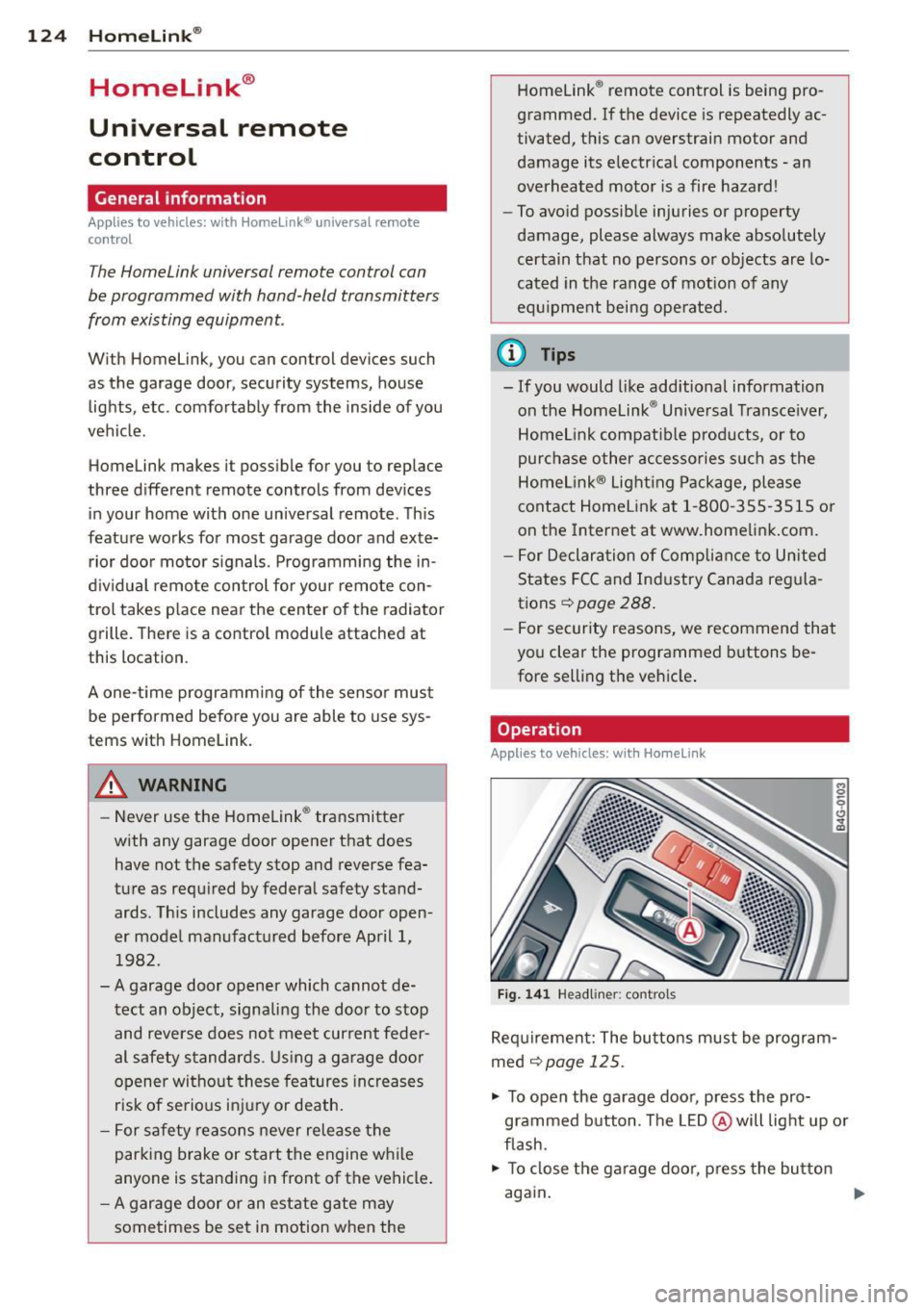
Fig . 14 1 Headliner: controls
M 0
9 (!)
~
Req uirement: The bu tto ns must be program
med ¢
page 125 .
"' To open the garage doo r, press the pro
grammed b utton. The LED @ will light up o r
flash.
"' To close the ga rage doo r, press the button
again .
Ill>
Page 127 of 306
@ Tips
To open the garage door, press the button,
but do not press it for longer ten seconds
or the Homelink modu le w ill switch to
programming mode .
Programming the transmitter
Applies to vehicles : with Home Link
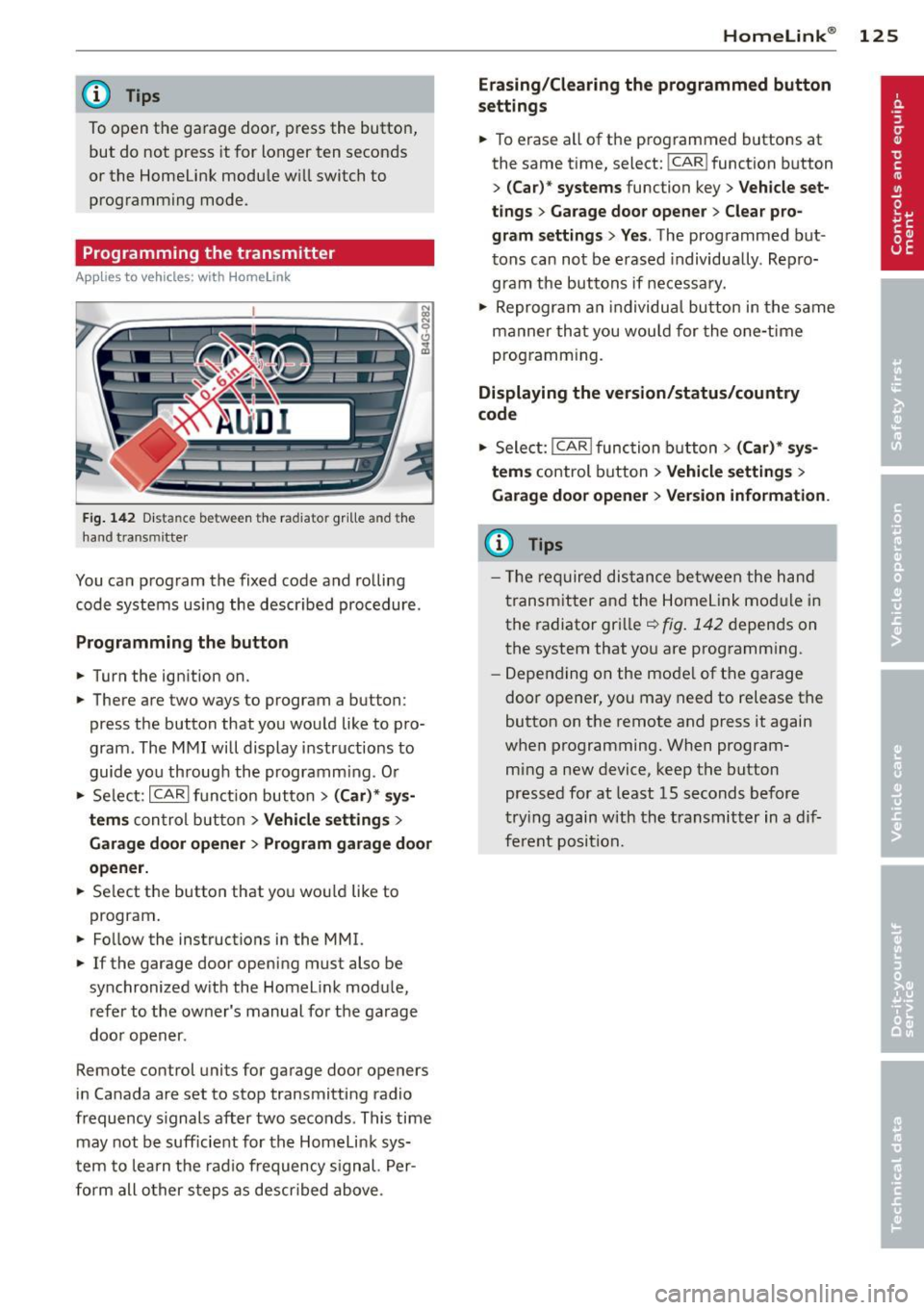
Fig. 142 Dist an ce be tween the ra diato r gr ille a nd the
hand t ransm itter
You can program the fixed code and rolling
code systems using the described procedure.
Programming the button
.. Turn the ignition on.
.. There are two ways to program a button:
press the button that you would like to pro
gram . The MMI will display instructions to
guide you through the programm ing . O r
.. Se lect: ICARlfunction button>
( Car) * sys
tems
con trol button > Vehicle settings >
Garage door opener > Program garage door
opener .
.. Se lect the button that you wou ld like to
program .
.. Fo llow the instructions in the MMI.
.. If the garage door opening must also be
synchronized with the Homelink module,
refer to the owner's manual for the garage
door opener .
Remote control units for garage door openers
in Canada are set to stop transmitting radio
frequency s ignals after two seconds . This time
may not be sufficient for the Homelink sys
tem to learn the radio frequency signal. Per
form all other steps as descr ibed above .
Homelink ® 125
Erasing/Clearing the programmed button
settings
.. To erase all of the programmed buttons at
the same time, select: !CAR ! function button
>
(Car)* systems function key> Vehicle set
tings
> Garage door opener > Clear pro
gram settings> Yes .
The programmed but
tons can not be erased individua lly . Repro
gram the buttons if necessary .
.. Reprogram an individual button in the same
manner that you wou ld for the one-time
programming.
Displaying the version/status/country
code
.. Select: I CAR I function button > (Car)* sys
tems
control button > Vehicle settings >
Garage door opener > Version information .
(D Tips
- The required distance between the hand
transmitter and the Homelink mod ule in
the radiator grille~
fig. 142 depends on
the system that you are programm ing .
- Depending on the mode l of the garage
door opener, you may need to release the
button on the remote and press it again
when programming. When program
ming a new device, keep the button
pressed for at least 15 seconds before
trying again with the transmitter in a dif
ferent position.
Page 163 of 306
-Have the airbag system inspected by
your Audi dealer before transporting
anyone on the front passenger seat.
(D Tips
If the capacitive passenger detection sys
tem determines that the front passenger
seat is empty, the frontal airbag on the
passenger side will be turned off, and the
PASSENGER AIR BAG OFF light will stay
on .
Repair, care and disposal of the airbags
Parts of the airbag system are installed at
many different places on your Audi. Installing,
removing, servicing or repairing a part in an
area of the vehicle can damage a part of an
airbag system and prevent that system from
working properly in a collision.
There are some important things you have to know to make sure that the effectiveness of
the system will not be impaired and that dis
carded components do not cause injury or pol
lute the environment.
A WARNING
Improper care, servicing and repair proce
dures can increase the risk of personal in
jury and death by preventing an airbag from deploying when needed or deploying
an airbag unexpectedly:
- Never cover, obstruct, or change the
steering wheel horn pad or airbag cover
or the instrument panel or modify them
in any way .
- Never attach any objects such as cup
holders or telephone mountings to the
surfaces covering the airbag units.
- For cleaning the horn pad or instrument
panel, use only a soft, dry cloth or one
moistened with plain water. Solvents or
cleaners could damage the airbag cover
or change the stiffness or strength of the
material so that the airbag cannot de
ploy and protect properly.
Airbag system 161
- Never repair, adjust, or change any parts
of the airbag system.
- All work on the steering wheel, instru
ment panel, front seats or electrical sys
tem (including the installation of audio
equipment, cellular telephones and CB radios, etc .) must be performed by a
qualified technician who has the training
and special equipment necessary.
- For any work on the airbag system, we
strongly recommend that you see your
authorized Audi dealer or qualified work
shop.
- Never modify the front bumper or parts
of the vehicle body.
- Always make sure that the side airbag
can inflate without interference:
- Never install seat covers or replace
ment upholstery over the front seat
backs that have not been specifically
approved by Audi.
- Never use additional seat cushions that
cover the areas where the side airbags
inflate.
- Damage to the original seat covers or
to the seam in the area of the side air
bag module must always be repaired
immediately by an authorized Audi
dealer.
- The airbag system can deploy only once .
After an airbag has been deployed, it
must be replaced with new replacement
parts designed and approved especially
for your Audi model version. Replace ment of complete airbag systems or air
bag components must be performed by
qualified workshops only. Make sure that
any airbag service action is entered in
your Audi Warranty
& Maintenance book
let under
AIRBAG REPLACEMENT RE
CORD .
-For safety reasons in severe accidents,
the alternator and starter are separated
from the vehicle battery with a pyrotech
nic circuit interrupter.
- Work on the pyrotechnic circuit inter
rupter must only be performed by a
qualified technicians who have the ...
L..._ _____________ _j ...
•
•
Page 175 of 306
~ page 171, Important things to
know.
(D Tips
Always replace child restraints that were
installed in a vehicle during a crash. Dam
age to a child restraint that is not visible
could cause it to fail in another collision
situation.
Advanced front airbag system and children
Your vehicle is equipped with a front "Ad
vanced Airbag System" in compliance with United States Federal Motor Vehicle Safety
Standard (FMVSS) 208 as applicable at the
time your vehicle was manufactured.
The Advanced Airbag system in your vehicle
has been certified to meet the "low-risk" re
quirements for 3- and 6-year old children on
the passenger side and small adults on the
driver side. The low risk deployment criteria
are intended to reduce the risk of injury
through interaction with the airbag that can
occur, for example, by being too close to the
steering wheel and instrument panel when
the airbag inflates. In addition, the system
has been certified to comply with the "sup
pression" requirements of the Safety Stand
ard, to turn off the front airbag for infants up
to 12 months who are restrained on the front passenger seat in child restraints that are list
ed in the Standard.
Even though your vehicle is equipped with an
Advanced Airbag system, all children, espe
cially those 12 years and younger, should al
ways ride in the back seat properly restrained
for their age and size. The airbag on the pas
senger side makes the front seat a potentially
dangerous place for a child to ride. The front
seat is not the safest place for a child in a for
ward-facing child safety seat. It can be a very
dangerous place for an infant or a larger child
in a rearward-facing seat.
The vehicle 's Advanced Airbag System has a
capacitive passenger detect ion system in the
Child Safety 173
front passenger seat cushion that can detect
the presence of a baby or a child in a child re
straint system on this seat.
The capacitive passenger detection system
registers the changes that result in an electri
cal field when a child, a child restraint, and a
baby blanket are on the front passenger seat .
The change in the measured capacitance due
to the presence of a child, a child restraint,
and a baby blanket on the front passenger
seat is related to the child restraint system resting on the seat . The measured capacitance
of a child restraint system varies depending
on the type of system and specific make and
model.
The electrical capacitance of the various
types, makes, and models of child restraints
specified by the U.S.National Highway Traff ic
Safety Administration (NH TSA) in the relevant
safety standard are stored in the Advanced
Airbag System control unit together with the
capacitances typical of infants and a 1-year
old child. When a child restraint is used on the
front passenger seat with a typical
1 year-old
infant, the Advanced Airbag System compares
the capacitance measured by the capacitive passenger detection system with the data
stored in the electronic control unit.
Child restraints and Advanced front
airbag system
Regardless of the child restraint that you use,
make sure that it has been certified to meet
United States Federal Motor Vehicle Safety
Standards and has been certified by its manu
facturer for use with an airbag. Always be sure
that the child restraint is properly installed at
one of the rear seating positions. If in excep
tional circumstances you must use it on the
front passenger seat, ca refully read all of the
information on child safety and Advanced Air
bags and heed all of the applicable WARN
INGS. Make certain that the chi ld and child re
straint are correctly recognized by the capaci
tive passenger detection system in the front passenger seat, that the front passenger air
bag is turned off, and that the airbag status is ..,.
•
•
Page 204 of 306
202 Driving and environment
Avoid full throttle
Driving at moderate speeds saves fuel and
improves your mileage.
.,. Try and keep well below your car's maxi-
mum speed.
Accelerating gently reduces fuel consump
tion, engine wear, and does not disturb the
environment.
Fu el consumption, exhaust emissions and en
gine noise increase disproportionately at high
speeds. If you drive at approximately three
quarters of top speed, fuel consumption will
be reduced by one half. Never drive faster
than the posted speed limit and weather con
ditions permit .
Reducing unnecessary idling
Even when your car is just idling it burns up
fuel.
.,. Shut the engine off when you are not driv
ing the vehicle .
... Do not warm up the veh icle by letting the
engine run at idle .
The idling phase is automat ically reduced for
vehicles w ith the Start/Stop system .
It is effi
cient to switch
off the engine in vehicles with
out the Start-Stop-System when stopped at
railroad crossings and long red lights . Turning
the engine
off for just 30-40 seconds saves
more f uel than is burned by starting the en
gine again.
It takes a long time for the engine to wa rm up
fully when it is running at idle. However, wear
and noxious emissions are especially high
when the engine is warming up. So you should
drive away as soon as you start the engine and
avoid running at high rpms while the engine is
still warming up.
([) Note
Do not leave engine idling unattended af
ter starting. If warning lights should come
on to indicate improper operation, they would
go unheeded. Extended idling also
produces heat, which could result in over
heating or other damage to the veh icle or
other property .
Regular maintenance
A badly tuned engine unnecessarily wastes a
lot of fuel.
.,. Have your vehicle serviced at regu la r inter-
vals .
By having your veh icle reg ularly se rviced by an
Audi dealer he lps to ensure that it runs prop
erly and economically. The condition of your
vehicle not only affects its safety and ability to
ho ld its value, it also affects
fuel consump
tion .
Check your oil each time you fill your tank.
The amou nt of oi l used is related to engine
load and speed.
It is normal for the oil consumption of a new
engine to reach its lowest value after a certain
mileage has been driven .
You must drive your veh icle about 3,000 miles
(5,000 kilometers) before you can properly
assess oil consumpt ion.
This also app lies to fuel consumption and en
gine output .
(D Note
-Have your veh icle ma inta ined properly
and in accordance with the service rec
ommendations in your Warranty
& Main
tenance booklet. Lack of proper ma inte
nance as well as improper use of the ve
hicle will impair the function of the
em ission control system and could lead
to damage.
- Do not alter or remove any component of
t he Emission Control System unless ap
proved by the manufacturer .
- Do not alter or remove any device, such
as heat shields, switches, ignition wires,
valves, which are designed to protect
your vehicle's Emission Control System
Page 206 of 306
204 Trailer towing
Trailer towing
Driving with a trailer
General information
Your Audi was designed primarily for passen
ger transportation .
If you plan to tow a trailer, p lease remember
that the additional load will affect durability,
economy and performance .
Trailer towing not on ly places more stress on
the vehicle, it also calls for more concentra
tion from the driver.
For this reason, always fo llow the operating
and driving instructions provided and use
common sense.
@ Note
If you are going to tow a trai ler, you must
activate the trailer operation mode
c:::> page 204, Operating instructions.
Technical requirements
Trailer hitch
Use a weight-carrying hitch conforming to the
gross trailer weight. The hitch must be suita ble for your vehicle and trailer and must be
mounted securely on the veh icle's chassis at a
technically sound location . Use only a trailer
hitch with a removable ball mount. A lways
check with the trai ler hitch manufacturer to
make sure that you are using the cor rect
hitch.
Do not use a bumper hitch.
The hitch must be installed in such a way that
it does not interfere with the impact-absorb
ing bumper system. No modifications should
be made to the vehicle exhaust and brake sys
tems . From time to time, check that all hitch
mounting bolts remain securely fastened.
When you are not towing a trailer, remove the
trai ler hitch ball mount. This prevents the
h itch from causing damage should your veh i
cle be struck from behind
c:::> A .
Trailer brakes
If your trailer is equipped with a brak ing sys
tem, check to be sure that it conforms to all
regulations.
T he trailer hydraulic brake system must not be
directly connected to the vehicle's hydraulic
brake system .
Safety chains
Always use safety chains between your veh icle
and the trailer.
Trailer lights
Trailer lights must meet all regulations. Be
sure to check with your Audi dealer for correct
wiring, switches and relays.
Mirrors
If you are unable to see the traffic behind you
using the regular outside mirrors, then you
must install extended mirrors. It is important
that you
always have clear v is ion to the rear .
A WARNING
--
After removing the trailer hitch, do not
store it in your vehicle . In case of sudden
braking, the hitch could fly forward and in
jure you or your passengers.
Operating instructions
Maximum trailer weight
A tra ile r for your vehicle is limited to a typical
class 1 or class 2 tra ile r.
Trailer load distribution
Be sure the load in the trailer is held securely
in place to prevent it from shift ing forward,
backward or sideways.
Never allow a passenger to ride in a trailer
c:::> A in Driving instructions on page 206 .
Engine cooling system
Towing a trailer makes the engine work hard
er . It is important that the cooling system 's
performance is up to the additional load.
Page 230 of 306
228 Check ing and filling
Modern engine lubrication has taken a quan
tum leap in the last few years. Many synthetic
oils ava ilable today provide better engine lu
brication that can outlast traditional petrole
um-based oils, making them a smart choice
for use throughout the life of your Audi .
Whether you use synthetic or petroleum
based engine oil, the oil that you use must
conform to Audi 's oil quality standard
VW 502 00 to he lp keep your vehicle's engine
running smoothly and help prevent the for
mat ion of harmfu l deposits, sometimes called
"s ludge ," that ove r time can lead to expensive
repairs .
At the time of pr int ing , engine o ils available in
the U .S . and Canada that meet the exacting
specifications of Audi oi l standard VW 502 00
a re synthetic engine oils. This does not mean,
however, that every syn thetic engine oil will
meet Audi oil standard VW 502 00. So always
be sure that you use an approved oil.
To help prevent the format ion of harmful de
posits use only oi l with the fo llowing specifi
cations printed on the oil container :
Audi oil standard VW 502 00
O il container labe ls may carry the specif ica
tion s ingly or in comb inat ion with other des ig
nations and oil qua lity standards .
Visco sity
Engine oi ls are graded accord ing to their vis
cosity. The proper viscosity grade oil for your
engine depends on cl imactic or seasonal con
d itions where you drive. You can use oil with a
viscosity grade of SA E SW40 across all tem
pe ratu re ranges for normal driving conditions .
However, if eng ine o il viscos ity grade
SAE SW40 is no t ava ilable, you can a lso use
viscosity grade SAE SW-30 or SAE OW -40 as
long as it meets Audi o il quality standard
VW 502 00 specifications .
Because engine oil that meets the Audi oil
standard may not be available everywhere
when you need it, we strongly recommend
that you always carry with you an ext ra quart (
li te r) of oil that exp ress ly con forms to the
VW 502 00 spec ification, in case you have to
top
off the oil while on the road.
Only if the level of the o il is a t or be low the
minimum mark -and no oi l that expressly
conforms to Audi oil standard VW 502 00
specifications is available - may you top
off
with a high quality engine o il, preferab ly syn
thet ic-based, tha t mee ts ACEA A3 or API SM
specifications, but even then , only in v iscosity
grades SAE SW-40 , SAE SW-30, o r
SAE OW-40. However, during the ent ire time
betwee n oil change intervals, never top
off
with more than a total of 0.5 q t/lite r engine
o il that does no t conform to Audi o il specifica
tion VW 502 00.
For more informa tion about eng ine oi l that
has been approved for your veh icle, please
contact e ither yo ur authorized Aud i dealer or
Audi C ustome r Re lations at 1 (800) 822 -2834
or visit our web site at www .audiusa.com or
www.aud icanada .ca. Here you w ill also find a
current list of oils (manufacturers, brand
names e tc.) tha t conform to Audi oil s tanda rd
vw 502 00 .
Changing the engine oil
The eng ine oi l and oil fi lter must be changed
according to the mileage (kilometers) and
time intervals specified in your ve hicle's War
ranty
& Maintenance booklet. Do not exceed
these intervals -harmful deposits from old
engine oil ca n reduce eng ine performance and
can lead to expensive engine repa irs .
Changi ng the oil at the recommended inter
vals is so very important because the lubricat ing proper ties of oil decrease gradually during
normal veh icle use . If you are not sure when
you have your oil changed, ask your author ized Audi Serv ice Adv isor.
Under some circumstances the engine oil
shou ld even be changed more frequent ly .
Change oil more often if you drive mostly
sho rt distances, operate the ve hicle in dusty
areas o r most ly unde r stop-and-go t raff ic con-
ditions, o r when you use your vehi cle where .,..