airbag AUDI S6 2013 Owners Manual
[x] Cancel search | Manufacturer: AUDI, Model Year: 2013, Model line: S6, Model: AUDI S6 2013Pages: 306, PDF Size: 76.92 MB
Page 5 of 306
Error messages . . . . . . . . . . . . . . . . . . 123
Trailer hitch . . . . . . . . . . . . . . . . . . . . . 123
Homelink ® . . . . . . . . . . . . . . . . . . . . 124
Universal remote control . . . . . . . . . . . 124
Safety fir st . . . . . . . . . . . . . . . . . . . . 126
Driving Safely . . . . . . . . . . . . . . . . . 126
Gene ral notes . . . . . . . . . . . . . . . . . . . . 126
Proper occupant seating posit ions . . . 12 7
Driver and passenger side footwell . . . 131
Pedal area . . . . . . . . . . . . . . . . . . . . . . . 131
Stowing luggage . . . . . . . . . . . . . . . . . 132
Report ing Safety Defects . . . . . . . . . . . 134
Safety belts . . . . . . . . . . . . . . . . . . . 136
Ge neral notes . . . . . . . . . . . . . . . . . . . . 136
Why safety be lts? . . . . . . . . . . . . . . . . 137
Safety belts . . . . . . . . . . . . . . . . . . . . . 139
Safety bel t pre tens io ners . . . . . . . . . . 1 43
Airbag system . . . . . . . . . . . . . . . . . 145
I mpo rtant th ings to know . . . . . . . . . . 145
Fr ont airbags . . . . . . . . . . . . . . . . . . . . 1 49
M on itoring the Advanced Airbag
System . . . . . . . . . . . . . . . . . . . . . . . . . 157
Knee airbags . . . . . . . . . . . . . . . . . . . . . 162
Side airbags . . . . . . . . . . . . . . . . . . . . . 165
Side curta in a irbags . . . . . . . . . . . . . . . 168
Child Safety . . . . . . . . . . . . . . . . . . . 171
Important things to know . . . . . . . . . . 171
C hi ld safety seats . . . . . . . . . . . . . . . . . 177
Install ing a child safety seat . . . . . . . . 182
L ATC H Lower ancho rages and tethe rs
for ch ild ren . . . . . . . . . . . . . . . . . . . . . . 185
Addit ional Information 189
Audi pre sense . . . . . . . . . . . . . . . . 190
P reven tat ive passenger p rotection 190
Vehicle operat ion . . . . . . . . . . . . . 192
Intelligent technology . . . . . . . . 19 2
Not ice about da ta re cor ded by veh icle
control mod ules . . . . . . . . . . . . . . . . . . 192
Elect ronic Stabilization Control (ESC) . 192
Braking . . . . . . . . . . . . . . . . . . . . . . . . . 194
E lectro-mechanical power assist . . . . . 196
Table of contents 3
Driving with your q uattro ® . . . . . . . . . 196
Energy management . . . . . . . . . . . . . . 197
Driving and environment . . . . . 199
The first 1,000 miles (1,500 km) and
afterwards . . . . . . . . . . . . . . . . . . . . . . 199
Catalytic converter . . . . . . . . . . . . . . . . 200
Avoid damaging the vehicle . . . . . . . . . 200
Drivi ng throug h wate r on roads . . . . . 201
Operate your vehicle economically and
min imize poll ution . . . . . . . . . . . . . . . . 201
Trailer towing . . . . . . . . . . . . . . . . . 204
D rivi ng with a trailer . . . . . . . . . . . . . . 204
T ra ile r tow ing tips . . . . . . . . . . . . . . . . 206
Vehicle care . . . . . . . . . . . . . . . . . . . 208
Cleaning and protection . . . . . . 208
General infor mation . . . . . . . . . . . . . . 208
Care of ex ter ior . . . . . . . . . . . . . . . . . . 208
Care of interior . . . . . . . . . . . . . . . . . . . 214
Fuel supply and filling your
fuel tank . . . . . . . . . . . . . . . . . . . . . . .
220
Gasoline . . . . . . . . . . . . . . . . . . . . . . . . 220
F uel tank. . . . . . . . . . . . . . . . . . . . . . . . 221
Checking and filling . . . . . . . . . . . 225
Engine hood . . . . . . . . . . . . . . . . . . . . . 225
Engine compartment . . . . . . . . . . . . . . 227
Engine oi l . . . . . . . . . . . . . . . . . . . . . . . 227
Engine cooling system . . . . . . . . . . . . . 232
Brake fluid . . . . . . . . . . . . . . . . . . . . . . 234
Battery . . . . . . . . . . . . . . . . . . . . . . . . . 235
Windsh ield/headlight washer
co ntaine r . . . . . . . . . . . . . . . . . . . . . . . 239
Tires and wheels . . . . . . . . . . . . . . 240
T ires . . . . . . . . . . . . . . . . . . . . . . . . . . . 240
T ire pressu re mo nitoring system 258
Do-it-yourself service . . . . . . . . . 261
What do I do now? . . . . . . . . . . . . 261
T ru nk escape handle . . . . . . . . . . . . . . 261
E mergency warn ing triangle . . . . . . . . 261
Vehicle tool kit . . . . . . . . . . . . . . . . . . . 26 2
Changing a wheel . . . . . . . . . . . . . . . . . 263
•
•
Page 11 of 306
CD
@
®
©
®
®
(j)
Door handle
Audi side assist display
Power locking sw itches
Memory function buttons .. .. .
Aud i side assist button ...... .
A ir vents with thumbwheel
Control lever for:
- T urn signal and high beam
- Audi act ive lane assist . .. .. .
@ Mu ltifunction steering wheel
with:
- Horn
- Driver's airbag
- Driver information system but-
tons ... ..... ....... ... .. .
- Audio/video , telephone, navi
gation and voice recognition
buttons
- Steering wheel heating . ... .
- Shift padd les (automatic
transmission) ..... ... ... . .
® Instrument cluster ......... .
@ Head-up Display ........... .
@ Windshield washer system
lever ..................... .
@ Buttons for:
- MMI display
- Reset bu tton for tr ip odome-
te r .. .. ... .. ..... ... .. .. .
@ Starting the engine if there is a
malfunction ............... .
~ Knee airbag ........... .. .. .
@ Steer ing whee l adjustment, de
pending on equipment:
- mechan ical .......... .. .. .
- electrical .... .. ..... ... .. .
@ Leve r for:
- Cru ise control system ... .. .
- Adaptive cruise contro l .. .. .
@ Button for sw itch ing the Head
up Disp lay on/off, adjusting the
h eight .. ............. .. .. .
@ Instrument illumination ... .. .
@ Eng ine hood release ........ . 94
36
54
94
43 91
149 23
69
109 11
28
46
2 7
74
16 2
70
70
79
82
28
44
225
In strument s and control s 9
@ Data Link Connector for On
Board Diagnostics (OBD II)
@ Light switch ... .. . .. .... ... .
@ Buttons for :
- All-weather lights
- Night vision assistant .... .. .
- Rear fog lights .. .. .. ..... .
@ Rear lid switch ............. .
~ Power exterior m irror adjust- 29
41
41
101 41
37
ment . . . . . . . . . . . . . . . . . . . . . 48
@ Power w indows . . . . . . . . . . . . . 38
@ MMI display
@ Emergency flashe rs . . . . . . . . . . 42
@ Glove compartment . . . . . . . . . 58
@) Front passenger's airbag . . . . . 149
@ Valet parking feature . . . . . . . . 39
@ Drives (MMI)
@ Buttons/Indicator lights fo r
- Start-Stop-System . . . . . . . . . 76
- Parking system . . . . . . . . . . . . 112
- PASSENG ER AIR BAG OF F . . . . 1S8
- Rear w indow powe r sun shade 4S
- Electron ic Stabilization Con-
t rol . . . . . . . . . . . . . . . . . . . . . 19 4
@ Climate controls, depending on
vehicle equipment:
- Three-zone cl imate control . . 6S
- F our-zone automatic climate
cont rol . . . . . . . . . . . . . . . . . . 67
@ Storage compartment or ash-
t ray wit h cigarette lighter . . . . . S6, 56
@ I ST ART ENGINE STOPI button 71
@ MM I controls
@ 12-volt socket, (upho lder 56, 57
@ E lectromechanical parking
brake . . . . . . . . . . . . . . . . . . . . . 74
@ Selector lever (a utomatic trans-
mission) 105
(D Tips
-Some of the equipment or fea tures
show n in the genera l ill ustration may be
standard equipment on your vehicle or
may be opt ional eq uipment depending
on your model. Always ask your
ll>
Page 36 of 306
34 Openin g and clo sing
- Applies to vehicles with power side door
closer *:
- When closing a door, make sure noth
i ng can interfere w ith the doo r. T his
could cause ser ious perso nal inj ury.
- You ca n stop the door from clos ing at
any time by pulling on the inside or
out side door handle.
(0 Tips
- In the event of a c rash wi th airbag de
ployment a ll locked doo rs will be auto
m atically unlo cked to g ive access to the
vehicle occ upants from the outside.
- If the power loc king system should ma l
func tion, you can lo ck the dr iver's door
u sing the mechanical key
I:!> pdge 3 7.
- If the power locking system should fai l,
you can st ill open the f ue l t ank flap in a n
emergency ¢
page 223.
-You are well advised no t to keep valua
bles inside an unattended vehicle, visib le
or not . Even a properly locked vehicle
ca nnot provide the sec urity of a safe.
- If the LED in the up per edge of the driv
er's door panel comes on fo r abo ut
30
seconds after t he vehicle is locked, there
i s a ma lfunction in the power locking or
the anti-theft warning system. Have the
malfunction corrected by an author ized
A udi dealersh ip or qua lified repa ir fac ili
ty .
Setting power locking
The driver con determine the functions for
power locking in the MMI.
.,. Select : ICARI function button> (Car )* sy s
tems
control button > Vehicle sett ings >
Central locking .
Unlock doors -You can decide if All doors or
only the
Dr iver should unlock. The rear lid al
so unlocks when
All is selected . If you select
Driver in a vehicle with a convenience key*,
only the door whose handle you pull will un l ock. If you se
lect
Dri ver, a ll the doors and rear lid
will unlock if you press them button on the re
mote control maste r key twice.
Loc k exterior trunk handle -If you se lect On ,
the rear lid handle is locked . In this case the
rear lid can be opened with the b utton
cs on
the master key or with the
cs button in the
driver's door . In veh icles with a convenience
key* , you can still open the rear lid using the
handle if an authorized master key is near the
proxim ity sensor .
Fold mir rors * -If you select On , the exterior
rearview mirrors fold in automatically when
you press the
~ button on the remote control
master key or touch the sensor* in the ha ndle.
Tone when locking -When you select On, a
confirmation tone sounds when you lock the
vehicle .
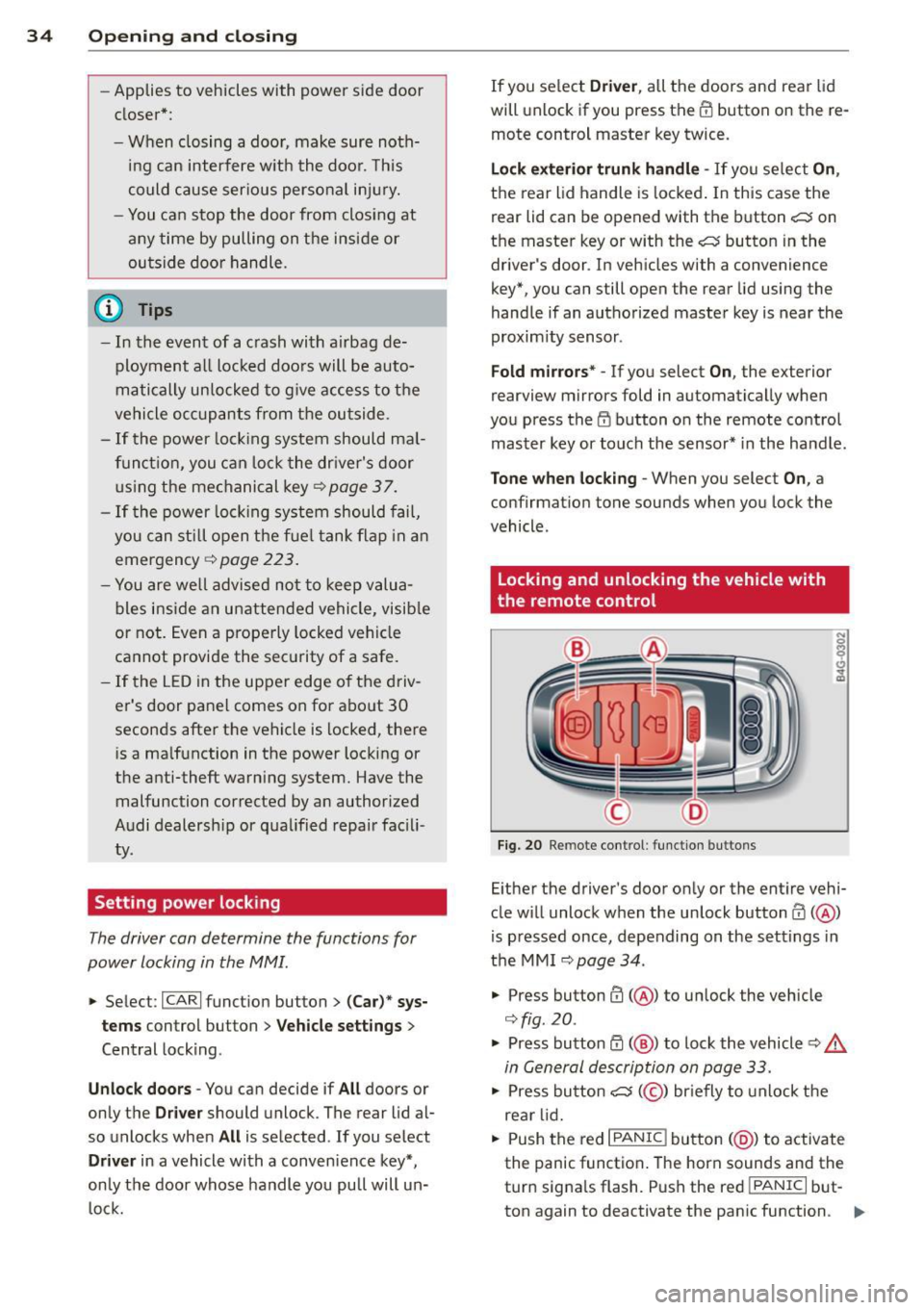
Locking and unlocking the vehicle with
, the remote control
F ig . 20 Re mote co ntrol : funct io n buttons
N 0
q Cl
~
Eithe r the driver's door on ly or the ent ire vehi
cle w ill unlock when the unlock button m
(@ )
is p ressed once, depending on the settings in
the MMI
I:!> page 34.
.,. Press button ffi (@ ) to un lock the vehicle
¢fig. 20.
.,. Press button~( @) to lock the vehicle¢.&
in General description on page 33 .
.,. Press bu tton cs( @) briefly to unlock t he
re ar lid .
.,. Push the red
I PANIC I button (@ ) to activate
the panic function . The horn sounds and the
turn signa ls flash. Push the red
I PANIC I but
ton again to deactivate the pan ic function . .,.
Page 38 of 306
36 Opening and clo sing
- Fo r Declaration of Compliance to United
States FCC and Industry Canada regula
tions
<::> page 288.
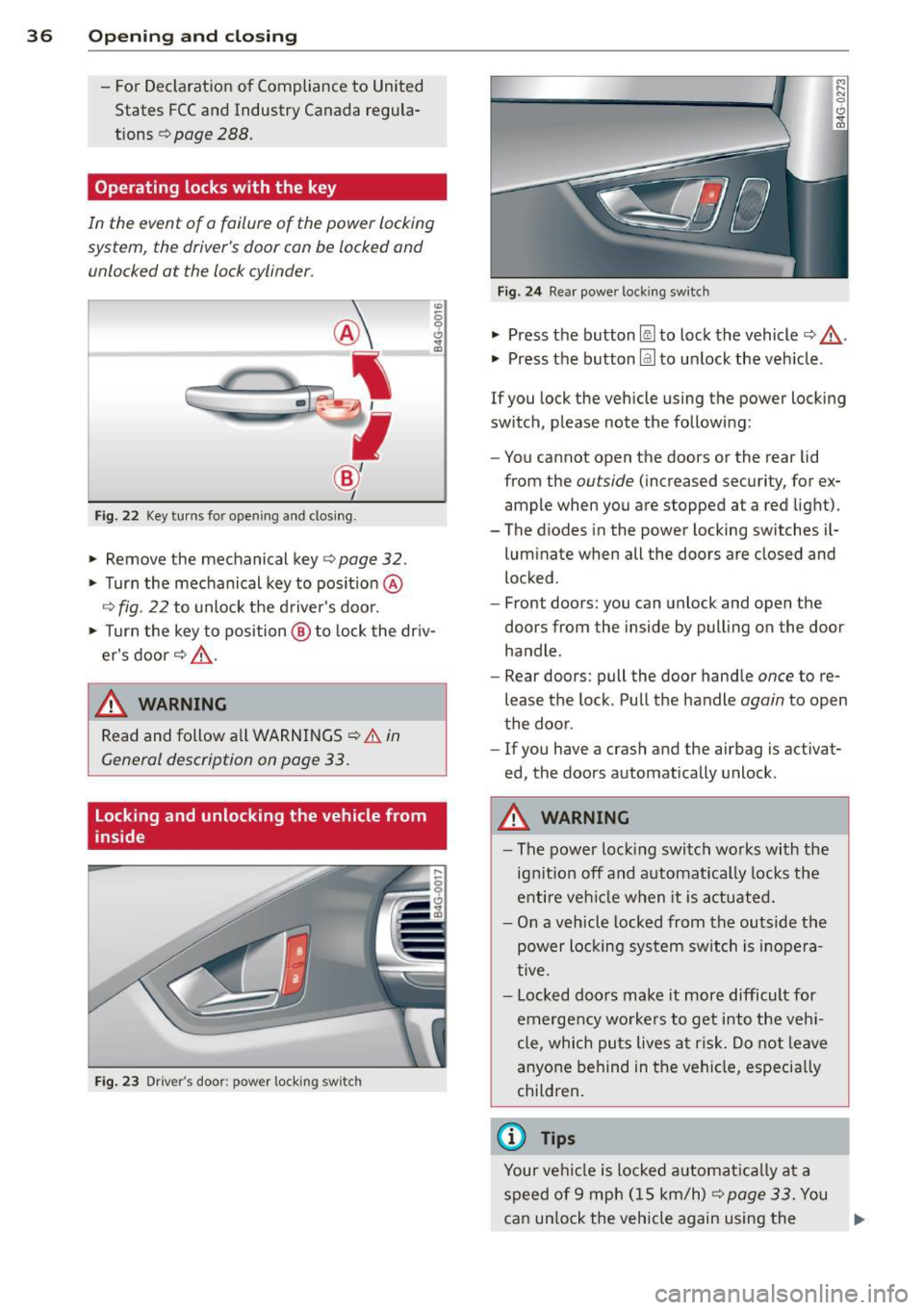
Operating locks with the key
In the event of a failure of the power locking
syst em , the driver 's door can be locked and
unlocked at the lack cylinder .
Fig. 22 Key turns fo r openi ng a nd closing.
"" Remove the mechanical key <=> page 32.
"" Turn the mechanical key to pos it io n @
r::':> fig . 22 to unlock the d river's door.
"' ~ 0 0 c!,
i
"" Turn the key to position @ to lock the dr iv
er's door
<=> ,&. .
.&_ WARNING
Read and follow a ll WARNINGS r::':> & in
General description on page 33.
Locking and unlocking the vehicle from
inside
Fi g. 2 3 Drive r's door ; pow er lo ckin g sw it c h
-
F ig. 2 4 Rear powe r loc king sw itc h
"" Press the button [@ to lock the vehicle <=> ,&. .
"" Press the button@] to unlock the veh icle.
If you lock the vehicle using the power locking
switch, p lease note the followi ng:
- You cannot open the doo rs or the rear lid
from the
ou tside (increased security, for ex
ample when you are s topped at a red light).
- The diodes in the power locking swit ches i l-
lum inate when all the doors are closed and
locked .
- Front doors: you can unlock and open the
doors from the inside by pull ing on the door
handle .
- Rear doors : pull the door hand le
once to re
lease the lock . Pull t he handle
again to open
the door .
- If you have a crash and the airbag is activa t
ed, the doors automatically unlock .
.&_ WARNING
=
-The power loc king swi tch wo rks wi th the
ignit ion off and a utomat ica lly locks the
en tire veh icle when it is a ctuated.
- On a v eh icl e locked from the outside the
power locking system switch is inopera
tive .
- Loc ked doo rs make it more difficult for
emerge ncy worke rs to ge t into the veh i
cle , which pu ts lives at ri sk. Do not leave
a nyo ne behind in the vehi cle, especi ally
chi ldren .
© Tips
Your ve hicl e is l ocked a utomat ically a t a
s p eed of 9 mp h (1 5 km/h)
<=> page 33. You
can un lo ck the vehicle again using the ..,.
Page 44 of 306
42 Clear vision
& WARNING
-Automatic headlights are only intended
to assist the driver . They do not relieve
the driver of his responsibility to check
the headlights and to turn them on man
ually according to the current light and
visibility conditions. For example, fog
cannot be detected by the light sensors.
So always switch on the headlights
io
under these weather conditions and
when driving in the dark.
- Crashes can happen when you cannot see
the road ahead and when you cannot be
seen by other motorists. Always turn on
theheadlightssothatyoucanseeahead and so that others can see your car from
the back .
- Please observe legal regulations when
using the lighting systems described .
(D Note
The rear fog lights should only be turned
on in accordance with traffic regulation, as
the lights are bright for following traffic.
{D) Tips
- The light sensor* for automatic head
light range control* is located in the rear
view mirror mount . You should therefore
not apply any stickers to the windshield
in this area in order to prevent malfunc
tions or failures .
- In the event of a light sensor malfunc
tion, the driver is notified in the instru
ment cluster display ~
page 22 .
-You will hear a warning tone if you open
the driver door when the exterior lights
are switched on.
- In cool or damp weather, the inside of
the headlights, turn signals and tail lights can fog over due to the tempera
ture difference between the inside and
outside. They will clear shortly after
switching them on. This does not affect
the service life of the lighting.
Emergency flasher
The emergency flasher makes other motorists
aware that you or your vehicle are in an emer
gency situation .
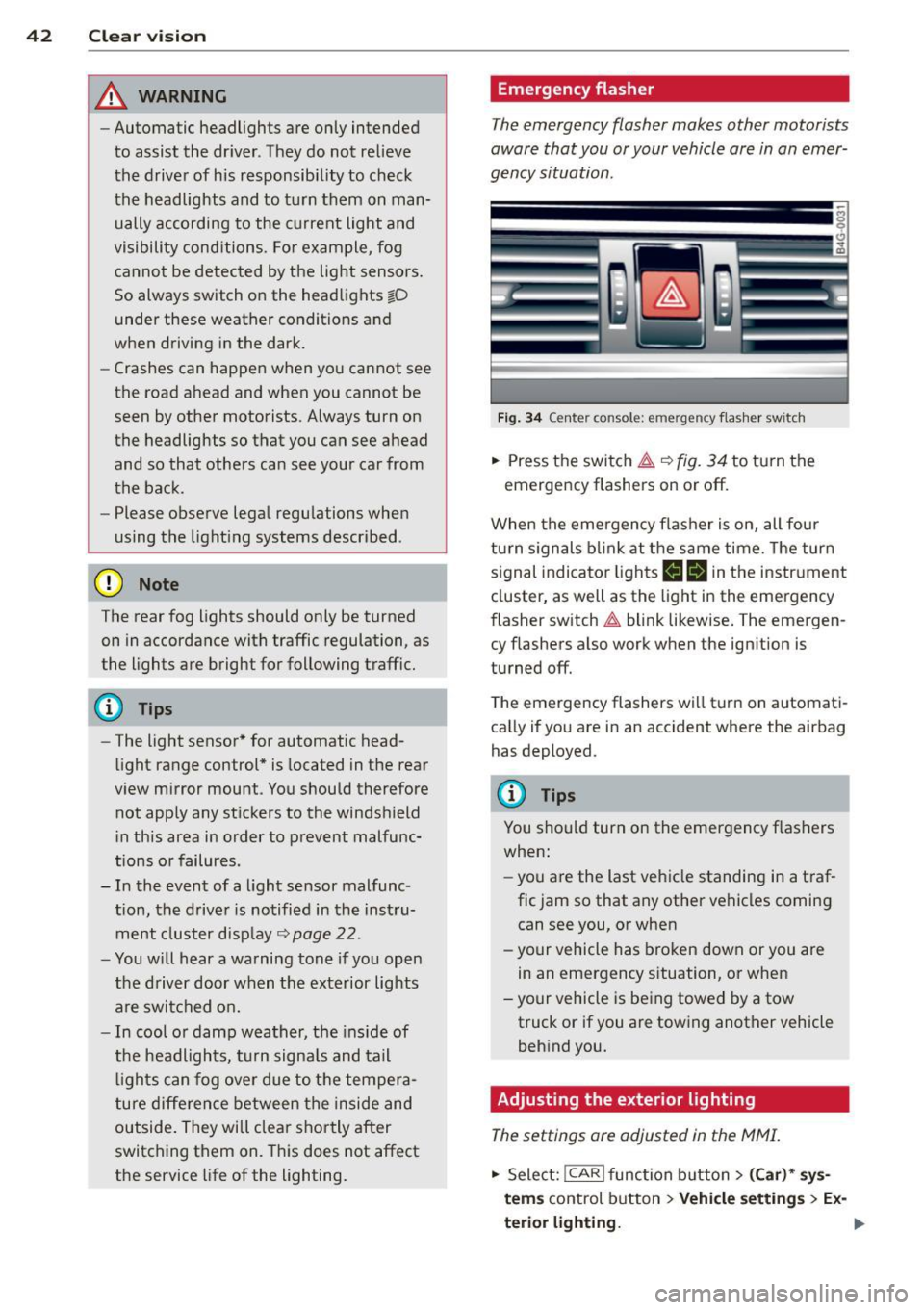
Fig. 34 Ce nte r co nso le: em erg en cy flash er sw itc h
.. Press the switch I:;,,. ~fig. 34 to turn the
emergency flashers on or off.
When the emergency flasher is on, all four
turn signals blink at the same time. The turn
signal indicator lights
B Nin the instrument
cluster, as well as the light in the emergency
flasher switch
I:;,,. blink likewise. The emergen
cy flashers also work when the ignition is
turned off.
The emergency flashers will turn on automati
cally if you are in an accident where the airbag
has deployed.
@ Tips
You should turn on the emergency flashers
when:
- you are the last vehicle standing in a traf
fic jam so that any other vehicles coming
can see you, or when
- your vehicle has broken down or you are
in an emergency situation, or when
-your vehicle is being towed by a tow
truck or if you are towing another vehicle
behind you.
Adjusting the exterior lighting
The settings ore adjusted in the MMI.
.. Select: !CAR ! function button> (Car)* sys
tems
control button > Vehicle settings > Ex-
terior lighting.
Ill>
Page 52 of 306
50 Seat s a nd s tor ag e
Seats and storage
General recommen
dations
Why is your seat adjustment so
important?
The safety belts and the airbag system can
only provide maximum protection if the front
seats are correctly adjusted.
There are various ways of adjust ing the front
seats to provide safe and comfortable support
for the driver and the front passenger . Adjust
you r seat prope rly so that :
- you can easily and quick ly reach all the
switches and controls in the instrument
panel
-your body is prope rly supported thus reduc
ing physical stress and fatigue
- the safety be lts and a irbag system can offer
maximum protection
¢ page 145 .
In the following sec tions, you will see exactly
how you can best adjust you r seats .
There are special regulations and instructions
for insta lling a child seat on the front pas
senger's seat. Always fo llow the information
regarding ch ild safety provided in
q page 171, Child Safety.
A WARNING
Incorrect seating position of the driver and
all other passengers can result in serious
personal in jury.
- Always keep your feet on the floor when
the vehicle is in motion -never p ut your
f eet on top of the instrument panel, out
of the w indow or on top of the seat cush
ion . Th is app lies especially to the passen
gers .
If your seating posi tion is incorrect,
yo u increase the r isk of injury in the case
of sudden braking or an acc ident.
If the
a irbag infla tes and the seating positio n
is incorrect, this could result in personal
injury o r even death.
- It is import ant for bo th the driver and
front passenger to keep a distance of at least 10 inches (25 cm) between them
selves and the steering wheel and/or in
strument panel. If you're s itting any
closer than th is, the a irbag system can
not protect you properly . In addition, the
front seats and head restraints must be
adjusted to your body height so that they
can give you max imum protect ion.
- Always try to keep as much distance as
possible between yourself and the steer
ing wheel o r inst rument pane l.
- Do not adjust the driver's o r front pas
senger's seat whi le the vehicle is moving.
Your sea t may move unexpected ly, caus
ing sudden loss of vehicle cont rol and
personal injury . If you adjust yo ur seat
while the veh icle is moving, yo u are out
of posit ion.
Driver's seat '
The correct seat position is important for safe
and relaxed driving.
We recommend tha t you adjus t the dr iver's
seat in the fo llowing manner :
.,. Adjust t he seat in fo re and aft direction so
t ha t you can eas ily pus h the peda ls to the
floor w hile keeping your knees sl igh tly bent
q A in Why is your seat adjustment so im
portant? on page 50.
.. Adjust the back rest so that when you sit
w ith your back against t he backrest, you can
still grasp the top of the steering wheel.
.. Adjust the head restraint so the upper edge
is as even as poss ible with the top of your
head . If that is not poss ible , try to adjust
t he head restraint so that it is as close to
t his pos it ion as possib le
q page 53.
A WARNING
Neve r place any objects in the dr iver's foot
well. An object could get into the pedal
area and interfere with pedal function . In
case of sudden braking or an acc ident, you
would not be able to brake or accelerate .
Page 53 of 306
Front passenger's seat
Always move the front passenger seat into the rearmost position .
To avoid contact with the airbag while it is de
ploying, do not sit any closer to the instru
ment panel than necessary and always wear
the three-point safety belt provided adjusted correctly . We recommend that you adjust the
passenger's seat in the following manner:
.. Bring the backrest up to an (almost) upright
pos it ion .
Do not ride with the seat reclined .
.. Adjust the head restra int so the upper edge
i s as even as possib le wit h the top of you r
head.
If that is not possib le, try to adjust
the head restraint so that it is as close to
this position as possible
r::!> page 53.
.. Place your feet on the floor in front of the
passenger's seat.
Front seats
Controls
Moving the seat forward or back and adjust
ing the height, backrest angle and seat an
gle.
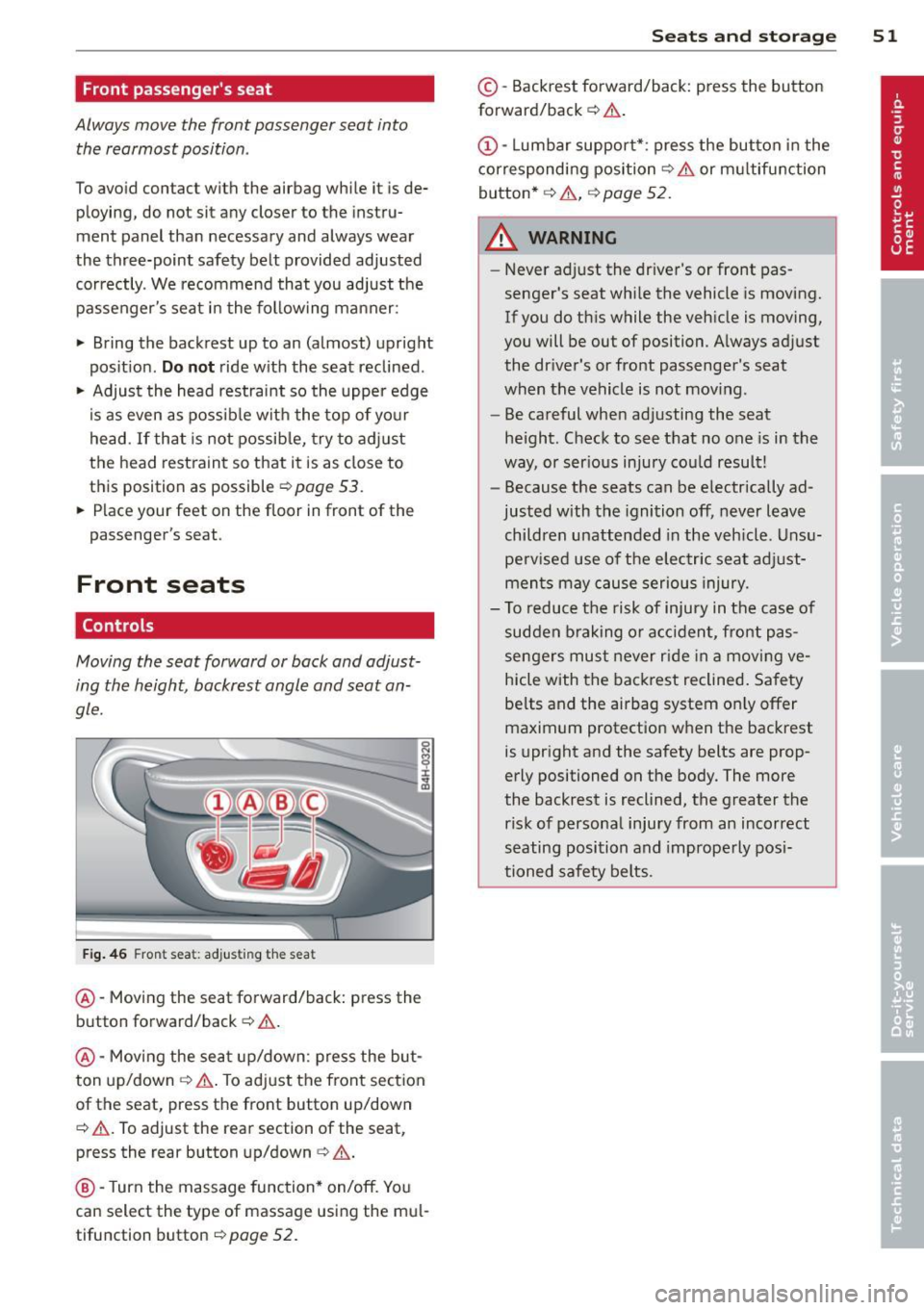
F ig . 46 Fron t seat: adjus ting the sea t
@-Mov ing the seat forward/back: press the
button forward/back
c::> .&, .
@ -Mov ing the sea t up/down: p ress the but
ton up/down
r::!> ,& . To ad just the front sect ion
of the seat, press the front button up/down
c::> .&, . To adjust the rear section of the seat,
press the rear button up/down
c> ,& .
@ -Turn the massage function* on/off. Yo u
can select the type of massage using the mu l
tifunction button
c> page 52.
S ea ts a nd s to rage 51
© -Backrest forward/back: press the button
forward/back
r::!> .&, .
(!)-Lumbar support* : press the button in the
corresponding position
r::!> .& or multifunction
button*
c::> .& , c::> page 52.
A WARNING
-
-Never adjust the driver's or front pas
senger's seat whi le the vehicle is moving.
If you do this while the veh icle is moving,
you will be out of position. A lways adjust
the dr iver's or front passenger's seat
when the vehicle is not moving .
- Be careful when adjusting the seat
he ight. Check to see that no one is in the
way, or serious injury cou ld result!
- Because the seats can be e lectrically ad
justed with the ignition off, never leave
children unattended in the veh icle. Unsu
perv ised use of the electric sea t ad just
ments may cause serious injury.
- To reduce the risk of injury in the case of
sudden braking or accident, front pas
sengers mus t never r ide in a moving ve
hicle with the backrest reclined. Safety
be lts and the airbag system on ly offer
maximum protection when the backrest
is upright and the safety belts are prop
erly positioned on the body. The more
the backrest is reclined, the greater the risk of personal injury from an incorrect
seating position and improperly posi
tioned safety belts.
Page 54 of 306
52 Seats and st o rag e
Multifunction button
Appl ies to vehicles: with memory function
You can adjust the massage function, lumbar
support, side bolsters and seating surface us
ing the multifunction button .
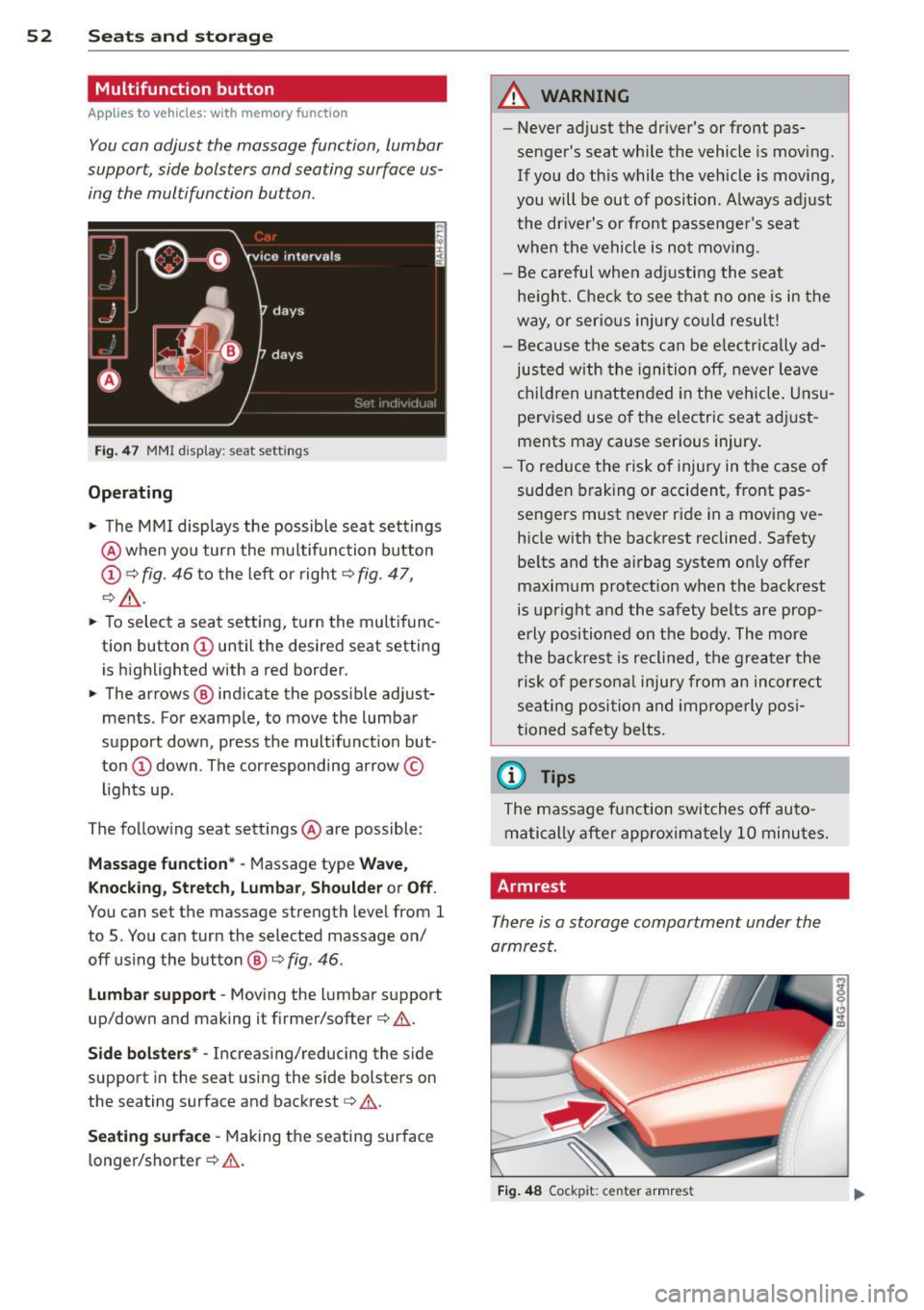
Fig. 4 7 MMI display: seat settings
Operating
• The MMI displays the possible seat settings
@ when you turn the mu ltifunction button
(D ¢ fig. 46 to the left or right¢ fig . 47,
¢ _&. .
• To select a seat setting, t urn the multifunc
tion button
(D until the desired seat setti ng
is highlighted with a red border.
• The arrows @ indicate the possib le adjust
ments. For example, to move the lumbar
support down, press the multifunct ion but·
ton
(D down . The corresponding arrow©
lights up .
The follow ing seat settings @ are possible:
Mas sage fun ct ion* · Massage type Wave,
Knockin g, Stretch, lumbar , Sho ulde r or Off.
You can set the massage strength level from 1
to 5. You can turn the selected massage on/
off using the button@¢
fig. 46.
lu mb ar su pport -Moving the lumbar support
up/down and making it firmer/softer¢ .&..
Side bol ste rs* -Increasing/reducing the side
support in the seat using the side bolsters on
the seating surface and backrest
q &.
Seating surfac e -Making the seating surface
longer/shorter¢ .&..
A WARNING
--Never adjust the driver's or front pas·
senger's seat whi le the vehicle is moving.
If you do th is while the veh icle is moving,
you will be out of position. A lways adj ust
the dr iver's or front passenge r's seat
when the vehicle is no t mov ing.
- Be careful when ad justing the seat
he ight. Check to see that no one is in the
way, or serio us injury co ul d resu lt!
- Because the seats can be e lectrically ad
justed with the igni tion off, never leave
child ren unattended in the veh icle. Uns u
pervised use o f the electric seat adj ust
ments may cause serious injury.
- To reduce the risk of injury in the case of
sudden braking or accident, front pas
sengers must never ride in a moving ve
hicle with the backrest reclined. Safety be lts and the airbag system only offer
maximum protection when the backrest is upr ight and the safety belts are prop·
erly positioned on the body. The more
the backrest is reclined, the greater the
ris k of persona l injury from an incor re ct
seating position and improperly posi
tioned safety belts.
(D Tips
The massage fun ction switches off auto·
matically after approximately 10 minutes.
Armrest
There is a storage compartment under the
armrest.
F ig . 4 8 Cockp it: center armrest
Page 61 of 306
-Any articles of cloth ing that you have
hung up must not interfere with the driv
er's view. The coat hooks are designed
only for lightweight clothing. Never hang
any clothing w ith hard, pointed or heavy
objects in the pockets on the coat hooks. During sudden braking or in an accident -
especially if the airbag is deployed -
these objects could injure any passen
gers inside the vehicle.
- To reduce the r isk of personal injury in an
acc ident or sudden stop, always keep the
glove compartment closed whi le driving.
- Read and fo llow all WARN INGS
~ page 167, Important safety instruc
tions on the side airbag system.
- Hang clothes in such a way that they do
not impair the driver's v ision .
- T he coat hooks m ust only be used for
lightwe ight clothing. Do not leave any
heavy or sharp edged objects in the pock
ets which may interfere with the side cur
tain a irbag deployment and can cause
persona l injury in a crash.
- Do not use coat hangers for hanging
clothing on the coat hooks as this can in
terfere with proper deployment of the
side curtain airbags in an accident.
- Do not hang heavy objects on the coat
hooks, as they cou ld cause personal in
jury in a sudden stop.
- For strength-related reasons, the mount
ing hooks can only be used to secure ob
jects weighing up to 10 lb. (5 kg). Heavi er objec ts will not be adequately secured
- there is a risk of injury.
(D Note
Objects located on the rear shelf that rub
aga inst the rear w indow cou ld damage the
heating wires for the rear w indow defog
ge r.
S ea ts a nd s to rage 59
Roof rack
Description and mounting locations
Additional cargo can be carried with a roof
luggage rack.
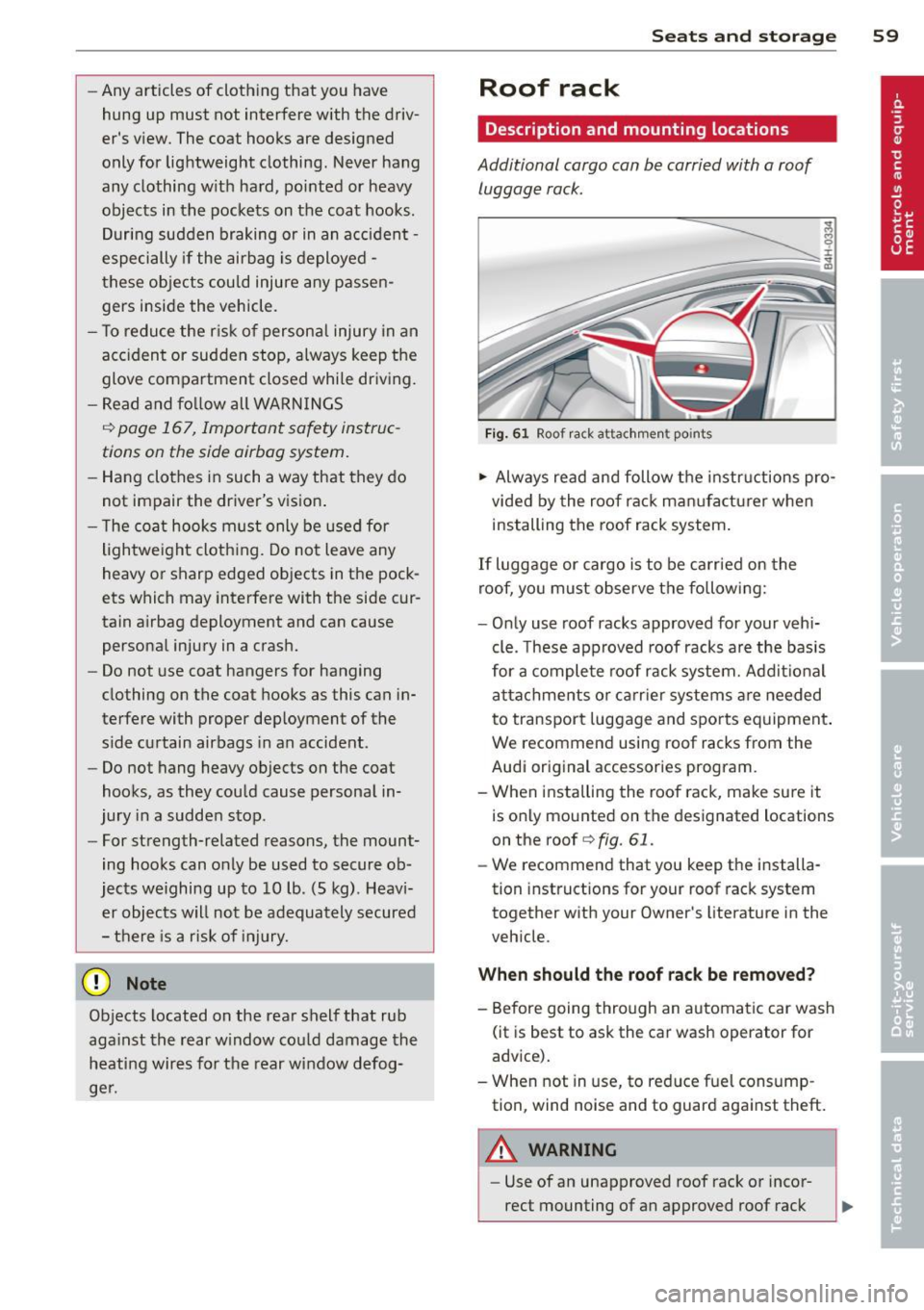
Fi g. 61 Roof r ack attac hment points
.,. Always read and follow the instructions pro
vided by the roof rack man ufacturer when
installing the roof rack system .
If luggage or cargo is to be carried on the
roof, yo u must observe the following:
- Only use roof racks approved for your vehi
cle. These approved roof racks a re the basis
for a comple te roof rack system. Add it iona l
attachments or ca rr ier systems a re needed
to transport luggage and sports equipment .
We recommend using roof racks from the
Audi original accessories program.
- When installing the roof rack, make sure it
is only mounted on the designated locations
on the roof
q fig. 61 .
-We recommend that you keep the installa
tion instructions for your roof rack system
together with your Owner's literature in the
veh icle.
When should th e roof rack be removed?
- Before going through an automatic car wash
(it is best to ask the car wash operator for
advice).
- When not in use, to reduce fue l consump
tion, wind noise and to guard aga inst theft.
A WARNING
- Use of an unapproved roof rack or incor
rect mounting of an approved roof rack
Page 72 of 306
70 On the road
On the road
Steering
Manually adjustable steering wheel
Applies to vehicles: with man ua lly adjustable steering
w hee l
The height and reach of the steering wheel
can be adjusted .
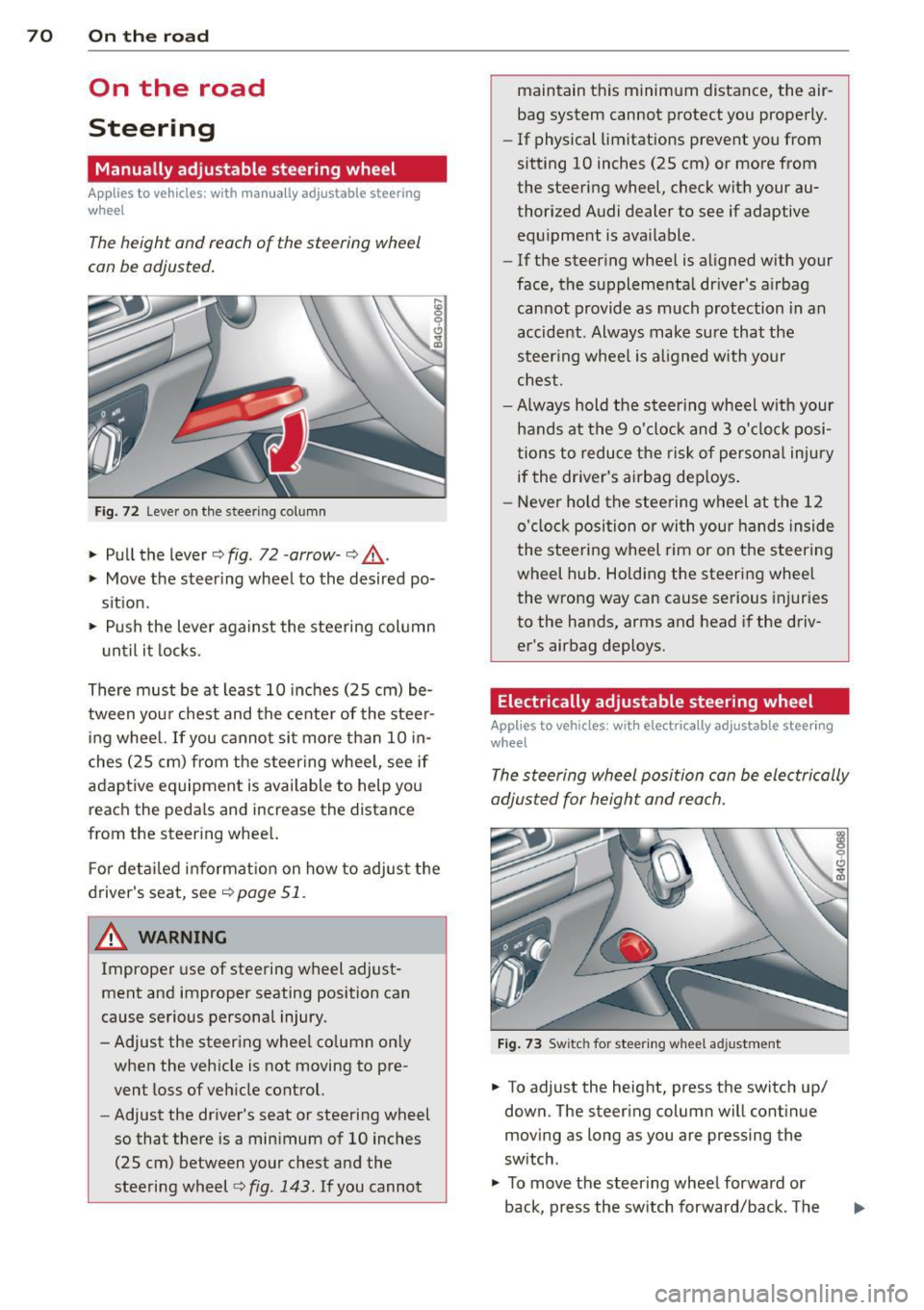
Fig. 72 Leve r on the stee rin g co lumn
" Pull the lever c::> fig . 72 -arrow -c::> &_.
" Move the steer ing wheel to the desired po
s it ion.
" Push the lever against the steering column
u ntil it locks.
There must be at least 10 inches (25 cm) be
tween you r chest and the center of the steer
ing wheel.
If you cannot si t more than 10 in
ches (25 cm) from the steer ing whee l, see if
adaptive equipment is available to help yo u
reach the peda ls and increase the distance
from the steer ing whee l.
F or deta iled informat ion on how to adjust the
driver's seat, see
c::> page 51 .
~ WARNING
Improper use of steering wheel adjust
ment and improper seating position can
cause serious persona l injury.
- Adjust the steering whee l co lumn on ly
when the veh icle is not moving to pre
vent loss of veh icle control.
-
- Adjust the driver's seat or steering wheel
so that there is a minimum of 10 inches
(25 cm) between your chest and the
steering wheel
c::> fig . 143 . If you cannot maintain this minimum distance, the air
bag system cannot protect you properly.
-
If physical limitations prevent you from
sitting 10 inches (25 cm) or more from
the steering wheel, check with your au
thorized Audi dealer to see if adaptive equ ipment is ava ilable .
- If t he steer ing wheel is aligned with your
face, the supplementa l driver's a irbag
cannot provide as much protection in an
accident . Always make sure that the
steer ing wheel is aligned with your
chest.
- Always hold the steering wheel w ith your
hands at the 9 o'clock and 3 o'clock posi
tions to reduce the risk of persona l injury
if the driver's airbag dep loys .
- Never hold the stee ring wheel at the 12
o'clock position or wi th your hands inside
the steeri ng wheel rim or on the steering
wheel hub . Ho lding the steering wheel
the wrong way can cause se rious injuries
to the hands, arms and head if the driv
er's airbag deploys.
Electrically adjustable steering wheel
App lies to vehicles: wit h electrically adj ustable stee ring
wheel
The steering wheel position can be electrically
adjusted for height and reach.
Fig . 73 Sw itc h fo r steering whee l adju stment
" To adjust the height, press the switch up/
down. The steer ing column will cont inue
moving as long as you are pressing the
switch .
" To
move the steer ing wheel forward or
back, press the sw itch forward/back . The