trailer AUDI S6 2014 User Guide
[x] Cancel search | Manufacturer: AUDI, Model Year: 2014, Model line: S6, Model: AUDI S6 2014Pages: 304, PDF Size: 76.32 MB
Page 126 of 304
124 Park in g s yste m s
Trailer view
Applies to vehicles: with par king system p lus and tra iler
hitch
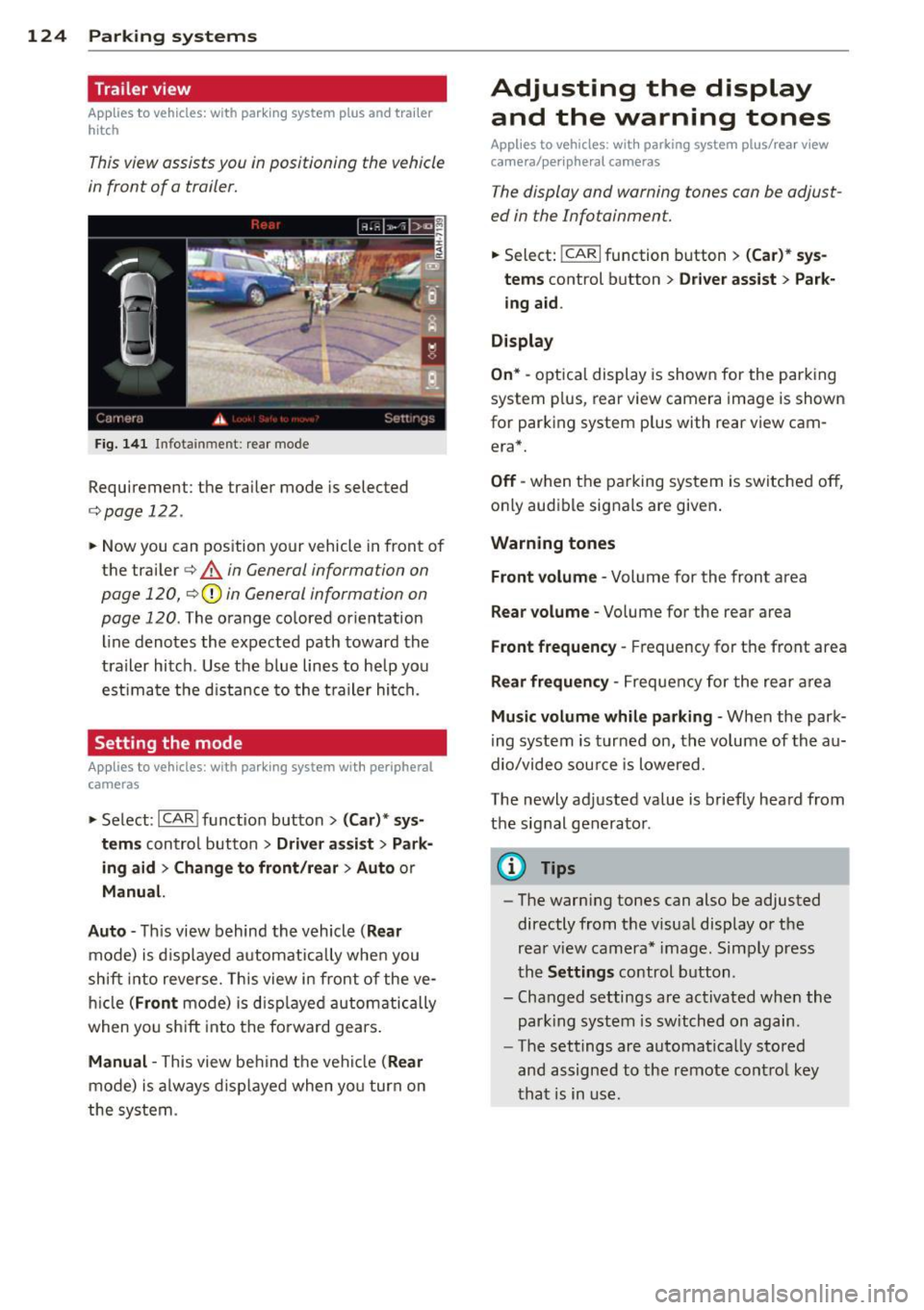
This view assists you in positioning the vehicle
in front of a trailer.
F ig. 1 41 Infotainment: rear mode
Requirement: the trailer mode is selected
c:;,page 122.
.. Now you can pos ition your vehicle in front of
the trailer
c:;, A in General information on
page 120,
c:;, (D in General information on
page 120.
The orange colored orientation
line denotes the expected path toward the
trailer hitch . Use the b lue lines to he lp you
est imate the d istance to the t railer hi tch.
Setting the mode
A ppl ies to vehicles: with park ing system wit h peripheral
cameras
.. Se lect : I CAR I func tion button> (Car )* sys
t e m s
control button > Dri ver as sis t > Park
ing aid > Ch ange to front /re ar > Aut o
or
Manua l.
A uto -
Th is view behind the vehicle ( Rea r
mode) is d isplayed automatically when you
shift into reverse. This view in front of the ve
h icle
( Fron t mode) is d isp layed automatically
when you sh ift into the fo rward gears .
Manual -This view behind t he vehicle (Rear
mode) is a lways d is p layed when you turn on
the system .
Adjusting the display
and the warning tones
Applies to vehicles: wit h parking system plus/ rea r vi ew
came ra/ peri pheral cameras
The display and warning tones can be adjust
ed in the Infotainment.
.. Select: !CARI function button > ( Car )* sys
tem s
control button > Drive r a ssist > Par k
in g a id .
Di splay
On * -
optical display is shown for the parking
system p lus, rear view camera image is shown
for parking system plus with rear view cam
era*.
Off -when the parking system is switched off,
only audible signals are given .
Warning tones
Fr ont volume -
Volume for the front area
Rear volume -Volume for the rear area
Front frequency -Frequency for the front area
Rear frequen cy -Frequency for the rear area
Mu sic v olum e wh ile parkin g -When the park
ing system is turned on, the volume of the au
dio/video sou rce is lowered.
The newly adjusted value is briefly heard from
the signal generator .
@ Tips
-The warn ing tones can also be adjusted
directly from the visual display o r the
rear v iew camera* image. Simply press
the
Setting s control button .
- Changed settings are act ivated when the
park ing system is switched on again.
- The settings are automatica lly stored
and assigned to the remote control key
that is in use .
Page 127 of 304
Error messages
Applies to vehicles: with parking system plus/rear view
camera/per ipheral cameras
There is an e rror in the system if the LED in
the
p, qA button is blinking and you hear a con
tinuous alarm for a few seconds afte r switch
ing on the parking system or when the park
ing system is already activated. If the error is
not corrected before you switch off the igni
tion, the LED in the
Pw.6. button will blink the
next time you switch on the parking system by
shifting into reverse.
Parking system plus
If a sensor is faulty, the~ symbol will appear
in front of/behind the vehicle in the Infotain
ment display. If a rear sensor is fau lty, only
obstacles that are in areas @ and @ are
shown ¢
page 115, fig. 118. If a front sensor
i s faulty, only obstacles that are in areas ©
and @are shown .
Peripheral cameras*
There is also a system error if:
- the
'(:8:)• • symbol appears in the display and
the corresponding display area is shown in
blue. The camera is not working in this area.
- all segments around the vehicles are red or
if no segments are displayed.
Drive to your authorized Aud i dea ler o r au
thorized repair fac ility immediately to have
the ma lfunction corrected.
Trailer hitch
Appl ies to vehicles: with parking system plus/rear view
camera/per ipheral cameras and trailer hitch
For vehicles using the tra iler socket, the park
ing system rear senso rs do not turn on when
you shift into reverse gear or when yo u press
the P
01A button. This results in the following re
strictions:
Parking system plus*
There is no distance wa rning for the rear. The
front sensors rema in activated. The visual dis
play switches to the traile r tow ing mode.
Parking systems 125
Parking system plus and rear view
camera* /Peripheral cameras*
There is no distance warning for the rear. The
front sensors remain activated. The visual dis
play sw itches to the trailer towing mode. The
rear view camera image will not show the ori
entation lines and the blue surfaces .
{D Tips
Trailer hitches that are not installed at the
factory may cause the park ing system to
malfunction or they may restr ict its func
tion.
Page 196 of 304
194 Intelligent technology
Intelligent technology
Notice about data
recorded by vehicle
control modules
Your veh icle is not equipped with an Event Da
ta Recorde r (EDR), installed by some manu
facturers fo r the express p urpose of capturing
data for retrieval after an accident or crash
event . EDR's are sometimes ca lled "crash re
corders".
Some state laws restr ict the retr ieval or down
loading of data stored by EDR's that were in
stalled in a vehicle for the express purpose of retrieving data after an accident or crash
event without the owner's consent.
A lthough your vehicle is not equipped with an
EDR, it is equipped with a number of electron
ic control modules for various vehicle systems
such as, for examp le, eng ine function, em is
sion control, as well as for the airbags and
safety belts.
These electronic contro l modules also record
vehicle-re lated data during norma l vehicle op
erat ion for diagnostic and repa ir purposes.
The recording capacity of the electronic con
trol modules is limited to data (no sound is re
corded) and only a small amount of data is ac
tually recorded over a ve ry limited pe riod of
time and stored when a system fault or other
cond ition is sensed by a cont ro l unit. Some of
the data then stored may re late to vehicle
speed, direction, braking as we ll as restraint
system use and performance in the event of a
crash or other condit ion. Stored data can only
be read and downloaded with special equip
ment.
Electronic Stabilization
Control (ESC)
Description
ESC helps to improve road holding and vehicle
dynamics to help reduce the probability of
skidd ing and loss of vehicle control. It works
only when the eng ine is running. ESC detects certain difficult driving situat
ions, including
when the vehicle is beginning to spin (yaw)
out of control and he lps you to get the veh icle
back under control by se lectively braking the
wheels, and/or reducing eng ine power and
providing steer ing ass istance to he lp hold the
vehicle on the dr iver's intended course. The in
dicator light
G) in the inst rument cluster
blinks when ESC is ta king action to help you
control the veh icle.
ESC has limitations.
It is importa nt to remem
ber that ESC cannot overcome the laws of
physics. It wi ll not always be able to help out
under a ll cond it ions you may come up aga inst.
For example, ESC may not always be able to
help you master situations where there is a
s u dden change in the coefficient of friction of
the road surface. When there is a section of
dry road that is sudden ly covered w ith water,
slush or snow, ESC cannot perform the same
way it wou ld on the dry surface . If the ve hicle
hydroplanes (rides on a cushion of water in
stead of the road surface), ESC will not be
able to help you steer the vehicle because con
tact with the pavement has been in terrupted
and the vehicle cannot be braked or steered .
D uring fast cornering, particularly on winding
roads, ESC cannot always deal as effectively
with difficult driving situations than at lower
speeds. When towing a trailer, ESC is not able
to help you regain control as it would if you
were not tow ing a trailer.
Always adjust your speed and driving style to road, traffic and weather condit ions. ESC can
not override the vehicle's physical limits, in
crease the available tract ion, or keep a ve hicle
on the road if road departure is a result of
drive r inattent ion. Instead, ESC imp roves the
poss ibil ity of keeping the vehicle under con
trol and on the road during ex treme maneu
vers by using the d river's steering inputs to
help keep the vehicle going in the intended di
rection . If you are traveling at a speed that
ca uses you to run off the road before ESC can
provide any assistance, you may not experi
ence the benefits of ESC.
Page 208 of 304
206 Trailer towing
Trailer towing
Driving with a trailer
General information
Your Audi was designed primarily for passen
ger transportation .
If you plan to tow a trailer, p lease remember
that the additional load will affect durability,
economy and performance .
Trailer towing not on ly places more stress on
the vehicle, it also calls for more concentra
tion from the driver.
For this reason, always follow the operating
and driving instructions provided and use
common sense.
@ Note
If you are going to tow a trai ler, you must
activate the trailer operation mode
c:::> page 206, Operating instructions.
Technical requirements
Trailer hitch
Use a weight-carrying hitch conforming to the
gross trailer weight. The hitch must be suita ble for your vehicle and trailer and must be
mounted securely on the vehicle's chassis at a
technically sound location . Use only a trailer
hitch with a removable ball mount. Always
check with the trailer hitch manufacturer to
make sure that you are using the cor rect
hitch.
Do not use a bumper hitch.
The hitch must be installed in such a way that
it does not interfere with the impact-absorb
ing bumper system. No modifications should
be made to the vehicle exhaust and brake sys
tems . From time to time, check that all hitch
mounting bolts remain securely fastened.
When you are not towing a trailer, remove the
trai ler hitch ball mount. This prevents the
hitch from causing damage should your vehi
cle be struck from behind
c:::> A.
Trailer brakes
If your trailer is equipped with a brakin g sys
tem, check to be sure that it conforms to all
regulations.
T he trailer hydraulic brake system must not be
directly connected to the vehicle's hydraulic
brake system .
Safety chains
Always use safety chains between your veh icle
and the trailer.
Trailer lights
Trailer lights must meet all regulations. Be
sure to check with your Audi dealer for correct
wiring, switches and relays.
Mirrors
If you are unable to see the traffic behind you
using the regular outside mirrors, then you
must install extended mirrors. It is important
that you
always have clear v is ion to the rear .
A WARNING
--
After removing the trailer hitch, do not
store it in your vehicle . In case of sudden
braking, the hitch could fly forward and in
jure you or your passengers.
Operating instructions
Maximum trailer weight
A trailer for your vehicle is limited to a typical
class 1 or class 2 trailer.
Trailer load distribution
Be sure the load in the trailer is held securely
in place to prevent it from shift ing forward,
backward or sideways.
Never allow a passenger to ride in a trailer
c:::> A in Driving instructions on page 208.
Engine cooling system
Towing a trailer makes the engine work hard
er . It is important that the cooling system 's
performance is up to the additional load.
Page 209 of 304
Make sure that the cooling system has enough
fluid.
Tire pressure
When towing a trailer, inflate the tires of your
vehicle to the cold tire pressure listed under
"Full load" on the label located on the driver's
side B-pillar (visible when the door is open).
Inflate trailer tires to trailer and tire manufac
turers' specifications.
Lights
Check to make sure both vehicle and trailer
lights are working properly.
Safety chains
Be sure trailer safety chains are properly con
nected from the trailer to the hitch on the ve
hicle. Leave enough slack in the chains to per
mit turning corners . When you install safety
chains, make sure they will not drag on the
road when you are driving.
The chains should cross under the trailer
tongue to prevent it from dropping in case of
separation from the hitch.
Adjusting the Audi drive select
Make sure the vehicle is on a level surface be
fore hitching up the trailer and before adjust
ing the tongue weight. The vehicle must be in
auto or comfort driving mode and not raised
qpage 100, ~CD .
Make sure that the vehicle is lowered. In Info
tainment, select:
ICARI function button> Low
er
control button.
If you must drive under poor road conditions,
you can raise the vehicle
after coupling the
trailer or
after adjusting the tongue weight
qpage 102.
- Changes in temperature or load can af
fect the height of the vehicle .
- Always select
auto or comfort mode.
Otherwise, the tongue load specified for
your vehicle will no longer be applicable.
Trailer towing
Driving instructions
Driving with a trailer always requires extra
care and consideration .
To obtain the best possible handling of vehicle
and trailer, please note the following:
... Do not tow a loaded trailer when your car it
self is not loaded.
... Be especially careful when passing other
vehicles.
... Observe speed limits .
... Do not drive at the maximum permissible
speed.
... Always apply brakes early .
... Monitor the temperature gauge.
Weight distribution
Towing a loaded trailer with an empty car re
sults in a highly unstable distribution of
weight. If this cannot be avoided, drive at very
low speeds only to avoid the risk of losing
steering control.
A "balanced" rig is easier to operate and con
trol. This means that the tow vehicle should
be loaded to the extent possible and permissi
ble, while keeping the trailer as light as possi
ble under the circumstances. Whenever possi
ble, transfer some cargo to the luggage com
partment of the tow vehicle while observing
tongue load requirements and vehicle loading
considerations.
Speed
The higher the speed, the more difficult it be
comes for the driver to control the rig. Do not
drive at the maximum permissible speed. Re
duce your speed even more if load, weather or
wind conditions are unfavorable -particularly
when going downhill .
Reduce vehicle speed
immediately if the trail
er shows the slightest sign of swaying .
Do not
try to stop the swaying by accelerating.
Observe speed limits. In some areas, speeds
for vehicles towing trailers are lower than for
regular vehicles . ..,..
207
•
•
Page 210 of 304
208 Trailer towing
Always apply brakes early. When driving
downhill, shift into a lower gear to use the en
g ine braking effect to slow the vehicle . Use of
the brakes alone can cause them to overheat
and fail.
Coolant temperature
The coolant temperature gauge¢ page 11
must be observed carefully. The coolant tem
perature can increase if you drive on long in
clines in a low gear at high engine speeds. Re
duce your speed immediately if the LEDs in
the top part of the display turn on .
For more information about indicator lights,
refer to.
¢ page 17 .
A WARNING
Anyone not properly restrained in a mov
ing vehicle is at a much greater risk in an
accident . Never let anyone r ide in your car
who is not properly wear ing the restraints
provided by Aud i.
Trailer towing tips
Important to know
Your vehicle handles differently when towing
a trailer because of the additional weight and
different weight distribution . Safety, perform
ance and economy w ill greatly depend on how
carefully you load your trailer and operate
your rig .
Before you actually tow your trailer, practice
turn ing, stopp ing and back ing up in an area
away from traffic. Keep practicing until you
have become comp lete ly familiar with the way
your ve hicle-trai ler comb ination behaves and
responds.
Backing up is difficult and requires practice .
Backing up with a tra iler generally requi res
steering act ion opposite to that when backing
up your vehicle without a trailer.
Maintain a greater distance between your ve
hicle and the one in front of you. You will need
more room to stop. To compensate for the trailer, you wi
ll need a larger than normal
turning radius.
When passing, remember that you cannot ac
celerate as fast as you norma lly would be
cause of the added load. Make sure you have
enough room to pass . After passing, a llow
plenty of room for your trailer before chang
ing lanes again.
Avoid jerky starts , sharp turns or rapid lane
changes.
(D Tips
- Do not tow a trailer during the break-in
period of your vehicle.
- If you tow a trailer, your Audi may re
quire more frequent maintenance due to
the extra load ¢
page 283.
Parking on a slope
Do not park on o slope with a trailer. If it can
not be avoided, do so only after doing the fol
lowing:
When parking:
.,. App ly the foot brake .
.. Have someone place chocks under both the
vehicle and the trailer wheels.
.. With chocks in place, slowly release the
brakes until the wheel chocks absorb the
load .
.. Turn the wheels towards the curb.
.. Apply the parking brake.
.. Select the P selector lever position .
When restarting after parking:
.. Apply the foot brake.
.. Start the engine.
.. Select the D/S selector lever position .
.. Release the parking brake and slowly pull
out and away from the wheel chocks .
.,. Stop and have someone retr ieve the wheel
chocks .
Ill-
Page 211 of 304
@ Tips
If you move the selector lever of the auto
mat ic transm ission to P before app lying
the parking brake and before blocking the
wheels, you may have to use more force later to move the lever out of the P posi
tion .
Trailer towin g 209
•
•
Page 248 of 304
24 6 T ire s and whee ls
The correct tire pressure for the spare wheel is
located on a label on the driver's side B-pillar.
Because tec hnical changes may be made to
vehicle equ ipment dur ing the model year, a l
ways compare the tire size designation on the
tire pressure labe l on your vehicle with the
tires on your vehicle . Make sure that the tire
si ze information on the vehicle label is the
same as the si ze of the tires on the vehicle.
This is especially important if the vehicle be
longs to someone else or you bought the veh i
cle with different rims/tires or you bought the
vehicle as a p reviously owned vehicle.
Remember, your safety and that of your pas
sengers also depends on mak ing sure that
l oad limits are not exceeded. Vehicle load in
cludes everybody and everything in and on the
ve hicl e. These load limits are technically refer
red to as the vehicle's Gross Vehicle Weight
Rating ("GVWR") . The Gross Ax le Weight Rat
ing ("GAWR") is the maximum load that can
be applied at each of the veh icle's two axles.
The Gross Vehicle Weight Rating and the
Gross Axle Weight Rating are listed on the
safety compliance st icker labe l located on the
driver 's side B-p illar . The tire pressure label on
your Aud i lists the maximum combined
weight of all of the occupants and luggage or
o ther cargo that the vehicle can carry. For the
l ocation of the tire pressu re labe l
i=:> fig. 195.
A WARNING
Overloading a vehicle can cause loss of ve
hicle control, a cras h or other accident, se
r ious personal injury, and even death.
- Carrying more weight than yo ur vehicle
was designed to carry will prevent the
vehicle from handling properly and in
crease the risk of a loss of veh icle con
trol.
- The brakes on a veh icle that has been
overloaded may not be able to stop the
vehicle within a safe distance.
- Tires on a vehicle that has been overload
ed can fail suddenly causing loss of con
trol and a crash . -
Always make sure that the total load be
ing transported - including the weight of
a trailer hitch and the tongue we ight of a
loaded trailer -does not make the vehi
cle heavier than the vehicle's G ross Vehi
cle Weight Rating.
A WARNING
-- I ncorrect tire pressures and/or underin-
flation can lead to a serious or fatal acci
dent.
- I nco rrect tire pressures and/or underin
flation cause increased ti re wear and can
affec t the handling of the vehicle .
- I nco rrect tire pressures and/or underin
flation can a lso lead to s udden t ire fail
ure, including a blowou t and sudden de
flation, ca using loss of veh icle cont ro l.
Checking tire pressure
The correct tire pressure for the tires original
ly installed on your vehicle is listed on the tire
pressur e label located on driver's side 8-pil
lar .
The recommended tire pressures are on the
t ir e pressure label and in the table
i=:> page 244, Cold tire inflation pressure.This
means that the pressure m ust be checked and
adjusted when the t ire has not been dr iven for
more than a couple of miles (kilometers) at
low speeds during the previous three hours.
Air in the tires expands when the tire heats up as a result of inter nal frict ion as it flexes in
u se . T he t ire pressure is higher when the tire
has warmed up t han whe n it is "co ld. "
It is the inflation pressure in a "co ld" t ire that
counts . The refore, you should never let a ir out
of a wa rm tire to match "Cold t ire inflat ion
pressure" recomme ndat ions
i=:, page 244 . The
t ir es wo uld then be unde rinflated and co uld
fail suddenly .
T he t ire pressure label on your Audi lists the
recommended co ld tire inflation pressures at
m aximum cap acity for the new, or ig inal
equipmen t tires tha t were on your vehicle at ..,.
Page 250 of 304
248 Tire s and whee ls
- Only when all tires on the vehicle are fi l
led to the correct pressure, the tire pres
sure monitoring* system can work cor rectly.
- The use of incorrect tire pressure values
can lead to accidents or other damage.
Therefore it is essential that the driver observe the specified tire pressure values
for the tires and the correct pressures for
the funct ion of the tire pressure mon itor
ing system*.
- Always inflate t ires to the recommended
and correct tire pressure before driving
off.
- Driv ing with under inflated ti res bend
more, letting them get too hot resu lting
in tread separation, sudden ti re fail ure
and loss of control.
- Excess ive speed and/overloading can
cause heat bui ld -up, sudden ti re fail ure
and loss of control.
- If the tire press ure is too low or too high,
the tires wi ll wear prematurely and the
vehicle will not hand le we ll.
- If the tire is not flat and you do not have
to change a wheel immediate ly, drive at
reduced speed to the nearest service sta
t ion to check the tire pressure and add
air as required.
Driving without va lve stem caps can cause
damage to the tire va lves. To prevent this,
always make sure that factory installed
valve stem caps on all wheels are securely mounted on the valve.
@) For the sake of the environment
Underinf lated tires will a lso increase the
fuel consumption.
Tires and vehicle load limits
There are limits to the amount of load or weight that any veh icle and any t ire ca n carry.
A veh icle that is overloaded w ill not handle
well and is more difficult to stop. Over load ing
can not on ly lead to loss of veh icle contro l, but can also damage important parts of the
vehicle and can lead to sudden tire fai lure, in
clud ing a b lowout and sudden deflation that
can cause the vehicle to crash.
Your safety and that of your passengers also depends on making sure that load limits are
not exceeded. Vehicle load includes everybody
and everything in and on the veh icle. These
load lim its are technically referred to as the
vehicle's
G ro ss Vehicl e We ight R ating
("GVWR").
The "GVWR" includes the weight of the basic
vehicle, all factory installed accessories, a full
tank of fuel, o il, coolant and other fluids plus
maximum load. The max imum load includes
the number of passengers that the vehicle is
intended to car ry ("seat ing capac ity") with an
ass umed we ight of 150 lbs (68 kg) for each
passenge r at a designated seating position
and the total weight of any luggage in the ve
hicle . If you tow a trai ler, the weight of the
trailer hitch and the tongue weight of the
loaded tra iler must be included as part of the
vehicle load.
The
G ro ss Axle We ight R ating ("GAWR") is
the maximum load that can be applied at each of the vehicle's two axles.
The Gross Vehicle Weight Rating and the Gross Axle Weight Rating are listed on the
safety comp liance sticker label located on the
driver's side B-pillar . Your Audi has 5 seat ing
pos itions, 2 in the front and 3 in the rear for
total seating capacity of 5 . Each seating posi
t ion has a safety belt
Q page 138, Safety
belts.
The fact that there is an upper limit to your
vehicle's Gross Vehicle Weight Rating means
that the total weight of whatever is being car
ried in the vehicle ( includ ing the weight of a
t ra ile r hi tch and the tongue weigh t of the
loaded tra iler) is lim ited. The more passen
gers in the vehicle or passengers who are
heavier than the standard weights assumed
mean that less weight can be carried as lug-
gage.
~
Page 251 of 304
The tire pressure label on your Audi also lists
the maximum combined weight of all of the
occupants and luggage or other cargo that
the vehicle can carry. For the location of the
label
c:::>page 244, fig. 195.
A WARNING
Overloading a vehicle can cause loss of ve
hicle control, a crash or other accident, se
rious personal injury, and even death.
- Carrying more weight than your vehicle
was designed to carry will prevent the
vehicle from handling properly and in
crease the risk of the loss of vehicle con
trol.
- The brakes on a vehicle that has been
overloaded may not be able to stop the
vehicle within a safe distance.
- Tires on a vehicle that has been overload
ed can fail suddenly, including a blowout
and sudden deflation, causing loss of
control and a crash.
- Always make sure that the total load be
ing transported -including the weight of
a trailer hitch and the tongue weight of a
loaded trailer -does not make the vehi
cle heavier than the vehicle's Gross Vehi
cle Weight Rating.
Determining correct load limit
Use the example below to cal
culate the total weight of the
passengers and luggage or oth
er things that you plan to trans
port so that you can make sure
that your vehicle will not be
overloaded.
Steps for Determining
Correct Load Limit
1. Locate the statement "THE COMBINED WEIGHT OF QC-
Tires and wheels 249
CUPANTS AND CARGO
SHOULD NEVER EXCEED XXX KG OR XXX LBS" on your ve
hicle's placard (tire inflation
pressure label)
¢ page 244,
fig. 195.
2. Determine the combined weight of the driver and pas
sengers that will be riding in
your vehicle.
3. Subtract the combined weight of the driver and pas
sengers from
"XXX" kilo
grams or
"XXX" pounds
shown on the sticker
¢page 244, fig. 195.
4. The resulting figure equals
the available amount of car
go and luggage load capaci
ty. For example, if the
"XXX"
amount equals 1400 lbs.
and there will be five 150 lbs. passengers in your vehi
cle, the amount of available
cargo and luggage load ca pacity is 650 lbs. (1400-7 50
(5
X 150) = 650 lbs.)
5. Determine the combined weight of luggage and cargo
being loaded on the vehicle.
That weight may not safely exceed the available cargo
•
•