steering AUDI S6 2014 Owners Manual
[x] Cancel search | Manufacturer: AUDI, Model Year: 2014, Model line: S6, Model: AUDI S6 2014Pages: 304, PDF Size: 76.32 MB
Page 4 of 304
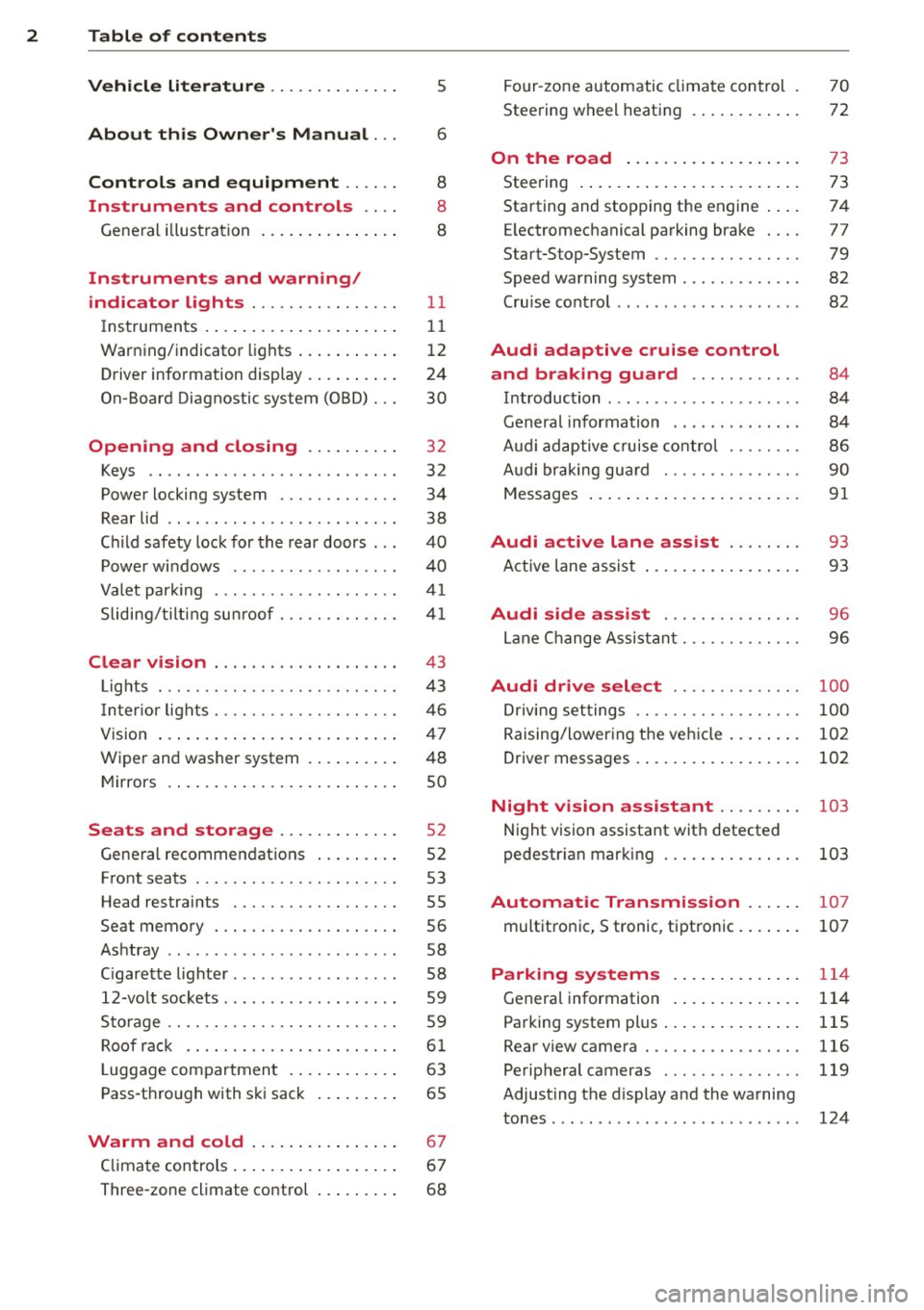
2 Table of contents Vehicle literature .. .. .. .. .. ... .
5
About this Owner's Manual . . . 6
Controls and equipment ..... .
Instruments and controls ... .
General illustration ......... .. ... .
Instruments and warning/
indicator lights ............... .
Instruments ............ ... .. ... .
Warning/indicator lights ..... ... .. .
Driver information display ... ... ... .
On-Board Diagnostic system (OBD) .. .
Opening and closing .. .. .... . .
Keys .......................... .
Power locking system ............ .
Rear lid ...................... .. .
Child safety lock for the rear doors .. .
Power windows ........... ... .. . .
Valet park ing ................... .
Sliding/tilting sun roof ............ .
Clear vision ................... .
Lights ......................... .
I nter ior lights ................... .
V1s 1on .......... ......... ... ... .
Wiper and washer system ... .... .. .
Mir rors .... .............. ... ... .
Seats and storage ......... ... .
General recommendations ... .... . .
Front seats ..................... .
Head restraints ................. .
Seat memory ................... .
Ashtray .. .. ... ... .... ......... . .
C igarette lighter .............. ... .
12-vo lt sockets .................. .
Storage ........ .............. .. .
Roof rack .... ................ .. .
L uggage compartment ...... ... .. .
Pass-through with ski sack ... .. ... . 8
8
8
11
11
12
24
30
32
32
34
38
40
40
41
41
43
43
46
47
48
so
52
52
53
55
56
58
58
59
59
61
63
65
Warm and cold . . . . . . . . . . . . . . . . 67
Climate controls . . . . . . . . . . . . . . . . . . 67
Three-zone climate control . . . . . . . . . 68 Four-zone
automatic climate control
Steering wheel heating ........... . 70
72
On the road
. . . . . . . . . . . . . . . . . . . 73
Steer ing . . . . . . . . . . . . . . . . . . . . . . . . 73
Starting and stopping the engine . . . . 74
E lectromechanical parking brake . . . . 77
Start-Stop-System . . . . . . . . . . . . . . . . 79
Speed warning system . . . . . . . . . . . . . 82
Cruise control . . . . . . . . . . . . . . . . . . . . 82
Audi adaptive cruise control
and braking guard . . . . . . . . . . . .
84
Introduction . . . . . . . . . . . . . . . . . . . . . 84
Genera l information . . . . . . . . . . . . . . 84
Audi adaptive cruise control . . . . . . . . 86
Audi braking gua rd . . . . . . . . . . . . . . . 90
Messages . . . . . . . . . . . . . . . . . . . . . . . 91
Audi active lane assist . . . . . . . . 93
Active lane assist . . . . . . . . . . . . . . . . . 93
Audi side assist . . . . . . . . . . . . . . . 96
Lane Change Assistant. . . . . . . . . . . . . 96
Audi drive select . . . . . . . . . . . . . . 100
Driving settings . . . . . . . . . . . . . . . . . . 100
Raising/lowering the vehicle . . . . . . . . 102
Driver messages . . . . . . . . . . . . . . . . . . 102
Night vision assistant . . . . . . . . . 103
Night vision assistant with detected
pedes trian marking . . . . . . . . . . . . . . . 103
Automatic Transmission . . . . . . 107
multitronic, S tronic, tiptronic. . . . . . . 107
Parking systems . . . . . . . . . . . . . . 114
General information . . . . . . . . . . . . . . 114
Parking system plus . . . . . . . . . . . . . . . 115
Rearviewcamera ................. 116
Peripheral cameras . . . . . . . . . . . . . . . 119
Adjusting the d isplay and the warning
tones. . . . . . . . . . . . . . . . . . . . . . . . . . . 124
Page 11 of 304
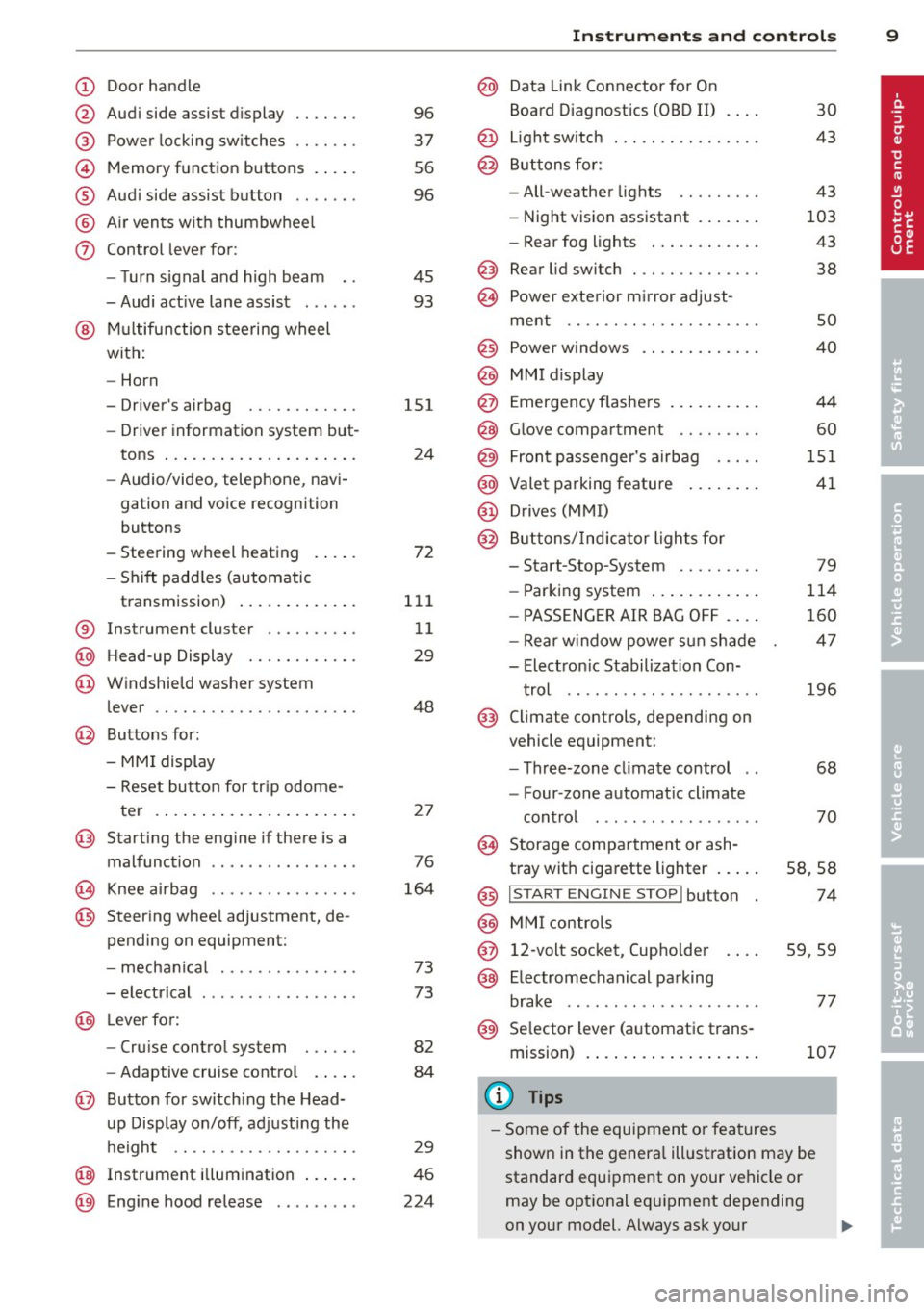
CD
@
®
©
®
®
(j)
Door handle
Audi side assist display
Power locking sw itches
Memory function buttons .. .. .
Aud i side assist button ...... .
A ir vents with thumbwheel
Control lever for:
- T urn signal and high beam
- Audi act ive lane assist . .. .. .
@ Mu ltifunction steering wheel
with:
- Horn
- Driver's airbag
- Driver information system but-
tons ... ..... ....... ... .. .
- Audio/video , telephone, navi
gation and voice recognition
buttons
- Steering wheel heating . ... .
- Shift padd les (automatic
transmission) ..... ... ... . .
® Instrument cluster ......... .
@ Head-up Display ........... .
@ Windshield washer system
lever ..................... .
@ Buttons for:
- MMI display
- Reset bu tton for tr ip odome-
te r .. .. ... .. ..... ... .. .. .
@ Starting the engine if there is a
malfunction ............... .
~ Knee airbag ........... .. .. .
@ Steer ing whee l adjustment, de
pending on equipment:
- mechan ical .......... .. .. .
- electrical .... .. ..... ... .. .
@ Leve r for:
- Cru ise control system ... .. .
- Adaptive cruise contro l .. .. .
@ Button for sw itch ing the Head
up Disp lay on/off, adjusting the
h eight .. ............. .. .. .
@ Instrument illumination ... .. .
@ Eng ine hood release ........ . 96
37
56
96
45
93
151
24
72
111
11
29
48
2 7
76
164
73
73
82
84
29
46
224
In strument s and control s 9
@ Data Link Connector for On
Board Diagnostics (OBD II)
@ Light switch ... .. . .. .... ... .
@ Buttons for :
- All-weather lights
- Night vision assistant .... .. .
- Rear fog lights .. .. .. ..... .
@ Rear lid switch ............. .
~ Power exterior m irror adjust-
30
43
43
103
43
38
ment . . . . . . . . . . . . . . . . . . . . . 50
@ Power w indows . . . . . . . . . . . . . 40
@ MMI display
@ Emergency flashe rs . . . . . . . . . . 44
@ Glove compartment . . . . . . . . . 60
@) Front passenger's airbag . . . . . 151
@ Valet parking feature . . . . . . . . 41
@ Drives (MMI)
@ Buttons/Indicator lights fo r
- Start-Stop-System . . . . . . . . . 79
- Parking system . . . . . . . . . . . . 114
- PASSENG ER AIR BAG OF F . . . . 160
- Rear w indow powe r sun shade 47
- Electron ic Stabilization Con-
t rol . . . . . . . . . . . . . . . . . . . . . 196
@ Climate controls, depending on
vehicle equipment:
- Three-zone cl imate control . . 68
- F our-zone automatic climate
cont rol . . . . . . . . . . . . . . . . . . 70
@ Storage compartment or ash-
t ray wit h cigarette lighter . . . . . S8, 58
@ I S T ART ENGINE STOPI button 74
@ MM I controls
@ 12-volt socket, (upho lder 59, 59
@ E lectromechanical parking
brake . . . . . . . . . . . . . . . . . . . . . 77
@ Selector lever (a utomatic trans-
mission) 107
(D Tips
-Some of the equipment or fea tures
show n in the genera l ill ustration may be
standard equipment on your vehicle or
may be opt ional eq uipment depending
on your model. Always ask your
ll>
Page 14 of 304
12 Instrum ent s and w arn ing /indic ato r light s
-Never open the engine hood if you see or
hear steam, or if you see engine coolant
dripping from the engine compartment.
You could burn yourself . Let the engine
cool off first until you can no longer see
o r hear steam or coo lant escaping.
@ Note
- Mounting additional lights or accessories
i n front of the a ir inlets reduces the cool
i ng effect of the rad iator . At h igh outside
temperatures or high eng ine load, the
engine could overheat.
- The front spo iler has been designed to
proper ly distribute the cooling air when
t h e ve hicle is moving.
If the spoiler is
dam aged, th is co uld red uce the cooling
effect and the engine co uld then over
heat . Ask your authorized Audi dea ler for
assistance .
Tachometer (engine rev counter)
The tachometer indicates the engine RPM
(revolutions per minutes).
If engine RP M drops be low 1,500, yo u should
downshift to the next lower gear. The red a rea
at the end of the sca le indicates maximum
perm iss ib le engine RPM after the break-in pe
riod. Before reaching this area, move these
lector lever to position D/S (Drive) or ease
your foot off the accelerator pedal.
(D Note
The tachometer needle should on ly br iefly
be in the red zone: you could damage your
engine! The beginn ing of the red zone var
ies depending on the engine .
@ For the sake of the environment
Upshifting early saves fuel and reduces en
gine noise.
Fuel gauge
The fuel gauge only works when the ignition is
on .
If the fuel level d rops below 2 . 6 ga llons (10 liters), the bottom LED turns red and the
indicator light
Em turns on
¢ page 22. The
bottom LED blinks red when the fuel level is
very low.
T he possible range based on the current fuel
level is shown in tab@<=>
page 24, fig . 4 .
(D Note
Never run the tank completely dry. An ir
r egular supply of f uel can cause engine
misfiring and fuel could enter the ex ha ust
system . The catalytic converter could then
overheat and be damaged.
Warning/indicator Lights
Description
The ind icator lights in the instrument cluster
blink or turn on. They indicate funct ions or
malfunctions <=>,& .
Messages may appear with some indicato r
lights. A warning signal will sound at the
same t ime. The indicator lights and messages
in the center of the displays may be rep laced
by other d isplays . To show them again, select
the tab for ind icator lights and messages us
i ng the multifunction steering wheel
Q page 24. If t here are several malfunc
t ions, you can display them one at a time us
ing the thumbwheel.
Some indicato rs lights in the d isplay can turn
on in severa l co lors.
A WARNING
- F ailure to heed w arning l igh ts and other
important vehicle in forma tion may res ult
in ser io us personal inj ury or vehicle dam
age .
- Whenever stalled or stopped for repair, move the vehicle a safe d istance off the
road, stop the engine, and turn on the
emergency flasher<=>
page 44.
-The engine compartment of any motor
veh icle is a potentially hazardous area.
Before you chec k anything in the engine
Page 15 of 304
Instrument s and warnin g/indic ator ligh ts 13
compartment, stop the engine and let it
cool down. Always exercise extreme cau
t ion when working under the hood
<=> page 224.
@ Tips
Ma lf u nctions or faults wi ll be identified ei
ther with a red symbo l (pr iority 1 -Dan
ger!) or with a yellow symbol (pr iority 2 -
Warn ing).
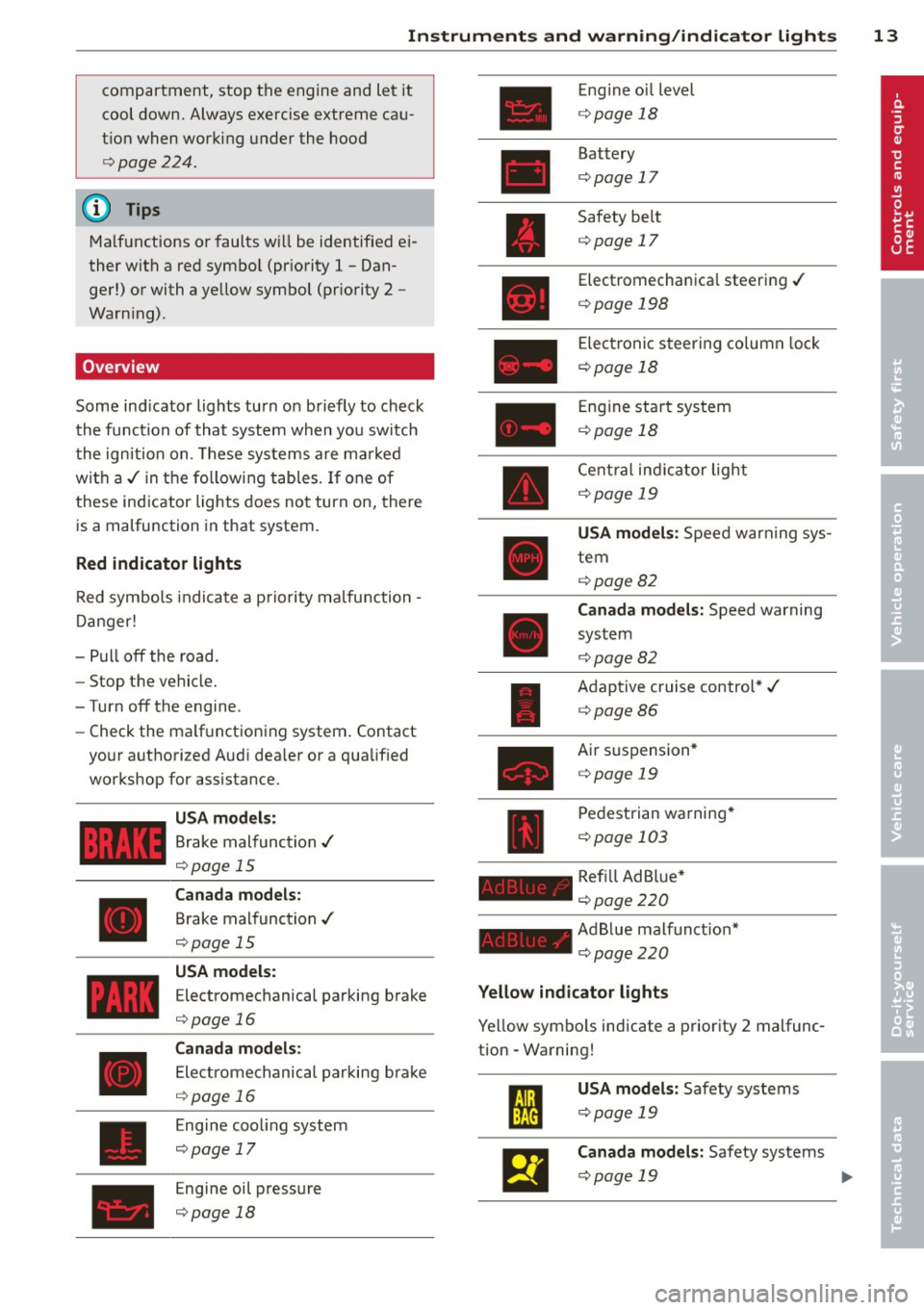
Overview
Some ind icator lights turn on briefly to check
the function of that system when you switch
the ignition on. These systems are ma rked
with a ,/ in the following tables. If one of
these indicator lights does not turn on, there
is a malfunction in that system.
Red indicator lights
Red symbols indicate a prio rity malfunction -
D anger!
- Pull off the road.
- Stop the vehicle.
-Turn off the engine.
- Check the ma lf u nctioning system . Contact
your authorized Audi dea ler or a qualified
workshop for assistance.
USA models :
Brake malfunction ,/
<=>page 15
Canada models :
Brake malfunction,/
¢page 15
USA model s:
Electromechanical parking brake
<=> page 16
Canada m odel s:
Electromechanical parking b ra ke
<=> page 16
Engine cooling system
¢page 17
Engine oil pressure
¢ page 18
Engine o il level
¢ page 18
Battery
¢page 17
Safety belt
¢page 17
Electromechanica l steering ,/
c:>page 198
Electronic steering column lock
¢ page 18
Engine star t sys tem
¢ page 18
Cent ral ind icator light
¢ page 19
USA mod els : Speed warn ing sys
tem
¢ page82
Canada mod els : Speed warning
system
~ page82
Adaptive cruise control *,/
¢page86
Air su spension *
c:>page 19
Pedestrian wa rning *
¢page 103
Refi ll Ad Bl ue*
¢ page 220
Ad B lue malfunct ion*
¢ pag e220
Yellow indicator lights
Ye llow symbo ls indicate a priority 2 malfunc
tion - Warning!
m
llEI
US A mod els : Safety systems
¢ page 19
Canada models : Safety systems
¢ page 19 liJI,
Page 16 of 304
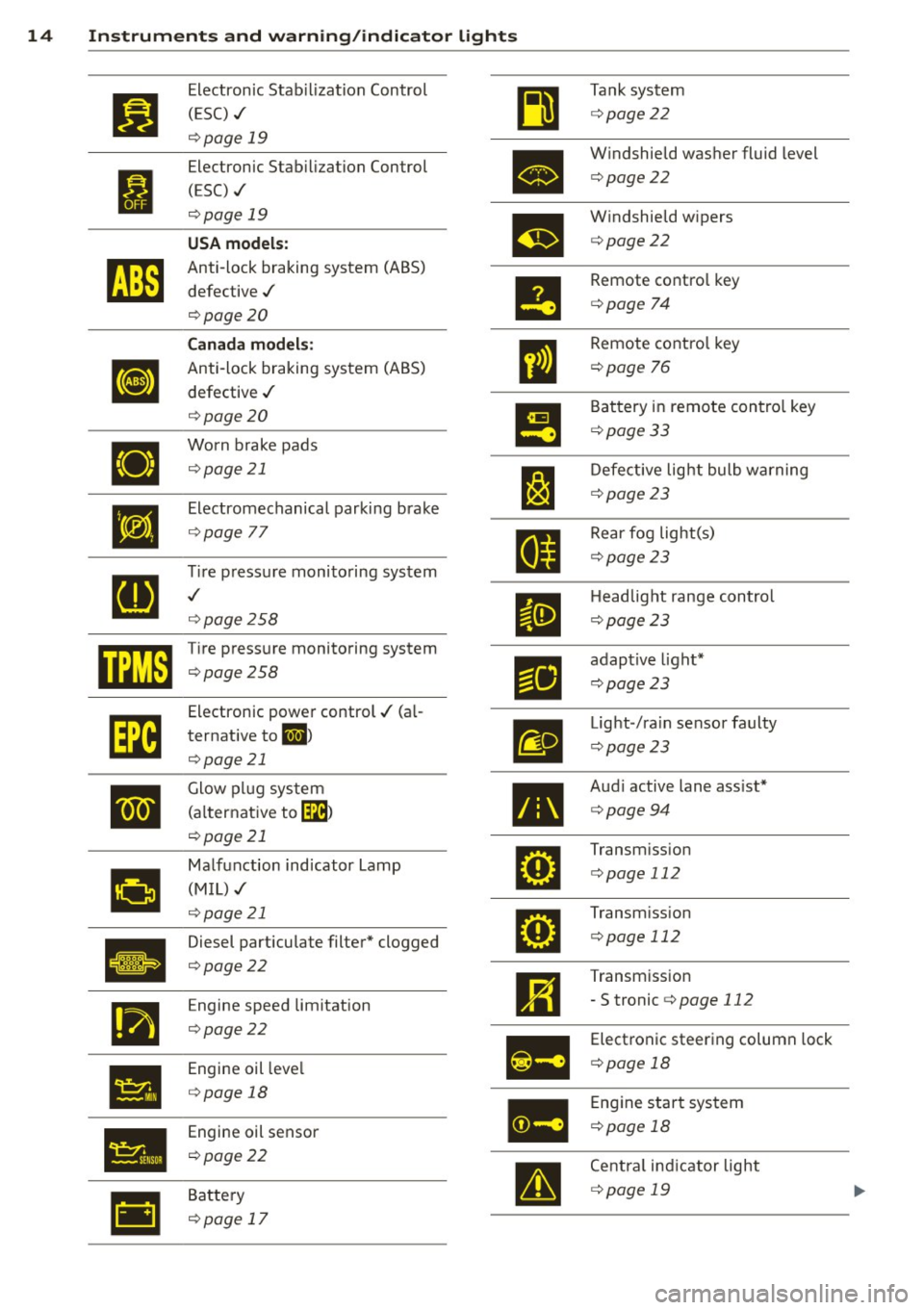
14 Instruments and w . . arn1ng/indicator lights
I
•
• •
•
rl1
Electronic Stab ilization Control
(ESC) ,/
c:> page 19
Electronic Stab ilization Control
(ESC) ./
c:> page 19
USA models:
Anti-lock braking system (ABS)
defective ,/
c:>page 20
Canada models:
Anti-lock braking system (ABS)
defective ,/
c:> page 20
Worn brake pads c:>page 21
Electromechanical parking brake
c:> page 77
~re pressure monitoring system
c:> page258
Tire pressure monitoring system
c:>page 258
Electronic power control./ (al
ternative to
ml >
c:>page 21
Glow plug system
(a lternative to~ )
c:> page 21
Malfunction indicator La
(MIL),/ mp
c:>page 21
Diesel particulate filter* clogged
c:>page 22
Engine speed limitation
c:>page 22
Engine oil leve l
c:> page 18
Engine oil sensor
c:> poge 22
Battery
c:> page 17
•
m
•
•
g
Tank system
c:> page22
W indshield washer fluid level
c:>page22
Windshield wipers
c:> page22
Remote control key
c:> page 74
Remote control key
c:> page 76
Battery in remote contro l key
c:>page 33
Defective light bulb warnin
c:> page 23
g
Rear fog light(s)
c:> page23
Headlight range control
c:> page23
adaptive light*
c:>page 23
Light -/ra in sensor faulty
c:> page23
Audi active lane ass ist*
c:> page94
Transmiss ion
c:> page 112
Transm iss ion
c:> page 112
Transmission
- S tronic c:>page
112
Electronic steering column lock
c:> page 18
Engine start system
c:> poge 18
Centra l ind icator light
c:> poge 19
Page 20 of 304
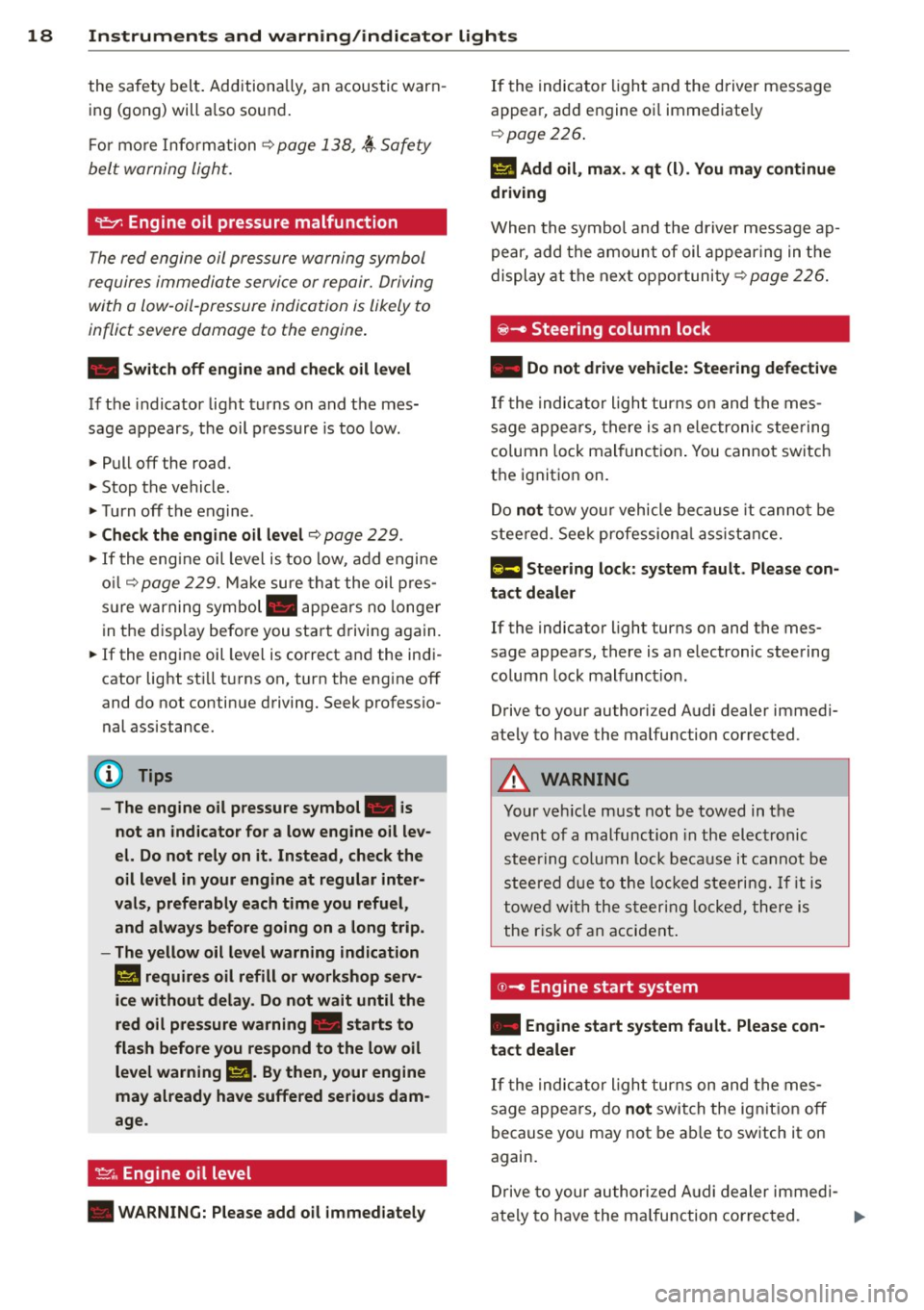
18 Instrum ent s and w arn ing /indic ato r light s
the safety belt. Additionally, an acoustic warn
ing (gong) will a lso sound.
For more Information
c::> page 138, ~ Safety
belt warning light.
requires immediate service or repair. Driving
with a low-oil-pr essur e indication is likely to
inflict severe damage to the engine.
• Swit ch off engine and ch ec k oil l evel
If the indicator light turns on and the mes
sage appears, the oil pressure is too low .
., Pull off the road.
., Stop the vehicle.
., Turn off the engine .
., Check the engin e oil level c::> page 229 .
., If the engine oil level is too low, add engine
oil
c::> page 229 . Make sure that the oil p res
s u re warning symbol. appears no longe r
in the disp lay before you start dr iving again.
• If the engine oil level is correct and the indi
cato r light sti ll turns on, turn the engine off
and do not continue driving. Seek professio
nal assistance.
(D Tips
- The engine oil pressu re symbol. is
not an indicator for a low eng ine oil lev
el. Do not rel y on it. Inst ead , che ck th e
oil l evel in your engin e at regular int er
val s, pref erabl y each tim e you refu el,
and alwa ys bef ore go ing on a long trip .
- The yell ow oil le vel warning indication
II requires oil refill or wo rksho p serv ·
ic e without del ay . Do n ot wait unti l the
red oil pre ssur e w arning. sta rt s to
fla sh before you re spond t o the low oil
le vel warning
II. By then , your engine
may al ready have suffered serious dam
age .
~ .. Engine oil level
• WARNING: P lease add oil immedia tely
If the indicator light and the driver message
appear, add engine oi l immediate ly
c::> page 226 .
II Add oil, m ax. x q t (l). Yo u m ay contin ue
driving
When the symbol and the driver message ap
pear, add the amount of oil appearing in the
display at the nex t oppor tunity
c::> page 226.
@ -Steering column lock
• Do not dr ive veh icle : Stee ring defecti ve
If the indicator l igh t turns on and the mes
sage appears, there is an e lectronic stee ring
column lock malfunction . You cannot switch
the ignition on .
Do
not tow your vehicle because it cannot be
steered . See k professiona l assistance .
1;11 Steering lo ck : s ystem fault . Plea se con
tact de ale r
If the indica tor light turns on and the mes
sage appears, there is an electronic steering
column lock malfunct io n.
Drive to your authori zed Audi dealer immedi
ately to have the mal function corrected .
A WARNING
Your vehicle must not be towed in the
event of a malfunction in the electronic
steering co lumn lock because it cannot be
steered due to the loc ked steering. If it is
towed with the steering locked, there is
the r isk o f an accident .
©-Engine start system
• Engine st art system fa ult. Ple ase con
tact deale r
If the indicator l ight turns on and the mes
sage appears, do
n ot switch the ignition off
because you may not be ab le to switch it on
again.
Drive to your authorized A udi dealer immed i-
a tely to have the ma lfunction corrected. ..,.
Page 27 of 304
Instruments and warning/indicator lights 25
For some vehicle functions, you can access the
trip information from the temporary memory
¢
page 26 in the line CD¢ fig. 5.
.&_ WARNING
-
- Never rely exclusively on the outside
temperature display to determine if a
road surface is icy or not . Keep in mind
that road surfaces, especially bridges
and overpasses, could be ice covered and
slippery even at an outside temperature above
41 °F (+5 °().
- Always remember, even if the "snow
flake" symbol (ice warning) does not ap
pear in the display, black ice could be on
the road.
- Always reduce your speed and drive with
special care in cold weather conditions
when the chance of encountering icy
road surfaces increases.
@ Tips
- At temperatures below 14 °F (+ 5 °C) a
snowflake symbol appears ahead of the
temperature display. It is intended to re
mind the driver to pay special attention
to
ice on the road ¢ ,&. . If the vehicle is
stationary, or if you are driving at a very
low speed, the temperature shown in the
display might be slightly higher than the
actual outside temperature . This is
caused by the heat being radiated from
the engine .
- You can select the units used for temper
ature, speed and other measurements in
the MMI.
- For information on the audio/video and
navigation* functions, refer to the sepa
rate MMI owner's manual.
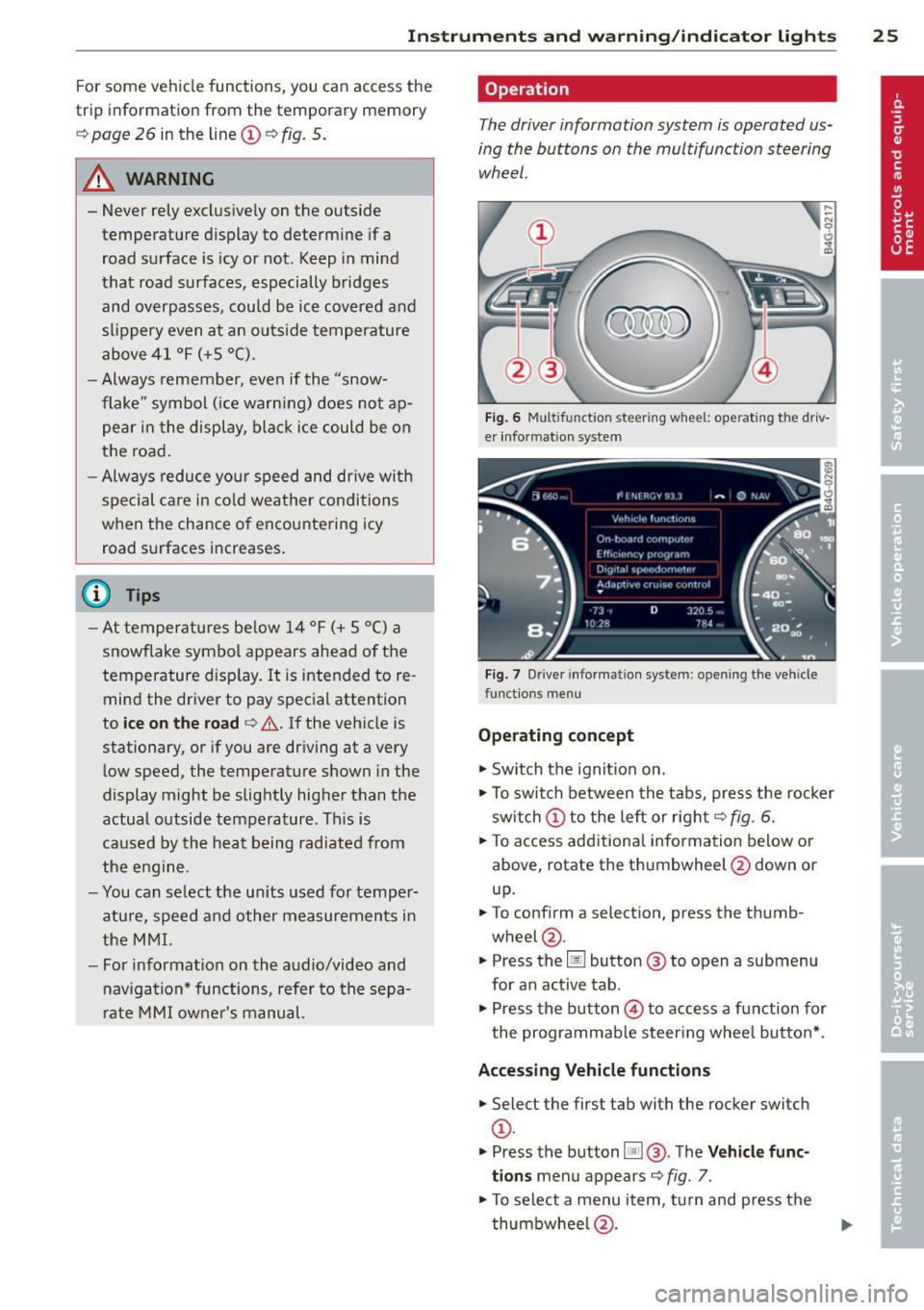
Operation
The driver information system is operated us
ing the buttons on the multifunction steering
wheel.
Fig. 6 Multif unctio n steerin g wh eel: operat in g th e driv
er informat ion sys te m
Fig . 7 Dr iver informat ion syste m: o penin g the ve hicle
fu nctio ns me nu
Operating concept
"'Switch the ignition on .
"'To switch between the tabs, press the rocker
switch CD to the left or right ¢
fig. 6.
"'To access additional information below or
above, rotate the thumbwheel @down or
up.
"' To confirm a selection, press the thumb
wheel @.
"' Press the
Iii button @ to open a sub menu
for an active tab .
"'Press the button @ to access a function for
the programmable steering wheel button* .
Accessing Vehicle functions
"'Select the first tab with the rocker switch
CD -
.. Press the button
liJ@. The Vehicle func
tions
menu appears ¢ fig. 7.
"'To select a menu item, turn and press the
thumbwheel @.
Page 28 of 304
26 Instruments and warning /indicator lights
Resetting values to zero
.,. Se lect t he on -board computer / Efficien cy
program
men u item in the Vehicle func
tions
menu.
.,. You can now select between the long-term
memory and short -term memory .
.,. To reset the values i n a memory, press and
ho ld the thumbwhee l@ for one second .
Assigning a function to the
programmable steering wheel button*
.,. Se lect : ICAR !funct io n button> (Car )* sys-
tems
control button > Vehicle settings >
Ste ering wh eel button .
The last function se lected displays when y ou
switch the ignition on.
On-board computer
You can call up the following information in the on -board computer:
- D ate
- Drivi ng time ( h) from t he s ho rt- term memo-
ry
- Ave rag e consumption in MPG (l/ 100 km)
from the sho rt-term memo ry
- Ave rag e speed in mph (km/h) from the
s h ort-term memo ry
- Distance d riven in m iles (km) from the
sho rt-term me mory
- C urrent fuel co nsumption in MPG (l/100
k m)
- Sho rt-term memo ry overview
- Long-term memory overview
The s ho rt-term memo ry co llects driving i nfo r
mat io n from the time the ignit ion is switched
on until it is switched off. If yo u continue dr iv
ing within two hours after switching the igni
tion off, the new val ues a re i ncluded when cal
culating the cu rrent trip informa tion .
Unlike the short-term memory, the long-term
memory is not erased automatica lly. You can
select the time period for evaluat ing trip in
formation yo urse lf.
For some veh icle functions, you can access the
tr ip i nformat io n from the tempora ry memory
i n the line
(D ¢ page 24 , fig. 5.
The current fue l cons umption can be d is
played using a ba r
¢page 27, fig . 10. The
average cons umption (mpg) stored in the
short-term memo ry is also displayed. E lectri
ca l energy can be sto red in the battery when
t h e vehicle is coasting or dr iving dow nhill (re
c u pera tion) . The bar w ill move toward
Cl .
Efficiency program
The efficiency program can he lp y ou to use
less fuel.
It evaluates driving information in
reference to f uel consumption and shows ot h
er equipment influencing consumption as well
as shift recomme ndat ions .
¢ page 26. Fu el
eco nomy m essages
<=:> page 2 7 provide t ips
f o r efficient d riving. The effi ciency program
u ses d ist ance and cons umpti on d ata from trip
c om puter
1.
T o d is pl ay th e eff ic ien cy p rogram, call up Ve
hicle functions
and se le ct t he menu o ptio n
Efficiency program. If the d ata are dele ted in
t h e eff icien cy prog ram, th ose values a re a lso
reset in tri p com puter .
@ Tips
-All s tored v alu e s will be los t if th e ve hi
cl e battery is dis con nected .
- Fue l consum ptio ns (a ver age an d cu r
ren t), range an d s pee d ar e disp laye d in
metric un its on Canadian mode ls.
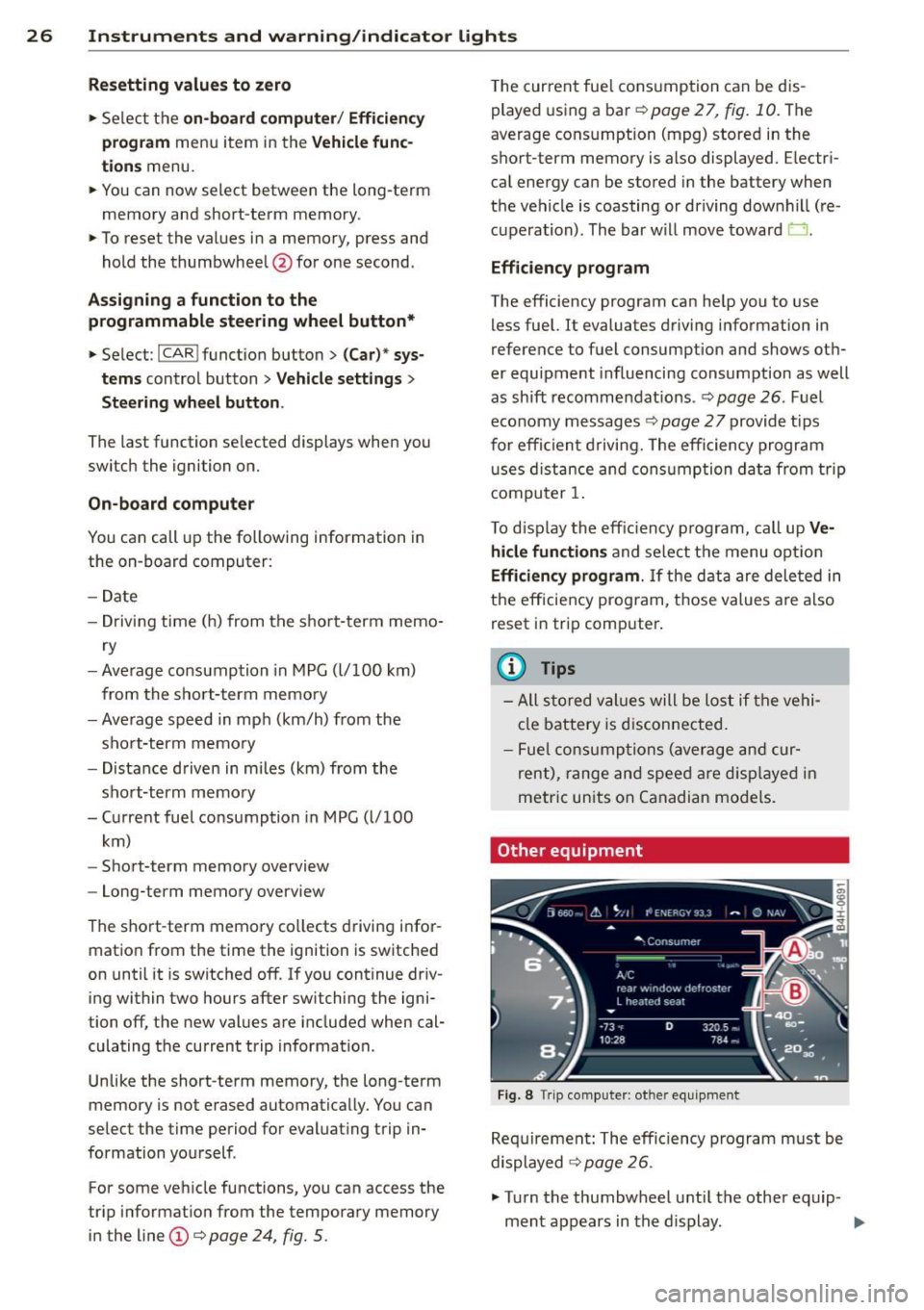
Other equipment
Fi g. 8 Tri p comp uter: ot her equi pm en t
Req uire ment: T he e fficiency p rogram m ust be
displayed
<=:> page 26 .
.,. Turn the thumbwheel u ntil the other eq uip-
ment appears in the d isplay . .,.
Page 34 of 304
32 Opening and clo sing
Opening and closing
Keys
Key set
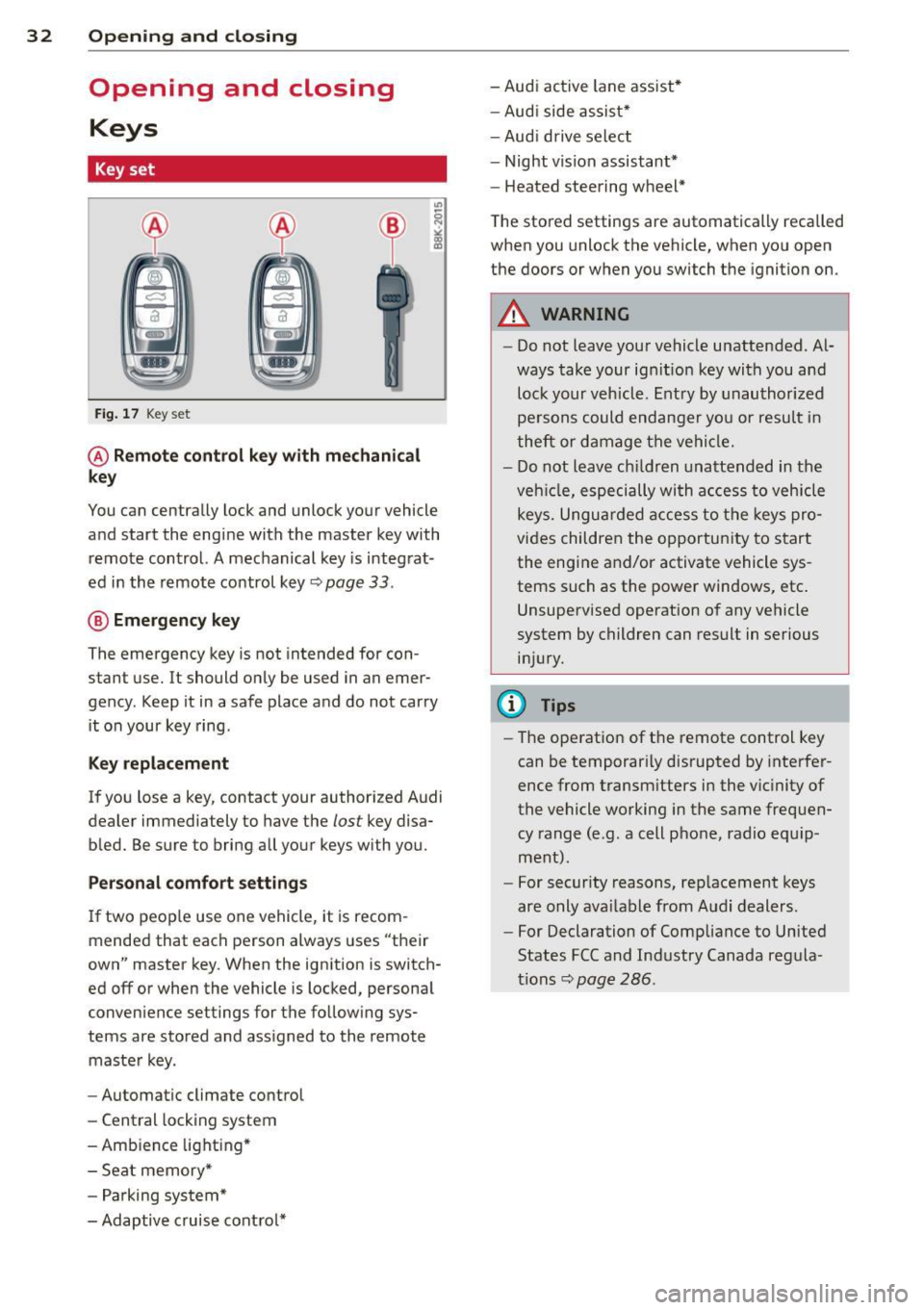
Fig . 17 Key set
@ Remot e control k ey w ith m echan ical
ke y
You can centrally lock and unlock your vehicle
and start the engine with the master key with
remote control. A mechanical key is integrat
ed in the remote control key
r:::;, page 33 .
@ Eme rgenc y ke y
The emergency key is not intended for con
stant use.
It should only be used in an emer
gency. Keep it in a safe place and do not carry it on your key ring .
Key replac em ent
If you lose a key, contact your authorized Audi
dealer immediately to have the
lost key disa
bled. Be sure to bring all your keys with you.
P er sonal c omfo rt se ttin gs
If two peop le use one vehicle, it is recom
mended that each person always uses "their
own" master key . When the ignition is switch
ed off or when the vehicle is locked, personal
convenience settings for the follow ing sys
tems are stored and assigned to the remote master key .
- Automatic climate control
- Central locking system
- Amb ience light ing*
- Seat memory*
- Parking system*
- Adaptive cruise control* - Audi active
lane assist *
- Aud i side assist*
- Aud i drive select
- Night vision assistant*
- Heated steering wheel*
The stored settings are automatically recalled
when you unlock the vehicle, when you open
the doors or when you switch the ignition on.
A WARNING
-- Do not leave your vehicle unattended . Al-
ways take your ignit ion key with you and
lock your vehicle . Entry by unauthorized
persons could endanger yo u or resu lt in
theft or damage the vehicle.
- Do not leave ch ildren unattended in the
veh icle, especially with access to vehicle
keys. Unguarded access to the keys pro
vides children the opportunity to start the engine and/or activate vehicle sys
tems such as the power windows, etc .
Unsupervised operation of any vehicle
system by children can result in serious
injury.
(1) Tips
- The operation of the remote control key
can be temporar ily disrupted by interfer
ence from transm itters in the vic inity of
the vehicle working in the same frequen
cy range (e.g. a cell phone, radio equip
ment).
- For security reasons, rep lacement keys
are only ava ilable from Audi dealers.
- For Declaration of Compliance to United
States FCC and Industry Canada regula
tions
r:::;, page 286.
Page 45 of 304
Clear vision Lights
Switching the headlights on and off
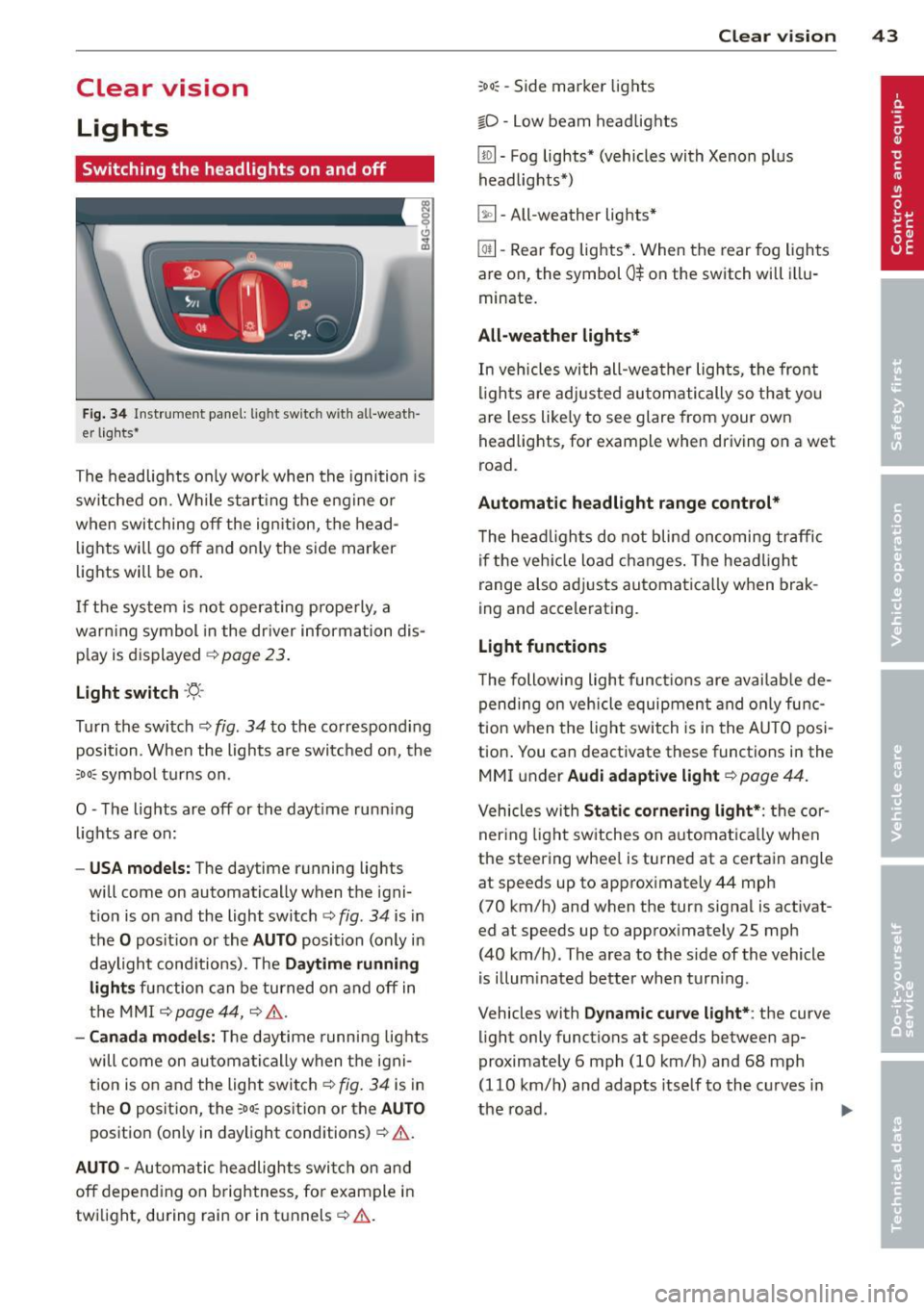
Fig . 34 Instrument pane l: lig ht sw itc h wit h all -weath
er lights•
The headlights only wo rk when the ignition is
switched on. Wh ile start ing the eng ine o r
when switching off the ign ition, the head
lights will go off and on ly the side marker
lights will be on .
If the system is not operating p rope rly, a
war ning symbol in the dr iver information dis
p lay is d isplayed
c::> page 23 .
Light switch -'tj_ -
Tu rn the switch c::> fig . 34 to the correspond ing
position . When the lights a re switched on, the
oD o: symbo l tu rns on .
0 -The lig hts are off or the dayt ime runn ing
lights are on:
- USA models: The day time running lights
will come on automatically when the igni
t ion is on and the light switch
c::> fig . 34 is in
the
O posit ion or the AUTO position (only in
daylight cond itions). The
Daytime running
light s
function can be turned on and off in
the MMI
c::> page44, c::>A .
-Ca nada model s: The daytime running lig hts
will come on automa tically when the igni
t ion is on and the light switch
c::> fig . 34 is in
the
O position, the : Do: pos ition or the AUTO
position (only in daylight conditions) c::> A .
AUTO -Automatic headlights swi tch on and
off depend ing o n brightness, for example i n
tw ilight, during rain or in tunnels
c::> &. .
:Do: -Side marker lights
io -Low beam headlights
Clear vi sion 43
lm -Fog lights* (vehicles with Xenon p lus
headlights *)
~ -All-weather lights *
@il-Rear fog lights* . When the rear fog lights
are on, the symbol
0$ on the switch will i llu
minate.
All-weather lights*
In vehicles with all-wea ther lights , the front
ligh ts are ad justed au tomatically so that yo u
are less like ly to see glare from your own
head lights , for example when driving on a wet
road.
Automatic h eadl ight range control*
T he head lights do not blind oncoming traffic
i f the veh icle load changes . The headligh t
range also adj usts automatically when brak
ing and accelerating .
Light functions
The following light funct io ns are availab le de
pend ing on vehicle equipment and o nly func
tion when t he lig ht switch is in the AUTO posi
tion . You can deactivate these functions in the
MMI under
Audi adaptive light c::> page 44.
Vehicles with St atic corn ering light* : the cor
ner ing ligh t sw itches on a utomat ically when
the steering whee l is turned at a certain angle
at speeds up to approximately 44 mph
( 7 0 km/h) and when the turn signa l is activat
ed at speeds up to approximately 25 mph
(40 km/h) . The area to the side of the vehicle
is illum inated better when turn ing .
Vehicles with
Dynamic cu rve light* : the curve
light only functions at speeds between ap
proximately 6 mph (10 km/h) and 68 mph
(110 km/h) and adapts itself to the curves in
the road .
~