cruise control AUDI S6 2015 User Guide
[x] Cancel search | Manufacturer: AUDI, Model Year: 2015, Model line: S6, Model: AUDI S6 2015Pages: 314, PDF Size: 77.57 MB
Page 89 of 314
Audi adaptive cruise control and braking guard 87
tachometer @and is also shown briefly in
the display @
c::> fig. 90.
.. You must also press the brake pedal when
the vehicle is stopped.
Switching adaptive cruise control off
.. Push the lever away from you into position
@ until it clicks into place. The message
ACC off appears.
@ Indicator lights
II-Adaptive cru ise contro l is switched on.
No vehicles are detec ted up ahead. The stored
speed is ma intained.
• -A moving vehicle is detected up ahead.
The adaptive cruise control system regulates
the speed and distance to the moving vehicle
ahead and acce lerates/brakes automatical ly.
fit -Adaptive cruise contro l is switched on. A
mov ing vehicle up ahead was detected. Your
vehicle remains stopped.
• -When automatic brak ing is not able to
keep enough distance to a previously detected
moving vehicle up ahead, you must take con
trol and brake
c::> page 89, Prompt for driver
intervention.
© Display
If adaptive cruise control is not shown in the
d isp lay, you can call it up with the multifunc
tion steering wheel buttons
c::> page 24.
Based on the symbols in the d isplay, you can
determine if the system is maintaining a dis
tance to the vehicle ahead and what that d is
tance is.
No vehicle -No veh icle ahead was detected .
White vehicle -A vehicle ahead was detected.
Red vehicle -Prompt for the driver to take ac
tion
c::> page 89.
Both arrow s on the scale© indicate the dis
tance to the vehicle ahead. No arrow appears
~ when the vehicle is on an open road and there
0
~ is no object ahead . If an object is detected
:;, ahead , the arrow moves on the scale .
"' ,....,
"' ,....,
The green zone on the scale shows the stored
distance. For information on changing the
stored distance, refer to
c::> page 88 . If the
distance selected is too close or may soon be
come too close, the arrows move into the red
zone on the sca le .
A WARNING
Improper use of the adaptive cruise con
trol can cause collisions, other accidents
and serious personal injur ies .
- Pressing the
!SET ! button when driv ing at
speeds below 20 mph (30 km/h), will au
tomatically accelerate the vehicle to 20
mph (30 km/h), which is the minimum
speed that can be set.
(D Tips
-If you switch the ignit ion or the adaptive
cruise control off, the set speed is erased
from the system memory.
- Th e elec tronic stab ilization control (ESC)
and the anti-slip-regulation (ASR) are au
tomatically turned on when the adaptive
cruise control is turned on. Both systems
cannot be turned off if the adaptive
cruise contro l is turned on.
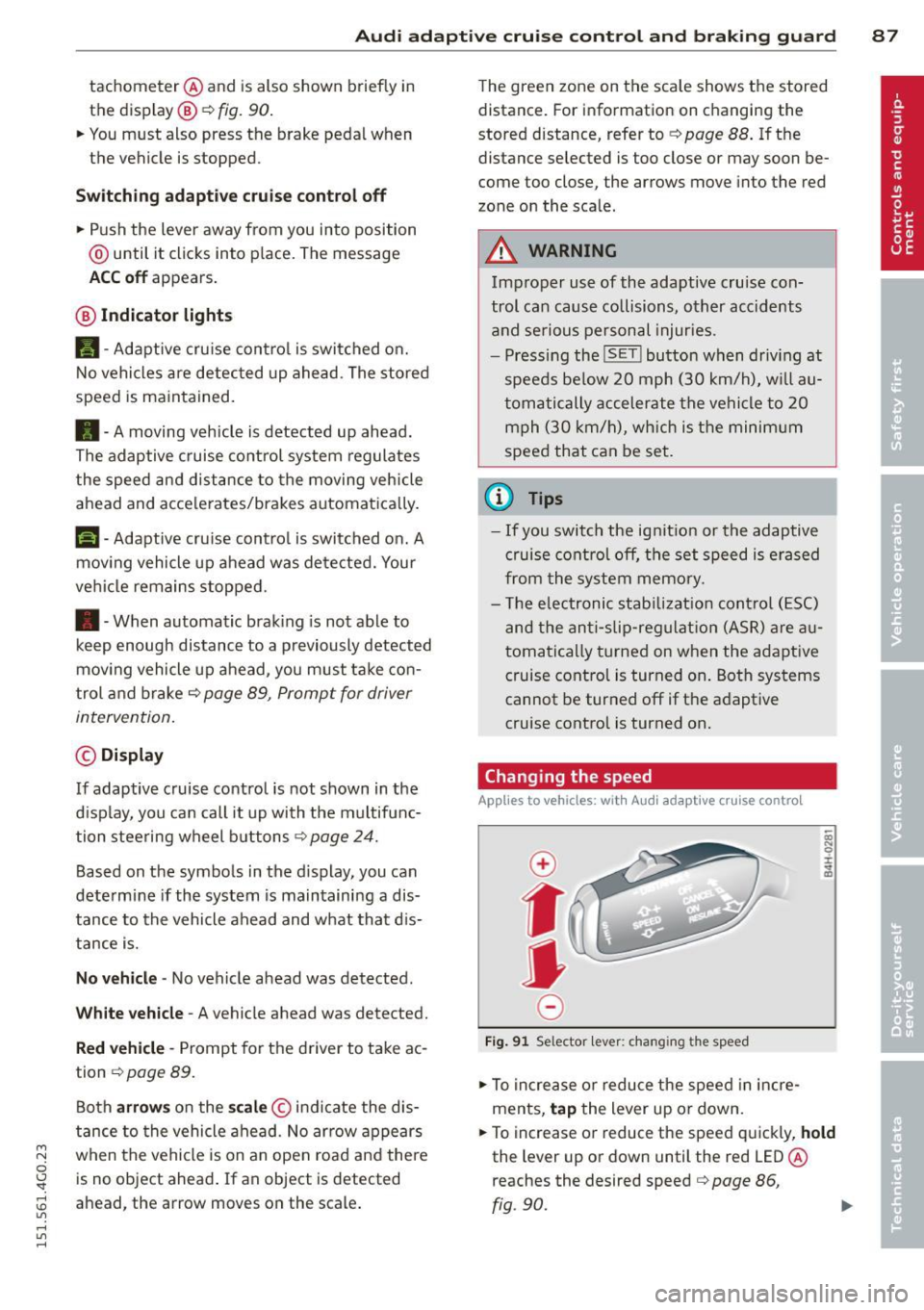
Changing the speed
Applies to veh icles: with Audi adaptive cruise control
0
f
• 0
Fig. 91 Selector lever: chang ing the speed
.. To increase or reduce the speed in incre
ments,
tap the lever up or down.
.. To increase or reduce the speed quickly,
hold
the lever up or down until the red LED @
reaches the desired speed
c::> page 86,
fig .90.
~
Page 90 of 314
88 Audi adaptive cruise control and braking guard
Following any changes, the new stored speed
will be disp layed briefly in the disp lay @
r::!) page 86, fig. 90 .
Driving in stop-and-go traffic
Applies to vehicles: with Audi adaptive cruise control
The adaptive cruise control system also as
sists you in stop-and-go traffic. If a previous
detected vehicle ahead stops, your vehicle will brake to a stop, within the limits of the sys
tem.
• To resume driv ing with adaptive cruise con
trol, tap the accelerator pedal or
• Pull the lever toward you into posit ion @
r::!) page 88, fig. 92 .
(D Tips
-If adaptive cru ise control is active and
your vehicle does not start driving as ex
pected after pulling the lever once, you
can start out again by tapping the accel
e rator pedal.
- If an obstacle is detected when your ve
hicle starts driving, the system w ill
prompt you to take over¢
page 89.
Your vehicle will drive more slow ly when
starting. This may a lso happen in some
s ituations when no obstacle is apparent.
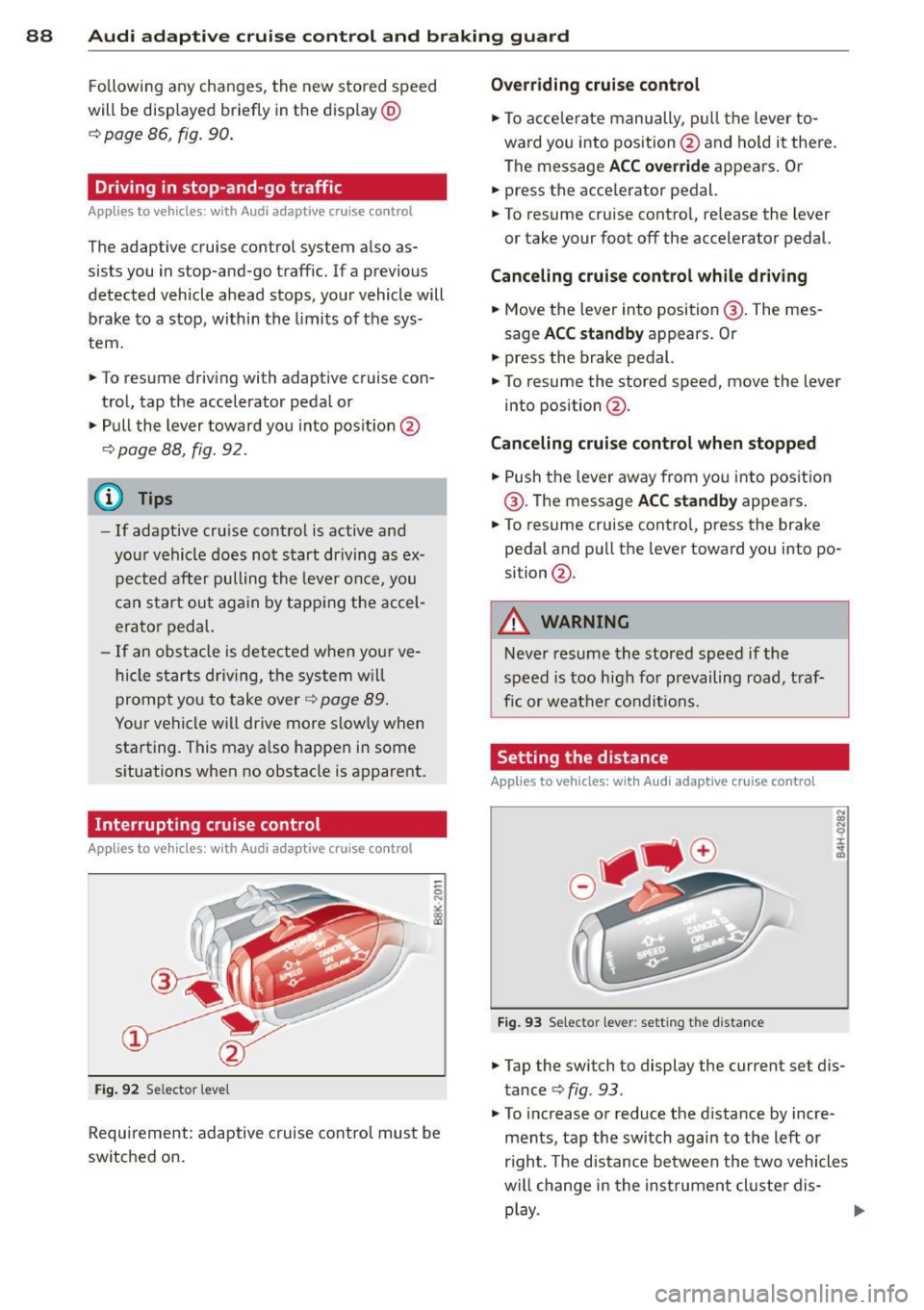
Interrupting cruise control
App lies to vehicles: with Audi adaptive cruise co ntrol
Fig. 92 Se lector leve l
Requirement: adaptive cruise control must be
switched on.
Overriding cruise control
• To accelerate manually, pull the lever to
ward you into position@and hold it there.
The message
ACC override appears. Or
• press the acce lerator pedal.
• To resume cruise contro l, re lease the lever
or take your foot off the accelerator pedal.
Canceling cruise control while driving
• Move the lever into position @. The mes
sage
ACC standby appears. Or
• press the brake pedal.
• To resume the stored speed, move the lever
into position @.
Canceling cruise control when stopped
• Push the lever away from you into position
@ . The message
ACC standby appears .
• To resume cruise contro l, press the brake
pedal and pu ll the lever toward you into po
sition @.
_&. WARNING ~ -
Never resume the stored speed if the
speed is too high for prevailing road, t raf
fic or weather condit ions.
Setting the distance
Applies to vehicles: wit h Audi adapt ive cruise control
Fig. 93 Selecto r lever : setting the distance
• Tap the switch to display the current set dis
tance
<=> fig. 93.
• To increase or reduce the distance by incre
ments, tap the switch again to the left or
r ight. The distance between the two vehicles
w ill change in the instrument cluster dis-
play .
IJII>
Page 91 of 314
M N
0 I.J "". rl I.O
"' rl
"' rl
Audi adaptive cruise control and braking guard 89
When approaching a moving vehicl e up ahead,
the adaptive cruise contro l system automati
cally brakes to match that object's speed and
then maintains the stored distance.
If the ve
hicle ahead accelerates, adaptive cruise con
trol will also accelerate up to the stored
speed .
The higher the speed, the greater the distance
in yards (meters) ¢.&. . The
Distance 3 setting
is recommended .
The distances prov ided are specified values .
Depending on the driving situation and the
how the vehicle ahead is driving, the actual
distance may be more or less than these tar
get distances.
The various symbols for the time increments appear briefly in the information line @
¢
page 86, fig . 90 when you change the set
tings .
,::::::,_,::::::, ___ Distance 1: This setting corre-
sponds to a distance of 92 feet/28 meters
when traveling at 62 mph (100 km/h), or a
time interval of 1 second.
,::::::, __ ,::::::, __ Distance 2: This setting corre
sponds to a distance of 118 feet/36 meters
when traveling at 62 mph (100 km/h), or a
time interval of 1.3 seconds .
,::::::, ___ ,::::::,_ Distance 3: This setting corre-
sponds to a distance of 164 feet/SO meters
when traveling at 62 mph (100 km/h), or a
time interval of 1.8 seconds .
,::::::, __ __ ,::::::, Distance 4: This setting corre-
sponds to a distance of 210 feet/64 meters
when traveling at 62 mph (100 km/h), or a
time interval of 2.3 seconds .
A WARNING
Following other vehicles too closely in
creases the risk of collisions and serious
personal injur y.
- Setting short distances to the traffic
ahead reduces the time and distance
available to bring your vehicle to a safe
stop and makes it even more necessary
to pay close attention to traffic. -
Always obey applicable traffic laws, use
good judgment, and select a safe follow
ing d istance for the traff ic, road and
weather conditions .
(D Tips
-Distance 3 is set automatically each time
you switch the ignition on.
- Your standard settings are automatically
stored and assigned to the remote con
trol key being used.
Selecting the driving mode
Applies to vehicles: with Audi adaptive cruise control
.. Select the desired driving mode in dr ive se
lect <=;>
page 100.
(D Tips
Your settings are automat ically stored and
assigned to the remote control key being
used.
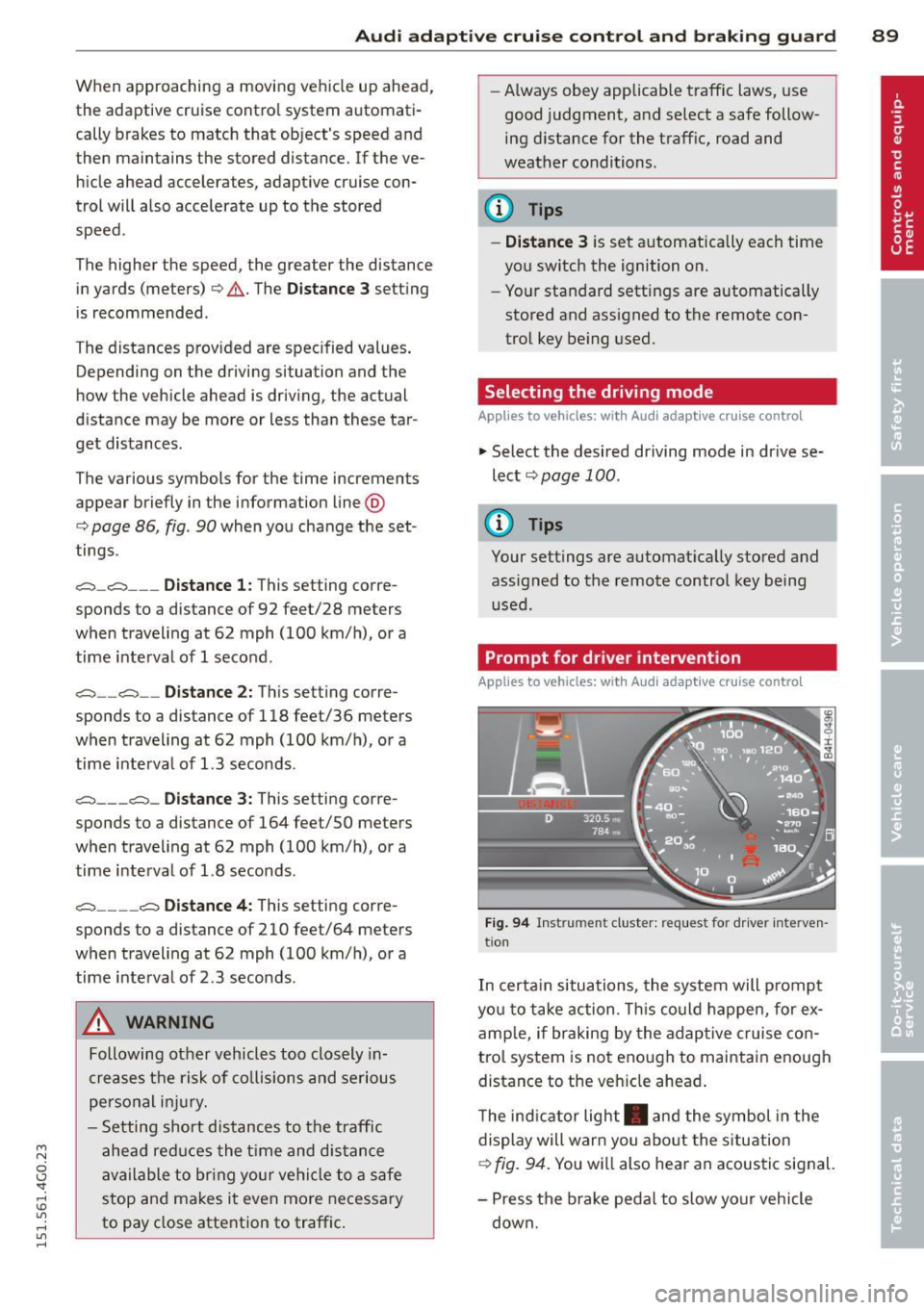
Prompt for dr iver intervention
Applies to vehicles: with Audi adaptive cruise contro l
Fig. 94 Instrument cluster: req ues t fo r drive r inte rven
tio n
In certain situations, the system will prompt
yo u to take action . This could happen, for ex
amp le, if braking by the adaptive cruise con
trol system is not enough to maintain enough
distance to the veh icle ahead .
The indicator light . and the symbol in the
display will warn you about the situation
<=;> fig. 94. You wi ll also hear an acoustic signal.
- Press the brake pedal to slow your vehicle
down.
Page 92 of 314

90 Audi adaptive cruise control and braking guard
Audi braking guard
Descript ion
Applies to vehicles: with Audi adaptive cruise control
Fig. 95 Instrument cluster: approach warn ing
Braking guard uses radar sensors and a video
camera . It also functions within the limits of
the system when adapt ive cruise control is
switched off .
What can braking guard do?
When detected in time, the system can assess
situations when a vehicle ahead brakes sud
denly or if your own vehicle is traveling at a
high speed and approaching a vehicle up
ahead that is moving more slowly . Brak ing
guard does not react if it cannot detect the
situation .
The system advises you of various situations:
- The
distance warning is given if you are too
close to the vehicle ahead for a long time. If
the vehicle ahead brakes sharply, you will not be able to avoid a collision . The indicator
light. in the display comes on .
- The
approach warning is given when a de
tected vehicle up ahead in your lane is mov
i ng much more slowly than you are or if it
brakes sharply . When this warning is given,
it may only be possible to avoid a collision
by swerving or braking sharply . Th e indicator
light. and indicator in the display will
warn you about the danger
c::> fig. 95. You
will also hear an acoustic signa l.
ll This is not ava ilable in some co un tri es .
If you do not react fast enough or do not react
at all to the situation, braking guard will inter·
vene by braking.
- If a coll is ion is imminent, the system will
first provide an
acute warning by briefly and
sharply applying the brakes.
- If you do not react to the acute warning,
braking guard can brake wit h increasing
force w ith in the limits of the system . This
reduces the vehicle speed in the event of a
collision.
- The system can initiate maximum braking
short ly before a collision
1l . Full deceleration
at high speeds occurs only in vehicles with
adapt ive cruise control and side assist (pre
sense plus).
- If the braking guard senses that you are not
braking hard enough when a collision is im·
m inent, it can increase the braking force.
- The pre sense functions also engage when a
collision is imminent
c::> page 190.
Which functions can be controlled?
You can switch braking guard and the dis
tance/approach warning on or off in the MMI
c::> page 91, Settings in the MMI.
A WARNING
Lack of attention can cause collisions, oth
er accidents and serious personal injuries.
The braking guard is an assist system and
cannot prevent a collision by itself. The
driver must always intervene. The driver is
always respons ible for braking at the cor
rect time.
- Always pay close att ent ion to traffic,
even when the braking guard is switched
on. Be ready to intervene and be ready to
take comp lete control whenever necessa
ry . Always keep the safe and legal dis
tance between your vehicle and vehicles up ahead.
- Braking guard works within limits and
will not respond outside the system lim· its, for example when approaching a ..,.
Page 93 of 314

M N
0 <.J 'SI: ,...., \!) 1.1"1 ,...., 1.1"1 ,....,
Audi adaptive cru ise control and brakin g guar d 91
stopped vehicle or stationary obstacle
(end of a traff ic jam or veh icle that has
broken down in traffic).
- Always remember that the radar sensor
for the braking guard works only within
defined detection and range limits that
may prevent the proper detection of oth
er vehicles .
- The radar sensor's function and range
can be reduced by rain, snow and heavy
spray . Moving vehicles up ahead may not
be promptly detected or may not be de
tected at al l.
- Reflective surfaces in cl ud ing crash barr i
ers or tunnel ent rances may impair the
function of the radar sensor.
(D Tips
- You can ca ncel the braking w ith increas
i ng force that is initiated by the system
by b raking yo urself, by accelerating no
ticeab ly or by swerving.
- Bra king guard error messages
¢ page 91.
-Keep in m ind that braking guard can
brake unexpectedly . Always secure any
c ar go or objec ts that you are transpor t
i ng to reduce the risk of damage or in
ju ry.
Settings in the MMI
App lies to vehicles: with Audi adaptive cruise co ntrol
... Se lect: I CAR I function button > (Car )* sy s
tems
control button > Dri ve r assi st > Audi
bra king guard .
System -
Switch braking g uard On and Off .
When you sw itch the ignition on, the message
Audi b raking guard off appears if the system
is switched off.
Early w arning -The d istance and approach
warn ings in the disp lay can be switched
On /
Off .
@ Tips
- Your settings are automatica lly stored
and ass igned to the remote control key being used at the time the settings are
made
.
-If you res trict the ESC, the braking gua rd
also sw itches itself off¢
page 195 .
-Swi tch braking guard off when you a re
loading the vehicle onto a veh icle carrier,
t rain, ship or other type of transporta
tion . This can prevent undesired warn
ings from the braking guard system.
Messages
App lies to vehicles: wi th Audi ada ptive c ruise con tro l
Braking gu ard : off
T his dr iver message appears if the system is
turned off via the infotainment . Otherwise , if
the system is turned off, the information ap
pears every time shortly after the start of the
trip.
T he driver message a lso appears if the system
is not ava ilable d ue to a malfunction or if the
ESC is not switched on¢
page 195 . If this is
the case, the system w ill not provide warnings
about a poss ible collision.
B ra king guard : ac tiv ated
This dr iver message appears if sharp b rake
pressure was applied due to an acu te warning.
ACC: Unavailable!
ACC and Audi braking guard: not a vailable
The system cannot detect mov ing vehicles up
ahead correctly and is switched off . The sen
sors have been displ aced or are not working
proper ly. The Audi pre sense functions may a l
so be affected . Drive to your authorized Aud i
dealer or author ized Audi serv ice facility im
med iate ly to have the malfunction cor rected .
ACC: currently unavailable. No senso r vis ion
ACC and b rak ing guide: cu rrentl y una vaila
ble . No sensor vis ion
T h is mess age appears if the senso r view is ob
structed, for examp le by leaves, snow, heavy
spray or dirt. Clean the sensors
i=:> page 84,
rg .85 . ~
Page 94 of 314
92 Audi adaptive cruise control and bra king guard
ACC : Currently unavailable . Gradient too
steep
T he road ex ceeds the maxim um poss ible an
g le for proper adaptive cruise co ntrol opera
tion . Adaptive cruise control is sw itched off .
ACC: Only available in D, Sor M
Select the D/S or M selector lever position .
ACC: currently unavailable. Parking brake
appl ied
T he adaptive c ruise co ntro l system swi tc hes
off a utomat ica lly if t he pa rking brake is set.
ACC : Currently unavailable . Stability control
(ESC) input .
This message appea rs if the Elect ron ic Stabili
z ation Cont ro l (ES C) is wo rking to help stabi
l iz e the vehicle. In thi s case, a dap tive cru ise
con tro l sw itches o ff autom atically .
ACC off: Manual control!
This message appears whe n adapt ive cr uise
control can not set the par king b rake. Press
the brake peda l to prevent the vehicle from
rolling .
•••
Three w hite dots appear if a settin g can not be
se lected with the se lecto r lever. For example,
this happens if adapt ive cr uise control cannot
resume driv ing in stop-and-go traff ic because
one o f the conditions required for ACC to wor k
i s not present .
Door open
The adaptive c ruise control system c annot
switch on whe n a doo r is open .
Stationary object ahead
This message appea rs if you would like to
sw itch adaptive cru ise cont rol on and ther e is
a stat io na ry ve hicle o r obstacle directly ahead
of yo ur vehicle .
Page 95 of 314
M N
0 <.J 'SI: ,...., \!) 1.1'1 ,...., 1.1'1 ,....,
Audi active Lane assist
Active Lane assist
Description
Applies to vehicles: with active lane assist
Active lane assist helps you keep your vehicle
in your lane.
Active lane assist detects lane marker lines
within the limits of the system using a camera in the windshield . If you are approaching a de
tected lane marker line and it appears likely
that you w ill leave the lane, the system will
warn you by means of corrective steer ing . T he
driver can over ride the cor re ct ive steer ing at
any time. If the veh icle crosses a line, the d riv
er is also warned by a light
vibration in the
steering whee l. The vibration warning must
be switched on in the MMI for this to happen.
Active lane ass ist is operable when the line
marking the lane is detected on at least one
side of the vehicle .
If the system is in active standby mode and
the turn signa l is activated before driving over
the lane marker line, the warning does not oc
cur since the system allows for intentional lane changes .
The system is designed for driv ing on free
ways and expanded highways and thus works
only at speeds of 40 mph (65 km/h) or more .
If the vehicle is also equipped with Audi adap
tive cruise control*, the corrective steering
will be more specif ic in regard to the driving
situation . In addition to the lane marker lines,
the system can a lso take into acco unt other
objects such as guard rails. If they are detect
ed i n close proximity to the veh icle, Audi a c
tive lane ass ist helps prevent the vehi cle from
driving too close to them . The re is also pass
ing assistance. The system does not provide
any corrective steering if it detects that you
are passing another vehicle.
A WARNING
- The system warns the driver that the ve
hicle is leaving the lane us ing corrective
Audi acti ve lane a ssis t 93
steer ing. The driver is always responsible
for keeping the vehicle within the lane.
- The system can assist the driver in keep
ing the vehicle in the lane, but it does
not steer by itself. A lways keep your
hands on the steering wheel.
- Corrective steering may not occur in cer tain sit uat ions, such as dur ing heavy
brak ing.
- The camera does not recognize all lane
marker lines. Corrective steer ing can only
take p lace on the side of the vehicle
where lane marker lines are detected .
- Other road structures or objects cou ld
possibly be identified un intent ionally as
lane ma rker lines. As a result, cor rect ive
steer ing may be unexpected or may not
oc cur .
- The camera view can be restricted, for
examp le by vehicles driving ahead o r by
r ai n, snow, heavy spray or light s hining
into the camera. This can result in a ctive
lane assist not detecting the lane marke r
lines or detect ing them inco rrectly .
- Unde r ce rtain condi tions such as ruts in
the road, a banked roadway or cross
winds, the corrective stee ring alone may
not be enough to keep the vehicle in the
lane.
- For safety reasons, active lane ass ist
must not be used when there are poor
road and/or weather condit ions such as
slippery roads, fog, gravel, heavy rai n,
snow and the potent ial for hydroplaning .
Using act ive lane assist under thes e con
ditions may increase the risk of a crash.
Page 102 of 314
100 Audi drive select
Audi drive select
Driving settings
Introduction
Aud i d rive select mak es it possible to expe ri
ence diffe ren t types of vehi cle se ttin gs i n o ne
ve hicl e. The dr ive r can se lect th ree
Comfort ,
Auto and Dynamic modes in the M MI to
switch between a sporty and a comforta ble
driving mo de.
You c an a lso a djust the setti ng according to
your p re ferences in the
Individual mode . F o r
examp le, you ca n combine settings such as a
sporty en gine t uning with comfortab le steer
ing.
A WARNING
Improper use of the A udi drive select can
cause collisions, ot her acc idents and se ri
ous personal injury.
Description
The follow ing systems a re affected by dr ive
se lect:
Engine and transmission
Depending on the mode, the engine and the
tra nsmission respond quicker or in a more bal
a nced manner to acce lerator pedal move
men ts. I n the sporty dynamic mode, the
tra nsmission sh ifts at highe r RPMs.
Air suspension*
The adaptive air suspension/adaptive air sus
pe nsion sport*
(A ir suspension in the MMI) is
an e lec tronically con tro lled air suspens ion and
d ampi ng sys tem. Th ey are adjusted depe nd
ing on the se lected driving mode, the dr ive r's
steer ing, br aki ng and acceler ation inpu t and
the road s urface, ve hicle speed an d load . A
sporty se tting is generally use d in vehicl es
with a daptive ai r suspension s port* .
The vehicle clea rance v aries depe nd ing on the
se lec ted mode and the speed . T
he hig hway setting is act ivated automat ically
whe n you drive above 7 5 mph (120 km/ h) for
m ore than
30 seconds in the Auto or Dynamic
mode. The g ro und clearance is increased a uto
matically if the speed drops below
44 mph
(70 km/h) for more than 120 seconds .
Steering
The steering adapts in terms of steering effort
and steering ratios. Indirect steering that
moves easily, like the steer ing in comfort
m ode, is best suited to lo ng drives o n a hig h
way. In contrast, dynamic mode provides spo rty, direct steer ing .
The following applies to veh icles with dynamic
steering* : the steer ing rat io changes based on
vehicle speed in orde r to ma inta in optimum
stee ring effort for the dr ive r at all times . This
sets the stee ring to be less sens itive at h igher
speeds in order to provide improved vehicle
co ntrol. At reduced spee ds, howeve r, s teer ing
is mo re d ire ct in order to keep the stee ring ef
fort as minima l as poss ible when the drive r is
mane uve rin g the vehicle. At low and average
speeds, dynamic steering addit iona lly pro
vides more responsive steeri ng performance.
Sport differential*
As a component o f the all whee l dr ive system
(quatt ro)
¢ page 197, the Sport differential *
dist ributes t he d riving power to the rear ax le
depend ing on the sit uat ion . The distrib ution
of power var ies depending on the selected
mode, from balanced (comfo rt) to agile (dy
nam ic) . The goal is a h igh level of ag ility and
abili ty to acce lera te on curves . Th e veh icle is
very respons ive to stee ring.
Curve light*
The curve light adapts to driving on curves.
The pivoting act io n and the lighting are also
adapt ed to the mode.
Adaptive cruise control*
The behav ior when accelerating can be adjust
ed from comfortab le to sporty, depending on
the drive select mode . Adaptive cru ise contro l
also responds to the driv ing behavior o f the
IJI,,
Page 104 of 314
102 Audi drive select
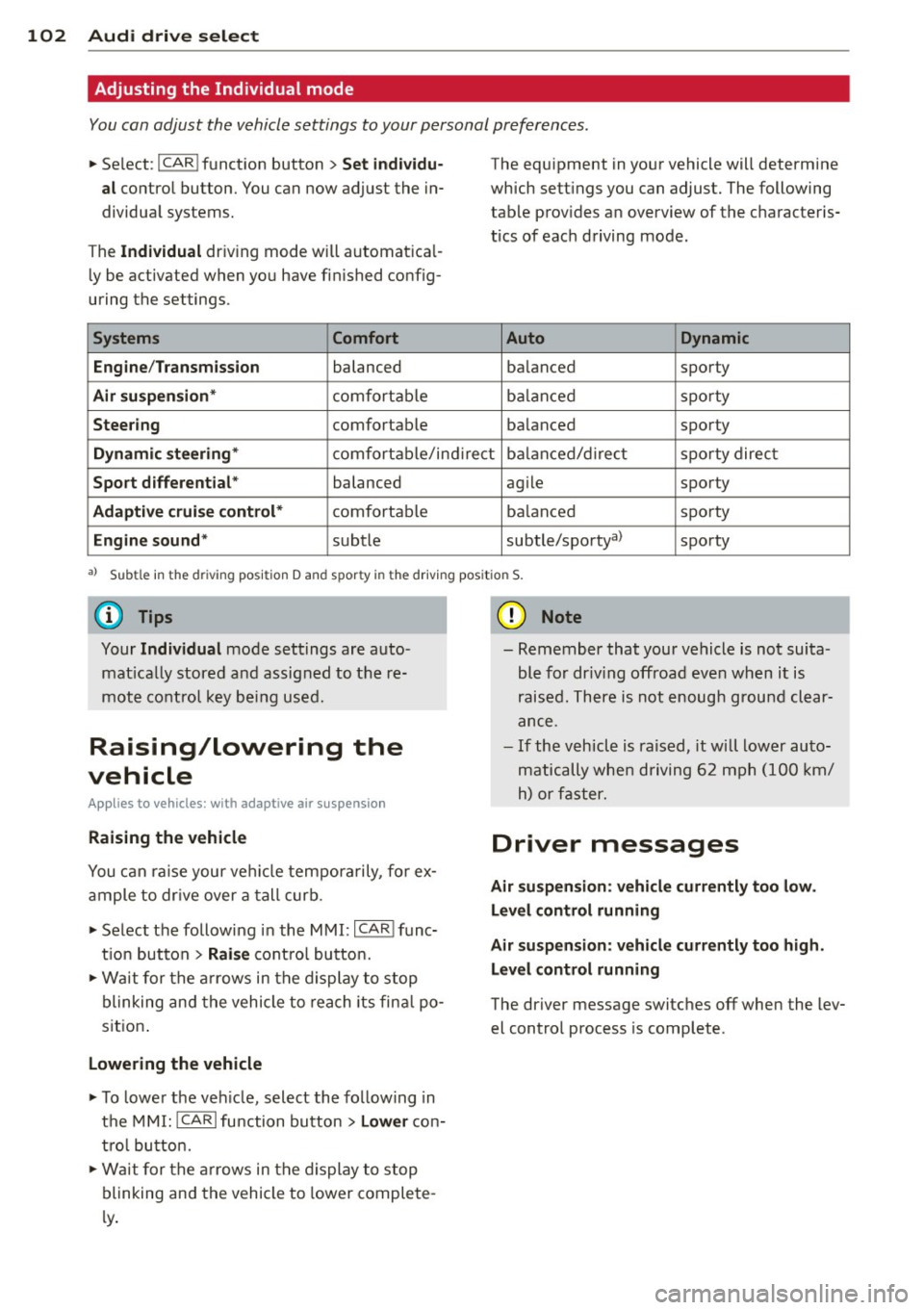
Adjusting the Individual mode
You can adjust the vehicle settings to your personal preferences .
• Se lect : I CAR ! function button > Set individu
al
control button. You can now adjust the in
dividual systems.
The
Individual dr iving mode will automatica l
ly be activated when you have finished config
uring the settings .
Systems Comfort
Engine /Transmission
balanced
Air suspension* comfortable
Steering comfortable The equipment
in your vehicle will determine
which settings you can adjust. The following
table provides an overview of the characteris
tics of each driving mode.
Auto Dynamic
balanced sporty
balanced sporty
balanced sporty
Dynamic steering* comfortable/indirect balanced/direct sporty direct
Sport differential * balanced agile sporty
Adaptive cruise control* comfortable balanced sporty
Engine sound* subtle
subtle/sportya> sporty
al Sub
tle in th e d riv in g po sit ion D an d sp or ty in t he driving pos itio n S.
Your Individual mode settings are auto
matically stored and assigned to the re
mote control key being used.
Raising/lowering the
vehicle
Appl ies to vehicles : wit h adapt ive a ir suspe nsion
Raising the vehicle
You can ra is e your veh icle temporarily, for ex
ample to drive over a tall curb.
• Select the following in the MMI:
ICARI func
t ion button
> Raise control button.
• Wait for the arrows in the display to stop
blinking and the vehicle to reach its fina l po
sit ion .
Lowering the vehicle
• To lower the vehicle, select the following in
the MMI:
!CARI function button > Lower con
tro l button.
• Wait for the arrows in the display to stop
blinking and the vehicle to lower complete
l y .
(D Note
- Remember that your vehicle is not suita
ble for dr iv ing offroad even when it is
raised. There is not enough ground clear
ance.
- If the vehicle is raised, it wi ll lower auto
matically when driving 62 mph (100 km/
h) or faster.
Driver messages
Air suspension: vehicle currently too low .
Level control running
Air suspension: vehicle currently too high.
Level control running
The driver message switches off when the lev
el control process is complete .
Page 113 of 314
M N
0 I.J "". rl I.O
"' rl
"' rl
Hill descent control switches off once the de
cline levels out or you press the accelerator pedal.
On vehicles with the cruise control system*
¢ page 82, hill descent control is also activat
ed when the speed is set.
A WARNING
Hill descent control cannot overcome
physical limitations, so it may not be able
to maintain a constant speed under all
conditions. Always be ready to apply the
brakes .
Manual shift program
Using the manual shift program you can
manually select gears.
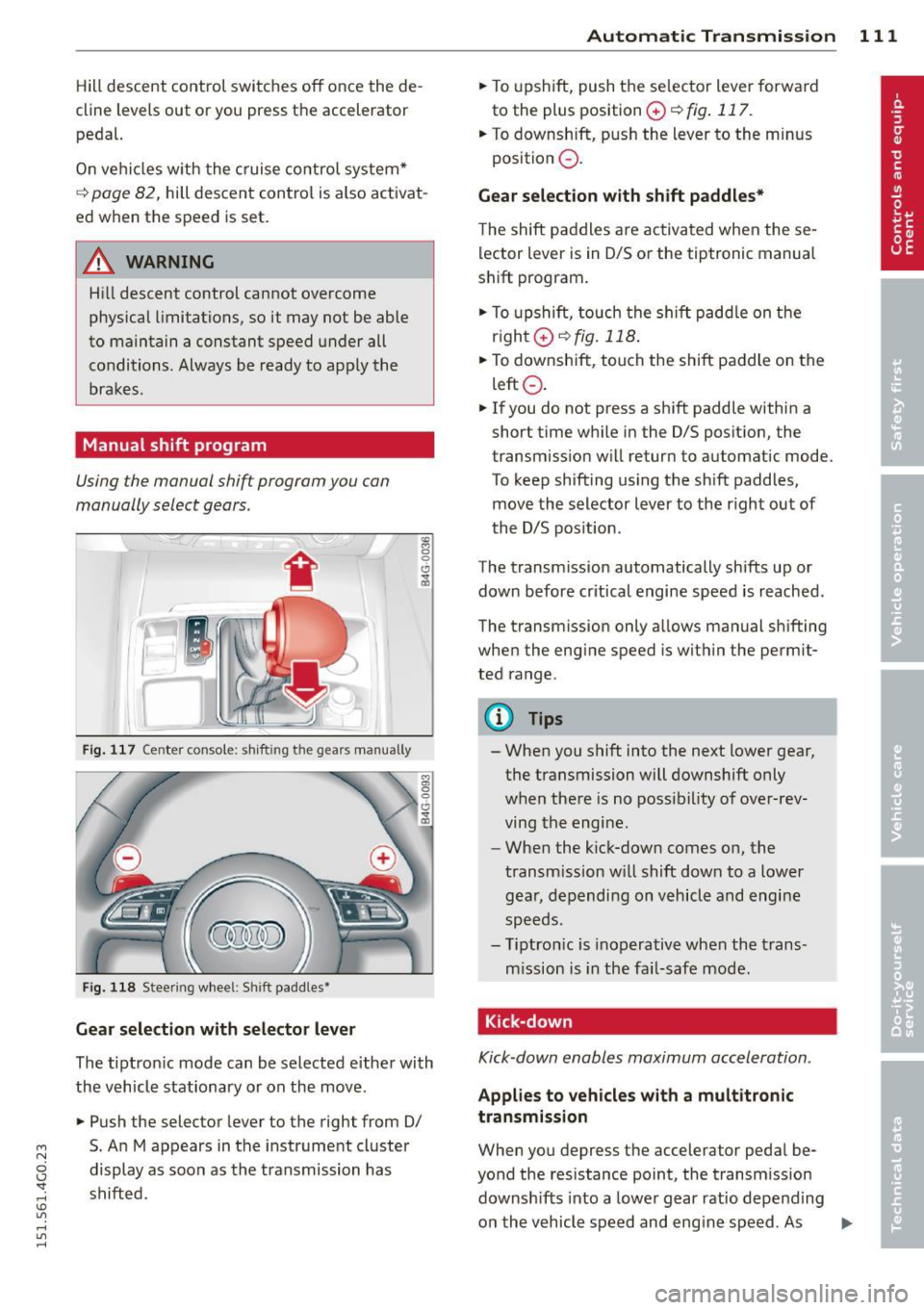
Fig. 117 Center console; shift ing the gears manually
Fig. 118 Steering wheel: Shift paddles•
Gear selection with selector lever
The tipt ron ic mode can be selected either with
the vehicle stationary or on the move.
.,. Push the selector lever to the right from 0/
5. An M appears in the instrument cluster
display as soon as the transmission has
shifted.
Automatic Transmission 111
.,. To upshift, push the se lector lever forwa rd
to the plus position
0 ¢ fig . 117.
.,. To downshift, push the lever to the minus
position
0 .
Gear selection with shift paddles*
The shift paddles are activated when these
lector lever is in 0/S or the tiptronic manual
shift program.
.,. To upshift, touch the shift paddle on the
right 0¢fig.118 .
.,. To downshift, touch the shift paddle on the
left
0 .
.,. If you do not press a shift paddle within a
short time while in the 0/S position, the
transm iss ion will return to automatic mode.
To keep shifting using the shift paddles,
move the selector lever to the r ight out of
the 0/S position.
The transmission automatically shifts up or
down before critical engine speed is reached.
The transm ission only allows manual sh ifting
when the engine speed is with in the permit
ted range.
@ Tips
- When you shift into the next lower gear,
the transmission will downshift only
when there is no possibility of over-rev
ving the engine.
- When the kick-down comes on, the
transmission will shift down to a lower
gear, depending on vehicle and engine
speeds.
- Tiptronic is inoperative when the trans
mission is in the fai l-safe mode.
, Kick-down
Kick-down enables maximum acceleration.
Applies to vehicles with a multitronic
transmission
When you depress the accelerator pedal be
yond the resistance point, the transmission
downshifts into a lower gear ratio depend ing
on the vehicle speed and engine speed. As .,.