Adaptive light AUDI S6 2016 User Guide
[x] Cancel search | Manufacturer: AUDI, Model Year: 2016, Model line: S6, Model: AUDI S6 2016Pages: 294, PDF Size: 73.88 MB
Page 91 of 294
.... N
0 CJ '
M
"' ......
Audi ada pti ve c ruise contr ol and br akin g gu ard
The highe r the speed, the greater the distance in
yards (meters) ¢&. .The
Distance 3 setting is
recommended .
The distan ces p rovided are specified values. De
pending on the driving situation and the how the
vehicle ahead is driving, the actual distance may
be more or less than these target d istances.
The various symbols fo r the time increments ap
pear br ie fly in the information line @ ¢
page 86,
fig. 93 when you change the settings.
c:::, _c:::, ___ Dis tan ce 1: This setting corresponds
to a distance of 92 fee t/28 meters when travel
ing at 62 mph (100 km/h), o r a time interval of 1
second.
c:::, __ c:::, __ Distan ce 2 : This setting corresponds
to a distance of 118 feet/36 meters whe n travel
ing at 62 mph (100 km/h), or a time interval of
1.3 seconds.
c:::, ___ c:::,_ Distanc e 3: This setti ng corresponds
to a distance of 164 feet/SO meters when travel ing at 62 mph (100 km/h), o r a time interval of
1.8 seconds.
c:::, __ __ c:::, Di stance 4 : This setti ng corresponds
to a distance of 210 feet/64 meters when travel ing at 62 mph (100 km/h), or a time interval of
2 .3 seconds.
A WARNING
Following other vehicles too closely increases
the risk of collisions and ser ious personal in
jury.
- Setting short distances to the traffic ahead reduces the t ime and distance available to
br ing your vehicle to a safe stop a nd makes
it even more necessary to pay close atten
t ion to traffic .
- Always obey applicable traff ic laws, use
good judgment, and select a safe following distance for the traffic, road and weathe r
condit io ns.
(D Tips
- Di stance 3 is set automatically each time
you switch the ignition on . -
Your standard settings are automatically
stored and assigned to the remote control
key being used.
Selecting the driving mode
Applies to vehicles: with Aud i adapt ive cru ise control
.,. Select the desired driving mode in drive select
¢page 100.
{!) Tips
Your settings are automatically stored and as
s igned to the remote control key being used.
Prompt for driver intervention
Applies to vehicles: with Aud i adapt ive cru ise control
F ig . 97 Inst rume nt cluster: request for d river in tervention
In certain situations, the system will prompt you
to take action . This could happen, for example, if
braking by the adaptive cru ise control system is
not enough to maintain enough distance to the
vehicle ahead .
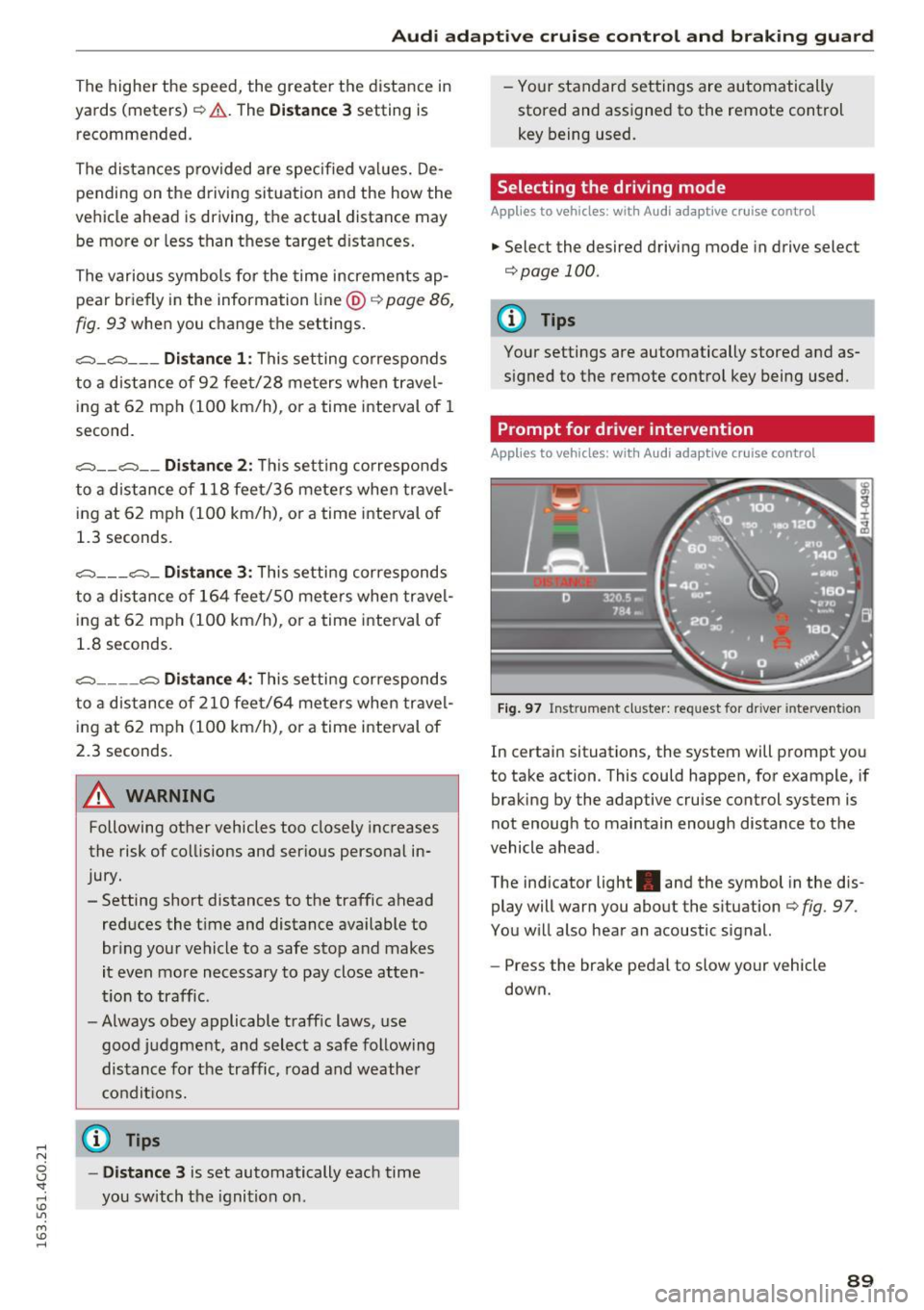
The ind icator light . and the symbol in the dis
play will warn you about the situation ¢
fig. 97 .
You w ill also hear an acoustic signal.
- Press the brake pedal to slow yo ur vehicle
down.
89
Page 92 of 294
Audi adaptive cruise control and braking guard
Audi braking guard
Description
Applies to vehicles: w ith Audi adaptive cruise co ntro l
Fig. 98 Instrument cluster: approach warning
Braking guard uses radar sensors and a video
camera . It also functions within the limits of the
system when adaptive cruise control is switched
off .
What can braking guard do?
When detected in time, the system can assess
situations when a vehicle ahead brakes suddenly
or if your own vehicle is traveling at a high speed
and approaching a vehicle up ahead that is mov
ing more slowly . Braking guard does not react if
it cannot detect the situat ion.
The system advises you of various situations:
- The
distance warning is given if you are too
close to the vehicle ahead for a long time.
If the
vehicle ahead brakes sharply, you will not be
able to avo id a coll is ion. The indicator light.
in the display comes on .
- The
approach warning is given when a detected
vehicle up ahead in your lane is moving much
more slowly than you are or if it brakes sharply .
When this warning is g iven, it may only be pos
sible to avo id a collision by swerving or braking
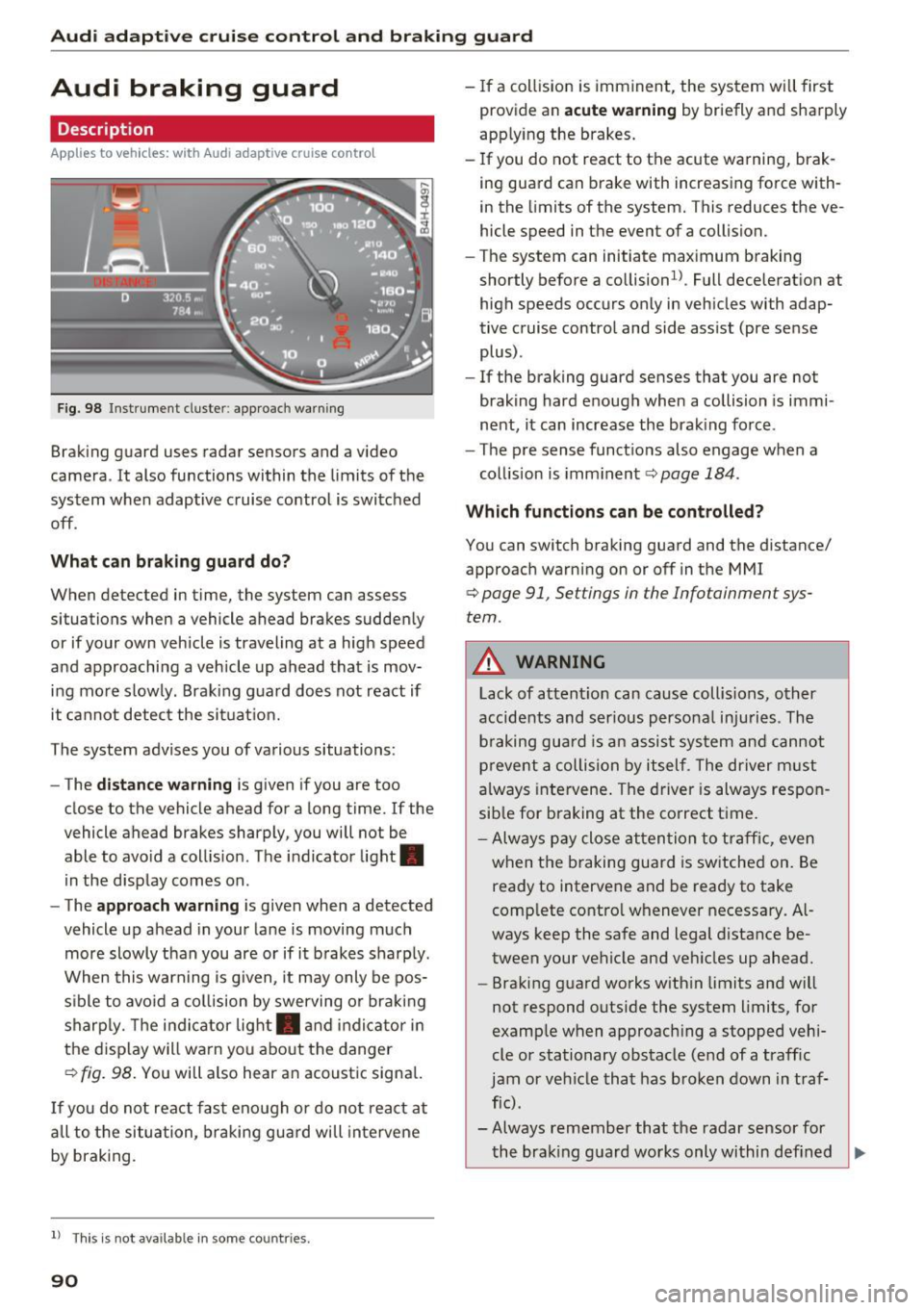
sharp ly. Th e indicator light. and indicator in
the display will warn you about the danger
qfig. 98. You will also hear an acoustic signal.
If you do not react fast enough or do not react at
all to t he situation, braking guard will intervene
by braking.
l ) Thi s is not ava ilab le in some co un tri es .
90
-If a collision is imminent, the system will first
provide an
acute warning by briefly and sharply
app lying the brakes.
- If you do not react to the acute warning, brak
ing guard can brake with increasing force with
in the limits of the system. This reduces the ve
hicle speed in the event of a collision.
- The system can initiate maximum braking
shortly before a co llision
1
) . Full deceleration at
high speeds occurs only in vehicles with adap
tive cruise control and side assist (pre sense
plus) .
- If the braking guard senses that you are not
braking hard enough when a collision is immi
nent, it can increase the braking force .
- The pre sense functions also engage when a
collision is imminent
qpage 184.
Which functions can be controlled?
You can switch braking guard and the distance/
approach warning on or off in the MMI
q page 91, Settings in the Infotainment sys
tem .
A WARNING
Lack of attent ion can cause collisions, other
accidents and serious personal injuries . The
b ra king guard is an assist system and cannot
prevent a collision by itself. The driver must
always intervene . The driver is always respon
sib le for braking at the correct time .
- Always pay close atten tion to traffic, even
when the braking guard is switched on. Be
ready to intervene and be ready to take
comp lete contro l whenever necessary. Al
ways keep the safe and legal distance be
tween your vehicle and vehicles up ahead.
- Braking guard works with in limits and will
not respond outside the system limits, for
example when approaching a stopped vehi
cle or stationary obstacle (end of a traffic
jam or vehicle that has broken down in traf
fic) .
- Always remember that the radar sensor for
-
the brak ing guard works only within def ined Ill>
Page 102 of 294
Audi drive select
Audi drive select
Driving settings
Introduction
Drive select makes it possible to experience d if
ferent types of vehicle settings in one vehicle.
The driver can select
Comfort, Auto and Dynami c
modes in the Infotainment system to switch be
tween a sporty and a comfortable driving mode.
In the
Individual mode, the settings can be ad
justed to your personal preferences. This makes it possible to combine settings such as a sporty
engine tuning with light steering.
A WARNING
-
Improper use of the Audi dr ive select can
cause collisions, other accidents and serious
personal injury.
Description
The follow ing systems are affected by drive se
lect:
Engine and transmission
Depending on the mode, the eng ine and the
transmission respond quicker or in a more bal
anced manner to acce lerator pedal movements.
I n the sporty dynamic mode, the transmission
shifts at h igher RPMs.
Air suspension*
The adaptive air suspension/adaptive air suspen
sion sport*
(Air suspension in the MMI) is an
e lectronically controlled air suspens ion and
damping system. They are adjusted depend ing
on the selected dr iv in g mode, the driver's steer
ing, braking and acceleration input and the road
surface, vehicle speed and load. A sporty setting
is generally used in vehicles with adaptive air sus
pension sport*.
The vehicle clearance varies depending on these
lected mode and the speed.
The highway setting is activated automatically
when yo u drive above 75 mph (120 km/h) for
mo re than 30 seconds in the
Auto or Dynamic
100
mode. The ground clea rance is increased auto
matically if the speed drops below 44 mph (70
km/h) for more than 120 seconds.
Steering
The steering adapts in terms of steering effort
and steering ratios. Indirect stee ring that moves
easily, like the steering in comfort mode, is best
suited to long drives on a highway. In contrast,
dynamic mode provides sporty, direct steering.
The following applies to vehicles with dynamic
steering*: the steering ratio changes based on
vehicle speed in order to maintain optimum
steering effort for the driver at a ll times . This
sets the steering to be less sensitive at higher
speeds in order to provide improved vehicle con
trol. At reduced speeds, however, steering is
more direct in order to keep the steering effort as
min imal as possible when the dr iver is maneuver
i ng the vehicle. At low and average speeds, dy
namic steering additionally provides more re
sponsive steering performance.
Sport differential*
As a component of the all wheel dr ive system
(quattro)
c::;> poge 191, the Sport differentia l*
distributes the d riving powe r to the rear axle de
pending on the situation . T he distr ibutio n of
power varies depending on the selected mode,
from ba lanced (comfort) to agile (dynamic). The
goal is a high level of agility and ability to accel
erate on curves. The vehicle is very responsive to
steering.
Curve light*
The curve light adapts to driving on curves. The
pivoting action and the lighting are also adapted
to the mode.
Adaptive cruise control*
The behav ior when accelerating can be adjusted
from comfortable to sporty, depending on the
drive select mode. Adaptive cruise control also
responds to the driving behavior of the vehicle
ahead in a more conservative or sporty manner . .,..
Page 128 of 294
Driving safety
• Make sure to use the right child restraint cor
rectly to protect children
c::> page 166, Child
safety.
• Sit properly in your seat and make sure that
your passengers do the same
c::> page 53, Gen
eral information.
• Fasten your safety belt and wear it properly. Al
so instruct your passengers to fasten their safe
ty belts properly
c::> page 134 .
What impairs driving safety?
Safe driving is directly related to the condition of
the vehicle, the driver as well as the driver's abili
ty to concentrate on the road without being dis
tracted .
The driver is responsible for the safety of the ve
hicle and all of its occupants. If your ability to
drive is impaired, safety risks for everybody in the
veh icle increase and you also become a hazard to
everyone else on the road
c::> ,&. . Therefore :
• Do not let yourself be distracted by passengers
or by using a cellular telephone .
• NEVER drive when your dr iv ing ability is im
paired (by medications, alcohol, drugs, etc .).
• Observe all traffic laws, rules of the road and
speed limits and plain common sense .
• ALWAYS adjust your speed to road, traffic and
weather conditions .
• Take frequent breaks on long trips . Do not drive
for more than two hours at a stretch .
• Do NOT drive when you are tired, under pres
sure or when you are stressed.
.&, WARNING
Impaired driving safety increases the risk of
serious personal injury and death whenever a
vehicle is being used.
126
.
Correct passenger
seating positions
Proper seating position for the driver
The proper driver seating position is important
for safe, relaxed driving.
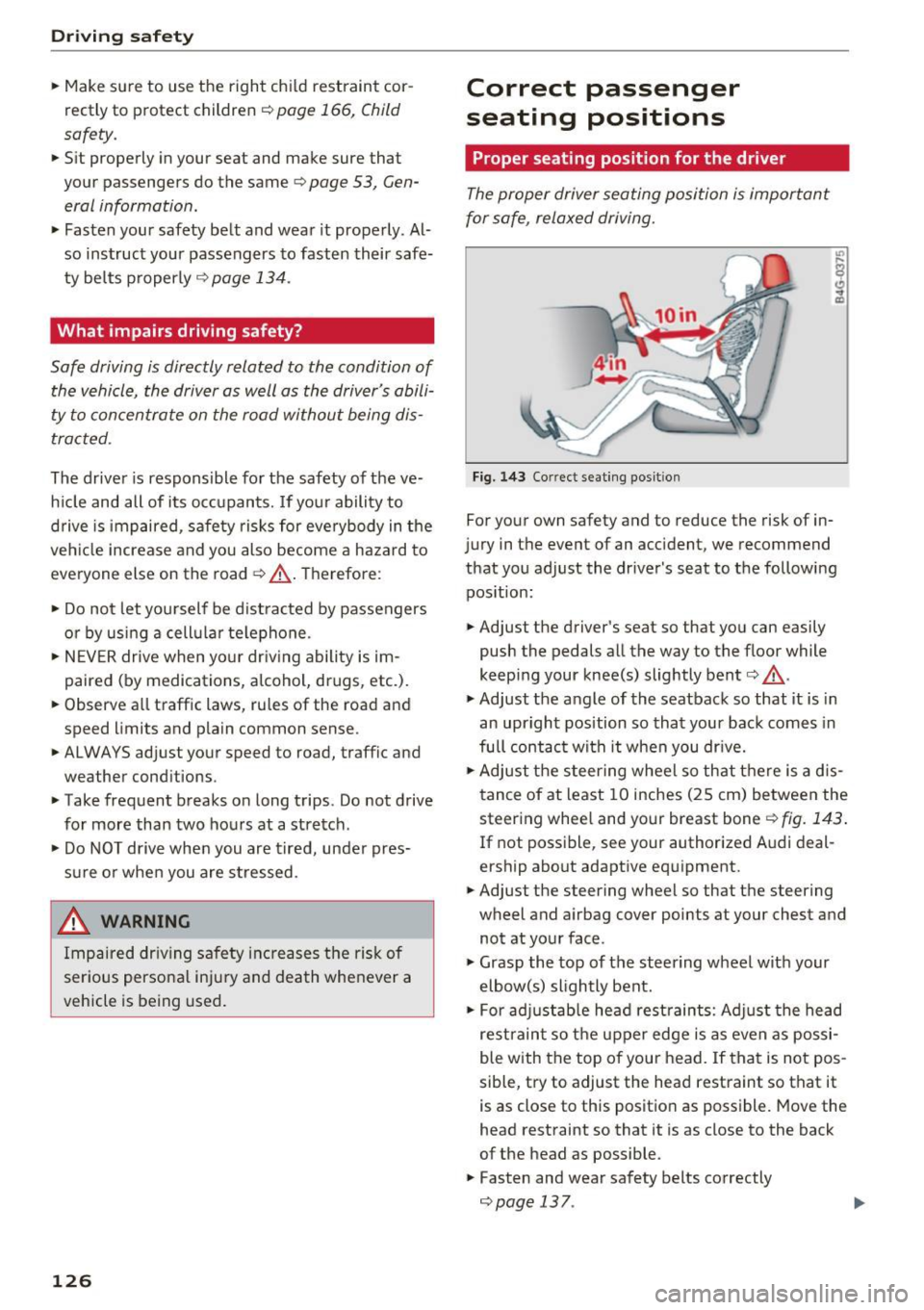
Fig. 143 Correct seating posit ion
For your own safety and to reduce the risk of in
jury in the event of an accident, we recommend
that you adjust the driver's seat to the following position:
• Adjust the driver's seat so that you can easily
push the pedals all the way to the floor while
keeping your knee(s) slightly bent
c:> .&_ .
• Adjust the angle of the seatback so that it is in
an upright position so that your back comes in
full contact with it when you dr ive.
• Adjust the steering wheel so that there is a d is
tance of at least 10 inches (25 cm) between the
steering wheel and your breast bone
r::!) fig. 143.
If not possible, see your authorized Audi deal
ership about adaptive equipment.
• Adjust the steering wheel so that the steering
wheel and airbag cover points at your chest and
not at your face .
• Grasp the top of the steering wheel with your
elbow(s) slightly bent.
• For adjustable head restraints: Adjust the head
restraint so the upper edge is as even as possi
ble with the top of your head. If that is not pos
sible, try to adjust the head restraint so that it
is as close to this position as possible. Move the
head restraint so that it is as close to the back
of the head as possible .
• Fasten and wear safety belts correctly
c::> page 13 7. .,._
Page 186 of 294
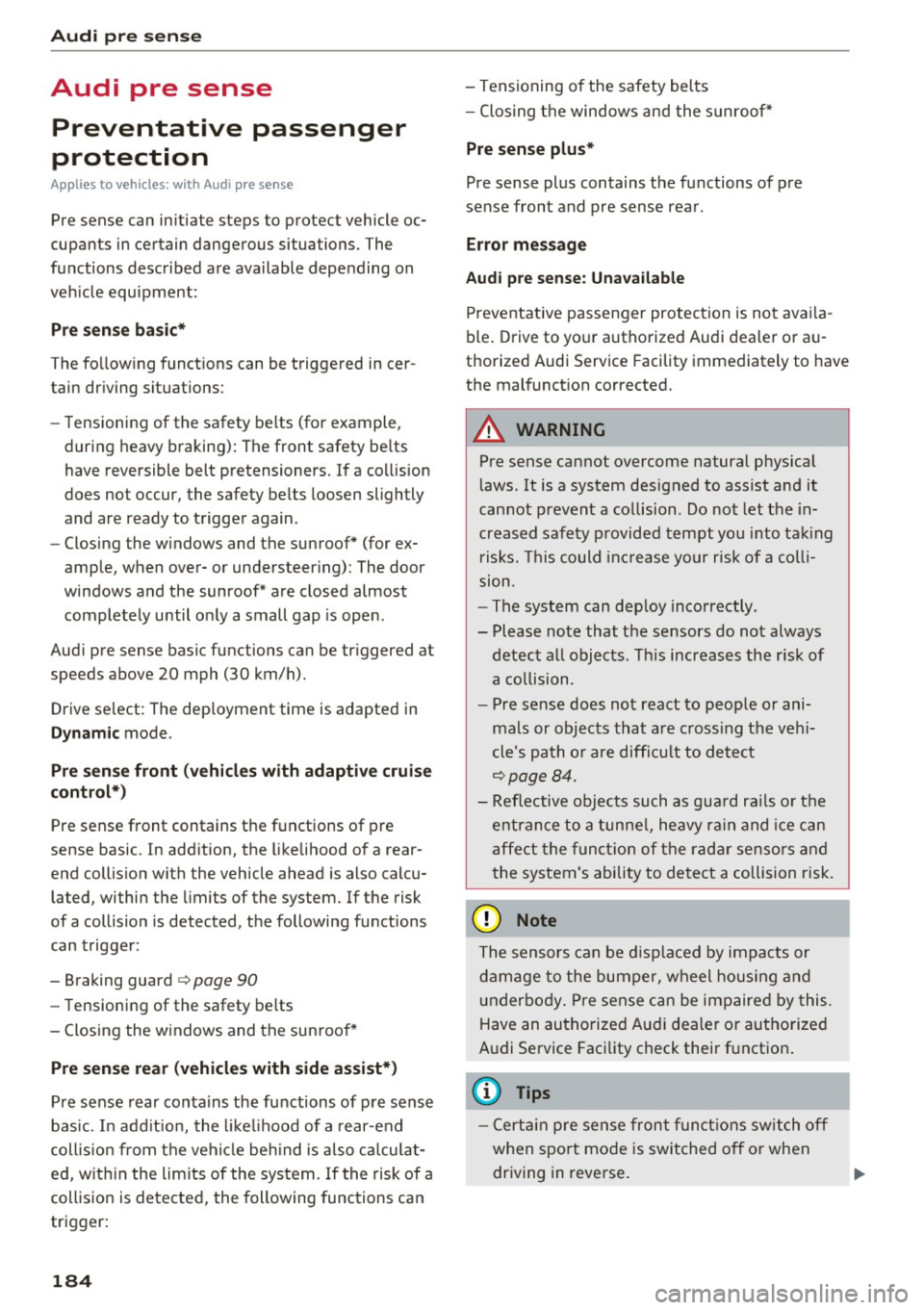
Audi pre sense
Audi pre sense
Preventative passenger
protection
A pp lies to ve hicles : w ith Audi p re se nse
Pre sense can initiate steps to protect vehicle oc
cupants in certain dangerous situations. The
functions described are available depending on
veh icle equipment :
Pre sense basic*
The following functions can be triggered in cer
tain driving situations:
- Tensioning of the safety belts (for example,
during heavy braking): The front safety belts
have reversible belt pretensioners. If a collision
does not occur, the safety belts loosen slightly
and are ready to trigger again .
- Closing the windows and the sunroof* (for ex
ample, when
over-or understeering): The door
windows and the sunroof* are closed almost
completely until only a small gap is open .
Audi pre sense basic functions can be triggered at
speeds
above 20 mph (30 km/h).
Drive select : The dep loyment time is adapted in
Dynamic mode.
Pre sense front (vehicles with adaptive cruise
control*}
Pre sense front contains the functions of pre
sense basic . In addition, the likelihood of a rear
end collision with the vehicle ahead is also calcu
lated, within the limits of the system. If the risk
of a collision is detected, the following functions
can trigger :
- Braking guard
c:> page 90
- Tensioning of the safety belts
- Closing the windows and the sunroof*
Pre sense rear (vehicles with side assist*)
Pre sense rear contains the functions of pre sense
bas ic. In addition, the likelihood of a rear-end
coll ision from the vehicle beh ind is also calculat
ed, within the limits of the system. If the risk of a
collision is detected, the following functions can
trigger:
184
- Tensioning of the safety belts
- Closing the windows and the sunroof*
Pre sense plus*
Pre sense plus contains the functions of pre
sense front and pre sense rear .
Error message
Audi pre sense: Unavailable
Preventative passenger protection is not availa
ble. Drive to your authorized Audi dealer or au
thorized Audi Service Facility immediately to have
the malfunction corrected.
A WARNING
Pre sense cannot overcome natural physical
laws. It is a system designed to assist and it
cannot prevent a collision . Do not let the in
creased safety provided tempt you into taking
risks. This could increas e your risk of a colli
sion.
- The system can deploy incorrectly .
- Please note that the sensors do not always
detect all objects . This increases the risk of
a collision .
- Pre sense does not react to people or ani
mals or objects that are crossing the vehi
cle 's path or are difficult to detect
c:> page 84.
- Reflective objects such as guard rails or the
entrance to a tunnel, heavy rain and ice can
affect the function of the radar sensors and
the system's ability to detect a collision risk.
(D Note
The sensors can be displaced by impacts or
damage to the bumper, wheel housing and
underbody. Pre sense can be impaired by this.
Have an authorized Aud i dealer or authorized
Audi Service Facility check their function.
{!) Tips
-Certain pre sense front functions switch off
when sport mode is switched off or when
driving in reverse.
1J11>
Page 189 of 294
shared, please see your contract with the
wireless telecommunications provider and the
"About Aud i connect" tab in your vehicle's
MMI:
! MENUI button> Aud i connect > About
Audi conn ect.
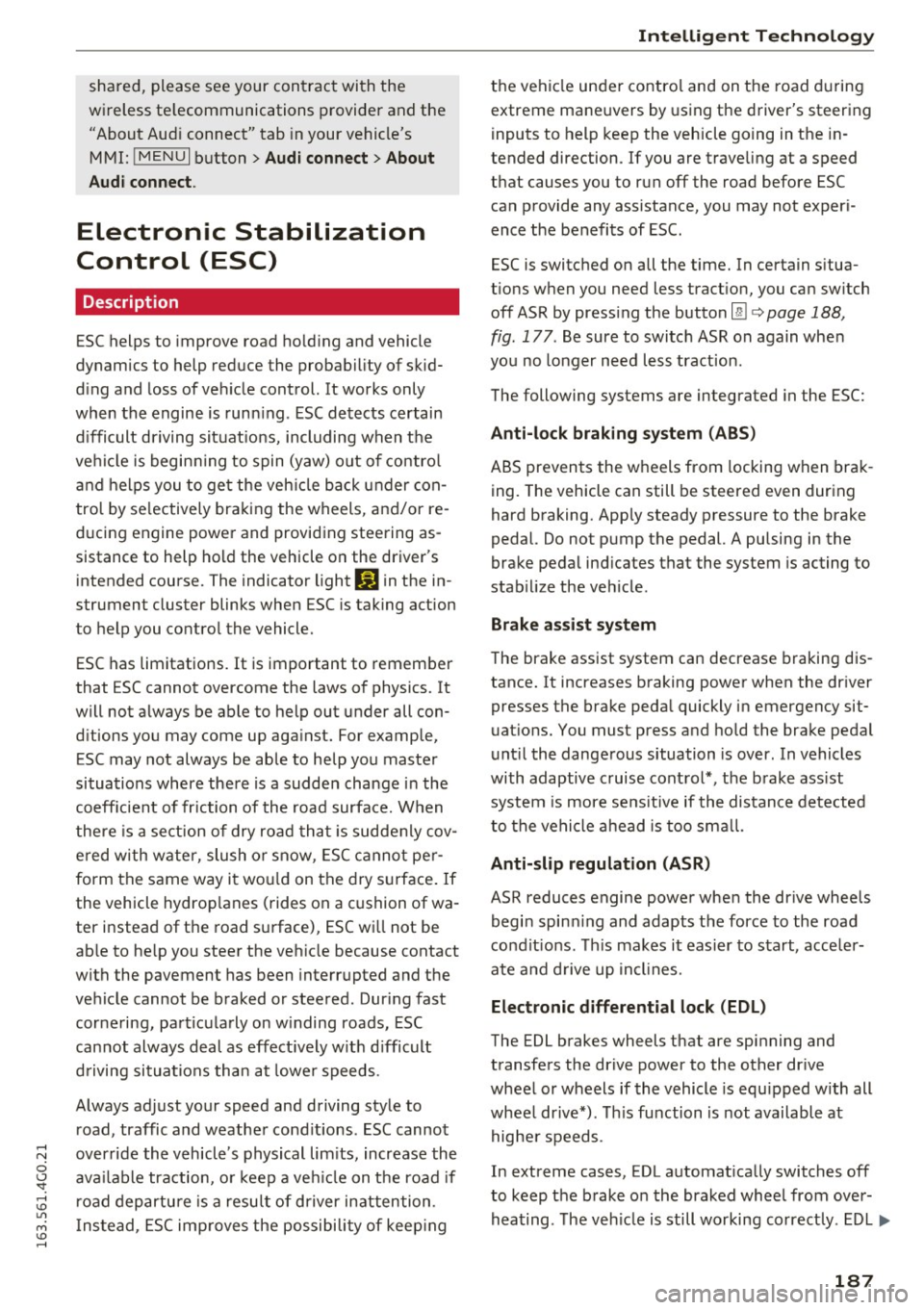
Electronic Stabilization
Control (ESC)
Description
ESC helps to improve road ho ld ing and vehicle
dynamics to help reduce the probability of skid
d ing and loss of vehicle control. It works only
when the engine is runn ing . E SC detects certain
d ifficult dr iving sit uat ions, including when t he
ve hicl e is begin ning to spin (yaw) out of contro l
and helps you to ge t the veh icle back under con
tro l by se lective ly braking the wheels, and/or re
ducing engine powe r and provid ing steering as
sistance to help hold the vehicle on the dr iver's
intended course. The indicator light
GJ in the in
strument cluster blinks when ESC is taking action
to help you co ntrol the vehicle.
ESC has limitations. It is important to remember
that ESC cannot overcome the laws of physics. It
will not a lways be able to help out under all con
d itions you may come up aga inst. For example,
ESC may not always be able to help you master
situations where there is a sudden change in the
coeff icient of friction of the road surface. When
there is a section of dry road that is sudde nly cov
e red with water, slush o r snow, ESC cannot pe r
form the same way it wo uld on the dry s urface . If
the vehicle hydrop lanes (rides on a cushion of wa
ter i nstead of the road su rface), ESC wi ll not be
ab le to he lp you steer the veh icle because contact
with the pavement has been interrupted and the
ve hicle cannot be braked or steered. Dur ing fast
cornering, pa rticula rly on w inding roads, ESC
cannot always deal as effect ively w it h difficult
d riving si tuations tha n at lowe r speeds.
Always adjust your speed and driving style to road , traffic and weather cond itions . ESC cannot
override the vehicle's physical lim its, increase the
ava ilab le traction, o r keep a ve hicle on the road if
road departure is a resu lt of driver in attention .
I nstead, ESC imp roves the possibi lity of keep ing
Intellig ent Technology
the vehicle under contro l and on the road d uring
extreme mane uvers by using the driver's steering
i nputs to help keep the vehicle go ing in the in
tended direction. If you are traveling at a speed
that causes you to run off the road before ESC
can provide any assistance, you may not exper i
ence the benefits of ESC.
ESC is switched on all the time. In certain s itua
tions when you need less tract ion, you can sw itch
off ASR by press ing the button
lm c> page 188,
fig . 177 . Be sure to switc h ASR on again whe n
you no longer need less traction.
The following systems are integrated in the ESC:
Anti-lock braking sy stem (ABS )
ABS prevents the wheels from locking when brak
ing. The vehicle can still be steered even dur ing
hard braking. Apply steady pressure to the brake
pedal. Do not pump the pedal. A pulsing in the
brake pedal ind icates that the system is acting to
stab ilize the veh icle .
Brake assist system
The brake assist system can decrease braking dis
tance. It increases braking power when the dr iver
presses the brake peda l quickly in emergency sit
uat ions. You must press and ho ld the brake pedal
unt il the dange rous situation is over . In vehicles
with adaptive c ruise cont rol*, the b rake ass ist
system is more se nsitive if the distance detected
to the ve hicle ahead is too sma ll.
Anti-slip regulation (ASR)
ASR reduces engine power whe n the dr ive wheels
begin spin ning and adapts the force to the road
co ndit ions. This makes it eas ier to s tart, acce ler
ate a nd d rive up incl ines.
Electronic differential lock (EDL)
The EDL brakes wheels that are spinning and
transfers the drive power to the other dr ive
wheel or wheels if the vehicle is equ ipped with all
whee l drive*) . This function is not available a t
highe r speeds .
In extreme cases, EDL automat ica lly switches off
to keep t he brake o n the braked wheel from over
hea ting . T he veh icle is still working co rrectly. EDL
IJJ>
187
Page 191 of 294
Intelligent Technology
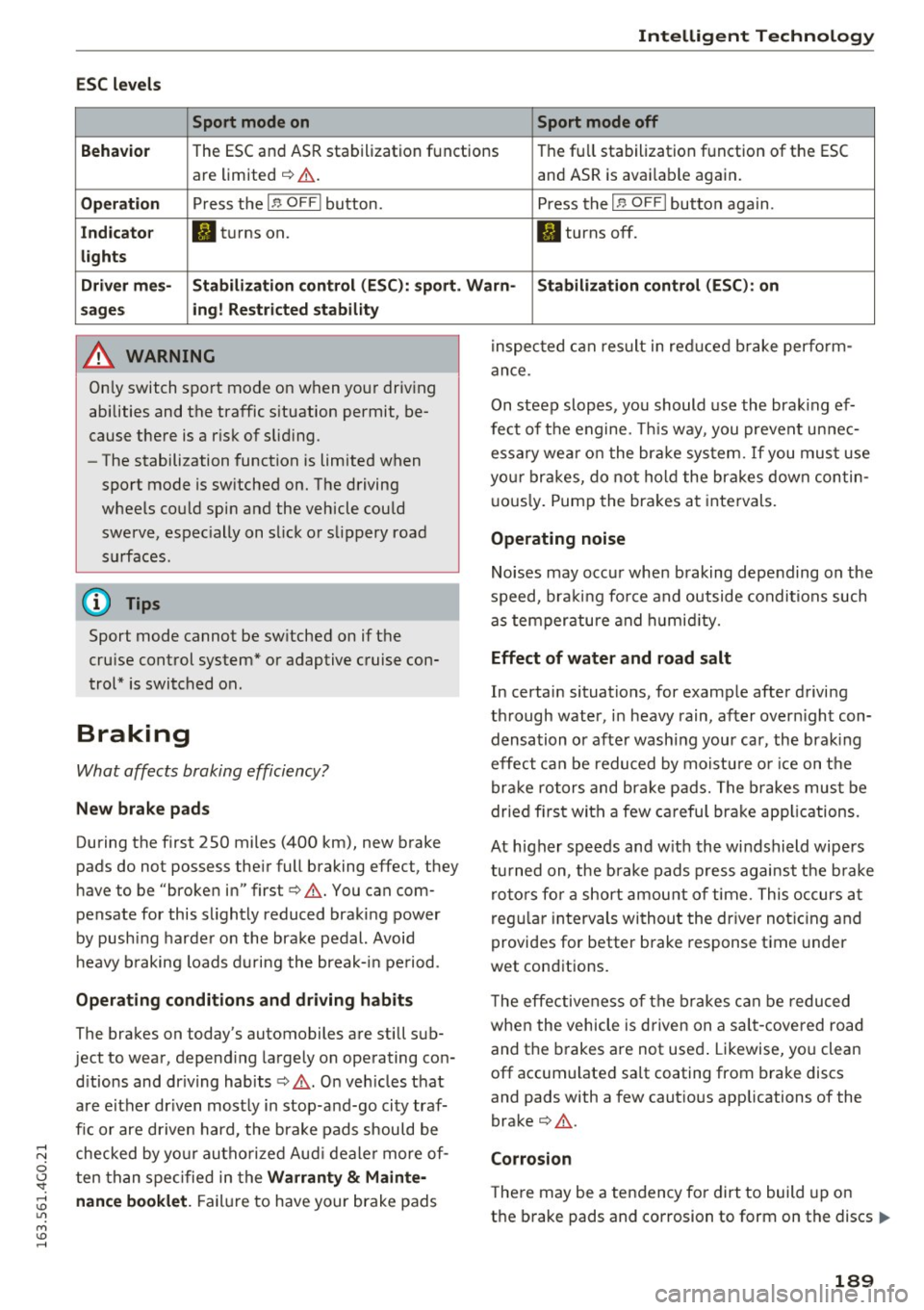
ESC levels Sport mode on Sport mode off
Behavio r
The ESC and ASR stabilization functions The fu ll stabilization function of the ESC
are limited ¢ .&. . and ASR is avai lable again.
Operation Press the I .a OFF I button.
Press the I.a OFFI button again .
Indicator II turns on. II turns off.
lights
Driver mes- Stabilization control (ESC): sport. Warn- Stabilization control (ESC): on
sages ing! Restricted stability
A WARNING
Only switch sport mode on when your driving
abilities and the traffic s ituation permit, be
cause there is a r isk of slid ing .
- The stabilization function is limited when
sport mode is sw itched on. The driving
wheels could spin and the vehicle cou ld
swerve, espec ially on slick or slippery road
surfaces .
(D Tips
Sport mode cannot be sw itched on if the
cru ise control system* or adaptive cruise con
trol* is switched on.
Braking
What affects braking efficiency?
New brake pads
During the first 250 miles (400 km), new brake
pads do not possess the ir full braking effect, they
have to be "broken in" first¢.&. . You can com
pensate for this slightly reduced braking power
by push ing harder on the brake pedal. Avoid
h eavy braking loads during the break-in period .
Operating conditions and driving habits
The brakes on today's automobiles are still sub
ject to wear , depend ing largely on operating con
d itions and dr iving habits ¢.&. . On veh icles that
are e ither dr iven most ly in stop-and-go city traf
fic or are driven hard, the brake pads should be
checked by your authorized Audi deale r more of
ten than specified in the
Warranty & Mainte
nance booklet.
F ailure to have your brake pads inspected can result
in reduced brake perform
ance.
On steep slopes, you should use the braking ef
fect of the engine. This way, you prevent un nec
essa ry wea r on the brake system. If you must use
you r brakes, do not hold the brakes down contin
u ous ly. Pump the brakes at intervals.
Operating noise
Noises may occur when braking depending on the
speed, bra king fo rce and outside conditions such
as temperature and humidity.
Effect of water and road salt
In certain situations, for example after driving
through water, in heavy rain, after overn ight con
densation or afte r wash ing your car, the brak ing
effect can be reduced by moisture or ic e on the
brake rotors and brake pads. The brakes must be
dried f irst with a few careful brake applications .
At h igher speeds and w ith the windshield wipers
turned on, the brake pads press against the brak e
rotors for a short amount of time. This occurs at
regular intervals without the driver noticing and
provides for better brake response t ime under
wet conditions.
T he effectiveness of the brakes can be reduced
when the vehicle is driven on a sa lt-covered road
and the brakes are not used . Likewise, yo u clean
off accum ulated salt coating from brake discs
and pads with a few cautious applications of the
brake¢ .&..
Corrosion
There may be a tendency fo r dirt to build up on
the brake pads and corrosion to form on the discs .,..
189
Page 262 of 294
Fuses
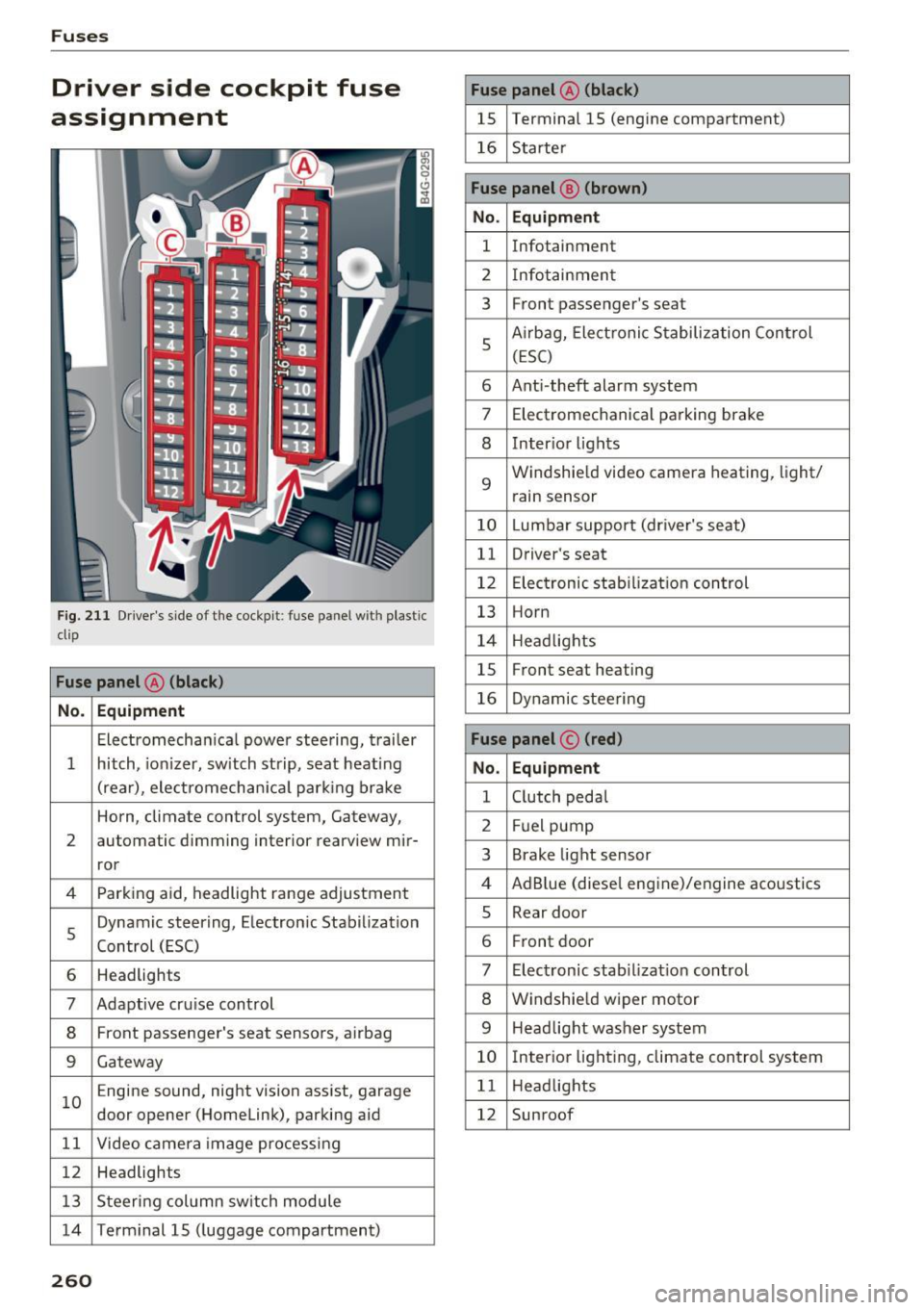
Driver side cockpit fuse
assignment
F ig. 211 Driver 's side of t he cockpit : fuse pa nel w it h plastic
clip
Fuse panel @ (black )
No . Equipment
Electromecha nica l powe r stee ring, trai ler
1 hitch, io nizer, sw itch st rip, sea t heat ing
(rear), ele ctromech an ical parking br ake
Horn, climate control system, Gateway,
2 automatic dimming interior rearv
iew mir-
ror
4 Parking aid, headlight range adjustment
5 Dynamic steering, Electron
ic Stabilization
Control (ESC)
6 Headlights
7 Adaptive cru ise control
8 Front passenger's seat senso rs, airbag
9 Gateway
1 0 E
ngine sound, night vision ass ist, garage
door opener (Homelink), parking aid
1 1 Video camera im age pro cessing
12 Headlights
1 3 Steeri ng col umn sw itch module
14 Term inal 15 ( luggage compartment)
260
Fuse panel @ (black)
15 Terminal 15 (engine compartment)
16 Starte r
Fuse panel @ (brown )
No. Equipment
1 Infotainment
2 Infotainmen t
3 F
ront passenger's seat
5 A
irbag, Elect ronic S tabiliza tion Con trol
( E SC)
6 Ant i- theft alarm system
7 Electromechanical pa rking brake
8 Inter io r li ghts
9
Windshie ld video camera heating, light/
rain sensor
10 Lumbar support (dr iver's seat)
11 Driver's seat
12 Elec tronic stab ilizati on con trol
13 Horn
1 4 H eadlights
15 Front seat heating
16 Dynamic stee ring
Fuse panel © (red)
No . Equipment
1 C lutch peda l
2 Fuel pump
3 Brake light sensor
4 AdB
lue (diese l eng ine)/engine aco ustics
5 Rear door
6 Fr
ont door
7 Electronic stab ili z at ion con trol
8 Windshie ld wiper motor
9 Headlight washer system
10 Inter
ior lig hting, climate control system
1 1 Headlights
12 Sunroof
Page 263 of 294
..... N
0 CJ '
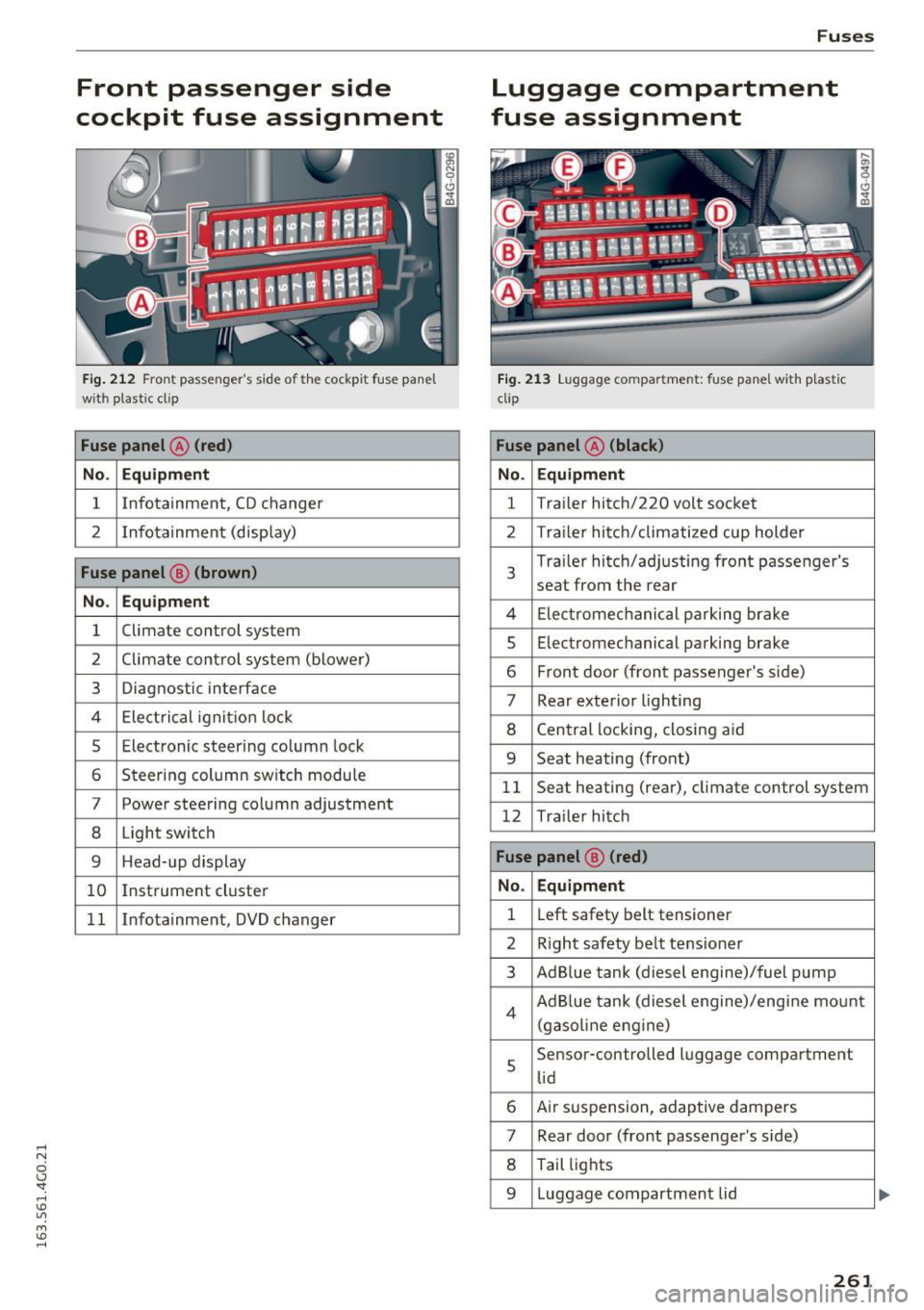
Front passenger side
cockpit fuse assignment
Fig. 212 Front passenger's sid e of t he cockpit fuse pane l
with plastic cl ip
Fuse panel @ (red)
No. Equipment
1 Infotainment, CD changer
2 Infotainment
(display)
Fuse panel@ (brown)
No . Equipment
1 Climate
control system
2 Climate control
system (blower)
3 Diagnostic interface
4 Electrical ignition lock
5 Electronic steering column lock
6 Steering column sw itch module
7 Power steering column adjustment
8 Light switch
9 Head-up display
10 I
nst rument cluster
1 1 Infotainment, DVD changer
Fuses
Luggage compartment
fuse assignment
Fig. 213 Luggage compartment: fuse panel with plastic
clip
Fuse panel @ (black )
No. Equipment
1 Tra
iler hitch/220 volt socket
2 Tra ile r hitch/climatized cup holder
3
Tra iler hitch/adjusting front passenger's
seat from the rear
4 Elec trom echan ica l parking brake
5 Electromec hanical parking brake
6 Front door (front passenger's side)
7 Rear exterior lighting
8 Central locking, closing aid
9 Seat heating (front)
1 1 Seat heating
(rear), climate control system
12 Tra iler hitch
Fuse panel @ (red)
No . Equipment
1 Left
safety belt tensioner
2 R ight safety belt tensioner
3 Ad Blue tank (diesel engine)/fuel pump
4 Ad Blue tank (diesel engine)/engine mount
(gasoline eng ine)
s
Sensor-controlled luggage compartment
lid
6 Air suspension, adaptive dampers
7 Rear door (front passenger's side)
8 Tail lights
9 Luggage compartmen t lid
261
Page 282 of 294
Index
Date display . . . . . . . . . . . . . . . . . . . . . . . . . . 26
Daytime running lights . . . . . . . . . . . . . . . . . 44
Declaration of compliance Adaptive cruise control . . . . . . . . . . . . . . .
276
Audi side assist . . . . . . . . . . . . . . . . . . . . . 276
Cell phone package . . . . . . . . . . . . . . . . . . 276
Convenience key . . . . . . . . . . . . . . . . . . . . . 276
Electronic immob ilizer. . . . . . . . . . . . . . . . 276
Garage door opener (HomeLink) . . . . . . . . 276
Remote control key . . . . . . . . . . . . . . . . . . 276
Defective light bulb warning
Indicator light . . . . . . . . . . . . . . . . . . . . . . .
21
Defrosting (windows)
Four- zone automatic climate control . . . . .
71
Three-zone climate control . . . . . . . . . . . . . 68
DEF (instrument cluster) . . . . . . . . . . . . . . . . 26
Determining correct load limit . . . . . . . . . . 245
Diesel Indicator light . . . . . . . . . . . . . . . . . . . . . . .
20
Prewarming . . . . . . . . . . . . . . . . . . . . . . . . . 74
Diesel fuel . . . . . . . . . . . . . . . . . . . . . . . . . . .
209
Diesel particu late filter . . . . . . . . . . . . . . . . 196
Dimensions .. .. ............... .... ... 271
Dimming the rearview mirror . . . . . . . . . . . . 49
Distance . . . . . . . . . . . . . . . . . . . . . . . . . . . . . 24
Door/rear lid warning . . . . . . . . . . . . . . . . . . . 23
Doors Ch ild safety lock . . . . . . . . . . . . . . . . . . . . . . 39
Driver information system . . . . . . . . . . . . . . . 23
CD/radio display . . . . . . . . . . . . . . . . . . . . . . 23
Door/rear lid warn ing . . . . . . . . . . . . . . . . . 23
E ff iciency program . . . . . . . . . . . . . . . . . . . .
25
E xterior temperature display . . . . . . . . . . . 23
On-board computer . . . . . . . . . . . . . . . . . . . 24
Service interval display . . . . . . . . . . . . . . . .
26
Driver seating posit ion . . . . . . . . . . . . . . . . . 126
drive select
adaptive air suspension/sport . . . . . . . . . .
100
Adaptive dampers . . . . . . . . . . . . . . . . . . . 100
Curve light . . . . . . . . . . . . . . . . . . . . . . . . . 100
Engine sound . . . . . . . . . . . . . . . . . . . . . . . 100
Safety belt tensione r . . . . . . . . . . . . . . . . . 100
Sport differential . . . . . . . . . . . . . . . . . . . . 100
Drive select . . . . . . . . . . . . . . . . . . . . . . . . . . 100
Driving economically
Driving safely .. .. ... .......... .. .. .. .
Driving through water .......... .. .. .. .
280
196
125
194
Driving time
Duplicate key ...
... .. .. ................ 24
30
Dust filter
refer to Pollutant filter . . . . . . . . . . . . . . . . 67
Dynamic steering
Indicator light
E
190
Easy seat entry . . . . . . . . . . . . . . . . . . . . . . . . 7 4
Economy tips (efficiency program) . . . . . . . . 25
Eff · 1c1ency program . . . . . . . . . . . . . . . . . . . . . 25
Electromechanical parking brake
Operat ion . . . . . . . . . . . . . . . . . . . . . . . . . . . 77
Releasing and closing . . . . . . . . . . . . . . . . . 77
Warning/indicator lights . . . . . . . . . . . . . . .
15
Electromechanical steering . . . . . . . . . . . . . 190
Indicator light . . . . . . . . . . . . . . . . . . . . . . 190
Electronic differential lock
Indicator light . . . . . . . . . . . . . . . . . . . . . . .
18
Electronic Differential Lock . . . . . . . . . . . . . 187
Electronic differential lock (EDL)
Warning/indicator lights . . . . . . . . . . . . . . .
19
Electronic immobili zer . . . . . . . . . . . . . . . . . . 31
E lectronic power control (EPC)
warning/indicator light . . . . . . . . . . . . . . . .
20
Electronic speed limiter . . . . . . . . . . . . . . . . . 29
Electronic stabilization control
Indicator light . . . . . . . . . . . . . . . . . . . . . . .
18
E lectronic Stabilization Control . . . . . . . . . . 187
Sport mode . . . . . . . . . . . . . . . . . . . . . . . . 188
Emergency actuation
Doors . . . . . . . . . . . . . . . . . . . . . . . . . . . . . . 36
Emergency flasher . . . . . . . . . . . . . . . . . . . . . 47
Warning/indicator lights . . . . . . . . . . . . . . .
22
Emergency operation
Emergency braking function (parking brake) .7.8
Fuel filler door . . . . . . . . . . . . . . . . . . . . . .
212
Luggage compartment lid . . . . . . . . . . . . . . 39
Selector lever . . . . . . . . . . . . . . . . . . . . . . .
112
Sunroof . . . . . . . . . . . . . . . . . . . . . . . . . . . . . 42
Emergency starting . . . . . . . . . . . . . . . . . . .
264
Energy management . . . . . . . . . . . . . . . . . . 192
Engine
Compartment. ... .. .. ... ..... ..... ..
218
Coolant . . . . . . . . . . . . . . . . . . . . . . . . . . . . 222
Prewarming . . . . . . . . . . . . . . . . . . . . . . . . . 74