buttons AUDI S7 2012 User Guide
[x] Cancel search | Manufacturer: AUDI, Model Year: 2012, Model line: S7, Model: AUDI S7 2012Pages: 294, PDF Size: 73.33 MB
Page 84 of 294

82 Adaptive cruise control and braking guard
Setting the speed and activating
regulation
.. To set the current speed, press the I SET !
button ¢ fig. 85. The set speed is shown in
the tachometer @and in the display
¢
fig . 86. You must also press the brake
pedal when the vehicle is stopped.
Switching adaptive cruise control off
.. Push the lever away from you into position
@ until it clicks into p lace. The message
ACC off appears.
Indicator lamps and messages in the instru
ment cluster display inform you about the cur
rent system status and settings.
@ Indicator lights
II -adaptive cruise control is switched on. No
vehicles are detected up ahead. The stored
speed is ma intained.
I -A moving vehicle is detected up ahead.
The adaptive cruise control system regulates
the speed and distance to the moving vehicle
ahead and acce lerates/brakes automat ically.
fij-adaptive cruise control is switched on. A
moving vehicle up ahead was detected. Your
vehicle remains stopped and will not start driving automatically.
I-When a utomat ic brak ing is not able to
keep enough distance to a previously detected
moving vehicle up ahead, you must take con
trol and brake¢
page 83, Prompt for driver
intervention.
© Display
If adaptive cruise control is not shown in the
display, you can call it up with the multifunc
tion steering wheel buttons¢
page 22.
Based on the symbo ls in the display, you can
determine if the system is main taining a dis
tance to the vehicle ahead and what that dis
tance is .
No vehicle -No vehi cle ahead was detected.
White vehicle -A vehicle ahead was detected.
Red vehicle -Prompt for the driver to take ac
tion ¢
page 83 .
Both arrows on the scale © indicate the dis
tance to the vehicle ahead. No arrow appears
when the vehicle is on an open road and the re
is no object ahead. If an object is detected
ahead, the arrow moves on the scale.
T he green zone on the scale shows the stored
distance . For information on changing the
stored distance ¢
page 84. If the distance
selected is too close or may soon become too
close, the arrows move into the red zone on
the scale.
A WARNING
Improper use of the adaptive cruise con
trol can cause collisions, other accidents
and serious personal injur ies.
- Pressing the
!SET ! button when driv ing at
speeds below
20 mph (30 km/h), w ill au
tomatically accelerate the vehicle to
20
mph (30 km/h), which is the minim um
speed that can be set.
(D Tips
-If you switch the ignit ion or the adaptive
cruise contro l off, the set speed is e rased
from the system memory.
- You cannot switch the Electron ic Stabili
zation Program (ESP) to the SPORT mode
when adaptive cruise control is sw itched
on.
Driving in stop-and-go traffic
Applies to vehicles: with adaptive cruise control
The adaptive cruise control system also as sists you in stop-and-go traffic. If a previous
detected vehicle ahead stops, your vehicle will
brake to a stop, within the limits of the sys
tem.
.. To resume driving with adaptive cruise con
trol, tap the acce lerator pedal or
.. Pull the lever toward you into position @
¢ page 81, fig. 85. .,.
Page 100 of 294
98 Night vision assistant
Night vision assistant
Night vision assistant
with detected pedestrian marking
Description
App lies to vehicles: with night v isio n ass istant
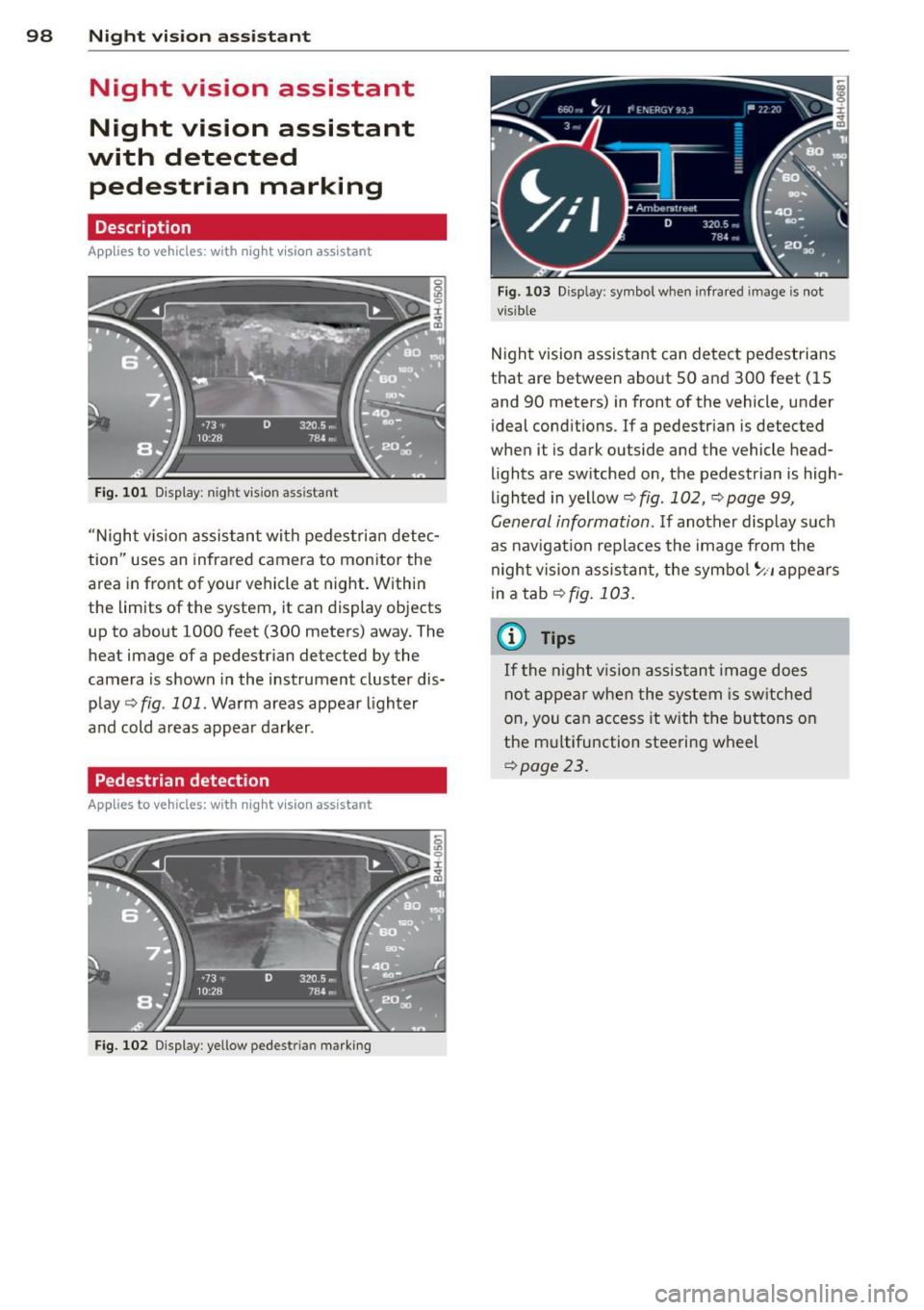
Fig. 101 D isplay: n ight vis ion assistant
"N ight v is ion assistant with pedestrian detec
tion" uses an infrared camera to monitor the
area in front of your vehicle at night. Within
the limits of the system, it can display objects
up to about 1000 feet (300 meters) away. The
heat image of a pedestrian detected by the
camera is shown in the instrument cluster dis
play
q fig. 101. Warm areas appear lighter
and cold areas appear darker .
Pedestrian detection
Applies to vehicles: with n ig ht v ision ass istant
Fig. 102 Display : yellow pedestrian marking
Fig. 103 Disp lay: symbo l w hen infrare d im age is not
visible
Night vision assistant can detect pedestrians
that are between about SO and 300 feet (15
and 90 meters) in front of the vehicle, under
ideal conditions . If a pedestrian is detected
when it is dark outside and the vehicle head
lights are switched on, the pedestrian is high
lighted in yellow
q fig. 102, q page 99,
General information. If another display such
as nav igation replaces the image from the
night vision assistant, the symbol
~11 appears
in a tab
qfig. 103.
(0 Tips
If
th e night vi.sion assistant image does
not appear when the system is switched
on, you can access it with the buttons on
the multifunction steering wheel
qpage 23.
Page 108 of 294

106 Autom atic Tran smissi on
To d ownsh ift
.,. Push the lever to the m inus position 0 -
When acce lerat ing, the transm iss ion w ill au
tomatically sh ift into the next gear befo re the
engine reaches its maxim um RPM.
If you apply a light throttle when accelerat ing , tiptronic will automatically shift from 1st
to 2nd gea r to save fuel.
If you apply a heavy
thrott le, the transmission will stay in 1st gear
unti l near maximum RPM is reached, or unt il
the driver shifts into 2nd gear .
If you take your foot off the accelerator peda l
when dr iving down a steep i ncl ine, tiptronic
will downshift from the selected gear into the
next lower gear until it reaches 1st gear,
based on road speed and engine RPM. Auto
matic downshifting is interrupted as soon as
you apply the throttle again.
(D Tips
- When you shift into the next lower gear,
the transmiss ion will downshift only
when there is no possibility of over-rev
v ing the engine.
- When the kick-down comes on, the transmission will sh ift down to a lower
gear, depending on vehicle and engine
speeds.
- tiptronic is inoperative when the trans
mission is in the fail-safe mode .
Steering wheel with tiptronic
Applies to vehicles: with tiptron ic steer ing wheel
The shift buttons on the steering wheel allow
the driver to shift gears manually .
Fig. 1 14 Stee ring wheel: Sh ift butto ns
.,. To downshift, touch the button on the left
0 -
.,. To upshift, touch the button on the r ight
0 -
The shift buttons are activated when the se
lector lever is in
D /S or in the manual shift
program (tiptronic).
Of course , you can continue to use the manua l
shift program with the selector lever on the
center console.
Transmission malfunction
Applies to vehicles: with tiptronic
[O] Transm iss ion : pleas e pre ss the br ake ped
al and select the pos ition again
Press the brake pedal and select the desired
selector lever position again. You can then
continue driving.
[O] Tran smi ssio n hot: ple ase m odify dri ving
style
The transm iss io n temperat ure has in cr eased
s ignificantly due to the spor ty driving manner.
Drive in a less sporty ma nner until the tem
perature returns to the normal range and the
indicator light switches of.
[O] Transmi ssion malfun ction: You can c on
tinue driv ing
T he re is a system malfunction i n the t ransm is
s ion. You m ay cont inue drivi ng. Drive to you r
authorized Aud i dea ler o r qualified repa ir fa
c il ity soon to have the malfunction corrected.
[O] Transmis sion malfun ction: Limited driv
ing functionality
There is a system malfunction in the t ransm is
s ion . The transm ission is switching to emer
gency mode . This mode o nly shifts into ce r
ta in gears o r will no longer shift at all. The en
gine may sta ll. Drive to your authorized Audi
dealer or qualified repair faci lity immediately
to have the malfunction corrected .
[O] Transmi ssion malfunc tion: St op and shift
~p ~
Page 118 of 294

116 Homelink®
Programming transmitters
Appli es to vehicles: with Horne link
You con program the buttons in the Home
Link universal remote control located in the
vehicle headliner.
Fig. 126 Co ntrol un it in the headliner
Fi g. 127 Left front area of the bumper
Programming a button
"' 0
9 C,
~
.. Make sure your veh icle is within operating
range of the remote controlled garage door
opener.
.. Set the parking brake
~ A in General infor
mation on page 115 .
.. Switch the ignition on. Do not start the en
gine!
.. There are two ways to program a button :
press the button that you would like to pro
gram . The MMI will display instructions to
guide you through the programm ing . Or
.,. Se lect :
ICARI funct ion button > Car systems
control button > Vehicle settings > Garage
door opener > Program garage door open
er .
.. Se lect the button that yo u wou ld like to
program.
.. Follow the instructions in the MMI.
.. If the garage door opening must also be
synchronized with the Homel ink module, refer to
the owner's manual for the garage
door opener .
Using the programmed button
.. Press the programmed button q ,& in Gen
eral information on page 115
to open the
ga rage door. The light @ will blink or turn
on.
.. Press t he button again to close the garage
door
q A in General information on
page 115.
Erasing the button programming
.. Select: I CAR I function button > Car systems
function key > Vehicle settings> Garage
door opener > Clear program settings
>
Yes .
Displaying the version/status/country
code
.. Select: I CAR I function button > Car systems
contro l button > Vehicle settings > Garage
door opener
> Version information .
You can program both fixed code and rolling
code systems using these instructions.
Programming a button
The requ ired distan ce between the handheld
transmitter and the Homelink module in the
bumper depends on the system that you are
programming. You may have to try several
times.
Each of the buttons can be reprogrammed in
dividua lly . The procedure is the same as fo r in
itial programming .
qpoge 116, Programming
a button.
Erasing the button programming
Individual buttons can be reprogrammed. Fol
low the same steps used when first prog ram
ming the button .
If you would like to erase all programmed but
tons at the same time, sele ct Erase button
programming .
Page 119 of 294
@ Tips
-To ensure your safety, erasing the pro
grammed Homel ink buttons before sell
i ng the veh icle is recommended.
- Depending on the model of the garage
door opener, you may need to release the
button on the remote and press it again
when programming .
Homelink® 11 7
Page 208 of 294
206 Cleaning and protec tio n
-Always read and heed all WARNINGS and
other information
c> page 200.
Exhaust tail pipes
Road salt and other corrosive materials will
damage the material in the exhaust tail pipes
if they are not cleaned regularly . Do not clean
the tail p ipes with wheel cleaner, paint pol ish,
chrome po lish or other abrasive cleaners.
C lean the tail p ipes with car ca re p roducts
that are su itable for stain less stee l.
Your author ized Audi dealer can provide clean
ing p roducts that have been tested and ap
p roved fo r you r vehicle.
Care of interior
Infotainment components
The MMI/RSE* display may be cleaned with a
soft cloth and commercially-ava ilable "LCD
cleaner" . The cloth should be coated lightly
when the clean ing solution when cleaning the
d isplay.
The MMI/RSE* contro ls must be cleaned first
with a brush so t hat dirt does not ente r the
un it or enter between the buttons and the
housing. Then wiping the controls with a cloth
dampened with dish detergent and water is recommended.
CJ) Note
- To avoid sc ratch ing the disp lay, you
shou ld never clean it dry.
- To prevent damage, ma ke sure fluids do
not enter the controls.
Aluminum trim
Use only n eutral-pH products to remove spots
and deposits from aluminum surfaces.
Chrome care products and alkaline cleaners
will attack aluminum s urfaces and can dam
age them over time.
A WARNING
A lways read and heed all WARNINGS and
other information
c> page 200.
Fabrics and fabric coverings
Fabr ics and fabric cover ings (e .g. seats, door
trim panels, etc.) should be cleaned at regular i ntervals w ith a vacuum cleaner. This removes
su rface di rt particles which could become em
bedded in the fabric through use. Steam
cleaners should not be used, because the
steam tends to p ush the dirt deeper into the
fabric and lock it there.
Normal clean ing
Generally, we recommend using a soft sponge
o r a lint-free microfiber cloth to the clean fab
ric. Brushes shou ld only be used for carpets
and floor mats, since other fabric surfaces
could be harmed by brushes.
Norma l su rface stains can be cleaned using a
commercially available foam cleaner . Spread
the foam on the s urface of the fabric with a
soft sponge and work it in gently. Do not satu
rate the fabric. Then pat the foam dry using
absorbent, dry cloths (e.g. m icrof iber cloth)
and vacuum it after it has dried completely.
Cle anin g sta ins
Stains caused by beverages (e .g. coffee, fruit
juice, etc.) can be treated with a mild deter
gent solution. Apply the detergent solution
with a sponge. In the case of stubborn stains, a detergent paste can be applied directly to
the stain and worked into the fabric. After
wards, use copious amounts of clean water to
remove the rema in ing deterge nt. Apply the
water wit h a damp clo th or sponge and pat
the fabric dry with an abso rbent, dry cloth .
Stains from choco late or makeup should have
detergent paste (e.g. ox-gall soap) rubbed in
to them. Afterwa rds, remove the soap with
water (damp sponge) .
Alcohol can be used to treat stains from grease, o il, lipstick or a ballpoin t pen . Melted ..,.
Page 281 of 294

Manual shift program . . . . . . . . . . . . . . 105
Selector lever .................. ... 103
Shift buttons . . . . . . . . . . . . . . . . . . . . . 106
Steering wheel with tiptronic . .. .. .. . 106
Automatic wipers .......... .. .. .. .... 45
Auto Safety Hotline ............ ... .. 126
Average consumption .......... ... .. .. 23
Average speed . . . . . . . . . . . . . . . . . . . . . . . 23
Avoid damaging the vehicle .. .. .. .. .. . 193
B
Battery ... .. .. ............. .. .. ... 226
Charging . .. ............. .... .. ... 229
Important warnings ...... .. .. .. .. . 227
Jump starting ............... ... ... 264
Location ... ... .. .. ...... .. .. .. .. . 227
l ow . .. .. .. .. ... .. ..... ... .. .. .. . 190
Replacing the battery ..... .. .. .. .. . 230
State of charge ........... .... .. ... 190
Winter operation ............ ... .. . 226
Working on the battery ....... ... .. . 227
Before driving . . . . . . . . . . . . . . . . . . . . . . 118
Blended gasoline .......... .... .. .. . 211
Blower (automatic climate control) . . . . . . 68
Blower (climate control) . . . . . . . . . . . . . . . 65
Body cavity sealing ............ ... .. . 205
Booster seats ............. .. .. .. .. . 172
Brake fluid Changing the brake fluid ....... ... .. 226
Checking the brake fluid level ... ... .. 225
What is the correct brake fluid level? .. 225
What should I do if the brake fluid warn-
ing light comes on? ....... .. .. .. .. . 225
Brake system Anti-lock braking system . ......... ... 18
Brake assist system .......... .... .. 184
Brake booster ............ .... .. .. . 188
Brake fluid .............. .... .. .. . 225
Brake fluid specifications for refill and re-
placement ................. ... ... 226
Brake light defective ......... ... .. .. 20
Brake pads . ............. .... .. ... 192
Electromechanical parking brake .. .. .. 74
Fluid reservoir ........... .... .. .. . 225
How does moisture or road salt affect the
brakes? .. ............ ...... .... .. 187
Index 279
Warning/indicator lights ............. 14
Worn brake pads symbol ............. 19
braking guard . . . . . . . . . . . . . . . . . . . . . . . 79
Messages . .. .. .. .... ........... .. . 86
Settings .. .. .. .. ................. . 86
Break-in period .. .... .. .. ...... ..... 192
Brake pads ...... .. ............... 192
T ires ... .. .. .. .. ... .. .......... .. 192
Bulbs .... .. .. .. .. .. ............... 263
C
California Proposition 65 Warning ..... 217
Battery specific .. .... ............. 228
Capacities .. .. .. .. .... ........... .. 272
Engine oil ........................ 218
Car care .. .. .. .. .. .. . .. .... ........ 200
Exterior ... .. .. .... ... .. ..... ..... 200
Interior . .. .... .. .. . .............. 206
Cargo area . . . . . . . . . . . . . . . . . . . . . . . . . 124
Cargo net . . . . . . . . . . . . . . . . . . . . . . . . . . . 61
Catalytic converter ................. . 193
Center armrest Cockpi t ..... .. ................... .
Sl
Central locking . . . . . . . . . . . . . . . . . . . . . . 31
Emergency locking . ............... .. 35
Certification ...... .. ............... 276
Changing a wheel .. ............. .. .. 254
Changi ng engine oil .... ............. 222
Chassis (undercoating) ............... 205
Checking Engine coolant level ............ .... 223
Tire pressure . .. .. ................. 237
Child restraints Danger of using child restraints in the
front seat ........................ 139
Where can I get additional information
about child restraints and their use? .. 181
Child restraint system anchors ....... . 177
Child safety ....... .. ..... .......... 163
Convertib le locking retractor ......... 17 4
Important safety instructions for using
child safety seats . .. ........... .... 167
Important things to know when driving
with children .. .... ............... 163
Tether anchors ..... .............. . 180
Tether straps .. .. ................. 180
•
•
Page 288 of 294
286 Index
Replacing Fuses . ..... ... . ...... ... .. .. .... . 260
Light bulbs .... ... .... ... .. .. .... . 263
Tires and whee ls ......... .. .. ..... 243
W indshield wiper blades ..... .. .... .. 46
Report ing Safety Defects . ... .. ... ... . 12 6
Rese t button . . . . . . . . . . . . . . . . . . . . . . . . 25
Retractor ...... ........... ........ . 131
Revers ible ma t .......... .. .. .. .. .. .. 6 2
R ims (cleaning) ............. ... .. ... 205
Roof rac k ..... .. .. ..... ... .. .. .... .. 57
L oading . ... .. . .. ..... ... .. .. .... .. 58
Roof weight . . . . . . . . . . . . . . . . . . . . . . . 58
s
SA FE .. ... ... .. .. ..... ... .. .. .... .. 25
S afe d riving hab its ......... .. .. .. .. . 118
Safety belt position ........ .. .. .. .. . 132
Safety belt he ight ad justment .. .... . 134
Safety belts worn by p regnant women . 133
Safety belt pretensioner ... .. .. .. .. ... 135
Service and disposal .......... .. .. . 135
S afety bel t pre tens io ners
Pr e sense . .... .. ..... ... .. .. .... . 18 2
Safety belts . . . . . . . . . . . . . . . . . . . . . . . . 13 1
cleaning . .. ................ ... ... 209
D anger to passe ngers w ho do not wea r a
s a fety be lt .............. .. .. ..... 129
F asten ing . .... .. ..... ... .. .. .... . 13 1
Height adjustment . . . . . . . . . . . . . . . . . 134
Imp roperly worn . ..... ... .. .. .... . 134
Not worn . . . . . . . . . . . . . . . . . . . . . . . . 129
Safety belt position ....... .. .. .. .. . 132
Safety instructions . . . . . . . . . . . . . . . . . 131
Secur ing ch ild safety seats . . . . . . . . . . 17 4
Specia l co nsiderations fo r pregnant
women .. .. ............. .. .. .. .. . 133
Unfaste ning .. ........... .... .... . 133
War ning/ indica to r li gh t .... .. .. ..... 12 8
Warn ing ligh t . ... ..... ... .. .. .... .. 16
Why YOU MUST wear them ... ... ... . 128
Worn properly . . . . . . . . . . . . . . . . . . . . 130
Safety bel t tensione r
d rive sele ct . ... .......... .. .. .. .. .. 9 6
Safety belt warn ing light .. .. .. .. .. .. . 128
Safety compliance sticker ... .. .. .. .. . 270 Sa
fety eq uipment . .... .. ..... ... .. .. 118
Safety featu res for occupant rest ra int and
protection .. .... .. ............. .... 118
Safety gu idelines
Seat adjustment . . . . . . . . . . . . . . . . . . . . 50
Safety instr uctions
E ngine compartment . .. ..... ... .. .. 216
for side c urtain airbags ......... .... 161
for using child safety seats .... .. .. .. 167
fo r using safety belts ........... .. .. 131
Monitoring the Advanced Airbag Sys -
tem .. ..... ... .. .. .......... .... . 152
Safety systems Warning/ind icator lights ........ .... . 17
S eat adjustment
Contro ls . . . . . . . . . . . . . . . . . . . . . . . . . . 51
Drive r's seat . . . . . . . . . . . . . . . . . . . . . . . 50
Front passenger's seat .............. . 51
Front seats . . . . . . . . . . . . . . . . . . . . . . . . 50
Head restra ints . . . . . . . . . . . . . . . 52, 122
Safety gu idelines . ................ .. 50
Seat be lts
WhyYOUMUSTwearthem .... .. .. .. 128
Seat heating/ven tila tion (automat ic cli-
mate control) . . . . . . . . . . . . . . . . . . . . . . . 68
Seat heating (climate con trol) . . . . . . . . . . 66
Seating position Driver .... .... ................... 119
Front passenger ............... .... 120
How to adj ust the front seats .... .. .. 120
Incorrect seat position .............. 122
Occu pan ts .. ... .. ..... ....... ... .. 119
Rea r passengers .. ............. .... 121
Seat memory . . . . . . . . . . . . . . . . . . . . . . . 53
Seats ( number) .... ... .. ..... ... .. .. 128
Se lective unlock feature . .......... ... . 32
Se lector lever ... .. .. .... .... ... .. .. 103
Emergency re lease ............. .... 107
Se rv ice and d isposa l
Safety be lt pre tensioner ..... .... . .. 135
Se rv ice interval display . . . . . . . . . . . . . . . . 25
S hi ft buttons .. .. .. ............. .. .. 106
S id e ai rbags
D escription . ..... .. .... .... ... .. .. 15 7
How they wor k ... .. ... ..... ... .. .. 158