rear view mirror AUDI S7 2012 User Guide
[x] Cancel search | Manufacturer: AUDI, Model Year: 2012, Model line: S7, Model: AUDI S7 2012Pages: 294, PDF Size: 73.33 MB
Page 115 of 294

The following steps apply only when there is
no obstacle such as a wall near the parking
spot. Otherwise, please read the information
prov ided in the "Parking Next to Obstacles"
section
c::> page 113.
~ Activate the turn signal.
~ Position your vehicle parallel to the edge of
the street, approximately 3 ft (1 meter)
from a parked vehicle.
~ Switc h the MMI on and se lect reverse gear.
The parking aid tu rns o n and parking mode
1 appears on the display .
~ Press the contro l bu tton (D c::> fig. 124 on
the MMI contro l conso le. Parking mode 2
appea rs .
~ Back up and align your vehicle so t he blue
area @ borders on the rear end of the vehi
cle or on the parking spot line. The blue area
represents an extension of the vehicle's out
line by approximate ly 16 ft (5 meters) to the
rear. The long side of the blue area should
be o n the curb . The entire blue area must fit
i nto the parking spot .
~ With the vehicle stopped, turn the steer ing
whee l to the right as far as it w ill go.
~ Back into the park ing spot until the blue
cu rve to uches the curb
c::> fig. 125. Stop the
vehicle.
~ With the veh icle stopped, turn the steering
wheel to the left as far as it will go.
~ Continue to back into the parking spot until
the vehicle is parked para llel to the curb. @
marks the rear bumper. Stop the vehicle
when the red orientation line@ borde rs an
object
c::> .&, . Keep an eye o n the fron t of
yo ur vehicle while do ing this
c::> (j) .
Parking next to obstacles
When t here is an obstacle (such as a wall)
next to the pa rking spot, choose a spot wit h
mo re space on t he sides. Pos ition the long
side of the b lue a rea so that there is sufficient
space from the curb. The a rea m ust no t be on
the c urb. You w ill also need to start turn ing
the steering wheel much earlier. T he re should
be a suffic ient amo unt of space between the
curb and the blue c urve, and the blue cu rve
c::> fig. 125 must not touch the curb.
Parking system 113
A WARNING
-The rear view camera does not show the
entire area behind the vehicle
c::> page 110, fig. 120. Watch out espe
cially fo r small children and anima ls. The
rea r view ca m era ca nnot alway s de te ct
them, posing r is k of an a ccident!
- P lease note that objects not touching the
g rou nd can appear to be further away
than they really are (for example, the
bumper of a parked vehicle, a trai ler
hitch, or the rea r of a truck) . In this case,
you shou ld not use the help lines to help
with parking, wh ich poses danger of an
accident!
(D Note
In the MMI display, the direction of travel
of the vehicle rear is represented depend
i ng on the steering wheel angle. The vehi
cle front swings o ut more than the vehicle
rear. Maintain ple nty of d istance so that
your outside mirror or a corner of your ve
hicle does not col lide with any obstacles.
T his can damage to your ve hicle.
(0 Tips
The left o r right orientation lines and su r
faces will be disp layed, depending on the
turn s ignal being used.
Adjusting the display
and warning tones
App lies to v ehicl es: wi th parkin g sys tem pl us or parkin g
system plus wit h rear view ca mera
The display and warning tones can be adjust
ed in the MMI .
~ Select:!CAR !function button> Car sy stem s
cont ro l butto n > Driv er a ssist > Parking aid
> Setting s control b utton .
Display
On* -turns o n the visual d isplay for parking
system p lus and shows the rearview came ra
image for the par king system p lus w ith rea r
view came ra*. ..,
Page 262 of 294
260 Fuses and bulbs
Fuses and bulbs
Fuses
Replacing fuses
Fuses that have blown will have metal strips
that have burned through.
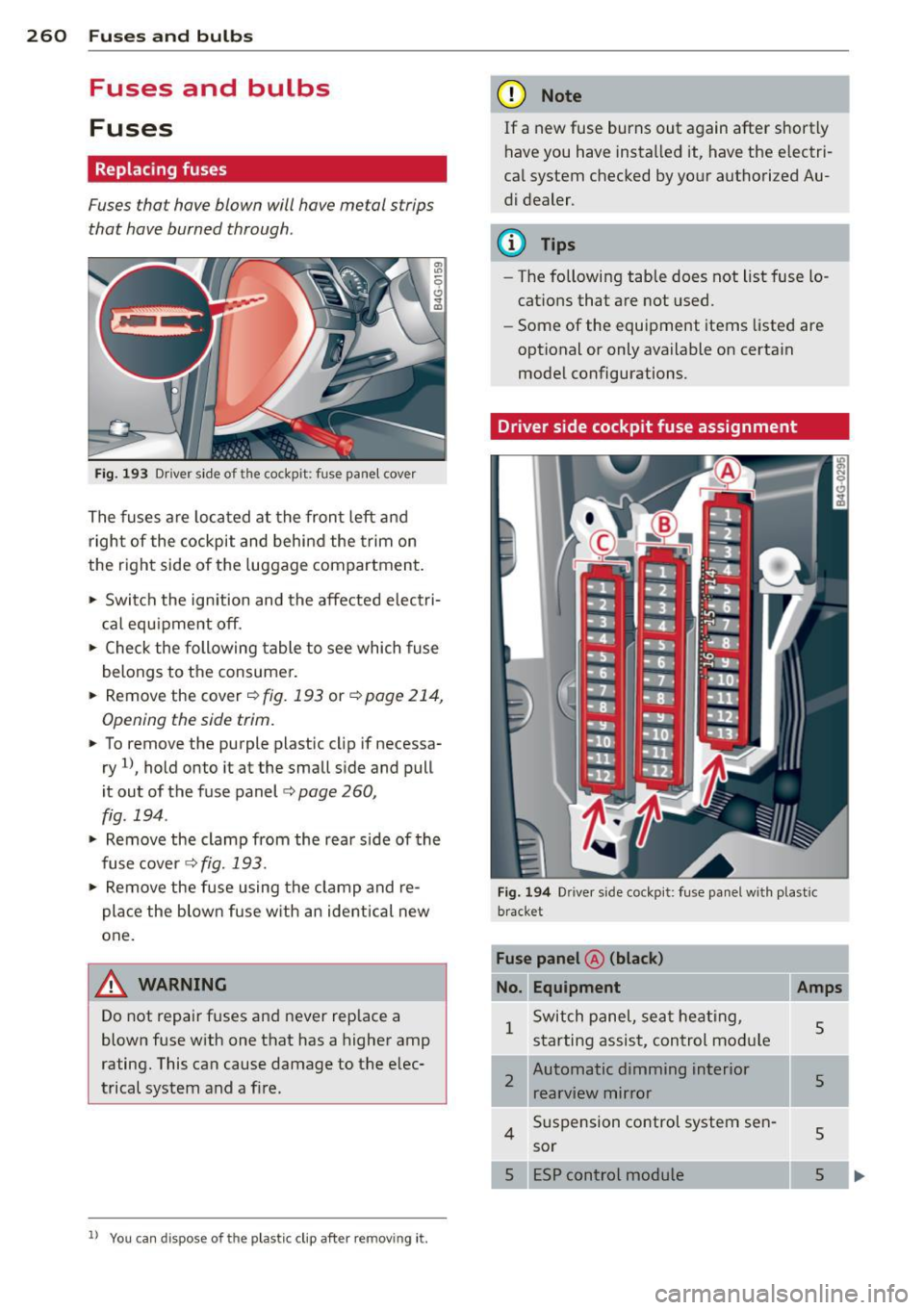
Fig. 193 Driver side of the cockpit: fuse panel cover
The fuses are located at the front left and
right of the cockpit and behind the trim on
the right side of the luggage compartment.
• Switch the ignition and the affected electri
cal equ ipment off.
• Check the following table to see which fuse
belongs to the consumer.
• Remove the cover¢
fig. 193 or¢ page 214,
Opening the side trim.
• To remove the purple plastic cl ip if necessa
ry
ll, hold onto it at the small side and pull
it out of the fuse panel
c:> page 260,
fig. 194 .
• Remove the clamp from the rear side of the
fuse cover <>
fig. 193 .
• Remove the fuse using the clamp and re
place the blown fuse w ith an ident ical new
one.
A WARNING
Do not repair fuses and never replace a
blown fuse with one that has a higher amp
rating. This can cause damage to the elec
trical system and a fire.
ll You ca n dispose of the plastic clip after remov ing it.
(D Note
If a new fuse burns out again after shortly
have you have installed it, have the electri
cal system checked by your authorized Au
di dealer .
(D Tips
-The following table does not list fuse lo
cations that are not used.
- Some of the equipment items listed are
optional or only available on certain
model configurations.
Driver side cockpit fuse assignment
Fig. 194 Drive r side cockpit: fuse panel with plastic
bracket
Fuse panel @ (black)
No. Equipment Amps
1
Switch panel, seat heating,
5 starting assist, control module
2
Automatic dimming interior
s rearview mirror
4
Suspension control system sen-
5 sor
ESP control module
5
Page 264 of 294

262 Fuses and bulb s
Fuse panel @ (black )
No . Equ ipment Amps
=
8
Headlight range adjustment/
5/7,5
adaptive lighting system
10 Left headlight (headlight with
7,5
adaptive light)
Fuse panel
@ ( brown )
No .II Equ ipm ent
II Amp s
1 Climate control 10
2 Climate control system blower 40
3 Diagnostic connector 10
4 Electrical ignition lock 5
5 Power steering column adjust-
ment
5
Steering column switch module 10
7 Power steer
ing column adjust-
ment 25
8 Light switch
Luggage compartment fuse assignment
Fig. 196 Luggage compartment: fuse panel with plas·
tic bracket
Fuse panel @ (bl ack )
No. II Equipment
I[ Amp s
4 E lectromechanical parking brake 30
5 Electromechanical parking brake 30
6 Front door (front passenger's
35
side)
7 Rear exterior lighting Rear sun shade, closing aid, lug
s gage compartment lock, con
venience key, START ENGINE
STOP, fuel filler door 30
20
-Fuse pane
l@ (blac k) I
No. Equipm ent Amps
=· 9 Power seat adjustment 15
10 Parking system
s
30
Fus e pane l
B (red)
No . Equipment Amps
1 Left belt tensioner
25
Right belt tensioner 25
3 Socket 20
20
Electromechanical parking brake
5
adaptive air suspension 15
7 Rear door (front passenger's
35
side)
Rear exterior lighting 30
9
Luggage compartment lid con-
30
t rol module
10 Telephone 5
11 Sound amp lifier 30
12 Rear spoiler 20
Fuse pane l c (b rown )
No. Equipment Amps
1 Rad
io receiver, Sound amplif ier/
30/20
MMI unit/dr ives
2 Tank leak detection system 5
AEM control module/battery 15/
4
module 7,5
6 Battery fan 35
Rad io receiver
7,5
7,5
9
Automatic dimming interior
5/15
rearview mirror/battery module
Parking system 5
Fu se panel o (gre en)
No. Equipment Amps
1 Audi pre sense 5
2 Electromechanical parking brake 5
3 adaptive a
ir suspension
5
Automatic transmission 7,5
...
Page 283 of 294
Defrosting (windows)
automatic climate control ... ... .. .. .. 68
climate control . . . . . . . . . . . . . . . . . . . . . 66
Determining correct load limit ... .. .. . 239
Dimensions .... .. .. .... ... .. .... .. . 271
Dimming the rearview mirror . ... .. .. .. 48
Distance . . . . . . . . . . . . . . . . . . . . . . . . . . . 23
Door/rear lid warning . . . . . . . . . . . . . . . . . 22
Doors Power child safety lock ....... ... .. .. 37
Driver information system CD/radio display . . . . . . . . . . . . . . . . . . . . 22
Door/rear lid warning . . . . . . . . . . . . . . . 22
Efficiency program . . . . . . . . . . . . . . . . . . 24
Exterior temperature display ... .. .. .. 22
On-board computer . . . . . . . . . . . . . . . . . 23
Driver seating position . . . . . . . . . . . . . . . 119
drive select .. .. ........... .. .. .. .... 96
Adaptive dampers . . . . . . . . . . . . . . . . . . 96
Cornering light .............. ... ... . 96
Safety belt tensioner . . . . . . . . . . . . . . . . 96
Driving safely . . . . . . . . . . . . . . . . . . . . . . 118
Driving through water ........ .. .. .. . 194
Driving time . . . . . . . . . . . . . . . . . . . . . . . . 23
Duplicate key . . . . . . . . . . . . . . . . . . . . . . . 29
Dust filter
refer to Pollutant filter . . . . . . . . . . . . . . 64
E
Easy entry feature . . . . . . . . . . . . . . . . . . . . 71
Efficiency program . . . . . . . . . . . . . . . . . . . 24
Fuel economy messages . . . . . . . . . . . . . 24
Other equipment . . . . . . . . . . . . . . . . . . . 24
Electrical accessories (sockets) . . . . . . . . . 55
Electro-mechanical power assist .. . ... . 189
Electromechanical parking brake Emergency braking . . . . . . . . . . . . . . . . . 76
Operation .. ... .. .. ...... .. .. .. .. .. 74
Parking .. ............ ...... .... ... 75
Releasing and closing ........ .... ... 74
Starting assist ........... .... .. .. .. 75
Starting from rest ........ .. .. .. .. .. 75
Starting off with a trai ler ............. 75
Warning/indicator lights ......... .. .. 15
Electronic differential lock (EDL) .. ... .. 184
Warn ing/ indicator lights ..... .. .. .. .. 18
Index 281
Electronic immobilizer . . . . . . . . . . . . 25, 30
Electronic power control (EPC) warning/indicator light ............. . 19
Electronic speed limiter .......... .... . 28
E lectronic stabilization program (ESP) .. 184
Warning/indicator lights ............. 18
Emergency actuation Doors ...... .. .. ................. . 35
Power sunroof . .. .... ........... .. . 40
Rear lid ........................... 37
Emergency brak ing ... . .. .. .. .... .... . 76
Emergency flasher ... .............. .. 42
Warning/indicator lights ........ .. .. . 21
Emergency release Selector lever ...... ............... 107
Emergency starting .. .............. . 264
Emergency towing . ................. 266
Emergency warning triangle ...... .. .. 252
Energy management . ............... 190
Engine Compartment . ..... ............... 218
Coolant ... .. .. .. ............... .. 223
Data ..... .. .. .. ................. 272
starting . .. .. .. .... .. .. ...... ...... 71
Starting with jumper cables ........ . 264
Stopping ........ .. ................ 73
Engine compartment ................ 218 Closing the hood . .. ........... .... 217
Opening the hood .... ...... ..... .. 216
Safety instructions .. .............. . 216
Working in the engine compartment .. 216
Engine coolant .. .. ................. 223
Adding coolant . ...... ............. 224
Checking the engine coolant level . .. .. 223
Expansion tank .... ............... . 223
Malfunction symbol ... .. ...... .... .. 15
Radiator fan . .. .. ................. 225
Temperature gauge ............ .... . 10
Engine oil .. .. .. .. .. . .. .. ..... ... .. 218
Adding ......... .. ............... 221
Additives .. .. .. .. .. . .. .... ........ 221
Changi ng ... .. ...... ........... .. 222
Checking the engine oil level ..... .... 221
Ind ications and conditions requiring ex-
tra checking ..... .. ............... 221
Indicator light ..... .............. .. 17
Oil consumption .. .. .............. . 220
•
•