tow AUDI S7 2012 User Guide
[x] Cancel search | Manufacturer: AUDI, Model Year: 2012, Model line: S7, Model: AUDI S7 2012Pages: 294, PDF Size: 73.33 MB
Page 65 of 294
.. Pull the release handle c;,fig . 67 and fold
down the cover of the pass-through in the
vehicle interior .
.. Open the rear lid .
.. Push the ski sack* through the opening
from the luggage compartment .
.. Secu re the ski sack
c::> page 63 .
Closing the trunk pass-through
.. Open the rear lid .
.,. Remove the ski sack from the trunk pass
through .
.. Push the pass-through cover up inside the
vehicle until it latches .
.. Raise the center armrest in the vehicle
again.
.. Close the rear lid .
& WARNING
Objects must only be transported in the ski
sack since the ski sack can be sec ured. In
divid ual objects cannot be secured. There
is a risk of injury .
@ Tips
You can also open the pass-through from
the luggage compartment. Push the re
lease button down and push the cover for
ward .
Securing the ski sack
Applies to vehicles: wit h ski sack
The ski sack must be secured in the luggage
compartment .
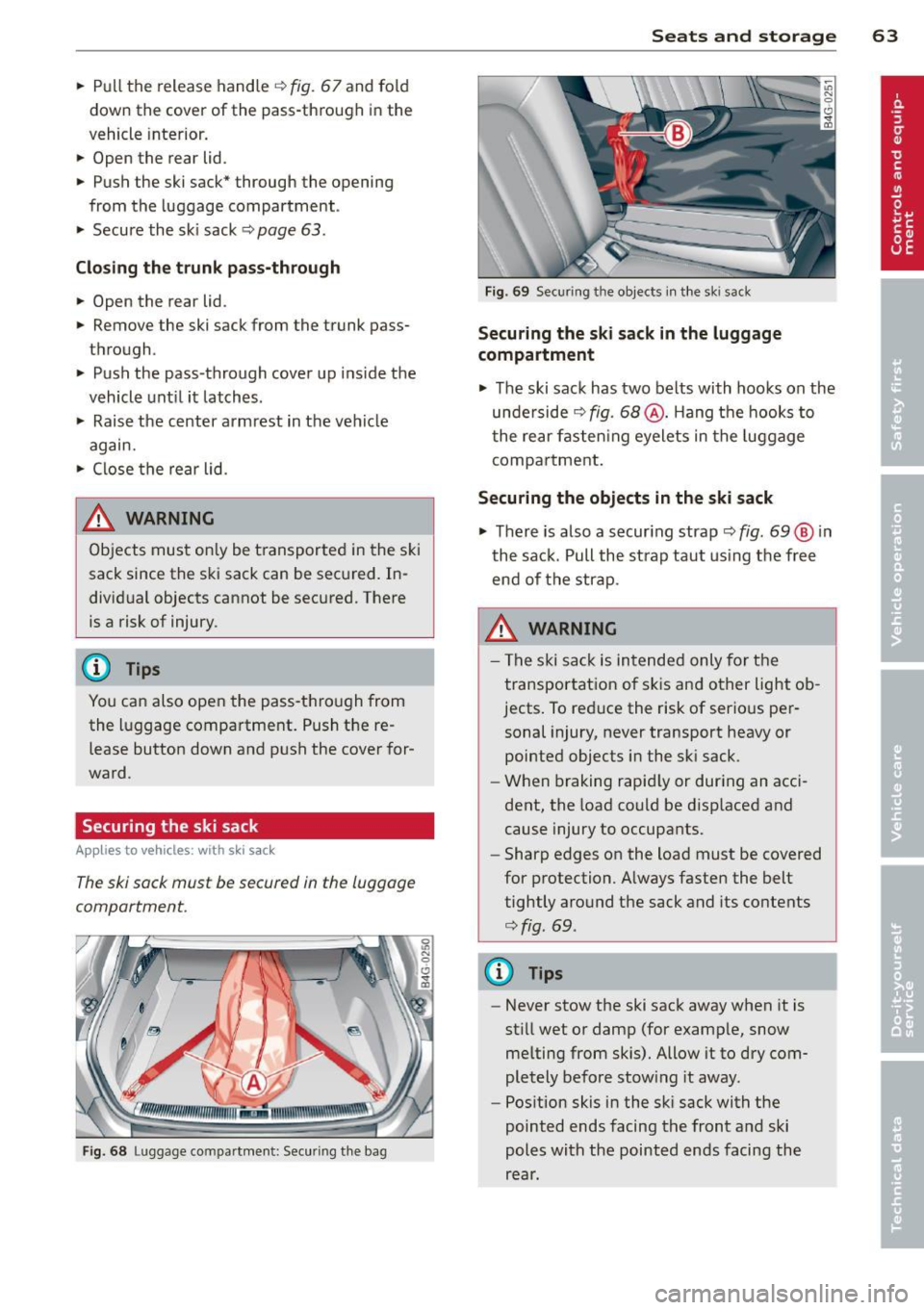
Fig. 68 Luggage compartment: Securing the bag
Seats and storage 63
Fig. 69 Secur ing t he objects in the ski sack
Securing the ski sack in the luggage
compartment
.. The ski sack has two belts with hooks on the
unde rside
c;, fig . 68 @. Hang the hooks to
t he rear fasten ing eyelets in the luggage
compartment .
Securing the objects in the ski sack
.,. There is also a secur ing strap c::> fig. 69 @ in
the sack. Pull the strap taut using the free
end of the strap.
& WARNING ~ -
-The ski sack is intended only for the
transportation of skis and other light ob
jects . To reduce the risk of serious per
sonal injury , never transport heavy or
pointed objects in the sk i sack.
- When braking rapidly or dur ing an acci
dent, the load could be disp laced and
cause injury to occupants.
- Sharp edges on the load must be covered
for protection. Always fasten the belt
tightly around the sack and its contents
c::> fig . 69 .
(D Tips
-Never stow the ski sack away when it is
st ill wet or damp (for examp le, snow
me lting from skis). Allow it to dry com
pletely before stow ing it away.
- Position skis in the ski sack with the
pointed ends facing the front and ski
poles with the pointed ends facing the
rear .
Page 74 of 294

72 On the road
By pressing the I STAR T ENGINE S TOP I button
without depressing the brake peda l, the igni
tion is on and switched
off by pressing it
again .
After a cold engine is started, the re may be a
brief period of increased noise because oil
pressure must first bu ild up in the hydraulic
va lve adjusters. This is normal and not a cause
f or concern.
If the engine should not start immediately,
the starting process is automatically stopped
after a short time . Repeat starting procedure.
Driver m essag e in th e in strum ent clu ster
d is pl ay
P re ss brake pedal to sta rt engi ne
This message appears if you press the
I START ENGINE STOP ! button to start the en
gine and do not depress the brake peda l. The
engine can on ly be started if the brake pedal
is depressed.
B C o nve nience ke y: Is ke y not in th e vehi
cle?
This message appears a long with the B sym
bol i f the master key is removed from the ve
hicle with the engine r unning . It is intended
to remind you (e .g . when changing drivers)
not to continue the journey without the mas
te r key .
If the master key is no longer in the vehicle,
you cannot switch on the ignit ion after stop
ping the engine and yo u also cannot start the
engine again. Moreover, you cannot lock the
vehicle from the outs ide with the key.
S hift to P , o ther wise v ehicl e can roll away.
Doors do not lock if le ver i s not i n P.
This message appears for sa fe ty reasons
a long w ith an audib le warning tone if the
P
selector lever posit ion is not engaged when
stopping the eng ine with the
I STAR T ENGINE S TOP ! button. Select the P se
lector lever posit ion. Otherwise the veh icle
could roll and it cannot be locked .
Key not recogni sed . H old bac k of ke y against
ma rked are a. See o wner' s manual.
If the indicator l ight turns on and this mes
sage appears, there is a malf unct ion
¢ page 73.
Steering lock
The steering locks when you turn the eng ine
off using the I STAR T ENGINE S TOP I butto n
and open t he driver's doo r. T he loc ked s teer
i ng helps prevent vehicle theft.
& WARNING ~
- Never a llow the engine to run in confined
spaces -danger of asphyx iat ion .
- Never turn
off the engine until the vehi
cle has come to a complete stop .
- The brake booster and powe r steering
only work when the engine is running . If
the engine is
off, you have to use more
force when steering or brak ing . Because
you cannot steer and brake as you usual ly would, th is cou ld lead to crashes and
serious injuries .
(Q) Note
-Avo id h igh engine rpm, full thrott le and
heavy eng ine loads until the eng ine has
reached operating temperature -other
wise you risk engine damage .
- The engine cannot be started by pushing
or towing the vehicle.
- If the eng ine has been under heavy load
for an extended per iod, heat builds up in
the engine compartment after the en
gine is switched
off -there is a risk of
damaging th e engine. Allow the engine
to run at idle for about 2 minutes before
switching it
off .
@ Tips
-If you open the driver's doo r with the ig
nition on, a buzzer sou nds and the mes
sage
Ignition i s on appears in the instru
ment cl uste r display . Sw itch the ignition
off . ll-
Page 80 of 294
78 On the road
pass someone. The speed you saved earlier
will resume as soon as you release the acceler
ator peda l.
If , however, you exceed your saved speed by
6 mph (10 km/h) for longer than 5 minutes,
the cruise contro l wi ll turn off temporarily.
The green symbo l
IB;(l)~i~ (US models) ;II
(Canad ian models) in the display will go out
but the saved speed remains the same.
Presetting your speed
Applies to vehicles: with cruise control
You con preset your desired speed while the
vehicle is not moving .
.. Switch on the ignition .
.. Pu ll lever into position@¢
page 77,
fig. 79.
> Press the lever in the 0 or 0 direction to
i ncrease or decrease your speed .
.. Release the lever to save that speed .
This funct ion makes it possible, for example,
to save the speed you want before driving on
the highway . Once on the highway, activate
the cruise control by pull ing the lever toward
@ .
Switching the system off
Applies to vehicles: with cruise control
Temporary deactivation
.. Press the brake peda l, or
.. Press the lever into position @ (not clicked
into pla ce)
¢ page 77, fig. 79, or
.. Drive for longer than 5 minutes at more
than 5 mph (10 km/h) above the stored
speed.
Switching off completely
.. Press lever into position @(clicked into
pla ce), o r
.. Switch the ignition off.
The system reta ins the saved speed if you de
activate the cruise control tempo rari ly. To re
sume the saved speed, release the brake ped
a l and pull the lever to position@. Switching
the ignition off erases the saved
speed.
A WARNING
-You shou ld only return to the saved speed
if it is not too fast for the c urrent traffic
conditions -risk of an accident!
Page 81 of 294

Adaptive cruis e control an d bra kin g guard 79
Adaptive cruise control
and braking guard
Introduction
App lies to vehicles: with adaptive cruise co ntrol
The adaptive cruise control system assists the
driver by regulating vehicle speed and helping
to maintain a set distance to the vehicle
ahead, within the limits of the system. If the
system detects a moving veh icle up ahead,
adaptive cruise control can brake and then ac
celerate your vehicle . T his helps to make dr iv
ing more comfortable both on long highway
stretches and in stop-and-go traffic.
Aud i brak ing guard can warn you about an im
pending col lision w ith a vehicle up a head that
is slower or has s lowed down and start slow
ing your vehicle down with the brakes
¢page 85.
Adaptive cruise control and Audi brak ing
guard have technica l limitations that you
must know, so p lease read this sect ion care
fu lly, understand how the system works and
use them properly at all times.
General information
General information
Ap plies to vehicles: with adaptive cruise co ntrol
Fig. 81 Fr ont of th e ve hicle : sensors an d video camera
The areas that contain the radar and ultrason
ic sensors and the video camera
¢ fig. 81
must never be covered by stickers, or other
things or coated with dirt, insects, snow or ice
that will interfe re with the adapt ive cru ise
control system and Audi braking guard . Re
move snow with a hand brush and remove ice with a de-icing spray that does not contain
solvents.
T
he function of the Adaptive cruise cont ro l
system and A udi braking guard is limited un
der some conditions.
- Objects can on ly be detected when they are
w ith in sensor range
¢page 81, fig. 84 .
-The system has a limited ability to detect
objects that are a shor t distance ahead,
off
to the side of your vehicle or moving into
your lane from the front or moves into your
lane from the side .
-When driving through curves
¢ page 80.
- Some kinds of veh icles are hard to detect;
for examp le motorcycles, veh icles with high
ground clearance or overhanging loads may
be detected when it is too late or they may
not be detected at a ll.
- Stationa ry objects
c::> page 80.
A WARNING
Improper use of the adaptive cruise con
trol can cause collisions, other accidents
and serious personal injury.
- Never let the comfort and convenience
that adaptive cruise control and Audi brak ing guard offer distract you from the
need to be alert to traffic conditions and
the need to remain in full control of your
veh icle at a ll t imes,
- Always remember that the adaptive
cru ise cont rol and Aud i brak ing guard
have lim its -they will not s low the vehi
cle down or maintain the set d istance
when yo u drive towards an obstacle or
someth ing on or near the road tha t is not
mov ing, such as vehicles stopped in a
traffic jam, a stalled or disabled vehicle.
If registered by the radar sensors, vehi
cles or obstacles that are not moving can
trigger a collision warning and if con
f irmed by the video camera, an acute col
lision warning.
- Always remember that the adaptive
cru ise contro l cannot detect a vehicle
that is driving towards you in your traffic
-
lane and that it cannot detect narrow ..,.
Page 83 of 294
Adaptive cruise control and braking guard 81
The adaptive cruise control system only reacts
to objects that are moving or that the system
has already detected and reg istered as mov
ing.
Adaptive cruise control
Description
Applies to vehicles: with adaptive cruise control
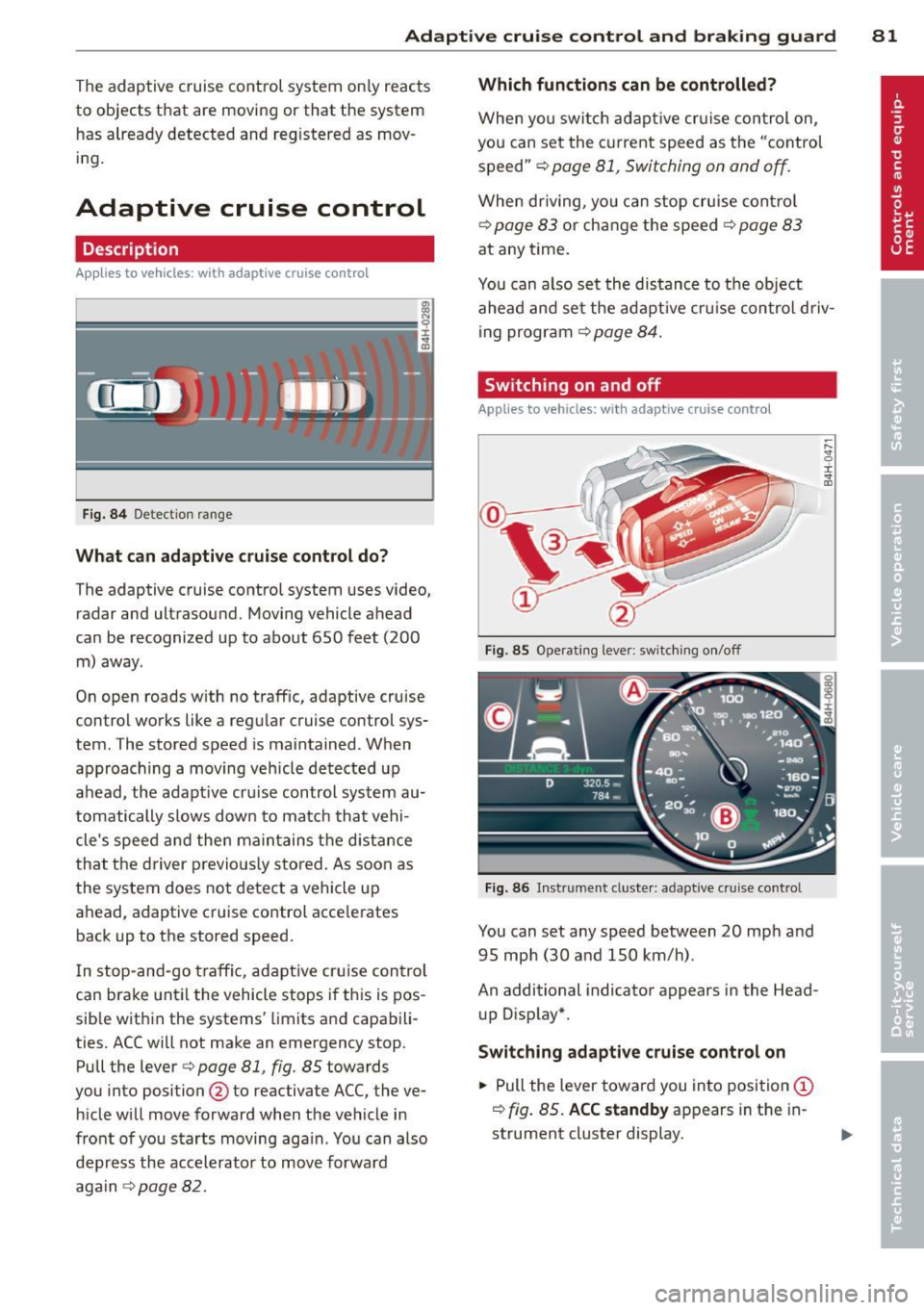
Fig. 84 Detection range
What can adaptive cruise control do?
The adaptive cruise control system uses video,
radar and ultrasound. Moving vehicle ahead
can be recognized up to about 650 feet (200 m) away.
On open roads with no traffic, adaptive cruise
control works like a regular cruise control sys
tem. The stored speed is maintained. When
approaching a moving vehicle detected up
ahead, the adapt ive cruise control system au
tomatically slows down to match that vehi
cle's speed and then maintains the distance
that the driver previo usly stored. As soon as
the system does not detect a vehicle up
ahead, adaptive cruise control accelerates back up to the stored speed.
In stop-and-go traffic, adaptive cruise control
can brake until the vehicle stops if this is pos
sib le within the systems' limits and capabili
ties. ACC will not make an emergency stop.
Pull the lever
c:> page 81, fig. 85 towards
you into position @to reactivate ACC, the ve
hicle will move forward when the vehicle in
front of you starts moving aga in. You can also
depress the accelerator to move forward
again
¢ page 82.
Which functions can be controlled?
When you switch adaptive cruise control on,
you can set the current speed as the " contro l
speed"
c::>page 81, Switching on and off.
When driving, you can stop cruise control
¢ page 83 or change the speed ¢ page 83
at any time.
You can also set the distance to the object ahead and set the adaptive cruise control d riv
ing program
¢ page 84.
Switching on and off
Applies to vehicles: with adaptive cruise control
Fig . 85 Operating lever: switching on/off
Fig. 86 Inst rument cluster: adaptive cruise control
You can set any speed between 20 mph and
95 mph (30 and 150 km/h) .
An additional indicator appears in the Head
up Display*.
Switching adaptive cruise control on
.. Pull the lever toward you into position (D
r=> fig. 85. ACC standby appears in the in
strument cluster display.
~ 9 I ..,. ID
Page 84 of 294

82 Adaptive cruise control and braking guard
Setting the speed and activating
regulation
.. To set the current speed, press the I SET !
button ¢ fig. 85. The set speed is shown in
the tachometer @and in the display
¢
fig . 86. You must also press the brake
pedal when the vehicle is stopped.
Switching adaptive cruise control off
.. Push the lever away from you into position
@ until it clicks into p lace. The message
ACC off appears.
Indicator lamps and messages in the instru
ment cluster display inform you about the cur
rent system status and settings.
@ Indicator lights
II -adaptive cruise control is switched on. No
vehicles are detected up ahead. The stored
speed is ma intained.
I -A moving vehicle is detected up ahead.
The adaptive cruise control system regulates
the speed and distance to the moving vehicle
ahead and acce lerates/brakes automat ically.
fij-adaptive cruise control is switched on. A
moving vehicle up ahead was detected. Your
vehicle remains stopped and will not start driving automatically.
I-When a utomat ic brak ing is not able to
keep enough distance to a previously detected
moving vehicle up ahead, you must take con
trol and brake¢
page 83, Prompt for driver
intervention.
© Display
If adaptive cruise control is not shown in the
display, you can call it up with the multifunc
tion steering wheel buttons¢
page 22.
Based on the symbo ls in the display, you can
determine if the system is main taining a dis
tance to the vehicle ahead and what that dis
tance is .
No vehicle -No vehi cle ahead was detected.
White vehicle -A vehicle ahead was detected.
Red vehicle -Prompt for the driver to take ac
tion ¢
page 83 .
Both arrows on the scale © indicate the dis
tance to the vehicle ahead. No arrow appears
when the vehicle is on an open road and the re
is no object ahead. If an object is detected
ahead, the arrow moves on the scale.
T he green zone on the scale shows the stored
distance . For information on changing the
stored distance ¢
page 84. If the distance
selected is too close or may soon become too
close, the arrows move into the red zone on
the scale.
A WARNING
Improper use of the adaptive cruise con
trol can cause collisions, other accidents
and serious personal injur ies.
- Pressing the
!SET ! button when driv ing at
speeds below
20 mph (30 km/h), w ill au
tomatically accelerate the vehicle to
20
mph (30 km/h), which is the minim um
speed that can be set.
(D Tips
-If you switch the ignit ion or the adaptive
cruise contro l off, the set speed is e rased
from the system memory.
- You cannot switch the Electron ic Stabili
zation Program (ESP) to the SPORT mode
when adaptive cruise control is sw itched
on.
Driving in stop-and-go traffic
Applies to vehicles: with adaptive cruise control
The adaptive cruise control system also as sists you in stop-and-go traffic. If a previous
detected vehicle ahead stops, your vehicle will
brake to a stop, within the limits of the sys
tem.
.. To resume driving with adaptive cruise con
trol, tap the acce lerator pedal or
.. Pull the lever toward you into position @
¢ page 81, fig. 85. .,.
Page 85 of 294

Adaptive cruise control and braking guard 83
@ Tips
-If adaptive cruise contro l is active and
your vehicle does not start dr iving as ex
pected after pulling the lever once, you
can start out aga in by tapping the accel
erator pedal.
- If an obstacle is detected when your ve
hicle starts dr iv ing, the system w ill
prompt you to take over
c:> page 83.
Your vehicle w ill dr ive more slowly when
starting. This may also happen in some
situations when there no obstacle is ap
parent .
Interrupting cruise control
App lies to vehicles: with a daptive cruise co ntrol
Requirement : adaptive cruise control must be
switched on.
Overriding cruise control
• To accelerate manually, pull the lever to
ward you into position@¢
page 81, fig. 85
and hold it th ere . The message ACC override
appears . Or
• press the accelerator peda l.
• To resume cruise control, release the lever
or take your foot off the accelerator pedal.
Canceling cruise control while driving
• Move the lever into position @. Th e mes
sage
ACC standby appears. Or
• press the brake pedal.
• To resume the stored speed, move the lever
into position @.
Canceling cruise control when stopped
• Push the lever away from you into position
@ . The message
ACC standby appears.
• To resume cruise control, press the brake
pedal and pull the lever toward you into po
sition @.
A WARNING
Improper use of the adaptive cruise con
trol can cause coll is io ns, othe r acc idents
and ser ious personal inj uries. -
Never resume the stored speed if the
speed is too high for prevailing road,
traffic or weather conditions.
Prompt for driver intervention
Applies to vehicles: wit h adapt ive c ruise contro l
Fig. 87 Instrument cluste r: req uest for driv er interve n
tion
In certain situations, the system will prompt
you to take action . For example, braking by
the adapt ive cruise control system is not
enough to maintain enough distance to the
vehicle ahead.
The indicator light
I and the symbol in the
display will warn you about the situation
c:> fig. 87. You w ill also hear an acoustic signal.
- Press the brake pedal to slow your vehicle
down .
Changing the speed
Applies to veh icles: w it h adaptive c ru ise contro l
0
f
• 0
Fig. 88 Operatin g lever: changing the speed
• To incr ease or reduc e the speed in incre
ments,
tap the lever up or down.
• To increase or reduce the speed qu ickly,
hold the lever up or down until the red LED .,._
Page 96 of 294
94 Audi side assist
right of your travel lane, depending on wheth
er you drive in the center of your lane or closer
to the edge.
If you drive in narrow lanes, s ide ass ist's de
tection area may a lso include other lanes -es
pecia lly if you tend to drive on the edge of
your lane¢
fig. 99. Under these condit ions,
vehicles can also be detected that are two lanes away, and side assist then could switch
between the informat ional and warning stage
signals .
When driving in very w ide lanes, vehicles in
the adjacent lane may not be detected be
cause they are not inside the detection area .
Notes
Messages in instrument cluster display
Applies to vehicles: with side assis t
If side assist turns off automatically, the indi
cator light on the button wi ll go out and you
will see a message in the instrument cluster
d isplay:
Audi side assist: not available. sensors
blocked
The side assist sensors are built into the rear
bumper on the left and right (not visible on
the outside)
¢ page 88, fig. 91 . To ensure that
you do not adversely affect the way side assist
functions, foreign objects (such as stickers or
b icycle racks) should not be attached to the
a rea on the rear bumper where the sensors
are located. If side assist functions are ad
versely affected, you will see this message in
the instrument cluster display. Remove any
thing that may be blocking the sensors .
If no vehicle is detected for a longer period of
time while driving, side assist will also switc h
off a utomatica lly.
Audi side assist currently not available
If there is a temporary problem (such as the
ve hicle's battery charge being low), s ide ass ist
cannot be activated tempo rari ly.
Audi side assist: system fault
Have the system checked by an authorized Au
di dealer or qualified workshop.
Audi side assist: not available when
towing
T he radar senso r's view is limited when tow
ing a trai le r. For vehicles with a fa ctory instal
led towing hitch or a trailer hitch that was in
stalled later according to factory specifica
tions, side assist is automatically deactivated
as soon as the electrical connection to the
trailer's electrical socket is made, and this sta
tus message appears in the instrument clus
ter display . Deactivation cannot be guaran
teed when using a retrofitted towing hitch
that was
not installed according to factory
specifications.
Safety tips
Appl ies to vehicles : wi th side assist
The side assist detection may be limited when
driving aro und narrow street corners, on hilly
streets, and under poor weather cond itions.
It is possible that the radar sensors may also
detect other objects, such as high or stag
gered guardrails .
Side assist does not measure actual lane
width. The system assumes a fixed lane width.
Detection in the left and right lanes is based
o n this ass umed lane width . When driving on
narrow roads or when driving to the left or
right of the center of a trave l lane, it is poss i
ble that vehicles will be detected that are
not
in the lane next to the lane you are using.
A WARNING
- Improper reliance on the side assist sys
tem can cause collis ion s and serious per
sonal injury:
- Never rely only on side assist when
changing lanes .
- Always check rear view mirrors to make
sure that it is safe to change lanes.
- Side assist cannot detect all vehicles un-
der all conditions- danger of accident! ..,.
Page 105 of 294
"creep" forward or backward. When
stopped, keep the brake pedal fully de
pressed and use the park ing brake if
necessary to keep the veh icle from roll
ing.
- If the selector lever is unintentionally
moved into N wh ile you are driving, take
your foot off the accele rator pedal and
wait for the engine to return to idle speed before selecting a d riving position.
- Never shift into R or P when the vehicle is in motion.
- Never get out of the driver's seat when
the engine is running.
- If you must get out of the vehicle, move
the se lector lever securely into the P po
sit ion and apply the par king brake firm ly.
- If the engine must remain running , never
have any driv ing position engaged when
chec king under the hood. Make sure the
selector lever has securely engaged and is locked in P with the parking bra ke
firmly set ¢
page 210, Engine compart
ment .
Otherw ise, any increase in engine
speed may set the vehicle in mot ion,
even with the parki ng brake applied.
Selector lever positions
Applies to vehicles: with tiptronic
This section describes the selector lever posi
tions and driving ranges.
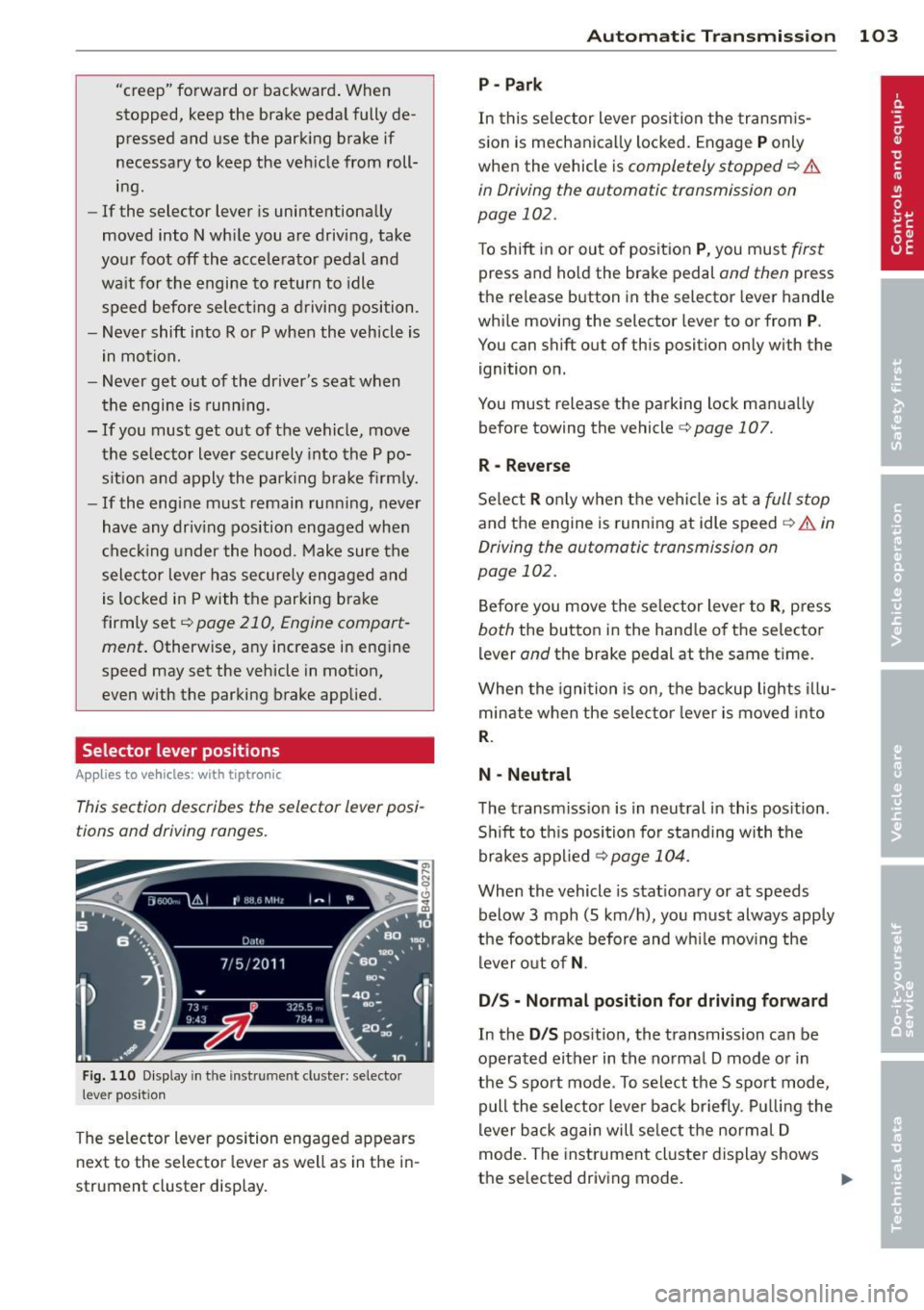
F ig . 1 10 D isplay in th e inst rument cluste r: selec to r
lever position
The selector lever position engaged appears
next to the selector lever as well as in the i n
strument cluster display.
Automatic Tra nsmi ssi on 10 3
P-Park
In this se lector lever posi tion the transm is
s ion is mechanica lly locked. Engage
P only
when the vehicle is
completely stopped ¢ &
in Driving the automatic transmission on
page 102.
To shift in or out of posit ion P , you mus t first
press and ho ld the brake pedal and then press
the re lease button in the selector lever hand le
whi le moving the selector lever to or from
P.
You can shift out of this position only with the
ignition on.
You must release the parking lock man ua lly
before towing the vehicle
c:> page 107.
R -Reverse
Se lect R o nl y when the vehi cle is at a full s top
and the engine is running at idle speed ¢ A in
Driving the automatic transmission on
page 102.
Be fore you move the se lector lever to R , press
both the button in the hand le of th e selector
lever
and the brake pedal at the same ti me .
When the igni tion is on, the backup lights illu
minate when the selec tor lever is moved into
R.
N -Neutral
The transm iss ion is in neut ral in this pos ition .
S hi ft to th is position for standing with the
brakes a pplied
¢ page 104.
When the vehicle is stat ionary or at speeds
below 3 mph (5 km/h), yo u must always apply
the foo tbrake before and w hile mov ing the
lever o ut of
N .
D/S - Normal posit ion for driving forward
In the D/S pos ition, the transmission can be
operated either in the no rmal D mode o r in
the S spo rt mode . To select the S spo rt mode,
pull the selector lever bac k br iefly . Pul ling the
lever b ack again will se lect the norma l D
mode. The inst rument cl uster display shows
the selected driving mode.
II>
Page 109 of 294
Do not continue driving. Select the P se lector
lever position and see your authorized Audi
dealer or qualified repair facility for assis
tance.
(D Note
If the transmission switches to emergency
mode, you shou ld take the vehicle to an
author ized Audi dealership as soon as pos
sible to have the cond ition corrected.
Emergency release of the selector lever
App lies to vehicles: with tiptron ic
If the vehicle's power supply foils, the selec
tor lever con be released in on emergency.
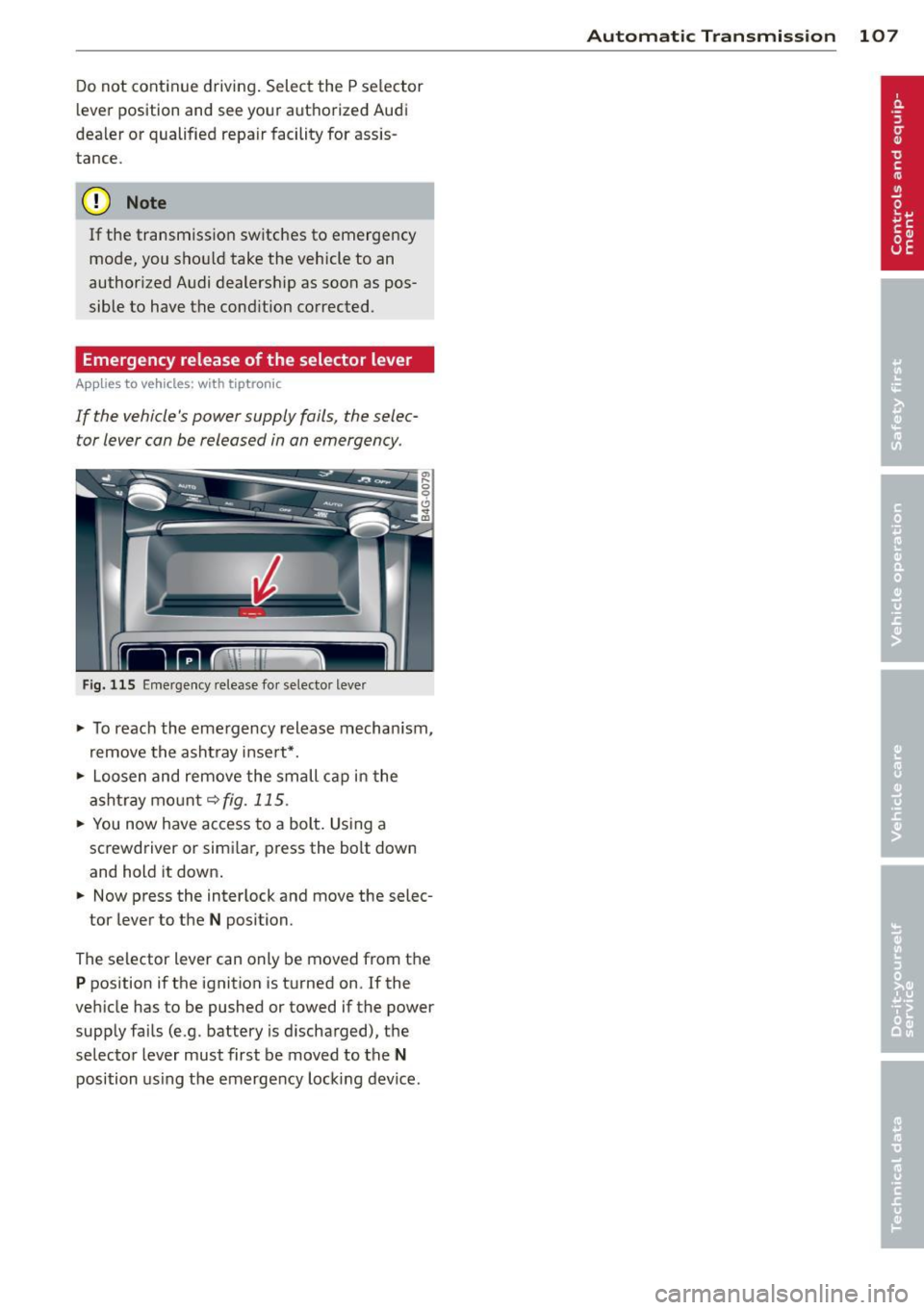
Fig. 115 Emergency release for selecto r lever
• To reach the eme rgency release mechan ism,
remove the asht ray insert*.
• Loosen and remove the small cap in the
ashtray mount<=:>
fig. 115.
• You now have access to a bolt. Using a
screwdriver or simi lar, press the bolt down
and hold it down.
• Now press the inter lock and move the selec-
tor lever to the
N position.
The selector lever can only be moved from the
P position if the ignition is turned on. If the
veh icle has to be pushed or towed if the power
supply fails (e.g. battery is discharged), the
selector lever must first be moved to the
N
position using the emergency locking device.
Automatic Transmission 107