ECU AUDI S7 2013 User Guide
[x] Cancel search | Manufacturer: AUDI, Model Year: 2013, Model line: S7, Model: AUDI S7 2013Pages: 310, PDF Size: 77.45 MB
Page 68 of 310
66 Seats and st o rage
Luggage compartment cover ing
(reversible mat )
Applies to vehicles: with luggage compartment carpeting
The reversible luggage compartment covering
should be used when transporting dirty or
wet objects.
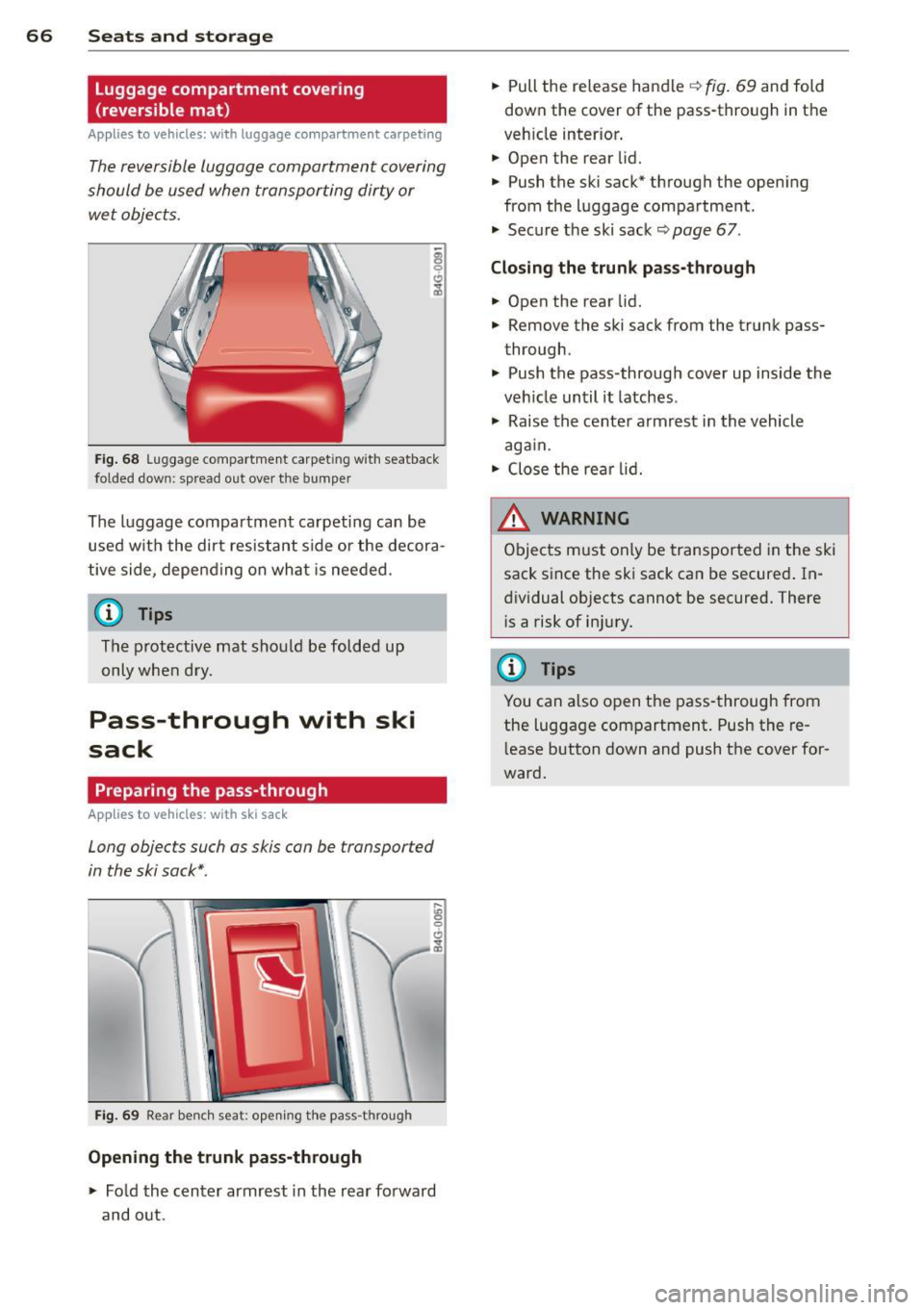
Fig . 68 Luggage compartment carpet ing with seatback
folded down: spread out over the bumper
The luggage compartment carpeti ng can be
used w ith the dirt resistant s ide or the decora
tive side, depe nding on what is needed.
@ Tips
The protective mat should be folded up
only whe n dry.
Pass-through with ski
sack
Preparing the pass-through
App lies to vehicles: with ski sack
Long objects such as skis can be transported
in the ski sack*.
Fig . 69 Rear be nch seat: opening th e pass -through
Opening the trunk pass-through
.,. Fold the center armrest in the rear fo rward
and o ut. .,.
Pull the release handle
q fig . 69 and fold
down the cover of the pass-through in the
veh icle inter ior .
.,. Open the rear lid.
.,. Push the ski sack* through the opening
from the luggage compartment.
"' Secure the ski sack¢
page 67.
Closing the trun k pass -through
.,. Open the rear lid .
.,. Remove the ski sack from the trunk pass
through.
"' Push the pass-through cover up inside the
veh icle until it latches .
"' Raise the center armrest in the vehicle
aga in.
.,. Close the re ar lid.
A WARNING ~
Objects must only be transported in the ski
sack since the ski sack can be secured . In
dividual objects cannot be secured. There
i s a risk of in jury.
(D Tips
You can also open the pass -through from
the luggage compartment . Push the re
l ease button down and push the cover for
ward.
Page 69 of 310
Securing the ski sack
Applies to vehicles: with sk i sack
The ski sack must be secured in the luggage
compartment.
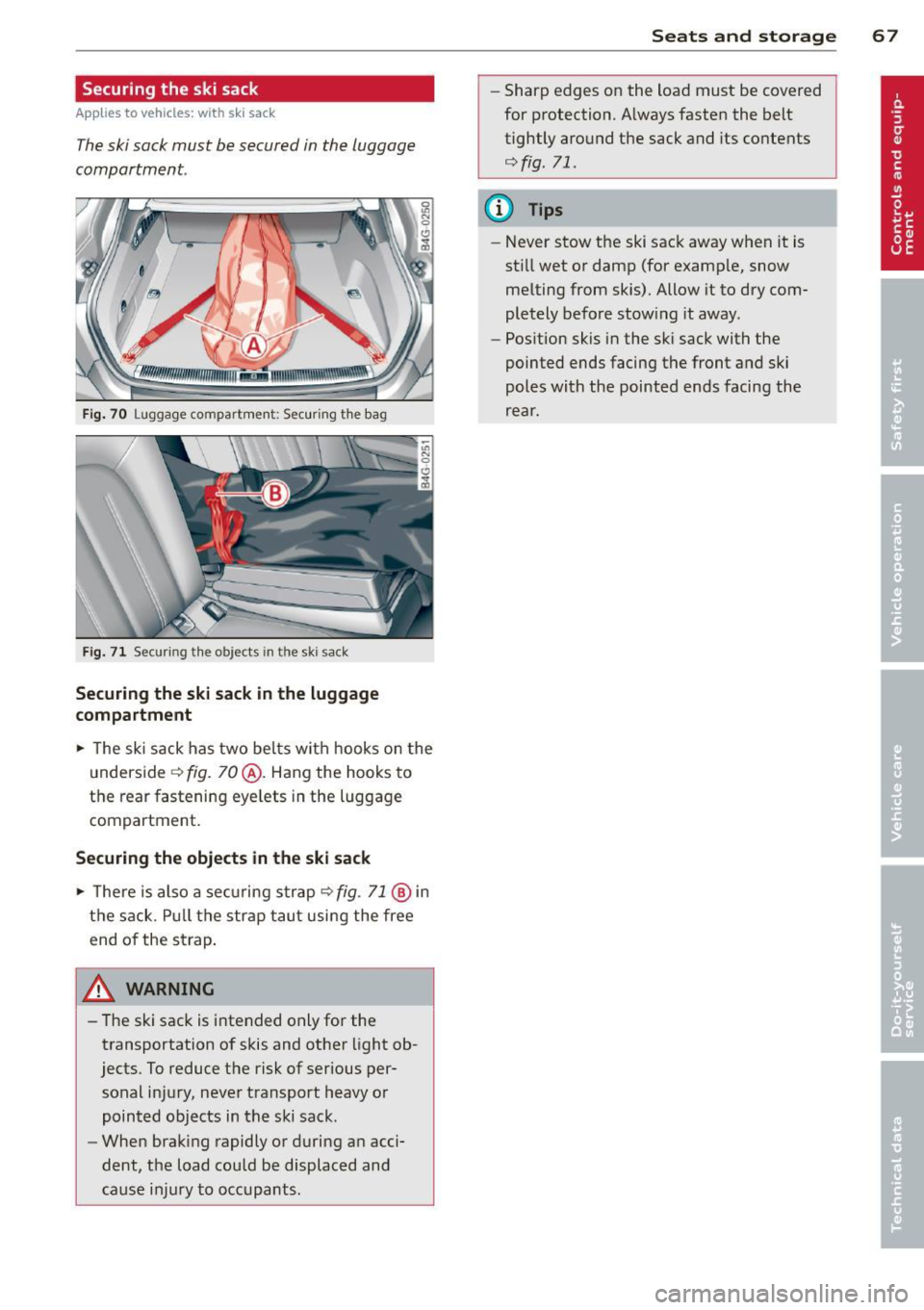
Fi g. 70 Luggage compartmen t: Securing th e bag
Fig . 71 Securing th e objects in the ski sack
Securing the ski sack in the luggage
compartment
.,. The ski sack has two bel ts w it h h ooks on the
u nderside
c:> fig. 70@. Hang the hooks to
the rear fastening eye lets in the luggage
compartment.
Securing the objects in the ski sack
.,. The re is al so a se cur ing s trap c:> fig. 71 @ in
th e s ack. Pull t he str ap tau t usi ng the free
end of the st rap .
A WARNING
-
-The ski sack is i ntended only for the
transportation of skis and other light ob
jects. To reduce t he risk of serious per
sonal inj ury, neve r transport heavy or
pointed objects in t he ski sack.
- When brak ing rapidly or during a n acci
dent, t he load could be displaced and
ca use i njur y to occupants.
Seats and storage 67
-Sharp edges on the load must be covered
for protection. A lways fasten the belt
tightly aro und the sack and its co ntents
c:>fig. 71.
(D Tips
-Never stow the ski sac k away when it is
st ill wet or damp (for examp le, sn ow
me lting from skis). Allow it to dry com
pletely before stow ing it away.
- Pos ition skis in the ski sack with the
pointed ends facing the front a nd ski
p oles with the pointed ends facing the
r e ar.
Page 95 of 310
Audi adaptive cru ise control and brakin g guar d 93
(end of a traffic jam or veh icle t hat has
br oken down in traffic).
- Alw ays remember that the radar sensor
for the b raking guard works only within
defined detection and ra nge limits that
may prev ent the proper det ection of oth
er ve hicles.
- The ra dar sensor's function and range
can be reduced by rain, snow and heavy
spray. Moving vehicles up ahead may not
be promptly detected or may not be de
tected at al l.
- Reflective surfaces includ ing crash barr i
ers or tunnel ent rances may impair the
function of the radar sensor.
(0 Tips
- You can cance l the braking w ith increas
i ng fo rce that is initiated by the system
by braking yo urself, by accelerating no
ticeab ly or by swerving.
- Brak ing guard error messages
<=> page 93.
-Keep in mind that braking guard can
brake unexpectedly. Always secure any
ca rgo or objec ts that you are transport
i ng to reduce t he risk of d amage o r in
Ju ry.
Settings in the MMI
Appl ies to vehicles: with Audi adaptive cruise co ntrol
~ Se lect: ICARlf unct ion button> ( Car )* sys
tems
contro l button > D river assi st > Audi
braking guard .
System -
Switch braking g ua rd On and Off .
When you sw itch the ignition on, the message
Audi braking guard off appears if the system
is switched off.
Early warning -The distance and approac h
warn ings in the display can be switched
On /
Off .
(D Tips
- Your settings are automatically stored
and assigned to the remote control key being used at the time the settings
are
ma de.
- If you switch the ES C to spo rt mode,
braking g uard switches off a utomatica lly
<=>page 198.
- Switch braking guard off when you a re
loading the vehicle onto a vehicle carrier,
t rain, ship o r other type of transporta
t ion. This can prevent undesired warn
ings from the braking guard system.
Messages
App lies to vehicles : wit h Audi ada ptive c ruise contro l
ACC unavail able
ACC and braking guard: unavailable
T he system cannot detect mov ing vehicles up
ahead co rrec tly and is switched off. The sen
sors have been displaced or a re not worki ng
properly . The Audi pre sense func tions may a l
so be affected. Drive to yo ur autho rized Audi
dealer or authorized A udi se rvice facility im
med iate ly to have the malfunction corrected.
ACC: unavailable at this time. No sensor vi
sion
ACC and braking guide: unavailable at this
time . No sensor vision
Th is message appears if the senso r view is ob
structed, for examp le by leaves, snow, heavy
sp ray or d irt. C lean the sensors<=>
fig. 86 .
ACC: unava ilabl e at this time . Inclin e too
steep
The road exceeds the max imum possible an
gle for proper adaptive cru ise control opera
tion. Adaptive cru ise con tro l is switched off .
ACC: only selector lever positions D , S or M
available
Se lect t he D/S or M selector leve r pos ition.
ACC: unavailabl e at this time . Parking brake
s et
The adaptive cr uise cont rol system switches
off automatically if the park ing b rake is set. ..,.
Page 105 of 310
(D Note
-Make sure there is enough clearance
above and below the veh icle when park
ing. The height of the vehicle can change
once it is parked due to temperature
fluctuations, changes to the load cond i
tions and changes to the dr iving modes,
which can affect clearance .
- When t ransporting the veh icle on a car
carr ier, tra in, ship or by other means, on
l y tie the veh icle down at the runni ng
su rface of the tires, which is the outer
ci rcumference . Secur ing the vehicle at
the axle components, s uspension struts
or tow ing eyes is not pe rm itted because
the pressu re in the air suspension struts
can change during transport. The vehicle may not be secured sufficiently if this
happens.
- If you are going to tow a trailer, you
must activate the trailer operation mode
<=> page 209.
{!) Tips
- In some models, the maximum vehicle
speed can only be reached in the
Auto
and Dynami c modes.
- Selecting the
Dynami c mode results in
spo rty sh ifting character istics. The S
gear posit ion engages automatically.
- In vehicles with sport differential", the
Dynami c mode is deactivated when tow
i ng a trailer.
Adjusting the Individual mode
Audi dri ve sele ct 103
Selecting the driving mode
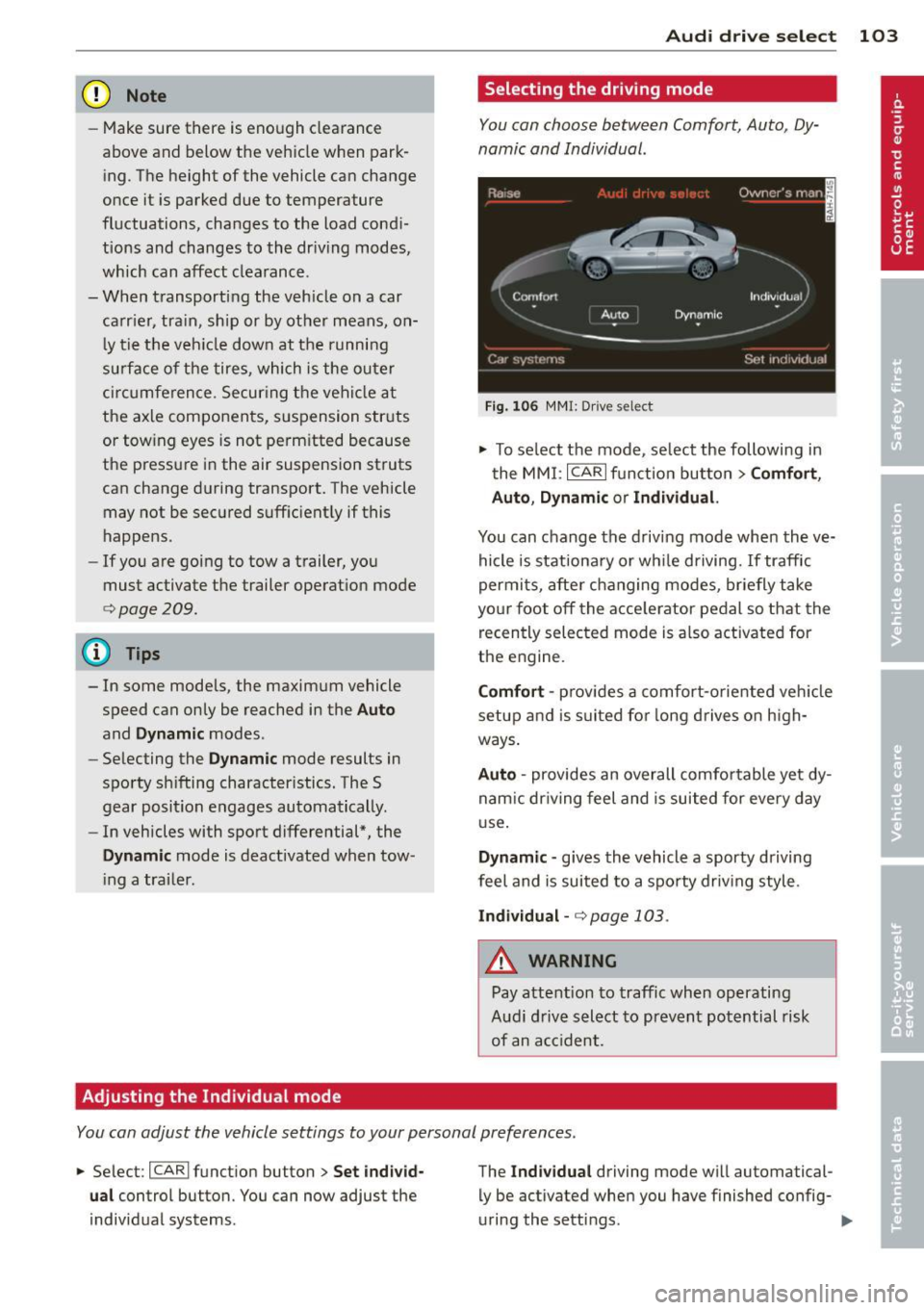
You can choose between Comfort, Auto, Dy
namic and Individual .
Fig. 10 6 MMI: D rive select
.,.. To se lect the mode, se lect the following in
the
MM I: ICARlf unction button> Comf ort ,
Auto , D ynamic or Individual.
You can change the d riv ing mode when the ve
hicle is stationary or wh ile driving.
If traffic
permi ts, after changing modes, briefly take
yo ur f oot off the acce lerator pedal so that the
recently selected mode is a lso activated for
the engine.
Comf ort -prov ides a comfort-oriented veh icle
setup and is s uited for long drives on h igh
ways .
Auto -provides an overall comfo rtable yet dy
nam ic dr iving feel and is suited for every day
u se.
Dynamic -gives the vehicle a sporty driving
feel and is suited to a spo rty driving style .
Individual -<=> page 103 .
_.& WARNING
-Pay attention to traffic when operating
Audi d rive select to prevent potential risk
of an acc ident.
-
You can adjust the vehicle settings to your personal preferences .
.,.. Select : I CARI funct ion button> Set individ
ual
control button. You can now adjust the
individual systems . The
Ind
ividu al driving mode wi ll automatical
ly be activated when you have finished config
uring the sett ings.
Page 114 of 310
112 Automatic Tran sm iss ion
_& WARNING
-The veh icle can also roll when the engine
is stopped .
- Unintended vehicle movement can cause
serious injury.
- Never leave your vehicle with the eng ine
running wh ile in gear. If you must leave
yo ur vehicle when the engine is running,
act ivate the parking brake and move the
selector lever to P.
- Power is sti ll transmitted to the whee ls
when the engine is running at idle. To
prevent the vehicle from "creeping", you
must keep your foot on the brake when
the engine is runn ing and the selector
lever is in D/S or R or "tiptron ic" mode is
selected.
- Do not press the accelerator pedal when
chang ing the selector lever pos ition
wh ile the vehicle is stat ionary and the
eng ine is running.
- Never shift into
R or P wh ile driving.
- Before driv ing down a steep slope, re-
duce your speed and shift into a lower
gear with "tiptronic".
- Do not ride the brakes or press the brake
peda l too often or too long when dr iving
down a hill. Constant braking causes the
brakes to ove rheat and s ubstant ially re
duces braking per formance, increases
braking distance or causes comp lete fail
ure of the brake system.
- To prevent the veh icle from rolling back
when stopping on inclines, a lways hold it
in place with the bra ke peda l or parking
brake.
- Never hold the ve hicle on an inc line with
a slipping clutch . The clutch opens auto
matically when it becomes too hot from
the overload. An indicator lamp
[O] illu
mi nates and a dr iver message appears
¢ page 114 when the clutch is overload
ed.
- If the eng ine must remain running, never
have any driv ing pos ition engaged when
c heck ing under the hood. Make sure the
selector lever has securely engaged and is locked in P w
it h the park ing brake set
¢ page 224, Engine compartment. Oth
erwise, any increase in engine speed may
set the veh icle in motion, even with the
parking brake applied.
(D Note
- When stopping on an incl ine, do not try
to hold t he vehicle in place by pressing
the acce lerator pedal while a driving gear
is se lected. This ca n cause the transmis
sion to ove rheat and can damage it . Acti
vate the pa rking brake or press the bra ke
peda l to preven t the vehicle from roll ing.
- Allowing th e vehicle to ro ll when the en
gine is stopped and the selecto r lever is
in N will d amage the tr ansmission be
cause it is not l ubricated unde r those cir
cumstances .
(D Tips
Fo r saf ety reaso ns, the pa rking br ake is re
l eased automatically on ly when the d riv
er's safety belt is engaged in the buckle.
Hill descent control
Appl ies to vehicles: wit h S t ronic/tiptro nic
The hill descent control system assists the
driver when driving down declines.
Hill des cent con trol is activated when these
lector lever is in D/S and yo u press the brake
peda l. The transmission automatica lly selects
a gear that is suitable for the incline . Hi ll de
scent contro l tries to maintain the speed ach
ieved at the time of braking, within phys ica l
and technical lim itations. If may st ill be nec
essary to adjust the speed with the brakes .
Hill descent cont ro l switches off once the de
cline leve ls out or you press the acce lerator
pedal.
On vehicles with the cruise contro l system*
¢ page 83, hill descent control is also activat-
ed when the speed is set. .,..
Page 130 of 310
128 Homelink®
Homelink®
Universal remote
control
General information
Applies to vehicles: with Homelink® unive rsal remote
co ntrol
The Homelink universal remote control can
be programmed with hand-held transmitters
from existing equipment.
With Homelink, you can control devices such
as the garage door, security systems, house lights, etc. comfortably from the inside of you
vehicle.
H omelink makes it possible for you to rep lace
three different remote controls from devices in your home with one universal remote . Th is
feature works for most garage door and exte rior door moto r signals. Programming the in
d iv idual remo te control fo r you r remote con
trol takes p lace near the center of the radiator
grille. There is a control module attached at
this location .
A one-t ime programm ing of the sensor mus t
be performed before you are able to use sys
tems w ith Homelink.
A WARNING
- Never use the Homelink ® transmitter
with any garage door opener that does have not the safety stop and reverse fea
ture as required by federa l safety stand
ards. This includes any garage door open
er mode l manufact ured before April 1,
1982.
- A garage door opener which cannot de
tect an object, signaling the door to stop
and reverse does not meet cur rent feder
al safety s tandar ds. Us ing a garage doo r
o pener witho ut these fea tures in creases
risk of serious inj ury or death.
- F or safe ty reasons never release t he
parking brake or s tart the engine while
anyone is standing in front of the vehicle .
- A garage door or an est ate gate may
sometimes be set in motion when the Homelink
® remote control is being pro
grammed. If the device is repeatedly ac
tivated, this can overstrain motor and
damage its electrica l components - an
overheated motor is a fire hazard!
- To avo id possible injuries or property
damage, please always make absolutely
certa in that no persons or objects are lo
cated in the rang e of motion of any
equ ipme nt bei ng ope rated.
(0 Tips
- If you would like add itional information
on the Home Link® Unive rsal Transce iver,
Homelink compatib le p roducts, or to
purc hase other accessories s uch as the
HomeL ink® Light ing Package, please
contact Homelink at 1-800 -355 -3515 o r
on the Internet at www.homelink .com.
- For Declaration of Comp liance to Unite d
States FCC and Ind ustry Canada reg ula
tions
¢ page 292.
- For security reasons, we recommend that
you clear the programmed b uttons be
fore selling the vehicle .
Operation
Applies to vehicles: wit h Ho meli nk
Fig . 14 5 Headliner: controls
M 0
9 (!)
~
Requi rement: The bu tto ns must be program
med
¢ page 129 .
"' To open the garage doo r, press the pro
grammed b utton. The LED @ will light up o r
flash.
"' To close the ga rage doo r, press the button
aga in .
Ill>
Page 135 of 310
-Passengers must always sit in an upright
position and never lean against or place
any part of their body too close to the
area where the airbags are located.
- Passengers who are unbelted, out of po
sition or too close to the airbag can be
seriously injured by an airbag as it un
folds with great force in the blink of an
eye.
- Always make sure that there are at least
10 inches (25 cm) between the front
passenger's breastbone and the instru
ment panel.
- Always make sure that there are at least
4 inches (10 cm) between the front pas
senger's knees and the lower part of the
instrument panel.
- Each passenger must always sit on a seat
of their own and properly fasten and
wear the safety belt belonging to that
seat .
- Before driving, always adjust the front
passenger seat and head restraint prop
er ly.
- Always keep your feet on the floor in
front of the seat . Never rest them on the
seat, instrument panel, out of the win
dow, etc. The airbag system and safety
belt will not be able to protect you prop
erly and can even increase the risk of in
jury in a crash .
- Never drive with the backrest reclined or
tilted far back! The farther the backrests
are tilted back, the greater the risk of in
jury due to incorrect positioning of the
safety belt and improper seating posi
tion.
- Children must always ride in child seats
¢
page 175. Special precautions apply
when installing a child seat on the front
passenger seat¢
page 149.
Driving Safely 133
Proper seating positions for passengers
in rear seats
Rear seat passengers must sit upright with
both feet on the floor consistent with their
physical size and be properly restrained
whenever the vehicle is in use.
To reduce the risk of injury caused by an incor
rect seating position in the event of a sudden
braking maneuver or an accident, your pas
sengers on the rear bench seat must always
observe the following:
.,. Adjust the head restraint so the upper edge
is as even as possible with the top of your
head. If that is not possible, try to adjust
the head restraint so that it is as close to
this position as possible¢
page 134 .
.,. Keep both feet flat in the footwell in front
of the rear seat.
.,. Fasten and wear safety belts properly
¢page 143.
.,. Make sure that children are always properly
restrained in a child restraint that is appro
priate for their size and age~
page 175.
,& WARNING
..-
Passengers who are improperly seated on
the rear seat can be seriously injured in a
crash.
- Each passenger must always sit on a seat
of their own and properly fasten and
wear the safety belt belonging to that seat.
- Safety belts only offer maximum protec
tion when the safety belts are properly
positioned on the body and securely
latched . By not sitting upright, a rear
seat passenger increases the risk of per
sonal injury from improperly positioned
safety belts!
- Always adjust the head restraint properly
so that it can give maximum protection.
•
•
Page 137 of 310
-never sit on the edge of the seat
- never sit sideways
- never lea n out the w indow
- never put your feet out the window
- never put your feet on the instrument panel
- never rest your feet on the seat cushion or
back of the seat
- never ride in the footwe ll
- never ride in the cargo area
8_ WARNING
Improper seat ing positions increase the
r isk of serious personal injury and death
whenever a veh icle is being used .
- Always make sure that all vehicle occu
pants stay in a proper seating pos ition
and are properly restra ined whenever the
vehicle is be ing used.
Driver and passenger
side footwell
Important safety instructions
Applies to vehicles: with knee airbags
8_ WARNING
Always ma ke su re that the knee a irbag can
inflate without inte rfe rence. Objects be
t ween yourse lf and the airbag can increase
t he risk of in jury in an acc ident by interfer
ing with the way the a irbag deploys or by
being p ushed into you as the airbag de
ploys.
- No persons (ch ildren) or animals should
ride in the footwell in front of the pas
senger seat. If the airbag deploys, this
can result in serious or fata l injuries.
- No objects of any k ind sho uld be carried
in the footwell area in front of the driv
er's or passenger's seat . Bulky objects
(shopping bags, for example) can ham
per or prevent p roper deployment of the
airbag. Small objec ts can be thrown
thro ugh the vehi cle if the airbag deploys
and injure you o r your passengers.
-
Dr iving S afel y 135
Pedal area
Pedals
The pedals must always be free to move and
must never be interfered with by a floor mat
or any other object.
Make sure that a ll peda ls move free ly without
interfe rence and that nothing prevents them
from return ing to their orig inal positions .
Only use floor mats t hat leave t he pedal area
free and can be secured with floor mat fasten ers .
If a brake circ uit fai ls, increased brake pedal
trave l is required to b ring the vehicle to a f ull
stop.
8_ WARNING
Pedals that cannot move free ly can cause
loss of vehicle co ntrol and increase the risk
of s erious injury.
- Never p lace any objects in the drive r's
footwell. An ob ject cou ld get into the
pe dal area and inte rfe re with pedal func
tion. In case of sudden brak ing o r an ac
cident, yo u wo uld not be able to b rake or
accelerate!
- Always ma ke sure tha t no thing can f all
or move into the driver's footwel l.
Floor mats on the driver side
Always use floor mats that can be securely
attached to the floor ma t fasteners and do
not in terfere with the free movement of the
pedals.
"' Ma ke s ure that the floor mats are prope rly
secured and cannot move and in terfere with
t he peda ls ¢ ..&_ .
U se only floor mats that leave the peda l area
u nobst ructed and th at are firmly secu re d so
that they c annot slip o ut o f posi tion. You c an
obta in suitab le floor mats from yo ur aut ho r
ized Audi Dealer.
Floor mat fastene rs a re in stall ed in your Aud i.
1111>
•
•
Page 138 of 310
136 Driving Saf ely
Fl oor mats used in your vehicle must be at
tached to these fasteners. Proper ly securing
the floor mats will prevent them from s liding
into pos itions that could interfere with the
pedals or impair safe operation of your vehicle
in other ways .
A WARNING
Pedals that cannot move freely can result
in a loss of veh icle contro l and increase the
r isk of serious personal injury .
- Always make sure that floor mats are
properly secured.
- Never place or insta ll floor mats or other
floor coverings in the vehicle that cannot be properly secured in place to prevent
them from slipping and interfering w ith
the pedals or the ability to control the
vehicle.
- Never place o r insta ll floor ma ts or other
floor coverings on top of a lready insta l
led floor mats. Additional floor mats and
other coverings w ill reduce the size of
the pedal area and interfere with the
pedals.
- Always properly reinstall and secure floor
mats that have been taken out for clean
ing.
- Always make sure that objects cannot fall into the driver footwell wh ile the ve
hicle is moving. Objects can become
trapped under the brake pedal and accel
erator peda l causing a loss of veh icle
control.
Stowing luggage
Loading the luggage compartment
All luggage and other objects must be prop
erly stowed and secured in the luggage com
partment.
L oose items in the luggage comp art ment can
shift suddenly, changing veh icle hand ling
characteristics. Loose items can also increase
the risk of serious personal injury in a sudden
vehicle maneuver or in a collision . ..
Distribute the load even ly in the luggage
compartment .
.. Always place and proper ly secure heavy
items in the luggage compartment as far
forward as possible .
.. Secure luggage using the tie -downs prov id
ed
¢ page 63, Luggage compartment.
.. Make s ure that the rear seatback is securely
la tc hed in place.
A WARNING
Imp roperly store d luggage or other items
can fly thro ugh the vehi cle causing ser ious
personal injury in the event of hard brak
i ng or an accident. To help reduce the risk
of ser ious personal in jury:
- Always put objects, fo r example, luggage
or other heavy items in the luggage com pa rtment.
- Always secure objects in the luggage
compartment using the t ie-down hooks
and suitable straps.
A WARNING
=
Heavy loads w ill influence the way your ve-
hi cle handles . To help reduce the risk of a
l oss of contro l leading to serious pe rsonal
i njury :
-Always keep in mind when transporting
heavy objects, that a change i n the cen
ter of gravity can also cause changes in
veh icle ha ndling:
- Always distribute the load as evenly as
poss ible.
- Place heavy objects as far forward in
the luggage compartment as possible .
- Never exceed the Gross Axle Weight Rat
ing or the Gross Vehicle We ight Rating
specified on the safety compliance stick
er on the left door jamb. Exceed ing per
miss ible weight standards can cause the
veh icle to slide and handle differently .
- Please observe information on safe dr iv
ing¢
page 130.
Page 139 of 310
A WARNING ,~
To help prevent poisonous exhaust gas
from being drawn into the vehicle, always
keep the rear lid closed while driving .
- Never transport objects larger than
those fitting completely into the luggage
area because the rear lid cannot be fully
closed.
- If you absolutely must drive with the rear
lid open, observe the following notes to
reduce the risk of poisoning:
- Close all windows,
- Close the power roof*,
- Open all air outlets in the instrument
panel,
- Switch off the air recirculation,
- Set the fresh air fan to the highest
speed.
A WARNING
Always make sure that the doors, all win dows, the power roof* and the rear lid are
securely closed and locked to reduce the
risk of injury when the vehicle is not being
used.
- After closing the rear lid, always make
sure that it is properly closed and locked.
- Never leave your vehicle unattended es
pecially with the rear lid left open. A
child could crawl into the vehicle through
the luggage compartment and close the
rear lid becoming trapped and unable to
get out. Being trapped in a vehicle can
lead to serious personal injury.
- Never let children play in or around the
vehicle .
- Never let passengers ride in the luggage
compartment. Vehicle occupants must
always be properly restrained in one of
the vehicle's seating positions.
Gj) Tips
-Air circulation helps to reduce window fogging. Stale air escapes to the outside
through vents in the trim panel. Be sure
to keep these slots free and open .
-
Driving Safely 137
-The tire pressure must correspond to the
load. The tire pressure is shown on the
tire pressure label. The tire pressure la
bel is located on the driver's side B-pillar.
The tire pressure label lists the recom
mended cold tire inflation pressures for
the vehicle at its maximum capacity
weight and the tires that were on your
vehicle at the time it was manufactured. For recommended tire pressures for nor
mal load conditions, please see chapter
r:!)page250.
Tie-downs
The luggage compartment is equipped with
four tie-downs to secure luggage and other
items.
Use the tie-downs to secure your cargo prop
erly<>
page 136, Loading the luggage com
partment.
In a collision, the laws of physics mean that
even smaller items that are loose in the vehi
cle will become heavy missiles that can cause
serious injury. Items in the vehicle possess en
ergy which vary with vehicle speed and the
weight of the item. Vehicle speed is the most
significant factor.
For example , in a frontal collision at a speed
of 30 mph (48 km/h), the forces acting on a 10-lb (4.5 kg) object are about 20 times the
normal weight of the item. This means that
the weight of the item would suddenly be about 200 lbs. (90 kg) . You can imagine the
injuries that a 200 lbs . (90 kg) item flying
freely through the passenger compartment
could cause in a collision like this.
A WARNING
Weak, damaged or improper straps used
to secure items to tie-downs can fail dur
ing hard braking or in a collision and cause
serious personal injury.
-Always use suitable mounting straps and properly secure items to the tie-downs in
'
•
•