instrument cluster AUDI S7 2013 User Guide
[x] Cancel search | Manufacturer: AUDI, Model Year: 2013, Model line: S7, Model: AUDI S7 2013Pages: 310, PDF Size: 77.45 MB
Page 47 of 310
Automatic headlights
You can adjust the following settings in the
Automatic headlights menu:
Headlights activation time -You can adjust if
the headlights switch on
Early, Med . or Late
according to the sensitivity of the ligh t sensor.
Audi adaptive light* -You can switch adaptive
light
On and Off.
Daytime running lights
USA models:
You can switch the dayt ime run
n ing lights
on and off .
Canada models :
The function cannot be
turned off . It is activated automatically each
time the ignition is switched on. This menu
item is shown "greyed out" .
Coming home, Leaving home
The coming home function illuminates the
area outside the vehicle when you switch the
ignition off and open the driver's door. To turn
the function on, select
Lights when leaving
car > On .
The leaving home function illuminates the
area outside the vehicle when you un lock the
vehicle. To turn the funct ion on, select
Lights
when unlocking car > On .
The coming home and leaving home functions
only operate when it is dark and the light
switch is in the
AUTO position. Clear
vision 45
Turn signals and high beam lever
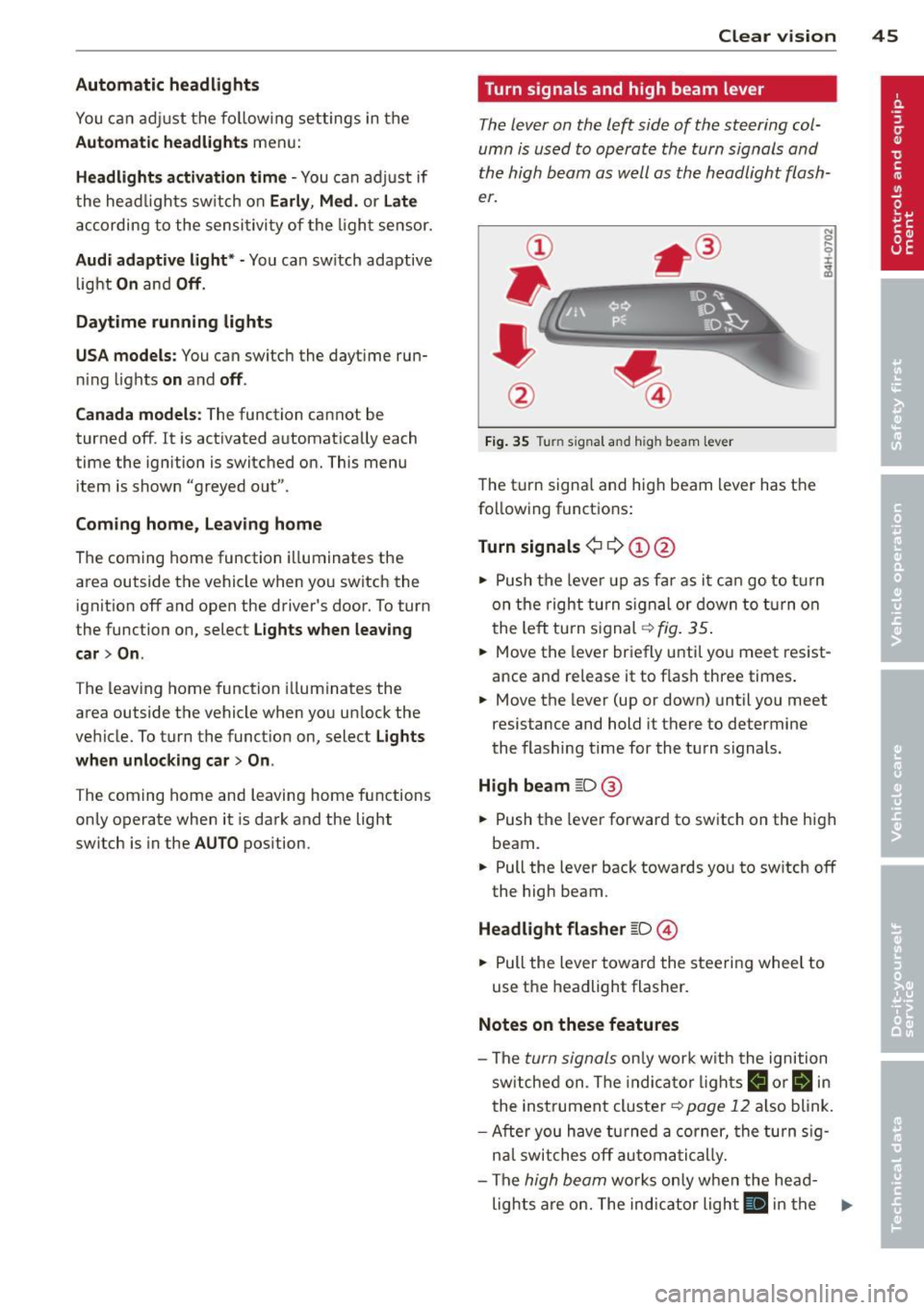
The lever on the left side of the steering col
umn is used to operate the turn signals and
the high beam as well as
the headlight flash
er.
Fig. 35 Tu rn signal and high beam lever
The turn signal and high beam lever has the
following functions:
Turn signals ¢ 9 ©@
.. 0 ....
~
.,. Push the leve r up as far as it can go to turn
on the right turn signa l or down to turn on
the left tu rn s ignal ¢
fig. 35.
... Move the lever briefly until you meet resist
ance and re lease it to flash three times.
.,. Move the lever (up or down) until you meet
resistance and hold it there to determine
the flashing time for the turn signals.
High beam ~D @
... Push the lever forward to switch on the high
beam .
.,. Pull the lever back towards you to sw itch
off
the high beam.
Headlight flasher ~D ©
... Pull the lever toward the steering wheel to
use the headlight flasher.
Notes on these features
-The turn signals on ly work w ith the ignition
sw itched on. The indicator l ights
B or Bin
the instrument cluster¢ page 12 also blink.
-After you have turned a corner, the turn sig-
n al switches
off automatically.
- The
high beam works only when the head-
lights are on. The indicator light
El in the .,.
Page 48 of 310
46 Clear vis ion
instrument cluste r illuminates when the
high beams are on.
- T he
headlight flash er works only as long as
yo u hold the lever - even if there are no
l ights turned on. The indicator light
II in
the instrument cluster il luminates when you
use the headlight flasher.
A WARNING
Do not use the high beam or headlight
flasher if you know that these could blind
oncoming traffic.
Interior lights
Front and rear interior lighting
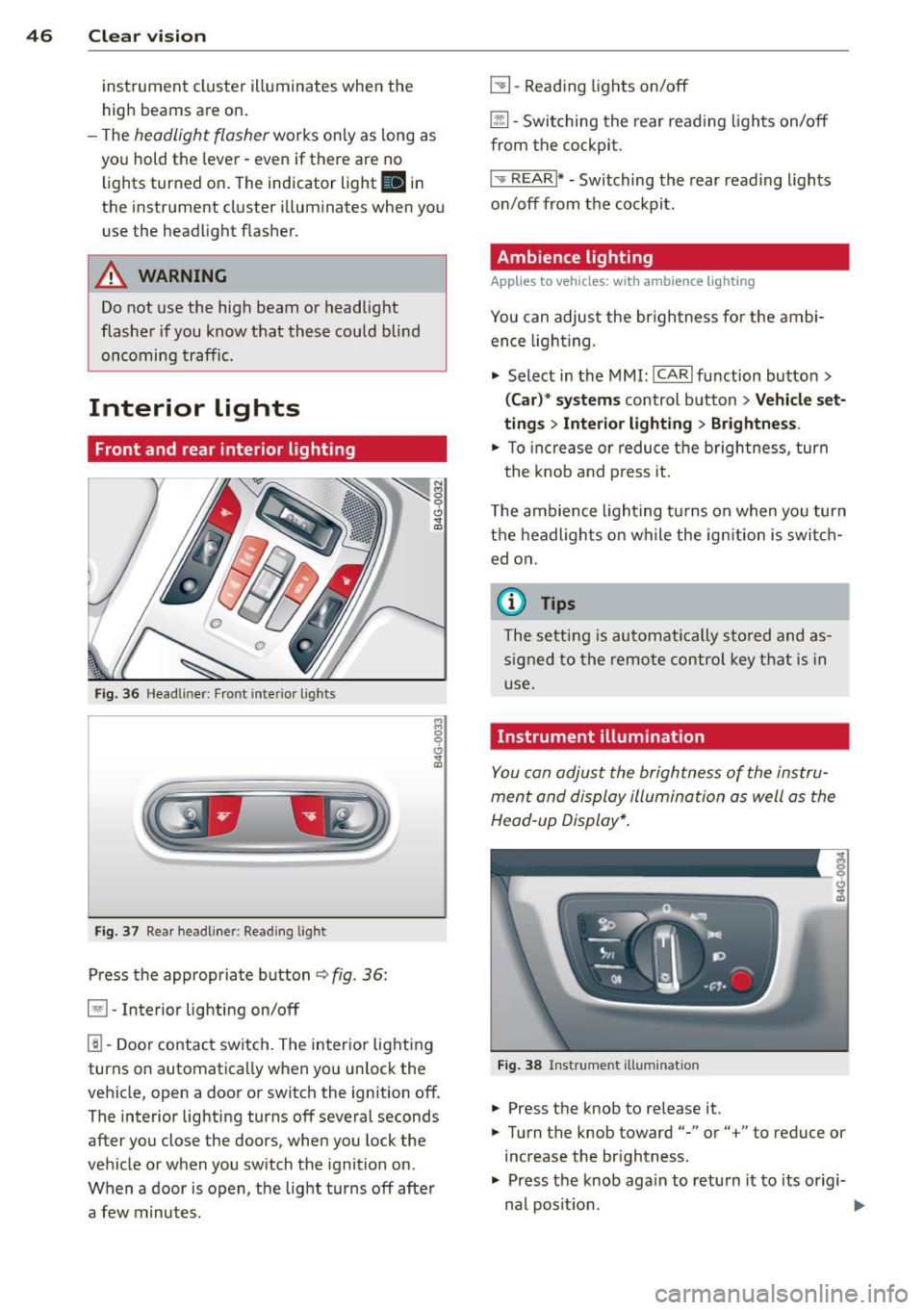
Fi g. 36 Headliner: Front interior ligh ts
Fig . 37 Re ar headli ne r: Readi ng light
Press the appropriate button q fig . 36:
El-Interior lighting on/off
I]]-Door contac t sw itch . The inter ior lighting
turns on automatica lly when you unlock the
vehicle, open a door or switch the ignition off.
The interior lighting turns off several seconds
after you close the doors, when you lock the
vehicle or when you sw itch the ignition on.
When a door is open, the light t urns off afte r
a few minutes.
L:!l -Read ing lights on/off
~ - Switching the rear read ing lights on/off
from the cockpi t.
I" REARI * - Switching the rear reading lights
o n/off from the cockpit.
Ambience lighting
Applies to vehicles: with ambience lighting
You can adjust the br ightness for the ambi
ence ligh tin g.
.. Select in the MMI: ICARlfunction butto n>
(Car )* sys tem s control button > Vehicle set
ting s
> Interi or lighting > Brightne ss.
.. To increase or reduce the b rightness , turn
t he knob and press it .
T he ambience light ing tu rns on when you turn
t h e headlights on wh ile the ig nition is swi tc h
ed on.
(D Tips
The setti ng is automati cally sto red and as
s igned to the remo te contr ol key t hat i s in
u se .
Instrument illumination
You can adjust the brightness of the instru
men t and di splay illumination a s well as the
Head-up Display*.
Fi g. 38 Instrume nt illumina tion
... Press the knob to re lease it.
.. Turn the knob toward"-" or"+" to reduce or
increase the br ightness .
.. Press the knob aga in to return it to its origi-
na l posit ion . ...
Page 75 of 310
(D Note
To avoid damage to the heating elements in the seats, do not kneel on the seats or
place heavy loads on a small area of the
seat.
Setup
App lies to vehicles: with four-zone a utomat ic climate con·
tro t
The climate con trol system setup is accessed
through the MMI.
" Select: ICARI function button > ( Car) * sys-
tems con trol but ton > AC.
Rear cabin settings*
When this function is selected, all settings for
the rear can be adjusted through the climate
control system in the cockpit. The climate
control system settings cannot be adjusted in
the rear seat at the same time. This function
switches
off after a certain period of time or
when one of the dials in the cockpit is press
ed .
Auto recirculation*
The sensitivity level of the automatic rec ircu
la tion mode can be set at various leve ls from
off to sensitive. The recirculation mode is con
trolled automat ica lly. You must press the~
button if fog forms on the windows.
Footwell temperature
You can adjust the footwell temperat ure so
that it is cooler or warmer.
AC mode
The strength of the airflow can be adjusted to
light, med ium or strong.
Warm and cold 7 3
Steering wheel heating
Applies to vehicles: wit h hea ted stee ring wheel
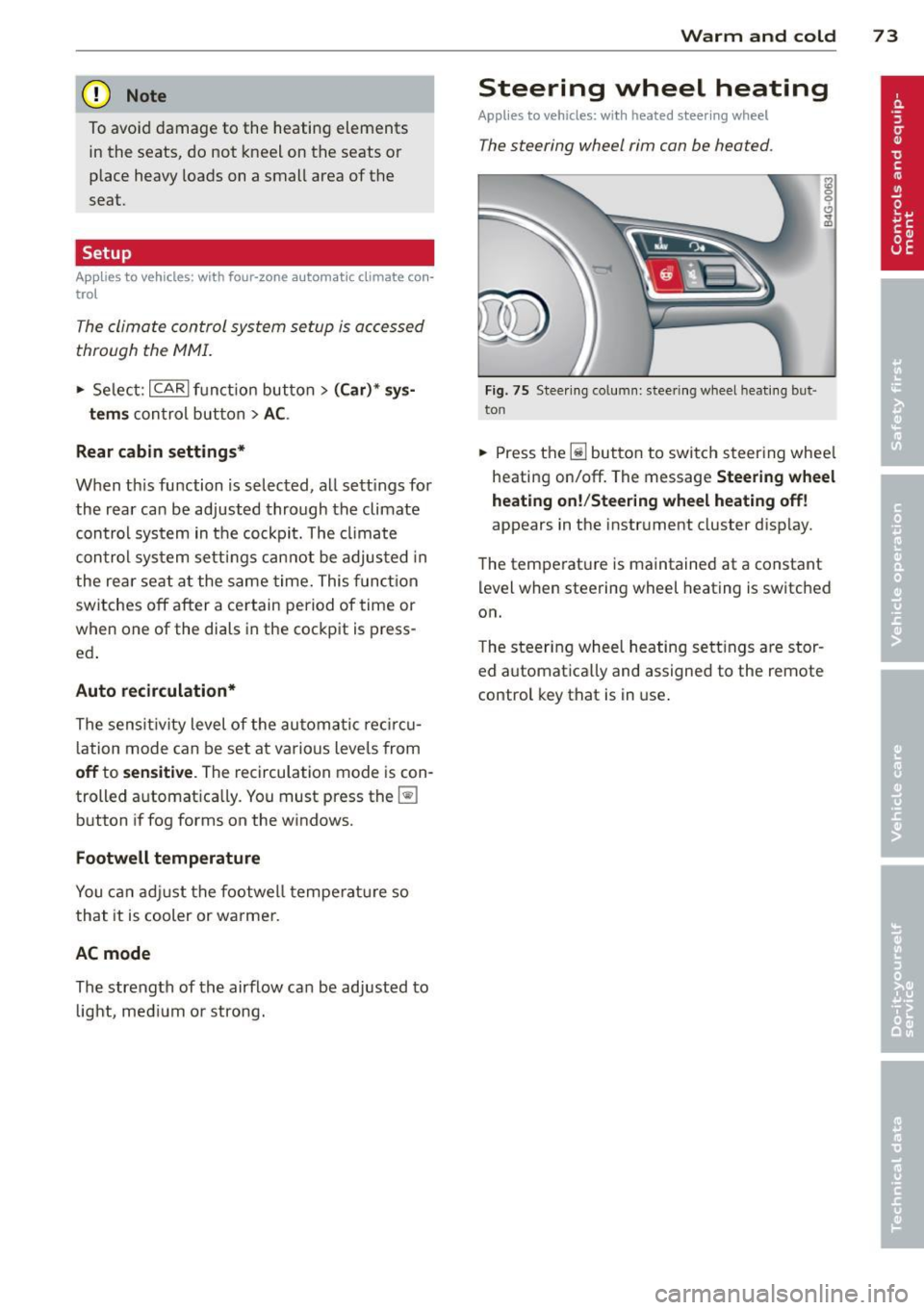
The steering wheel rim con be heated .
Fig. 75 Steering column: steering w heel hea tin g but ·
ton
.. Press the lil bu tton to switch steering whee l
heating on/off. The message
Steering wheel
heating on! /Steering wheel heating off!
appears in the instrument cluster d isp lay.
The temperat ure is maintained at a constant
level when steering wheel heating is switched
on.
T he steering wheel heating settings are stor
ed automat ica lly and assigned to the remote
control key that is in use .
Page 81 of 310

Emergency brake fun ction
An emergency brake ensures that the vehicle
can be slowed down even if the
normal b rakes
fail
c::> pag e 80 , Emergency broking .
Indicat or light s
-If the par king b rake is closed w ith the igni
t ion
s wit ched on the indicator lights come
on - (USA models)/ . (Canada models)
in the instrument cluster and in the switch.
- If the par king brake is closed w ith the igni
tion
s witc hed off the indicator lights come
on - (USA models)/ . (Canada models)
in the instr ument cluster and in the switch
for about 20 seconds.
A WARNING
Do not press the accelerator peda l inadver
tently if the vehicle is stat ionary but the
eng ine is running and a gear is selected .
Otherw ise the vehicle will start to move
immediately and cou ld result in a crash .
(D Note
If the symbol . in the display or the ind i
cato r light
1111 (USA models) . (Cana
da models) in the instrument cluster flash
es , the re is a malfunction in the bra ke sys
tem. Please refer to the detai led descr ip
tion of the indicator lights ¢
page 15.
- If the indicato r light - (USA mod-
els) . (Canada mode ls) or
IIJ tu rns
on, there may be a malfunction in the
parking brake
r=> page 16.
@ Tips
-You can apply the pa rking brake at any
time -even w ith the ignition swi tched
off. The ignition must be on in order to
release the parking brake.
- Occasiona l noises when the parking
brake is applied and re leased are norma l
and are not a ca use for concern .
- When the vehicle is parked, the parking brake goes thro ugh a se lf-test cycle at
r egular intervals . Any assoc iated noises
are norma l.
On the ro ad 79
Parking
Parking
~ Stop the vehicle with the foot brake .
~ Pull the switch(®) to apply t he pa rking
bra ke .
~ Select the P se lec to r lever posit ion
r=> poge 109.
~ Turn the engine off c::> &_.
In addition on inclines and grades
~ Tu rn the steering wheel so that your vehicle
w il l roll aga inst the c urb in c ase it shou ld
s tart to move .
T he park ing brake activates automat ica lly
when you swit ch the ign ition off. This does not
happe n if you select the N selector lever posi
tion or switch the parking off with the~ but
ton before switching the ignition off .
A WARNING
-When you leave your vehicle -even if on
ly briefly -always take the ign it ion key
with you . This applies particularly when
children remain in the vehicle . Othe rwise
the children could start the engine, re lease the parking brake or operate elec
trica l equipment (e.g. power wi ndows).
There is the r is k of an accident.
- When the veh icle is locked, no one -par
ticularly not childre n should rema in in
the vehicle . Locked doors ma ke it mo re
difficult for emergency wo rke rs to ge t in
to the vehicle -putting lives at risk .
Starting from rest
The starting assist function ensures that the
parking broke is released automatically upon
starting .
Stopping and applying parking brake
~ Pull the switch(®) to apply the pa rking
bra ke .
Page 84 of 310

82 On the road
@ Tips
When you stop and the start-stop-system
turns the engine off, the ignition remains
on. Make sure that the ignition is switched
off before exiting the vehicle.
General information
Applies to vehicles: with S tart-Stop -System
The standard Start-Stop-mode can be cancel
led for different system-related reasons .
Fig. 82 Instrument cluster: eng ine-Stop tempo rar ily
unavai lable
Engine will not switch off
Before each stop phase, the system checks if
certain conditions have been met. For exam
p le, the engine will
not be switched off in the
following situations:
- The engine has not reached the minimum
r equired temperature for Start-Stop -mode .
- T he interior temperature selected by the A/C
system has not been reached .
- T he outs ide temperature is extremely h igh/
low .
- T he w indshield is being defrosted
9page 70, 9page 72.
- The pa rking system* is switched on.
- The battery charge level is too low .
- The steering wheel is sharply turned or there is a steering movement.
- After engaging the reverse gear.
- On sharp inclines .
The
r,J indicator light appears in the informa
tion line in the instrument cluster disp lay
9 fig. 82.
Engine automatically restarts
The stop phase is interrupted in the following
situations, for example. The engine restarts
without any action by the driver.
- The inte rior temperature varies from the
temperature selected in the A/C system.
- The windsh ield is being defrosted
9 page 70, 9page 72.
-The brake pedal is pressed severa l times in a
row.
- The battery charge level becomes too low .
- High power consumption .
@ Tips
If you shift into the D, Nor S posit ions af
ter shifting into reverse, the vehicle must
be driven faster than 6 mph (10 km/h) in
o rd er for the engine to switch off aga in.
Switching the Start-Stop-System on/off
manually
Appl ies to vehicles : wi th Start-S top-Sys te m
If you do not wish to use the system, you can
switch it off manually.
Fig. 83 Center console: Start-Stop-System button
.,. To switch the Start-Stop -System off/on
manually, press the
! iiil ~·I button. The LED in
the button turns on when the system is
switched off.
(D Tips
If you switch the system off during a stop
phase, the engine will start again auto
matically.
Page 85 of 310

Messages in the instrument cluster
display
Applies to vehicles: with Start-Stop-System
Start-Stop syste m deacti vated: Please re
start engine manually
This message appears when specific condi
tions are not met dur ing a s top phase and the
Start -Stop-System w ill
not be able to restart
the eng ine.
If the Dor R selector lever posi
tions were engaged, P will be selected auto mat ica lly. The engine must be started with
the
! START ENGINE STOP I button .
Start-Stop system: System fault! Function
unavailable
There is a malf unctio n in t he Star t-Stop-Sys
tem . Dr ive the veh icle to an authorized repair
fac ility for servicing as soon as possible to cor
rect the malfunction .
Speed warning system
Introduction
The speed warning system helps you to stay
under a specified maximum speed.
The speed warning system warns you if you
a re exceeding the max imum speed that you
have set. You w ill hear a warn ing tone when
your speed exceeds the stored va lue by ap
p rox ima tely 3 mph (3 km/h) . An indicato r
l ight . (USA models)/ . (Canada mode ls) in
t he ins trumen t cluster display also turns on at
the same time. The indicator light
a;m
turns off when the speed decreases below the
stored maximum speed.
Setting a threshold is recommended if you
wou ld like to be reminded when you reach a
certain maximum speed . Situations where you
may want to do so include driving in a country
with a general speed limit or if there is a
specif ied max imum speed for winter tires.
(D Tips
Even tho ugh your vehicle is equipped with
a speed warning system, you should st ill
On the road 83
watch the speedometer to make sure you
are not driving faster than the speed limit.
Setting the threshold
You can set, chang e and delete the threshold
in the MMI.
.,. Select: I CAR I function button > (Car)* sys
tems
control button > Driver assist > Speed
warning.
You can set any threshold between 20 mph
(30 km/h) and lS0 mph (240 km/h). Sett ings
can eac h be adjusted in increments of 6 mph
(10 km/h).
Cruise control
Switching on
Applies to vehicles: with cruise control
The cruise control system makes it possible to
drive at a constant speed starting at
20 mph
(30kmlh).
0
f
®t
0
Fig. 84 Contro l lever with set button
Fig. 85 Display: Selected speed
.,. Pull the lever to position © c::> fig. 84 to
sw itch the system on.
.,. Drive at the speed you w is h to set.
.,. Press button @ to set that speed.
Page 86 of 310
84 On th e road
The stored speed and the ind icator light
A;(l)~i~ (US mo dels) 1,'I (Canadian mode ls) a p
pea r in the instrument cluster d isp lay
c::> fig. 85. The display may vary, depending on
the type of d isplay in your vehicle .
This informat ion is also shown briefly in t he
Head -up Display*.
The speed is kept constant v ia an engine o ut
put adjustment or active b rake intervention.
A WARNING
- Always pay attention to traffic even when
the cruise control is switched on. You are
always responsible for your speed and
the distance between your vehicle and
other vehicles .
- For safety reasons, the cruise control
should not be used in the city, in stop
and-go traff ic, on twist ing roads and
when road conditions are poor (such as ice , fog, gravel, heavy ra in and hydro
planing) -risk of accident.
- Turn
off the cruise control temporar ily
when entering turn lanes, highway exit lanes or in construc tion zones.
- Please note that inadvertently "rest ing"
yo ur foot on the accelerator peda l causes
the cruise control not to brake . T his is
because the cr uise control is overridden
by the d river's acce leration .
- If a brake system malfunction such as
overheating occurs when the cruise con
tro l system is switched on, the braking
function in the system may be switched
off. The other cruise control functions re
ma in active as long as the indicator light
[~;rn~i~ (US models) !Ill (Canad ian mod
els) is on .
(j) Tips
The brake lights illuminate as soon as the
brakes decelerate automat ica lly.
Changing speed
Applies to veh icles: w ith cru ise control
., To increase/decrease the speed in inc re
ments, tap the lever in the
0 10 direction
c::> fig . 84
., To increase/decrease the speed quick ly,
hold t he lever in the
0 10 direction until
the desired speed is displayed.
You can also press the accelerator pedal down
to increase your speed, e.g . if you want to
pass someone . The speed you saved earlier
will res ume as soon as you release the acceler
ator pedal.
If, however, you exceed your saved speed by
6 mph (10 km/h) for longer than 5 m inutes,
the cr uise control wi ll turn
off temporari ly.
The green symbol
A;(l)~i~ (US mode ls) 1,'I
(Canadian mode ls) in the display will go out
but the saved speed rema ins the same .
Presetting your speed
Applies to veh icles : w ith cru ise control
You can preset your desired speed while the
vehicle is not moving.
., Switch on the ignition.
., Pull lever into position
(D c::> fig . 84.
., Press the lever in the 0 or 0 direction to
increase or decrease your speed .
., Release the lever to save that speed .
This function makes it possible, for examp le,
to save the speed you want before dr iving on
the h ighway. Once on the h ighway, act ivate
the cru ise control by pulling the lever toward
(D .
Switching the system off
Applies to veh icles: w ith cruise control
Temporary deactivation
., Press the b rake pedal, or
., Press the leve r into posi tion @(n ot clicked
into place)
c::> fig. 84, or
... Drive for longer t han 5 min utes at more
than 5 mph (10 km/h) above the stored
speed.
Page 90 of 310
88 Audi adaptive cruise control and braking guard
@ is located in front of that vehicle, the sys
tem will not react to the stationary vehicle.
Audi adaptive cruise control
Description
Applies to vehicles: with Audi adaptive cruise control
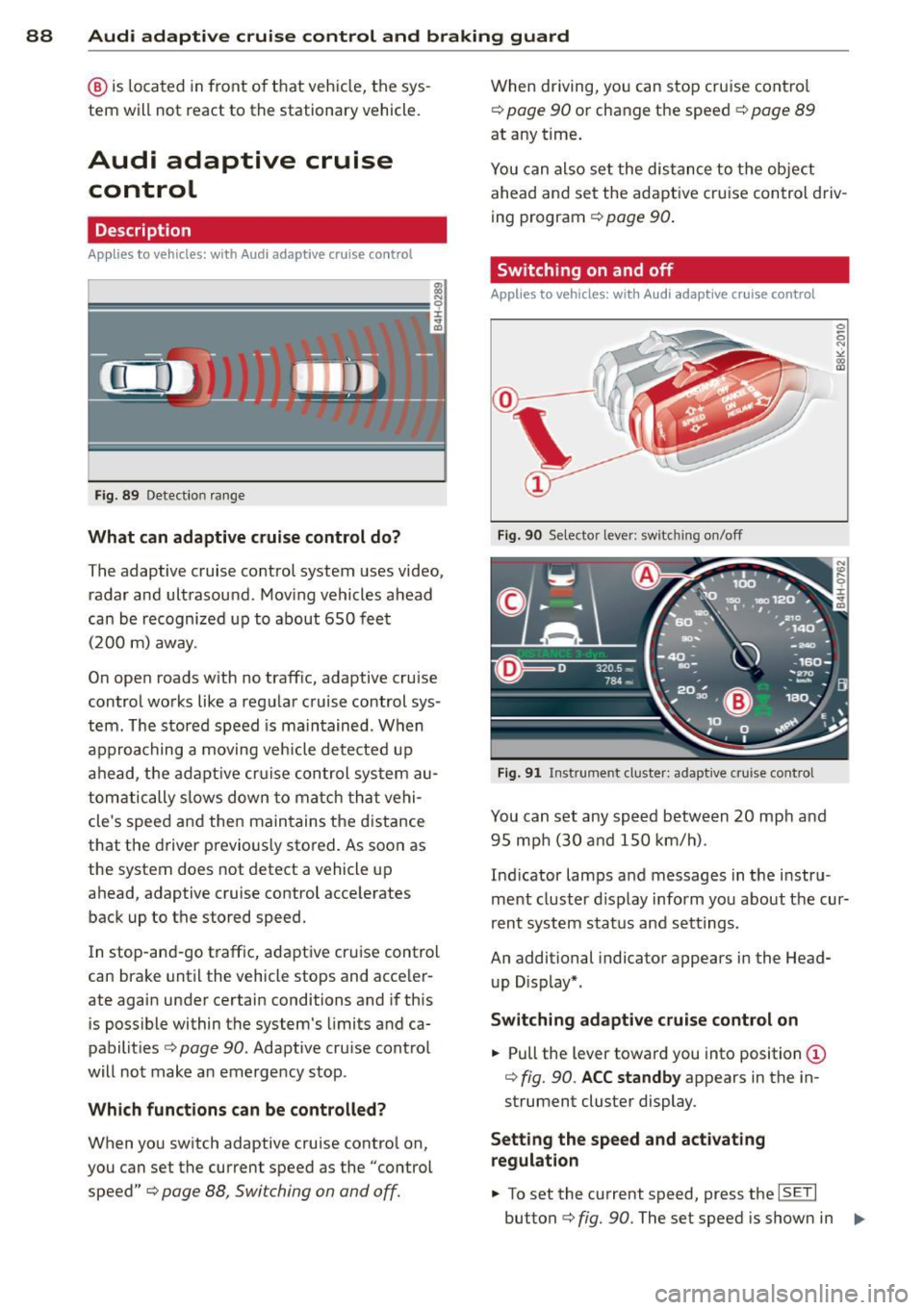
Fig. 89 Detection range
What can adaptive cruise control do?
The adaptive cruise control system uses video,
radar and ultrasou nd. Moving vehicles ahead
can be recognized up to about 650 feet (200 m) away.
On open roads w ith no traffic, adaptive cruise
control works like a regular cruise control sys
tem. The stored speed is maintained. When
approaching a moving vehicle detected up
ahead, the adaptive cruise control system au
tomatically s lows down to match that vehi
cle's speed and then maintains the distance
that the driver previous ly stored. As soon as
the system does not detect a vehicle up
ahead, adaptive cruise control accelerates
back up to the stored speed.
In stop-and-go traffic, adapt ive cru ise control
can brake until the vehicle stops and acceler
ate again under certain conditions and if this
is possible within the system's limits and ca
pabilities¢
page 90. Adaptive cru ise control
will not make an emergency stop .
Which functions can be controlled?
When you switch adaptive cruise contro l on,
you can set the current speed as the "control
speed" ¢
page 88, Switching on and off.
When driving, you can stop cruise control
¢
poge 90 or change the speed ¢ page 89
at any time.
You can also set the distance to the object
ahead and set the adaptive cruise control driv
ing program ¢
page 90.
Switching on and off
Applies to vehicles: with Audi adaptive cruise control
Fig. 90 Se lector lever: switching on/off
Fig. 91 Instrument cluste r: adaptive cruise control
You can set any speed between 20 mph and
95 mp h (30 and 150 km/h).
Ind icator lamps and messages in the instru
ment cluster d isplay inform you about the cur
rent system status and settings.
An additional indicator appears in the Head
up D isplay*.
Switching adaptive cruise control on
.,. Pull the lever toward you into position (D
¢ fig. 90 . ACC standby appears in the in
strument cluster display.
Setting the speed and activating
regulation
.,. To set the current speed, press the ISETI
button ¢ fig. 90. The set speed is shown in 1111-
Page 94 of 310
92 Audi adaptive cruise control and braking guard
Audi braking guard
Descript ion
App lies to vehicles: with Audi adap tive cruise control
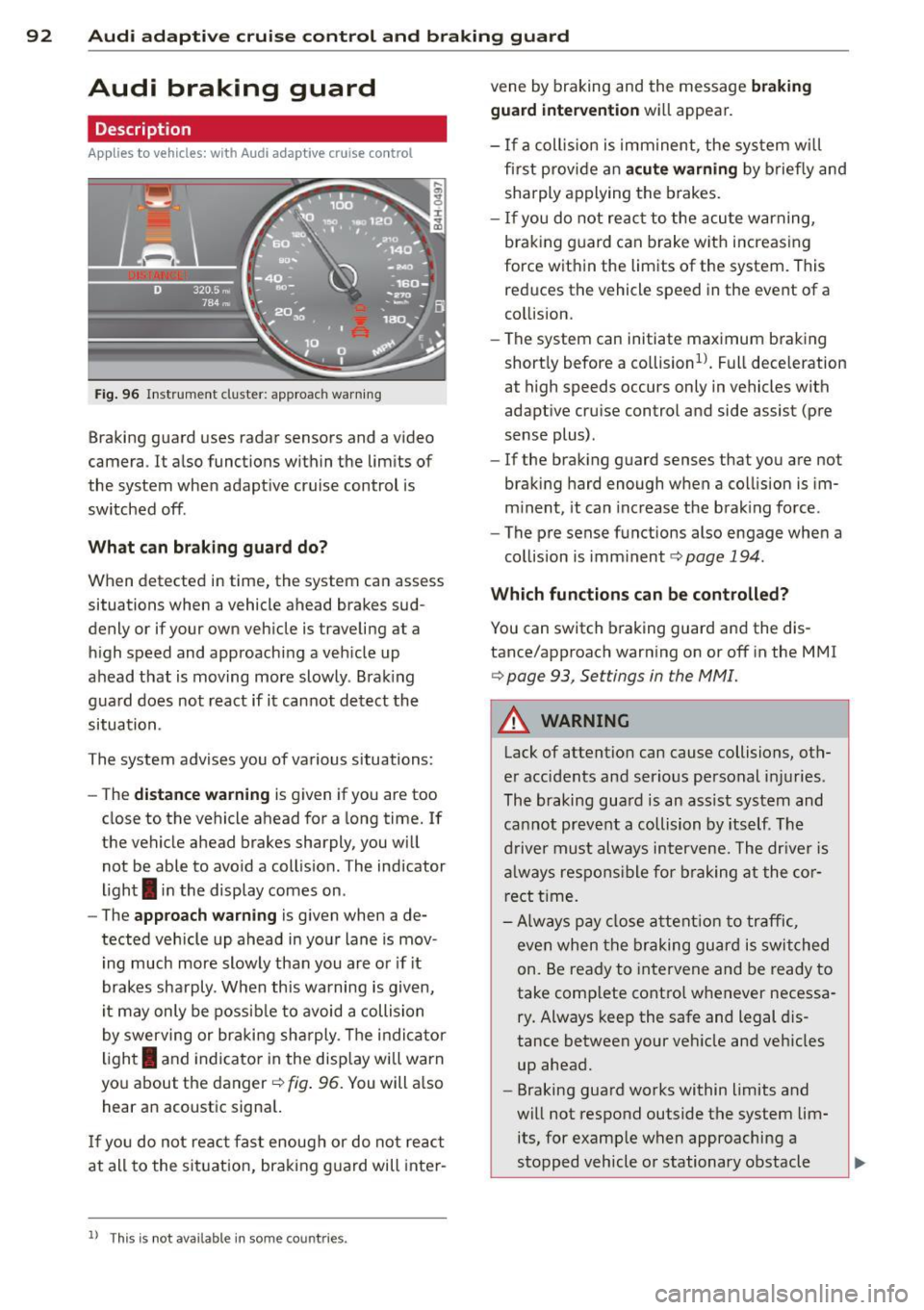
Fig. 96 Instrument cluster: approach warn ing
Braking guard uses radar sensors and a video
camera . It also functions within the limits of
the system when adapt ive cruise control is
switched off .
What can braking guard do?
When detected in time, the system can assess
situations when a vehicle ahead brakes sud
denly or if your own vehicle is traveling at a
high speed and approaching a vehicle up
ahead that is moving more slowly . Brak ing
guard does not react if it cannot detect the
situation .
The system advises you of various situations:
- The
distance warning is given if you are too
close to the vehicle ahead for a long time. If
the vehicle ahead brakes sharply, you will not be able to avoid a collision . The indicator
light
I in the display comes on .
- The
approach warning is given when a de
tected veh icle up ahead in your lane is mov
i ng much more slowly than you are or if it
brakes sharply . When this warning is given,
it may only be possible to avoid a collision
by swerving or braking sharply. Th e indicator
light
I and indicato r in the display will warn
you about the danger¢
fig. 96. You will a lso
hear an acoustic signal.
If you do not react fast enough or do not react
at all to the situation, braking guard will inter-
ll This is not ava ilable in some co un tri es .
vene by braking and the message braking
guard intervention
wi ll appear.
- If a coll is ion is imm inent, the system wi ll
fi rst prov ide an
acute warning by briefly and
sharply applying the brakes.
- If you do not react to the acute warning,
braking guard can brake with increas ing
force within the limits of the system . This
reduces the vehicle speed in the event of a
collision.
- The system can initiate maximum braking
short ly before a co llision
1l . Full deceleration
at high speeds occurs only in vehicles with
adaptive cruise control and side assist (pre
sense plus) .
- If the braking guard senses that you are not
braking hard enough when a collision is im
m inent, it can increase the braking force .
- The pre sense functions also engage when a
collision is imminent¢
page 194.
Which function s can be controlled?
You can switch braking guard and the dis
tance/approach warning on or off in the MMI
i=> page 93, Settings in the MMI.
A WARNING
-
Lack of attention can cause collisions, oth-
er accidents and serious personal injuries.
The braking guard is an assist system and
cannot prevent a collision by itself . The
driver must always intervene. The dr iver is
a lways respons ible for braking at the cor
rect time.
- Always pay close attention to traffic,
even when the braking guard is switched
on. Be ready to intervene and be ready to
take complete control whenever necessa
ry. Always keep the safe and legal dis
tance between your veh icle and vehicles
up ahead.
- Braking guard works within limits and
will not respond outside the system lim
its, for example when approaching a
stopped vehicle or stationary obstacle ..,.
Page 98 of 310
96 Audi active lane assist
Activating and deactivating
A ppl ies to vehicles: with active lan e assis t
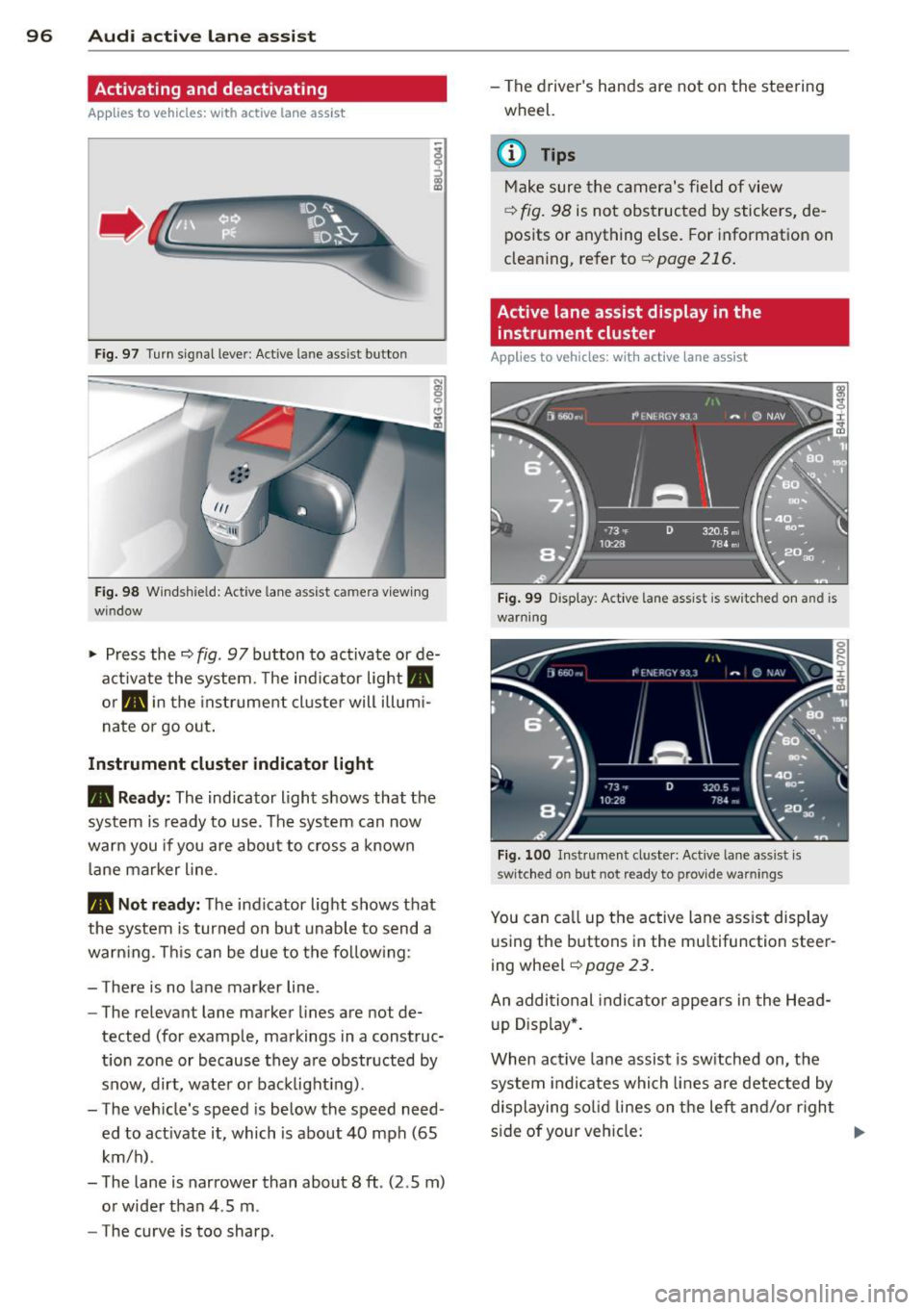
Fig. 97 Turn signal leve r: Active lane ass ist butto n
Fig. 98 Windshie ld: Active lane assist ca mera viewing
wi ndow
-
I
~ Press the c::> fig. 97 button to activate or de
activate the system. The indicator light.
or . in the instrument cluster will illumi
nate or go out.
Instrument cluster indicator light
• Ready:
The indicator light shows that the
system is ready to use . The system can now
warn you if you are about to cross a known
lane marker line .
• Not ready: The indicator light shows that
the system is turned on but unable to send a
warning . This can be due to the following:
- There is no lane marker line .
- The relevant lane marker lines are not de·
tected (for example, markings in a construc
tion zone or because they are obstructed by
snow, dirt, water or backlight ing).
- The vehicle 's speed is below the speed need
ed to activate it, which is about 40 mph (65
km/h) .
- The lane is narrower than about 8 ft . (2 .5 m)
or wider than 4 .5 m .
- The curve is too sharp. - The driver's hands are not on the steering
wheel.
(D Tips
Make sure the camera's field of view
c::> fig. 98 is not obstructed by stickers, de
posits or anything else. For information on
cleaning, refer to
c::> page 216.
Active lane assist display in the
instrument cluster
Applies to vehicles: wit h act ive lane assist
Fig. 99 Display : Active lane assist is switc hed on a nd is
warning
Fig. 100 Instrument cl uster: Active lane assist is
switch ed on but not re ad y to provid e wa rnin gs
You can call up the active lane assist display
using the buttons in the multifunction steer
ing wheel
c::> page 23.
An additional indicator appears in the Head
up Display*.
When active lane assist is switched on, the
system indicates which lines are detected by
displaying solid lines on the left and/or right
side of your vehicle: .,..