buttons AUDI S7 2014 User Guide
[x] Cancel search | Manufacturer: AUDI, Model Year: 2014, Model line: S7, Model: AUDI S7 2014Pages: 306, PDF Size: 76.83 MB
Page 98 of 306

96 Audi active lane assist
Activating and deactivating
A pp lies to vehicles: with active lan e assis t
Fig. 98 Turn signal leve r: Active lane ass ist butto n
Fig. 99 Windshie ld: Active lane assist ca mera viewing
win dow
-
I
~ Press the ¢ fig. 98 button to activate or de
activate the system. The indicator light.
or . in the instrument cluster will illumi
nate or go out.
Instrument cluster indicator light
• Ready: The indicator light shows that the
system is ready to use . The system can now
warn you if you are about to cross a known
lane marker line .
• Not ready: The indicator light shows that
the system is turned on but unable to send a
warning . This can be due to the following :
- There is no lane marker line .
- The relevan t lane marker lines are not de-
tected (for example, markings in a construc
tion zone or because they are obstructed by
snow, dirt, water or backlight ing) .
- The vehicle 's speed is below the speed need
ed to activate it, which is about 40 mph (65
km/h) .
- The lane is narrower than about 8 ft . (2 .5 m)
or wider than 4 .5 m .
- The curve is too sharp . - The driver's hands are not on th
e steering
wheel.
(D Tips
Make sure the camera's field of view
¢
fig. 99 is not obstructed by stickers, de
posits or anything else. For information on
cleaning, refer to¢
page 213.
Active lane assist display in the
instrument cluster
App lies to vehicles: wit h active lane assist
Fig. 100 D isp lay : Act iv e lane ass ist is swi tc h ed on a nd
is wa rnin g
Fig. 101 Instrumen t cl uster: Active lane as sist is
s witch ed o n but not re ad y to provid e wa rnin gs
You can call up the active lane assist display
using the buttons in the multifunction steer
ing wheel ¢
page 24.
An additional indicator appears in the Head
up Display*.
When active lane assist is switched on, the
system indicates which lines are detected by
displaying solid lines on the left and/or right
side of your vehicle: .,..
Page 107 of 306
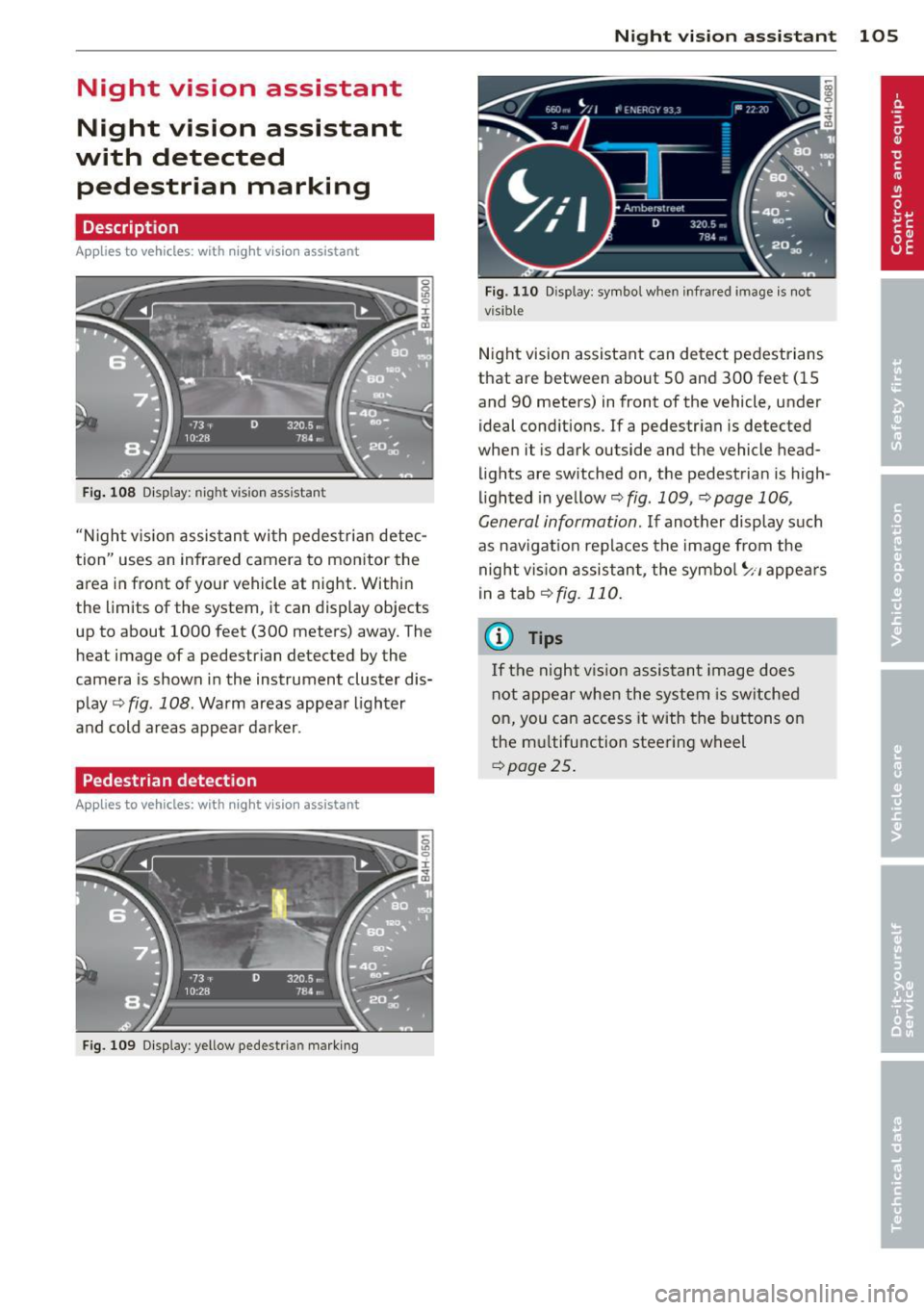
Night vision assistant
Night vision assistant
with detected pedestrian marking
Description
App lies to vehicles: with night v isio n assistant
Fig . 108 Display: nig ht v is ion assistant
"N ight v is ion assistant with pedestrian detec
tion" uses an infrared camera to monitor the
area in front of your vehicle at night. Within
the limits of the system , it can display objects
up to about 1000 feet (300 meters) away. The
heat image of a pedestrian detected by the
camera is shown in the instrument cluster dis
play Q fig . 108. Warm areas appear lighter
and cold areas appear darker .
Pedestrian detection
Applies to vehicles: with n ig ht v ision ass istant
Fig. 109 Display : yellow pedestrian marking
Night vision assistant 105
Fig. 1 10 Disp lay: symbo l w hen infrare d image is not
visi ble
Night vision assistant can detect pedestrians
that are between about 50 and 300 feet (15
and 90 meters) in front of the vehicle, under
ideal conditions .
If a pedestrian is detected
when it is dark outside and the vehicle head
lights are switched on, the pedestrian is high
lighted in yellow Qf/g. 109, Qpage 106,
General information. If another display such
as navigation replaces the image from the
night vision assistant, the symbo l~,, appears
in a tab Qfig. 110.
(D Tips
If the night vision assistant image does
not appear when the system is sw itched
on, you can access it with the buttons on
the multifunction steering wheel
Q page25.
Page 115 of 306
A WARNING
Hill descent control cannot overcome
physical limitations, so it may not be able
to maintain a constant speed under all
conditions. Always be ready to apply the
brakes.
Manual shift program
Applies to vehicles : with S tronic/tiptronic
Using the manual shift program you can
manually select gears .
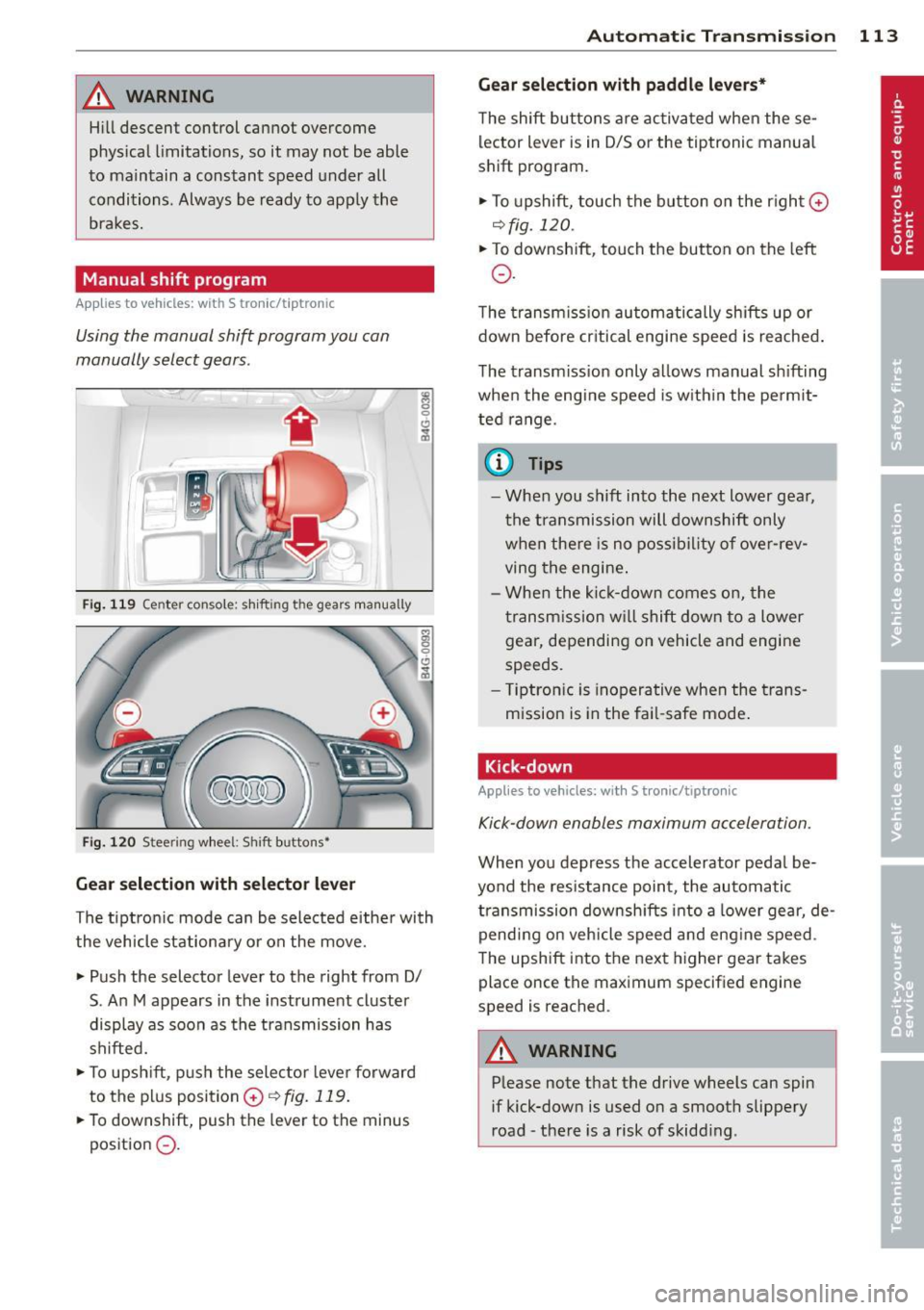
Fig. 119 Cen ter con sole : shift ing th e gear s manua lly
Fi g. 120 S tee ring wheel: S hift b uttons•
Gear s election with se lecto r le ver
The tiptron ic mode can be selected either with
the vehicle stationary or on the move.
" Push the selector lever to the right from 0/
S . An M appears in the instrument cluster
display as soon as the transmission has
shifted.
• To upsh ift, push the selector lever forward
to the plus position
0 ~ fig. 119.
"To downshift, push the lever to the minus
position
0 .
Automatic Tra nsmi ssi on 11 3
Gear sele ct ion w ith pad dle l eve rs *
The shift buttons are activated when these
lector lever is in D/S or the tiptronic manual
shift program.
" To upshift, touch the button on the r ight
0
~ fig. 120 .
"To downshift, touch the button on the left
0 .
The transm iss ion automatically shifts up or
down before cr itical engine speed is reached .
The transm iss ion only allows manual sh ifting
when the engine speed is w ith in the permit
ted range .
(0 Tips
-When you shift into the next lower gear,
the t ransmission will downshift only
when there is no possibility of over-rev
ving the engine .
- When the ki ck-down comes on, the
transm ission wi ll shift down to a lower
gear, depending on vehicle and engine
speeds.
- T iptron ic is inoperative when the trans
mission is in the fai l-safe mode .
Kick-down
Applies to vehicles: wit h S tronic/t iptron ic
Kick-down enables maximum acceleration .
When you depress the accelerator peda l be
yond the resistance point , the automatic
transmission downsh ifts into a lower gear, de
pending on veh icle speed and eng ine speed .
The upshift into the next higher gear takes
place once th e maximum specified engine
speed is reached .
A WARNING
--Please note that the drive wheels can spin
if kick-down is used on a smooth slippery
road - the re is a risk of skidding .
Page 130 of 306

128 Homelink
Homelink
Universal remote
control
General information
Applies to vehicles: with Homelink u nive rsal remote con
tro l
The HomeLink universal remote control can
be programmed with hand-held transmitters
from existing equipment.
With Homelink, you can control devices such
as the garage door, security systems, house
lights, etc. comfortably from the inside of you
vehicle.
Homelink makes it possible for you to replace
three different remote controls from devices in your home with one universal remote . Th is
feature works for most garage door and exte
rior door motor signals. Programming the in
d iv idual remo te control fo r your remote con
trol takes p lace near the center of the radiator
grille. There is a control module attached at
this location .
A one-t ime programm ing of the sensor mus t
be performed before you are able to use sys
tems w ith Homelink.
A WARNING
- Never use the Homelink transmitter
with any garage door opener that does
have not the safety stop and reverse fea
ture as requ ired by federal safety stand
ards. Th is includes any garage door open
er model manufactured before April 1, 1982.
- A garage door opener which cannot de
tect an object, signaling the door to stop
and reverse does not meet current feder
al safety standards . Us ing a garage doo r
opener witho ut these fea tures increases
risk of serious injury or death.
- For safety reasons never release the
parking brake or start the engine while
anyone is standing in front of the vehicle .
- A garage door or an estate gate may
sometimes be set in motion when the Homelink remote control is being pro
grammed. If the device is repeatedly ac
tivated, this can overstrain motor and
damage its electrical components -an
overheated motor is a fire hazard!
- To avo id possible injuries or property
damage, please always make absolutely
certa in that no persons or objects are lo
cated in the range of motion of any
equ ipment being operated.
(0 Tips
- If you would like additional information
on the Homelink Un iversal Transceiver,
Homelink compatible products, or to
purchase other accessories su ch as the
Homelink Lighting Package, please con
tact Homelink at 1 -800-355-3515 or on
the Internet at www.homelink.com.
- For Declara tion of Comp liance to United
States FCC and Ind ustry Canada reg ula
tions¢
page 288 .
-For security reasons, we recommend that
you clear the programmed b uttons be
fore selling the ve hicle .
Operation
Appl ies to vehicles: wit h Ho melink
Fig . 14 6 Headliner: controls
M 0
9 (!)
~
Requirement: The buttons must be program
med ¢
page 129 .
"'To open the garage door , press the program
med b utton . The LED @ will light up o r
flash.
"' To close the garage door, press the button
again .
Ill>
Page 131 of 306

@ Tips
To open the garage door, press the button,
but do not press it for longer ten seconds
or the Homelink module will switch to
programming mode .
Programming the transmitter
Applies to vehicles : with Home Link
Fig. 147 Di stan ce be twe en th e ra di ato r grille a nd th e
h an d trans mitter
You can program the fixed code and rolling
code systems using the described procedure.
Programming the button
.. Turn the ignition on .
.. There are two ways to program a bu tton :
press the button that you would like to pro
gram . The MMI will display instructions to
guide you through the programming . Or
.. Select :
I CARI function button> (Car)* sys
tems
control button > Vehicle settings >
Garage door opener > Program garage door
opener .
.. Select the button that you would like to pro
gram .
.. Follow the instructions in the MMI.
.. If the garage door opening must also be
synchronized with the Homelink module,
refer to the owner's manual for the garage
door opener.
Remote control units for garage door openers
in Canada are set to stop transmitting radio
frequency signals after two seconds . This time
may not be sufficient for the Homelink sys
tem to learn the radio frequency signal. Per
form all other steps as described above.
Homelink 129
Erasing/Clearing the programmed button
settings
.. To erase all of the programmed buttons at
the same time, select:
!CAR ! function button
>
(Car)* systems function key> Vehicle set
tings
> Garage door opener > Clear pro
gram settings> Yes .
The programmed but
tons can not be erased individually. Repro
gram the buttons if necessary .
.. Reprogram an individual button in the same
manner that you would for the one-time
programming.
Displaying the version/status/country
code
.. Select: !CAR I function button> (Car)* sys
tems
control button > Vehicle settings >
Garage door opener> Version information.
(D Tips
- The required distance between the hand
transmitter and the Homelink module in
the radiator grille~
fig. 147 depends on
the system that you are programming .
- Depending on the model of the garage
door opener, you may need to release the
button on the remote and press it again
when programming. When program
ming a new device, keep the button
pressed for at least 15 seconds before
trying again with the transmitter in a dif
ferent position. Watch out for the emer
gency flasher during that time.
Page 301 of 306

Safety belt warning light ... ... .. .. .. . 140
S afety complianc e st icker ............ 282
Safety equipment .......... ... ... .. . 130
Safety features for occupant restra int and
protection ... ..... ..... ... ... ... ... 130
Safety guidelines Seat adjustment . . . . . . . . . . . . . . . . . . . . 53
Safety instructions
Eng ine compartment ............... 227
for side curtain airbags ............. 173
for using child safety seats ... .. .. .. . 179
for using safety be lts ............. .. 143
M on itoring the Advanced Airbag Sys-
tem . .... .. ................. .. ... 164
Safety systems
War ning/ indicator lights ....... .. .. .. 1 9
Seat adjustment
Controls . . . . . . . . . . . . . . . . . . . . . . . . . . 54
Driver 's seat . . . . . . . . . . . . . . . . . . . . . . . 53
Front passenger's seat . . . . . . . . . . . . . . . 54
Front seats . . . . . . . . . . . . . . . . . . . . . . . . 53
H ead restraints . . . . . . . . . . . . . . . 56, 134
Safety guide lines ................... 53
Seat belts
Why YOU MUST wear them 140
Seat covers Cleaning ... .... ...... ... .. .. .. ... 216
Seat heating/vent ilation (automatic cli-
mate con trol) . . . . . . . . . . . . . . . . . . . . . . . 73
Seat heating (climate control) . . . . . . . . . . 71
Seating position Driver ... .. .. .. ........... ....... 131
Front passenger .......... .. .. .. .. . 132
H ow to adjust the front seats ... .. .. . 132
Incorrect seat position ............ .. 134
Occupants ................ ...... .. 13 1
Rear passengers ................... 133
Seat memory ............. .... .. .... 57
Seats Comfort seat side view . . . . . . . . . . . . . . 58
Seat symmetry . . . . . . . . . . . . . . . . . . . . . 58
Seats (number) . . . . . . . . . . . . . . . . . . . . . 140
Select ive catalytic reduction
refer to Ad Blue ........... .... .. ... 223
Select ive unlock feature .. ... .. .. .. .. .. 35
Selecto r leve r .................... .. 109
Selector lever emergency release . . . . . . 115
Inde x 299
Serv ice and disposa l
Safety be lt pretensioner ..... ... .. .. 147
•
Se rv ice interval display . . . . . . . . . . . . . . . . 28 •
Sh ift buttons .. .. .. ................. 113
Sh ip ( transport ing your vehicle) . ... .. .. 280
Sh utting down vehicle ............... 206
Side a irbags
Description .. .. .. ................. 169
How they work . . . . . . . . . . . . . . . . . . . . 170
s ide ass ist . ... .. .... . ... ...... ... .. . 98
Adjusting the brightness ..... ... .. .. 100
Sensor range . ... .. .. .. ...... ... .. . 99
Side assist Activati ng and deactivat ing .......... 100
Cleaning the sensors . .. ..... ... .. .. 214
S ide curta in airbags ................. 172
Desc ription .. .. .. .... ........... .. 172
How they wor k ... .. .. ........... .. 173
Sa fety i nstr uctions ................. 173
Side marker lights ................. .. 44
Ski sack . ... .. .. .... . ... ...... ... .. . 67
also refer to Trunk pass-through . .. .. . 68
Slid ing/til ting s unroof
Emergency clos ing . .. .. ..... ... .. .. . 43
Opening and closing . ... .... ... .. .. . 42
Snow cha ins ...... .. ............... 259
Socket ....... .. .. ................. . 60
Sources of informa tion abo ut child re -
stra ints and their use .. .. ..... ... .. .. 193
Space-savi ng spa re tire ... .. ..... ... .. 265
Spare tire . .. .. .. .. .. ............... 265
Speed limi ter . .. ...... ........... .. . 31
Speedometer ... .. .. . .. .... ...... .. . 27
Speed rating letter code .. ..... ... .. .. 255
Speed warning system ............. ... 84
Sport d ifferential .. ............. .. .. 102
Ind icator lig ht ... ................. . 23
Star button ... .... .. . .. .. ..... ... .. . 25
Start-Stop-System ................... 81
E ngine does not swit ched off ......... 82
E ngine sta rts a utomat ica lly .......... 82
Ind icator lights .. ................. . 82
Messages ... .. .... . ... ...... ... .. . 83
Starting/stopp ing the engine .. .. .. .. . 82
switching off/on .. .. .. .. .... ... .. .. . 83
START ENG IN E ST O P bu tton ........... 76