heating AUDI S7 2015 User Guide
[x] Cancel search | Manufacturer: AUDI, Model Year: 2015, Model line: S7, Model: AUDI S7 2015Pages: 316, PDF Size: 78.09 MB
Page 76 of 316
7 4 Warm and cold
(D Note
To avoid damage to the heating e lements
in the seats, do not kneel on the seats or
place heavy loads on a small area of the
seat .
Setup
Applies to vehicles: with four-zone a utomat ic clima te con·
tro l
The climate control system setup is accessed
through the MMI .
.,. Se lect : I CAR I func tion button> (Car )* sys·
terns con trol but ton > A /C.
Rear cabin settings*
When th is fu nction is selected, all sett ings for
the rear can be adjusted through the climate
control sys tem in the cockpit. The cl imate
con trol sy stem se ttings cannot be adjusted in
the rea r seat a t the same time. This func tion
switches o ff after a certain period of time or
when one of the dia ls in the cockp it is press
ed .
Auto recirculation*
The sensit ivity level of the au tomatic rec ircu
lation mode can be set at v ario us leve ls from
off to sensit ive. The recirculation mode is con
trolled a utomat ica lly. You must p ress the
I@ FRONT I button if fog forms on the win
dows.
Footwell temperature
You can ad just the footwe ll temperat ure so
that it is cooler or wa rmer.
Supplementary heater*
The supplementa ry heater warms the interio r
of vehicle s with diesel engines* mo re q uic k ly.
The su pplement ary he ate r is cont rolle d au to
mat ica lly in t he
Auto setting.
Steering wheel heating
App lies to vehicles: wi th hea ted s tee rin g wheel
The steering wheel rim can be heated .
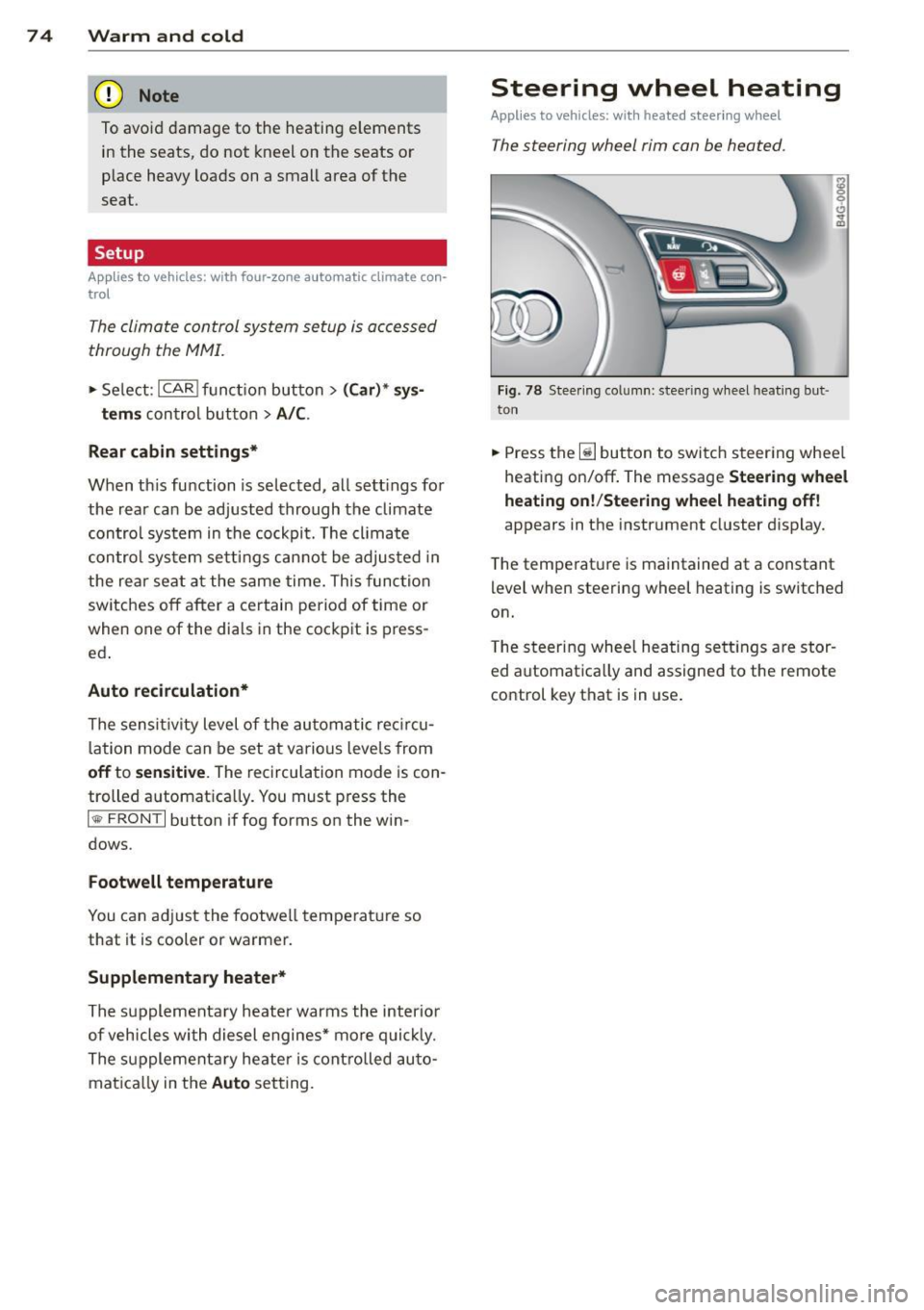
Fig. 78 S tee ring co lu mn : steeri ng w hee l h ea tin g but ·
ton
.,. Press the~ button to swi tch steering whee l
heati ng on/off . The message
Steering wheel
heating on !/Steering wheel heating off !
appears in the instrument cluster d isplay.
T he temperat ure is maintained at a constant
level when steering wheel heating is switched
on.
T he steering whee l hea ting se tt ings are stor
ed automat ica lly and assigned to the remote
control key that is in use .
Page 86 of 316

84 On the road
You can set any threshold between 20 mph
(30 km/h) and 150 mph (240 km/h). Settings
can each be adjusted in increments of 6 mph
(10 km/h).
Cruise control
Switching on
Ap plies to vehicles: with c ruise con tro l
The cruise control system makes it possible to
drive at a constant speed starting at 20 mph
(30 km/h).
0
f
~
0
Fig. 87 Con tro l lever w it h set bu tton
Fig. 88 Display : Selected speed
• Pull the lever to position (D c:> fig. 87 to
switch the system on.
• Drive at the speed you wish to set.
• Press button @to set that speed.
The stored speed and the indicator light
II (US models) ;ii (Canadian models) ap
pear in the instrument cluster display
cc> fig. 88. The display may vary, depending on
the type of d isplay in your vehicle .
This information is also shown briefly in the
Head-up Display*.
The speed is kept constant v ia an engine out
put adjustment or active brake intervention .
A WARNING
--Always pay attent ion to traffic even when
the cruise control is switched on. You are always responsible for your speed and
the distance between your vehicle and
other vehicles.
- For safety reasons, the cruise contro l
should not be used in the city, in stop
and-go traffic, on twisting roads and
when road conditions are poor (such as
ice, fog, gravel, heavy rain and hydro
p lan ing) -risk of accident .
- Turn off the cruise control temporarily
when entering turn lanes, highway exit
lanes or in constr uction zones .
- Please note that inadve rtently "resting"
your foot on the accelerator pedal causes the cruise control not to brake. This is
because the cruise control is overridden
by the driver's acceleration.
- If a brake system malfunction such as
overheating occurs when the cruise con
trol system is switched on, the braking
function in the system may be sw itched
off. The other cruise control functions re
main active as long as the indicator light
II (US models)/ ... (Canadian models)
is on.
(D Tips
The brake lights illuminate as soon as the
brakes decelerate automatically .
Changing speed
Applies to vehicles: with cruise control
• To increase/decrease the speed in incre
ments, tap the lever in the
0 10 direction
c:> page 84, fig. 87
• To increase/decrease the speed quick ly, hold
the lever in the
010 d irect ion until the de
sired speed is displayed .
You can also press the accelerator pedal down
to increase your speed, e.g . if you want to
pass someone. The speed you saved earlier
will resume as soon as you release the acceler- ator pedal. ..,.
Page 116 of 316

114 Automatic Tran sm iss ion
• Move the selecto r lever to position D/S to
select sport mode (S) or select
D ynam ic
mode in Audi dr ive select ¢ page 103.
• Press the brake pedal strongly with your left
foot and hold it down for at least 1 second.
• At the same time, press the accelerator ped
al down completely w ith your r ight foot un
t il the engine reaches and maintains a h igh
RPM.
• Remove your foot from the brake pedal
within S seconds¢ ..&,.
A WARNING
-Always adapt your driving to the traffic
flow.
- Only use the Launch Control Program when road and traffic conditions allow it
and other drivers will not be endangered
or annoyed by your dr iv ing and the vehi
cle's accelerat ion.
- Please note that the driving wheels can spin and the vehicle can break away
when sport mode is sw itched on, espe
c ially when the road is slippery .
- Once you have accelerated, you should
switch sport mode off by pressing the
I.$ OFF I button.
(D Tips
-The transm ission temperat ure may in
crease significantly after using the Launch Control Program . If that hap
pens, the program may not be available
fo r a few minutes. It will be availab le
again afte r a coo l-down period.
- When accelerating us ing the Launch
Control Program, all vehicle pa rts a re
subject to heavy loads. This can res ult in
i ncreased wear.
Transmission malfunction
[i'J Transmi ssion : Pre ss b rake pedal and se
le ct gear aga in
Press the brake pedal and se lect the des ired
selector lever position again. You can then
continue driving .
[i'J Transmis sion ov erheating: Plea se dri ve
cons ervativel y
The transm iss ion tempera ture has inc reased
s ignificantly due to the sporty d riving manner.
Drive in a less sporty manner until the tem
perature returns to the normal range and the
indicator light switches of.
[i'J Tra nsmi ssion malfun ct io n: Y o u ca n con
tinue dri ving
The re is a system malfunction in the transm is
s io n. You may cont inue drivi ng. Dr ive to yo ur
a utho rized Aud i dea ler o r qualified repa ir fa
cility soon to have the malfunction corrected.
m) [O] Trans mission malfunc tion : You can
continu e driving with limit ed fun ctionality
T he re is a system malfunction in the transm is
s ion. The t ransm ission is switching to eme r
gency mode. This mode on ly shifts into cer
t ai n gears o r will no longer shift at all. The en
gine may sta ll. Drive to your a uthorized Audi
dealer or qualified repair facility immediately
to have the malfunction corrected .
[i'J ffl Transmission malfunction : No rever se
gear . You can c ontinue drivin g
S tronic transmission: There is a system mal
funct ion in the t ransmission. The transmis
s io n is switching to emergency mode. This
mode only sh ifts into certain gea rs or will no
longer shift at a ll. The engine may stall. You
cannot engage the reverse gear . Drive to your
authorized Aud i dea ler or qualified repa ir fa
c ility immediately to have the malfunction
corrected.
[i'J Tran smi ssion malfunct ion: Stop veh icle
a nd shift to P
Do no t con tinue dr iving . Se lect the P selector
lever position and see your authorized A udi
dealer or qualified repair facility for assis
tance.
(D Note
If the transmission switches to emergency
mode, yo u should take the vehicle to an
ll-
Page 198 of 316
196 Intellig ent technolog y
distance detected to the veh icle a head is too
smal l.
Anti -slip regulation (ASR )
ASR reduces engine power when the drive
wheels begin to spin and adapts the force to
the road condit ions. This makes it eas ier to
start, accelerate and drive up hills.
Electronic differential lock (EDL )
The ED L brakes wheels that are spinn ing and
transfers the d rive power to the other wheels.
This f unct ion is not availab le at h igher speeds.
In extreme cases, EDL automat ically switches
off to help keep the brake on the braked whee l
from overheating. EDL w ill switch on aga in au
tomatically when conditions have returned to norma l.
St eering recommendat ion
The ESC helps to stabilize the vehicle by
cha nging the steering to rque.
In vehicles with dynam ic steering*, ESC also
helps to stabilize the steering in critical s itua
tions .
Select ive w heel to rque control
Selective wheel torque control is used when
driving on curves . The front wheel on the in
side of the curve or both wheels on the inside
of the curve are braked selectively as needed.
This a llows more prec ise driving in curves. The
applicable system may not activate when d riv
ing i n wet or snowy conditions.
.&_ WARNING
- T he ESC and its integrated systems can
not overcome the limits posed by natural physical laws
. This is especially impor
tant on slippery or wet roads. If the sys tems beg in acting to stabilize your vehi
cle, you should immediately change your
speed to match the road and traffic con
d itions . Do not let the increased safety
p rovided by these systems tempt you to
take risks. Do ing so will increase the ri sk
of a loss of veh icle cont ro l, collision and
serio us personal inj uries.
- Always adapt your speed to road, traffic
and weather conditions . The risk of los
ing control of the vehicle increases when
driving too fast , especially through
curves and on slippery or wet roads, and
when dr iv ing too close to vehicles up
ahead . The ESC and its integrated sys
tems cannot a lways prevent collisions -
there is still a risk of acc idents!
- Always accelerate with special care on
even, smooth su rfaces such as those that
are wet or covered with ice and snow .
The drive wheels can spin even w ith
these assistance systems that c annot al
ways he lp to red uce the risk of loss of ve
h icle control.
(D Tips
- ABS and ASR only wo rk correctly when
all four wheels are equipped wi th iden ti
cal tires. D ifferen t tire sizes can lead to a
reduction in engine power.
- Yo u may hear noises when the systems
descr ibed are workin g.
-If the ind icator light DJ or Ea (USA
mode ls)/ lCO j
page 19,
<=>page 19.
Page 204 of 316

202 Intelligent technology
than is being generated and ensures an opti
mal state of charge for the battery.
(D Tips
- But even energy management cannot
negate the limits of physics. Consider
that the power and life of a battery are
li mited.
- If starting ability is threatened, the indi
cator light (•) appears¢
page 17.
What you should know
The highest priority is given to maintaining
starting capability.
The battery is severely taxed in short-distance
driving, in city traffic and during the cold time
of year. Abundant e lectrica l energy is re
quired, but only a little is generated.
It is also
crit ical if the engine is not running and electri
cal components are turned on. In this in
stance energy is being consumed but none is be ing generated .
It is in precisely these situations that you wi ll
notice energy management actively regulat
ing the distribution of energy.
Vehicle stands for an e xtended period
If you do not drive your vehicle over a period
of severa l days or weeks, electrical compo
nents are gradually cut back or switched
off.
This reduces energy consumption and main
tains starting capab ility over a longer period.
Some of the conven ience functions may not
ope rate, such as the inter ior lights or the
power seat adjustment. The conven ience
f u nctions w ill be available again when you
switch on the ignition and start the engine.
With the engine turned off
If you listen to the radio, for example, with
the engine turned
off or use other MMI func
tions, the battery is being discha rged .
If starting capability is jeopardized due to en
ergy consumpt ion, the following warning ap
pears in t he MMI display:
Please start the engine soon or the system
will be turned off.
The wa rn ing ind icates that the system will be
turned
off automatically after 3 minutes. If
you wish to continue using the functions, yo u
have to start the engine.
With the engine running
Although electrical energy is generated when
the vehicl e is being driven, the battery can be
come discharged. This happens mostly when
little energy is being generated and a great
deal consumed and t he battery's state of
charge is not opt imal.
To bring the energy ba lance back into equili
brium , consumers which require especially
large amounts of energy are temporari ly cut
back or switched
off. Heating systems in par
t icular require a great deal of energy. If you
notice, for example, that the heated seats" or
the heated rear window are not heating, they
have been temporarily cut back or sw itched
off. These systems w ill be available again as
soon as the energy balance has been restored.
You will also notice that engine idle speed has
been increased slightly . This is normal and not
a cause for concern. By increasing engine idle
speed the addi tional energy requi red is gener
ated and the batt ery is charged.
Page 208 of 316

206 Driving and en vir onm ent
The consumption estimates as published
by ENVIRONMENTAL PROTECTION AGENCY
(EPA) and Transport Canada may not corre
spond to your actual consumption on the
road, which will vary depending upon vehi
cle load and speed, road and weather con
ditions, tr ip length, etc .
Drive smoothly and keep a lookout
ahead
Vehicles use the most fuel when they are ac
celerating.
• Avoid unnecessary accelerating and braking.
Vehicles use the mo st fuel when they are ac
celerating . If you anticipate what is go ing to
happen next, you will need to brake less and,
thus , accelerate less. Let the vehicle coast
wheneve r poss ible -for example when you see
that the next traffic l ight is red.
Avoid full throttle
Driving at moderate speeds saves fuel and
improves your mileage.
• Try and keep well below your car 's max imum
speed .
Accelerating gently reduces fuel consump
tion, engine wear, and does not disturb the
environment .
Fuel consumption, exhaust emissions and en
g ine no ise increase d isproportionately at high
speeds. If you dr ive at approximately three
quarters of top speed, fue l consumption will
be reduced by one half. Neve r dr ive faste r
than the posted speed limit and wea ther con
d itions permit.
Reducing unnecessary idling
Even when your car is just idling it burns up
fuel.
• Shut the engine off when you are not dr iv ing
the vehicle. •
Do not warm up the vehicle by letting the
engine run at id le .
T he id ling phase is automatically red uced for
vehicles with the Start -Stop -System . It is effi
cient to switch off the engine in vehicles with
out the Start-Stop -System when stopp ed at
railroad crossings and long red lights. Tu rning
the engine off for jus t 30-40 seconds saves
more fuel than is burned by starting the en-
. . gme again .
It takes a long time for the eng ine to warm up
fully when i t is running at idle. However, wear
and noxiou s emissions are espec ially high
when the eng ine is warm ing up . So you should
drive away as soon as you start the engine and
avo id running at high rpms while the engine is
still warming up.
W Note
Do not leave engine idling unattended af
ter start ing . If wa rning lights should come
on to indicate improper operation, they
wo uld go unheeded . Ex tended idling also
produces heat, wh ich could result in ove r
heating or other damage to the ve hicle or
other property .
Regular maintenance
A badly tuned engine unnecessarily wastes a
lot of fuel.
• Have your veh icle serviced at reg ular in ter -
vals .
By having your ve hicle regu la rly se rviced by an
Audi dealer he lps to ensu re tha t it runs p rop
erly and economically . The condition of your
vehicle not only affects its safety and ability to
ho ld its va lue, it also affects
fuel con sump
tion .
Check your oil e ach time you
fill y our tank.
The amount of o il used is re lated to engine
load and speed.
It is normal for the oil consumption of a new
engine to reach its lowest value after a certa in
mileage has bee n driven . ..,.
Page 218 of 316

216 Vehicl e c are and cle aning
- Never use abrasive cleaning materials
or alcoho l to clean the camera lens .
Th is could cause scratches and cracks .
-Window s
-Remove snow and ice on w indows and
exterior mirrors with a plastic scraper.
To avoid scratches, move the scraper only in one direction and not back and
forth.
- Never remove snow or ice from win
dows and m irrors using warm or hot
wate r be cause this cou ld cause c rac ks
to form.
- To avoid damage to the rear window
defogger, do not apply any stickers on
the heating wi res on the ins ide of the
w indow .
-De corative part s/trim
-Never use chrome care or cleaning
products.
- Paint
-To reduce the risk of sc ratches, the ve-
hicle must be free of dirt and dust be
fore polishing or waxing.
- To prevent paint damage, do not polish
or wax the veh icle in direct sun light.
- To reduce the risk of paint damage, do
not polish away rust film .
-Displays
- T o avoid scratches, do not use dry
cleaning methods on displays .
-Controls
- Make s ure that no f lu ids enter the con-
trols, because th is cou ld cause dam
age.
- Safety belts
- Do not remove the sa fety belts to clean
them.
- Never clean safety belts o r their com
ponents chemically or wi th cor ros ive
fluids or so lvents and never a llow
sharp objects to come into contact
w ith the safety belts . This co uld cause
damage to the belt webbing.
- If the re is damage to the webb ing, the
connections, the retractors or t he buc k
les, have them rep laced by an author- ized A
udi dealer or a qualified work
shop.
- Te xtiles /Vin yl/Alcantara
- Never treat V inyl/ Alcantara w ith leath-
er care products, solvents, floor polish,
shoe polish, stain remover or similar p roducts.
- To avoid damage, have stubborn stains
removed by an authorized Aud i dealer
or a qualif ied workshop.
- Never use steam cleaners, br ushes,
hard sponges, etc. when cleaning.
- Do not turn on the seat heating * to dry
the seat.
- Objects w ith sharp edges such as zip
pers, rivets on clothing or be lts can
cause damage to the su rface.
- Open hook and loop fasteners, for ex
ample on cloth ing, can damage seat
covers. Make sure hook and loop fas
tene rs are closed.
- Natural leather
- N eve r treat leather wit h solven ts, floo r
polish, shoe polish, stain remover or
similar products.
- Objects with sharp edges s uch as zip
pers, rivets on clothing or be lts can
cause damage to the surface.
- Neve r use steam cleaners, br ushes,
hard sponges, etc . when cleaning .
- Do not turn on the seat heating* to dry
the seat.
- To help prevent the leat her from fad
ing, do not leave the vehicle in di rect
sunlight for long periods of time. If leaving the vehicle parked for long pe
riods of time, you should cover the
leathe r to protect it from d irect sun
light.
(D Tips
- Insects are easier to remove from paint
that has been freshly waxed.
- Regular waxing can prevent rust film from forming.
Page 220 of 316
218 Fuel supply and filling your fuel tank
-Blend must contain not more than 15%
MTBE.
Seasonally adjusted gasoline
Many gasoline grades are blended to perform
espec ially we ll for winter or summer driv ing.
During seasonal change-over, we suggest that
you fill up at busy gas stat ions where the sea
sonal adjustment is more likely to be made in
time.
(CT) Note
- Methanol fuels which do not meet these
requirements may cause corrosion and
damage to plastic and rubber compo
nents in the fuel system .
- Do not use fuels that fai l to meet the
specified criteria in this chapter.
- If yo u are unable to determine whether
or not a particular fuel blend meets the
specifications, ask your service station or
its fuel sup plier.
- Do not use fuel for which the contents cannot be identified.
- Fuel system damage and performance
problems resulting from the use of fuels
different from those specified are not
the respons ibility of Audi and are not
covered under the New Vehicle or the Emission Control System Warranties.
- If you experience a loss of fuel economy
or driveability and performance prob l ems due to the use of one of these fuel
blends, we recommend that you switch
to unblended fuel.
Gasoline additives
A major concern among many auto manufac
turers is carbon deposit build- up caused by
the type of gasoline you use.
A lthough gasoline grades differ from one
manufacturer to another, they have certain
things in common. All gasoline g rades contain
substances that can cause deposits to co llect
on vital engine parts, such as fuel injectors
and intake valves. Although most gasoline
brands include additives to keep engine and fuel
systems clean, they a re not equally effec
tive .
A udi recommends using TOP TIER Detergent
Gasoline. For more information on TOP TIER
Detergent Gasoline, please go to the official
website (www.toptiergas.com).
After an extended period of using inadequate
f uels, carbon deposit build-ups can rob yo ur
engine of peak performance.
CD Note
Damage or malf u nct ion due to poor fuel
quality is not covered by the Aud i New Ve
hicle Limited Warranty.
Diesel fuel
Applies to veh icles: w ith diesel engine
Always use ULSD (Ultra Low Su lfu r Diesel)
No. 2. The U LSD No. 2 meets the ASTM D975.
Diesel fuel with concentrations of biodiese l
higher than 5 % s uch as Bl 1, B2O or BlOO are
strictly prohib ited.
Serv ice stat ion fuel pumps are labeled with
the correct fuel information for easy recogn i
t io n by the user. If the diesel fuel pump is not
labeled ask the station operator what fue l is
being dispensed before filling up your vehicle.
ULSD No. 2 may not be available outside the
USA and Canada. Be sure to check before trav
eling to other countries.
ULSD No. 2 can become thicker in very cold
temperatu res, and this can impair the en
gine's start ing and running. Depending on the
season, gas stat ions provide ULSD No. 2 that
flows better in cold temperatures so that you
can continue operating your vehicle as usua l.
CD Note
-Yo ur vehicle's diesel engine was de
signed soley for use with ULSD No. 2.
Therefore, never use gasoline, heating
oil, other fuels or flow improvers. These
conta in substances that will severely
damage the fuel system and the engine.
II>
Page 233 of 316
M N
"' rl
-Always dispose of used engine oil proper
ly. Do not dump it on garden soil, wood
ed areas, into open streams or down
sewage drains.
- Recycle used engine oil by taking it to a
used engine oil collection facility in your
area, or contact a service station.
Engine cooling system
Coolant
The engine coolant performs two functions: it
keeps the engine from overheating and it pro
tects the engine from freezing in the winter.
The cooling system is sealed and generally re
quires little attention .
The cooling system has been filled at the fac
tory with a permanent coolant which does not
need to be changed . The coolant consists of a
mixture of specially conditioned water and the
manufacturer 's glycol-based coolant addi-
tive G13 antifreeze with anticorrosion addi
tives (50% for USA models; 60% for Canadian
models) . This mixture both assures the neces
sary frost protection and protects metal com
ponents in the engine's cooling system from
corrosion and scaling.
It also raises the boil
ing point of the coolant.
Do not reduce the concentration of the cool
ant in the summer by adding plain water.
The
proportion of coolant additive must be at
least 50% but not more than 60%
to main
tain antifreeze protection and cooling efficien
cy .
If the coolant frost protection is too low,
the coolant could freeze and damage the vehi
cle heating and engine cooling system.
For year -round driving, antifreeze is added at
the factory for temperatures down to:
- -31°F(-35°C)USA
- -40 °F ( - 40 °C) Canada.
If you must add coolant, use a mixture of wa
ter and coolant additive. Mixing the coolant
additive with distill ed water is recommended .
Checking and filling 231
A WARNING
Before you check anything in the engine
compartment, always read and heed all
WARNINGS ~&.
in Working in the engine
compartment on page 225.
(D Note
- Before winter sets in, have the coolant
checked to see if the coolant additive in
your vehicle is sufficient to meet the cli
mate conditions. This is especially impor
tant if you live in a region where the win
ter is extremely cold. If necessary, in
crease the proportion of coolant additive
to 60%.
- When adding coolant additive to your
cooling system, remember:
- We recommend using only coolant ad
ditive G12++ or G13 (check the label)
for your vehicle. This coolant additive is
available at authorized Audi dealers.
Other types of antifreeze can signifi
cantly reduce corrosion protection. The
resulting corrosion can cause a loss of
coolant and serious engine damage.
- Do not add any type of radiator leak seal
ant to your vehicle's engine coolant.
Adding radiator repair fluid may adverse
ly affect the function and performance of
your cooling system and could result in
damage not covered by your New Vehicle Limited Warranty.
Checking the engine coolant level
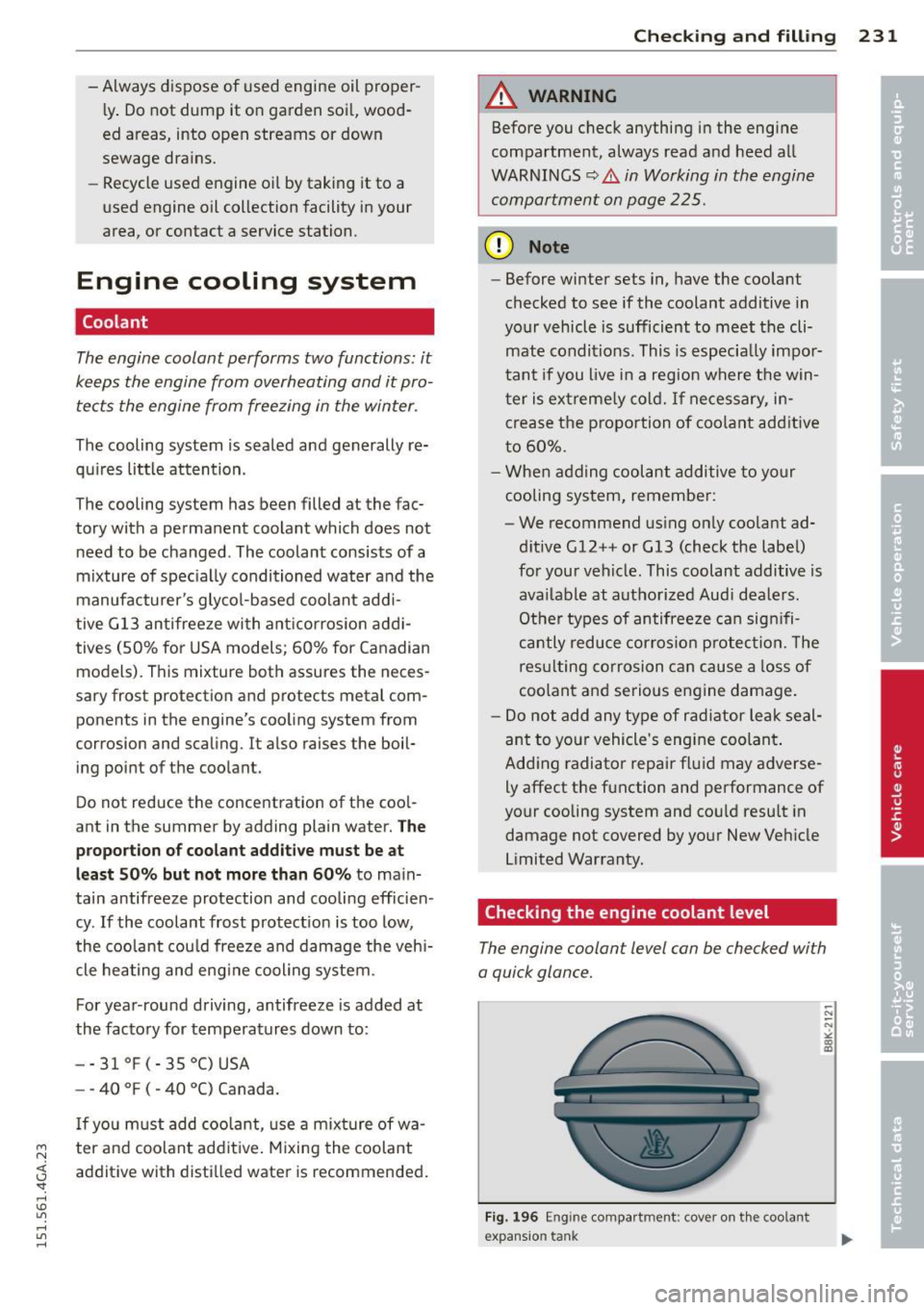
The engine coolant level can be checked with
a quick glance.
Fig. 196 Engine compa rtment: cove r on t he coola nt
expansion tank
Page 283 of 316
M N <( I.J "". rl I.O
Fuses and bulbs
Fuses
Replacing fuses
Fuses that have blown will have metal strips
that have burned through.
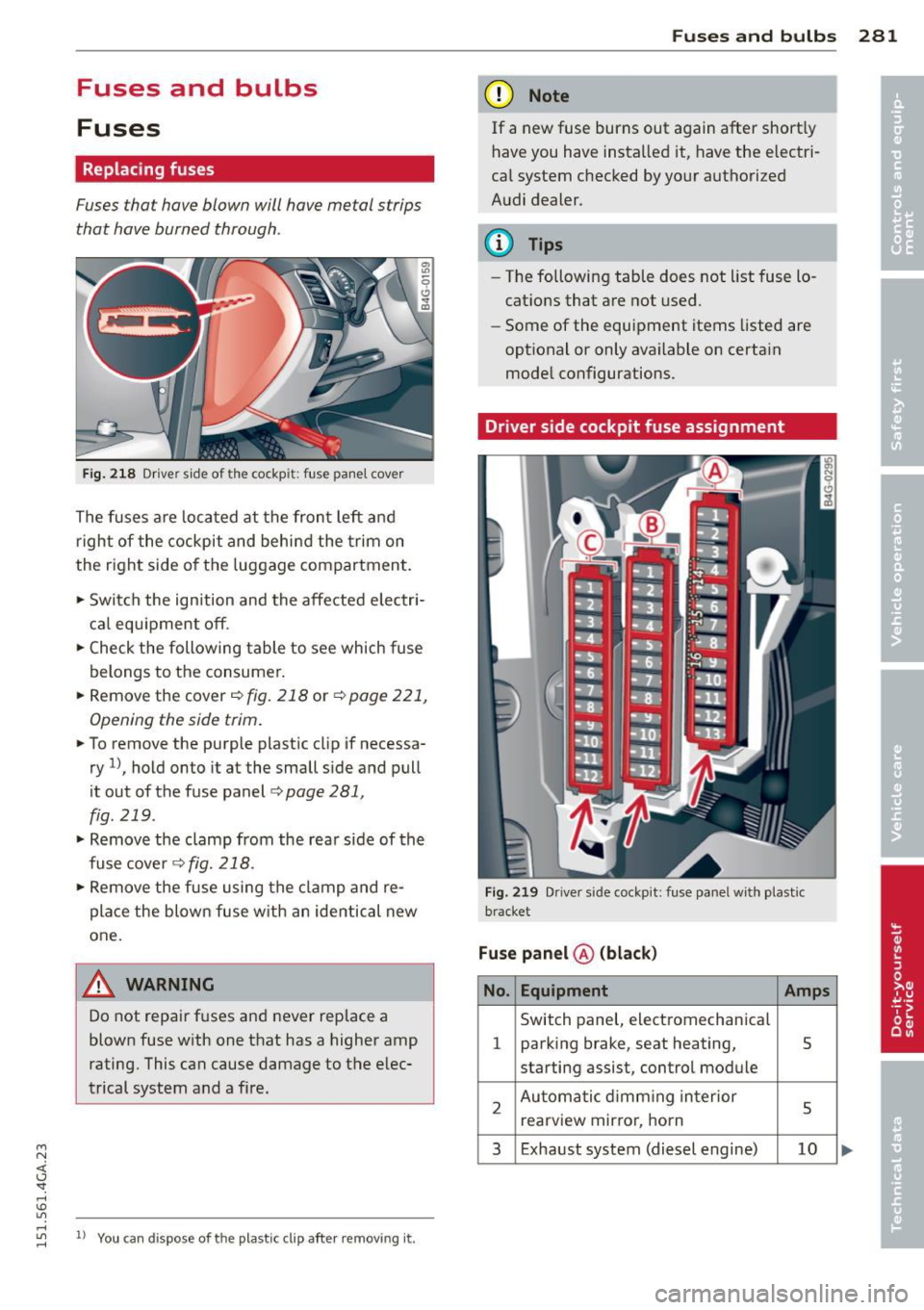
Fig . 2 18 Dr iver side of the cockp it: fuse panel cove r
The fuses are located at the front left and
r igh t of the cockpit and behi nd the trim on
the right side of the luggage compartment .
.. Switch the ign ition and the affected electr i
ca l equ ipment off .
.. Check the following table to see which fuse
belongs to the consume r .
.. Remove the cover
r:!;> fig. 218 or r:!;> page 221,
Opening the side trim .
.. To remove the purple plastic cl ip if necessa
ry
ll, hold onto it at the small s ide and pull
it out of the fuse panel
r:!;> page 281,
fig. 219 .
.. Remove the clamp from the rea r side of the
fuse cover ¢
fig. 218 .
.. Remove the fuse using the cl amp and re
pla ce the blown fuse w ith an identical new
one.
& WARNING , -
Do not repair f uses and never replace a
blown fuse w ith one that has a higher amp
rating. This can cause damage to the e lec
trical system and a fire.
"' rl
~ 11 You can dis pose of the plastic clip after removing it.
Fu se s and bulb s 281
(D Note
If a new fuse burns out again after short ly
have you have insta lled it, have the electri
ca l system c hecked by yo ur authorized
A udi dealer .
{!) Tips
-The following table does not list fuse lo
cat ions that are not used .
- Some of the equipment items listed are
opt ional or only available on certa in
mode l configurations.
Driver side cockpit fuse assignment
Fi g. 21 9 Driver side cockpit : fuse pa nel w ith plastic
bracket
Fuse panel @ (blac k)
No . Equipment Amps
Switch panel, electromechanica l
1 parking brake, seat heating, 5
starting assist, control module
2 Au toma tic d imm ing in terior
5 rearview mir ro r, horn
3 Exhaust system (diesel engine) 10