parking brake AUDI S7 2015 User Guide
[x] Cancel search | Manufacturer: AUDI, Model Year: 2015, Model line: S7, Model: AUDI S7 2015Pages: 316, PDF Size: 78.09 MB
Page 113 of 316

M N <( I.J "". rl I.O
"' rl
"' rl
A time delay element prevents the selector
lever from locking when it is moved through
the N position (going from R to 0/5). The lock
ing element will lock the selector lever if the
lever is left in N (Neutral) for more than ap
prox imately 2 second, without the brake ped
al being pressed.
Release button
The release button on the selector lever pre
vents the lever from being accidenta lly shifted
into certain positions. Depending on the direc
tion of the shift, the selector lever locks at d if
ferent positions . The positions a re highlighted
in the illustration
c::> fig. 119.
Driving the automatic transmission
Fig. 120 Shift gate on the center console: se lecto r lev
er with release button
Starting the engine
.. The selector lever must be in P or N.
Starting off
.. Press and hold the brake pedal.
.. Press and hold the release button in these
lector lever handle, select the desired selec
tor lever position such as 0/5 and release
the button.
.. Wait briefly until the transmission has shift
ed (you will feel a slight movement).
.. Remove your foot from the brake pedal and
acce lerate .
Stopping temporarily
.. Keep the vehicle stationary using the brak
ing peda l, for examp le at traffic l ights.
.. Do not press the accelerator pedal when do
ing this.
Automatic Transmission 111
.. To prevent the vehicle from rolling when you
start driving, set the parking brake when
stopping on steep inclines
c::> .&, .
.. The parking brake will release automat ically
and the vehicle will start moving once you
press the acce lerator pedal.
Stopping/parking
If the selector lever is not in the P position
when you open the driver's door, the vehicle
could roll. The message
Transmission: Car
may roll! Shift to park!
appears.
.. Press and hold the brake peda l until the ve -
hicle has come to a complete stop .
.. App ly the parking brake
c::> page 79, Parking .
.. Select the P selector lever position i=> .&, .
Stopping on an incline
.. Always press the brake pedal to hold the ve
hicle in place and prevent it from "rolling
back"
i=> .&, . Do not try to prevent the veh i
cle from "rolling back" when a gear is en
gaged by increasing the engine speed
i=> (D .
Starting on an incline
.. Activate the parking brake .
.. With the driving gear selected, press the ac
celerator pedal carefully . The parking brake
w ill release automatically if your seat belt is
fastened .
Under certain circumstances, such as driving
in the mounta ins, it may be useful to sw itch
temporar ily to the manual shift program in or
der to adjust the gears to the driving condi
tions by hand
~ ,&..
On slopes, activate the parking brake first and
then move the selector lever to the P position .
This prevents too much stress from being
placed on the locking mechanism .
A WARNING
-The vehicle can also roll when the engine
is stopped .
- Unintended vehicle movement can cause
. . . serious mJury. Iii>
Page 114 of 316

112 Automatic Tran sm iss ion
-Never leave your vehicle with the engine
running while in gear. If you must leave
your vehicle when the engine is running, act ivate the park ing brake and move the
selector lever to P.
- Power is st ill transmitted to the wheels
when the eng ine is running at idle . To
prevent the vehicle from "creeping", you
must keep your foot on the brake when
the engine is runn ing and the selecto r
lever is in D/S or R or "tiptronic" mode is
selected .
- Do not press the accelera tor pedal when
changing the selector lever pos ition
whi le the vehicle is stationary and the
engine is running.
- Never shift into
R or P whi le driving.
- Before driv ing down a steep slope , re-
duce you r speed and shift into a lower
gear with "tiptronic".
- Do not ride the brakes or press the brake
peda l too often or too long when dr iving
down a hill. Constant braking causes the
brakes to overheat and substant ially re
duces braking per formance, increases
braking distance or causes complete fail
ure of the brake system.
- To prevent the veh icle from rolling back
when stopping on inclines, always hold it in place with the brake peda l or parking
brake .
- Never hold the veh icle on an incline with
a slipping clutch . The clutch opens auto
matically when it becomes too hot from
the overload . An indicator lamp@] illu
minates and a dr iver message appears
9 page 114 when the clutch is overload
ed.
- If the engine must remain running, never
have any driv ing pos ition eng aged when
check ing under the hood. Make sure the
selector lever has secure ly engaged and
is locked in P with the parking brake set
9 page 225. Otherwise, any increase in
engine speed may set the vehicle in mo
t io n, even with the park ing brake ap
plied .
(D Note
-When stopping on an incline, do not try
to hold the vehicle in place by press ing
the acce lerator pedal while a driving gear
is se lected. This can cause the transmis
sion to overheat and can damage it . Acti
vate the parking brake or press the brake
peda l to prevent the vehicle from roll ing .
- Allowing the vehicle to roll when the en
gine is stopped and the selecto r lever is
in N will damage the transmission be
cau se it is not l ubricated unde r th ose cir
c umstances.
(D Tips
Fo r safety reasons, the pa rking brake is re
l eased automatically o nly when t he d riv
er's safety belt is eng aged in the buckle.
Hill descent control
The hill descent control system assists the
driver when driving down declines.
Hill descent cont rol is activated when these
lector lever is in D/S and yo u press the brake
peda l. The transmission automa tical ly selects
a gear tha t is suitable fo r the incline. H ill de
scent cont ro l tries to ma inta in the speed ach
ieved at the time of braking, within physica l
and tec hnical lim itations. If may sti ll be nec
essary to ad just the speed with the brakes.
Hill descent cont ro l sw itches off once the de
cline leve ls o ut or yo u press the acce lerator
pedal.
On vehicles with the cru ise cont ro l system *
9 page 84 , hill descent control is also activa t
ed when the speed is set.
A WARNING ,____ -
Hill descent control cannot overcome
physica l lim itations, so it may not be ab le
to maintain a constant speed under all
conditions . A lways be ready to apply the
brakes .
Page 212 of 316
210 Trailer towing
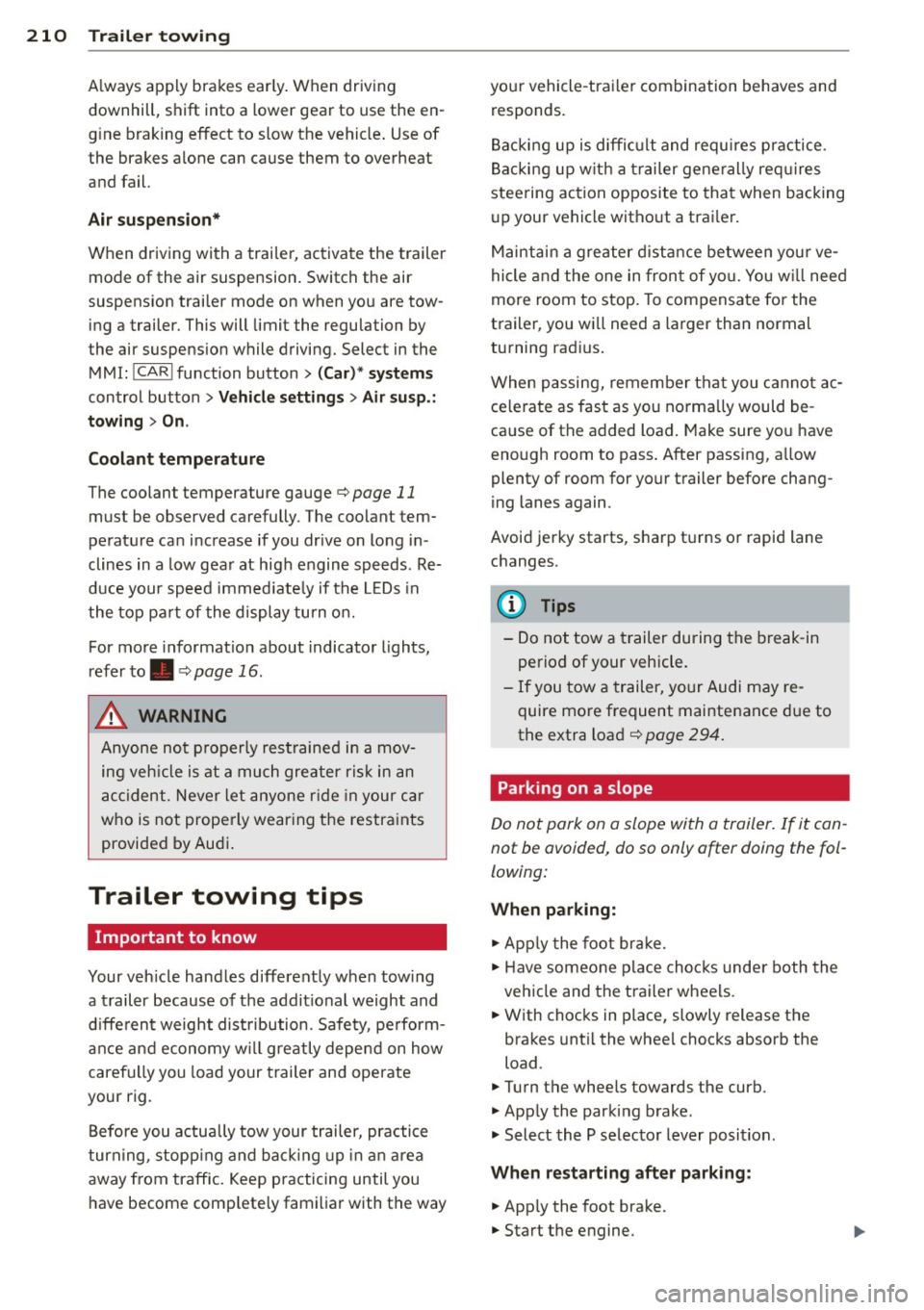
A lways apply brakes early. When driving
downhill, shift into a lower gear to use the en
g ine braking effect to slow the vehicle . Use of
the brakes alone can cause them to overheat
and fail.
Air su spen sion *
When driving with a trai ler, activate the trailer
mode of the air suspension. Switch the air
suspension trailer mode on when you are tow
ing a trailer. This will limit the regulation by
the air suspens ion while driving. Select in the
MMI:
! CARI function button> (C ar)* sys te m s
control button > Vehicl e se tting s> Air s usp .:
t o wing > On .
Coolant t emperatur e
The coolant temperature gauge¢ page 11
must be observed carefully. The coolant tem
perature can increase if you drive on long in
clines in a low gear at high engine speeds. Re
duce your speed immed iate ly if the LEDs in
the top pa rt of the display turn on.
For more information about indicator lights,
refer to. ¢ page 16 .
A WARNING
Anyone not properly restrained in a mov
ing veh icle is at a much greater risk in an
accident. Never let anyone r ide in your car
who is not prope rly wearing the restraints
provided by Audi .
Trailer towing tips
Important to know
Your vehicle handles differently when tow ing
-
a trailer because of the addit ional weight and
d ifferent weight dist ribution. Safety, perform
ance and economy w ill greatly depend on how
carefu lly you load your trailer and operate
your rig.
Before you actually tow your trailer, practice
turn ing, stopp ing and back ing up in an area
away from traffic. Keep practicing until you
have become comp letely familiar with the way your vehicle
-trailer combination behaves and
responds .
Backi ng up is diffic ult and requi res p ractice.
Backing up w ith a trailer generally req uires
steering action opposite to that when backing
up your vehicle without a trailer.
Maintai n a greater d ista nce between yo ur ve
hicle and the one in fron t of yo u. You w ill need
more room to stop. To compensate for the
trailer, you will need a larger than normal
turning radius.
When passing, remember that you cannot ac ce le rate as fast as you norma lly would be
ca use of the added load. Make sure you have
enough room to pass . After passing, allow
plenty of room for your trailer before chang
ing lanes again.
Avoid jerky starts, sharp tu rns o r rapid lane
changes.
(D Tips
- Do not tow a trailer during the break-in
period of your vehicle.
- If you tow a trailer, your Audi may re
quire more frequent maintenance due to
the extra load ¢
page 294.
Parking on a slope
Do not park on a slope with a trailer. If it can
not be avoided, do so only after doing the fol
lowing:
When parking:
.,. App ly the foot brake .
.,. Have someone place choc ks unde r both the
vehicle and the trailer wheels.
.,. With chocks in place, slowly release the
brakes unt il the whee l chocks absorb the
load .
.,. Turn the whee ls towards the curb.
.,. Apply the parking brake.
.,. Select the P selector lever posit ion.
When re sta rting after p ark in g :
.,. App ly the foot brake .
.,. Start the engine.
Page 277 of 316

M N <( (.J
'SI: ,...., \!) ..,.,
,...., ..,., ,....,
Changing a wheel
Before changing a wheel
Observe the following precautions for your
own and your passenger's safety when chang
ing a wheel .
.,. After you experience a tire fa ilure, pull the
car well away from moving traffic and try to
reach
level gro und before you stop¢.&_ .
.. All passengers should
leav e the car and
move to a safe location (fo r instan ce, be hind
the guardra il) ¢.&_ .
.. Engage the
parkin g brake to prevent your
vehicle from ro lling unintentionally ¢.&_ .
.. Move
selecto r le ver to p osition P ¢ .&_ .
1> Ifyou are towing a trai ler, unh itch the tra iler
from your vehicle .
.,. Take the
jack and the spare tire out of the
luggage compartment
¢ page 273,
¢ page 274 .
.8, WARNING
You or your passengers cou ld be injured
while changing a whee l if yo u do not fol
low t hese safety precautions:
- If you have a flat t ire, move a safe dis
tance off the road. Tur n off the eng ine,
turn the emergency f lashers on and use
other warning dev ices to alert other mo
torists.
- Make sure that passengers wait in a safe
place away from the ve hicle and well
away from the road and traff ic.
- To help p revent the vehicle from moving
s u dden ly and possibly slipping off the
jack, always fully set the parking brake
and block the wheel diagonally opposite
the wheel being changed. Whe n one
front wheel is lifted off the ground, plac ing the A utomat ic Transm iss ion in P
(Pa rk) will
not p revent the vehicle from
moving.
- Before you change a wheel, be su re the
ground is level and fi rm. If ne cessa ry,
use a st urdy board under the jack.
-
What do I do now? 275
- Always store the vehicle tool kit, the jack
and the replaced tire in the luggage com partment
c::>page 134.
(D Tips
Before changing the whee l, you must acti
vate the jacking mode, so that the auto matic controls for the Adaptive Air Sus
pension* do not make it more d iff icult to
lift the vehicle with the jack
c::> page 2 77 .
Changing a wheel
When you change a wheel , follow these
quence described below s tep-by-s tep and in
exactly that order .
l. Activate the vehicle jack mode*
¢page 277 .
2. Remove the decorativ e wheel co ver* . For
more details see also
c::> page 2 76, Deco
rative wheel covers
or c::> page 2 76,
Wheels with wheel bolt caps .
3. Loosen the wh eel bolt s ¢page 277.
4 . Loca te the p roper moun ting poin t for the
jack and align the jack be low that point
¢ page 277 .
5.
R ais e the car with the jack¢ page 2 77.
6. Remove the
wheel with the flat tire and
then install
the spar e c::>page 279.
7. Tighten all whee l bolts lightly .
8.
Lo wer the vehicle with the jack .
9 . Use the wheel bolt w rench and
firmly
t ighten al l wheel bolts ¢ page 2 77.
10 . Replace the decorative
wh eel c ov er* .
11. Deactivate the vehicle jack mode* in the
MM I:
ICARI f u nction button > (Car )* sy s
tems
contro l button > S erv ici ng & che cks
> A ir s usp .: jac k mode > Off .
The vehicle jack mode * switches off automati
ca lly at speeds above 6 mph (10 km/h) .
.8, WARNING
-Always read and fo llow all WARNINGS and
i nformat ion
c::> A in Raising the vehicle on
page 278
and c::> poge 280.
•
•
Page 279 of 316

M N <( I.J "". rl I.O
"' rl
"' rl
Loosening and tightening the wheel
bolt s
The wheel bolts must be loosened before rais
ing the vehicle.
Fig . 212 Changing a wheel: loosening the whee l bo lts
Loosening
.. Slide the wheel wrench onto the wheel bolt
as far as it wi ll go .
.. Take tight hold of the
end of the wrench
hand le and turn the whee l bolts
counter
clockwise
about one single turn in the direc
tion of arrow c:>
fig. 212.
Tightening
.. Slid e the wheel wrench onto the whee l bolt
as far as it will go.
.. Take tight hold of the
end of the wrench
handle and turn each wheel bolt
clockwise
until it is seated.
A WARNING
- Do not use force or hurry when changing
a whee l -you can cause the vehicle to s lip
off the jack and cause serious personal
injuries.
- Do not loosen the wheel bolts more than
one turn
before you raise the vehicle with
the jack. -You risk an injury.
(D Tips
-Never use the hexagonal socket in the
handle of the screwdriver to loosen or
tighten the wheel bolts.
-If a wheel bolt is very tight, you may find
it easier to loos en by carefully pushing
down on the end of the wheel bolt
wrench with
one foot only . As you do so,
What do I do now? 27 7
hold on to the car to keep your balance
and take care not to slip.
Raising the vehicle
The vehicle must be lifted with the jack first
before the wheel can be removed.
Fig . 213 Sill panels : marking s
Fig. 214 Sill: position ing the vehicle jack
.. Activate the vehicle jack mode* in the MMI:
!CARI function button> (Car)* systems con
trol button>
Servicing & checks > Air susp .:
jack mode > On .
.,. Engage the parking brake to prevent your
veh icle from rolling unintentionally.
.,. Move the
selector lever to position P .
.. Find the marking (imprint) on the sill tha t is
nearest the whee l that will be changed
r=>fig. 213. Behind the marking, there is a
lifting point on the sill for the veh icle jack .
.. Veh icles with a sill: remove the cover from
the sill before lift ing the veh icle with a vehi
cle jack
c:>page 278 .
.,. Turn the vehicle jack located under the lift
ing point on the sill to raise the jack unti l its
arm @c:>
fig. 214 is located under the des
ignated plastic mount c:> &, c:>(D .
.. Align the jack so that its arm@c:>
fig. 214
engages in the designated lifting point in
the door sill and the movable base@ lies
~
Page 283 of 316
M N <( I.J "". rl I.O
Fuses and bulbs
Fuses
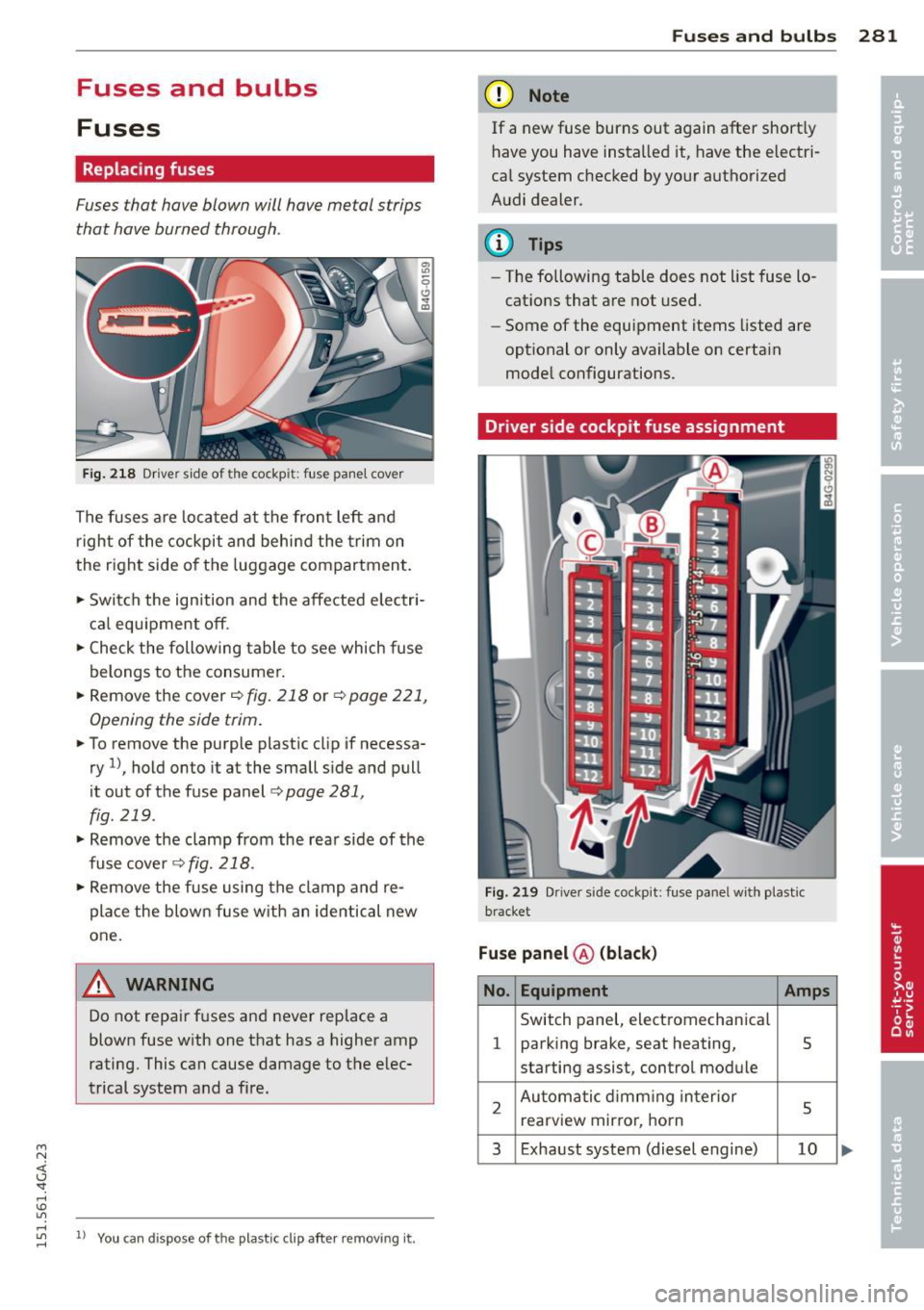
Replacing fuses
Fuses that have blown will have metal strips
that have burned through.
Fig . 2 18 Dr iver side of the cockp it: fuse panel cove r
The fuses are located at the front left and
r igh t of the cockpit and behi nd the trim on
the right side of the luggage compartment .
.. Switch the ign ition and the affected electr i
ca l equ ipment off .
.. Check the following table to see which fuse
belongs to the consume r .
.. Remove the cover
r:!;> fig. 218 or r:!;> page 221,
Opening the side trim .
.. To remove the purple plastic cl ip if necessa
ry
ll, hold onto it at the small s ide and pull
it out of the fuse panel
r:!;> page 281,
fig. 219 .
.. Remove the clamp from the rea r side of the
fuse cover ¢
fig. 218 .
.. Remove the fuse using the cl amp and re
pla ce the blown fuse w ith an identical new
one.
& WARNING , -
Do not repair f uses and never replace a
blown fuse w ith one that has a higher amp
rating. This can cause damage to the e lec
trical system and a fire.
"' rl
~ 11 You can dis pose of the plastic clip after removing it.
Fu se s and bulb s 281
(D Note
If a new fuse burns out again after short ly
have you have insta lled it, have the electri
ca l system c hecked by yo ur authorized
A udi dealer .
{!) Tips
-The following table does not list fuse lo
cat ions that are not used .
- Some of the equipment items listed are
opt ional or only available on certa in
mode l configurations.
Driver side cockpit fuse assignment
Fi g. 21 9 Driver side cockpit : fuse pa nel w ith plastic
bracket
Fuse panel @ (blac k)
No . Equipment Amps
Switch panel, electromechanica l
1 parking brake, seat heating, 5
starting assist, control module
2 Au toma tic d imm ing in terior
5 rearview mir ro r, horn
3 Exhaust system (diesel engine) 10
Page 285 of 316
M N <( I.J "". rl I.O
"' rl
"' rl
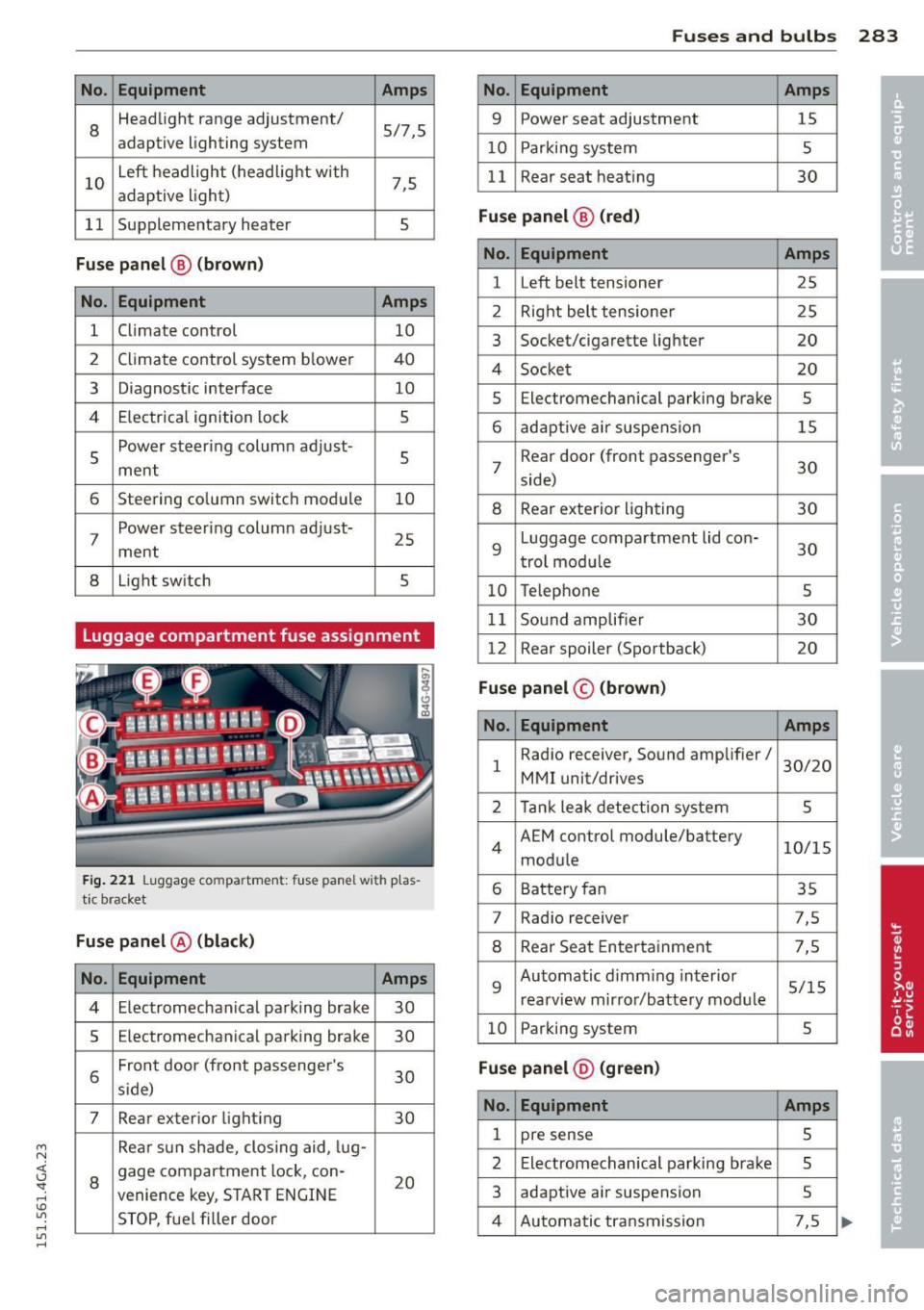
No. Equ ipment Amps
8
Headlight range adjustment/ 5/7,5
adaptive lighting system
10
Left headlight (headlight with 7,5 adaptive light)
11 Supplementary heater s
Fuse p anel @ (b ro w n)
No . Equipment Amps
1 Climate control 10
2
Climate control system blower 40
3
Diagnostic interface 10
4
E lectrical ignition lock s
5
Power steering column adjust-
ment
s
6 Steering column switch module 10
7
Power steering column adjust-
ment
25
8 Light switch 5
Luggage compartment fuse assignment
Fig . 221 Luggage compa rtmen t: fuse panel wit h p las
tic bracket
Fuse p anel @ (black )
No. Equipment Amps
4 Electromechan ical parking brake 30
5
Electromechanical parking brake 30
6
Front door (front passenge r's
30 s ide)
7 Rear exterior light ing 30
Rea r sun shade, closing aid, lug-
8
gage compartment lock, con-
20 venience key, START ENGINE
STOP, fuel filler door
Fu se s and bulb s 283
No. Equipment Amps
9 Power seat adjustment 15
10
Parking system 5
11
Rear seat heating 30
Fu se p an el@ (r e d )
No . Equipment Amps
1 Left belt tensioner 25
2
Right belt tensioner 25
3
Socket/cigarette lighter 20
4
Socket 20
5
Electromechanical parking brake 5
6 adaptive air suspension 15
7
Rear door (front passenger's
30 side)
8 Rear exterior lighting 30
9
Luggage compartment lid con-
30 trol modu le
10 Telephone 5
11
Sound amplifier 30
12
Rear spoiler (Sportback) 20
Fuse panel© (brown)
No . Equ ipment Amps
1
Radio receiver, Sound amplifier/
30/20
MMI unit/drives
2 Tank leak detection system 5
4
AEM control module/battery 10/15
module
6 Battery fan 35
7
Rad io receiver 7,5
8 Rear Seat Entertainment 7,5
9
Automatic d imm ing interior 5/15
rearview mirror/battery module
10 Parking system 5
Fu se pan el@ (gr ee n)
No . Equipment Amps
1 pre sense 5
2
Electromechanical parking brake 5
3
adaptive air suspension 5
4 Automatic transmission 7,5
Page 288 of 316

286 Emergency situations
@ Tips
The discharged battery must be properly
connected to the vehicle's electrical sys
tem. When jump starting or charging the
battery, never connect the negative
ground cable to the battery negative post
because the batte ry manager system must
be able to detect the battery 's state of
charge. Always connect the negative
ground cab le to the negative ground post
of the battery manager control unit.
Use of jumper cables
Make sure to connect the jumper cable
clamps in exactly the order described below!
Fig. 222 Engine compartment: connecto rs for jump
start cables and charger
Fig. 223 Jump start ing with the battery of another ve·
hide: @-booster battery, @-discharged ve hicle bat
tery
The procedure described below fo r connecting
jumper cables is intended to provide a jump
start for your vehicle.
Vehicle with discharged battery:
.,. Turn off lights and accessories, move lever
of automatic transmission to N (Neutral) or
P (Park) and set parking brake.
Connect POSITIVE(+) to POSITIVE(+)
(red)
.,. Open the red cover on the positive terminal
¢fig. 222.
1. Connect one end of the red positive cable
on the
jump start bolt c::;, fig. 223 @ (bolt
under the red cover = "positive") of the ve
hicle to be started @.
2. Connect the other end to the positive ter-
mina l@ of the booster battery@.
Connect NEGATIVE (-) to NEGATIVE (-)
(black)
3. Connect one end of the black negative ca
ble to the negat ive terminal @ of the
booster battery @.
4. Connect the other end to the
jump start
pin © (bolts with hex head bolt= "nega
tive") of the vehicle to be started @.
Starting the engine
.,. Start the engine of the veh icle w ith the
booster battery@. Run the engine at a
moderate speed .
.,. Start engine with discharged vehicle battery
@ in the usual manner.
.,. If the engine fails to start, do not keep the
starter cranking for longer than 10 seconds.
Wait for about 30 seconds and then try aga in .
.,. With engine running, remove jumper cables
from both vehicles in the exact
reverse o r
de r .
.,. Close the red cover on the positive term inal.
T he battery is vented to the outside to prevent
gases from entering the veh icle inter ior. Make
sure that the jumper clamps are well connect
ed with their metal parts in full contact with
the battery terminals.
_& WARNING
To avoid serious personal injury and dam
age to the vehicle, heed all warnings and
instructions of the jumper cable manufac
turer. If in doubt, call for road service .
- Jumper cables must be long enough so
that the veh icles do not touch.
-
Page 302 of 316
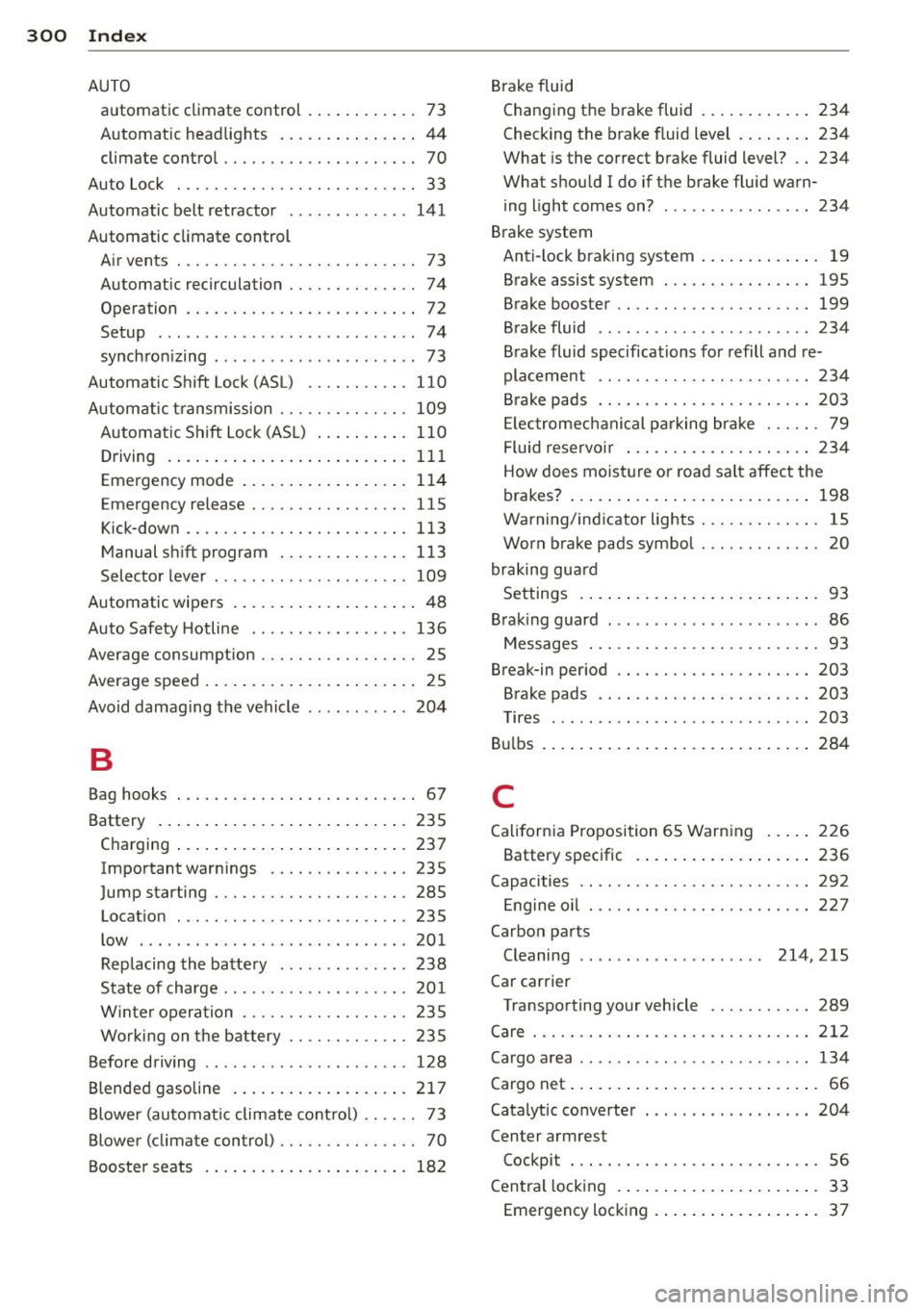
300 Index
AUTO automatic climat e control .. .. ... ... ..
73
Automatic headlights ....... .. .... .. 44
climate control . . . . . . . . . . . . . . . . . . . . . 70
Auto Lock . . . . . . . . . . . . . . . . . . . . . . . . . . 3 3
Automatic belt retractor .. ... ..... .. .
141
Automatic climate control
Air vents . .... ........... .... .... ..
7 3
Automatic recirculation .... .. .. .. .. . . 74
Opera tion . . . . . . . . . . . . . . . . . . . . . . . . . 72
Setup . .. .. ................ ... .. .. 74
synchron izing .... ......... ... .. .. .. 73
Automatic Shift Lock (ASL) .... .. .. .. . 110
Automatic transmission ..... .. .. .. .. . 109
Automatic Shift Lock (ASL) .......... 110
Driving . . . . . . . . . . . . . . . . . . . . . . . . . . 111
Emergency mode . . . . . . . . . . . . . . . . . . 114
Emergency release .......... .. .... . 115
Kick-down ............... .. .. .... . 113
Manual shift program ..... .... .... . 113
Selector lever . . . . . . . . . . . . . . . . . . . . . 109
Automatic wipers .................. .. 48
Auto Safety Hotline ........ .. .. .. .. . 136
Ave rage consumption ....... .. .. .. .. . . 25
Average speed . . . . . . . . . . . . . . . . . . . . . . .
25
Avoid damaging the vehicle .. .. .. .. .. . 204
B
Brake fluid
Changing the brake fluid ............
234
Checking the brake fluid level ........ 234
What is the correct brake fluid level? .. 234
What should I do if the brake fluid warn-
ing light comes on? ................
234
Brake system
Anti- lock braking system . . . . . . . . . . . . .
19
Brake assist system . ....... .... .. .. 195
Brake booster .. ... .............. .. 199
Brake fluid .. .. .. .......... ...... . 234
Brake fluid specifications for refill and re-
placement ...... ................ .
234
Brake pads .... .. ............. .... 203
Electromechanical parking brake ... .. . 79
Fluid reservoir ... ................ . 234
How does moisture or road salt affect the
brakes? . . . . . . . . . . . . . . . . . . . . . . . . . .
198
Warning/indicator lights ........ .. .. . 15
Worn brake pads symbol . . . . . . . . . . . . . 20
braking guard
Settings .. .... .. .. .............. ..
93
Brak ing guard . .. .. .......... ...... .. 86
Messages ... .. .. .. ....... .... .... . 93
Break-in period .. .. ............. .... 203
Brake pads .. ... . ... ... .... ... .. .. 203
Tires ........ ... .. .............. . 203
Bulbs .......... .. .. .............. . 284
Bag hooks . . . . . . . . . . . . . . . . . . . . . . . . . . 67 C
Battery ..... ................ ..... .
Charging ................... ..... .
Important warnings ...... .. .. .. .. .
Jump starting . .... ....... .. .. .. .. .
Location
. .. .... ........... .. .... .
low ..... .. ................ ... ' . .
Replacing the battery ..... .. .. .. .. .
State of charge ........... .. .. .. .. .
w· t · 1n er operation ......... .... .... .
Working on the battery .... .. .. .... .
Before driving .............. ... .. .. .
235
237
235
285
235
201
238
201
235
235
128
Blended gasoline . . . . . . . . . . . . . . . . . . . 217
Blower (automatic climate control) . . . . . . 73
Blower (climate con trol) . . . . . . . . . . . . . . . 70
Booster seats .............. ... .... . 182
California Proposition 65 Warning ..... 226
Battery specific .. ............. .... 236
Capacities .. .. .. .. ............. .. .. 292
Engine oil ..... .. ............. .... 227
Carbon par ts
Cleaning . . . . . . . . . . . . . . . . . . . .
214,215
Car carrier
Transporting your vehicle ....... ....
289
Care ..... .. .. .. .. .... ......... .... 212
Cargo area ...... .. .. ... ........... . 134
Cargo net . . . . . . . . . . . . . . . . . . . . . . . . . . . 66
Catalytic converter . ... .. ... ..... .. .. 204
Center armrest
Cockpit . .. .. .. .. ............. .. .. .
56
Central locking .... ............. ..... 33
Emergency locking ................ ..
37
Page 304 of 316

302 Index
Daytime running lights .... .. .. .. .... . . 44
Declaration of compl iance
Adaptive c ruise control .... .. .. .... .
297
Aud i side assis t ... ... .... .. .. .. .. . 297
Cell phone package ... .... .. .. .... . 297
Convenience key ....... ... .. .. .... . 297
Electronic immobilizer ... .. .. .. .... . 297
Garag e door opener (Homelink) ... .. . 297
Remote control key ....... .. .. .. .. . 297
D ecorative parts/ trim
C leaning ... ... .. ..... ... .. .. .... .
214
DEF
What does t his mean when it appea rs in
the trip odomete r d isplay? . .. .. .. .. . .
27
De fective light bulb warning . . . . . . . . . . . 22
D efrosting (windows)
automatic climate control . ... ... ... ..
73
climate contro l . . . . . . . . . . . . . . . . . . . . . 71
Determin ing cor re ct load limi t ... .. ... 257
Diese l fuel . .. .......... ...... ... .. . 218
D iese l partic ulate fi lter . . . . . . . . . . 2 1, 205
D imensions .. ... . ...... ... .. .. .. .. . 292
Dimming the rearview mirror .. .. ...... 51
D isp lays
C leaning ... ... . ...... ... .. .. .... .
214
Distance . . . . . . . . . . . . . . . . . . . . . . . . . . . 25
Door/rear lid warning . . . . . . . . . . . . . . . . . 24
Doors
Power child safety loc k .. .. .. .. .... . .
4 0
D river information system
CD/radio display . . . . . . . . . . . . . . . . . . . .
24
D oor/ rear lid warning . . . . . . . . . . . . . . . 24
Exte rio r tempe rat ure d isplay . .. .. .. . . 24
On -boa rd compute r . . . . . . . . . . . . . . . . . 2 5
D river seating position . . . . . . . . . . . . . . . 129
drive select .... ........... .. .. .... . 102
adaptive a ir s uspension/sport . .. .... .
Adaptive dampers .......... .. .... .
Curve light ........... .... ... .. .. .
E ng ine sound ......... .... ... .. .. .
Safety belt tensioner .......... .. .. .
Sport differen tial ......... .. .. .. .. .
Driving safely 102 102
102
102
102
10 2
128
D riving through water . ... .. .. .. .... . 204
D . . . nvmg time .... .... ...... .. .. .. .. .. 25
Dup licate key . . . . . . . . . . . . . . . . . . . . . . . 31
D ust filter
refer to Poll utant fi lter . ..... ... .. .. . 69
Dynam ic steering
2 00
E
Easy entry feature . . . . . . . . . . . . . . . . . . . . 76
Efficiency program Fuel economy messages ........ .. .. .
26
Other equ ipment . ............. .... . 26
Electr ica l accessories (soc ke ts) . ... .. .. . 60
Electromechanical pa rking brake
Emergency bra king . .. ...... ... .. .. .
80
Operation . . . . . . . . . . . . . . . . . . . . . . . . . 79
Parking . .. .. .. .. .. ........... .. .. . 79
Re leas ing and closing .. ..... .... . .. . 79
Starting assist ... .. .... .... ... .. .. . 80
Starting from rest . .... ..... ... .. .. . 80
Starting off w ith a trailer .......... .. . 80
Warning/ind icator lights ........ .... . 16
Elec tromechanica l power assist . ... .. .. 2 00
El ectronic d ifferential lock
Warning/ind icator lights ........... ..
19
Electronic differential lock (EDL) . . . . . . . 195
Warning/ind icator lights ........ .... . 19
Electronic immob ilizer . . . . . . . . . . . . 27, 32
Electronic power cont rol (EPC)
wa rning/indicator light ......... .... .
20
Electronic speed limiter .......... .... . 30
Elec tronic Stabilization Con tro l (ESC) . .. 195
Warning/ind icator lights ..... ... .. .. . 19
Emergency actuat ion
Doo rs .... .. .. .. .. ........... .... .
37
Power sunroof . .. ............. .. ... 42
Rea r lid ... .... .. .. .... . ... ... .. .. . 39
Em b k'
ergency ra 1ng . .......... ...... .. 80
Emergency flasher ... ... ..... ... .. .. . 45
Warning/ind icator lights .......... .. . 23
Emergency re le a se
Se lector lever .... .. .... .... ... .. ..
115
E mergency start ing ..... .. ... ..... .. 285
Emergency towing . ............. .... 287
E mergency wa rn in g triangle .... .. .. .. 2 73
Energy management .... .. ... ..... .. 201
Engine
Compartment .... .. ... ..... ... .. ..
227
Coolant ... .... .. ............. .... 231