door lock AUDI S7 2016 User Guide
[x] Cancel search | Manufacturer: AUDI, Model Year: 2016, Model line: S7, Model: AUDI S7 2016Pages: 294, PDF Size: 73.82 MB
Page 40 of 294

Opening and closing
- There are audio signals when closing the
luggage compartment lid with the remote
control key (vehicles with convenience key*)
or with the~ button in the driver's door.
- When the vehicle is locked, the luggage
compartment lid can be unlocked separately
by pressing the button
l a ! on the remote
control key. When the luggage compart ment lid is closed aga in, it locks automati
cally.
- You can close the luggage compartment lid
using the master key (vehicles with conven
i ence key*) up to a distance of approximate
l y 9 ft (3 m).
- The luggage compartment lid can be oper
ated by hand if the vehicle battery is low.
It
is necessary to use more force when doing
th is . Move the lid slowly to reduce the
amount of force needed.
Luggage compartment with movement
activated opening
Applies to veh icles: w ith conve nien ce key and senso r-contro l
led lugg age compart ment lid
Fig. 28 Rear of the veh icle : foot movement
Requirements You must be carrying your veh icle
key with you. You must be standing at the center
behind the luggage compartment lid. T he re
should be a distance of approximately 20 cm
from the rear of the vehicle. The ignition must be
switched off. Make sure you have firm footing.
.,. Swing yo ur foot back and forth below the
bumper ¢
fig. 28. Do not touch the bumper.
Once the system recognizes the movement, the
luggage compartment lid will open .
The luggage compartment lid will only open if
you make the movement as described. This pre-
38
vents the luggage compartment lid from opening
due to similar movements such as when you wa lk
between the rear of the vehicle and your garage
door.
General information
In some situat ions, the function is limited or
temporarily unavailable. This may happen if:
- the luggage compartment lid was closed be
forehand .
-you park close to a hedge and the branches
move back and forth under the veh icle for a
long period of time.
-you clean your vehicle, for example with a pres
sure washer or in a car wash.
- there is heavy rain.
- the bumper is very dirty, for example after driv- ing on salt-covered roads.
- there is interference to the radio signal from
the vehicle key, suc h as from cell phones or re
mote controls.
Luggage compartment lid emergency
release
The luggage compartment lid can be released in
an emergency from inside the luggage compart
ment.
Fig. 29 Inside of the lu ggage compartme nt: access to the
e m ergency release
.,. Remove the emergency key ¢ page 30 .
.,. Pry the cover out using the eme rgency key
~fig. 29 .
.,. Press the lever in the direction of the arrow to
release the luggage compartment lid.
Page 41 of 294
M N <( I.J "". rl I.O
"' N I.O rl
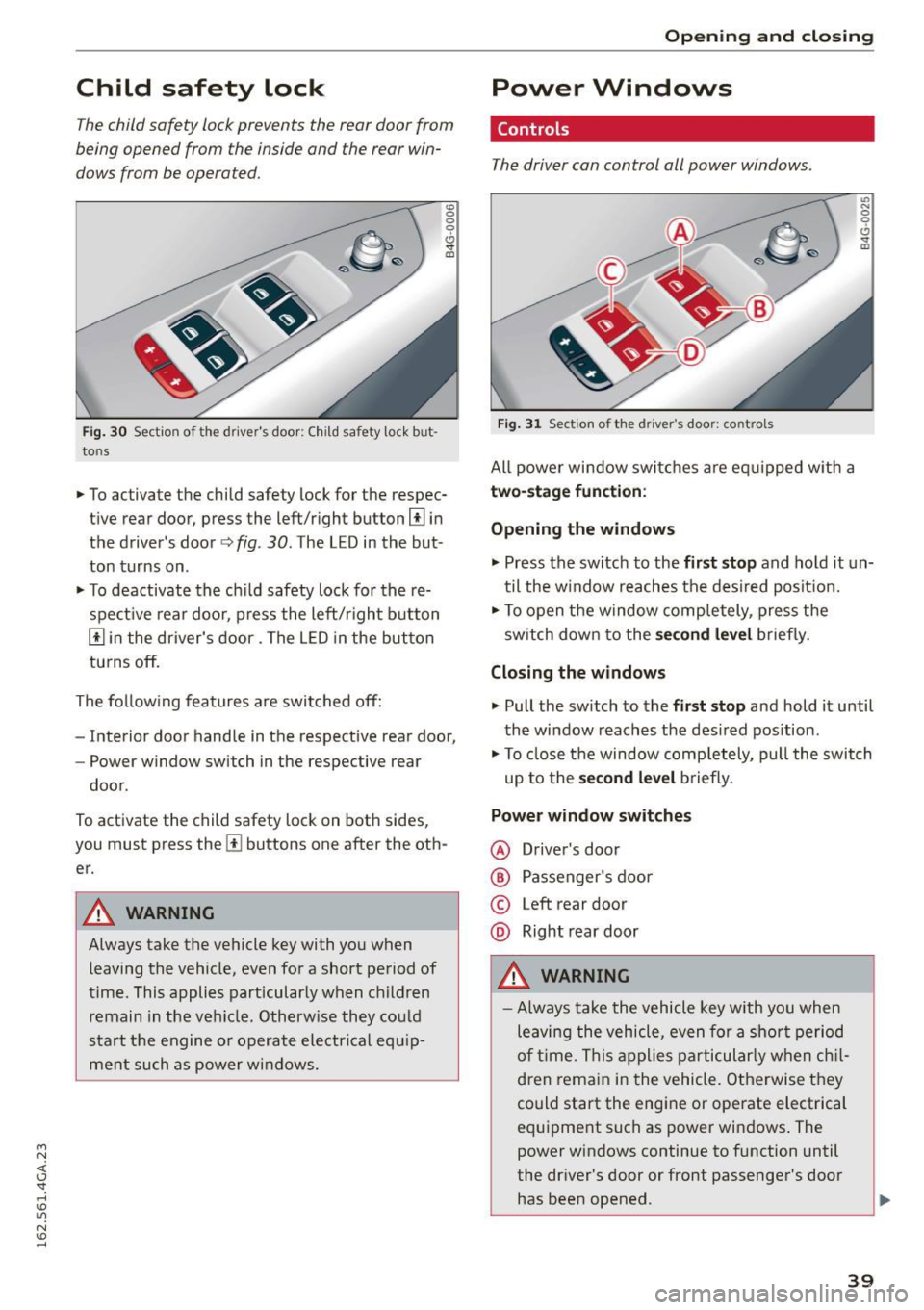
Child safety lock
The child safety lock prevents the rear door from
being opened from the inside and the rear win
dows from be operated.
Fi g. 30 Section of the driver 's door: Child safety lock but
tons
"' 0
0
0
0 ,,. !II
• To activate the child safety lock for the respec
tive rear door, press the left/right button
[!l in
the driver's door¢
fig. 30 . The LED in the but
ton turns on.
• To deactivate the ch ild safety lock for the re
spect ive rear doo r, press the left/r ight button
[!] in the driver's door. The L ED in the but ton
turns off.
The fo llow ing features are switched off:
- Interior door handle in the respective rear door,
- Power w indow switch in the respective rear
door.
To activate the child safety lock on both sides,
you must press the
[!l buttons one after the oth
er.
A WARNING
Always take the vehicle key with you when leaving the vehicle, even for a short period of
time . This applies particularly when ch ildren
remain in the veh icle. Otherw ise they cou ld
start the engine or operate ele ctrical equ ip
ment such as power windows.
Open ing and clo sing
Power Windows
Controls
The driver can control all power windows.
Fig. 31 Sect ion of the driver's door: controls
All power window swi tches a re eq uipped w ith a
two- stage function :
Opening the windows
U') N
0
0
<.!, ., m
• Press the switch to the fir st stop and hold it un
til the w indow reaches the desi red posit ion.
• To open the window comp letely, press the
sw itch down to the
s econd level brief ly.
Closing the windows
.,. Pull the sw itch to the fi rst stop and hold it until
the window reaches the des ired pos ition.
• To close the window comp letely, pull the switch
up to the
sec ond lev el b riefly.
Power window switches
@ Driver's door
® Passenger's door
© Left rear door
@ Right rear door
A WARNING
-- Always take the vehicle key with you when
leaving the vehicle, even for a shor t period
of t ime. This applies particularly when ch il
dren remain in the vehicle. Otherwise they
could start the engine or operate electrical
equipment such as power windows . The
power windows continue to f unction until
the dr iver's door or front passenger's door
has been opened.
-
39
Page 42 of 294
Opening and closing
- Pay carefu l attent ion when closing the win
dows. It could cause injury by pinching.
- When locking the vehicle from outside, the
vehicle must be unoccupied since the win
dows can no longer be opened in an emer
gency.
(D Tips
- When you open the doors, the w indows au
tomatically lower about
0.4 inches
(10 mm).
- When the window in the driver's or passeng
er's door is completely open, it will raise ap
proximately 1 inch (25 mm) when the door
is opened . The window wi ll lower again
when you close the door.
- After the ignition has been switched off, the
windows can st ill be opened or closed for
about
10 m inutes. The power windows are
not switched off until the driver's door or
passenger's door has been opened.
Convenience opening
All of the windows and the sunroof* can be
opened at once.
The settings in the Infotainment system specify
which windows will open.
Convenience opening
.,. Press and hold the li button on the remote
control key until the windows reach their de
sired position and the sunroof* is tilted open.
Setting convenience opening in the
Infotainment system
.,. Select: the ICARI function button > (Car)* Sys
tems control button > Vehicle settings > Cen
tral locking > Long-press to open windows .
To enable convenience opening of the windows
and the roof*, the
Front windows , Rear windows
and Roof funct ions must be switched On.
A WARNING
For security reasons, the windows and the
sunroof* can only be opened with the remote
40
control key at a maximum d istance of approxi
mately 6 feet (2 meters) from the vehicle.
Correcting power window malfunctions
After disconnecting the vehicle battery, the one
touch up and down feature must be activated
again.
.,. Pull the power window switch until the window
is completely raised.
.,. Release the switch and pull it again for at least
one second.
Sunroof
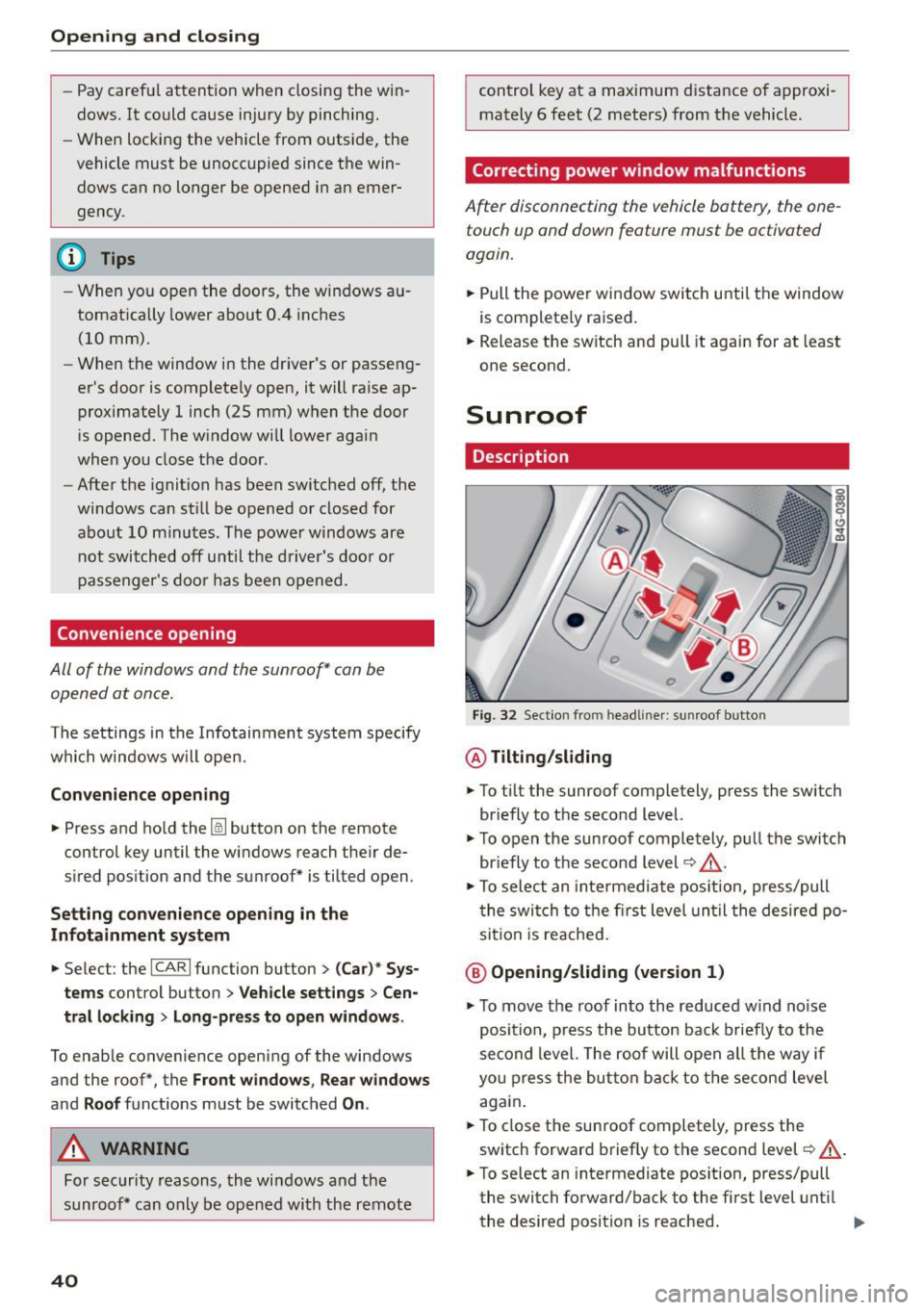
Description
Fig. 32 Sect ion from headli ner: sunroof b utton
@ Tilting/sliding
.,. To tilt the sunroof completely, press the switch
briefly to the second level.
.,. To open the sunroof completely, pull the switch
briefly to the second level~.&_ .
.,. To select an intermediate position, press/pull
the switch to the first level until the desired po
sition is reached .
@ Opening/sliding (version 1)
.,. To move the roof into the reduced w ind no ise
position, press the button back briefly to the
second level. The roof will open all the way if
you press the button back to the second level
aga in.
.,. To close the sunroof completely, press the
sw itch forward briefly to the second level~.&_ .
.,. To select an intermedi ate position, press/pull
the switch forward/back to the first level until
the desired position is reached. ..,.
Page 47 of 294
M N <( (.J
'SI: ,...., \!) ..,.,
N \!) ,....,
~ To activate the h igh beam assist, tap the lever
forward
(D . The ID indicator light appears in
the instrument cluster disp lay and the high
beam assist is switched on/off automatically.
The
El indicator ligh t also turns on if the high
beams are switched on .
Switching the high beam s on/off manually
If the high beams did not switch on/off automat
ically as expected, you may switch them on or off
manually instead:
~ T o switch the high beams on man ually, tap the
lever forward
(D. The El indica tor light turns
on.
~ To switch the high beams off manua lly, pull the
lever back@. The high beam assist is deacti
vated.
Operating the headlight flasher
~ To operate the headlight flasher when the high
beam assist is activated and high beams are
switched off, pull the lever back@. The high
beam assist remains act ive.
Messages in the instrument cluster display
r!IJ Audi adaptive light: system fault!
High beam assist: System fault
Drive to an authorized Aud i dealer or authorized
Aud i Service Fac ility immediately to have the
malfunct ion corrected. You can still switch the
hi gh beams on or off manually.
High beam assist : Unavailable No camera view
The camera view is blocked, for example by a
sticker or debr is.
The sensor is located between the interior rear
view mirror and the windshie ld. Therefore, do not
p lace any st ickers in this area on the windshield.
A WARNING
-
High beam assist is only intended to assist
the driver. The driver is still responsible for
controlling the headlights and switching
them manually depending on light and visibil
i t y cond itions. It may be necessary to operate
them manually in situations such as:
Lights and Vision
-In adverse weather conditions such as fog,
heavy ra in, blow ing snow or spray ing water.
- On roads where oncoming traffic may be
partially obscured, such as expressways.
- When there a re road users that do not have
sufficient lighting, such as bicyclers or
veh icles with dirty tail lamps.
- In tight curves and on steep slopes.
- I n poorly lit areas.
- With strong reflectors, such as signs.
-If the area of the windsh ield near the sensor
is fogged over, dirty, icy or covered with a
sticker.
Adjusting the exterior lighting
The settings are adjusted in the MMI.
~ Select: !CARI function button> (Car)* systems
control button > Vehicle settings > Exterior
lighting .
Automatic headlights
You can adjust the following sett ings in the Auto
matic headlights
menu:
Headlights activation time -You can adjust if the
headlights switch on
Early , Med. or Late accord
ing to the sensit ivity of the light sensor.
Audi adaptive light* -You can switch adaptive
light
On and Off.
Automatic high beams*
You can switch the high beam assist on and off.
Daytime running lights
USA models:
You can switch the daytime running
lights
on and off .
Canada models:
The function cannot be turned
off. It is activated automat ica lly each t ime the ig
nition is switched on. Th is menu item is show n
"greyed out".
Coming home, Leaving home
The coming home function illuminates the area
outside the vehicle when you switch the ignition off and open the driver's door. To turn the func-
t ion on, select
Lights when leaving car > On . ..,.
45
Page 48 of 294
Lights and Vision
The leaving home function illuminates the area
outside the vehicle when you un lock the vehicle.
To turn the function on, select
Lights when un
locking car> On .
The coming home and leaving home functions
only operate when it is dark and the light switch
is in the
AUTO posit ion .
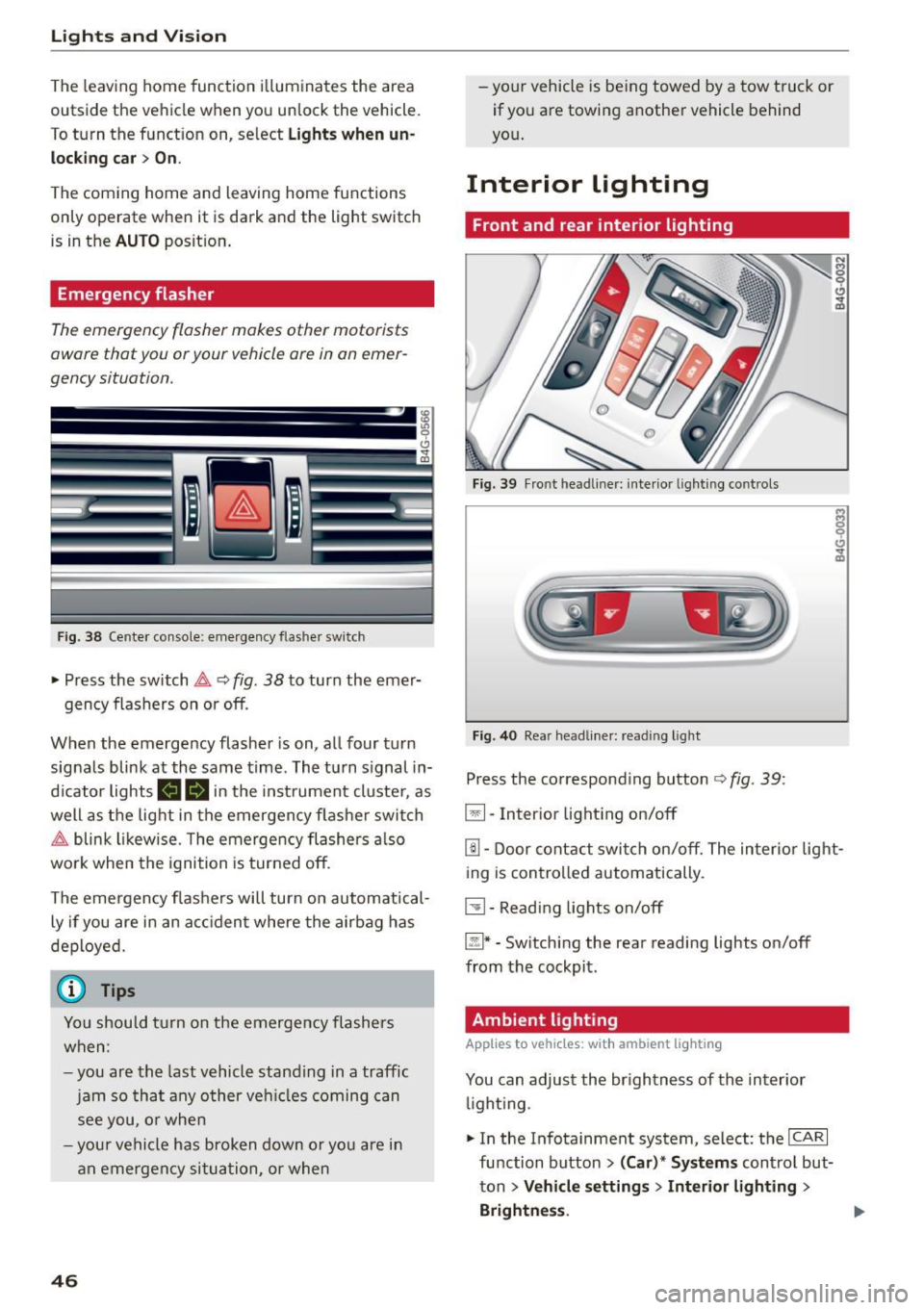
Emergency flasher
The emergency flasher makes other motorists
aware that you or your vehicle are in an emer
gency situation.
F ig. 38 Cente r co nsole: e mergen cy flasher sw itc h
~ Press the switch &, Q fig. 38 to turn the emer-
gency flashers on or off.
When the emergency flasher is on, all four turn
signals blink at the same time . The turn s ignal in
d icator lights
111!1 in the instrument cluster, as
well as the light in the emergen cy flashe r swit ch
&, blink likewise . T he emergency flashers also
wo rk when the ignition is turned off.
The emergency flashers will turn on automatical
ly if you are in an acc ident where the airbag has
deployed.
(j) Tips
You should turn on the emergency flashers
when:
- you are the last vehicle standing in a traffic
jam so that any other vehicl es coming can
see you, or when
- your vehicle has broken down or you are in
an emergency situation, or when
46
-your vehicle is being towed by a tow truck or
if you are towing another vehicle behind
yo u.
Interior Lighting
Front and rear interior lighting
Fig. 39 Front head liner: interio r light ing controls
Fig . 40 Rea r head lin er: read ing light
Press the corresponding button ¢ fig. 39:
5:1-Interior lighting on/off
rn-Door contact switch on/off. The interior light
ing is controlled automatically.
~- Reading lights on/off
~* -Switching the rear reading lights on/off
from the cockpit.
Ambient lighting
Applies to vehicles: wit h ambient lig hting
You can adjust the br ightness of the interior
li ght ing .
~ In the Infotainment system, select : the ICA RI
function button > (Car)* Systems control but
ton
> Vehicle settings > Interior lighting >
Brightne ss.
Page 58 of 294
Seats and storag e
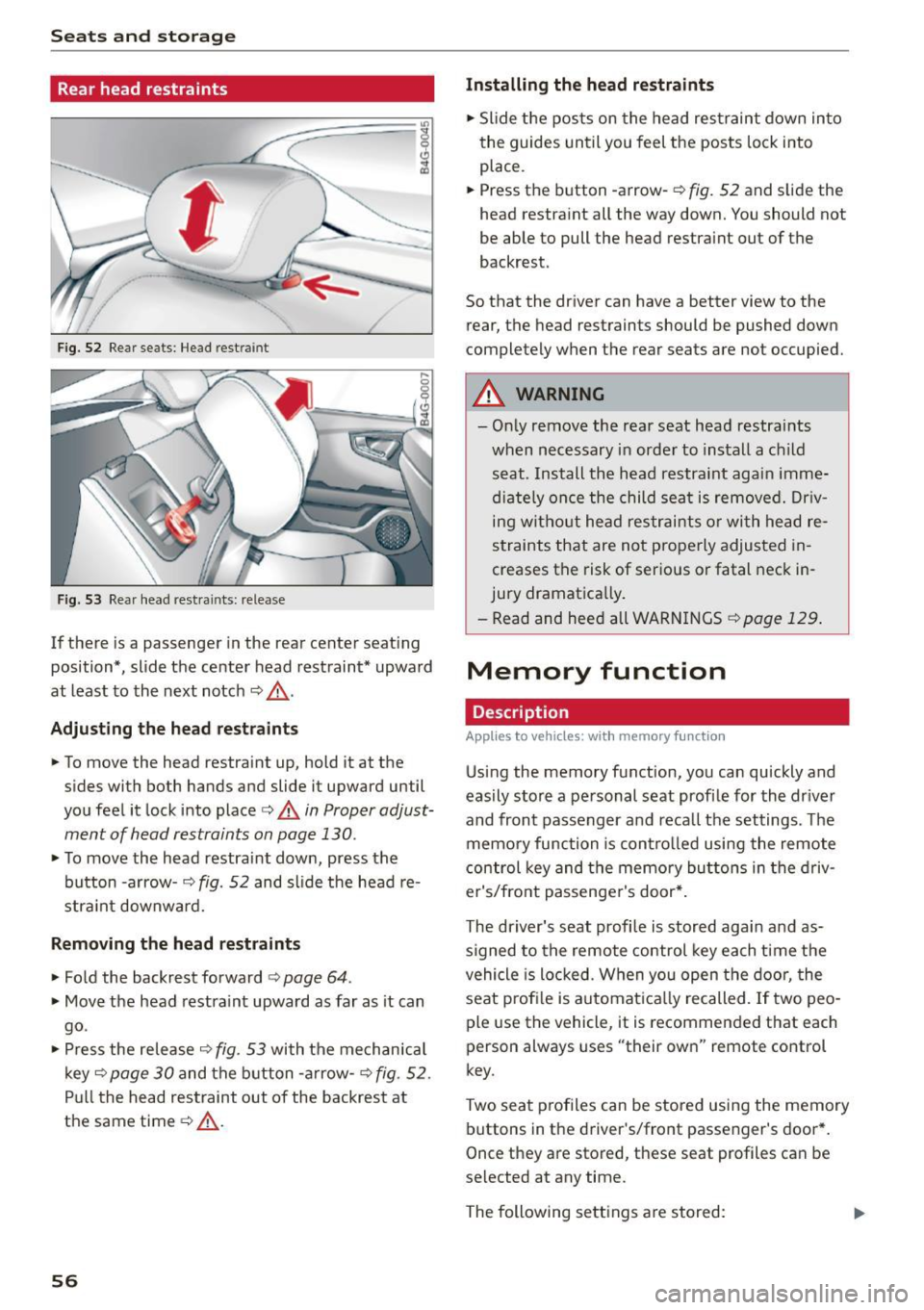
Rear head restraints
Fig. 52 Rear seats: Head rest ra in t
Fig. 53 Rear head restra ints: release
If there is a passenger in the rear center seat ing
position* , slide the center head restraint* upward
at least to the next notch
~ ,&. .
Adjust ing th e he ad res trai nts
• To move the head restra int up, hold it at the
sides with both hands and slide it upward until
you feel it lock into place
c:> A in Proper adjust
ment of head restraints on page
130.
• To move the head restraint down, press the
button -arrow-
c;> fig. 52 and slide the head re
stra int downward.
R emo ving the h ead re straint s
• Fold the backrest forward c:> page 64.
• Move the head restra int upward as far as it can
go .
• Press the release
c:> fig. 53 with the mechan ica l
key ~
page 30 and the b utton -a rrow-c:> fig . 52 .
Pull the head restraint out of the backrest at
the same time
c:> .&_ .
56
Installing the he ad re stra ints
• Slide the posts on the head restraint down into
the guides until you feel the posts lock into
place .
• Press the button -arrow-
c:> fig. 52 and s lide the
head restra int all the way down. You should not
be able to pull the head restra int out of the
backrest.
So that the driver can have a better view to the rear, the head restraints should be pushed down
completely when the rear seats are not occupied.
A WARNING
- On ly remove the rear seat head restra ints
when necessary in order to install a c hild
seat . Install the head restraint again imme
diate ly once the child sea t is removed. Dr iv
ing without head restraints o r with head re
straints that are not properly adjusted in
creases the risk of serious or fatal neck in
jury dramatically.
- Read and heed a ll WARN INGS
c:> page 129 .
Memory function
Description
Applies to vehicles : with memory f un ction
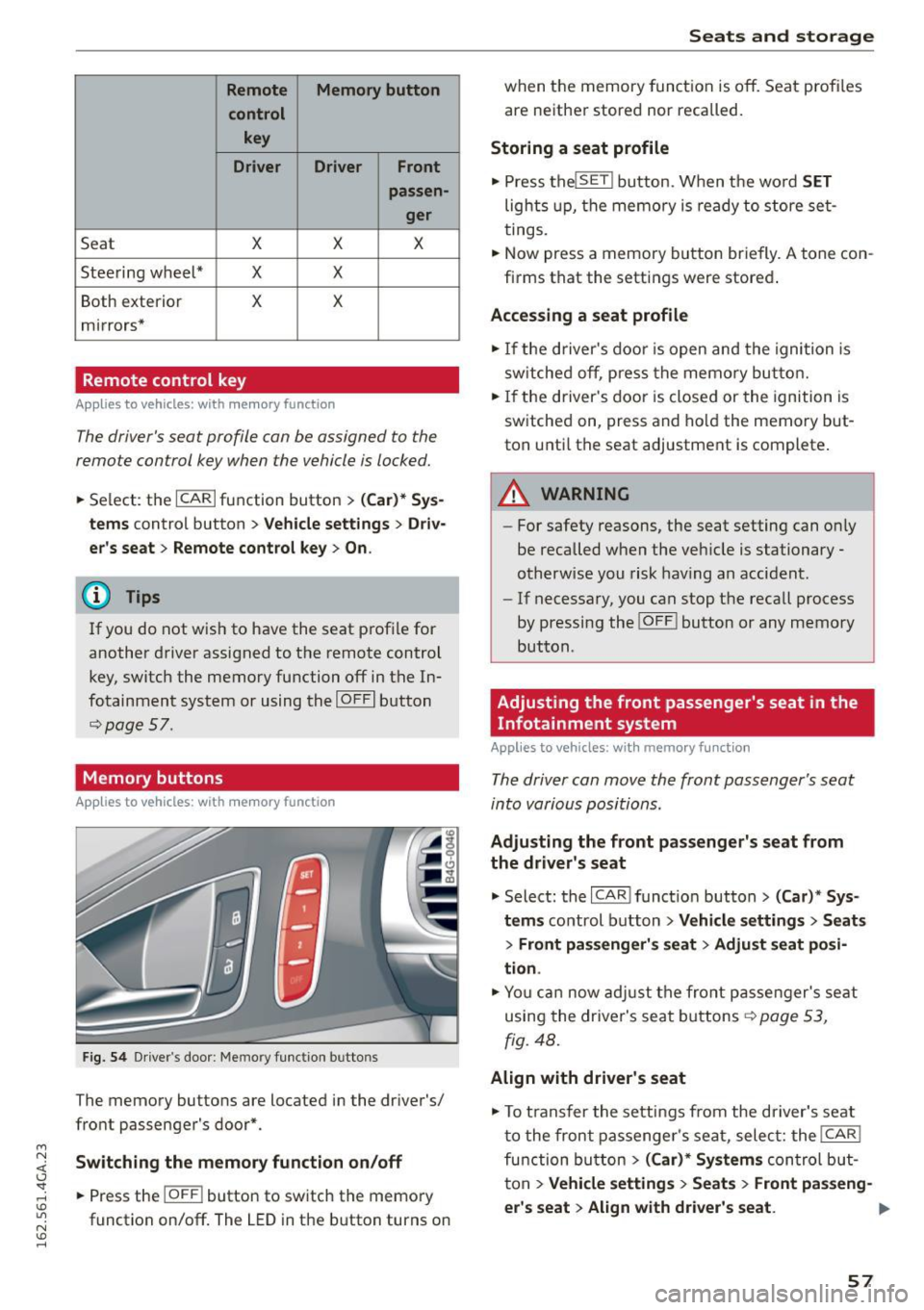
Us ing the memory function, you can quickly and
eas ily store a pe rsonal seat profi le for the driver
and front passenger and reca ll the settings . The
memory function is control led using the remote
control key and the memory buttons in the driv
er's/front passenger's door* .
-
The driver's seat profile is stored aga in and as
signed to the remote control key each time the
vehicle is locked. When you open the door, the
seat prof ile is automat ica lly recalled. If two peo
ple use the veh icle, it is recommended that each
person always uses "their own" remote control
key.
Two seat p rofiles can be stored using the memory
buttons in the dr iver's/front passenger's door *.
Once they are stored, these seat profiles can be
selected at any time.
The following sett ings a re stored:
Page 59 of 294
M N <( I.J "". rl I.O
"' N I.O rl
Remote Memory button control key
Driver Driver Front passen-ger
Seat X X X
Stee ring wheel* X X
Both exterior X X
mirrors*
Remote control key
Applies to vehicles: with memory function
The
driver's seat profile can be assigned to the
remote control key when the vehicle is locked.
• Se lect: the ICARI function button > (Car)* Sys
tems
contro l button > Vehicle settings > Driv
er's seat
> Remote control key > On .
(D Tips
If you do not wish to have the seat profile for
another driver assigned to the remote control
key, switch the memory function off in the In
fotainment system or using the IOFFI button
r=;;,page 57.
Memory buttons
Applies to vehicles: with memory function
Fig. 54 Driver's door: Memory function buttons
The memory buttons are located in the dr iver's/
front passenger's door*.
Switching the memory function on/off
• Press the IOFF i button to switch the memory
function on/off. The
LED in the button turns on
Seats and storage
when the memory function is off. Seat profiles
are neither stored nor recalled.
Storing a seat profile
• Press the lSET I button. When the word SET
lights up, the memory is ready to store set
tings.
.. Now press a memory button briefly.
A tone con
firms that the settings were stored .
Accessing a seat profile
• If the driver's door is open and the ignition is
switched off, press the memo ry button.
• If the driver's door is closed or the ignition is
switched on, press and hold the memory but
ton unti l the seat adjustment is complete .
A WARNING
-For safety reasons, the seat setting can on ly
be recalled when the veh icle is stationary
otherwise you risk having an accident.
- If necessary, you can stop the recall process
by pressing the !O FF ! button or any memory
button .
Adjusting the front passenger's seat in the
Infotainment system
Applies to vehicles: with memory function
The driver can move the front passenger's seat
into various positions.
Adjusting the front passenger's seat from
the driver's seat
• Select: the I CAR I function button > (Car)* Sys
tems
control button > Vehicle settings > Seats
> Front passenger's seat > Adjust seat posi
tion .
• Yo u can now adjust the front passenger's seat
using the driver's seat buttons
r::;;, page 53,
fig. 48.
Align with driver's seat
• To transfer the settings from the driver's seat
to the front passenger's seat , select: the I CAR !
function button
> (Car)* Systems control but
ton
> Vehicle settings > Seats > Front passeng-
er 's seat > Align with driver 's seat. ...,
57
Page 60 of 294
Seats and storag e
.. Press and ho ld the control knob until the ad
justing process is complete .
@ Tips
The lumbar support and upper thigh support
settings a re not transferred when aligning the
front passenger's seat with the driver's seat .
Ashtray
Applies to vehicles: with ashtray
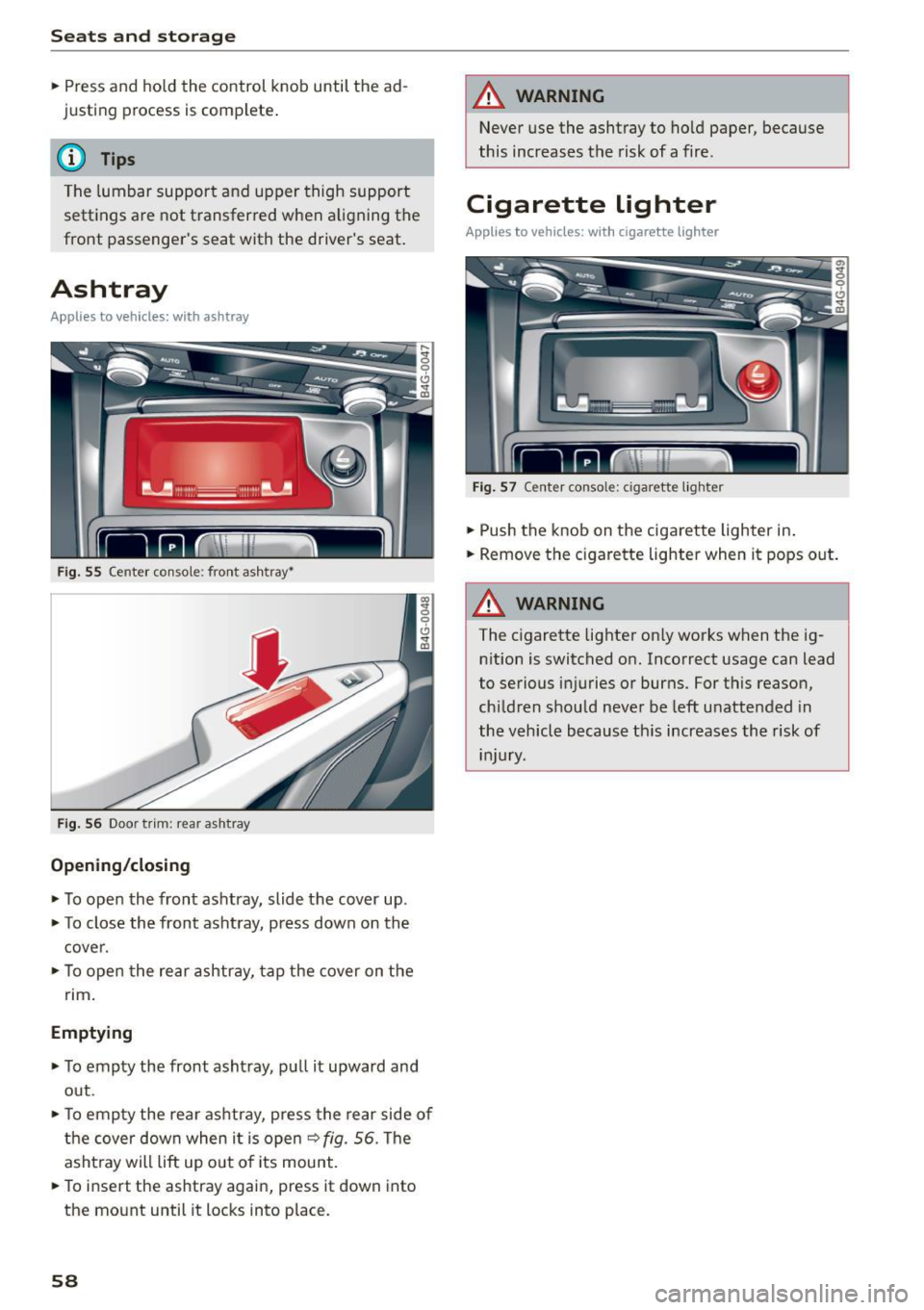
Fig. 55 Center console: front ashtray~
F ig . 56 Door trim: rear ashtray
Opening /closing
.. To open the front ashtray, slide the cover up .
.. To close the front ashtray, p ress down on the
cover .
.. To open the rear ashtray, tap the cover on the
nm .
Emptying
.. To empty the front asht ray, pu ll it upward and
out .
.. To empty the rea r ashtray, press the rear side of
the cover down when it is open
9 fig . 56. The
asht ray will lift up out o f its mount .
.. To insert the ashtray again, press it down into
the mount until it locks into place.
58
A WARNING
Never use the ashtray to ho ld paper, because
this increases the risk of a fire.
Cigarette lighter
Applies to vehicles: with cigarette lighter
F ig . 57 Center console: cigarette lighter
.. Push the knob on the cigarette lighter in .
.. Remove the c igarette lighter when it pops out .
A WARNING
The cigarette lighter on ly works when the ig
nition is switched on. Incorrect usage can lead
to serious injuries or burns. For this reason,
ch ildren should never be left u nattended in
the vehicle because th is increases the risk of
injury.
Page 62 of 294
Seats and storage
-Never carry any beverage containers with
hot liquids, such as hot coffee or hot tea, in
the vehicle while it is moving. In case of an
accident, sudden braking or other vehicle movement, hot liquid could spill, causing
scalding burns . Spilled hot liquid can also
cause an accident and personal injury.
- Use only soft cups in the cupholder. Hard
cups and glasses can cause injury in an acci
dent.
- Never use the cupholder or adapter as an
ashtray- risk of fire.
(D Note
Only drink containers with lids should be car
ried in the cupholder. Liquid could spill out
and damage your vehicle's electronic equip
ment or stain the upholstery, etc.
Cooled glove compartment
A pp lies to ve hicles: w ith coole d glove compart men t
The cooled glove compartment only functions
when the AIC system is switched on.
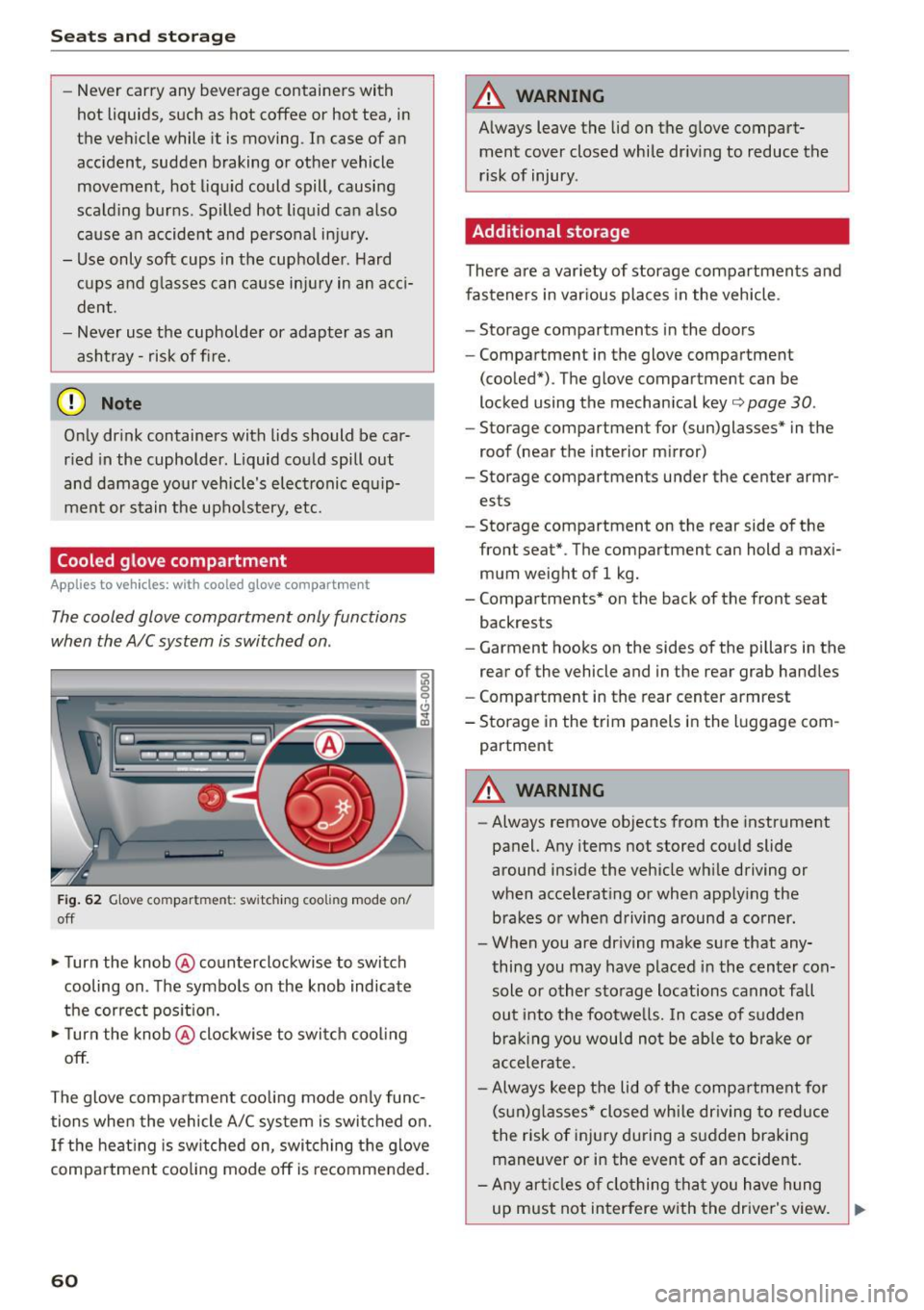
Fig. 62 Glove compartment: switching cooling mode on/
off
• Turn the knob @counterclockwise to switch
cooling on. The symbols on the knob indicate
the correct position.
• Turn the knob @clockwise to switch cooling
off.
The glove compartment cooling mode only func tions when the vehicle A/C system is switched on.
If the heating is switched on, switching the glove
compartment cooling mode off is recomme nded.
60
A WARNING
Always leave the lid on the glove compart
ment cover closed while driving to reduce the
risk of injury.
Additional storage
There are a variety of storage compartments and
fasteners in various places in the vehicle .
- Storage compartments in the doors
- Compartment in the glove compartment
(cooled*) . The glove compartment can be
locked using the mechanical key¢
page 30.
-Storage compartment for (sun)glasses* in the
roof (near the interior mirror)
- Storage compartments under the center armr
ests
- Storage compartment on the rear side of the
front
seat* . The compartment can hold a maxi
mum weight of 1 kg.
- Compartments* on the back of the front seat
backrests
- Garment hooks on the sides of the pillars in the
rear of the vehicle and in the rear grab handles
- Compartment in the rear center armrest
- Storage in the trim panels in the luggage com-
partment
A WARNING
-Always remove objects from the instrument
panel. Any items not stored could slide
around inside the vehicle while driving or
when accelerating or when applying the brakes or when driving around a corner.
- When you are driving make sure that any
thing you may have placed in the center con
sole or other storage locations cannot fall
out into the footwells. In case of sudden
braking you would not be able to brake or
accelerate .
- Always keep the lid of the compartment for
(sun)glasses* closed while driving to reduce
the risk of injury during a sudden braking
maneuver or in the event of an accident.
- Any articles of clothing that you have hung
up must not interfere with the driver's view.
~
Page 79 of 294

M N <( I.J "". rl I.O
"' N I.O rl
-After the engine has been switched off , the
radiator fan can cont in ue to run for up to 10
minutes - even with the ign ition sw itched
off . It can a lso switch on again after some
t i me if t he coolant tern pera ture rises as the
result of a heat bu ildup or if the engine is
ho t and the engi ne compa rtmen t is addi
ti onal ly he ate d by the su n's ra ys.
(D Note
Do not stop the engine imme diate ly afte r
ha rd or extend ed dr iving . K eep the engi ne
r u nning for app roximately two m inutes to
p reven t exces sive heat build-up.
Messages
Turn off ignition before leaving car
This message appea rs and a war ning tone sounds
if you open the d river's doo r whe n the ignition is
switche d on .
Press brake ped al to start engine
This message appears if you do not press the
brake peda l when starting the engine.
Ill Is key in the vehicle?
This indi ca tor light tur ns on and t his message ap
pears i f the ignit ion key was removed from the
ve hicl e when the e ngine was ru nning . If the igni
tion key is no longer in the vehicle, you cannot
switch on the ignit ion or start the engine once
you stop it. You also cannot lock the veh icle from
the outside.
Shift to P , otherwise vehicle can roll away.
Doors do not lock if lev er is not in P.
This message appears for sa fe ty reasons if the
tra nsmission is not i n the P position when you
switch the ignition off . Move the selector lever to
the P pos ition . Otherwise the vehicle is not pro
tected from roll ing and it cannot be locked.
DJ Key is not recognized . Hold back of key
again st ma rked a rea. See owner's manual
If the i ndic ator lig ht turns on and th is mess age
appears, there is a malfunction ~
page 77.
Driv ing
Turn off ignition before leaving car. Battery is
di scha rging
T his dr iver message appears if the drive r's door is
o pened wh ile the ign ition is switched on. Always
switch off the ignition if you are leav ing t he veh i
cle . Refer to
¢ page 81.
Shift to P and turn off ignition b efore leaving
car , otherwise vehicle can roll away
This message appears if the drive r's door is
opened wh ile the ign ition is switched on and the
sele ctor lever is not in the P position . Move the
se lector lever in to the P posi tion a nd switch the
i gnition off when you exit the vehicle . Otherwise
t h e vehicle co uld ro ll. Refer to ¢
page 81.
Starting the engine when there is a
malfunction
It may not be possible to start the engine under
certain circumstances, for example if the battery
in the vehicle key is drained , if interference is af
fected the key or if there
is a system malfunc
tion .
Fig . 8 2 Ce nte r c onsol e/master key : s tar ting t he e ngin e
w hen t here is a ma lf un ctio n
Requirement: The message Key is not recog
nized. Hold back of key against marked are a.
Se e owner 's manual
is displayed and the DJ indi
c ator lig ht tu rns on.
.. Hold the master key i n the location indicated as
shown in the illustration
f>l) ¢ fig . 82 .
.. Press the brake pedal ¢ A. in Starting the en
gine on page
76.
.. Press the
~ IS_ T_A_ R_T _E_N_G-IN_E_S_ T_O_P ~I bu tton. The
eng ine will start .
77