infotainment system AUDI S7 2016 User Guide
[x] Cancel search | Manufacturer: AUDI, Model Year: 2016, Model line: S7, Model: AUDI S7 2016Pages: 294, PDF Size: 73.82 MB
Page 77 of 294
M N <( I.J "". rl I.O
"' N I.O rl
There must be at least 10 inches (25 cm) be
tween your chest and the center of the steering
wheel.
If you cannot sit more than 10 inches (25
cm) from the steering wheel, see if adaptive
equipment is available to help you reach the ped
als and increase the distance from the steering
wheel.
For detailed information on how to adjust the
driver's seat, see
r:::>page 53.
In vehicles with the memory function*, the steer
ing column settings are stored together with the
seat position.
A WARNING
Improper use of steering wheel adjustment
and improper seating position can cause seri
ous personal injury.
- Adjust the steer ing wheel column only when
the vehicle is not mov ing to prevent loss of
vehicle control.
- Adjust the driver's seat or steering wheel so
that there is a minimum of 10 inches (25
cm) between yo ur chest and the steering
wheel
r:::>page 127, fig. 144. If you cannot
mainta in this min imum d istance, the a irbag
system cannot protect you properly .
- If phys ica l limitations prevent you from sit
ti ng 10 inches (25 cm) or more from the
steering wheel, check with your authorized
Audi dealer to see if adaptive eq uipment is
available.
- If the steering wheel is aligned wi th your
face, the supp lemental driver's airbag can
not provide as much protection in an acci
dent. Always make sure that the steering
wheel is aligned w ith your chest.
- Always hold the steering wheel with your hands at the 9 o'clock and 3 o'clock posi
t ions to reduce the r isk of personal injury if
the driver 's airbag deploys.
- Never hold the steer ing wheel at the 12
o'clock posit ion or w ith your hands inside
the steering wheel rim or on the steering
wheel hub. Holding th e steering wheel the
wrong way can cause se rious injuries to the
hands, arms and head if the driver's a irbag
dep loys .
Drivi ng
Easy seat entry
Applies to vehicles: with power steering wheel adjustment
Easy seat entry makes it easier to enter and exit
the vehicle by adjusting the steering column au
tomatically.
.. In the Infotainment system, select: the ICARI
function button > ( Car) * Systems control but
ton
> V ehicle sett ings > Se ats> Driver 's se at>
Ea sy se at entry > On .
When easy seat entry is sw itched on, the steering
column goes back up into the park pos ition when
the ignit ion is switched off . After entering the ve
hicle, the steeri ng column returns to the stored
pos ition once the ig nit ion is switched on.
Starting and stopping
the engine
Starting the engine
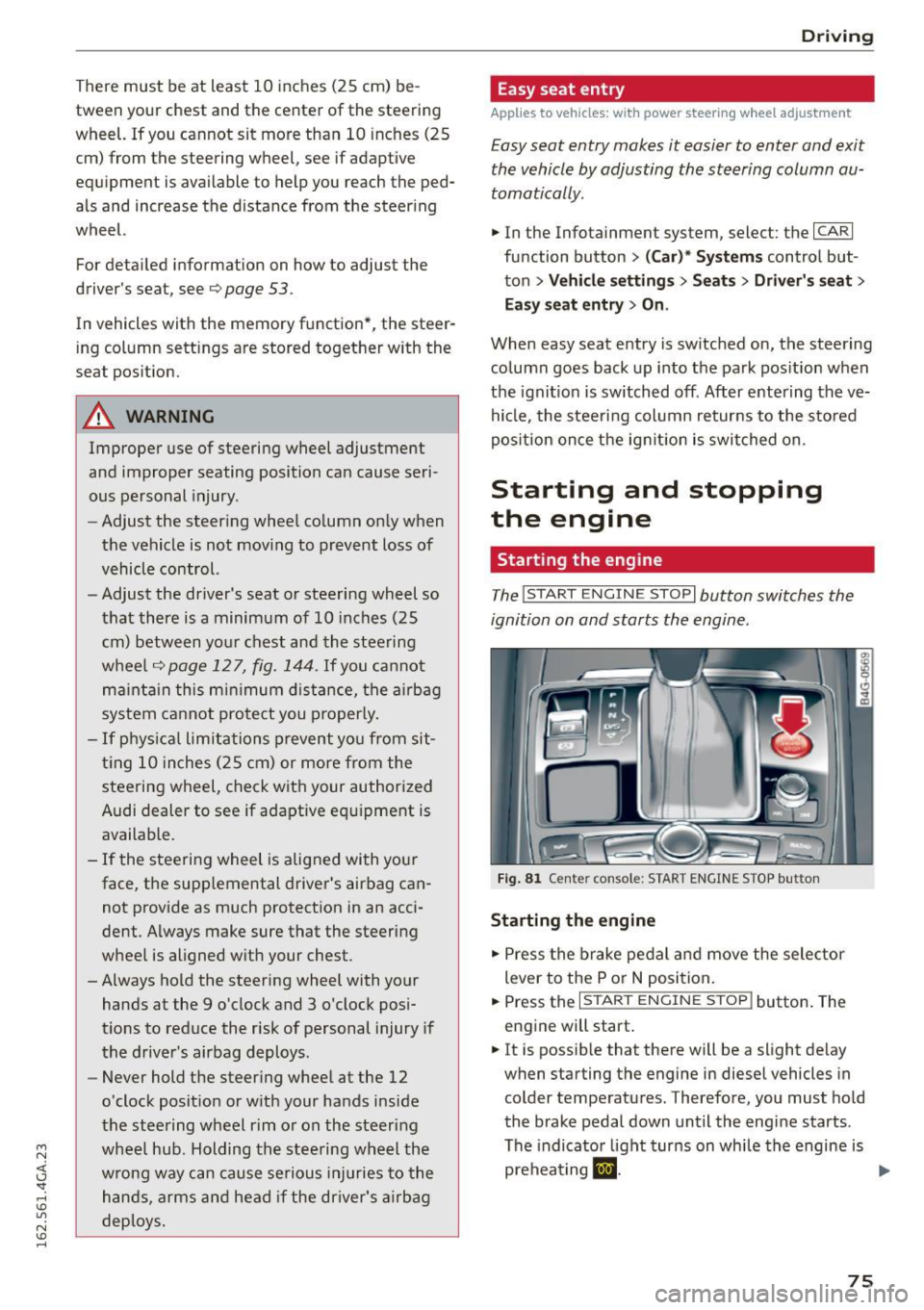
The I STAR T ENGIN E ST OPI button switches the
ignition on and starts the engine .
Fig . 8 1 Center console: START ENGINE STOP button
Sta rting the engine
.. Press the brake pedal a nd move the selector
lever to the P o r
N position.
.. Press the
I START ENGINE STOP j button . The
eng ine will start .
.. It is possib le that there will be a slight delay
when starting the engine in diesel vehicles in
colder temperatu res. Therefore, you must hold
the brake pedal down unt il the engi ne starts .
The indicator light turns on whi le the engine is
preheating
m . ...
75
Page 84 of 294

Driving
Switching the Start-Stop-System on/off
manually
Applies to veh icles: with Sta rt-Stop-System
If you do not wish to use the system, you can
switch it off manually.
F ig . 86 Ce nter con so le: Start -Stop-Syste m button
• To switch the Start-Stop-System off/on manual
ly, press the
1 0• •1 button . The L ED in the button
turns on when t he system is switched off .
(D Tips
If you switch the system off d uring a stop
phase, the engine will start again automati
cally.
Messages in the instrument cluster display
Applies to vehicles: with Start -Stop-System
Start-stop system dea ctivated: Please restart
engine manually
This message appea rs when specific conditions
are no t me t d uring a stop phase and the Sta rt
Stop-System will
not be able to resta rt the en
gine. The engine must be started with the
I S TAR T ENGINE STOP I button.
Start-stop system: System fault! Currently
unavailable
There is a ma lf u nct ion in the Star t-Stop -System .
Drive the veh icle to an authorized repair fac ility
for servic ing as soon as possib le to correct the
malfunct ion.
82
Speed warning system
Introduction
The speed warning system helps you to stay un
der a specified maximum speed .
The speed warning system warns you if you are
exceeding the maximum speed that you have set .
You w ill hear a warning tone when your speed ex
ceeds the sto red val ue by app rox imately 3 mph
(3 km/h) . An indicator light . (USA mode ls)/ .
(Ca nada models) in the ins trumen t cluste r dis
play a lso turns o n at the same time. The ind ic a tor
li ght .,. turns off w hen the speed decrea ses
below the stored maximum speed.
Set ting a t hreshol d is recom mended if you would
lik e to be rem inded when you re ach a cert ain
maximum speed . Si tua tions where you may want
to do so include drivin g in a country w ith a gene r
a l speed limit or if there is a specified max imum
speed for winter tires.
(D Tips
Eve n though your vehicle is eq uipped w ith a
speed warning system, you should still watch
the speedometer to make sure yo u are not
drivi ng faster than the speed lim it.
Setting the threshold
You con set , change and delete the warning
threshold in the Infotainment system.
• Select: the ICAR I function button > (Car)* Sy s
tems
control b utton > Driver ass istance >
Speed warning .
You can set any threshold betwee n 20 mph
(30 km/h) and 150 mph (240 km/h) . Settings
can each be adjusted in increments of 6 mph
(10 km/h) .
Page 93 of 294

Audi adaptive cruise control and braking guard
Audi braking guard
Description
Applies to vehicles: with Audi adaptive cruise co ntrol
F ig. 99 Instrument cluster : approach warning
Braking guard uses radar sensors and a video
camera. It also functions within the lim its of the
system when adaptive cruise control is sw itched
off.
What can braking guard do?
When detected in time, the system can assess
situations when a vehicle ahead brakes suddenly
or if your own veh icle is traveling at a high speed
and approaching a vehicle up ahead that is mov
ing more slow ly . Braking guard does not react if it
cannot de te ct the situation .
The system advises you of various situations:
- The
distance warning is given if you are too
close to the vehicle ahead for a long time. If the
vehicle ahead brakes sharply, you will not be
able to avo id a collision. The indicator light.
in the d isplay comes on .
- The
approach warning is g iven when a detected
vehicle up ahead in your lane is moving much
more slowly than you are or if it brakes sharply .
When this warning is g iven, it may only be pos
sible to
avoid a co llis ion by swerving or braking
sharp ly. The indicator light. and indica tor in
the display will warn yo u about the danger
¢
fig. 99. You will also hear an acoustic signal.
If you do not react fast enough or do not react at
all to the situation, braking guard will intervene
M N by braking. <( I.J "". rl I.O
"' N <.0 ll This is not a vailable in some coun tri es. rl
- If a collision is imminent, the system wi ll first
provide an
acute warning by briefly and sharply
app ly ing the brakes.
- If you do not react to the acute warning, brak
ing guard can brake with increasing force within
the limits of the system. This reduces the vehi
cle speed in the event of a collision.
- The system can initiate maximum braking
short ly before a collision
1l . Full dece leration at
high speeds occurs only in vehicles with adap
tive cruise control and s ide ass ist (pre sense
plus).
- If the braking guard senses that you are not
braking hard enough when a collis ion is imm i
nent, it can increase the braking force .
- The pre sense functions also engage when a
collision is imm inent ¢
page 185 .
Which functions can be controlled?
You can switch braking guard and the distance/
approach warning on or off in the MMI
¢ page 92, Settings in the Infotainment sys
tem .
A WARNING
--
Lack of attention can cause collisions, other
accidents and ser ious personal injuri es. The
braking guard is an ass ist system and cannot
prevent a collision by itself. The driver must
always intervene . The driver is always respon
sib le for braking at the correct time.
- Always pay close attent ion to traffic,
even
when the braking guard is switched on . Be
ready to intervene and be ready to take com
p lete control whenever necessary. Always
keep the safe and legal distance between
your veh icle and vehicles up ahead.
- Braking guard works within limits and will
not respond outside the system limits, for
example when approaching a stopped vehi
cle or stationary obstacle (end of a traffic
jam or vehicle that has broken down in traf
fic).
-Always remember that the radar sensor for
the braking gua rd works on ly w ithin defined
liJ,,
91
Page 94 of 294

Audi adaptive cru ise control and b ra king guard
detection and range limits that may prevent
the proper detect ion of other vehicles.
- The radar sensor's function and range can
be reduced by rain, snow and heavy spray .
Moving vehicles up ahead may not be
promptly detected or may not be detected
at all.
- Reflective surfaces includ ing crash barr iers
or tunnel entrances may impair the function
of the radar senso r.
@ Tips
- You can cance l the braking with increasing
force that is initiated by the system by brak
i ng yourself, by accelerating noticeably or by
swervrng .
- Braking guard error messages
c> page 92.
- Keep in mind that braking guard can brake
unexpectedly. Always secure any cargo or
objects that you are transporting to reduce
the r isk of damage or injury.
Settings in the Infotainment system
Applies to vehicles: with Audi adaptive cruise control
~ Se lect : the ICARI function button > (Car )* Sys
t e m s
control button > Dr iver a ssistan ce > Audi
bra king gua rd.
S yste m -
Sw itch the braking guard On/ Off. When
you switch the ign ition on, the message
Br akin g
g uard : Off
appea rs if the system is switched off.
Pr ew arni ng -The distance and approach warn
i n gs in the display can be sw itched
On/ Off.
(D Tips
-Your settings are automat ically stored and
assigned to the remote control key being
used.
- If you restrict or switch off the ESC, the braking guard also switches itself off
c>page 189.
- Switch brak ing guard off when you are load
i ng the veh icle onto a vehicle carr ier, tra in,
sh ip or other type of transportation. This
can prevent undesired wa rnings from the
braking guard system.
92
Messages
Applies to vehicles: with Audi adaptive c ru ise control
B ra king gu ard : off
This dr iver message appears if the system is
tu rned off via the infotainment. Otherw ise, if the
system is t urned off, the information appears ev
ery time short ly after the start of the trip.
The driver message a lso appea rs if the system is
not available due to a malfunction or if the ESC is
not sw itched on
c> page 189 . If th is is the case,
the system wi ll not provide warnings about a
possible collision .
Braking guard : ac tiv ated
This dr ive r message appears if sharp brake pres
sure was applied due to an acute warn ing .
ACC : Un available !
A CC and Audi b raking gua rd: not av ailable
The system cannot detec t mov ing vehicles up
ahead correc tly and is sw itched off. The sensors
have been displaced or are not working proper ly .
T he Audi pre sense functions may a lso be affect
ed. Drive to your authorized Audi dealer or au
thorized Audi service facility immediately to have
the malfunction corrected.
A CC: currentl y unav ailable. No sen so r v ision
A CC and b rakin g g uid e: currentl y un available .
No s ensor vis ion
This message appears if the sensor v iew is ob
structed, for examp le by leaves, snow, heavy
spray or d irt . Clean the sensors
c> page 85,
fig. 89.
AC C: C urrentl y un availabl e. Gradi ent t oo ste ep
The road exceeds the max imum possible angle
for proper adapt ive cruise control operation.
Adaptive c ruise control is sw itched off .
ACC: Onl y ava ilable in D , Sor M
Select t he D/S or M selector leve r position.
ACC: curr entl y unavailable . Parking brake ap
plied
Page 96 of 294
Audi active lane assist
Audi active lane assist Lane assist
Description
A pp lies to veh icles: w ith Audi active lane assist
Active lane assist detects lane marker lines with
in the limits of the system using a camera in the
windshield. If you are approaching a detected lane marker line and it appears likely that you
will leave the lane, the system will warn you with
corrective steering. You can override this steering
at any time. If you pass over a line, the steering
wheel will vibrate lightly. In order for this warn
ing vibration to occur, it must first be switched
on in the Infotainment system. Active lane assist is operable when the lane marker line is detected
on at least one side of the vehicle.
The system is designed for driving on freeways
and expanded highways and thus works only at
speeds of 40 mph (65 km/h) or more .
Applies to vehicles with side assist*: If you acti
vate a turn s ignal when active lane assist is ready
and it classifies a lane change as critical because
of vehicles traveling alongside you or approach ing you, there will be noticeable corrective steer
ing shortly before you leave the lane. This will at
tempt to keep your vehicle in the lane.
Applies to vehicles without side assist*: the sys
tem does not warn when it is ready if you activate
the turn signal before crossing the lane marker line. In this case, it assumes that you are chang
ing lanes intentionally.
Applies to vehicles with adaptive cruise control*
or parking aid*: The corrective steering is target
ed based on the driving situation. In addition to
the lane marker lines, the system can also take
into account other objects such as guard rails. If
they are detected in close proximity to the vehi
cle, active lane assist helps prevent the vehicle
from driving too close to them. There is also
passing assistance . The system does not provide
any corrective steering if it detects that you are
passing another vehicle.
94
A WARNING
-
- The system warns the driver that the vehicle
is leaving the lane using corrective steering.
The driver is always responsible for keeping
the vehicle within the lane.
- The system can help you keep the vehicle in the lane, but it does not drive by itself. Al
ways keep your hands on the steering
wheel.
- Corrective steering may not occur in certain
situations, such as during heavy braking.
- There may be cases where the camera does
not recognize all lane marker lines. Correc
tive steering can only take place on the side
of the vehicle where lane marker lines are
detected.
- Other road structures or objects could possi
bly be identified unintentionally as lane marker lines. As a result, corrective steering
may be unexpected or may not occur.
- The camera view can be restricted, for ex
ample by vehicles driving ahead or by rain,
snow, heavy spray or light shining into the
camera. This can result in active lane assist
not detecting the lane marker lines or de
tecting them incorrectly.
- Under certain conditions such as ruts in the
road, a banked roadway or crosswinds, the
corrective steering alone may not be enough
to keep the vehicle in the middle of the lane.
- For safety reasons, active lane assist must
not be used when there are poor road and/
or weather conditions such as slippery roads, fog, gravel, heavy rain, snow and the
potential for hydroplaning. Using active lane
assist under these conditions may increase
the risk of a crash.
Page 103 of 294
M N <( (.J
'SI: ,...., \!) ..,.,
N \!) ,....,
Audi drive select Driving settings
Introduction
Drive select makes it possible to experience dif
ferent types of vehicle settings in one vehicle.
The driver can select
Comfort, Auto and Dynamic
modes in the Infotainment system to switch be
tween a sporty and a comfortable driving mode.
In the
Individual mode, the settings can be ad
justed to your personal preferences. This makes it possible to combine settings such as a sporty en
g ine tun ing with light steering.
_&. WARNING
Improper use of the Audi drive select can
cause collisions, other acc idents and serious
personal injury.
Description
-
The follow ing systems are affected by drive se
lect:
Engine and transmission
Depending on the mode, the eng ine and the
transmission respond quicker or in a more bal
anced manner to acce lerator pedal movements.
I n the sporty dynamic mode, the transmission
shifts at higher RPMs.
Air suspension*
The adaptive air suspension/adaptive air suspen
sion sport*
(Air suspension in the MMI) is an
e lectronically controlled a ir suspension and
damping system. They are adjusted depending on
the selected driving mode, the driver's steering,
b raking and acce leration input and the road sur
face, vehicle speed and load. A sporty setting is generally used in vehicles with adaptive air sus
pension sport*.
The vehicle clearance varies depending on these lected mode and the speed.
The highway setting is activated automatically
when you drive above 75 mph (120 km/h) for
more than 30 seconds in the
Auto or Dynamic
Audi drive select
mode. The ground clearance is increased auto
matically if the speed drops below 44 mph (70
km/h) for more than 120 seconds.
Steering
T he steering adapts in terms of steer ing effort
and steering ratios . Indirect steering that moves
easily, like the steering in comfort mode, is best
suited to long drives on a highway. In contrast,
dynamic mode provides sporty, direct steering.
T he following applies to vehicles with dynamic
steering*: the steering ratio changes based on ve
hicle speed in order to maintain optimum steer
ing effort for the driver at all times. This sets the
steering to be less sensitive at higher speeds in
order to provide improved vehicle control. At re
duced speeds, however, steering is more direct in
order to keep the steering effort as minimal as
poss ible when the driver is maneuvering the vehi
cle. At low and average speeds, dynamic steer ing
additionally provides more responsive steering
performance.
Sport differential*
As a component of the all wheel dr ive system
(quattro)
¢ page 192, the Sport differential* dis
tributes the driving power to the rear axle de
pending on the sit uation. The distribution of
power varies depending on the selected mode,
from balanced (comfort) to agile (dynamic) . The
goal is a high level of agility and ability to accel
erate on curves. The vehicle is very responsive to
steering.
Curve light*
T he curve light adapts to driving on curves. The
pivoting action and the lighting are also adapted
to the mode.
Adaptive cruise control*
T he behav ior when accelerating can be adjusted
from comfortable to sporty, depending on the
drive select mode. Adaptive cruise control a lso
responds to the driving behavior of the vehicle
ahead in a more conservative or sporty manner. ..,_
101
Page 104 of 294

Audi dri ve se lect
Engine soun d*
The sound of the engine is adapted to the select
ed mode and ranges from subtle to sporty.
(D Note
-Make sure there is enough clearance above
and below the veh icle when parking. The
height of the vehicle can change once it is
parked due to temperature fluctuations,
changes to the load conditions and changes
to the driving modes, which can affect clear
ance.
- When transporting the vehicle on a car car
rier, train, ship or by other means, only tie
the vehicle down at the running surface of
the tires, which is the outer c ircumference .
Securing the vehicle at the axle compo
nents, suspension struts or towing eyes is
not permitted because the pressure in the
a ir s uspension struts can change dur ing
transport. The vehicle may not be secured
sufficient ly if this happens .
- If yo u are goi ng to tow a t railer, yo u m ust
activate the trai ler operation mode
¢ page 201.
(D Tips
-In some models, the maximum vehicle
speed can on ly be reached in the
Auto and
D ynami c modes.
- Se lecting the
D ynamic mode results in spor
ty shifting characte ristics . The S gear posi
tion engages automatically.
- In vehicles with spo rt differential*, the
Dy·
na mic
mode is deactivated when towing a
trai ler.
- In vehicles that have dynamic steering*, op
erating noise is heard when starting or stop -
Adjusting the Individual mode
ping the engine. This does not indica te a
problem .
Selecting the driving mode
You can choose between comfort, auto, dynamic
and individual.
Fig . 109 Infota inment : drive select
.. To select the mode, se lect the following in the
Infotainment system:
I CAR I function button >
Comfort , Auto , D yn amic or Indi vidu al.
You can change the driv ing mode when the vehi
cle is stationary or whi le driving . If traffic per
mits, after changing modes, briefly take your
foot off the accelerator pedal so that the recently
selected mode is also activated for the engine.
Comfort -provides a comfort-o riented vehicle
setup and is s uited for long drives o n highways.
Auto -provides an overall comfortable ye t dy
nam ic dr iv ing feel and is suited for eve ry day use.
D ynami c· gives the driver a sporty driving feel
and is suited to a sporty driv ing style .
Individual ·¢ page 102.
A WARNING
Pay attent ion to traffic when operating the
drive select to reduce the risk of an accident .
You con adjust the vehicle settings to your personal preferences .
.. Se lect: the ICARI function button> Set individ
ual
control button. Once you select the menu,
102
you will automatically drive in the In di vid ua l
mode.
Page 105 of 294

M N <( (.J
'SI: ,...., \!) 1.1'1
N \!) ,....,
After you have closed the settings, you are auto
matica lly driving in the
Individual driving mode.
Systems Comfort
Engine/Transmission
balanced
air suspension* comfortable
Steering comfortable
Audi drive select
The equipment in your vehicle will determine
which settings you can adjust . The following ta
ble g ives an overview of the characteristics.
Auto Dynamic
balanced sporty
ba lanced sporty
ba lanced sporty
Dynamic
steering* comfortable/indirect ba lanced/direct sporty/direct
Sport differential* balanced
Adaptive cruise control* comfortable
Engine sound* subtle
a) Subtle in the se lector lever position D and sporty in S.
(D Tips
Your Ind ividual mode settings are automat i
cally stored and assigned to the remote con
trol key being used.
Raising/lowering the
vehicle
A ppl ies to vehicles: with a daptive air s uspensio n
Raising the vehicle
You can ra ise your veh icle temporarily, for exam
p le to drive over a tall curb.
.,. Select the following in the Infota inment sys
tem: the
ICARI function button > Raise control
button .
.,. Wait for the arrows in the Infotainment system
display to stop blinking and the vehicle to reach
its fina l position.
Lowering the vehicle
.,. To lower the vehicle, select the follow ing in the
Infotainment system: the
! CARI function button
> Lower control button .
.,. Wait for the arrows in the Infotainment system
display to stop blinking and the vehicle to lower
completely .
(D Note
-Remember that your veh icle is not suitable
for driving offroad even when it is raised.
There is not enough ground clearance . ag
ile sporty
ba lanc ed sporty
subtle/sportyal sporty
- If the vehicle is raised, it wi ll lower auto
matically when driving 62 mph (100 km/h)
or faster.
Driver messages
App lies to vehicles: wit h adaptive a ir suspens ion
Air suspension : Vehicle is too high. Controlling
level. ..
Air suspension: Vehicle is too low. Controlling
level. ..
The driver message switches off when the level
control process is complete .
103
Page 116 of 294
Parkin g sys tems
Parking systems
General information
A ppl ies to veh icles: w ith pa rk in g system plus/rear v iew ca m
era/per ipheral came ras
Depending on your vehicle 's equipment, various
pa rking aids will help you when parking and ma
neuvering.
The
p ark ing syste m plu s assists you when park
ing by audibly and visua lly indicating objects de
tected
in front of and behind the vehicle
¢ page
115.
The rear v iew ca mera shows the area beh ind the
ve hicle in the Infotainment display. This display
assists you when you are c ross or parallel parking
¢ page
116. In add ition, you are ass isted by the
functions from the parking system plus
¢ page
115.
The pe riph era l cam era s assist you with parking
and maneuvering. You are aided by var ious cam
eras depending on the vehicle equipment level
¢ page
119. In addition, you are assisted by the
functions from th e parking syst em p lus
¢ page 115.
A WARNING
-Always look for traffic and check the area
around your vehicle by looking at it directly
as well. The parking system cannot rep lace
the driver's attent ion. The dr iver is a lways
responsible for safety during parking and
f or all other maneuvers.
- Please note that some surfaces, such as
clothing, are not detected by the system.
- Sensors and cameras have blind spots in
wh ich peop le and objects cannot be detect
ed . Be especia lly caut ious of ch ild ren and
animals.
- T he sensors can be displaced by impacts or
damage to the radia tor grille, bumper ,
wheel housing and the underbody . The park
ing systems may become impai red as a re
s u lt . Have yo ur autho rized Audi dealer or
qualified workshop check their function .
- Make sure the sensors are not covered by
stickers, deposits or any other obstructions
114
-
as it may impair the sensor function. For in
formation on cleaning, refer to¢ page
205 .
(D Note
- Some ob jects are not detec ted by the sys
tem under certain circumstances :
- Objects such as barrier chains, trailer draw
bars, vertical poles or fences
- Objects above the sensors such as wall ex
tensions
- Objects w ith specific surfaces or struc
tures such as chain link fences or powder
snow .
- If you continue driving closer to a low-lying
object, it may disappear from the sensor
range . Note that you w ill no longe r be
wa rned about th is obstacle.
(D Tips
- The system may provide a warning even
tho ugh there are no obstacles in the cover
age area in some situat ions, such as :
- certain road surfaces or for long grass.
- externa l ultrason ic sources e.g. from
cleaning vehicles.
- h eavy ra in, snow or thick vehicle exhaus t.
- We recommend that you practi ce parking in
a traff ic-free location or par king lo t to be
come fam iliar with the sys tem. When doing
this, there should be good light and weather conditions.
- Yo u can change the vo lume and pi tch of the
signals as well as the display¢ page
124.
-Please refer to the instr uctions for towing a
trailer ¢ page
124.
-What appea rs in the infot ainmen t display is
somewha t time-delayed.
Page 119 of 294
M N <( I.J "". rl I.O
"' N I.O rl
-The camera lens en larges and distorts the
field of v ision. The object appears both a l
tered and inaccurate on the screen.
- In certain situations, peop le or objects in
the display appear closer or farther away:
- For objects that do not touch the ground, such as the bumper of a parked vehicle, a
trailer h itch or the rear of a tru ck . Do no t
use the help lines in this case .
- I f driven from a leve l surface onto a n in
cline, or a downward s lope .
- I f driven toward p rotruding objects.
- I f the ve hicle is ca rrying too much load in
the rear.
(D Note
- Always read and follow the applicable warn
i ngs
c:> © in General information on
page 114 .
-The orange colored orientat ion lines in the
Infotainment d isplay show the vehicle path
depend ing on the steering wh eel angl e. The
fron t of the vehicle fro nt swi ngs out more
th an the rear of the vehicle. Maintain plenty
of distance so that your outside mi rror or a
corner of you r vehicle does not collide with
any obstacles .
Switching on/off
Applies to vehicles: with rearview camera
Sw itching on
.,. Shift into reverse, or
.,. Press the
PwA button in the center console
c:> page 115, fig. 122. A short confirmation
tone sounds and the LED in the button turns
on .
Sw itching b etwe en the r ear view camer a and
optical di splay
.,. Press the Graphic control button®
c:, page 117, fig. 12 7 to see the opt ica l display .
.,. Press the
Rear view cont ro l button to see the
rearview camera image.
Sw itching off
.,. Drive forward faster than 10 km/h, or
.,. press the
P,1
1! button, or
P arking systems
.,. Switch the ignition off .
@ Tips
- The visua l display in the left pa rt of the dis
play shou ld help you detect the crit ica l vehi
cle a reas .
- Yo u can change the vo lume and pi tch of the
signa ls as well as the display
c:, page 124.
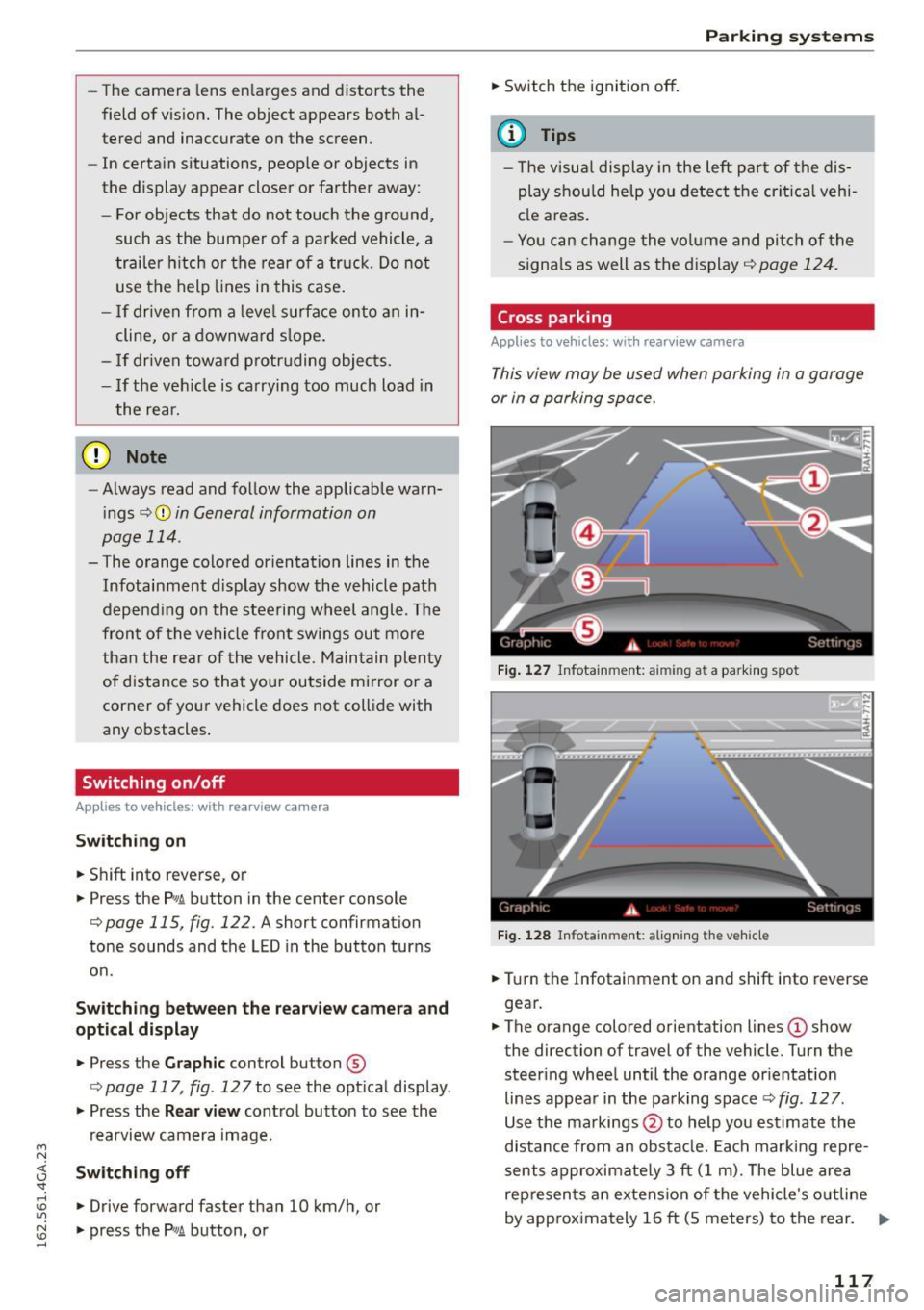
Cross parking
Appl ies to vehicles : wit h rearv iew camera
This view may be used when parking in a garage
or in a parking space .
Fig . 127 In fotainment: aiming at a parking spot
F ig . 12 8 Infota inment: align ing the vehicle
.,. Turn the Infotainment on and shift into reverse
gear.
.,. The orange colored orientation lines
(D show
the direction of travel of the vehicle. Turn the steering whee l until the orange or ientation
lines appea r in the pa rking space
c:> fig. 127 .
Use the markings @to help you estimate the
d istance from an obsta cle. Each marking repre
sents approximate ly 3 ft (1 m). The blue area
represen ts an extension of the vehicle 's o utline
by app rox ima tely 16 ft (5 meters) to the rear. ..,
117