trailer AUDI S7 2016 User Guide
[x] Cancel search | Manufacturer: AUDI, Model Year: 2016, Model line: S7, Model: AUDI S7 2016Pages: 294, PDF Size: 73.82 MB
Page 204 of 294

Trailer mode
Tire pressure
When tow ing a trailer, inflate the tires of your ve
hicle to the cold tire pressure listed under " Full
load" on the label located on the driver's side B
pillar (visible when the door is open). Inflate
trailer tires to trailer and tire manufacturers'
specifications.
Lights
Check to make sure both vehicle and trailer lights
are working properly .
Safety chains
Be sure trailer safety cha ins are p roperly connect
ed from the trailer to the hitch on the vehicle.
L eave enough slack in the chains to permit turn
ing corners. When you install safety chains, make
sure they will not drag on the road when you are
driving.
The chains should cross under the trai ler tongue
to prevent it from dropping in case of separation
from the hitch.
Adjusting the Audi drive select
Make su re the vehicle is on a level su rface before
h itching up the trailer and before adjusting the
tongue weight . The vehicle must be in
auto or
comfort driving mode and not raised
r::!> page 101, r::!> 0.
Make sure that the vehicle is lowered. In Info
tainment, select:
ICARI function button > Lower
control button.
If you must drive under poor road conditions, you
can raise the vehicle
after coupling the traile r or
after adjusting the tongue weight c::!> page 103 .
(D Note
-Changes in temperature or load can affect
the height of the vehicle.
- Always select
auto or comfort mode. Other
wise, the tongue load specified for your ve
hicle will no longer be applicable.
202
· Driving instructions
Driving with a trailer always requires extra care
and consideration .
To obtain the best possible handling of vehicle
and trailer, please note the follow ing:
.,. Do not tow a loaded trailer when your car itself
is not loaded .
.,. Be especially carefu l when passing other
vehicles.
.,. Observe speed lim its .
.,. Do not drive at the maximum permissib le
speed.
.,. Always app ly brakes early .
.,. Monitor the temperature gauge.
Weight distribution
Towing a loaded trailer with an empty car results
i n a h ighly unstab le distribution of weight. If th is
cannot be avoided, dr ive at very low speeds only
to avoid the risk of losing steer ing control.
A "balanced" rig is easier to operate and control.
This means that the tow vehicle shou ld be loaded
to the extent possible and permissib le, w hile
k eep ing the traile r as light as possible under the
circumstances. Whenever possible, transfer
some ca rgo to the luggage compartment of the
tow vehicle while observing tongue load require
ments and vehicle loading considerations.
Speed
The higher the speed, the more difficult it be
comes for the driver to contro l the rig. Do not
drive at the maximum permissible speed. Reduce
your speed even more if load, weather or wind cond itions are unfavorab le -particular ly when
going downh ill.
Red uce vehicle speed
immediately if the trailer
shows the slightest sign of swaying .
Do not try
to stop the swaying by accelerating.
Observe speed limits . In some areas, speeds for
vehicles towing trai lers are lower than for regular
vehicles.
Always apply brakes early. When driving dow n
hill, shift i nto a lower gear to use the engine
Page 205 of 294

M N <( (.J
'SI: ,...., \!) 1.1'1
N \!) ,....,
braking effect to slow the vehicle. Use of the
brakes alone can cause them to overheat and fail.
Air suspension*
When driving with a trailer, activate the trailer
mode of the air suspension. Switch the air sus
pension trailer mode on when you are towing a
trailer. This will limit the regulation by the air
suspension while driving. Select in the MMI:
ICARI function button > (Car)* systems control
button>
Vehicle settings> Air susp.: towing>
On.
Coolant temperature
The coolant temperature gauge c::> page 10 must
be observed carefully. The coolant temperature
can increase if you drive on long inclines in a low
gear at high engine speeds . Reduce your speed
immediately if the LEDs in the top part of the dis
play turn on .
For more information about indicator lights, re
fer to.
c::> page 15.
A WARNING
Anyone not properly restrained in a moving
vehicle is at a much greater risk in an acci
dent . Never let anyone ride in your car who is
not properly wearing the restraints provided
by Audi.
Trailer mode notes
Important to know
-
Your vehicle handles differently when towing a trailer because of the additional weight and dif
ferent weight distribution . Safety, performance
and economy will greatly depend on how careful
ly you load your trailer and operate your rig.
Before you actually tow your trailer, practice
turning, stopping and backing up in an area away
from traffic . Keep practicing until you have be
come completely familiar with the way your vehi
cle-trailer combination behaves and responds.
Backing up is difficult and requires practice. Back
ing up with a trailer generally requires steering
Trailer mode
action opposite to that when backing up your ve
hicle without a trailer.
Maintain a greater distance between your vehicle
and the one in front of you . You will need more
room to stop. To compensate for the trailer, you
will need a larger than normal turning radius.
When passing, remember that you cannot accel
erate as fast as you normally would because of
the added load. Make sure you have enough room
to pass. After passing, allow plenty of room for
your trailer before changing lanes again.
Avoid jerky starts, sharp turns or rapid lane
changes.
(D Tips
- Do not tow a trailer during the break-in peri
od of your vehicle.
- If you tow a trailer, your Audi may require
more frequent maintenance due to the ex
tra load
c::> page 2 7 4.
Parking on a slope
Do not park on a slope with a trailer. If it cannot
be avoided, do so only after doing the following:
When parking:
" Apply the foot brake.
" Have someone place chocks under both the ve
hicle and the trailer wheels.
"With chocks in place, slowly release the brakes
until the wheel chocks absorb the load.
"Turn the wheels towards the curb.
... Apply the parking brake.
"Select the P selector lever position.
When restarting after parking:
"Apply the foot brake.
"Start the engine.
"Select the D/S selector lever position.
"Release the parking brake and slowly pull out
and away from the wheel chocks.
"Stop and have someone retrieve the wheel
chocks .
203
Page 206 of 294
Trailer mode
(D Tips
If you move the selector lever of the a utomat
ic transmission to P be fore applying the par k
ing brake and before block ing the wheels, you
may have to use more force later to move the
lever out of the P position .
204
Page 248 of 294
Wheels
Your safety and that of your pas
sengers also depends on making
sure that load limits are not ex
ceeded. Vehicle load includes ev
erybody and everything in and on
the vehicle. These load limits are
technically referred to as the vehi
cle's
Gross Vehicle Weight Rating
("GVWR").
The "GVWR" includes the weight of the basic vehicle, all factory in
stalled accessories, a full tank of
fuel, oil, coolant and other fluids
plus maximum load . The maxi
mum load includes the number of
passengers that the vehicle is in
tended to carry ("seating capaci
ty") with an assumed weight of 150 lbs. (68 kg) for each passen
ger at a designated seating posi
tion and the total weight of any
luggage in the vehicle. If you tow
a trai ler, the weight of the trailer
hitch and the tongue weight of
the loaded trailer must be includ
ed as part of the vehicle load.
The
Gross Axle Weight Rating
("GAWR") is the maximum load
that can be applied at each of the
vehicle's two axles.
The fact that there is an upper
limit to your vehicle's Gross Vehi -
246
cle Weight Rating means that the
total weight of whatever is being
carried in the vehicle (including
the weight of a trailer hitch and
the tongue weight of the loaded
trailer) is limited. The more pas
sengers in the vehicle or passen
gers who are heavier than the
standard weights assumed mean
that less weight can be carried as
luggage.
The Gross Vehicle Weight Rating
and the Gross Axle Weight Rating
are listed on the safety compli
ance sticker label located on the
driver's side B-pillar
c::> page 243,
fig. 197.
&_ WARNING ~
Overloading a vehicle can cause
loss of vehicle control, a crash
or other accident, serious per
sonal injury, and even death.
-Carrying more weight than your vehicle was designed to carry will prevent the vehicle
from handling properly and in
crease the risk of the loss of
vehicle control.
-The brakes on a vehicle that
has been overloaded may not
be able to stop the vehicle
within a safe distance.
Page 249 of 294
-Tires on a vehicle that has
been overloaded can fail sud
denly, including a blowout and
sudden deflation, causing loss
of control and a crash.
-Always make sure that the to
tal load being transported - including the weight of a trail
er hitch and the tongue
weight of a loaded trailer -
does not make the vehicle heavier than the vehicle's
Gross Vehicle Weight Rating.
Determining correct load
limit
Use the example below to calcu
late the total weight of the pas
sengers and luggage or other
things that you plan to transport so that you can make sure that
your vehicle will not be overload
ed.
Steps for Determining Correct Load Limit
1. Locate the statement "THE
COMBINED WEIGHT OF OCCU
PANTS AND CARGO SHOULD
NEVER EXCEED XXX KG OR XXX
LBS"on your vehicle's placard
(tire inflation pressure label)
¢ page 243, fig. 19 7.
Wheels
2. Determine the combined
weight of the driver and pas
sengers that will be riding in
your vehicle.
3. Subtract the combined weight
of the driver and passengers
from
"XXX" kilograms or "XXX"
pounds shown on the sticker
¢ page 243, fig . 197 .
4. The resulting figure equals the
available amount of cargo and
luggage load capacity. For ex
ample, if the
"XXX" amount
equals
1400 lbs. and there will
be five
150 lbs. passengers in
your vehicle, the amount of
available cargo and luggage
load capacity is 650 lbs .
(1400-750 (5 X 150) = 650
lbs.)
5. Determine the combined
weight of luggage and cargo
being loaded on the vehicle.
That weight may not safely ex ceed the available cargo and
luggage load capacity calculat
ed in Step 4.
6. If your vehicle will be towing a trailer, load from your trailer
will be transferred to your vehi
cle. Consult this manual to de
termine how this reduces the ..,
247
Page 257 of 294
M N <( (.J
'SI: ,...., \!) 1.1'1
N \!) ,....,
Replacing wheels
Before changing a wheel
Observe the following precautions for your own
and your passenger's safety when changing a
wheel .
.,. After you experience a tire failure, pull the car
well away from moving traffic and try to reach
level ground before you stop¢,& .
.. All passengers should
leave the car and move
to a safe location (for instance, beh ind the
guardrail) ¢ ,& .
.,. Engage the
parking brake to prevent your vehi
cle from rolling unintentiona lly ¢,& .
.. Move
selector lever to position P ¢ ,& .
1> lfyou are towing a trai ler, unhitch the trailer
from your vehicle .
.,. Take the
jack and the spare tire out of the lug
gage compartment
¢ page 253, ¢ page 254.
.,&. WARNING
You or your passengers could be injured while
changing a wheel if you do not follow these
safety precautions:
- If you have a flat tir e, move a safe distance
off the road. T urn off the engine, turn the
emergency flashers on and use other warn
ing devices to alert other mo torists.
- Make sure that passengers wait in a safe
place away from the vehicle and well away
from the road and traffic.
- T o help prevent the vehicle from moving
sudden ly and possibly slipping off the jack,
always fully set the parking brake and block
the wheel diagonally opposite the wheel be ing changed. When one front wheel is lifted
off the ground, placing the Automatic Trans
mission in P (Park) will
not prevent the vehi
cle from moving.
- Before you change a wheel, be sure the
ground is level and firm . If necessary, use a
stu rdy board under the jack.
- Always store the vehicle tool kit, the jack
and the replaced tir e in the luggage com
partment ¢
page 132.
Emergency assistance
{!) Tips
Before changing the whee l, you must activate
the jacking mode, so that the automat ic con
trols for the Adapt ive Air Suspension* do not
make it more difficult to lift the vehicle with
the jack ¢
page 257 .
Changing a wheel
When you change a wheel , follow the sequence
described below step-by-s tep and in exactly tha t
order .
l. Activate the vehicle jack mode* ¢ page 2 5 7.
2. Remove the
decorative wheel cover*. For
more details see also¢
page 256, Decora
tive wheel covers
or¢ page 256, Wheels
with wheel bolt caps .
3. Loosen the wheel bolts ¢page 256.
4. Locate the pro per mounting point for the
jack and align the jack be low that point
¢page 257.
5. Raise the car with the jack¢ page 257 .
6. Remove the wheel with the flat tire and then
install
the spare ¢ page 259.
7. Tighten all wheel bolts ligh tly.
8.
Lower the vehicle with the jack .
9. Use the wheel bolt w rench and
firmly tighten
all wheel bolts¢
page 256 .
10. Replace the decorative wheel cover*.
11. Deactivate the vehicle jack mode* in the
MMI :
ICAR I funct ion button > (C ar)* systems
control button > Servicing & checks > Air
susp.: jack mode > Off .
The vehicle jack mode* switches off automatically
at speeds above 6 mph (10 km/h) .
.,&. WARNING ~ -
Always read and follow all WARNINGS and in
formation ¢
.& in Raising the vehicle on
page 258
and ¢ page 260.
255
Page 264 of 294
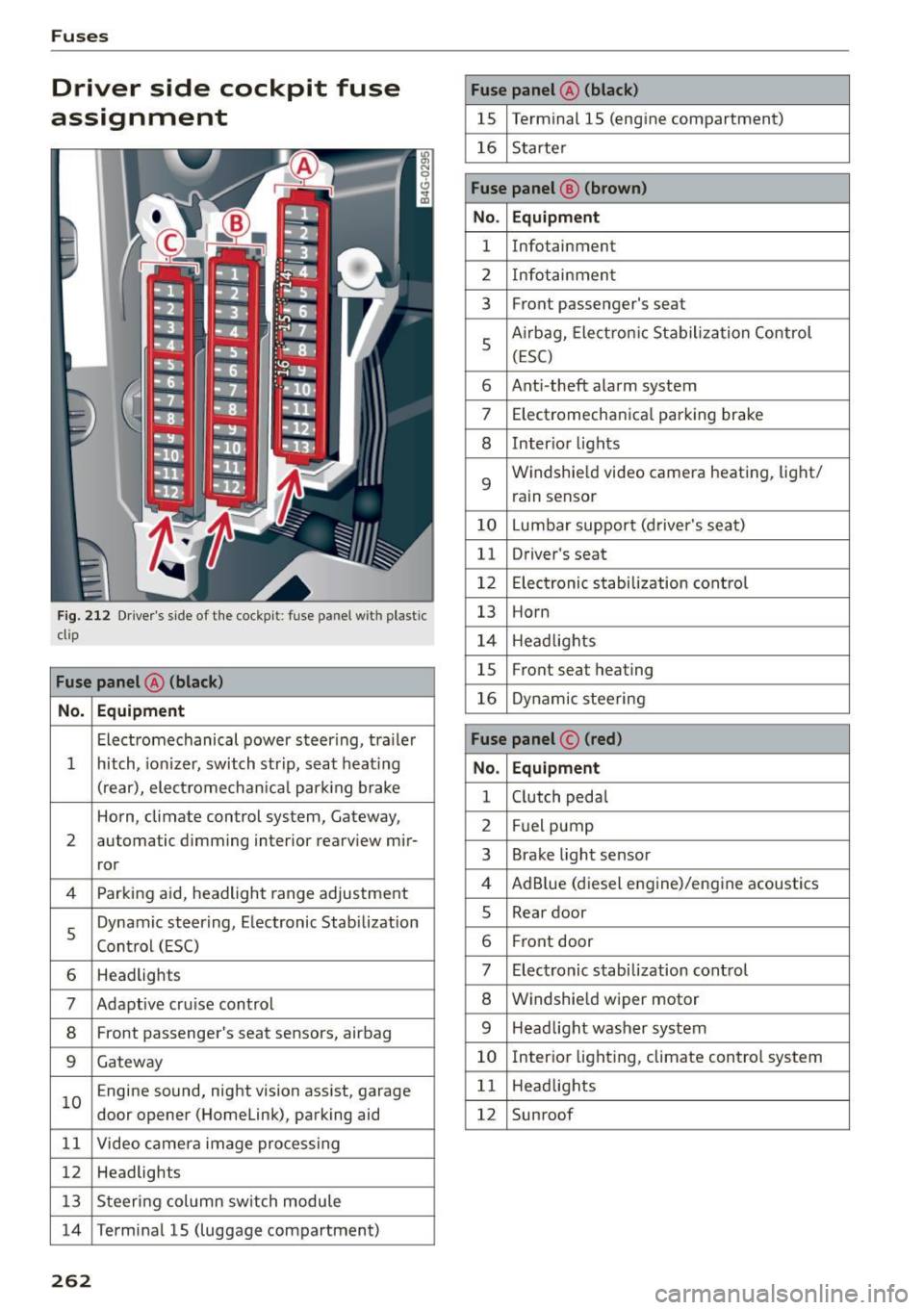
Fuses
Driver side cockpit fuse
assignment
Fig. 212 Driver's side of the cockpit : fuse pa nel w it h plastic
cl ip
Fuse panel @ (black)
No. Equipment
Electromechanical power steer ing, trailer
1 hitch, ionizer, switch strip, seat heating
(rear), electromechanica l park ing brake
Horn, climate control system, Gateway,
2 automatic dimming interior rearview mir-
ror
4 Parking aid, headlight range adjustment
5 Dynamic steering, Electronic Stabilization
Control (ESC)
6 Headlights
7 Adaptive cru
ise control
8 Front passenger's seat sensors, airbag
9 Gateway
10 E
ngine sound, night vision assist, garage
door opener (Homelink), parking aid
11 Video camera image processing
12 Headlights
13 Steering col umn switch module
14 Terminal 15 (luggage compartment)
262
Fuse panel @ (black)
15 Terminal 15 (engine compartment)
16 Starter
Fuse panel @ (brown)
No . Equipment
1 Infotainment
2 Infotainment
3 Front passenger
's seat
5 Airbag, Electron
ic Stabilization Control
(ESC)
6 Anti -theft alarm system
7 Electromechanical parking brake
8 Inter
ior lights
9 Windshie
ld video camera heating , light/
rain sensor
10 Lumbar support (driver's seat)
11 Driver's seat
12 Electronic stabilization control
13 Horn
14 Headlights
15 Front seat heating
16 Dynamic steering
Fuse panel © (red)
No. Equipment
1 Clutch pedal
2 Fuel pump
3 Brake light sensor
4 AdBlue (diesel engine)/engine acoustics
5 Rear door
6 Front
door
7 Electronic stabilization control
8 Windshield wiper motor
9 Headlight washer system
10 Interior lighting, climate control system
11 Headlights
12 Sunroof
Page 265 of 294
M N <( I.J "". rl I.O
"' N I.O rl
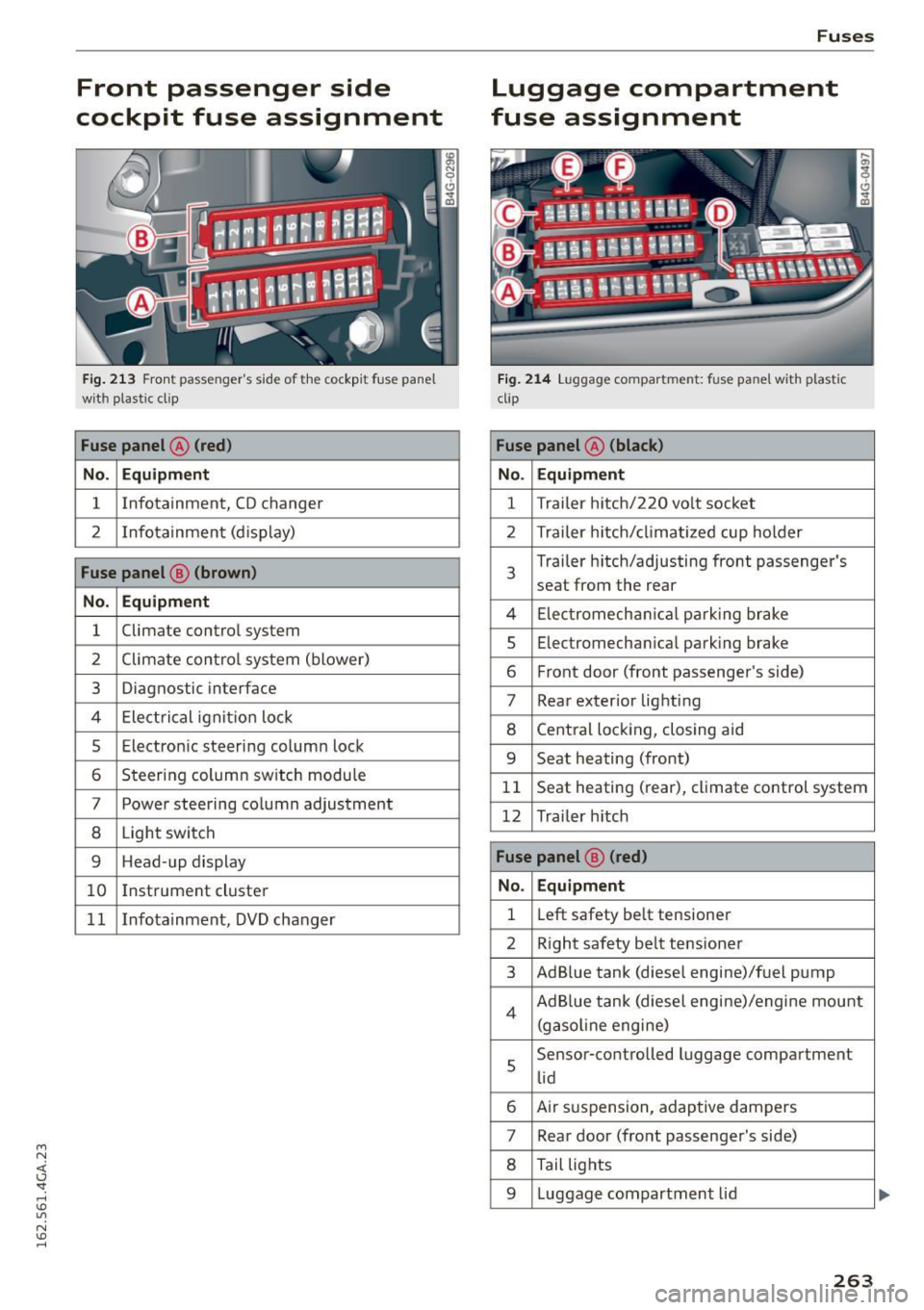
Front passenger side
cockpit fuse assignment
F ig. 21 3 Front passenger 's s ide of t he cockp it fuse pa nel
wit h plast ic cl ip
Fuse panel @ (red)
No. Equipment
1 Infotainment, CD changer
2 I nfotain ment (d isplay)
Fuse panel @ (brown)
No . Equipment
1 Climate control system
2 Climate con
trol sys tem (blower)
3 Diagnostic interface
4 Ele ctric al ignit ion loc k
5 Electro nic steer ing colum n lock
6 Steer ing column sw itch modu le
7 Power steering co lumn adjustment
8 Light switch
9 Head-up display
1 0 I
nstrument cluste r
1 1 Infotainment, DVD changer
Fuses
Luggage compartment
fuse assignment
F ig . 214 Lu ggage compa rtm ent: fuse pa nel w ith plastic
cli p
Fuse panel @ (black)
No. Equipment
1 Trailer h
itch/220 vo lt socket
2 Trailer h itch/ climatize d cup holder
3
Trailer h itch/adjusting front passenger's
seat from the rear
4 El ec tromech anical p ar kin g bra ke
5 Electromecha nica l park ing brake
6 Fr ont door (front passenger 's side)
7 Rear exterior lig hti ng
8 Cent ral loc king, closing aid
9 Seat heating (front)
1 1 Seat heating (rear), climate control system
12 Trailer h itch
Fuse panel @ (r ed)
No. Equipment
1 L
eft safety be lt tensioner
2 R ight safety be lt tensione r
3 AdBlue tank (diesel engine)/f uel p ump
4 Ad B lue tank (diese l engi ne)/engine mount
(g asol ine engine)
s
Sensor -co ntrolled luggage compartment
li d
6 Air s uspension, adaptive dam pers
7 Rear door (fro nt passenge r's side)
8 Tail lig hts
9 Luggage compartment lid
263
Page 276 of 294
Consumer information
Consumer information
Warranty coverages
Your Audi is covered by the following warran
ties:
- New Vehicle Limited Warranty
- Limited Warranty Against Corrosion Perfora-
tion
- Emissions Control System Warranty
- Emissions Performance Warranty
- California Emissions Control Warranty (USA
vehicles only)
- California Emissions Performance Warranty
(USA vehicles only)
Detailed information regarding your warranties
can be found in your
Warranty & Maintenance
booklet .
Operating your vehicle
outside the U.S.A. or
Canada
Government regulations in the United States and
Canada require that automobiles meet specific
emission regulations and safety standards.
Therefore, vehicles built for the U.S.A. and Cana
da differ from vehicles sold in other countr ies.
If you plan to take your veh icle outside the conti
nenta l limits of the United States or Canada,
there is the possibility that:
- unleaded fuels for vehicles with catalytic con
verter may not be available;
- fuel may have a considerably lower octane rat
ing . Improper fuel may cause engine damage;
- serv ice may be inadequate due to lack of proper
serv ice facilities , tools or testing equipment;
- r eplacement parts may not be readily available .
- Nav igat ion systems for vehicles built for the
U.S.A. and Canada will not necessar ily work in
Europe, and may not work in othe r countries
outside North America .
274
(D Note
Aud i cannot be responsib le for mechanical
damage that could result from inadequate
fuel, service or parts availability.
Audi Service Repair
Manuals and Literature
Audi Offic ial Factory Service Manuals and Litera
ture are published as soon as possible after mod
el introduction. Service manuals and literature
are available to order from the Audi Technical Lit
erature Ordering Center at:
www.audi.techliterature .com
Maintenance
General '
Your vehicle has been designed to help keep
maintenance requirements to a minimum. How
ever, a certain amount of regular maintenance is
still necessary to assure your veh icle's safety,
economy and reliability. For deta iled vehicle
maintenance consult your Warranty & Mainte
nance booklet .
Under difficult operating conditions, for exam
ple at extremely low outs ide temperatures, in
very dusty regions, when towing a trailer very fre
quently , etc., some service work should be per
formed between the intervals specified. This ap
plies particularly to:
- oil changes, and
- cleaning or replacing the air filter .
'
@) For the sake of the environment
By regularly maintaining your vehicle, you
help make sure that emission standards are
maintained, thus minimizing adverse effects
on the environment.
Important considerations for you and your
vehicle
The increasing use of electronics, sophisticated
fuel injection and emission control systems , and
the generally increasing technical comp lexity of
llJJ,
Page 287 of 294
Memory function . . . . . . . . . . . . . . . . . . . . . . 56
Mirror Vanity mirror . . . . . . . . . . . . . . . . . . . . . . . . 49
Mirrors dimm ing ..... .. .. .. .... ... .... .. .. .. 48
Exterior mirrors . . . . . . . . . . . . . . . . . . . . . . 47
Monitoring the Advanced Airbag System . . 154
Mul tifunction steering wheel . . . . . . . . . . . . . 24
N
Natural leather care/cleaning
NH TSA 208
Contacting . . . . . . . . . . . . . . . . . . . . . . . . . 133
Night vision ass ist. . . . . . . . . . . . . . . . . . . . . 104
Cleaning the camera . . . . . . . . . . . . . . . . . 206
Nitrogen oxide (NOx) cata lytic converter
refer to Ad Blue . . . . . . . . . . . . . . . . . . . . . . 214
Number of seats . . . . . . . . . . . . . . . . . . . . . . 135
0
Occupant seating positions 127
Octane rating .. ........... .. .. .. .... . 210
Odometer . . . . . . . . . . . . . . . . . . . . . . . . . . . . 26
OFF (four-zone automatic climate contro l) . . 71
OFF (three-zone climate control) . . . . . . . . . . 69
Oi l
refer to Engine oil . . . . . . . . . . . . . . . . . . . 220
Oil change interva l . . . . . . . . . . . . . . . . . . . . . 26
On-board computer . . . . . . . . . . . . . . . . . . . . 24
On-Board Diagnostic System (080) Data Link Connector (DLC) . . . . . . . . . . . . . . 28
Electronic speed limiter . . . . . . . . . . . . . . . . 29
Malfunction Indicator lamp (MIL) . . . . . . . 28
Open door/hood/rear lid warning . . . . . . . . . 23
Opening. .. .. .... ............. .. .. .. .. 30
H ood . . . . . . . . . . . . . . . . . . . . . . . . . . . . . . 218
L uggage compartment lid . . . . . . . . . . . . . . 36
Sunroof .... ................ ... .... .. 40
Windows .. ................ ... .... .. 39
Other consumers (efficiency program) . . . . . 25
Outlet . . . . . . . . . . . . . . . . . . . . . . . . . . . . . . . 58
Owner's Literature
5
p
Paint damage . . . . . . . . . . . . . . . . . . . . . . . . 207
Index
Paint No. . . . . . . . . . . . . . . . . . . . . . . . . . . . . 271
Parking Automatic transmission . . . . . . . . . . . . . . 109
Parking aid Cleaning sensors/camera . . . . . . . . . . . . . 206
Parking brake . . . . . . . . . . . . . . . . . . . . . . . . . 78
Emergency braking function . . . . . . . . . . . . 79
Parking . . . . . . . . . . . . . . . . . . . . . . . . . . . . . 78
Starting from a stop . . . . . . . . . . . . . . . . . . 79
Starting to drive with a trailer . . . . . . . . . . . 79
also refer to Electromechanical
parking brake . . . . . . . . . . . . . . . . . . . . . . . . 78
Parking lights . . . . . . . . . . . . . . . . . . . . . . . . . 43
Parking system Adjusting the display/warning tone . . . . . 124
Cleaning the rearview camera . . . . . . . . . . 116
Malfunction . . . . . . . . . . . . . . . . . . . . . . . . 124
Parking system plus . . . . . . . . . . . . . . . . . . 115
Peripheral cameras . . . . . . . . . . . . . . . . . . 119
Peripheral display . . . . . . . . . . . . . . . . . . . 115
Trailer hitch . . . . . . . . . . . . . . . . . . . . . . . . 124
olsorefertoParkingsystems .. .. .. 115,116
Parking systems . . . . . . . . . . . . . . . . . . . . . . 114
Rearview camera . . . . . . . . . . . . . . . . . . . . 116
Parts replacement . . . . . . . . . . . . . . . . . . . . 276
Pass -through with ski sack . . . . . . . . . . . . . . . 66
PASSENGER AIR BAG OFF light . . . . . . . . . . 155
Passenger protection . . . . . . . . . . . . . . . . . . 185
Pedals . . . . . . . . . . . . . . . . . . . . . . . . . . . . . . 131
Pedestrian detection . . . . . . . . . . . . . . . . . . 104
Peripheral display . . . . . . . . . . . . . . . . . . . . . 115
Physical principles of a frontal collision . . . 136
Polishing . . . . . . . . . . . . . . . . . . . . . . . . . . . . 207
Pollen filter
refer to Pollutant filter . . . . . . . . . . . . . . . . 68
Pollutant filter . . . . . . . . . . . . . . . . . . . . . . . . 68
Power Windows . . . . . . . . . . . . . . . . . . . . . . . . . . . 39
Power locking system
locking/unlocking the veh icle from ins ide . 35
Unlocking and locking vehicle . . . . . . . . . . . 33
Power seat adjustment . . . . . . . . . . . . . . . . . 53
Power windows
Child safety lock . . . . . . . . . . . . . . . . . . . . . . 39
Convenience opening . . . . . . . . . . . . . . . . . . 40
Malfunction . . . . . . . . . . . . . . . . . . . . . . . . . 40
285