rear view mirror AUDI S8 2008 User Guide
[x] Cancel search | Manufacturer: AUDI, Model Year: 2008, Model line: S8, Model: AUDI S8 2008Pages: 404, PDF Size: 52.7 MB
Page 181 of 404
___________________________________________ A_ d_ v_ a_n _ c_ e_ d_ P_a _ r_ k_ i_n --=g=-- S_ y=--- s_t _
e _m _ ___.ffllll
fl::. WARNING (continued )
• The Audi parking system is not a substitute for being careful
and alert when backing up. Be especially careful during parking
and similar maneuvers . Always watch where you are driving and
make sure that nothing is in the way.
• When maneuvering or parking, do not only use the MMI Display
for orientation. Certain objects
· depending on the screen resolu
tion
· may not, or not entirely , be displayed; for example trailer
hitches , chains, narrow posts , or fences .
• Improper reliance on the Audi parking system can cause colli
sions and serious personal injury .
- Never rely only on parking assist when changing backing up.
- Always check rear view mirrors to make sure it is safe to back
up. •
App lies to vehic les: w ith Adva nced Pa rk ing Sys tem with re ar view c ame ra
Notes on distance information
Contro ls a nd eq uip
ment
Fig . 20 3 MMI Display:
displayed red l ine
touche s the bumper Fig
. 204 Actual
di stance from bumper
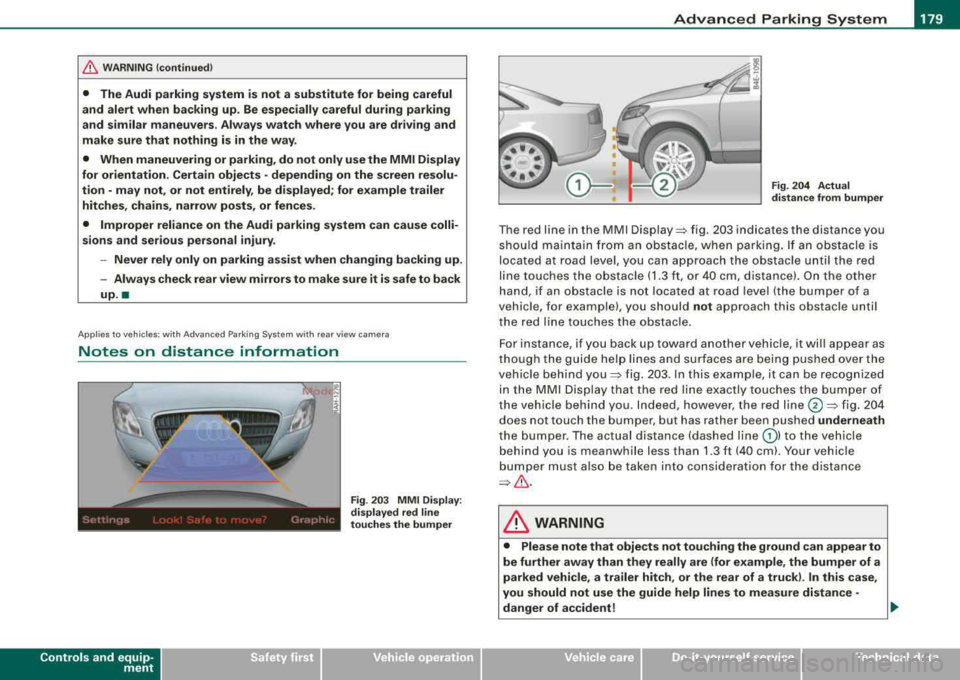
T he red line in the MMI Disp lay~ fig . 20 3 indicates th e distance you
shou ld ma inta in fro m a n ob stacle , when park ing . If an obst acle is
located at road leve l, y ou can approach the o bstacle u nti l th e red
li ne to uche s the obs tacle ( 1.3 ft, o r 40 cm, dis tance). On the othe r
han d, if an obstac le is no t locat ed at roa d leve l (the b umper of a
vehic le, for examp le), you should not approach this obstac le unti l
t he red lin e touch es t he obstac le.
F or instance, if you back up toward another vehic le, it will appea r as
t ho ug h th e gu ide hel p lines and su rfaces are bei ng pu shed ov er the
vehic le b ehind
you~ fig. 2 03 . In t his e xample, it can be reco gnized
i n th e MM I D is pl ay t hat t he red line e xactly touc hes the b um per o f
th e veh icle behind you . In de ed , however, t he red
line @~ fig. 20 4
does not touch the b umper, but ha s rather been pushed underneath
t h e b umper. The ac tual dista nce (dashe d line
G) ) to the vehi cle
beh ind yo u is meanwhile less than 1.3 ft ( 40 cm). Your vehicle
bum per must also be take n in to consi dera ti on for the d istanc e
~& .
& WARNING
• Please note that objects not touching the ground can appear to
be further away than they really are (for example , the bumper of a
parked vehicle, a trailer hitch , or the rear of a truck ). In this case ,
you should not use the guide help lines to measure distance
·
danger of accident! ..
Vehicle care I I irechnical data
Page 182 of 404
___ A_ d_v _ a_ n_c _e _ d_ P_ a_r _k _in ~ g_ S_y _ s_ t_ e_ m ___________________________________________ _
&, WARNING (continued)
• Maintain plenty of distance from an obstacle, so that your
outside mirror or a corner of your vehicle does not collide with any
obstacles -danger of accident!
• The Audi parking system is not a substitute for being careful
and alert when backing up. Be especially careful during parking
and similar maneuvers. Always watch where you are driving and
make sure that nothing is in the way.
• When maneuvering or parking, do not only use the MMI Display
for orientation. Certain objects -depending on the screen resolu
tion -may not, or not entirely, be displayed; for example trailer
hitches, chains, narrow posts, or fences .
•
Applies to vehicles: with Advanced Parking System with rear view camera and a trailer hitch
i nstalled according to factory spec ifications
Towing hitch
For vehicles with a trailer hitch installed according to factory speci
fications, the rear acoustic parking sensors are not activated when
the vehicle is put in reverse gear while an electrical connection to
the trailer socket* is established . No distance alert occurs in the rear
=> page 170. The rear -view camera picture => page 173 is displayed
without orientation lines and without blue surfaces. •
Settings in the MMI
Applies to vehicles : w ith Advanced Par king Sys tem with rear vie w camera
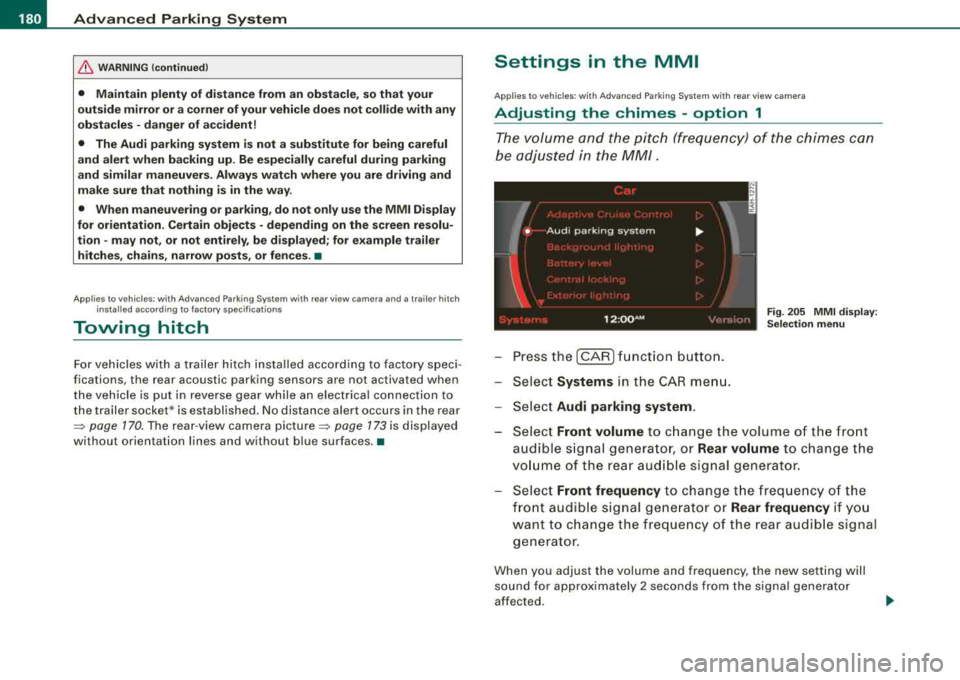
Adjusting the chimes -option 1
The volume and the pitch (frequency) of the chimes can
be adjusted in the MM/.
Fig. 205 MMI display:
Selection menu
- Press the [CAR] function button.
- Select
Systems in the CAR menu.
- Select
Audi parking system .
-Select Front volume to change the volume of the front
audible signal generator, or
Rear volume to change the
volume of the rear audible signal generator.
- Select
Front frequency to change the frequency of the
front audible signal generator or
Rear frequency if you
want to change the frequency of the rear audible signal
generator.
When you adjust the volume and frequency, the new setting will
sound for approximately 2 seconds from the signal generator
affected.
Page 185 of 404
__________________________________________ A_ d_v _a_ n_ c_e _d _ P_a_ r_ k_ i_n ~g _ S_y_ s_ t_ e_ m
___ ffllll
"O ff" se tting
If yo u have set t he off function, both the rear -view camera and the
visual disp lay wi ll be deactivated. The acoustic parking assist
rema ins active .
[ i] Tip s
If you change the settings in the MM I, the new settings do not
become active unti l the parking assis t is sw itched on again .•
Safety tips
Ap plies to vehi cles : w ith Ad vance d Par king Sys tem with re a r view c ame ra
Acoustic parking system error message
If you hear a continuous tone for several seconds while the front
and back parking ass ist w ith visual d isplay is activated and the LED
in the switch
P wA flashes when you engage the reverse gear, there is
a malfunction in the acoustic parking assist.
This system error is immed iate ly output after:
• Every manua l activation via the switch
Pw.o. => page 170,
• Reverse gear is engaged for t he first t ime during an ign it ion
cycle, or
• An error is detected dur ing operation.
[ i ] Tip s
If the system reports an error, have an Audi dealer or an authorized
dea lership correct this system error .•
Controls and equip ment
Applies to vehi cles: w it h Ad vanced Par king Sy stem wit h rea r vie w camera
Rear-view camera tips
We recommend that you pract ice parking with t he rear -v iew ca mera
in a traffic-free location, or parking
lot, to become familiar with the
system, the orien tation lines, and their fu nction . When do ing th is,
there should be good light and weather conditions .
I n the MMI Disp lay, objects or vehicles appear closer or further away
if:
• you are driving in reverse gear from a level surface onto an
inc lin e, or a downward slope,
• you are dr iving in reverse gear toward protruding objects,
• the vehicle is carrying too much load in the rear .
The accuracy of the orientation lines and b lue surfaces diminishes
if :
• the Adaptive Air Suspension is defec tive, or the dynamic or lift
mode is switched on,
• the rear -view camera does not provide a re liable image, for
examp le, in poor vis ibility conditions or if the lens is dirty,
• the image on the screen is not visib le due to sun glare and reflec
t ion.
Caring for the re ar-v iew c amer a len s:
• Dampen the lens with a household a lcoho l- based g lass c leaner,
and c lean the lens with a dry cloth.
• Remove snow with a hand brush.
• Remove ice, preferably with de -icing
spray=> 0.
& WARNING
• The rear -view c amera does not r epla ce the vie w to the re ar a nd
the rear view mirror s.
• The rear-view camer a - be cause of t echn ical lim itations -doe s
not show the entire are a behind the
vehicle => page 174, fig. 197. ~