mirror AUDI S8 2008 Owner's Manual
[x] Cancel search | Manufacturer: AUDI, Model Year: 2008, Model line: S8, Model: AUDI S8 2008Pages: 404, PDF Size: 52.7 MB
Page 174 of 404

-
Advanced Parking System
--~-------------
The image in the visual display can be switched off on the MMI
display=> page 182. The acoustic distance warning remains active.
If you press a function button on the MMI terminal, the visual
display disappears. Manually switching the parking assist on again
via the
P, Yi switch shows the visual image on the MMI display again .
Further informat ion regard ing the MMI terminal is included in the
MMI user 's manual.
Rear-view camera (rear view)
The rear-view camera picture=> page 175, fig. 198 appears on the
MMI display as a mirror image. The rear -view camera picture has
orientation lines and marked surfaces projected into it as an aid to
the parking
process => page 173. The red line in the picture
=> page 173, fig. 194 or=> page 173, fig. 195 indicates the collision
area . You should stop backing up, preferably before you reach this
point =>& .
If your vehicle is close to an obstacle, the visual distance display
also appears in the picture from the rear -view camera. This superim
posed display is intended to help display the relevant critical vehicle
area.
If the visual display is shown on the MMI display and you press the
control button with the
Rear view function=> page 170, fig. 193, the
picture from the rear -view camera is displayed.
If the picture from the rear-view camera is shown and you press the
control button with the
Graphic function => page 175, fig. 198, the
visual display is shown.
The picture from the rear-view camera can be switched off on the MMI
display => page 182. The acoustic distance warning remains
active.
If you press a function button on the MMI terminal, the rear -view
camera picture disappears. The rear-view camera picture reappears
the next time you park. But the picture from the rear -view camera
can also be shown again on the MMI display by manually switching
off and on with the
P' Yi switch . Further information regarding th e
MMI terminal is included in the MMI user 's manual.
& WARNING
• Sensors have dead spaces in which objects cannot be
detected. Be especially careful to check for small children and
animals before backing up . Small children and animals will not
always be detected by the sensors.
• The Audi parking system is not a substitute for being careful
and alert when backing up. Be especially careful during parking
and similar maneuvers . Always watch where you are driving and
make sure that nothing is in the way.
• Remember that low obstacles which have already been
signaled may pass below the system's sensing zone when the
vehicle is backing up. The fact that the signal stops does not mean
that you have cleared the obstacle. When the signal stops, impact
is imminent. Objects such as trailer hitches, chains, narrow posts
or fences covered by a thin layer of paint may not always be
detected by the system. They can still damage your vehicle
without warning.
• Always make sure that the volume and frequency of the chimes
is adjusted so that you can easily hear the acoustic distance signal
even if the radio is playing, the air-conditioner blower is on High or
there is a high level of outside noise.
- Check the settings whenever someone else has driven the
vehicle before you.
• Improper reliance on the Audi parking system can cause colli
sions and serious personal injury.
- Never rely only on parking assist when backing up.
- Always check rear view mirrors to make sure it is safe to back
up.
[ i] Tips
• The rear-view camera picture is available as soon as the MMI
Display or the MMI is switched on, or the start -up phase is
completed .
Page 176 of 404

___ A_ d_v _a_ n_ c_e _ d_ P_ a
_ r_k _in -= g'-- S...,_y _s_ t_ e_ m ___________________________________________ _
& WARNING
• The rear-view camera has blind spots , in whi ch objects cannot
be detected. Be especially careful to check for small children and
an imals before ba ck ing up . Small children and animals will not
always be detected by the sensors.
• The Audi parking system is not a substitute for being careful
and alert when backing up. Be especially careful during parking
and similar maneu vers . Always watch where you are driving and
make sure that nothing is in the way .
• Remember that low obsta cles which have already been
signaled may pass below the system's sensing zone when the
vehicle is ba cking up . The fact that the signal stops does not mean
that you have cleared the obstacle . When the signal stops , impact
is imminent . Objects such as trailer hit ches , chains , narrow posts
or fences covered by a thin layer of paint may not always be
detected by the system. They can still damage your vehicle
without warning .
• Always make sure that the volume and frequency of the chimes
is adjusted so that you can easily hear the acoustic distance signal
even if the radio is playing, the air -conditioner blower is on High or
there is a high level of outside noise .
- Check the settings whenever someone else has driven the
vehicle before you.
• Improper reliance on the Audi parking system can cause colli
sions and serious personal injury .
- Never rely only on parking assist when chang ing backing up .
- Always check rear view mirrors to make sure it is safe to back
up .
[ i J Tips
• Before parking with the rear -view camera, the Adaptive Air
S us pe nsi on sta ndard or automatic mo de mus t be switch ed on
=> page 27.
• T he rear -view camera pictur e is avai lable as soon as the MMI
Display or the M MI is sw itche d on, o r the start -up pha se is
completed.
• In order fo r th e re ar-v iew camera to func tion prop erly, the
camera
lens=> page 170, fig. 191 must be kept clean, and free of
sn ow a nd i ce. Please follo w the ad ditio nal no tes
on => page 783 .
• T he camera coverage angle changes when the trunk lid is open.
Theref ore, the r ear-view camera picture is d isplaye d w ithout ori en
tation lines and without blue surfaces.
• Observe an d follow t he no tes on towing mo de
on => pag e 180. •
App lies to veh icles : w ith Advanced Parking System with rear view came ra
Rear-view camera coverage area
0
.. - --
®
F ig . 196 Top vi ew :
Re ar- vie w ca mera
coverage a rea
F ig . 197 Side vi ew:
Covered ar ea
G) and
uncover ed area
0 of
the rear-v iew camera
~
Page 180 of 404
___ A_ d
_ v_a _ n_ c_ e_d _ P_a _ r_ k _i_n ~g _ S_y _ s_ t_ e_ m _________________________________________ _
&, WARNING (continued)
you should not use the guide help lines to measure distance -
danger of accident!
0 Note
In the MMI Display, the direction of travel of the vehicle rear is repre
sented depending on the steering wheel angle . The vehicle front
swings out more than the vehicle rear.
[ i] Tips
• In order for the rear-view camera to function properly, the
camera
lens=> page 170, fig . 191 must be kept clean, and free of
snow and ice. Please follow the additional notes
on=> page 183.
• The positions of the orientation lines/ surfaces are displaced up
or down if the parking process is carried out with the rear -view
camera in Adaptive Air Suspension=> page 21 dynamic or lift mode.
Therefore, the accuracy is reduced.•
Special parking situations
Applies to vehicles : with Advance d Par king Sys tem wi th rear view came ra
Parking next to obstacles
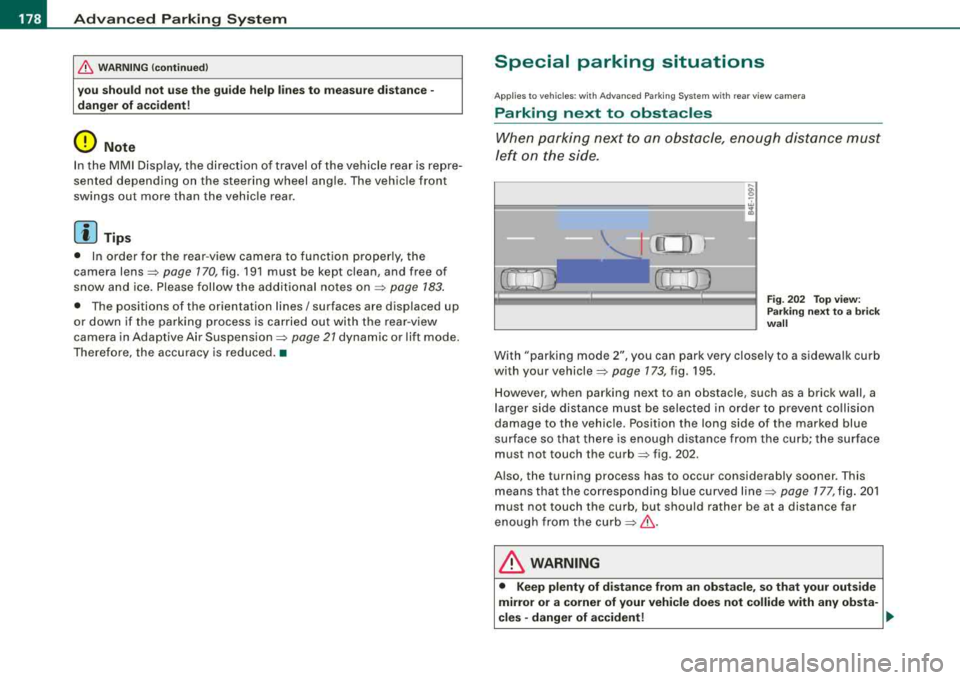
When parking next to an obstacle, enough distance must
left on the side.
Fig. 202 Top view:
Parking next
to a brick
wall
With "parking mode 2", you can park very closely to a sidewalk curb
with your
vehicle=> page 173, fig. 195.
However, when parking next to an obstacle, such as a brick wall, a
larger side distance must be selected in order to prevent collision
damage to the vehicle. Position the long side of the marked blue
surface so that there is enough distance from the curb; the surface
must not touch the
curb=> fig . 202.
Also, the turning process has to occur considerably sooner. This
means that the corresponding blue curved
line=> page 177, fig. 201
must not touch the curb, but should rather be at a distance far
enough from the
curb=>&,.
& WARNING
• Keep plenty of distance from an obstacle, so that your outside
mirror or a corner of your vehicle does not collide with any obsta-
cles -danger of accident!
~
Page 181 of 404
___________________________________________ A_ d_ v_ a_n _ c_ e_ d_ P_a _ r_ k_ i_n --=g=-- S_ y=--- s_t _
e _m _ ___.ffllll
fl::. WARNING (continued )
• The Audi parking system is not a substitute for being careful
and alert when backing up. Be especially careful during parking
and similar maneuvers . Always watch where you are driving and
make sure that nothing is in the way.
• When maneuvering or parking, do not only use the MMI Display
for orientation. Certain objects
· depending on the screen resolu
tion
· may not, or not entirely , be displayed; for example trailer
hitches , chains, narrow posts , or fences .
• Improper reliance on the Audi parking system can cause colli
sions and serious personal injury .
- Never rely only on parking assist when changing backing up.
- Always check rear view mirrors to make sure it is safe to back
up. •
App lies to vehic les: w ith Adva nced Pa rk ing Sys tem with re ar view c ame ra
Notes on distance information
Contro ls a nd eq uip
ment
Fig . 20 3 MMI Display:
displayed red l ine
touche s the bumper Fig
. 204 Actual
di stance from bumper
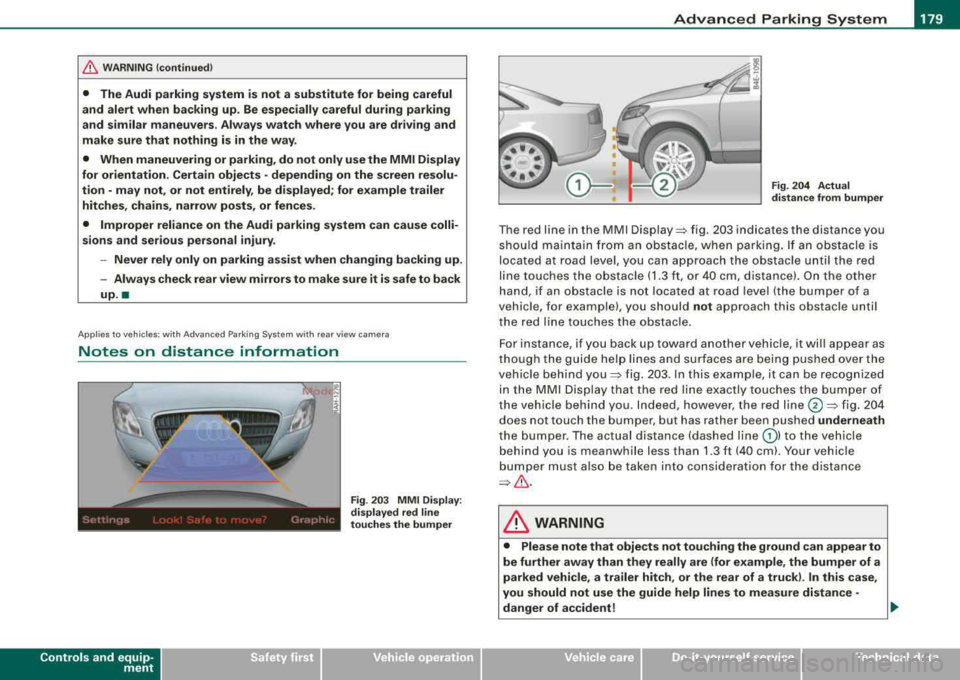
T he red line in the MMI Disp lay~ fig . 20 3 indicates th e distance you
shou ld ma inta in fro m a n ob stacle , when park ing . If an obst acle is
located at road leve l, y ou can approach the o bstacle u nti l th e red
li ne to uche s the obs tacle ( 1.3 ft, o r 40 cm, dis tance). On the othe r
han d, if an obstac le is no t locat ed at roa d leve l (the b umper of a
vehic le, for examp le), you should not approach this obstac le unti l
t he red lin e touch es t he obstac le.
F or instance, if you back up toward another vehic le, it will appea r as
t ho ug h th e gu ide hel p lines and su rfaces are bei ng pu shed ov er the
vehic le b ehind
you~ fig. 2 03 . In t his e xample, it can be reco gnized
i n th e MM I D is pl ay t hat t he red line e xactly touc hes the b um per o f
th e veh icle behind you . In de ed , however, t he red
line @~ fig. 20 4
does not touch the b umper, but ha s rather been pushed underneath
t h e b umper. The ac tual dista nce (dashe d line
G) ) to the vehi cle
beh ind yo u is meanwhile less than 1.3 ft ( 40 cm). Your vehicle
bum per must also be take n in to consi dera ti on for the d istanc e
~& .
& WARNING
• Please note that objects not touching the ground can appear to
be further away than they really are (for example , the bumper of a
parked vehicle, a trailer hitch , or the rear of a truck ). In this case ,
you should not use the guide help lines to measure distance
·
danger of accident! ..
Vehicle care I I irechnical data
Page 182 of 404
___ A_ d_v _ a_ n_c _e _ d_ P_ a_r _k _in ~ g_ S_y _ s_ t_ e_ m ___________________________________________ _
&, WARNING (continued)
• Maintain plenty of distance from an obstacle, so that your
outside mirror or a corner of your vehicle does not collide with any
obstacles -danger of accident!
• The Audi parking system is not a substitute for being careful
and alert when backing up. Be especially careful during parking
and similar maneuvers. Always watch where you are driving and
make sure that nothing is in the way.
• When maneuvering or parking, do not only use the MMI Display
for orientation. Certain objects -depending on the screen resolu
tion -may not, or not entirely, be displayed; for example trailer
hitches, chains, narrow posts, or fences .
•
Applies to vehicles: with Advanced Parking System with rear view camera and a trailer hitch
i nstalled according to factory spec ifications
Towing hitch
For vehicles with a trailer hitch installed according to factory speci
fications, the rear acoustic parking sensors are not activated when
the vehicle is put in reverse gear while an electrical connection to
the trailer socket* is established . No distance alert occurs in the rear
=> page 170. The rear -view camera picture => page 173 is displayed
without orientation lines and without blue surfaces. •
Settings in the MMI
Applies to vehicles : w ith Advanced Par king Sys tem with rear vie w camera
Adjusting the chimes -option 1
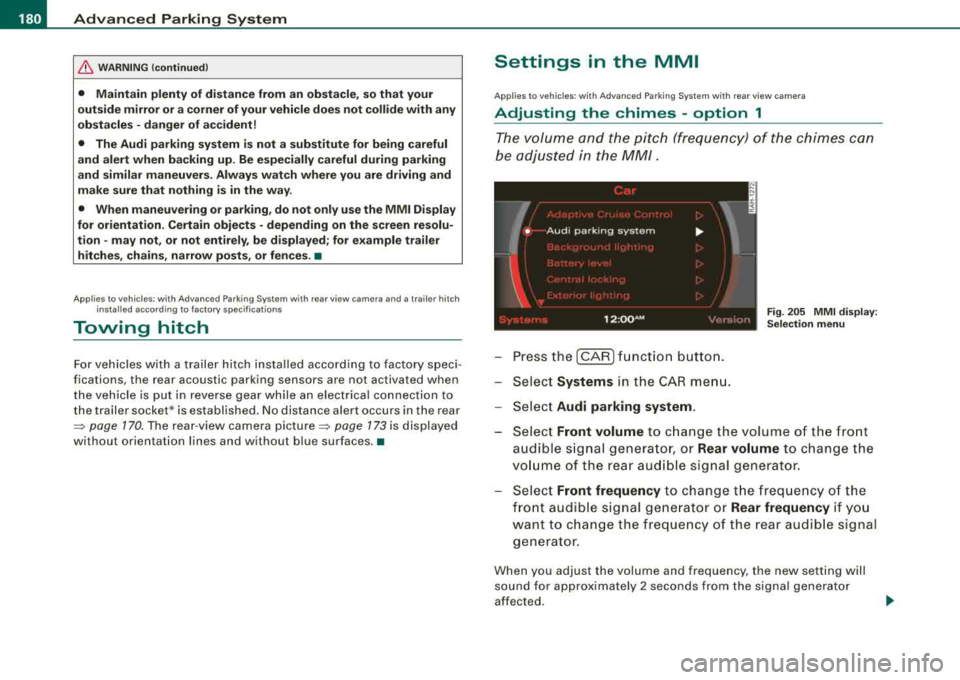
The volume and the pitch (frequency) of the chimes can
be adjusted in the MM/.
Fig. 205 MMI display:
Selection menu
- Press the [CAR] function button.
- Select
Systems in the CAR menu.
- Select
Audi parking system .
-Select Front volume to change the volume of the front
audible signal generator, or
Rear volume to change the
volume of the rear audible signal generator.
- Select
Front frequency to change the frequency of the
front audible signal generator or
Rear frequency if you
want to change the frequency of the rear audible signal
generator.
When you adjust the volume and frequency, the new setting will
sound for approximately 2 seconds from the signal generator
affected.
Page 185 of 404
__________________________________________ A_ d_v _a_ n_ c_e _d _ P_a_ r_ k_ i_n ~g _ S_y_ s_ t_ e_ m
___ ffllll
"O ff" se tting
If yo u have set t he off function, both the rear -view camera and the
visual disp lay wi ll be deactivated. The acoustic parking assist
rema ins active .
[ i] Tip s
If you change the settings in the MM I, the new settings do not
become active unti l the parking assis t is sw itched on again .•
Safety tips
Ap plies to vehi cles : w ith Ad vance d Par king Sys tem with re a r view c ame ra
Acoustic parking system error message
If you hear a continuous tone for several seconds while the front
and back parking ass ist w ith visual d isplay is activated and the LED
in the switch
P wA flashes when you engage the reverse gear, there is
a malfunction in the acoustic parking assist.
This system error is immed iate ly output after:
• Every manua l activation via the switch
Pw.o. => page 170,
• Reverse gear is engaged for t he first t ime during an ign it ion
cycle, or
• An error is detected dur ing operation.
[ i ] Tip s
If the system reports an error, have an Audi dealer or an authorized
dea lership correct this system error .•
Controls and equip ment
Applies to vehi cles: w it h Ad vanced Par king Sy stem wit h rea r vie w camera
Rear-view camera tips
We recommend that you pract ice parking with t he rear -v iew ca mera
in a traffic-free location, or parking
lot, to become familiar with the
system, the orien tation lines, and their fu nction . When do ing th is,
there should be good light and weather conditions .
I n the MMI Disp lay, objects or vehicles appear closer or further away
if:
• you are driving in reverse gear from a level surface onto an
inc lin e, or a downward slope,
• you are dr iving in reverse gear toward protruding objects,
• the vehicle is carrying too much load in the rear .
The accuracy of the orientation lines and b lue surfaces diminishes
if :
• the Adaptive Air Suspension is defec tive, or the dynamic or lift
mode is switched on,
• the rear -view camera does not provide a re liable image, for
examp le, in poor vis ibility conditions or if the lens is dirty,
• the image on the screen is not visib le due to sun glare and reflec
t ion.
Caring for the re ar-v iew c amer a len s:
• Dampen the lens with a household a lcoho l- based g lass c leaner,
and c lean the lens with a dry cloth.
• Remove snow with a hand brush.
• Remove ice, preferably with de -icing
spray=> 0.
& WARNING
• The rear -view c amera does not r epla ce the vie w to the re ar a nd
the rear view mirror s.
• The rear-view camer a - be cause of t echn ical lim itations -doe s
not show the entire are a behind the
vehicle => page 174, fig. 197. ~
Page 201 of 404
________________________________________________ D_r_iv _ i
_ n..; g::;_ S_ a_ fe---' ly'---_JIII
Important things to do before driving
Safety is everybody's job! Vehicle and occupant safety
always depends on the informed and careful driver.
For your safety and the safety of your passengers, before
driving always:
- Make sure that all lights and signals are operat ing
correctly.
- Make sure that the tire pressure is correct.
- Make sure that all windows are clean and afford good
visibility to the outside.
- Secure all luggage and other items
carefully => page 109.
-Make sure that nothing can interfere with the pedals.
- Adjust front seat, head restraint and mirrors correctly for your height .
- Instruct passengers to adjust the head restraints
according to their height.
- Make sure to use the right child restraint correctly to
protect
children => page 243, "Child Safety".
- Sit properly in your seat and make sure that your passen
gers do the
same => page 86, "General recommenda
tions".
- Fasten your safety belt and wear it properly. Also instruct
your passengers to fasten their safety belts properly
=> page 209. •
Controls and equip
ment Safety first
Vehicle operation
What impairs driving safety?
Safe driving is directly related to the condition of the
vehicle, the driver as well as the driver's ability to concen
trate on the road without being distracted.
The driver is responsible for the safety of the vehicle and all
of its occupants. If your ability to drive is impaired, safety
risks for everybody in the vehicle increase and you also
become a hazard to everyone else on the road
=>& .There
fore:
Do not let yourself be distracted by passengers or by
using a cellular telephone .
NEVER drive when your driving ability is impaired (by
medications, alcohol, drugs, etc.).
- Observe all traffic laws, rules of the road and speed limits
and plain common sense .
- ALWAYS adjust your speed to road, traffic and weather
conditions.
- Take frequent breaks on long trips. Do not drive for more
than two hours at a stretch.
- Do NOT drive when you are tired, under pressure or when
you are stressed .
& WARNING
Impaired driving safety increases the risk of serious personal
injury and death whenever a vehicle is being used. •
Vehicle care Do-it-yourself service Technical data
Page 284 of 404
llffll.___T_ r_a _il _e_ r_ t_o _w_ i_ n """g"'- ---------------------------------------------------
Trailer towing
Driving with a trailer
General information
Your Audi was designed primarily for passenger transpor
tation.
If you plan to tow a trailer, please remember that the add it ional load
wi ll affect durability, economy and performance.
Tra iler towing not on ly p laces more stress on the vehicle, it a lso ca lls
for more concentration from the driver.
For this reason, always fol low the ope rating and driv ing instruc tions
provided and use common sense.
(D Note
If you are go ing to tow a trai ler, you must activate the trailer opera
tion
mode => page 189, "Towing a Trailer". •
Technical requirements
Traile r hit ch
Use a we ight-carrying hitch conforming to the gross trai ler weight.
The hitch must be suitable for your vehic le and trailer and must be
mounted secure ly on the ve hicle's chass is at a
technically sound
location. Use only a trailer hitch with a removable ball mount.
Always check wit h the trai ler hitch manufacturer to make s ure that
you are using the correct hitch .
Do not use a bumper hit ch.
The hitc h must be installed in such a way t hat it does not interfere
with the impact-absorbing bumper system. No modifications
should be made to the veh ic le exhaust a nd brake systems. F rom time to time, check that all hitch mounting bolts remain secure
ly
fastened .
When yo u are no t towing a trailer, re move the tra ile r hitch ball
mount. This prevents the hitch from causing damage shou ld your
vehic le be struck from
behind =>& .
Traile r br ake s
If your tra iler is equipped with a braking syste m, check to be sure
that it conforms to al l regu lations .
The tra iler hydraul ic brake sys tem must not be di rect ly co nnected to
t he vehic le's hydrau lic brake system .
Safety chains
Always use safety chains between your vehicle and the trailer.
Trailer light s
Trai ler lights must meet a ll regulations. Be sure to check with your
Aud i dea ler for correc t wir ing, sw itch es and relays .
Mirrors
If you are unable to see the traf fic behind you using the regu lar
outside mirrors, then you
must instal l extended mirrors. It is impor
t ant that you
always have c lear v ision to the rear.
& WARNING
After removing the tr ailer hitch , do not store it in your vehi cle . In
ca se of sudden braking , the hitch could fl y forward and injure you
or your p assenger s.•
Page 294 of 404
IIJIL--_C_ l_
e _a _n_ in_g=.. a
_ n_d___, p'--- ro_ t_e _c_ t_ i_o _n _____________________________________________ _
Plastic and vinyl
Plastic needs special care.
Use a clean, damp cloth or spong e to remove dust and light surface
dirt. For other soil, use a lukewarm all -purpose cleaning solution or
a mild saddle soap for vinyl trim. Remove water spo ts and traces of
soap with a clean, damp cloth or sponge. Use a clean, soft cloth to rub dry .
Grease, tar or oil stains can be removed with a clean cloth or sponge
soaked with all-purpose cleaner or with a solvent designed espe
cially to clean vinyl.
Occasionally apply a colorless vinyl or leather preservative to retain
the material's luster and pliability .
& WARNING
Always read and heed all WARNINGS and other information
~ page288. •
Aluminum trim
Use only neutral-pH products to remove spots and deposits from
aluminum surfaces. Chrome care products and alkaline cleaners
will attack aluminum surfaces and can damage them over time.
& WARNING
Always read and heed all WARNINGS and other information
~ page 288 . •
Touch-up paint
Minor paint damages should be touched up immediately.
-Use either a touch-up paint stick or spray paint to cover
minor scratches and nicks.
Your Audi dealer has touch-up paint for minor scratches and stone
chips . Scratches should be touched up soon after they occur to
prevent corrosion.
If a spot starts to rust, however, a simple touch-up job will not be
enough. The affected surface must be sanded smooth and coated
with an anti-rust primer before the painted finish can be restored.
The number for the original vehicle paint can be found on the
vehicle identification
label~ page 374.
& WARNING
Always read and heed all WARNINGS and other information
~ page 288. •
Windows
Clear vision to all sides.
Clean all windows regularly to remove road film and car
wash wax buildup.
-Remove snow from windows using a brush.
-Use a plastic ice scraper to remove ice from windows and
mirrors.
-Remove other residue on the windows with a spray-on
glass cleaner.
-Wipe the windows dry with a clean piece of cloth or
kitchen paper towel.
Page 295 of 404
_____________________________________________ C_ l_ e _a_ n_ in~ g_a
_ n_d_ p_ r_ o_ t
_ e_ c_t _io _ n __ ffllll
•
The best way to remove snow from windows and mirrors is to use a
brush. Use a non -abrasive
plastic ice scraper -better still, a spray
deicer -to remove
ice from windows and mirrors .
Oil, grease or silicone residue can be removed with
glass cleaner or
silicone remover . However, wax residue requires the use of a
specially formulated solvent. Please contact your Audi dealer for
advice on safe products for wax removal.
Windows should also be cleaned on the inside at regular intervals .
Never dry windows with the same chamois that you use to dry
painted surfaces . Wax residue on the chamois can impair vision
through the windows.
& WARNING
• Always read and heed all WARNINGS and other information
=> page 288 .
• The windshield must not be treated with water-repellent mate
rials . They can increase glare under poor visibility conditions such
as wetness, darkness, or when the sun is low on the horizon. In
addition, they can cause the windshield wipers to chatter.
0 Note
• Never use warm or hot water to remove snow and ice from
windows and mirrors. This could cause the glass to crack.
• To prevent damage to the wires of the rear defogger, do not place
any adhesive stickers on the inside of the rear window over the
wires .
• To help prevent dirt from scratching the window, always scrape
in a forward direction -pushing the scraper away from you -never
back and forth. •
Weatherstrips
Complete car care includes the weatherstrips as well.
-Apply a suitable rubber conditioner to the weatherstrips
from time to time.
To be able seal properly, the weatherstrips around the hood, doors,
rear lid, etc . must remain pliable. Spray the weatherstrips with sili
cone or coat them with talcum powder or glycerine to retain the
flexibility of the rubber and to protect them against freezing in the
winter.
& WARNING
Always read and heed all WARNINGS and other information
=> page 288.
[ i ] Tips
Keep silicone sprays off the windshield to avoid wiper smear in
rain. •
Cast (light) alloy wheels
Cast (light) alloy wheels require special care.
-Wash the wheels with a sponge or hose brush every
other week.
-For deep cleaning afterwards, use only a dedicated acid
free cast alloy wheel cleaner.
-Rub a coat of liquid wax onto the rims every three month.
Be sure to reach and treat all parts of the rim.
To preserve the decorative appearance of the cast alloy wheels,
some special care is necessary . In addition to road dirt and salt,
Vehicle care