buttons AUDI S8 2009 User Guide
[x] Cancel search | Manufacturer: AUDI, Model Year: 2009, Model line: S8, Model: AUDI S8 2009Pages: 408, PDF Size: 91.63 MB
Page 127 of 408
Warm and cold -
-------------------'
Rear climate controls
Applies to vehic les: with rear a ir condition ing
Controls
This overview is to assist you in familiarizing yourself with
the air conditioning controls .
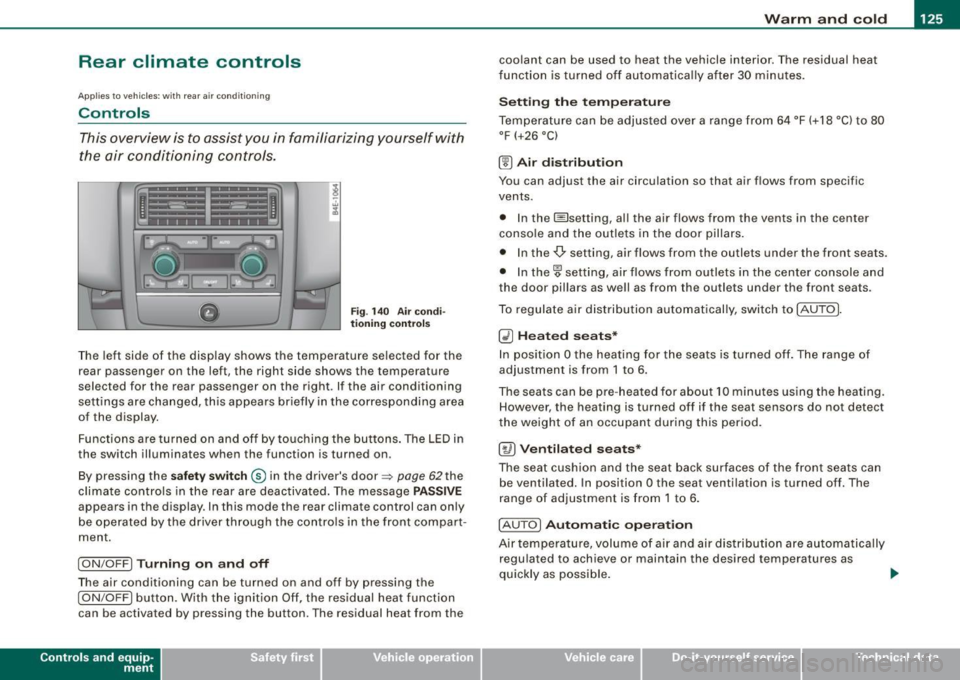
Fig. 140 Air condi
tioning control s
The left side of the display shows the temperature selected for the
rear passenger on the left, the right side shows the temperature
selected for the rear passenger on the right. If the air conditioning
settings are changed, this appears briefly in the corresponding area
of the display.
Functions are turned on and off by touching the buttons . The LED in
the switch illuminates when the function is turned on .
By pressing the
safety switch ® in the driver's door=> page 62the
climate controls in the rear are deactivated. The message
PASSIVE
appears in the display. In this mode the rear climate control can on ly
be operated by the driver through the contro ls in the front compar t
ment.
I ON/OFF] Turning on and off
The air conditioning can be turned on and off by pressing the
I ON/OFF] button. With the ignition Off, the residual heat function
can be activated by pressing the button. The residual heat from the
Con tro ls and eq uip
ment
coolant can be used to heat the vehicle interior. The residual heat
fun ction is turned off automatica lly after 30 minu tes.
Setting the temperature
Temperature can be adjusted over a range from 64 °F (+18 °C) to 80
°F
(+26 °C)
® Air distribution
You can adjust the air circulation so that air flows from specific
vents.
• In the I isetting, al l the air flows from the vents in the center
conso le and the outle ts in the door pillars.
• In the-,!) setting, air flows from the outlets under the front seats.
• In the~ setting, air flows from outlets in the center console and
the door pil lars as we ll as from the outlets under the front seats.
To regulate air distribution automatically, switch to !AU TO].
~ Heated seats*
In position O the heating for the seats is turned off. The range of
adjustment is from 1 to 6.
The seats can be pre-heat ed for about 10 minutes using the heating.
However, the heating is turned off if the seat sensors do not detect
the weight of an occupant during this period.
[~ ) Ventilated seats*
The seat cushion and the seat back surfaces of the front seats can
be ventila ted. In position
O the seat ventilation is turned off. The
range of adjustment is from 1 to 6.
! AUTO]
Automatic operation
Air tempe rature, volume of air and air distribution are automatically
regulated to achieve or maintain the desired temperatures as
quickly as possible.
~
Vehicle care I I irechnical data
Page 173 of 408
Automatic transmi ssio n -
------------------'
Applies to vehi cles : wi th tip troni c-st eerin g wh eel
Steering wheel with tiptronic ®
The shift buttons on the steering wheel allow the driver to
shift gears manually.
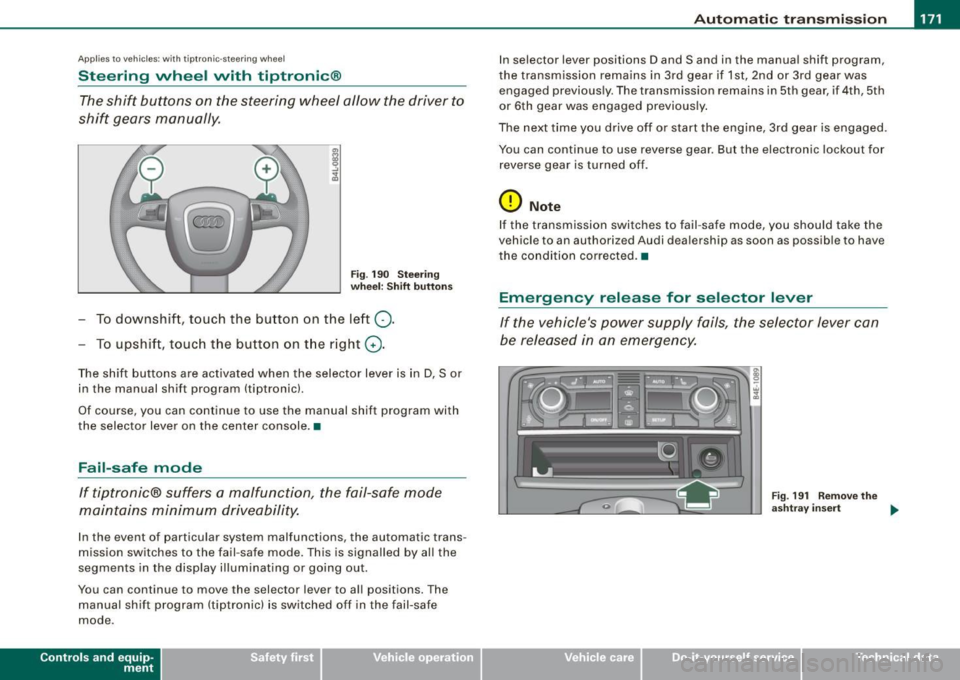
F ig . 190 Steering
whee l: S hift butt ons
- To downshift, touch the button on the left Q .
- To upshift , touch the button on t he right G) .
The shift buttons are activated when the selector lever is in D, Sor
in the manual shift program (tip tronic) .
Of course, you can continue to use the manual shift program with
the selector lever on the center console .•
Fail-safe mode
If tiptronic® suffers a malfunction, the fail-safe mode
maintains minimum driveability.
In the event of particular system malfunctions, the automatic trans
mission switches to the fail -safe mode. This is s ignalled by all the
segments in the display illuminating or going out .
You can continue to move the selector lever to all positions. The manual shift program (tiptronic) is switched off in the fail-safe
mode .
Contro ls and eq uip
ment
In selector lever positions D and Sand in the manual shift program ,
the transmission remains in 3rd gear if 1st, 2nd or 3rd gear was engaged previous ly. The transmission remains in 5th gear, if 4th, 5th
or 6th gear was engaged previously .
The next time you drive off or start the engine, 3rd gear is engaged .
You can continue to use reverse gear . But the electronic lockout for
reverse gear is turned off .
0 Note
If the transmission switches to fail -safe mode, you should take the
vehicle to an au thori zed Audi dea lership as soon as possib le to have
t he condition corrected .•
Emergency release for selector lever
If the vehicle's power supply fails, the selector lever can
be released in an emergency.
Fig . 19 1 Rem ove th e
as htray i nser t
~
Vehicle care I I Technical data
Page 197 of 408
___________________________________________________ H_ o_m _ e_ L_ i_ n _k_ @_R _ __.111
Ap plies to vehic les: with Hom elin k® un iversal remote contro l
Programming the Homelink ® transmitter
The transmitter is programmed in two phases. For rolling
code transmitters, a third phase is also necessary.
~------------ ~ ~--~--------~--- J, iii
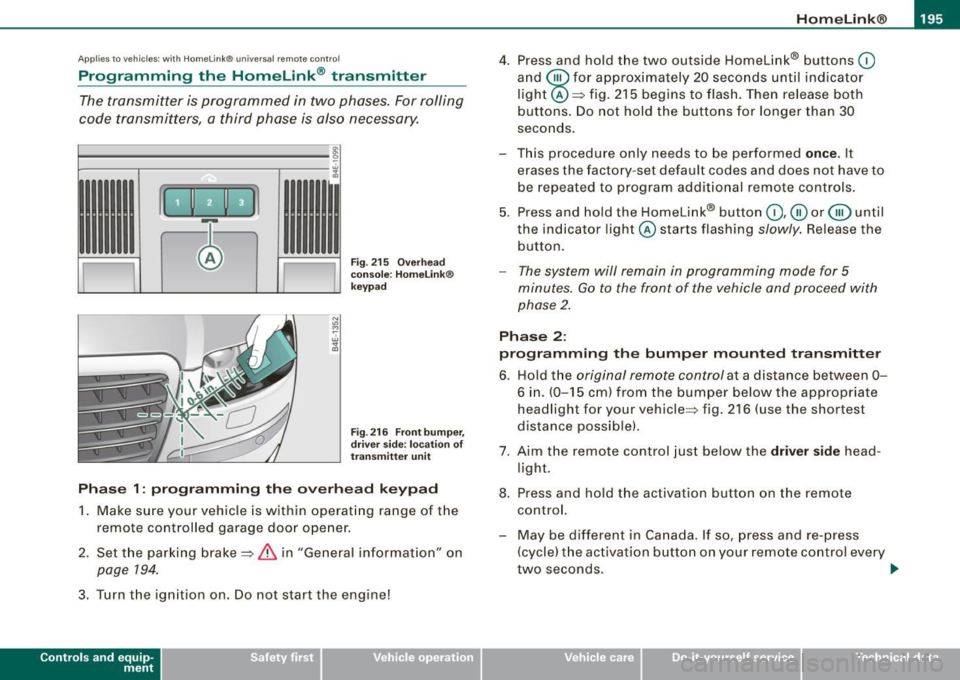
Fig. 215 Overhead
console: HomeLink®
keypad
Fig . 216 Front bumper,
driver side: location of
transmitter unit
Phase 1: programming the overhead keypad
1. Make sure your vehicle is within operating range of the
remote controlled ga rage door opener .
2. Set the parking brake==>
& in "General information" on
page 194.
3. Turn the ignition on. Do not start the eng ine!
Con tro ls and eq uip
ment
4. Press and hold the two outside Homelink® buttons 0
and @for approximately 20 seconds until ind icator
light @==> fig.
215 begins to flash. Then release both
buttons. Do not hold the buttons for longer than 30
seconds.
- This procedure only needs to be performed
once. It
erases the factory-set default codes and does not have to
be repeated to program additional remote controls.
5. Press and hold the Homelink® button
0 ,@ or @ until
the indicator l ight @starts flashing slowly. Release the
button.
- The system will remain in programming mode for 5
minutes.
Go to the front of the vehicle and proceed with
phase 2.
Phase 2:
programming the bumper mounted transmitter
6. Hold the original remote control at a distance between
0-
6 in. (0-15 cm ) from the bumper below the appropriate
headlight for your vehicle=:> fig .
216 (use the shortest
distance possible) .
7. Aim the remote control just below the
driver side head
light.
8. Press and hold the activation button on the remote control.
- May be different in Canada. If so, press and re-press
(cycle) the activation button on your remote control every
two seconds. .,_
Vehicle care I I irechnical data
Page 199 of 408
___________________________________________________ H_ o_m....:..: e:..; L::. i;,,;. n.;,,; k;,,;. ®.:. R __ ,n
- Press the appropriate programmed button G),@ or @
to activate the desired remote control function~
& in
"General information" on
page 194. •
Applies t o ve hicl es: wit h Hom elin k® universal re mote co nt ro l
Reprogramming a single button
A Homelink ® button can be reprogrammed individually
without affecting the other button a/locations.
Programming the overhead keypad
- Press the appropriate Homelink® button unt il the indi
cator light begins flashing slowly.
Programming the bumper mounted transmitter
1. Hold the original remote control at a distance between 0-
5 in. (0-13 cm) from the bumper below the appropriate
headlight for your vehicle (use the sho rtest distance
possible) .
2. Aim the remote control just below the
driver side head
light.
3. Press and hold the activation button on the remote control.
4. The emergency flashers will flash
three times (after
about
15-60 seconds) when the programm ing is
successful. Now release the button on the remote
control.
- If the device ut ilizes a rolling code, please follow phase 3
of ~
page 195, "Programming the Homelink® trans
mitter" for rolling code programming.
Controls and equip
ment This procedure
will cause
the existing programming on the
Homelink ® button to be erased! •
App lies t o ve hicles : with Homeli nk® universa l re m ote contro l
Erasing the programming of the Homelink ®
transmitter
When you erase the programming , the programming on
all three of the transmitter channels with be lost!
- Perform steps 1 to 4 as descr ibed on~ page 195, "Phase
1: programm ing the overhead keypad ".
When completed , the Homelin k® system will be in the program
ming mode and is then ready to learn the cod es for remote
controlled devices.
(I) Tips
• Programmed buttons cannot be erased individually.
• For security reasons you ar e advis ed to erase the programming
of the Homelink ® system befo re you sell your vehicle. •
I • •
Page 261 of 408
_______________________________________________ C_h _ i_ld _ S_ a_ f_ e_ t..,:c y __ ffl!III
(The term "ISOFIX" regarding lower anchorages had been used by
Audi and other manufacturers in the past, but LATCH is now the
standard name for the new child restraint anchorage system.)
Some child restraint system manufacturers have been providing
tether straps on certain models of their child restraint systems, either as standard equipment or as a retrofit, for several years .
Check with the manufacturer of the child restraint system for tether
strap availability .
To provide a simpler and more practicable way to attach the child
restraint system on the vehicle seat, U.S. Federal regulations require
the phase -in of lower anchorages in vehicles and devices on new
child restraint systems to attach to the vehicle anchorages.
Child restraint system manufacturers will probably offer two kinds
of lower anchorages on their child safety seats
They could come with:
• hooks or other latches attached to adjustable straps or
• rigid latches on bars that extend out the back of the child
restraint and are released with release buttons at the bottom of the
child restraint.
In addition to the LATCH lower anchorages, both of these child
restraint systems use tether straps to help keep the child restraint
system firmly in place .•
Where can I get additional information about
child restraint application and usage?
There are a number of sources of additional information about child
restraint selection, installation and usage :
NHTSA advises that the best child safety seat is the one that fits
your child and fits in your vehicle, and that you will use correctly and
consistently.
Try before you buy!
Controls and equip ment Safety first Vehicle operation National Highway Traffic Safety Administration
Tel.: (888) DASH -2 -DOT
www.nhtsa .dot .gov
National SAFE KIDS Campaign
Tel.: (202) 662 -0600
www.safekids.org
Safety BeltSafe U.S.A
Tel.: (800) 745-SAFE (English)
Tel.: (800) 747 -SANO (Spanish)
www.carseat .org
Transport Canada
Tel.: (800) 333-0371
www.tc.gc.ca
Audi Client Relations
Tel.: (800) 822-2834 •
Vehicle care Do-it-yourself service Technical data
Page 262 of 408
___ C_h_ i_ld _ S_ a_ f_ e_ t-= y'------------------------------------------------
Lower anchorages and tether for
children (LATCH)
Location
LATCH is the acronym for Lower Anchor and Tethers for
Children and designates a special child safety seat
restraint system. In Canada, the terms "top tether " with
"lower universal anchorages" (or "lower universal
anchorage bars") are used to describe the system.
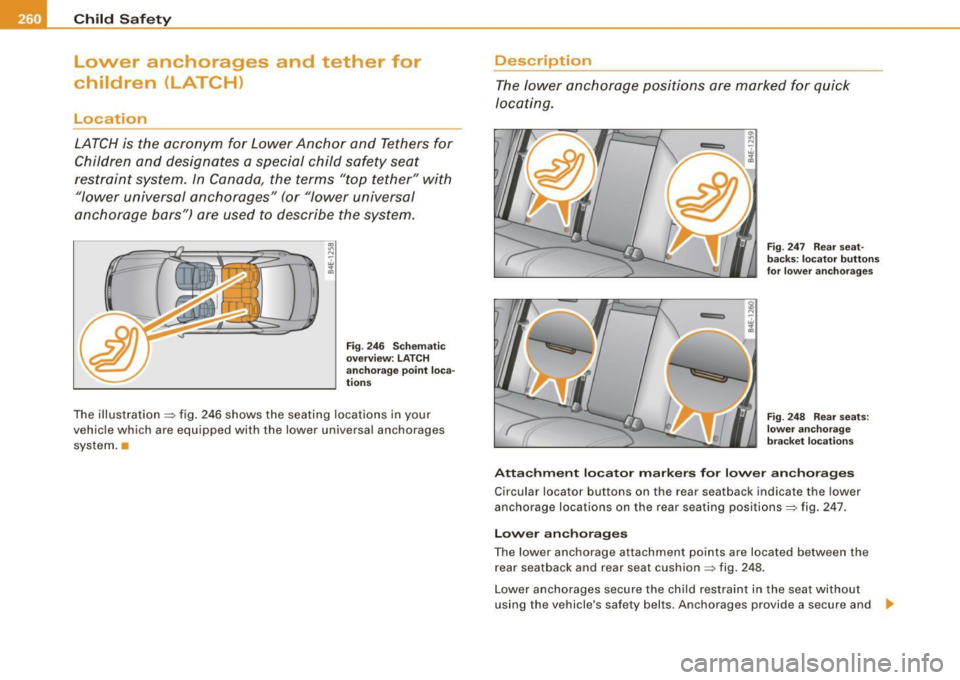
Fig . 246 Schematic
overview: LATCH
anchorage point loca
tions
The illustration ~ fig. 246 shows the seating locations in your
vehicle which are equipped wi th the lower universal anchorages
system.
Description
The lower anchorage positions are marked for quick
locating.
Fig . 247 Rear seat
backs : locator buttons
for lower anchorages
Fig. 248 Rear seats:
lower anchorage
bracket locations
Attachment locator markers for lower anchorages
C ircular locator buttons on the rear seatback indicate the lower
anchorage locations on the rear seating positions~ fig. 247 .
Lower anchorages
The lower anchorage attachment points are located between the
rear seatback and rear seat cushion~ fig. 248.
Lower anchorages secure the child restraint in the seat without
using the vehicle 's safety belts . Anchorages provide a secure and
~
Page 299 of 408
_____________________________________________ C_ l_ e _a_ n_ in_ g_a _ n_d_ p_ r_ o_ t _e_ c_t _io _ n __ !II
•
Care of interior
MMI display
- Clean th e MMI display with a soft c lean cloth and an LCD
cl eane r.
The MM I disp lay can be cleaned with a professional ly available "LCD
cleaner". The cloth should be s lightly dampened with the c leaning
fluid to clean the display.
0 Note
T o avoid scra tching the MMI display, you should never c lean it dry .•
MMI terminal
- First clean the MMI terminal with a brush to remove dust
from the housing.
- T hen wipe the MMI terminal wit h a clea n, soft, s lig htly
damp cloth .
The MMI terminal shou ld be c leaned with a brush first so that no
dirt is trapped between the buttons and the housing. We recom
mend giving the MM I terminal a final wipe with a c loth moistened
with water and dish washing dete rgent.
0 Note
To prevent damage, make sure that no flu id ever gets into the M MI
terminal. •
Aluminum trim
Use only neutral-pH products to remove spots and deposits from
a lum inum surfaces . C hro me care products an d alka line cleaners
wi ll attack aluminum surfaces and can damage them over time.
& WARNING
Always read and heed all WARNINGS and other information
~ page 290 .•
Fabrics and fabric coverings
Fabrics and fabric coverings (e.g . seats, door trim panels, etc.l
shou ld be c leaned at regular intervals with a vacuum cleaner . This
re moves surface dirt partic les which could become embedded in
the fabric through use. Steam cleaners shou ld not be used, because
t he steam tends to push the d irt deeper into the fabric and lock it
there.
Normal cl eaning
Genera lly, we recommend using a soft sponge or a lint -free
microf iber c loth to the clean fabric . Brushes should on ly be used for
carpets and floor mats, since other fabric surfaces could be harmed
by brushes.
Norma l surface stains can be cleaned using a commercially avail
able foam cleaner. Spread the foam on the surface of the fabric with
a soft sponge and work it in gent ly. Do not saturate the fabric . Then
pat the foam dry using absorbent, d ry cloths (e.g. microfiber cloth)
and vacuum it a fter it has dried completely .
Cleaning stains
Stains caused by beverages (e.g. coffee, fruit juice, etc.) can be
treated with a mild detergent so lution . Apply the detergent so lution
with a sponge. In the case of stubborn stains, a detergent paste can be applied direct ly to the stain and worked into the fabric. After -.,.
Vehicle care I t •
Page 365 of 408
_________________________________________________ F_ u_ s_ e_s _ a_n _d_ b_ u _ lb_ s _ __.11111
No. II Equipment
8 Engine control, auxiliary water pump
9
10
11
12
13
Climate control front /rear, dash panel buttons
Suspension leve l control system
(Adaptive Air Suspension)
Light and rain sensor
Display-/control unit
Roof electronics control unit
CD/DVD drive
15 Energy managemen t
16 Vacant
17 Radiator fan electronics
18 Airbag front passenger recognition
(weight sensor)
19 Vacant
20 Heated/ventilated seats
21 Engine control module
22 Vacant
23 Parking brake (switch)
24 Vehicle electrical system
25
26
27
Automatic transmission Air conditioning water valves water pump, rear climate control
Sunroof
28 Engine control module
29 Fuel injectors
30 Ignition coils Amps
10
5
10
5
5
10
5
5
5
5
5
5
5
10
15
10
20
5
15
30 No. Equipment
31 Fuel pump, right/fuel pump electronics
32 Automatic transmission
33 Right rear footwell heater
34 Heated/ventilated seats, rear
35 Heated/ventilated seats, front
36 Cigarette l ighter, front
37 Cigarette lighte r, rear/socket, rear
38 Auxiliary cooler fan
39 Door control unit, front right
40 Brake booster
41 Door control unit, rear right
42 Vacant
43 Headlight washer system
44 Air conditioning heater fan Amps
20/40
5
25
20
20
20
20/25 20
7.5
15
7.5
30
30
•
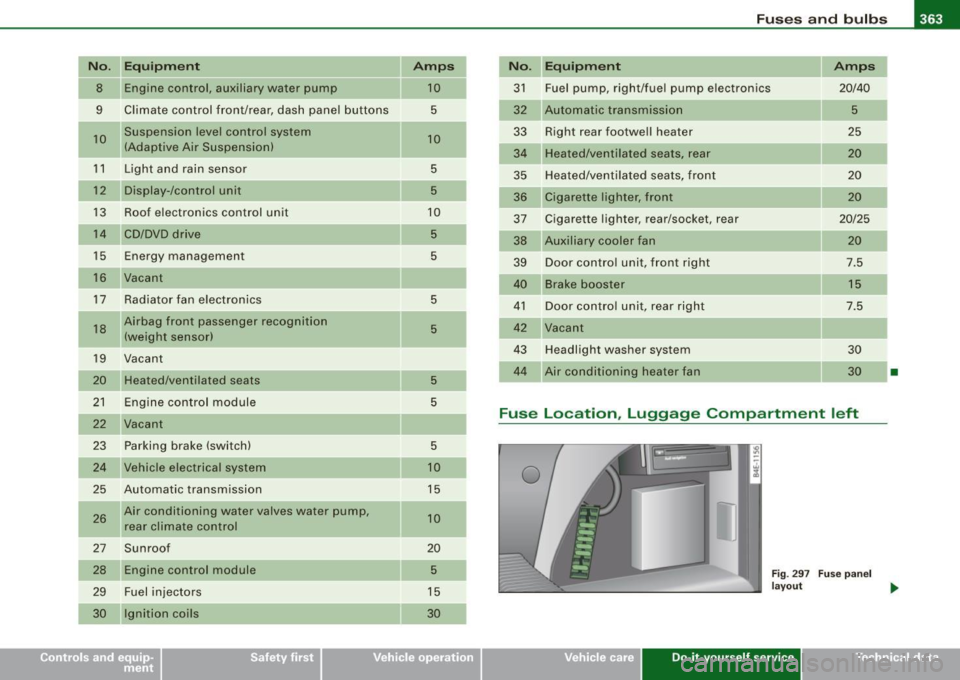
Fuse Location , Luggage Compa rtment left
0
Fig . 297 Fuse panel
layout _.
Vehicle care Do-it-yourself service irechnical data
Page 393 of 408
______________________________________________ A_ l_,_ p _h_ a_ b_e _t_i c_ a _ l _in _ d_e _ x __ _
Weight-sensing mat .... .... . ... .. 246
When must the system be inspected?
231
Aircraft Transporting your vehicle .. .... .... 371
All Wheel Drive .. .... ....... .... .... 275
Alloy wheels ... .... .... .... ... .... .. 295
All -whee l drive
Winter tires .. ..... ... .... ..... .. . 343
A lternator
See Generator .... .... ... ..... ... . 18
Anti-freeze
See Engine coolant . ...... ..... .. . 316
Anti-lock brake system How the ABS system works . .... ... 274
Warning/indicator lights ... ... .... .. 21
Anti -Slip Regulation System (ASR)
How the system works ............ 272
An ti-t heft systems
Anti -theft ala rm system ...... .... .. 60
Electronic immob ilizer ... .. .... .... 49
Ashtray Front ... ...... ...... .... ..... ... 106
Rear .... ... .. .... .... ... .... .... 107
ASR How the Anti-Slip Regulation System works .. .... .... .... ... .... .... 272
Audi Service Repair Manua ls and Literature
382
AUTO mode AC climate con tro l .. .. .... ... .... . 1 17
Auto Safety Hotline . .... ........ .... . 209
Auto -Check Contro l .... ... .. .... .... .. 28
Controls and equip
ment Safety first
Automatic belt
retractor ... .. ...... ... 215
Automatic car wash
See Washing ..... .... .... .... .... 291
Au tomatic Shift Lock (ASU .... .... .... 168
Automatic transmission 6-speed automatic transmission .... 166
Automatic Shift Lock (ASU .... ... .. 168
Driving ............. ............ . 166
Dynamic sh ift program .... ........ 169
Emergency release for selector lever 171
Fa il- safe mode . ...... .... .... .... 171
I gnition key safety lock . ...... .... . 130
Kick -d ow n .... .... .... .... ... .... 169
Manual shift program ... .. .... .... 170
Selector lever .... .... .... .... .... 1 67
Shift buttons ... .. .... .... .... ... 1 71
Steering wheel with tiptronic .. .... . 171
Average speed . ...... .... .... .... ... . 38
Avoid damaging the vehicle .. ..... ... . 28 1
B
Background ligh ting . .... ...... ... .... 76
Battery ... .. .... ... .... .... .... .... 320
Battery location inside the luggage compartment ...... .... ... .. .... 32 1
Charging ........................ 323
I mpo rta nt warn ings when work ing o n the
battery . .... .... .... ........ ... 32 1
low ............................. 276
Replacing the battery ....... .... .. 324
State of charge ... .... .... .... .... 276
Winter operation . .... .... .... .... 320
Working on the battery .... .... .... 321 Battery vo
ltage . ... .... .. .... .... .... . 36
Before driving ... .... .... ..... .. .... 201
Blended gasoline . .... .... .... ...... . 303
Body cavity sealing .. .... .... .... ... . 296
Boos ter seat ... .. .... .... ... .... .... 253
How do I properly insta ll a b ooster sea t in
my vehic le? ............... ..... 253
Safety instructions .... .......... .. 253
Brake fluid Changing the brake fluid ... .... .... 320
Checking the brake fluid level .. ... . 319
What is the correct brake fluid level? 319
What should I do if the brake f luid warning
light comes on? ... .. .... .... .... 319
Brake system Ant i-lock brake system . ..... .. .... . 21
Brake assistant .... .... .... ....... 27 4
Brake booster ..... .... ... .... .... 274
Brake fluid .... .... .... ... .... .... 319
Brake f luid specificat ions for re fill and
replacement . .... .... .... ...... . 320
Brake light defective ... ...... ...... 26
Brake pads ....... .... .... .... ... 280
Electromechanica l parking brake .... 134
Fluid reservoir .. ...... ..... .. .... 319
How does m oisture or road salt affec t the
brakes? . .... .... .... ....... .... 272
Malfunction ............ ... .. ..... 30
Warning/indicator lights .... .... .... 22
Worn brake pads symbol ........... 34
Break -in period .. .... .... .... .... ... 279
Brake pads ... .... .... .... ...... . 280
Tires . .... .... .... .... ... .... .... 279
Bu lbs . ... .... .... .... ... .... ...... . 36 4
Vehicle operation Vehicle care Do-it-yourself service Technical data
Page 402 of 408
___ A---" lp_h_ a_b_ e_ t_ i_ c _ a_ l_ in_d_ e_x ______________________________________________ _
Safety guidelines
Seat adjustment . . . . . . . . . . . . . . . . . . 86
Safety instructions Engine compartment ..... .... .... 309
for a booster seat . . . . . . . . . . . . . . . . 253
for side curtain airbags .... ....... 243
for using a conver tible child safety sea t .
251
for using an infant seat .. ......... 250
for using child safety seats ........ 248
forusingsafetybe lts ... ... .... ... 214
Monitoring the Advanced Airbag System 233
Safety lock Ignition key, automatic transmission 130
Seat adjustment Adjusting the seatback ............. 89
Driver 's seat . . . . . . . . . . . . . . . . . . . . . . 86
Driver's seat memory . . . . . . . . . . . . . . 94
Fron t passenger's seat . . . . . . . . . . . . . 87
Front seats . . . . . . . . . . . . . . . . . . . . . . . 86
Head restraints ............. .. 91,205
Lumbar support .. ............... . 90
Power seat . . . . . . . . . . . . . . . . . . . . . . . 87
Safety guidelines .. ... .... ..... ... 86
Seat belts Why YOU MUST wear them ..... ... 211
Seat memory . . . . . . . . . . . . . . . . . . . . . . . . 94
Seat position Incorrect seat position . . . . . . . . . . . . 205
Seating capacity . .... .... .... ... .... 211 Seating position
Driver . ... .... ...... ...... ...... 202
Front passenger .. .... .... .... ... 203
How to adjust the front seats .. .... 203
Occupants .... .... .... ... ....... 202
Rear passengers
Seats Number of seats 204
211
Selective unlock feature .... ....... ... 52
Selector lever . . . . . . . . . . . . . . . . . . . . . . 167
Service and disposal Safety b elt pret ensioner . ... .... ... 219
Service interval display . . . . . . . . . . . . . . . 27
Service position Windshield wipers . .... .... ....... 82
Servotronic Power steering ...... ...... .... ..
2 7 5
Shift buttons . . . . . . . . . . . . . . . . . . . . . . . 171
Ship Transporting your vehicle . ........ 371
Side airbags Description .... .... .... .... .... .. 239
How they work . . . . . . . . . . . . . . . . . . . 240
Side assist Activating and deactivating ........ 156
Description .......... ...... .... .. 156
Informationa l and alert stage signals 158
Messages in instrument cluster display .. 163
MMI settings ............ .. .. .... 162
Operation . . . . . . . . . . . . . . . . . . . . . . . 158
Safety tips . . . . . . . . . . . . . . . . . . . . . . 164
Sensor detection area . . . . . . . . . . . . 158 Side curtain airbags .
... .. .... .... .. . 242
Description ..... ... .... .... .... .. 242
How they work . . . . . . . . . . . . . . . . . . . 243
Safety instructions . ... .... .... ... 243
Side marker lights .. ....... .... .... ... 69
Sk i sack . . . . . . . . . . . . . . . . . . . . . . . . . . . 102
Snow chains ....... .... ....... .. ... 344
Sockets ........................ 107, 108
Solar blower fan/solar roof . .... ..... . 123
Sound system display Driver information disp lay . .... .... . 25
Spare wheel . . . . . . . . . . . . . . . . . . . . . . . . 352
Speed control sys tem
See Adaptive Cruise Control ...... .. 139
Speed rating letter code .. .... .... ... 340
Speed warning system ........ .... .. . . 37
Speedometer .. .... .... ... ...... ..... 14
Sport Suspension
See Adaptive Air Suspension . .... .. 188
Starting off with a trailer ... ... .... ... 136
Starting the engine .... .... ... ... 129,130
What should I do if the engine does not
start? ... .... .... .... ...... ... . 130
Steering . .... .... .... .... ... .... ... 128
Adjusting s teering column .. .... ... 128
Easy entry feature . .... .... .... ... 129
Locking the steering ....... ....... 129
Malfunction .. .. .. .... .... .... .. . . 33
Steering wheel heating .... .... ... ... 119
Steps for determining correct load limit 336
Stopping the engine .... ... .... .... .. 131