brake light AUDI S8 2009 Owner's Manual
[x] Cancel search | Manufacturer: AUDI, Model Year: 2009, Model line: S8, Model: AUDI S8 2009Pages: 408, PDF Size: 91.63 MB
Page 149 of 408
_____________________________________________ A_ d_a ...: p_ t_ i_ v _e_ C_ ru_ is_ e_ C_ o_n _ t_ r_o _ l _ __._
• "°" ""° D riv ing in traffi c: The warning light "°"""° shows that a
vehic le moving in your lane of travel has been de tected up front in
your lane of travel. Your speed is adjusted according to the speed of
the vehicle up front. ACC accelerates and brakes automatical ly
within the system's capabilities.
• "°" ""°
Reque st f or driver to a ssume control: The red flashing
warning light
G'.'.::> 1,.,<:Q means R equ est fo r d riv er to assume control.
You as the driver must slow the vehicle with the foot brake. The
symbo l "°""G'.'.::l tells you that the Adaptive Cruise Control is not able
to slow the vehicle down enough to keep a enough distance to the
vehicle in front of you . A warning tone signal wi ll also sound when
the symbol appears .
& WARNING
Improper use of the Adaptive Cruis e Control f eatures and inatten
ti on c an lead to an cra sh a nd s erio us per sonal injury .
• Never allo w the c losing speed between you and other v ehicles
to be so high t hat th e Adap tive Cru is e Control ma y not be abl e to
slow your vehi cle safel y. If closing speed i s too high , you must
apply the brake s yourself to r ed uc e the ri sk of a r ear-end cra sh .
• Alway s sele ct a greater follow ing di stance to th e vehi cle up
a he ad on w et ro ad s th an on dr y roa ds.
• Alway s read and he ed the inf ormation and WARNINGS~
& in
" De scription " on
pag e 139 .
[ i J Tips
• If the Adaptive Cruise Control initiates braking, the hydraulic
brake system is under pressure . Therefore, the brake peda l distance
is shorter and the pedal feels "harder".
• If you use the accelerator to go faster than the speed of the
vehicle ahead of you, the driver intervention prompt wi ll not be
accompanied by a warning tone.
• If the speed you previously set is exceeded, the indicator light in
the speedometer wi ll switch o ff.•
Con tro ls and eq uip
ment
Ap plies to vehi cle s: wi th Ad apt ive Crui se Co ntro l
Display in the instrument cluster
You should hove the supplementary information
displayed here, p articularly on your first trips.
Fig. 160 D ispla y in th e
i n strum ent cl uste r
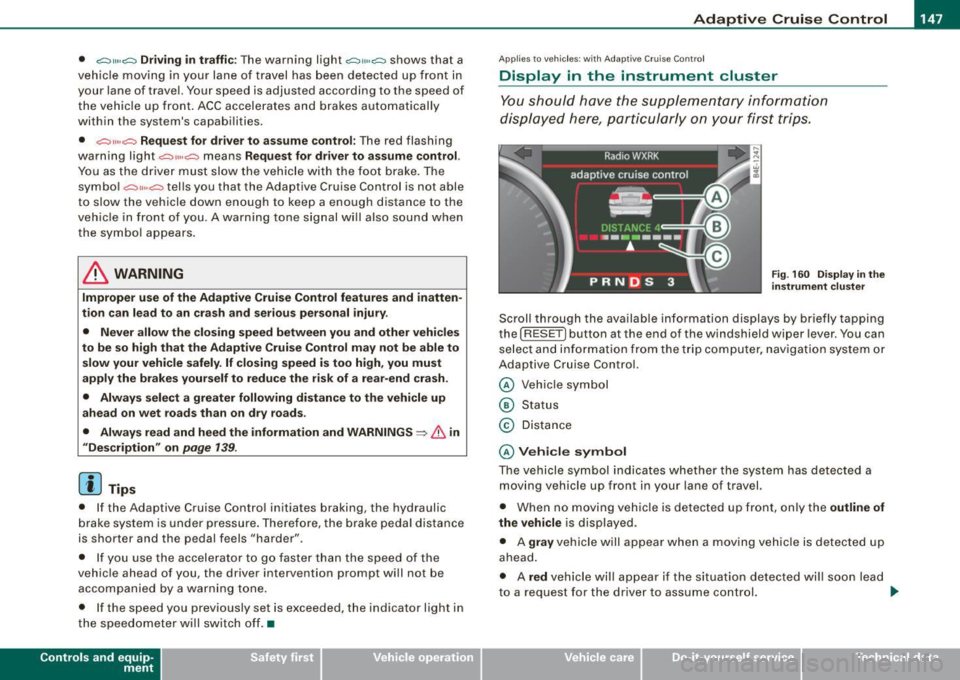
Scroll th rough the available information displays by briefly tapping
the ( RESET] button at the end of the windshield wiper lever . You can
se lect and information from the trip computer, naviga tion syste m or
Adaptive Cruise Control.
@ Veh icle symbol
@ Status
© Distance
@ V ehi cle sym bol
The vehicle symbol indicates whether the system has detected a
moving vehicle up front in your lane of travel.
• When no moving vehic le is detected up front, on ly the
outline of
the vehicle
is displayed.
• A
gra y vehicle will appear when a moving vehic le is detected up
ahead.
• A
red vehicle will appear i f the situation detected will soon lead
to a request for the driver to assume control. .,,_
Vehicle care I I irechnical data
Page 151 of 408
_____________________________________________ A_ d_a ...: pc.. t _i_ v _e_ C_ ru_ is_ e_ C_ o_n_ t_ r_ o _ l __ fflJI
A CC no t avai la bl e
The text message ACC n ot av aila bl e appears, for examp le, if the
temperature of the brakes is excessive. Adaptive Cruise Contro l is
temporari ly not available . A warning tone sounds as a reminder.
A CC no t avai lable!
The text message ACC not avai la ble! appears in the event of a
malfunction. Adaptive Cruise Control is turned off. A warning tone
sounds as a rem inder. Have the system inspected by a qua lified
dea lership.
A CC sen sor bloc ked
The text message AC C se nsor b lo cked appears when the ACC
System does not detect any objects over an extended time period .
For the time being, the distance to vehicles up ahead is not being
controlled. The ACC system is not switched off, so increased a lert
ness is required. The following may be reasons for the text message
ACC sensor blocked:
• The ACC sensor is d irty. The ACC system is not reacting, or is not
reacting correctly, to vehicles trave ling ahead .
• It is possible that you are dr iving on a road with very light traffic
without anything at the side of the road (e.g. guard rai ls, traffic
s igns, trees) . As soon as a vehicle is detected by the system aga in,
it returns to its control range and the text message disappears .
The ACC sensor is located in the area under the front license plate .
If there is a loss of operation due to heavy contamination, this area
should cleaned to restore proper operation.
A CC se nso r blo cked !
The text message ACC sen sor blocked! appears when the ACC
System can no longer accurately detect vehic les moving up ahead
in your lane of travel. Adapt ive Cruise Cont rol is tu rned off . A
warning tone a lso sounds as a reminder.
T o decide whether it is necessary to switch off the ACC (ACC sensor
b locked!) o r if it is on ly a temporary condition (ACC sensor blocked),
Controls and equip
ment
the system will also takes into consideration the outside tempera
t ure and/or the windshield wiper operation.
The ACC sensor is dirty or blocked (e.g. leaves, snow).
The ACC sensor is located in the area under the front license plate .
I f the ACC sensor is d irty or blocked, clean the area to restore system
operation .
EPB acti vation
The text message EPB a cti vation appears if emergency braking was
initiated with the Electromechan ical Parking Brake (EPB) . Adaptive
Cruise Control is turned off. A gong sounds as a reminder.
ESP activ at ion
The text message E S P activ ation appears if the Electronic Stabiliza
tion Program (ESP) has intervened to take control in a critica l driving
situation. In this case Adaptive Cruise Control is automatically
turned o ff. A gong sounds as a reminder .
Speed r ange
The text message Sp eed r ange appea rs if the current speed is too
low
to set or to hold the requested speed.
When se tting a desired speed, it must be a t leas t 20 m ph (30 km/h).
At speeds below 17 mph (25 km/h), the cruise control is turned off.
Shift le ver po sition!
The text message Shift lever po sition! appears when the shift se lect
leve r is m oved to position
N. In this position, Adaptive Cruise
Control is not avai lable .•
I • •
Page 170 of 408
• ..__A_ u_ t _o_ m_ a_ t_ i_ c _ t_r _a _n_ s_ m_ is_ s_io _ n ________________________________________________ _
Select R only when the vehicle is at a full stop and the engine is
running at idle speed=>
& in "Driving the automatic transmission"
on
page 166.
Before you move the selector lever to R, press both the button in the
handle of the selector lever
and the brake pedal at the same time.
When the ignition is on, the backup lights illuminate when the
selector lever is moved into
R.
N -Neutral
The transmission is in neutral in this position. Shift to this position
for standing with the brakes applied =>
page 168 .
When the vehicle is stationary or at speeds below 3 mph (5 km/h),
you must always apply the footbrake before and while moving the
lever out of
N.
D -Normal position for driving forward
Position Dis for normal city and highway driving. It ranges from zero
to top speed and all six gears shift automatically, depending on
engine load, driving speed and automatically selected shift
programs.
When the vehicle is stationary or at speeds below 3 mph (5 km/h),
you must always apply the foot brake before and while moving the
lever to
D out of N.
In certain circumstances it may be advantageous to temporarily
switch to the manual shift program to manually select gear ratios to
match specific driving conditions=>
page 170.
S -Sport position
Select this position for sportier performance. In this position, the
transmission will not upshift as soon, allowing the vehicle to use the increased power available at higher engine speeds to achieve live
lier acceleration.
When the vehicle is stationary or at speeds below 3 mph (5 km/h),
you must always apply the foot brake before and while moving the lever to
S out of N.
& WARNING
Read and follow all WARNINGS => & in "Driving the automatic
transmission" on
page 166.
0 Note
Coasting downhill with the transmission in N and the engine not
running will result in damage to the automatic transmission and
possibly the catalytic converter. •
Automatic Shift Lock (ASL)
Automatic shift lock prevents you from accidentally
shifting into a forward gear or into reverse, thus causing the vehicle to move unintentionally.
Fig. 187 Shift gate
selector lever lock
positions and interlock
button highl ighted
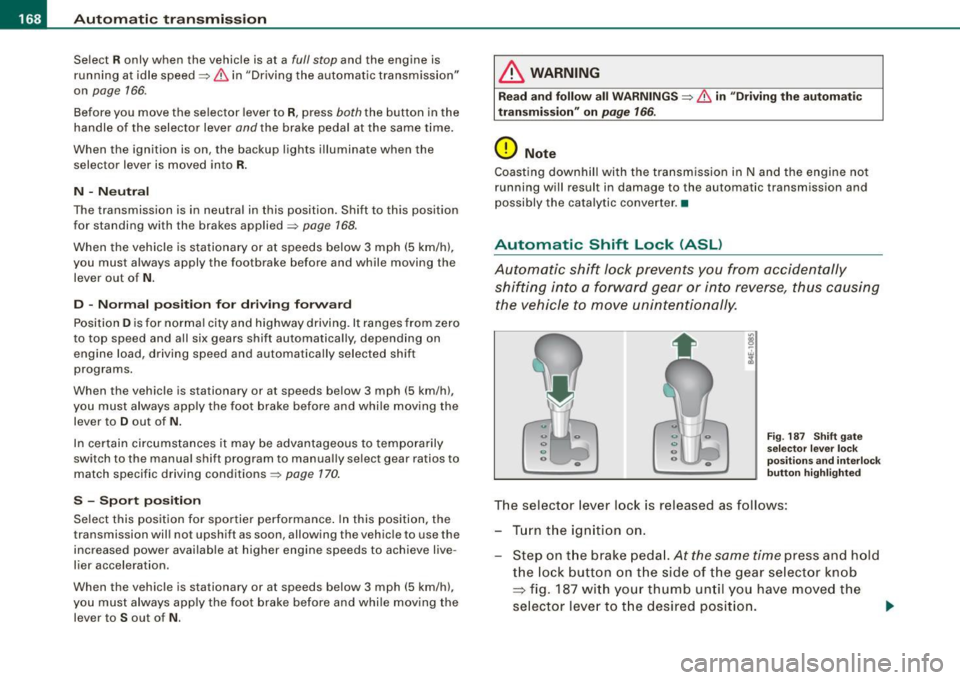
The selector lever lock is released as follows:
- Turn the ignition on.
Step on the brake pedal.
At the same time press and hold
the lock button on the side of the gear selector knob
=> fig. 187 with your thumb until you have moved the
selector lever to the desired position.
~
Page 172 of 408
• ..__A_ u_ t _o_ m_ a_ t_ i_ c _ t_r _a _n_ s_ m_ is_ s_i o _ n ________________________________________________ _
gear when the driver presses the brake pedal on a downhill
gradient. This makes use of the braking effect of the engine without
the need to shift down manually.•
Manual shift program
Using the manual shift program you can manually select
gears.
Fi g. 18 8 Ce nte r
co nso le: s hiftin g the
t ip tr on ic® ma nually
F ig . 18 9 Disp lay:
ma nua l shi ft prog ra m ,
selecte d gear high
l ig hte d
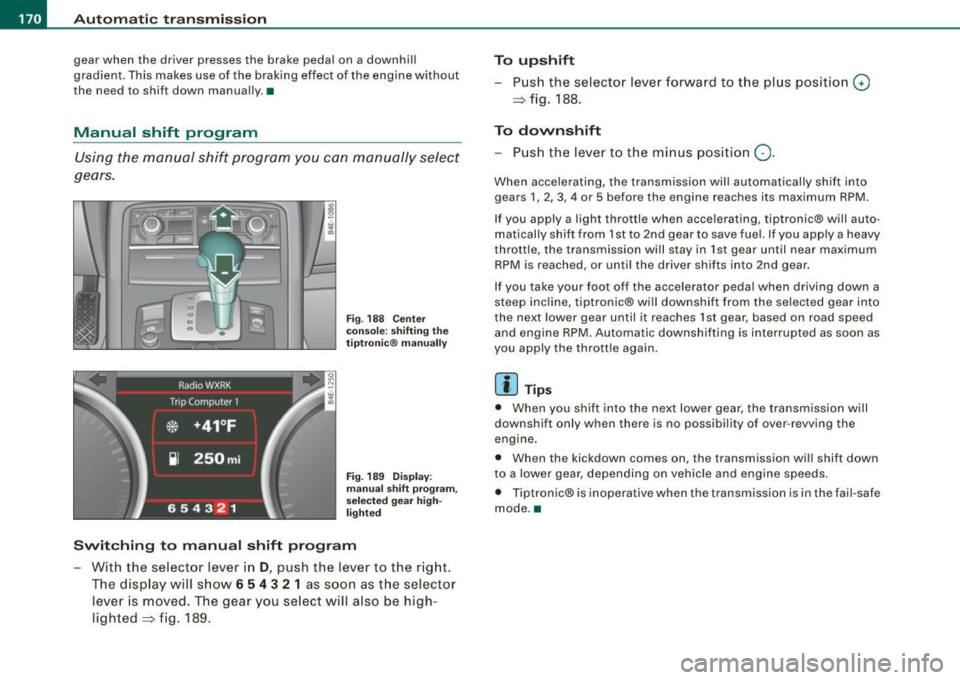
Swit ching to manual shift program
With the selecto r lever in D, push the lever to the rig ht.
T he d isplay will s how
6 5 4 3 2 1 as soon as the selector
lever is moved. The gear you se lect will also be high
lighted => fig . 189.
To upshift
Push the selector lever forward to the plus position 0
=> fig. 188.
To downshift
- Push the lever to the minus position Q.
When accelerating, the transmission will automatically shift into
gears 1 , 2, 3, 4 or 5 before the engine reaches its maximum RPM .
If you apply a light throttle when accelerating, tiptronic® will auto
matically shift from 1st to 2nd gear to save fuel. If you apply a heavy
throttle, the transmission will stay in 1st gear until near maximum
RPM is reached, or unti l the driver shifts into 2nd gear .
If you take your foot off the accelerator peda l when driving down a
steep incline, tiptronic® will downshift from the selected gear into
the next lower gear until it reaches 1st gear, based on road speed
and engine RPM. Automatic downshifting is interrupted as soon as
you apply the thrott le again .
[ i ] Tips
• When you shi ft into the next lower gear, the transmission will
downshift only when there is no possibi lity of over -revving the
engine.
• When the kickdown comes on, the transmission wil l shift down
to a lower gear, depending on vehicle and eng ine speeds.
• Tiptronic® is inoperative when the transmission is in the fai l-safe
mode. •
Page 197 of 408
___________________________________________________ H_ o_m _ e_ L_ i_ n _k_ @_R _ __.111
Ap plies to vehic les: with Hom elin k® un iversal remote contro l
Programming the Homelink ® transmitter
The transmitter is programmed in two phases. For rolling
code transmitters, a third phase is also necessary.
~------------ ~ ~--~--------~--- J, iii
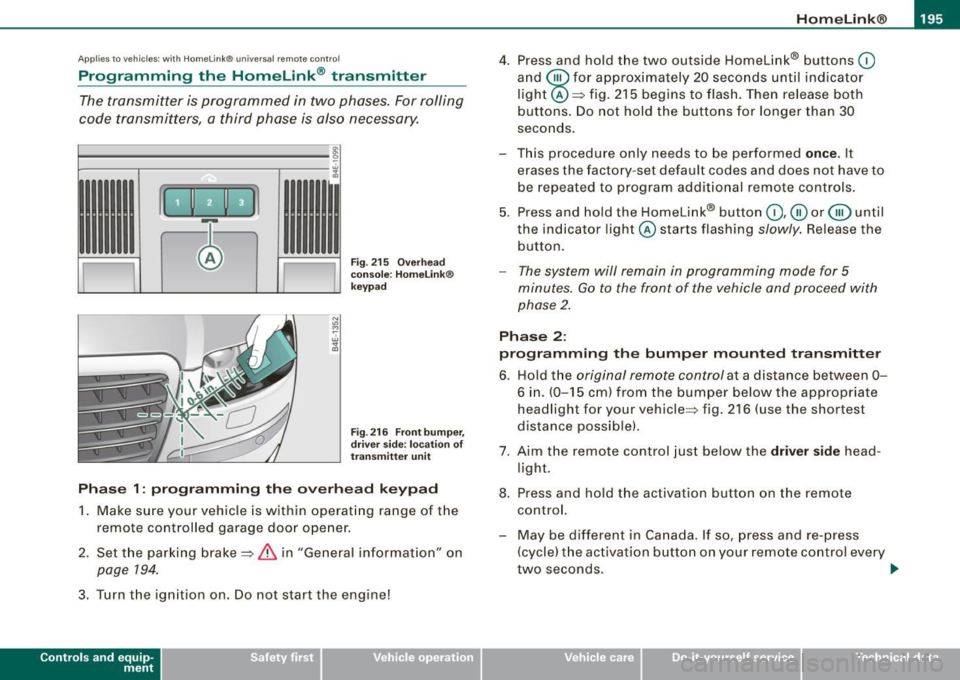
Fig. 215 Overhead
console: HomeLink®
keypad
Fig . 216 Front bumper,
driver side: location of
transmitter unit
Phase 1: programming the overhead keypad
1. Make sure your vehicle is within operating range of the
remote controlled ga rage door opener .
2. Set the parking brake==>
& in "General information" on
page 194.
3. Turn the ignition on. Do not start the eng ine!
Con tro ls and eq uip
ment
4. Press and hold the two outside Homelink® buttons 0
and @for approximately 20 seconds until ind icator
light @==> fig.
215 begins to flash. Then release both
buttons. Do not hold the buttons for longer than 30
seconds.
- This procedure only needs to be performed
once. It
erases the factory-set default codes and does not have to
be repeated to program additional remote controls.
5. Press and hold the Homelink® button
0 ,@ or @ until
the indicator l ight @starts flashing slowly. Release the
button.
- The system will remain in programming mode for 5
minutes.
Go to the front of the vehicle and proceed with
phase 2.
Phase 2:
programming the bumper mounted transmitter
6. Hold the original remote control at a distance between
0-
6 in. (0-15 cm ) from the bumper below the appropriate
headlight for your vehicle=:> fig .
216 (use the shortest
distance possible) .
7. Aim the remote control just below the
driver side head
light.
8. Press and hold the activation button on the remote control.
- May be different in Canada. If so, press and re-press
(cycle) the activation button on your remote control every
two seconds. .,_
Vehicle care I I irechnical data
Page 273 of 408
The direction in which the driver wishes to travel is determined with
t he aid of the steering angle and vehicle speed and is continua lly
compared with the actual behavior of the vehicle. If the two do not
match, for example, when the vehic le starts hydrop laning on a wet
road, ESP will automatically brake the appropriate whee l to correct
the prob lem.
The vehicle is then stab ilized by the forces acting on the whee l
during braking. If the vehicle is oversteering (rear tends to skid out
of the turn), the brakes are mainly app lied on the wheel that is on
the outside of the curve. In the case of a vehicle that is understeering
(tendency to sl ide out of the curve), the brakes are applied at the
rear wheel that is on the inside of the curve . An acoustic signal indi
cates when ESP brake application cuts in
~ & .
The system operates across the entire speed range in combination
with the ABS system
~ page 274 . If the Anti -Lock Brake System
(ABS) malfunctions, the ESP wi ll be out of action as well.
Ac tivat ion
When you turn on the eng ine, ESP will automatically be activated
and will perform a self -test.
The system can be activated or deactiva ted by pressing the button
~ page 270, fig. 256. The warning light comes on when the system
is switched off
~ page 18.
Normally , the ESP should always be on, however, it may be advanta
geous to turn off the system in certain special cases when some
degree of wheel spin is desired such as :
• when driving with snow chains
• when driving in deep snow or on a loose surface (to allow the
wheels to dig in to reach firm ground)
• when trying to "rock" the vehicle free when it has beco me stuck.
T he system should be reactivated once you are no longer in such
situations .
Both the ABS and EDS systems are still functioning even if the ESP
is switched off .
Controls and equip
ment Safety first Vehicle operation
In
te llig ent tec hn olo gy
& WARNING
The Ele ctron ic St abiliz ation Progr am i s ne ve rt h el ess s ubject to the
laws of ph ysics. It i s particularl y important t o pay attention t o th is
f ac t on wet an d slipp ery road s. It i s th ere fore important that you
alway s adapt your driving to the condition of the road and traffic
c onditio ns. Do n ot allow the in crease d sa fety p ro vi ded by t he El ec
tronic Stabiliz ation Program sy stem to lu ll you into a ccepting
a dditional safety ri sk s.
c
Electronic differential lock (EDL)
The electronic differential lock monitors the rotation al
s p eed of the drive wheels.
G en era l not es
The elect ronic differential lock (EDU helps the car to start moving,
accelerate and c limb a gradient on surfaces providing poor or
a lmost no grip . Without EDL , this would be difficult, if not impos
s ib le.
How the system works
The EDL operates automatical ly. It monitors the rotational speed of
the drive wheels on an axle with the he lp of the ABS sensors
~ page 274. If a noticeable difference in rotational speed between
the drive wheels on one axle is detected (e.g. on slippery ground on
one side), the spinning w heel is braked, thereby transferring power
to the other drive wheel or wheels (all -whee l drivel. This is done up
to a speed of about 60 mph (100 km/h) . Noises from the brake
system signal that wheel spin is being control led .
Dri ving off
When driving off, always be sur e to ke ep road conditions in mind as
you accelerate. I f one drive wheel spins because it is on a surface
with less grip, gradual ly increase the pressure on the accelera tor
pedal unt il the car star ts to
move . The whee l less able to t ra nsfer
power spins. _.,
Vehicle care Do-it-yourself service Technical data
Page 274 of 408
-Intelligent technology --=---=-=-------------
Overheating
of brakes
To prevent the disc brake of the braked wheel from overheating if
subjected to excessive loads, the EDL cuts out temporarily . The
vehicle remains operational and behaves in the same way as a
vehicle without EDL.
As soon as the brake has cooled down, EDL switches on again auto
matically.
& WARNING
• When accelerating on slippery surfaces, such as on ice or snow,
always be careful when depressing the accelerator pedal. Even
with the EDL working, the drive wheels can spin and reduce your ability to control your car. Risk of crash!
• The increased safety afforded by EDL does not mean that you
can take safety risks . Always adapt your driving style to the road
conditions and traffic situation.
[ i] Tips
If a fault occurs in the ABS, the EDL is also not functioning. This is
indicated by the ABS warning light=>
page 21. •
Anti-Slip Regulation System (ASR)
The Anti-Slip Regulation System prevents the driven
wheels from spinning when the car is accelerating.
General notes
The Anti-Slip Regulation System (ASR) is integrated in the electronic
stabilization program (ESP). When the vehicle starts up and acceler
ates, the wheels are prevented from spinning by adjusting the
engine power to match the amount of grip available from the road
surface.
How the system works
ASR performs automatically, i.e. without the driver's intervention.
With the aid of the ABS sensors=>
page 274, ASR monitors the
speed of the driven wheels. If the wheels start to spin, the engine
power is reduced automatically until the tires find enough grip to
lock onto the road surface. The system is active across the entire
speed range.
The ASR works in conjunction with the ABS. If a malfunction should
occur in the ABS, the ASR will also be out of action.
& WARNING
The increased safety afforded by ASR does not mean that you can
take safety risks. Always adapt your driving style to the road
conditions and traffic situation.
[ i] Tips
To ensure that the ASR works properly, all four wheels must be fitted
with identical tires Any differences in rolling radius of the tires can
cause the system to reduce engine power when this is not desired.
See also=>
page 338, "New tires and replacing tires and wheels".
Braking
General information
What affects braking efficiency?
Operating conditions and driving habits
The brakes on today's automobiles are still subject to wear,
depending largely on operating conditions and driving habits=>& .
On vehicles that are either driven mostly in stop-and-go city traffic
or are driven hard, the brake pads should be checked by your autho
rized Audi dealer more often than specified in the
Warranty & Main- ~
Page 276 of 408
___ ln_ t _e_ ll-'"ig ...,_ e_ n_t _t_ e_ c_ h _ n_o _ l_o _,.g= y,_ __________________________________________ _
& WARN ING (continued )
vehicle and have it towed to the nearest Aud i dealer or qualified
workshop.
;:a
Brake booster
The brake booster a dds ex tra braking power.
The bra ke booster works wit h vacuu m pressure w hich is created
only when the engine is running =>& .
& WARNING
• Never let the vehicle roll to a stop with the engine shut off .
• If the brake boo ster i s not wor king , for e xample when towing
your vehicle, or because the brake booster has somehow been
damaged , the brake pedal must be pre ssed considerably harder to
make up for the lack of booster as sistance. •
Functioning of Anti-Lock Brake System {ABS)
A BS prevents the wheels from l ocking up under braking.
The ABS contributes effective ly to vehicle contr ol since i t preven ts
t he whee ls from
locking whe n the brakes are appl ied. This mea ns
that the vehicle remains steerable and is less likely to skid .
With ABS you do not need to pump the brake. Ju st hold the brake
pedal down .
However, do no t ex pect the ABS to sho rten braking distance u nder
all circumstances. When drivin g on gravel or on new ly fallen snow
on top of icy surfaces, bra king distance may be even longer, there
f ore, under these c ircu msta nces, it is especially importa nt that you
drive slow ly and with great care.
How the ABS system works
An au toma tic c heck is made when a s peed of about 4 mph (6 km/h)
is reached. When this happens, a pumping no ise can be heard.
I f an individual wheel begins to rotate too slowly in relation to
veh ic le speed and tends to lock, the ABS au tomat ically reduces
brake pressure to prevent that whee l from locking.
Th is au tomatic a djust ment pr oces s wi ll cause a
slight vibration o f
the brake peda l and some noises to alert you that vehicle speed
m ust be ada pted to e xisting road and traff ic conditio ns.
& WARNING
Although the ABS is very effective , alway s remember that braking
capability is limited by tire traction . Always adjust your driving
speed according to the road and traffi c conditions. Do not let the
extra safety afforded by the ABS tempt you into tak ing extra risks.
The ABS cannot overcome the laws of physics.
[ i ] Tips
• I f ABS is not functioning properly, a wa rning light will come on .
See=>
page 27.
• I f a faul t occurs in t he ABS, t he EDL is also n ot fu nctio ning . Th is
is indicated by the ABS warning light. •
Brake assistant
T he brak e assi stant i s designe d to ac hie ve th e optimu m
bra kin g eff ec t.
The bra ke assistant helps to increase the effective braking power
an d th us to achieve a shorter s top ping dis tan ce. If the dr iver
presses the brake pedal very quic kly, the brake assistant automati
c a lly bo osts t he braking force to the max imum level, up to th e point
where the anti -lock brake function (ABS) intervenes to stop the
whee ls from locking. You shou ld then keep the brake peda l pressed .,
Page 283 of 408
- Lack of proper maintenance as wel l as improper use of the
vehic le wi ll impair the func tion of the emission con tro l system
and could lead to damage.
<£> For the sake of th e envir onm ent
Even when the Emission Control System is operating properly, the
exhaust gas can have a su lfur -like exhaust gas smell under some
operating states . This depends on the sulfur content of the fuel
being used. Using a different brand of fue l may help, or filling the
tank with lead-free super grade gasoline. •
Avoid damaging the vehicle
When you are driving on poor roads, or over curbs, steep ramps,
etc., make certain that low- lying parts such as spoi lers and exhaust
system parts do not bottom out and get damaged.
This is especially true for vehicles with low-slung chassis (sports
chassis) * and fully loaded vehicles .
a
Operate your vehicle economically
and minimize pollution
General
Your personal style of driving will determine the economy
of your vehicle, as well as exhaust and noise levels.
Fuel economy, environmental impact, and wear on your engine,
brakes and tires largely depend on three factors:
• your personal driving style
• operating cond itions
• technica l limitations
Controls and equip
ment Safety first Vehicle operation
Dri
ving and environm ent
If you anticipate what you need to do next and drive economica lly,
you can easily cut your fuel consumption by 10 -15 percent . This
section wil l give you some tips on how you can help the environ
ment and your pocketbook.
[ i ] Tips
The consumption estimates as published by ENV IRONMENTAL
PRO TEC TION AGENCY (EPA) and Transport Canada may not corre
spond to your actua l consumption on the road, which wi ll vary
depending upon vehic le load and speed, road and weather condi
tions, trip length, etc. •
Drive smoothly and keep a lookout ahead
Vehicles use the most fuel when they ore accelerating.
-Avoid unnecessary accelerat ing and braking.
Vehicles use the most fuel when they are accelerating . If you antici
pate what is going to happen next, you wi ll need to brake less and,
thus, acce lerate less. Let the vehicle coast whenever possib le - for
examp le when you see that the next traffic light is red. •
Avoid full throttle
Driving at moderate speeds saves fuel and improves your
mileage.
-Try and keep well below your car 's max imum speed.
Acce lerating gently reduces fue l consumption , engine wear, and
does not disturb the environment.
Fue l consumption, exhaust emissions and engine noise increase
disproportionately at high speeds . If you drive at approximate ly
three quarters of top speed, fuel consumption wil l be reduced by
Vehicle care Do-it-yourself service Technical data
Page 286 of 408

___ T_ r _a_ il_e _r_ t_ o_ vv_ in__... g,_ __________________________________________________ _
Trailer towing
Driving with a trailer
General information
Your Audi was designed primarily for passenger transpor
tation.
If you plan to tow a trailer, please remember that the additional load
wi ll affect durability, economy and performance.
Trai ler towing not on ly p laces more stress on the vehicle, it a lso ca lls
for more concentration from the driver.
For this reason, always fol low the operating and driving instructions
provided and use common sense.
0 Note
If you are going to tow a trai ler, you must activate the trailer opera
tion mode =>
page 192, "Towing a Trailer".
Technical requirements
Tra iler hitch
Use a weight-carrying hitch conforming to the gross trailer weight .
The hitch must be suitable for your vehicle and trailer and must be
mounted secure ly on the ve hicle's chass is at a
technically sound
location. Use only a trailer hitch with a removable ball mount.
Always check with the trai ler hitch manufacturer to make sure that
you are using the correct hitch .
Do not use a bump er hit ch.
The hitch must be installed in such a way tha t it does not interfere
with the impact-absorbing bumper system. No modifications should be made to the vehic le exhaust and brake systems. From time to time, check that all hitch mounting bolts remain securely
fastened.
When you are no
t towing a trailer, remove the traile r hitch ball
mount. This prevents the hitch from causing damage shou ld your
vehic le be struck from behind=>& .
Traile r br akes
If your trailer is equipped with a braking system, check to be sure
that it conforms to al l regu lations .
The trai ler hydraulic brake system must no t be direct ly connected to
the vehicle's hydraulic brake system.
S afet y c hains
Always use safety chains between your vehicle and the trailer.
Trailer light s
Trailer lights must meet all regulations. Be sure to check with your
Audi dealer for correc t wiring, swi tches and relays .
Mirrors
If you are unable to see the traf fic behind you using the regu lar
outside mirrors, then you
must install extended mirrors. It is impor
tant that you
always have c lear vision to the rear.
& WARNING
After rem oving the tr aile r hitch , do not store it in your vehi cle. In
ca se of sudde n braking , the hit ch co uld fl y for ward and injure you
or your p asseng ers. a