sport mode AUDI S8 2009 Owners Manual
[x] Cancel search | Manufacturer: AUDI, Model Year: 2009, Model line: S8, Model: AUDI S8 2009Pages: 408, PDF Size: 91.63 MB
Page 23 of 408
Adaptive Air Suspension c.:::>
The c.:, symbol illuminates for a few seconds after you have
switched on the ignition to indicate
r e du ced ground cle aranc e when
the dynamic mode is activated and when the ignition is switched on
with a vehicle which was parked in dynamic mode=>
page 189,
"Chassis Controls" . On vehicles which are equipped with the s por t
s u sp en sio n
Adaptive Air Suspension -Sport*, the check light does
not come on in this instance since ground clearance is general ly
reduced.
This warning/indicator light has the following functions: • It illuminates for a few seconds after the ignition is turned on as
function check and then goes out.
• If the warning/indicator light flashes in conjunction with the
~
warning/indicator light, you should not drive the vehicle immedi
ate ly in order to prevent damage to the underbody. The two
warning/indicator lights flashing together points to an extreme Low level. A very
pronounced lowering of the vehicle (extreme Low level)
can result, for example, from a heavy load. As soon as the level has
returned to normal, the warning/ind icator lights stop flashing , and
you can drive away .
0 Note
If the warning/indicator light flashes in conjunction with the .•.
warning/indicator light, you should not drive the vehicle because low -lying vehicle parts can bottom out as you drive over uneven
ground and be damaged as a result. •
Cruise control
CRUISE (USA models) /c,f' (Canada models)
The warning/indicator light illuminates when the cruise control is
activated. •
Controls and equip
ment
In st rum ent s a nd w arnin g/indi cato r ligh ts
Anti-lock brake system (ABS)
... (USA models) /
~ (Canada models)
This warning/indicator light monit ors the ABS and the
electronic differential lock (EDL).
The warning/indicator light wi ll come on for a few seconds when the
ignition is switched on. The light will go out after an automatic
check sequence is comp leted .
There is a malf un cti on in the AB S when :
• The warning/indicator light does not i lluminate when you switch
on the ignition .
• The warn ing/indicator light does not go out after a few seconds.
• The warning/indicator light illuminates while driving.
The ESP indicator light also i lluminates if there is a ma lfunction in
the ABS. The message
E S P / A BS fau lt ! Se e ow ner's manu al also
appears in the inst rument cluster display and a warning tone
sounds.
The br ake system will still re spond even withou t the assis tan ce o f
t he ABS system. See y our autho rize d Audi dealer a s soon as
pos sibl e t o r estor e full br aking perfo rm an ce.
For more information
regarding the ABS=>
page 274 .
The ABS warning lig ht and th e br ak e w ar ning lig ht come on
t og eth er. The AB S will no t work an d you w ill notic e a ch ange in
b ra king re sp ons e an d p erf or mance .
Mal fun ction in the brak e syst em
If the brake warning light=> page 22and the ABS warning illuminate
together there may be a malfunct ion in the ABS, and there may also
be a malfunction in the brake system itself=>&.
In the event of a
malfun ctio n in th e br ak e s yste m the warning/indi
cator light
BRAKE (USA mode ls)/ ((i)) (Canada models) in the instrument
c luster flashes. By pressing the
I CHECK] button, you can bring up a
driver message which explains the ma lfunc tion in more detail.
Please note =>
page 30. _,.
I • •
Page 143 of 408
_____________________________________________ A_ d_a ...: p_ t_ i_ v _e_ C_ ru_ is_ e_ C_ o_n _ t_ r_o _ l _ __._
Vehicles moving in you r direction can be detected up to a dis tance
of about 140 yards (130 meters) bu t the Adaptive Cruise Control
cannot detect vehicles that are stopped or sta lled, obs tacles that do
not move or narrow vehic les like motorcyc les and bicycles .
Open road
When the road is c lear, Adap tive Cruise Con trol works like cruise
control. It maintains a constant target speed specified by the driver .
Driving in traffic
If a slow er vehicle driving ahead is detected, the Adaptive Cruis e
Contr ol dece lerates (within the limits of the system) ::::,
page 150 to
its spe ed and after adjusting, tries to maintain the set distance from
t he veh ic le ahead. The vehicle may temporar ily d rive slower tha n
the set speed while adjusting ::::,
& in "Description" on page 139.
If the vehicle in front accele rates, Adaptive Cruise Control also accel
erates up to the speed that you have set.
Situations requiring driver intervention
I n some situations you w ill have to use the foot brake and slow the
veh icle down in order to keep a sa fe distance from vehicle in front
of you or to avoid a rear -end collision. In this situation, a symbol
appears and a warning tone sounds::::,
page 146.
Passing another vehicle
If you move int o the pa ssing lane and no vehicle is detecte d ahead,
Adaptive Cruise Contro l accelerates to the speed you have set and
maintains it .
Overriding ACC
You can increase your speed a t any time by stepping on the acceler
ator pedal. After you re lease the accelerator pedal, the system
adjusts back down to the speed you previously set .
Contro ls and eq uip
ment
& WARNING
• Never rely on the distan ce control feature of ACC alone to
prevent rear -end collisions. Always be prepared to brake and take
evasive action to avoid colli sio ns and other accident situation s.
• Never allow the closing speed between you and other vehicle s
to be so high that the Adaptive Cruise Control may not be able to
slow your vehicle safely . If clo sing speed i s too high , you must
apply the brakes yourself to reduce the risk of a rear -end cra sh .
[ i ] Tips
Please note that the amount of acceleration the Adaptive Cruise
C o ntro l use s depends on the Distance setting selected . DISTA NCE 1
gives you acceleratio n that is dynamic a nd sporty. D IS TA NCE 4, on
the other hand, gives more moderate acceleration . For more infor
mation about the ti me inte rvals ::::,
page 144, "How is the distance
set?". •
Applies to veh ic les : wi th Ad aptive Cr uise Co ntro l
Switching the system on and off
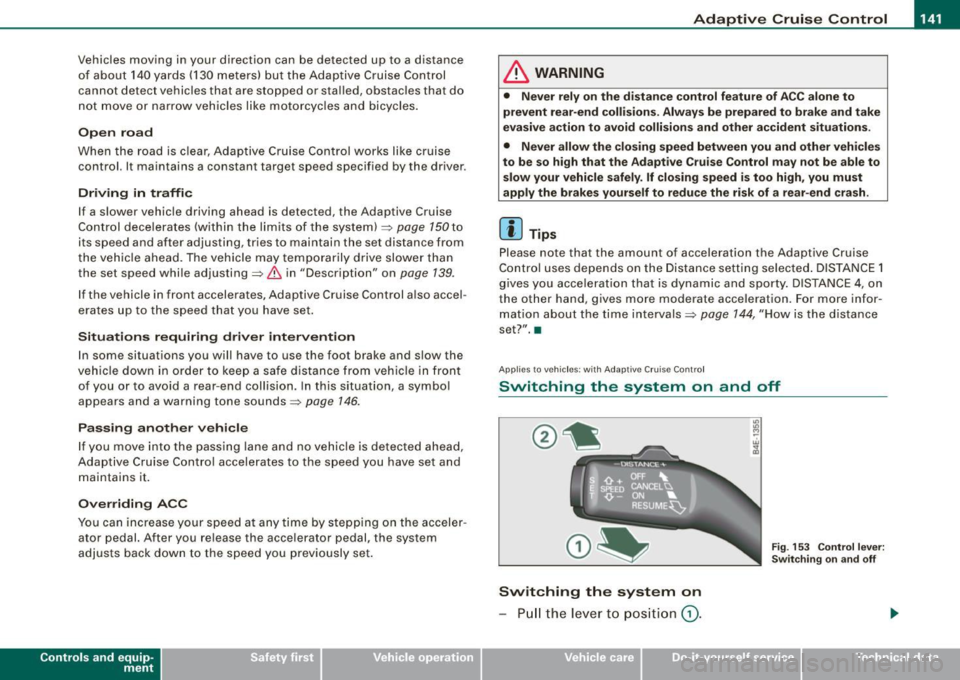
Switching the system on
- Pull the le ver t o positi on G) .
Vehicle care I I
Fig . 15 3 Contr ol le ver:
Sw itch ing on an d off
irechnical data
Page 190 of 408
-L~A~d~a~ p~ t~iv~ e~A~ ir~ S~u~ s ~p~ e~n~ s~io~n ~-------------------------------------------
Adaptive Air Suspension
Adaptive Air Suspension and
Damping
Description
Adaptive Air Suspension and damping can be regulated and they adapt automatically t o a request from the driver
and the driving situation at the time.
Adaptive Air Suspension is an electronica lly controlled springing
and damping system. This chassis system makes it easier on the
driver by adapting to the particular situation through imperceptible
control processes.
The
Ad aptiv e Ai r Suspen sion component regulates ground clear
ance depending on vehic le speed, load condition and driver input.
Accelerating to a speed above a predetermined limit wil l make the
vehic le lower itself. On the other hand, driving more slowly results
in the vehicle raising aga in at specific speeds.
The
damping component provides individual control of the
damping forces . For example, with damping c haracteristics set to
provide greater comfort, damping is set somewhat harder for a brief period only as required, for example, when going around a curve or
over rough road surfaces as well as when braking.
Settings
Adaptive Air Suspension provides the driver w ith the opportunity to
set the chassis characteristics also to their individual preference .
With the driving modes
standard, automatic and dynamic the driver
has three chassis settings available, ranging from comfort to sporty.
In addition,
lift provides a fourth mode which can be selecting for
driving over poor stretches of road=>
page 189, "Chassis Controls".
The modes are set in MMI =>
page 191.
On vehicles equipped with the s port su spen sio n Adaptive Air
Suspension -Sport*, there is generally more emphasis on a sporty
chassis setting. Settings range from comfortable to firm
=>
page 190, "Sport Chassis Contro ls".
0 Note
• Whenever you park your vehicle, always make sure there is
adequate c learance
above and below the vehic le . The height of the
parked vehicle can change as the result of temperature fluctuations,
changes in load conditi on and changes in the driving m ode (gro und
clearance).
• Mount the tie -down chains/cables over the running surface
(circumference) of the tires . Never secure the vehicle by the axle, the
suspension stru ts or the front or rear towline eye. For technical
reasons, the pressure in the suspension struts may change during
the transport and this wi ll adversely affect vehicle handling.
• To prevent damage to the vehicle underbody, remember that
you r veh ic le is not an off -road vehicle, even in the lift mode. The
ground c learance is insufficient for this type of operation.
• If you are going to tow a trai ler, you must activa te the trai ler oper
ation mode=>
page 792.
[ i ] T ip s
Before you can raise your vehic le using the vehicle jack (for
example, when changing a flat tire) you must activate the jacking
mode=>
page 191 . •
Page 191 of 408
____________________________________________ A_ d_a--' p=-- t_iv _e_ A_ ir_ S_u_ s-=- p_e _ n_ s _ io_ n __ JIIII
Chassis Controls
Four different driving modes can be set by the driver.
The automatic control processes are speed -and time -dependent.
For example, it is not possib le to raise the suspension to the lift
mode above certain speeds .
When a speed of about 75 mph ( 120 km/h) is exceeded for more than
30 seconds, the vehicle is automatically lowered approximately 1
inch (25 mm) to a level suitable for highway speeds, except in the
standard mode . Road holding is optim ized as a result of the lower
center of gravity and fue l consumption is reduced as a result of
reduced wind resistance .
Level adjustment
lift
automatic
dynamic
a utomati c Ground
clear ance
about 5 .7 inches (145 mm)
a bout 4.7 inches ( 120 mm)
about 4 .7 inches (120 mm)
about 3 .9 inches (100 mm)
Select the automatic mode if you prefer a suspension setting
e m phasizing comfort. Damping characteristics emphasizing
comfort are selected in this mode.
• Lower ing : When a speed of about 75 mph (120 km/h) is exceeded
for more than 30 seconds, the vehicle is automatically lowered by about 1 inch (25 mm) .
• Rais ing : The vehicle is automatically raised again if the speed
falls be low about 44 mph (70 km/h) for a period of 120 seconds. The
vehicle is raised immediately when speed falls below about 22 mph (35 km/h) .
dynami c
Select the sport mode if you prefer a sporty suspension setting. In
this mode, the vehic le is lowered whi le it is still stationary and
Controls and equip
ment
sporty damping characteristics are selected. The warning light ~
in the instrument cluster will come on for a few seconds just to
remind you of the reduced ground clearance .
I f you switch off the engine while the vehicle is in the dynamic mode
and then switch on the ignition once again, the~ warning light
wi ll also come on again for a few seconds.
• Lowering : When a speed of abou t 75 mph (120 km/h) is exceeded
for more than 30 seconds, the vehicle is automatically lowered by an addi tional 0 .2 in (5 mml.
• Raising : The vehicle is automatically raised again if the speed
falls bel ow about 44 mph (70 km/h) for a period o f 120 seconds . The
vehic le is raised immediately when speed falls below about 22 mph
(35 km/h).
s ta nd ard
Select the standard mode if you desire a suspension setting with a
special emphasis on comfort . In the standard mode there is
no
lowering o f the suspension. Even at high speeds, the veh icle stays
at the same level. Damping characteristics with a decided emphasis
on comfort are selected in this mode .
lift
Select the lift mode when you have to travel over poo r sections of
road (e .g . trai ls). In the lift mode, the vehic le is raised by 1 inch (25
mm) compared to norma l leve l while it is still stationary and
damping characteristics are adjusted to emphasize comfort.
The lift mode can be act ivated only at speeds be low 50 mph (80
km/h). When a speed of about 62 mph (100 km/h) is exceeded, the
system automatically leaves lift mode and the mode set previously
(standard, automa tic, dynamic) is activated again. •
I • •
Page 192 of 408
• .___A_ d_ a --=- p_t_ i_v _e _ A_ ir_ S_u_ s_,_ p_e_ n_ s_i o_ n _____________________________________________ _
Applies to vehi cles : wi th Ad aptive Air Sus pension -Sport
Sport Chassis Controls
Four different driving modes can be set by the driver.
The automatic control processes are speed -and time -dependent .
For example, it is not possible to raise the suspension to the lift
mode above certain speeds.
When a speed of about 75 mph (120 km/h) is exceeded for more than 30 seconds, the vehicle is automatically lowered approximately 0.2
inch (5 mm) to a level suitable for highway speeds, except in the
standard mode.
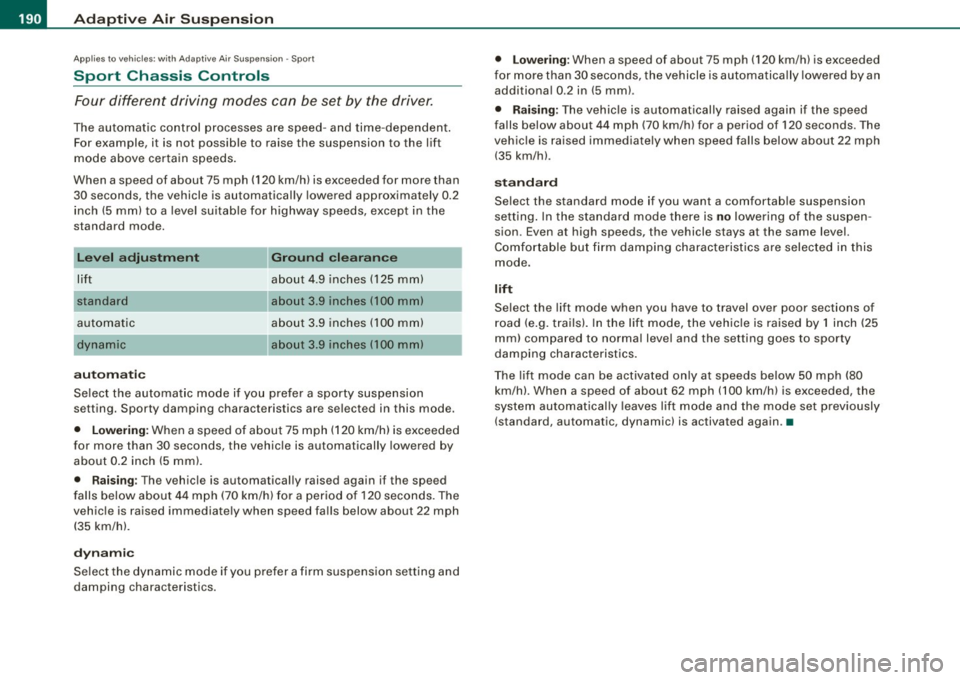
L e v el ad justm ent
lift
standard
automatic
aut om ati c Gr
ound clea ra nce
about 4 .9 inches (125 mm)
about 3 .9 inches (100 mm)
about 3.9 inches (100 mm)
about 3.9 inches (100 mm)
Select the automat ic mode if you prefer a sporty suspension
setting. Sporty damping characteristics are selected in this mode.
• Low erin g: When a speed of about 75 mph (120 km/h) is exceeded
for more than 30 seconds, the vehicle is automatically lowered by
about 0 .2 inch (5 mm) .
• Rais ing : The vehicle is automatically raised again if the speed
falls below about 44 mph (70 km/h) for a period of 120 seconds. The
vehic le is raised immediate ly when speed fa lls below about 22 mph
(35 km/h).
dy nami c
Select the dynamic mode if you prefer a firm suspension setting and
damping characteristics.
• Lo we ring : When a speed of about 75 mph (120 km/h) is exceeded
for more than 30 seconds, the vehicle is automatica lly lowered by an
additiona l 0.2 in (5 mm) .
• Rais ing: The vehic le is au tomatically raised again if the speed
falls below about 44 mph (70 km/h) for a period of 120 seconds. The
vehic le is ra ised immediate ly when speed fa lls below about 22 mph
(35 km/h) .
stand ard
Select the standard mode if you want a comfortab le suspension
setting. In the standard mode there is
no lowering of the suspen
sion. Even at high speeds, the vehicle stays at the same level.
Comfor table but firm damping characteristics are selected in this
mode.
lift
Select the lift mode when you have to travel over poor sections of
road (e.g. trails). In the lif t mode, the vehic le is raised by 1 inch (25
mm) compared to normal level and the setting goes to sporty
damping characteristics .
The lift mode can be activated only at speeds below 50 mph (80
km/h). When a speed of about 62 mph (100 km/h) is exceeded, the
system automatical ly leaves lift mode and the mode set previously
(standard, automatic, dynamic) is activated again. •
Page 194 of 408
![AUDI S8 2009 Owners Manual ....... _A_ d_ a --=- p_t_ i_v _e_ A_ ir_ S_u_ s_,_ p_e_ n_ s_io _ n _____________________________________________ _
[ i] Tips
The vehicle jack mode is switched off automatically at speeds](/img/6/57618/w960_57618-193.png "AUDI S8 2009 Owners Manual ....... _A_ d_ a --=- p_t_ i_v _e_ A_ ir_ S_u_ s_,_ p_e_ n_ s_io _ n _____________________________________________ _
[ i] Tips
The vehicle jack mode is switched off automatically at speeds")
....... _A_ d_ a --=- p_t_ i_v _e_ A_ ir_ S_u_ s_,_ p_e_ n_ s_io _ n _____________________________________________ _
[ i] Tips
The vehicle jack mode is switched off automatically at speeds above
9 mph (15 km/h). •
Towing a Trailer
Automatic lowering is not desirable when towing a trailer.
Fig. 214 MMI display :
Activate towing opera
tion
If you are going to tow a trailer, you must activate the trailer
towing mode.
Switching the trailer towing mode on and off
manually
- Press the ICAR)function button. The main menu
Adaptive Air Suspension appears.
- Press the !SETUP] function button. The menu
Adaptive
Air Suspension
appears ~ fig. 214.
- Select
Trailer towing mode on or off as desired.
Level Adjustment when Towing a Trailer
The following applies to vehicles with Adaptive Air Suspension: • Before
hitching up the trailer
and before adjusting the tongue
weight at the trailer, the automatic or standard mode
must be
selected, so that the vehicle is at normal level=>
page 191, "Setting
the Driving Modes".
• If driving in dynamic mode is desired, this mode
must be
selected before hitching up the trailer and before adjusting the
tongue weight . However, note that your vehicle is lowered and
ground clearance is reduced.
• If you have to drive under difficult road conditions, you can
select lift mode after hitching up the trailer or after adjusting the
tongue weight .
The following applies to vehicles with
sport suspension Adaptive Air
Suspension -Sport*:
• Before hitching up the trailer
and before adjusting the tongue
weight at the trailer, the automatic, standard or dynamic mode
must
be selected, so that the vehicle is at normal level=> page 191,
"Setting the Driving Modes".
• If you have to drive under difficult road conditions , you can
select lift mode after hitching up the trailer or after adjusting the
tongue weight .
Restrictions when Operating with a Trailer
When operating with a trailer, the lift mode can only be selected up
to about 25 mph (40 km/h). The system automatically goes out of lift
mode when speed exceeds about 31 mph (50 km/hl.
If the vehicle is in automatic, standard or lift mode before the trailer
towing mode is activated, the dynamic mode cannot be activated -
except on vehicles with
sport suspension Adaptive Air Suspension -
Sport*.
If the vehicle is in dynamic mode before towing operation is acti
vated, it can be driven in this mode. If the suspension is shifted from
this mode to automatic mode, dynamic mode cannot be re-selected.~
Page 261 of 408
_______________________________________________ C_h _ i_ld _ S_ a_ f_ e_ t..,:c y __ ffl!III
(The term "ISOFIX" regarding lower anchorages had been used by
Audi and other manufacturers in the past, but LATCH is now the
standard name for the new child restraint anchorage system.)
Some child restraint system manufacturers have been providing
tether straps on certain models of their child restraint systems, either as standard equipment or as a retrofit, for several years .
Check with the manufacturer of the child restraint system for tether
strap availability .
To provide a simpler and more practicable way to attach the child
restraint system on the vehicle seat, U.S. Federal regulations require
the phase -in of lower anchorages in vehicles and devices on new
child restraint systems to attach to the vehicle anchorages.
Child restraint system manufacturers will probably offer two kinds
of lower anchorages on their child safety seats
They could come with:
• hooks or other latches attached to adjustable straps or
• rigid latches on bars that extend out the back of the child
restraint and are released with release buttons at the bottom of the
child restraint.
In addition to the LATCH lower anchorages, both of these child
restraint systems use tether straps to help keep the child restraint
system firmly in place .•
Where can I get additional information about
child restraint application and usage?
There are a number of sources of additional information about child
restraint selection, installation and usage :
NHTSA advises that the best child safety seat is the one that fits
your child and fits in your vehicle, and that you will use correctly and
consistently.
Try before you buy!
Controls and equip ment Safety first Vehicle operation National Highway Traffic Safety Administration
Tel.: (888) DASH -2 -DOT
www.nhtsa .dot .gov
National SAFE KIDS Campaign
Tel.: (202) 662 -0600
www.safekids.org
Safety BeltSafe U.S.A
Tel.: (800) 745-SAFE (English)
Tel.: (800) 747 -SANO (Spanish)
www.carseat .org
Transport Canada
Tel.: (800) 333-0371
www.tc.gc.ca
Audi Client Relations
Tel.: (800) 822-2834 •
Vehicle care Do-it-yourself service Technical data
Page 283 of 408
- Lack of proper maintenance as wel l as improper use of the
vehic le wi ll impair the func tion of the emission con tro l system
and could lead to damage.
<£> For the sake of th e envir onm ent
Even when the Emission Control System is operating properly, the
exhaust gas can have a su lfur -like exhaust gas smell under some
operating states . This depends on the sulfur content of the fuel
being used. Using a different brand of fue l may help, or filling the
tank with lead-free super grade gasoline. •
Avoid damaging the vehicle
When you are driving on poor roads, or over curbs, steep ramps,
etc., make certain that low- lying parts such as spoi lers and exhaust
system parts do not bottom out and get damaged.
This is especially true for vehicles with low-slung chassis (sports
chassis) * and fully loaded vehicles .
a
Operate your vehicle economically
and minimize pollution
General
Your personal style of driving will determine the economy
of your vehicle, as well as exhaust and noise levels.
Fuel economy, environmental impact, and wear on your engine,
brakes and tires largely depend on three factors:
• your personal driving style
• operating cond itions
• technica l limitations
Controls and equip
ment Safety first Vehicle operation
Dri
ving and environm ent
If you anticipate what you need to do next and drive economica lly,
you can easily cut your fuel consumption by 10 -15 percent . This
section wil l give you some tips on how you can help the environ
ment and your pocketbook.
[ i ] Tips
The consumption estimates as published by ENV IRONMENTAL
PRO TEC TION AGENCY (EPA) and Transport Canada may not corre
spond to your actua l consumption on the road, which wi ll vary
depending upon vehic le load and speed, road and weather condi
tions, trip length, etc. •
Drive smoothly and keep a lookout ahead
Vehicles use the most fuel when they ore accelerating.
-Avoid unnecessary accelerat ing and braking.
Vehicles use the most fuel when they are accelerating . If you antici
pate what is going to happen next, you wi ll need to brake less and,
thus, acce lerate less. Let the vehicle coast whenever possib le - for
examp le when you see that the next traffic light is red. •
Avoid full throttle
Driving at moderate speeds saves fuel and improves your
mileage.
-Try and keep well below your car 's max imum speed.
Acce lerating gently reduces fue l consumption , engine wear, and
does not disturb the environment.
Fue l consumption, exhaust emissions and engine noise increase
disproportionately at high speeds . If you drive at approximate ly
three quarters of top speed, fuel consumption wil l be reduced by
Vehicle care Do-it-yourself service Technical data
Page 370 of 408
111!1.___E_ m_ e_r -=g :...e_ n _ c-=y _ s_ i_t _u _a _t_ i_o _n_ s _______________________________________________ _
4. Connect the other end t o the negative ground post of t he
battery manager contro l un it located next to t he batte ry.
Start in g the engin e
-Start the engine of the vehicle with the booster battery .
Run the engine at a moderate speed.
- Start eng ine w ith discharged ve hicle battery in t he usual
manner .
- If the e ngine fa ils to sta rt: do not keep the starter
cranking for longer than 10 seconds . Wait for about 30
seconds and then try aga in .
- With e ngine running, remove jumper cables from both
ve hic les in the exac t
reverse order.
The battery is vented to the outside to prevent gases from entering
the vehicle interior . Make sure that the jumper clamps are well
connected with their metal parts in full contact with the battery
termina ls .
& WARNING
To avo id seri ous pe rsonal injur y and d am age to the veh icle, heed
all warning s and ins truct ion s of the jumper cable manufa cturer . If
in doubt , call for road ser vic e.
• Jump er cable s mu st be long enough so that the vehicle s do not
tou ch .
• When connecting jumper c able s, make sure th at the y cannot
g et ca ught in an y mov ing par ts in the engine compa rt me nt.
• Befor e you che ck anything i n the en gine com partment , alwa ys
re ad and heed all WARNINGS=>
page 301 , "Engin e com partm ent ".
0 Note
Improper hook -up of jumper cables can ruin the generator. •
Always connect POS ITIVE( +) to POSITIVE(+), and NEGAT IVE( -) to
NEGAT IVE( -) ground post of the battery manager con trol unit.
• Check that al l screw plugs on the battery cells are screwed in
firm ly . If not, tighten plugs prior to connecting clamp on negative
battery terminal.
• Please note that the procedure for connect ing a jumper cable as
described above applies specifical ly to the case of your vehicle
being jump started. When you are giving a jump start to another
vehicle, do not connect the negative(-) cable to the negative(-)
t erminal on the discharged battery@=> page 367, fig. 299. Ins tead,
securely connect the negative (-l cable to either a solid meta l
component that is firmly bo lted to the engine block or to the engine
block itself. If the battery that is being charged does not vent to the
outside, escap ing battery gas could ignite and explode! •
Emergency towing with commercial
tow truck
General hints
Your Audi requires special handling for t owing.
T he fol lowing information is to be used by commercial tow truck
operators who know how to operate their equipment safely .
• Never t ow y our Audi , tow ing w ill ca use damage to t he en gin e
and tran sm iss ion .
• Never w ra p the safe ty c hai ns or winch ca bles a ro und th e bra ke
line s.
• To prevent un nece ssa ry d ama ge, your Audi must b e tr ansported
wi th a flat bed tru ck .
• To lo ad the vehi cle on to th e flat bed , us e the to wing loop fo und
in the vehicle tool s and a tt ac h to the front or rear anchorage
=> page 369 and=> page 370 . ~
Page 380 of 408
lllffl __ G_ e_n_ e_ r_ a _l _i_n _f _o _ r_ m_ a_ t_ i_ o _ n ________________________________________________ _
0 Note
• The vehicle capacity weight figures apply when the load is
distributed evenly in the vehicle (passengers and luggage). When
transporting a heavy load in the luggage compartment, carry the
load as near to the rear axle as possible so that the vehicle's
handling is not impaired.
• Do not exceed the maximum permissible axle loads or the
maximum gross vehic le weight. Always remember that the vehic le's
handling will be affected by the extra load. Therefore, adjust your
speed accordingly .
• Always observe local regulations. •
Dimensions
The specifications refer to the basic model. Differences may occur
depending on the mode l type and options ordered, for example, tire
sizes.
0 Note
When driving up steep ramps, on rough roads, over curbs, etc. it is
important to remember that some parts of your vehicle, such as
spoilers or exhaust system components, may be close to the
ground. Be careful not to damage them. •