warning AUDI S8 2010 Owner's Manual
[x] Cancel search | Manufacturer: AUDI, Model Year: 2010, Model line: S8, Model: AUDI S8 2010Pages: 384, PDF Size: 90.95 MB
Page 31 of 384
you can bring up a driver message which explains the malfunction in more detail.
Stop vehicle and check brake fluid Level
- Pull off the road .
- Stop the vehicle.
- Turn off the engine.
- Check the brake fluid level~
page 299.
-Contact your nearest authorized repair facility if neces-
sary.
Brake fault ! Drive carefully to nearest
workshop
- Drive carefully to the nearest authorized repair facility and
have the malfunction corrected~& .
Parking brake ! Please contact workshop
- If the warning/indicator light flashes when the vehicle is
stationary or after the ignition is turned on , check to see if
the parking brake can be released . Drive to an authorized
repair facility as soon as possible and have the malfunc
tion corrected. If the parking brake cannot be released,
contact your nearest authorized repair facility.
- If the warning/indicator light flashes while you are driving, it is possible that the traction control or the emer
gency brake has malfunctioned. It is possible that the parking brake cannot be applied . It is also possible that
the parking brake cannot be released after it has been
applied. Drive to an authorized Audi dealer to have the malfunction corrected.
Controls and equip
ment Safety first
Driver information display
I
f the ABS , ESP and the brake for ce distribution fail, the ABS
warning/indicator light and the ESP warning/indicator light come on
along with the brake system malfunction warning/indicator light
~ & -
& WARNING
• Always observe the warnings in ::::> page 281, "Engine compart
ment", before opening the hood and checking the brake fluid.
• Driving with low brake fluid is a safety hazard. Stop the car and
get professional assistance.
• USA models: If the BRAKE warning light, the ~ warning light
and the warning light come on together, the rear wheels
could lock up first under hard braking. Rear wheel lock-up can
cause loss of vehicle control and an accident. Have your vehicle
repaired immediately by your authorized Audi dealer or a qualified
workshop. Drive slowly and avoid sudden, hard brake applica
tions.
• Canada models: If the brake warning light(())), the r-warning
light and the ABS warning light come on together, the rear
wheels could lock up first under hard braking. Rear wheel lock-up
can cause loss of vehicle control and an accident. Have your vehicle
repaired immediately by your authorized Audi dealer or a qualified
workshop. Drive slowly and avoid sudden, hard brake
applications. •
Engine cooling system malfunction -1-
A malfunction in the engine cooling system must be
repaired as soon as possible.
When the - L symbol in the display blinks, then either the
engine coolant
temperature is too high, or the coolant level ~
Vehicle care Technical data
Page 32 of 384
Driver information display
is too low. An additional driver message can also be displayed
by pressing the [CHECK) button:
Switch off engine and check coolant level
-Pull off the road .
- Stop the vehicle.
- Turn off the engine.
- Check coolant level=>
page 297.
-Add coolant if necessary=> page 298.
-Continue driving only after the engine coolant
warning/indicator light goes out.
- Contact your authorized Audi dealer for assistance if
necessary.
If the engine coolant level is correct, then the radiator fan may be the
cause of the malfunction.
If the generator warning/indicator light should also illuminate
=>
page 16, then the fan belt may be damaged .
& WARNING
• If your vehicle should break down for mechanical or other
reasons, park at a safe distance from moving traffic, turn off the
engine and turn on the hazard warning lights=>
page 63, "Emer
gency flasher A".
• Never open the hood if you see or hear steam or coolant
escaping from the engine compartment -you risk being scalded.
Wait until you can no longer see or hear steam or coolant
escaping.
• The engine compartment of any vehicle is a dangerous area.
Before you perform any work in the engine compartment, turn of
& WARNING (continued)
the engine and allow it to cool. Follow the warning stickers
=> page 281, "Engine compartment".
0 Note
Do not continue driving if the -~-symbol illuminates. There is a
malfunction in the engine cooling system -you could damage your
engine. •
Engine oil pressure malfunction "t':::7':
The red engine oil pressure warning symbol requires
immediate service or repair. Driving with a low-oil-pres
sure indication is likely to inflict severe damage to the
engine.
If the ~ symbol appears in the display and blinks, the oil
pressure is too low. An additional driver message can also be
displayed by pressing the [CHECK] button:
Switch off engine and check oil level
Immediate actions
-Pull off the road .
- Stop the vehicle.
- Turn off the engine .
-Check the engine oil level with the dipstick=> page 293.
Dipstick readings checks too low
- Top off oil to the proper level=> page 294.
Page 33 of 384
- Make sure that the oil pressure warning symbol 't=:1:
appears no longer in the display before you start driving
again.
Dipstick reading checks OK
- If the oil pressure warning symbol 't=:1: starts flashing
again even though the engine oil level checks OK on the
dipstick,
do not continue driving and do not let the
engine run in idle.
Instead, contact your authorized Audi
dealer for assistance.
[ i) Tips
• The engine oil pressure symbol~ is not an indicator for a low
engine oil level. Do not rely on it. Instead, check the oil level in your
engine at regular intervals, preferably each time you refuel, and
always before going on a long trip.
• The yellow oil level warning indication _ requires oil refill or
workshop service without delay. Do not wait until the red oil pres sure warning ~ starts to flash before you respond to the low oil
level warning _ . By then, your engine may already have suffered
serious damage. •
Steering malfunction i
If there is a malfunction in the electronic steering column
lock, the steering cannot be unlocked.
If the i symbol in the display blinks, there is a malfunction
in the electronic steering column lock . An additional driver
message can also be displayed by pressing the (
CHECK)
button:
Do not drive vehicle: Steering defective
-Contact your nearest authorized repair facility.
Controls and equip
ment Safety first
Driver information display
-
Do not tow your vehicle.
& WARNING
Your vehicle must not be towed in the event of a malfunction in
the electronic steering column lock because it cannot be steered
due to the locked steering. If it is towed with the steering locked,
there is the risk of an accident. •
Ignition lock malfunction ,Pe
A malfunction in the ignition lock must be repaired imme
diately.
If the 2e symbol in the display blinks, there is a malfunction
in the electronic ignition lock. An additional driver message
can also be displayed by pressing the
(CHECK] button:
Ignition lock defective. Contact workshop !
- Do
not turn the engine off.
- Drive immediately to an authorized Audi dealer to have
the malfunction corrected.
If there is a malfunction in the electronic ignition lock, the ignition
cannot be turned off . Drive immediately to an authorized Audi dealer
to have the cause of the malfunction corrected.
If your vehicle has a Convenience key*, then you should not use the
[ STOP
l button to shut off the engine. You will not be able to start the
engine again once the ignition is switched off. •
Vehicle care Technical data
Page 34 of 384
Driver information displ ay
Yellow symbols
A yellow symbol means WARNING.
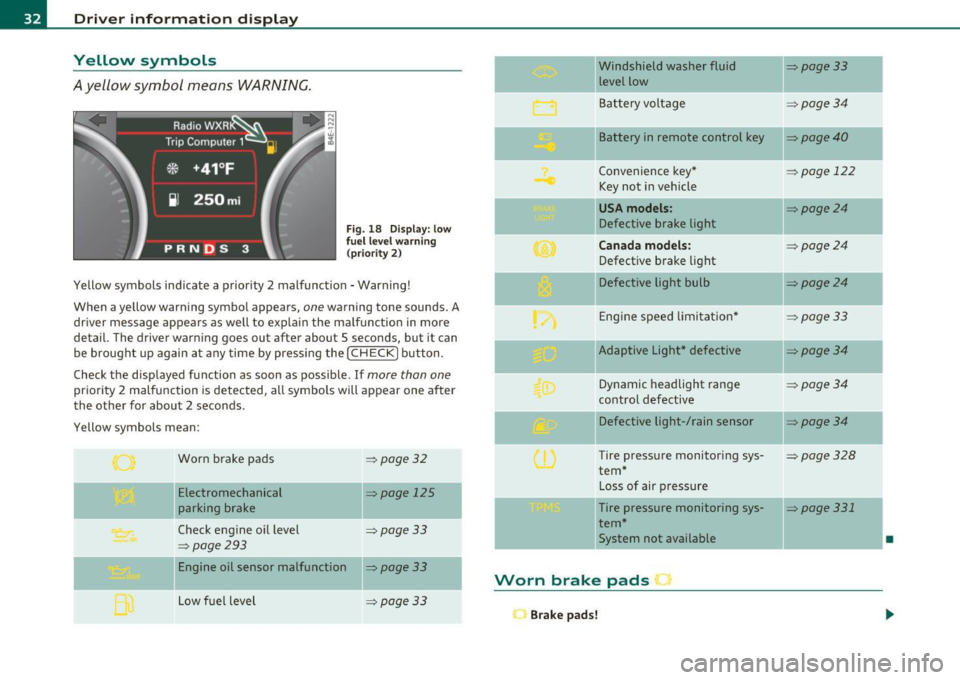
Fig . 18 Display: low
f ue l level warn ing
(priority 2)
Yellow symbols ind icate a prior ity 2 malfunction -Warning!
When a yellow warning symbo l appears,
one warning tone sounds. A
dr iver message appears as well to explain the ma lfunction in more
detail. The driver warning goes out after about 5 seconds, but it can
be brought up again at any time by pressing the
I CHECK] button .
Check the displayed function as soon as possible.
If more than one
priority 2 malfunction is detected, all symbols will appear one after
the other for about 2 seconds .
Yellow symbols mean:
Worn brake pads
=> page 32
Electromechanical => page 125
parking brake
Check engine oil level
=> page 33
=> page 293
Engine oil sensor malfunction => page 33
-
Low fuel level =>page33
Windshield washer fluid =>page33
level low ~
Bat tery voltage =>page34
-
II Battery in remote control key =>page40
Convenience key * =>page 122
Key not in veh icle
USA models: => page24
Defective brake light
Can ad a mod els : =>page24
Defect ive brake light
Defective light bulb
=>page24
E ng ine speed limitat ion* => page33
-
IIAdaptive Light* defective =>page34
Dynamic headlight range => page 34
contro l defective
Defective light-/rain sensor
=> page34
Tire pressure monitoring sys-=>page328
tern *
Loss of air p ressure
-Tire pressure monitoring sys-=> page331
tern*
11System not available •
Worn brake pads •
Brake pa ds!
Page 35 of 384
If the warning light illum inates, immediately contact your authorized
Audi dea ler or qu alified wor kshop to h ave all b rake pads insp ecte d.
On USA mode ls the warn ing light comes on together w it h the
warning light
BRAKE . Both sets of brake pads on an axle must a lways
be rep laced at the same time.
& WARNING
Driving w ith bad brakes can cause a collision and serious personal
injury .
• If the w arning light
ii and the warning light BRAKE1> with the
me ssage Brake pads! com es on in the in strument clu ster di splay,
immediately contact your author ized Aud i dealer or qualified
workshop t o have all brake pads che cked or replaced if
necessary. •
Checking the engine oil level ~
.... ,. Pleas e check oil level
W hen the symbol i lluminates, check the engine oi l level as soon as
poss ible=>
page 293. Add oil if necessary=> page 294. •
Engine oil sensor defective
~ Oil level ! sensor d efective
If the symbo l illuminates, contact your authorized Audi dealer and
have t he o il senso r in spec ted . U ntil yo u have this do ne, check the oil
level each time you refue l just to be on the safe side=>
page 293. •
ll BRAKE: USA mode ls on ly
Controls and equip
ment Safety first
Driver information display
A
pp lies to vehi cles : w ith engine s peed lim it a tion
Engine speed limitation
!.-• Engine speed maximum XXXX RPM
The symbol illuminates whe n there is an engine co ntrol malfunc
tion. The in dicator light in the instrument cluste r a lso i lluminates .
T he engi ne speed is limited to the speed d isp layed in the driver infor
mation system . Keep in mind that t he engine speed will not exceed
t he va lue disp layed in the d rive r in format ion sys tem, for example
when downshifting .
P lease go to an a uthor ized A udi deale r o r ot her qualifie d wo rk shop to
have the malfunction repa ired .•
Fuel supply too low w
A Please refuel
When the symbol illuminates, th is means there are about 2.4 ga llons
(9 litres) of fuel left in the fuel tank . Time to refuel.=>
page 284.
If
the symbol lig hts up, even when there is ample fue l in the tank, and
t he text
Tank sy stem m alfunction! Contact workshop appears in t he
display, there is a fa ult in the system. Con tact a qual ified workshop to
h ave the fault re ctified. •
Windshield washer fluid level too low ;>
Please top up washer fluid
If the symbo l illuminates, add windshield washe r fluid to the washer
system and a lso to the headlig ht washe r system =>
page 305. •
Vehicle care Technical data
Page 37 of 384
Speed warning system
Overview
The speed warning system helps you to keep your driving
speed below a set speed limit.
T he speed warning system warns the driver if he exceeds a previously
s tored maximum spee d. A w arning tone will sound as soon as the
vehicle speed exceeds the set speed by about 3 mph (3 km/h) . A t the
same time, a warning symbol appears in t he disp lay .
Th e spee d wa rn ing system has
two warning threshold s that function
independently of each other and that have somewhat di fferent
purp oses:
Speed warning 1 8 (USA models) /8 (Canada
models)
You can use speed warn ing 1 to set the max imum speed w hile you are
driv ing. This setting will remain in effect until yo u turn off the igni
tion, assum ing that yo u have not changed or reset the setting .
Th e spee d warn ing symbo l
B (USA models)/ 0 (C anad a mode ls) in
t he warning 1 display appears when you exceed the maxim um speed .
It goes out when the speed falls be low the stored maximum speed .
Th e spee d warn ing sy mbo l w ill also go o ut if t he speed
exceeds the
sto red maxim um speed by more than about 25 mph
(40 km/ h) for at
least
10 sec onds . H oweve r, th is doe s not rese t the stored maxim um
speed.
Setting spee d warning 1
=> page 35.
Speed warning 2 0 (USA models) /0 , (Canada
models)
Storing warn ing 2 is recommended if you always want to be reminded
o f a ce rtain speed, fo r example when yo u are traveling in a co untr y
that has a genera l maximum speed lim it, or if you do not want to
exceed a specified speed for winter tires.
Controls and equip
ment Safety first
Driver information display
T
he speed warning 2 symbol, 8 (U SA models)/ 0, (Canada models)
appe ars in t he displ ay whe n you exceed the sto red speed limi t. Un like
warning 1, it will not go out unt il the vehicle speed drops below the
stored speed limit.
Setti ng spee d wa rn ing 2
::::> page 36 .
[I) Tips
Eve n th oug h your veh icle is eq uipped wi th a speed war ning sys tem,
you shou ld st ill watch the speedometer to make sure you are not
dr iv ing fast er than t he spee d lim it. •
Speed warning 1: setting a speed Limit
Warning thr eshold 1 is s et by th e [ C HE CK] button.
:c: HECK •F F ig . 19 CHE CK button
in t he in strume nt
clu st e r
Storing the maximum speed
- Drive at the desired maxi mum s pee d.
- Brie fly pre ss the [C H ECK] butto n:=> fig .19.
Resetting the maximum speed
- Drive the veh icle a t a spee d of a t leas t 3 mph ( 5 km /h)
- Press the [ CHECK] b utton for more t han 1 seco nd.
Vehicle care Technical data
Page 38 of 384
Driver information displ ay
The speed warn ing symbol 8 (USA models)/ 0 (Canada models) will
appear briefly in the display when you release the button to indicate
that the maximum speed has been stored successfully.
The max imum speed remains stored until it is changed by pressing
the button again briefly or unt il it is deleted by a lengthy push on the
button. •
Speed warning 2: setting a speed limit
Warning threshold 2 is set, changed and deleted in /11/111.
Switching speed warning on and off
- Select: Function button I CAR]> System s> Instrument
cl uster .
- Select Speed warning On to switch on the warning
threshold or
Off to turn off the warning threshold.
Setting and adjusting th e warning threshold
- Select : Function button! CAR ]> S ystems > Instrument
c luster.
- Select the second item in the Speed warning menu . The
submenu
Speed thre shold appears .
- Set the warning threshold you want.
Warning threshold 2 can only be set in a speed range from 20 to
150 mph (30 to 240 km/h). •
Trip computer
Introduction
The trip computer gives you information on current and
average fuel mileage, average speed, fuel range and
driving time.
F ig . 2 0 Tri p com puter
d is pl ay: Ave ra g e fuel
mil eage
The follow ing driving information is continuously evaluated by the
trip computer and can be displayed sequen tially in the inst rument
cluster d isplay.
Fuel range
The estimated cruising range in miles (km) appears in the display .
T his tells you how far your vehicle w ill be ab le to travel on t he cu rre nt
tank of fuel and w ith the same driv ing style. The display changes in
increments of 6 miles
(10 km) .
The cru is ing range is ca lculated based on the fuel consumpt ion for
the last 18 miles
(30 km). If you drive conservatively, the cruising
range will increase .
Average fuel mileage
The average fuel economy in MPG (l/100 km) s ince you last clea red
the memory appears in this disp lay. You can use this display to adjust
your dr iv ing techn ique to achieve a desired mileage. ..,
Page 41 of 384

Opening and closing
Keys
Key set
Fig. 23 Key set
© Ma ster key with remote control
You can centrally lock a nd u nlock your ve hicle and start the eng ine
with the master key with remote contro l.
® Emergency key
The emergency key is only for tempo rary use if the vehicle key sho uld
be lost or misplaced~ &.
@ Valet key
The valet key f its only the driver's door and the ignition lock. If you
have to le ave t he key with somebody else, you are we ll-advised to
turn over the va let key on ly .
Be aware that the rear lid can be opened from inside the vehicle wit h
the remote rear lid release located in the dr iver's door. Before you
t u rn over the va let key you should therefore lock the rear lid mechan
ically w it h the mas ter key .
Turn t he master key
clockwise to the horizontal position and pull it
o ut . This has two effects:
Controls and equip
ment Safety first
Opening and closing
•
the remote rear lid release is deactivated ,
• the lid will remain locked when the power lock ing system is actu
ated .
In this state the rear lid can be unlocked only with the remote cont rol
unlo ck button ~ on the mas ter key.
Key replacement
If yo u lose a key, contact your a utho riz ed A udi dea ler immedia tely to
have t he
lost key disabled . Be sure to bring all your keys with yo u.
& WARNING
• Do not leave your vehicle unattended with the key in the igni
tion lock. Entry by unauthorized persons could endanger you or
result in theft or damage the vehicle. Always lock all doors and
take the key .
• Do not leave children unattended in the vehicle, especially with
ac ces s to v ehicle key s. Unguarded access to the keys provides chil
dren the opportunity to start the engine and/or activate vehicle
s ystems such as the power windows etc . Unsupervised operation
of any vehicle sy stem by child ren can result in serious injury.
(I) Tips
• If you open the dr iver's door with the key left in the ignit ion lock,
a ch ime will sound. This is your reminde r to remove t he key and lock
the door.
• For sec urity reasons, rep lacement keys a re only availab le from
Audi dealers. •
Vehicle care Technical data
Page 43 of 384

Battery operation in the master key is monitored by a check light . The
check light flashes when one of the buttons on the master key is
pressed. If the check light does not flash, the battery is dead and has
to be replaced .
In add ition , when the battery is dead the ..: symbol appears in the
instrument cluster display as well as the message:
Please change key battery
We recommend having the battery changed by an Audi Dealer .•
Electronic immobilizer
The immobilizer helps to prevent unauthorized use of
your vehicle.
A computer chip inside your key automatically deactivates the elec
tronic immobilizer when you insert the key in the ignition lock, or on
vehicles with Convenience key*, when the key is inside the vehicle.
When you remove the key from the ign it ion lock , or on veh icles with
Convenience key, when you remove the key from the vehicle, the elec
tronic immobilizer is automatically activated once again.
& WARNING
Always take the key with you when you leave the vehicle. The key
can disarm the electronic engine immobilizer and permit an unau
thorized person to start the engine and enable operation of the
vehicle systems such as power window or power sunroof leading
to serious personal injury .
(I) Tips
• The immobilizer prevents unauthorized use of the vehicle. The
vehicle cannot be sta rted if an unauthorized key is used. The vehicle
may not start if another radio device such as a key for another vehicle
or a transponder is located on the key ring.
Controls and equip
ment Safety first
Opening and closing
•
For Declaration of Compliance to United States FCC and Industry
Canada regulations=>
page 364. •
Power locking system
General description
The power locking system locks or unlocks all doors and
the rear lid simultaneously.
The power locking system in your vehicle incorporates the following
functions:
• Central locking function
• Selective unlock feature~
page 44
• Remote control feature ~ page 40
• Convenience key*=> page 50
• Anti -theft alarm system ~ page 52
All the doors and the rear lid are locked by the central locking system
when you lock the veh icle. You can set whether generally only the
dr iver's door or all doors and the rear lid should be unlocked when you
open the vehicle in the MMI menu
Central locking to suit your indi
vidual desires~
page 44.
Unlocking the vehicle
You can unlock the vehicle from outside either by using the remote
control
or by turning the key inside the driver's door lock. When you
unlock your vehicle:
• The anti-theft alarm system is deactivated briefly .
• The vehicle interior lights illuminate for approximately 30
seconds.
• All turn signal lights will flash twice when the car is unlocked .
• After un locking the vehicle, you have 60 seconds to open a door or
the rear lid. After 60 seconds, the vehicle automatically locks and the
anti-theft alarm system activates again. ..,
Vehicle care Technical data
Page 44 of 384

Opening and closing
The rear lid can be locked or unlocked either by using the remote
con trol
or by turning the key inside the dr ive r's door loc k. Unl ocking
the vehicle w ith the remote control will only
unlock the rear lid, to
open it, the lid handle needs to be pressed.
Lock ing the vehicle
You c an lock t he veh icle from o uts ide eithe r by using the remote
control
or by turning t he key inside the drivers's door lock . When you
lock the vehicle :
• All doors and the rear lid are locked.
• All turn signa l lights will flash once when the car is locked .
• The anti-theft alarm system is activated . The horn of the anti
t heft ala rm system w ill sound and the a nti -t heft alarm system readi
ness lig ht, located in the upper part of the dr iver's door panel, w ill
start to blink.
• The veh icle inter ior lights turn off.
Unlocking and locking the vehicle using the
Convenience key*
Th e Convenience key * feature is a keyless system wh ich all ows yo u to
unlock the vehicle via sensors in the door handle. Loc king is likewise
keyless using a lock b utton. Each door is equipped w it h a sensor and
lock button.
Power side door closer*
The ve hicle is equipped with a power side door closer. When closing a
door, yo u simp ly need to gen tly push on the door. The door wi ll the n
automatically close by itself~
page 45.
Automatic locking
The automat ic lock ing feature locks all the vehicle doors and the rear
lid when you d rive faste r than 9 mph (15 km/h). This fun ction can be
turned on and off in the MMI
Central locking Menu~ page 44.
Yo u can unlock the vehicle from the ins ide by :
• removing the key from the ignit ion sw itch (the ve hicle w ill au to
matically un lock itself) or •
pressi ng the unloc k part of the power lock sw itch @or
pulling t he door handle (once to open the door).
& WARNING
• When you lock your vehicle from outside, nobody -especially
children -should remain inside the vehicle . Remember, when you
lo ck the vehicle from the out side the windows cannot be opened
from the inside .
• When you leave the vehicle, always remove the ignition key
and tak e it with you. This will prevent passenge rs (children, for
example) from accidentally being locked in the vehicle should
they accidentally pre ss the power lo cking switch in the doors .
• Do not leave children ins ide the vehicle unsupervised . In an
emergency it would be impossible to open the doors from the
out side without the key .
[ i ] Tips
• In the event of a crash w it h ai rbag deployme nt all locked doo rs
w ill be automat ically u nlocked to give access to the vehicle occupants
from the outside.
• If the powe r lock ing system s hou ld malfunction, you ca n lock each
door indiv idually using the ve hicl e key ~
page 46.
• If the power locking system should fail, yo u can still open the fuel
t ank flap in an emergen cy ~
page 287 .
• You are well advised not to keep valuables ins ide an unattended
veh icle, v is ib le or no t. Even a prope rly loc ked vehi cle c anno t provide
the security of a safe .•