homelink AUDI S8 2010 Owners Manual
[x] Cancel search | Manufacturer: AUDI, Model Year: 2010, Model line: S8, Model: AUDI S8 2010Pages: 384, PDF Size: 90.95 MB
Page 4 of 384
Table of contents
Table of contents
Vehicle literature
About this Owner's Manual ............. ...... .
Controls and
equipment .............. .
Instruments and controls ... .
General illustration ........... .
Instruments and
warning/indicator Lights ..... .
Instruments ................ .
Warning/indicator ligh ts ...... .
Driver information display ... .
Introduction ............ ... . .
On-Board Diagno stic system
(OBD) ....................... .
Auto Ch eck Control ........... .
Speed warning system ........ .
Tr ip computer ............... .
Opening and closing ......... .
Keys ........................ .
Power locking system ........ .
Rear lid/Trunk lid ......... ... .
Child safety Lock ............. .
Convenience key ............. .
Anti-theft alarm system ...... .
Power windows .............. .
Sliding/tilting power sunroof .. .
Clear vision .. ................ .
Lights ....... ......... ...... .
Interior ligh ts ........ ....... .
5
6
8
9
9
10
10
14
22
22
25
26
35
36
39
39
41
46
49
so
52
53
57
60
60
65 Vi
sion
Wiper and washer system
Mirrors
Seats and storage ........... .
General recommendations .... .
Power seat ....... ........... .
Head restraint s .... .......... .
Armr est ................. ... .
Seat memory ................ .
Rear seats ............. ..... .
Indiv idual rear seats ......... .
Luggage compartment .. ..... .
Roof rack ................... .
Cupho lder .................. .
Ashtray ..................... .
Cigarette Lighter/socket ...... .
Long cente r console .... ...... .
Storage ............. ....... .
Warm and cold ........... ... .
Climat e controls ...... ... .. .. .
W ind shield defogging/defrosting
Rear climate controls ........ .
Basic settin gs ............... .
On the road ................. .
s . teenng .................... .
I gn ition lock and ign ition switch
S tarti ng and stopping the en gine
Starting and stopping the engine
us ing the Convenience ke y .....
Electromechanical park ing brake
C ru ise control ............... . 68
70
7
4
76
76
77
81
83
8 4
85
87
90
92
9 4
96
97
98
98
103
103
112
114
115
11 7
11 7
118
119
120
123
126
Adaptive Cruise Control ....... 128
Speed and distance control
system
Driver information .......... .. .
System Limitation s ........... .
A d' l . u I ane assist ............. . .
128
135
139
142
Lane assist . . . . . . . . . . . . . . . . . . . 142
Audi side assist ............... 145
Lane Change Assistan t . . . . . . . . . 145
No tes ..... ......... .......... 152
Automatic transmission 154
tiptronic ® (6-speed automatic
transmission ) . . . . . . . . . . . . . . . . . 1 54
Advanced Parking System ..... 161
Advanced Parking System with
rear view camera .............. 161
Specia l park ing situat ions . . . . . . 169
Tow ing hitch ........... ....... 1 71
Settings in the MMI ......... ... 171
Saf ety tips .... ................ 173
Adaptive Air Suspension 176
Adaptiv e Air Suspens ion and
Damp ing . . . . . . . . . . . . . . . . . . . . . 176
Homelink ® ............. ...... 181
Universal remote control
181
Safety first ............... 186
Driving Safely ................. 186
General notes . . . . . . . . . . . . . . . . . 186
Proper occupan t seating
positions . . . . . . . . . . . . . . . . . . . . . 188
Driver and passenger side
footwell . . . . . . . . . . . . . . . . . . . . . . 192
Page 183 of 384

_____________________________________________________ H_ o_m_ e_ L_i_n _k_ ®_ • __ _
Homelink ®
Universal remote control
Applies to veh icles: w ith Hom eli nk ® universal remote control
General information
The Homelink ® feature can learn up to three radio
frequency codes for most current transmitters used for
operating garage doors, estate gates, home or outdoor
lighting systems, and other devices.
You must first program the Homelink ® transm itter before you can
use the system=>
page 182, "Programming the Home link® trans
mitter".
I n order to program the Homelink ® transmitter for devices utilizing
rolling code, a second person on a ladder who can safe ly reach the
garage door opener motor is recommended. It is also necessary to
locate the "learn" button on your garage door opener motor. Refer to
the operating instructions for the opener, as the location and color of
this button may vary by manufacturer.
You can still use the original remote control for the device at any
time.
& WARNING
• Never use the Homelink'"' transmitter with any garage door
opener that does have not the safety stop and reverse feature as
required by federal safety standards. This includes any garage
door opener model manufactured before Aprill, 1982.
• A garage door opener which cannot detect an object, signaling
the door to stop and reverse does not meet current federal safety
standards. Using a garage door opener without these features
increases risk of serious injury or death.
Controls and equip
ment Safety first
& WARNING
(continued)
• For safety reasons never release the parking brake or start the
engine while anyone is standing in front of the vehicle.
• A garage door or an estate gate may sometimes be set in
motion when the Homelink ® remote control is being
programmed. If the device is repeatedly activated, this can over
strain motor and damage its electrical components -an over
heated motor is a fire hazard!
• To avoid possible injuries or property damage, please always
make absolutely certain that no persons or objects are located in
the range of motion of any equipment being operated.
rn Tips
• If you would like more information on Homelink ®, where to
purchase the Homelink ® compatible products, or would like to
purchase the Homelink ® Home Lighting Package, please call toll
free: 1-800-355-3515.
• For Declaration of Compliance to United States FCC and Industry
Canada regulations=>
page 364 . •
Vehicle care Technical data
Page 184 of 384
.,..__H_ o_m_ e_ L_ i _n_ k_ ® _______________________________________________ _
Applies to veh icles : w ith Homelin k® un iversa l remote control
Programming the Homel ink ® transmitter
The transmitter is programmed in two phases . For rolling
code transmitters, a third phase is also necessary .
i--------------~
I----~---------.---- "' :;
N
"' M ~ w
~
Fig. 195 Overhead
conso le: Homelink ®
keypad
F ig . 196 F ront
bumpe r, driver side:
location of transmitter
u n it
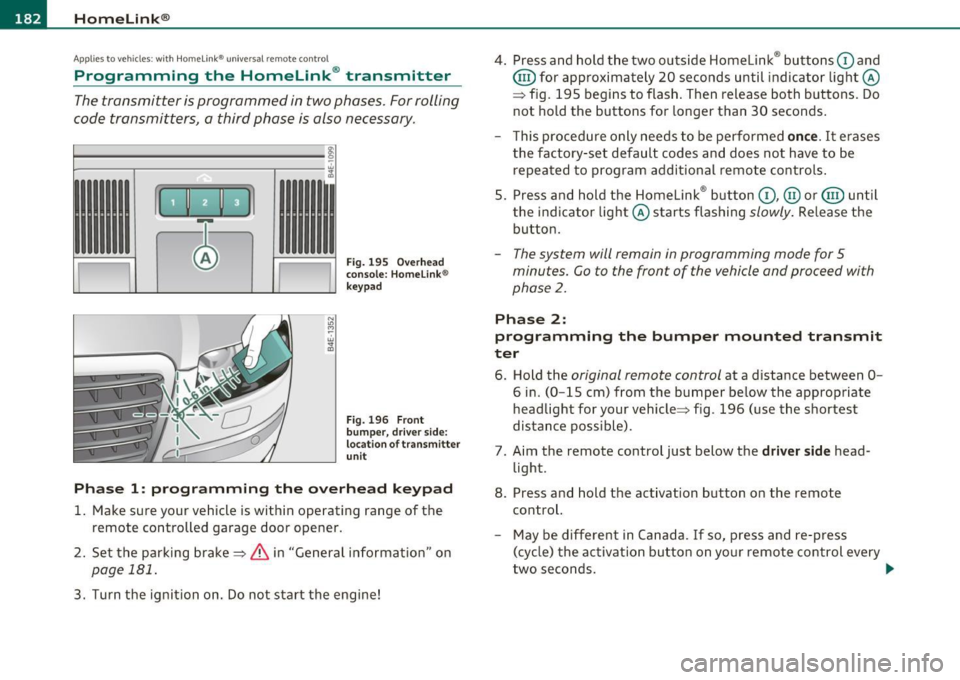
Phas e 1: programming the o verhead k eyp ad
1. Make sure your vehicle is within operating range of the
remote controlled garage door opener.
2 . Set the parking brake=>
& in "General information " on
page 181.
3. Turn the ignition on. Do not start the engine! 4
. Press and hold the two outside Homelink ® buttons
G) and
@ for approximately 20 seconds until indicator light@
=> fig.
195 begins to flash . Then release both buttons . Do
not hold the buttons for longer than 30 seconds .
- This procedure only needs to be performed
once. It erases
the factory-set default codes and does not have to be repeated to program additional remote controls .
5. Press and hold the Homelink ® button
G) , @ or@ until
the indicator light@ starts flashing
slowly . Release the
button .
-The system will remain in programming mode for 5
minutes. Co to the front of the vehicle and proceed with
phase
2 .
Phase 2:
programming the bumper mounted tr ansmit
ter
6 . Hold the original r emote control at a distance between 0-
6 in. (0 -15 cm) from the bumper below the appropriate
headlight for your vehicle=> fig .
196 (use the shortest
distance possible) .
7 . Aim the remote control just below the
driver side head
light .
8. Press and hold the activation button on the remote control.
- May be different in Canada . If so, press and re-press
(cycle) the activation button on your remote control every
two seconds. .-,,
Page 185 of 384

___________________________________________________ H_o_ m_ e_L_ i_ n _ k_ ® __ _
9. The emergency flashers will flash thr ee tim es (after about
15-60 seconds) when the programming is successful.
Release the button on the remote control.
- To program more devices, repeat steps 4 to 9.
10. Press and hold the trained Homelink ® button and
observe the indicator light©=>
page 182, fig. 195.
- If the indicator light is solid/continuous, programming is
complete and your device should activate when you press
and release the trained Homelink ® button.
- If the indicator light blinks rapidly for 2 seconds and is
then a solid/continuous light, proceed with phase 3 to
program a rolling code device.
Ph ase 3: rolling cod e progr amming
- A second person on a ladder who can safely reach the
garage door opener motor is recommended.
11. Locate the "learn" button on the garage door opener
motor (refer to the operating instructions for the opener,
as the location of this button may vary by manufacturer) .
12 . Press and release the learn button on the garage door
opener motor.
- Note : once the button is pressed, there are 30 s econd s in
which to initiate the next step.
13. On the Homelink ® keypad inside the vehicle, firmly press
and hold the Homelink ® button previously programmed
in phases 1 and 2 for two seconds and release. Repeat this
sequence
tw ice.
Controls and equip
ment Safety first
-
Some vehicles may require the press/hold/release
sequence up to three times to complete the training
process.
- Homelink ® should now activate your rolling code
equipped device.
If the 5 minute time limit is exceeded, the e m erge ncy flas hers w ill
fl ash o ne tim e
to indicate that the process has been terminated. In
this case, repeat steps 4 through 9.
If the emergency flashers do not flash
three times (after about 15 -
60 seconds), programming was not successful. In this case , repeat
steps 4 through 9.
Remote control units for garage door openers in Canada are set to
stop transmitt ing radio frequency signals after two seconds. This
time may not be sufficient for the Home link® system to learn the
rad io frequency signal. Pe rform all other steps as described above. •
Applies to vehicles: with Hom elink® universal remote control
Operating the Homelink ® transmitter
The Homelink ® transmitter works in the same manner as
the original hand held remote control that came with the
system.
w ;f,
Vehicle care
Fig. 197 Ove rhead
conso le: Homeli nk®
k ey pad
Technical data
Page 186 of 384
1111....__H_ o_ m __ e_L_ i_n _k_ ®_ • _________________________________________________ _
-Press th e ap pro priate programmed button G) , @ or@
to activate the desired remote control function ::::>
& in
"Genera l informat io n" on
page 181. •
Applies to ve hicles : w ith Hom eli nk® univer sa l rem ote c ont rol
Reprogramming a single button
A Homelink ® button can be reprogrammed individually
without affecting the other button allocations.
Programming the ov erh ead keypad
- Press the appropriate Homelink ® button until the indi-
cator light begins flashing slowly .
Programming the bumper mounted transmit
ter
1. Hold the original remote control at a distance between 0 -
5 in . (0-13 cm) from the bumper below the appropriate
headlight for your vehicle (use the shortest distance
possible).
2. Aim the remote control just below the
driver side head
light .
3 . Press and hold the ac tivation button on the remote
control.
4 . The emergency flashers will flash
three times (after about
15 -60 seconds) when the programm ing is successful.
N ow release the b utton on the remote control.
- If the device utilizes a rolling code , please follow phase 3
of =>
page 182 , "Programming the Homelink ® trans
mitter" for rolling code programming.
This pro cedur e will caus e th e ex is ting pr ogramming on th e
Homelink ® button to be era sed !•
Ap plies to veh icles: w ith Ho meli nk® un ive rsa l rem ote c ont rol
Erasing the programming of the
Homelink ® tr ansmitter
When you erase the programming, the programming on
all three of the transmitter channels with be lost!
- Perform steps 1 to 4 as described on ::::> page 182, "Phase
1 : programming the overhead keypad".
When completed , the Homel ink ® system will be in the programm ing
mode and is then ready to learn the codes for remote controlled
devices .
[I) Tips
• Programmed buttons cannot be erased individually.
• For security reasons you are advised to erase the programming of
the Homelink ® system before you sell your veh icle .•
Page 345 of 384
![AUDI S8 2010 Owners Manual ________________________________________________ F_ u_s _e_ s_ a_ n_ d_ b_u_ lb_ s _ __.1111
(]] Tips
You a re well adv ised to keep a supply of spare fuses in your veh icle .
Fuses with](/img/6/57617/w960_57617-344.png "AUDI S8 2010 Owners Manual ________________________________________________ F_ u_s _e_ s_ a_ n_ d_ b_u_ lb_ s _ __.1111
(]] Tips
You a re well adv ised to keep a supply of spare fuses in your veh icle .
Fuses with")
________________________________________________ F_ u_s _e_ s_ a_ n_ d_ b_u_ lb_ s _ __.1111
(]] Tips
You a re well adv ised to keep a supply of spare fuses in your veh icle .
Fuses with the proper ampere ratings are avai lab le at your Audi
dealer. •
Fuse Location, Instrument Panel left
Fig. 2 78 Fuse pa nel
la you t
Some of the equ ipment items listed a re opt io na l o r only availab le on
certain model configurations.
Note that the following table i s accu rate at the time of going to
pre ss and is subject to change . In the event of di scr epancie s, th e
label on the in side of the cover always takes precedence.
T he power wi ndows and the power seats are p rotected by cir cuit
breakers ,
which automatically reset after a few seconds after the
overlo ad -for e xamp le if a window is fro zen - has bee n remed ie d.
Equipment Amps
1 Garage door opener (Homelink) 5
Parking assist system 5
3
Pa rking assist sy stem 5
4
Headlight range control/light control devic e 10
Vehicle OP-eration
No.
5
6
7
8
9
10
11
1 2
13
14
1 5
16
17
1 8
19
20
2 1
22
23
24
25
26
27
28 29
Equipment Amps
Instrument cluster 5
Steering column electronics system control 10
Diagnostic co nnector 5
Diagnostic connector/oil level sensor 5
ES P contro l uni t/steer ing angle se nsor 5
Instrum ent cluster 5
Au di lane ass ist 10
B ra ke ligh t switch 5
Telephone/ cell phone 10
Vacant
Acces s/ st art cont rol m odul e
5
RSE system 10
Adaptive C ruise Control 5
Hea ted w asher je ts 5
Vacant
Tire pressure monitoring system *
5
Vacant
Bra ke light switch
5
Ce ll phone preparation 5
Horn 15
Wi ndshie ld wipe r system 4 0
Vacant
E le ctronic Stabilizati on Pro gram (E SP)
2 5
Vacant
Sw itch illumination
1
Vehicle care Do-it-yourself service iTechnical data
Page 367 of 384

______________________________________________ C _o_ n _ s_u_ m_ e_r_ I_n _f_ o_ r_m _ a_t_ i_ o _ n __ _
• Cell phone package
• Electronic immobilizer
• Homelink ® universal remote control
• Remote control key
• Tir e pressure monitoring system*
FCC Part 15.19
This device complies with part 15 of the FCC Rules. Operation is
subject to the following two conditions:
(1) This device may not cause harmful interference, and
(2) this device must accept any interfe rence rece ived , including inter
ference that may cause undesired operation.
FCC Part 15.21
CAUTION:
Changes or modifications not expressly approved by the party
respons ible for compliance could void the user's authority to operate
the equipment.
RSS-Gen Issue 1
Operation is subject to the following two conditions:
(1) this device may not cause interference, and
(2) this device must accept any interference, including interference
that may cause undesired operation of the device .•
Safety first Do-it,yourself service Technical data
Page 373 of 384
Alphabetical index Ill
----------------
Proper disposal of drained brake fluid 300
Proper disposal of dra ined engine coolant
298
Proper disposal of drained engine oil 294,
295
Recycl ing used engine o il ....... .. . 294
Unleaded fuel . ............... .. . 283
What should I do with an old battery? ...
304
EPC
See Electronic power control ........ 16
ESP
See E lectronic stabilizat ion program ( ESP)
16
Event Data Recorder (EDR) ....... .... . 252
Exhaust tail pipes
Cleaning .. ............. .. .. .. .. . 276
Expansion tank ........ .. .... .. .... . 297
F
Fan
Radiator .. ............. .. .. .. .. . 299
Fastening Booster seats ............. .. ... .. 239
Convertible child safety seats .... ... 237
Infant seats ..................... 236
Flat tire changing . .. ............. .. . 330
Floor mats .. .... .. .. ... . .. .. .. .... . 193
Fog lights Front .................... .. .. .. .. 62
Rear ........ .... .. .. .. .......... 62
Warning/indicator lights ... .. ...... 17
Folding master key with remote control .. 39
Controls and equip
ment Safety first
Foot pedals
.... ... ...... .. .. .. ... .. 192
For the sake of the environment
Gasoline fumes and the environment 285
Letting your engine warm up .. ..... 119
Reducing engine noise by early upshifting 10
Refueling ........ .. .. .. .. ....... 285
Saving fuel by early upshifting ....... 10
Using the rear window defogger ..... 113
Front airbags Description .. ..... .. .. .. .. ....... 210
How they work .... ....... ...... .. 215
Front ashtray .. .. .. ........ .......... 96
Front fog lights . ..................... 62
Front seats . .. .................. ... . 76
Adjusting .. .. .. ..... .... ...... .. 189
Child restraints in the front seat .. .. 208
Convenience side view .. .. .. .. ...... 81
Pockets ............... .. .. .... .. 100
Symmetrical seat positions .......... 81
Frontal collisions and the laws of physics 198
Fuel Additives .. .. .... .... ........... 283
Average consumption .. ............ 36
Blended gasoline .... .. .. .. ....... 283
Fuel filler neck .. ..... ...... ...... 284
Fuel gauge . ........ ......... ..... 12
Gasoline ... .. ... ........ ........ 283
Gasoline additives ................ 284
Instantaneous fuel consumption .... . 36
Low fuel level symbol .. .. .......... 33
Octane rating ...... .............. 283
Recommendation ................ 283 Refuelling
.. .. .. .. ... ...... ... .. 285
Reserve ......... ........ ... .. ... . 12
Tank capacity . . . . . . . . . . . . . . . . 12, 360
Unlocking the fuel filler flap by hand . 287
Fuse arrangement ............ .. .. .. . 342
G
Garage door opener (Homelink ®) ...... 181
Gas discharge lamps .......... .. .. .. . 346
Gauges Engine coolant temperature ......... 10
Fuel gauge .. .. ... ................ 12
Speedometer ....... ...... .. . ... .. 12
Tac hometer ..... .. ............... 11
Tr ip odometer ............ .... .. .. 12
General illustration Instruments and controls .. ... . ... .. . 9
Generator Warning/indicator lights ... ... . .. .. 16
Glossary of tire and loading terminology 307
Glove compartment ... .... ...... ..... 99
cd changer .. .. .. .. .. .. ... ....... . 99
Owner's Literature ................ . 99
Gross Vehicle Weight Rating (GVWR) ... 357
H
Head restraints ..................... 191
Adjusting .......... ...... .. .... . 191
Comfort head restraints ............ 81
Front seats .. ...... ............... 81
Rear seats .. .. .. .. .. .. .. ..... .... 82
Vehicle operation Vehicle care Do-it-yourself service Technical data
Page 376 of 384

___ A_ l_. p_ h_a _b_ e_ t_ic _a_ l _ in_ d_e _ x ____________________________________________ _
Operate your vehicle economically and mini-
mize po llution .. .... ......... .. 263
Outside air pollution How to prevent from entering the vehicle .
109
Outside mirrors ............ .. .... ... 74
Outside temperature display . .......... 23
p
Paint
Touch-up 274
Paint No ......................... .. 356
Park ing .. .. .. .. .. .. ...... ......... 124
Automatic transm ission .. ....... .. 154
Caution when parking near a parking barri- er or curb ............. ...... .. 124
Low bumper cover, spoilers and suspension .................... 124
Parking brake
See Electromechan ical parking brake 123
Parking on a decline (downhill) ... ..... 124
Park ing on an incline (uphill) ........ .. 124
Parts replacement . ........ ..... .... 363
PASSENGER AIR BAG OF F light ... .. .. . 218
Passenger's seat . . . . . . . . . . . . . . . . . . . . . 77
Passenger's seat memory ... .......... 85
Passive safety system ............. ... 186
Pedals . .. . .... .................... 192
Physical principles of a frontal collision . 198
Pockets .. .. ..................... .. 100
Polishing . ....................... .. 273
Power locking switch ................. 45 Power
locking system ...... .... .. .. .. 41
Conven ience open feature .......... S6
Locking and unlock ing the veh icle from
inside ............ ... .. .. .... .. 4S
Opening and closing the windows ... . 56
Rear lid/trunk lid . ................. 46
Remote control ........... .. .. .. .. 40
Selective unlock feature . ........... 44
Settings ..... .... .. .. .. .... .. .. .. 44
Unlocking and lock ing vehicle ....... 43
Power roof ............. .... .. ...... S7
Powe r seat
Contro ls ....... .......... .. .. .... 77
Massage funct ion .. ............... 79
Seat adjustment .................. 78
Upper thigh support ............ ... 78
Power s ide door closer ............ .. .. 45
Power steering . .. .... ............. . 257
Power sunroof
Emergency closing ... ... ... .... 58, 59
Power window switches ........... .. .. S3
In the dr iver's door ............. ... S4
In the front passenger's door ..... ... 5S
Reactivating the system . . . . . . . . . . . . 56
Power windows Settings ...... ... .. .. .. .. .. .. .... S6
Pregnant women Special considerations when wearing a safety belt .............. .. .. .. . 203
Programming the HomeLink ® universal re-
mote control ........ .... .. ..... 181
Proper occupant seating positions .. ... 188
Proper sa fety belt position ........... 202 Proper seating position
Front passenger .. .............. .
Occupants ... .. ... ............. .
Rear passengers
Q
189
188
190
Quartz clock . . . . . . . . . . . . . . . . . . . . . . . . 11
quattro ®
See All Wheel Drive . ............. 257
Question What happens to unbelted occupants? ...
199
Why safety belts? ... ......... ... . 197
R
Radiator fan ............ ... .. .. .... 299
Rain sensor ................. ...... .. 70
Rain sensor defective . .. .... .......... 34
Reading lights Front . ........................ .. 65
Rear ..... ............. .......... 66
Rear ashtray ..... ................. .. 96
Rear center console .. ...... .... .. .... 98
Rear climate controls . .. ............. 114
Air distribution . ................ . 114
Automatic operation ......... .. .. 114
Controls . . . . . . . . . . . . . . . . . . . . . . . . 114
Heated seats ........ .. .... .... .. 114
PASSIVE .......... ... . .. .. .. .. .. 114
Switching on and off ........ .. .. .. 114
T emperature ......... ... .. .... .. 114
Ventilated seats ... .............. 114
Page 377 of 384

Alphabetical index -________________ fWI
Rear fog lights ..... ....... ... .. .. .. .. 62
Rear lid Automatic operation .............. . 48
Escape handle ... .. .............. 332
Opening and closing .. .. ........... 46
Opening manually ....... .. .... .. .. 47
Rear light
Defective ............... .... ... .. 24
Rear seat Controls .. .. ................. .. .. 87
Easy entry .... ...... .... .. .... .. .. 89
Head restraint adjustment .......... 88
Lumbar support . . . . . . . . . . . . . . . 86, 89
Massage function ....... .... .. .. .. 88
Seat adjustment ........ ....... ... 87
Setting in the MMI ............ ... .. 89
Rear view
See Rear-view camera .......... .. . 161
Rear window defogger .......... .. .. . 113
Rear window shelf .................... 86
Rear-v iew camera .. ...... ...... 161, 164
Park ing mode 1 .. ................ 166
Park ing mode 2 .. ................ 167
Red symbols .............. ...... .. .. 28
Refuelling ... .................. ... . 285
Release lever for hood ....... ... .. .. . 288
Remote control ... .... ... .. .. .... .... 40
Unlocking and locking ... .. .. ....... 43
Remote cont rol garage door opener
(Homelink ®) .......... .. .... .. . 181
Remote rear lid release ............... 46
Repair manua ls ............. ... ..... 361
Controls and equip
ment Safety first
Repairs
Airbag system ................... 220
Replacing Wheel rims . ................. ... 320
Replacing a fuse . .. ............... .. 342
Replacing light bulbs ... .. .... .. .. ... 346
Replacing tires and wheels ............ 319
Reporting Safety Defects ........ ... .. 195
Reset button .. ...... ...... .......... 12
Retractor . ...... ........... ...... .. 201
Rims Cast alloy .. .. ... ... .. ... .... .... 275
Replacing ....... ... .. .. ..... .... 320
Roof rack . .... .. ........... .. .... .. . 92
Loading ..... ........... .. .. .. .. . 94
Mounting locations .... .. .......... 93
Roof weight ................. ... .. .. . 94
s
SAFE ................. ...... ... .. .. . 12
Safe driving habits .. .. ... .. .. .. .. ... 186
Safety belt height adjUJstment ......... 204
Safety belt position .. ...... ......... 202
Safety belt height adjustment .. .. .. 204
Safety belts worn by pregnant women ...
203
Safety belt pretensioner ........... ... 204
Service and disposal .............. 205
Safety belt warn ing light .. .... .. . 18, 197 Safety belts ......
... ... . .. .. .. .. .. . 201
cleaning ............ ... .. .. .. ... 281
Danger to passengers who do not wear a safety belt ......... ... .. .... ... 199
Fastening ....................... 201
Improperly worn . .. .............. 204
Not worn ................ .... .. . 199
Safety belt position .............. . 202
Safety instructions ... . .. .. .. .. .. . 200
Securing child safety seats ... ... .. . 241
Special considerations for pregnant women ...... ...... ... ... ... ... 203
Unfastening .......... .... .... ... 203
Warning/indicator light ...... .... . 197
Why YOU MUST wear them .. .... .. . 197
Worn properly ... ..... ... ... .. .. . 200
Safety compliance sticker ... . ......... 356
Safety equipment ...... ...... .... .. . 186
Safety features for occupant restraint and protection . .. .. .. .... .......... 186
Safety guidelines Seat adjustment .................. 76
Safety instructions
Engine compartment ..... ..... .. . 289
for side curtain airbags .. .......... 229
for using child safety seats ...... .. . 234
for using safety belts ...... .. .. .. . 200
Monitoring the Advanced Airbag System .
219
Safety lock Ignition key, automatic transmission 119
Seat adjustment Adjusting the seatback ............. 79 Driver 's seat .................. .. .. 76
Vehicle operation Vehicle care Do-it-yourself service Technical data