towing AUDI S8 2010 Owners Manual
[x] Cancel search | Manufacturer: AUDI, Model Year: 2010, Model line: S8, Model: AUDI S8 2010Pages: 384, PDF Size: 90.95 MB
Page 5 of 384
Pedal area ... ........ ......... 192
S towing luggage .............. 193
Reporting Safety Defects ....... 195
Safety be lts ................... 197
General notes ................. 197
Why safety belts? . . . . . . . . . . . . . 198
Safety belts . . . . . . . . . . . . . . . . . . 201
Safe ty be lt pretensioners . . . . . . . 204
Airbag system ................ 206
Important th ings to know . . . . . . 206
F ront airbags ......... ........ 210
Mon ito ring the Advanced A irbag
Syst em ...................... 217
Knee airbags . . . . . . . . . . . . . . . . . . 2 22
Side airbags . . . . . . . . . . . . . . . . . . 225
Side curtain airbags . . . . . . . . . . . . 228
Child Safety ................... 231
Important things to know ...... 231
Child safety seats . . . . . . . . . . . . . 236
Ins ta lling a ch ild safety seat . . . . 24 1
LAT CH Lower anchorages and
t ethers for chi ldren . . . . . . . . . . . . 244
Add itiona l Informa tion 251
Vehicle operation ...... 252
Intelligent tec hno logy ........ 252
Notice about data recorded by
v e hicl e contro l modu les . . . . . . . . 252
Electronic Stab ili z ati on Program
(ESP) ........................ 252
Braking . . . . . . . . . . . . . . . . . . . . . . 254
Servotronic ® -advanced power
steer ing system ............ ... 257
Dr iving with your quattro® ...... 257
Energy management . . . . . . . . . . . 258
Controls and equip
ment Safety first
Driving and environment
..... 261
The first 1,000 miles (1,500 km)
and afterwards . . . . . . . . . . . . . . . 261
Catalytic converter . . . . . . . . . . . . 262
Avoid damaging the veh icle 263
Dr ivi ng th rough wat er on roads . 263
Operate your veh icle economica lly
and m inimi ze po llution . . . . . . . . 263
Trailer towing ................ 266
Dr iving wi th a traile r . . . . . . . . . . . 266
T railer tow ing tips . . . . . . . . . . . . . 268
Vehicle care .............. 270
Clea nin g and pro tect ion ...... 270
General information . . . . . . . . . . . 270
Care of exterior . . . . . . . . . . . . . . . 270
Care of interior . . . . . . . . . . . . . . . 277
Fuel supply and filling your fuel
tank .......................... 283
Gasol ine . . . . . . . . . . . . . . . . . . . . . 283
F u el tank . . . . . . . . . . . . . . . . . . . . . 284
Checking and filling . . . . . . . . . . . 288
Eng ine hood . . . . . . . . . . . . . . . . . . 288
Eng ine compartment . . . . . . . . . . 290
Engine oil ............... ..... 291
Engine cooling system . . . . . . . . . 296
Brake fluid . . . . . . . . . . . . . . . . . . . 299
Bat tery . . . . . . . . . . . . . . . . . . . . . . 300
W indshield/head light washer
containe r . . . . . . . . . . . . . . . . . . . . 305
Tires and wheels .............. 306
Ti res 306
T ir e pressure monitor ing system 326
Table of contents
Do-it-yourself service
What do I do now? .......... .
Trunk escape handle ......... .
Emergency wa rning tria ngle ... .
Jack, tools and spare wheel ... .
Changing a wheel ........... . .
Fuses and bulbs ............. .
Fuses ...................... .
Bulbs ...................... .
Emergency situations ....... .
General ..................... .
Starting by pushing or towing ..
S tarting with jumper cables ... .
Use of j umper cables ......... .
Emergency towing with
commercial tow truck ........ .
Lifting vehicle ............... .
Technical data
General information
Explanat ion of technical data .. .
Vehicle identification ......... .
We ig hts ... ....... ....... ... .
Dimensions ................. .
Data .......... ......... ...... .
350 hp, 8-cylind er engine, with all
whee l dr ive ................. .
Consumer Information ...... .
Warranty coverages .......... .
Ope rating your vehicle outs ide the
U.S.A. or Canada ............. .
Aud i Se rvice Repair Man uals and
Literature ................... . 332
332
332
332
333
335
342
342
346
348
348
348
3
4 8
349
350
353
356
356
356
356
357
357
360
360
361
361
361
361
Vehicle operation Vehicle care Do-it-yourself service Technical data
Page 66 of 384
Clear vision
(I) Tips
You should t urn on the emergency flashe rs when:
• you are the last vehicle standing in a traffic jam so that any other
vehicles coming can see you, or when
• your vehicle has broken down or yo u are in an emergency situa
tion, or when
• your vehicle is being towed by a tow truck or if you are towing
another vehicle behind you. •
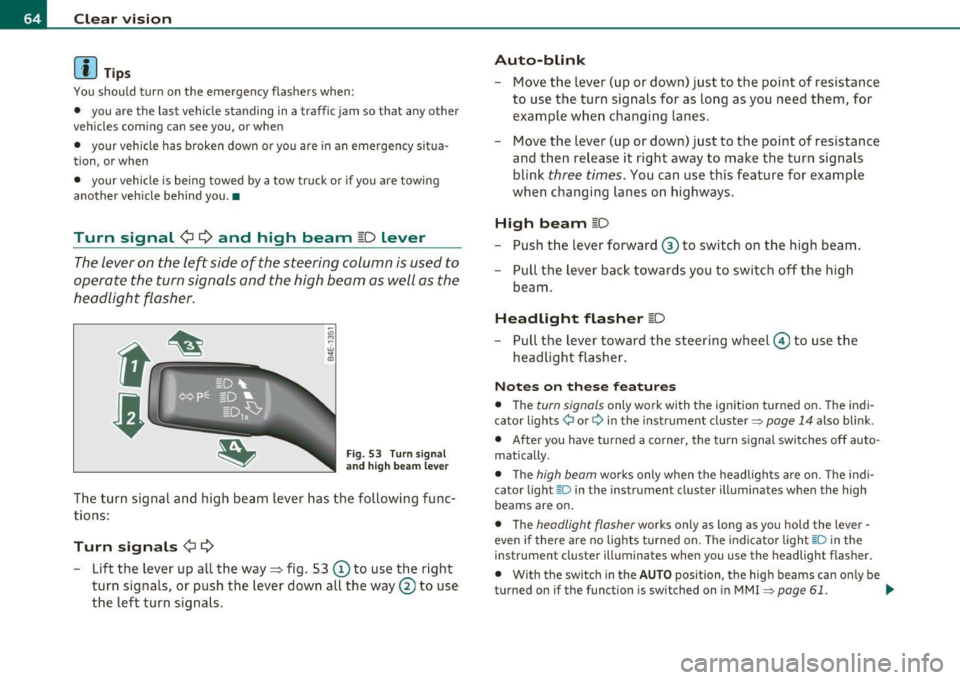
Turn signal ¢¢ and high beam ~D Lever
The lever on the left side of the steering column is used to
operate the turn signals and the high beam as well as the
headlight flasher.
F ig. 53 Turn s ig nal
a n d hig h beam le ve r
The turn signa l and high beam lever has the following fu nc
tions:
Turn signals ¢¢
-Lift the lever up all the way~ fig. 53 © to use the right
turn signals, or push the lever down all the way
0 to use
the left turn signals.
Auto -blink
- Move the lever (up or down) just to the point o f resistance
to use the turn signa ls for as long as you need them, for
example wh en changi ng lanes.
- Move the lever (up or down) just to the point of resistance
and then release it right away to make the turn signals
blink
three times . You can use this feature for example
when changing lanes on highways.
High beam [D
- Push t he lever forward ® to switch on the high beam .
- Pull the lever back towards you to switch off the high
beam .
Headlight flasher [D
Pull the lever toward the steeri ng w heel © to use t he
headlight flasher.
Not es on these feature s
• The turn signals only work with the ignition turned on. T he indi
cator lights ¢ or¢ in the inst rument cluster~
page 14 also blink .
• After you have t urned a co rner, the tu rn s ignal switc hes off auto
matically.
• T he
high beam works only when the headligh ts ar e o n. Th e indi
cator light [D in the instrument cluster illuminates when the high
beams are on .
• The
headlight flasher works only as long as you hold the lever -
even if there are no lights turned on. The indi cato r light aD in the
instrument cluster illuminates when you use the headlight flasher.
• With the swi tc h in the
AUTO posi tion, the high beams can o nly be
turned on if the funct ion is switched on in MMI
~ page 61. ..,_
Page 92 of 384
Seats and storage
Luggage compartment
Tie-down eyelets
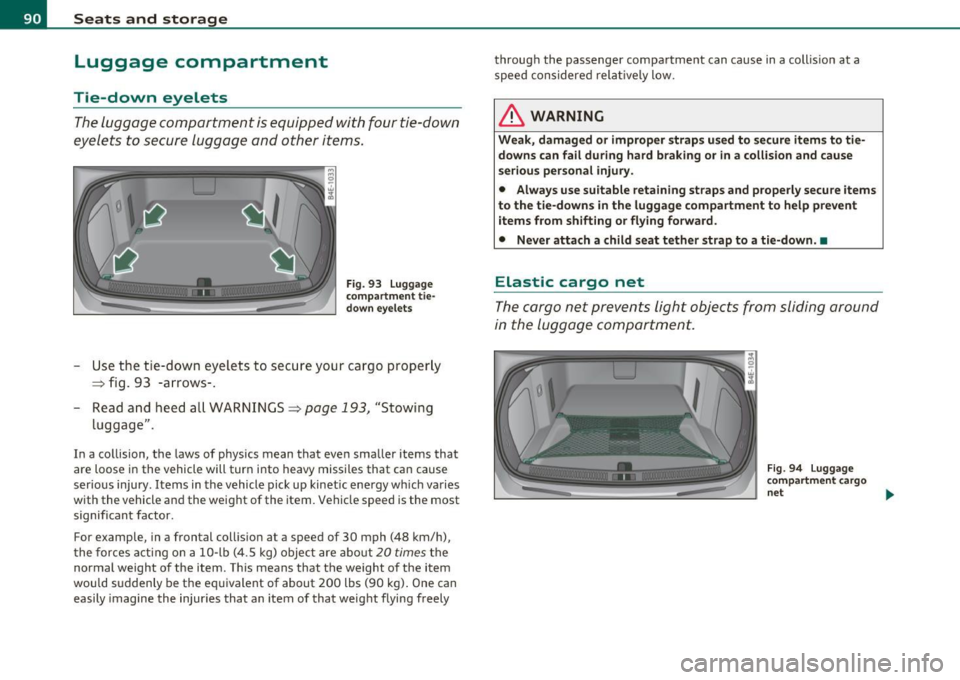
The luggage compartment is equipped with four tie-down
eyelets to secure luggage and other items.
Fig. 93 Luggage
compartment tie
down eyelets
Use the tie -down eyelets to secure your cargo properly
=> fig. 93 -arrows-.
- Read and heed all WARNINGS=>
page 193, "Stowing
luggage" .
In a collision, the laws of physics mean that even smaller items that
are loose in the vehicle will turn into heavy missiles that can cause
serious injury . Items in the vehicle pick up kinetic energy wh ich varies
with the vehicle and the weight of the item. Vehicle speed is the most
significant factor.
For example, in a frontal collision at a speed of 30 mph (48 km/h),
the forces acting on a 10-lb (4.5 kg) object are about 20
times the
normal weight of the item . This means that the weight of the item
would suddenly be the equivalent of about 200 lbs (90 kg). One can
easily imagine the injur ies that an item of that weight flying freely through the passenger compartment can cause in a collis
ion at a
speed considered relatively low.
& WARNING
Weak, damaged or improper straps used to secure items to tie
downs can fail during hard braking or in a collision and cause
serious personal injury.
• Always use suitable retaining straps and properly secure items
to the tie-downs in the luggage compartment to help prevent
items from shifting or flying forward.
• Never attach a child seat tether strap to a tie-down . •
Elastic cargo net
The cargo net prevents light objects from sliding around
in the luggage compartment.
Fig. 94 Luggage
compartment cargo
net ...
Page 94 of 384
Seats and storage
Load the ski sack from the luggage compartment .
Loading
-Open the luggage compartment lid and clear a space in
the center .
- Press the release button for the sk i sack hatch in the
luggage compartment and pull down the hatch
~ page 91, fig . 96.
- Fo ld out center armrest in the rear seat backrest .
- Press th e re le ase button on the lid from inside the v ehicle,
and then lower the lid .
- Pull out and unfold the ski sack.
- Load s kis or simi lar objects through t he luggage compart-
ment into the interior of the vehicle~& .
Securing
- Insert the ski sack strap © ~ page 91, fig. 97 in the
center buck le
@ .
- Pull t he sa fety belt taut on the free end of the belt@.
Securing in vehicles with power individual
rear seats*
- Loop the sk i sac k safety belt around the center armrest.
- Pu ll the safety bel t ta ut on the free end of the be lt.
Stowing
- In t he luggage compartme nt, close the ski sack hatch.
- F old the ski sack carefully and stow away.
- Close and engage the inne r hatch .
& WARNING
• The ski s ack is intended only for the transportation of skis and
other light object s. To redu ce the ri sk of serious per sonal injury ,
never transport heavy or pointed objects in the ski sack.
• When braking rapidly or during an accident, the load could be
d isplaced and cause injury to occupants .
• Sharp edg es on the load must be covered for prot ection .
Alw ays f aste n the belt t ightly a round the s ack and its contents
=> page 91 , fig . 97.
[ i ] Tips
N ever stow the ski sack aw ay when it is still we t or damp ( for ex ample ,
snow melt ing from skis). Allow it to dry completely before stow ing it
away .•
Roof rack
First things first
A roof rack can be fitted to carry additional luggage on
the roof.
- A lways read a nd follow the instruct ions provided by the
roof rack manufacturer when the roof rack system must
be ins ta lled.
If a roof rack or simila r luggage carrying equipment is to be installed,
please note the following :
• T o enh ance the vehi cle's st ream lined des ign, rain gu tters have
been molded into the roof. It is not possible to use normal roof racks.
On ly insta ll a roo f rack specifica lly designed fo r your model A 8.
Contact the nearest Audi dea ler for information on approved modular
roof rac ks for your vehicle. .,
Page 121 of 384
![AUDI S8 2010 Owners Manual _________________________________________________ O_ n_ t_ h_ e_ r _o_ a_d _ __.lftI
(]] Tips
• If you release the ignition key in posit ions G) , @ or@, the key
automatically returns t](/img/6/57617/w960_57617-120.png "AUDI S8 2010 Owners Manual _________________________________________________ O_ n_ t_ h_ e_ r _o_ a_d _ __.lftI
(]] Tips
• If you release the ignition key in posit ions G) , @ or@, the key
automatically returns t")
_________________________________________________ O_ n_ t_ h_ e_ r _o_ a_d _ __.lft'I
(]] Tips
• If you release the ignition key in posit ions G) , @ or@, the key
automatically returns to position @.
• If you open the driver's door when the ignition is switched on, a
buzzer sounds and the message
Ignition is on appears in the instru
ment cluster display. Please switch the ignition off.•
Ignition key safety lock
The ignition key can only be removed when the selector
lever is in the "P" (Park) position.
After turning off the ignition, the ign ition key can only be removed
from the ignition lock when the se lector lever is in the "P" (Park) posi
tion . After you have removed the key, the selector lever is locked and
cannot be moved. •
Starting and stopping the engine
Starting the engine
The engine can only be started with your original Audi
key.
Con tro ls a nd e quip
m en t
Fig. 132 Ignition key
positions
Vehicle OP-eration
-Step on the brake.
- Move the selector lever into P or N
~ &.
- Turn the ignition key to position @~ fig. 132 -do not
depress the gas pedal when starting the engine.
A cold engine may sound loud after it has been started. This is due to
the hydraulic valves building up oil pressure. This is normal and is not
a need for concern.
If the engine does not start immediately, stop trying after 10 seconds
and then try to restart the engine about 30 seconds later .
& WARNING
Never start or let the engine run in a confined or enclosed area.
Exhaust fumes from the engine contain carbon monoxide , a color
less and odorless gas. Carbon monoxide can be fatal if inhaled.
• Never leave the engine idling unattended. An unattended
vehicle with a running engine poses a danger of personal injury or
theft .
0 Note
• Avoid high eng ine speeds, fast accelerat io n or heavy engine loads
wh ile the engine is still cold. This could damage the engine.
• The engine cannot be started by push ing or towing the vehicle.
~ For the sake of the environment
To avoid unnecessary engine wear and to reduce exhaust emissions,
do not let your vehicle stand and warm up. Be ready to drive off imme
diately after starting your vehicle. Maintain moderate speed unti l the
engine is completely warm. Remember, the engine performs best at
operating temperature .•
Vehicle care Do-it-yourselt service iTechnical data
Page 167 of 384

_________________________________________ A_ d_v _a_ n_ c_e _d _ P_ a_ r _k_ , _· n_ g=- S-=- y_s _t _e _m __ ....JIJII
& WARNING
• The rear-view cam era has blind spots, in which objects cannot
be detected. Be especiall y carefu l to check for small children and
animal s before backing up . Small childr en and animals will not
always be detected by the sensor s.
• The Audi parking system is not a subst itute for being careful
and alert when ba cking up. Be e specially careful dur ing parking
and similar maneuvers . Always watch where you are driving and
make sure that nothing is in the way.
• Remember that low obstacles which have already been
s ignaled may pass below the system 's sensing zone when the
vehicle is back ing up . Th e fact that the signal stop s does not mean
that you have cleared the obstacle . When the signal stops , impact
is imminent . Objects su ch as trailer hitches, chains, narrow posts
or fences covered by a thin la yer of paint may not always be
detected by the system. They c an still damage your vehicle
without warning.
• Alway s make sure that the volume and frequency of the chimes
is adjusted so th at you can eas ily hear the acoustic distance s ignal
even if the radio is playing, the air-conditioner blower is on High
or there is a high level of outside noise .
- Che ck the setting s whenever someone el se has driven the
vehicle befo re you.
• Improper reliance on the Aud i parking system can caus e colli
sions and seriou s per sonal injury.
- Never rely only on parking assist when changing ba cking up.
- Alway s check re ar view mirrors to make sure it is safe to back
up.
[ i ) Tips
• Before parking with the rear-view camera, the Adaptive A ir
S uspension stan dard or au tomatic mo de must be swit ched on
=> page 18.
Cont rols a nd e quip
m en t
Vehicle OP-eration
• The rear-view camera pict ure is avai lab le as soon as the MMI
Display or the MMI is sw itched on , or the sta rt-u p ph ase is completed .
• In or der for the rear-view camera to function p roper ly, the came ra
lens =>
page 16 1, fig. 176 mus t be kept clean , a nd free o f snow and
ice . Please follow t he addit ional notes on =>
page 174 .
• The c ame ra cover age angle change s when the t runk lid is o pen.
The refore, the rear-v iew camera pict ure is displayed without orienta
t ion lines and w ithout blu e surfaces.
• Obse rve and fo llow the notes on towing mode on=>
page 171. •
Applies to ve hicles: w it h Advanced Pa rking System w ith rear view camera
Rear -view camera coverage area
0
Vehicle care
I)
Fig. 18 1 Top vie w:
R ear-v iew came ra
c o ve rage a re a
Fi g. 182 Side view :
Cov ered ar ea @ and
u nc overed are a@ of
th e re ar -vi ew c am era ..
Do-it-yourselt service iTechnical data
Page 173 of 384

Advanced Parking System -
---------------=---:.--
& WARNING (co ntinued )
• Maintain plenty of di stance from an obstacle , so that your
outside mirror or a corner of your vehicle does not collide with any
obstacle s -danger of accident!
• The Audi parking system is not a substitute for being careful
and alert when backing up. Be e specially careful during parking
and similar maneuvers . Always watch where you are driving and
make sure that nothing is in the
w ay.
• When maneuvering or parking, do not only u se the MMI
Di splay for orientation. Certain obje cts -depending on the s creen
resolution -may not , or not entirely, be di splayed; for e xample
trailer hitches , chains , na rrow posts, or fences. •
Applies to vehicles: with Advanced Park ing System w ith rear view camera and a trailer h itch
i nstalled acco rding to fact ory spec ificat ion s
Towing hitch
For vehicles with a tra ile r hitc h installed according to factory spec ifi
cat ions, the rear acoust ic parking senso rs are not activated when the
vehicle is pu t in r everse gear while an e lec trica l connec tion to t he
trai ler socket* is established. No distance ale rt occurs in the rear
~ page 161. T he re ar-view camera picture ~ page 164 is di splayed
without o rientation lines and without blue surfaces .•
Controls and equip
ment Safety first
Settings in the MMI
App
lies to vehicles: w ith Advanced Parking System w ith rear view camera
Adjusting the chimes -option 1
The volume and the pitch (frequency) of the chimes can
be adjusted in th e MM I.
Fig. 190 MM I di sp lay :
Selec tion menu
-Press th e [ C A R] fu nctio n bu tto n.
- Selec t
Systems in th e CAR me nu.
- Select
Audi parking system .
-Select Front volume to c hange t he volu me of t he fro nt
aud ible signal generator , or
Rear volume to change t he
volume of t he rea r aud ible s ignal genera tor.
- Selec t
Front frequency to change the freq uen cy of th e
front audib le s ignal gener ato r or
Rear frequency if you
wa nt to c hange t he freque ncy of t he rear a udible s ig nal
generato r.
When you adjust the vol ume and freq uency, the new setti ng will
so und for app roxim ate ly 2 s econds from the s ignal generator
affected.
Vehicle care Technical data
Page 181 of 384

____________________________________________ A_ d_a_ p ,_ t_iv _ e_ A _ i_ r _ S_ u_s_, p __ e_n _ s_ i _o_ n __ _
Setting the Driving Modes
The driving modes are set in MMI.
Fig. 1 94 MMI d isplay:
Se tti ngs
The ignition must be switched on to set the driving modes.
- Press the [ CAR]function button. The main menu
Adaptive
Air Suspension
appears::::> fig. 194.
- Select the desired mode with the control knob .
Please note that not every driving mode can be selected in every
driving situation . For examp le, it is not possible to switch to lift mode
at speeds above 50 mph (80 km/h). This mode is shown
greyed out in
the MMI display.
For additiona l information on the driving modes=>
page 177,
"Chass is Controls" . •
Jacking Mode When Changing a Flat Tire
This mode must be activated before raising the vehicle
with a vehicle jack .
Switching jacking mod e on and off
- Select: Function button [CAR]> Adaptive Air Suspension
> function button [SETUP].
Controls and equip
ment Safety first
-
Turn the control knob to Veh icl e jac k mode and select on
or off as desired.
The vehicle jack mode must be act ivated before changing a whee l so
that the automatic control processes for the air suspension do not
make lifting with the vehicle jack more difficult.
In the veh icle jack mode the indicator light in the instrument cluster
w v illuminates.
& WARNING
The hei ght of the parked vehi cle ca n c hange due to te mp erature
fluc tu at ions or c ha ng es in l oad .
[I) Tips
The vehicle jack mode is switched off automatically at speeds above 9
mph (15 km/h). •
Towing a Trailer
Automatic lowering is not desirable when towing a
trailer.
If you are going to tow a trailer, you must activate the tra iler
towing mode .
Switching the trail er towing mode on and off
manually
- Select: Function buttont( CAR]> function button [SETUP].
- Select Trailer towing mode on or off as desired .
Level Adjustm ent when T ow ing a Trail er
The following applies to vehicles with Adaptive Air Suspension:
Vehicle care Technical data
Page 182 of 384
1111....__A_ d_ a_,_ p_t _i_ v _e _ A_i_ r_ S_ u_ s ... p,_ e_n_ s_ io_ n __________________________________________ _
• Before h itching up the trailer and before adjust ing the tongue
we igh t a t the trailer, t he automat ic o r st and ard mode
must be
selected, so that the vehicle is at normal level=:>
page 1 79, "Setting
the Driving Modes".
• If dr iv ing in dynamic mode is desired, this mode
must be selected
befo re hitch ing up the trailer and before adjus ting the tongue
we ight. However, note that your veh icle is lowered and ground clear
ance is reduced.
• If you have to drive under difficult road conditions, you can select
lift mode af ter hitching up the tra iler o r af ter adjusting the tong ue
we ight.
T he following applies to vehicles wit h
sport suspension Adaptive Air
S uspens ion - Spo rt* :
• Before hitching up the trailer
and before adjust ing the tongue
we igh t at the t railer, the a utomatic, standard or dynamic mode
must
be selected, so that the vehicle is at normal level=:> page 179,
"Setting the Driving Modes" .
• If you have to drive under difficult road conditions, you can select
li ft mode a fter hitching up the tra ile r or aft er ad justing the tong ue
we ight .
Restrictions when Operating with a Trailer
When ope rating with a trailer, the lift mode can only be selected up
t o about 25 mph ( 40 km/h). The system automat ic all y goes o ut o f lift
mode when speed exceeds about 31 mph (SO km/h) .
If the ve hicle is in automatic , standard or lift mode before t he trailer
towing mode is act ivated, the dynam ic mode cannot be activated -
except on vehicles with
s po rt suspension Adaptive A ir Suspension -
Sport*.
If the veh icle is in dynamic mode before towing operation is act i
va ted, it can be dr iven in t his mode. If the suspe ns io n is shifted from
this mode to automatic mode, dynamic mode ca nnot be re -selected .
W Tips
The vehicle w ill not lower to t he dynamic leve l w he n operat ing in t he
trai ler towing mode. •
Page 195 of 384

------------------------------------------------=D __ r __ i..: v ....:..i.:...n :.::g ~ S:...:a=- f=-- e= ly~ _-
& WARNING
Pedals that cannot move freely can cause loss of vehicle control
and in crease the risk of serious injury .
• Never place any objects in the driver 's footwell. An object could
get into the pedal area and interfer e with peda l function . In ca se
of sudden braking or an accident, you would not be able to brake
or accelerate!
• Always make su re that noth ing can fall o r move into the
driver' s footwe ll. •
Floor mats on the driver side
Always use floor mats that can b e securely attach ed to
the floor mat fasteners and do not interfere with the fre e
movement of the pe dals.
- Make sure that the floor mats are properly secur ed and
cannot move and i nte rfere with t he peda ls=> &.
Use on ly floor ma ts t hat leave the pe dal area uno bstr ucted and that
are firm ly sec ured so that they cannot slip out of position . You can
obtain s uita ble f loor mats from yo ur authori zed Audi Dealer .
Floo r mat fas teners are installed in your Audi.
Floor mats used in your vehicle must be attached to these fasteners.
P roperly secur ing t he f loor mats wi ll prevent them from s lid ing into
positions that cou ld interfere with the peda ls or impa ir safe opera
ti on of your veh icle in other ways.
& WARNING
Pedals that cannot move freely can re sult in a loss of vehicle
control and inc rease the risk of serious personal injury.
• Alway s make sure that floor mats are properly se cured .
Controls and equip ment Safety first Vehicle operation
& WARNING
(co ntinued )
• Never place or in stall floo r m ats or other floor coverings in the
vehicle that cannot be properly secured in place to prevent them from slipping and interfering with the pedals or the ability to
c ontrol the v ehicle.
• Never place or install floor mat s or other floor coverings on top
of alr eady in stalled floor mats. Additional floor mat s and other
cove rings will reduce the size of the pedal area and interfere w ith
the pedals .
• Always properly rein stall and secure floor mats that have been
taken out for cleaning.
• Always make sure that objects cannot fall into the driver foot
well while the vehicle is moving . Obje cts can become trapped
under the brake pedal and accele rator pedal causing a loss of
vehicle control. •
Stowing luggage
Loading the luggage compartment
All luggage and oth er objects must be properly stowed
and secured in the lu ggage comp artment.
Loose items in t he luggage compartme nt can s hift suddenly ,
chang ing ve hicle handling c haracteristics. Loose items ca n
also incre ase the r isk of serious pe rsonal i njury in a sudde n
veh icle maneuver or in a co llis io n.
- Distr ibute the loa d eve nly in t he luggage compartme nt.
- Always pla ce and p roperl y se cure heavy it em s in the
l u gg age compar tme nt a s far forwar d as possi ble .
- S ecur e luggag e using t he tie -d ow ns prov id ed =>
page 90,
"Lugga ge com partm ent". 1111-
Vehicle care Do-it-yourself service Technical data