brake light AUDI S8 2012 Owner's Manual
[x] Cancel search | Manufacturer: AUDI, Model Year: 2012, Model line: S8, Model: AUDI S8 2012Pages: 300, PDF Size: 75.06 MB
Page 113 of 300
To shift from N to D when traveling at speeds
be low S km/h, press the brak e pedal and se
lect the D se lector lever position
~ .& .
Unde r certain conditions such as driving in the
mountains or when towing a trailer , it may be
helpful to switch to manual mode temporarily
to sh ift
manually to adapt to the driv ing con
ditions
r:=:> page 112.
S -Sport
The 5 position can be selected fo r sporty driv
ing. Upshifting at a higher RPM makes full use
of the engine's power.
You can only select the S selector lever posi
tion when Dis engaged . Move the selector
l ever back to engage the 5 selector lever posi
tion. To select the D sel ector lever position
again when 5 is engaged, move the selector
lever back
r:=:> .&.
The 5 selector lever position engages auto
matica lly when you select the dynamic mode
in Audi drive se lect .
A WARNING
-Never engage R or P wh ile driving. It
could cause a crash.
-
- Power is still transmitted to the whee ls
when the engine is running at idle. To
prevent the vehicle from "creeping", you
must keep your foot on the brake in all
selector lever positions except P and N
when the eng ine is running. Do not inad
vertent ly press the accelerator pedal
when the vehicle is stationary . Otherwise
the vehicle will start to move immediate
ly. This cou ld happen even if the parking
brake is activated .
- Before opening the hood, select the P se
lector lever position and set the parking
brake. This reduces the risk of a crash . A l
ways read and follow the applicable
warnings
r:=:> page 213, Engine compart
ment.
- Never get out of the driver's seat when
the engine is running.
Automatic Transmission 111
-If you must get out of the vehicle , move
the selector lever secure ly into the P po
sition and apply the parking brake firmly.
@ Tips
- If you unintentionally shift into the N se
lector lever position while driving, take
your foot off the accelerator pedal and
wa it for the engine to slow down until it
is idling before you sh ift into Dor 5.
Driving tips
The gears shif t automa tically.
Starting from a stop
.. Press and hold the brake pedal.
.. Start the engine
r:=:>page 80.
.. Press the b utton on the s elector lever and
select the D, 5 or R se lector lever position
r:=:> page 109 .
.. Wait a moment until the transmiss ion
shifts . You will notice a slight movement
when the gear engages .
"" Release the brake peda l and press the accel
erator pedal
r:=:> &, .
Stopping temporarily
.. Press the brake pedal to stop the veh icle,
for example at a traffic light. Do not press
the acce lerator pedal when doing this.
"" To prevent the vehicle from rolling when
you start driving, set the parking brake
when stopp ing on large inclines
r:=:> &, .
.,. Th e parking brake will release automatica lly
and the vehicle will start moving once you
press the acce lerato r pedal.
Parking
If the selector lever is not in the P position
when you open the driver's door, the vehicle
could roll . The message
Transmission: Car
may roll! Shift to park!
appears .
.. Press and hold the bra ke peda l¢ &, .
"" Set the park ing brake.
.. To engage the P se lector lever position,
press the button on the selector lever and
shift into the P position
r:=:> page 109 .
Page 115 of 300
The transmission temperature has increased
significantly due to the sporty driving manner. Drive in a less sporty manner until the tem
perature returns to the normal range and the
indicator light switches of.
[O] Gearbox malfunction: you can continue
driving
There is a system ma lfunction in the transmis
sion. You may continue driving. Drive to your
authorized Audi dealer or qualified repair fa
cility soon to have the malfunction corrected .
[O];lij Gearbox malfunction: you can contin·
ue driving in D only until engine is off
There is a system malfunction in the transmis
sion . The transmission is switching to emer
gency mode. If you turn the engine
off, you
will not be able to select any other selector
l ever positions after starting the engine again.
Drive to your authorized Audi dea ler or quali
fied repai r facility immediately to have the
malfunction corrected.
[O] Gearbox malfunction: you can continue
driving {limited functionality)
There is a system ma lfunction in the transmis
sion. The transmission is switching to emer
gency mode. This mode only shifts into cer
tain gears or will not longer shift at all. The
engine may sta ll. Drive to your authorized Au
di dealer or qualified repa ir facility immedi
ately to have the malfunction corrected.
[o]tlij Gearbox malfunction: no reverse gear
(you can continue driving)
There is a system malfunction in the transmis
sion. The transmission is switching to emer
gency mode. This mode only shifts into cer
tain gears or will not longer shift at all. You
cannot engage the reverse gear. Drive to your
author ized Audi dealer immediately to have
the malfunction corrected.
[O] Vehicle may roll! Cannot shift to P. Please
apply parking brake
- The parking lock was released using the
emergency release
r=:> page 113. Or
Automatic Transmission 113
- The parking brake cannot engage automati
cally . Drive to your authorized Audi dea ler or
qualif ied repair facility immediately to have
the malfunction corrected.
[O] Gearbox malfunction: Stop and shift to P
Do not continue dr iving. Select the P selector
lever position and see your authorized Aud i
dealer or qualified repair facility for assis
tance .
Parking lock emergency release
The parking lock must be released using the
emergency release before towing the vehicle.
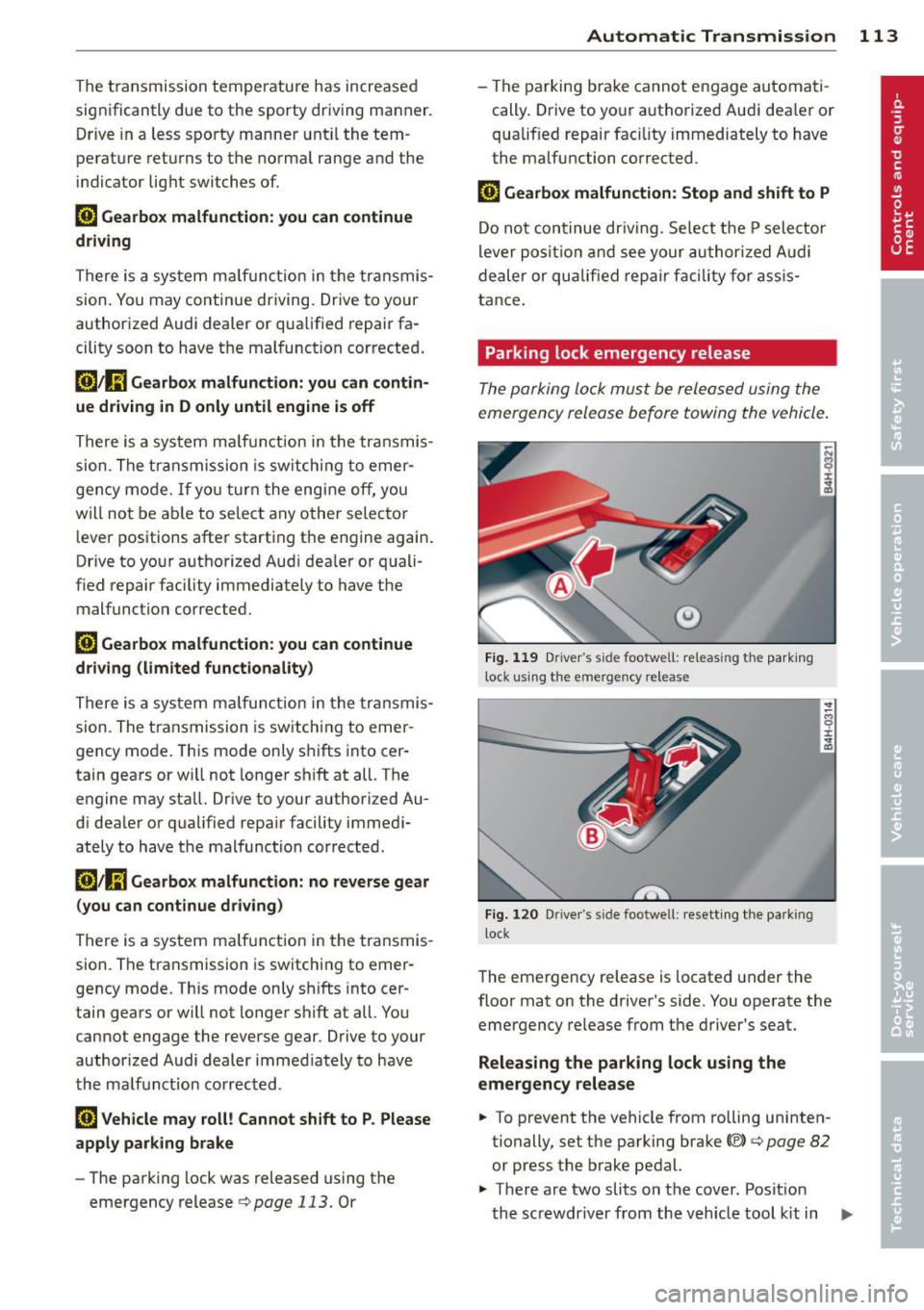
Fig. 119 Driver 's side footwell: releas ing the park ing
lock using the emergency release
.------------------ -~
Fig. 120 Dr iver"s side footwel l: resett ing the parking
l ock
8 ±
~
The emergency release is located under the
floor mat on the driver's side. You operate the
emergency release from the driver's seat.
Releasing the parking lock using the
emergency release
.. To prevent the vehicle from rolling uninten
tionally, set the parking brake©
r=:> page 82
or press the brake pedal.
.,. There are two slits on the cover. Posit ion
the screwdriver from the veh icle tool kit in
Ill-
Page 116 of 300

114 Automatic Transmission
one of the sli ts on the cover and pry the cov
er
off .
.. Pu ll the band @ in the direction of the ar
row until the release lever locks in place
<=>fig . 119.
• Fold the upper section of the release lever
down into the recess .
Resetting the parking lock
.. Press the button @ and the release lever at
the same time. You can now push the lever
back into its orig inal position . Make sure the
lever locks in place <=>
fig. 120 .
• Install the cover .
The indicator light
[O] and the N position indi
cator in the instrument cluster turn on when
the park ing lock is released using the emer
gency re lease . The message
Risk of rolling! P
not possible . Please set the parking brake
al
so appears .
.&_ WARNING
If you release the parking lock using the
emergency release, secure your vehicle
with the parking brake or the brake pedal
if the parking brake is not working. The ve
hicle can roll away if it is not secured and
cause a crash.
-
Page 123 of 300
Homelink®
Universal remote
control
General information
Applies to vehicles: with Horne Link® universal remote
control
The Homelink universal remote control can
be programmed with hand -held transmitters
from existing equipment.
Using the Homelink universal remote control,
you can operate equipment such as garage
doors, property gates and house lights from inside your vehicle.
Using the Homelink universal remote control,
you can replace up to three separate hand
held transmitters for equipment on your
property with just one universal remote con
trol. Most of these transmitters a re used to
operate ga rage doo rs and property gates. The
individua l transmitters are programmed at
the front bumper. That is where the control
module is located.
The transmitters must be programmed first in
order to operate systems using the Homelink universal remote control.
A WARNING
-
- Never use the Homelink® transmitter
with any garage door opener that does have not the safety stop and reverse fea
ture as required by federal safety stand ards . Th is includes any garage door open
er model manufactured before April 1, 1982.
- A garage door opener which cannot de
tect an object, signaling the door to stop
and reverse does not meet current feder
al safety standards. Using a garage door
opener without these features increases
risk of serious injury or death.
- For safety reasons never release the
parking brake or start the engine while
anyone is standing in front of the vehicle .
- A garage door or an estate gate may
sometimes be set in motion when the
Homelink ® 121
Homelink ® remote control is being pro
grammed.
If the device is repeatedly ac
tivated, this can overstrain motor and
damage its electrical components - an
overheated motor is a fire hazard!
- To avoid possible injuries or property
damage, please always make absolutely
certain that no persons or objects are lo
cated in the range of motion of any
equ ipment being operated.
(D Tips
- If you would like additional information
on the Homelink ® Universal Transce iver,
Homelink compatible products, or to
purchase other accessories such as the
Homel ink ® Lighting Package, please
contact Homelink at 1 -800 -355-3515 or
on the Internet at www.homelink.com.
- For Declaration of Comp liance to United
States FCC and Industry Canada regu la
tions ~
page 283.
Page 189 of 300
Intelligent technology Notice about data
recorded by vehicle
control modules
Your vehicle is not equipped with an Event Da
ta Recorder (EDR), installed by some manu
facturers for the express purpose of capturing
data for retrieval after an accident or crash
event. EDR's are sometimes called "crash re
corders".
Some state laws restrict the retr ieval or down
loading of data stored by EDR's that were in
stalled in a vehicle for the express purpose of
retrieving data after an accident or crash
event without the owner's consent.
Although your vehicle is not equipped with an
EDR, it is equipped with a number of electron
ic control modules for various vehicle systems
such as, for examp le, engine function, emis
sion control, as well as for the airbags and
safety belts.
These electronic control modules also record
vehicle-related data during norma l vehicle op
eration for diagnostic and repair purposes.
The recording capacity of the electronic con
trol modules is limited to data (no sound is re
corded) and only a small amount of data is ac
tually recorded over a very limited period of
time and stored when a system fault or other
condition is sensed by a control unit. Some of
the data then stored may relate to vehicle
speed, direction, braking as we ll as restraint
system use and performance in the event of a
crash or other condition. Stored data can only be read and downloaded with special equip
ment.
Electronic Stability
Control (ESC)
Description
ESC helps to improve road holding and vehicle
dynamics to help reduce the probability of
skidding and loss of veh icle control. It works
only when the engine is running. ESC detects
Intelligent technology 187
certain difficult driving situations, including
when the vehicle is beginning to spin (yaw)
out of control and helps you to get the veh icle
back under control by se lectively braking the
wheels, and/or reducing engine power and
providing steering ass istance to help hold the
vehicle on the driver's intended course. The in
dicator light
Ip.] in the instrument cluster
blinks when ESC is taking action to help you
control the vehicle.
ESC has limitations .
It is important to remem
ber that ESC cannot overcome the laws of
physics.
It will not always be able to help out
under all conditions you may come up against.
For example, ESC may not always be able to
help you master situations where there is a
sudden change in the coefficient of friction of
the road surface. When there is a section of
dry road that is suddenly covered with water,
slush or snow, ESC cannot perform the same
way it would on the dry surface . If the vehicle
hydroplanes (rides on a cushion of water in
stead of the road surface), ESC will not be
able to help you steer the vehicle because con
tact with the pavement has been interrupted
and the vehicle cannot be braked or steered .
During fast cornering, particularly on winding
roads, ESC cannot always deal as effectively
with difficult driving situations than at lower
speeds. When towing a trailer, ESC is not able
to help you regain control as it would if you
were not tow ing a trailer.
Always adjust your speed and driving style to road, traffi<; and weather conditions. ESC can
not override the vehicle's physical limits, in
crease the available traction, or keep a veh icle
on the road if road departure is a result of
driver inattention. Instead, ESC improves the
poss ibility of keeping the vehicle under con
trol and on the road dur ing extreme maneu
vers by using the driver's steering inputs to
help keep the vehicle going in the intended di
rection. If you are traveling at a speed that
causes you to run off the road before ESC can
provide any assistance, you may not experi
ence the benefits of ESC.
•
•
Page 191 of 300
@ Tips
-ABS and ASR on ly work correctly when
all four wheels are equ ipped with identi
cal t ires. Different tire s iz es can lead to a
reduct ion in eng ine power.
- You may hear noises when the systems
described are working.
- If the indicator light
D] or m (USA
models) ;£1 (Canada models) appears,
there may be a malfunction¢
page 19,
c> page
18 .
Switching on and off
ESC
turn s on au tomatically when you s tart
the engine .
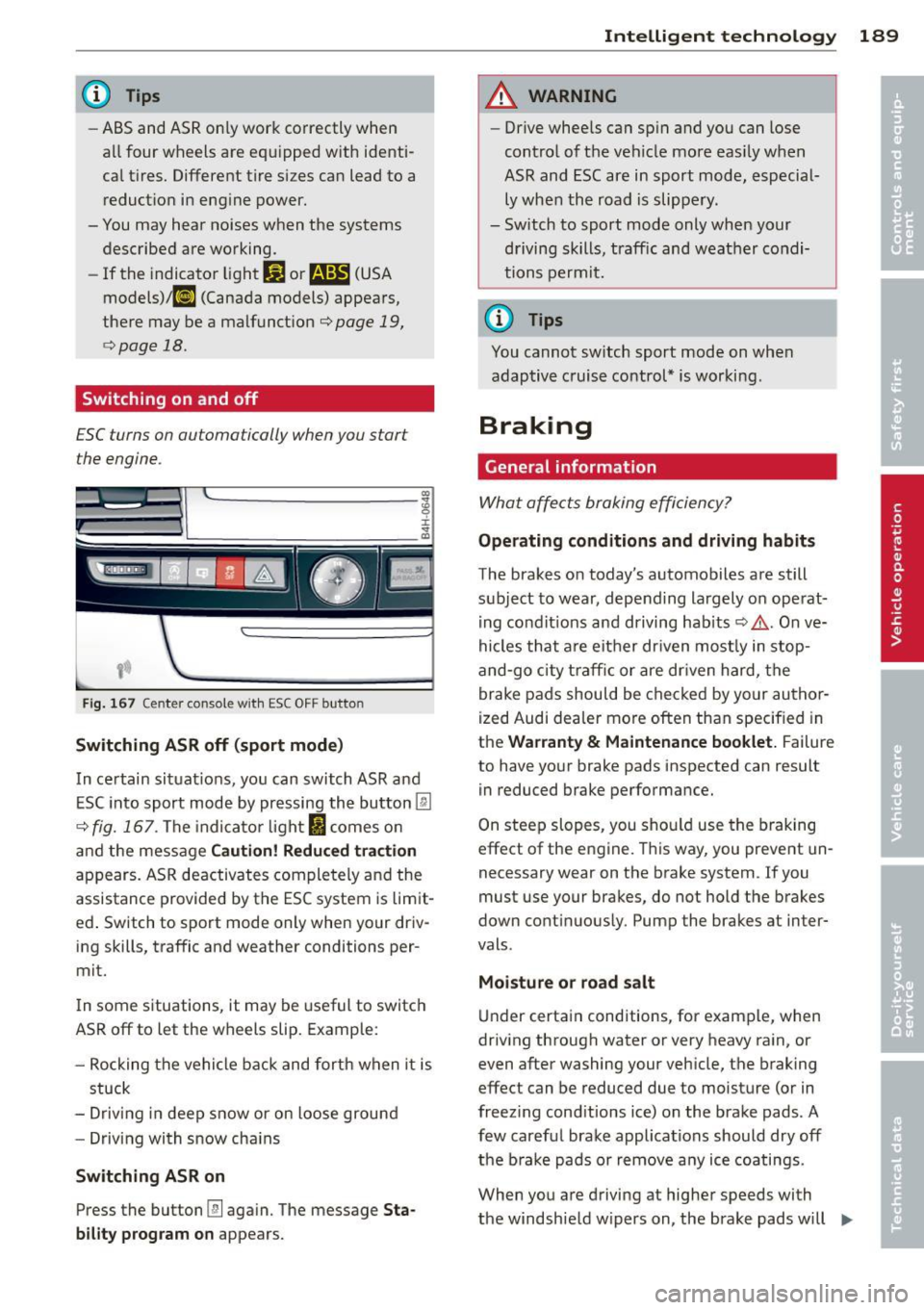
Fig. 167 Cen te r con sol e wit h ES C OF F but ton
Switching ASR off (sport mode )
In certain sit uat ions, you can switch ASR and
ESC in to sport mode by pressing the bu tton
[ru
c> fig. 167 . The indicator light I comes o n
and the message
Cauti on! R edu ced t ra cti on
appears. ASR deactivates completely and the
assistance provided by the ESC system is lim it
ed . Switch to sport mode only when your driv
ing skills, traffic and weathe r conditions per
mi t.
I n some s ituations, it may be useful to switc h
ASR off to let the wheels slip. Example:
- Rocking the vehicle back and forth when it is
stuck
- Driv ing in deep snow or on loose ground
- Driving with snow cha ins
Switching ASR on
Press the button [fil again. The message Sta
bility program on
appears.
Intelligen t technolog y 189
A WARNING
-Drive whee ls can sp in and you can lose
control of the vehicle more eas ily when
ASR and ESC are in sport mode, especial
ly whe n the road is slippe ry .
- Sw itch to sport mode only when your
driving skills, traff ic and weather condi
tions permit.
(D Tips
You cannot sw itch sport mode on whe n
adaptive cruise control* is working .
Braking
General information
What affects braking efficiency?
Operating cond itions and driving h abits
The brakes o n today's automobiles are still
subject to wear, depend ing largely on operat
i ng condit ions and driving habits ¢&, . On ve
hicles that a re either dr iven most ly in stop
and-go c ity t raff ic or are dr iven hard, the
brake pad s should be checked by yo ur author
i zed Audi dealer more often than specified in
the
Warranty & Maintenance booklet. Failure
to have your brake pads inspected can result in reduced brake performance.
On steep slopes, you sho uld use the braking
effect of the eng ine . T his way, you prevent un
necessary wear on the brake system . If you
must use your brakes, do not hold the br akes
down cont inuous ly . Pump the brakes a t in ter
vals .
Moisture o r ro ad sa lt
Under certa in conditions, for example, when
driv ing through water or very heavy ra in, or
even after washing your veh icle, the braking
effec t can be reduced due to moisture (or in
freez ing cond itions ice) on the brake pads . A
few carefu l brake applications should dry off
the b ra ke pads or remove a ny ice coatings.
When you are driving a t higher speeds with
the windsh ie ld w ipers on , the brake pads will
IJJJ,
Page 198 of 300
196 Driving and en vironm ent
Driving through water
on roads
Note the following to avoid vehicle damage
when driving through water, for example on
flooded roads:
- The water must not be any higher than the
bottom of the vehicle body.
- Do not drive faster than wa lking speed.
A WARNING
After driving through water, mud, slush,
etc., the brakes may be slow to take effect
because of wet brake rotors and pads. Dry
the brakes first by braking carefully to re
sto re the full braking effect.
@) Note
Vehicle components such as the engine,
transmiss ion, suspension or electrical sys
tem can be severely damaged by driving
through water.
- Check the depth of the water before dr iv
i ng through it.
- Do not stop the vehicle, drive in reverse
or switch the engine off when driving
through water .
- Keep in mind that oncoming vehicles
may create waves that raise the water
level and make it too deep for your vehi
cle to drive through safely.
- Avoid dr iving through salt water because
i t can cause corrosion.
Operate your vehicle
economically and
minimize pollution
General
Your personal style of driving will determine
the economy of your vehicle, as well as ex
haust and noise levels.
Fuel economy, environmenta l impact, and
wear on your engine, brakes and tires largely
depend on three factors:
- your personal driving style
- operating conditions
- technical limitations
If you anticipate what you need to do next and
drive economically, you can easily cut your
fuel consumpt ion by 10-15 percent . This sec
t ion will give you some tips on how you can
help the env ironment and your pocketbook.
@ Tips
The consumption estimates as published
by ENVIRONMENTAL PROTECTION AGENCY
(EPA) and Transport Canada may not corre
spond to your actual consumption on the
road, which will vary depending upon vehi
cle load and speed, road and weather con
ditions, trip length, etc.
Drive smoothly and keep a lookout
ahead
Vehicles use the most fuel when they are ac
celerating.
.,. Avoid unnecessary accelerating and braking.
Vehicles use the most fuel when they are ac
ce lerating. If you anticipate what is going to
happen next, you will need to brake less and,
thus, acce lerate less . Let the vehicle coast
whenever possible - for example when you see
that the next traffic light is red.
Page 201 of 300

Trailer towing Driving with a trailer
General information
Your Audi was designed primarily for passen
ger transportation .
If you plan to tow a trai ler, p lease remember
that the addit ional load will affect durab ility,
economy and performance .
Trailer towing not on ly places more stress on
the vehicle, it also calls for more concentra
tion from the driver.
F or this reason, a lways fo llow the operating
and d riving instr uctions provided and use
common sense.
(D Note
If you are going to tow a trai ler, you must
activate the trailer operat ion mode
~ page 199, Operating instructions.
Technical requirements
Trailer hitch
Use a weight-carrying hitc h co nforming to the
gross trailer we ight. The hitch must be suita
b le for your veh icle and trailer and must be
mounted secure ly on the veh icle's chassis at a
technically sound location . Use only a trailer
hi tch wit h a removab le ball moun t. A lways
check with t he trail er hitch ma nufactur er to
make sure tha t you are using the corre ct
hi tch.
Do not use a bumper hitch.
The hitc h must be installed in such a way that
i t does not interfere with the impac t-absorb
i ng bumpe r sys tem. No mod ifica tio ns should
be made to the vehicle exh aust a nd brake sys
tems . From time to time, check that a ll hitch
mo unt ing bolts remain securely fastened.
W hen you are not towing a trail er, remove the
traile r hitch ball mount. Th is prevents the
hi tch from causing damage sho uld your ve hi
cle be str uck from behind ¢& .
Trailer towin g 199
Trailer brakes
If your trailer is equippe d wi th a br akin g sys
tem, check to be s ure that i t conforms to all
r egulations .
T he trailer hy draul ic brak e sys tem mus t not be
direc tly connec ted to the vehi cle' s h ydraulic
brake system .
Safety chains
Always use safety chains between your veh icle
and the tra ile r.
Trailer lights
Trai ler lights must meet all regu lations. Be
su re to check with your Audi dealer for cor rect
wir ing, swi tches and relays .
Mirrors
If you are unable to see the traffic behind you
us ing the reg ular o utside mirrors, then you
must insta ll extended mirrors. It is imp ortant
that you
always have clea r v is ion to the rear.
A WARNING ...__ -
Afte r removing the trailer hitch, do not
stor e it i n yo ur v ehicl e. In cas e o f sudden
b ra king, the hitch co uld fly forwar d and in
ju re you or your p ass en ger s.
Operating instructions
Fi g. 168 MM I dis pl ay: tow ing mode on
Ma ximum trailer weight
A trai ler fo r you r vehicle is limited to a typical
class 1 or class 2 tra iler.
ll>
Page 202 of 300
200 Trailer towing
Trail er load dis tr ibut ion
Be sure the load in the trai ler is held securely
in place to prevent it from shifting forward,
backward or sideways.
N eve r all ow a p assenger to rid e in a trailer
~ .&. in Driving instructions on page 201.
Engine cooling sy stem
Towing a tra iler makes the eng ine work hard
er . It is important that the cooling system's
performance is up to the addit ional load .
Make sure that the cooling system has eno ugh
flu id.
Tir e pressure
When tow ing a tra iler, inflate the t ires of your
vehicle to the co ld tire pressure listed under
" Full load" on the label loca ted o n the dr iver's
side B-pillar (v is ible when the door is open).
I nflate trailer tires to tra iler and tire manufac
turers' specifications.
Lights
Check to make sure both veh icle and trailer
l ights are wor king p roperly.
Safe ty chain s
Be sure tra iler safety cha ins are properly con
nected from the trailer to the hitch on the ve
h icle . Leave enough slack in the chains to per
mit turning corners. When you install safety
cha ins, make sure they w ill not drag on the
road when yo u are driving.
The chains shou ld cross under the tra iler
tongue to prevent it from dropping in case of
separat ion from the hitch .
Adjusting the Audi drive select
Make sure the vehicle is on a level surface be
for e
hitching up the tra iler and b efor e adjust
ing the tongue weight . The vehicle must be i n
auto or comfort driving mode and not raised
~ page 103, ~CD .
Make sure that the vehicle is lowered . In Info
tainment, select:
I CARI function button> Lo w
e r
control button . If you must drive under poor road conditions,
you can raise the vehicle
afte r coupling the
trailer or
a fter adjust ing the tongue we ight
~ page 105.
(D Note
-Changes in temperature or load can af
fect the height of the vehicle .
- Always select auto or comfort mode .
Otherwise, the tongue load specified for
your vehicle will no longer be applicable.
Driving instructions
Driving with a trailer always requires extra
core and consideration.
T o obtain the best possible hand ling of vehicle
and trailer, please note the fo llowing:
.. Do not tow a loaded t railer when you r ca r it
self is not loaded .
.. Be especially carefu l when passing other ve
hicles .
.. Observe speed limits.
.. Do not drive at the maximum permissible
speed .
.. Always apply brakes early .
.. Monitor the temperature gauge .
Weight distribut ion
T owing a loaded trailer with an empty car re
s ul ts in a highly unstable distribution of
weight. If this cannot be avoided, drive at very
low speeds only to avoid the risk of losing
steering control.
A "balanced" rig is easier to operate and con
trol. This means that the tow vehicle should
be loaded to the extent possible and permissi
ble , while keep ing the trailer as light as possi
ble under the ci rcumstances. Whenever poss i
ble, transfer some cargo to the luggage com
partment of the tow vehicle while obse rv ing
tong ue load requi rements and vehicle load ing
considerations .
Speed
The higher the speed, the more d ifficu lt it be
comes for the driver to control the rig. Do not
1111>
Page 203 of 300

drive at the maximum permissible speed. Re
duce your speed even more if load, weather or
wind condit ions are unfavorable -part icularly
when going downhill.
Reduce vehicle speed
immediately if the trail
er shows the slightest sign of swaying .
Do not
try to stop the swaying by accelerating.
Observe speed limits . In some areas, speeds
for vehicles towing trailers are lower than for
regular vehicles .
A lways apply brakes early. When driving
downhill, shift into a lower gear to use the en
gine braking effect to slow the vehicle . Use of
the brakes a lone can cause them to overheat
and fail.
Coolant temperature
The coolant temperature gauge c:> page 10
must be observed carefully. The coo lant tem
perature can increase if you drive on long in
clines in a low gear at high engine speeds. Re
duce your speed immed iate ly if the L EDs in
the top part of the display turn on.
F or more information about indicator lights,
refer to.
i::> page 15.
A WARNING
Anyone not properly restrained in a mov
ing vehicle is at a much greater risk in an
accident . Never let anyone r ide in your car
who is not properly wear ing the restra ints
provided by Aud i.
Trailer towing tips
Important to know
Your veh icle hand les different ly when tow ing
-
a trailer because of the addit ional weight and
d ifferent weight distribution . Safety, perform
ance and economy will greatly depend on how
carefully you load your trailer and operate
your ng .
Before you actually tow your trailer, practice
turning, stopp ing and back ing up in an area
away from traffic. Keep practicing until you
Trailer towing 201
have become completely familiar with the way
your vehicle-trai ler combination behaves and
responds .
Backing up is difficult and requires practice .
Backing up with a t railer generally requires
steering action opposite to that when backing
up your vehicle without a tra iler.
Maintain a greater distance between your ve
hicle and the one in front of you . You wi ll need
more room to stop. To compensate for the
trailer, you w ill need a larger than normal
turning rad ius.
When passing, remembe r that you cannot ac
ce lerate as fast as you norma lly would be
cause of the added load. Make sure you have
enough room to pass. After passing, allow plenty of room for your trailer before chang
ing lanes again.
Avoid jerky starts, sharp turns or rapid lane changes.
(D Tips
- Do not tow a trailer during the break-in
period of your vehicle.
- If you tow a trailer, your Audi may re
quire more frequent maintenance due to
the extra load
c:> page 280.
Parking on a slope
Do not park on a slope with a trailer. If it can
not be avoided, do so only a~er doing the fol
lowing:
When parking:
.,. App ly the foot brake.
.,. Have someone p lace chocks under both the
vehicle and the trailer wheels .
.,. With chocks in place, slowly release the
brakes until the wheel chocks absorb the
load.
.,. Turn the wheels towards the curb .
.,. Apply the parking brake .
.,. Select the P selector lever posit ion .
When restarting after parking:
.,. Apply the foot brake.
•
•