brake AUDI S8 2013 Owner's Manual
[x] Cancel search | Manufacturer: AUDI, Model Year: 2013, Model line: S8, Model: AUDI S8 2013Pages: 318, PDF Size: 79.34 MB
Page 97 of 318
Audi adaptive cruise control and braking guard 95
@ is located in front of that vehicle, the sys
tem will not react to the stationary vehicle.
Audi adaptive cruise
control
Description
Applies to vehicles: with Audi adaptive cruise co ntrol
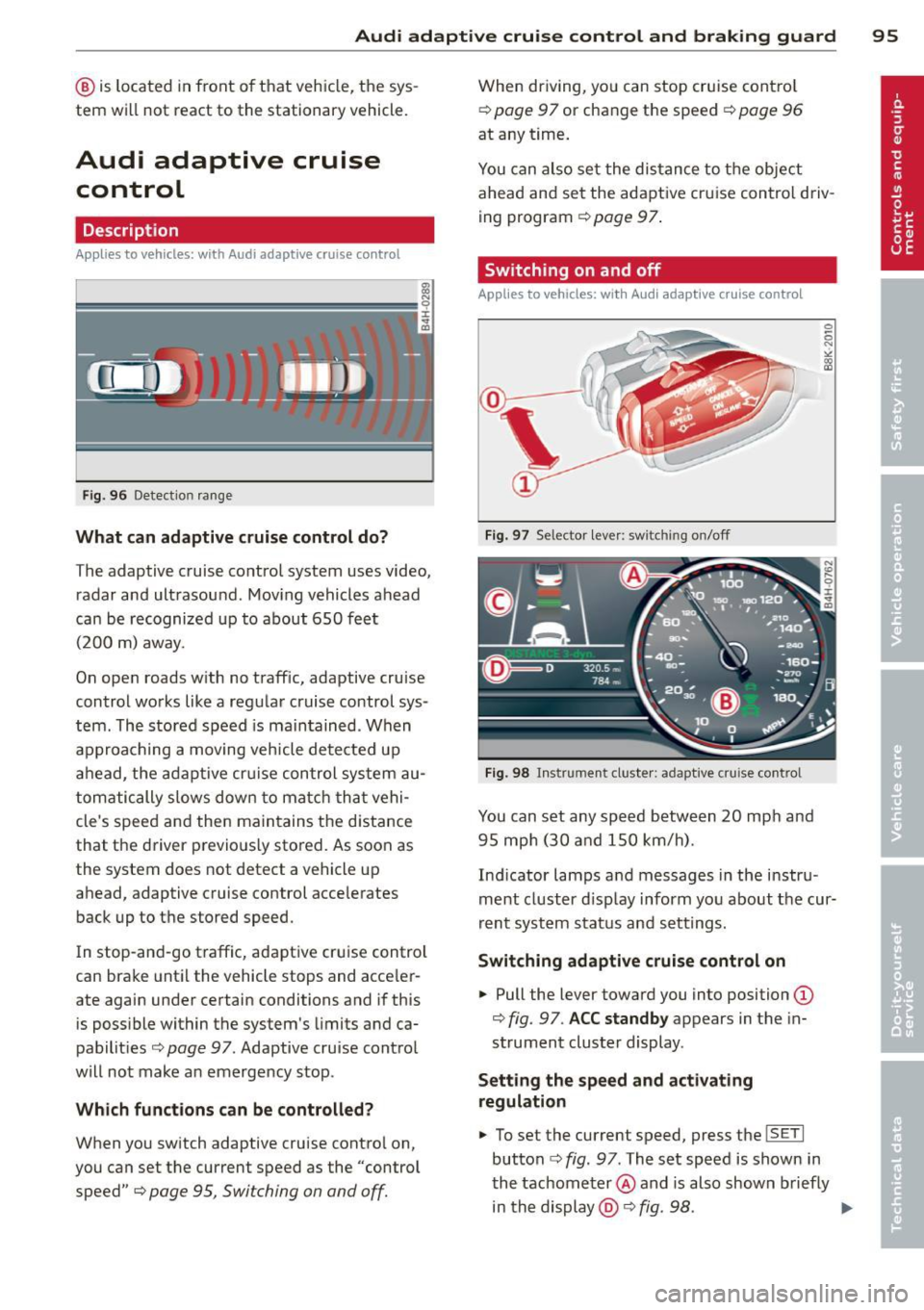
Fig. 96 Detectio n range
What can adaptive cruise control do?
The adaptive cruise control system uses video,
radar and ultrasound . Moving vehicles ahead
can be recognized up to about 650 feet (200 m) away.
On open roads w ith no traff ic, adaptive cruise
control works like a regular cruise control sys
tem. The stored speed is maintained . When
approaching a moving vehicle detected up
ahead, the adaptive cruise control system au
tomatically slows down to match that vehi
cle's speed and then maintains the distance
that the driver previously stored. As soon as
the system does not detect a vehicle up
ahead, adaptive cruise control accelerates
back up to the stored speed.
In stop-and-go traffic, adaptive cruise control
can brake until the vehicle stops and acce ler
ate again under certain conditions and if this
is possible within the system 's limits and ca
pabilities
c> page 97 . Adaptive cruise control
will not make an emergency stop .
Which functions can be controlled?
When you switch adaptive cruise contro l on,
you can set the current speed as the "control speed"
c> page 95, Switching on and off.
When driving, you can stop cruise control
c> page 9 7 or change the speed c> page 96
at any time.
You can also set the distance to the object
ahead and set the adaptive cruise control driv
ing program
c>page 97 .
Switching on and off
Applies to vehicles: with Audi adaptive cruise control
Fig. 97 Selector lever: sw itchin g on/off
Fig. 98 Instrumen t cl uster : ad apt ive crui se cont rol
You can set any speed between 20 mph and
95 mph (30 and 150 km/h).
Indicator lamps and messages in the instru
ment cluster d isplay inform you about the cur
rent system status and settings.
Switching adaptive cruise control on
... Pull the lever toward you into position (D
c> fig . 97 . ACC standby appears in the in
strument cluster display.
Setting the speed and activating
regulation
... To set the current speed, press the ISETI
button c> fig . 97 . The set speed is shown in
the tachometer @ and is also shown briefly
in the display @
c> fig. 98 . ..,..
Page 98 of 318
96 Audi adaptive cruise control and braking guard
• You must also press the brake pedal when
the vehicle is stopped.
Switching adaptive cruise control off
• Push the lever away from you into position
@ until it clicks into p lace. The message
ACC off appears.
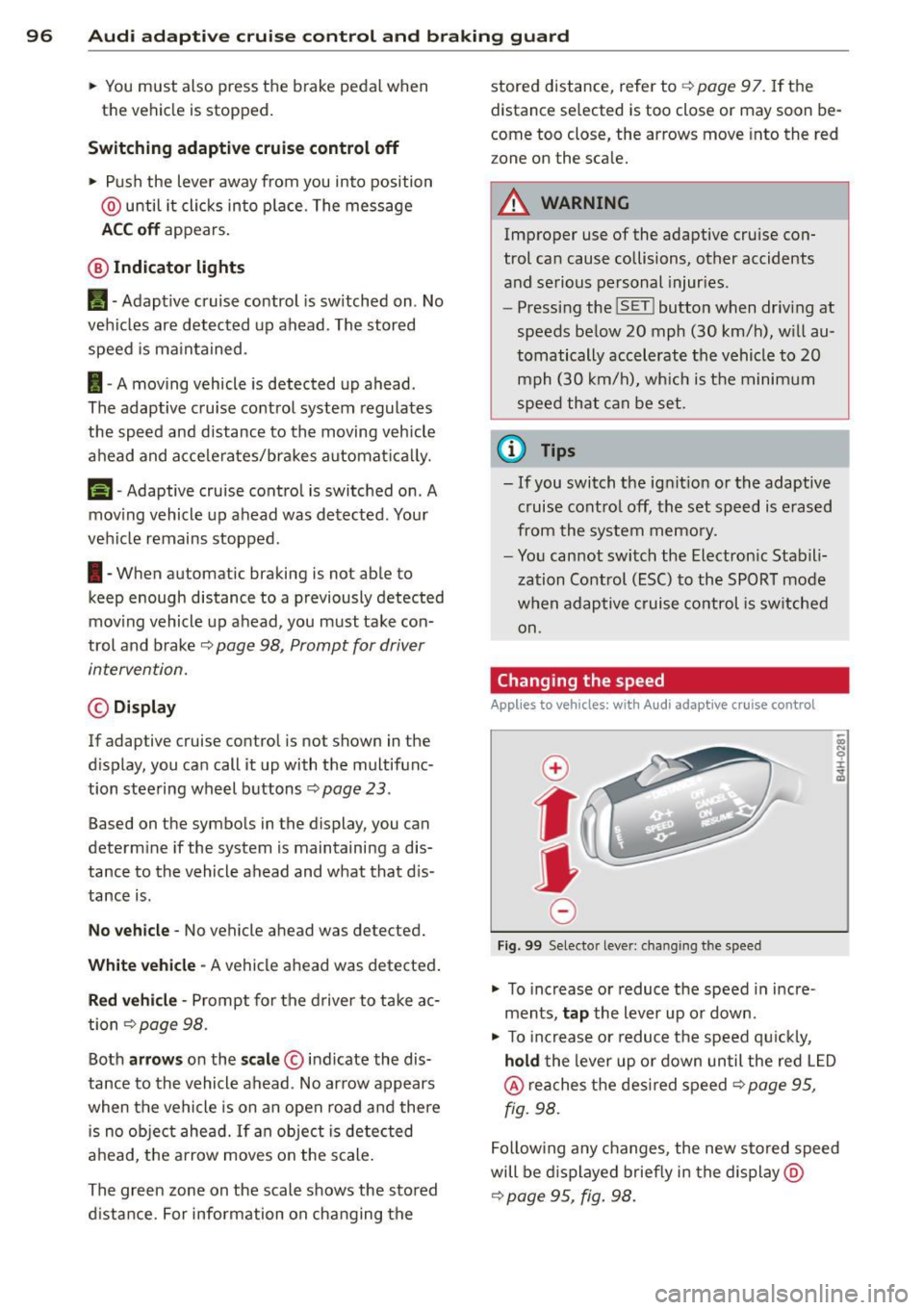
@ Indicator lights
II-Adaptive cruise control is switched on . No
vehicles are detected up ahead. The stored
speed is maintained.
I-A moving vehicle is detected up ahead .
The adaptive cruise control system regulates
the speed and d istance to the moving vehicle
ahead and acce lerates/brakes automatica lly.
S, -Adaptive cruise contro l is switched o n. A
mov ing vehicle up ahead was detected. Your
vehicle remains stopped .
I-When au tomatic braking is not able to
keep enough distance to a p reviously detected
mov ing vehicle up ahead, you must take con
trol and brake ¢
page 98 , Prompt for driver
intervention.
© Display
If adap tive cruise control is not shown in the
d isplay, you can call it up with the multifunc
tion steering wheel buttons~
page 23.
Based on the symbols in the display , you can
determ ine if the system is maintaining a dis
tance to the vehicle ahead and w hat that dis
tance is.
No vehicle -No vehicle ahead was detected.
White vehicle -A vehicle ahead was detected .
Red vehicle -Prompt for the driver to take ac
tion ¢
page 98 .
Both arrows on the scale© indicate the dis
tance to the vehicle ahead . No arrow appears
when the vehicle is on an open road and there is no object ahead. If an object is detected
ahead, the arrow moves on the scale .
The green zone on the scale shows the stored d istance. For information on changing the stored distance, refer to
¢
page 97. If the
distance se lected is too close or may soon be
come too close, the arrows move into the red
z one on the sca le.
A WARNING
Improper use of the adaptive cruise con
trol can cause collisions, other accidents
and serious personal injur ies .
- Pressing the
!SET ! button when driving at
speeds below
20 mph (30 km/h), w ill au
tomatically accelerate the vehicle to
20
mph (30 km/h), which is the minimum
speed that can be set .
(D Tips
-If you switch the ignit ion or the adaptive
cruise control off, the set speed is erased
from the system memory.
- You cannot switch the Electron ic Stabili
zation Control (ESC) to the SPORT mode
when adaptive cruise control is switched
on .
Changing the speed
Applies to vehicles: with Audi adaptive cruise control
0
f
• 0
Fig. 99 Selecto r lever : chang ing t he spee d
• To increase or reduce the speed in incre
ments,
tap the lever up or down.
-
-a)
N
q :r
~
"' To increase or reduce the speed qu ickly,
hold the lever up or down until the red L ED
@ reaches the desired speed ¢ page 95,
fig . 98.
Following any changes, the new stored speed
will be displayed briefly in the display @
¢ page 95 , fig. 98.
Page 99 of 318

Audi adaptive cruise control and braking guard 97
Driving in stop-and-go traffic
Applies to vehicles: with Audi adaptive cruise control
The adaptive cruise control system also as
sists you in stop-and -go traffic. If a previous
detected vehicle ahead s tops, yo ur vehicle will
brake to a stop, within the limits of the sys
tem .
.,. To resume driv ing with adap tive cruise con
tro l, tap the accelerator peda l or
.,. Pull the lever toward you into position @
¢page 97, fig. 100.
(D Tips
-If adaptive cru ise contro l is active and
your vehicle does not start driving as ex pected after pulling the lever once, you
can start out aga in by tapping the accel
erator pedal.
- If an obstacle is detected when your ve
hicle starts dr iv ing, the system w ill
prompt you to take over¢
page 98.
Your vehicle w ill drive more slowly when
starting. This may also happen in some
s ituations when no obstacle is apparent.
Interrupting cruise control
Applies to vehicles: with Audi adaptive cruise contro l
Fig. 100 Selector lever
Requirement : adaptive cruise control must be
switched on .
Overriding cruise control
.,. To accelerate manually, pull the lever to
ward you into position @and hold it there .
The message
ACC override appears . Or
.,. press the accelerator pedal. .,.
To resume cruise contro l, release the lever
or take your foot off the accelerator pedal.
Canceling cruise control while driving
.,. Move the lever into position @. The mes
sage
ACC standby appears . Or
.,. press the brake pedal.
.,. To resume the stored speed, move the lever
into position @ .
Canceling cruise control when stopped
.,. Push the lever away from you into pos ition
@ . Th e message
ACC standby appears.
.,. To resume cruise control, press the brake
pedal and pu ll the lever toward you into po
sition @.
A WARNING
-
Never resume the stored speed if the
speed is too high for prevailing road, traf
fic or weather conditions.
Setting the distance
App lies to vehicles: with Audi adapt ive cr uise contro l
Fig. 101 Selector lever: setting the distance
.,. Tap the switch to display the current set dis
tance
¢ fig. 101 .
.,. To increase or reduce the distance by incre
ments, tap the switch again to the left or
right. The distance between the two vehicles
w ill change in the instrument cluster dis
play .
When approaching a moving vehicle up ahead,
the adaptive cruise control system automati
cally brakes to match that object's speed and
Ill-
Page 100 of 318
98 Audi adapti ve cruise control and bra king gu ard
then maintains the stored distance. If the ve
hicle ahead accelerates, adaptive cruise con
trol will also acce lerate up to the stored
speed.
The higher the speed, the greater the distance
in yards (meters)¢ ,&. T he
Di sta nc e 3 setting
is recommended .
The distances p rov ided are specified values.
D epending on the driving situation and the
how the vehicle ahead is driving, the actual
distance may be more or less than these tar
get distances.
The various symbols for the time increments
appear briefly in the information line@
¢
page 95, fig. 98 when you change the set
tings.
~ -~ --- Dis tance 1 : This setting corre
sponds to a distance of 92 feet/28 meters
when traveling at 62 mph (100 km/h), or a
time interva l of 1 second.
~ -- ~-- Dista nc e 2: This setting corre
sponds to a distance of 1 18 feet/36 meters
when traveling at 62 mph (100 km/h), or a
time interva l of 1.3 seconds.
~ --- ~-Dis ta nce 3: This setting corre
sponds to a distance of 164 feet/SO meters
when traveling at 62 mph (100 km/h), or a
time interva l of 1.8 seconds.
~---- ~ Dista nce 4 : This setting corre
sponds to a distance of 210 feet/64 meters
when traveling at 62 mph (100 km/h), or a
time interva l of 2 .3 seconds.
A WARNING
Following other vehicles too closely in
creases the risk of collisions and serious
personal inju ry.
- Setting short distances to the traffic
ahead reduces the t ime and distance
available to br ing your vehicle to a safe
stop and makes it even mo re necessa ry
to pay close attention to traffic.
- Always obey applicable traffic laws, use
good judgment, and select a safe follow- ing distance for the traffic, road and
weather conditions.
(D Tips
- Distan ce 3 is set automatically each time
you switch the ignition on .
- Your standard settings a re automatically
stored and assigned to the remote con
tro l key being used.
Selecting the driving mode
Applies to vehicles: with Aud i adapt ive cru ise control
.. Select the desired driving mode in drive se
lect¢
page 109 .
(D Tips
Your settings are automatically stored and
assigned to the remote control key being
used.
Prompt for driver intervention
Applies to vehicles: with Aud i adapt ive cru ise contro l
Fig. 1 02 In strument cluster: request for driver inte r
vent ion
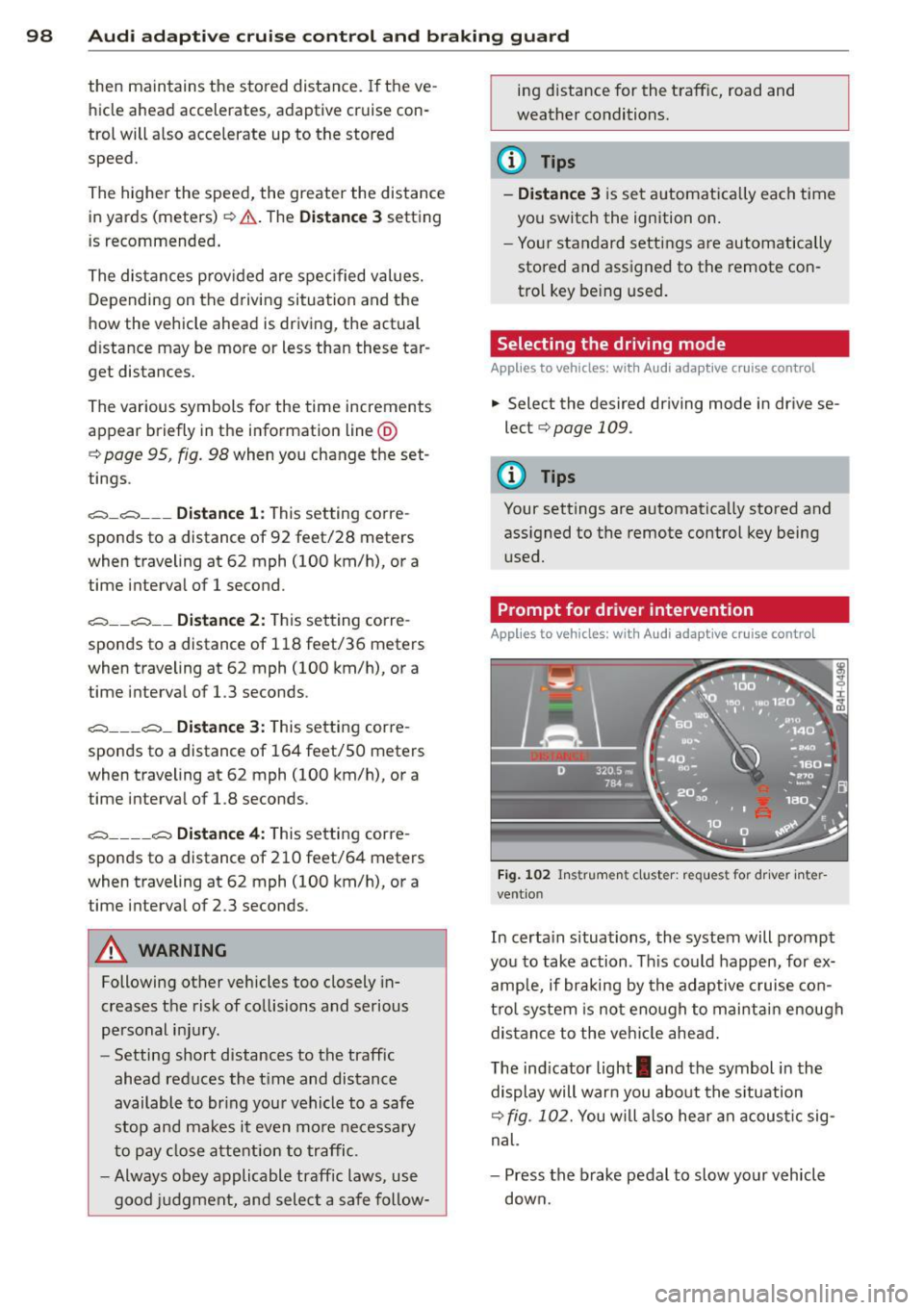
In certa in situations, the system will prompt
you to take action . Th is could happen, for ex
amp le, if braking by the adaptive c ruise con
tro l system is not enough to mai nta in enough
dis tance to the veh icle ahead .
The ind icator light
I and the symbol in the
display will warn you abo ut the s ituation
¢
fig. 102. You will also hea r an acous tic sig
nal.
- Press the brake pedal to slow your vehicle
down.
Page 101 of 318
Audi adaptive cruise control and braking guard 99
Audi braking guard
Description
Applies to vehicles: with Audi adaptive cruise control
Fig. 103 Instrumen t cl uste r: ap proac h warn ing
Braking guard uses radar sensors and a video
camera . It a lso functions within the lim its of
the system whe n adapt ive cruise control is
switched off .
What can braking guard do? When detected in time, the system can assess
situations when a vehicle ahead brakes sud
denly or if y our own veh icle is traveling at a
high speed and approaching a veh icle up
ahead that is moving more slowly . Bra king
g ua rd does not react if i t cannot detect th e
si tuation.
The system advises you of va rious situations:
- The distance warning is given if you are too
close to the vehicle ahead for a long time. If
the vehicle ahead brakes sharply, you will not be able to avoid a col lisio n. The indicator
light
I i n the display comes on .
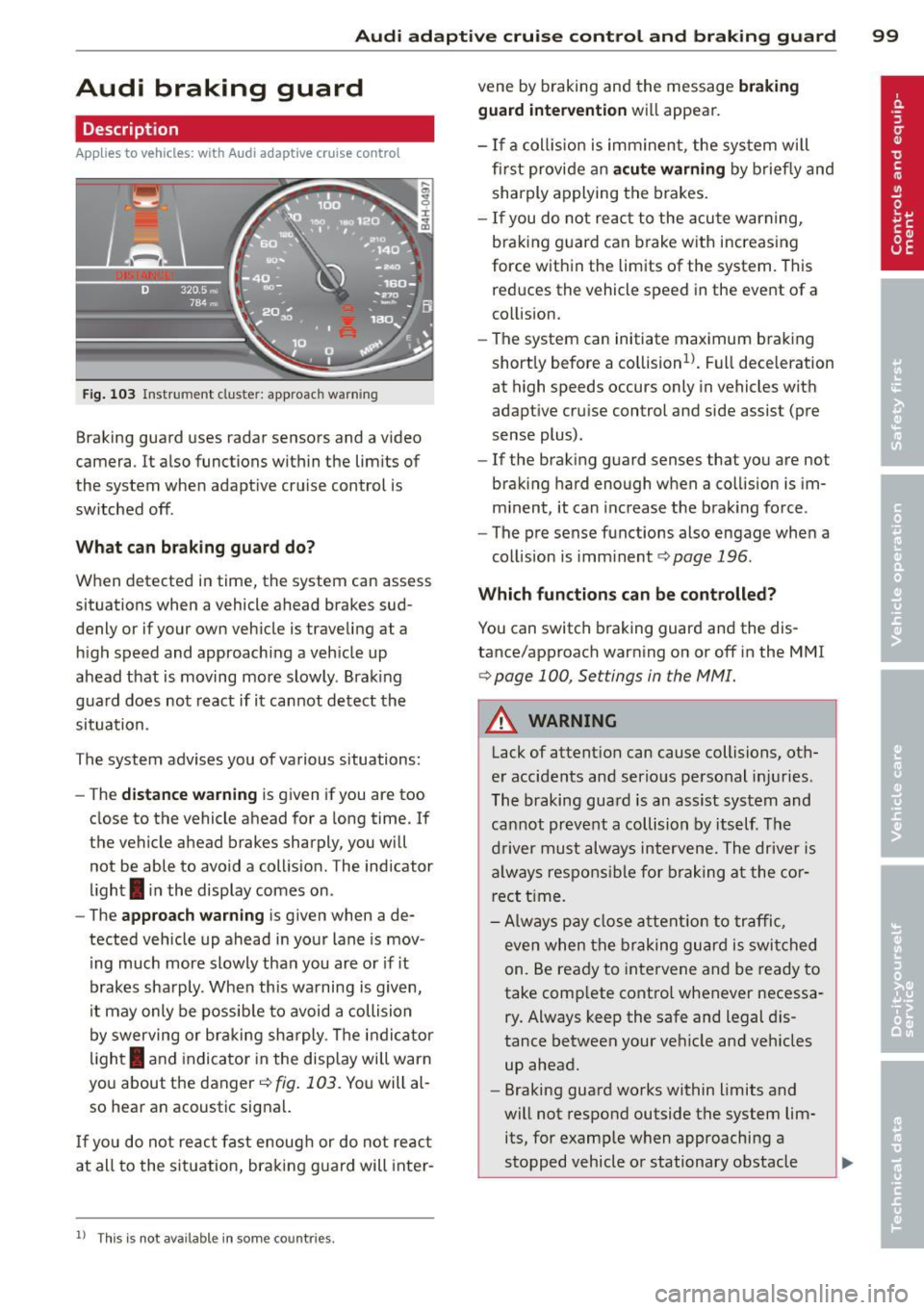
- The approach warning is g iven when a de
tected vehicle up ahead in yo ur lane is mov
i ng much more slowly tha n you are o r if it
b rakes sha rply . When this wa rning is given,
i t may only be possib le to av oid a collision
by swerving or br aking sh arply . Th e ind ic a tor
li gh t
I and indicator in the disp lay will warn
yo u about the danger
c::> fig . 103 . You will al
so hear an acoustic sig na l.
If yo u do not re act fast enoug h or do not re act
at all to the situat io n, braking g uard will inte r-
11
Thi s is not ava ilable in som e coun tri es.
vene by braking and the message braking
guard intervention will appea r.
- If a coll is ion is im minen t, the sy st em w ill
first provi de an acute warning by brie fly and
shar ply a pplying the brakes.
- If you do not re act t o the acu te war ning,
bra king g uard can brake w ith increas ing
force w ith in the lim its of the system. T his
red uces the vehicle speed in the event of a
co llision.
- The system can initiate maximum brak ing
short ly before a co llision
ll. Full dece leration
at high speeds occurs only in vehicles with
adapt ive cr uise control and side assist (pre
sense plus).
- If the brak ing g uard senses that yo u are not
braki ng hard enough w hen a co llision is im
m inent, it can inc rease t he b ra ki ng fo rce .
- The pre sense functions also engage whe n a
col lision is imm inent
c::> page 196 .
Which function s can be controlled?
You can switc h braking guard an d the dis
tance/approach warning on or off in the M MI
c::> page 100, Settings in the MMI.
&_ WARNING
Lack of attent ion can cause collisions, ot h
e r accidents and serio us pe rsonal inj uries .
Th e braking gua rd is an assist system and
ca nnot pr ev en t a collisi on by its elf . T he
dr iver must always in tervene. The drive r is
al way s res pons ible f or br aki ng a t the cor
rect t ime.
- Always pay clos e att ention to traffic ,
e v e n w hen the bra king g uard is swi tched
on. Be ready t o intervene and be ready to
take comp lete contro l whenever necessa
ry. Always keep the sa fe and legal dis
tanc e between your ve hicle an d veh icles
up ahead.
- Braking guard works wi thin limits and
wi ll not respo nd outside t he system lim
its, for e xamp le w hen approaching a
stopped vehicle o r stationary obstacle ..,.
Page 102 of 318
100 Audi adaptive cruise control and braking guard
(end of a traffic jam or vehicle that has
broken down in traffic).
- Always remember that the radar sensor
for the braking guard works only within
defined detection and range limits that
may prevent the proper detection of oth
er vehicles.
- The radar sensor's function and range
can be reduced by rain, snow and heavy
spray. Moving vehicles up ahead may not
be promptly detected or may not be de
tected at all.
- Reflective surfaces including crash barri
ers or tunnel entrances may impair the
function of the radar sensor.
(D Tips
- You can cancel the braking with increas
ing force that is initiated by the system
by braking yourself, by accelerating no
ticeably or by swerving.
- Braking guard error messages
r::> page 100.
-Keep in mind that braking guard can
brake unexpectedly . Always secure any
cargo or objects that you are transport
ing to reduce the risk of damage or in
jury.
Settings in the MMI
Applies to vehicles: with Audi adaptive cruise control
• Select: ICARI function button > Car systems
control button > Driver assist > Audi brak
ing guard.
System -
Switch braking guard On and Off.
When you switch the ignition on, the message
Audi braking guard off appears if the system
is switched off.
Early warning -The distance and approach
warnings in the display can be switched
On/
Off.
Tips
- Your settings are automatically stored
and assigned to the remote control key being used at the time the settings are
made.
- If you switch the ESC to sport mode,
braking guard switches off automatically
~page 200.
- Switch braking guard off when you are
loading the vehicle onto a vehicle carrier,
train, ship or other type of transporta
tion. This can prevent undesired warn
ings from the braking guard system.
Messages
Applies to vehicles: with Aud i adapt ive cru ise contro l
ACC unavailable
ACC and braking guard: unavailable
The system cannot detect moving vehicles up
ahead correctly and is switched off. The sen
sors have been displaced or are not working
properly. The Audi pre sense functions may al
so be affected. Drive to your authorized Audi
dealer or authorized Audi service facility im
mediately to have the malfunction corrected.
ACC: unavailable at this time. No sensor vi
sion
ACC and braking guide: unavailable at this
time. No sensor vision
This message appears if the sensor view is ob structed, for example by leaves, snow, heavy
spray or dirt . Clean the sensors
r:> page 93,
fig. 93.
ACC: unavailable at this time. Incline too
steep
The road exceeds the maximum possible an
gle for proper adaptive cruise control opera
tion. Adaptive cruise control is switched off .
ACC: only selector lever positions D, S or M
available
Select the D, Sor M selector lever position.
ACC: unavailable at this time. Parking brake
set
The adaptive cruise control system switches
off automatically if the parking brake is set. .,.
Page 103 of 318
Audi adaptive cruise control and braking guard 101
ACC: Currently unavailable. Stabilization
control (ESC ) input
This me ssage appea rs if the Ele ct ron ic Stab ili
z ation Contro l (ES C) is work ing to help st abi
li ze the vehicle. In this case, adaptive cruise
contro l sw itches off automatically .
ACC: Please take over
This message appea rs whe n adapt ive cr uise
con trol cannot set t he parking b ra ke . P ress
the brake pedal to preve nt the vehicle from
r olling .
•••
Three wh ite dots appear if a setting cannot be
se lected with t he se lecto r lever . Fo r example,
this happens if adapt ive cr uise c ontrol can not
resume dr iv ing in stop-and -go traff ic because
one of the conditions required for ACC to wor k
i s not p resent.
Door open
The adaptive c ruise control system cannot
sw itch on when a d oor is open .
Stationary object ahead
This message appea rs if you would li ke to
sw itch ad aptive cr uise con trol o n and t here is
a sta ti onar y ve hicle or obs tacle direc tly ah ea d
of yo ur vehicle.
Page 118 of 318
116 Automatic Transmission
Selector lever lock
The selector lever lock prevents you from se
l ecting a position unintentionally, causing the
vehicle to roll. When engaging some selector lever positions, you must press the button on
the selector lever<=>
fig. 123 and/or press the
brake pedal.
You must press the brake pedal to engage a
selector lever position when the engine is run
n ing while the vehicle is stationary. The ar
rows¢
fig. 124 indicate when you need to
press the button on the selector lever.
The selector lever does not lock if you shift
from D to R within one second . This allows
you to "rock" the vehicle to free it when it is
stuck.
P - Park
The whee ls are locked in this position. Only
shift into park when the vehicle is stationary
¢ & .To engage the P selector lever position,
press the button on the selector lever and
shift into the P position.
You can only shift out of park when the eng ine
is running and you are pressing the brake ped
al. Press the button on the selector lever to
release the park ing lock and select the des ired
selector lever posit ion.
P engages automatically when you switch the
engine off while D, Sor R is engaged or in
manual mode.
If you switch the engine off when N is engag
ed, the transmission remains in N for approxi
mately 30 minutes and then Pis engaged.
You must use the emergency release proce
dure to release the parking lock before towing
the vehicle
¢ page 120.
R - Reverse
The reverse gear is engaged in this position.
Only select reverse when the vehicle is sta
tionary and the engine is running at idle speed
¢ & .To engage the R se lector lever position,
press the button on the selector lever, press the
brake pedal and move the selector lever
into the R position.
T he back-up lights turn on when you select
the R selector lever position while the engine
is running .
N -Neutral
The transmission is in idle in this position. To
engage the N selector lever position , press
the button on the selector lever and shift int o
the N position.
If you switch the engine off when N is engag
ed, the transmission remains in N for approxi
mately 30 min utes and then Pis engaged.
You cannot select the N position when the ig
nition is switched off . When driving through
an automat ic car was h, first select the N posi
tion and then switch the engine off
¢page 216.
The vehicle cannot be locked when the selec
tor leve r is in the
N position.
D/S - Position for driving forward
In the D/S pos ition, the transmission can be
operated either in the normal mode Dor in
the sport mode S. You can only select the S se
lector lever position when Dis engaged. Move
the selecto r lever back to engage the S selec
tor lever position. To select the D selector lev
er position again when S is engaged, move the
selector lever back¢& . To shift from
N to D
when traveling at speeds below 1 mph (2km/
h), press the brake pedal and select the D se
lector lever position ¢
&.
In the normal mode D, the transmission auto
matically selects the suitable gear ratio.
It de
pends on engine load, vehicle speed and driv
ing style.
Select the
sport mode S for sporty driving.
T he vehicle makes full use of the engine's
power. Shift ing may become noticeab le when
acce lerat ing.
The S selector lever position engages auto
matically when yo u select the dynamic mode
in Audi drive select.
...
Page 119 of 318

& WARNING
-Never engage R or P wh ile driving. It
cou ld cause a crash .
-
-Power is sti ll transmitted to the whee ls
when the engine is running at idle. To prevent the vehicle from "creeping", you
must keep your foot on the brake in all
selector lever positions except P and N
when the engine is running. Do not inad
vertent ly press the accelerator pedal
when the veh icle is stationary . Otherwise
the vehicle will start to move immediate ly. This cou ld happen even if the parking
brake is activated.
- Before opening the hood, select the P se
lector lever position and set the par king
brake. This reduces the risk of a crash. A l
ways read and follow the applicable
warnings
¢page 226, Engine comport
ment.
- Never get out of the driver's seat when
the engine is running.
- If you must get out of the vehicle, move
the se lector lever securely into the P po
sit ion and apply the park ing brake .
@ Tips
-If you un intentionally shift into the N se
l ector lever position while dr iving, take
your foot off the accelerator pedal and
wait for the engine to slow down until it is idling before you shift into Dor S.
Driving tips
The gears shift outomoticolly .
Starting from a stop
"' Press and ho ld the brake pedal.
.,. Start the eng ine
q page 83.
"' Press the button on the se lector lever and
select the D, S or R selector lever position
¢ page 115.
"' Wait a moment until the transmission
shifts. You w ill not ice a slight movement
when the gear engages .
"' Re lease the brake pedal and press the accel
erato r peda l¢ _& .
Aut omat ic Tr ans missio n 11 7
Stopping temporarily
"' Press the b rake pedal to stop the veh icle,
for examp le at a traffic light . Do not press
the acce lerator pedal when doing this .
"' To prevent the vehicle from rolling when
you start driving, set the parking brake
when stopp ing on large inclines¢_& .
"' The parking brake will release automat ically
and the vehicle will start mov ing once you
press the acce lerator pedal.
Parking
If the selector lever is not in the P position
when you open the driver's door, the veh icle
could roll. The message
Transmission: Car
may roll! Shift to park !
appears.
"' Press and hold the brake pedal¢ _& .
"' Set the park ing brake.
"' To engage the P se lector lever position,
press the button on the selector lever and
shift into the P posit ion ¢
page 115 .
Under certa in conditions such as dr iv ing in the
mountains or when towing a trailer, it may be
helpful to switch to manual mode temporarily
to shift
manually to adapt to the dr iving con
ditions
¢ page 118.
On slopes, activate the parki ng brake first and
then move the selecto r leve r to the P position .
T his prevents too much st ress from be ing
placed on the locking mechanism.
& WARNING
Read and follow all WARNINGS ¢ .&. in Se
lecting o selector lever position on
page 117.
- The vehicle can also roll when the engine
is stopped.
- Do not press the accelerator pedal when
changing the selec tor lever position
while the vehicle is stationary and the engine is running . This could result in a
crash.
- Never engage R or P while driving . It
could cause a crash.
- Power is still transmitted to the wheels
when the engine is running at idle. To ..,.
Page 120 of 318
118 Autom atic Tran smissi on
preve nt the vehicle from "creep ing" , you
must keep your foot on the brake in all
selector lev er positions except P and N
when the e ng ine is r unning. Do not inad
vertently press the accelerator pe dal
w hen the veh icl e is stationary . Otherwise
the vehicle will s tart to move immediate
ly, even if the park ing brake is se t. This
cou ld result in a c rash.
- Do not ride the brakes or press the brake
peda l too often or too long when dr iving
down a hill. Constant braking causes the
brakes to ove rheat and s ubstant ially re
duces braking performance, increases
braking distance or causes comp lete fail
ure of the brake system.
Hill descent control
The hill descent control system assists the
driver when driving down declines.
H ill descent control is activated when these
lector lever is in D/S and you press t he b rake
pedal. The transmission automat ically se lects
a gear that is suitab le for the incline. Hill de
scent control tries to maintain the speed ach ieved at the time of brak ing, within physical
and techn ical limitations. If may still be nec
essary to adjust the speed with the brakes .
H ill descent control switches off once the de
cline levels out or you press the accelerator
pedal.
Hill descent control is also activated when the
speed is set by starting the cruise control sys
tem c:>
page 90.
A WARNING -
Hill descent control ca nnot overcome
physical limitations, so it may not be able
t o maintain a constant speed under all
condi tion s. Alw ays be ready to ap pl y the
bra kes.
Shifting manually
The shift paddles allow the driver to shift the
gears manually .
Fig . 1 25 Steer ing whee l: sh ift in g manually
" To shift to a higher or lowe r gear tempo rari
ly, tap the
0 or 0 shift padd le c:> fig. 125.
" To switch manual mode on, press the~
button. An M and the gear that is current ly
engaged appear in the instrument cluster
disp lay @ c:>
page 115, fig. 122.
" To shift up one gear, tap the rig ht shift pad
dle
0 c:> fig . 125 .
" To s hift down one gear, tap the left shift
paddle Q.
" To swi tch manual mode off, press the~
but ton again, or
" Move the se lector lever back and release it .
T he transm iss io n automatically sh ifts up or
down before cr itical engine spee d is reached.
T he transm iss ion only allows manual sh ifting
whe n the eng ine speed is w ith in the pe rmit
ted range .
The eng ine braking effect increases when you
downsh ift when going downhill .
Kick-down
Kick-down enables maximum acceleration .
When you press the accelerator pedal down
beyond the resistance point, the automatic
transmission downsh ifts into a lower gear, de
pending on veh icle speed and eng ine RPM . It
shifts up into the next higher gear once the
max imum specified engine RP M is reached .
Iii>