warning AUDI S8 2013 Repair Manual
[x] Cancel search | Manufacturer: AUDI, Model Year: 2013, Model line: S8, Model: AUDI S8 2013Pages: 318, PDF Size: 79.34 MB
Page 76 of 318
7 4 Seats and storage
Storage
(upholder
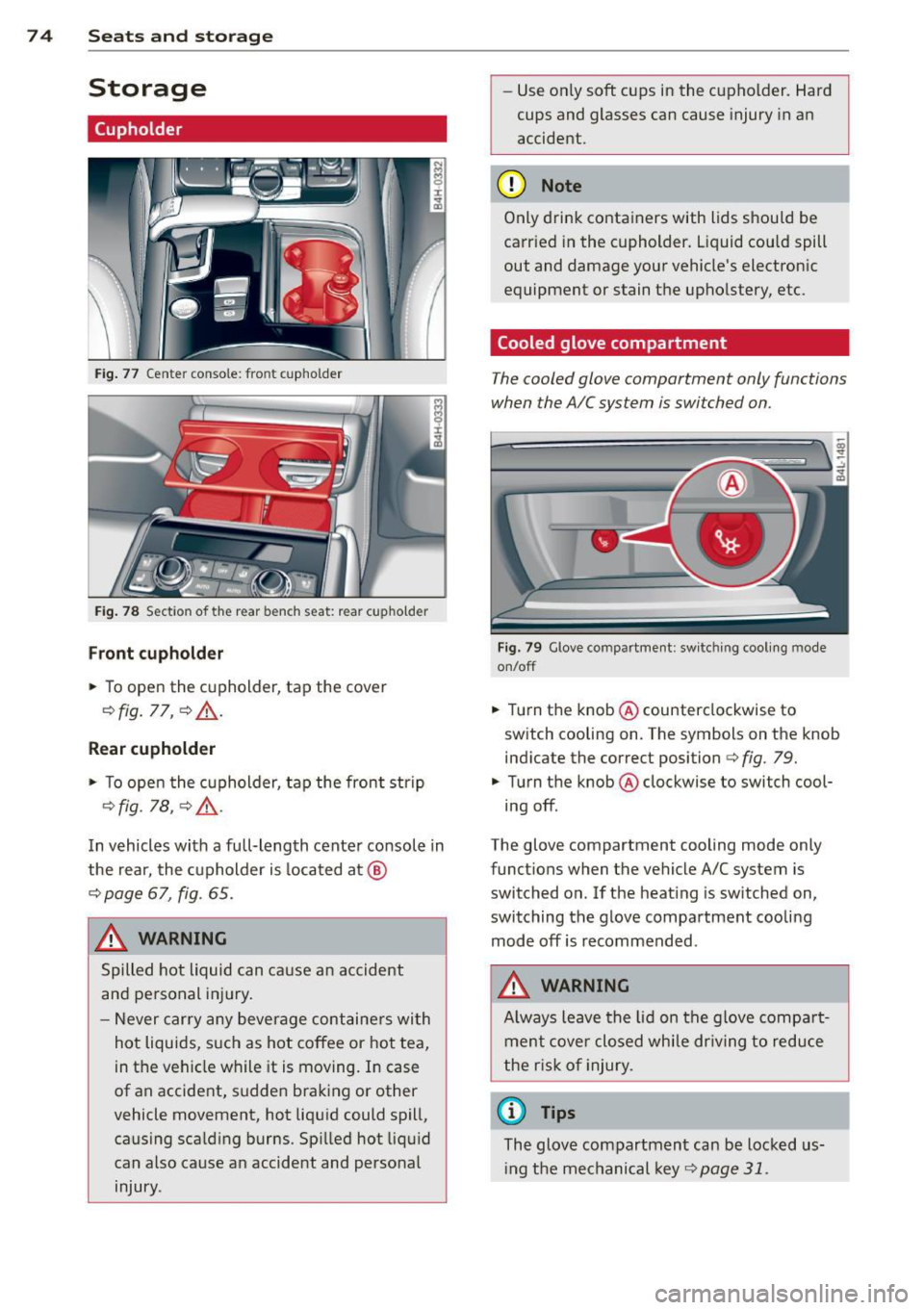
Fig . 77 Center conso le: front cupholder
Fig. 78 Section of the rear bench seat: rear cupholder
Fr ont cuphold er
., To open the cupholder, tap the cover
¢ fig. 77, ¢ &_ .
Rear cupholder
., To open the cupholder, tap the front strip
¢ fig. 1a, ¢ A .
In vehicles with a full-length center console in
the rear, the cupholder is located at @
¢ page 67, fig. 65.
A WARNING
Spilled hot liquid can cause an accident
and personal inj ury .
- Never car ry any beverage containers wi th
hot liquids, s uch as hot coffee or hot tea,
in the veh icle while it is mov ing. In case
of an accident, sudden braking or other
vehicle movement, hot liqu id could spill,
causing scalding burns. Spi lled hot liquid
can also cause an accident and personal injury. -
Use on ly soft cups in the cupholder. Hard
cups and glasses can cause injury in an
accident.
(D Note
Only drink containers with lids should be
carried in the cupholder. Liquid could spill
out and damage your vehicle's electronic
equipment or stain the upholstery, etc.
Cooled glove compartment
The cooled glove compartment only functions
when the AIC system is switched on.
Fig. 79 Glove compartme nt: sw itching cool ing mode
on/off
., Turn the knob @counterclockwise to
sw itch cooling on . The symbols on the knob
indicate the correct position¢
fig. 79 .
., Turn the knob @clockwise to switch cool·
ing off.
The glove compartment cooling mode only
funct ions when the vehicle A/C system is
switched on. If the heat ing is sw itched on,
switching the glove compa rtment cooling
mode off is recommended.
A WARNING
A lways leave the lid on the glove compa rt
ment cove r closed while dr iving to reduce
t he r isk o f injury.
(1) Tips
The glove compartment can be Locked us·
i ng the mechanical key
¢page 31.
Page 77 of 318
Additional storage
There are a variety of storage compartments
and fasteners in various places in the vehicle.
- Storage compartments in the doors
- Net in the front passenger footwell
- Eyeglasses compartment in the headliner (near the rearview mirror)
- Storage compartments under the center
armrests
- Compartments* on the back of the front
seat backrests
- Garment hooks over the rear doors
- Compartment in the center console with
pass-through)* (rear)
- Compartment behind the rear center arm
rest (in vehicles without the pass-through*
or refrigerator*)
- Bag hooks in the luggage compartment
A WARNING
-When driving, do not leave any hard ob
jects on the rear window shelf or allow
your pet to s it on the shelf. They could
become a hazard for veh icle occupants in
the event of sudden brak ing or a crash.
- Always remove objects from the instru
ment panel. Any items not stored could
slide around inside the vehicle while driv
ing or when accelerating or when apply
ing the brakes or when driv ing around a
co rner.
- When you are driving make sure that
anything you may have placed in the cen
ter console o r othe r storage lo cat ions
cannot f all out in to the footwells. In case
of sudden braking you would not be able
to brake or acce lerate .
- Any articles of clothing that you have
hung up must not interfere with the driv
er's view . The coat hooks are designed
only for lightweight clothing. Never hang
any clothing w ith hard, pointed or heavy
objects in the pockets on the coat hooks.
During sudden braking or in an accident -
especially if the airbag is deployed -
Seat s an d sto rage 75
these objects co uld inj ure any passen
gers ins ide the vehicle.
- To reduce the risk of persona l injury in an
accident or sudden stop, a lways keep the
glove compartment closed wh ile driving.
- Read and follow a ll WARNINGS
¢ page 172, Important safety instruc
tions on the side airbag system.
- Hang clothes in such a way that they do
not impair the driver's vision.
- The coat hooks must only be used for
lightweight clothing. Do not leave any
heavy or sharp edged objects in the pock
ets which may interfere with the s ide cur
tain airbag deployme nt and can cause
pe rsonal injury in a crash .
- Do not use coat hangers for hanging cloth ing on the coat hooks as t his can in
terfere with proper deployment of the
side curta in a irbags in an acc ident.
- Do not hang heavy objects on the coat
hooks, as they could cause perso nal in
jury in a sudden stop.
(D Note
Objects located on the rear shelf that rub
against the rea r window could damage the
heating wires for the rear window defog
ger.
@ Tips
- A vent slot is located between the shelf
and the rear w indow. Do not bloc k the
vent with any items you may place o n the
rear window she lf.
- Do not place bu lky i tems o n the rear win
dow shelf as they could res tri ct or bloc k
t he drive r's vision in the rear view m irror.
Cooler
Introduction
App lies to vehicles : wi th coo ler
Please clean the cooler before using it for the
first time
¢ page 226.
You can only sw itch on the coo ler if
Page 78 of 318
76 Seats and storage
-the temperature in the luggage compart
ment is below 131 °f (55 °C). The cooler
switches off automatically if the tempera
ture in the luggage compartment exceeds 131 °f (55 °C). Once the tempera ture falls
below 131 °f (55 °C) again, the cooler
switches on aga in automatically .
- the battery is adequately charged . The cool
er switches off automatically if the vehicle
battery voltage falls below a minimum lev
el. This prevents the battery from discharg
ing. The cooler switches back on again auto
matically when the battery voltage increases
again (e.g . after starting the engine).
The cooler cools to 42.8 °f
(+ 6 °C) and the
freezer cools to 21.2 °f (-6 °C) in opt imum
cooling conditions . The cooling performance
is affected by the temperature in the luggage
compartment. The temperature inside the
cooler will be higher if the luggage compart
ment is hot.
A WARNING
To avoid putting the occupants at any risk, please observe the following safety rules:
- The maximum capacity is 2.5 kg (5.5
lbs.).
- Never overload the cooler. This could
cause injury in the event of a collision or
sudden braking.
- The cooler lid must always be kept closed
while you are driving. Make sure the re
taining catch is securely engaged. The contents of the coo ler could be thrown
forward into the passenger compart
ment in the event of a collision or under
sudden braking -risk of injury!
- Inflammable liquids, gas canisters, etc.
must not be stored in the cooler -risk of
explosion! This also includes any prod
ucts that might emit volatile or inflam
mable gases.
- Liquids will freeze at temperatures at or
below 32 °f (0 °C) and may cause glass
bottles to burst!
(D Note
- The ventilation openings for the cooler
are located on the back panel trim in the
luggage compartment and
must be kept
clear at all times.
- If the cooler is not functioning properly,
switch it off to prevent further damage.
Have it checked by a qualified workshop.
Operation
App lies to vehicles: wit h cooler
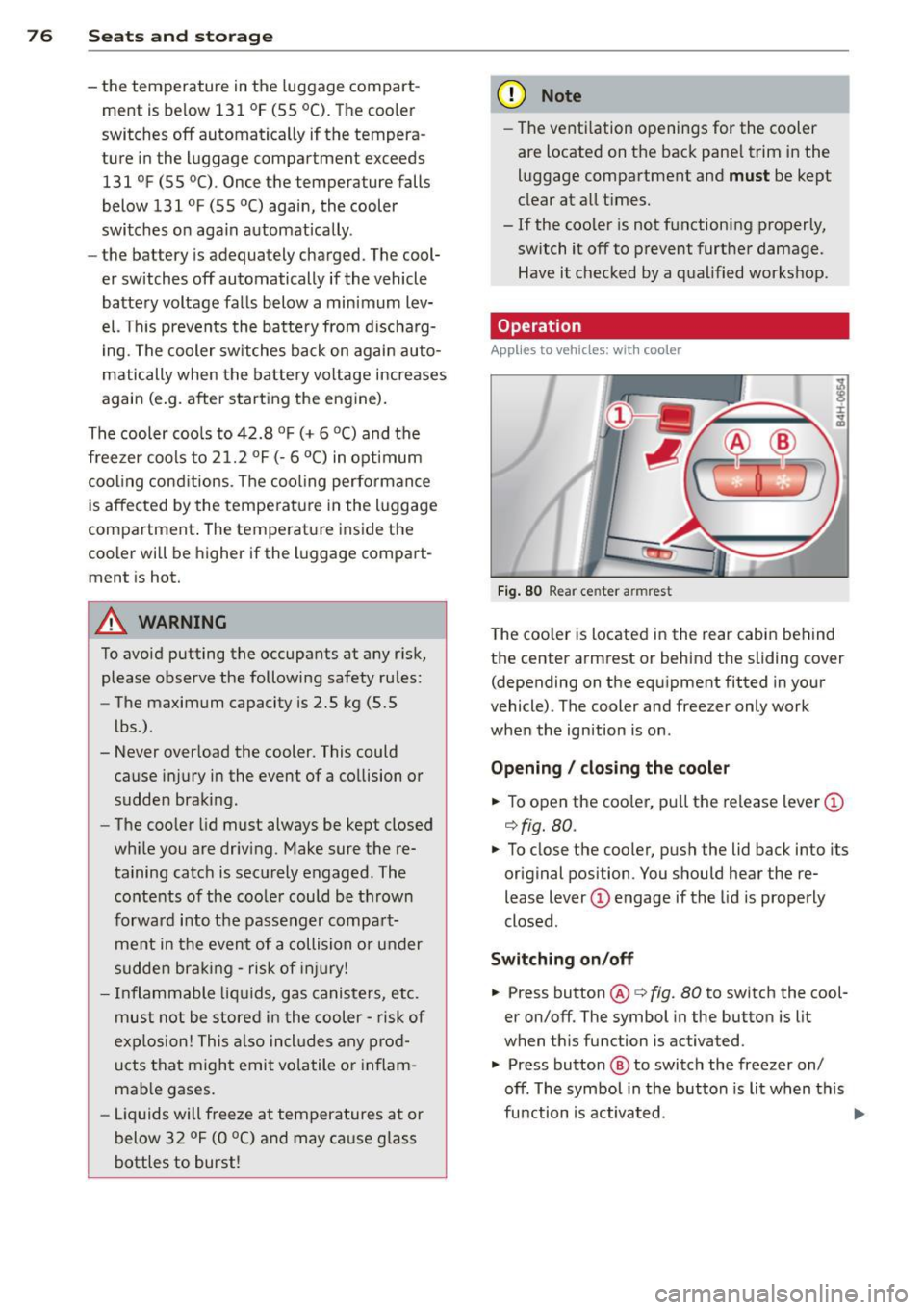
Fig. 80 Rear cen ter armrest
The cooler is located in the rear cabin behind
the center armrest or behind the sliding
cover
(depending on the equipment fitted in your
vehicle) . The cooler and freezer only work
when the ignition is on .
Opening / closing the cooler
.,. To open the cooler, pull the release lever(!)
c!> fig. 80.
.. To close the cooler, push the lid back into its
original position . You should hear the re
lease lever
(D engage if the lid is properly
closed.
Switching on/off .,. Press button @c::>fig.
80 to switch the cool
er on/off. The symbol in the button is lit
when this function is a ctivated .
.. Press button
@ to switch the freezer on/
off . The symbol in the button is lit when this
function is activated.
Page 80 of 318
78 Warm and cold
Warm and cold Climate controls
Description
The climate control system warms, cools and
adds humidity to the air in the vehicle interior.
It is the most effect ive when the windows and
sunroof* are closed . If the temperature inside
the parked vehicle becomes very warm, open ing the window briefly will speed up the cool
ing process.
I n all heating mode functions except
defrost,
the blower on ly switches to a higher speed
once the engine coolant has reached a certain
temperature.
Condensation from the cooling system can
drip and form a puddle of water under the ve
hicle. This is normal and does not mean there
is a leak.
Pollutant filter
The pol lutant filter removes pollutants such
as dust and pollen from the air.
The air pollutants filter must be changed at
the intervals spec ified in you r Warranty
&
Maintenance booklet, so that the air condi
tioner can properly work.
I f you drive your vehicle in an a rea with high
a ir po llution, the fi lter may need to be
changed more frequent ly than specified in
your Aud i Warranty
& Maintenance booklet. If
in doubt, ask your authorized Audi Service Ad
visor for advice .
Key coded settings
The climate control settings are a utomat ically
stored and assigned to the remote control key
that is in use.
A WARNING
Reduced visibility is dangerous and can
cause accidents. -
- For safe driving it is very important that
all windows be free of ice, snow and con
densation.
- Comp letely familiarize yourself with the
proper use and funct ion of the heat ing
and ventilation system and especially how to defog and defrost the windows.
- Never use the windshield wiper/washer
system in freez ing weather unt il you
have warmed the windshield first, using
the heating and ventilation system. The
washer solution may freeze on the wind sh ie ld and reduce visib ility.
(D Note
- If you suspect that the air conditioner has been damaged, switch the system
off to avoid further damage and have it
inspected by a qualified dealership.
- Repairs to the Audi air conditioner re
quire special technical know ledge and
special tools. Contact an authorized Aud i
dea ler fo r assistance.
@ For the sake of the environment
By reducing the amount of fuel you use,
you also reduce the amount of pollutants
emitted into the air.
(D Tips
- Keep the air intake s lots (in fro nt of the
w indshield) free from ice, snow and de
bris in order to maintain the proper func
tion of the climate control system.
- T he energy management system may
switch the seat heating* or rear window
defroster off temporari Ly . These systems
are available again as soon as the energy
balance has been restored.
- Air escapes through vents under the rear
window. When placing items of clothing
on the luggage compartment cover, en
sure that the openings are not covered.
Page 82 of 318
80 Warm and cold
airflow and air distribution are controlled au
tomatically.
Adjusting the temperature
Temperatures between 60 °F (+16 °() and
84
°F (+28 °C) can be set. Outside of this
range,
lo or hi will appear in the climate con
trol system display. At both of these settings,
the climate control system runs continuously
at maximum cooling or heating power. There
is no temperature regulation.
~ Adjusting the airflow
You can adjust the airflow manually to suit
your needs. To have the airflow regulated au
tomatically, press the
! AUTO ! button.
~ Adjusting the air distribution
You can manually select the vents where the
air will flow. To have the air distribution regu
lated automatically, press the
IAUTOI button.
~ I lil* Adjusting Seat heating/
ventilation*
Pressing the button switches the seat heat
ing/ventilation on at the highest setting (level
3). The L EDs indicate the temperature level.
To reduce the temperature, press the button
again. To switch the seat heating/ventilation
off, press the button repeatedly until the LED
turns off.
After 10 minutes, the seat heating/ventilation
automatically switches from level 3 to level 2.
In vehicles without the four zone automatic
climate control*, buttons in the rear center
console control the seat heating for both out
er rear seats*.
~ Switch the defroster on/off
The windshield and side windows are defrost
ed or cleared of condensation as quickly as
possible. The maximum amount of air flows
mainly from the vents below the windshield.
Recirculation mode switches off. The tempera
ture is controlled automatically.
The
IAUTOI button switches the defroster off.
~ Switching rear window heater on/off
The rear window heater only operates when
the engine is running. It switches off auto
matically after 10 to 20 minutes, depending
on the outside temperature.
To prevent the rear window heater from
switching off automatically , press and hold
the~ button for more than 2 seconds. This
r ema ins stored until the ignition is switched
off.
I SYNC I Synchronization*
When synchronization is switched on, the set
tings for the driver's side are applied to the
front passenger's side (except for seat heat
ing/ventilation*). The rear seat is also
synchronized in vehicles with the 4-zone de
luxe automatic climate control system*. Syn
chronization switches off if the settings are
adjusted on the front passenger's side or in
the rear*.
You can synchronize the settings in a row by
pressing and holding a knob. For example, to
apply the settings for the front passenger's side to the driver's side, press and hold the
knob on the front passenger's side.
Air vents
You can open or close the center and rear
vents in the cockpit and the vents in the rear
center console and door pillars using the
ridged thumbwheels. The levers adjust the di
rection of the airflow from the vents.
,&. WARNING
- Do not use the recirculation mode for ex
tended periods of time. The windows
could fog up since no fresh air can enter
the vehicle. If the windows fog up, press
the air recirculation button again imme
diately to switch off the air recirculation
function or select defrost.
- Individuals with reduced sensitivity to
pain or temperature could develop burns
when using the seat heating function. To reduce the risk of injury, these individu-
als should not use seat heating . .,..
Page 84 of 318
82 On the road
On the road
Steering
Adjusting steering wheel position
The steering wheel position can be adjusted
for height and reach .
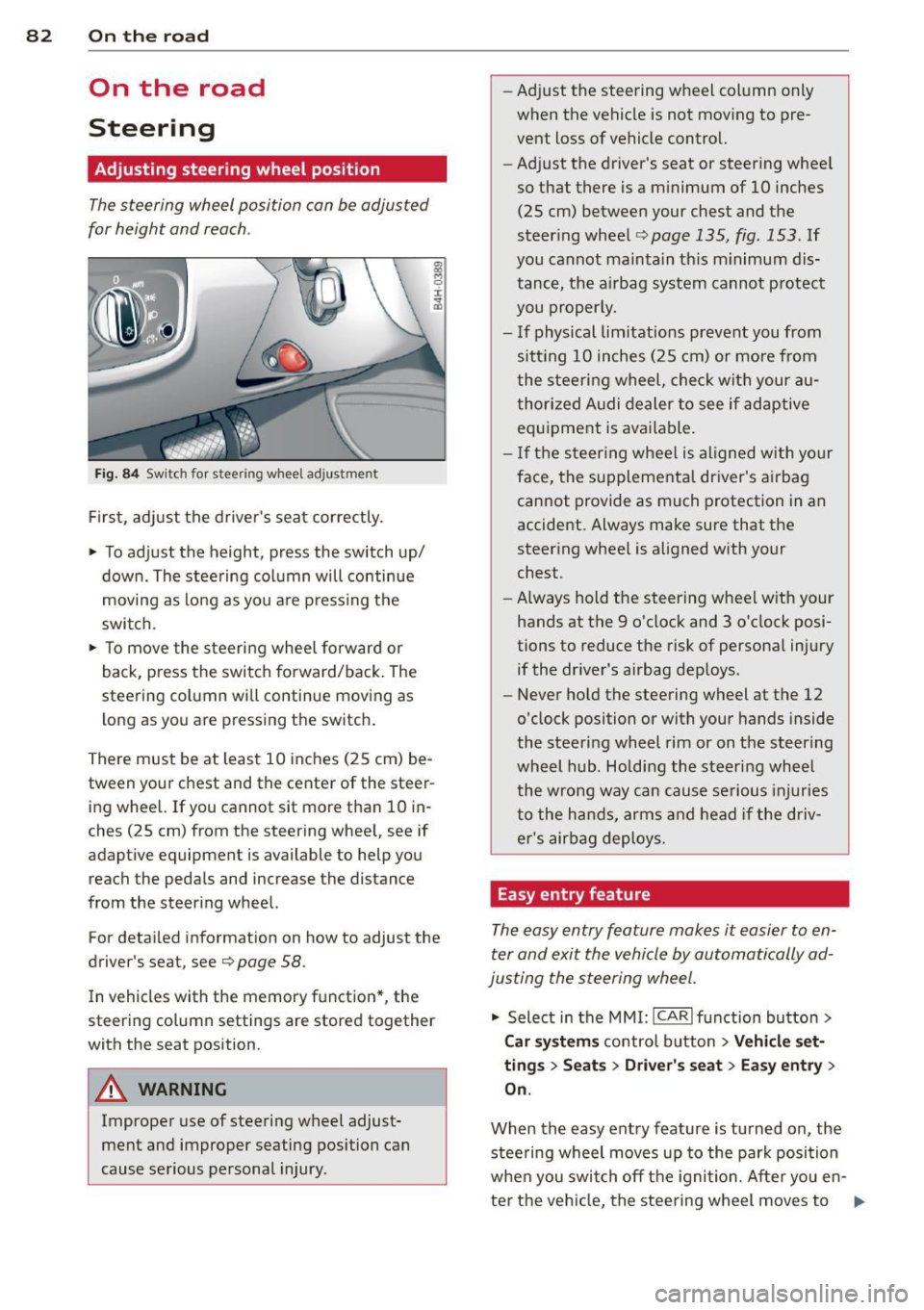
Fig. 84 Switch for steering whee l adjustment
F irst, adjust the driver's seat correctly.
• To adjust the height, press the switch up/
down. The steering column will continue
moving as long as you a re pressing the
switch.
• To move the steeri ng wheel forward or
back, press the switch forward/back . The
steering column wi ll continue moving as
long as you are pressing the switch .
There must be at least 10 inches (25 cm) be
tween your chest and the center of the steer ing wheel. If you cannot sit more than 10 in
ches (25 cm) from the steering wheel, see if
adaptive equipment is available to help you
reach the pedals and increase the distance
from the steering wheel.
For detai led informat ion on how to adjust the
driver's seat, see
Q page 58.
In vehicles with the memory function* , the
steering column settings are stored together
with the seat position.
A WARNING
Improper use of steering wheel adjust
ment and improper seating position can
cause serious personal injury . -
Adjust the steering wheel col umn only
when the vehicle is not mov ing to pre
vent loss of vehicle control.
- Adj ust the driver's seat or steering whee l
so that there is a m inimum of 10 inches
(25 cm) between your chest and the
steer ing wheel
Q page 135, fig . 153 . If
you cannot maintain th is m inimum dis
tance, the airbag system cannot p rotect
you properly.
- If physical limitations prevent you from sitt ing 10 inches (25 cm) or more from
the steering wheel, check wit h your au
thorized A udi dealer to see if adaptive
equipment is available .
- I f the steering wheel is al igned with your
face, the supplementa l driver's airbag
cannot provide as much protection in an
accident. Always make sure that the
steering whee l is aligned with your
chest.
- Always hold the steering wheel w ith your
hands at the 9 o'clock and 3 o'clock posi
tions to reduce the risk of persona l injury
if the dr iver's airbag dep loys.
- Never hold the steering wheel at the 12
o'clock position or with your hands inside
the steeri ng wheel rim or on t he steering
wheel hub. Holding the steer ing wheel
the wrong way can cause serious injuries
to the hands, arms and head if the driv
er's airbag deploys.
Easy entry feature
The easy entry feature makes it easier to en
ter and exit the vehicle by automatically ad
justing the steering wheel.
• Select in the MMI : ICAR lfunction button>
Car sy st e m s control button > Ve hicle set·
tin gs > Se ats > Driver's s eat > Ea sy entr y>
On .
When the easy entry feature is turned on, the
steering wheel moves up to the park position
whe n you switch off the ignition. Afte r you en-
ter the ve hicl e, the steering wheel moves to .,..
Page 85 of 318

the stored position as soon as you switch on
the ignition.
Starting and stopping
the engine
Starting the engine
This button switches on the ignition and
starts the engine.
Fig. 85 Center console: S TART ENGINE S TOP b utton
Switching the ignition on/off
• To switch the ignition on/off, press the
I START ENGINE STOPI button. Do not press
the brake pedal while doing this.
Starting the engine
• Press the brake pedal QA .
• Press the !START ENGINE STOPI button
Q fig . 85. The engine will start.
If the engine does not start immediately, the
starting process is automatically stopped af
ter a short time. Repeat starting procedure.
Start-Stop-System*:
When you stop and the Start -Stop -System*
turns off the engine, the ignition still remains
switched on.
- If you press the !S TART ENGINE STOPI but
ton now, the ignition will be switched off.
The engine will not start
¢page 89.
- Make sure that the ignit ion is switched off
before exiting the vehicle.
Switching the ignition/engine off
automatically*
The follow ing applies to vehicles with Start
Stop-System*: to prevent the battery from
On the road 83
draining, the ignition and the engine will
switch off automatically under the following
cond itions:
- The vehicle has already been driven.
- The driver's door is opened.
- The driver's seat belt is removed .
- The brake pedal is not pressed down.
- The vehicle is stationary.
In this case, the activated low beam will be re
placed by the side marker lights. The side
marker lights will switch off after a certain pe
riod of time or when you lock the vehicle .
A WARNING
-Never allow the engine to run in conf ined
spaces -danger of asphyx iation.
- Never turn off the engine until the vehi
cle has come to a complete stop.
- The brake booster and power steering
only work when the engine is running. If
the engine is off, you have to use more
force when steering or braking. Because
you cannot steer and brake as you usual
ly would, this could lead to crashes and
serio us injuries.
(D Note
- Avo id h igh engine rpm, full throttle and
heavy engine loads until the engine has
reached operating temperature - other
w ise you risk engine damage.
- The engine cannot be started by pushing
or towing the vehicle.
@ Tips
-After a co ld engine is started, there may
be a brief period of inc reased noise be
cause oil pressure must first build up in
the hydraulic valve adjusters. This is nor
ma l and not a cause for concern.
-If you leave the vehicle with the ignition
switched on, the ignition w ill switch off
after a certain period of time. Please
note that electrical equipment such as
exterior lights will sw itch off as well
when that happens.
Page 86 of 318

84 On th e road
Stopping the engine
• Bring your vehicle to a complete stop.
• Move the selecto r lever to the P or N posi
t ion .
• Pre ss the I START ENGINE STOP I button
¢ page 83, fig. 85.
When you s top and the Sta rt- Stop -Sys tem*
turns off the engine, the ignit ion remains on .
Press the
I STAR T ENGINE ST OP I button to
switch the ignition off during a stop phase.
Steering lock
The stee ring lo cks w hen you t urn the engine
off using the
I S TART ENGINE STOP I button
and open the dr iver's door . The locked steer
ing helps prevent vehicle theft .
Emergency off
If necessary, the eng ine ca n be sw itched off
with the selector lever in the R, Dor S pos i
tions . The eng ine stops if you press the
I START ENGINE STOP ! button at speeds be low
6 mph (10 km/h) .
A WARNING
-Never turn off the engine before the ve
hicle has come to a complete stop. The
full function of the brake booster and the power steering is not quara nteed. You
must use more force to turn or b rake if
necessary. Because you cannot stee r and
brake as you usua lly would, th is could
lead to c rashes and serious injur ies.
- For safety reasons, you shou ld always
par k your vehicle with the se lector lever
in P. Otherwise, the ve hicle co uld i nad
vertent ly roll away .
- After the engine has been switched off,
the radia tor fan can continue to run fo r
up to 10 min utes -even with the ign it ion
switched off. It can a lso switch on again
after some time if the coolant tempera
ture rises as the result of a heat buildup
or if the engine is hot and the engine
compartment is addit ionally heated by
the su n's rays.
(D Note
Do not stop the eng ine immediately after
hard or extended driving . Keep the eng ine
runn ing for approximate ly two minutes to
prevent excess ive heat bu ild-up.
Driver message in the instrument
cluster display
Ignition i s on
This message appears and a warning tone
sounds if you open the driver's door when the
ignition is sw itched on.
Press brake pedal to start eng ine
This message appears if you press the
I START ENGINE STOPI button to start the en
gine and do not depress the brake pedal. The
engine can only be started if the brake pedal
is depressed .
!!I Is key in the vehicle ?
If the indicator ligh t turns on and the mes
sage appears, the remote control key was re
moved from the vehicle whi le the engine was
runn ing . If the ignition key is not in the veh i
cle you will not be able to switch on the igni
tion or restart the engine after it has bee n
switched off . You will also not be able to lock
the ve hicle from the outs ide .
Shift to P , othe rwise v ehicle can roll away.
Doors do not lock if le ver is not in P .
This driver message appears for safety rea
sons if the transmission has not been shifted
to the P position when you switc h the ignition
off . Move the selector lever to the P position.
O therwise the vehicle is not p rotected from
r o ll ing a nd ca nnot be locked.
rJl Ke y i s not recognized . Hold back of ke y
aga inst marked area. See owner's manual.
If the indicator light turns on and this mes
sage appears, there is a malfunct ion
¢ page 85.
Tu rn off ignition before leaving c ar
Page 88 of 318

86 On the road
driving force has been built up at the
wheels.
E mergency brake function
An emergency brake ensures t hat the vehicle
can be slowed down even if the
normal brakes
fail
c::> page 87, Emergency braking .
Indicator lights
-If the parking b rake is closed w ith the igni
t ion
sw itch ed on the indicator lights come
on - (USA models)/ . (Canada models)
i n the i nstr ument cluster and in the switch .
- If the par king brake is closed w ith the igni
t ion
s wit ched off the indicato r lights come
on - (USA models)/ . (Canada models)
in the instrument cluster and in the switch
for about 20 seconds.
.&_ WARNING
Do not press the accelerator peda l inadver
tently if the vehicle is stat ionary but the
eng ine is running and a gear is selected.
Otherw ise the vehicle will start to move
immed iate ly and could result in a crash .
@ Note
If the symbo l. in the display or the ind i
cator light
1111 (USA models) . (Cana
da models) in the instrument cluster flash
es, there is a malfunction in the brake sys
tem . Please refer to the detai led descrip
tion of the indicator lights
c::> page 14.
- If the indicato r light - (USA mod-
els) . (Canada mode ls) or
liJ turns
on, there may be a malfunction in the parking b rake
c::> poge 15.
(D Tips
- You can apply the pa rking brake at any
t ime - even w ith the ignition switched
off . T he ignit ion must be on in order to
r elease the parking brake.
- Occ asiona l noises when the par king
brake is applied and re leased are no rma l
and are not a ca use for concern .
- When the vehicle is par ked, the par king
brake goes through a se lf -test cycle at regu
lar interva ls. Any associated noises
are normal.
Parking
Parking
.,. Stop the vehicle with the foot brake .
.,. Pull the switch(®) to apply the parking
brake.
.,. Select the P selector lever position
c::>page 115.
.,. Turn the engine off c::> _&. .
In addit ion on inclin es and g rades
.,. Turn the steering whee l so that your vehicle
w ill roll aga inst the curb in ca se it should
start to move.
.&_ WARNING
- When you leave your vehicle - even if on
ly br iefly - always take the ignit io n key
wit h you. This applies pa rticularly when
children remain in the vehicle. Otherwise
the children co uld s tart the engine, re
lease the parking brake or operate elec
trica l equipment (e.g . power windows) .
There is the r isk o f an accident.
- When the vehicle is locked, no one - par
ticularly not children should rema in in
the vehicle. Locked doors make it more
d ifficult for emergency workers to get in
to the vehicle - putting lives at risk .
· Starting from rest
The starting assist function ensures that the
parking broke is released au tomatically upon
star ting.
Stopping a nd applying parking brak e
.,. Pull the switch(®) to apply the parking
brake.
St arting and automatically releasing the
parking brake
.,. When you start to drive as usual , the park
ing brake is a utomatically rel eased and your
vehicle beg ins to move. ..,..
Page 89 of 318

When stopping at a traffic signal or stopp ing
i n city traffic, the parking brake can be ap
p lied . The vehicle does not have to be held
with the footbrake. The park ing brake elimi
nates the tendency to creep with a drive range
engaged. As soon as you dr ive off as usual,
the park ing brake is released automatically
and the vehicle starts to move .
Starting on slopes
When starting on inclines, the start ing ass ist
prevents the vehicle from unintentionally roll
i ng back. The braking force of the parking
brake is not released until sufficient dr iv ing
force has been bu ilt up at the whee ls.
O') Tips
For safety reasons, the park ing brake is re
leased automatically only when the dr iv
er's safety belt is engaged in the buck le.
Starting off with a trailer
To prevent rolling back unintentionally on an
incline, do the following:
.. Keep the switch(®) pulled and depress the
acce lerator. The park ing brake stays applied
and prevents the vehicle from rolling back
ward .
.. You can release t he sw itch C®l once you are
s u re that yo u are develop ing eno ugh f or
wa rd momentum at the wheels as you de
press the accelerator.
D epending on the weight of the r ig (veh icle
and trai le r) and the severi ty of the in cli ne, you
may roll backwards as you sta rt. Yo u can pre
ve nt roll ing backwards by holding the parking
brake switch C®) p ulled out and acce lerating -
just as you would when starting on a hill with
a conventional hand brake.
On th e ro ad 87
Emergency braking
In the event that the conventional brake sys
tem fails or locks .
.. In an emergency, pull the sw itch(®) and
cont inue to pull it to s low your ve hicle down
w ith the park ing brake.
.. As soon as you release the switch C®> or ac-
celerate, the b ra ki ng process stops.
If you pu ll the switch C®> and hold it above a
speed of about 5 mph (8 km/h), the emergen
cy brak ing f unction is initia ted . T he ve hicle is
braked at all fou r whee ls by activating the hy
d raulic brake sys tem. The brake pe rform ance
is simila r to making an emergency stop~ .&..
In order not to act ivate the emergency brak
ing by mis take, an audib le wa rn ing tone (buz
z er) so unds whe n the switch(®) is pulled . As
soon as the sw itch<®> is re leased, or the accel
erator peda l is depressed, emergency braking
stops.
_& WARNING
Emergency braking should only be used in
an emergency, when the normal foot bra ke
has fa iled or the brake pedal is obstructed.
Using the parking brake to pe rform emer
gency b rak ing will slow your vehicle down
as if you had made a full bra ke application .
T he laws of physics cannot be su spended
even wi th ESC and i ts asso ciated compo
nents (ABS, ASR , ED L) . In corners and
when road or weather con ditions are bad,
a full brake application can ca use the vehi
cle to sk id or the rear end to break away -
risking an accident.
Start-Stop-System
Description
Applies to veh icles: w ith Start -Stop-System
The Sta rt -Stop -Sys tem can help incre ase fuel
e conomy and redu ce CO2 emissions.
In the Start-S top-mode, the engine shuts off
a utomat ically when the veh icle is stopped,
s u ch a s at a t raff ic lig ht. The igni tion rem ains
lill-