brake light AUDI S8 2014 Owner's Manual
[x] Cancel search | Manufacturer: AUDI, Model Year: 2014, Model line: S8, Model: AUDI S8 2014Pages: 314, PDF Size: 78.47 MB
Page 101 of 314
Audi adaptive cruise control and braking guard 99
then maintains the stored distance. If the ve
hicle ahead accelerates, adaptive cr uise con
trol will also accelerate up to the stored
speed.
The higher the speed, the greater the distance
in yards (meters) ¢.&. . The
Distance 3 setting
is recommended .
The distances prov ided are spec ified values.
Depending on the driving situation and the
how the vehicle ahead is driving, the actual
d istance may be more or less than these tar
get distances.
The various symbols for the time increments
appear briefly in the information line @
¢ page 96, fig. 98 when you change the set
tings.
~ -~ --- Distance 1: This setting corre
sponds to a distance of 92 feet/28 meters
when traveling at 62 mph (100 km/h), or a
time interva l of
l second.
~ -- ~-- Distance 2: This setting corre
sponds to a distance of 118 feet/36 meters
when traveling at 62 mph (100 km/h), or a
time interva l of 1.3 seconds .
~--- ~-Distance 3: This setting corre
sponds to a distance of 164 feet/SO meters
when traveling at 62 mph (100 km/h), or a
time interva l of 1.8 seconds .
~---- ~ Distance 4: This setting corre
sponds to a distance of 210 feet/64 meters
when traveling at 62 mph (100 km/h), or a
time interva l of 2.3 seconds .
A WARNING
Following other vehicles too closely in
creases the risk of collisions and serious
personal injury.
- Setting short distances to the traffic
ahead reduces the time and distance
available to br ing your vehicle to a safe
stop and makes it even more necessary
to pay close attention to traffic.
- Always obey applicable traffic laws, use
good judgment, and select a safe follow- ing distance
for the traffic, road and
weather conditions.
@ Tips
- Distance 3 is set automatically each time
you switch the ignition on.
- Your standard settings are automatically
stored and assigned to the remote con
tro l key being used.
Selecting the driving mode
Applies to vehicles: with Aud i adapt ive c ruise contro l
.,. Select the desired driving mode in drive se
lect¢
page 110.
(0 Tips
Your settings are automat ica lly stored and
assigned to the remote control key being
used.
Prompt for driver intervention
Applies to vehicles: with Audi adapt ive cru ise contro l
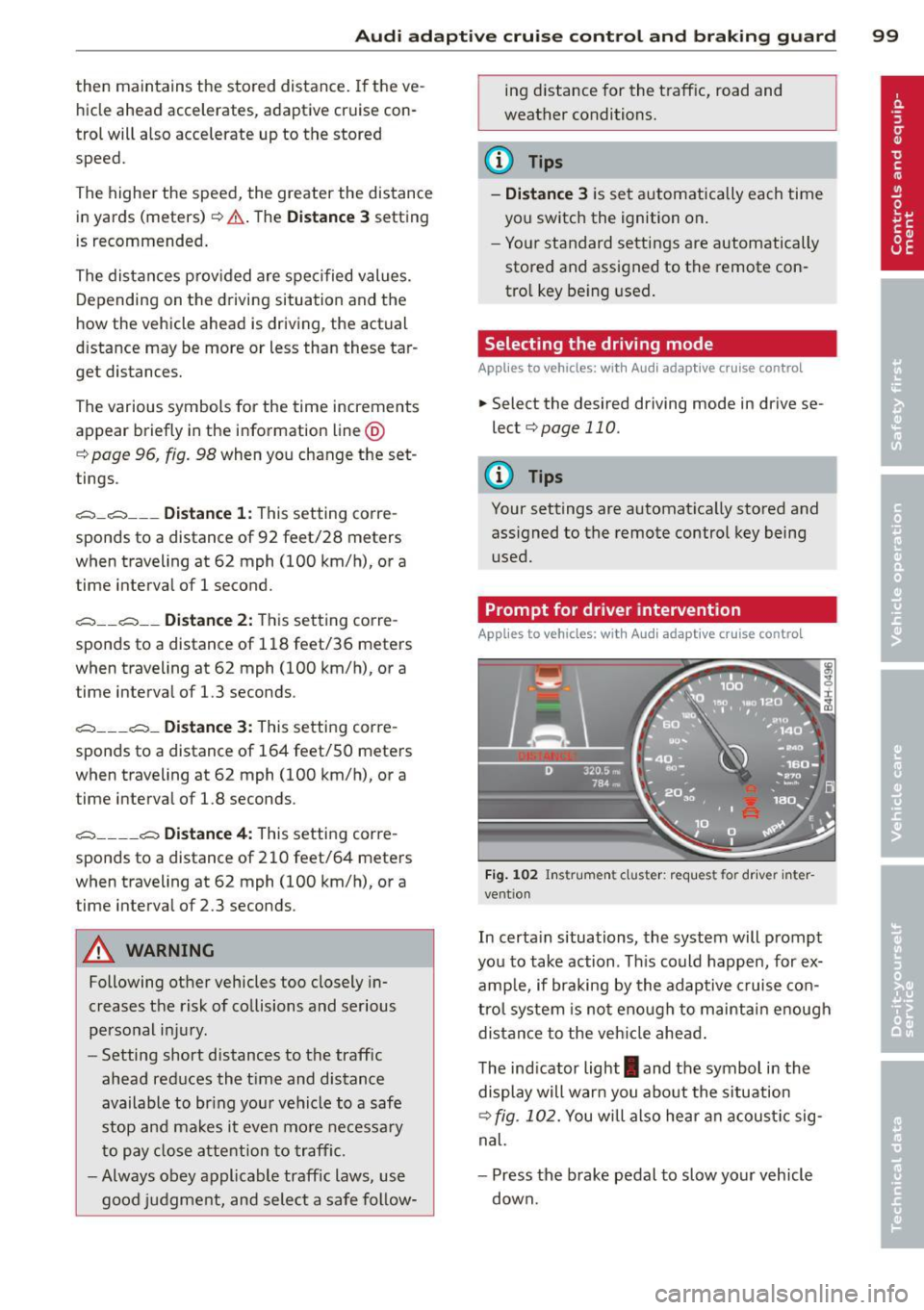
Fig. 102 Instrument cluster: request fo r drive r in ter
vent ion
In certa in situations, the system will prompt
you to take action . Th is could happen, for ex
amp le, if braking by the adaptive cruise con
trol system is not enough to maintain enough
distance to the vehicle ahead.
The indicator light
I and the symbol in the
display will warn you about the situation
¢ fig. 102. You will also hea r an acoustic sig
nal.
- Press the brake pedal to slow your vehicle
down.
Page 119 of 314
Selector lever lock
The selector lever lock prevents you from sel ecting a position unintentionally, causing the
vehicle to roll. When engaging some selector lever positions, you must press the button on
the selector lever
c:> fig. 123 and/or press the
brake pedal.
You must press the brake pedal to engage a
selector lever position when the engine is run
ning while the vehicle is stationary. The ar
rows
c:> fig. 124 indicate when you need to
press the button on the selector lever.
The selector lever does not lock if you shift
from D to R within one second. This allows
you to "rock" the vehicle to free it when it is
stuck.
P- Park
The whee ls are locked in this position. Only
shift into park when the vehicle is stationary
c:> &. To engage the P se lector lever position,
press the button on the selector lever and
shift into the P position .
You can only shift out of park when the engine
is running and you are pressing the brake ped
al. Press the button on the selector lever to
release the parking lock and select the desired
selector lever pos ition .
P engages automatically when you switch the
engine off while D, Sor R is engaged or in
manual mode .
If you switch the engine off when N is engag
ed, the transmission remains in N for approxi
mately 30 minutes and then Pis engaged.
You must use the emergency release proce
dure to release the parking lock before towing
the vehicle
c:> page 121.
R - Reverse
The reverse gear is engaged in this position .
Only select reverse when the vehicle is sta
tionary and the engine is running at idle speed
c:> &. To engage the R selector lever position,
press the button on the selector lever, press
Automatic Transmission 11 7
the brake peda l and move the selector lever
into the R position.
T he back-up lights turn on when you select
the R selector lever position wh ile the engine
is running .
N -Neutral
The transmission is in idle in this pos it ion . To
engage the N selector lever posit ion, press
the button on the selector lever and shift into
the N position.
If you switch the engine off when N is engag
ed, the transmission remains in N for approxi
mately 30 minutes and then Pis engaged.
You cannot select the N position when the ig
nition is switched off. When driv ing through
an automat ic car wash, first select the N posi
tion and then switch the engine off
c:> table on
page 218.
The veh icle cannot be locked when the selec
tor lever is in the N position.
D/S - Posit ion for driv ing forward
In the D/S position, the transmission can be
operated either in the normal mode D or in
the sport mode S . You can only select the S se
lector lever position when Dis engaged. Move
the selector lever back to engage the S selec
tor lever position. To select the D selector lev
er position again when Sis engaged, move the
selector lever back
c:> .&. . To shift from N to D
when traveling at speeds below 1 mph (2km/
h), press the brake peda l and select the D se
lector lever position
c:> .&. .
In the normal mode D, the transmission auto
matically selects the suitable gear ratio.
It de
pends on engine load, vehicle speed and driv
ing style.
Se lect the
sport mode S for sporty driving.
The vehicle makes f ull use of the engine's
power. Shift ing may become noticeab le when
accelerat ing.
The S selector lever position engages auto
matically when you select the dynamic mode
in Audi drive select.
Page 120 of 314
118 Automatic Transm iss ion
& WARNING
-Never e ngag e R or P w hile driving. It
could cause a crash .
-
-Power is sti ll t ransmitted to the whee ls
when the engine is r unning at idle . To
prevent the vehicle from "creeping", you
must keep your foot on the brake in all
selector lever positions except P and N
when the eng ine is running. Do not inad
vertent ly press the accelerator pedal
when the veh icle is stationary . Otherwise
the vehicle will s tart to move immediate
ly. This cou ld h appen even if the parking
brake is activa ted .
- Be fore opening the hood, select the P se
le ctor lever position and set the par king
brake. This red uces the risk of a crash. Al
ways read and follow the applicable
wa rnings
<=)page 231.
-Never get out of the driver's seat when
the engine is running.
- If you mus t get out of the vehicle, move
the se lector lever securely into the P po
sit ion an d apply the park ing brake .
(D Tips
-If you u nin ten tio nally shift into the N se
l ector lever posi tion while dr iv ing, ta ke
your foot off the acce lerator pedal and
wait for the e ngine to slow down until it
i s idling before you shift into Dor S.
Driving tips
The gears shi~ automatically .
Starting from a stop
"" Press and ho ld the brake pedal.
"" Sta rt the eng ine
c:> page 8 4.
"" Press the but ton on the se lector lever and
select the D, S or R selecto r leve r pos it ion
c:> page 116 .
""Wait a moment until the transmission
shifts. You w ill not ice a slight movement
when the gear engages .
"" Re lease the brake pedal and press the accel
erator pedal¢ ,& .
Stopping temporarily
""Press the brake pedal to s top the ve hicle, for
examp le a t a traffic light . Do not press the
accelerato r peda l when doing this.
"" To prevent the vehicle from ro lling when yo u
start dr iving, set the parking brake when
stopping on large incl ines
c:> ,& .
"" The parking brake will release automat ica lly
and the vehicle will start mov ing once you
press the acce lerator pedal.
Parking
If the se lector lever is not in the P position
whe n you open the driver's door, the ve hicle
could roll. The message
Transmission: Car
may roll! Shift to park!
appears .
"" Press and hold the brake pedal¢ ,& .
"" Set the park ing brake.
"" To engage the P se lector lever position,
press the button on the selector leve r and
shift into the P posit ion
c:> page 116 .
Under certa in conditions suc h as dr iv ing in the
mountains or when towing a trailer, it may be
helpful to switch to manual mode tempo rari ly
to shift
manually to adapt to the driving con
di tions
c:> page 119.
On slopes, activate the parki ng bra ke first and
then move the selecto r leve r to the P position .
T his prevents too much st ress from be ing
pla ced o n the locking mec hanism.
& WARNING
R ead an d fol low all WAR NING S ¢.&. in Se
lecting a selector lever position on
page 118.
- The vehicle can also roll when the engine
is stopped.
- Do not press t he acceler ator pe dal when
chan ging the se lector leve r posi tion
while the veh icle is stationary and t he
engine is running . This cou ld result in a
crash.
- Never engage R o r P while driving .
It
could cause a crash.
- Power is still transmitted to the wheels
when the engine is runn ing at idle. To
IJJ,,
Page 122 of 314
![AUDI S8 2014 Owners Manual 120 Automatic Transmission
8_ WARNING
Please note that the wheels could spin on
slick or slippery roads when kick-down is
active .
Transmission malfunction
[O] Transmission: plea se](/img/6/57613/w960_57613-121.png "AUDI S8 2014 Owners Manual 120 Automatic Transmission
8_ WARNING
Please note that the wheels could spin on
slick or slippery roads when kick-down is
active .
Transmission malfunction
[O] Transmission: plea se")
120 Automatic Transmission
8_ WARNING
Please note that the wheels could spin on
slick or slippery roads when kick-down is
active .
Transmission malfunction
[O] Transmission: plea se press the brake ped
al and select the position again
Press the brake pedal and select the des ired
selector lever posit ion again . You can then
continue dr iving .
[O] Transmission hot: please modify driving
style
The transmission temperature has increased
significantly due to the sporty driving manner.
Drive in a less sporty manner until the tem
perature returns to the normal range and the
indicator light switches of.
[O] Gearbox malfunction: you can continue
driving
There is a system ma lfunction in the transmis
sion. You may continue driving. Drive to your
authorized Audi dealer or qualified repair fa
cility soon to have the malfunction corrected.
l'i]Jffl Gearbox malfunction: you can contin
ue driving in D only until engine is off
There is a system ma lfunction in the transmis
sion. The transmission is switching to emer
gency mode. If you turn the engine off, you
will not be able to select any other selector
lever positions after starting the engine again.
Drive to your authorized Aud i dealer or quali
fied repair facility immediately to have the
malfunction corrected.
[O] Gearbox malfunction: you can continue
driving (limited functionality)
There is a system ma lf u nction in the transmis
sion. The transmission is switching to emer
gency mode. Th is mode only shifts into cer
tain gears or will not longer shift at all. The
engine may stall. Dr ive to your authorized
Aud i dealer or qualified repair facility immedi
ately to have the malfunction corrected.
[O]/jj'j Gearbox malfunction: no reverse gear
(y ou can continue driving)
The re is a system malfunction in the transmis
s ion. The transm ission is swi tching to emer
gency mode. This mode on ly shifts into cer
tain gears or will not longer shift at al l. You
cannot engage the reverse gear . Dr ive to your
authorized Aud i dea ler immediately to have
the malfunction corrected.
[O] Vehicle may roll! Cannot shift to P. Please
apply parking brake
-The parking lock was re leased using the
emergency release
¢page 121. Or
- The parking brake cannot engage automati
cally. Drive to your authorized Audi dea ler or
qualified repair facility immediately to have
the malfunction corrected.
[O] Gearbox malfunction: Stop and shift to P
Do not continue dr iving . Select the P selector
lever position and see your author ized A udi
dealer or qualified repair faci lity for assis
tance.
Page 123 of 314
Parking lock emergency release
The parking lock must be released using the
emergency release before towing the vehicle .
®
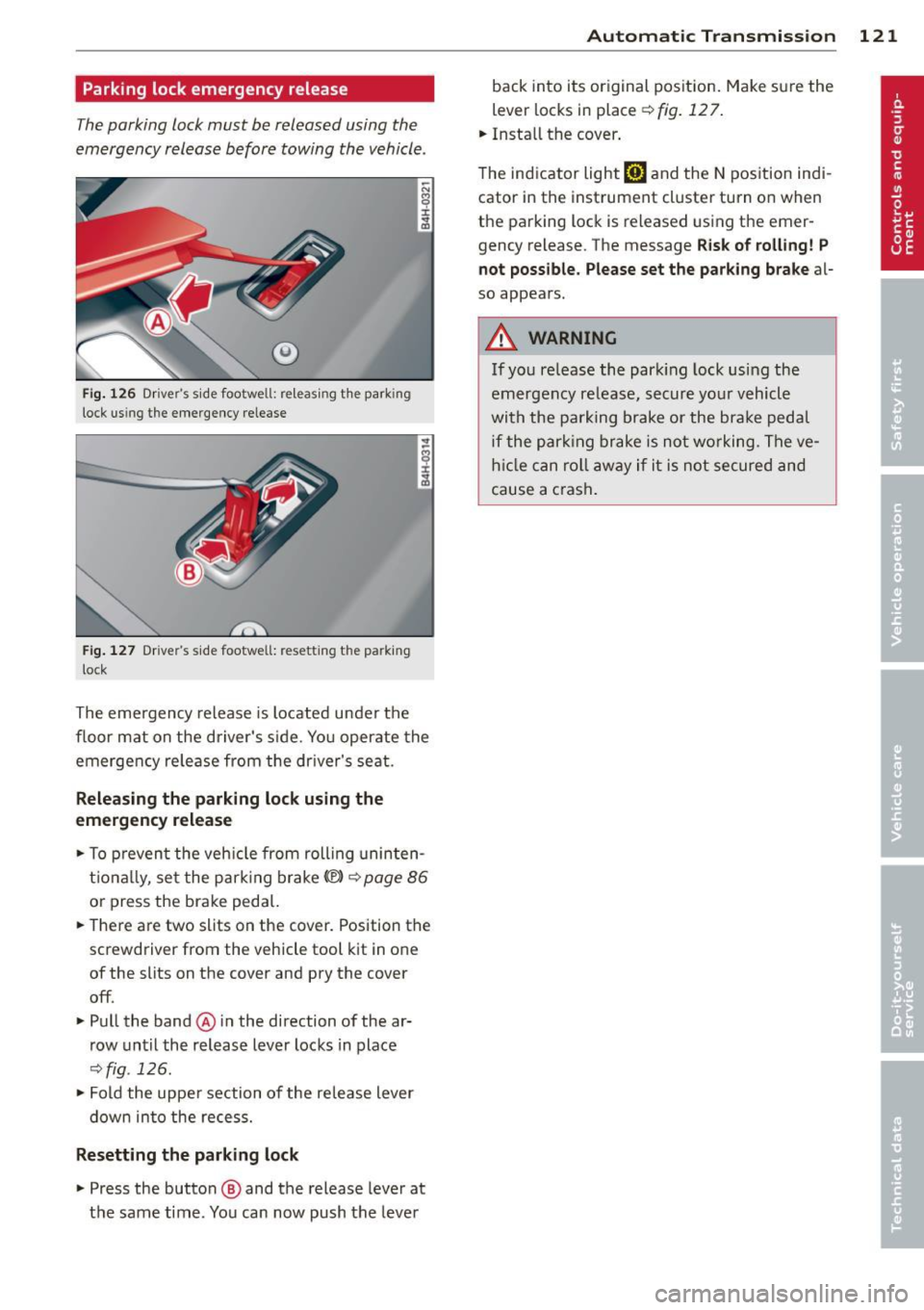
Fig. 126 Driver's s ide footwell: re lea sing t he park ing
lock us ing the emergency release
Fig. 127 Drive r's s ide footwell: resettin g th e pa rk ing
lock
The emergency release is located under the
f loor mat on the driver's s ide. You operate the
emergency re lease from the driver's seat.
Releasing the parking lock using the
emergency release
.,. To prevent the vehicle from rolling uninten
tionally, set the parking brake
«e)) q page 86
or press the brake peda l.
.,. There are two slits on the cover. Position the
screwdriver from the vehicle tool kit in one
of the slits on the cover and pry the cover
off .
.,. Pull the band@ in the direction of the ar
row until the release lever locks in place
qfig . 126 .
.,. Fold the uppe r section of the re lease lever
down into the recess.
Resetting the parking lock
.,. Press the button @ and the release lever at
t h e same time. You can now push the lever
Automatic Transmission 121
back into its original position. Make sure the
lever locks in place ~
fig. 12 7.
.,. Install the cover .
T he indicator light
[O] and the N position indi
cator in the instrument cluster turn on when
the parking lock is released using the emer
gency release. The message
Risk of rolling! P
not possible. Please set the parking brake
al
so appears .
.&_ WARNING
If you release the park ing lock using the
emergency release, secure your vehicle
with the parking brake or the brake pedal
i f the parking brake is not working. The ve
hicle can roll away if it is not secured and
cause a crash .
Page 135 of 314

Homelink
Universal remote
control
General information
Applies to vehicles: with Home link unive rsal remote con
tro l
The Homelink universal remote control can
be programmed with hand -held transmitters
from existing equipment
Using the Homelink universal remote control,
you can operate equ ipment such as garage
doors, property gates and house lights from inside your vehicle .
Using the Homelink universal remote control,
you can replace up to three separate hand
held transmitters for equipment on your
property with just one universal remote con
trol. Most of these transmitters a re used to
operate ga rage doors and property gates. The
individual transmitters are programmed at
the front bumper. That is where the control
module is located.
The transmitters must be programmed first in
order to operate systems using the Homelink
universal remote control.
A WARNING , .,.
- Never use the Homelink transmitter
with any garage door opener that does
have not the safety stop and reverse fea
ture as required by federal safety stand
ards . Th is includes any garage door open
er model manufactured before April 1,
1982.
- A garage door opener which cannot de
tect an object, signaling the door to stop
and reverse does not meet current feder
al safety standards . Us ing a garage door
opener without these features increases
risk of serious injury or death.
- For safety reasons never release the
parking brake or start the engine while
anyone is standing in front of the vehicle .
- A garage door or an estate gate may sometimes be set in motion when the
H ome link 133
Homelink remote control is being pro
grammed. If the device is repeatedly ac
tivated, this can overstrain motor and
damage its electrical components -an
overheated motor is a fire hazard!
- To avoid possible injuries or property
damage, please always make absolutely
certa in that no persons or objects are lo
cated in the range of motion of any
equipment being ope rated.
(D Tips
- If you would like additional information
on the Home link Universal Transce iver
'
Homel ink compatib le products, or to
purchase other accessories such as the
Homelink Lighting Package, please con
tact Homelink at 1-800-355 -3515 or on
the Internet at www. homelink.com.
- For Declaration of Comp liance to United
States FCC and Ind ustry Canada reg ula
tions~
page 295.
Operation
Applies to vehicles: with Homeli nk
Fig. 151 Contro l u ni t in the head liner
"' 8 ±
" m
Requ irement: The buttons must be p rogram
med
~ page 134.
"Press the programmed button~ & in Gen
eral information on page 133
to open the
garage door. The light @will bl ink or turn
on .
" Press the button again to close the garage
door
¢ .&. in General information on
pag e 133 . .,.
Page 201 of 314
Intelligent technology Notice about data
recorded by vehicle
control modules
Your vehicle is not equipped with an Event Da
ta Recorder (EDR), installed by some manu
facturers for the express purpose of capturing
data for retrieval after an accident or crash
event. EDR's are sometimes called "crash re
corders".
Some state laws restrict the retr ieval or down
loading of data stored by EDR's that were in
stalled in a vehicle for the express purpose of
retrieving data after an accident or crash
event without the owner's consent.
Although your vehicle is not equipped with an
EDR, it is equipped with a number of electron
ic control modules for various vehicle systems
such as, for examp le, engine function, emis
sion control, as well as for the airbags and
safety belts.
These electronic control modules also record
vehicle-related data during norma l vehicle op
eration for diagnostic and repair purposes.
The recording capacity of the electronic con
trol modules is limited to data (no sound is re
corded) and only a small amount of data is ac
tually recorded over a very limited period of
time and stored when a system fault or other
condition is sensed by a control unit. Some of
the data then stored may relate to vehicle
speed, direction, braking as we ll as restraint
system use and performance in the event of a
crash or other condition. Stored data can only be read and downloaded with special equip
ment.
Electronic Stabilization
Control (ESC)
Description
ESC helps to improve road holding and vehicle
dynamics to help reduce the probability of
skidding and loss of veh icle control. It works
only when the engine is running. ESC detects
Intelligent technology 199
certain difficult driving situations, including
when the vehicle is beginning to spin (yaw)
out of control and helps you to get the veh icle
back under control by se lectively braking the
wheels, and/or reducing engine power and
providing steering ass istance to help hold the
vehicle on the driver's intended course. The in
dicator light
JjJ in the instrument cluster
blinks when ESC is taking action to help you
control the vehicle.
ESC has limitations .
It is important to remem
ber that ESC cannot overcome the laws of
physics.
It will not always be able to help out
under all conditions you may come up against.
For example, ESC may not always be able to
help you master situations where there is a
sudden change in the coefficient of friction of
the road surface. When there is a section of dry road that is suddenly covered with water,
slush or snow, ESC cannot perform the same
way it would on the dry surface. If the vehicle
hydroplanes (rides on a cushion of water in
stead of the road surface), ESC will not be
able to help you steer the vehicle because con
tact with the pavement has been interrupted
and the vehicle cannot be braked or steered .
During fast cornering, particularly on winding
roads, ESC cannot always deal as effectively
with difficult driving situations than at lower
speeds. When towing a trailer, ESC is not able
to help you regain control as it would if you
were not tow ing a trailer.
A lways adjust your speed and driving style to
road, traffic and weather conditions. ESC can
not override the vehicle's physical limits, in
crease the available traction, or keep a vehicle
on the road if road departure is a result of
driver inattention. Instead, ESC improves the
poss ibility of keeping the vehicle under con
trol and on the road dur ing extreme maneu
vers by using the driver's steering inputs to
help keep the vehicle going in the intended di
rection. If you are traveling at a speed that
causes you to run off the road before ESC can
provide any assistance, you may not experi
ence the benefits of ESC.
•
•
Page 203 of 314
@ Tips
-ABS and AS R on ly wor k co rrectly when
a ll fo ur wheels are eq uipped w ith identi
ca l tires . Different tire s izes can lead to a
r educt io n in eng ine power.
- You may hear noises when the sys tems
desc ribed are working.
Switching on and off
Intelligent technology 201
- If the ind ica tor li ght DJ o r til1 (U SA
mo dels)/ [!] (Canada models) appea rs,
there may be a malfunc tion
r:::> page 19,
¢page 18.
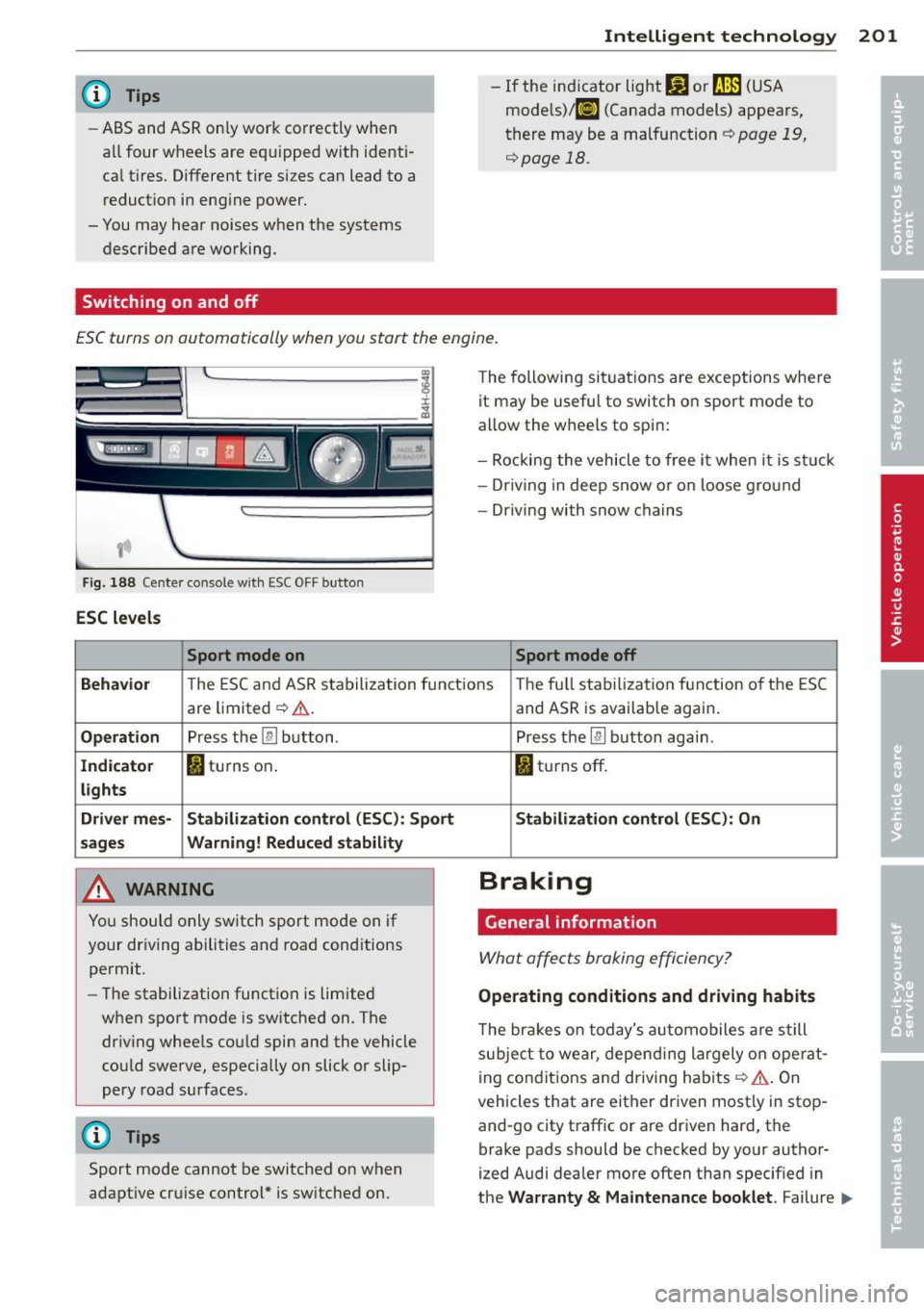
ESC turns on automatically when you start the engine.
Fig . 188 Center co nsole with ESC O FF bu tton
ESC levels
Sport mode on
The following si tua tions are exceptions whe re
it may be usefu l to switch o n sport mo de to
allow the w heels to spi n:
- Rockin g the vehicle to free it when i t is st uck
- Dr iv ing in deep s now o r on loose g ro un d
- Dr iving with snow chains
Sport mode off
Behavior
T he E SC and AS R sta bilization f unct io ns The fu ll sta biliz ati on f uncti on o f the ES C
are limited¢ ,&.
Operation Press the [ru button .
Indicator II turns on .
lights
Driver mes· Stabilization control (ESC): Sport
sages Warning! Reduced stability
A WARNING
Yo u should o nly sw itch sport mo de on i f
your dr iv ing abili ties and road cond itions
permit.
- The stabilization function is limited
when sport mode is sw itched on. The
dr iv ing whee ls co uld spin and the vehicle
cou ld swe rve , especially on slick or slip
pery road surfaces.
(D Tips
Sport mode cannot be switched o n when
adapt ive cr uise c ontrol* is sw itched on.
-
and AS R is availab le again .
Press the
[ru button again .
II tur ns off.
Stabilization control (ESC): On
Braking
General information
What affects braking efficiency?
Operating conditions and driving habits
The bra ke s on today's au to m obiles a re s till
sub ject t o wear, depe nding la rgely o n ope rat
i ng con dit ions and d riving habits¢
A . On
vehicles that are either driven most ly in stop
and-go city traff ic or are driven hard , the
brake pads should be checked by your author
ized Audi dealer more often than specif ied in
t h e
Warranty & Maintenance booklet . Failure .,..
Page 212 of 314

210 Driving and environment
The consumption estimates as published
by ENVIRONMENTAL PROTECTION AGENCY
(EPA) and Transport Canada may not corre
spond to your actual consumption on the
road, which will vary depending upon vehi
cle load and speed, road and weather con
ditions, trip length, etc.
Drive smoothly and keep a lookout
ahead
Vehicles use the most fuel when they are ac
celerating.
• Avoid unnecessary accelerating and braking.
Vehicles use the mo st fuel when they are ac
celerating. If you anticipate what is going to happen next, you will need to brake less and,
thus , accelerate less. Let the vehicle coast
whenever possible -for example when you see
that the next traffic light is red.
Avoid full throttle
Driving at moderate speeds saves fuel and
improves your mileage.
• Try and keep well below your car's maximum
speed .
Accelerating gently reduces fuel consump
tion, engine wear, and does not disturb the
environment .
Fuel consumption, exhaust emissions and en
gine noise increase disproportionately at high
speeds. If you drive at approximately three
quarters of top speed, fuel consumption will
be reduced by one half. Never drive faster
than the posted speed limit and weather con
ditions permit.
Reducing unnecessary idling
Even when your car is just idling it burns up
fuel.
• Shut the engine off when you are not driving
the vehicle. •
Do not warm up the vehicle by letting the
engine run at idle.
The idling phase is automatically reduced for
vehicles with the Start/Stop system. It is effi
cient to switch off the engine in vehicles with
out the Start-Stop-System when stopped at
railroad crossings and long red lights. Turning
the engine off for jus t 30-40 seconds saves
more fuel than is burned by starting the en-
. . gme again.
It takes a long time for the engine to warm up
fully when it is running at idle. However, wear
and noxious emissions are especially high
when the engine is warming up . So you should
drive away as soon as you start the engine and
avoid running at high rpms while the engine is
still warming up.
W Note
Do not leave engine idling unattended af
ter starting . If warning lights should come
on to indicate improper operation, they
would go unheeded. Extended idling also
produces heat, which could result in over
heating or other damage to the vehicle or
other property.
Regular maintenance
A badly tuned engine unnecessarily wastes a lot of fuel.
• Have your vehicle serviced at regular inter-
vals.
By having your vehicle regularly serviced by an
Audi dealer helps to ensure that it runs prop
erly and economically. The condition of your
vehicle not only affects its safety and ability to
hold its value, it also affects
fuel consump
tion.
Check your oil each time you
fill your tank.
The amount of oil used is related to engine
load and speed.
It is normal for the oil consumption of a new
engine to reach its lowest value after a certain
mileage has been driven . ..,.
Page 214 of 314

212 Trailertowing
Trailer towing Driving with a trailer
General information
Your Audi was designed primarily for passen
ger transportation .
If you plan to tow a trai ler, please remember
that the additional load will affect durability,
economy and performance .
Trailer towing not only places more stress on the vehicle, it also calls for more concentra
tion from the driver.
For this reason, always follow the operating
and driving instructions provided and use
common sense.
(D Note
If you are going to tow a trai ler, you must
activate the trailer operation mode
i::> page 212, Operating instructions .
Technical requirements
Trailer hitch
Use a weight-carrying hitch conforming to the
gross trailer weight. The hitch must be suita ble for your vehicle and trailer and must be
mounted securely on the veh icle 's chassis at a
technically sound location . Use only a trailer
hitch with a removable ball mount. A lways
check with the trai le r hitch manufacturer to
make sure that you are using the cor rect
hitch.
Do not use a bumper hitch.
The hitch must be installed in such a way that
it does not interfere with the impact-absorb
ing bumper system. No modifications should
be made to the vehicle exhaust and brake sys
tems. From time to time, check that all hitch
mounting bo lts remain securely fastened.
When you are not towing a trailer, remove the
trailer hitch ball mount. This prevents the
h itch from causing damage should your veh i
cle be struck from behind~ &.
Trailer brakes
If your trailer is equipped with a brak ing sys
tem, check to be sure that it conforms to all
regulations.
T he trailer hydraulic brake system must not be
direc tly connected to the vehicle's hydraulic
brake system .
Safety chains
Always use safety chains between your veh icle
and the tra iler.
Trailer lights
Trailer lights must meet all regulations. Be
sure to check with your Audi dealer for correct
wiring, switches and relays.
Mirrors
If you are unable to see the traffic behind you
using the regular outside mirrors, then you
must install extended mirrors. It is important
that you
always have clear v is ion to the rear .
A WARNING ,~ -
After removing the trailer hitch, do not
store it in your vehicl e. In case of sudden
braking, the hitch could fly forward and in
jure you or your passengers.
Operating instructions
Fig. 189 MMI display : tow ing mode on
Maximum traile r weight
A trai ler for your vehicle is limited to a typical
class 1 or class 2 trailer. .,.