lock AUDI S8 2014 Owner's Manual
[x] Cancel search | Manufacturer: AUDI, Model Year: 2014, Model line: S8, Model: AUDI S8 2014Pages: 314, PDF Size: 78.47 MB
Page 43 of 314
Child safety lock
Mechanical child safety lock in the rear
doors
The child safety lock prevents the rear doors
from being opened from the inside.
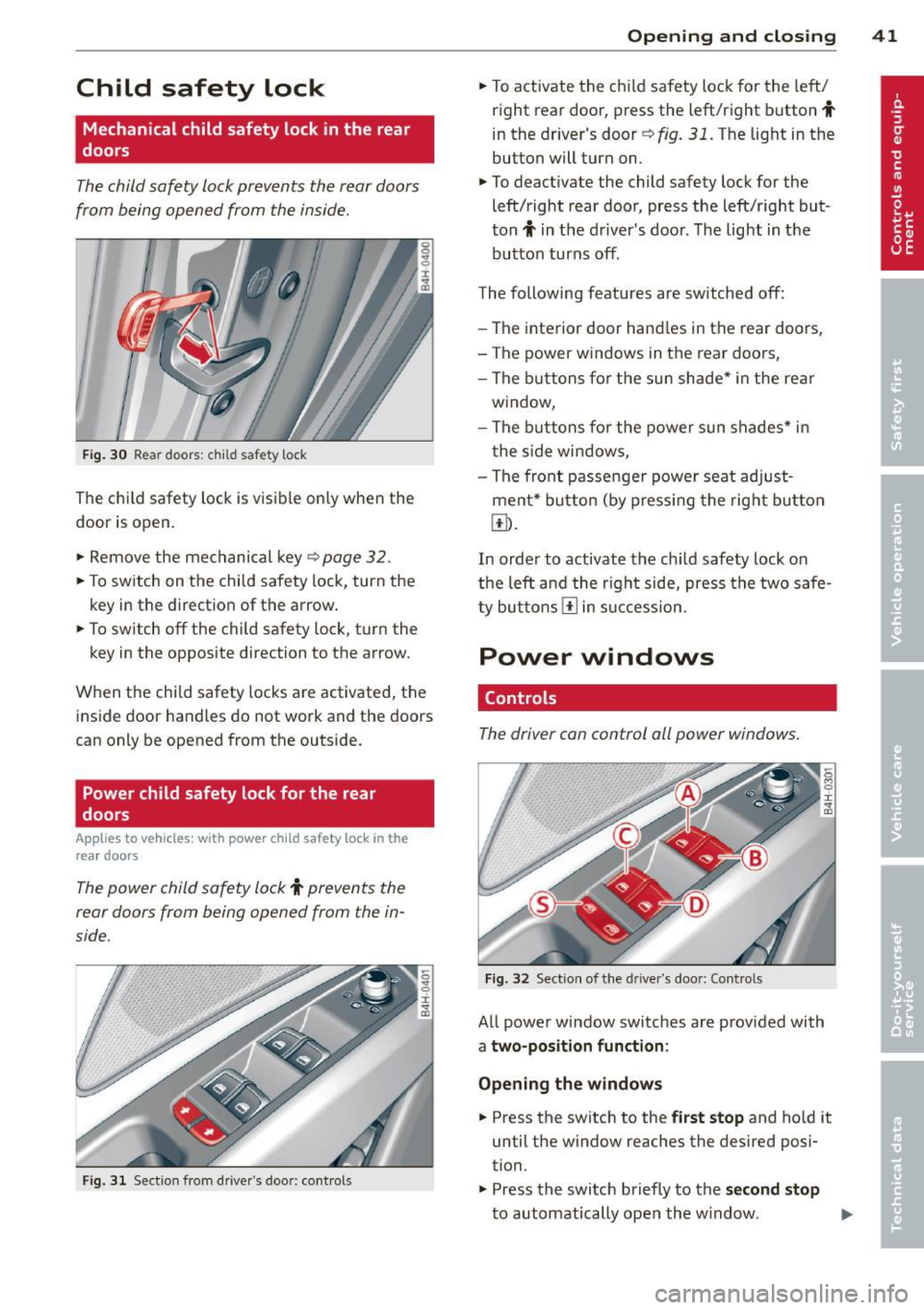
Fig. 30 Rear doors: child safety lock
The child safety lock is visible only when the
door is open.
• Remove the mechanical key<>
page 32.
• To switch on the child safety lock, turn the
key in the direction of the arrow .
• To switch
off the child safety lock, turn the
key in the opposite direction to the arrow.
When the child safety locks are activated, the
inside door handles do not work and the doors
can only be opened from the outside .
Power child safety lock for the rear
doors
Applies to vehicles: with power c hild safety lock in the
rea r doo rs
The power child safety lock t prevents the
rear doors from being opened from the in
side.
Fig. 31 Section from drive r's door: co ntrols
Opening and closing 41
• To activate the child safety lock for the left/
right rear door, press the left/right button
t
in the driver's door r=> fig. 31. The light in the
button will turn on .
• To deactivate the child safety lock for the
left/right rear door, press the left/right but
ton
t in the driver's door. The light in the
button turns
off.
The following features are switched off:
- The interior door handles in the rear doors,
- The power windows in the rear doors,
- The buttons for the sun shade* in the rear
window,
- The buttons for the power sun shades* in
the side windows,
- The front passenger power seat adjust
ment* button (by pressing the right button
Ii]).
In order to activate the ch ild safety lock on
the left and the right side, press the two safe
ty buttons
I!] in succession.
Power windows
Controls
The driver can control all power windows.
Fig. 32 Section of the driver's door: Controls
All power window switches are provided with
a two-position function :
Opening the windows
• Press the switch to the first stop and ho ld it
until the window reaches the desired posi
tion.
• Press the switch briefly to the
second stop
to automatically open the window. Ill-
Page 44 of 314
42 Opening and closing
Closing the windows
.,. Pull the switch to the first stop and hold it
until the window reaches the desired posi
tion .
.,. Pull the switch briefly to the
second stop to
automatically close the window.
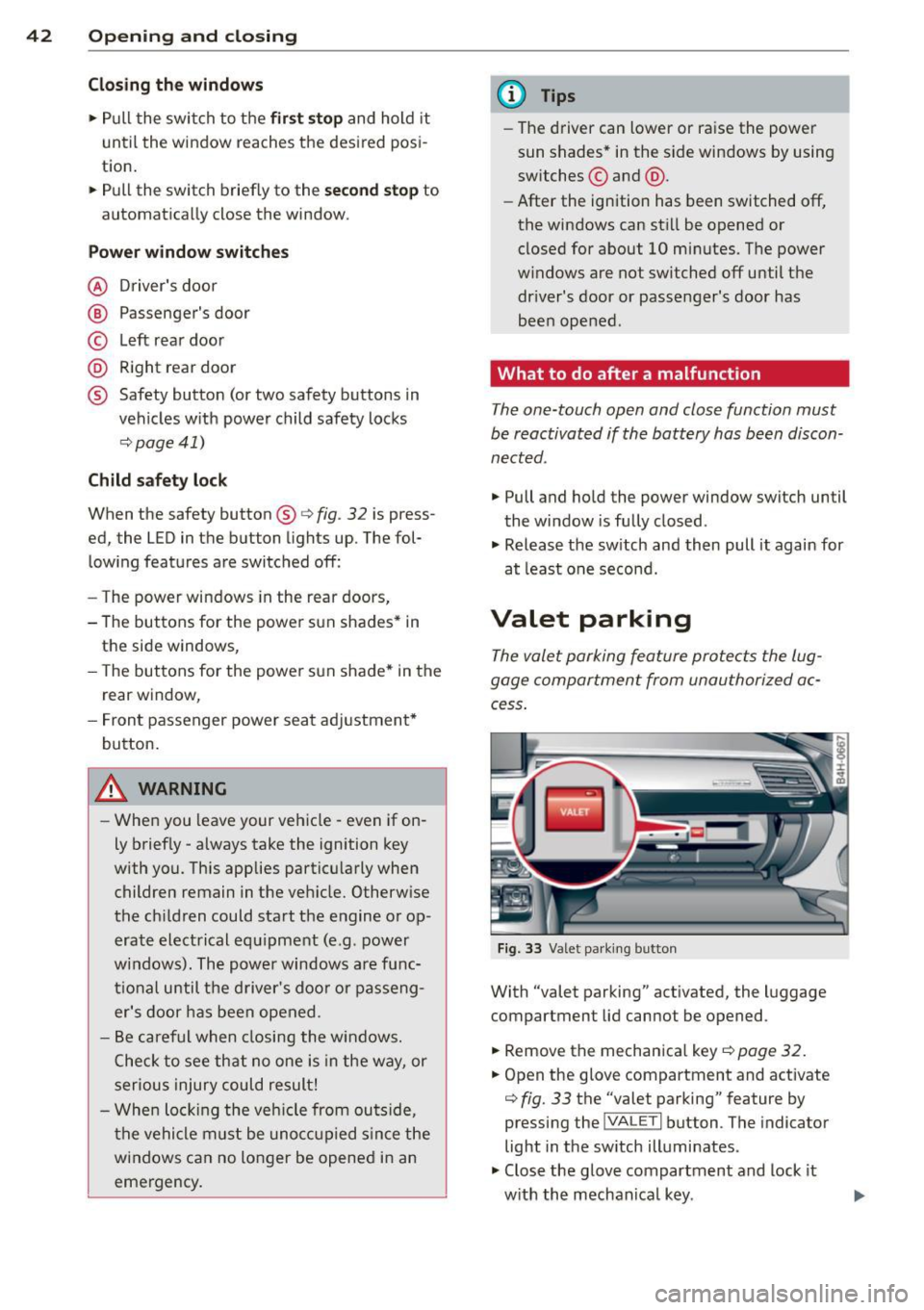
Power window switches
@ Driver's door
@ Passenger's door
© Left rear door
@ Right rear door
® Safety button (or two safety buttons in
vehicles w ith power child safety locks
c:> page 41)
Child safety lock
When the safety button® c:> fig. 32 is press
ed, the LED in the button lights up. The fol
lowing features are switched off:
- The power windows in the rear doors,
- The buttons for the power sun shades * in
the side windows,
- The buttons for the power sun shade* in the
rear window,
- Front passenger power seat adjustment*
button.
&_ WARNING
- When you leave your veh icle - even if on
ly brief ly - always take the ignition key
with you. This applies particularly when children remain in the veh icle. Otherwise
the chi ldren could start the engine or op
erate electrical equipment (e.g. power
w indows). The power windows are func
tional until the driver's door or passeng
er's door has been opened .
- Be careful when closing the windows.
C heck to see that no one is in the way, or
serious injury could result!
- When locking the vehicle from outside,
the vehicle must be unoccupied since the
windows can no longer be opened in an
emergency.
(D Tips
- The driver can lower or raise the power
sun shades* in the s ide windows by using
switches © and @.
- After the ignition has been switched
off,
the windows can sti ll be opened or
closed for about 10 minutes. The power
w indows are not switched off until the
dr iver's door or passenger's door has
been opened .
What to do after a malfunction
The one-touch open and close function must
be reactivated if the battery has been discon
nected .
.,. Pull and hold the power window switch until
the window is fully closed .
.,. Release the sw itch and then pull it again for
at least one second.
Valet parking
The valet parking feature protects the lug
gage compartment from unauthorized ac
cess .
Fig. 33 Valet parking button
With "valet parking" activated , the luggage
compartment lid cannot be opened .
.,. Remove the mechanica l key
¢ page 32.
.,. Open the glove compartment and activate
c:> fig. 33 the "valet parking" feature by
pressing the
j VA LETi button . The indicator
light in the sw itch illuminates .
.,. Close the glove compartment and lock it
w ith the mechanical key . .,.
Page 45 of 314
.. Leave the master key with the service per
sonnel for park ing and keep the mechanica l
key w ith you.
When the "valet parking" feature is activated:
- the un locking button for the luggage com
partment lid~ in the d river's door is inac
t ive
- the button~ on the master key is inactive
- the opening handle in the luggage compart-
ment lid is inactive .
The vehicle can be driven and locked and un locked with the master key . Access to the lug
gage compartment is blocked .
When the valet parking function is switched on, the message
Valet parking activated ap
pears in the instrument cluster display when
you switch the ign it ion on .
Sliding/tilting sunroof
Operation
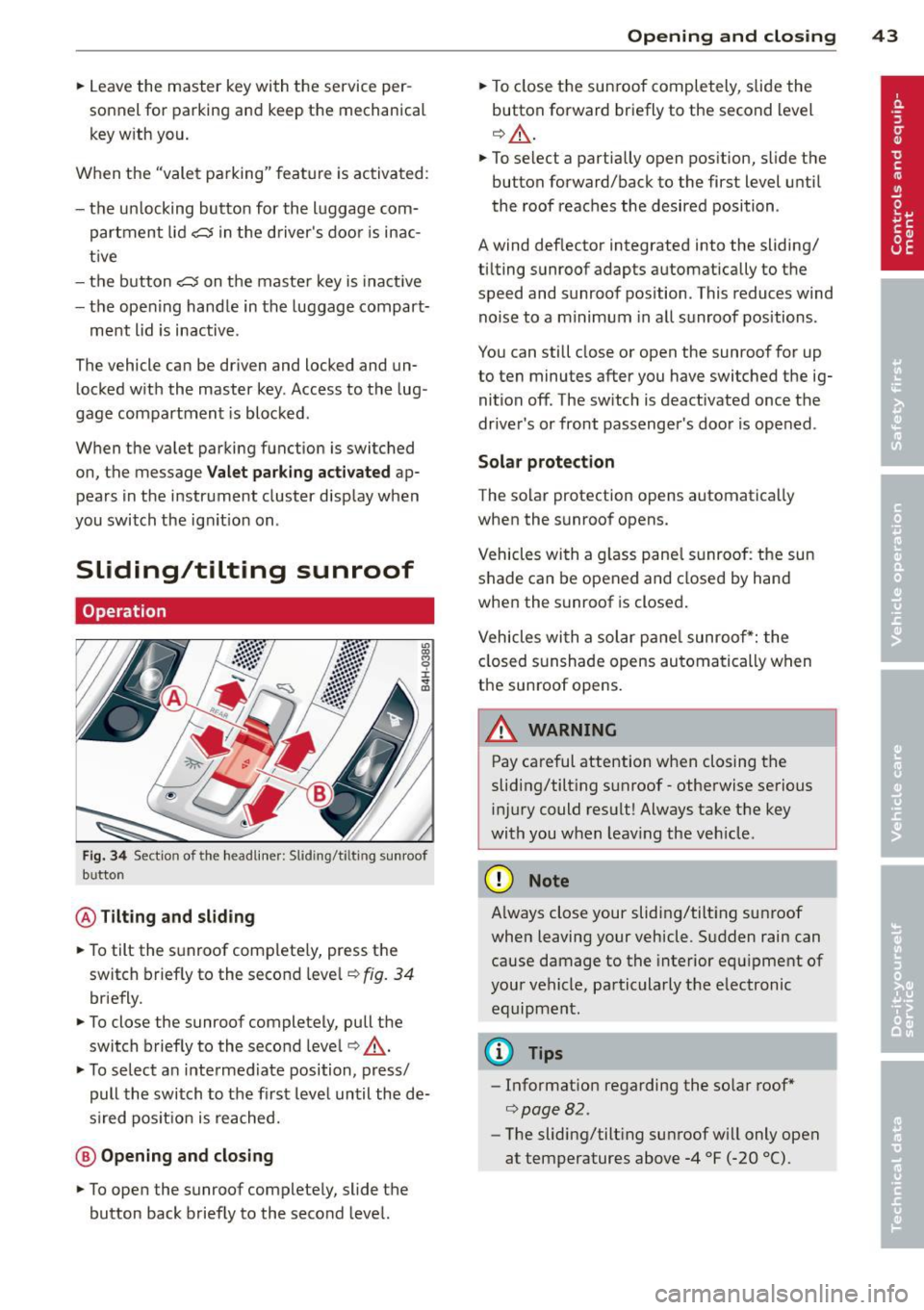
Fig. 34 Sectio n of the headliner: Slid ing/t ilting sunroof
b utto n
@ Tilting and sliding
.. To tilt the sunroof complete ly, press the
switch briefly to the second leve l¢
fig. 34
briefly.
.. To close the sunroof completely, pull the
switch brief ly to the second leve l¢ ,&. .
.. To select a n intermediate position, press/
pull the switch to the first level until the de
s ir ed pos it ion is reached.
@ Opening and closing
.. To open the sunroof completely, slide the
button back briefly to the second level.
Opening and closing 43
.. To close the sunroof completely, slide the
button forward briefly to the second level
¢ ,&. .
.. To select a partially open position, slide the
button forward/back to the first level until
the roof reaches the desired position .
A wind deflector integrated into the sliding/
t ilting sunroof adapts automatically to the
speed and sunroof pos ition . This reduces wind
noise to a minimum in all sunroof positions .
You can still close or open the sunroof for up
to ten minutes after you have switched the ig nition off . The sw itch is deactivated once the
driver's or front passenger's door is opened .
Solar protection
The solar protection opens automatically
when the sunroof opens.
Vehicles with a glass pane l sunroof : the sun
shade can be opened and closed by hand
when the sunroof is closed.
Vehicles with a solar pane l sunroof*: the
closed sunshade opens automatically when
the sunroof opens.
A WARNING
-Pay careful attention when closing the
sliding/tilt ing sunroof -otherwise serious
injury could result! Always take the key
with you when leav ing the veh icle .
(D Note
-
Always close your sliding/tilting sunroof
when leaving your vehicle. Sudden rain can
cause damage to the interior equipment of
your vehicle, particularly the electronic equipment .
@ Tips
-Information regarding the so lar roof*
¢page 82 .
-The sliding/tilt ing sunroof w ill only open
at temperatures above -4 °F
(-20 °() .
Page 50 of 314
48 Clear vision
Adjusting the exterior lighting
The settings are adjusted in the MMI.
• Se lect : I CAR ! function button > Car systems
control button > Vehicle settings > Exterior
lighting .
Automatic headlights
You can adjust the following settings in the
Automatic headlights menu:
Headlights activation time -You can adjust if
the head lights switch on
Early, Med. or Late
according to the sensitivity of the light sensor .
Audi adaptive light * -You ca n sw itch adaptive
l ight
On and Off.
Automatic high beams*
You can switch the high beam ass ist on and
off .
Daytime running lights
USA models :
You can switch the dayt ime run
ning lights
on and off .
Canada models:
The function cannot be
turned off .
It is activated a utomat ica lly each
time the ign ition is switched on. This menu
item is shown "greyed out".
Coming home, Leaving home
The coming home function illuminates the
area outside the vehicle when yo u switch the
ignition off and open the driver's door. To turn
the function on, select
Lights when leaving
car > On .
The leaving home function illuminates the
area outside the vehicle when you un lock the
ve hicle. To turn the funct ion on, select
Lights
when unlocking car > On .
The coming home and leaving home functions
only operate when it is dark and the light
switch is in the
AUTO position.
Turn signal and high beam lever
The lever on the left side of the steering col
umn is used to operate the turn signals and
the high beam as well as the headlight flash
er.
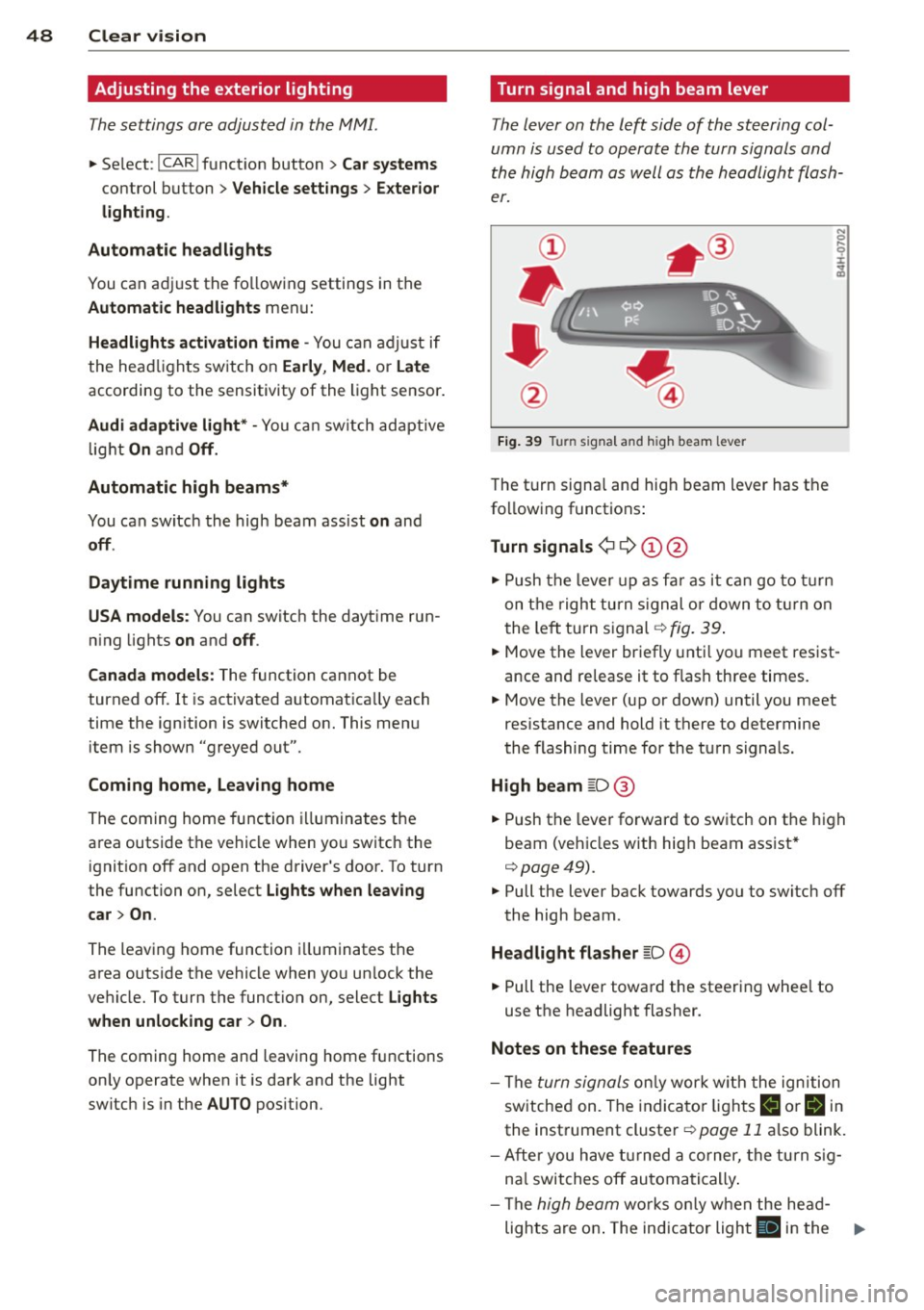
Fig. 39 Tu rn signal and high beam lever
The turn signa l and high beam lever has the
following functions:
Turn signals ¢ 9 (D@
• Push the lever up as far as it can go to turn
on the right turn signal or down to turn on
t he left turn signal¢
fig. 39.
N 0 ... 'i' :r
~
• Move the lever briefly unti l you meet res ist·
ance and re lease it to flash three times.
• Move the lever (up or down) until you meet
resistance and hold it there to determine
the flashing time for the turn signals.
High beam [D @
• Push the lever forward to switch on the high
beam (vehicles with high beam assist*
¢ page49).
• Pull the lever back towards you to switch off
the high beam .
Headlight flasher [D ©
• Pull the lever toward the steering wheel to
use the headlight flasher.
Notes on these features
- The turn signals only work w ith the ignition
switched on. The indicator lights
II or Bin
the instrument cluster¢ page 11 also blink.
- After you have turned a corner, the turn sig-
na l switches off automatically.
- The
high beam works only when the head-
lights are on . The indicator light
II in the ..,.
Page 51 of 314
instrument cluste r ill uminates when the
high beams are on.
- T he
headlight flasher works only as long as
you hold the lever -even if there are no
li ghts turned o n. The indicator light
El in
the instr ument cluster illuminates when you
use the head light flasher.
A WARNING
Do not use the hig h beam or headlight
flasher if you know that these could blind
oncoming traffic.
High beam assist
Applies to vehicles: with high beam ass ist
The high beam assist automatically switches
the high beams on or off, depending on the
surroundings and traffic conditions .
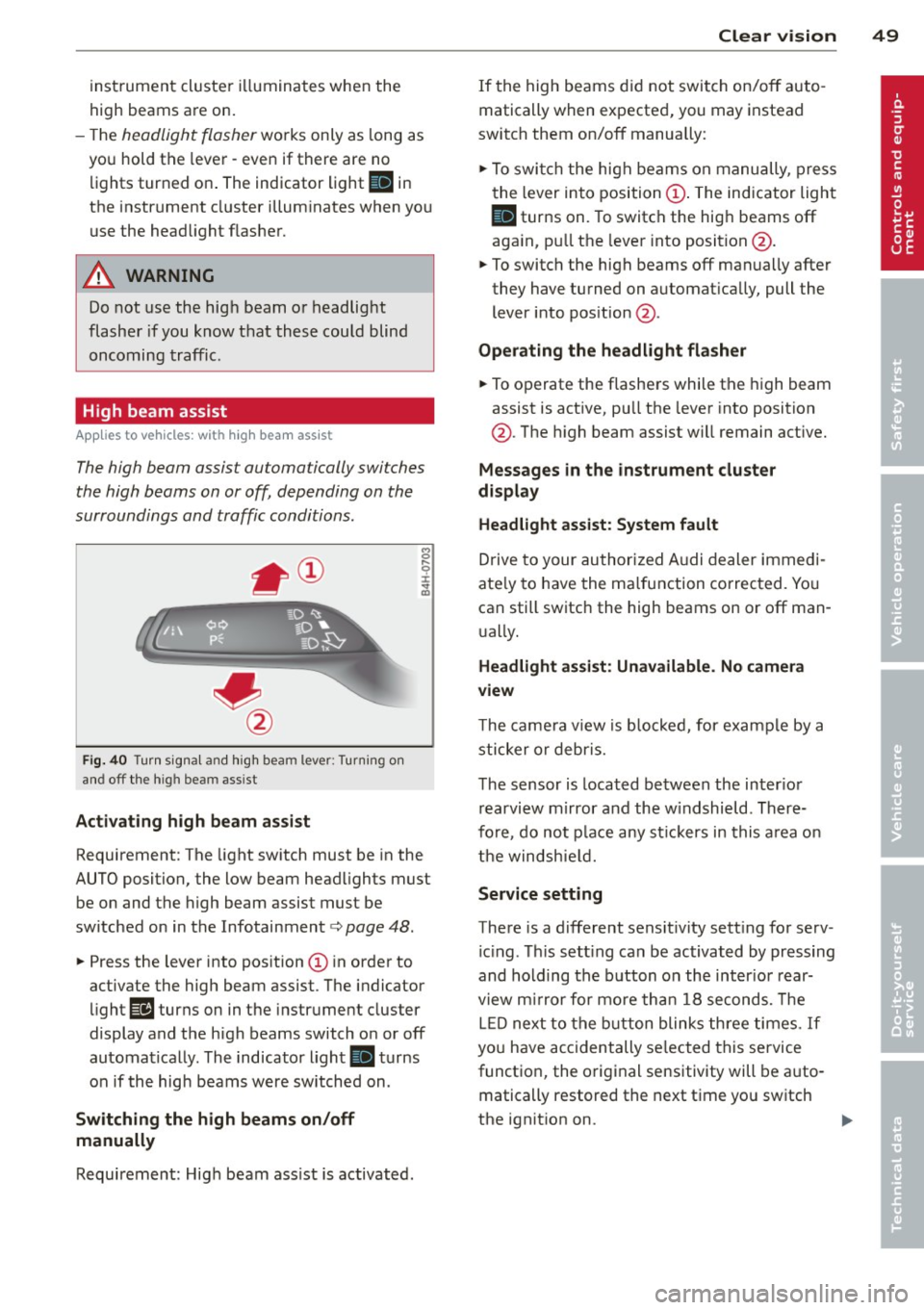
Fig. 40 Turn sig na l and high beam lever: Turning on
and off the high beam ass ist
Activating h igh beam a ssi st
8 .... 0 :i: ;g
Requirement: The light sw itch must be in the
AUTO position, the low beam head lights must
be on and the high beam assist must be
switched on in the Infotainment¢
page 48.
~ Press the lever into position @ in order to
activate the high beam assist. T he indicator
light
Ill turns on in the instrument cluster
display and the high beams switch o n or off
automatically . The indicato r light
II turns
on if the high beams w ere switched on .
Switching the high beams on /off
manually
Requirement: Hig h beam ass ist is activated.
Clear vis ion 49
If the high beams d id not swi tch on/off auto
matically when expected, you may instead
switch them on/off manua lly:
~ To swi tch the high beams on manually, press
the lever into position@. The indicator light
II turns on. To switch the hig h beams off
aga in, p ull the leve r into position @.
~ To switch the high beams off manually after
they have turned on a utomat ica lly, pull the
lever i nto pos ition @.
Oper ating the headlight fla sher
~ To operate the flashe rs while the high beam
assist is act ive, pu ll the lever into position
@ . T he high beam assist will remain act ive.
Messag es in the instrument cluster
di spl ay
Headlight assist: System fault
Drive to your authorized A udi dealer immed i
ate ly to have the ma lfunction corrected. Yo u
can still switch the high beams on or off man
u ally.
Headlight a ssi st: Unavailable . No camera
view
T he came ra v iew is b locked, for example by a
sticker o r debr is.
The sensor is loca ted be tween the inter io r
r earvi ew mirror and the w indshield . There
fo re, do no t place any st ic kers in this a rea on
th e windsh ie ld .
Service setting
There is a d ifferent sens it ivity sett ing for serv
ic ing . Th is sett ing can be activated by pr essing
and hold ing the b utton on the int erio r r ear
view m irror for mo re tha n 1 8 seconds. The
L E D next to the button blinks th ree times.
If
yo u have accidentally se lec ted this service
funct io n, the origi nal sensitivity will be a uto
matically restored the next t ime yo u sw itch
the ignit ion on.
Page 52 of 314
50 Clear vis ion
& WARNING
H igh beam assist is only intended to assist
the driver. The driver is still responsible for controlling the headlights and sw itching
th e high beams on and off manually de
pending on traffic, l ighting and visibility
condi tions. Failure to intervene manually
may lead to ris k of accident . It may be nec
essary to operate the high beams man ua l
ly in the following situat ions, e.g .:
- For adverse weather conditions such as
fog, heavy rain, blowing snow or spraying
water .
- On roads where oncoming traffic may be
partia lly obsc ured such as expressways .
-If there are individuals on the road with
no light ing or poor lighting, such as cy
cl ists .
- In tight c urves and on steep s lopes .
- In poorly lit areas.
- With strong reflectors su ch as signs.
- If the area of the windshie ld nea r th e
sensor is fogged over, dirty, icy or cov
ered w ith a st icker.
(D Tips
- The high beam ass ist is active above a
speed of approx . 25 mph (40 km/h).
- If afte r activation, your speed falls below
approx . 15 mp h (24 km/h), the high
beams w ill automatically be switched
off.
Interior lights
Front and rear interior lighting
Fi g. 41 Headliner: Front interior lights
F ig. 42 Rear headli ner : Read ing light
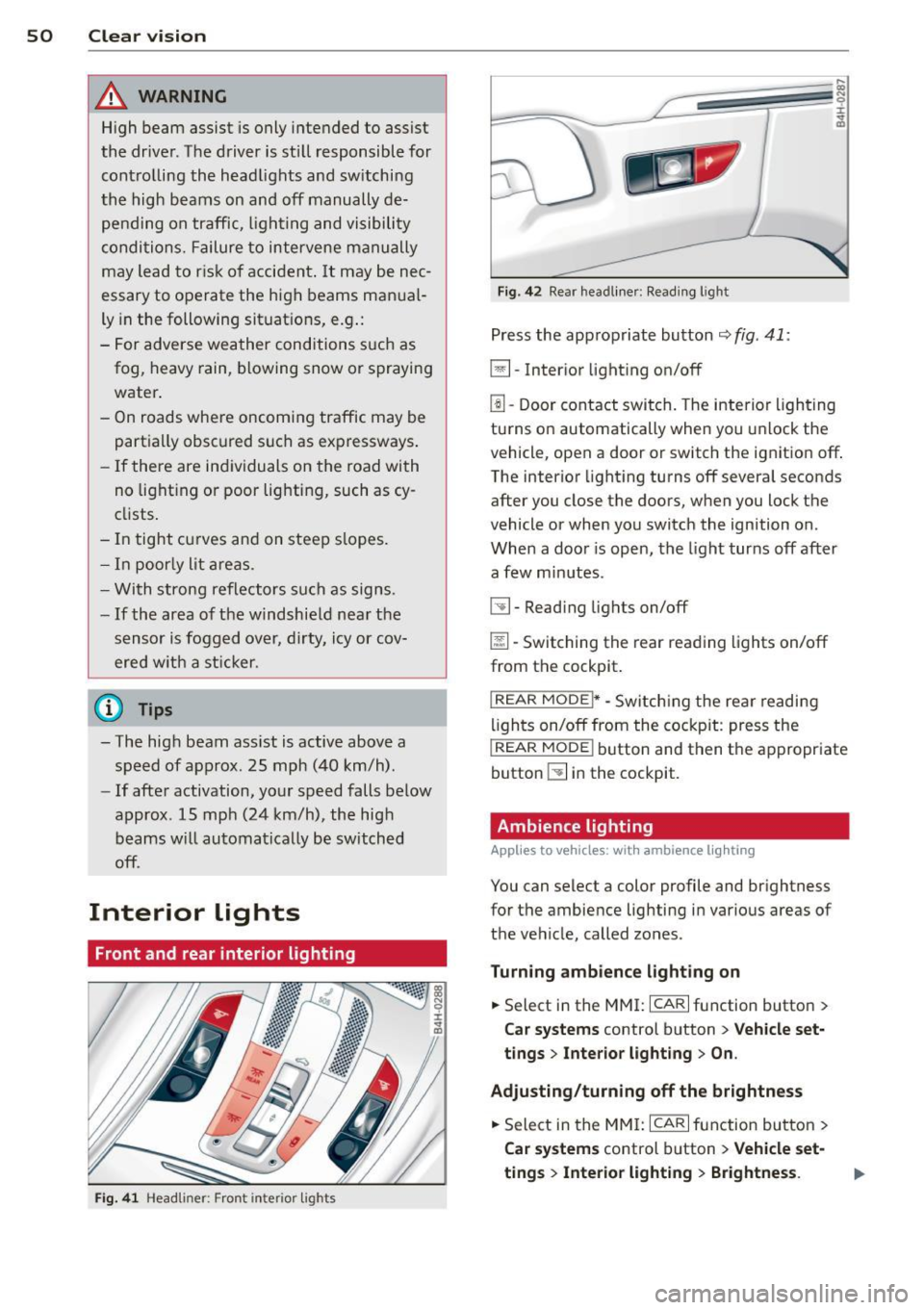
Press the app ropriate button ~ fig . 41:
~ -Inter ior light ing on/off
l!l -Door contact switch. The interior lighting
turns on automatically when you u nlock the
vehicle, open a door or switch the ignition off.
The interior light ing turns off several seconds
after you close the doors, when you lock the
vehicle or when you switch the ignition on.
When a doo r is open, the light turns off after
a few min utes.
~ -Read ing lights on/off
~ - Switching the rear reading lights on/off
from the cockpit .
I REAR MODEi* -Switching the rear readi ng
li ghts on/off from the cockpit : press the
I REAR MODE ! button and then th e appropriate
button ~ in the cockpit.
Ambience lighting
Applies to veh icles: w it h amb ience l ig h ting
You can select a color profile and brightness
for the ambie nce lighting in various areas of
the ve hicle, called zones.
Turning ambience lighting on
.. Select in the MMI: ICAR ! function button >
Car systems control button > Vehicle set·
tings > Interior light ing > On .
Adjusting /turning off the brightness
• Sele ct in the MM I: ICARI fu nction button >
Car sy stems control b utton > V ehicle set
ting s> Inte rior light ing > Brightness .
Page 56 of 314
54 Clear vis ion
rain se nsor f unction . Check yo ur
winds hield wiper b lades regularly.
- The washer fluid nozzles of the wind
sh ield washer system are heated at low
temperatures when the ignition is on .
- When stopping temporarily, e .g . at a
traffic light, the set speed of the wind
s h ield wipers is automatically red uced by
one speed.
Cleaning w indshield wiper blades
Clean the w indshield wiper blades when they
begin to leave streaks .
.. Place the windshield wiper arms in the serv
ice position . Refer to ¢
page 54.
.. Use a soft cloth and glass cleaner to clean
the windsh ield wiper blades .
A WARNING
Dirty windshield w iper blades can impa ir
your view. This can lead to ac cidents.
Replacing windshield wiper blades
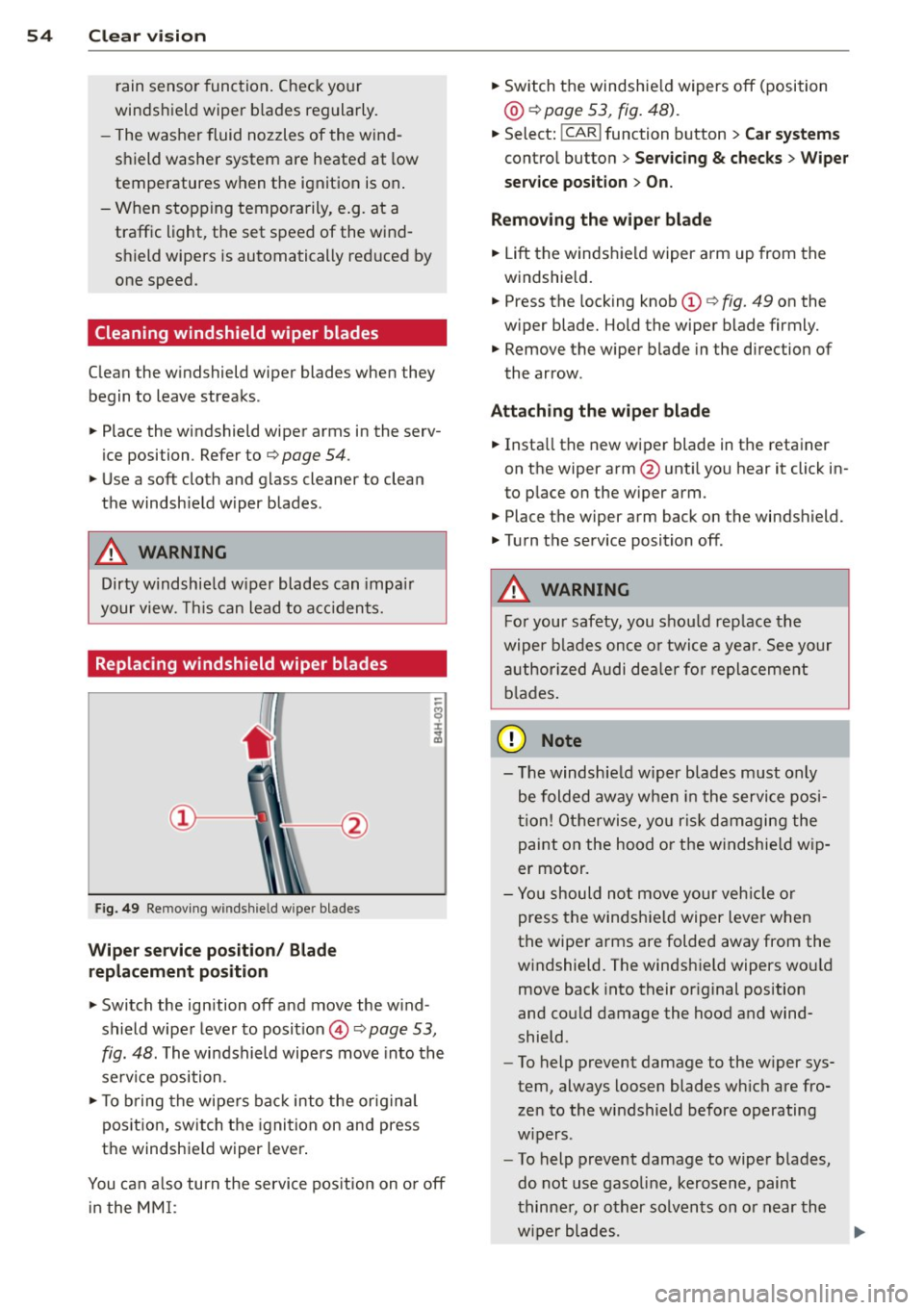
Fig. 49 Removing w inds hie ld w ipe r blades
Wiper service positio n/ Blad e
replacem ent po sition
-
.. Switch the ign ition off and move the w ind
shield wiper lever to position © ¢
page 53,
fig. 48. The windshield wipe rs move into the
service position .
.. To b ring the wipers bac k into the orig inal
position, switch the ignition on and press
the windshie ld wiper lever .
You can a lso turn the service pos ition on o r off
in the
MM I:
.. Switch the windshie ld wipers off (position
@ ¢ page 53, fig. 48) .
.. Select: !CARI function button > Car systems
contro l button > Ser vicing & checks > Wiper
ser vice position
> On .
Remo ving th e wiper blade
.. Lift the windshield wiper arm up from the
w indshie ld.
.. Press the locking knob
(D ¢ fig. 49 on the
w iper blade. Hold the wiper blade firmly.
.. Remove the wiper blade in the direction of
the arrow .
Attach ing the w iper bl ade
.. Insta ll the new wiper blade in the retainer
on the wiper arm @unti l you hear it click in
to place on the w iper arm .
.. Place the wiper arm back on the windshield .
.. Turn the service position off .
A WARNING
---
For your safety, you should rep lace th e
wiper b lades once o r twi ce a yea r. See your
a uthor ized Audi de aler fo r repla ceme nt
b lades .
(D Note
-The windsh ie ld wiper blades m ust only
be folded away when in the service posi
tion! Otherwise, yo u ris k damaging the
paint on the hood o r the windshie ld w ip
er motor.
- Yo u should not move your veh icle or
press the windsh ield wiper lever when
the wiper arms are folded away from the
windshield. The windshield wipers wou ld
move back into their or iginal position
and could damage the hood and wind
shield.
- To help prevent damage to the w iper sys
tem, always loosen blades wh ich are fro
zen to the windshield before operating
w ipers.
- To help prevent damage to wiper blades,
do not use gaso line, kerosene, paint
thinne r, or other solvents on o r near the
w iper blades.
Page 57 of 314
-To help prevent damage to the wiper
arms or other components, do not at
tempt to move the wipers by hand .
@ Tips
-Commercial hot waxes applied by auto
matic car washes affect the cleanability
of the windshield.
- You can also use the service position, for
example, if you want to protect the
windshield from icing by using a cover.
- You cannot activate the service pos ition
when the hood is open.
Mirrors
Adjusting the exterior mirrors
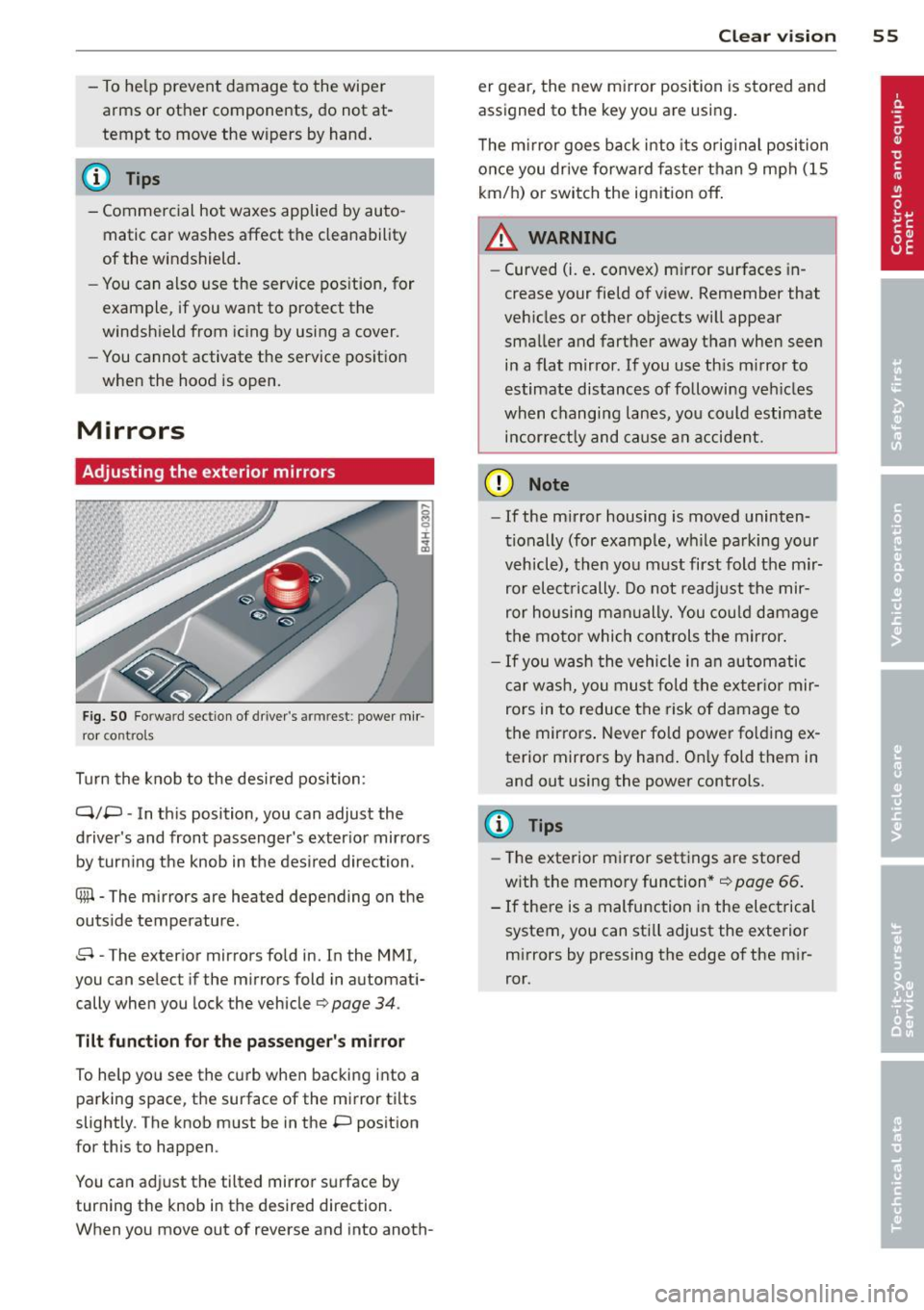
Fig. SO Fo rwar d section of driver's armrest: power mir
ro r contro ls
Turn the knob to the desired position :
Q/P -In this position, you can adjust the
driver's and front passenger's exter ior mirrors
by turn ing the knob in the desired direction.
@ -The mirrors are heated depending on the
outside temperature .
8 -The exterior mirrors fo ld in. In the MMI,
you can select if the mirrors fold in automati
cally when you lock the vehicle
c:> page 34.
Tilt function for the passenger's mirror
To help you see the curb when backing into a
parking space, the surface of the mirror tilts
slightly. The knob must be in the P position
for this to happen .
You can adjust the tilted mirror surface by
turning the knob in the desired direction.
When you move out of reverse and into anoth- Clear vi
sion 55
er gear, the new m irror position is stored and
assigned to the key you are using .
T he m irror goes back into its orig inal position
once you drive forward faster than 9 mph (15
km/h) o r switch the ignition off .
A WARNING
-
-Curved (i.e . convex) m irror surfaces in
crease your field of view. Remember that
veh icles or other objects will appear
smaller and fart her away than when seen
in a flat mirror. If you use th is mirror to
estimate distances of following veh icles
when changing lanes, you could estimate
incor re ctl y and cause an accident.
(D Note
-If the mirror housing is moved uninten
tionally (for examp le, while pa rking your
vehicle), then you must first fold the m ir
ror elect rically. Do not readj ust the mir
ror housing man ually. You could damage
the motor which controls the mirror .
-If you wash the vehicle in an automatic
car wash, you must fold the ex ter ior mir
rors in to reduce the risk of damage to
the mirrors . Never fold power fo lding ex
terior mirrors by hand . On ly fold them in
and out using the power controls.
(D Tips
- Th e exterior mirror settings are stored
w ith the memory function*
c::> page 66.
- If there is a malfunction in the electrical
system, you can still adjust the exterior
mirrors by pressing the edge of the m ir
ror.
Page 64 of 314
62 Seats and storage
@-Moving the seat forward/back: press the
button forward/back
r=:, .&. .
@ -Moving the seat up/down: press the but
ton up/down~ &..
©-Switching front passenger seat adjust
ment on/off: this function must be activated
in the MMI
<=:> page 64 , <=:> &, .To switch front
passenger seat adjustment on, press the but
ton. You can now adjust the front passenger
seats using the buttons @and @. If you do
not press the buttons ® or@ , front passen
ger se at adjustment switche s off automatical
ly after approximately ten seconds.
A WARNING
- The power adjustment for the individual seats also works with the ignition. For
this reason, children should never be left
unattended in the vehicle -they could be
injured!
- Exercise caution when adjusting the
seats . Unsupervised or careless seat ad
justment can pinch fingers or hands causing injuries.
- Vehicles with a pass through in the cen
ter console have seating for four. The
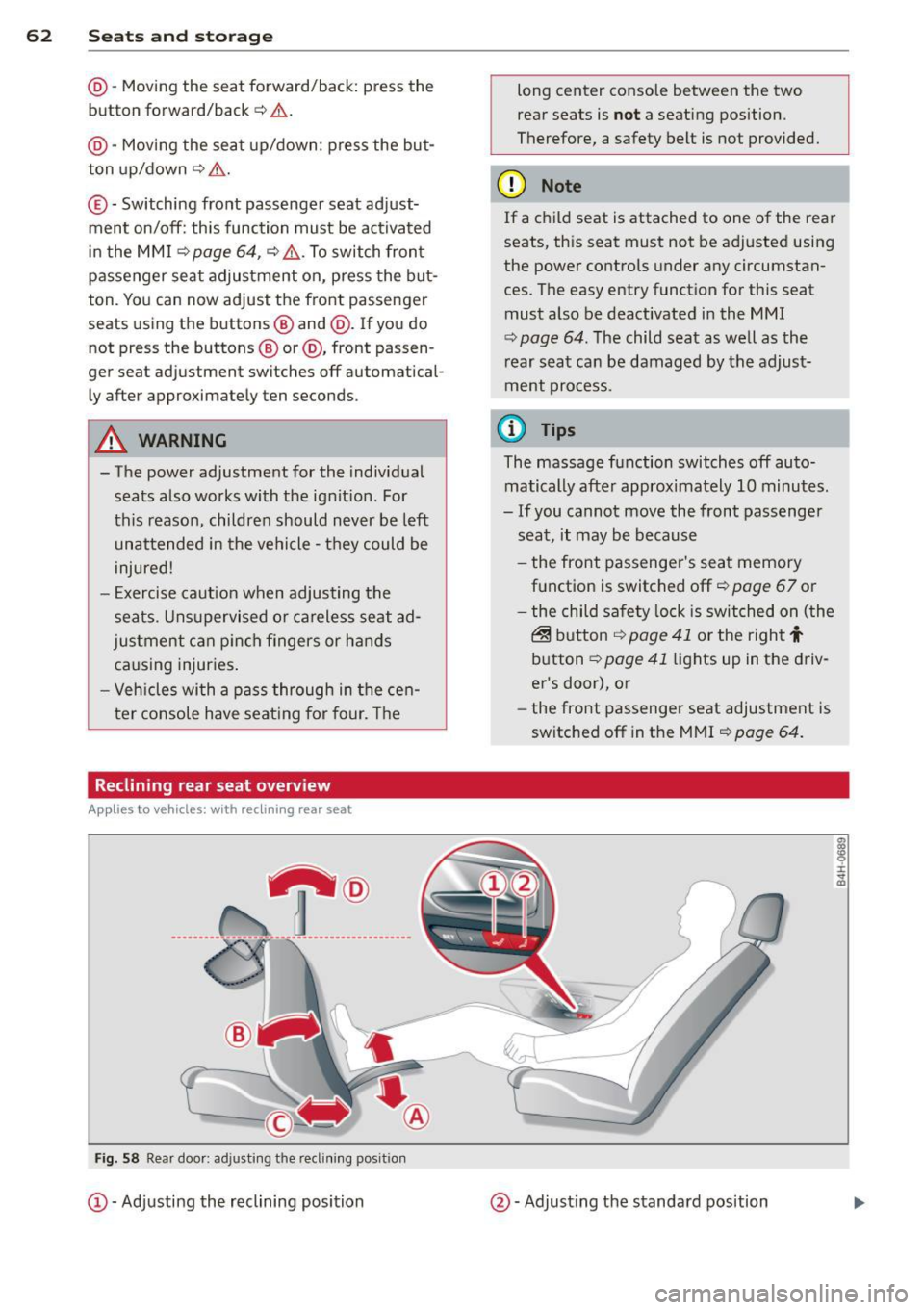
Reclining rear seat overview
Applies to vehicles: with reclining rear seat
,-@
_____ ___ ., ------- ---- ·-------- ----- ------
-
Fig. 58 Rear door : ad justing t he reclining po sit ion
CD -Adjusting the reclining position long center console between the two
rear seats is
not a seating position.
Therefore, a safety belt is not provided.
(D Note
If a child seat is attached to one of the rear
seats, this seat must not be adjusted using
the power controls under any circumstan
ces. The easy entry function for this seat
must also be deactivated in the MMI
<=:> page 64. The child seat as well as the
rear seat can be damaged by the adjust
ment process.
(D Tips
The massage function switches off auto
matically after approximately 10 minutes.
- If you cannot move the front passenger
seat, it may be because
- the front passenger's seat memory
function is switched off
r=;, page 67 or
- the child safety lock is switched on (the
@ button ¢ page 41 or the right t
button <=:> page 41 lights up in the driv
er's door), or
- the front passenger seat adjustment is
switched off in the MMI
r=;, page 64.
@ -Adjusting the standard position
Page 66 of 314
64 Seats and storage
@ Tips
If you cannot move the seat into the re
clining position, it may be because
- the front passenger's seat memory func
tion is switched off¢
page 67 or
- the child safety lock is switched on (the
~ button ¢ page 41 or the right t but
ton ¢
page 41 light s up in the driver's
door), or
- the front passenger seat adjustment is
switched off in the MMI ¢
page 64.
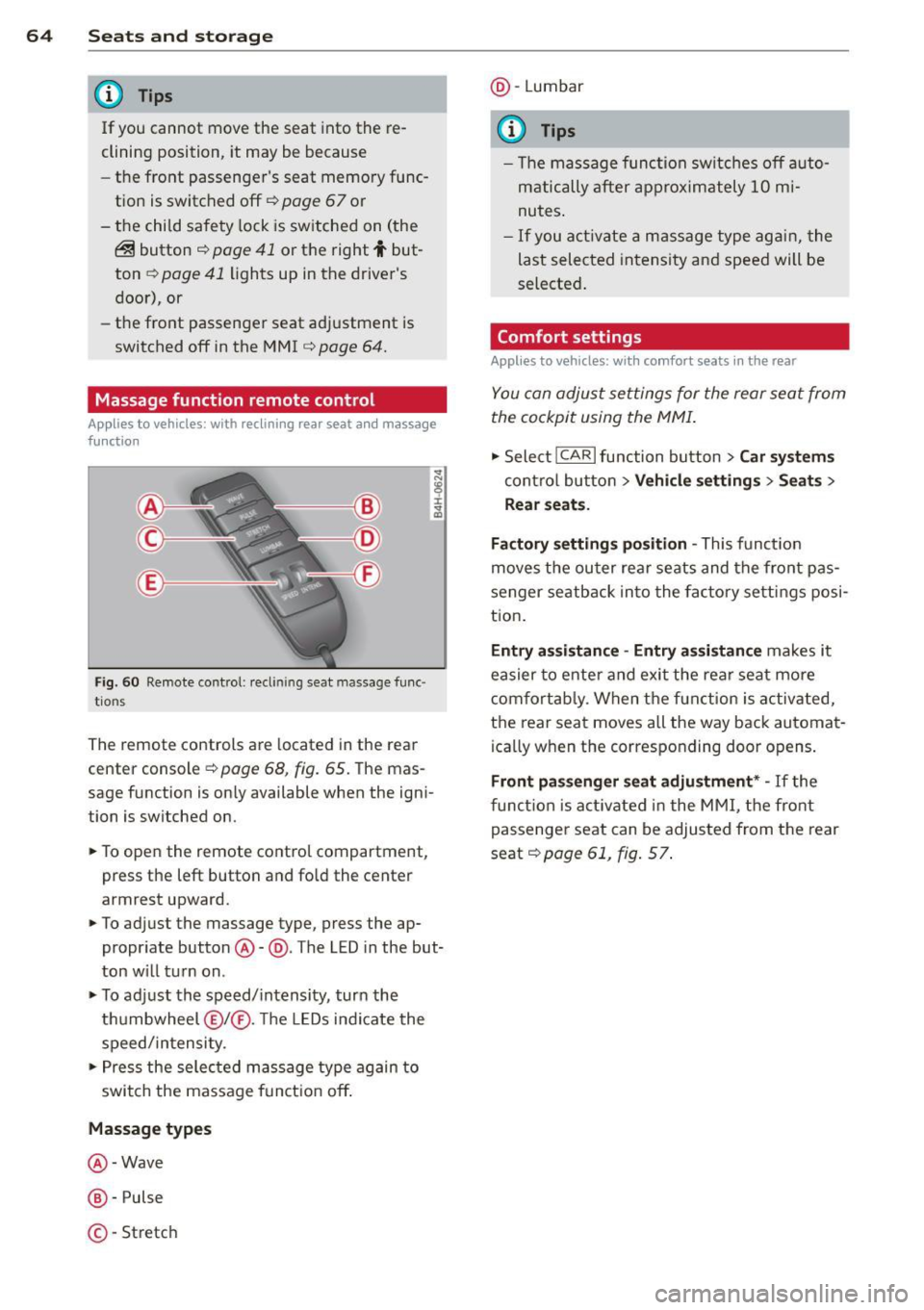
Massage function remote control
Applies to vehicles: with reclining rear seat an d massage
fu nct ion
Fig . 60 Remote control: reclining seat massage func
tions
The remote controls are located in the rear
center console¢
page 68, fig. 65. The mas
sage function is on ly available when the igni
tion is switched on.
• To open the remote control compartment,
press the left button and fold the center
armrest upward.
• To adjust the massage type, press the ap
propriate button@-@ . The LED in the but
ton will turn on.
• To adjust the speed/intensity, turn the
thumbwheel @I® . Th e LEDs indicate the
speed/intensity.
• Press the selected massage type again to
switch the massage function off.
Massage types
@ -Wave
@-Pulse
©-Stretch @
-Lumbar
© Tips
- The massage function switches off auto
matically after approximately 10 mi
nutes.
- If you activate a massage type again, the
last selected intensity and speed will be
selected.
Comfort settings
Applies to vehicles: wit h comfort seats in the rear
You can adjust settings for the rear seat from
the cockpit using the MMI.
• Select !CARlfunction button> Car systems
control button > Vehicle settings > Seats >
Rear seats.
Factory settings position -
This function
moves the outer rear seats and the front pas
senger seatback into the factory settings posi
tion.
Entry assistance -Entry assistance makes it
easier to enter and exit the rear seat more
comfortably. When the function is activated,
the rear seat moves all the way back automat
ica lly when the corresponding door opens.
Front passenger seat adjustment* -If the
function is activated in the MMI, the front
passenger seat can be adjusted from the rear
seat¢
page 61, fig. 57.