instrument cluster AUDI S8 2015 Owner's Manual
[x] Cancel search | Manufacturer: AUDI, Model Year: 2015, Model line: S8, Model: AUDI S8 2015Pages: 312, PDF Size: 79.18 MB
Page 105 of 312

,....,
N ,....,
N
0 J:
'SI: ,...., \!) 1.1'1 ,...., 1.1'1 ,....,
White Active l ane assist is sw itched on
line(s) and ready to p rov ide warnings
on the side that is ind icated
¢ fig. 109 .
Red line Act ive lane assist is warning you
(left or that you are about to leave your
right) lane
¢ fig . 109. In addition, the
steeri ng wheel vibrates s light ly.
Gray Act ive l ane assist is switched on
line(s) but is not ready to provide warn-
ings
¢ fig . 110.
Mes sages in the instrument clu ster
display
When the active lane ass ist turns off automat
ically, the i nstrument cluster ind icator goes
out and one of the fo llow ing messages ap
pears on the display :
Audi active lane a ssist : Curr ently un availa
bl e. No camera view
This message appears if the camera is no lon
ger funct ional after the system has cont inous
ly failed to detect the lane markings . This
could happen if :
- The camera field of view¢
page 102,
fig. 108 is dirty or covered in ice. Clean the
area on the w indshield .
- The camera field of view is fogged over. Wait
until the fog has cleared before switching
active lane assist on .
- The system has been unable to detect the
lanes for an extended period of time due to
road cond it ions . Switch active lane ass ist
back on when the lines are more visible .
Audi active lane a ssist : Currently un available
A temporary ma lf u nction is preventing lane
assist from operating. Try sw itching active
lane assist on again later.
Audi acti ve lane a ssist : S ys tem fault!
Drive to you r autho rized Aud i dea le r soon to
h ave the ma lfunction co rrec ted.
Audi active lane a ssis t: Pl ea se take over
s te ering
Audi acti ve lane a ssis t 103
This message appears if yo u do not s teer the
vehicle yourself . If this is the case, active lane
ass ist does not switch off, b ut it does sw itch
to the "not ready" stat us. The system can help
you keep the vehicle in the lane. However it is
your own responsibility to steer and control
t h e ve hicle .
Setting the steering wheel vibration
Applies to veh icles: w ith active la n e assist
11> Select: !CAR ! function button> (Car )* sys
tem s
control button > Driver a ssis t > Aud i
a ctive lan e as sis t.
You can switch the vibrat ing warn ing in t he
stee ring wheel
o n or off .
(D Tips
Your setting is a utomat ically stored and
assigned to the remote control key being
used.
Page 109 of 312

.... N .... N
0 J:
'SI: .... \!) 1.1"1
.... 1.1"1 ....
@ Tips
-Side assist is not active whi le you are
making the adjustment.
- Your settings are automatica lly stored
and assigned to the remote control key
being used.
Driver messages
Applies to vehicles: with side assist
If side ass ist switches off by itself, the LED in
the button turns off and a message will ap
pear in the instrument cluster d isplay:
Audi side assist: Currently unavailable . No
sensor vision
The radar sensors' vision is affected. Do not
cover the area in front of the sensors with bike
wheels, stickers, dirt or other objects. Clean
the area in front of the sensors, if necessary
c>page 105, fig . 114.
Audi side assist: Currently unavailable
Side assist cannot be swi tched on temporarily
because there is a malfunction (for example,
the battery charge leve l may be too low) .
Audi side assist: System fault!
The system cannot guarantee that it will de
tect vehicles correctly and it is switched off .
The senso rs have been displaced or are faulty.
Ha ve the sys tem checked by an authorized
Aud i dealer o r autho rized Aud i Service Fac ilit y
soon.
Audi side assist: Unavailable when towing.
Side assist sw itches off automatically when a
factory- installed trailer hitch is connected to
the electrical connector on the trailer. There is
no guarantee the system will switc h off when
using a retrofitted trailer hitch. Do not use
side assist when towing a trailer .
Audi side assist 107
Page 113 of 312

Night vision assistant
Night vision assistant
with pedestrian and
wild animal detection
Description
App lies to vehicles: with night visio n assistant
Night vision assistant with pedestrian and
wild animal detection assists you in darkness
by using an infrared camera to monitor the
area in front of your vehicle, within the lim its
of the system.
It can display objects up to ap
proximately 1000 feet (300 meters) away.
The heat image detected by the camera is
shown in the instrument cluster display.
Warm areas appear lighter and cold areas ap pear darker.
Pedestrian and wild animal detection
Applies to vehicles: with nig ht visio n assistant
Fig . 117 Display: yellow pedestrian marking
Fig. 118 Display: symbol when infrared image is not
visible
Within the limits of the system, night vision
assistant can detect pedestrians and wild ani
mals that are within the detection range be
tween approximately 32 feet (10 meters) and
295 feet (90 meters) in front of the vehicle .
Night vision assistant 111
When it is dark outside and the headlights are
switched on, detected pedestrians and wild
animals are marked in ye llow
¢ fig. 117with
in the limits of the system
¢page 112. Wild
animal detection is not active in built-up
areas. The system only detects large wild ani
mals such as deer .
(!) Tips
-If another display such as navigation re
places the image from the night vis ion
assistant, the~,, symbol appears in the
tab
¢fig. 118. You can call up night vi
sion assistant using the buttons on the
mu ltifunc tion steering wheel
r::;, page 24.
Pedestrian and wild animal warning
App lies to vehicles: wi th night vision assistan t
Fig. 119 Instrument cluste r: @ pedest rian warning,
@ wild animal warning
Fig. 120 Instrument cluster : @ pedestr ian warning/
® wild animal warning when the night vision assistant
im age is not selected in th e instrument cluster display
Instrument cluster display/Head-up
Display*
If pedestrians or wild animals are detected in
an area in front of your vehicle that is consid
ered critical, the system will attempt to draw
your attention to this by:
111>--
Page 114 of 312

112 Night visi on assis tant
-Mark ing pedestrians or wi ld an imals in red
in the instrument cluster and turning on the
. or. symbo l¢ fig.119.
-Sounding a warning tone .
The area regarded as cr it ical depends on the
vehicle speed and steering angle . Pedestrian
and wild anima l warning a ims to increase you r
attention.
I f the n ight vision assistant image is replaced
by another d isplay such as the t rip computer,
the red indicator lamp . or.
c::;, fig . 120
will turn on when there is a pedestrian or wild
animal warning .
I f the Head-up Display* is swi tched on and the
night vision assistant disp lay content is acti
vated, the display . or. appears in the
Head-up Display *.
General information
A ppl ies to vehicles : w ith nigh t visio n ass istant
F ig . 12 1 Fron t of the vehicle: night v ision a ssistant
camera
The follow ing s ituations may affect the func
tion of the night vision assistant system:
- poor visibility such as snow , rain, fog or
heavy road spray
- dirty lens on the night vision assistant cam -
era
Make sure the night v is ion assistan t camera
c::;, fig . 121 is not covered by stickers, deposits
or any other obstructions beca use that can
prevent the camera from working properly.
For information on cleaning the lens, refer to
c::;,page214.
Pedestrian and wild animal detection depends
on the difference in temperature between the person/wild anima
l and the backg round area.
Pedestrians/w ild an imals may not be detected
if the d ifference is too sma ll. Pedestrian and
wild animal marking are deactivated at tem
peratures above approximately 77 °F
(25 °()
and when it is light outside. When the night
v ision assistant image is selected in the in
strument cluster d isplay, the
II symbo l ap·
pears in the upper right.
_&. WARNING
Night vision ass ista nt has limits and ca n
not always detect pedestr ians . Always pay
close attention to t raffic and the area
a round your veh icle even when nig ht vision
assistant is switched on.
- Night vision assistant can only warn
about people and wild animals located
w ith in the visual range of the infrared
camera. The visua l range corresponds to
the image in the instrument cluster dis·
p lay.
- Night vision assistant may not detect
people or w ild an imals and mark them if
- they a re not in an up right po siti on, for
example if they are si tting or lying
down and/or
- the silhouette in the disp lay is incom
plete or interrupted, for examp le be
cause a perso n is partially covered by a
parked vehicle or a wild anima l is parti·
a lly covered by tall grass. This increases
the risk of a collision.
- Never try to swerve to avoid anima ls if
this will put you or other drivers at risk.
This could increase t he risk of a collision.
(D Tips
- Even though the shape and warmth radi·
ated by each object detected is evaluat·
ed, the system does have limitations and
it can give incorrect warnings .
- For technical reasons, the image pauses
in split second intervals.
-
Page 119 of 312

rl N
rl N
0 J:
""'. rl I.O
"' rl
"' ......
prevent the vehicle from "creeping", you
must keep your foot on the brake in all
selector lever positions except P and N
when the eng ine is running. Do not inad
vertently press the accelerator pedal
when the veh icle is stationary. Otherwise
the vehi cle will s tart to move immediate
ly, even if the park ing brake is set. This
cou ld result in a crash.
- Do not ride the brakes or p ress the brake
peda l too often or too long when dr iv ing
down a hill. Constant braking causes the
brakes to overheat and substant ially re
duces b raking performance, increases
braking distance or ca uses comp lete fail
ure of the brake system.
Hill descent control
The hill descent control system assists the
driver when driving down declines.
H ill descent control is activated when these
lector lever is in D/S and you press the brake
pedal. The transmission automatically selects
a gear that is suitab le for the incline. Hill de
scent control tries to maintain the speed ach
ieved at the time of braking, within physical
a nd techn ical limitations.
It may st ill be nec
essary to adjust the speed with the brakes.
H ill descent control switches off once the de
cline levels out or you press the accelerator
pedal.
Hill descent control is also activated when the
speed is set by starting the cruise contro l sys
tem c::>
page 90.
A WARNING
Hill descent control can not overcome
phys ical limitations, so it may not be able
to main tain a constant speed under a ll
condi tions. Always be re ady to app ly the
br akes.
Automatic Tra nsmi ssi on 11 7
Shifting manually
The shift paddles allow the driver to shift the
gears manually .
Fig . 1 26 Steer ing w heel: sh ift ing manually
.,.. To shift to a h igher or lowe r gear tempo rari
ly, tap the
0 or 0 shift padd le c::> fig. 126 .
.. To switch manua l mode on, press the~
button . An Mand the gear that is currently
engaged appear in the instrument cluster
disp lay @ c::>
page 114, fig. 123.
.. To shift up one gear, tap the right shift pad
dle
0 c::> fig . 126 .
.. To sh ift down one gear, tap the left shift
paddle Q.
.. To switc h manua l mode off, press the~
button aga in, or
.. Move the selector lever back and release it .
T he transm iss ion automatically sh ifts up or
down before cr itical engine speed is reached.
The transm iss ion only allows manual sh ifting
whe n the eng ine speed is w ith in the pe rmit
ted range.
The engine braking effect increases when you
downshift when going downhill.
Kick-down
Kick-down enables maximum acceleration.
When you press the accelerator pedal down
beyond the resistance point, the automatic
transmission downshifts into a lower gear, de
pending on veh icle speed and eng ine RPM .
It
shifts up into the next higher gear once the
maximum specified engine RPM is reached . ..,.
Page 121 of 312
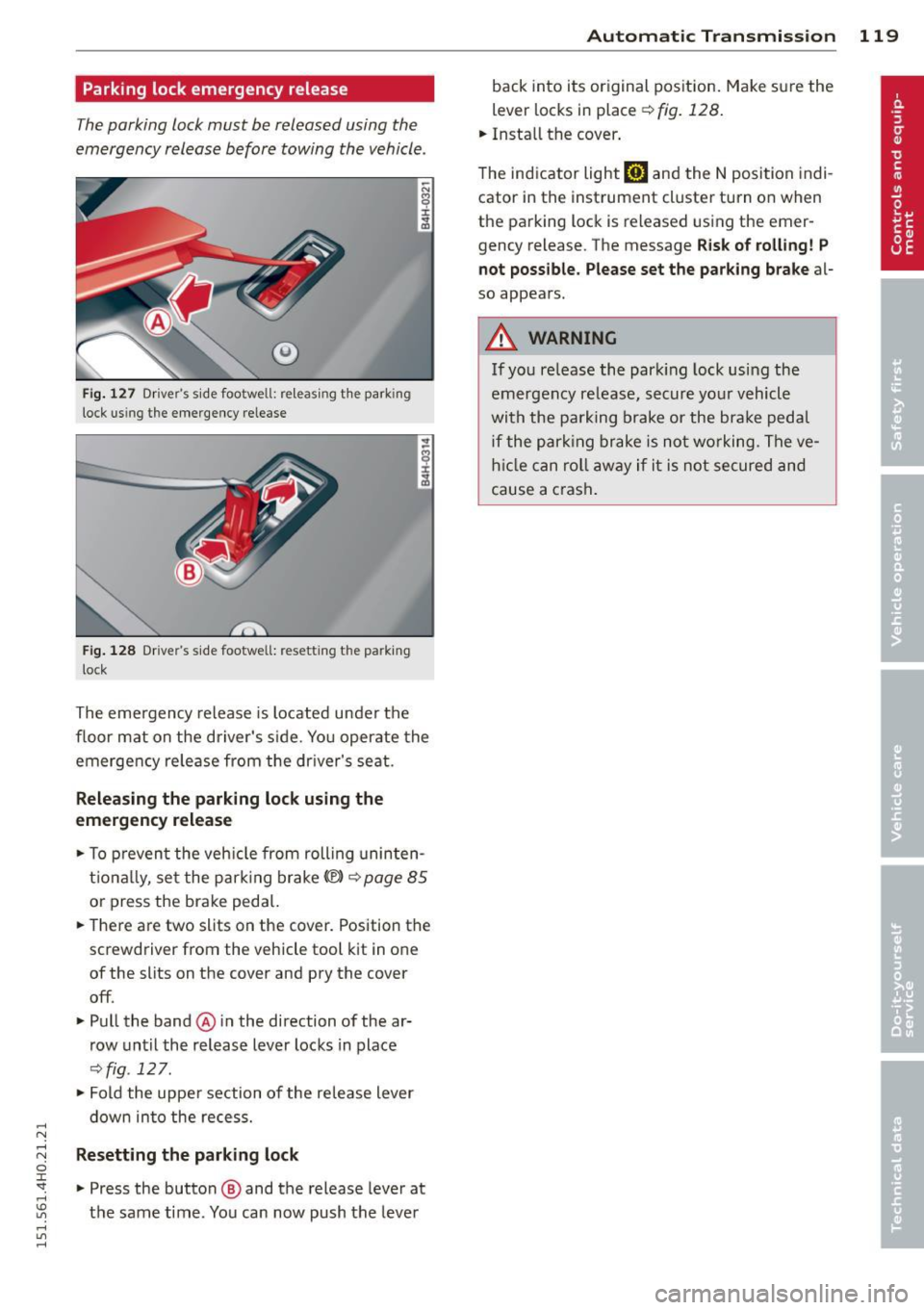
Parking lock emergency release
The parking lock must be released using the
emergency release before towing the vehicle .
®
Fig. 127 Driver's s ide footwell: re lea sing t he park ing
lock us ing the emergency release
Fig. 128 Driver's s ide footwell: resettin g th e pa rk ing
lock
The emergency release is located under the
f loor mat on the driver's s ide. You operate the
emergency re lease from the driver's seat.
Releasing the parking lock using the
emergency release
.,. To prevent the vehicle from rolling uninten
tionally, set the parking brake
«e)) q page 85
or press the brake peda l.
.,. There are two slits on the cover. Position the
screwdriver from the vehicle tool kit in one
of the slits on the cover and pry the cover
off .
.,. Pull the band@ in the direction of the ar
row until the release lever locks in place
qfig . 127 .
.,. Fold the uppe r section of the re lease lever
down into the recess.
Resetting the parking lock
.,. Press the button @ and the release lever at
t h e same time . You can now push the lever
Automatic Transmission 119
back into its original position. Make sure the
lever locks in place ~
fig. 128.
.,. Install the cover .
T he indicator light
mJ and the N position indi
cator in the instrument cluster turn on when
the parking lock is released using the emer
gency release. The message
Risk of rolling! P
not possible. Please set the parking brake
al
so appears .
.&_ WARNING
If you release the park ing lock using the
emergency release, secure your vehicle
with the parking brake or the brake pedal
i f the parking brake is not working. The ve
hicle can roll away if it is not secured and
cause a crash .
Page 160 of 312

158 Airbag sys te m
- Never put the forward-facing child re
straint up aga inst or very near the instru
ment panel.
- Always move the passenger seat into its
rearmost position in the seat's fore and
aft adjustment range, as far away from
the a irbag as poss ible, before installing
the forward-facing child restraint. The backrest must be adjusted to an upr ight
posit io n.
- Make sure that the
PASSENGER AIR BAG
OFF
light comes on and stays on all the
t ime whenever the ignition is switched
on.
Advanced Airbag System components
The front passenger seat in your vehicle has a
lot of very important parts of the Advanced
Airbag System in it. These parts include the
weight-sensing mat, sensors, wiring, brack
ets, and more. The function of the system in
the front passenger seat is checked by the
electronic control un it when the ign it ion is on .
The control unit mon itors the Advanced Air
bag System and turns the airbag indicator
l ight on whe n a malfunction in the system
components is de tected. The function of the
ai rbag indicator light is described in greater
detai l be low . Because the front passenger
seat contains important parts of the Ad
vanced A irbag System, you must take care to
prevent it from be ing damaged. Damage to
the seat may prevent the Advanced Airbag for
the front passenger seat from doing its job in
a crash .
The front Advanced Airb ag System
con sis ts of the following:
- Crash sensors in the front of the veh icle that
measure veh icle acceleration/deceleration
to provide information to the Advanced Air
bag System about the seve rity of the c rash.
- An electron ic co ntro l unit, w ith integ rated
crash sensors for fron t and side impacts.
T he contro l unit "dec ides " whether to fire
the front airbags based on the information received from the crash sensors . The contro l unit also "decides" whether the sa
fety be lt
pretensioners shou ld be activated.
- An Advanced Airbag with gas generato r and
contro l valve for the driver inside the steer
ing wheel h ub.
- An Advanced Airbag with gas gene rator and
contro l valve inside the instrument panel for
the front passenger .
- A weight -sensing mat under the upho lstery
padding of the front passenger seat cushion
that measures the total weight on the seat.
The informat ion registered is sent continu
ously to the electronic control unit to regu late deployment of the front Advanced Air
bag on the passenger side.
- An airbag monitoring system and indicator
light in the instrument cluster~
page 161 .
-A sensor in each front seat registers the dis
tance betwee n the respective seat a nd the
steer ing whee l o r inst rument panel. The in
formation registered is sent cont inuous ly to
t he ele ctron ic contro l uni t to regula te de
p loyment of the front Adva nced A irbags .
- The
PASSENGER AIR BAG OFF light comes
on and st ays on in the center of the instr u
ment p anel
~page 162, fig. 168 and t ells
you when the front Advanced Airbag on the
passenger side has been turned off .
- A sensor below the safety be lt latch for the
front seat passenger to measure the tension
on t he safety be lt . The tension on the safety
be lt and the weight registered by the
weight-sensing mat he lp the control unit
"decide" whether the front airbag for the
front passenger seat should be turned off or not
~ page 153, Child restraints on the
front seat -some important things to
know.
- A sensor in the safety belt latch fo r the driv
er and fo r the fro nt seat passenger that
senses whether that safety bel t is latched or
no t and transmi ts this information to t he
electronic control unit.
A WARNING ~ -
Damage to the front passenger seat can
prevent the front airbag from work ing
properly.
Page 165 of 312

,....,
N ,....,
N
0 J:
'SI: ,...., \!) 1.1'1 ,...., 1.1'1 ,....,
If the front passenger seat is not occupied,
the front airbag will not deploy, and the
PAS
SENGER AIR BAG OF F
light will stay on. Nev
er insta ll a rearward-fac ing ch ild restra int on
the front passenger seat, the safest place for
a child in any kind of child restraint is at one
of the seating positions on the rear seat
¢ page 153, Child restraints on the front seat
- some important things to know
and
¢ page 174, Child Safety .
If the PASSENGER AIR BAG OFF light c omes
on
when one of the conditions listed above is
met, be sure to check the light regularly to
make certa in that the
PASSENGER AIR BAG
O FF
ligh t stays on cont inuous ly whenever the
ignition is on . If the
PASSENGER AIR BAG
OFF
light does not appear on and does not
stay on all the time, stop as soon as it is safe
to do so and
- reactivate the system by switc hing the igni
tion off and then switching it on again;
- remove and reinstall the chi ld restraint .
Make sure that the child restraint is properly
insta lled and that the sa fety be lt for the
front passenger seat has been correct ly
ro uted th roug h the child restraint as descri
bed in the chi ld restraint manufacturer 's in
structions;
- make sure that the convertible locking fea
ture on the safety be lt for the front passen
ger seat has been activated and that the
safety belt has been pulled t ight . The belt
mus t not be loose o r have loops of slack so
that the senso r below the safety be lt latch
on the seat can do its job ¢
page 184.
-make su re that th ings that may increase the
weight of t he ch ild and child sea t are no t be
ing transported on the front passenger sea t;
- make su re that the safety be lt tension sen
so r is not b locked . Shake the safety be lt
latch on the front passenger seatbac k and
forth;
- If a st rap or tether is being used to tie the
child seat to the front passenger seat , make
s ur e that it is not so tig ht that it ca uses the
weight-sensing mat to meas ure more
weight than is actually on the seat.
A irbag system 163
If the PASSENGER AIR BAG OFF light still
does not come on
and does not stay on con
ti nu ous ly (when the ignition is switched on),
- take the child restra int off the front passen -
ge r seat and install it properly at one of the
rear seat positions. Have the airbag system
inspected by yo ur Audi dealer immed iate ly .
- move the child to a rear seat position and
make s ure that the c hild is properly restrain
ed in a ch ild rest ra int that is appropriate for
its si ze and age.
T he
PASSENGER AIR BAG OFF lig ht sho uld
NOT come on when t he ignitio n is on and an
adult is s itting in a proper seating position on
the front passenger seat. If the
PASSENGER
AIR BAG OFF
light comes on and stays on or
flashes fo r about 5 seconds wh ile driving, un
der these c ircumstances, make sure that:
- the adult on the front passenger seat is
properly seated on the center of the seat
cushion with his or her back up aga inst the
backrest and the backrest is not recl ined
¢ poge 134, Prope r occupant seating posi
tions,
-the adult is not tak ing weight off the seat by
holding on to the passenger assist handle
a bove the fron t passenger door o r su pport
ing their weight on the armres t,
- the safe ty be lt is be ing properly wo rn and
t ha t the re is no t a lot o f sla ck in the safety
be lt webb ing ,
- acce sso ry sea t covers or cushions or other
t hings tha t may cause an in correct reading
or imp ression on the weight-sensing mat
unde r th e upho lstery of the seat have been
removed from the front passenger seat,
- a safety belt extender has not bee n left in
the safety be lt latch for the front passenger
seat.
I n add ition to the
PASSENGER AIR BAG OFF
li ght in the center of the instrument panel,
the message
PASSENGER AIR BAG OFF or
PASSENGER AIR BAG ON wi ll briefly appear
i n the instrument cluster disp lay. This is to in
form the dr iver of the current front passenge r
a irbag status.
•
•
Page 199 of 312

,....,
N ,....,
N
0 J:
'SI: ,...., \!) ..,.,
,...., ..,., ,....,
@ Tips
Your vehicle may be equipped with Audi
connect. Your use of certain Aud i connect
features req uires wireless serv ices that are
provided by a third party wireless telecom
municat ions provider. For details regard
ing how information obtained through
Aud i connect is collected, processed,
transmitted, used, and shared, please see
your contra ct w ith the wire less telecom
municat ions provider and the "About A udi
connect" tab in your vehicle's MMI:
!MENU !
button > Audi connect > About Audi con·
nect .
Electronic Stabilization
Control (ESC)
Description
ESC helps to improve road holding and vehicle
dynamics to help reduce the probability of
skidd ing and loss of veh icle control. It works
only when the eng ine is running. ESC detects
certain difficult driv ing s ituations, including
when the vehicle is beginning to spin (yaw)
out of cont ro l and helps you to get the vehicle
back under control by select ively brak ing the
wheels, and/or red ucing engine powe r and
p roviding steering assistance to help hold the
ve hicle on the driver's intended course . The in
dicator light
m in the instrument cluster
blinks when ESC is taking action to help you
control the vehicle.
ESC has limitations.
It is important to remem
ber that ESC cannot overcome the laws of
phys ics. It will not a lways be able to help out
under all conditions you may come up against.
For example, ESC may not always be able to
h elp you master situat ions where there is a
sudden change in the coefficient of fr iction of
the road surface. When there is a sect io n of
d ry road that is s udden ly cove red with water,
slush o r snow, ESC canno t perform the same
way it would on the dry su rface.
If the vehicle
hydroplanes (rides on a c ush ion of wate r in
stead of the road surface), ESC wi ll not be
ab le to he lp you steer the veh icle because con-
Int ellig ent technolog y 197
tact with the pavement has been interrupted
and the vehicle cannot be braked or steered .
D uring fast corner ing, particular ly on wind ing
roads, ESC cannot always deal as effectively
with difficult dr iv ing s ituations than at lower
speeds. When towing a trailer, ESC is not able
to help you regain control as it would if you
were not tow ing a trailer.
Always adjust your speed and driving style to road, traffic and weather conditions . ESC can
not override the vehicle's physical lim its, in
crease the availab le tract ion, or keep a veh icle
o n the road if road departu re is a result of
driver ina ttent io n. Instead , ESC imp roves the
poss ibility of keep ing t he vehicle under con
trol and on the road during extreme maneu
vers by using the driver's steering i nputs to
help keep the vehicle go ing in the intended di
rect ion. If you are traveling at a speed that
causes you to run off the road before ESC can
provide any assistance, you may not experi
ence the benefits of ESC.
ESC includes and/or works together with the
anti-lock braking system
(ABS), brake assist
system, anti -slip regulation (ASR), electronic
differential lock (EDL), dynam ic steer ing* and
selective wheel torque contro l. ESC is switch
ed on all the time. In cer tain situations when
yo u need less traction, yo u can switch off ASR
by press ing the b utton above ~
page 199,
fig. 188 the se lector lever. Be sure to switch
ASR on again when you no longer need less
traction.
Anti -lock braking system (ABS )
ABS prevents the whee ls from loc king up
when b rak ing. The vehicle can st ill be stee red
even during hard braking . App ly steady pres
su re to the brake peda l. Do not pump the ped
al. A pulsing in the brake pedal indicates that
the system is helping you to brake the vehicle.
Brake assi st sy stem
T he brake ass ist system can dec rease braking
distance . It increases braking power when the
driver presses the brake peda l quickly in emer
gency s ituations. You must press and hold the
brake pedal unti l the situation is over. In
I),
•
•
Page 227 of 312

.. Loosen the loop C? fig. 193 from the retaine r
and then pull on t he loop carefully
~CD-
.. Press on the left s ide of the fuel filler door
to open C?page 223, fig. 190.
(D Note
Only pull on the loop until you feel resist
ance. You will not hear it release . Other
w ise you could damage the emergency re
lease mechanism .
Selective catalytic
reduction
General information
Applies to vehicles: with d iesel e ng in e
On vehicles w ith select ive catalytic reduction,
an urea solut ion (Ad Blue) is injected into the
exhaust system befo re a nitrogen oxide cata
lytic converter to reduce nitrogen emiss ions .
The AdBlue is stored in a separate tank in the
ve hicle. The Ad Blue usage accounts for ap
prox imately 0 .5% to 1.2% of the diesel fuel
that is used .
You must refill the Ad Blue or have it refilled by your authorized Audi dealer or qualified
workshop as soon as the Ad Blue refill mes
sage appears in the instrument cluster
C? poge 226.
,& WARNING
Failure to hee d Ad Blue refi ll information in
t he ins trument cl uste r can preven t the ve
hicle from being s tarted and d rive n. If the
vehicle cannot be driven and an eme rgency
ar ises, persona l injury can occur.
- Always have the Ad Blue tank refilled well
before the tank runs dry .
@ Tips
-The ins trument clus ter display indi cates
the distance remaining that ca n be driv
en
C? page 225 . If the Ad Blue tank is
complete ly empty, the engi ne will not
start again after the ignition is switched
off.
Fu el suppl y and filli ng your fuel t ank 225
- Ad Blue is req uired by law to ope rate this
vehicle .
Indicator in the instrument cluster
display
Applies to vehicles: wit h diese l engine
The display indicates if the Ad Blue level is low
or if it was filled incorrectly.
Fi g. 194 In strume nt cl uste r: indicator in the d isp lay
AdBlue level low
You w ill be informed if t he Ad B lue in the tank
drops below a certa in level.
Please refill Ad Blue. Range 1500 miles
( 2400 km )
This indicator appears when there is on ly
enough AdBl ue left to drive the distance indi
cated in the driver information system. Please
add AdBlue.
AdBlue /; Refill AdBlue! Cannot start en
gine in 600 miles (1000 km) ! See owner 's
manu al
This indicator appears when there is only
enough Ad Bl ue left to d rive the distance indi
cated in the driver information system. Please
add AdBl ue. Otherwise the engine will not
start again if you stop it once the distance in
dicated has been driven.
Refill AdBlue! No rest art! See
owner's m anual
T his message appears w hen the Ad Blue tank
is empty. P lease ad d Ad Blue. Otherwise you
will not be able to start the eng ine again once
you stop it. ..,.