brake AUDI S8 2015 Service Manual
[x] Cancel search | Manufacturer: AUDI, Model Year: 2015, Model line: S8, Model: AUDI S8 2015Pages: 312, PDF Size: 79.18 MB
Page 199 of 312

,....,
N ,....,
N
0 J:
'SI: ,...., \!) ..,.,
,...., ..,., ,....,
@ Tips
Your vehicle may be equipped with Audi
connect. Your use of certain Aud i connect
features req uires wireless serv ices that are
provided by a third party wireless telecom
municat ions provider. For details regard
ing how information obtained through
Aud i connect is collected, processed,
transmitted, used, and shared, please see
your contra ct w ith the wire less telecom
municat ions provider and the "About A udi
connect" tab in your vehicle's MMI:
!MENU !
button > Audi connect > About Audi con·
nect .
Electronic Stabilization
Control (ESC)
Description
ESC helps to improve road holding and vehicle
dynamics to help reduce the probability of
skidd ing and loss of veh icle control. It works
only when the eng ine is running. ESC detects
certain difficult driv ing s ituations, including
when the vehicle is beginning to spin (yaw)
out of cont ro l and helps you to get the vehicle
back under control by select ively brak ing the
wheels, and/or red ucing engine powe r and
p roviding steering assistance to help hold the
ve hicle on the driver's intended course . The in
dicator light
m in the instrument cluster
blinks when ESC is taking action to help you
control the vehicle.
ESC has limitations.
It is important to remem
ber that ESC cannot overcome the laws of
phys ics. It will not a lways be able to help out
under all conditions you may come up against.
For example, ESC may not always be able to
h elp you master situat ions where there is a
sudden change in the coefficient of fr iction of
the road surface. When there is a sect io n of
d ry road that is s udden ly cove red with water,
slush o r snow, ESC canno t perform the same
way it would on the dry su rface.
If the vehicle
hydroplanes (rides on a c ush ion of wate r in
stead of the road surface), ESC wi ll not be
ab le to he lp you steer the veh icle because con-
Int ellig ent technolog y 197
tact with the pavement has been interrupted
and the vehicle cannot be braked or steered .
D uring fast corner ing, particular ly on wind ing
roads, ESC cannot always deal as effectively
with difficult dr iv ing s ituations than at lower
speeds. When towing a trailer, ESC is not able
to help you regain control as it would if you
were not tow ing a trailer.
Always adjust your speed and driving style to road, traffic and weather conditions . ESC can
not override the vehicle's physical lim its, in
crease the availab le tract ion, or keep a veh icle
o n the road if road departu re is a result of
driver ina ttent io n. Instead , ESC imp roves the
poss ibility of keep ing t he vehicle under con
trol and on the road during extreme maneu
vers by using the driver's steering i nputs to
help keep the vehicle go ing in the intended di
rect ion. If you are traveling at a speed that
causes you to run off the road before ESC can
provide any assistance, you may not experi
ence the benefits of ESC.
ESC includes and/or works together with the
anti-lock braking system
(ABS), brake assist
system, anti -slip regulation (ASR), electronic
differential lock (EDL), dynam ic steer ing* and
selective wheel torque contro l. ESC is switch
ed on all the time. In cer tain situations when
yo u need less traction, yo u can switch off ASR
by press ing the b utton above ~
page 199,
fig. 188 the se lector lever. Be sure to switch
ASR on again when you no longer need less
traction.
Anti -lock braking system (ABS )
ABS prevents the whee ls from loc king up
when b rak ing. The vehicle can st ill be stee red
even during hard braking . App ly steady pres
su re to the brake peda l. Do not pump the ped
al. A pulsing in the brake pedal indicates that
the system is helping you to brake the vehicle.
Brake assi st sy stem
T he brake ass ist system can dec rease braking
distance . It increases braking power when the
driver presses the brake peda l quickly in emer
gency s ituations. You must press and hold the
brake pedal unti l the situation is over. In
I),
•
•
Page 200 of 312

198 Intelligent technology
vehicles with adaptive cruise control*, the brake assist system is more sensitive if the
d istance detected to the vehicle ahead is too
smal l.
Anti-slip regulati on (ASR )
ASR reduces engine power when the d rive
wheels begin to spin and adapts the force to
the road conditions. This makes it easier to
start, accelerate and drive up hills.
Electronic diffe rential lock (EDL )
The EDL brakes wheels that are spinn ing and
transfers the drive power to the other d rive
wheel or whee ls if the vehicle is equipped with
all whee l drive*. This function is available up
to about 75 mph (120 km/h).
I n extreme cases, ED L automatica lly switches
off to help keep the brake on the braked whee l
from overheating . EDL wi ll switch on again au
tomatically when conditions have returned to normal.
Dynamic steer ing*
On vehicles with dynamic steering, ESC he lps
stabilize the steering in certain situations .
Selective wheel torque control
The se lective wheel torque cont ro l operates
when dr iving thro ugh cu rves. The front wheel
on the ins ide of the curve or both w heels on
the inside of the curve are braked selective ly
as needed. This minimizes sliding in the front
wheels and a llows for more precise driving
through curves. The applicab le system may
not activate when driving in wet or snowy con
d itions .
Post- coll isio n br ake assis t
"Post-collision brake assist" can assist the
driver during a collision by reducing the dan
ger of slipp ing and further collision and by au
tomatic braking.
"Post-collision brake assist" functions d uring
collisions when the a irbag contro l modu le de
tects a trigger level and the collision takes place at a certa in driving speed. The brak ing
of the vehicle happens automatically via the ESC as
long as the ESC, the brake system, and
the vehicle electrical system are not damaged
from the collision.
T he following ac tivit ies override the au toma t
ic braking during a co llision:
- I f the driver p resses the acce le rator pedal.
There is no automa tic brak ing .
- When the force on the press brake peda l is
st ronger tha n the braking force initiated by
t he system. The veh icle is manua lly braked.
- When the ESC is damaged, the "Post-colli
sion brake assist" is not available.
,&. WARNING
- ESC, ABS, ASR, ED L, dynamic steeri ng *
and the select ive wheel torque control
cannot overcome the laws of physics .
This is especially important on s lippery
or wet roads. If the systems beg in acting
to stabilize your veh icle, you should im
mediately change your speed to match
the road and traffic conditions. Do not let the increased safety provided by
these systems tempt you to take r is ks.
D oing so will increase the risk of a loss of
veh icle contro l, col lision and ser ious per
sonal injuries.
- Always ad apt your speed to road, traffi c
and weather conditions . The risk of los
ing contro l of the vehicle increases when
driving too fast, espec ially through
curves and on slippery or wet roads, and
when dr iv ing too close to vehicles up
ahead. ESC, ABS, the brake ass ist sys
tem, EDL, ASR, dynam ic steering* and
the selective wheel torque cont ro l can
not prevent collisions.
- Always accelerate with special care on
even, smooth s urfaces such as those that
are wet or covered with i ce and snow.
The drive wheels can spin even w ith
these assistance systems tha t cannot al
ways he lp to red uce the risk of loss of ve -
-
hicle control. IJJ,,
Page 201 of 312
rl N
rl N
0 J:
"". rl I.O
"' rl
"' ......
@ Tips
-ABS and AS R on ly wor k co rrectly when
a ll fo ur wheels are eq uipped w ith identi
ca l tires . Different tire s izes can lead to a
r educt io n in eng ine power.
- You may hear noises when the sys tems
desc ribed are working.
Switching on and off
Intelligent technology 199
- If
the ind ica tor li ght &J or m] (US A
mode ls)/ ri] (Ca nada models) ap pears,
t h ere may be a malfunction
c::> page 19,
¢ page 18.
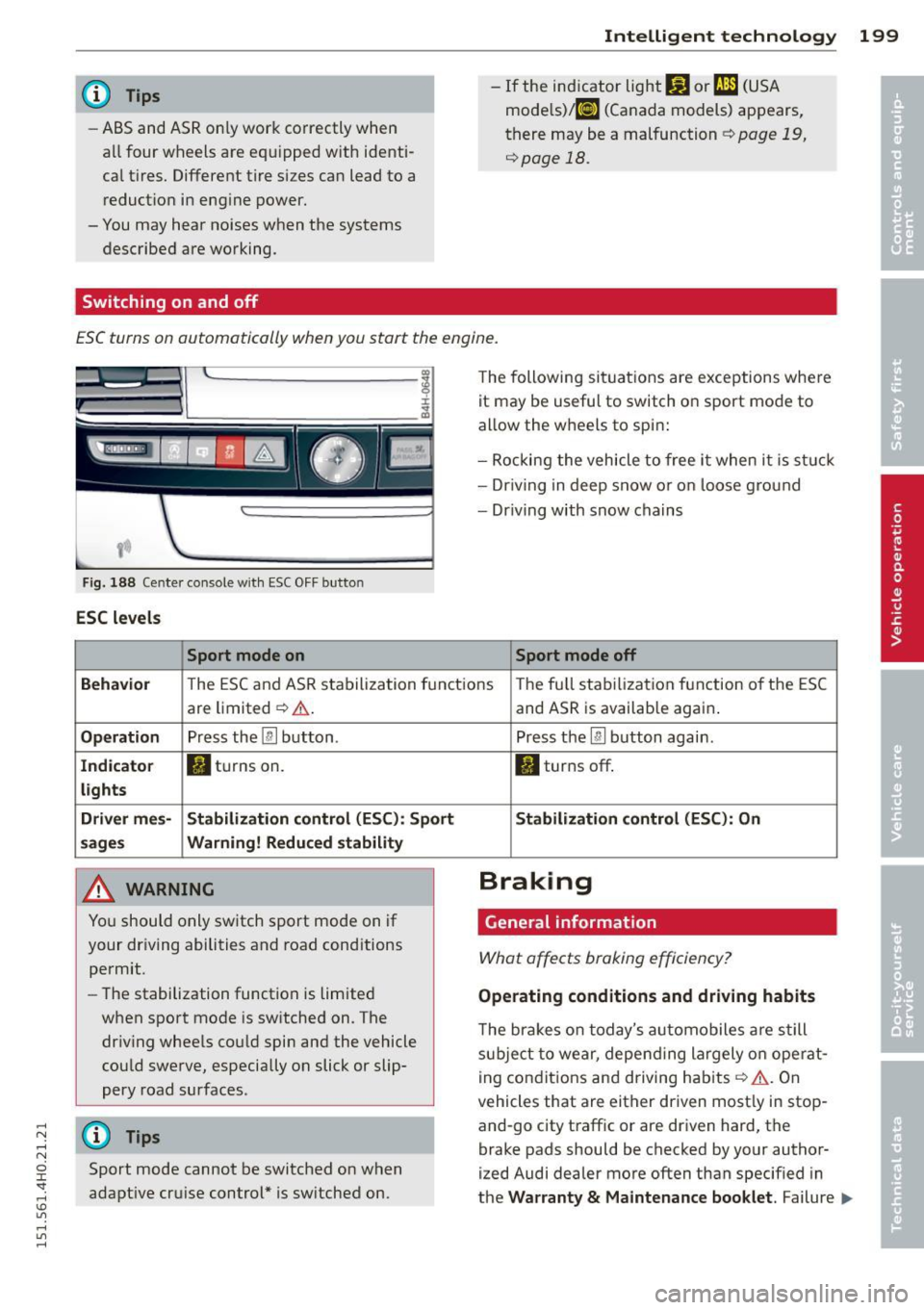
ESC turns on automatically when you start the engine.
Fig . 188 Center co nsole with ESC O FF bu tton
ESC levels
Sport mode on
The following si tua tions are exceptions whe re
it may be usefu l to switch o n sport mo de to
allow the w heels to spi n:
- Rockin g the vehicle to free it when i t is st uck
- Dr iv ing in deep s now o r on loose g ro un d
- Dr iving with snow chains
Sport mode off
Behavior
T he E SC and AS R sta bilization f unct io ns The fu ll sta biliz ati on f uncti on o f the ES C
are limited ¢,& .
Operation Press the [ru button .
Indicator • tur ns on.
lights
Driver mes· Stabilization control (ESC): Sport
sages Warning! Reduced stability
A WARNING
Yo u should o nly sw itch sport mo de on i f
your dr iv ing abili ties and road cond itions
permit.
- The stabilization function is limited
when sport mode is sw itched on. The
dr iv ing whee ls co uld spin and the vehicle
cou ld swe rve , especially on slick or slip
pery road surfaces .
(D Tips
Sport mode cannot be switched o n when
adapt ive cr uise c ontrol* is sw itched on.
-
and AS R is availab le again .
Press the
[ru button again .
II turns off .
Stabilization control (ESC): On
Braking
General information
What affects braking efficiency?
Operating conditions and driving habits
The bra ke s on today's au to m obiles a re s till
sub ject t o wear, depe nding la rgely o n ope rat
i ng con dit ions and d riving habits ¢
A. On
vehicles that are either driven most ly in stop
and-go city traff ic or are driven hard , the
brake pads should be checked by your author
ized Audi dealer more often than specif ied in
t h e
Warranty & Maintenance booklet . Failure .,._
Page 202 of 312
200 Intellig ent technol ogy
to have your brake pads inspected can result
in reduced brake performance.
On steep slopes, yo u shou ld use the b rak ing
effect of the engine. Th is way, you prevent un
necessary wear on the brake system. If you
must use your brakes, do not hold the brakes
down continuously. P ump the brakes at inter
vals.
Operating nois e
Noises may occur when braking depending on
the speed, braking force and outside condi
tions such as temperature and humidity.
E ff ect of water and road salt
In certain situat ions, for example after driving
through water , in heavy ra in , after overn ight
condensation or after washing your car, the braking effect can be reduced by moisture or
ice on the brake rotors and brake pads. The
brakes must be dried first with a few careful
brake applications.
At higher speeds and with the windshield wip
ers turned on, the brake pads press against
the brake rotors for a short amount of time.
This occurs at regular intervals without the
driver noticing and provides for bet ter brake
response time under wet condit ions .
The effectiveness of the brakes can be reduced
when the vehicle is dr iven on a salt-covered
road and the brakes are not used . Likew ise,
you clean off accumulated salt coating from
brake discs and pads with a few caut ious ap
plications of the brake
c:::> .&, .
Cor ro sion
There may be a tendency for dirt to build up
on the brake pads and corrosion to form on
the discs if the car is not dr iven regularly or
only for short t rips with little use of the
b rakes .
If the brakes are not used frequently , or if cor
rosion has formed on the discs, it is advisable
to clean off the pads and discs by braking
firm ly a few times from a mode rately high
speed
c:::> .&, .
Faults in the brake syste m
If you shou ld notice a sudden increase in
brake pedal trave l, then one of the two brake
circuits may have fai led
c:::> & .
Low bra ke fluid lev el
Malfunctions can occu r in the bra ke system if
the b rake fluid level is too low. The brake flu id
level is monitored electro nica lly.
Brake booster
The brake booster works with vacuum pres
sure which is created only when the eng ine is
runn ing
c:::> .&, .
Brake lining we ar statu s
Brake lining wear may be checked by visual in
spect ion of the condition of the brake pads
through the open ings in the wheel. If neces
sary, the wheel may be removed for th is in
spect ion
c:::> page 269, Changing a wheel .
_& WARNING
-You shou ld perform braking maneuvers
for the purpose of cleaning the brake
system only if road conditions permit .
Other road users must not be put at risk -
you may ca use an accident!
- Before descending a steep grade, reduce
speed and sh ift transmission into a lower
gear or lower dr iving range. Do not ride
the brakes or hold the pedal down too
long or too often . This could cause the
brakes to get hot and diminish braking
efficiency.
- Do not "ride the brakes" by rest ing your
foot on the pedal when you do not intend
to b rake . This may cause the brakes to
overheat, p remature wear and increased
s topping distance .
- Unde r ce rtain cl imatic and ope rat ing
conditions such as passing thro ugh wa
ter, dr iving in heavy rain o r after washing
the vehicle, the effectiveness of the brakes can be reduced. In winter, ice can
accumu late on the brake pads, lin ings,
d iscs and drums. Carefully app ly brakes
for a test. Brakes will dry and ice
Page 203 of 312

,....,
N .... N
0 J:
'SI: .... \!) ..,.,
.... ..,., ....
coatings will be cleaned off after a few
careful brake applicat ions.
- Driving for an extended period of time on
salt-covered roads without us ing your
brakes can also affect braking efficiency.
Clean off accumulated salt coating from
brake discs and pads w ith a few careful
brake applicat ions.
- If you damage the front spoiler, or if you
install a different spoiler, be sure the air
flow to the front brakes is not obstruct ed. Otherwise the brake system could
overheat reducing the effectiveness of
the ent ire brake system.
- Failure of one bra ke c ircui t will impair
t he braking capabi lity res ulting in an in
creased stopp ing distance . Avoid driv ing
the vehicle and have it towed to the near
est Aud i dea le r or q ualified workshop .
- Never let the vehicle ro ll to a stop w ith
the engine shut off.
- If the bra ke booster is not work ing, the
brake pedal must be pressed considera
bly harder to make up for the lack of
booster assistance.
Electromechanical
power assist, dynamic
steering
The electrome chanical power assist helps the
driver when steering.
Powe r stee ring adapts electronically based on
the veh icle speed.
Indicator lights and mess ages
• Stee ring defecti ve! Stop th e vehicle
If th is ind icator light turns on and stays on
and this message appears, the power steering
may have fa iled.
Do
not co ntinu e driving . See yo ur authorized
Aud i dea ler or other qualified repa ir facility
for assistance .
'Tj Steering: System fault You can contin ue
driving
Int ellig ent technolog y 201
If the indicator light turns on and the mes
sage appears, the steering may be more diffi
cu lt to move or more sensitive than usual. The
steering wheel may also be at an ang le when
driv ing straight.
Drive slowly to your a uthorized Audi dealer or
qualified workshop to have the ma lf u nction
corrected.
'T-ij Dynamic stee ring: Init ializing
If this d rive r message appears and the i ndica
tor lig ht is flas hing on the instrumen t panel,
dynam ic s teer ing* is being rein it ia liz ed. After
starting the engine, the stee ring wheel will
move s light ly . Re-initialization might be nec
essary if the steering wheel was moved hard
to the left and right whi le the vehicle was not
moving. The display goes out as soon as initi
alization is complete .
Drive slowly to your authorized Audi dea ler or
qualified workshop to have the malf u nction
corrected.
A WARNING
H ave the dy namic steering* system mal
f u nction repa ired as soon as possible by an
authorized Audi dea ler or qua lified wor k
shop -risk of acc ident!
(D Tips
If the . or 'Tj indicator light only stays
on for a short t ime, you may continue dr iv
i ng .
- The dynamic steering* stab il ity systems
are not ava ilab le in the event of a system
ma lfunction .
- For add itiona l information o n dynamic
steering*, refer to
~page 108.
•
•
Page 207 of 312
,....,
N ,....,
N
0 J:
'SI: ,...., \!) 1.1'1 ,...., 1.1'1 ,....,
Driving and
environment
The first 1
1000
miles
(11500 km) and
afterwards
New engine
The engine needs to be run-in during the first
1,000 miles (1 ,500 km) .
For the first 600 mile s (1,000
kilometers ):
.,. Do not use full throttle.
.,. Do not drive at engine speeds that are more
than 2/3 of the max imum permitted RPM .
.. Avoid high engine speeds .
From 600 to 1,000 mile s (1 ,000 to
1,500 kilometers):
.. Speeds can gradually be increased to the
maximum pe rm iss ib le road or eng ine speed .
During and after break-in per iod
.,. Do not rev the engine up to high speeds
when it is cold. This applies whether the
transmission is i n N (Neutra l) or in gear.
After the break- in peri od
.. Do not exceed maximum engine speed un
der any circumstances.
.,. Upshift into the next higher gear
before
reaching the red area at the end of the tach
ometer scale
¢ page 10.
During the first few hours of driving, the en
g ine's interna l friction is higher than later
when all the moving parts have been broken
i n. How well this break-in p rocess is done de
pends to a considerable extent on the way the
ve hicl e is driven du ring the first 1,000 miles
(1 ,500 ki lome ters).
(D Note
Extremely h igh engine speeds are auto
mat ica lly reduced. However, t hese rpm
lim its are progr amme d for an eng ine well
r u n- in , not a new engine .
Driving and environment 205
@) For the sake of the environment
Do not drive with unnecessarily high en
g ine speeds -upshifting ear ly saves f uel,
reduces noise and protects the environ
ment.
New tires
If your vehicle is running on new tires, drive
particularly caref ul for the first 350 miles
(500 kilomete rs) afte r fitt ing.
.&, WARNING
N ew tires tend to be sl ippery and mus t al
so be "b roken -in" . Be sure to remember
this dur ing the f irst 350 m iles (500 kilo
meters) . Brake gently . Avoid fo llowing
closely behind other vehicles or other sit
uations that m ight require sudden, hard
b raking .
New brake pads
Remember that new brake pads do not have a
full brak ing effect dur ing the first 250 m iles
(400 ki lomete rs) afte r they are installed.
New brake pads have to be "broken in" before
they have optima l grab ¢,&. .
D uring the brea k-in period, yo u should avo id
putting severe loads on the brakes. Severe
l oads include , for example, sudden hard brak
i ng, in particular at very h igh speeds or, for
example, on mounta in passes .
.&, WARNING
New b rake pads don 't have the best stop
p ing power and must be "broken-i n" dur
ing the initi al 100 to 150 miles (150 to
2 00 kilometers) o f no rma l ci ty driving . You
can compensate for this by pressing the b rake peda l more fi rm ly . This also applies
later when new pads are installed.
•
•
Page 209 of 312
,....,
N .... N
0 J:
'SI: .... \!) ..,.,
.... ..,., ....
A WARNING ,~
- Do not park your vehicle over flammable
materials such as grass or leaves because
the high temperature of the diesel par
t icu late filter cou ld start a fire .
- Do not apply an underbody protectant in the exhaust system area or a fire could start .
Shutting down vehicle
If you would like your veh icle to remain inop
erat ive for a longer period of time, contact an
Aud i or other specia lized dealer. They can ad
vise you on necessary precautions e.g . corro
sion prevention, ma intenance and storage.
Pay attention to additiona l information con
cerning the battery. Refer to~
page 240.
Avoid damaging the
vehicle
When you a re driving on poor roads, or over
curbs, steep ramps, etc., make certain that low-lying parts such as spoilers and exhaust
system parts do not bottom out and get dam
aged.
This is especially true for vehicles with low
slung chassis (sports chassis)* and fully load
ed vehicles.
Driving through water
on roads
Note the following to avoid vehicle damage
when driving through water, for example on
flooded roads :
- The water must not be any higher than the
bottom of the veh icle body.
- Do not drive faster than wa lking speed.
A WARNING
After driving through water, mud, slush,
etc., the brakes may be slow to take effect
because of wet brake rotors and pads. Dry
-
Drivin g and environment 207
the brakes first by braking carefully to re
store the full braking effect.
(D Note
- Vehicle components such as the engine,
transmission, suspension or electrical
system can be severely damaged by driv
ing through water.
- Always switch off the Start-Stop-System*
when driving through water
~ page 87.
(D Tips
-Check the depth of the water before driv
ing through it .
- Do not stop the vehicle, drive in reverse
or switch the engine off when driving
through water.
- Keep in mind that oncoming vehicles may create waves that raise the water
level and make it too deep for your vehi
cle to drive through safely .
- Avoid driving through salt water because
it can cause corrosion.
Operate your vehicle
economically and minimize pollution
General
Your personal style of driving will determine
t he economy of your vehicle , as well as ex
haus t and noise levels.
Fuel economy, environmental impact, and
wear on your engine, brakes and tires largely
depend on three factors:
- your personal driving style
- operating conditions
- technical limitations
If you ant icipate what you need to do next and
drive economically, you can easily cut your
fuel consumpt ion by 10-15 percent . This sec
tion w ill give you some tips on how you can
help the env ironment and your pocketbook. •
•
Page 210 of 312
208 Driving and en vir onm ent
The consumption estimates as published
by ENVIRONMENTAL PROTECTION AGENCY
(EPA) and Transport Canada may not corre
spond to your actual consumption on the
road, which will vary depending upon vehi
cle load and speed, road and weather con
ditions, tr ip length, etc .
Drive smoothly and keep a lookout
ahead
Vehicles use the most fuel when they are ac
celerating.
• Avoid unnecessary accelerating and braking.
Vehicles use the most fuel when they are ac
celerating . If you anticipate what is going to
happen next, you will need to brake less and,
thus , accelerate less. Let the vehicle coast
whenever poss ible -for example when you see
that the next traffic l ight is red.
Avoid full throttle
Driving at moderate speeds saves fuel and
improves your mileage.
• Try and keep well below your car's max imum
speed .
Accelerating gently reduces fuel consump
tion, engine wear, and does not disturb the
environment .
Fuel consumption, exhaust emissions and en
g ine noise increase d isproportionately at high
speeds. If you dr ive at approximately three
quarters of top speed, fue l consumption will
be reduced by one half. Neve r dr ive faste r
than the posted speed limit and wea ther con
d itions permit.
Reducing unnecessary idling
Even when your car is just idling it burns up
fuel.
• Shut the engine off when you are not dr iv ing
the vehicle. •
Do not warm up the vehicle by letting the
engine run at id le .
T he id ling phase is automatically red uced for
vehicles with the Start -Stop -System*. It is ef
ficient to switch off the engine in vehicles
without the Start -Stop-System when stopped
at rai lroad crossings and long red lights . Turn
ing the engine off for just 30-40 seconds
saves more fuel than is burned by starting the engine aga in .
It takes a long time for the engine to warm up
fully when it is running at idle. However, wear
and noxious emissions are espec ially high
when the eng ine is warm ing up . So you should
drive away as soon as you start the engine and
avo id running at high rpms while the engine is
still warming up.
W Note
Do not leave engine idling unattended af
ter start ing . If wa rning lights should come
on to indicate improper operation, they
wo uld go unheeded. Ex tended idling also
produces heat, wh ich could result in ove r
heating or other damage to the ve hicle or
other property .
Regular maintenance
A badly tuned engine unnecessarily wastes a
lot of fuel.
• Have your veh icle serviced at reg ular in ter -
vals .
By having your ve hicle regu la rly se rviced by an
Audi dealer he lps to ensu re that it runs p rop
erly and economically . The condition of your
vehicle not only affects its safety and ability to
ho ld its va lue, it also affects
fuel con sump
tion .
Ch eck your oil e ach time you
fill y our tank.
The amount of o il used is re lated to engine
load and speed.
It is normal for the oil consumption of a new
engine to reach its lowest value after a certa in
mileage has bee n driven . ..,.
Page 212 of 312

210 Trailer towing
Trailer towing
Driving with a trailer
General information
Your Audi was designed primarily for passen
ger transportation .
If you plan to tow a trai ler, please remember
that the additional load will affect durability,
economy and performance .
Trailer towing not only places more stress on the vehicle, it also calls for more concentra
tion from the driver.
For this reason, always follow the operating
and driving instructions provided and use
common sense.
(D Note
If you are going to tow a trai ler, you must
activate the trailer operation mode
i::> page 210, Operating instructions .
Technical requirements
Trailer hitch
Use a weight-carrying hitch conforming to the
gross trailer weight. The hitch must be suita ble for your vehicle and trailer and must be
mounted securely on the veh icle 's chassis at a
technically sound location . Use only a trailer
hitch with a removable ball mount. A lways
check with the trai le r hitch manufacturer to
make sure that you are using the cor rect
hitch.
Do not use a bumper hitch.
The hitch must be installed in such a way that
it does not interfere with the impact-absorb
ing bumper system. No modifications should
be made to the vehicle exhaust and brake sys
tems. From time to time, check that all hitch
mounting bo lts remain securely fastened.
When you are not towing a trailer, remove the
trailer hitch ball mount. This prevents the
h itch from causing damage should your veh i
cle be struck from behind~ &.
Trailer brakes
If your trailer is equipped with a brak ing sys
tem, check to be sure that it conforms to all
regulations.
T he trailer hydraulic brake system must not be
direc tly connected to the vehicle's hydraulic
brake system .
Safety chains
Always use safety chains between your veh icle
and the tra iler.
Trailer lights
Trailer lights must meet all regulations. Be
sure to check with your Audi dealer for correct
wiring, switches and relays.
Mirrors
If you are unable to see the traffic behind you
using the regular outside mirrors, then you
must install extended mirrors. It is important
that you
always have clear v is ion to the rear .
A WARNING ,~ -
After removing the trailer hitch, do not
store it in your vehicl e. In case of sudden
braking, the hitch could fly forward and in
jure you or your passengers.
Operating instructions
Fig. 189 MMI display : tow ing mode on
Maximum traile r weight
A trai ler for your vehicle is limited to a typical
class 1 or class 2 trailer. .,.
Page 213 of 312
.... N .... N
0 J:
'SI: .... \!) 1.1'1
.... 1.1'1 ,....,
Trailer load distribution Be sure the load in the trailer is held securely
in place to prevent it from shifting forward,
backward or sideways.
Never allow a passenger to ride in a trailer
¢ .&. in Driving instructions on page 212.
Engine cooling system
Towing a trailer makes the engine work hard
er . It is important that the cooling system's
performance is up to the additional load .
Make sure that the cooling system has enough
fluid.
Tire pressure
When towing a trailer, inflate the tires of your
vehicle to the cold tire pressure listed under
"Full load" on the label located on the driver's
side B-pillar (visible when the door is open).
Inflate trailer tires to trailer and tire manufac
turers' specifications.
Lights
Check to make sure both vehicle and trailer
lights are working properly.
Safety chains Be sure trailer safety chains are properly con
nected from the trailer to the hitch on the ve
hicle . Leave enough slack in the chains to per
mit turning corners . When you install safety
chains, make sure they will not drag on the
road when you are driving.
The chains should cross under the trailer
tongue to prevent it from dropping in case of
separation from the hitch .
Adjusting the Audi drive select Make sure the vehicle is on a level surface
be
fore
hitching up the trailer and before adjust
ing the tongue weight. The vehicle must be in
auto or comfort driving mode and not raised
¢page 108, ~CD .
Make sure that the vehicle is lowered. In Info
tainment, select:
ICARI function button> low
er control button .
Trailer towing 211
If you must drive under poor road conditions,
you can raise the vehicle
after coupling the
trailer or
after adjusting the tongue weight
¢ page 110.
@ Note
- Changes in temperature or load can af
fect the height of the vehicle.
- Always select auto or comfort mode.
Otherwise, the tongue load specified for
your vehicle will no longer be applicable.
Driving instructions
Driving with a trailer always requires extra
core and consideration.
To obtain the best possible handling of vehicle
and trailer, please note the following:
.,. Do not tow a loaded trailer when your car it
self is not loaded .
.,. Be especially careful when passing other
vehicles.
.,. Observe speed limits.
.,. Do not drive at the maximum permissible
speed .
.,. Always apply brakes early .
.,. Monitor the temperature gauge.
Weight distribution
Towing a loaded trailer with an empty car re
sults in a highly unstable distribution of
weight. If this cannot be avoided, drive at very
low speeds only to avoid the risk of losing
steering control.
A "balanced" rig is easier to operate and con
trol. This means that the tow vehicle should be loaded to the extent possible and permissi
ble, while keeping the trailer as light as possi
ble under the circumstances . Whenever possi
ble , transfer some cargo to the luggage com
partment of the tow vehicle while observing
tongue load requirements and vehicle loading
considerations .
Speed
The higher the speed, the more difficult it be
comes for the driver to control the rig. Do not .,.
•
•