cruise control AUDI S8 2016 User Guide
[x] Cancel search | Manufacturer: AUDI, Model Year: 2016, Model line: S8, Model: AUDI S8 2016Pages: 302, PDF Size: 75.68 MB
Page 95 of 302
Audi adaptive cruise control and braking guard
.. You must also press the brake pedal when the
vehicle is stopped .
Switching adaptive cruise control off
.. Push the lever away from you into position @
until it clicks into place. The message
ACC off
appea rs.
@ Indicator lights
II-Adapt ive cru ise control is switched on . No
vehicles are detected up ahead. The stored speed
is ma inta ined .
• -A moving vehicle is detected up ahead . The
adapt ive cruise control system regulates the
speed and distance to the moving vehicle ahead
and accelerates/brakes automatically.
(-) -Adaptive cru ise control is switched on . A
mov ing vehicle up ahead was detected . Your veh i
cle remains stopped .
• -When automatic braking is not able to keep
enough d istance to a previously detected moving
veh icle up ahead, you must take control and
brake
c::> page 95, Prompt for driver interven
tion.
© Display
If adaptive cruise control is not shown in the dis
play, you can call it up with the multifunction
steer ing wheel buttons c::>
page 23.
Based on the symbols in the display, you can de
termine if the system is ma inta ining a distance to
the vehicle ahead and what that distance is.
No vehicle -No vehicle ahead was detected.
White vehicle -A vehicle ahead was detected.
Red vehicle -Prompt for the driver to take action
c::>page 95.
Both arrows on the scale © indicate the distance
to the vehicle ahead. No arrow appears when the
vehicle is on an open road and there is no object
ahead . If an object is detected ahead, the arrow
moves on the scale .
The green zone on the scale shows the stored dis
tance . For information on chang ing the stored
distance, refer to
c::> page 94. If the distance se-lected is too
close or may soon become too close,
the arrows move into the red zone on the scale .
A WARNING
Improper use of the adaptive cruise control
can cause collisions, other accidents and seri
ous personal injuries.
- Pressing the
ISETI button when driving at
speeds below 20 mph (30 km/h), will auto matically accelerate the ve hicle to 20 mph
(30 km/h), which is the minimum speed
that can be set.
(D Tips
-If you switch the ignit ion or the adaptive
cruise control off, the set speed is erased
from the system memory .
- You cannot switch the Electronic Stabiliza
tion Control (ESC) to the SPORT mode when
adaptive cruise control is switched on .
Changing the speed
Applies to: vehicles with Aud i adapt ive cru ise control
0
f
•
0
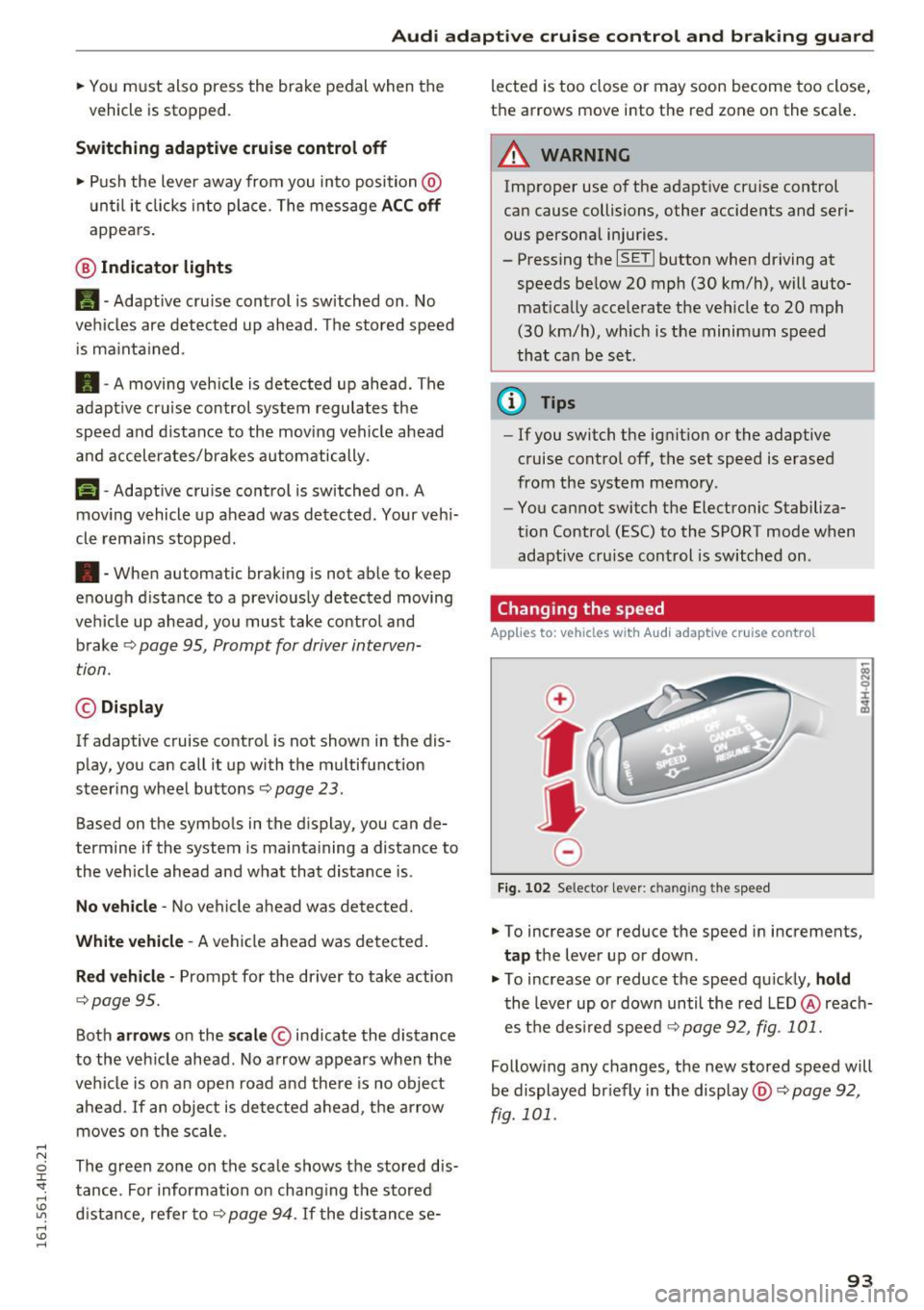
Fig. 102 Selector lever: chan gin g t he speed
.. To increase or reduce the speed in increments,
tap the lever up or down .
.,. To increase or reduce the speed quickly,
hold
the lever up or down until the red LED@reach
es the desired speed c::>
page 92, fig. 101.
Following any changes, the new stored speed will
be displayed br iefly in the display @c::>
page 92,
fig. 101 .
93
Page 96 of 302
Audi adaptive cruise control and braking guard
Driving in stop -and-go traffic
Applies to: ve hicles w ith Audi adaptive cruise co ntro l
The adaptive cruise control system also assists
you in stop-and-go traffic.
If a previous detected
vehicle ahead stops, your vehicle will brake to a
stop, within the limits of the system.
• To resume driving with adaptive cruise control,
tap the accelerator pedal or
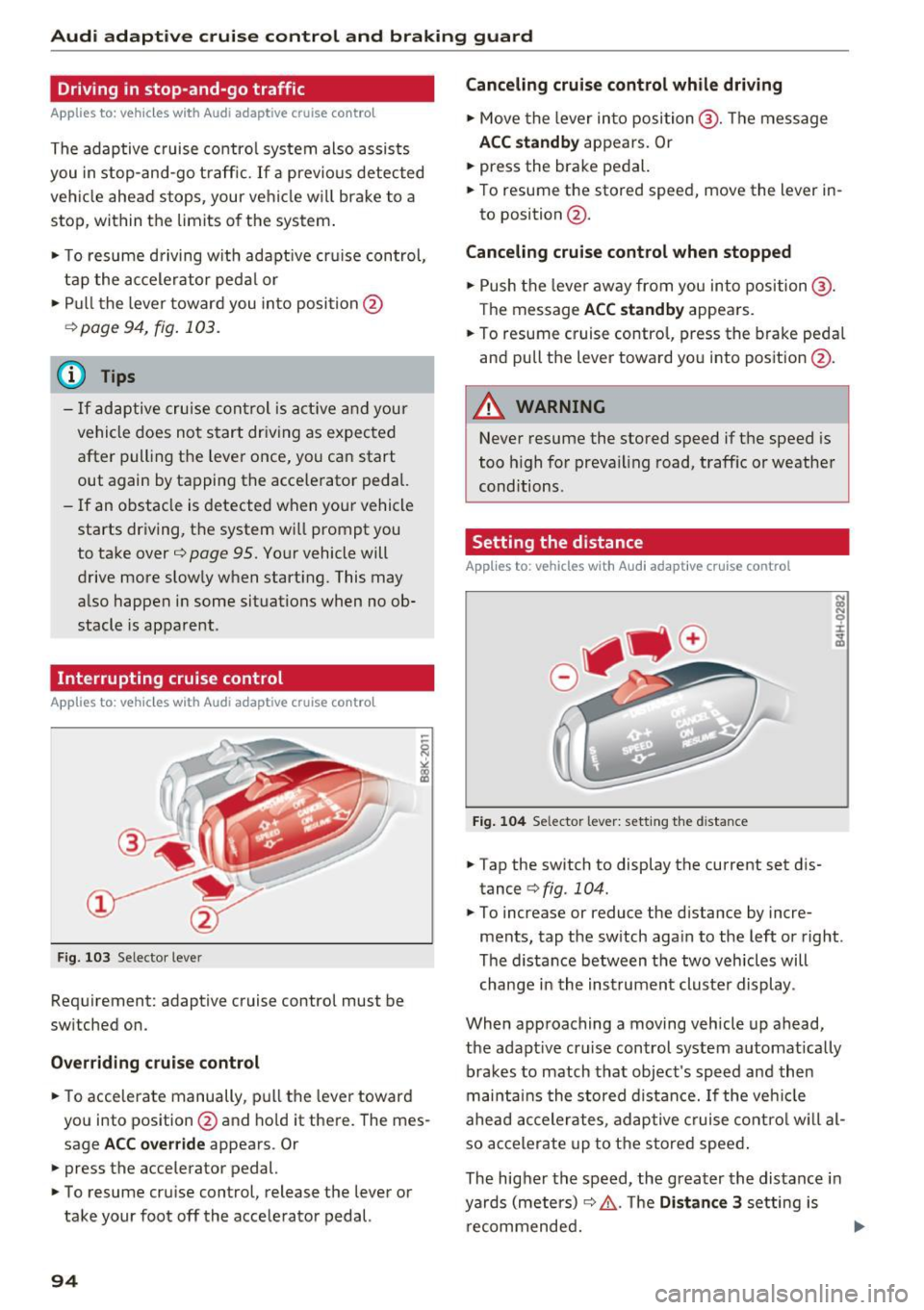
• Pull the lever toward you into position @
<=>page 94, fig. 103.
(Di Tips
-If adaptive cruise control is active and your
vehicle does not start driving as expected
after pulling the lever once, you can start
out again by tapping the accelerator pedal.
- If an obstacle is detected when your vehicle
starts driving, the system will prompt you
to take over<=>
page 95. Your vehicle will
drive more slowly when starting. This may
also happen in some situations when no ob
stacle is apparent.
Interrupting cruise control
App lies to: ve hicles w ith Audi adaptive cruise co ntro l
Fig. 103 Selector lever
Requirement: adaptive cruise control must be
switched on.
Overriding cruise control
• To accelerate manually, pull the lever toward
you into position@and hold it there . The mes
sage
ACC override appears . Or
• press the accelerator pedal.
• To resume cruise control, release the lever or
take your foot off the accelerator pedal.
94
Canceling cruise control while driving
• Move the lever into position @. The message
ACC standby appears. Or
• press the brake pedal.
• To resume the stored speed, move the lever in
to position @.
Canceling cruise control when stopped
• Push the lever away from you into position@.
The message
ACC standby appears.
• To resume cruise control, press the brake pedal
and pull the lever toward you into position @.
A WARNING
Never resume the stored speed if the speed is
too high for prevailing road, traffic or weather
conditions.
Setting the distance
App lies to: vehicles with A ud i adapt ive cru ise contro l
Fig. 104 Selector lever: setting the dista nce
• Tap the switch to display the current set dis
tance
<=> fig. 104.
:;: N 0
±
ci!i
• To increase or reduce the distance by incre
ments, tap the switch again to the left or right.
The distance between the two vehicles will
change in the instrument cluster display .
When approaching a moving vehicle up ahead,
the adaptive cruise control system automatically brakes to match that object's speed and then
maintains the stored distance.
If the vehicle
ahead accelerates, adaptive cruise control will al
so accelerate up to the stored speed.
The higher the speed, the greater the distance in
yards (meters)
<=> A . The Distance 3 setting is
recommended.
Page 97 of 302
Audi adaptive cruise control and braking guard
The distances provided are specified values . De
pending on the driving situation and the how the
vehicle ahead is driving, the actual distance may
be more or less than these target distances.
The various symbols for the time increments ap
pear briefly in the information line@~
page 92,
fig. 101 when you change the settings.
~-~ --- Distance 1: This setting corresponds
to a distance of 92 feet/28 meters when travel
ing at 62 mph (100 km/h), or a time interval of 1
second.
~ -- ~-- Distance 2: This setting corresponds
to a distance of 118 feet/36 meters when travel
ing at 62 mph (100 km/h), or a time interval of
1.3 seconds .
~--- ~-Distance 3: This setting corresponds
to a distance of 164 feet/SO meters when travel
ing at 62 mph (100 km/h), or a time interval of
1.8 seconds.
~ ---- ~ Distance 4: This setting corresponds
to a distance of 210 feet/64 mete rs when travel
ing at 62 mph (100 km/h), or a time interval of
2 .3 seconds.
.&_ WARNING
Following other vehicles too closely increases
the risk of col lisions and ser ious personal in
jury.
- Setting short distances to the traffic ahead
reduces the t ime and distance available to
bring your vehicle to a safe stop and makes
it even more necessary to pay close atten
tion to traffic.
- Always obey applicable traffic laws, use
good judgment, and select a safe following
distance fo r the traffic, road and weather
con ditions.
(0 Tips
-Distance 3 is set automatically each time
you switch the ignition on.
- Your standard sett ings are automatically
stored a nd assigned to the remote control
key being used.
Selecting the driving mode
Applies to: vehicles with Audi adaptive cruise control
• Select the desired driving mode in drive select
~page 106.
(D Tips
Your settings are automatically stored and as
signed to the remote control key being used.
Prompt for driver intervention
Applies to: vehicles with Audi adaptive cruise control
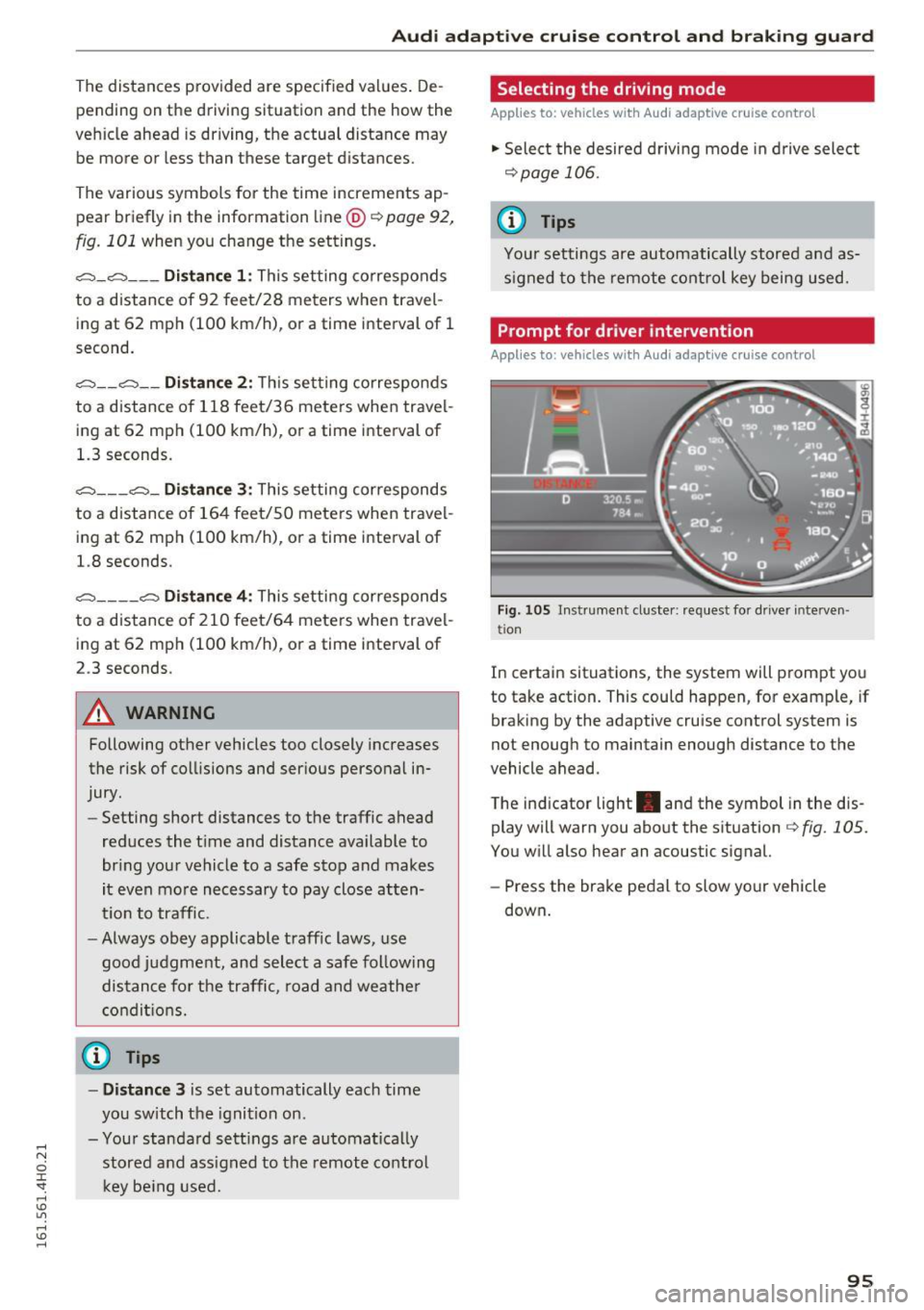
Fig . 105 Instrument cluste r: request for driver interve n
tio n
In certain situations, the system will prompt you
to take action. This could happen, for example, if
braking by the adaptive cruise control system is
not enough to maintain enough distance to the
vehicle ahead.
T he ind icator light . and the symbol in the dis
play will warn you about the situation~
fig. 105.
You will also hear an acoustic signal.
- Press the brake pedal to slow your vehicle
down .
95
Page 98 of 302
Audi adaptive cruise control and braking guard
Audi braking guard
Description
Applies to: vehicles w ith Aud i adapt ive c ru ise co ntro l
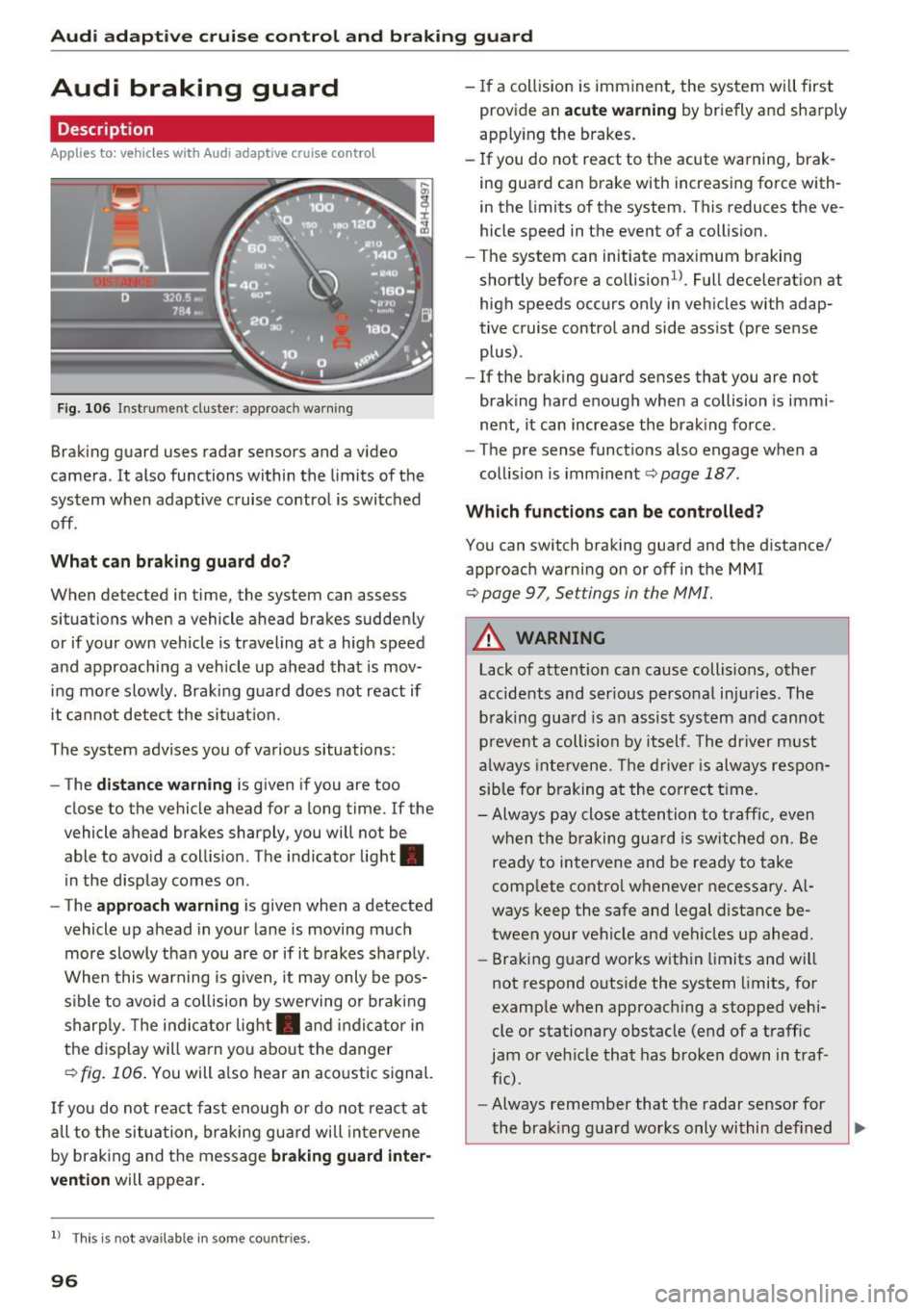
Fig. 106 Instrument cluster : approac h warning
Braking guard uses radar sensors and a video
camera. It also functions within the limits of the
system when adaptive cruise control is switched
off .
What can braking guard do?
When detected in time, the system can assess
situations when a vehicle ahead brakes suddenly
or if your own vehicle is traveling at a high speed
and approaching a vehicle up ahead that is mov
ing more slowly. Braking guard does not react if
it cannot detect the situat ion.
The system advises you of various situations:
- The
distance warning is given if you are too
close to the vehicle ahead for a long time. If the
vehicle ahead brakes sharply, you will not be
able to avo id a coll is ion. The indicator light.
in the display comes on.
- The
approach warning is given when a detected
vehicle up ahead in your lane is moving much
more slowly than you are or if it brakes sharply.
When this warning is g iven, it may only be pos
sible to avo id a collision by swerving or braking
sharp ly. Th e indicator light. and indicator in
the display will warn you about the danger
qfig. 106. You will also hear an acoustic signal.
If you do not react fast enough or do not react at
all to t he situation, braking guard will intervene
by braking and the message
braking guard inter
vention
will appear.
l) Thi s is not available in some countries.
96
-If a collision is imminent, the system will first
provide an
acute warning by briefly and sharply
app ly ing the brakes.
- If you do not react to the acute warning, brak
ing guard can brake with increasing force with
in the limits of the system. This reduces the ve
hicle speed in the event of a collision.
- The system can initiate maximum braking
shortly before a co llision
1
) . Full deceleration at
high speeds occurs only in vehicles with adap
tive cruise control and side assist (pre sense
plus) .
- If the braking guard senses that you are not
braking hard enough when a collision is immi
nent, it can increase the braking force .
- The pre sense functions also engage when a
collision is imminent
qpage 187.
Which functions can be controlled?
You can switch braking guard and the distance/
approach warning on or off in the MMI
¢ page 9 7, Settings in the MMI.
A WARNING
Lack of attention can cause collisions, other
accidents and serious personal injuries. The
braking guard is an assist system and cannot
prevent a collision by itself . The driver must
always intervene. The driver is always respon
sible for braking at the correct time.
- Always pay close attention to traffic, even
when the braking guard is switched on. Be
ready to intervene and be ready to take
comp lete control whenever necessary. Al
ways keep the safe and legal distance be
tween your vehicle and veh icles up ahead.
- Braking guard works within limits and will
not respond outside the system limits, for
example when approaching a stopped vehi
cle or stationary obstacle (end of a traffic
jam or vehicle that has broken down in traf
fic).
- Always remember that the radar sensor for
-
the brak ing guard works only within def ined ..,.
Page 99 of 302
Audi adapt ive cruis e control and braking gua rd
de tect ion and range limits t hat may prevent
the proper detection of other veh icles.
- The radar sensor's function and range can
be reduced by rain, snow and heavy spray.
Moving veh icles up ahead may not be
promptly detected or may not be detected
at all .
- Reflective surfaces including crash barriers
or tunnel entrances may impair the funct ion
of the radar sensor.
(D Tips
- You can cancel the brak ing with increasing
force that is init iated by the system by b rak
i ng yourself, by accelerat ing noticeab ly or
by swerving .
- Braking guard error messages ¢
page 9 7.
- Keep in mind that braking guard can brake
unexpected ly. Always secure any cargo or
objects that you are transport ing to reduce
the risk of damage or injury .
Settings in the MMI
Appl ies to: ve hicles with Audi a daptive cruise co ntro l
~ Select: I CARI funct ion button > Car s ystem s
control button > Driv er a ssis t > Audi braking
guard .
S ys tem -
Switch braking guard On and Off . When
you swit ch the ig nitio n on, the message
Audi
braking guard off
appe ars if the system is
switche d off.
Early warning -The distance and approach wa rn
in gs in the display can be sw itc hed
On/ Off.
0) Tips
- Your settings are automatically stored and
ass igned to the remote cont rol key being
used at the time the sett ings a re made.
- If you rest rict the ESC, the bra king guard al
so switches itse lf off
Q page 192 .
- Switch braking guard off when yo u are load
i ng t he ve hicle on to a vehicle ca rr ier, t rain,
s hi p or other type of transportation . This
c a n prevent undesired warnings from the
br aking gua rd system.
Messages
App lies to : vehicles wi th Audi ada ptive c ruise con trol
Braking guard : off
T his dr iver message appears if the system is
tu rned off via t he i nfot ainment. O therwise, if the
system is t urne d off, the information appears ev
ery time shortly after t he start o f the trip .
T he driver message a lso appea rs if the system is
not avai lab le due to a m alfu nction o r if the ES C i s
not switched on¢
page 192 . If th is is the case,
the sys tem wi ll not provide warnings abou t a
poss ib le collision .
Braking guard : a ctivated
This dr iver message appears if sharp brake pres
su re was applied due to an acu te warning .
ACC: Unava ilable!
ACC and Audi braking guard: not available
T he system cannot detec t moving vehicles up
ahead co rrectly and is swi tc h ed off. The senso rs
have been displaced or are not working proper ly.
T he Audi pre sense funct ions may also be affect
e d. D rive to your authorized A udi deal er or au
thori zed Audi serv ice facility immediately to have
the malfunction corrected .
ACC: currently unavailable. No senso r vi sion
ACC and braking guide : current ly unavailable .
No s ensor vi sion
Th is message appears if the senso r view is ob
structed, for examp le by leaves, snow, heavy
spray or dirt. Clean the senso rs
Q page 90 ,
fig. 96.
ACC: Currently unavailable . Gradient too steep
The road exceeds the maximum poss ible angle
for proper adaptive cruise co ntro l operat ion .
Adaptive cruise control is switched off .
ACC: Only available in D, Sor M
Select the D/S or M selector leve r position.
ACC : currently unavailable . Parking brake ap
plied
97
Page 100 of 302
Audi adaptive cruise control and braking guard
The adaptive c ruise contro l sys tem swi tches off
automatically if the park ing brake is set .
ACC: Currently unavailable. Stability control
(ESC) input .
This message appea rs if the Electronic S tabiliza
tion Contro l (ESC) is wor king to help st ab iliz e the
ve hicl e. In thi s case, ada pti ve cr uise co nt rol
sw itches
off au tom atic ally.
ACC off: Manual control!
This message appea rs when adapt ive cr uise con
trol cannot set the pa rking brake . Press the brake
pedal to p revent the vehicle from rolling .
•••
Three whi te dots a ppea r if a se tt ing cannot be se
lected with the se lector lever. For example, t his
ha ppens if adaptive c ruise contro l cannot resume
driving in stop -and-go traffic beca use one o f the
conditi ons requ ired for ACC to work is not
p resent .
Door open
The ada ptive cruise cont ro l sy stem cannot sw itch
on whe n a door is open .
Stationary object ahead
This message appea rs if you would like to switc h
adapt ive cr uise control o n and there is a stat io n
ary vehicle or obs tacle d irectly ahead of your ve
h icle .
98
Page 108 of 302
Audi drive select
Audi drive select
Driving settings
Introduction
Aud i drive select makes it possib le to experience
d ifferent types of veh icle sett ings in one veh icle.
The driver ca n select three
Comf ort, Aut o and
Dyn am ic modes in the MMI to switch between a
sporty and a comfortable driving mode.
You can a lso adjust the setting accord ing to your
p references in the
indi vidual mode. For example,
you can combine settings such as a sporty engine tuning with comfortable steering.
A WARNING
Improper use of the Audi drive select can
cause collisions, other accidents and serious
personal injury.
Description
-
The follow ing systems are affected by drive se
lect:
Engine and t ransm is sion
Depending on the mode, the engine and the
transmission respond quicker or in a more ba l
anced manner to accelerator pedal movements.
In the sporty dynamic mode, the transmission
shifts at h igher RPMs.
Air suspe nsion
The adaptive air suspension/adaptive air suspen
sion sport*
(Air suspension in the MMI) is an
electronically controlled air suspens ion and
damping system . They are adjusted depending
on the se lected dr iving mode, the driver's steer
ing, b raking and acceleration input and the road
surface, vehicle speed and load. A spo rty setting
is gene rally used in veh icles with adaptive air sus
pens ion sport*.
The vehicle clearance va ries depending on these
lected mode and the speed .
The highway setting is activated automatically
when yo u drive above 75 mph (120 km/h) for
mo re than 30 seconds in the
au to or dynamic
106
mode. The ground clea rance is increased auto
matically if the speed drops below 44 mph (70
km/h) for more than 120 seconds.
Steering
The steering adapts in terms of steering effort
and steering rat ios. Indirect stee ring that moves
easily, like the steering in com fort mode, is best
suited to long drives on a highway. In contrast,
dynamic mode provides sporty, direct steering .
The following app lies to veh icles with dynamic
steering*: the steering ratio changes based on
vehicle speed in order to maintain optimum
steering effort for the dr iver at a ll times . This
sets the steering to be less sensitive at higher
speeds in order to provide improved vehicle con
trol. At reduced speeds, however, steering is more d irect in order to keep t he steering effort as
min imal as possible whe n the dr iver is maneuve r
i ng the vehicle. A t low and ave rage speeds, dy
namic steeri ng addit ionally prov ides more re
spons ive steering performance.
Sport differential*
As a component of the all whee l dr ive sys tem
(quattro)
~ page 195, the Sport differe ntia l*
dist ributes t he d riving powe r to the rear axle de
pend ing on the s ituation. The distr ib ution of
power va ries depending on the selected mode,
from ba lanced (comfort) to agile (dynamic). The
goal is a high level of agility and ability to accel
erate on curves. The vehicle is very responsive to
steering.
Cur ve light *
The curve light adapts to driving on curves . The
pivoting action and the lighting are also adapted
to the mode.
Adapt ive cruise control*
The behavio r whe n accelerating ca n be adjusted
from comfortable to sporty, depending on the
drive select mode. Adaptive cruise contro l also
responds to the driving behavior of the vehicle
ahead in a more conservative or sporty manner . ..,_
Page 110 of 302
Audi drive select
Adjusting the Individual mode
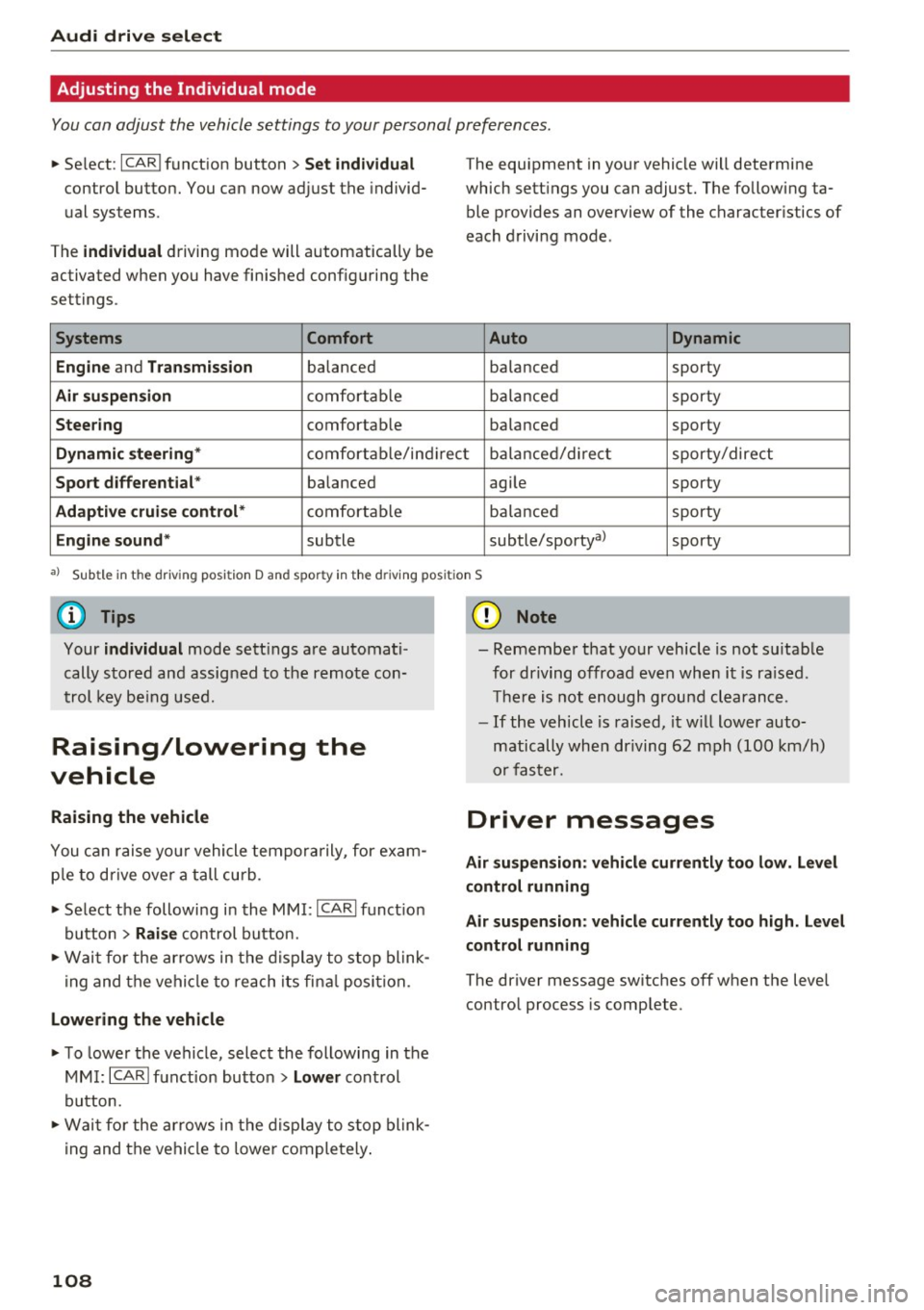
You can adjust the vehicle settings to your personal preferences.
"'Se lect : I CAR I function button > Set individual
cont rol button. You can now adjust the individ
ual systems.
The
individual driving mode will automatically be
activated when you have finished configuring the
settings .
Systems Comfort
Engine
and Transmission balanced
Air suspension comfortable
Steering comfortable T
he equipment in your vehicle will determine
which settings you can adjust. The following ta ble provides an overview of the characteristics of
each driving mode .
Auto Dynamic
balanced sporty
balanced sporty
balanced sporty
Dynamic
steering* comfortable/ind i r ec1t balanced/di rect sporty/direct
Sport differential * balanced agile sporty
Adaptive cruise control* comfortable balanced sporty
Engine sound* subtle
subtle/sportyal sporty
•> Sub tle in the dri ving posit ion D a nd sp or ty in the driving posi tion S
(D Tips
Your individual mode sett ings are automati
cally stored and assigned to the remote con
trol key being used.
Raising/lowering the
vehicle
Raising the vehicle
You can raise your vehicle temporarily, for exam
p le to drive over a tall curb .
"' Se lect the following in the MMI :
ICARI funct ion
button>
Raise control button.
"'Wa it for the arrows in the display to stop blink
ing and the vehicle to reach its fina l position.
Lowering the vehicle
"'T o lower the vehicle, select the following in the
MM I:
ICARI function button > Lower control
button.
"' Wait for the arrows in the display to stop blink
ing and the vehicle to lower completely.
108
(D Note
- Remember that your vehicle is not suitable
for driving offroad even when it is ra ised .
There is not enough ground clearance.
- If the vehicle is raised, it will lower auto
matically when driving 62 mph (100 km/h)
or faster.
Driver messages
Air suspension: vehicle currently too low. Level
control running
Air suspension: vehicle currently too high. Level
control running
The driver message switches off when the level
control process is complete.
Page 117 of 302
to move immediately, even if the parking brake is set. Th is could result in a crash.
- Do not ride the brakes or press the brake
peda l too often or too long when driving
down a hill. Constant braking causes the
brakes to overheat and substantially re
duces braking performance, increases brak
ing distance or causes complete failure of
the brake system.
Hill descent control
The hill descent control system assists the driver
when driving down declines.
Hill descent control is activated when the selec
tor lever is in D/S and you press the brake pedal.
The transm iss ion automatically selects a gear
that is suitable for the incl ine. Hill descent con
trol tries to mainta in the speed achieved at the
time of brak ing, within physical and technical
limitations. It may st ill be necessary to ad just the
speed with the brakes .
H ill descent contro l switches off once the decline
l eve ls out or yo u press the accelerator pedal.
H ill desce nt control is also act ivated when the
speed is set by starting the cruise control system
¢ page 88.
& WARNING
Hill descent contro l cannot overcome physical
limitations, so it may not be able to mai ntain
a constant speed under a ll conditions . Always
be ready to apply the brakes.
Aut oma tic tr ansm iss ion
Shifting manually
The shift paddles allow the driver to shift the
gears manually .
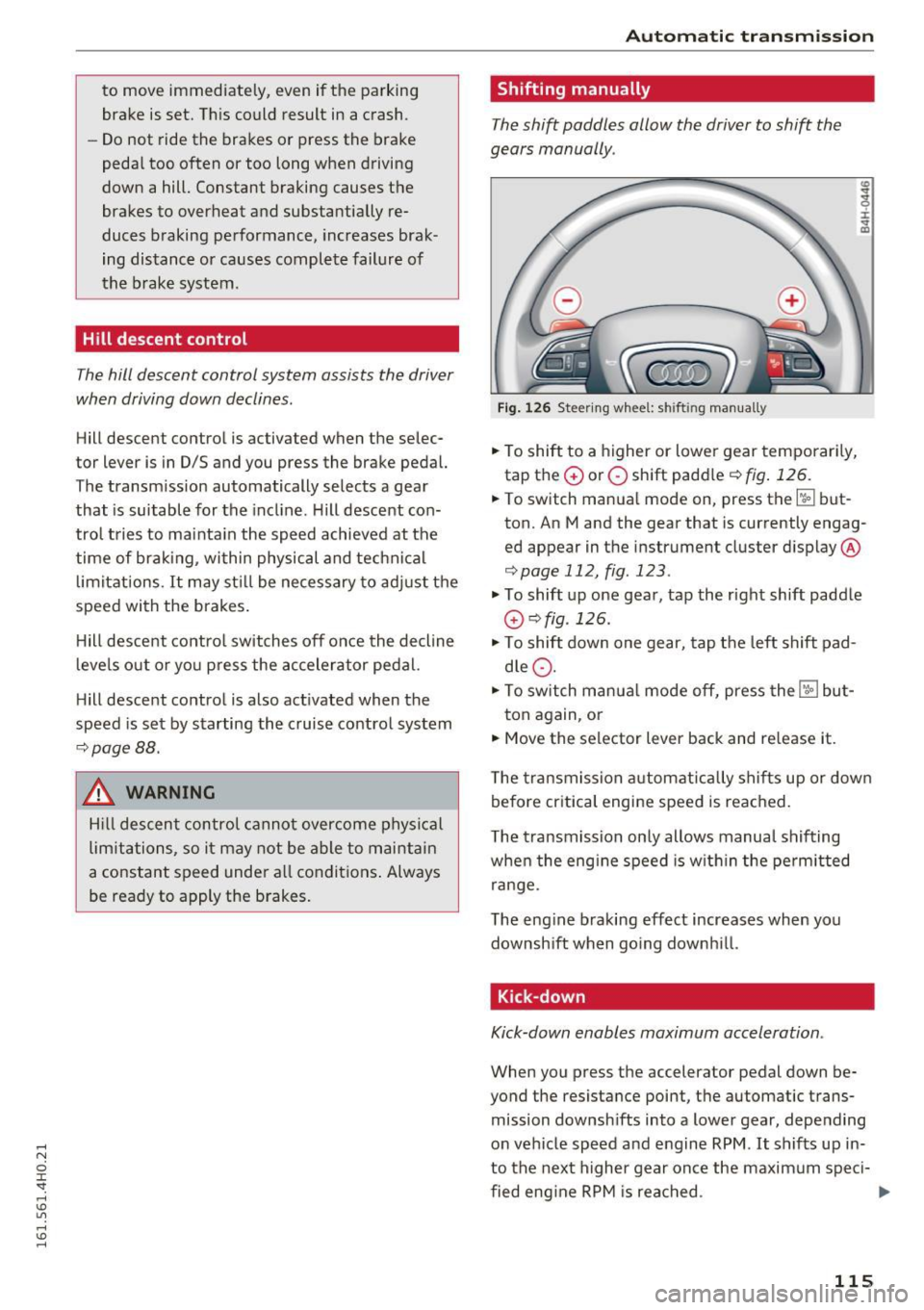
Fig. 126 Steering whee l: sh ift in g man ually
.. To shift to a higher or lowe r gear temporar ily,
tap the
G) or O shift paddle ¢ fig . 126.
:i:
"' CD
.. To switch manual mode on, press the~ but
ton. An M and the gear that is currently engag
ed appear in the instrument cluster display @
¢page 112, fig . 123 .
.., To shift up one gear, tap the right shift paddle
G) ¢fig .126.
.., To shift down one gear, tap t he left shift pad
d le
Q .
.., To switch manua l mode off, press the~ but-
ton again, or
.. Move the selector lever back and re lease it.
T he transmission automatically sh if t s up or down
before critica l engine speed is reached .
T he transmission on ly allows manual shifting
when the eng ine speed is w ith in the pe rm itted
range.
The eng ine braking effect increases when you
downsh ift when go ing downh ill.
Kick -down
Kick-down enables maximum acceleration .
When you press the accelerator pedal down be
yond the resistance point, t he automatic trans
mission downsh ifts into a lower gear, depe nding
on vehicle speed and e ngine RPM .
It shifts up in
to the next higher gear once the maxim um speci-
fied eng ine RPM is rea ched . ...,
115
Page 189 of 302
Audi pre sense Preventative passenger
protection
A ppl ies to: ve hicles with Audi pre se nse
Audi pre sense can initiate steps to help protect
vehicle occupants in certain situations. The func
tions described depend on equipment installed in
your veh icle:
Audi pre sense basic
The following functions can be triggered in cer
tain driving situations:
- Tightening of the safety belts (for examp le,
during heavy braking): the front safety belts
have reversible belt pretensione rs. If a collision
does not occur, the safety belts loosen slightly
and are ready to be t ightened again.
- Closing the windows and the sunroof*: the win
dows and the sunroof* close leaving a small
open gap .
Audi pre sense basic functions can be triggered at
speeds above 20 mph (30 km/h). The deploy ment time is adapted in the drive select mode dy
namic.
Audi pre sense front (vehicles with adaptive
cruise control*)
Audi pre sense front includes the functions in
Audi pre sense basic . In addition, within the lim
its of the system, the likelihood of a collision
with the vehicle immediately ahead is also calcu lated.
If the system senses an imminent collision
the following functions can be triggered:
- Braking guard
~ page 96
- Tightening the safety belts
- Closing the windows and the sunroof* (leaving
a small open gap)
Audi pre sense rear (vehicles with Audi side
assist*}
Audi pre sense rear includes the functions in Audi
pre sense basic. In addition, the likelihood of a
rear-end collision with the vehicle coming from
behind is also calculated.
If the risk of a collision
is detected , the following functions can be trig
gered:
Audi pre sense
-Tig htening the safety belts
- Closing the windows and the sunroof* ( leaving
a small open gap)
- Adjusting the seats: the settings for the power
head restrains, the upper sections of the backr
ests and the pneumatic side bolsters* are opti mized for the front seats and the outboard rear
seats*. If a co llision does not occur, the previ
ous seat settings are restored.
Audi pre sense plus
Audi pre sense plus includes the functions in Audi
pre sense front and Audi pre sense rear.
Error message
Audi pre sense: not available
Preventative passenger protection is not availa
ble . See your authorized Audi dealer immediately
to have the malfunction corrected .
A WARNING
-
Audi pre sense cannot overcome the laws of
physics. It cannot prevent a collision. Do not
l et the increased safety provided tempt you to
take risks. This will increase the risk of a colli
sion and serious personal injuries.
- The sensors cannot always detect all ob
jects. This increases the risk of a collision.
-Audi pre sense does not detect people or an
imals or objects that are crossing the vehi
cle's path
~ page 90.
-The radar sensor's vision can be reduced by
heavy rain, ice, snow, heavy road sp ray and
reflections from guard rails, tunne l entran
ces, etc. These and similar conditions can prevent vehicles from being accurately de
tected and in some cases they may not be
detected at all.
(D Note
The sensors can be displaced by impacts or
damage to the bumper, wheel housing and
underbody. This can affect the function of the
Audi pre sense system . Have your authorized
Audi dealer check to make sure that the sys
tem is work ing properly.
187