mirror AUDI S8 2016 User Guide
[x] Cancel search | Manufacturer: AUDI, Model Year: 2016, Model line: S8, Model: AUDI S8 2016Pages: 302, PDF Size: 75.68 MB
Page 65 of 302
-Vehicles with a pass through in the center
console have seating for four. The long cen
ter console between the two rear seats is
not a seating position . Therefore, a safety
belt is not provided .
- Applies to vehicles with reclining rear seat*:
- Do not use the front passenger's seat for
seating when it is in the reclining position.
This increases the risk of serious injury or
death .
- Never adjust the reclining position when
the front passenger 's seat is occupied .
This increases the risk of injury.
- Do not tilt the display if the driver's view
of the right exterior mirror will be ob
structed .
- Make sure the area between the leg sup
port and the front passenger's seat back
rest is clear before folding the leg support in so that you are not pinched.
(D Note
If a child seat is attached to one of the rear
seats, this seat must not be adjusted using
the power controls under any circumstances.
The easy entry function for this seat must also
be deactivated in the MMI
c:> page 64. The
child seat as well as the rear seat can be dam
aged by the adjustment process .
(!) Tips
The massage function switches off automati
cally after approximately
10 minutes .
- If you cannot move the front passenger seat
or the reclining rear seat, it may be because
- the front passenger's seat memory func
tion is switched off¢
page 66 or
- the child safety lock is switched on (the~
button ¢
page 40 or the right T button
c::> page 40 lights up in the driver's door),
or
- the front passenger seat adjustment is
switched off in the MMI
c:> page 64.
Seats and storage
Massage function remote control
Applies to: vehicles with reclining rear seat and massage
functio n
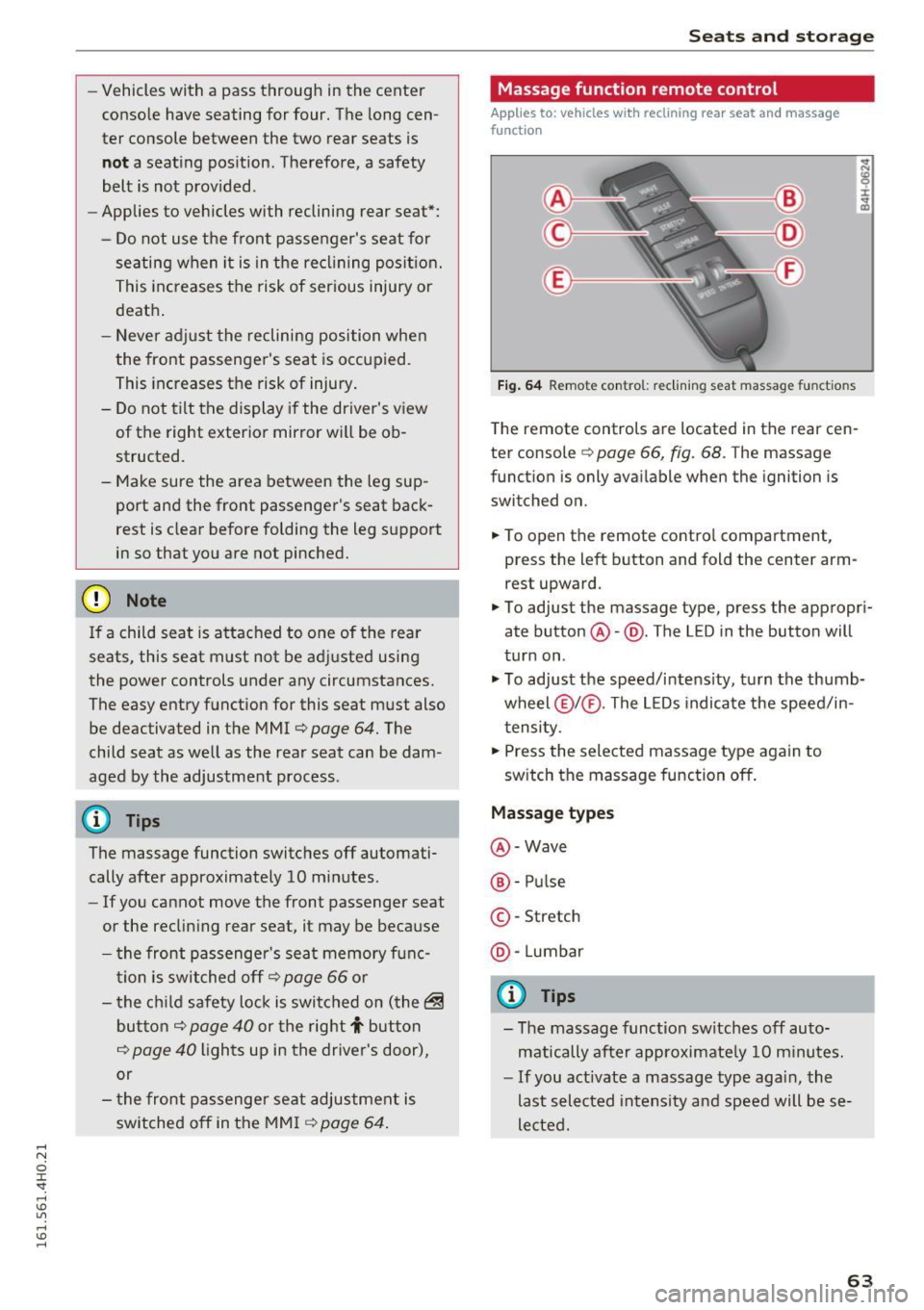
Fig. 64 Remote con trol: re clining seat massag e functions
The remote controls are located in the rear cen
ter console
c::> page 66, fig. 68. T he massage
function is only available when the ignition is
switched on.
.,. To open the remote control compartment,
press the left button and fold the center arm rest upward.
.,. To adjust the massage type, press the appropri
ate button @-@ . The L ED in the button will
turn on .
.,. To adjust the speed/intensity, turn the thumb
wheel @I® . The LEDs indicate the speed/in
tensity.
.,. Press the selected massage type again to
switch the massage function off.
Massage types
@-Wave
®-Pulse
©-Stretch
@ -Lumbar
@ Tips
- The massage function switches off auto
matically after approximate ly
10 minutes.
- If you act ivate a massage type again, the
last selected intensity and speed will be se
lected.
63
Page 67 of 302
restraints that are not properly adjusted in
creases the risk of ser ious or fatal neck in
jury dramatically.
- Read and heed all WARNINGS
¢page 132,
Proper adjustment of head restraints.
- Vehicles with a pass through in the center
console have seating for four. The long cen
ter console between the two rear seats is
Memory function
Description
Applies to: vehicles with memory function
The memory functio n allows you to quickly and
eas ily store and recall personal seating profi les
for the driver, front passenger and outer rear
seats* . The memory function is operated through
the master key and the memory buttons in the
driver's/front passenger's doors and the rear
doors".
The driver's seating profi le is stored and assigned
to the master key each time the vehicle is locked.
When you open the door, the seating profile is
Remote control
master key
Driver
Seat X
Head restraint X
Steering wheel* X
Safety belt* X
Both exterior rea rview X
mirrors*
Remote control key
Applies to: veh icles with memory function
To assign the driver's seat settings to the remote
control key when locking the vehicle, the function
must be switched on .
~ Select: I CARI function button > Car systems
control button > Vehicle settings > Seats >
Driver seat > Remote control key > On .
Seats and storage
not a seating position. Therefore, a safety
be lt is not provided.
(D Tips
-To prevent the head restraints from running
into the headliner, they retract automatica l
ly when moving the seat forward or upward.
- Correctly adjusted head restraints and safe
ty be lts are an extremely effective combina
tion of safety features.
automat ically recalled. If two people use one ve
hicle, it is recommended that each person always
uses "their own" master key .
T wo seating profiles can be stored in eac h of the
drive r's/front passenger's doors and one seating
profi le in each of the rear doors*. Once stored,
these seating p rofiles can be reca lled at any time.
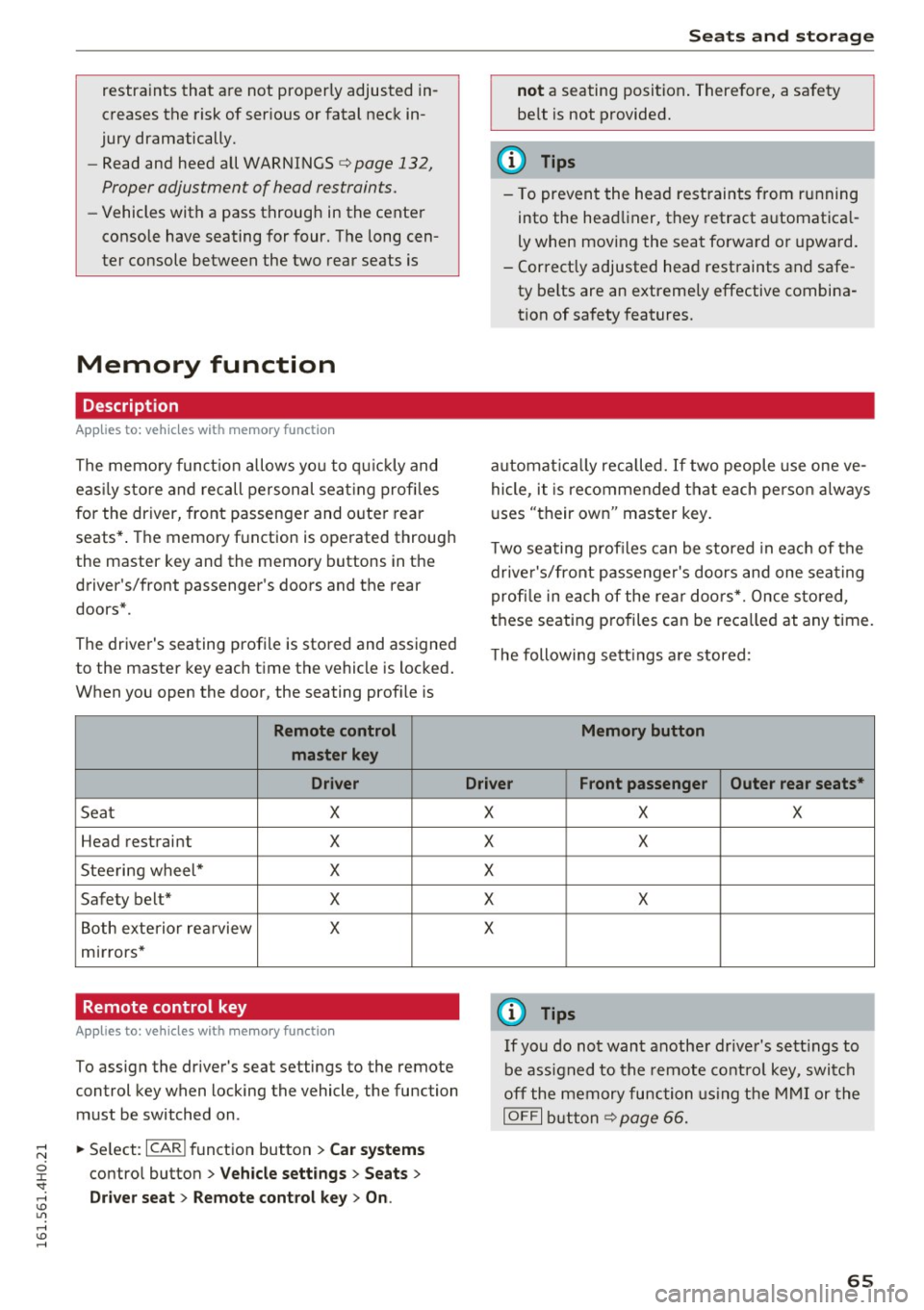
Th e following sett ings are stored:
Memory button
Driver Front passenger Outer rear seats*
X
X
X
X
X X
X
X
X
@ Tips
If you do not want another driver's settings to
be assigned to the remote control key, switch
off the memory function using the MMI or the
IOFF I button ¢p age 66.
65
Page 76 of 302
Seats and storage
Additional storage
There are a variety of storage compartments and
fasteners in various places in the vehicle.
- Storage compartments in the doors
- Net in the front passenger footwell
- Eyeglasses compartment in the headliner (near the rearview mirror)
- Storage compartments under the center armr
ests
- Compartments* on the back of the front seat
backrests
- Garment hooks over the rear doors
- Compartment in the center console with pass-
through)* (rear)
- Compartment behind the rear center armrest
(in vehicles without the pass-through* or cool
er*)
- Cell phone holder* in the right rear door
- Bag hooks in the luggage compartment
_& WARNING
-When driving, do not leave any hard objects
on the rear window shelf or allow your pet
to sit on the shelf. They could become a haz ard for vehicle occupants in the event of
sudden braking or a crash.
- Always remove objects from the instrument
panel. Any items not stored could slide
around inside the vehicle while driving or
when accelerating or when applying the
brakes or when driving around a corner.
- When you are driving make sure that any
thing you may have placed in the center con
sole or other storage locations cannot fall
out into the footwells. In case of sudden
braking you would not be able to brake or
accelerate.
- Any articles of clothing that you have hung
up must not interfere with the driver's view.
The coat hooks are designed only for light
weight clothing. Never hang any clothing
with hard, pointed or heavy objects in the
pockets on the coat hooks. During sudden
braking or in an accident -especially if the
airbag is deployed -these objects could in
jure any passengers inside the vehicle.
74
- To reduce the risk of personal injury in an
accident or sudden stop, always keep the
glove compartment closed while driving.
- Read and follow all WARNINGS
¢ page 164, Important safety instructions
on the side airbag system.
- Hang clothes in such a way that they do not
impair the driver's vision.
- The coat hooks must only be used for light
weight clothing. Do not leave any heavy or
sharp edged objects in the pockets which
may interfere with the side curtain airbag
deployment and can cause personal injury in
a crash.
- Do not use coat hangers for hanging cloth
ing on the coat hooks as this can interfere
with proper deployment of the side curtain
airbags in an accident.
- Do not hang heavy objects on the coat
hooks, as they could cause personal injury in
a sudden stop.
(D Note
Objects located on the rear shelf that rub
against the rear window could damage the
heating wires for the rear window defogger .
(D Tips
-A vent slot is located between the shelf and
the rear window. Do not block the vent with
any items you may place on the rear window
shelf .
'
-Do not place bulky items on the rear window
shelf as they could restrict or block the driv
er's vision in the rear view mirror.
Refrigerator
Introduction
Applies to: vehicles wit h cooler
Please clean the cooler before using it for the
first time ¢
table on page 208 .
You can only switch on the cooler if
- the temperature in the luggage compartment
is below 131 °F (5 5 °C). The cooler switches off
automatically if the temperature in the luggage .,._
Page 104 of 302
Audi side assist
Audi side assist
Side assist
Description
Applies to: veh icles with s ide assist
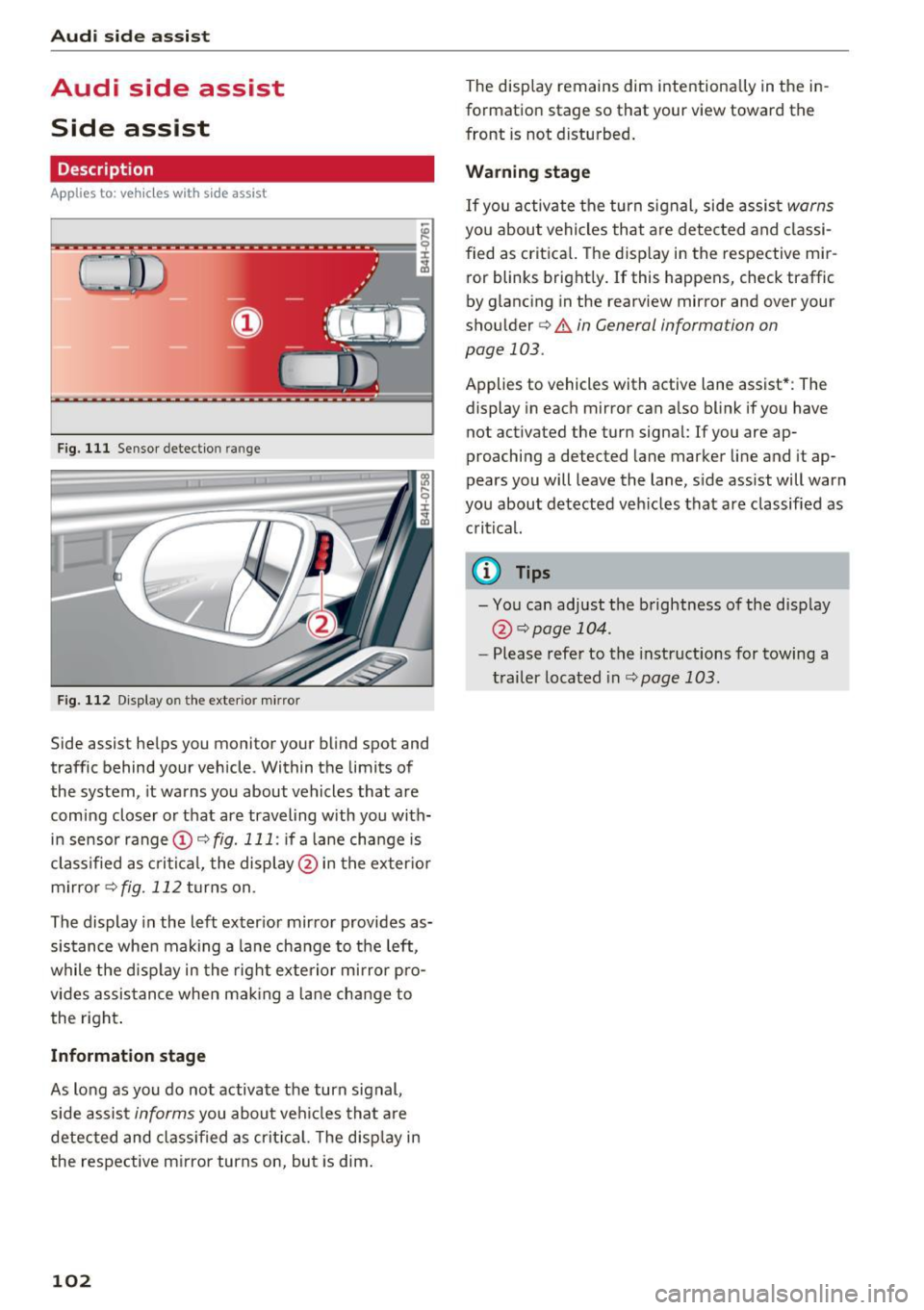
Fig. 111 Sensor detection range
Fig . 11 2 Disp lay on the exterio r m irror
Side assist helps you monitor your bl ind spot and
traffic behind your vehicle. Within the limits of
the system , it warns you about vehicles that are
comi ng closer o r that are traveling with you with
in sensor range
(D <::) fig. 111 : if a lane cha nge is
cl assified as c ritic al, the displ ay @ in the exter io r
m irro r
i=>fig. 112 turns on .
The display in the left exter ior mir ror provides as
sis tance whe n making a la ne change to the left,
while the disp lay in the rig ht exte rio r mi rror pro
vides assis tance when mak ing a lane chan ge to
the right .
Information stage
As long as you do no t activate the turn signal,
side assis t
informs you about ve hicles tha t are
detected and class if ied as crit ic al. T he disp lay in
the respe ctive m irror turns on, but is dim .
102
The display remains dim intentionally in the in
formation stage so that your view toward the
front is not disturbed .
Warning stage
If you activate the turn signal, side assis t warns
you about vehicles that are detected and classi
fied as crit ica l. T he disp lay in the respective mir
ror blinks bright ly. If this happens, check traffic
by glancing in the rearview mirror and over your
shou lder
c:> .&. in General information on
page 103 .
Applies to vehicles with active lane assist* : The
display in eac h m irror can also blink if you have
not activated the turn signa l: If you are ap
proaching a detected lane marker line and it ap
pears you will leave the lane, side assist will warn
you about detected veh icles that are classified as
critical.
0) Tips
- You can adjust the brightness of the disp lay
@ i=>page 104.
-Please refe r to the instructions for towing a
trailer located in
<::) page 103.
Page 105 of 302
General information
Applies to: vehicles with side assist
®
®
©
Fig. 113 D riving sit u atio ns
AUD I
Fig. 114 Rear of the vehicle: position of the senso rs
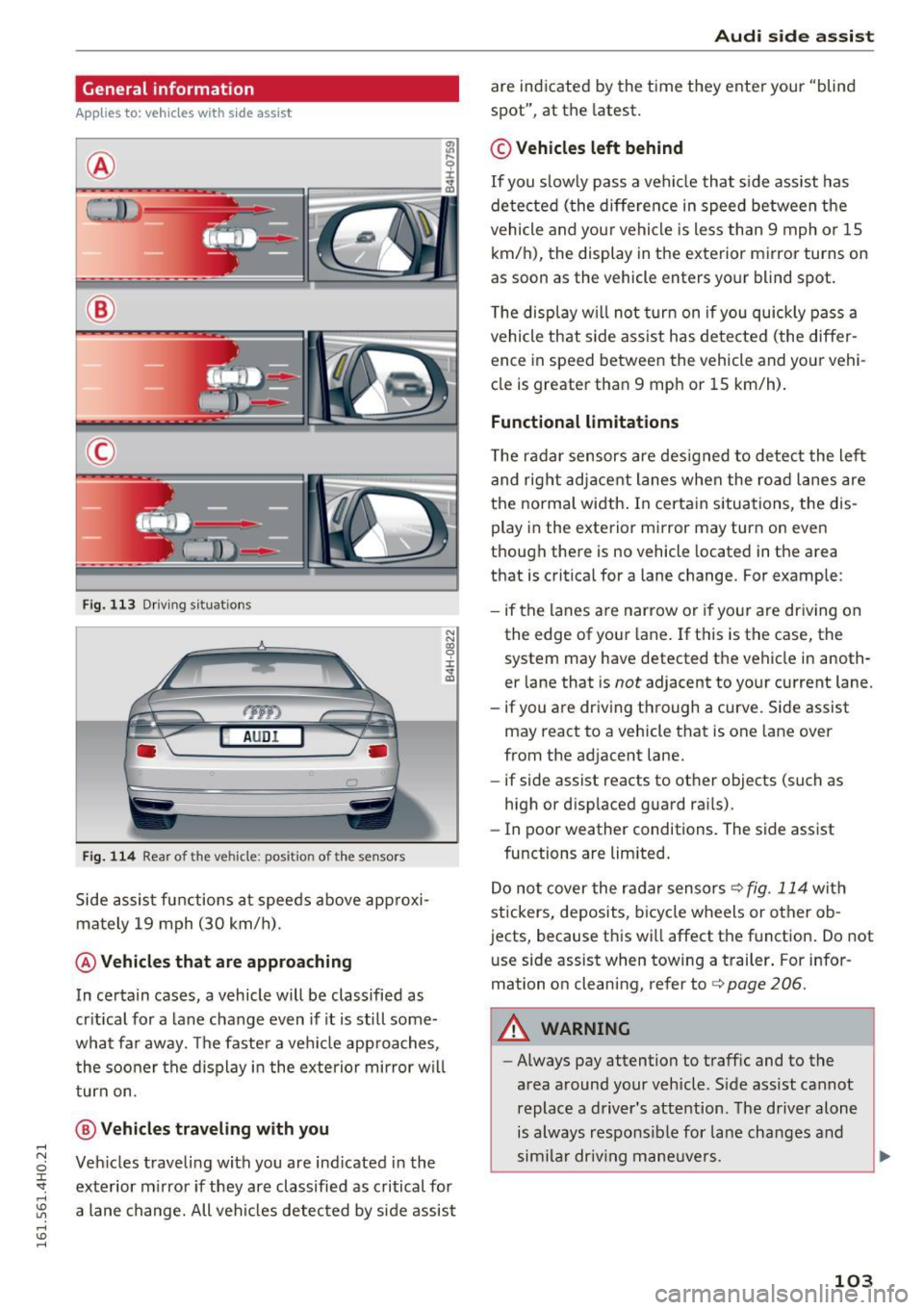
S ide a ssist fu nctions a t speeds above app roxi
ma tely 19 mph (30 km/h).
@ Vehicles that are approaching
N N
~
:i: .,. a,
In ce rtain cases, a vehicle will be classified as
cr itica l for a lane change even if it is still some
what far away. The faste r a ve hicle app roaches,
t he soo ner the d isplay in the exterio r mirror w ill
t urn on.
@ Vehicles traveling with you
Ve hicles traveli ng w ith you are ind icated i n the
exte rior m irro r if they are classified as critical for
a lane change. All vehi cles detec ted by side assist
Aud i side assist
are indicate d by the time they ente r your "blind
spot", at the latest.
© Vehicles left behind
If you s low ly pas s a vehi cle that s ide ass ist has
de te cted ( the differe nce in speed between t he
vehicle and you r vehicle is less than 9 mph or 15
km/h), the display in the exterior mirror turns on
as soon as the vehicle enters your blind spot.
T he disp lay w ill not turn on if you quickly pass a
vehicle th at side ass ist h as de te cte d (t he differ
ence in speed between the vehicle and your vehi
cle is greater tha n 9 mp h or 15 km/h).
Functional limitations
The radar se nsors are des igned to detect the le ft
and right adj ace nt lane s when the ro ad l anes are
the normal width . In certa in situations, the dis
play in the exterior mirror may turn on eve n
though there is no vehicle located in the area
that is critical for a lane change. For example:
- if the lanes a re narrow or i f yo ur are dr iv ing on
the edge of you r lane. If t his is the case, the
system may have detected th e vehicle in anoth
er lane that is
not adjacent to your cu rrent lane.
- if you are dr iv ing through a curve. Si de assist
may react to a vehicle that is one lane over
from the adjacent lane.
- if side assist reacts to ot her objects (such as
high or disp laced guard ra ils).
- In poor weather conditions. The side assist
fu nctions a re limited .
D o no t cover the r adar senso rs
c> fig. 114 wit h
stickers, deposits, b icycle wheels or other o b
jects, because th is wi ll affect the f unction . Do not
u se side assist when towing a t railer . For infor
mation on cleaning, refer to
c> page 206.
A WARNING
- Always pay attention to traffic and to the
area around your veh icle. S ide assist cannot
replace a driver' s attention. The driver alone
is always respo nsib le for la ne cha nges and
s im ila r dr iv in g ma neuve rs.
103
Page 106 of 302
Audi side assist
-Improper reliance on the side assist system
can cause collisions and serious personal in
jury:
- Never rely only on side assist when chang
ing lanes.
- Always check rear view mirrors to make
sure that it is safe to change lanes.
- Side assist cannot detect all vehicles under
all conditions- danger of accident!
- Please note that side assist indicates there
are approaching vehicles, or vehicles in your blind spot, only after your vehicle has
reached a driving speed of at least 19 mph
(30 km/h).
- In certain situations, the system may not
function or its function may be limited. For
example:
- if vehicles are approaching or being left
behind very quickly . The display may not
turn on in time .
- in poor weather conditions such as heavy
rain, snow or heavy mist .
- on very wide lanes, in tight curves or if
there is a rise in the road surface . Vehicles
in the adjacent lane may not be detected
because they are outside of the sensor
range.
(D Note
The sensors can be displaced by impacts or damage to the bumper, wheel housing and
underbody . This can affect the system . Have
your authorized Audi dealer or authorized
Audi Service Facility check their function.
(D Tips
-If the window glass in the driver's door or
front passenger's door has been tinted, the
display in the exterior mirror may be misin
terpreted.
- For Declaration of Compliance to United
States FCC and Industry Canada regulations
c::> page 284.
104 Activating and deactivating
App
lies to : vehicles with side assist
Fig. 115 D riv er's doo r: Side ass ist butto n
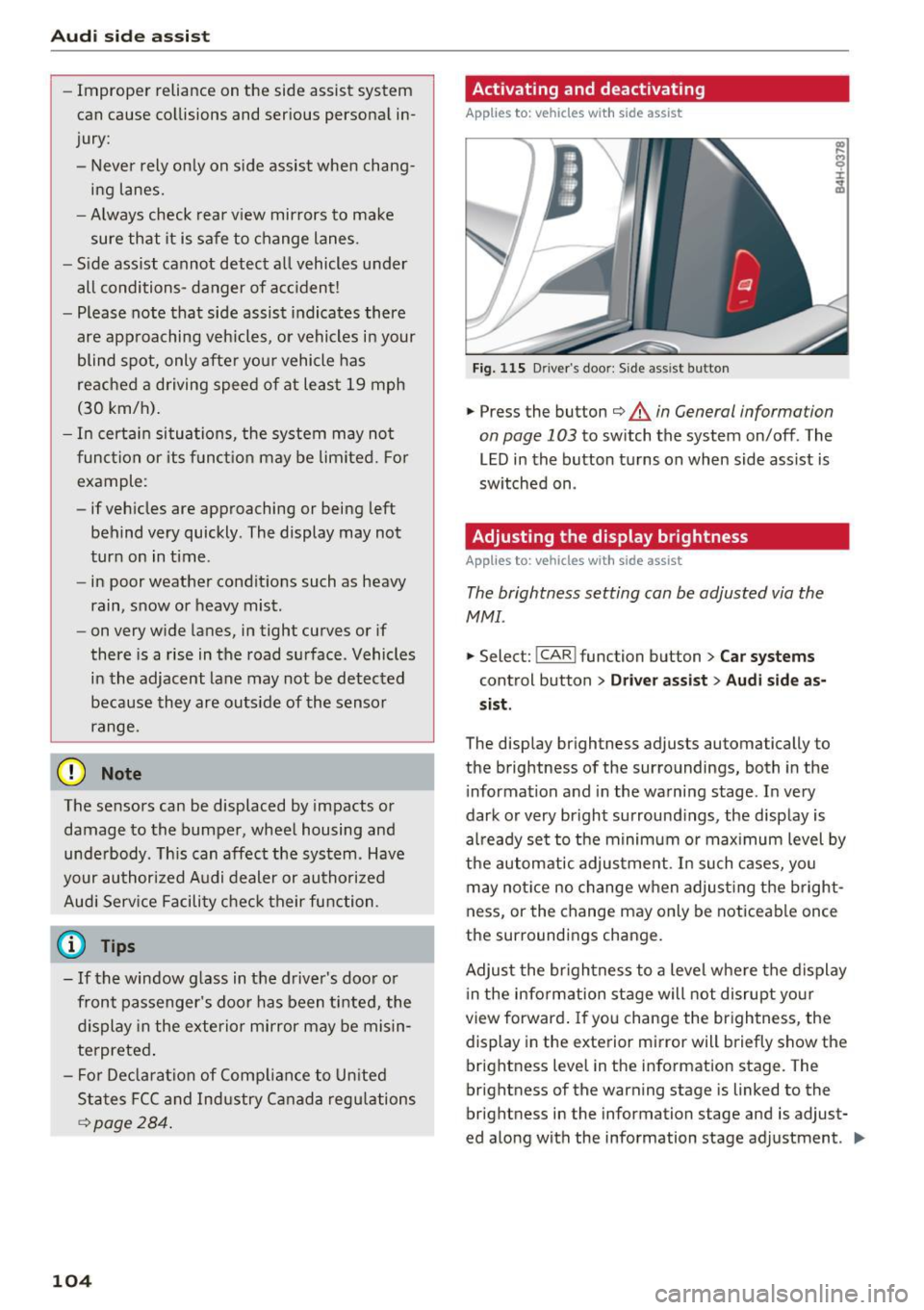
.,.. Press the button c::> &. in General information
on page 103
to switch the system on/off . The
LED in the button turns on when side assist is
switched on .
Adjusting the display brightness
Applies to: vehicles wit h side assist
The brightness setting can be adjusted via the
MMI.
.,.. Select: I CAR I function button > Car systems
control button > Driver assist> Audi side as
sist .
The display brightness adjusts automatically to
the brightness of the surroundings, both in the
information and in the warning stage . In very
dark or very bright surroundings, the display is
already set to the minimum or maximum level by
the automatic adjustment. In such cases, you may notice no change when adjusting the bright
ness, or the change may only be noticeable once
the surroundings change.
Adjust the brightness to a level where the display
in the information stage will not disrupt your
view forward. If you change the brightness, the
display in the exterior mirror will briefly show the
brightness level in the information stage. The
brightness of the warning stage is linked to the
brightness in the information stage and is adjust
ed along with the information stage adjustment . .,,.
Page 122 of 302
Parking system s
If the distance to an obstacle r emains constant,
the volume of the distance warn ing gradually
drops after about four seconds (th is does not ap
ply in the continuous tone range) .
Rear vie w cam era
The rea r view camera is located above the rear li
cense plate bracket. Make sure that the lens for
the park ing system
¢ fig . 132 is not covered by
deposits or any other obst ructions because this
can affe ct the function of the parking system . For
information on clean ing, refer to¢
page 206.
The rear view camera coverage area includes@
¢fig. 131 . Only this a rea is shown in the Info
tainment display. Objects that are outside of th is
area @are not displayed.
The accuracy of the orientation lines and the blue
surfaces is reduced if the adaptive air suspen
sion " is faulty, if the vehicle is lifted or if the
dy
n amic
mode is activated ¢ page 106 .
A WARNING
-Always read and follow the applicable warn
ings
¢ .& in General information on
page 118 .
-If the posit io n and the installation angle of
the rear view camera was changed , for ex
ample, after a co llision, do not continue to
use the system for safety reasons . Have i t
checked by your author ized Audi dealers hip
or authorized repair faci lity .
- Only use the rear view came ra to assist you
if it shows a good, clear picture . For exam
ple, the image may be affected by the sun
shining into the lens, dirt on the lens or if
there is a system fau lt .
- Use the rear view camera only if the l uggage
compartment lid is completely closed. Make
sure any objects you may have mounted on
the luggage compartment lid do not block
the rear view camera.
- The camera lens enlarges and distorts the
field of vis ion. T he object appears both al
tered and inaccurate on the screen .
- In certain situations, people or objects in
the d isplay appear closer or further away :
120
-objects that do not to uch the ground, such
as the bumper of a parked vehicle , a tra iler
hitch or the rear of a truck. Do not use the
help lines in this case.
- If driven from a level surface onto an in
cline, or a downward slope .
- If driven toward protruding objects.
-If the vehicle is carrying too much load in
the rear.
(D Note
- Always read and fo llow the applicable wa rn
ings
¢ (i) in General information on
page 118 .
-The orange co lored orientation lines in the
Infota inment display show the vehicle path
depending on the steer ing whee l ang le . The
front of the vehicle front swings out more
than the rear of the vehicle. Maintain plenty of distance so that your outside mirror or a
corner of your vehicle does not collide w ith
any obstacles .
Switching on /off
Applies to: vehicles with parking system plus with rear view
camera
F ig . 133 Center co n sole : Pa rk ing syste m swi tch
Switching on
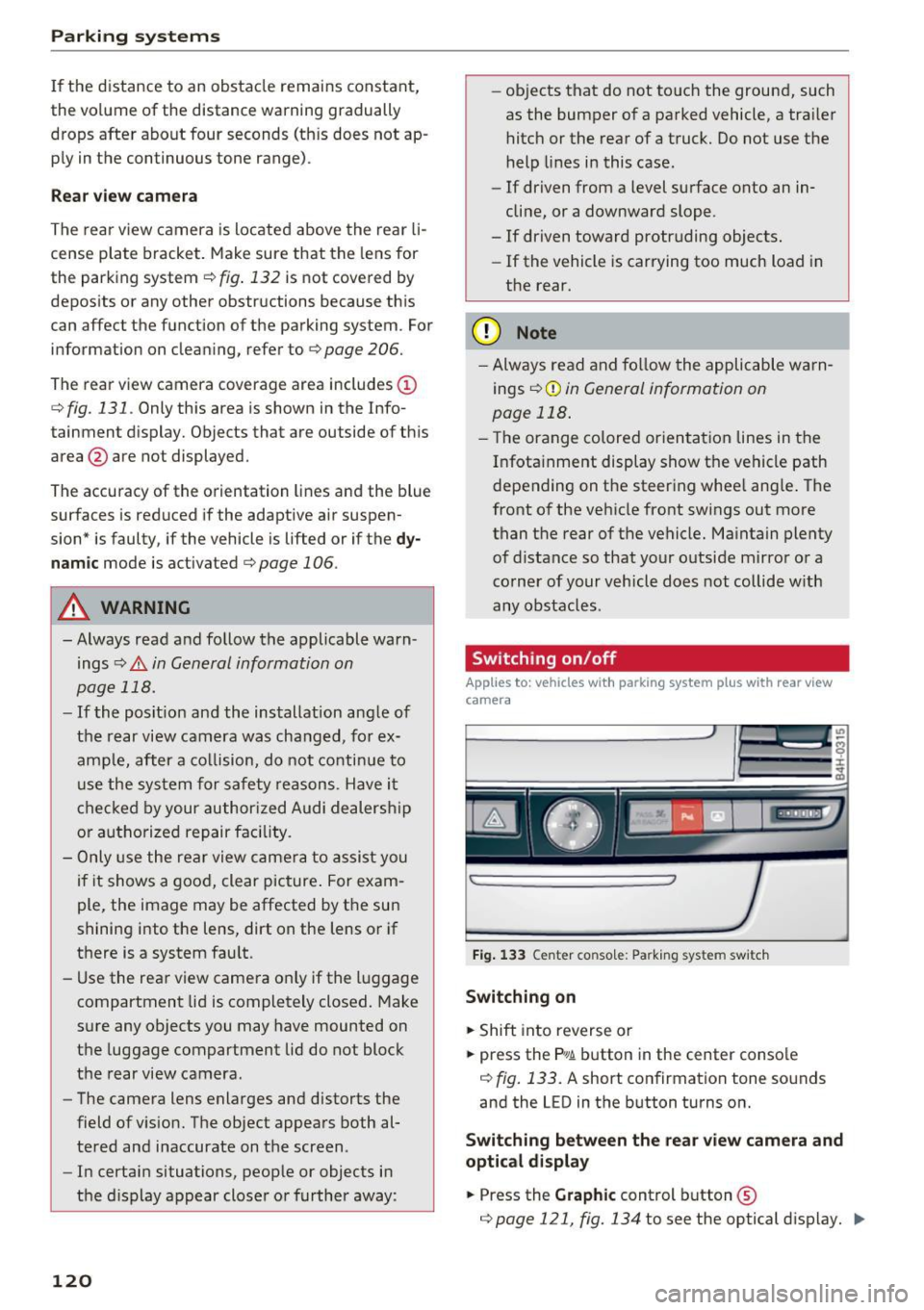
... Shift into reverse or
... press the
p,q ~ button in the center conso le
¢ fig. 133. A short confirmation tone so unds
and the LED in the b utton turns on.
Switching b etween the rear view camera and
optica l d isplay
... Press the Graphic cont rol button ©
¢page 121, fig. 134 to see the optical d isplay . ..,.
Page 125 of 302
Depending on the vehicle equipment, you are as
sisted by various views such as peripheral view,
corner views at the front and rear of the veh icle,
and v iews directly in front of or behind the vehi
cle.
General information
App lies to: veh icles with top view camera system
e
Fig. 138 Location of periphera l came ras
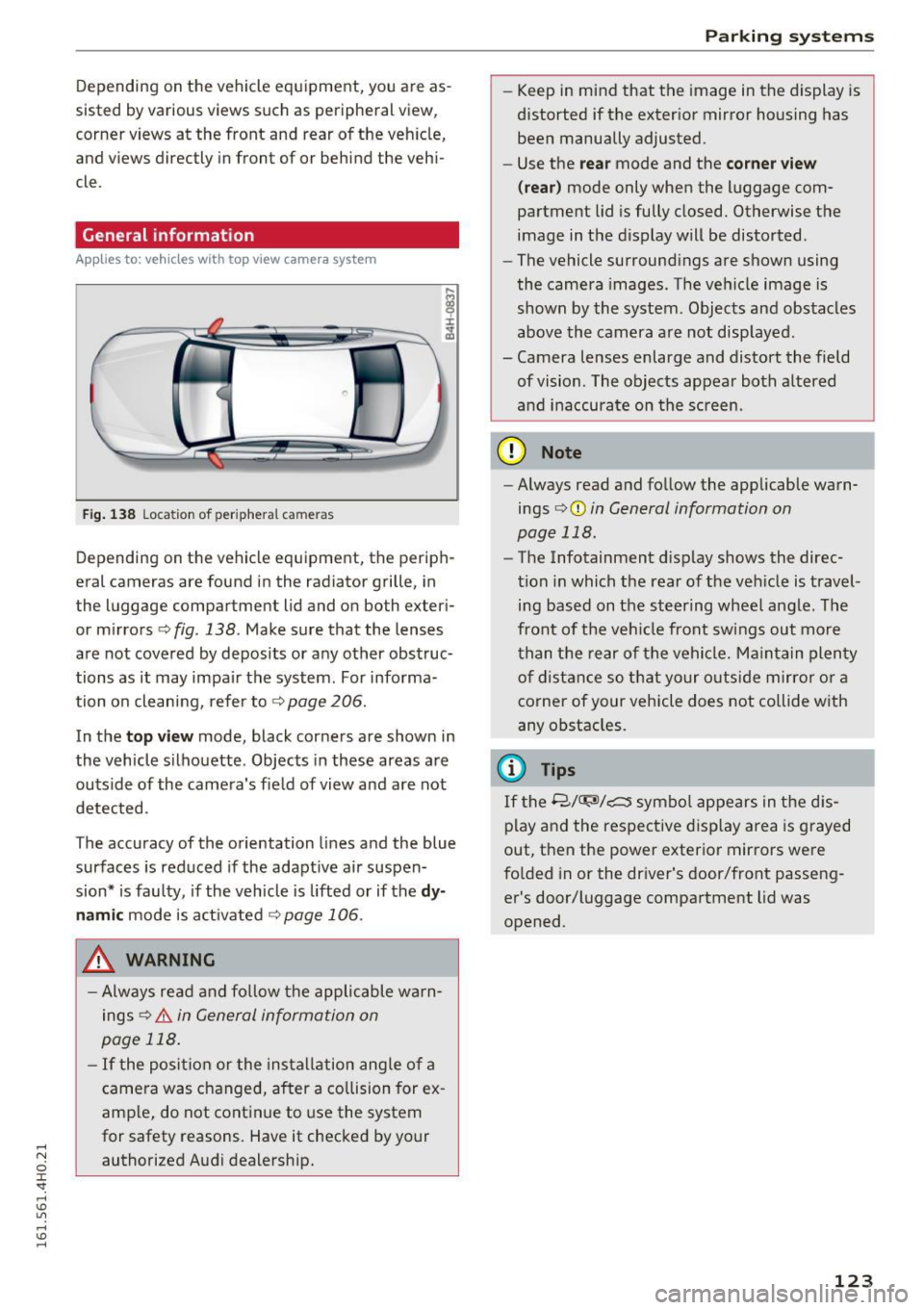
Depending on the vehicle equipment, the periph
eral cameras are found in the radiator grille, in
the luggage compartment lid and on both exter i
or mirrors ¢
fig. 138. Make sure that the lenses
are not covered by deposits or any other obstruc
tions as it may impair the system . For informa
tion on cleaning, refer to¢
page 206.
In the top vi ew mode, black corners are shown in
the vehicle silhouette . Objects in these areas are
outside of the camera's fie ld of view and are not
detected.
The accuracy of the orientation lines and the blue
surfaces is reduced if the adaptive air suspen
sion* is faulty, if the vehicle is lifted or if the
d y
namic mode is act ivated ¢ page 106.
.&, WARNING
-Always read and fo llow the applicable wa rn
ings
¢ & in General information on
page 118 .
-If the posit ion or the insta llation angle of a
camera was changed, after a co llision for ex
amp le, do not cont inue to use the system
for safety reasons. Have it checked by your
authorized Audi dealership.
Parking systems
-Keep in mind that the image in the display is
distorted if the exter ior mirror housing has
been manually adjusted.
- Use the
rear mode and the co rner view
( rear )
mode only when the luggage com
partment lid is fully closed. Otherwise the
image in the d isplay will be distorted.
- The vehicle surround ings are shown using
the camera images. The vehicle image is
shown by the system . Objects and obstacles
above the camera a re not disp layed .
- Camera lenses enlarge and distort the field of vision . The objects appear both a ltered
an d inaccurate on the screen.
(D Note
-Always read and fo llow the applicable warn
ings
o (D in General information on
page 118.
- The Infotainment display shows the direc
tion in which the rear of the veh icle is travel
ing based on the steering wheel ang le. The
front of t he veh icle front sw ings out more
t han t he re ar of the vehicle . M ai nta in plenty
o f distance so that your o uts ide mirro r or a
corner of your vehicle does not collide with
any obstacles.
(D Tips
If t he 8/<:r;si/c:::::::5 symbo l appears in the d is
play and the respective d isp lay area is grayed
out, then the power exterior mirrors we re
fo lded in or the dr iver's door/front passeng
er's door/luggage compa rtment lid was
opened .
123
Page 131 of 302
Driving safety
Basics
Safe driving habits
Please remember -safety first!
This chapter contains important information,
tips, instructions and warnings that you need to
read and observe for your own safety, the safety
of your passengers and others . We have summar
ized here what you need to know about safety
belts, airbags, child restraints as well as child
safety. Your safety is for us
priority number 1. Al
ways observe the information and warnings in
this section - for your own safety as well as that
of your passengers.
The information in this section applies to all
model versions of your vehicle. Some of the fea
tures descr ibed in this sections may be standard
equipment on some models, or may be optional
equipment on others. If you are not sure, ask
your authorized Audi dealer.
A WARNING
- Always make sure that you follow the in
structions and heed the WARNINGS in this
Manual. It is in your interest and in the in
terest of your passengers .
-
-Always keep the complete Owner's Litera
ture in your Audi when you lend or sell your
vehicle so that this important information
will always be available to the driver and
passengers.
- Always keep the Owner's literature handy so
that you can find it easily if you have ques
tions.
Safety equipment
The safety features are part of the occupant re
straint system and work together to help reduce the risk of injury in a wide variety of accident sit
uations.
Your safety and the safety of your passengers
should not be left to chance. Advances in tech
nology have made a var iety of features available
to help reduce the risk of injury in an accident.
Driving safety
The following is a list of just a few of the safety
features in your Audi:
- sophisticated safety belts for driver and all pas-
senger seat ing pos itions,
- safety belt pretensioners,
- safety belt force limiters for the front seats,
- safety belt height adjustment systems for the
front seats,
- front airbags,
- knee airbags for the front seats
- side airbags in the front seats and outer rear
seats,
- side curtain airbags,
- special LATCH anchorages for child restraints,
- head restraints for each seating position,
- adjustable steering column.
These individual safety features, can work to gether as a system to help protect you and your
passengers in a w ide range of accidents . These
features cannot work as a system if they are not
always correctly adjusted and correctly used.
Safety is everybody's responsibility!
Important things to do before driving
Safety is everybody 's job! Vehicle and occupant
safety always depends on the informed and care
ful driver .
For your safety and the safety of your passen
gers,
before driving always:
.,. Make sure that all lights and signals are operat
ing correctly .
.,. Make sure that the tire pressure is correct.
.,. Make sure that all windows are clean and afford
good visibility to the outside .
.,. Secure all luggage and other items carefully
c:c.> page 68, c:c.> page 73 .
.,. Make sure that nothing can interfere with the
pedals.
.,. Adjust front seat, head restraint and mirrors
correctly for your height.
.,. Instruct passengers to adjust the head re
straints according to their height.
.,. Make sure to use the right child restraint cor
rectly to protect children
¢ page 168, Child
safety. ..,.
129
Page 204 of 302
Trail er mode
Trailer mode
Driving with a trailer
General information
Your Audi was designed primarily for passenger
transportation.
If you plan to tow a trailer, please remember that
the additional load will affect durability, econo
my and performance.
Trailer towing not only places more stress on the
vehicle, it also calls for more concentration from the driver.
For this reason, always follow the operating and
driving instructions provided and use common
sense.
(D Note
If you are going to tow a trailer, you must ac
tivate the trai ler operation mode
¢ page 202, Operating instructions.
Technical requirements
Tr ailer hitch
Use a weight-carrying hitch conforming to the
gross trailer weight. The hitch must be suitable
for your veh icle and trailer and must be mounted
securely on the vehicle's chassis at a
technically
sound
location . Use only a trailer hitch with a re
movable ball mount . Always check w ith the t rail
er h itch man ufact urer to make sure that you are
using the co rrect hitc h.
Do not u se a bumper hitch .
The hitch must be installed in such a way that it
does not interfere with the impact-absorbing
bumper system . No mod ificat ions should be
made to the vehicle exhaust and brake systems .
F rom t ime to t ime, check that a ll hitch mo unt ing
bolts rema in securely fastened.
When you are not tow ing a traile r, remove the
tra iler hitch ball mount. This prevents the hitch
from caus ing damage should your vehicle be
struck from behind
¢ ,&. .
202
Trailer b rakes
If your trailer is equipped with a braking system,
check to be sure that it co nforms to all regu la
tions.
The tra iler hydrau lic brake system must not be
directly connected to the vehicle's hydrau lic
brake system .
Safety chains
Always use safety chains between your vehicle
and the tra iler.
Trailer light s
Trailer lights must meet all regulations. Be sure
to check with your Aud i dealer for correct wir ing,
switches and relays .
Mirror s
If you are unable to see the traffic behind you us
ing the regular outside mirrors, then you
must in
stall extended mirrors . It is important that you
always have clear vision to the rear.
A WARNING
Afte r remov ing the tra iler hitch, do not sto re
i t in you r vehicle. In case of s udden braking,
the hitch could fly fo rwa rd and injure you or
your passengers.
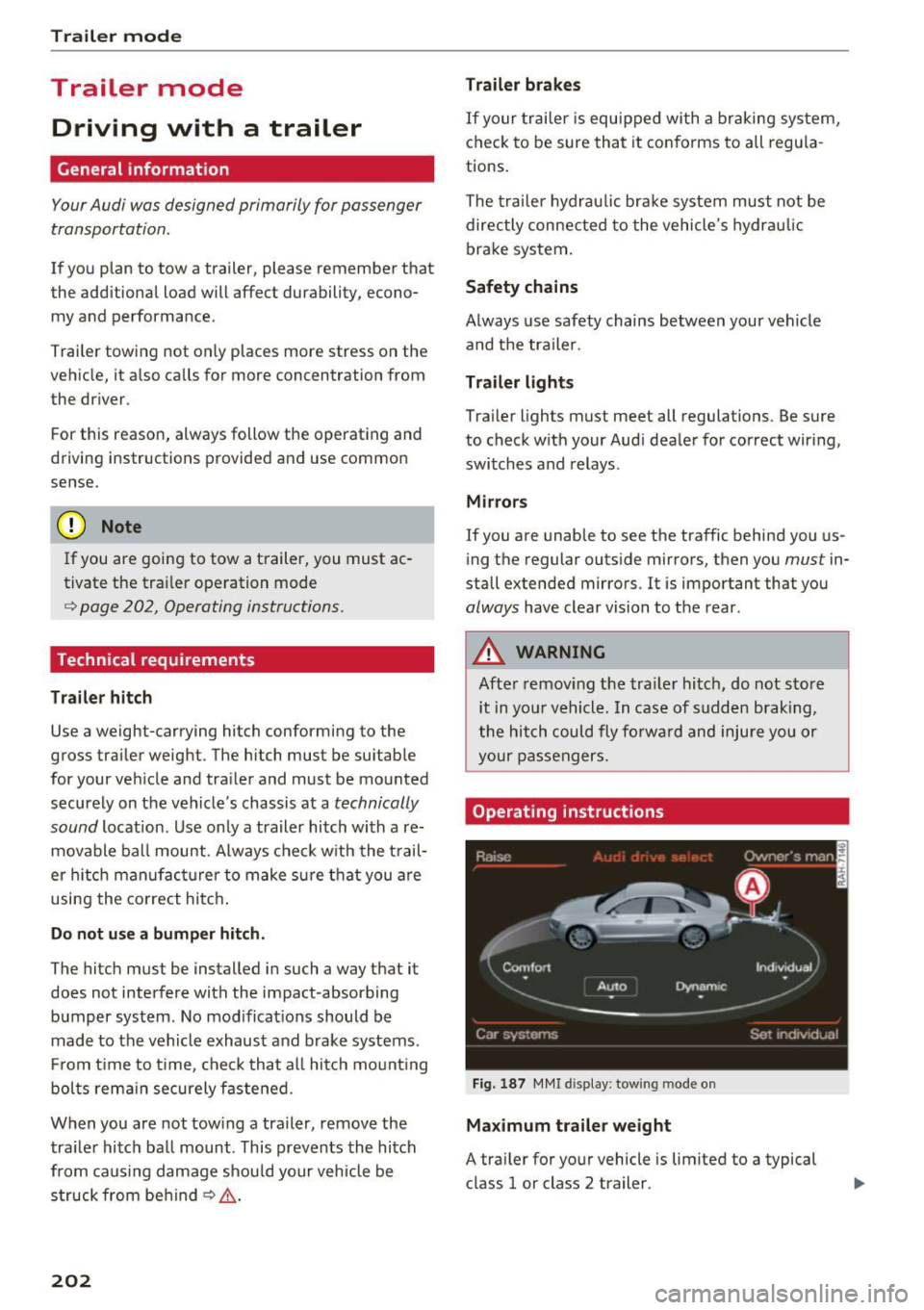
Operating instructions
Fig. 1 87 MMI d ispl ay: tow ing mode o n
Maximum traile r weight
A tra iler for your vehicle is lim ited to a typical
class 1 or class 2 trailer.