trailer AUDI S8 2016 User Guide
[x] Cancel search | Manufacturer: AUDI, Model Year: 2016, Model line: S8, Model: AUDI S8 2016Pages: 302, PDF Size: 75.68 MB
Page 130 of 302
Parking systems
Adjusting the display
and the warning tones
Applies to: ve hicles with parking system plus wit h rea r view
camera/top v iew camera system
The display and warning tones con be adjusted in
the Infotainment.
~ Se lect: ICARI function button> Car systems
contro l button > Driver assist > Parking aid.
Display
On* -
rear view camera image is shown for park
ing system plus with rear view camera*.
Off -when the parking system is sw itched on, on
ly audible signals are given.
Warning tones
Front volume -
Volume for the front area
Rear volume -Volume for the rear area
Front frequency -Frequency for the fron t area
Rear frequency -Frequency for the rear area
Music volume while parking -When the parking
system is turned on, the volume of the aud io/vid
eo source is lowered .
The newly adjusted value is briefly heard from
the signal generator.
(D Tips
- The warning tones can also be adjusted di
rectly from the visua l display or the camera
i mage. Simp ly press the
Settings contro l
button .
- Changed settings are act ivated when the
parking system is switched on aga in.
- The settings are automat ically stored and
ass igned to the remote control key that is in
use.
Error messages
Applies to: veh icles w ith parking system plus with rear view
camera/top v iew camera system
There is an error in the system if the LED in the
P, YA button is blinking and you hear a continuous
a larm for a few seconds after switching on the
parking system or when the parking system is al-
128
ready activated. If the error is not corrected be
fore you switch off the ignition, the LED in the
Po/A
button will blink the next time you switch on the
parking system by shifting into reverse.
If a sensor is faulty, the~ symbol will appear in
front of/behind the vehicle in the Infotainment display. If a rear sensor is faulty, only obstacles
that are in the front detect ion area are shown. If
a front sensor is faulty , only obstacles that are in
the rear area are shown .
Peripheral cameras*
There is also a system error if :
- the~" symbol appears in the display and the
corresponding display area is shown in blue.
The camera is not working in this area.
- all segments around the vehicles are red or if
no segments are disp layed.
D rive to your authorized Aud i dealer or author
iz ed repair facility immediately to have the mal
function corrected.
Trailer hitch
Applies to: vehicles with parking system plus with rear view
camera/top view camera system
For vehicles using the trailer socket, the parking
system rear sensors do not turn on when you
shift into reverse gear or when you press the
P,YA
button. This resu lts in the following restrictions:
There is no distance warning for the rear. The
front sensors remain activated . Th e visual display
switches to the tra iler tow ing mode . The rear
view camera image will not show the orientation
lin es and the blue surfaces.
(D Tips
Trailer hitches that are not installed at the
factory may cause the parking system to mal
function or they may restrict its function .
Page 192 of 302
Smart Technology
shared, please see your contract with the
wireless te lecommunications provider and the
"About Audi connect" tab in your vehicle's
MMI:
! MENUI button> Audi connect> About
Audi connect.
Electronic Stabilization
Control (ESC)
Description
ESC helps to improve road holding and vehicle
dynamics to help reduce the probability of skid
ding and loss of vehicle control. It works only
when the engine is running. ESC detects certain
difficult dr iving situations, including when the
veh icle is beginn ing to spin (yaw) out of contro l
and helps you to get the vehicle back under con
trol by se lectively braking the wheels, and/or re
ducing engine power and providing steering as
sistance to help hold the vehicle on the driver's
intended course. The indicator light
GI in the in
strument cluster blinks when ESC is taking action
to help you control the vehicle.
ESC has limitations. It is important to remember
that ESC cannot overcome the laws of physics. It
will not always be able to help out under all con
ditions you may come up against . For example,
ESC may not always be able to help you master
situations where there is a sudden change in the
coefficient of friction of the road surface. When
there is a section of dry road that is suddenly cov
ered with water, slush o r snow , ESC cannot per
form the same way it wou ld on the dry surface. If
the vehicle hydrop lanes (rides on a cushion of wa
ter instead of the road surface), ESC wi ll not be
able to he lp you steer the vehicle because contact
with the pavement has been interrupted and the
vehicle cannot be braked or steered. During fast cornering, part icularly on w inding roads, ESC
cannot always deal as effective ly w ith difficult
driving situat ions than at lower speeds . When
towing a trailer, ESC is not able to help you re
ga in control as it would if you were not towing a
trai ler.
Always adjust your speed and driving sty le to
road, traffic and weather conditions. ESC cannot
override the vehicle's physical limits, increase the
190
available traction, or keep a vehicle on the road if
road departure is a result of driver inattention.
Instead, ESC improves the possib ility of keeping
the vehicle under control and on the road during extreme maneuvers by using the driver's steering
inputs to help keep the vehicle going in the in
tended direction . If you are traveling at a speed
that causes you to run off the road before ESC
can provide any assistance, you may not exper i
ence the benefits of ESC.
ESC is switched on all the time. In certa in s itua
tions when you need less traction, you can sw itch
off ASR by press ing the button above
~ page 192, fig. 186 the selector lever. Be sure
to switch ASR on again when you no longer need
l ess traction.
The following systems are integrated in the ESC:
Anti-lock braking system (ABS)
ABS prevents the wheels from locking up when
braking. The vehicle can still be steered even dur
i ng hard braking . Apply steady pressure to the
brake pedal. Do not pump the pedal. A pulsing in
the brake pedal indicates that the system is help
i ng you to brake the vehicle.
Brake assist system
The brake assist system can decrease braking dis
tance. It increases braking power when the dr iver
presses the brake pedal quickly in emergency sit
uations. You must press and hold the brake pedal
u nt il the situation is over. In vehicles with adap
tive cruise control*, the brake assist system is
more sensitive if the d ista nee detected to the ve
hicle ahead is too sma ll.
Anti-slip regulation (ASR)
ASR reduces engine powe r when the dr ive wheels
begin to spin and adapts the force to the road
cond itions. This makes it easier to start, acceler
ate and drive up hills.
Electronic differential lock (EDL)
The EDL brakes wheels that are spinning and
transfers the drive power to the other wheels.
This function is not available at higher speeds .
Page 204 of 302
Trail er mode
Trailer mode
Driving with a trailer
General information
Your Audi was designed primarily for passenger
transportation.
If you plan to tow a trailer, please remember that
the additional load will affect durability, econo
my and performance.
Trailer towing not only places more stress on the
vehicle, it also calls for more concentration from the driver.
For this reason, always follow the operating and
driving instructions provided and use common
sense.
(D Note
If you are going to tow a trailer, you must ac
tivate the trai ler operation mode
¢ page 202, Operating instructions.
Technical requirements
Tr ailer hitch
Use a weight-carrying hitch conforming to the
gross trailer weight. The hitch must be suitable
for your veh icle and trailer and must be mounted
securely on the vehicle's chassis at a
technically
sound
location . Use only a trailer hitch with a re
movable ball mount . Always check w ith the t rail
er h itch man ufact urer to make sure that you are
using the co rrect hitc h.
Do not u se a bumper hitch .
The hitch must be installed in such a way that it
does not interfere with the impact-absorbing
bumper system . No mod ificat ions should be
made to the vehicle exhaust and brake systems .
F rom t ime to t ime, check that a ll hitch mo unt ing
bolts rema in securely fastened.
When you are not tow ing a traile r, remove the
tra iler hitch ball mount. This prevents the hitch
from caus ing damage should your vehicle be
struck from behind
¢ ,&. .
202
Trailer b rakes
If your trailer is equipped with a braking system,
check to be sure that it co nforms to all regu la
tions.
The tra iler hydrau lic brake system must not be
directly connected to the vehicle's hydrau lic
brake system .
Safety chains
Always use safety chains between your vehicle
and the tra iler.
Trailer light s
Trailer lights must meet all regulations. Be sure
to check with your Aud i dealer for correct wir ing,
switches and relays .
Mirror s
If you are unable to see the traffic behind you us
ing the regular outside mirrors, then you
must in
stall extended mirrors . It is important that you
always have clear vision to the rear.
A WARNING
Afte r remov ing the tra iler hitch, do not sto re
i t in you r vehicle. In case of s udden braking,
the hitch could fly fo rwa rd and injure you or
your passengers.
Operating instructions
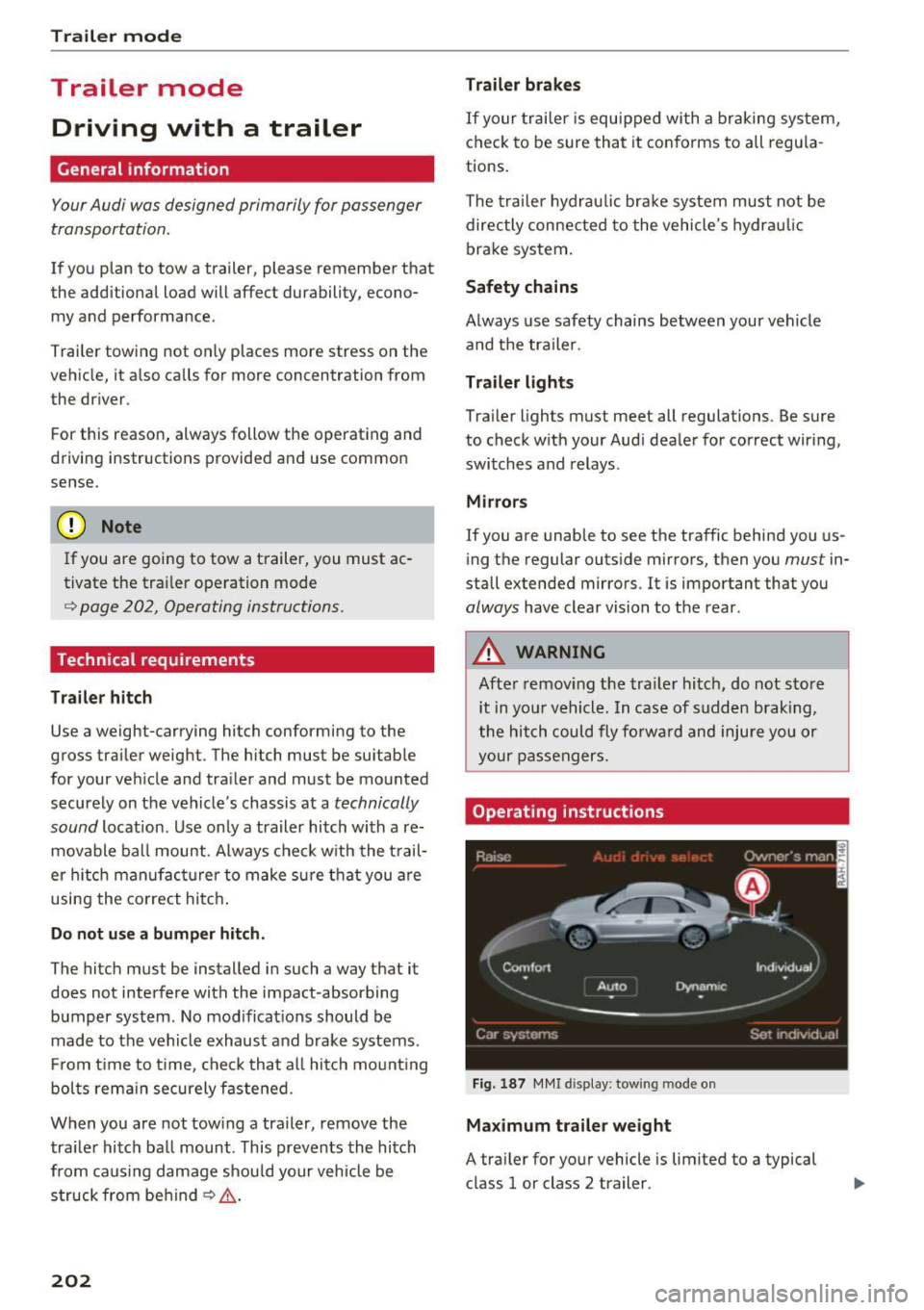
Fig. 1 87 MMI d ispl ay: tow ing mode o n
Maximum traile r weight
A tra iler for your vehicle is lim ited to a typical
class 1 or class 2 trailer.
Page 205 of 302
Trailer load distribution
Be sure the load in the trailer is held securely in
p la ce to prevent it from sh ifting forward, back
ward or sideways.
Never allow a passenger to ride in a trailer¢.&.
in Driving instructions on page 204.
Engine cooling system
Towing a trailer makes the engine work harder . It
is important that the cool ing system's perform
ance is up to the addit ional load. Make sure that
the cooling system has enough fluid.
Tire pressure
When towing a trailer, inflate the tires of your
veh icle to the cold tire pressure listed under "Full
load " on the label located on the driver's side B
pillar (vis ible when the door is open). Inflate
trailer tires to trailer and tire manufacturers'
specif ications.
Lights
Check to make sure both vehicle and trailer lights
are working proper ly.
Safety chains
Be sure trailer safety chains are properly connect
ed from the trailer to the hitch on the vehicle.
Leave enough slack in the chains to permit turn
in g corners . When you install safety cha ins, make
sure they wi ll not drag on the road when you are
driving.
The chains should cross under the trailer tongue
to prevent it from dropping in case of separat ion
from the hitch.
Adjusting the Audi drive select
Make sure the vehicle is on a level surface before
hitching up the trailer and before adjusting the
tongue we ight. The vehicle must be in
auto or
comfort driving mode and not ra ised
¢ page 106, 9Q) .
Make sure that the vehicle is lowered. In Info
tainment, select:
I CARI function button > lower
control button .
Trailer mode
If you must drive under poor road conditions, you
can raise the vehicle
after coupling the trailer or
after adjusting the tongue weight¢ page 108.
(D Note
-Changes in temperature or load can affect
the height of the vehicle.
- Always select auto or comfort mode. Other
w ise, the tong ue load specified for your ve
hicle will no longer be applicable .
Driving instructions
Driving with a trailer always requires extra care
and consideration.
T o obtain the best possible handling of veh icle
and trailer, p lease note the following:
.,. Do not tow a loaded trailer when your car itself
is not loaded.
.,. Be especially careful when passing other
vehicles.
.,. Observe speed limits.
.,. Do not drive at the maximum permissible
speed .
.,. Always apply brakes early.
.,. Monitor the temperature gauge.
Weight distribution
Towing a loaded tra iler with an empty car results
in a highly unstab le distribution of weight . If this
cannot be avoided, drive at very low speeds only
to avoid the risk of losing steering control.
A "balanced" rig is easier to operate and control.
This means that the tow vehicle shou ld be loaded
to the extent possib le and permissib le, while
keeping the trailer as light as possible under the
cir cumstances . Whenever poss ible, transfer
some cargo to the luggage compartment of the
tow veh icle while observing tongue load require
ments and vehicle load ing conside rations.
Speed
The higher the speed, the more difficult it be
comes for the driver to control the r ig. Do not
drive at the maximum permissible speed. Reduce
your speed even more if load, weather or wind .,._
203
Page 206 of 302
Trailer mod e
conditions are unfavorable - particularly when
going downhill.
Red uce veh icle speed
imm ediatel y if the tra ile r
shows the s lightest sign of swaying.
Do not try
to stop the sway in g b y accele rating .
Observe speed lim its . In some areas, speeds for
ve hicl es towing tra ilers are lower than for reg ula r
veh icles.
A lways apply brakes early . When dr iving down
h ill , sh ift into a lower gear to use the engine
b raking effect to slow the veh icle. Use of the
brakes a lone can cause them to overheat and fail.
Air suspension*
When driving with a tra iler, activate the trailer
mode of the air suspension . Switch the air sus
pens ion tra iler mode on when you a re towing a
tra ile r. This will limit the regulat ion by the air
suspens ion while driving . Select in the MM I:
ICARI function button > (Car )* sys tem s control
button >
Vehicle setting s > Air su sp .: to wi ng >
On .
Coolant temperature
The coolan t temperature gauge¢ page 10 must
be observed carefully. The coo lant temperature
can increase if you drive on long inclines in a low
gear at high engine speeds. Reduce your speed
immed iate ly if the LEDs in the top part of the dis
p lay turn on.
For more information about indicator lights, re
fer to.
¢page 15.
A WARNING
Anyone not properly restrained in a moving
vehicle is at a much greater risk in an acci
dent. Never let anyone ride in your car who is
not properly wearing the restraints provided
by Audi.
Trailer mode notes
Important to know
Your vehicle hand les different ly when towing a
trai ler because of the additiona l weight and dif
ferent weight distr ibut ion. Safety, performance
204
-
and economy will g reatly depend on how carefu l
l y you load your trai ler and operate your rig .
Befo re yo u actually tow yo ur t railer, pract ice
turning, stopping and backing up in an area away
from traffic. Keep practicing unti l you have be
come complete ly familiar with the way your vehi
cle-tra iler combination behaves and responds .
Backing up is diff icult and requ ires practice.
Backing up with a trailer genera lly req uires steer
ing action opposite to that when backing up your
vehicle witho ut a trailer .
Maintain a greater distance between yo ur vehicle
and the one in front of you. You will need more
room to stop . To compensate for the trailer, you
will need a larger than normal turning radius .
When passing, remember tha t you canno t accel
erate as fast as you normally wou ld because of
the added load . Make sure you have enough room
to pass. After passing, allow p lenty of room for
your trailer before changing lanes again.
Avoid jerky starts, sharp turns or rapid lane changes.
(D Tips
- Do not tow a trailer du ring the break-i n pe ri
od of your vehicle.
- If you tow a tr aile r, your A udi may requi re
more frequent ma intenance due to the ex
tra load ¢
page 281.
Parking on a slope
Do not park on a slope with a trailer . If it cannot
be avoided, do so only after doing the following:
When parking:
.,. App ly the foot brake.
.,. Have someone p lace chocks unde r both the ve
hicle and the trailer wheels .
.,. With chocks in place, slowly release the brakes
until the wheel chocks abso rb the load .
.,. Turn the whee ls towards the curb.
.,. App ly the parking brake .
.,. Select the P selector lever posit ion.
Page 207 of 302
When restarting after parking:
"'Apply the foo t brake.
"' St art the engi ne .
"' Se lect the D selector leve r position.
"' Release the parking brake an d slow ly pull out
and away from t he wheel choc ks .
"' Stop and have someone retrieve t he wheel
chocks .
(D Tips
If you move the selector lever of the a utomat
ic transm ission to P before applying t he park
ing brake and before block ing t he wheels, you
may have to use mo re force late r to move t he
lev er out of th e P position .
Trailer mode
205
Page 251 of 302
Wheels
technically referred to as the vehi- sengers in the vehicle or passen-cle's
Gross Vehicle Weight Rat-gers who are heavier than the
ing ("GVWR"). standard weights assumed mean
The "GVWR" includes the weight that less weight can be carried as
of the basic vehicle, all factory in-luggage.
stalled accessories, a full tank of The Gross Vehicle Weight Rating
fuel, oil, coolant and other fluids and the Gross Axle Weight Rating
plus maximum load. The maxi- are listed on the safety compli-
mum load includes the number of ance sticker label located on the
passengers that the vehicle is in- driver's side B-pillar
c::::> page 246,
tended to carry ("seating capaci-fig. 207.
ty") with an assumed weight of
.&_ WARNING
150 lbs . (68 kg) for each passen-
Overloading a vehicle can cause
ger at a designated seating posi-
loss of vehicle control, a crash
tion and the total weight of any
or other accident, serious per-
luggage in the vehicle. If you tow
sonal injury, and even death.
a trailer, the weight of the trailer
-Carrying more weight than
hitch and the tongue weight of
your vehicle was designed to
the loaded trailer must be includ-
carry will prevent the vehicle
ed as part of the vehicle load.
from handling properly and
The
Gross Axle Weight Rating increase the risk of the loss of
("GAWR") is the maximum load vehicle control.
that can be applied at each of the -The brakes on a vehicle that
vehicle's two axles. has been overloaded may not
The fact that there is an upper be able to stop
the vehicle
limit to your vehicle's Gross Vehi- within a safe distance.
cle Weight Rating means that the -Tires
on a vehicle that has
total weight of whatever is being been overloaded can fail sud-
carried in the vehicle (including denly, including a blowout and
.... the weight of a trailer hitch and sudden deflation, causing loss
N the tongue weight of the loaded of control and a crash. ci ... :c ": trailer) is limited. The more pas-....
'° "? ....
'° ....
249
Page 252 of 302
Wheels
-Always make sure that the total load being transported -
including the weight of a trail
er hitch and the tongue
weight of a loaded trailer -
does not make the vehicle
heavier than the vehicle's
Gross Vehicle Weight Rating.
Determining correct load
limit
Use the example below to calcu late the total weight of the pas
sengers and luggage or other
things that you plan to transport
so that you can make sure that
your vehicle will not be overload ed .
Steps for Determining Correct
Load Limit
1 . Locate the statement "THE
COMBINED WEIGHT O F OCCU
PANTS AND CARGO SHO ULD
NEV ER EXCEED XXX KG OR XXX
LBS"on your vehicle's placard
(tire inflation pressure label)
¢ page 246, fig . 207 .
2. Determine the combined
weight of the driver and passengers that will be riding in
your vehicle .
250
3. Subtract the combined weight
of the driver and passengers
from
"XXX" kilograms or "XXX"
pounds shown on the sticker
¢ page 246, fig . 207 .
4. The resu lting fig ure equals the
available amount of cargo and luggage load capacity . For ex
ample, if the "XXX" amount
equals
1400 lbs. and there will
be five
150 l bs . passengers in
your vehic le, the amount of
available cargo and luggage load capac ity is
650 lbs .
(1400-750 (S x 150) = 650
lbs.)
5. Determine the combined
weight of luggage and cargo
being loaded on the vehicle .
That weight may not safely ex
ceed the available cargo and luggage load capacity calcu lat
ed in Step 4.
6 . If your vehicle will be towing a
trailer, load from your trailer
w ill be transferred to your ve
hic le. Consu lt th is manua l to
determine how this reduces
the available cargo and lug
gage load capacity of yo ur vehi-
cle.
~
Page 261 of 302
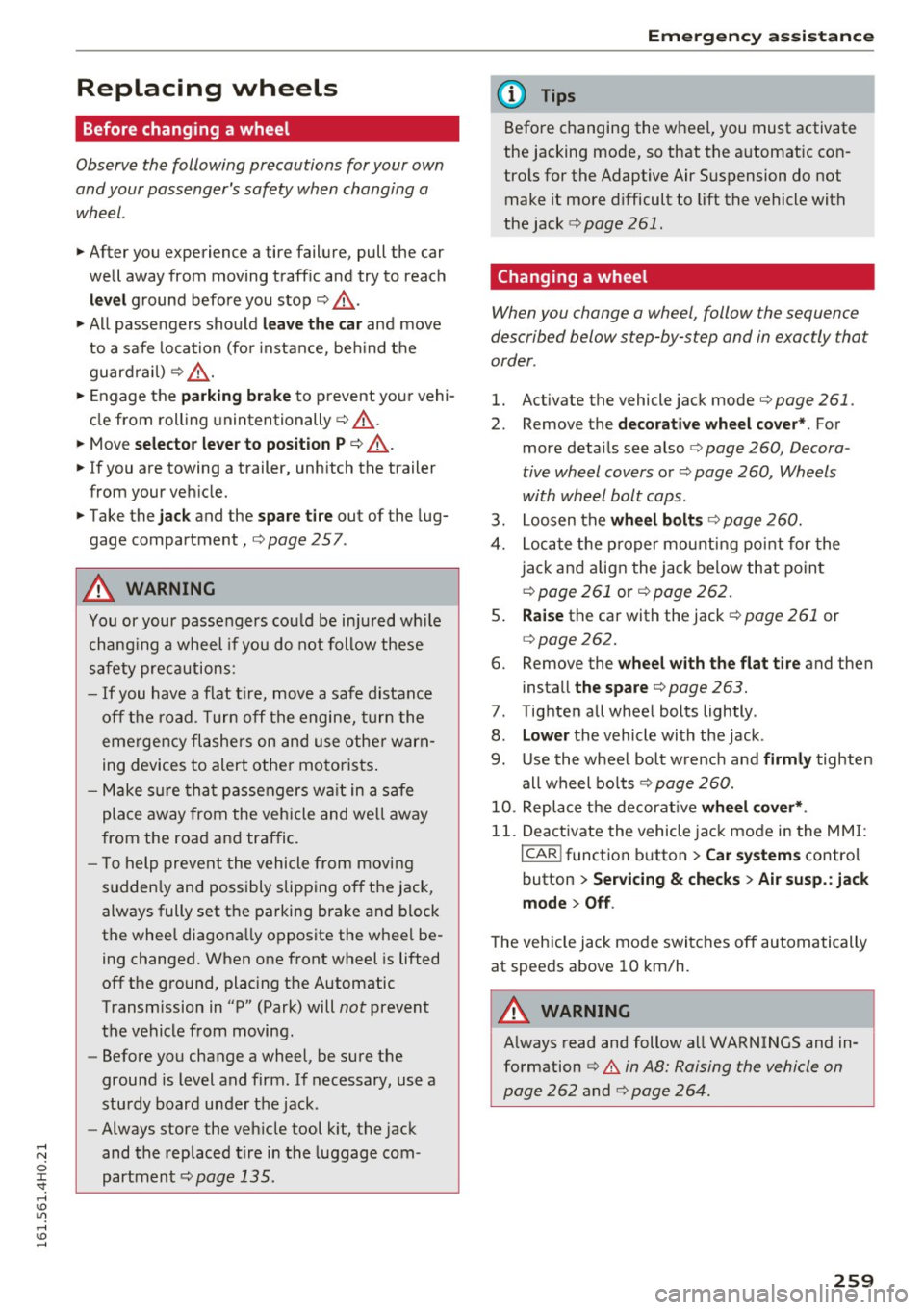
Replacing wheels
Before changing a wheel
Observe the following precautions for your own
and your passenger's safety when changing a
wheel.
.,. After you experience a tire failure, pull the car
well away from moving traffic and try to reach
level ground before you stop¢.,&. .
.. All passengers should
leave the car and move
to a safe location (for instance, beh ind the
guardrail) ¢.,&. .
.,. Engage the
parking brake to prevent your vehi
cle from rolling unintentionally ¢.,&. .
.. Move
selector lever to position P ¢ .,&. .
1> lfyou are towing a trailer, unhitch the trailer
from your vehicle.
.,. Take the
jack and the spare tire out of the lug
gage compartment,
¢page 257.
..&, WARNING
You or your passengers could be injured wh ile
changing a wheel if you do not follow these
safety precautions:
- If you have a flat tire, move a safe distance
off the road. Turn off the engine, turn the
emergency flashers on and use other warn
ing devices to alert other motorists.
- Make sure that passengers wa it in a safe
place away from the vehicle and well away
from the road and traffic.
- T o help prevent the vehicle from moving
sudden ly and possibly slipping off the jack,
always fully set the parking brake and block
the wheel diagonally opposite the wheel be
ing changed. When one front wheel is lifted
off the ground, plac ing the Automatic
Transmission in "P" (Park) will
not prevent
the vehicle from moving.
- Before you change a wheel, be sure the
ground is level and firm . If necessary, use a
sturdy board under the jack .
- Always store the vehicle tool k it, the jack
and the replaced tire in the luggage com
partment ¢
page 135.
Emergency assistance
{!) Tips
Before changing the wheel, you must activate
the jacking mode, so that the automat ic con
tro ls for the Adaptive Air Suspension do not
make it more difficult to lift the vehicle with
the jack ¢
page 261 .
Changing a wheel
When you change a wheel , follow the sequence
described below step-by-s tep and in exactly tha t
order .
l. Activate the vehicle jack mode ¢ page 261 .
2. Remove the decorative wheel cover*. For
more details see also¢
page 260, Decora
tive wheel covers
or¢ page 260, Wheels
with wheel bolt caps .
3. Loosen the wheel bolts¢ page 260.
4. Locate the proper mounting point for the
jack and align the jack below that point
¢ page 261 or¢ page 262.
5. Raise the car with the jack¢ page 261 or
¢page 262.
6. Remove the wheel with the flat tire and then
install
the spare ¢ page 263.
7. Tighten all wheel bolts lightly .
8.
Lower the vehicle with the jack .
9. Use the wheel bolt wrench and
firmly tighten
all wheel bolts<=>
page 260.
10. Replace the decorative wheel cover*.
11. Deactivate the vehicle jack mode in the MMI :
I CAR! function button > Car systems contro l
button
> Servicing & checks > Air susp.: jack
mode > Off.
The vehicle jack mode switches off automatically
at speeds above 10 km/h .
..&, WARNING
Always read and follow all WARNINGS and in
formation
¢ .&. in AB: Raising the vehicle on
page 262
and ¢ page 264.
259
Page 271 of 302
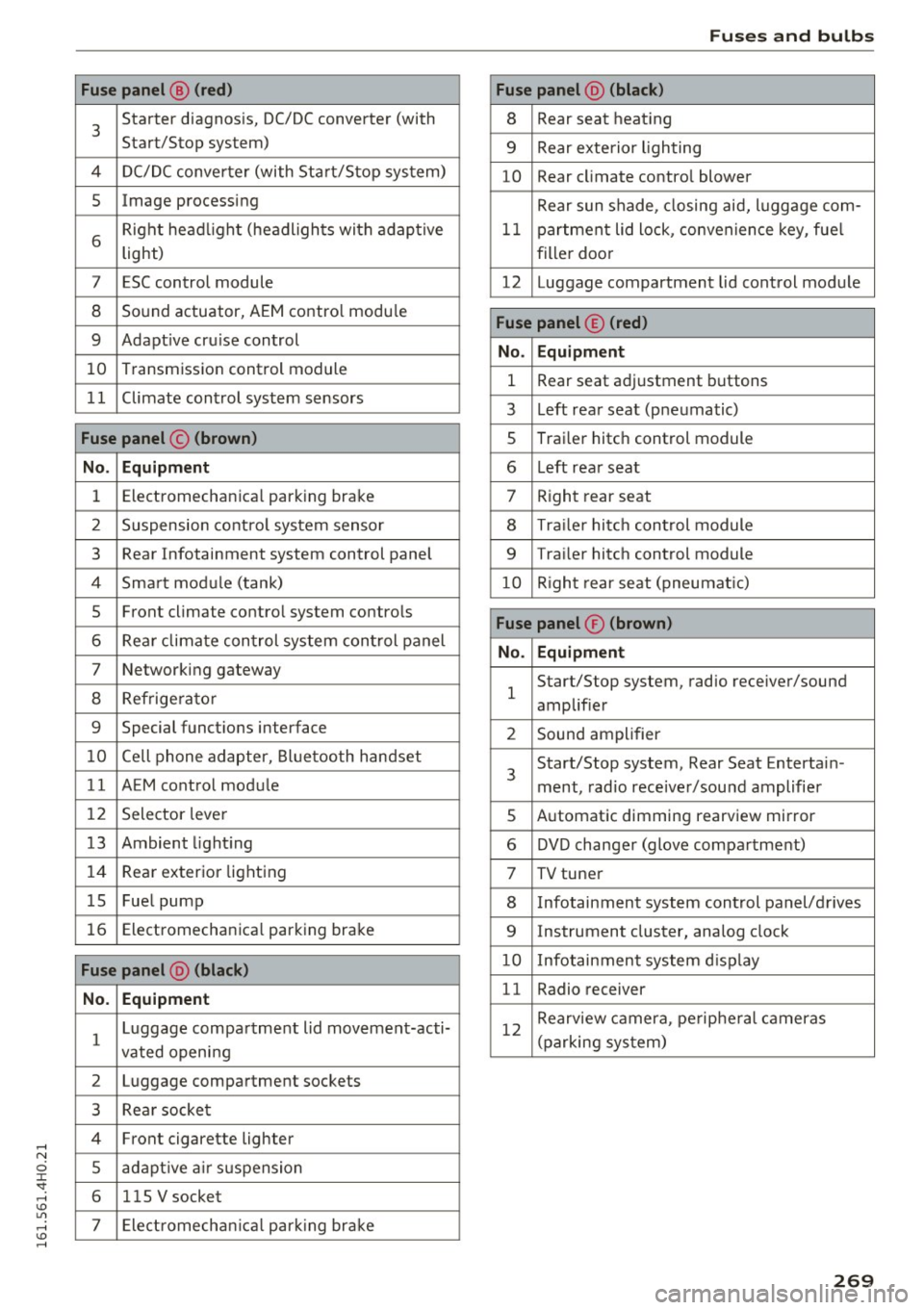
Fuses an d bulb s
Fuse p anel @ (red ) Fuse panel@ (black )
3 Starter diagnosis, DC/DC converter (with
Start/Stop system) 8 Rear
seat heating
9 Rear exterio r lighting
4 DC/DC converter (with Start/Stop system)
10 Rear
climate contro l blower
5 Image processing
Rear sun shade, closing aid, luggage com-
6 Right headl
ight (headlights with adaptive
light) 11 partment lid
lock, convenience key, fue l
filler doo r
7 ESC control module 12 Luggage compartment lid control module
8 Sound actuator, AEM control modu le
9 Adapt ive cru ise control
10 Transmission
control module
Fuse panel © (red )
No . Equ ipm en t
1 Rear seat adjustment buttons
1 1 Climate control system sensors
3 Left rear
seat (pneumatic)
Fuse panel © (br own ) 5 Trai
ler hitch control module
No. Equipm ent 6 L
eft rear seat
1 Electromechanical parking
brake
7 Right rear seat
2 Suspension control system sensor
8 Traile r hitc h control module
3 Rear Infotainment system control
panel
9 Trailer hitch control module
4 Smart module (tank) 10 Right rear seat (pneumatic)
5 Front climate contro
l system controls
6 Rear climate control system control panel
7 Networking gateway
8 Refrige rator
Fuse panel ® (brown )
No. Equipm en t
1 Start/Stop
system, radio receiver/sound
amplifier
9 Special functions interface
2 Sound amplifier
10 Cell phone adapter, Bluetooth handset
11 AEM control module 3 Start/Stop
system, Rear Seat Entertain-
ment, radio receiver/sou nd amplifier
12 Selector lever
5 Automatic dimming
rearview mirror
13 Ambient lighting 6 DVD changer (glove compa rtment)
14 Rear
exterior lighting
7 TV tuner
15 Fuel pump
8 Infotainment system control panel/drives
16 Electromechanica l parking brake
9 Instrument cluster, analog clock
Fuse panel @ (bl ack ) 10 Infotainment system d isp lay
N o. Equi pm en t 11 Radio receiver
1 Luggage compartment lid movement-acti-
vated openi ng 12
Rearview camera, pe
ripheral cameras
(parking system)
2 Luggage compartment sockets
3 Rear socket
4 Front cigarette lighter
5 adapt ive a ir suspension
6 115 V
socket
7 Electromechan ica l park ing brake
269