brake light AUDI S8 2016 Owner's Manual
[x] Cancel search | Manufacturer: AUDI, Model Year: 2016, Model line: S8, Model: AUDI S8 2016Pages: 302, PDF Size: 75.68 MB
Page 97 of 302
Audi adaptive cruise control and braking guard
The distances provided are specified values . De
pending on the driving situation and the how the
vehicle ahead is driving, the actual distance may
be more or less than these target distances.
The various symbols for the time increments ap
pear briefly in the information line@~
page 92,
fig. 101 when you change the settings.
~-~ --- Distance 1: This setting corresponds
to a distance of 92 feet/28 meters when travel
ing at 62 mph (100 km/h), or a time interval of 1
second.
~ -- ~-- Distance 2: This setting corresponds
to a distance of 118 feet/36 meters when travel
ing at 62 mph (100 km/h), or a time interval of
1.3 seconds .
~--- ~-Distance 3: This setting corresponds
to a distance of 164 feet/SO meters when travel
ing at 62 mph (100 km/h), or a time interval of
1.8 seconds.
~ ---- ~ Distance 4: This setting corresponds
to a distance of 210 feet/64 mete rs when travel
ing at 62 mph (100 km/h), or a time interval of
2 .3 seconds.
.&_ WARNING
Following other vehicles too closely increases
the risk of col lisions and ser ious personal in
jury.
- Setting short distances to the traffic ahead
reduces the t ime and distance available to
bring your vehicle to a safe stop and makes
it even more necessary to pay close atten
tion to traffic.
- Always obey applicable traffic laws, use
good judgment, and select a safe following
distance fo r the traffic, road and weather
con ditions.
(0 Tips
-Distance 3 is set automatically each time
you switch the ignition on.
- Your standard sett ings are automatically
stored a nd assigned to the remote control
key being used.
Selecting the driving mode
Applies to: vehicles with Audi adaptive cruise control
• Select the desired driving mode in drive select
~page 106.
(D Tips
Your settings are automatically stored and as
signed to the remote control key being used.
Prompt for driver intervention
Applies to: vehicles with Audi adaptive cruise control
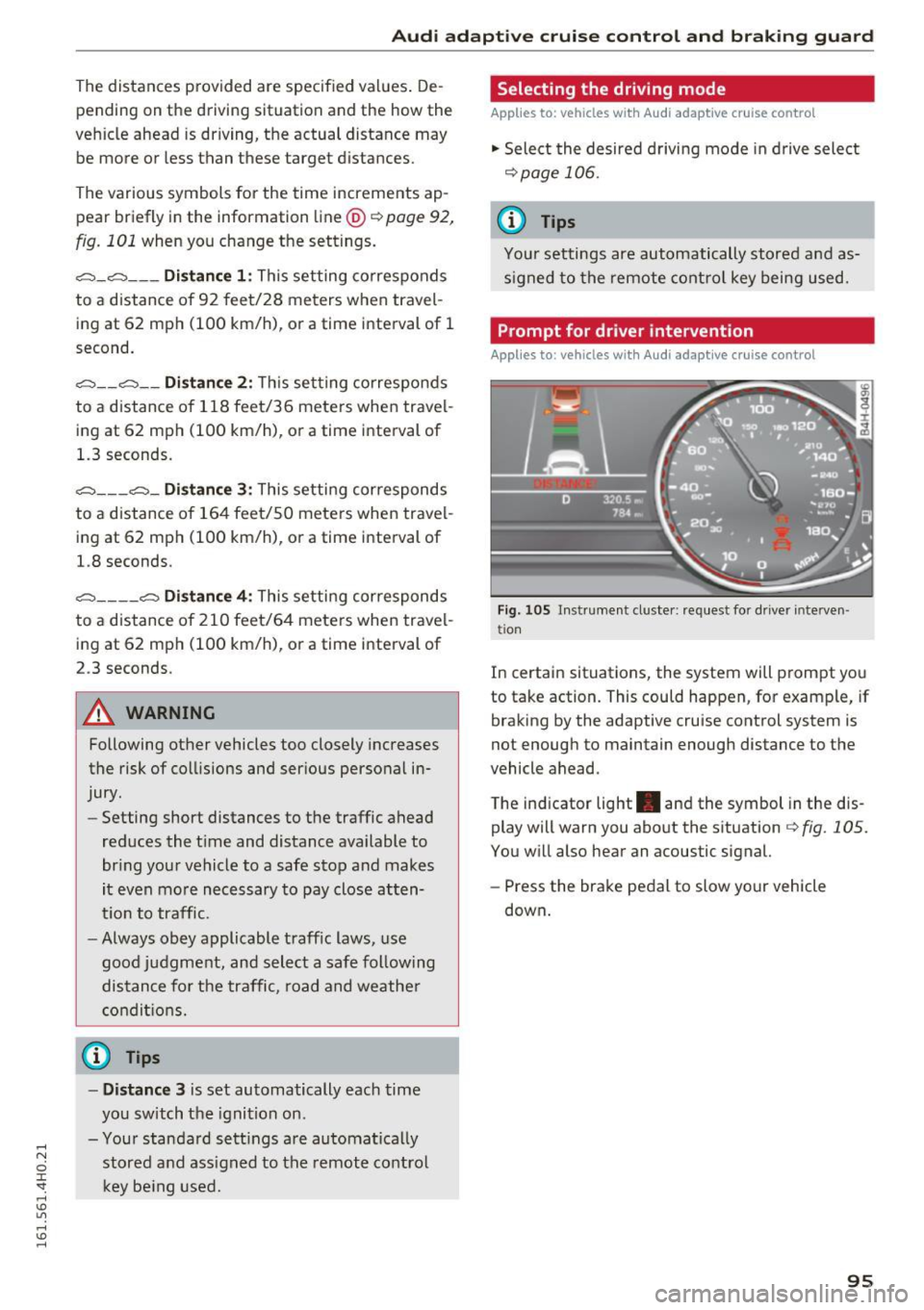
Fig . 105 Instrument cluste r: request for driver interve n
tio n
In certain situations, the system will prompt you
to take action. This could happen, for example, if
braking by the adaptive cruise control system is
not enough to maintain enough distance to the
vehicle ahead.
T he ind icator light . and the symbol in the dis
play will warn you about the situation~
fig. 105.
You will also hear an acoustic signal.
- Press the brake pedal to slow your vehicle
down .
95
Page 98 of 302
Audi adaptive cruise control and braking guard
Audi braking guard
Description
Applies to: vehicles w ith Aud i adapt ive c ru ise co ntro l
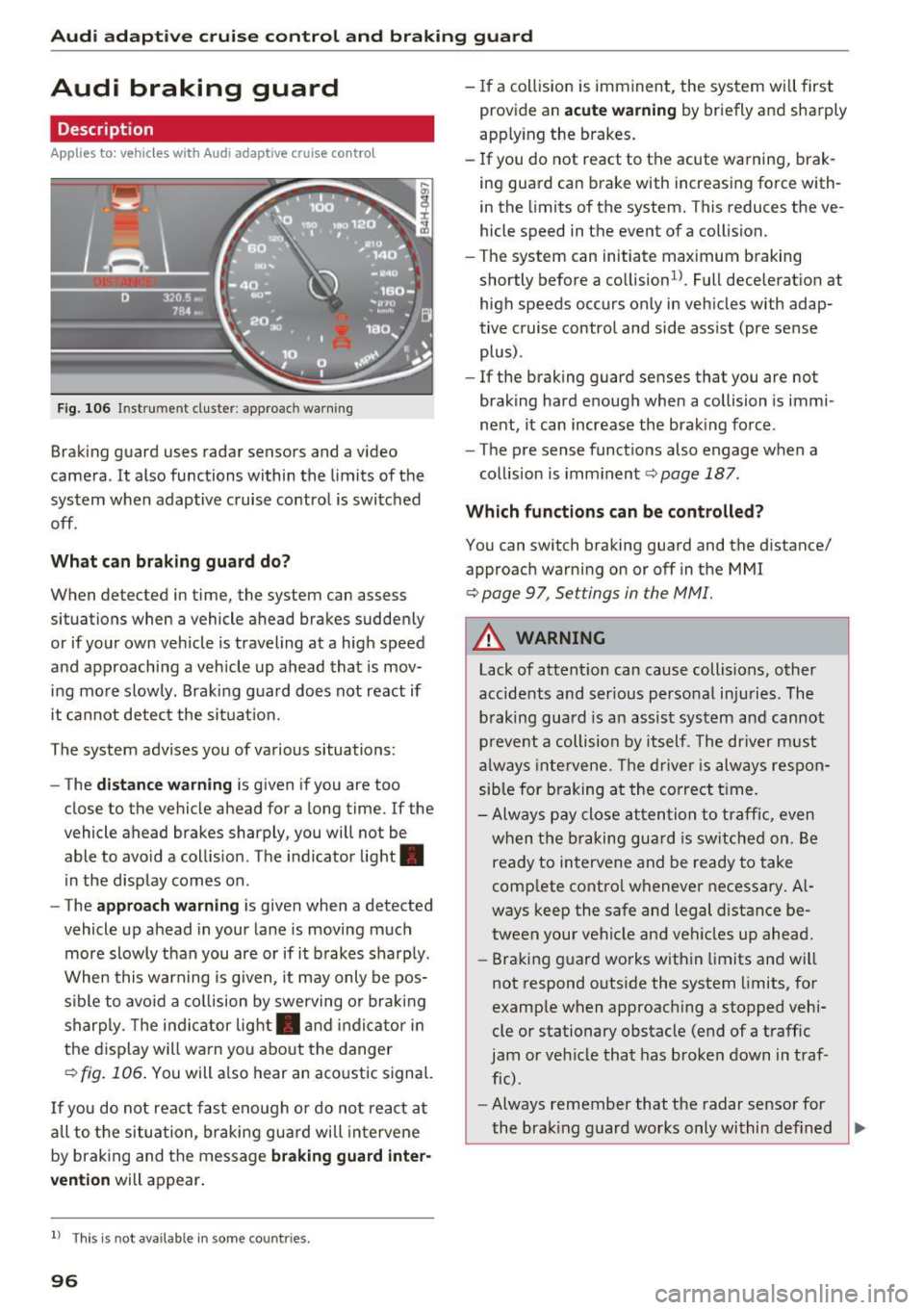
Fig. 106 Instrument cluster : approac h warning
Braking guard uses radar sensors and a video
camera. It also functions within the limits of the
system when adaptive cruise control is switched
off .
What can braking guard do?
When detected in time, the system can assess
situations when a vehicle ahead brakes suddenly
or if your own vehicle is traveling at a high speed
and approaching a vehicle up ahead that is mov
ing more slowly. Braking guard does not react if
it cannot detect the situat ion.
The system advises you of various situations:
- The
distance warning is given if you are too
close to the vehicle ahead for a long time. If the
vehicle ahead brakes sharply, you will not be
able to avo id a coll is ion. The indicator light.
in the display comes on.
- The
approach warning is given when a detected
vehicle up ahead in your lane is moving much
more slowly than you are or if it brakes sharply.
When this warning is g iven, it may only be pos
sible to avo id a collision by swerving or braking
sharp ly. Th e indicator light. and indicator in
the display will warn you about the danger
qfig. 106. You will also hear an acoustic signal.
If you do not react fast enough or do not react at
all to t he situation, braking guard will intervene
by braking and the message
braking guard inter
vention
will appear.
l) Thi s is not available in some countries.
96
-If a collision is imminent, the system will first
provide an
acute warning by briefly and sharply
app ly ing the brakes.
- If you do not react to the acute warning, brak
ing guard can brake with increasing force with
in the limits of the system. This reduces the ve
hicle speed in the event of a collision.
- The system can initiate maximum braking
shortly before a co llision
1
) . Full deceleration at
high speeds occurs only in vehicles with adap
tive cruise control and side assist (pre sense
plus) .
- If the braking guard senses that you are not
braking hard enough when a collision is immi
nent, it can increase the braking force .
- The pre sense functions also engage when a
collision is imminent
qpage 187.
Which functions can be controlled?
You can switch braking guard and the distance/
approach warning on or off in the MMI
¢ page 9 7, Settings in the MMI.
A WARNING
Lack of attention can cause collisions, other
accidents and serious personal injuries. The
braking guard is an assist system and cannot
prevent a collision by itself . The driver must
always intervene. The driver is always respon
sible for braking at the correct time.
- Always pay close attention to traffic, even
when the braking guard is switched on. Be
ready to intervene and be ready to take
comp lete control whenever necessary. Al
ways keep the safe and legal distance be
tween your vehicle and veh icles up ahead.
- Braking guard works within limits and will
not respond outside the system limits, for
example when approaching a stopped vehi
cle or stationary obstacle (end of a traffic
jam or vehicle that has broken down in traf
fic).
- Always remember that the radar sensor for
-
the brak ing guard works only within def ined ..,.
Page 115 of 302
positions, you must press the button on the se
lector lever
c:::> fig. 124 and/or press the brake
pedal.
You must press the brake pedal to engage a se lector lever position when the engine is runn ing
while the vehicle is stationary. The arrows
c:::> fig . 125 indicate when you need to press the
button on the selector lever.
The selector lever does not lock if you shift from D to R within one second. This a llows you to
"rock" the vehicle to free it when it is stuck.
P -Par k
The whee ls are loc ked in this pos it ion. On ly shift
into park when the vehicle is stationary
c:::> .&. . To
engage the P selector lever position, press the
button on the selector lever and shift into the P
position .
You can on ly shift out of park when the engine is
running and you are pressing the brake pedal.
Press the button on the se lector lever to release
the parking lock and se lect the desired selector
lever position .
P engages automatically when you switch the en
gine off while D, Sor R is engaged or in manual
mode.
I f you sw itch the engine off when N is engaged,
the transmission remains in N for approximately
30 minutes and then Pis engaged .
You must use the emergency re lease proced ure
to release the parking lock before tow ing the ve
hicle
c:::> poge 117.
R - Reverse
The reverse gear is engaged in this pos ition. On ly
select reverse when the vehicle is stat iona ry and
the eng ine is r unning at idle speed
c:::> ,&. . To en
gage the R selector leve r position, press the but
ton on the selector lever, press the brake pedal
and move the selector lever into the R position.
The back-up lights turn on when yo u select the R
se lector lever posit ion while the engine is run
ning.
Autom atic tran sm iss ion
N -Neutral
The tra nsmission is in idle in th is position. To en
gage the N selector leve r position, press the but
ton on the selecto r lever and shift into the N po
sition .
If you swi tch the eng ine off when N is engaged ,
the transmission remains in N for approximately
30 minutes and then Pis engaged.
You cannot se lect t he N pos it ion when the igni
t ion is swit ched off. When dr iv ing th rough an au
tomatic car was h, fi rst select the N position and
then switch the engine off
c:::> table on page 208 .
The veh icle cannot be lo cked when the se lector
lever is in the N position .
DIS -Position for driving forw ard
In the D/S position, the transmission can be op
erated either in the normal mode Dor in the
spo rt mode S. Yo u can only se lect the S se lector
lever posit ion when D is engaged . Move t he selec
tor leve r bac k to engage the S selector lever posi
tion . To select the D selector lever position again
when S is engaged, move the se lector lever back
c:::> .&. . To shift from N to D when traveling at
speeds below 1 mph (2km/h), press the brake pedal and select the D selector lever pos it ion
c:::> .&. .
In the norm al mode D, the transmission auto
matically selects the suitable gear ratio . It de
pends on engine load, vehicle speed and driving
style.
Se lect the
sport mode S for sporty driving . Th e
vehicle makes full use of the eng ine 's power.
Sh ift ing may become noticeable when accelerat
i ng .
The S se lector lev er position engages automati
ca lly when you select the dynamic mode in Audi
drive select.
A WARNING ,.___
- Never engage R or P while driving . It could
cause a crash .
113
Page 116 of 302
Automatic transmissio n
-Power is sti ll transmitted to the w heels
w hen the eng ine is r unning at idle. To pre
vent the veh icle from "creeping", you must
keep your foot on the brake in all selector
lever positions except P and N when the en
gine is runn ing . Do not inadvertently press
t h e accelerator pedal when the vehicle is
s tationa ry. Otherwise the vehicle will start
to move immediately. This cou ld happen
even if the parking brake is activated.
- Before opening the hood, se lect the P sele c
tor leve r pos ition and se t the park ing bra ke .
This reduces the risk of a crash . Always read
and follow the applicab le warnings
<=> page 220.
- Never get out of the driver's seat when the
engine is running.
- If you must get out of the vehicle, move the
selector lever securely into the P position
and apply the parking brake.
(D Tips
- If you un intent ionally shift in to the N selec
tor lever position whi le driving, ta ke your
foot off the accelerator pedal and wait for
the engine to slow down unt il it is idling be
fore yo u shift into D or S.
Driving tips
Th e gears shi~ automatically .
Starting from a stop
.. Press and hold the brake pedal.
.. Start the engine<=>
page 81 .
.. Press the button on the selector lever and se
l ect the D, 5 or R selector lever position
<=> page 112.
.. Wait a moment unti l the transmission shifts.
You w ill not ice a slight moveme nt when the
gear engages .
"' Release the b rake pedal and press the acce lera
tor pedal <=>,&. .
Stopping temporarily
.. Press the b rake pedal to stop the vehicle, for
example at a traff ic light. Do not press the ac
celerator pedal when do ing th is.
114
.. To preven t the vehicle from ro lling when yo u
start driving, set t he parking brake when stop
ping on large inclines¢,&. .
.. The parking brake will release a utomat ica lly
and the vehicle will start moving once you press
the acce lerato r pedal.
Parking
If the se lector lever is not in the P position whe n
yo u open the drive r's door, the vehicle cou ld roll.
The message
Transmission: Car may roll! Shift
to park!
appears.
.. Press an d hold the b rake peda l
c::> ,&..
.. Set the park ing brake.
.. To engage the P selector lever position, press
the button on the selector lever and shift into
the P position
c::> page 112 .
Under certain conditions such as driving in the
mountains or when towing a trailer, it may be
helpful to switch to manua l mode temporar ily to
shift
manually to adapt to the driving conditions
c::> page 115.
On slopes, act ivate the park ing brake first and
then move the selector lever to the P position .
This prevents too muc h stress from be ing placed
on the locking mechanism .
A WARNING
Read and fo llow all WAR NING S c::> .&. in Se
le ct ing a selec tor lever posi tion on p age 113.
- The vehicle can also ro ll when the eng ine is
s t o pped .
- Do no t press the acce le ra t o r pedal when
chang ing t he selec to r lever posit io n while
t he vehicle is s tat ionary and the engine i s
r u nning. This co uld result in a crash.
- Never e ngage R or P while driving.
It co uld
cause a crash.
- P owe r is still transmitted to the wheels
when t he e ngine is runni ng at idle . To pre
vent the vehicle from "creeping", yo u m ust
keep your foot on the brake in a ll selector
lever positions except P and N when the en
gi ne is running. Do not inadvertent ly press
the acce le rator peda l when the veh icle is
stat ionary. Otherwise t he vehicle will start
-
Page 118 of 302
![AUDI S8 2016 Owners Manual Automatic transmission
A WARNING
Please note that the wheels could spin on
slick or slippery roads when kick-down is ac
tive .
Transmission malfunction
[O] Transmission: please pre](/img/6/57611/w960_57611-117.png "AUDI S8 2016 Owners Manual Automatic transmission
A WARNING
Please note that the wheels could spin on
slick or slippery roads when kick-down is ac
tive .
Transmission malfunction
[O] Transmission: please pre")
Automatic transmission
A WARNING
Please note that the wheels could spin on
slick or slippery roads when kick-down is ac
tive .
Transmission malfunction
[O] Transmission: please press the brake pedal
and select the position again
Press the brake pedal and select the desired se
lector lever position aga in. You can then continue
driving .
[O] Transmission hot: please modify driving
style
The transmission temperature has increased sig nificant ly due to the sporty driving manner. Drive
in a less sporty manner until the temperature re
turns to the normal range and the indicator light
sw itches of .
Dt) Gearbox malfunction : you can continue driv
ing
There is a system malfunction in the transm is
sion. You may continue driving. Drive to your au
thorized Audi dealer or qualified repair facility
soon to have the malfunction corrected.
[0]/(i) Gearbox malfunction: you can continue
driving in D only until engine is off
There is a system malfunctio n in the transmis
sion. The transmission is switching to emergency
mode . If you turn the engine off, you will not be
ab le to select any other selector lever positions
after starting the engine again. Drive to your au
thor ized Audi dealer or qualified repair facility
immed iately to have the malfunction corrected .
[O] Gearbox malfunction: you can continue driv
ing (limited functionality)
There is a system malfunction in the transmis
sion. The transmission is switching to emergency
mode . This mode only shifts into certain gears or
will not longer shift at all. The engine may stal l.
Drive to your authorized Aud i dea ler or qualified
repair fac ility immediately to have the malfunc
tion corrected .
116
~Ii) Gearbox malfunction: no reverse gear
(you can continue driving)
There is a system malfunction in the transm is
sion. The transmission is switching to emergency
mode. This mode only shi fts into certain gears or
will not longer shift at all. You cannot engage the
reverse gear. Drive to your authorized Audi dealer
i mmediately to have the malfunction corrected.
Dt) Vehicle may roll! Cannot shift to P. Please
apply parking brake
- Th e parking lock was re leased using the emer
gency release~
page 117. Or
- Th e parking brake cannot engage automatical
ly. Drive to your authorized Audi dealer or quali
fied repair facility immediately to have the mal
function corrected.
Dt) Gearbox malfunction: Stop and shift to P
Do not continue dr iving . Se lect the P selector lev
er posit ion and see your authorized Audi dealer
or qualified repair facility fo r ass istance.
Page 119 of 302
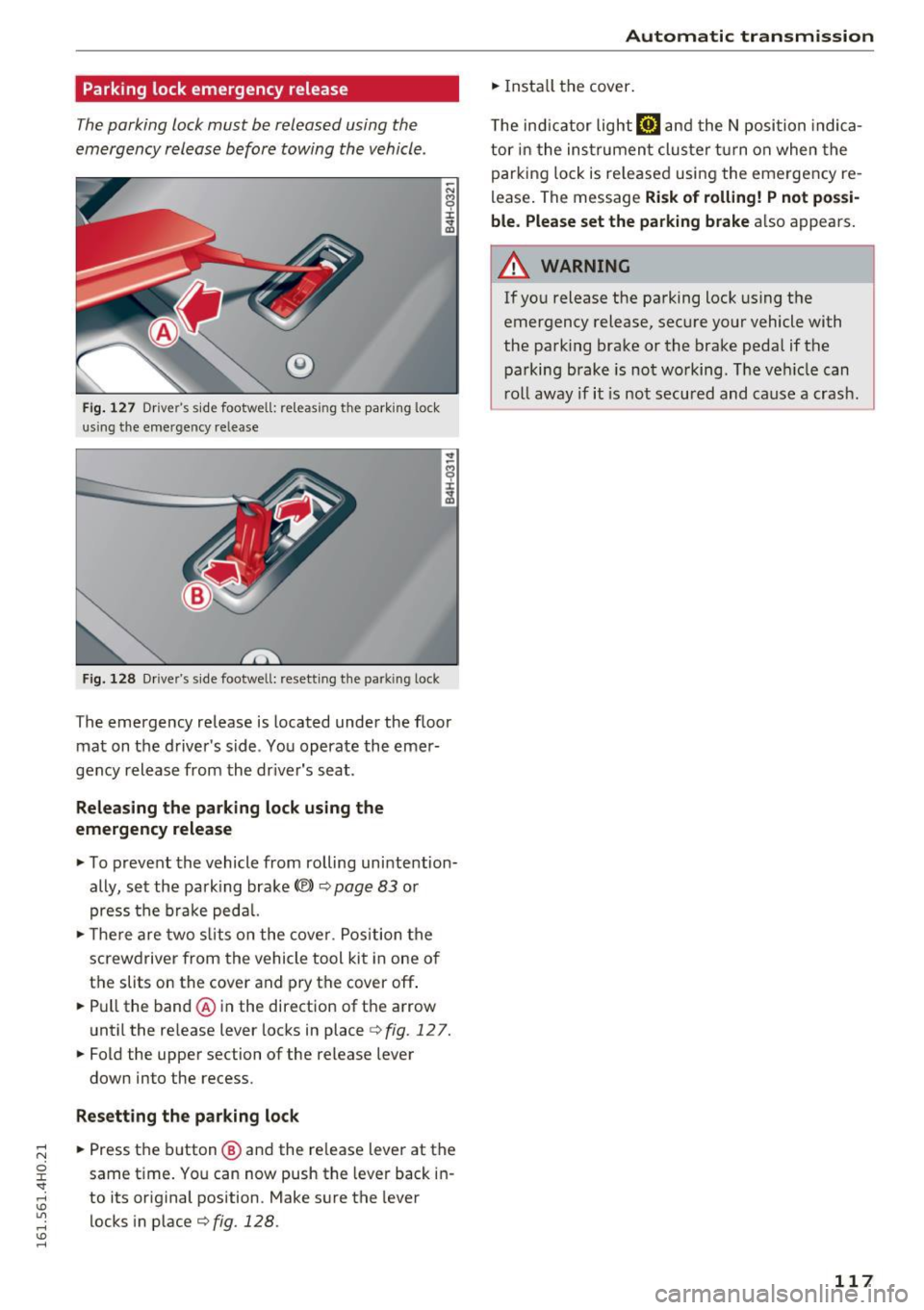
Parking lock emergency release
The parking lock must be released using the
emergency release before towing the vehicle .
®
Fig. 127 Dr iver's s ide footwell: releas ing the par king lock
us ing the eme rge ncy re lease
F ig . 128 D rive r's s ide foo twe ll: rese tt in g th e pa rking lock
The emergency release is located under the floor
ma t on t he d river's side . Yo u opera te the emer
gency release from the dr iver's seat .
Releasing the parking lock using the
emergency release
... To prevent the vehicle from rolling uni nte ntion
ally, set the pa rking brak e<®>
r=.> page 83 or
press the brake ped al.
... The re are tw o sli ts on t he cove r. Po sition the
s c rew driver from the vehicle tool kit i n one o f
the slits on the cover and pry the cover off .
... Pull the band@ in the direct ion of t he a rrow
unt il the re lease lever locks in place
r=.> fig . 127 .
... Fold the upper section of the release leve r
down into the recess.
Resetting the parking lock
... Press t he b utton @ and the re lease lever at the
same t ime . Yo u can now push the leve r back in
to its or iginal position . Make sure the lever
locks in p lace
<=.> fig. 128 .
Automatic transmission
... Insta ll the cover .
T he in dicator light@] and the N position indica
tor in the ins trument cluster t urn on when the
parki ng lo ck is re leased usi ng the eme rgency re
lease . The message
Risk of rolling! P not possi
ble. Please set the parking brake
a lso appears .
A WARNING
--
If you release the parking lock using the
emergency release, sec ure yo ur vehicle with
the parking brake or the brake peda l if the
p arking brake is not wo rking. The ve hicle can
r o ll away if i t is no t secured and cause a crash .
117
Page 192 of 302
Smart Technology
shared, please see your contract with the
wireless te lecommunications provider and the
"About Audi connect" tab in your vehicle's
MMI:
! MENUI button> Audi connect> About
Audi connect.
Electronic Stabilization
Control (ESC)
Description
ESC helps to improve road holding and vehicle
dynamics to help reduce the probability of skid
ding and loss of vehicle control. It works only
when the engine is running. ESC detects certain
difficult dr iving situations, including when the
veh icle is beginn ing to spin (yaw) out of contro l
and helps you to get the vehicle back under con
trol by se lectively braking the wheels, and/or re
ducing engine power and providing steering as
sistance to help hold the vehicle on the driver's
intended course. The indicator light
GI in the in
strument cluster blinks when ESC is taking action
to help you control the vehicle.
ESC has limitations. It is important to remember
that ESC cannot overcome the laws of physics. It
will not always be able to help out under all con
ditions you may come up against . For example,
ESC may not always be able to help you master
situations where there is a sudden change in the
coefficient of friction of the road surface. When
there is a section of dry road that is suddenly cov
ered with water, slush o r snow , ESC cannot per
form the same way it wou ld on the dry surface. If
the vehicle hydrop lanes (rides on a cushion of wa
ter instead of the road surface), ESC wi ll not be
able to he lp you steer the vehicle because contact
with the pavement has been interrupted and the
vehicle cannot be braked or steered. During fast cornering, part icularly on w inding roads, ESC
cannot always deal as effective ly w ith difficult
driving situat ions than at lower speeds . When
towing a trailer, ESC is not able to help you re
ga in control as it would if you were not towing a
trai ler.
Always adjust your speed and driving sty le to
road, traffic and weather conditions. ESC cannot
override the vehicle's physical limits, increase the
190
available traction, or keep a vehicle on the road if
road departure is a result of driver inattention.
Instead, ESC improves the possib ility of keeping
the vehicle under control and on the road during extreme maneuvers by using the driver's steering
inputs to help keep the vehicle going in the in
tended direction . If you are traveling at a speed
that causes you to run off the road before ESC
can provide any assistance, you may not exper i
ence the benefits of ESC.
ESC is switched on all the time. In certa in s itua
tions when you need less traction, you can sw itch
off ASR by press ing the button above
~ page 192, fig. 186 the selector lever. Be sure
to switch ASR on again when you no longer need
l ess traction.
The following systems are integrated in the ESC:
Anti-lock braking system (ABS)
ABS prevents the wheels from locking up when
braking. The vehicle can still be steered even dur
i ng hard braking . Apply steady pressure to the
brake pedal. Do not pump the pedal. A pulsing in
the brake pedal indicates that the system is help
i ng you to brake the vehicle.
Brake assist system
The brake assist system can decrease braking dis
tance. It increases braking power when the dr iver
presses the brake pedal quickly in emergency sit
uations. You must press and hold the brake pedal
u nt il the situation is over. In vehicles with adap
tive cruise control*, the brake assist system is
more sensitive if the d ista nee detected to the ve
hicle ahead is too sma ll.
Anti-slip regulation (ASR)
ASR reduces engine powe r when the dr ive wheels
begin to spin and adapts the force to the road
cond itions. This makes it easier to start, acceler
ate and drive up hills.
Electronic differential lock (EDL)
The EDL brakes wheels that are spinning and
transfers the drive power to the other wheels.
This function is not available at higher speeds .
Page 194 of 302

Smart Technology
Switching on and off
ESC turns on automatically when you start the engine.
Fig. 186 Center console w it h ESC O FF but ton
ESC level s
Sport mode on
The following situations are exceptions where it
may be useful to switch on sport mode to allow
the wheels to spin:
- Rocking the vehicle to free it when it is stuck
- Driving in deep snow or on loose ground
- Dr iving with snow chains
Sport mode off
Behavior
The ESC and ASR stabilization functions The full stabilization function of the ESC
are limited ¢
A:,.. and ASR is ava ilable again .
Operation Press the 00 button. Press
the[!] button again.
Indicator II turns on. II turns off .
lights
Driver mes- Stabilization control (ESC): Sport Warn- Stabilization control (ESC): On
sages ing! Reduced stability
A WARNING
You should only switch sport mode on if your
dr iv ing abilities and road condit ions perm it .
- The stabilization function is limited when
sport mode is sw itched on. The driving
wheels cou ld spin and the vehicle could
swerve, espec ially on s lick o r sli ppery road
s urfac es.
Sport mode cannot be sw itched on if t he
cruise cont rol system* or the adaptive cru ise
cont rol* is switched on.
Braking
What affects braking efficiency?
New brake pads
During the first 250 miles (400 km), new brake
pads do not possess the ir full braking effect, they
have to be "broken in" first ¢
.1:,.. The break-in pe
riod can be considerably longe r fo r vehicles with
192
ceramic brake rotors*. You can compensate for
this slightly reduced braking power by push ing
harder on the brake pedal. Avoid heavy braking
lo ads during the break-in period.
Operating conditions and driving habits
The brakes on today's automobiles are still sub
j ect to wear, depending large ly on operating con
ditions and driving habits¢,& . On vehicles that
are either driven mostly in stop-and-go city traf
fic or are driven hard, the brake pads should be
checked by your authorized Audi dealer more of
ten than specified in the
Warranty & Mainte
nance booklet .
Failure to have your brake pads
inspected can result in reduced brake perform
ance.
On steep slopes, you should use the brak ing ef
fect of the engine. T his way, you prevent unnec
essary wea r on the brake system. If you mus t use
your brakes, do not hold the brakes down contin-
u ously. Pump th e brakes at intervals. ..,.
Page 196 of 302
Smart Techn olo gy
- Under certain climatic and operating condi
tions such as passing through water, driving
in heavy rain or after washing the vehicle,
the effectiveness of the brakes can be re
duced . In w inter, ice can accumulate on the
brake pads, linings, discs and drums . Care
fully apply brakes fo r a tes t. Brakes w ill dry
and ice coatings wi ll be cleaned off after a
few careful brake applications .
- Driving for an extended pe riod of time on
salt-covered roads witho ut using your
brakes can also affect bra king efficiency.
Clean off accumulated salt coating from
brake discs and pads with a few carefu l
brake applications.
- If you damage the front spoiler, or if you in
stall a different spoiler, be sure the air flow
to the front brakes is not obstructed. Other
wise the brake system could overheat reduc
ing the effectiveness of the entire brake sys
tem.
- Failure of one brake circuit will impair the
braking capability result ing in an increased
stopp ing distance. Avoid driving the vehicle
and have it towed to the nea rest Aud i dealer
or qualified workshop.
- Never let the vehicle roll to a stop with the
engine shut off.
- If the brake booster is not working, the
brake pedal must be pressed considerably
harder to make up for the lac k of booster
assistance.
Electromechanical power
assist, dynamic steering
The electromechanical power assist helps the
driver when steering.
Power steering adapts electronically based on
the vehicle speed.
Ind icator light s and messages
• Stee ring defective! St op th e ve hicle
If th is ind icator light turns on and stays on and
this message appears, the power steer ing may
have fa iled.
194
Do not continue driving. See your authorized
Audi dealer or other qualified repair facility for
ass istance .
,Ion Steering : System faul t You can c ontinue
dri ving
If the indicato r light turns on and the message
appears, the steeri ng may be more diff icult to
move o r more sensitive than usu a l. T he steer ing
whee l may also be at an angle when driving
straight.
D rive slowly to your a uth orized Aud i dea ler or
qualified wo rkshop to have the malfunct ion cor
rected.
1;r,ij D ynamic steering : Init ializing
If this driver message appears and the indicator
light is flashing on the instrument panel, dynam
i c steer ing* is being re initialized . After starting
the engine, t he steering wheel w ill move slightly.
Re- initializa tion might be necessary if the steer
i ng whee l was moved hard to the left and right
while the vehicle was not moving . The display
goes out as soon as initialization is comp lete .
D rive slowly to your a uth orized Aud i dea ler or
qualified wo rkshop to have the mal func tion cor
rected.
.&_ WARNING
Have the dynamic steering * system malfunc
tion repaired as soon as possible by an au
thorized Audi dealer or qualif ied workshop -
risk of acc ident!
(D Tips
If the . or ,Ion indicator light only stays on
for a short time, you may continue driving.
- The dynamic steering* stabi lity systems are
not ava ilable in the event of a system mal
function.
- For additiona l information on dynamic
steering *, refer to~
page 106 .
Page 204 of 302
Trail er mode
Trailer mode
Driving with a trailer
General information
Your Audi was designed primarily for passenger
transportation.
If you plan to tow a trailer, please remember that
the additional load will affect durability, econo
my and performance.
Trailer towing not only places more stress on the
vehicle, it also calls for more concentration from the driver.
For this reason, always follow the operating and
driving instructions provided and use common
sense.
(D Note
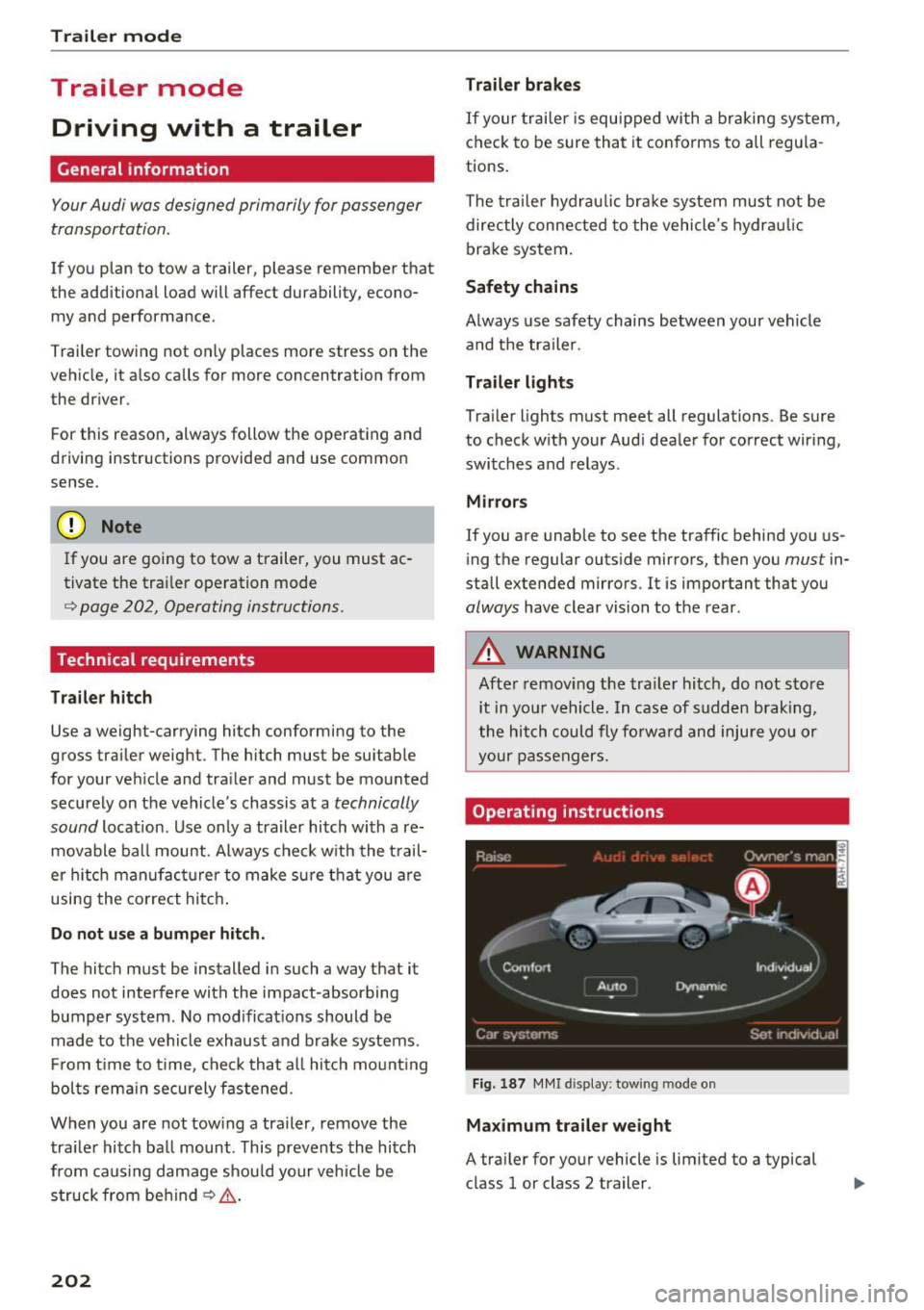
If you are going to tow a trailer, you must ac
tivate the trai ler operation mode
¢ page 202, Operating instructions.
Technical requirements
Tr ailer hitch
Use a weight-carrying hitch conforming to the
gross trailer weight. The hitch must be suitable
for your veh icle and trailer and must be mounted
securely on the vehicle's chassis at a
technically
sound
location . Use only a trailer hitch with a re
movable ball mount . Always check w ith the t rail
er h itch man ufact urer to make sure that you are
using the co rrect hitc h.
Do not u se a bumper hitch .
The hitch must be installed in such a way that it
does not interfere with the impact-absorbing
bumper system . No mod ificat ions should be
made to the vehicle exhaust and brake systems .
F rom t ime to t ime, check that a ll hitch mo unt ing
bolts rema in securely fastened.
When you are not tow ing a traile r, remove the
tra iler hitch ball mount. This prevents the hitch
from caus ing damage should your vehicle be
struck from behind
¢ ,&. .
202
Trailer b rakes
If your trailer is equipped with a braking system,
check to be sure that it co nforms to all regu la
tions.
The tra iler hydrau lic brake system must not be
directly connected to the vehicle's hydrau lic
brake system .
Safety chains
Always use safety chains between your vehicle
and the tra iler.
Trailer light s
Trailer lights must meet all regulations. Be sure
to check with your Aud i dealer for correct wir ing,
switches and relays .
Mirror s
If you are unable to see the traffic behind you us
ing the regular outside mirrors, then you
must in
stall extended mirrors . It is important that you
always have clear vision to the rear.
A WARNING
Afte r remov ing the tra iler hitch, do not sto re
i t in you r vehicle. In case of s udden braking,
the hitch could fly fo rwa rd and injure you or
your passengers.
Operating instructions
Fig. 1 87 MMI d ispl ay: tow ing mode o n
Maximum traile r weight
A tra iler for your vehicle is lim ited to a typical
class 1 or class 2 trailer.