oil reset AUDI TT 2012 Owners Manual
[x] Cancel search | Manufacturer: AUDI, Model Year: 2012, Model line: TT, Model: AUDI TT 2012Pages: 132, PDF Size: 89.43 MB
Page 7 of 132
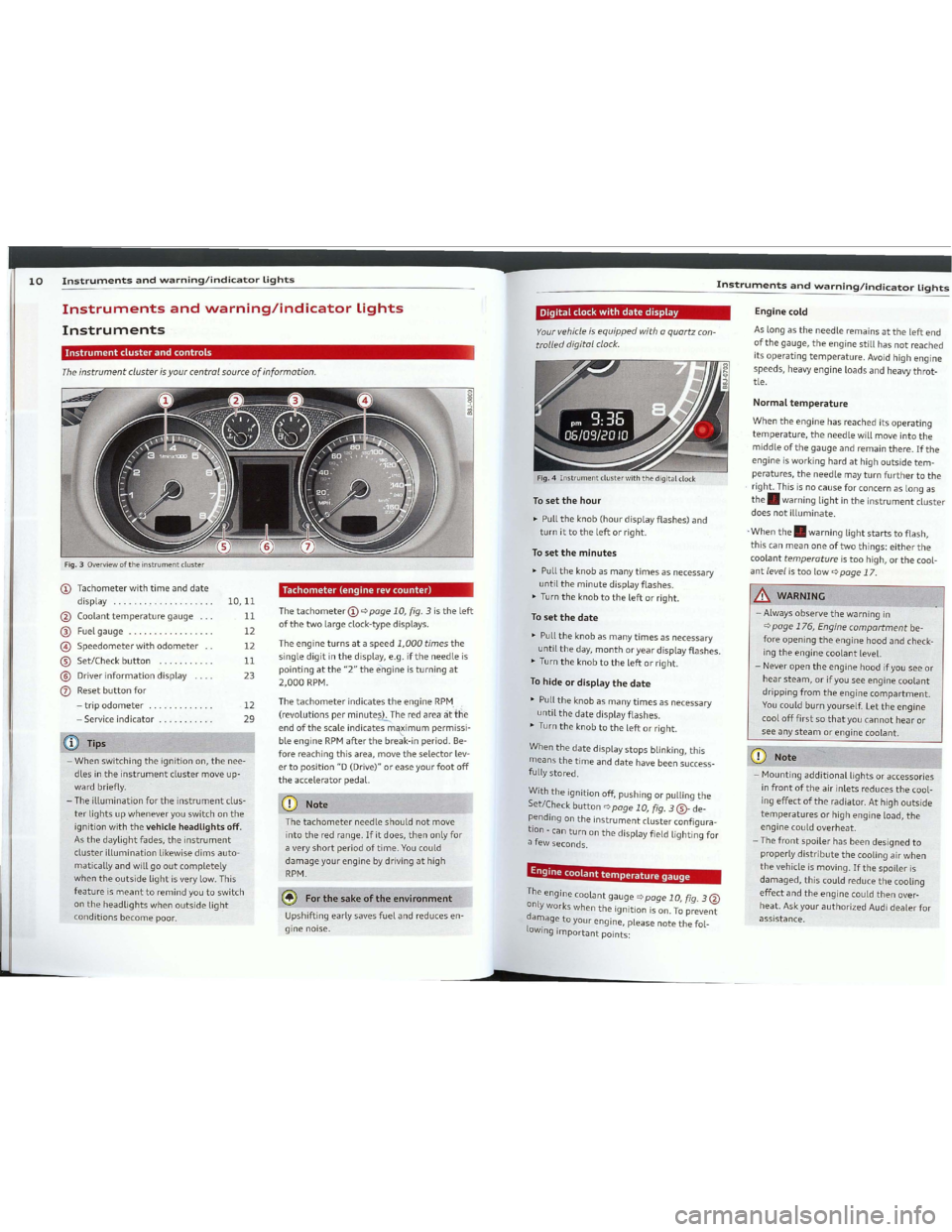
Downloaded from www.Manualslib.com manuals search engine 10Instrumentsandwarning/indicatorlightsInstrumentsandwarning/indicatorlights
Theinstrumentclusterisyourcentra/sourceofinformation.
Instrumentdusterandcontrols:
EnginecoId
Aslongastheneedleremainsattheleftend
ofthegauge,theenginestill hasnotreached
its
operatingtemperature.Avoidhighengine
speeds,heavyengineloads andheavythrot
tle.
.&..WARNING
- Always
observethewarningin
qpage176,Enginecompartmentbe
fore opening
theenginehood andcheck
ing
theenginecoolantlevel.
- Never
opentheenginehoodifyouseeor
hearsteam,orifyouseeenginecoolant
dripping fromtheenginecompartment.
Youcouldburnyourself. Lettheengine
coolofffirstsothatyoucannothearor
seeanysteamorenginecoolant.
Normaltemperature
Whentheenginehasreached itsoperating
temperature,theneedlewillmove intothe
middleofthegaugeandremainthere.Ifthe
engineisworking hardathighoutsidetem
peratures,theneedlemayturnfurthertothe
.right. Thisisnocauseforconcern aslongas
the.warninglightintheinstrumentcluster
doesnotilluminate.
.
Whenthe.warning lightstartstoflash,
this can
meanoneoftwothings:eitherthe
coolanttemperatureistoohigh,orthecool
antLevetistoolowqpage 17.
[CDNote--1
-Mountingadditionallightsor accessories
infrontoftheair inlets reducesthecool
ing
effectoftheradiator. Athighoutside
temperaturesorhighengineload,the
enginecouldoverheat.
-Thefrontspoilerhas beendesignedto
properlydistributethecooling airwhen
thevehicleismoving.Ifthespoileris
damaged,thiscouldreducethecooling
effectandtheenginecouldthenover
heat.AskyourauthorizedAudidealerforassistance.
Digitaldockwithdatedisplay
Yaurvehicleisequipped withaquartz can
trolled digitalclack.
Tosetthehour
~Pulltheknob(hour display flashes)and
turnittotheleftorright.
Tosettheminutes
~Pulltheknob asmanytimesasnecessary
until
theminutedisplayflashes.
~Turntheknobtotheleftorright.
Tosetthedate
En .grnecoolanttemperaturegauge
Fig.4Instrumentdusterwiththedigital dock
~Pulltheknobasmanytimesasnecessary
until
theday,monthoryeardisplay flashes.
~Turntheknobtotheleftorright.
Tohideordisplaythedate
~Pulltheknobasmanytimesasnecessary
until
thedatedisplayflashes.
~Turntheknobtotheleftorright.
When
thedatedisplaystopsblinking, this
meansthetimeanddatehavebeensuccess
fullystored.
With
theignition off,pushingorpullingthe
Set/Checkbuttonqpage 10,fig.3@-de
pending on
theinstrumentclusterconfigura
tion -can
turnonthedisplay fieldlighting for
a few seconds.
The .
engmecoolantgaugeqpage10,fig.3@
onlyworks whentheignitionison.Topreventdamageto.
your englne,pleasenotethefol-
lowingimportantpoints:
CDNote
Thetachometerneedleshouldnotmove
into
thered range.Ifitdoes,thenonly for
a very
shortperiodoftime.Youcould
damageyour enginebydrivingathigh
RPM.
~Forthesakeoftheenvironment
Upshifting earlysavesfuelandreducesen
gine noise.
Tachometer(enginerevcounter)
ThetachometerCDqpage 10,fig.3istheleft
ofthetwolarge clock-type displays.
The
engineturnsataspeed1,000timesthe
singledigitinthedisplay, e.g.iftheneedleis
pointingatthe"2"theengineisturningat
2,000RPM.
ThetachometerindicatestheengineRPM..
(revolutionsperminute&:,.Theredarea,it'ttle
endofthescale indicatesm~imumpermissi
ble
engineRPMafterthebreak-in period.Be
forereachingthisarea, movetheselectorlev
ertoposition"D(Drive)"oreaseyourfootoff
theacceleratorpedal.
12
29
10,11
11
12
12
11
23
iTips
- When switchingtheignition on,thenee
dles
intheinstrumentclustermove up
ward briefly.
-Theillumination fortheinstrumentclus
terlightsupwheneveryouswitch onthe
ignition withthevehicLeheadlightsoff.
Asthedaylightfades,theinstrument
clusterillumination likewisedimsauto
maticallyandwillgooutcompletely
whentheoutsidelightisvery low.This
featureismeanttoremind youtoswitch
ontheheadlightswhenoutsidelight
conditionsbecomepoor.
Instrumentsandwarning/indicatorLights
Instruments
Fig.3Overviewoftheinstrumentduster
CDTachometerwithtimeanddate
display .
@Coolanttemperaturegauge.
®Fuelgauge.
@Speedometerwithodometer..
@Set/Checkbutton.
®Driverinformation display
(])Resetbuttonfor
- trip
odometer.
- Service indicator .
p
Page 15 of 132

Downloaded from www.Manualslib.com manuals search engine N'"
'":i;cc
Driverinformationsystem
~Ifnecessary,scrollbyselectingandactivat
ing
thesymbolfor"Nextpage"or "Previous
page".
Whenyou haveselectedtheComputermenu
andactivateditbypressingtheIResetlbut
ton,twocomputerlevelsappear(computerl
andcomputer2).Now youhavetoselectthe
level youwantusingtherocker switchandac
tivateitwiththeIResetlbutton.
EngineoiLtemperature
dispLay
~Withtheignitionswitchedon,pressthe
IRE5ETIbutton9page25,fig.10repeated
lyuntiltheengineoiltemperaturedisplay is
shown.
Appliestovehicles: withenginetemperaturecontrol dis
play
Fig.
1SDisplay: engineoiltemperaturedisplay
Theenginehasreacheditsoperatingtemper
aturewhentheengineoiltemperatureisbe
tween176oF(80oC)and248oF(120oC)un
dernormaldriving conditions. Theengineoil
temperaturemaybehigherifthereisheavy
engineloadandhightemperaturesoutside.
Thisisnotacauseforconcernaslongasthe
•9page16orll9page20warninglight
inthedisplaydoesnotflash.
Se
lec- Selected
func- Meaning
tion tion
bar
>CursorCurrentSelection
Check mark
SelectedorFunc-
,/tionactive
BoxNotselected
0
Triangle point- Previouspage
Â.ing
up
T
Triangle paint-
ing down
Fig.14Display: MenuSettings,computerselected
(page1)
TheDriverInformationSystemsettingsare
menu-guided.
Selectingsettings
Select yoursettingsasfollows:
~Pressthe~eseiJbutton.TheStartmenu
appears9page25,fig.11.
~Presstherocker switchuntilSetisdis
played.
~PresstheŒeseiJbutton.Allthemenusap
pear.
~Pressthek . .
. rocersWltchuntllthedesiredlineIShighlighted (cursor)9fig.14....PressthelKes@button.
--rsontheleftinfrontofthese-
curs orappea
lected values.
.
the~eseiJbutton,youactivateBypressing lt'on
youmadeorconfirmthevaluestheseec1 • • • •tSelectedfunctionsareIdentlfled
wlth
youse.
h k
m ark
orare carriedoutdirectly.
a c ec
Meaning sof
thesymbolsinthedisplay:
~--~®
Fig.13Display:Startmenu
Navigatingthemenu..'
Fig.12Wiper
lever:Controls forthe menu display
Usetherocker switch anthewindshield wiper
lever
andtheIResetlbuttonto opera tethe
menuandcarryoutinquiriesandselections.
Toopenthemenu
~Pressthe1Resetlbutton@untilthemenu
display
9fig.13appears
Enteringandconfirming
~Pressthe1Resetlbutton@.
ReturningtatheStartmenu
~Pressthe1Resetlbuttonlongerthan2 sec
ondstoreturnfromanymenuleveltothe
Startmenu.
~Selectionsandsettings\..
~Presstherocker switch®toreachamenu
display. Theswitch
isoperatedthesameas
thedisplay (up/down).
Using
therocker switch, youcanselectthe
menusinthedisplayorchangesettings.A
1Resetlbutton@androckerswitch®
9fig.12functions:
26Driverinformationsystem
Il
Each displaytypeintheStartmenucontainsa
submenuwithadditionaloptions.
SetClock
9page27
Computer
9page27
Acoustic parkassist*
9page81
Speedalarm(speedwarning)
ê;>page32
Language(6languages)
9page27
Units (distance,fuelconsump-
tion,temperature)
9page27
Tirepressuremonitoring
9page216
Laptimer*
ê;>page30
Lighting*
9page45
Wiper(service position)
9page53
Window
9page44
Doors(unlockingandlocking
mode,forexampleAuto-lock)
9page37,9page37
Check Service
9page29
Chassisnumber*
9page240
Engineoiltemperature*
9page27,9page29
Registered keys
9page35
MenuoffAllofthemessagesshowninve-
hicles
withoutmenudisplay ap-
pearonthedisplayscreen.
p
Page 16 of 132

Downloaded from www.Manualslib.com manuals search engine 28Driverinformationsystem
Efficiencyprogram
Description
Appliestovehicles:withtripcomputerwithefficiency
program
Fig.
16Display: efficiency program
~PresstheIRE5ETIbutton@qpage25,
fig.larepeatedlyuntiltheefficiency pro
gram
appearsinthedisplay.
The efficiency programcanhelp you
touse
less fuel.
Itevaluatesdriving informationin
referencetofuelconsumptionandshowsoth
erequipmentinfluencingconsumptionaswell
as shift
recommendations.Fuel economy
messagesqpage28provide tipsforeffi
cient driving.
The efficiency
programusesdistanceand con
sumptiondatafromtripcomputer1.Ifthe
dataaredeletedintheefficiency program,
thosevaluesarealsoresetintripcomputer1.
Otherequipment
Appliestovehicles:withtripcomputerwithefficiency
program
Fig.
17Display:otherequipment
~Intheefficiency program,pressthefunc
tion selection switch
qpage25,fig.10@
repeatedly untiltheotherequipmentap
pearsinthedisplay.
Otherequipmentthatiscurrentlyaffecting
fuel consumption
islistedintheefficiency
program. Thedisplay showsup
tothreeother
[email protected]
themostfuelislistedfirst.Ifmorethanthree
itemsusingfuelareswitched on,theequip
mentthatiscurrently usingthemostfuelis
displayed.
A
scale@alsoshowsthecurrenttotalcon
sumptionofallotherequipment.
Fueleconomymessages
Appliestovehicles:withtripcomputerwithefficiency
program
Fig.
18Display:fueleconomy message
Fueleconomymessagesaredisplayed when
fuel
consumptionisincreasedbycertain con
ditions.
Ifyoufollowthesefuel economy mes
sages,youcanreduce yourvehicle'sconsump
tionoffuel.Themessag;!sappearautomati-'\:cally andareonly displayedintheefficiency
program. Thefuel economy
messagesturnoff
automaticallyafteracertain periodoftime.
~Toturnafuel economymessageoffimme-
diately
afterit appears, presstheIRE5ETI
buttonqpage25,fig.10@,or
~Pressthefunctionselection switch
qpage25,fig.10@.
iTips
- Once youhave
turnedafuel economy
messageoff,itwill onlyappearagain af-
teryouturntheignition onagain.~
-
_Thefueleconomymessagesarenotdis
played
inevery instance,butratherinin
tervals overaperiod
oftime.
ServiceintervaLdispLay
Theservice intervaL dispLayreminds youwhen
yaur
nextservice isdue.
Fig.19Sectionofinstrumentcluster: Serviceinterval
display
The service interval displaydetermineswhen
a service procedure
isneededforyour vehicle.
Itoperatesintwostages:
-Service reminder: Beforereaching aservice
event, this
messageappearsbriefly when
you switch on
theignition: Dilchangein
1230mi(2000km)150days.
-Serviceevent:Whenthedateforserviceis
reached,themessageDilchange!appears.
Itisaccompaniedbyanaudible signal.
Display
remainingdistance
Bybriefly pullingtheknob,0qpagela,
fig.3,thedistance/timeremainingtothe
nextservicedateisdisplayed withtheignition
on. The
distance/timeremainingisupdated
every300miles(500km).
Ifthedistance/timeremainingiscalled upon
new vehicles
orafterservice hasbeen per
formed,
theduedateisalways showninthe
display withDilchangein----- mi(km)--
days within
thefirst300miles(500km).
Ta
resetthedisplay
The dealership performingtheserviceresets
thedisplay whentheservice hasbeen com
pleted. Thedisplay
isresetsasfollows:
-Switchtheignition on.
Driverinformationsystem
-Pulltheknob0qpagela,fig.3, this mes
sageappears: Dilchange!
- Pull
theknob untilthedisplay Dilchangein
-----mi(km)---daysappearsinthedisplay.
Iftheresetbuttonisnotpulled within5
seconds,thedisplayresetmodecloses.
Tips
-Ifamalfunctionispresent(red symbol),
thedistance remainingcannotbecalled
up.
-
Donotresetthedisplay between service
intervals. Doingsowill result
inanincor
rect display.
-
Ifthebatteryisdisconnected,theServ
ice
IntervalDisplay valuesareretained.
-
Ifservice wasnotperformedatthecor
rect
timeortheservice interval display
was
notresetafterservice wasper
formed,
theadditionalmileage drivenor
theelapseddayswillbeshown asnega
tive
numbers.
BoostandengineoiL
temperatureindicator
Appliestovehicles:withboost pressure indicator
Fig.
20Display: boostandengineoiltemperature indicator
~Withtheignitionswitched on,pressthe
button-arrow-repeatedlyuntilthedisplay
isshown.
Boostpressureindicator(boost)
Abar graphthatbegins ontheleftand fillsin
towardtheright indicatestheengine'scur
rentload(meaningthecurrentboostpres
sure).
Page 17 of 132

Downloaded from www.Manualslib.com manuals search engine Driverinformationsystem
~_--®
mTips
Eventhoughyourvehicleisequippedwith
a
speedwarningsystem,youshouldstill
watchthespeedometertomakesureyou
arenotdrivingfasterthanthespeedlimit.
Settingspeedwarning1c:>page32.
Speedwarning2
Storing warning 2
isrecommendedifyoua/
wayswanttoberemindedofacertainspeed,
forexamplewhenyou aretravelinginacoun
trythathasageneralmaximumspeedlimit,
or ifyou
donotwanttoexceed aspecified
speedforwintertires.
Thespeedwarning2 symbol,[il(USAmod
els)/[il(Canada models)appearsinthedis
play
whenyou exceedthestoredspeedlimit.
Unlike warning
1,itwillnotgooutuntilthe
vehiclespeeddropsbelowthestoredspeed
limit.
Settingspeedwarning 2c:>page32.
about3mph(3km/hl.Atthesametime,a
warning
symbolappearsinthedisplay.
The
speedwarningsystemhastwowarning
thresholdsthatfunctionindependentlyof
eachotherandthathavesomewhatd ifferent
purposes:
Speedwarning1
Youcan usespeedwarning 1tosetthemaxi
mumspeedwhileyouaredriving. Thissetting
willremainineffectuntilyouturnofftheigni
tion,
assumingthatyou havenotchangedor
resetthesetting.
.Thespeedwarningsymbol[i(USAmodels)/
ri(Canadamodels)inthewarning 1display
appearswhenyou exceedthemaximum
·speed.Itgoesoutwhenthespeedfallsbelow
thestoredmaximumspeed.
Thespeedwarningsymbolwillalsogooutif
thespeedexceedsthestoredmaximumspeed
bymorethanabout25mph(40km/hlforat
least10seconds.Thestoredmaximumspeed
isdeleted.
Overview
Speedwarningsystem
Fig.23Display: laptimeevaluation
~Toevaluatelaptimes,pressandholdthe
1RE5ETIc:>page30,fig.21®buttonforap
proximately 2
seconds.Thedisplayshows
thefastestlap"+",theslowestlap"-"and
theaveragelaptime"0".
~Tocontinuetimingforadditionallaps,press
thewiper switch@.
~Toresetthetimertozero,pressandhold
theIRE5ETIbuttonagainforapproximately
2seconds.
~Toswitchthelaptimeroffcompletely,
press
the1RE5ETIbuttonbriefly.
«DTips
- Saved laptimescannotbeindividually
deletedfromthetotalresults.
-Thesaved laptimervalueswillnotbe
lostafterturningtheignition off.
Evaluatingtimesandcontinuingor
resettingtiming
Appliestovehicles:withlaptimer
Youcaneva/uatethefastest,s/owestand
average /aptimes.
Iftimingispaused,you cancontinuei,tlater
even ifyou switchtheignition off.
The
speedwarningsystemwarnsthedriver if
he
exceedsa previouslystoredmaximum
speed.A warningtonewillsoundassoonas
thevehidespeedexceedsthesetspeedby
Thespeedwarningsystemhelpsyouto keep
yourdrivingspeedbelowasetspeedlimit.
-
Fig.21Controls
Callingupthelaptimerandtiming1
Fig.22Display:Laptimer
Appliestovehicles:withlaptimer
Callingupthelaptimer
~Pressthe1RE5ETIc:>fig.21®buttonuntil
thelaptimerC:>fig.22appears.
Timinglaps
~Tostarttiming,presstheuppersectionof
thewiper [email protected]
isshowninline
~Tostoptiming,pressheuppersectionof
thewiperswitch@agaif\.Thisalsostarts
timingthenextround. Theprevioustime
movesonelineup,firsttoline(3)andthen
[email protected]@showsthecurrentlap
number,forexampleLAP5.
Displayingintermediatetimeandpausingtiming
~Todisplay anintermediatetime,pressthe
[email protected]
termediatetimeappearsinline
~Topausetiming,pressthelowersectionof
thewiperswitch@again.
~Tocontinuetiming,presstheuppersection
ofthewiperswitch@.~
@Tips
Whenthelaptimerstopwatchisrunning,
you cancall up
thetripcomputerinforma
tion with
the1RE5ETIbutton.
Laptimer
Introduction
Appliestovehicles:withlaptimer
.&.WARNING---Pleasedèvoteyour fullattentiontodriv-
ing.
Asthedriver, youhavecompletere
sponsibility
forsafetyintraffie. Onlyuse
thefunctionsinsuchawaythatyou always
maintaincompletecontroloveryourvehi
deinalltrafficsituations.
Engineoiltemperatureindicator
Iftheengineoiltemperatureisbelow140oF
(60oC),the'I::;r.symbolfollowed bythreehy
phens"---"andtheocunitisshown.
Theenginehasreacheditsoperatingtemper
aturewhentheengineoiltemperatureisbe
tween176oF(80oC)and248oF(120oC)un
dernormaldrivingconditions. Theengineoil
temperaturemaybehigherifthereisheavy
engineloadandhightemperaturesoutside.
Thisisnotacauseforconcernaslongasthe
•-:>page16orIlc:>page20warninglight
inthedisplaydoesnotflash.
Youcanrecordandevaluatelaptimeswith
thelaptimerinthedisplayc:>page30,
fig.22.Thetimeismeasuredinminutes,sec
ondsand1/10seconds.The hoursarealso
shownwhenthelaptimeexceeds60minutes.
Themaximumindividualmeasurementis99
hours.
Il
Page 18 of 132
Downloaded from www.Manualslib.com manuals search engine lil'
1
Driverinformationsystem
Speedwarning1:settingaspeedlimit
Warningthreshold1issetbythe button,
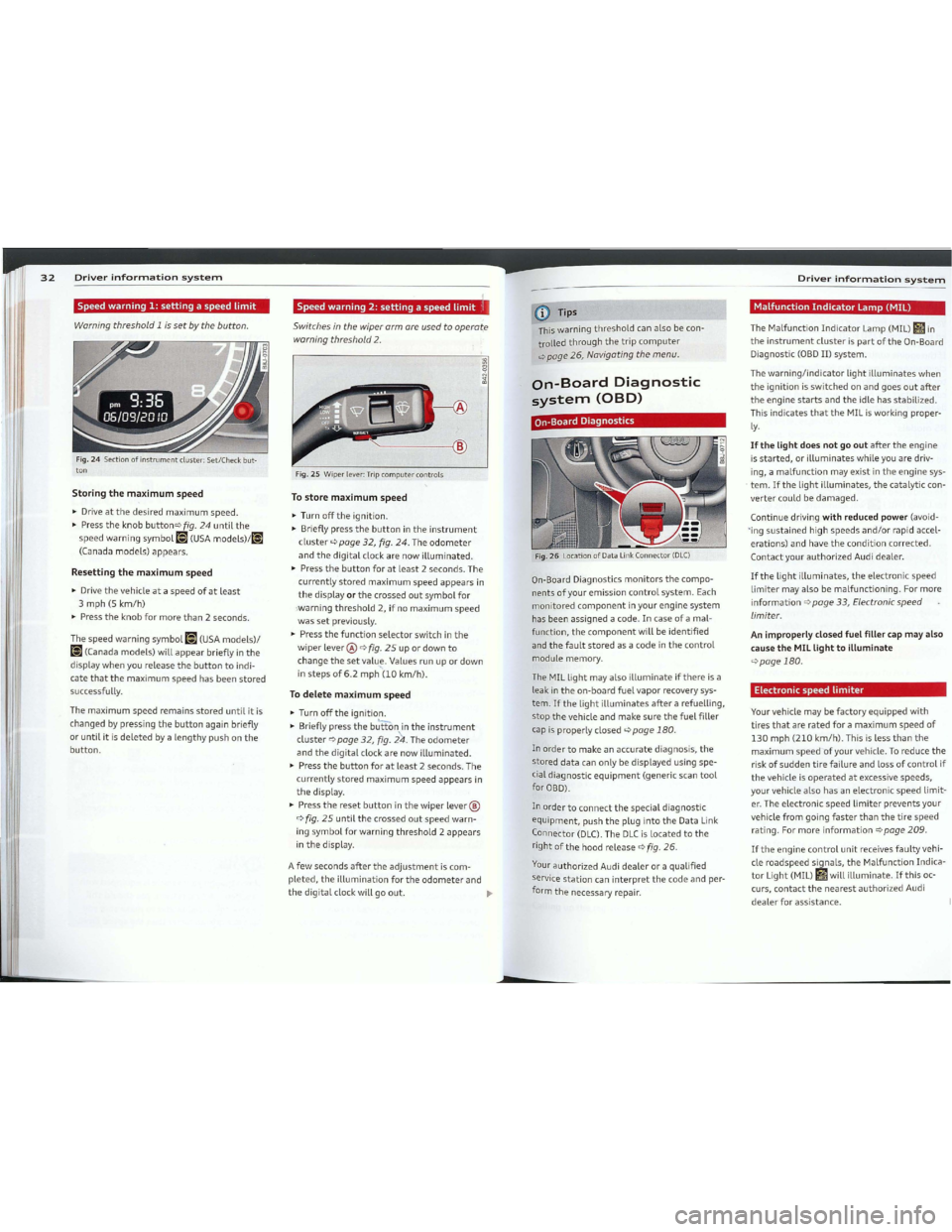
Fig.24Sectionofinstrumentcluster: Set/Check button
Storingthemaximumspeed
~Driveatthedesiredmaximumspeed.
~Presstheknobbuttonqfig.24untilthe
speedwarningsymbolli](USAmodels)/li]
(Canadamodels)appears.
Resettingthemaximumspeed
~Drivethevehicleataspeedofatleast
3mph(Skm/hl
~Presstheknobformorethan2seconds.
Thespeedwarningsymbolli](USAmodels)/
ri(Canadamodels)willappearbrieflyinthe
displaywhenyoureleasethebuttontoindi-
catethatthemaximumspeedhasbeenstored
successfully.
The
maximumspeedremainsstoreduntil itis
changedbypressingthebuttonagainbriefly
oruntilitisdeletedbyalengthypushonthe
button.
Speedwarning2:settingaspeedlimit'1
Switchesinthewiperarmareused toopera te
warning threshold 2.
------1@
Fig.2SWiperlever:Tripcomputercontrols
Tostoremaximumspeed
~Turnofftheignition.
~Brieflypressthebuttonintheinstrument
clusterqpage32,fig.24.Theodometer
andthedigital clockarenowilluminated.
~Pressthebuttonforatleast2seconds.The
currentlystoredmaximumspeedappearsin
thedisplayorthecrossedoutsymbolfor
'warningthreshold2,ifnomaximumspeed
wassetpreviously.
~Pressthefunctionselectorswitchinthe
[email protected]
changethesetvalu~.Values runupordown
instepsof6.2mph(10km/hl.
Todeletemaximumspeed
~Turnofftheignition.
~Brieflypressthebuttonintheinstrument
clusterqpage32,fig.24.Theodometer
andthedigitalclockarenowilluminated.
~Pressthebuttonforatleast2seconds.The
currentlystoredmaximumspeedappearsin
thedisplay.
~Presstheresetbuttoninthewiper lever®
qfig.25untilthecrossedoutspeedwarn
ingsymbolforwarningthreshold2appears
inthedisplay.
A
fewsecondsaftertheadjustmentiscom
pleted,theilluminationfortheodometerand
thedigital clockwillgoout.~
-
CDTips
This warningthresholdcanalsobecon
trolledthroughthetripcomputer
qpage26,Navigatingthemenu.
On-BoardDiagnostic
system(OBD)
On-BoardDiagnostics
Fig.26LocationofData LinkConnector(DLC)
On-Board Diagnosticsmonitorsthecompo
nentsofyouremissioncontrolsystem.Each
monitored
componentinyourenginesystem
hasbeenassigneda code. Incaseofamal
function,
thecomponentwill beidentified
and
thefaultstoredasacodeinthecontrol
module memory.
The
MILlight mayalsoilluminateifthereisa
leak
intheon-boardfuelvaporrecovery sys
tem.Ifthelightilluminatesafterarefuelling,
stopthevehicleandmakesurethefuelfiller
cap
isproperly closedqpage180.
Inordertomakeanaccuratediagnosis,the
storeddatacanonlybedisplayed usingspe
cialdiagnosticequipment(genericscantool
forOBD).
Inordertoconnectthespecialdiagnostic
equipment,pushtheplugintotheDataLink
Connector(DLC).TheDLCislocatedtothe
rightofthehoodreleaseqfig.26.
YourauthorizedAudidealeroraqualified
service
stationcaninterpretthecode andper
form
thenecessary repair.
Driverinformationsystem
MalfunctionIndicatorLamp(MIL)
The Malfunction
IndicatorLamp(MIL)Gilin
theinstrumentclusterispartoftheOn-Board
Diagnostic
(OBDII)system.
Thewarning/indicatorlightilluminateswhen
theignitionisswitchedonandgoesoutafter
theenginestartsandtheidle hasstabilized.
This indicates
thattheMILisworking proper
ly.
Ifthelightdoesnotgooutaftertheengine
isstarted,orilluminateswhileyouaredriv
ing, a
malfunctionmay existintheenginesys
tem.Ifthelightilluminates,thecatalytic con
vertercouldbedamaged.
Continue drivingwithreducedpower(avoid
'ing
sustainedhighspeedsand/orrapid accel
erations)andhavetheconditioncorrected.
ContactyourauthorizedAudidealer.
Ifthelightilluminates,theelectronicspeed
limitermayalsobemalfunctioning. Formore
informationqpage33,Electronicspeed
limiter.
AnimproperlyclosedfuelfillercapmayaLso
causetheMILLighttoilluminate
qpage180.
Electronicspeedlimiter
Vourvehicle maybefactoryequippedwith
tires
thatareratedforamaximumspeedof
130mph(210km/hl.Thisislessthanthe
maximumspeedofyourvehicle.Toreducethe
riskofsuddentirefailureandlossofcontrolif
thevehicle isoperatedatexcessivespeeds,
yourvehiclealsohasanelectronicspeedlimit
er. The
electronicspeedlimiterpreventsyour
vehicle
fromgoingfasterthanthetirespeed
rating. Formoreinformationqpage209.
Iftheenginecontrolunitreceivesfaultyvehi
cle
roadspeedsignais,theMalfunction Indica
torLight(MIL)!ilwillilluminate.Ifthisoc
curs,
contactthenearestauthorizedAudi
dealerforassistance.
Page 42 of 132
Downloaded from www.Manualslib.com manuals search engine ~---180OntheroadOntheroad--------------------------------_--..:-=---=~=--=-==
Potentialmalfunctions
Therangeatwhichthesensorsstarttomeas
ureisabout:
2feet(0.60m)
S
feet(1.60m)
Tatheside
Centerrear
Fortheparkingassisttooperate,thesensors
mustbekeptcleanandfreeofice.
&.WARNING
-Sensarshave blindspotsinwhichabjects
cannotbedetected.Payspecialattention
Whenthedistanceislessthanlfoot(0.30
ml.thetonebecomescontinuous.Atthis
pointyoushouldstopbacking up.
Please
notethatlowobjectsalreadysignalled
byawarning candisappearfromthesystem's
detectionrangeandwillnotcontinuetobe
signalled.
Ifa warningbuzzersoundsfor afewseconds
whentheignitionisswitchedon,thereis a
systemmalfunctianwiththeacoustic parkas
sist.
Ifthemalfunctionpersistsuntiltheigni
tion
isswitchedoff,therewillbenoacoustic
warningatthenextattempttoactivatethe
system.Havetheproblemcorrected.
Activation
Thereisnoconfirmationtonewhenreverse
gearisengagedifthereisasystemmalfunc
tian.
The parkingassistisactivatedwhenreverse
gearisengaged.Abrieftoneconfirmsthat
thesystemisactivated.
chimescanbeadjustedthroughthemenudis
play
qpoge 25.
Backingup
Distance warningwhenbackingupstarts
whenanobstacleisdetectedintherangeof
!heparkassistsystem.Asthedistancede
creases,
thetimeintervalbetweentheaudible
tonesbecomesshorter.
Aeoustie parkassist givesawarning obout
obstocles behindthevehicle.
Description
The rear acoustic parkassist(4-channel
acousticparkassist)determinesthedistance
ofthevehiclefromanobstacleusing ultra
sonic
sensors.Thesensorsareintherear
bumper. The
volumeandthepitchofthe
Appliestavehicles:with4-channel acousticparkassist
Acousticparking
system
Rearacousticparkassist
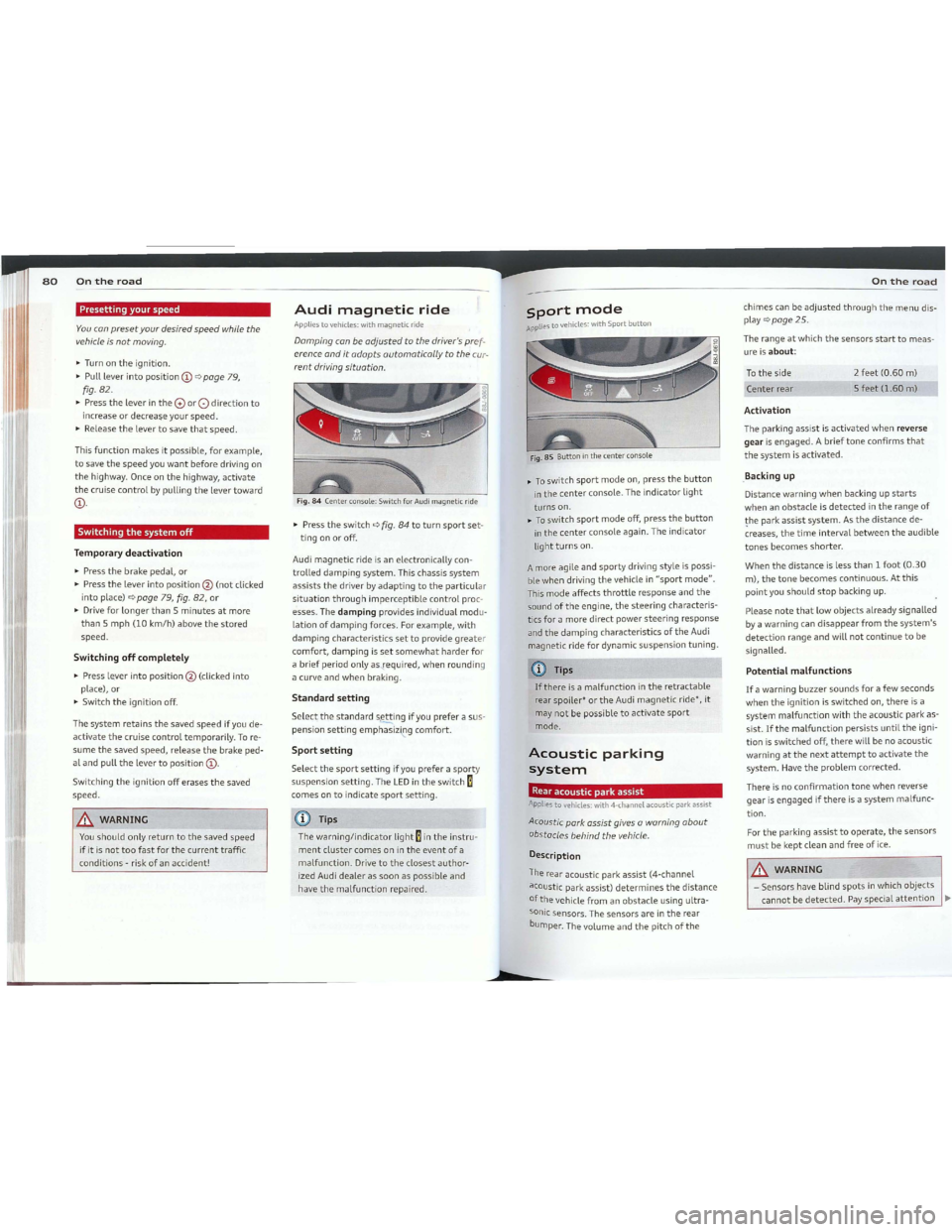
~Toswitchsportmodeon,pressthebutton
inthecenterconsole. Theindicatorlight
turnson.
~Toswitchsportmodeoff,pressthebutton
inthecenterconsoleagain.Theindicator
light
turnson.
Fig.85Buttoninthecenter console
CDTips
Ifthereisamalfunctionintheretractable
rear spoiler*ortheAudimagneticride*, it
may
notbe possibletoactivatesport
mode.
A
more agile
andsportydrivingstyleispossi
ble when driving
thevehicle in"sportmode".
Thismodeaffectsthrottleresponseandthe
soundoftheengine,thesteeringcharacteris
tics
foramoredirectpowersteeringresponse
andthedampingcharacteristicsoftheAudi
magnetic ride
fordynamicsuspensiontuning.
sportmode
APpliestavehicles:withSportbutton
Fig.84Center console: SwitchforAudimagnetic ride
Audimagneticride
Appliestavehicles:withmagnetic ride
IDTips
Thewarning/indicatorlightEintheinstru
mentclustercomesonintheeventofa
malfunction.Drivetotheclosestauthor
izedAudidealerassoonaspossibleand
havethemalfunctionrepaired.
Damping conbeadjusted tothe driver's pref
erence ond
itadapts automaticolly totheeur
rentdriving situation.
~Presstheswitchqfig.84toturnsportset
tingonoroff.
Audi
magneticrideisanelectronically con
trolleddampingsystem.Thischassissystem
assiststhedriverbyadaptingtotheparticular
situationthroughimperceptiblecontrolproc
esses.Thedampingprovides individual modu
lationofdampingforces.Forexample,with
dampingcharacteristicssettoprovidegreater
comfort,dampingissetsomewhatharderfor
abriefperiodonlyas--required,whenrounding
a curve
andwhen braking.
Standardsetting
Selectthestandards~ingifyoupreferasus
pensionsettingemphasiz~gcomfort.
Sportsetting
Selectthesportsettingif youpreferasporty
suspensionsetting.TheLEDintheswitchE
cornes ontoindicatesportsetting.
&.WARNING
Youshouldonlyreturntothesavedspeed
ifitisnottoofastforthecurrenttraffic
conditions -risk
ofanaccident!
~Turn ontheignition.
~Pullleverintoposition@qpoge 79,
fig.82.
~PresstheleverintheCVor0directionto
increaseordecrea~eyourspeed.
~Releasethelevertosavethatspeed.
Temporarydeactivation
~Pressthebrakepedal,or
~Pressthelever intoposition@(notclicked
into place)
qpage79,fig.82,or
~DriveforlongerthanSminutesatmore
thanSmph(10km/hlabovethestored
speed.
Switchingthesystemoff
Presettingyourspeed
Youconpresetyour desiredspeedwhile the
vehicle
isnotmoving.
Thisfunctionmakesit possible,forexample,
tosavethespeedyouwantbeforedriving on
thehighway. Onceonthehighway, activate
thecruisecontrolbypullingthelevertoward
@.
Switchingoffcompletely
~Pressle.verintoposition@(clicked into
place), or
~Switchtheignition off.
The
systemretainsthesavedspeedif you de
activatethecruisecontroltemporarily.Tore
sumethesavedspeed,releasethebrake ped
alandpullthelevertoposition@.
Switchingtheignitionofferasesthesaved
speed.
b
Page 110 of 132

Downloaded from www.Manualslib.com manuals search engine 216Tiresand\NheelsTiresand\Nheels217
Tirepressure
monitoringsystem
GeneralnotesApptiestovehicles:withtirepressuremonitoringsystem
Eachtire,includingthespare(ifprovided),
shouldbecheckedmonthlywhencoldandin
flatedtotheinflationpressurerecommended
bythevehiclemanufactureronthevehicle
placard
ortireinflationpressurelabel.(Ifyour
vehiclehastiresofadifferentsizethanthe
sizeindicatedonthevehicleplacardortirein
flationpressurelabel,youshoulddetermine
thepropertireinflationpressureforthose
tires.)
Asanaddedsafetyfeature,yourvehiclehas
beenequippedwithatirepressuremonitoring
system(TPMS)thatilluminatesa lowtire
pressuretelltalewhenoneormoreofyour
tiresissignificantlyunder-inflated.According
ly,whenthelowtirepressuretelltaleillumi
nates,youshouldstopandcheckyourtiresas
soonaspossible,andinflatethemtothe
properpressure.Drivingonasignificantlyun
der-inflatedtirecausesthetiretooverheat
andcanleadtotirefailure.Under-inflational
soreducesfuelefficiencyandtiretreadlife,
andmayaffectthevehicle'shandlingand
stoppingability.
PleasenotethattheTPMS isnotasubstitute
forpropertiremaintenance,anditisthedriv
er'sresponsibilitytomaintaincorrecttire
pressure,evenifunder-inflationhasnot
reachedtheleveltotriggerilluminationofthe
TPMSlowtirepressuretelltale.
Yourvehiclehasalsobeenequippedwitha
TPMS
malfunctionindicatortoindicatewhen
thesystemisnotoperatingproperly.The
TPMSmalfunctionindicatoriscombinedwith
thelowtirepressuretelltale.Whenthesys
temdetectsamalfunction,thetelltalewill
flashforapproximatelyoneminuteandthen
remaincontinuouslyilluminated.Thisse
quencewillcontinueuponsubsequentvehicle
start-upsaslongasthemalfunctionexists.
Whenthemalfunctionindicatorisilluminat
ed,thesystemmaynotbeabletodetector
signallowtirepressureasintended.TPMS
malfunctionsmayoccurfora varietyofrea
sons,includingtheinstallationofreplace
mentoralternatetiresorwheelsonthevehi.
cle
thatpreventtheTPMSfromfunctioning
properly. AlwayschecktheTPMSmalfunction
telltaleafterreplacingoneormoretiresor
wheelsonyourvehicletoensurethatthere
placementoralternatetiresandwheelsallow
theTPMStocontinuetofunctionproperly.
Tire pressure indicator appears •
Appliestovehicles:withtirepressuremonitoringsystem
Thetirepressure indicatorintheinstrument
c/uster informs you
ifthetire pressureistoo
LoworifthereisasystemmaLfunction.
Fig.1S6Display: Systemmalfunction
UsingtheABSsensors,thetirepressuremoni
toringsystemcomparesthetiretreadcircurn
ferenceandvibrationcharacteristicsofthein
dividualtires.Ifthepressuredecreasesinone
ormoretires,thisisindicatedintheinstru
mentclusterwithawarningsymbolganda
messageqfig.155.The drivermessageinthe
displaygoesoutafter5seconds.Thedriver
messagecanbedisplayedagainbypressing
the[CHECKIbutton®qpage10,fig.3.Ifon
lyonetireisaffected,thedisplaywillindicate
itsposition.
Thetirepressuremonitoringmustberesetin
themenudisplayeachtimethepressuresare
adjusted(e. g.whenswitchingbetweenparti
alandfullloadpressure)orafterchangingor
replacing atireonyourvehicleqpage218.
Voucanfindtherecommendedtirepressures
foryourvehicleonthelabelonthedriver's
door pillar
qpage202.
Tiretreadcircumferenceandvibrationcharac·
teristicscanchangeandcauseatirepressure
warningif:
_thetirepressureinoneormoretiresistoo
low,
-
thetirehasstructuraldamage,
_thetirepressurewaschanged,wheelsrotat
edorreplacedbuttheTPMSwasnotreset
qpage218.
Warning symbols
[D]Lossofpressureinatleastonetireq/D,.
Checkthetireortiresandreplaceorrepairif
necessary. The
indicatorlightgintheinstru
mentclusteralsoilluminatesqpage13.
Check/correctthepressuresofallfourtires
andresetTPMSinthemenudisplay.
~(TirePressureMonitoringSystem)Tire
pressure!Systemmalfunction.IflDmap
pearsafterswitchingtheignitiononorwhile
drivingqfig.156andtheindicatorlightgin
theinstrumentclusterblinksforapproxi
matelyoneminuteandthenstayson,thereis
a
systemmalfunction.Seeyourauthorized
Audidealerassoonaspossible.
AWARNING
-Ifthetirepressureindicatorappearsin
theinstrumentclusterdisplay,oneor
moreofyourtiresissignificantlyunder
inflated.Reduceyourspeedimmediately
andavoidanyhardsteeringorbraking
maneuvers.Stopassoonaspossibleand
checkthetiresandtheirpressures.In
fla
tethetirepressuretotheproperpres-
sureasindicatedonthevehicle'stire
pressurelabelqpage202.Drivingona
significantlyunder-inflatedtirecauses
thetiretooverheatandcanleadtotire
failure.Under-inflationalsois likelyto
impairthevehicle'shandlingandstop
ping ability.
-
Thedriverisresponsibleformaintaining
thecorrecttirepressures.Youmust
checkthetirepressuresregularly.
-
Undercertainconditions(suchasaspor
tydrivingstyle,winterconditionsorun
paved
roads),thepressuremonitorindi
catormaybedelayed.
- AskyourauthorizedAudidealerif run
flattiresmaybeusedonyourvehicle.
Your vehicle
registrationbecomesinvalid
if
yàuusethesetireswhennotpermit
ted.Damagetoyourvehicleoraccidents
couldalsoresult.
-Ifyouswitchbetweenstandardandrun
flattires,anauthorizedAudidealeror
qualifiedworkshopmustreprogramthe
controlmodule.
1Tips
- The
tirepressuremonitoringsystem
stopsworkingwhenthereis an ESP/ABS
malfunction.
-Usingsnowchainsmayresultin asystem
malfunction.
-Tireswiththeidentification"AD"or"RD"
have
beenspeciallymatchedwithyour
Audi.Werecommendusingonlythese
tiresbecausetheymeetthehighest
standardsregardingsafetyanddriving
characteristicswhenusedcorrectly. Your
authorizedAudidealerwillgladlypro
vide you
withmoreinformation.
Page 117 of 132

Downloaded from www.Manualslib.com manuals search engine 230Fusesandbulbs
Fusesandbulbs
Electricalfuses
Replacingfuses
Fusesthathaveblawn willhavemetalstrips
thathave burned thraugh.
Fig.173Endfaceofinstrumentpanel:removing cover
plate toaccessfuses
Fig.174Left sideofenginecompartment:fusecover
Fusecoverontheleftendfaceoftheinstrumentpanel
~Switchofftheignitionandtheelectrical
componentaffected.
~Carefully prythefusecoverofftheinstru
mentpanelusingtheignitionkeyora
screwdriver
qfig.173.
~Checkthefuselisting onthenextpagesto
findoutwhichfusebelongstothecompo
nentwhichhasfailedqpoge231,FuseLo
cation,InstrumentPonelleft.
~Removetheblownfusewiththeplastic clip
provided. Theclip
islocatedontheholderin
thefusebox.
~Replace ablownfuse(recognizablebythe
meltedmetalstripinside) withafuseofthe
someamperage.
~Firmlysnapthecover backontotheinstru
mentpanelface.
Fusecoverinenginecompartment
~Switchtheignitionandtheaffectedcon
sumeroff.
~Unlatchthefusecover,pushthetwoslides
forwardqfig.174.
~Findoutwhichfusebelongstotheequip
mentwhichstoppedworkingqpoge232,
Fuse location,
leftsideofengine comport
ment.
~Removetheplasticframitsretainerinthe
fuseboxcover(leftfaceendoftheinstru
mentpanel),place itonthefuseinquestion
andpull itout.
~Ifthefuseisburnedout(recognizableby
meltedstripsofmetal),replace itwith a
new
fuseofthesomerating.
~Replacethefusecover.
~Pushthetwoslidestotherearqfig.174.
Installthefusecover carefullytoprevent
waterfromentering.
Thevariouselectricalcircuitsareprotectedby
fuses.Thefusesareclusteredinacentralized
unit. The
unitislocatedbehindthefacepanel
attheendoftheinstrumentpanel.
Vouarewelladvisedtokeep asupplyofspare
fusesinyourvehicle. Fuseswiththepraper
ampereratingsareavaitableatyourauthor
ized Audi dealer.
.&.WARNING
DonotrepairfusesanCleverreplace a
blown
fusewithonethath'àsahigheramp
rating.This cancausedamagetotheelec
tricalsystemandafire.
CDNote
Ifa newfuseburnsoutagainaftershortly
have youhave installed it,have
theelectri
cal
systemcheckedbyyourauthorizedAu
didealer.
FuseLocation,InstrumentPanelleft
Fig.175Fuse carrier behindtheinstrumentpanelend
face, cover removed
50meoftheequipmentitemslistedareop
tional oronly available on
certainmodelcon
figurations.
Note
thatthefollowingtableis accurateat
thetimeofgoingtapressandissubjectta
change.Intheeventofdiscrepancies,thela
belontheinsideofthecoveralwaystakes
precedence.
Thepowerseatsarepratectedbycircuit
breakers, whichautomaticallyresetaftera
few
secondsaftertheoverloadhasbeenrem
edied.
No.
EquipmentAmps
Engine relay,fueltankcontrol
1unit,
Airbag Offlight,light10switch (switch illumination), di-
agnosticconnector
2ABS,ASR,ESP,brakelight5
switch
3
AF5headlight([eft) 5
Fusesandbulbs23
No.EquipmentAmps
Oillevelsensor(extendedmain-
tenanceinterval)(WIV),tire
pressuremonitoringsystem,
4switchforElectronic
Stability
S
Program (ESP),
AFSheadlights
(controlunit),A/Csystem(pres-
suresensor),backuplight
switch
Automaticheadlightrangecon-
Strol,AFSheadlight(right)15/10manualheadlightrangecon-
trol,halogenheadlights
ControlunitforCANdatatrans-
6fer(gateway),electromechani-5
calsteering,automatietrans-
.missionshiftgate
Acoustic ParkAssist,automatic
dipping interiorrearviewmir-
7 ror,
garagedooropener,heata-5
ble windshieldwashernozzles,
washerpump,winddeflector
relay (Roadster)
8 Haldex
clutch/Haldexclutch5/10(TT5)
Control
unitAudimagneticride 5
Airbag
controlunit5
11Mass airflowsensor,crankcaseSilOheating
12Doorcontrolunit(centrallock-10ingdriver/passenger)
13Diagnosticconnector10
14Rainsensor,automatictrans-5
missionshiftgate
15Rooflight(interiorlighting) 5
16AlCsystem(controlunit)10
17Tirepressuremonitoringsys-
5
tem(controlunit)
18Notused
19Notused
20Notused
21Fuelinjectors(gasoline engine)10
22Winddeflector(Roadster)30
23Horn20~
Page 127 of 132
Downloaded from www.Manualslib.com manuals search engine 250~I~n~d~e:.:x:...-_
Damping
refertaAudimagneticride80
Data-242
Datarecorder153
Datedisplay _ . . ...11
Daytimerunninglights'45
Declarationofcompliance
Cellphonepackage248
Electronicimmobilizer248
HomeLink®universalremotecontrol..248
Remotecontrolkey248
defWhatdoesthismeanwhenitappearsin
thetripodometerdisplay?12
Defectivelightbulbwarning20
Defrostingthewindows_73
Determiningcorrectloadlimit206
Digital clock11
Digitalcompass55
Dimensions
241
Dimmingtherearview mirror50
Dipstick
Reading
thedipstick properly187
Distance _24
D
Controlsanddisplays__8
Convenience
close/openfeature
Windows44
Convertible childsafetyseats139
Convertible lockingretractor
Activating145
Deactivating145
Usingtosecureachildsafetyseatl43,145
Coolingsystem189
Expansiontank189
Corneringlight46
Cruisecontrol_.._..79
Changingspeed79
Presettingyourspeed80
5witchingoff_80
5witching on79
Warning/indicatorlights22
Cupholder66
Currentfuelmileage_24
175
176
172
173
173
172
175
172
170
173172
176
170
167
70
73
72
73
73
70
73 73
71
74
70
7074
71
71
70
11
88
Clock .
Clutch
overheating.
Clutch
pedalIndicatorlight17
Coat hooks69
Coldtireinflationpressure202
Cominghome46
Compassmirror55
Compliance248
ConsumerInformation.. . . . . . ...101,245
ContactingNHT5A101
LATCHsystem149
5afetyinstructions136
Childseats
Loweranchorages147
Cigarettelighter. . . . . . . . . . . . . . . . . . ...67
Cleaning
Alcantara (synthetic
suede).
Engine
compartment.
Exhaust
tailpipes .
Fabrics
andfabric coverings .
Instrumentpanel.
Interior.
Leather .
Navigation display .
Plastic
andvinyl .
Plastic
parts.
Radio display .
Safety
belts.
Trim
strips.
Cleaning and
protection.
Climate
controls.
AlCoperation.
Airdistribution.
Airrecirculationmode.
Automaticmode.
Controls - .
Defrost
.._ - .
Economical use .
Fan .
Heatedseats.
Heating .
Pollutantfilter.
Rear
windowdefogger.
Switching
onandoff.
Temperature.
Ventilation - .
Car
care-
"167
Interior"172
Plasticandvinyl..- -..170
Care
ofexterior- "167
Cargo
area
refertoLuggagecompartment" 99
Catalytic
converter- "163
CDchanger- 69
Certification
248
Changing aflattire 225
Changing
engineoil188
Chassis Undercoating "172
0150refertaAudimagneticride80
Checking
Batteryacid level 195
Engine
coolantlevel189
Checking tirepressure204
Childrestraint
Dangerofusingchildrestraintsinthe
frontseat113
Child
restraints
Wherecanlgetadditionalinformation
aboutchildrestraintsandtheiruse?..151
Child
restraintsystemanchors146
Childsafety133
Convertible locking
retractor143
Guidancefixturesforloweranchorages148
Importantsafetyinstructionsforusing
child
safetyseats136
Importantthingstoknàwwhendriving
with children
133
Installingachildrestraintusingthe
LATCHsystem149
Mountingandreleasingtheanchorage
hook149
Tetheranchors149
Tetherstraps149
Childsafetyseat138
Convertible lockingretractor. . . . . ...143
Installing143
Childsafetyseats
Boosterseats'141
Convertible child
seats139
Howdo1properly installachildsafety
seatinmy vehicle?136
Infantseats138
Connecting__192
Disconnecting _..192
Importantwarningswhenworkingon
thebattery_..194
Low_..159
Replacingthebattery193
5tateofcharge159
Winteroperation192
Workingonthebattery194
Batteryvoltage20
Beforedriving _93
Blendedgasoline178
Bodycavitysealing172
Boost29
Boosterseats141
Boostpressureindicator29
Brakefluid
Changing
thebrake fluid192
Checkingthebrakefluidlevel191
Whatisthecorrectbrake fluidlevel?..191
Whatshould1doifthebrake fluidwarn-
ing light
comeson?191
Brake fluidreservoir191
Brakesystem191
Anti-lock brakesystem18
Brakeassistsystem153
Brakefluid191
Brakefluidspecificationsforrefillandre-
placement192
Brakelightdefective21
Brakepads162
Generalinformation156
Howdoesthemoistureorroadsaltaffect
thebrakes?156
Malfunction14
Warning/indicatorlights14
Worn brakepadssymbol19
Break-in period162
Brakepads162
Tires _162
Bulbs233
c
CaliforniaProposition65Warning183
Batteryspecifie195
Capacities _242
Page 130 of 132
Downloaded from www.Manualslib.com manuals search engine Index2!:
Parkingbrakewarning15
Parking onadecline (downhill)78
Parking onanincline(uphill)78
Partsreplacement247
PA5SENGERAIRBAGOFFlight122
Passivesafetysystem93
Pedals98
Physical principlesofafrontalcollision .104
Polishing169
Pollenfilter71
Pollutantfilter71
Powerlocking switch40
Powerlockingsystem37
Convenienceclose/openfeature44
Lockingandunlockingthevehiclefrom
inside40
Openingandclosingthewindows44
Rearlid/trunklid41
Remotecontrol35
Unlockingandlocking vehicle38
Poweroutlets68
Powerseats
Adjustingtheseatback60
Adjustment59
Foldingtheseatbackforward60
Powersteering
refertaElectro-mechanical poweras-
sist17,158
Powerwindowswitches43
Reactivatingthesystem44
Pregnantwomen
Specialconsiderationswhenwearing a
safetybelt108
ProgrammingtheHomeLink® universalre
motecontrol. . . . . . . . . . . . . . . . . . . . . ...90
Properoccupantseatingpositions94
Propersafetybeltposition108
Properseatingposition
Front
passenger95
accupants. . . . . . . . . . . . . . . . . . . . . . ...94
Rearpassengers96
Q
Quartzclock11
quattro®
refertaAll-wheel drive158
Question
Whathappenstounbeltedoccupants?105
Why
safetybelts?103
R
Radiator fan 191
Rain
sensordefective . . . . . . . . . . . . . . . 21
Reading
lights48
Rear lid41
Emergencyrelease. . . . . . . . . . . . . . . ...42
Rearlightdefective 20
Rear
spoiler156
Rear view mirror 50
Rear
windowdefogger74
Rearwindowshelf62
Refuelling
180
Release leverforhood182
Remotecontrol.. . . . . . . . . . . . . . ...35,39
Remotecontrolgaragedooropener
(HomeLink®) . . . . . . . . . . . . . . . . . . . . .90
Remotemasterkey
Unlocking
andlocking38
Remoterear lidrelease41
Repairmanuals245
Repairs
Airbag
system125
Replacementparts247
Replacing
Wheelrims209
Replacing afuse~230
Replacinglightbulbs:233
Replacing
tiresandwheels' 209
Replacing windshield wiper
blades54
Reporti ng
5afetyDefects '101
Reset
button' 12
Resettingremotecontrol'39
Retractor'107
Reverse (Automatictransmission). ..'84
Rims
Cast alloy 171
Replacing 209
Steelrims'171
Roofrack
Loading . . . . . . . . . . . . . . . . . . . . . .
65
Mounting locations65
Safemounting64
Roofweight'65
Run-flattires219
Driving220
Introduction219
Replacingdefectsparts221
5
SAFE12
Safedrivinghabits93
Safetybeltposition108
Safetybeltswornbypregnantwomen.108
5afetybeltpretensioner
Serviceanddisposal110
Safetybelts107
Cleaning176
Dangertopassengerswhodonotweara
safetybelt105
Fastening107
Improperlyworn109
Notworn105
pretensioners109
5afetybeltposition108
Safetyinstructions106
securingchildsafetyseats143
Specialconsiderationsforpregnant
women108
Unfastening109
Warning/indicatorlight103
WhyVOUMUSTwearthem103
Worn properly105
safetybeltwarninglight. . . ...16,103
safetycompliancesticker240
safetyequipment93
safetyfeaturesforoccupantrestraintand
protection'93
safetyguidelines
seatadjustment. . . . . . . . . . . . . . . . . ...57
safetyinstructions
Enginecompartment182
forusingchildsafetyseats136
Forusingsafetybelts106
MonitoringtheAdvanced Airbag5ys-
~mlM
safetylock(Ignitionkey)76
seatadjustment
Driver'sseat57
Frontpassenger'sseat. . . . . . . . . . . . ...58
Frontseats57
Headrestraints97
Headrestraints,frontseat61
Lumbarsupport.. . . . . . . . . . . . . . .61
Manualcontrols. . . . . . . . . . . . . . . . . ...58
Powerseats59
5afetyguidelines. . . . . . . . . . . . . . . . ...57
seatbackangle58
Seatingcapacity103
Seatingposition
Driver
94
Frontpassenger95
Howtoadjustthefrontseats95
Incorrectseatposition97
accupants. . . . . . . . . . . . . . . . . . . . . . ...94
Rearpassengers96
Seats
Numberofseats103
Selectorleveremergencyrelease89
Selectorleverpositions83
Serviceanddisposal
Safetybeltpretensioner110
Service interval display29
Servicepositionforwindshield wipers53
Setmenu.. . . . . . . . . . . . . . . . . . . . . . . .27
Setting
Datedisplay11
Digital clock . . . . . . . . . . . . . . . ...11
Sideairbags
Description129
Howtheywork130
Sidemarkerlights45
Snowchains214
Sockets67,68
Soundsystemdisplay23
Sourcesofinformationaboutchildre-
straintsandtheiruse151
Speedometer12
Speedratinglettercode210
Speedwarningsystem31
Sportbutton81
Sportmode.. . . . . . . . . . . . . . . . ...81,155