window AUDI TT 2021 Owner´s Manual
[x] Cancel search | Manufacturer: AUDI, Model Year: 2021, Model line: TT, Model: AUDI TT 2021Pages: 280, PDF Size: 99.18 MB
Page 67 of 280
8S1012721BE
Storage and convenience
— The cargo net is only strong enough to se-
cure light objects. Heavy objects are not ad-
equately secured. Attempting to secure
heavy objects increases the risk of injury.
— Never exceed the permitted axle and load
and vehicle weight > page 264.
— Never secure a child safety seat to the tie-
downs.
— Never leave your vehicle unattended, espe-
cially if the luggage compartment lid is
open. Children could enter the luggage com-
partment and close the luggage compart-
ment lid from the inside. This creates the
risk of fatal injury, since the children would
be locked in and may not be able to escape
by themselves.
— Do not allow children to play in or on the ve-
hicle. Close and lock the luggage compart-
ment lid as well as all other doors when you
leave the vehicle.
— Never transport passengers in the luggage
compartment. Every passenger must be cor-
rectly secured with the safety belts in the
vehicle > page 49.
— Applies to: Coupe: The luggage compart-
ment cover must always be securely fas-
tened when in use to reduce the risk of an
accident.
— Applies to: Coupe: The luggage compart-
ment cover is not a surface for storing ob-
jects. Objects placed on the cover increase
the risk of injury to all vehicle occupants
during sudden driving or braking maneuvers
or in the event of an accident.
— Applies to: Coupe: Be careful when releasing
the backrest and folding it forward. To re-
duce the risk of being pinched, pay attention
and check when folding backrests forward.
— Applies to: Coupe: The backrest must be se-
curely latched so objects cannot slide for-
ward out of the luggage compartment dur-
ing sudden braking.
— Applies to: Coupe: Always pull forward on
the backrest to make sure it is check if it is
correctly locked in place.
CG) Note
Applies to: Coupe
— If you move the front seat back when the
rear seat backrest is folded forward, you
could damage the head restraints on the
rear seat.
— When folding the backrest forward, make
sure the outer safety belts are in the belt
guide recess so that they do not get pinched
in the backrest lock and damaged. Other ob-
jects should be removed from the rear
bench seat to protect the backrest from
damage.
— Make sure that the heating grid strips for
the rear window defogger are not damaged
by abrasive objects.
G) Tips
— The tire pressure must be adapted to the
load > page 224.
— You can purchase suitable straps at special-
ty stores.
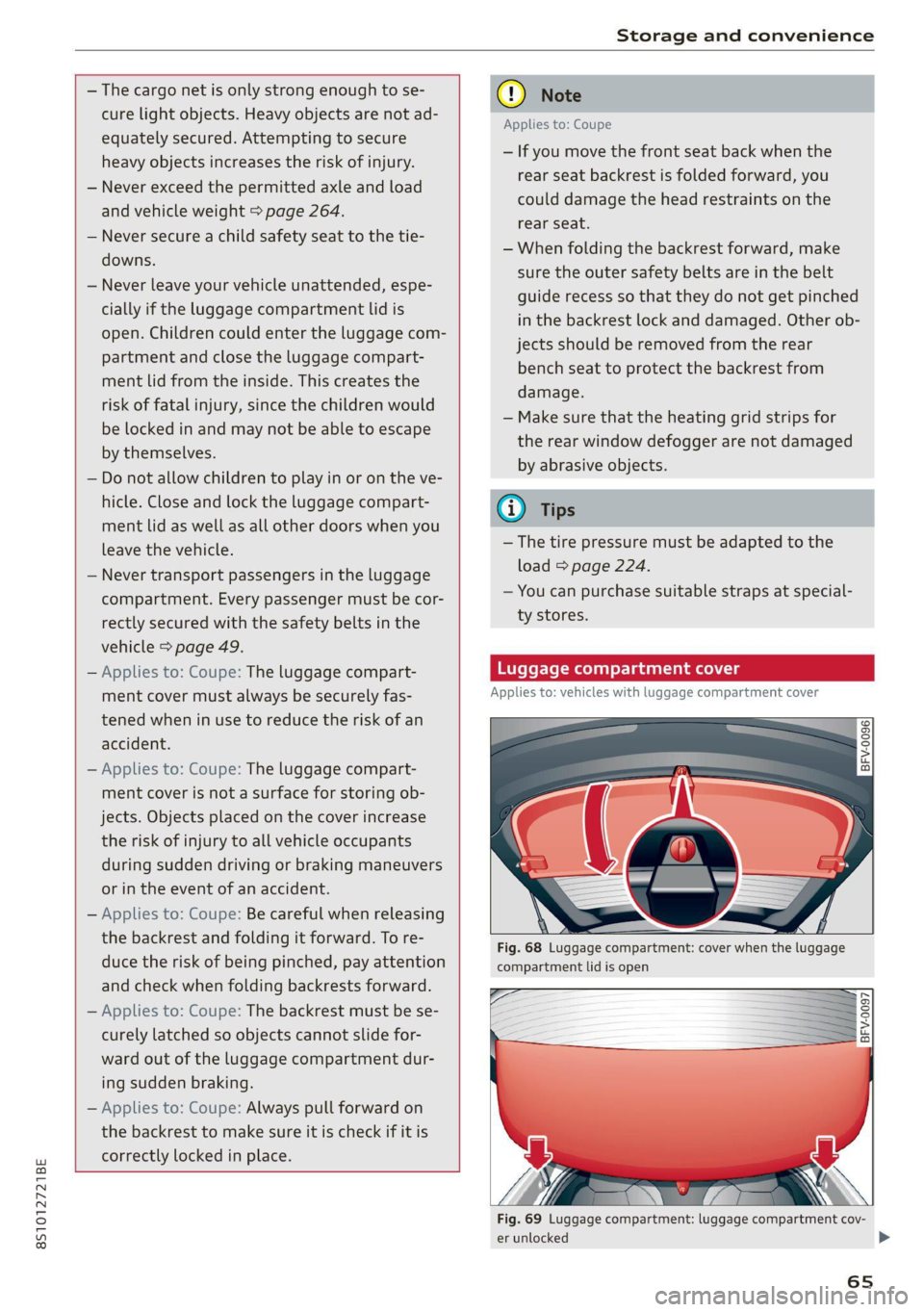
Luggage compartment cover
Applies to: vehicles with luggage compartment cover
©) a S| g|
> z 0
Fig. 68 Luggage compartment: cover when the luggage
compartment lid is open
=
BFV-0097
Fig. 69 Luggage compartment: luggage compartment cov-
er unlocked
65
>
Page 71 of 280
8S1012721BE
Warm and cold
Warm and cold
Climate control system
The climate control system warms, cools, dehu-
midifies, and filters the air in the vehicle interior.
It functions most effectively when the windows
are closed. If there is a build-up of heat inside the
vehicle, ventilation can help to speed up the cool-
ing process.
The deluxe climate control system automatically
maintains a temperature once it has been set. In
all heating mode functions except defrost, the
blower only switches to a higher speed once the
coolant has reached a certain temperature.
Pollutant filter
The pollutant filter removes pollutants such as
dust and pollen from the air.
ZA WARNING
Poor visibility can lead to accidents.
— For safer driving, keep all windows free of
ice, snow and fog.
— Become familiar as quickly as possible with
the correct use and function of the climate
control system, especially with the defrost-
ing and defogging function.
— When the temperature is below freezing,
only use the windshield washer system after
the
windshield has been warmed by the cli-
mate control system. The washer fluid could
freeze on the windshield and impair visibili-
ty.
©) Note
— If you suspect that the climate control sys-
tem is damaged, switch the system off to
prevent further damage and have it checked
by an authorized Audi dealer or authorized
Audi Service Facility.
— Repairs to the Audi climate control system
require special technical knowledge and
special tools. Have it inspected by an au-
thorized Audi dealer or a qualified electron-
ics store.
(@) For the sake of the environment
Reducing the amount of fuel used also re-
duces the amount of pollutants that enter the
air.
G) Tips
—To prevent interference with the heating
and cooling output and to reduce the risk of
the windows fogging over, the air intake in
front of the windshield must be free of ice,
snow, or leaves.
— Condensation from the cooling system can
drip and form a puddle of water under the
vehicle. This is normal and does not mean
there is a leak.
— The energy management system may tem-
porarily switch off certain functions, such as
the seat heating* or rear window defogger.
These systems are available again as soon
as the energy supply has been restored.
— The flows through the vents under the rear
window. Make sure the openings are not
covered when placing clothing on the lug-
gage compartment cover.
69
Page 72 of 280
Warm and cold
Deluxe automatic climate control
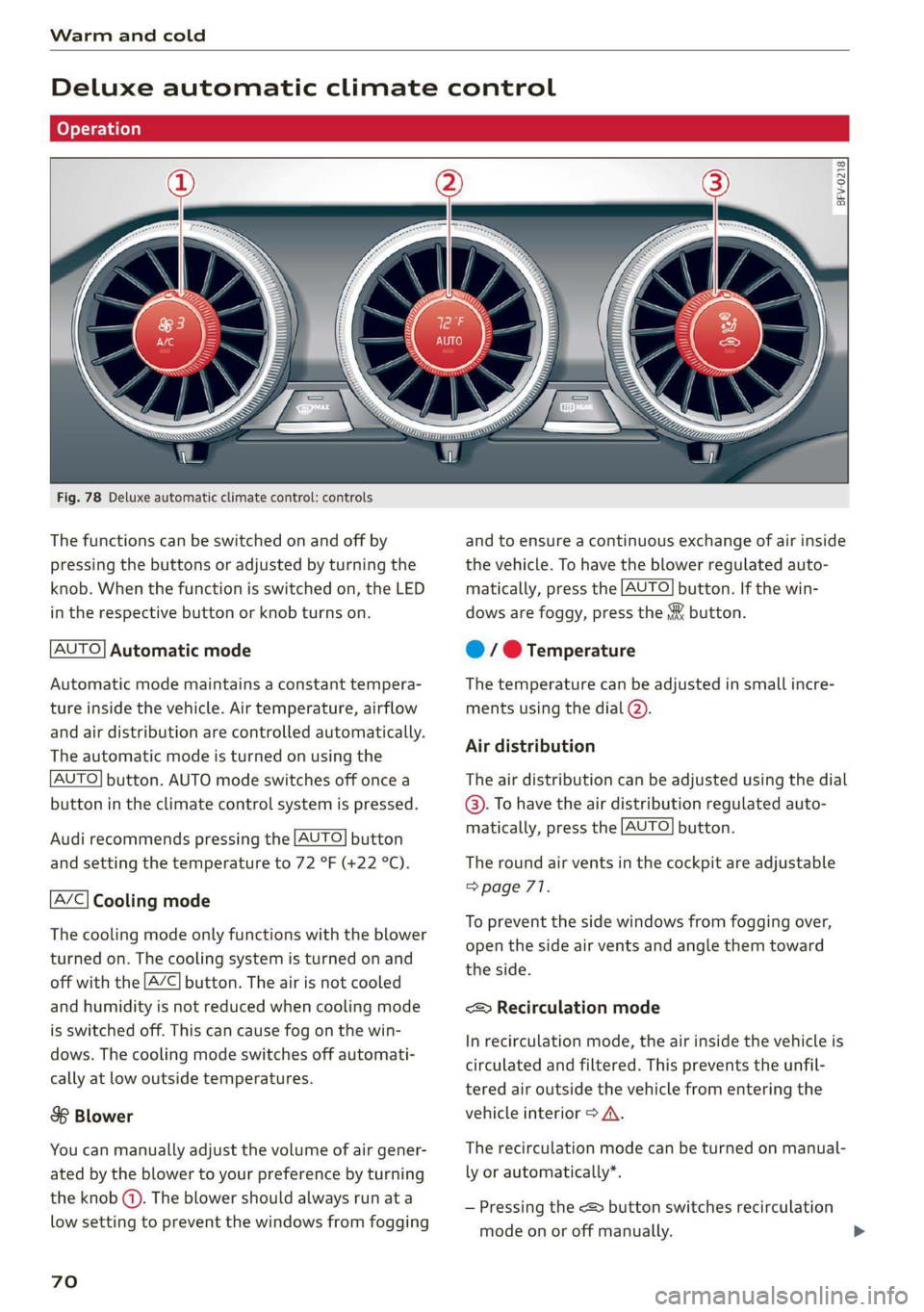
Fig. 78 Deluxe automatic climate control: controls
The functions can be switched on and off by
pressing the buttons or adjusted by turning the
knob. When the function is switched on, the LED
in the respective button or knob turns on.
AUTO] Automatic mode
Automatic mode maintains a constant tempera-
ture inside the vehicle. Air temperature, airflow
and air distribution are controlled automatically.
The automatic mode is turned on using the
AUTO] button. AUTO mode switches off once a
button in the climate control system is pressed.
Audi recommends pressing the [AUTO] button
and setting the temperature to 72 °F (+22 °C).
A/C} Cooling mode
The cooling mode only functions with the blower
turned on. The cooling system is turned on and
off with the [A/C] button. The air is not cooled
and humidity is not reduced when cooling mode
is switched off. This can cause fog on the win-
dows. The cooling mode switches off automati-
cally at low outside temperatures.
S$ Blower
You can manually adjust the volume of air gener-
ated by the blower to your preference by turning
the knob (4). The blower should always run at a
low setting to prevent the windows from fogging
70
BFV-0218
and to ensure a continuous exchange of air inside
the vehicle. To have the blower regulated auto-
matically, press the [AUTO] button. If the win-
dows are foggy, press the & button.
@ / @ Temperature
The temperature can be adjusted in small incre-
ments using the dial (2).
Air distribution
The air distribution can be adjusted using the dial
@. To have the air distribution regulated auto-
matically, press the [AUTO] button.
The round air vents in the cockpit are adjustable
=> page 71.
To prevent the side windows from fogging over,
open the side air vents and angle them toward
the side.
< Recirculation mode
In recirculation mode, the air inside the vehicle is
circulated and filtered. This prevents the unfil-
tered air outside the vehicle from entering the
vehicle interior > A\.
The recirculation mode can be turned on manual-
ly or automatically*.
— Pressing the <> button switches recirculation
mode on or off manually.
Page 73 of 280
![AUDI TT 2021 Owner´s Manual 8S1012721BE
Warm and cold
— Automatic recirculation mode*: automatic re-
circulation needs to be activated in the Info-
tainment system. Select in the Infotainment
system: [MENU] button > Ve](/img/6/40287/w960_40287-72.png "AUDI TT 2021 Owner´s Manual 8S1012721BE
Warm and cold
— Automatic recirculation mode*: automatic re-
circulation needs to be activated in the Info-
tainment system. Select in the Infotainment
system: [MENU] button > Ve")
8S1012721BE
Warm and cold
— Automatic recirculation mode*: automatic re-
circulation needs to be activated in the Info-
tainment system. Select in the Infotainment
system: [MENU] button > Vehicle > left control
button > Vehicle settings > Air conditioning >
Auto recirculation. When switched on, auto-
matic recirculation controls the recirculation
mode automatically. You must press the $Y but-
ton if fog forms on the windows.
Pressing the <> button, [AUTO], or the 8 button
switches recirculation mode off.
® Defroster
The windshield and side windows are defrosted
or cleared of condensation as quickly as possible.
The maximum amount of air flows mainly from
the vents below the windshield. Recirculation
mode switches off. The temperature should be
set at +72 °F (22 °C) or higher. The temperature
is controlled automatically. Depending on the
outside temperature, the A/C cooling mode may
automatically switch on.
The [AUTO] button switches the defroster off.
& Rear window defogger
If the rear window defogger is activated when the
ignition is switched on, the battery management
determines based on the battery charge if it is
possible to turn on. Otherwise, the rear window
defogger functions with the engine running and
switches off automatically after 10 - 20 minutes,
depending on the outside temperature.
To prevent the rear window defogger from
switching off automatically, press and hold the
® button for more than two seconds. This re-
mains stored up to approximately 15 minutes af-
ter turning off the ignition.
Adjusting the vents
x 8 8
x z a
Fig. 79 Cockpit: adjusting the air vents
To adjust the direction of air flow, turn the
ridged outer adjustment wheel (1).
To adjust the amount of air flow, move the lever
@ on the air vent. To stop the air flow, move the
lever all the way to the left.
Seat heating
Fig. 80 Air vents: seat heating
Pressing the w button switches the seat heating
on at the highest setting (level 3). The LEDs indi-
cate the temperature level. To reduce the tem-
perature, press the button again. To switch the
seat heating off, press the button repeatedly un-
til the LED turns off.
Z\ WARNING
You should not use the recirculation mode for
an extended period since no fresh air is drawn
in. With the air-conditioning switched off, the
windows can fog up, which increases the risk
of an accident.
ZA WARNING
Individuals with reduced sensitivity to pain or
temperature could develop burns when using
the seat heating function. To reduce the risk
of injury, these individuals should not use seat
heating. >
71
Page 78 of 280
![AUDI TT 2021 Owner´s Manual Driving
Stopping the engine
> Bring the vehicle to a full stop.
> Press the [START ENGINE STOP] button.
Emergency off function*
If it is absolutely necessary, the engine can also
be](/img/6/40287/w960_40287-77.png "AUDI TT 2021 Owner´s Manual Driving
Stopping the engine
> Bring the vehicle to a full stop.
> Press the [START ENGINE STOP] button.
Emergency off function*
If it is absolutely necessary, the engine can also
be")
Driving
Stopping the engine
> Bring the vehicle to a full stop.
> Press the [START ENGINE STOP] button.
Emergency off function*
If it is absolutely necessary, the engine can also
be turned off while driving at speeds starting at
4 mph (7 km/h). To stop the engine, press the
START ENGINE STOP] button twice in a row or
press and hold it one time.
Z\ WARNING
— Never turn off the engine before the vehicle
has come to a complete stop. Switching it
off before the vehicle has stopped may im-
pair the function of the brake booster and
power steering. You may need to use more
force when braking or steering. Because you
cannot brake and steer as you usually would,
this could lead to accidents and serious inju-
ries.
— If you leave the vehicle, switch the ignition
off and take the vehicle key with you. If you
do not do this, the engine could be started
and electrical equipment such as the power
windows could be activated. This can lead to
serious injuries.
— For safety reasons, always park the vehicle
with the selector lever in the P position.
Otherwise, there is the risk that the vehicle
could roll unintentionally.
@) Note
If the engine has been under heavy load for an
extended period of time, heat builds up in the
engine compartment after the engine is
switched off and there is a risk of damaging
the engine. For this reason, let the engine run
at idle for approximately two minutes before
shutting it off.
@) Tips
For up to 10 minutes after stopping the en-
gine, the radiator fan may turn on again auto-
matically or it may continue to run, even if the
ignition is switched off.
76
IY ett Tel -1
Pressing the start/stop button again will switch
off the engine
This message appears when you press the
START ENGINE STOP] button while driving.
Engine start system: malfunction! Please con-
tact Service
The engine automatic start system has a mal-
function. Drive immediately to an authorized
Audi dealer or authorized Audi Service Facility to
have the malfunction repaired. To start the en-
gine, press and hold the [START ENGINE STOP
button.
Remote control key: hold back of key
against the designated area. See owner's man-
ual
This message appears if there is no convenience
key inside the vehicle or if the system does not
recognize the key. The convenience key may not
be recognized, for example, if it is covered by an
object that disrupts the signal (such as a brief-
case), or if the key battery is weak. Electronic de-
vices such as cell phones can also interfere with
the signal.
To still be able to start or stop the engine, see
= page 77, Starting the engine when there is a
malfunction.
B Remote control key: key not detected. Is the
key still in the vehicle?
The B indicator light turns on and this message
appears if the convenience key was removed from
the vehicle when the engine was running. If the
convenience key is no longer in the vehicle, you
cannot switch the ignition on or start the engine
once you stop it. You also cannot lock the vehicle
from the outside.
Please press the brake pedal
This message appears if you do not press the
brake pedal when starting the engine.
Please select N or P
Page 79 of 280
8S1012721BE
Driving
This message appears when starting or stopping
the engine if the selector lever is not in the "N" or
"P" position. The engine will not start/stop.
Starting the engine when there is a
Teles (ela)
It may not be possible to start the engine under
certain circumstances, for example, if the bat-
tery in the vehicle key is drained, if interference
is affecting the key or if there is a system mal-
function.
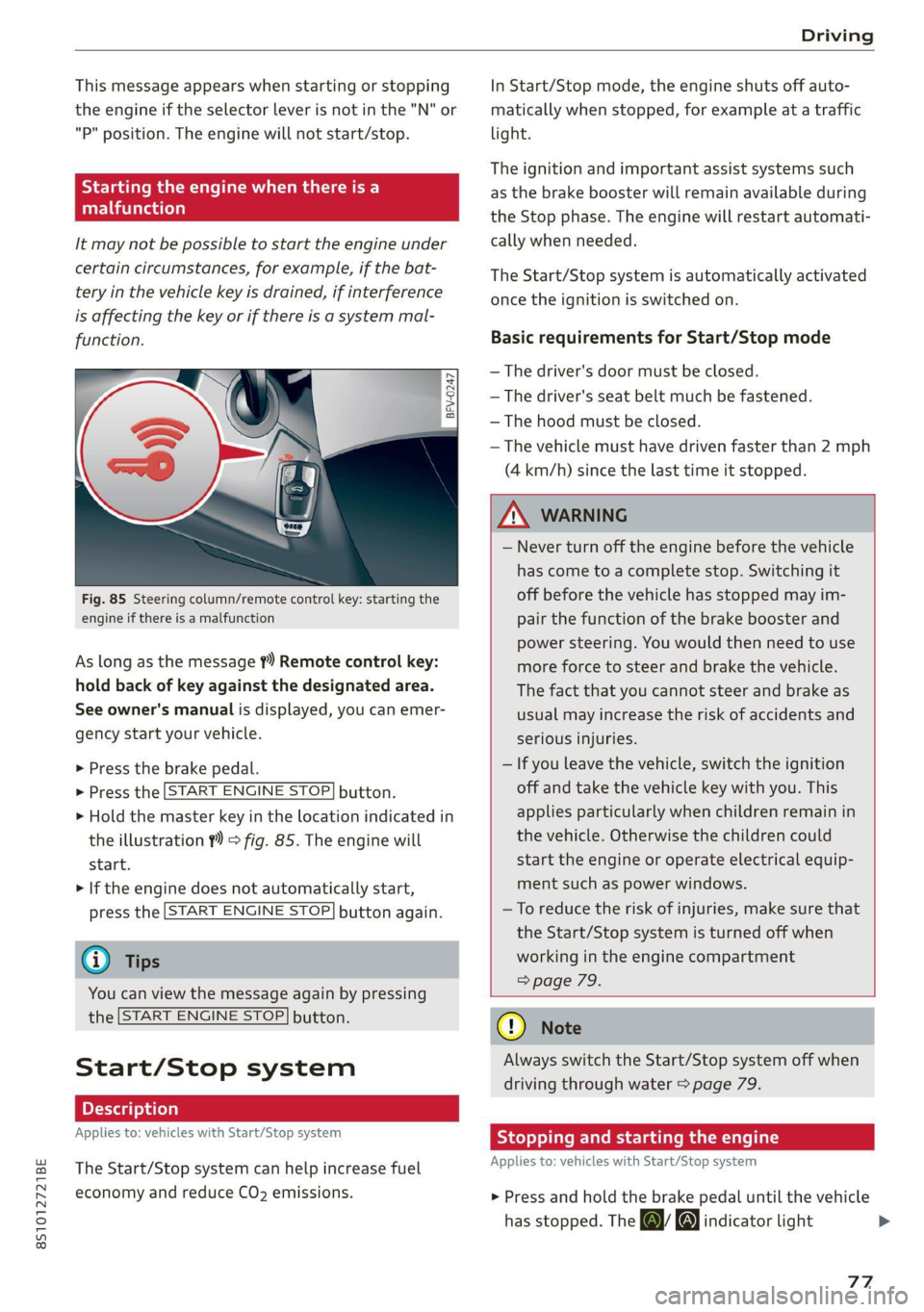
Fig. 85 Steering column/remote control key: starting the
engine if there is a malfunction
As long as the message ?) Remote control key:
hold back of key against the designated area.
See owner's manual is displayed, you can emer-
gency
start your vehicle.
» Press the brake pedal.
> Press the [START ENGINE STOP] button.
> Hold the master key in the location indicated in
the illustration ?) = fig. 85. The engine will
start.
> If the engine does not automatically start,
press the [START ENGINE STOP] button again.
@ Tips
You can view the message again by pressing
the [START ENGINE STOP] button.
Start/Stop system
Applies to: vehicles with Start/Stop system
The Start/Stop system can help increase fuel
economy and reduce CO2 emissions.
In Start/Stop mode, the engine shuts off auto-
matically when stopped, for example at a traffic
light.
The ignition and important assist systems such
as the brake booster will remain available during
the Stop phase. The engine will restart automati-
cally when needed.
The Start/Stop system is automatically activated
once the ignition is switched on.
Basic requirements for Start/Stop mode
— The driver's door must be closed.
— The driver's seat belt much be fastened.
— The hood must be closed.
— The vehicle must have driven faster than 2 mph
(4 km/h) since the last time it stopped.
Z\ WARNING
— Never turn off the engine before the vehicle
has come to a complete stop. Switching it
off before the vehicle has stopped may im-
pair the function of the brake booster and
power steering. You would then need to use
more force to steer and brake the vehicle.
The fact that you cannot steer and brake as
usual may increase the risk of accidents and
serious injuries.
— If you leave the vehicle, switch the ignition
off and take the vehicle key with you. This
applies particularly when children remain in
the vehicle. Otherwise the children could
start the engine or operate electrical equip-
ment such as power windows.
—To reduce the risk of injuries, make sure that
the Start/Stop system is turned off when
working in the engine compartment
> page 79.
@) Note
Always switch the Start/Stop system off when
driving through water > page 79.
Stopping and starting the engine
Applies to: vehicles with Start/Stop system
> Press and hold the brake pedal until the vehicle
has stopped. The a& indicator light
77
Page 82 of 280
Driving
Parking
> Press the brake pedal to stop the vehicle.
> Pull the ©) switch to set the parking brake.
> Place the selector lever in the “P” position.
> Turn the engine off > /A\.
> Turn the steering wheel when parking on in-
clines so that the wheels will roll into the curb
if the vehicle starts moving.
Z\ WARNING
— If the parking brake is set, it can release au-
tomatically when the accelerator pedal is
pressed. To reduce the risk of an accident,
do not inadvertently press the accelerator
pedal and always shift into “P” when the ve-
hicle is stopped.
— Emergency braking should only be used in
an emergency, when the when the standard
brake pedal is malfunctioning or obstructed.
During emergency braking, your vehicle will
brake similar to heavy braking. ESC and the
associated components (ABS, ASR, EDL)
cannot overcome the laws of physics. In cor-
ners and when road or weather conditions
are bad, a full brake application can cause
the vehicle to skid or the rear end to swerve,
which increases the risk of an accident.
— If the power supply fails, you cannot set the
parking brake once it is released. In this
case, park the vehicle on level ground and
secure it by placing the selector lever in the
P position. See an authorized Audi dealer or
authorized Audi Service Facility for assis-
tance.
— If you leave the vehicle, switch the ignition
off and take the vehicle key with you. This
applies particularly when children remain in
the vehicle. Otherwise children could start
the engine, release the parking brake or op-
erate electrical equipment such as power
windows, which increases the risk of an acci-
dent.
— No one should remain in the vehicle when it
is locked - especially children. Locked doors
make it more difficult for emergency work-
ers to get into the vehicle, which puts lives
at risk.
80
@) Note
Do not leave your vehicle unattended while
the engine is running, because this increases
the risk of an accident.
@) Tips
— Noises when the parking brake is set and re-
leased are normal and are not a cause for
concern.
— The parking brake goes through a self-test
cycle at regular intervals when the vehicle is
stopped. Any noises associated with this are
normal.
Starting to drive
Various convenience and safety functions may be
available when the vehicle begins driving, de-
pending on vehicle equipment.
Starting on hills with the parking brake set
Requirement: the driver's door must be closed.
> To start driving comfortably when on a hill, set
the parking brake and begin driving as usual.
The braking force of the parking brake does not
release automatically until the wheels build up
enough driving force.
Starting on hills with hill hold assist
If you take your foot off of the brake pedal when
driving on hills, the braking force will be held for
several seconds. At that time, you can start driv-
ing without the vehicle rolling backward.
Requirement: the driver's door must be closed,
the engine must be on, and the vehicle must be
traveling uphill.
> To activate hill hold assist, press and hold the
brake pedal for several seconds while the vehi-
cle is stationary.
ZA\ WARNING
—To reduce the risk of an accident, always
make sure the vehicle is situated safely
while stationary.
— If the parking brake is set, it can release au-
tomatically when the accelerator pedal is >
Page 97 of 280

8S1012721BE
Assist systems
— If vehicles are approaching or being left
behind very quickly. The display may not
turn on in time.
— In poor weather conditions such as heavy
rain, snow or heavy mist.
— On very wide lanes, in tight curves, or if
there is a rise in the road surface. Vehicles
in the adjacent lane may not be detected
because they are outside of the sensor
range.
() Note
The sensors can be displaced by impacts or
damage to the bumper, wheel housing and
underbody. This can impair the system. Have
an authorized Audi dealer or authorized Audi
Service Facility check their function.
@ Tips
— If the window glass in the driver's door or
front passenger's door has been tinted, the
display in the exterior mirror may be incor-
rect:
—The system complies with United States FCC
regulations and ISED regulations
=> page 261.
Sic Rema
Applies to: vehicles with Audi side assist
MENU > Select in the Infotainment system: but-
ton > Vehicle > left control button >Driver as-
sistance > Audi side assist
If the system is activated, the displays in the ex-
terior mirrors will turn on briefly when the igni-
tion is switched on.
Adjusting the display brightness
Applies to: vehicles with Audi side assist
The display brightness can be adjusted in the In-
fotainment system.
MENU > Select in the Infotainment system: but-
ton > Vehicle > left control button >Driver as-
sistance > Audi side assist
The display brightness adjusts automatically to
the brightness of the surroundings, both in the
information and in the warning stage. In very
dark or very bright surroundings, the automatic
adjustment will set the display to the minimum
or maximum level. In such cases, you may notice
no change when adjusting the brightness, or the
change may only be noticeable once the sur-
roundings change.
Adjust the brightness to a level where the display
in the information stage will not disrupt your
view
ahead. If you change the brightness, the dis-
play in the exterior mirror will briefly show the
brightness level in the information stage. The
brightness of the warning stage is linked to the
brightness in the information stage and is adjust-
ed along with the information stage.
(i) Tips
— Side assist is not active while you are mak-
ing the adjustment.
— Your settings are automatically stored and
assigned to the remote control key being
used.
Messages
Applies to: vehicles with Audi side assist
If the side assist switches off automatically, a
message appears in the Infotainment system dis-
play.
& Audi side assist: currently unavailable. Sen-
sor vision restricted due to surroundings. See
owner's manual
The radar sensor vision is impaired. Do not cover
the area in front of the sensors with bike wheels,
stickers, dirt or other objects. Clean the area cov-
ering the sensors, if necessary > page 94,
fig. 107.
Audi side assist: currently unavailable. See
owner's manual
Side assist cannot be switched on at this time be-
cause there is a malfunction (for example, the
battery charge level may be too low).
Audi side assist: malfunction! Please contact
Service
95
>
Page 124 of 280
Voice recognition system
Voice recognition system
General information
Applies to: vehicles with voice recognition system
You can operate many functions in the vehicle
easily using voice commands.
Using the voice recognition system optimally
> Speak clearly and distinctly at a normal volume.
Speak louder when driving faster.
> Emphasize the words in the commands evenly
and do not leave long pauses.
> Close the doors, the windows, and the power
top* to reduce background noise. Make sure
that passengers are not speaking when you are
giving a voice command.
> Do not direct the vents toward the hands-free
microphone, which is in the roof headliner/on
the driver’s safety belt* near the front interior
lights. For additional information on the safety
belt microphone’, see > page 140.
> Only the driver should speak to the system, be-
cause the handsfree microphone is aimed to-
ward this seating position.
ZA\ WARNING
— Direct your full attention to driving. As the
driver, you have complete responsibility for
safety in traffic. Only use the functions in
such a way that you always maintain com-
plete control over your vehicle in all traffic
situations.
— Do not use the voice recognition system in
emergencies because your voice may change
in stressful situations. The system may take
longer to dial the number or may not be
able to dial it at all. Dial the emergency
number manually.
G) Tips
There are no voice guidance* prompts when a
dialog is active.
Operating
Applies to: vehicles with voice recognition system
Requirement: the ignition and the MMI must be
switched on. A system language supported by
122
the voice recognition system must be set. There
must be no phone calls in progress and the park-
ing aid must not be active.
> Switching on: briefly press the %» button @)
=> page 14, fig. 10 on the multifunction steer-
ing wheel and say the desired command after
the Beep.
> Switching off: press and hold the ™» button,
or:
» Say the command Cancel.
> Pausing: say the command Pause. To resume,
press the ™» button.
> Correcting: press the button one time G)
=> page 12, fig. 6, or:
» Say the command Correction.
Input assistance
The system guides you through the input with
visual and audio feedback.
— Visual input assistance: after switching on
voice recognition, a display with a selection of
possible commands appears. This command
display can be switched on or off. Select:
MENU] button > Settings > left control button
> MMI settings > Speech dialog system.
— Audio input assistance: to have the possible
commands read, press the “9 button on the
multifunction steering wheel briefly and say
Help.
Additional settings
See > page 194, Voice recognition system.
Gi) Tips
—The dialog pauses when there is an incom-
ing phone call and will continue if you ig-
nore the call. The dialog ends if you answer
the call.
— You can select an item in the list using ei-
ther the voice recognition system or the
control knob.
Page 185 of 280
8S1012721BE
Media
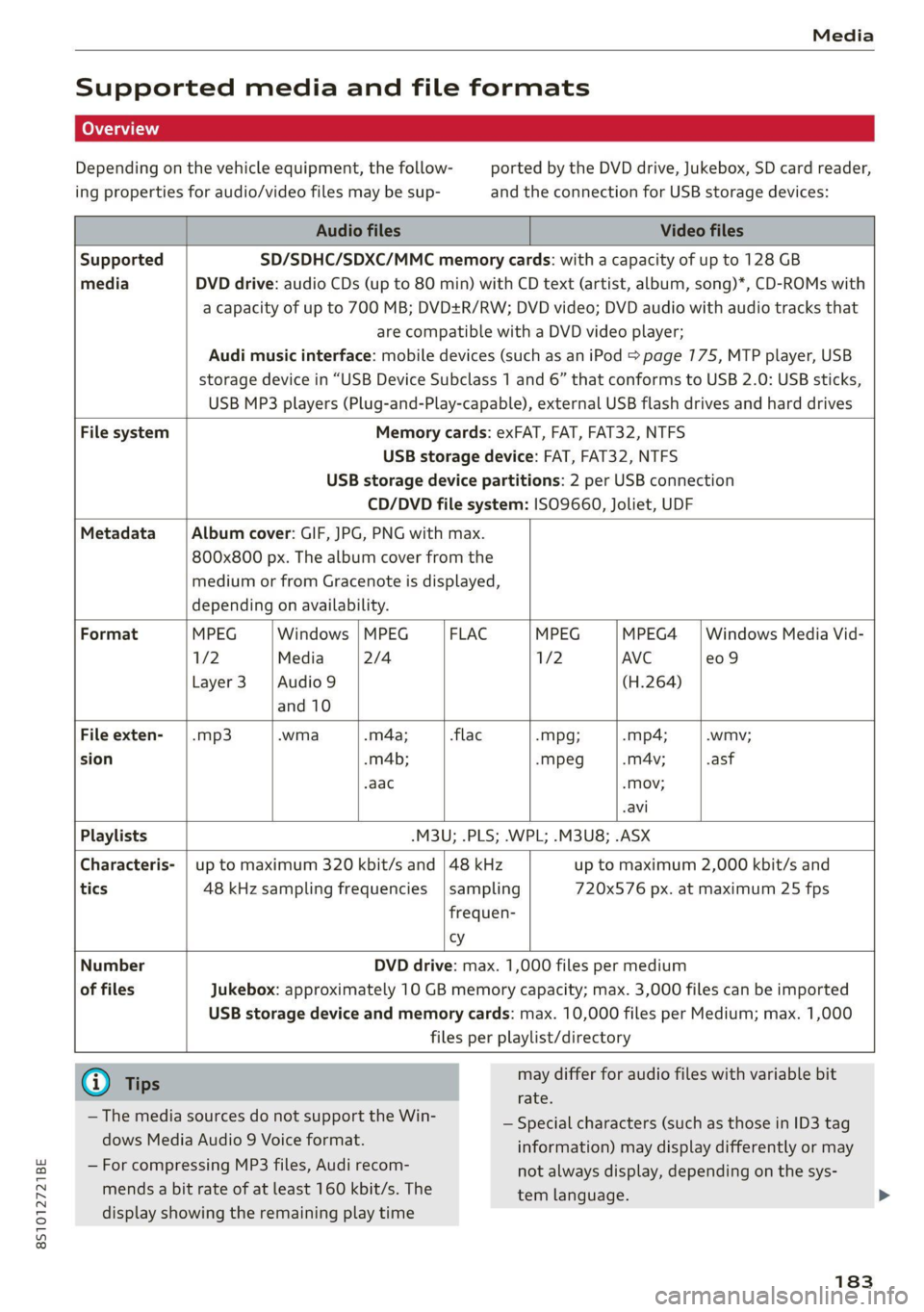
Supported media and file formats
Depending on the vehicle equipment, the follow- ported by the DVD drive, Jukebox, SD card reader,
ing properties for audio/video files may be sup- and the connection for USB storage devices:
Audio files Video files
Supported SD/SDHC/SDXC/MMC memory cards: with a capacity of up to 128 GB
media DVD drive: audio CDs (up to 80 min) with CD text (artist, album, song)*, CD-ROMs with
a capacity of up to 700 MB; DVD+R/RW; DVD video; DVD audio with audio tracks that
are compatible with a DVD video player;
Audi music interface: mobile devices (such as an iPod S page 775, MTP player, USB
storage device in “USB Device Subclass 1 and 6” that conforms to USB 2.0: USB sticks,
USB MP3 players (Plug-and-Play-capable), external USB flash drives and hard drives
File system Memory cards: exFAT, FAT, FAT32, NTFS
USB storage device: FAT, FAT32, NTFS
USB storage device partitions: 2 per USB connection
CD/DVD file system: ISO9660, Joliet, UDF
Metadata Album cover: GIF, JPG, PNG with max.
800x800 px. The album cover from the
medium or from Gracenote is displayed,
depending on availability.
Format MPEG Windows | MPEG FLAC MPEG MPEG4 | Windows Media Vid-
1/2 Media 2/4 1/2 AVC e09
Layer3 |Audio9 (H.264)
and 10
File exten- | .mp3 .wma .m4a; -flac -Mpg; -mp4; .wmv;
sion -m4b; -mpeg -mA4v; .asf
.aac -Mov;
-avi
Playlists -M3U; .PLS; .WPL; .M3U8; .ASX
Characteris- | up to maximum 320 kbit/s and | 48 kHz up to maximum 2,000 kbit/s and
tics 48 kHz sampling frequencies |sampling 720x576 px. at maximum 25 fps
frequen-
cy
Number DVD drive: max. 1,000 files per medium
of files Jukebox: approximately 10 GB memory capacity; max. 3,000 files can be imported
USB storage device and memory cards: max. 10,000 files per Medium; max. 1,000
files per playlist/directory
(i) Ti may differ for audio files with variable bit
| Tips
rate.
— Special characters (such as those in ID3 tag
information) may display differently or may
not always display, depending on the sys-
tem language.
— The media sources do not support the Win-
dows Media Audio 9 Voice format.
— For compressing MP3 files, Audi recom-
mends a bit rate of at least 160 kbit/s. The
display showing the remaining play time
183