ECU AUDI TT 2021 Owner´s Manual
[x] Cancel search | Manufacturer: AUDI, Model Year: 2021, Model line: TT, Model: AUDI TT 2021Pages: 280, PDF Size: 99.18 MB
Page 246 of 280
Emergency assistance
> Inflate the tire to between 29 psi (200 kPA) and
36 psi (250 kPA) and read the pressure on the
gauge.
> If this tire pressure is not reached, remove the
filler hose. Drive slowly approximately 33 feet
(10 m) forward or in reverse so that the sealant
can be distributed in the tire. Inflate the tire
again > A\.
ZX WARNING
— Read and follow the manufacturer's safety
precautions on the compressor and in the
instructions on the bottle of sealant.
— lf a tire pressure of 29 psi (200 kPA) cannot
reached after inflating for 6 minutes, then
the tire is too severely damaged. Do not
continue driving.
— If the tire cannot be repaired with the tire
sealant, see an authorized Audi dealer or au-
thorized Audi Service Facility for assistance.
@ Tips
Do not operate the compressor for more than
six minutes continuously, or it can overheat.
Once the compressor has cooled, you can con-
tinue to use it.
Completing
Applies to: vehicles with tire mobility kit
> Affix the sticker that says "max. 50 mph (max.
80 km/h)" that is provided with the tire mobili-
ty kit within the driver's field of vision.
> Stop the vehicle after driving for about 10 mi-
nutes and check the tire pressure.
> If the tire pressure is lower than 19 psi (130
kPA), then the tire is too severely damaged. Do
not continue driving.
ZA\ WARNING
Pay attention to the following after repairing
the tire:
— Do not drive faster than 50 mph (80 km/h).
— Avoid hard acceleration or braking and driv-
ing fast around curves.
— The vehicle may become more difficult to
control.
244
— If the tire is too severely damaged, see an
authorized Audi dealer or authorized Audi
Service Facility for assistance.
(@) For the sake of the environment
You can give the used tire sealant bottle to an
authorized Audi dealer or authorized Audi
Service Facility for disposal.
G) Tips
Remember to obtain a new bottle of sealant
from an authorized Audi dealer or authorized
Audi Service Facility after repairing a tire.
Replacing wheels
You must complete the preparation before
changing a tire.
> Read and follow the important safety precau-
tions > page 242, General information.
> Set the parking brake.
> Select the “P” position.
> Lay out the vehicle tool kit > page 242 and the
spare tire > page 248.
ZX WARNING
The vehicle must also be secured to prevent it
from rolling when using the vehicle jack”. Use
suitable objects to block the front and back of
the wheel that is diagonal from the wheel
with the flat tire.
Page 248 of 280
Emergency assistance
> Slide the wheel wrench* from the vehicle tool
kit all the way onto the wheel bolt”).
> Turn the wheel bolt approximately one turn to
the left. To achieve the required torque, hold
the end of the wheel wrench*. If the wheel bolt
will not loosen, press carefully on the wheel
wrench* with your foot. Hold onto the vehicle
securely while doing this and make sure your
footing is stable.
Z\ WARNING
To reduce the risk of an accident, only loosen
the wheel bolts gently one turn before raising
the vehicle with the vehicle jack*.
Raising the vehicle
Applies to: vehicles with vehicle jack
A_,
BFv-0094
2 oS a 2
> £
oO
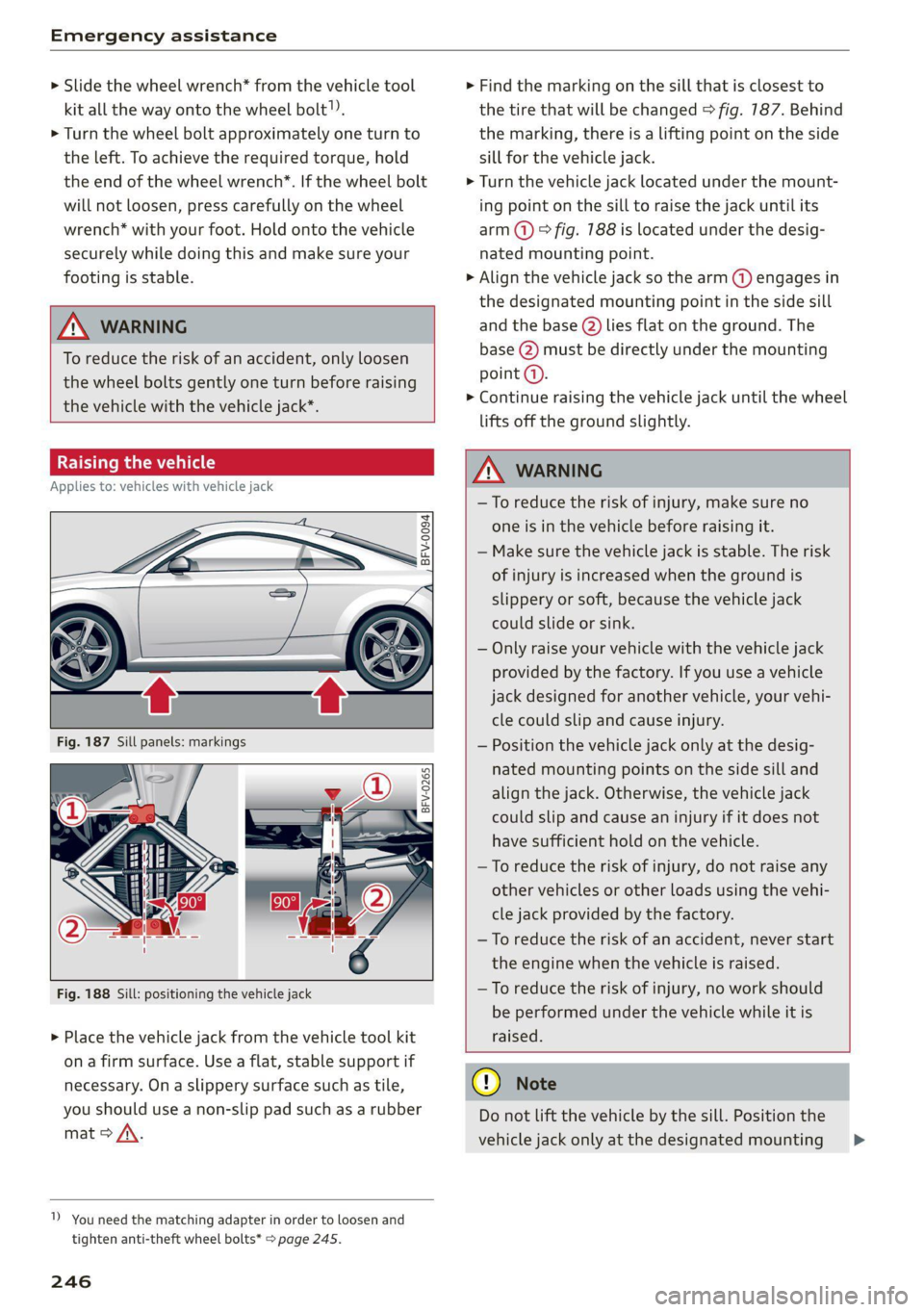
Fig. 188 Sill: positioning the vehicle jack
> Place the vehicle jack from the vehicle tool kit
ona firm surface. Use a flat, stable support if
necessary. On a slippery surface such as tile,
you should use a non-slip pad such as a rubber
mat > /\.
1) You need the matching adapter in order to loosen and
tighten anti-theft wheel bolts* > page 245.
246
> Find the marking on the sill that is closest to
the tire that will be changed © fig. 187. Behind
the marking, there is a lifting point on the side
sill for the vehicle jack.
> Turn the vehicle jack located under the mount-
ing point on the sill to raise the jack until its
arm @) ° fig. 188 is located under the desig-
nated mounting point.
> Align the vehicle jack so the arm (@) engages in
the designated mounting point in the side sill
and the base (2) lies flat on the ground. The
base (2) must be directly under the mounting
point (a).
> Continue raising the vehicle jack until the wheel
lifts off the ground slightly.
Z\ WARNING
—To reduce the risk of injury, make sure no
one is in the vehicle before raising it.
— Make sure the vehicle jack is stable. The risk
of injury is increased when the ground is
slippery or soft, because the vehicle jack
could slide or sink.
— Only raise your vehicle with the vehicle jack
provided by the factory. If you use a vehicle
jack designed for another vehicle, your vehi-
cle could slip and cause injury.
— Position the vehicle jack only at the desig-
nated mounting points on the side sill and
align the jack. Otherwise, the vehicle jack
could slip and cause an injury if it does not
have sufficient hold on the vehicle.
—To reduce the risk of injury, do not raise any
other vehicles or other loads using the vehi-
cle jack provided by the factory.
—To reduce the risk of an accident, never start
the engine when the vehicle is raised.
—To reduce the risk of injury, no work should
be performed under the vehicle while it is
raised.
@) Note
Do not lift the vehicle by the sill. Position the
vehicle jack only at the designated mounting >
Page 250 of 280
Emergency assistance
> Reinstall the caps on the wheel bolts if neces-
sary.
> Store the vehicle tool kit in its designated
place.
> If the removed wheel does not fit in the spare
wheel well, store it securely in the luggage
compartment > page 64.
> Check the tire pressure on the installed wheel
as soon as possible.
> Check the tire pressure and store it in the Info-
tainment system.
> The wheel bolt tightening specification must be
90 ft lbs (120 Nm). Have it checked as soon as
possible with a torque wrench. Drive carefully
until then.
> Have the faulty wheel replaced as quickly as
possible.
Spare tire
General information
Applies to: vehicles with space-saving spare tire (compact
spare tire)
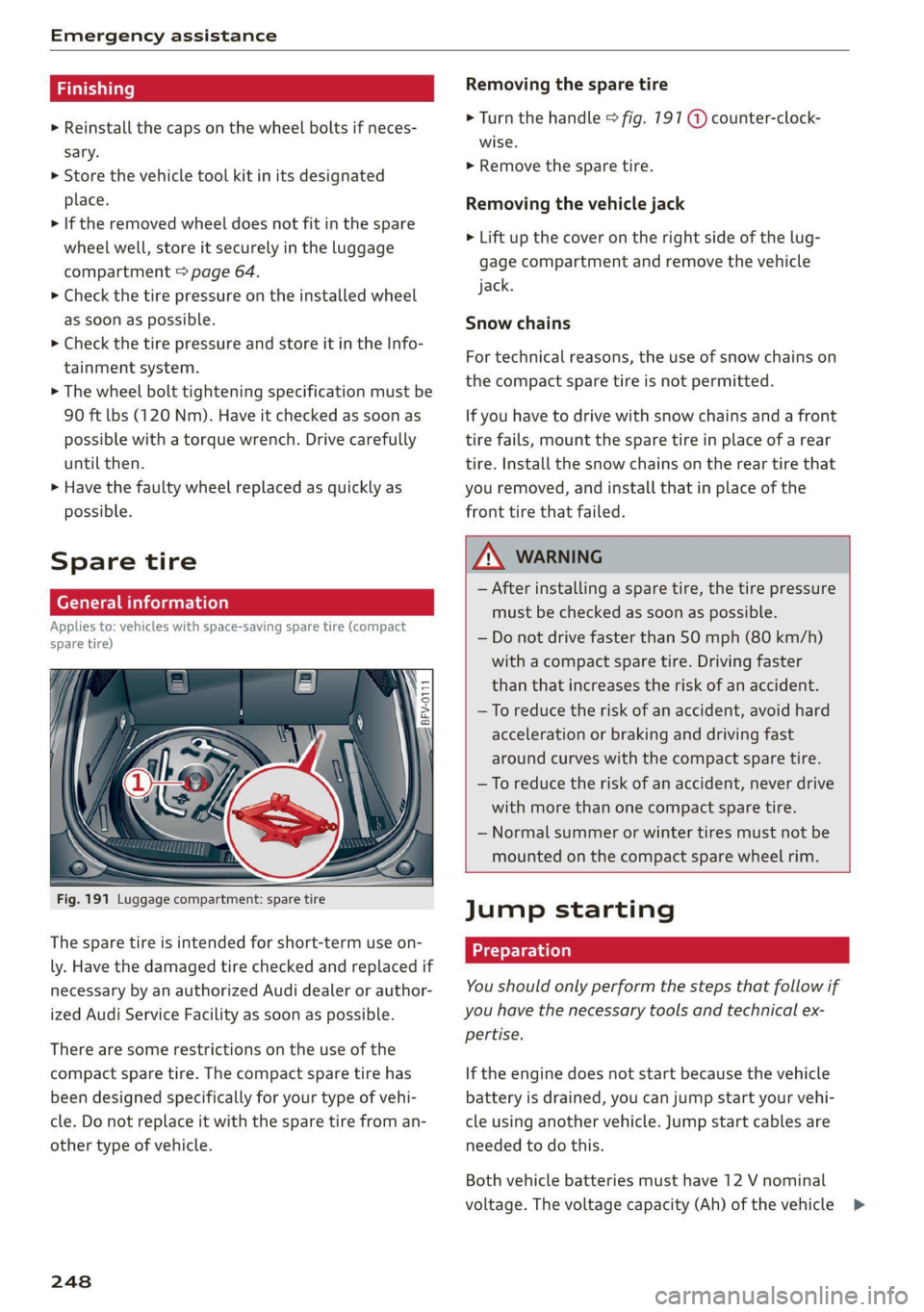
Fig. 191 Luggage compartment: spare tire
The spare tire is intended for short-term use on-
ly. Have the damaged tire checked and replaced if
necessary by an authorized Audi dealer or author-
ized Audi Service Facility as soon as possible.
There are some restrictions on the use of the
compact spare tire. The compact spare tire has
been designed specifically for your type of vehi-
cle. Do not replace it with the spare tire from an-
other type of vehicle.
248
Removing the spare tire
> Turn the handle > fig. 191 @ counter-clock-
wise.
> Remove the spare tire.
Removing the vehicle jack
> Lift up the cover on the right side of the lug-
gage compartment and remove the vehicle
jack.
Snow chains
For technical reasons, the use of snow chains on
the compact spare tire is not permitted.
If you have to drive with snow chains and a front
tire fails, mount the spare tire in place of a rear
tire. Install the snow chains on the rear tire that
you removed, and install that in place of the
front tire that failed.
ZA WARNING
— After installing a spare tire, the tire pressure
must be checked as soon as possible.
— Do not drive faster than 50 mph (80 km/h)
with a compact spare tire. Driving faster
than that increases the risk of an accident.
— To reduce the risk of an accident, avoid hard
acceleration or braking and driving fast
around curves with the compact spare tire.
— To reduce the risk of an accident, never drive
with more than one compact spare tire.
— Normal summer or winter tires must not be
mounted on the compact spare wheel rim.
Jump starting
You should only perform the steps that follow if
you have the necessary tools and technical ex-
pertise.
If the engine does not start because the vehicle
battery is drained, you can jump start your vehi-
cle using another vehicle. Jump start cables are
needed to do this.
Both vehicle batteries must have 12 V nominal
voltage. The voltage capacity (Ah) of the vehicle >
Page 252 of 280
Emergency assistance
4. Attach the other end of the negative cable
(black) to the jump start connection @ on
the vehicle.
Starting the engine
> Start the engine in the vehicle giving the charge
and let it run at idle.
> Now start the engine in your vehicle, which has
the
drained battery.
> If the engine does not start, stop the starting
procedure after 10 seconds and then repeat it
after approximately 30 seconds.
> Turn on the rear window defogger in your vehi-
cle in order to reduce any voltage peaks that
may occur when disconnecting the jump start
cables. The headlights must be switched off.
> With the engines running, remove the cables in
reverse order of the way they were installed.
> Close the red cover on the positive terminal.
ZA\ WARNING
— Never connect the jump start cable directly
to your vehicle battery. Only use the connec-
tions in the engine compartment.
— Do not touch the non-insulated parts of the
terminal clamps. The cable must also not
come into contact with vehicle components
that conduct electricity when it is connected
to the positive vehicle battery terminal. This
can cause a short circuit.
— The locking bolts on the battery cells must
be tightened securely.
— Keep ignition sources (open flames, burning
cigarettes, etc.) away from the vehicle bat-
teries to reduce the risk of an explosion.
— Route the jump start cables so they cannot
get caught in the moving parts in the other
vehicle's engine compartment.
C) Note
Please note that the connecting process previ-
ously described for the jump start cables is in-
tended for when your vehicle is being jump
started.
250
G) Tips
Make sure that the connected jump start ca-
bles have sufficient contact with metal.
Towing
General information
You should only perform the steps that follow if
you have the necessary tools and technical ex-
pertise.
Towing requires a certain amount of practice.
Audi recommends contacting a towing company
to have the vehicle transported.
You should only have your vehicle towed by an-
other vehicle when disabled in exceptional cir-
cumstances. Inexperienced drivers should not
tow.
Notes on towing
When the engine is stopped, the transmission
will not be sufficiently lubricated if traveling at
high speeds and long distances:
— The maximum permitted towing speed is 30
mph (50 km/h).
— The maximum permitted towing distance is 30
miles (SO km).
Additional information on towing with a tow
truck
The vehicle may only be towed with the front axle
raised. Do not wrap any chains or cables around
the brake lines.
If the vehicle should be towed with the axle
raised, then the ignition must be switched off to
reduce the risk of damage to the drivetrain.
Tow bar and towing cable
The vehicle can be towed with a tow bar or tow-
ing cable. Both drivers should be familiar with
the special considerations when towing, especial-
ly when using a towing cable.
Always make sure the traction force does not ex-
ceed the permitted level and there are no shock
loading conditions. There is always the risk of the >
Page 253 of 280
8S1012721BE
Emergency assistance
coupling becoming overloaded when driving off-
road.
For the most safety and security, drive with a tow
bar. You should use a towing cable only if a tow
bar is not available. Use a towing cable made of
synthetic elastic cable similar elastic material.
ZA\ WARNING
— Towing highly increases the risk of an acci-
dent, for example from colliding with the
towing vehicle.
— To reduce the risk of an accident, do not al-
low anyone to remain inside the vehicle
when it is being transported by a tow truck
or a special transporter.
® Note
— If normal towing is not possible, for exam-
ple if the transmission is faulty or if the
towing distance is greater than 30 miles
(50 km), then transport the vehicle ona
special carrier.
— If the vehicle is towed by a tow truck at the
axle that is not permitted, this can cause se-
vere damage to the transmission.
— The vehicle must not be tow started for
technical reasons.
G) Tips
— If there is a power failure, the selector lever
will not move out of the "P" position. The
parking lock must be released using the
emergency release before towing the vehi-
cle > page 88.
— Follow the local legal regulations for tow-
ing.
Read and follow the important information un-
der > page 250.
Preparations
> Only secure the towing cable or tow bar at the
designated towing loops > page 2517,
=> page 252.
> Make sure the towing cable is not twisted. Oth-
erwise it could disconnect from the towing loop
while towing.
> Switch the emergency flashers on in both
vehicles > page 38. However, do not do this if it
prohibited by law.
Towing vehicle (front)
> Only start to drive when the towing cable is
taut.
> Be especially careful when accelerating.
» Avoid sudden braking or driving maneuvers.
Vehicle being towed (rear)
> Make sure the ignition is switched on so that
the steering wheel is not locked and so that you
can use the turn signals, the horn, and the
windshield wipers if needed > /A\.
> Switching it off before the vehicle has stopped
may impair the function of the brake booster
and power steering. You would then need to
use more force to steer and brake the vehicle.
> Release the parking brake > page 79.
> Select the “N” selector lever position.
> Make sure the towing cable is always taut.
ZA\ WARNING
— Never tow a vehicle using a tow bar or tow-
ing cable if the vehicle does not have electri-
cal power.
— If the vehicle runs out of power while it is
being towed, stop towing the vehicle imme-
diately and consult an authorized Audi deal-
er or qualified repair facility.
Front towing loop
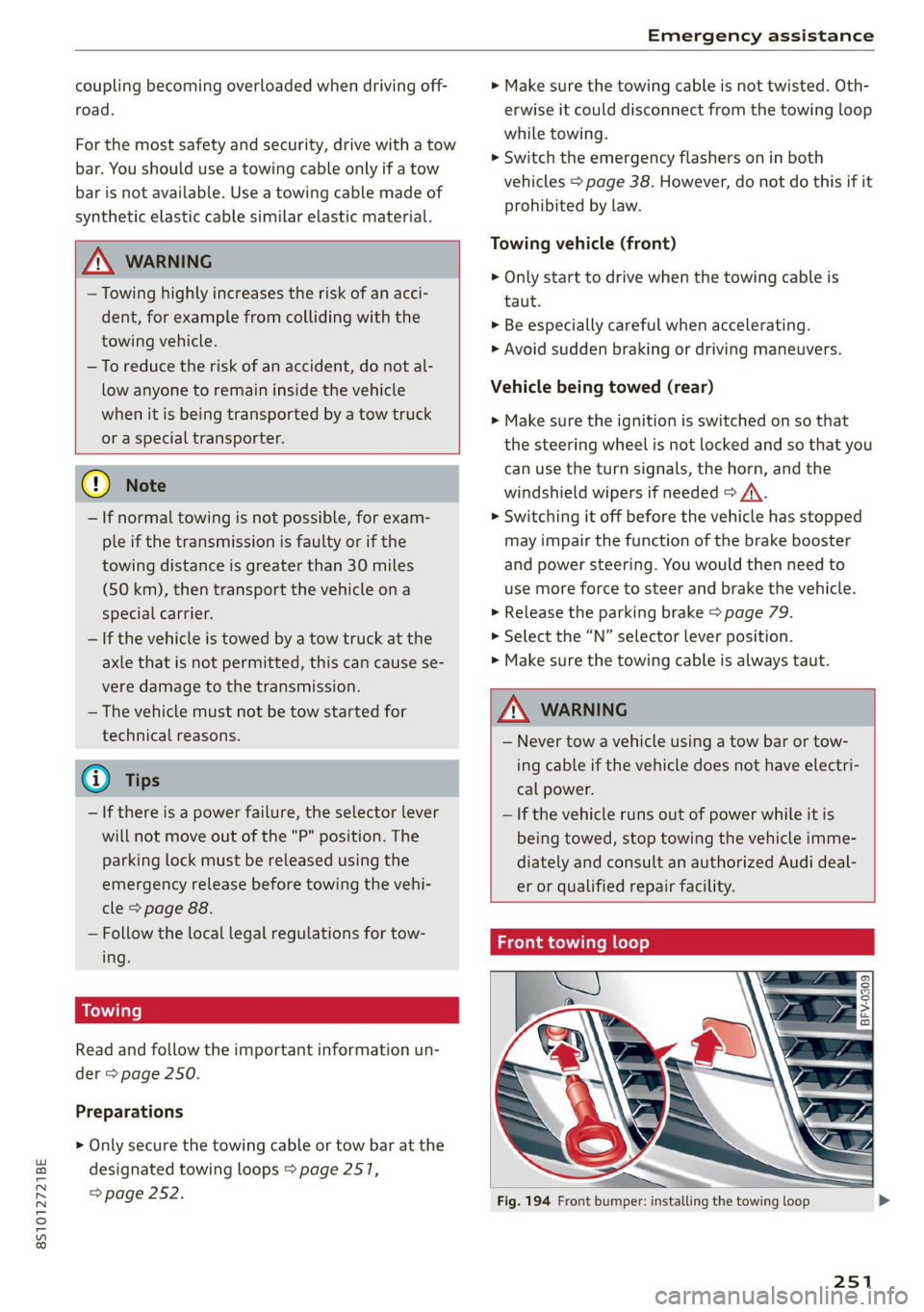
Fig. 194 Front bumper: installing the towing loop
251
Page 254 of 280
Emergency assistance
The threaded opening for the towing loop is lo-
cated on the right side of the front bumper.
> Remove the towing loop from the vehicle tool
kit > page 242.
> Press the cap inward with brief, strong pressure
> fig. 194. The cap will loosen from the bump-
er.
> Tighten the towing eye as far as it will go into
the mount. Use a suitable object to tighten the
towing eye completely and securely in the
mount.
>» After using, place the towing loop back in the
vehicle tool kit.
A WARNING
If the towing loop is not tightened until it
stops when installing, the threads may be
pulled out when towing the vehicle and result
in an accident.
@ Tips
Depending on the model, the shape of the cap
can vary.
Rear towing loop
BFV-0310
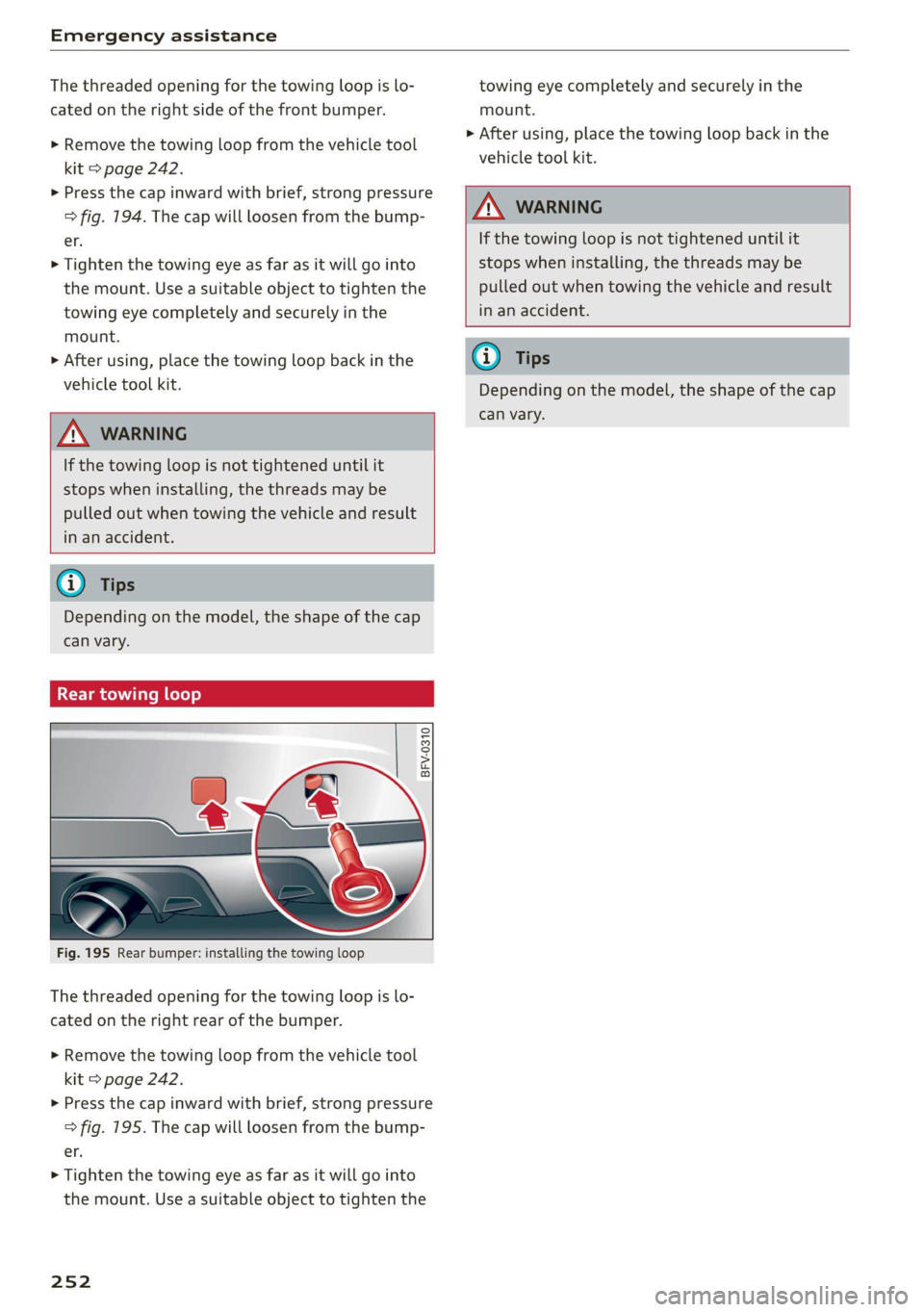
Fig. 195 Rear bumper: installing the towing loop
The threaded opening for the towing loop is lo-
cated on the right rear of the bumper.
> Remove the towing loop from the vehicle tool
kit > page 242.
> Press the cap inward with brief, strong pressure
> fig. 195. The cap will loosen from the bump-
er.
> Tighten the towing eye as far as it will go into
the mount. Use a suitable object to tighten the
252
towing eye completely and securely in the
mount.
> After using, place the towing loop back in the
vehicle tool kit.
Z\ WARNING
If the towing loop is not tightened until it
stops when installing, the threads may be
pulled out when towing the vehicle and result
in an accident.
G) Tips
Depending on the model, the shape of the cap
can vary.
Page 263 of 280
8S1012721BE
Accessories and technical changes
To contact NHTSA, you may call
the Vehicle Safety Hotline toll-
free at 1-888-327-4236 (TTY: 1-
800-424-9153); go to http://
www.safercar.gov;
or write to:
Administrator NHTSA
1200 New Jersey Ave.,
S.E. West Building
Washington, DC
20590.
You can also obtain other infor-
mation about motor vehicle safe-
ty from http://www.safercar.gov.
Applicable to Canada
If you live in Canada and you be-
lieve that your vehicle has a de-
fect that could cause a crash, in-
jury or death, you should immedi-
ately inform Transport Canada,
Defect Investigations and Recalls.
You should also notify Audi Cana-
da.
Canadian customers who wish to
report a safety-related defect to
Transport Canada, Defect Investi-
gations and Recalls, may either
call Transport Canada toll-free at:
Tel.: 1-800-333-0510 or
Tel.: 1-819-994-3328 (Ottawa re-
gion and from other countries)
TTY for hearing impaired:
1-888-675-6863
or contact Transport Canada by
mail at:
Transport Canada
Motor Vehicle Safety Investiga-
tions Laboratory
80 Noel Street
Gatineau, QC
J8Z OA1
For additional road safety infor-
mation, please visit the Road
Safety website at:
English:
http://www.tc.gc.ca/eng/
motorvehiclesafety/menu.htm
French:
http://www.tc.gc.ca/fra/
securiteautomobile/menu.htm
Declaration of
compliance for telecom-
munications equipment
and electronic systems
Your vehicle may be equipped with various radio
systems, depending on vehicle equipment. The
manufacturer is not liable for radio malfunctions
that are caused by unauthorized changes to the
equipment.
FCC Part 15.19
This device complies with part 15 of the FCC
Rules. Operation is subject to the following two
261
>
Page 268 of 280
Index
Balance:(SOund) cisco a cxavore a x assess « ¥ exeane 193
Band
refer to Frequency band............... 164
Bassi(SOUn) « semar » somone oa umes © a name © ee 193
Battery, secvos «x sxumes ow cxrnens w a aumees vo aston vo 210
Charging .... 0.0... cece cence eee eens 211
Winter Operation s « ween s » ewe « e eewe + we 210
Bluetooth
AUGIO player » secu ss mone oo oasna oo inane wo 172
Connecting a mobile phone............ 128
Settings...............00 000020000 192
BoOSt .. 6... eee eee eee 15
Boost pressure indicator................. 15
Brake fluid
Checking the brake fluid level........... 209
Brakes... eee ee 106
Brakeiassist: worn « : mann a ¢ mage se seme a a 104
Brake assist systeM............0--000. 104
Brake fluid... 0.6... cece eee eee 209
Electromechanical parking brake......... 79
Emergency braking function............. 79
New brake pads..............--.00000- 106
Braids. « scwens 1 « sneewes 4 sesuees «0 otoaets 0 6 ssenwen a 195
Break-in security feature..........0e. eee 24
Breaking in
New brake pads..............--00000- 106
Ne@Wtit@Sicic s esses » i ows 2 3 paoes se eer 5 221
Browser
refer to Media center..............44. 178
Bulb replacements: ss ease ss eeu 3 i owes s 255
Buttons
Controlpaneli(MMI):. « . ssssiss 6 a secunes os ames 110
Cc
Cable (USB adapter/AUX connector cable).. 175
California Proposition 65 Warning........ 201
Battery:specificien: 2 = cas 2 onsen = mesa x ex 210
GalLUst + sion os wri oo ewan vo enn e HeeN = 132
CalloptionSees « cams = 4 cape + eee & ¥ eee 139
Capacities
Fueltanks, « sess x x csosein oe mewe woo cone eve 264
Washer fluid reservoir..............--. 264
CAPEK Yeine 5 x cxowens « eaviece a 6 enzsite au use + 1 wens 19
CARWASH. & anasnos c+ wnscwns o esnarne > x camtene H axeee 236
Catalytic converter’. wei 6 ewe ve eww vv oe 200
CD drive (media drives)................. 171
266
Cell phone
refer to Telephone.............00 eee 128
Cell phone compartment
refer to Audi phone box............... 130
Center armrest ....... 00. c cece eee eee es 47
Central locking.................0 ese eeee 18
AUTO LOGK:: » cuoz = wees: = sem 4 s seu 2 mae 18
Conveniencerkey’s sic. zs suvses se sven « stamens 22
Convenience opening and closing......... 27
Mechanically unlocking and locking....... 24
Remote'control keyicssis so issn se aera s 6 oem 21
Setting. ........ 0.0... 23)
Central locking switch..............0.00. 23
Ceramic Drakes :.cvcr: 2 2 sweieue eo wane oo cxivaue a vs 106
Certiticationses «swans x x aveins a x cxmmve a x aeaoans 261
Changing light bulbs................... 255
Charging
refer to Power sourceS..........-0000005 63
Charging the battery (mobile devices). 130, 176
Child safety seats...............-.000065 57
Securing to the top tether anchor........ 62
Securing with a safety belt.............. 60
Securing with LATCH: « « suas: ss gee 2 x seem 60
GlaSSie VieWirs « = sccm & x news © 2 etme cg eee we 13
Cleaning... 2.2.2... eee eee eee eee 236
Cleaning Alcantara.............-..0000. 239
Cleaning artificial leather............... 239
Cleaning carbon components........ 238, 239
Cleaning Controls'. « sieve ee sree oo eevee + 0 we 239
Cleaning decorative parts andtrim... 238, 239
Cleaning exhaust tail pipes.............. 238
Cleaning plastic parts .;. 2s gcse ss qeam = soe 239
Cleaning tail lights................00.-. 237
Cleaning textiles.................0000. 239
Cleaning the wind deflector............. 238
Climate control system............-..0-- 69
Climate control system (automatic)
Drive select............ 0.0002 eee eee 96
Clock... eee eee eee eee eee 189
Closing
COnVENIENCE-ClOSING awe se sere = t means = x ow 27
HOOGs: 2 5 acs 2 2 wie os wena so mez wan 202
Luggage compartment lid............... 25
WINGWS%: 4 = sews 3s Saas 7 a Hees oa ee a Ad 27
Cockpit (overview) .............0000ee eee 6
Color code... . 6. cece eee ee eee eee eee 263
Page 272 of 280
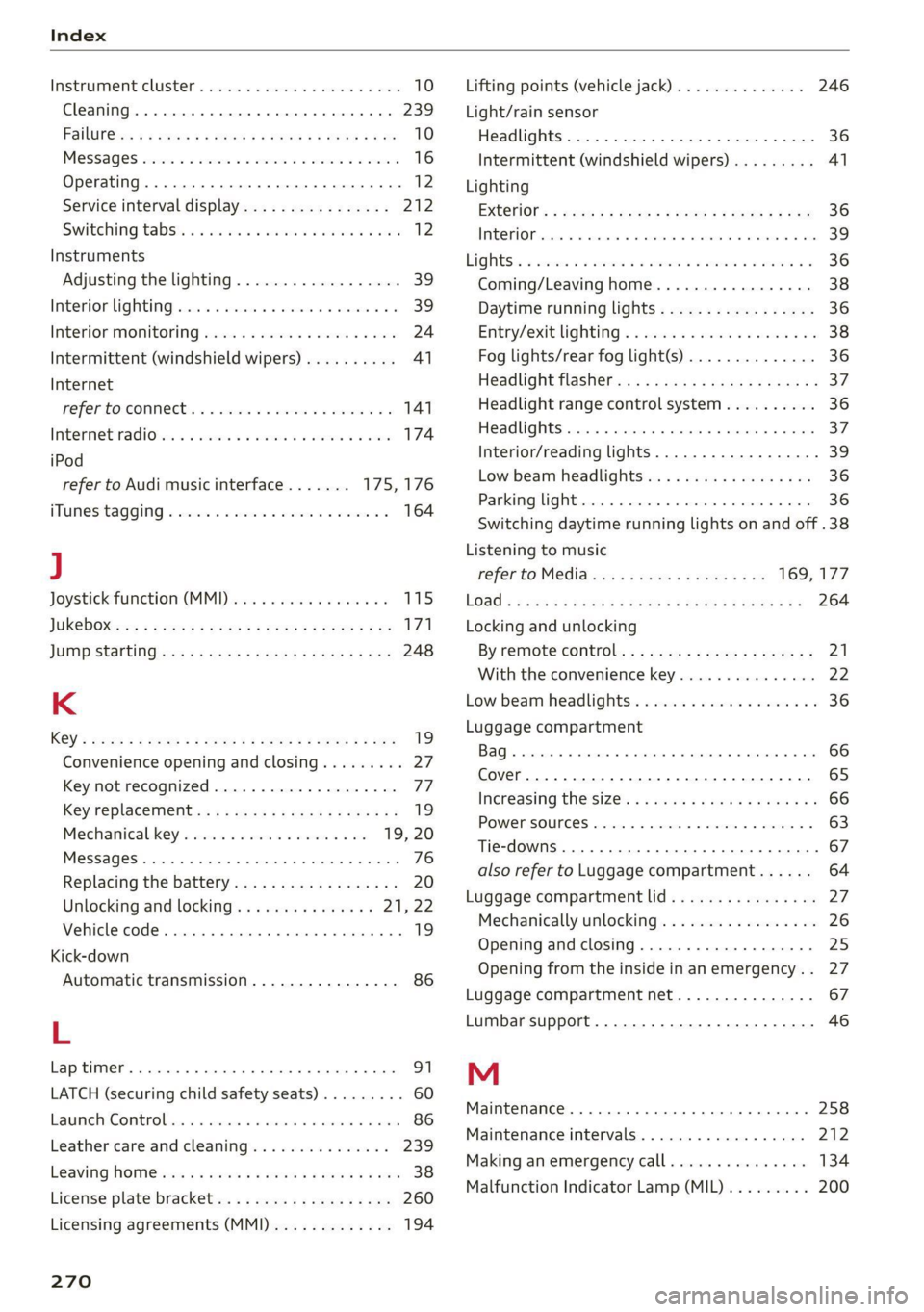
Index
Instrumenticlusten «secon + & avcnsie x 0 sucuses © a swe 10
Cleaning..... 2.0... cee eee eee eee 239
FailibGios » 2 smo $ 2 ama ge meew 4 e eM a A om 10
Me@SSageS sxasis wo onesies vv oenens « 8 coewer wx mewn 16
Operating ........ 0... cee cece eee 12
Service interval display................ 212
Switching tabs. « « ssi a «asa ss eww oo we 12
Instruments
Adjusting the lighting.................. 39
Interior LIQHtiNG secs. esses ee areunce a 6 arenes a a 39
Interior monitoring.................0 eee 24
Intermittent (windshield wipers).......... 41
Internet
referto connects « = secs ve views vo seme ¥ oe 141
IntermetiradiOnes: « «seine s x oxime + ¥ soanese % © awas 174
iPod
refer to Audi music interface....... 175,176
HTUMESAQGING & woes so aeseie + cess o + ecswoR os 164
J
Joystick function (MMI) ..............005 115
JOKED OX: s cams « yam a + earn 8 x Rem ae oe 171
JUMP Starting ces + = news < eases s aaem 3 3 Ra 248
K
KG": wcme s = mame 2 2 eeNNs ¢ 2 STS xo eee 8 2 19
Convenience opening and closing......... 27
Key not recognized.................00. 77
Key replacement <« < s sees s sees eeeeaee 19
Mechanical key.............---0005 19, 20
MESSAGES cress «sonnei o ovens 4 0) onenene 9 oem 76
Replacing the battery.................. 20
Unlocking and locking............... 21,22
WehiGle GOde « scenic 6 4 accace vo aunsaon nn enazece #0 19
Kick-down
Automatic transmission................ 86
L
Laptimer..... 2... eee eee eee 91
LATCH (securing child safety seats)......... 60
LaumeleComtrolins « sims + + ssmmn « + memo © eens 86
Leather care and cleaning............... 239
LEAVING HOMCiesn: «2 aes 6 c aewn so ee oe Ee 38
License plate bracket................--- 260
Licensing agreements (MMI)............- 194
270
Lifting points (vehicle jack).............. 246
Light/rain sensor
Headlights...............0 00. cece eee 36
Intermittent (windshield wipers) ......... 41
Lighting
EXterlor’: : wean ¢ s were « » gems so come oo eee 36
PEC OP sci « + consowe = a enesion = suomes ws eee wo He 39
Lights 2 cases ou nese 2 2 meas 2s mame 2 ewe 8 6 36
Coming/Leaving home...............4 38
Daytime running lights................. 36
Entry/exit lighting « « sii ¢ «were oo weve + oe 38
Fog lights/rear fog light(s).............. 36
Headlight flashers: s scsas + een gs anes s s 37
Headlight range control system.......... 36
HEALIGHES xerieie « scaem @ » stiesnes ovate wines 37
Interior/reading lights.................. 39
Low beam headlights.................. 36
Parking light...............00 000000 ee 36
Switching daytime running lights on and off .38
Listening to music
refer to Mediaiecs ss ecw se seves ve ee 169; 177
EOad + same 2 = suum ¢ 2 mene © E eae FY eae a 264
Locking and unlocking
By remote control... : seca .: eeea ss eves ee 21
With the convenience key............... 22
Low beam headlights.................00, 36
Luggage compartment
Bag... cee cece eet eee 66
Cover... eee eee eee 65
Increasing the'size.. 2. nsec sccsee se veee ees 66
POWEPSOURGES ecessics 1 = ssseews wo 2 eerie oo seers 63
Tie-downs ... 2... 0... cece eee 67
also refer to Luggage compartment...... 64
Luggage compartment lid................ 27
Mechanically unlocking...............-. 26
Opening and closing................00- 25
Opening from the inside in an emergency.. 27
Luggage compartment net............... 67
Lumbar support.............-.00 eee eae 46
M
Maintenance........... 0. cece eee eee 258
Maintenance intervals..............005. 212
Making an emergency call............... 134
Malfunction Indicator Lamp (MIL)......... 200
Page 273 of 280
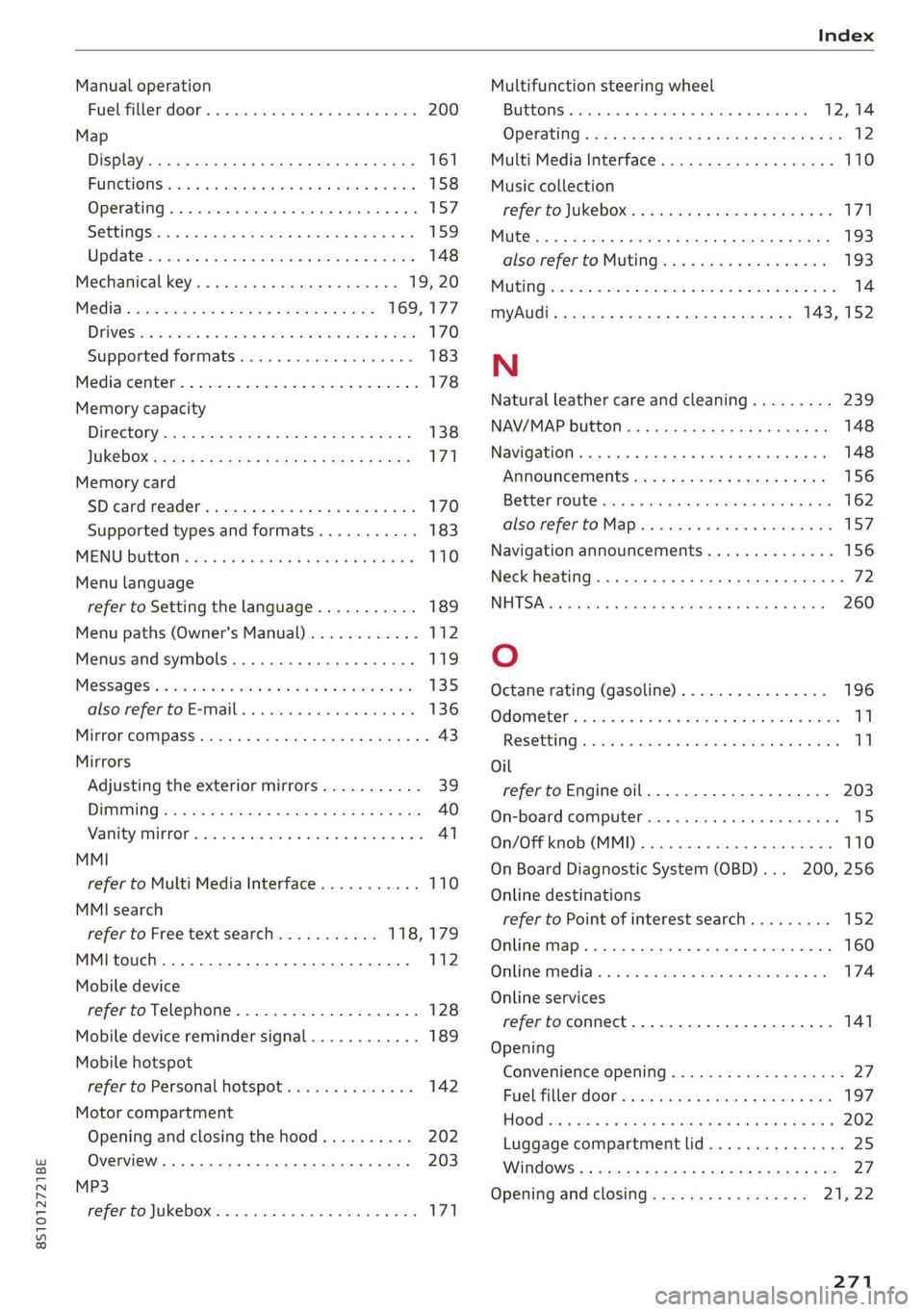
8S1012721BE
Index
Manual operation
Fuel filler door. ....... 00. e eee eee eee 200
Map
DiSplay s nasa ¢ 2 ean.5 = Re GS SESH GE ROG 161
FUNGHIONS ecco ¢ waa oy ween ee eee oo eee 158
Operating... 6... cece eee eee eee 157
Settings............0. 000. e eee eee 159
Update « sais ¢ ¢ naw so pees oo mews oeeas 148
Mechanical: key’. « x seve sc news x sau es 19, 20
MeGia. xe ¢ 2 sccm & + qo & 2 ene 2 2 ee 169,177
DIIVESS: oo sxnecus oi riseue 5 masa 2 8 inaaene & ate 170
Supported formats.................-. 183
Mediarcenter. « csinne so vascure #2 aaetwee 0 ctunins © 2 178
Memory capacity
Directory... 0... ee cee eee ee eee 138
JUKEDOX vcs ¢ < secu: & x some ee NewE 2 Does 171
Memory card
SD card reader's wscomve » svc a 2 swine a 2 omnes 170
Supported types and formats........... 183
MENU Buttons cesnsic o o cncsine s 6 ecaine a arena wv 110
Menu language
refer to Setting the language........... 189
Menu paths (Owner's Manual)............ 112
Menus and symbols..............e ee eee 119
MeSSAGES': « eenis + wanes a 6 ween wo mane wo ove 135
also refer to E-mail................0-- 136
MInrOr COMPASS « sswees «5 sxsasne % o axons @ 0 axemees 6 43
Mirrors
Adjusting the exterior mirrors........... 39
DIRIHUNG 2 evens 5 x eeeu oe meen oe eee oe ee 40
ManityAM KOR wuscca: a + seven
refer to Multi Media Interface........... 110
MMI search
refer to Free text search........... 118,179
MMI touch. .... 2.0.0.0 cece cece eee ee 112
Mobile device
refertoTelephone............-...0--. 128
Mobile device reminder signal............ 189
Mobile hotspot
refer to Personal hotspot.............. 142
Motor compartment
Opening and closing the hood.......... 202
OVERVIOWoescce xo cen + a wvenmine wo steno aw ameree 203
MP3
refer to Jukebox... 0.2... eee eee eee 171
Multifunction steering wheel
Buttons... .. 0... cee eee eee 12,14
OPCHAUING’s ¢ x wae 2 eesen o wawe Bo eGR so BO 12
Multi Media Interface................... 110
Music
collection
refer to Jukebox...........--0ee eee eee 171
Mut@ xx « s soem = s neers se Gems 5 a eee § eee 193
alsorreferto MULAN es 6 eos ov cme 5 a a 193
MULINGsss <= cess o 2 ween 2 o eee 2 0 eee oo ere 14
MYAUGI » » sees 5 = seme 5 e Hewes eee ee 143, 152
N
Natural leather care and cleaning......... 239
NAV/MAP button................020005 148
Navigation ..... 0... cece eee eee eee 148
Announcement sas << eeu es eee ey es 156
Betteriroute cs x « means + 0 memes « 0 smn = 0 a0 162
also refertoMap..............0+-005 157
Navigation announcements.............. 156
Neck heating........... 0 cee eee eee eee 72
NEDESA ss i cuisssie oi sscweva a x senna © a seasiie 0 ¥ aire 260
O
Octane rating (gasoline)................ 196
QAOMELEr asowe « x worms vw comes oo eae ow coo 11
RESULTING: cuseitn & w: esexes « wicezere 9 « stiecesn 6 © pstonese al
Oil
referto Engineoil.................0.. 203
On-board computer......... 0.0.0. e eee 15
OnZOFEKMOB:CMIM]) « « acsieze oo sceseus oa enero a we 110
On Board Diagnostic System (OBD)... 200, 256
Online destinations
refer to Point of interest search......... 152
Online map.......... cee eee eee eee ee 160
OnlimeMeMiarerass o svossic ev sawn wo a eresina ia & ae 174
Online services
refer toconnect.............0 eee eae 141
Opening
Convenience opening...............005% 27
Fuel tiller do0r sx : 2 goes : samy s s sees 2 ay 197
HOOd ... ee eee eee 202
Luggage compartment lid............... 25
WiNdOWS': » sues 2 : oes 2 u seuss ge eee 9 0 27.
Opening and closing................- 21;.22
271