infotainment AUDI TT 2021 Owner´s Manual
[x] Cancel search | Manufacturer: AUDI, Model Year: 2021, Model line: TT, Model: AUDI TT 2021Pages: 280, PDF Size: 99.18 MB
Page 166 of 280
Radio
Radio
Opening the radio
@ =
CEUs AEP
89.9 _WIBI-FM HD4
WIBI-FM HD6
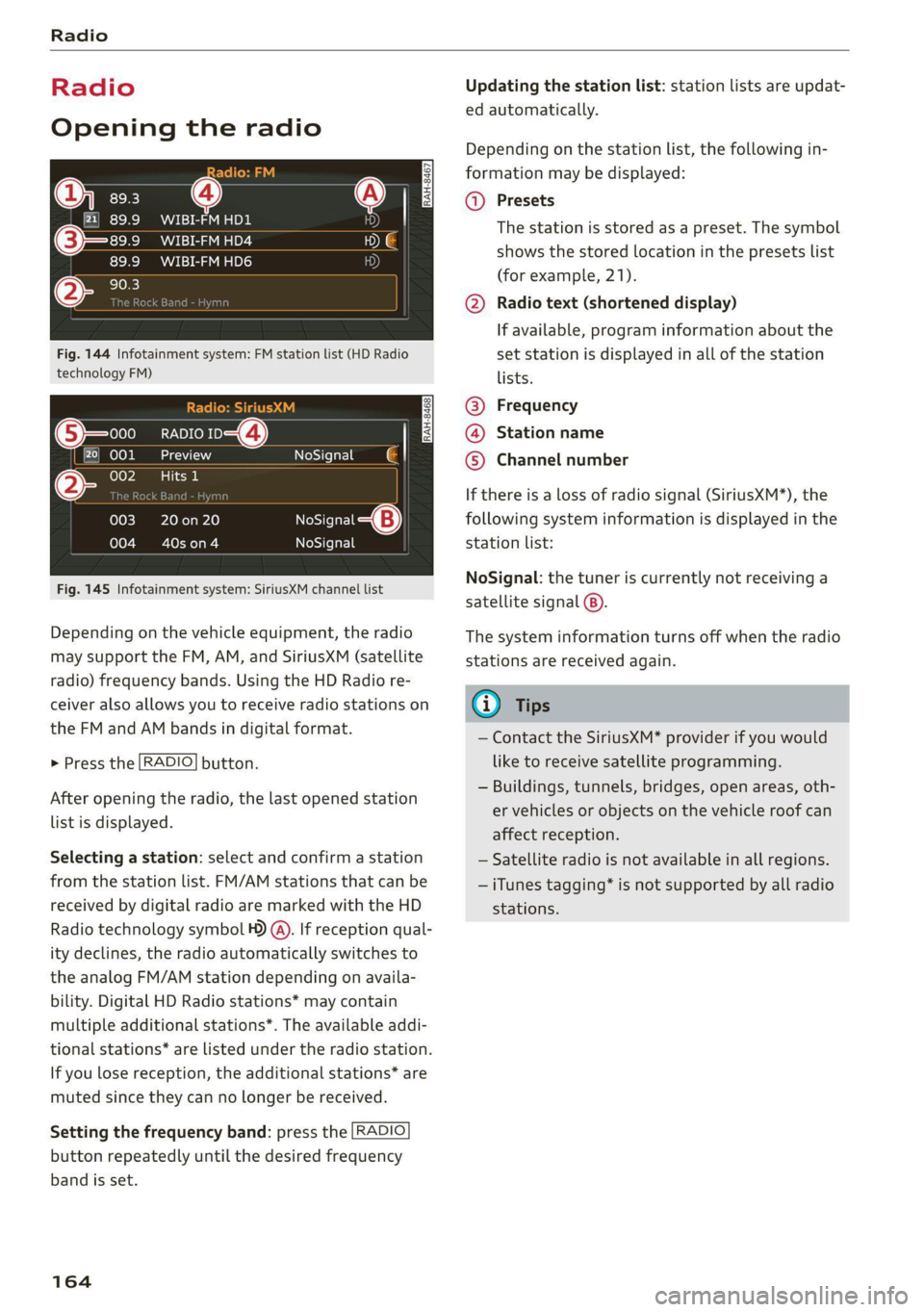
Fig. 144 Infotainment system: FM station list (HD Radio
technology FM)
RADIO ro 4)
kad
ieee
NoSignal é |
20 on 20
Cowon)
NoSigna
NoSignal
Fig. 145 Infotainment system: SiriusXM channel list
Depending on the vehicle equipment, the radio
may support the FM, AM, and SiriusXM (satellite
radio) frequency bands. Using the HD Radio re-
ceiver also allows you to receive radio stations on
the FM and AM bands in digital format.
> Press the [RADIO] button.
After opening the radio, the last opened station
list is displayed.
Selecting a station: select and confirm a station
from the station list. FM/AM stations that can be
received by digital radio are marked with the HD
Radio technology symbol ) (A). If reception qual-
ity declines, the radio automatically switches to
the analog FM/AM station depending on availa-
bility. Digital HD Radio stations* may contain
multiple additional stations*. The available addi-
tional stations* are listed under the radio station.
If you lose reception, the additional stations* are
muted since they can no longer be received.
Setting the frequency band: press the [RADIO
button repeatedly until the desired frequency
band is set.
164
Updating the station list: station lists are updat-
ed automatically.
Depending on the station list, the following in-
formation may be displayed:
@ Presets
The station is stored as a preset. The symbol
shows the stored location in the presets list
(for example, 21).
@ Radio text (shortened display)
If available, program information about the
set station is displayed in all of the station
lists.
@ Frequency
@® Station name
© Channel number
If there is a loss of radio signal (SiriusXM*), the
following system information is displayed in the
station list:
NoSignal: the tuner is currently not receiving a
satellite signal ®).
The system information turns off when the radio
stations are received again.
@) Tips
— Contact the SiriusXM* provider if you would
like to receive satellite programming.
— Buildings, tunnels, bridges, open areas, oth-
er vehicles or objects on the vehicle roof can
affect reception.
— Satellite radio is not available in all regions.
— iTunes tagging* is not supported by all radio
stations.
Page 167 of 280
8S1012721BE
Radio
Radio functions
ak eee)
Applies to: vehicles with free text search
MYT El DE
Wee a Be
WIBI-FM HD6
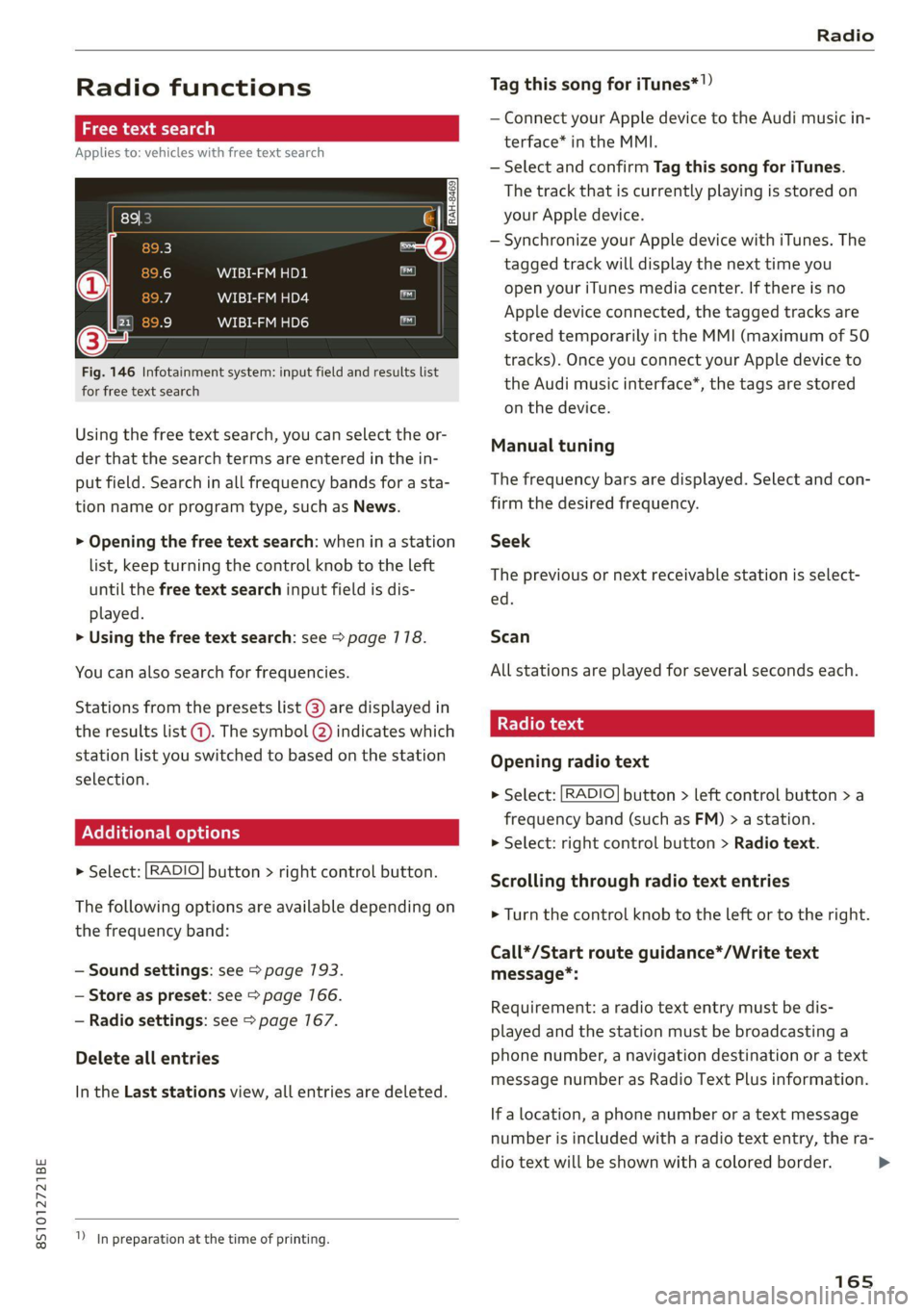
Fig. 146 Infotainment system: input field and results list
for free text search
Using the free text search, you can select the or-
der that the search terms are entered in the in-
put field. Search in all frequency bands for a sta-
tion name or program type, such as News.
> Opening the free text search: when in a station
list, keep turning the control knob to the left
until the free text search input field is dis-
played.
> Using the free text search: see > page 178.
You can also search for frequencies.
Stations from the presets list @) are displayed in
the results list @. The symbol Q) indicates which
station list you switched to based on the station
selection.
Ad
nal options
> Select: [RADIO] button > right control button.
The following options are available depending on
the frequency band:
— Sound settings: see > page 193.
— Store as preset: see > page 166.
— Radio settings: see > page 167.
Delete all entries
In the Last stations view, all entries are deleted.
In preparation at the time of printing.
Tag this song for iTunes*!)
— Connect your Apple device to the Audi music in-
terface* in the MMI.
— Select and confirm Tag this song for iTunes.
The track that is currently playing is stored on
your Apple device.
— Synchronize your Apple device with iTunes. The
tagged track will display the next time you
open your iTunes media center. If there is no
Apple device connected, the tagged tracks are
stored temporarily in the MMI (maximum of 50
tracks).
Once you connect your Apple device to
the Audi music interface*, the tags are stored
on the device.
Manual tuning
The frequency bars are displayed. Select and con-
firm the desired frequency.
Seek
The previous or next receivable station is select-
ed.
Scan
All stations are played for several seconds each.
Radio text
Opening radio text
> Select: [RADIO] button > left control button >a
frequency band (such as FM) > a station.
> Select: right control button > Radio text.
Scrolling through radio text entries
> Turn the control knob to the left or to the right.
Call*/Start route guidance*/Write text
message*:
Requirement: a radio text entry must be dis-
played and the station must be broadcasting a
phone number, a navigation destination or a text
message number as Radio Text Plus information.
If a location, a phone number or a text message
number is included with a radio text entry, the ra-
dio text will be shown with a colored border. >
165
Page 168 of 280
![AUDI TT 2021 Owner´s Manual Radio
> Select a radio text entry with Radio Text Plus in-
formation and press the control knob.
> Select and confirm Call*/Start route guid-
ance*/Write text message”.
> press the [BACK] bu](/img/6/40287/w960_40287-167.png "AUDI TT 2021 Owner´s Manual Radio
> Select a radio text entry with Radio Text Plus in-
formation and press the control knob.
> Select and confirm Call*/Start route guid-
ance*/Write text message”.
> press the [BACK] bu")
Radio
> Select a radio text entry with Radio Text Plus in-
formation and press the control knob.
> Select and confirm Call*/Start route guid-
ance*/Write text message”.
> press the [BACK] button to cancel.
G) Tips
The availability of radio text and RadioText
Plus depends on the radio station.
View: additional station informat
Fig. 147 Infotainment system: "Now Playing" screen
Requirement: the Show "Now Playing" screen
option must be switched on = page 167.
Symbols in the "Now Playing" screen:
@ Radio text availability
Radio text is available for the selected sta-
tion > page 165.
@ iTunes Tagging
The Tag this song for iTunes option is availa-
ble for the set station > page 165, Addition-
al options.
@ FMHD Radio technology
The station is received through FM HD Radio
technology.
@ Screen view
Display Cover art or Station logo
=> page 168, Preferred picture view.
Displaying the station list
turn the control knob, or press the [BACK] button.
166
Radio menu
(ian Change to media
agi}
(3 ae FEET a a-ha (olay
(a Sate Au
al
Fig. 148 Infotainment system: Radio menu
Opening a menu
> Select: [RADIO] button > left control button.
Selecting the frequency band
>» Select and confirm the desired frequency band
in the radio menu, or
> Press the [RADIO] button repeatedly until the
desired frequency band is set. Displays the sta-
tion list.
@ Switch to media
The Media menu is displayed > page 177.
@ Presets
The presets list is displayed > page 166.
@® Last stations
The last stations listened to from all frequen-
cy bands are shown in the list. Select and
confirm a station for immediate playback.
@ Applies to: vehicles with SiriusXM
SiriusXM
The SiriusXM channel list is displayed.
© FM
The FM station list is displayed.
Additional frequency bands
Depending on the vehicle equipment, you can se-
lect additional frequency bands in the selection
menu > fig. 148.
Presets
You can store your favorite stations from every
frequency band in the presets list.
Page 169 of 280
![AUDI TT 2021 Owner´s Manual 8S1012721BE
Radio
Opening a menu
> Select: the [RADIO] button > left control button
> Presets.
Store as preset
Requirement: the presets list must be displayed.
> Select and confir](/img/6/40287/w960_40287-168.png "AUDI TT 2021 Owner´s Manual 8S1012721BE
Radio
Opening a menu
> Select: the [RADIO] button > left control button
> Presets.
Store as preset
Requirement: the presets list must be displayed.
> Select and confir")
8S1012721BE
Radio
Opening a menu
> Select: the [RADIO] button > left control button
> Presets.
Store as preset
Requirement: the presets list must be displayed.
> Select and confirm a free preset space. Follow
the system instructions.
> Select and confirm a station from the list if nec-
essary.
Store as preset
Requirement: a station list must be displayed.
> Select: a station from the list > right control
button > Store as preset.
> Press and hold the control knob for several sec-
onds.
Listening to a preset
Requirement: the presets list must be displayed.
> Select and confirm a preset from the list.
Moving a preset
Requirement: the presets list must be displayed.
> Select a preset from the list > right control but-
ton > Move preset, or
> Press and hold the control knob for several sec-
onds.
> Select and confirm the location of the selected
preset.
Deleting a preset
Requirement: the presets list must be displayed.
> Select a preset from the list > right control but-
ton > Delete preset > Delete this preset or De-
lete all presets.
Additional settings
> Select: [RADIO] button > right control button >
Radio settings.
The following settings can be selected, depend-
ing on the band that is selected:
Station names (FM)
Variable: scrolling text transmitted by the FM
stations is shown in the Infotainment system dis-
play.
Fixed: scrolling text transmitted by the FM sta-
tions is not shown in the Infotainment system
display. Only the current section of the scrolling
text is displayed.
FM HD Radio/AM HD Radio*
You can switch HD Radio reception on or off.
Channel sorting (SiriusXM*)
You can set the channel sorting for SiriusXM sta-
tion lists* by:
— Channel number: the channels are sorted in as-
cending order according to their channel num-
ber.
— Channel name: the channels are listed in alpha-
betical order.
— First category, then channel number: the
channels are sorted by their category and then
by their channel numbers.
— First category, then channel name: the sta-
tions are sorted by their category and then by
their channel names.
Category filter (SiriusXM*)
The stations shown in the station list can be fil-
tered by your personal preferences and by pro-
gram type. The program categories that you can
select depend on what is offered by your provid-
er. Select the All categories option to deactivate
all filter options and display all available stations
in the satellite station list.
Show “Now Playing" screen
When the function is switched on ¥ and the sta-
tions or presets list is open, the display will
switch to the Show "Now Playing" screen view
after approximately five seconds > page 166. De-
pending on availability, information about the
set station (such as station name, artist and sta-
tion logo) may be displayed in this view.
167
>
Page 179 of 280
8S1012721BE
Media
approximately 70% of the maximum vol-
ume.
— Functionality is not guaranteed for mobile
devices that do not conform to the USB 2.0
specification.
— USB hubs are not supported.
— Some versions of the iPod such as the iPod
shuffle cannot be connected to the USB
adapter
for devices with dock connector.
Connect these devices using a AUX connec-
tor cable.
— Video playback* through the Audi music in-
terface is only supported if the connected
device is recognized as a USB storage device
(for example a USB stick). Apple devices and
MTP devices (such as smartphones) are not
recognized as USB storage devices.
— iPod or iPhone malfunctions also affect the
operation of the MMI. Reset your mobile de-
vice in these situations.
— Audi recommends updating the iPod or
iPhone software to the latest version. Refer
to your mobile device owner's manual for
more information.
—Aselection of supported devices can be
found in the database for tested mobile de-
vices at www.audi.com/mp3.
Playing media
er audio player
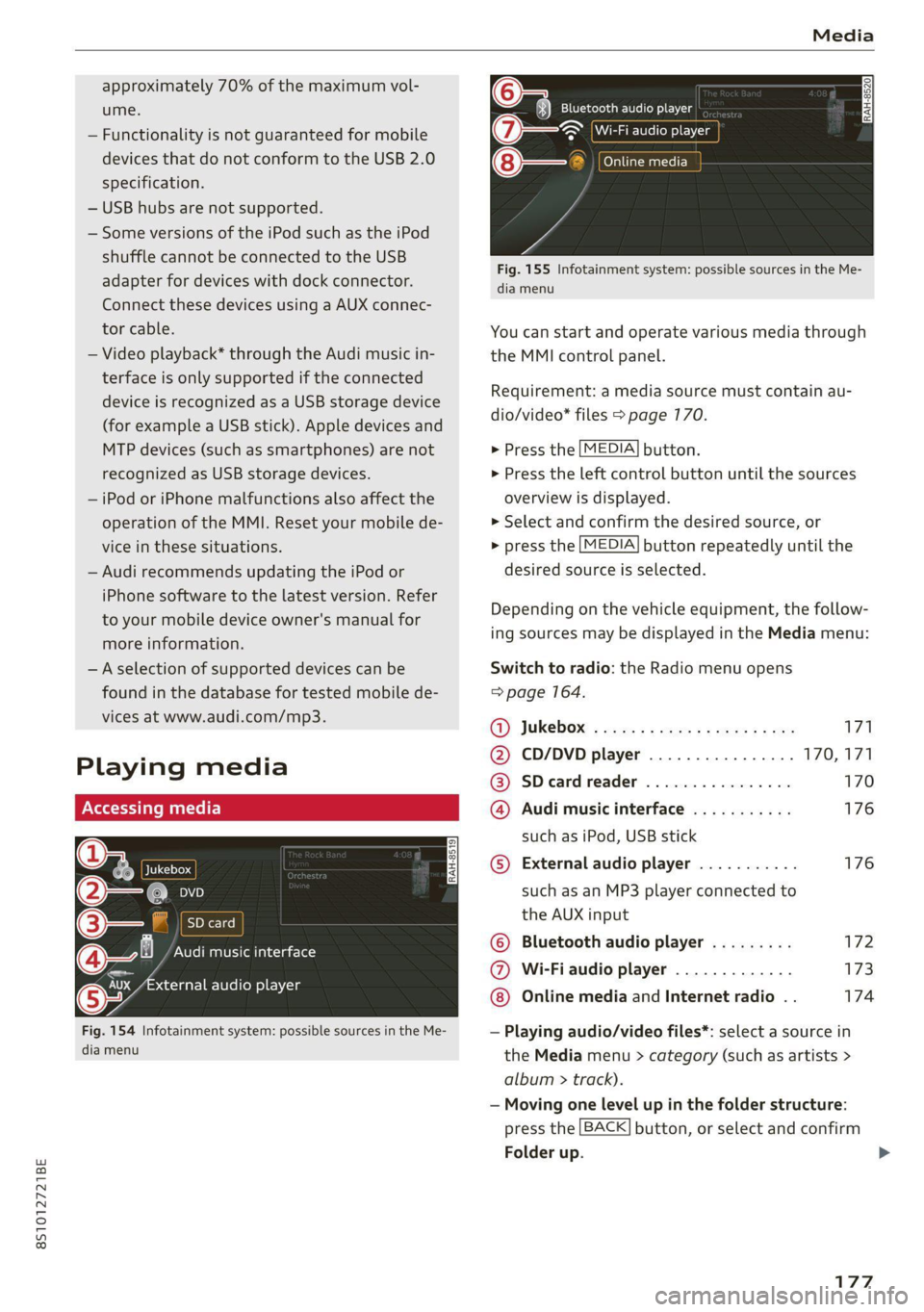
Fig. 154 Infotainment system: possible sources in the Me-
dia menu
y_
Bluetooth audio player
> {Wi-Fi audio foe
Online media
Fig. 155 Infotainment system: possible sources in the Me-
dia menu
You can start and operate various media through
the MMI control panel.
Requirement: a media source must contain au-
dio/video* files > page 170.
> Press the
> Press the
overview i
MEDIA button.
left control button until the sources
s displayed.
> Select and confirm the desired source, or
> press the
MEDIA button repeatedly until the
desired source is selected.
Depending on the vehicle equipment, the follow-
ing sources may be displayed in the Media menu:
Switch to radio: the Radio menu opens
=> page 164.
GY Jukebox: ¢ sey: + ease 5 e ees 2 sa 171
@ CD/DVD player ................ 170,171
@ SDecardreader ................ 170
@ Audi music interface ........... 176
such as iPod, USB stick
© External audio player ........... 176
such as an MP3 player connected to
the AUX input
© Bluetooth audio player ......... 172
@ Wi-Fiaudio player ............. 173
Online media and Internet radio . . 174
— Playing audio/video files*: select a source in
the Media menu > category (such as artists >
album > ti rack).
— Moving one level up in the folder structure:
press the
Folder up
BACK button, or select and confirm
177
>
Page 180 of 280
Media
— Selecting the previous or next track/chapter
1): press the On/Off knob on the MMI control
panel briefly to the left Kd or right Do.
— Fast-forwarding and rewinding audio/video*
files: press and hold the On/Off knob on the
MMI control panel to the left Kd or right Pe for
a longer time.
— Pausing or resuming playback: press the
On/Off knob on the MMI control panel briefly.
G@) Tips
— You can scroll through long lists quickly by
turning the control knob quickly. The scroll-
ing speed depends on the number of list en-
tries.
— For safety reasons, the video image* is only
displayed when the vehicle is stationary. On-
ly the sound from the video* plays while
driving.
=e
ie
Naa a)
(4) As Albums
[ale
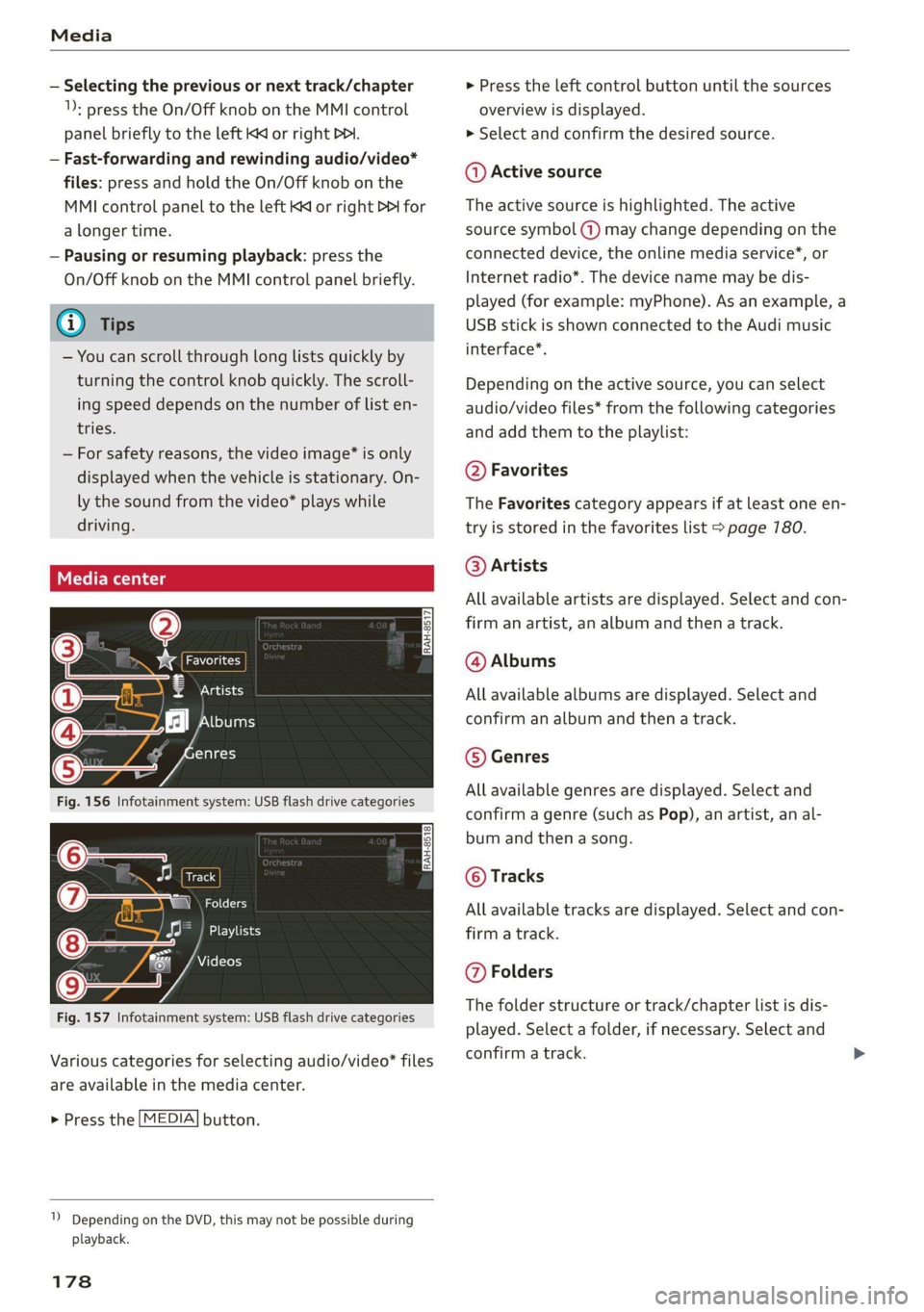
Fig. 156 Infotainment system: USB flash drive categories
i Beep
Orn oli
RAH-8518
8) apie ee
Nie (=fol-)
Fig. 157 Infotainment system: USB flash drive categories
Various categories for selecting audio/video" files
are available in the media center.
> Press the [MEDIA] button.
1) Depending on the DVD, this may not be possible during
playback.
178
> Press the left control button until the sources
overview is displayed.
> Select and confirm the desired source.
@ Active source
The active source is highlighted. The active
source symbol (a) may change depending on the
connected device, the online media service”, or
Internet radio*. The device name may be dis-
played (for example: myPhone). As an example, a
USB stick is shown connected to the Audi music
interface*.
Depending on the active source, you can select
audio/video files* from the following categories
and add them to the playlist:
@ Favorites
The Favorites category appears if at least one en-
try is stored in the favorites list > page 780.
@ Artists
All available artists are displayed. Select and con-
firm
an artist, an album and then a track.
@ Albums
All available albums are displayed. Select and
confirm an album and then a track.
© Genres
All available genres are displayed. Select and
confirm a genre (such as Pop), an artist, an al-
bum and then a song.
© Tracks
All available tracks are displayed. Select and con-
firm a track.
@ Folders
The folder structure or track/chapter list is dis-
played. Select a folder, if necessary. Select and
confirm a track.
Page 181 of 280
8S1012721BE
Media
Playlists
All available playlists from the source and the
smart playlists are displayed. Select and confirm
a playlist and then a track.
Smart playlists
— Last played tracks: the last tracks played in the
selected source are displayed.
— Most played tracks: the most played tracks in
the selected source are displayed.
— 5 stars to 1 star: tracks from the selected
source are displayed according to their rating.
— Unrated: all files from the selected source
without rating information (for example, in the
ID3 tag) are displayed.
© Videos*
All available video files are displayed. Select and
confirm a video file.
@) Tips
— Only the categories supported by the medi-
um are available. For example, CD/DVD-
ROM tracks* cannot be selected with cate-
gories such as Artists, Albums or Genres.
With an iPod (source: Audi music interface
= page 175), the Podcasts, Audio books
and Composers categories are also availa-
ble.
— For safety reasons, the video image* is only
displayed when the vehicle is stationary. On-
ly the sound from the video* plays while
driving.
— When synchronizing a portable device with
"Cloud" services, playlists may display incor-
rectly
in the MMI. Use the media center in
the device.
cme deer 1g
Applies to: vehicles with free text search
@
e@- Rock Band
©-" Rock Band
@-» ete
React
Fig. 158 Infotainment system: input field and results list
for free text search
Nume
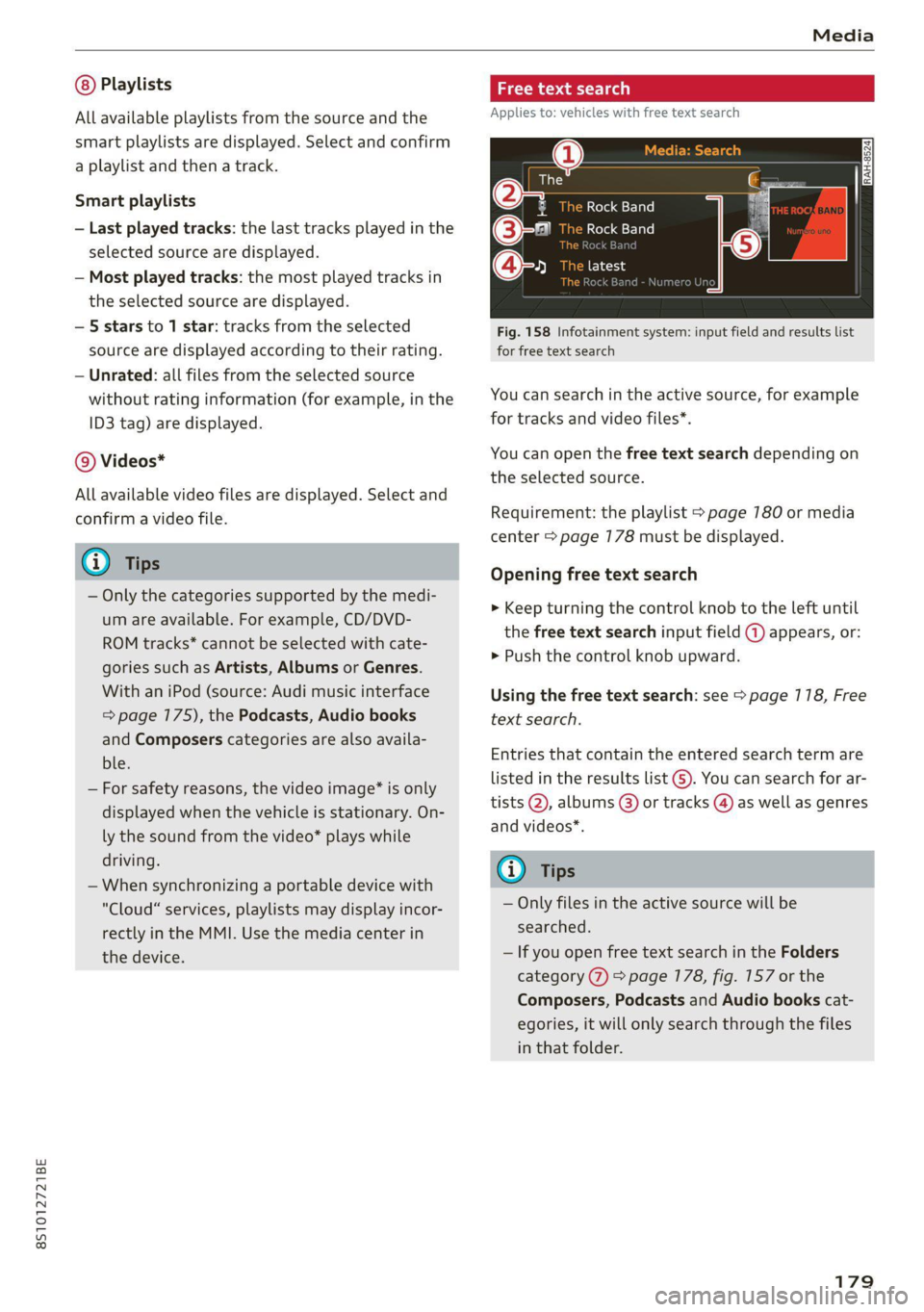
You can search in the active source, for example
for tracks and video files*.
You can open the free text search depending on
the selected source.
Requirement: the playlist > page 780 or media
center > page 178 must be displayed.
Opening free text search
> Keep turning the control knob to the left until
the free text search input field @ appears, or:
> Push the control knob upward.
Using the free text search: see > page 118, Free
text search.
Entries that contain the entered search term are
listed
in the results list G). You can search for ar-
tists @, albums @) or tracks @) as well as genres
and videos*.
G) Tips
— Only files in the active source will be
searched.
— If you open free text search in the Folders
category (7) > page 178, fig. 157 or the
Composers, Podcasts and Audio books cat-
egories, it will only search through the files
in that folder.
179
Page 182 of 280
Media
Hymn
The big B
kE
Stories
k Bar
Again
Fig. 159 Infotainment system: playlist
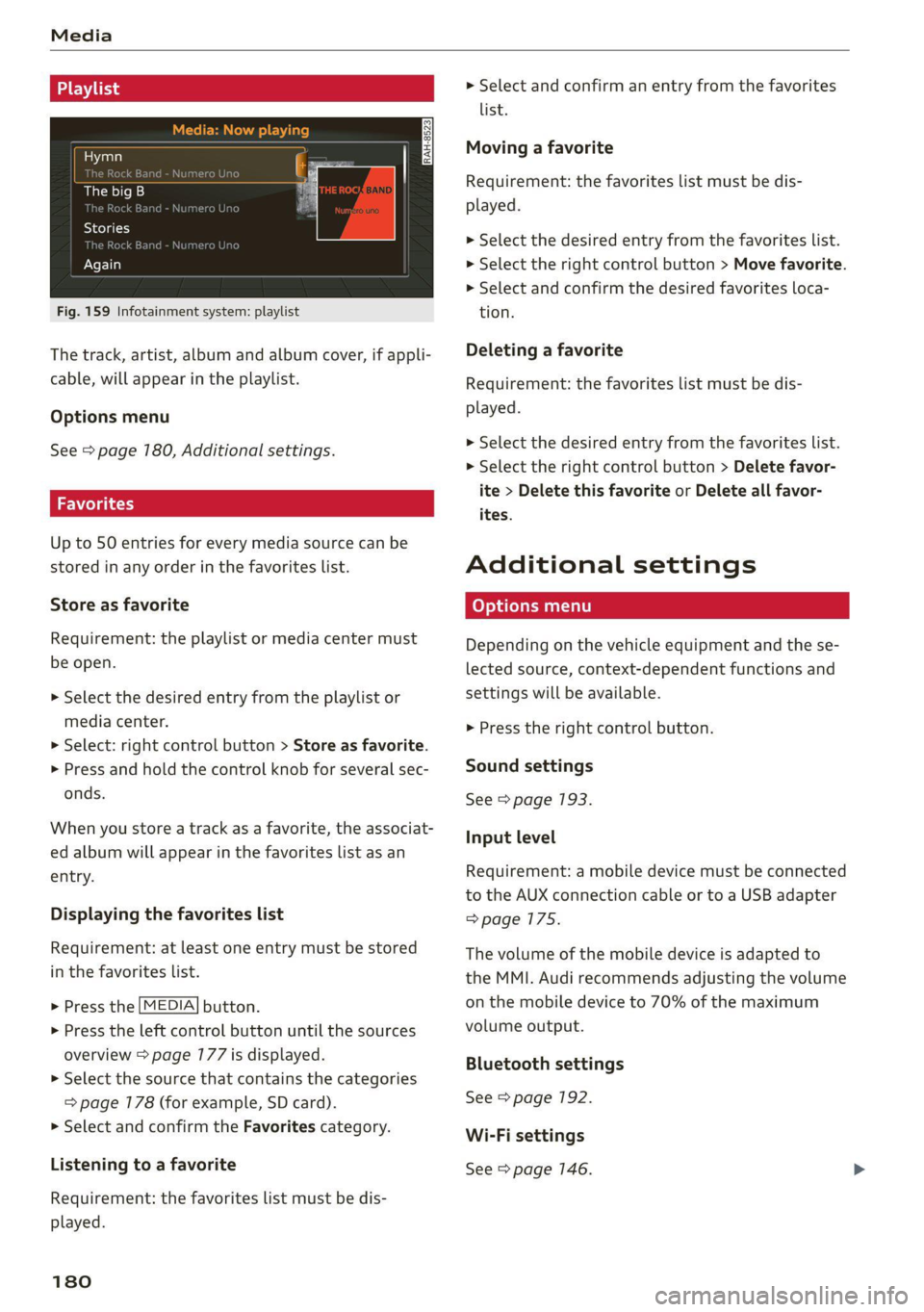
The track, artist, album and album cover, if appli-
cable, will appear in the playlist.
Options menu
See > page 180, Additional settings.
Wola i ast)
Up to 50 entries for every media source can be
stored in any order in the favorites list.
Store as favorite
Requirement: the playlist or media center must
be open.
> Select the desired entry from the playlist or
media center.
> Select: right control button > Store as favorite.
> Press and hold the control knob for several sec-
onds.
When you store a track as a favorite, the associat-
ed album will appear in the favorites list as an
entry.
Displaying the favorites list
Requirement: at least one entry must be stored
in the favorites list.
> Press the [MEDIA] button.
> Press the left control button until the sources
overview > page 177 is displayed.
> Select the source that contains the categories
=> page 178 (for example, SD card).
> Select and confirm the Favorites category.
Listening to a favorite
Requirement: the favorites list must be dis-
played.
180
> Select and confirm an entry from the favorites
list.
Moving a favorite
Requirement: the favorites list must be dis-
played.
> Select the desired entry from the favorites list.
> Select the right control button > Move favorite.
> Select and confirm the desired favorites loca-
tion.
Deleting a favorite
Requirement: the favorites list must be dis-
played.
> Select the desired entry from the favorites list.
> Select the right control button > Delete favor-
ite > Delete this favorite or Delete all favor-
ites.
Additional settings
Depending on the vehicle equipment and the se-
lected source, context-dependent functions and
settings will be available.
> Press the right control button.
Sound settings
See > page 193.
Input level
Requirement: a mobile device must be connected
to the AUX connection cable or to a USB adapter
=>page 175.
The volume of the mobile device is adapted to
the MMI. Audi recommends adjusting the volume
on the mobile device to 70% of the maximum
volume output.
Bluetooth settings
See > page 192.
Wi-Fi settings
See > page 146.
Page 184 of 280
Media
Switch to full screen
The video image is displayed. Turn the control
knob to display the playlist, or press the [BACK
button.
Replay video
When this function is switched on ¥, the current
video will replay.
Show DVD menu
Selecting a menu item: select and confirma
menu item, or move your finger on the MMI
touch control pad* and press the control knob.
Audio track”)
You can manually set the audio track (language
and audio format). The availability of the lan-
guage and audio format depend on the video
DVD.
Subtitles!)
You can manually select subtitles for playback.
The languages available depend on the DVD.
Aspect
Audi recommends the Automatic setting for the
picture format. You can set the picture format
depending on the active file or source (for exam-
ple video file, DVD).
Aspect ra-
tio
Description
Cinema-
scope
Use this setting for films in cinema
format 21:9. Black bars are shown
in the upper and lower edges of the
Infotainment system display.
Original The image is displayed in the ratio
of the source format. Select this
option if the image is distorted or a
section of the image is cut off
when Automatic is selected.
4:3 The image is set to the 4:3 picture
format. Black bars are shown on
the sides of the Infotainment sys-
tem display.
16:9 The image is set to the 16:9 pic-
ture format. Black bars are shown
in the upper and lower edges of the
Infotainment system display.
Aspect ra-
tio
Description
Automatic | The MMI detects the picture for-
mat of the source and displays the
image in the optimal ratio. Black
bars may appear on the sides of
the display, depending on the
source format and the Infotain-
ment system display that is instal-
led.
Zoom The image is enlarged to fill the
entire Infotainment system dis-
play. Switch the function off if the
image is distorted.
1) Depending on the DVD, this may not be possible during
playback.
182
G) Tips
— Not all video DVDs have parental control.
— The protection levels for the Parental con-
trol are based on the US standards from the
Motion Picture Association of America
(MPAA). Note that the age levels for video
DVDs in European countries may differ.
— Password entry for Parental control will be
locked for approximately one minute if you
enter the incorrect password three times in
a row. The password can only be reset by an
authorized Audi dealer.
Page 191 of 280
![AUDI TT 2021 Owner´s Manual 8S1012721BE
System settings
System settings
Setting the date and
time
You can set the clock time manually or using the
GPS.
> Select: [MENU] button > Settings > left control
button >](/img/6/40287/w960_40287-190.png "AUDI TT 2021 Owner´s Manual 8S1012721BE
System settings
System settings
Setting the date and
time
You can set the clock time manually or using the
GPS.
> Select: [MENU] button > Settings > left control
button >")
8S1012721BE
System settings
System settings
Setting the date and
time
You can set the clock time manually or using the
GPS.
> Select: [MENU] button > Settings > left control
button > MMI settings > Date & time, or:
> Select: [MENU] button > Vehicle > left control
button > Vehicle settings > Date & time.
Automatic setting
When this function is switched on ¥, the time
and date are automatically set.
Time
Requirement: the Automatic setting must be
switched off.
Press the control knob. You can set the Time
manually by turning and pressing the control
knob.
Date
Requirement: the Automatic setting must be
switched off.
Press the control knob. You can set the Date
manually by turning and pressing the control
knob.
Time zone
When selecting the appropriate time zone, a
sampling of countries in this zone will be listed.
Automatic time zone*
When this function is switched on MW, the time
will automatically adjust to the corresponding
time zone.
Time format
If you select 24h, the clock will display, for exam-
ple, 13:00. If you select AM/PM, the clock will
display, for example, 1:00 PM.
1) The Qi standard makes it possible to charge your mobile
device wirelessly.
Date format
If you select DD.MM.YYYY, the date display will
show, for example, 31.03.2020. If you select
MM/DD/YYVY, the date display will show, for ex-
ample, 03/31/2020. If you select YYYY-MM-DD,
the date display will show, for example,
3/31/2020.
MMI settings
> Select: [MENU] button > Settings > left control
button > MMI settings.
Language
You can change the display language as well as
the language for the voice guidance* and voice
recognition system*.
The number of languages available depends on
the country.
Measurement units
The following measurement units can be set de-
pending on availability: Speed, Distance, Tem-
perature, Fuel consumption, Volume, Pressure.
Mobile device reminder signal
Applies to: vehicles with Audi phone box
Requirement: your cell phone must be Qi-capa-
ble ) or connected to the Audi music interface @
with a USB adapter cable > page 730, fig. 130.
When the device reminder signal is switched on,
you will be notified that your mobile device is still
in the Audi phone box when you leave the vehicle.
You can select between Spoken cue, Signal tone
and Off.
Mobile device reminder signal volume: you can
adjust the reminder signal volume by turning the
control knob.
Switch off pop-up: when the function is switched
on [M, the messages in the Infotainment system
display regarding the charging status of your cell
phone in the Audi phone box are hidden. The re-
minder not to forget your cell phone when leav-
ing the vehicle is also switched off.
189