light AUDI TT 2021 Owner´s Manual
[x] Cancel search | Manufacturer: AUDI, Model Year: 2021, Model line: TT, Model: AUDI TT 2021Pages: 280, PDF Size: 99.18 MB
Page 171 of 280
8S1012721BE
Media
Media
Introduction
There are various media sources and connections
available in the MMI. For example, you can play
audio/video* files from the Jukebox* or connect
your mobile device to the Audi music interface*
and operate it through the MMI.
Notes
Media and format restrictions: the MMI (includ-
ing the SD card reader and the USB storage de-
vice connection*) was tested with a variety of
products and media available in the market.
However, there may be cases where individual de-
vices or media and audio/video” files may not be
recognized, may play only with restrictions or
may not play at all.
Digital Rights Management: please note that
the audio/video* files are subject to copyright
protection.
The media sources do not play files that are pro-
tected by DRM and are identified with the symbol
&.
Data security: never store important data on SD
cards, the Jukebox*, CDs/DVDs* or mobile devi-
ces. Audi is not responsible for damaged or lost
files and media.
Loading times: the more files/folders/playlists
that are on a storage medium, the longer it will
take to load the audio/video* files. Audi recom-
mends using storage media that only contain au-
dio/video files*. To decrease the time it takes to
load audio/video files*, create subfolders (for ex-
ample, for the artist or album). The loading time
will also increase when importing files.
Additional information: when playing, audio
files are automatically displayed with any addi-
tional information that is stored (such as the ar-
tist, track and album cover). If this information is
not available on the storage medium, the MMI
will check the Gracenote metadata database.
However, in some cases, the additional informa-
tion may not be displayed.
Restricted functionality: reset the Media set-
tings to the factory default settings if functional-
ity is restricted > page 190.
If functionality is restricted, reset the Jukebox* to
the factory default settings > page 190.
For information about the properties of support-
ed media and file formats, see > page 783.
CG) Note
Always follow the information found in S@ in
General information on page 141.
CD/DVD operation
Applies to: vehicles with a CD/DVD drive
CD/DVD and format restrictions: the functionali-
ty of individual storage media may be limited due
to the variety of blank CDs/DVDs available and
the various capacities. Audio CDs or video DVDs
with copy protection, CDs/DVDs that do not con-
form to the standard, and multisession CDs may
have limited playback or may not play at all. Audi
recommends finalizing the recording process
when creating multisession CDs. Multisession
DVDs are not supported.
Using CDs/DVDs, the CD drive or the DVD drive:
to ensure correct, high-quality playback and to
prevent damage to the drive or disc reading er-
rors, always store CDs/DVDs in a protective
sleeve and do not expose them to direct sunlight.
Do not use:
— Damaged, dirty or scratched CDs/DVDs
— Single CDs/DVDs with 3 inch (8 cm) diameter
— CD/DVDs that are not round
— CDs/DVDs with labels
— Protective rings
— Cleaning CDs
Thermal protection switch: CD/DVD playback
may be temporarily unavailable if outside tem-
peratures are extremely high or low. A thermal
protection switch is installed to protect the
CD/DVD and the laser.
169
Page 177 of 280
8S1012721BE
Media
ZA WARNING
—To reduce the risk of an accident, only use
Audi connect services and the Wi-Fi hotspot
only if the traffic situation permits it. Read
and follow the guidelines provided in
=>
page 110, Traffic safety information.
— It is only safe to use tablets, laptops, mobile
devices and other similar devices when the
vehicle is stationary because, like all loose
objects, they could be thrown around the in-
side of the vehicle in a crash and cause seri-
ous injuries. Store these types of devices se-
curely while driving. Also read the warnings
in the chapter > page 52.
Multimedia connections
USB adapter for Audi music interface or
USB charging port
Applies to: vehicles with Audi music interface/USB charging
es
2
<
eg
[RAH-9203|
@) Note
Always follow the information found in >@® in
General information on page 141.
G) Tips
— Depending on the Internet connection and
network traffic, the connection may discon-
nected when online media sources are play-
ing.
— Online media and Internet radio usage de-
pends on the service availability of the third
party provider.
— Audi simply makes the access to online me-
dia services possible through the MMI and
does not take any responsibility for the con-
tent
of the online media services.
— Depending on the mobile device being used,
there may be interruptions during media
playback and when using the myAudi app.
To avoid interruptions when using a mobile
device, do not lock the screen on your mo-
bile device and keep the myAudi app in the
foreground.
— Contact an authorized Audi dealer or au-
thorized Audi Service Facility for additional
information about online media.
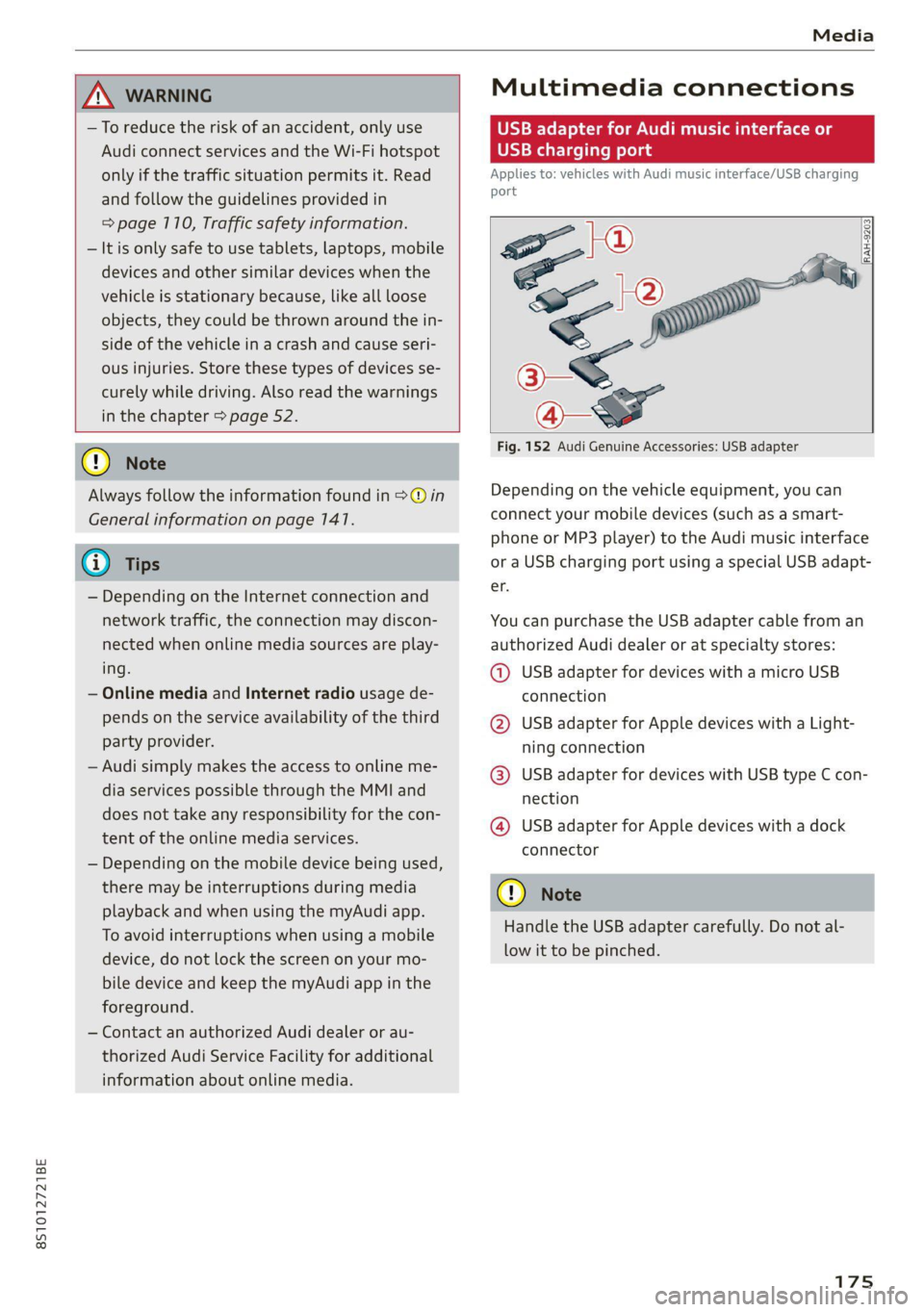
Fig. 152 Audi Genuine Accessories: USB adapter
Depending on the vehicle equipment, you can
connect your mobile devices (such as a smart-
phone or MP3 player) to the Audi music interface
or a USB charging port using a special USB adapt-
er.
You can purchase the USB adapter cable from an
authorized Audi dealer or at specialty stores:
@ USB adapter for devices with a micro USB
connection
@ USB adapter for Apple devices with a Light-
ning connection
@ USB adapter for devices with USB type C con-
nection
@ USB adapter for Apple devices with a dock
connector
C) Note
Handle the USB adapter carefully. Do not al-
low it to be pinched.
Page 180 of 280
Media
— Selecting the previous or next track/chapter
1): press the On/Off knob on the MMI control
panel briefly to the left Kd or right Do.
— Fast-forwarding and rewinding audio/video*
files: press and hold the On/Off knob on the
MMI control panel to the left Kd or right Pe for
a longer time.
— Pausing or resuming playback: press the
On/Off knob on the MMI control panel briefly.
G@) Tips
— You can scroll through long lists quickly by
turning the control knob quickly. The scroll-
ing speed depends on the number of list en-
tries.
— For safety reasons, the video image* is only
displayed when the vehicle is stationary. On-
ly the sound from the video* plays while
driving.
=e
ie
Naa a)
(4) As Albums
[ale
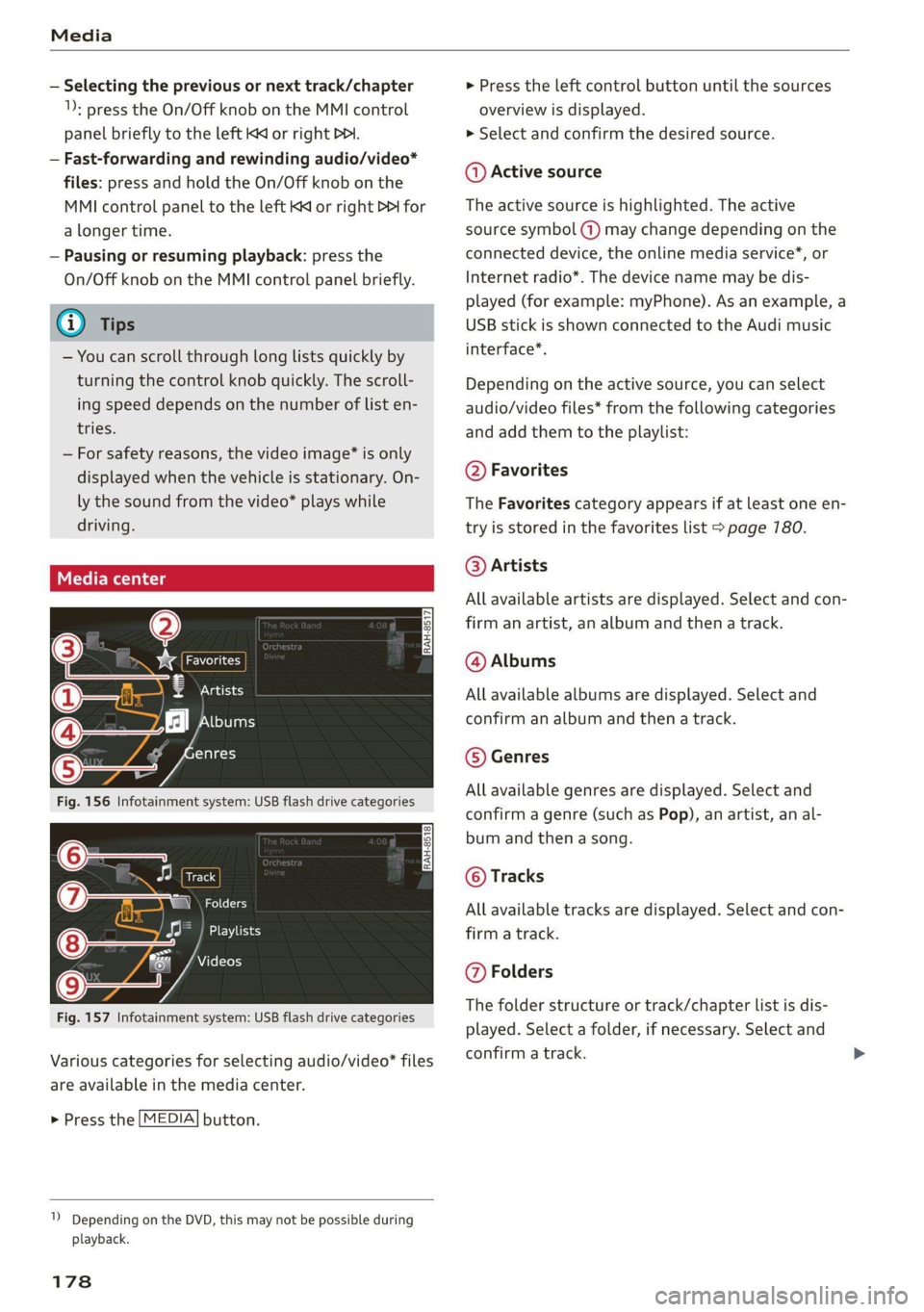
Fig. 156 Infotainment system: USB flash drive categories
i Beep
Orn oli
RAH-8518
8) apie ee
Nie (=fol-)
Fig. 157 Infotainment system: USB flash drive categories
Various categories for selecting audio/video" files
are available in the media center.
> Press the [MEDIA] button.
1) Depending on the DVD, this may not be possible during
playback.
178
> Press the left control button until the sources
overview is displayed.
> Select and confirm the desired source.
@ Active source
The active source is highlighted. The active
source symbol (a) may change depending on the
connected device, the online media service”, or
Internet radio*. The device name may be dis-
played (for example: myPhone). As an example, a
USB stick is shown connected to the Audi music
interface*.
Depending on the active source, you can select
audio/video files* from the following categories
and add them to the playlist:
@ Favorites
The Favorites category appears if at least one en-
try is stored in the favorites list > page 780.
@ Artists
All available artists are displayed. Select and con-
firm
an artist, an album and then a track.
@ Albums
All available albums are displayed. Select and
confirm an album and then a track.
© Genres
All available genres are displayed. Select and
confirm a genre (such as Pop), an artist, an al-
bum and then a song.
© Tracks
All available tracks are displayed. Select and con-
firm a track.
@ Folders
The folder structure or track/chapter list is dis-
played. Select a folder, if necessary. Select and
confirm a track.
Page 189 of 280
8S1012721BE
Audi smartphone interface
Audi smartphone
interface
Setup
Applies to: vehicles with Audi smartphone interface
You can connect your smartphone to the MMI us-
ing the Audi smartphone interface. Certain con-
tent on your smartphone is adapted to the Info-
tainment system display while driving and can be
operated through the MMI control panel.
Requirement: the vehicle must be stationary and
the ignition must be switched on. iPhone genera-
tion 6 or higher with Lightning connector and iOS
7.1.2 operating system or higher, or smartphone
with Android Auto app and Android 5.0 Lollipop
operating system or higher.
> Connect your smartphone to the Audi music in-
terface > page 776 using the applicable USB
adapter > page 175, fig. 152.
> Select and confirm Activate Apple CarPlay or
Activate Android Auto now.
> Follow the system instructions.
> Pay attention to any additional system prompts
on your smartphone, if applicable.
If you chose not to use Apple CarPlay or Android
Auto when connecting your smartphone for the
first time, you can start the Audi smartphone in-
terface later on using the Connection manager.
> Select: [MENU] button > Audi smartphone in-
terface > Change to connection manager.
> Connect your smartphone to the Audi music in-
terface > page 7176 using the applicable USB
adapter > page 175, fig. 152.
> Select and confirm Audi smartphone interface
in the Connection manager => page 790. You
can select your smartphone in the list of devi-
ces that are already paired > page 197.
> Follow the system instructions.
mobile devices while driving, because this in-
creases the risk of an accident.
ZA\ WARNING
Driving requires your complete and undivided
attention. As the driver, you have complete re-
sponsibility for safety in traffic. Never operate
In preparation at the time of printing.
() Note
Read the information about Audi connect, and
be sure to note the connectivity costs section
=> page 1417.
G) Tips
— The functions that can be used depend on
the following factors, among others:
—The brand of your smartphone
— The version of the operating system in
your smartphone
— The software version of the app used
— The USB adapter cable and correct connec-
tion
— Your cell phone service provider
— The customized settings on your smart-
phone
— One of the factors above or a combination
of any of them could cause your smart-
phone to be incompatible with the Audi
smartphone interface. Compatibility cannot
be guaranteed for all types of smartphones.
For more information and assistance, refer
to the user guide and the manufacturer of
your smartphone.
— If the connected smartphone has voice con-
trol, you can operate your smartphone using
the external voice recognition system*
=> page 127.
—The menu language shown in the MMI is
based on the settings in your smartphone.
— The time displayed in the MMI is based on
the settings in your smartphone.
— Some MMI functions are not available when
there is an active Audi smartphone interface
connection.
— You cannot connect any mobile devices via
Bluetooth when an Audi smartphone inter-
face connection is active.
— When the Apple CarPlay connection is ac-
tive, Tag this song for iTunes*”) is not avail-
able > page 165.
187
Page 197 of 280
8S1012721BE
Additional information
Additional information
Brands and licenses
This manual does not contain any symbols, such
as ® or ™, to identify trademarks or registered
trademarks. However, the absence of these sym-
bols does not constitute a waiver of any rights as-
sociated with these names.
Apple, iPhone, iPod, iPod shuffle, Apple CarPlay,
Lightning, and iTunes are trademarks of Apple
Inc.
10S is a trademark or, in the USA and other coun-
tries, a registered trademark of Cisco and is used
under license.
Other product and manufacturer names may be
trademarks of their respective owners.
195
Page 198 of 280

Checking and Filling
Checking and Filling
Fuel
Types of gasoline
The correct gasoline grade is stated on the inside
of the fuel filler door.
The vehicle is equipped with a catalytic converter
and must only be driven with unleaded gasoline.
Audi recommends using TOP TIER Detergent Gas-
oline. For additional information on TOP TIER De-
tergent Gasoline, visit www.toptiergas.com.
The individual gasoline grades are differentiated
by octane ratings. This value is given with (R
+M)/2 equating to AKI or in RON.
The headings below match the sticker in the fuel
filler door (examples):
UNLEADED FUEL ONLY MIN. (R+M)/2 87
Regular / MIN. RON 91 Regular
Use regular gasoline with minimum 87 AKI /
91 RON >©.
UNLEADED FUEL ONLY PREMIUM MIN. (R
+M)/2 91 / SUPER MIN. RON 95
Using premium gasoline with minimum 91 AKI /
95 RON is recommended.
Applies to: TT and TTS models: If premium gaso-
line is not available, you can also use regular gas-
oline 87 AKI / 91 RON. However this does reduce
the engine power slightly.
Applies to: RS models: To achieve the specified
power and torque, Audi recommends using pre-
mium plus gasoline with at least 93 AKI / 98
RON.
Applies to: RS models: If premium gasoline is not
available, you can also use regular 87 AKI /
91 RON gasoline if absolutely necessary. Howev-
er, you must only drive in the middle of the RPM
range and with low engine load. Refuel your vehi-
cle with premium gasoline as soon as possible.
UNLEADED FUEL ONLY PREMIUM MIN. (R
+M)/2 93 / SUPER PLUS MIN. RON 98
Using premium plus gasoline with at least 93
AKI / 98 RON is recommended.
196
If no premium plus gasoline is available, you can
also use premium gasoline with 91 AKI / 95 RON.
However this does reduce the engine power
slightly.
C) Note
— Filling the tank just one time with leaded
fuel or other metallic additives will cause
permanent deterioration to the catalytic
converter function.
— When gasoline with an octane rating that is
too low is used, high speeds or heavy engine
load can lead to engine damage.
G) Tips
The vehicle may be filled with fuel that has a
higher octane rating than what is required by
the engine.
Gasoline mixture
Gasoline with alcohol or MTBE (Methyl-Tert-
Butyl-Ether)
You can use unleaded gasoline mixed with alco-
hol or MTBE (generally labeled as oxygenated
compounds) as long as the fuel meets the follow-
ing conditions:
Gasoline with methanol content (methyl alco-
hol or methanol)
— Anti-Knock Index is at least 87 AKI
—No more than 3% methanol
— More than 2% solvent
Gasoline with ethanol content (ethyl alcohol or
ethanol)
— Anti-Knock Index is at least 87 AKI
—No more than 15% ethanol
Gasoline with MTBE content
— Anti-Knock Index is at least 87 AKI
—No more than 15% MTBE
Gasoline adapted to the season
Many gasoline fuels are adapted to the seasons.
When the season changes, refueling at high-traf-
fic gas stations is recommended. It is more likely
that the gasoline will be suitable for the season
there.
Page 200 of 280
Checking and Filling
continue fueling, or else the expansion space in
the tank will be filled with fuel.
> After the fuel pump has switched off, wait five
seconds before removing the nozzle to allow
the rest of the fuel to finish dripping into the
fuel tank.
> Close the fuel filler door and then press on the
left side until it latches.
The correct fuel type for your vehicle can be
found ona label located on the inside of the fuel
filler door. For additional information on fuel, see
=> page 196.
For the tank capacity in your vehicle, refer to the
Technical Data > page 264.
Messages
If the Ay indicator light appears with a corre-
sponding message, refuel the vehicle.
1D] Tank system: malfunction! Please contact
Service
There is a malfunction in the fuel tank system.
Drive to an authorized Audi dealer or authorized
Audi Service Facility immediately to have the
malfunction corrected.
flying sparks. Sparks can start a fire when
refueling.
Z\ WARNING
Improper fueling procedures and improper
handling of fuel can lead to explosions, fires,
severe burns, and other injuries.
— Do not smoke. Keep away from open flames.
— The ignition must be switched off when re-
fueling.
— Mobile devices, radio devices, and other ra-
dio equipment should always be switched
off when refueling. Electromagnetic rays
could cause sparks and start a fire.
— If you do not insert the fuel pump nozzle all
the way into the filler tube, then fuel can
leak out. Spilled fuel can ignite and start a
fire.
— Never get into the vehicle when refueling. If
there is an exceptional situation where you
must enter the vehicle, close the door and
touch a metal surface before touching the
fuel pump nozzle again. This will reduce the
risk of electrostatic discharge that can cause
ZA\ WARNING
Audi does not recommend transporting fuel
containers inside the vehicle. Fuel could leak
out of the container and ignite, especially dur-
ing an accident. This can cause explosions,
fires, and injuries.
— If you must transport fuel in a fuel contain-
er, note the following:
— Always place the fuel container on the
ground before filling. Never fill the fuel
container with fuel while it is inside or on
the vehicle. Electrostatic discharge can oc-
cur while refueling and the fuel vapors
could ignite.
— When using fuel containers made of met-
al, the fuel pump nozzle must always re-
main in contact with the container to re-
duce the risk of static charge.
— Insert the fuel pump nozzle as far as possi-
ble into the filler opening while refueling.
— Follow the applicable legal regulations in
the country where you are driving when
using, storing and transporting fuel con-
tainers.
— Make sure that the fuel container meets
the industry standards, for example ANSI
or ASTM F852-86.
198
@) Note
— Remove fuel that has overflowed onto any
vehicle components immediately to reduce
the risk of damage to the vehicle.
— Never drive until the fuel tank is completely
empty. The irregular supply of fuel that re-
sults from that can cause engine misfires.
Uncombusted fuel may enter the exhaust
system and increase the risk of damage to
the catalytic converter.
@) For the sake of the environment
— Do not overfill the fuel tank, or fuel could
leak out when the vehicle is warming up.
— Fuel should never enter the sewer system or
come into contact with the ground.
Page 202 of 280
Checking and Filling
er door manual release
Applies to: vehicles with fuel filler door manual release
Fuel fi
If the fuel filler door lock is faulty, the fuel filler
door can be unlocked manually.
F5FV.0093|
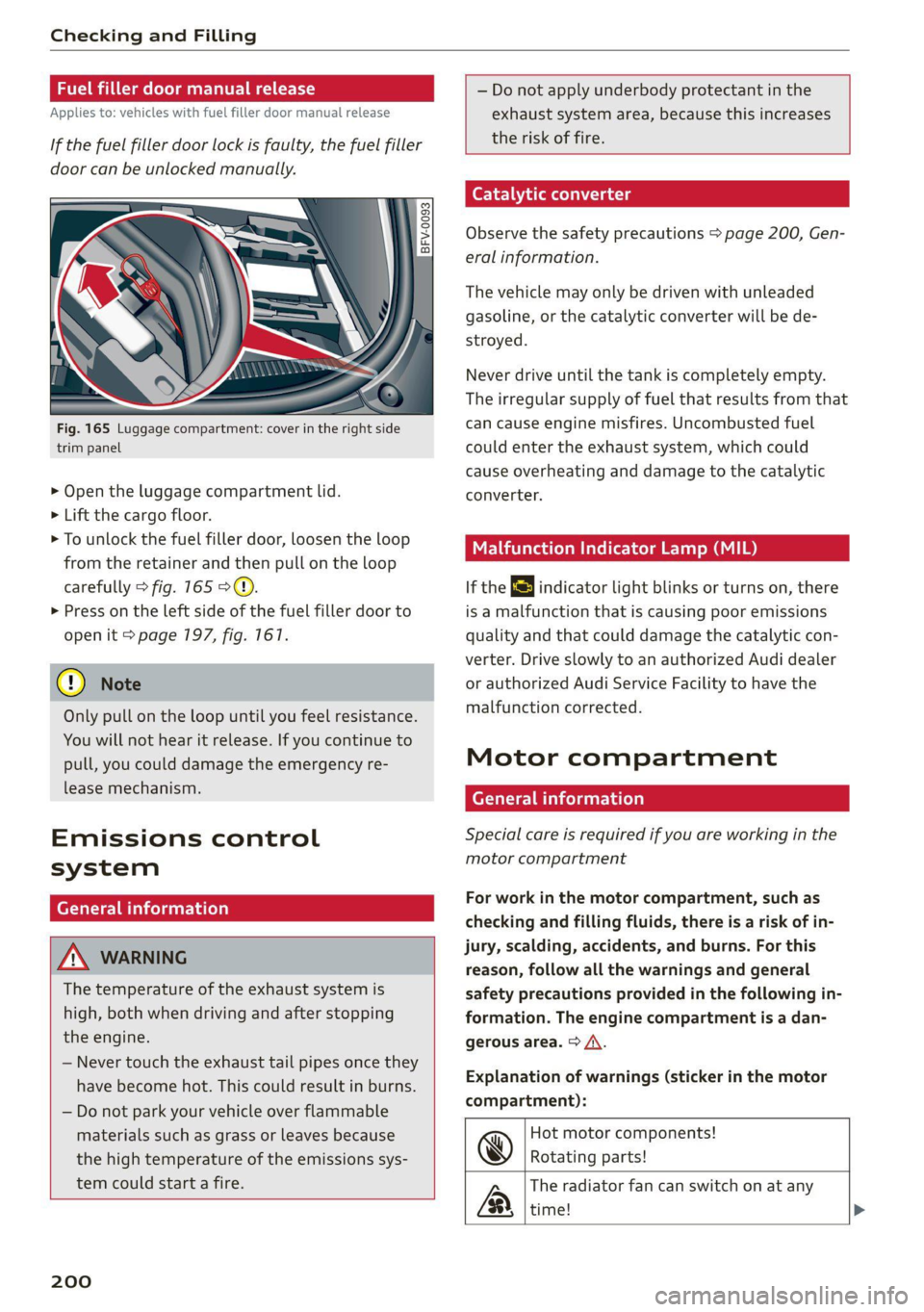
Fig. 165 Luggage compartment: cover in the right side
trim panel
> Open the luggage compartment lid.
> Lift the cargo floor.
> To unlock the fuel filler door, loosen the loop
from the retainer and then pull on the loop
carefully > fig. 165 >@).
> Press on the left side of the fuel filler door to
open it > page 197, fig. 167.
@ Note
Only pull on the loop until you feel resistance.
You will not hear it release. If you continue to
pull, you could damage the emergency re-
lease mechanism.
Emissions control
system
General information
Z\ WARNING
The temperature of the exhaust system is
high, both when driving and after stopping
the engine.
— Never touch the exhaust tail pipes once they
have
become hot. This could result in burns.
— Do not park your vehicle over flammable
materials such as grass or leaves because
the high temperature of the emissions sys-
tem could start a fire.
200
— Do not apply underbody protectant in the
exhaust system area, because this increases
the risk of fire.
(e-) 1 ad(molae lg
Observe the safety precautions > page 200, Gen-
eral information.
The vehicle may only be driven with unleaded
gasoline, or the catalytic converter will be de-
stroyed.
Never drive until the tank is completely empty.
The irregular supply of fuel that results from that
can cause engine misfires. Uncombusted fuel
could enter the exhaust system, which could
cause overheating and damage to the catalytic
converter.
Malfunction Indicator Lamp (MIL)
If the S indicator light blinks or turns on, there
is a malfunction that is causing poor emissions
quality and that could damage the catalytic con-
verter. Drive slowly to an authorized Audi dealer
or authorized Audi Service Facility to have the
malfunction corrected.
Motor compartment
General information
Special care is required if you are working in the
motor compartment
For work in the motor compartment, such as
checking and filling fluids, there is a risk of in-
jury, scalding, accidents, and burns. For this
reason, follow all the warnings and general
safety precautions provided in the following in-
formation. The engine compartment is a dan-
gerous area. > /\.
Explanation of warnings (sticker in the motor
compartment):
@
&
Hot motor components!
Rotating parts!
The radiator fan can switch on at any
time!
Page 204 of 280
Checking and Filling
to cause cancer and reproductive harms.
Wash hands after handling.
© Note
When filling fluids, be sure not to add any flu-
ids to the wrong reservoirs. Otherwise severe
malfunctions and engine damage will occur.
@ For the sake of the environment
You should regularly check the ground under
your vehicle in order to detect leaks quickly. If
there are visible spots from oil or other fluids,
bring your vehicle to an authorized Audi deal-
er or authorized Audi Service Facility to be
checked.
Opening and closing the hood
The hood is released from inside the vehicle.
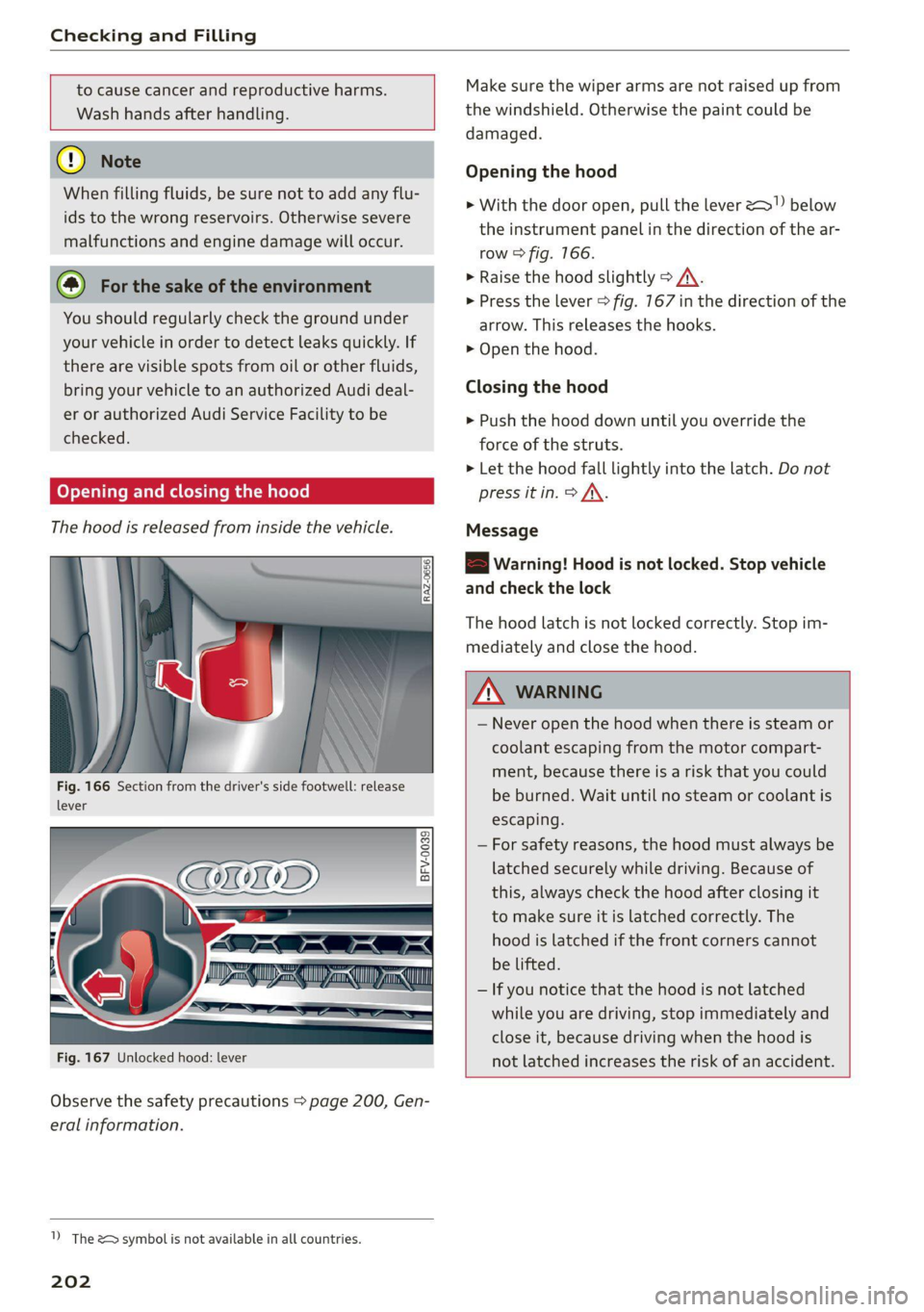
Fig. 166 Section from the driver's side footwell: release
lever
Fig. 167 Unlocked hood: lever
Observe the safety precautions > page 200, Gen-
eral information.
1) The &> symbol is not available in all countries.
202
Make sure the wiper arms are not raised up from
the windshield. Otherwise the paint could be
damaged.
Opening the hood
> With the door open, pull the lever 2!) below
the instrument panel in the direction of the ar-
row > fig. 166.
> Raise the hood slightly > A\.
> Press the lever > fig. 167 in the direction of the
arrow. This releases the hooks.
> Open the hood.
Closing the hood
> Push the hood down until you override the
force of the struts.
> Let the hood fall lightly into the latch. Do not
press it in. > /\.
Message
EB warning! Hood is not locked. Stop vehicle
and check the lock
The hood latch is not locked correctly. Stop im-
mediately and close the hood.
ZA WARNING
— Never open the hood when there is steam or
coolant escaping from the motor compart-
ment, because there is a risk that you could
be burned. Wait until no steam or coolant is
escaping.
— For safety reasons, the hood must always be
latched securely while driving. Because of
this, always check the hood after closing it
to make sure it is latched correctly. The
hood is latched if the front corners cannot
be lifted.
— If you notice that the hood is not latched
while you are driving, stop immediately and
close it, because driving when the hood is
not latched increases the risk of an accident.
Page 206 of 280
Checking and Filling
@ Tips
Audi recommends using engine oils provided
by Audi Genuine Parts.
Messages
2 Turn off engine. Oil pressure too low
Stop driving and switch the engine off. Check the
engine oil level > page 204.
— If the engine oil level is too low, add engine oil
= page 205. Only continue driving once the in-
dicator light turns off.
— If the engine oil level is correct and the indica-
tor light still turns on, turn the engine off and
do not continue driving. See an authorized Audi
dealer or authorized Audi Service Facility for as-
sistance.
Applies to: vehicles with oil level warning:
i Please check oil level
— You may continue driving for the time being.
Check the engine oil level as soon as possible
=> page 204, Checking the engine oil level.
— If the engine oil level is correct and the indica-
tor light still turns on, drive at low engine
speed to an authorized Audi dealer or author-
ized Audi Service Facility.
Bs Oil level sensor: oil change necessary. Please
contact Service
Fuel has entered the engine oil. This will cause
the engine oil level to rise slowly and the engine
oil quality to decrease. Do not extract engine oil
to reduce the level, because this will increase the
risk of engine damage. Drive to an authorized
Audi dealer or authorized Audi Service Facility im-
mediately to have engine oil extracted.
& Oil level system: malfunction! Please con-
tact Service
The sensor that checks the engine oil level has
malfunctioned. Drive immediately to an author-
ized Audi dealer or authorized Audi Service Facili-
ty to have the malfunction repaired.
3 Oil pressure sensor: malfunction! Please
contact Service
204
The sensor that checks the engine oil pressure
has malfunctioned. Drive immediately to an au-
thorized Audi dealer or authorized Audi Service
Facility to have the malfunction repaired.
i Please drive to warm up engine
Fuel has entered the engine oil, either due to low
outside temperatures or frequent short drives.
Drive until the engine is warm so that the fuel in
the engine oil will evaporate. Avoid high engine
speeds, full accelerating, and heavy engine loads
when doing this.
(i) Tips
The oil pressure warning = is not an oil level
indicator. Always check the oil level regularly.
(entrada meat Male] mey mC
Q
B8V-0588
&
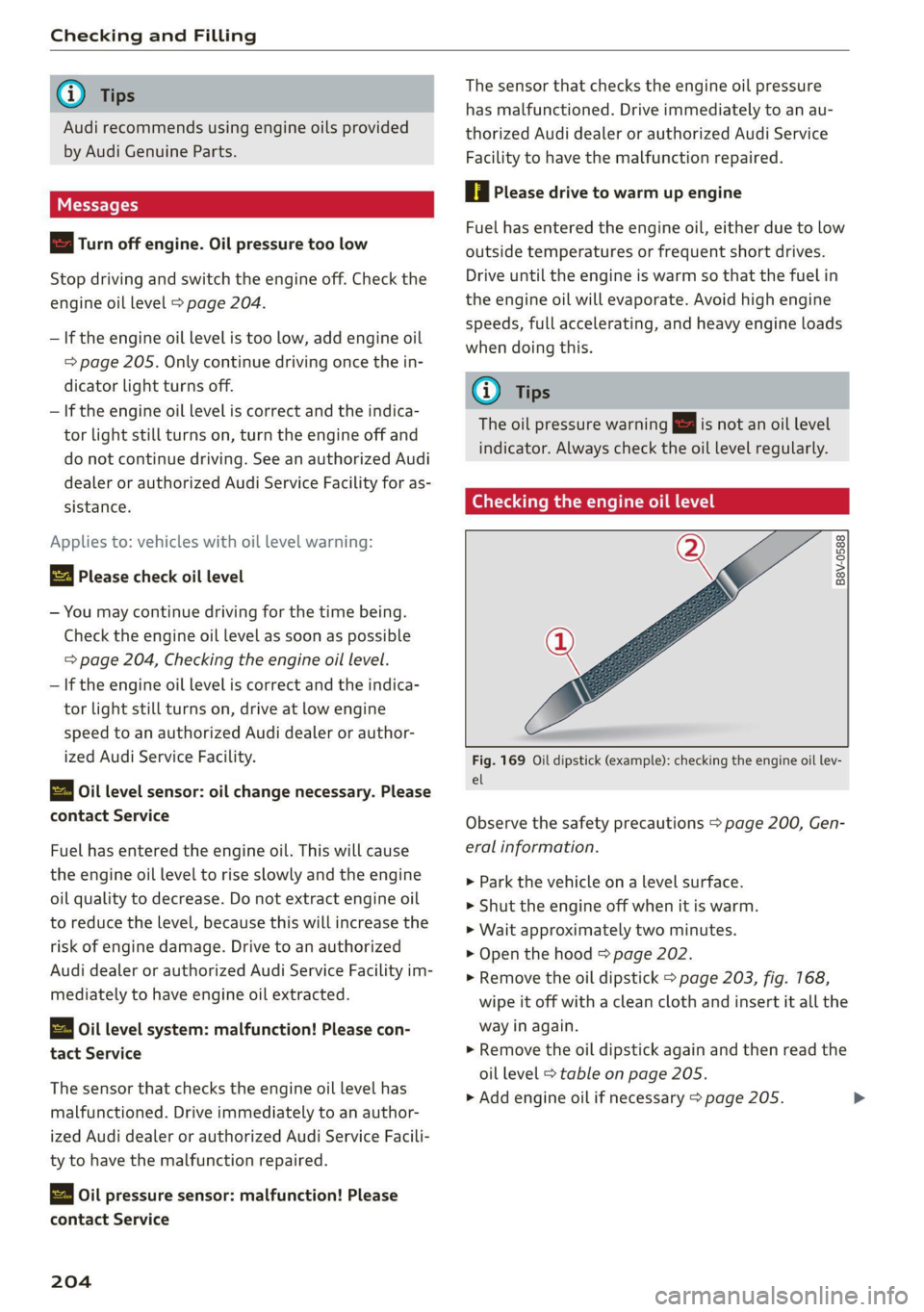
Fig. 169 Oil dipstick (example): checking the engine oil lev-
el
Observe the safety precautions > page 200, Gen-
eral information.
> Park the vehicle on a level surface.
>» Shut the engine off when it is warm.
> Wait approximately two minutes.
> Open the hood > page 202.
> Remove the oil dipstick > page 203, fig. 168,
wipe it off with a clean cloth and insert it all the
way in again.
> Remove the oil dipstick again and then read the
oil level > table on page 205.
> Add engine oil if necessary > page 205.