garage door opener AUDI TT 2021 Owner´s Manual
[x] Cancel search | Manufacturer: AUDI, Model Year: 2021, Model line: TT, Model: AUDI TT 2021Pages: 280, PDF Size: 99.18 MB
Page 4 of 280
Table of contents
About this Owner's Manual......
SUMIMAry: < = exe : eens: Seen cs sens
QutckeaeCe ssh: «i esis se ois a eaves @
Cockpit overview..............000005
Indicator lights overview...........-5.
Display and operation...........
Instrument cluster...............
Instrument cluster overview...........
Coolant temperature indicator.........
Tachometer........... 0c eee eee eee
Odometer as = s eees = games 2 geen as pews
Outside temperature display...........
Fuellevel.......... 0... eee
Multifunction steering wheel..........
Vehicle functions... cscs ve mews ve eee vs
MessageS ... 0... eee eee
Starting and driving.............
Opening and closing.............
Cental LOCKING sass = « sams 3 & eames + sees
Luggage compartment lid.............
Power windOWSio. ss seeeceewen enn
Garage door opener..................
POWEDr COPE « «cece. 6 cess so erereis + & onee
Automatic power top.................
Witid deflector ocax < x same 5s emis 5 o eee
Power top emergency operation........
Lights and Vision.................
Exterior lighting ssives « « snes 3% imams © & ware
Interior lighting..................0..
VISION s « = sas ss sees Fe eee Fo eS so eS
Windshield wipers...............0005
Digital compass...............00000.
Sitting correctly and safely......
Correct passenger seating position......
Front seats .......... 0.0 ccc eee eee ee
R@arseats case ss gece ¢ s geese seeea 2 gee
Steerimg'wheelressos «+ eau wv sons a sansvns
Safety belts...............0..00000-
Airbag SYStEM se. x & exw x © eeeeie =o veers =
Childisafety seatsicie. «6 ccs 6 cae 6 esis
NOD
OO
10
10 10
11 11 11
12 12 15
16
18
18
18
25
27 28
3]
31
33 33
36 36 39 39
41
43
45 45
45
48
48
49
52
Storage and convenience........ 63
Power SOUrceS......... 00. c ee eee eee 63
Cup Holders’s + seen ss sews + weve ¢ s eee 63
Storage areas and compartments....... 64
Luggage compartment............... 64
ROOF rack: « = wees « » yews 2 seme ty oes 68
Warm and cold................... 69
Climate control system............... 69
Deluxe automatic climate control....... 70
Adjusting the vents...............00. 71
Seat heating.................000000 71
Neck heating « eeu + eens se ree ce ees 72
Fluids in the A/C system.............. 72
DIVING): = secs & = gees < = eepes & = ows + 2 2 74
General information................. 74
Starting and stopping the engine....... 75
Start/Stop system...........--.0006- 77
Electromechanical parking brake....... 79
Starting to drive... 2.0.2... eee eee 80
Sporty CriVind sc « = wees se een cs ee ee 81
Automatic transmission.............. 81
Driver assistance................. 89
Assist systems................... 89
Speed warning system.............-.- 89
Cruise control system...........00005 89
LAP TIMER sem s » gay < cares x neem & & ROR 91
Audi Side ASSISBien: + scores ao stone om ove oo 93
Audi drive select (drive settings) ........ 96
Parkimepatied. «css sx sss 3 0 esses ov one 98
Introduction.............. 20.00.0000. 98
Rear parking system...........-..0-- 98
Parking system pluSiss «sn ¢ ¢ ces 6 om 99
Rearview camera... ... 0... cece eee eee 100
Adjusting the display and the warning
PONES ican ce nawwn 6 2 wave ov eR ow so Bo 8 102
Error messages..............2..000. 102
Intelligent Technology........... 104
Electronic Stabilization Control (ESC).... 104
Brakes... 2... eee eee 106
SU@Gring « ews 5 2 eee & x wows 5 ¢ pew so oe 107
All wheel drive (quattro).............. 108
Rear spoiler..... 0.0... 0.00 eee eee ee 108
Energy management................. 109
Page 30 of 280
Opening and closing
Convenience closing with the convenience
key*
> Touch the sensor* on the door handle long
enough until all windows are closed. Do not
place your hand in the door handle when doing
this.
Setting convenience opening in the
Infotainment system
The function can be switched on/off in the Info-
tainment system > page 23.
ZA WARNING
— Never close the windows carelessly or in an
uncontrolled manner, because this increases
the risk of injury.
— For security reasons, the windows can only
be opened and closed with the remote con-
trol key at a maximum distance of approxi-
mately 6 feet (2 m) away from the vehicle.
When pressing the f button, always watch
the windows while they are closing so that
no one is pinched in the window. The closing
process will stop immediately when the &
button is released.
Correcting power window malfunctions
If necessary, you can reactivate the one-touch up/
down function if it malfunctions.
> Pull the power window switch up until the win-
dow is completely raised.
> Release the switch and pull it up again for at
least one second.
28
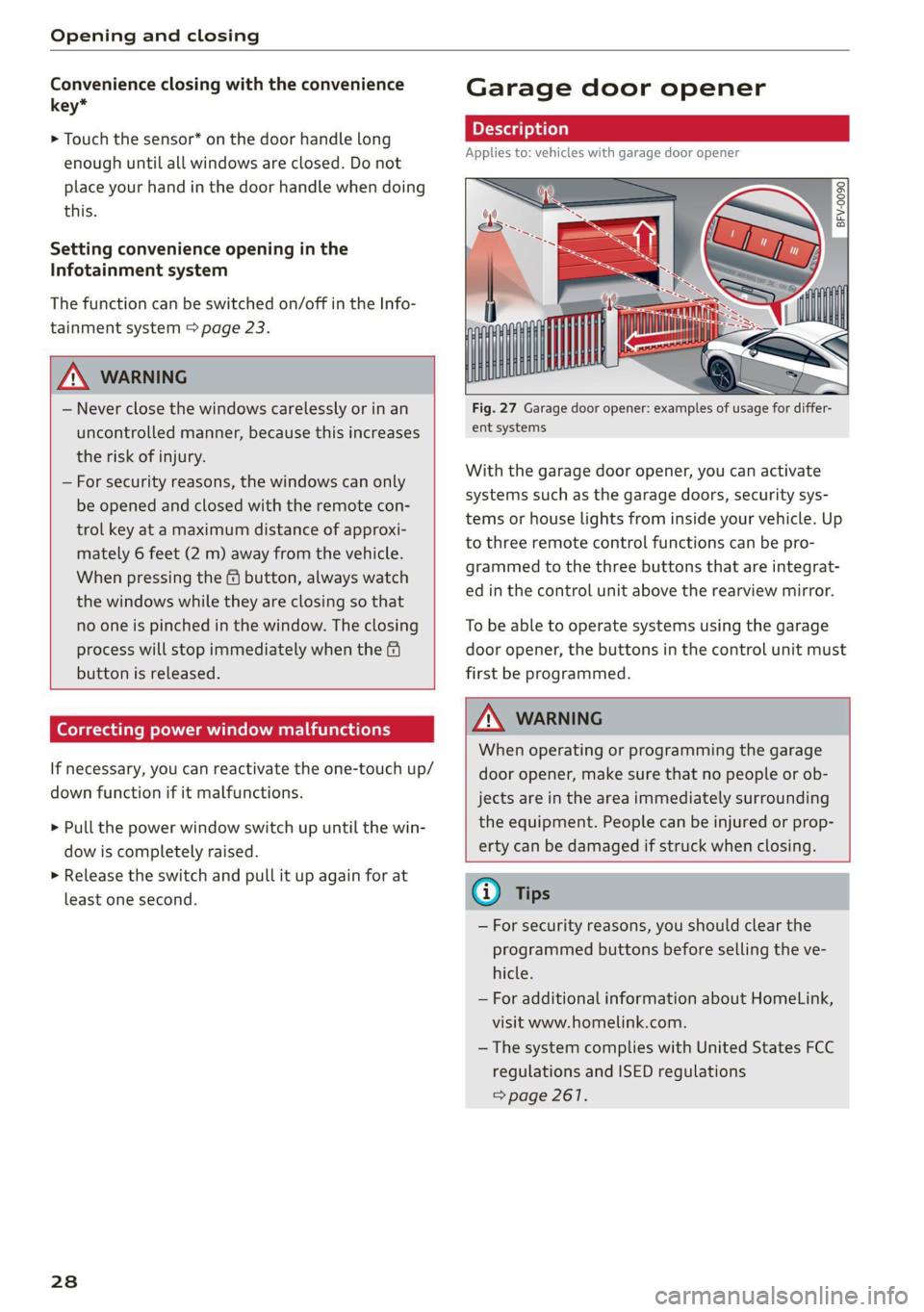
Garage door opener
Applies to: vehicles with garage door opener
——
Fig. 27 Garage door opener: examples of usage for differ-
ent systems
With the garage door opener, you can activate
systems such as the garage doors, security sys-
tems or house lights from inside your vehicle. Up
to three remote control functions can be pro-
grammed to the three buttons that are integrat-
ed in the control unit above the rearview mirror.
To be able to operate systems using the garage
door opener, the buttons in the control unit must
first be programmed.
Z\ WARNING
When operating or programming the garage
door opener, make sure that no people or ob-
jects are in the area immediately surrounding
the equipment. People can be injured or prop-
erty can be damaged if struck when closing.
® Tips
— For security reasons, you should clear the
programmed buttons before selling the ve-
hicle.
— For additional information about HomeLink,
visit www.homelink.com.
—The system complies with United States FCC
regulations and ISED regulations
=> page 261.
Page 31 of 280
8S1012721BE
Opening and closing
2. Press both of the outer buttons on the con-
Applies to: vehicles with garage door opener trol unit > page 29, fig. 28 until the yellow
LED (2) turns off and the green LED (4) blinks.
This procedure clears the standard codes that
were set at the factory and does not need to
be repeated again to program the other but-
a gs S
= c 3
tons.
3. Briefly press the button in the control panel
that you want to program.
4. Wait until the yellow LED @) blinks. The pro-
gramming mode is active for five minutes.
5. Go in front of the vehicle with the original re-
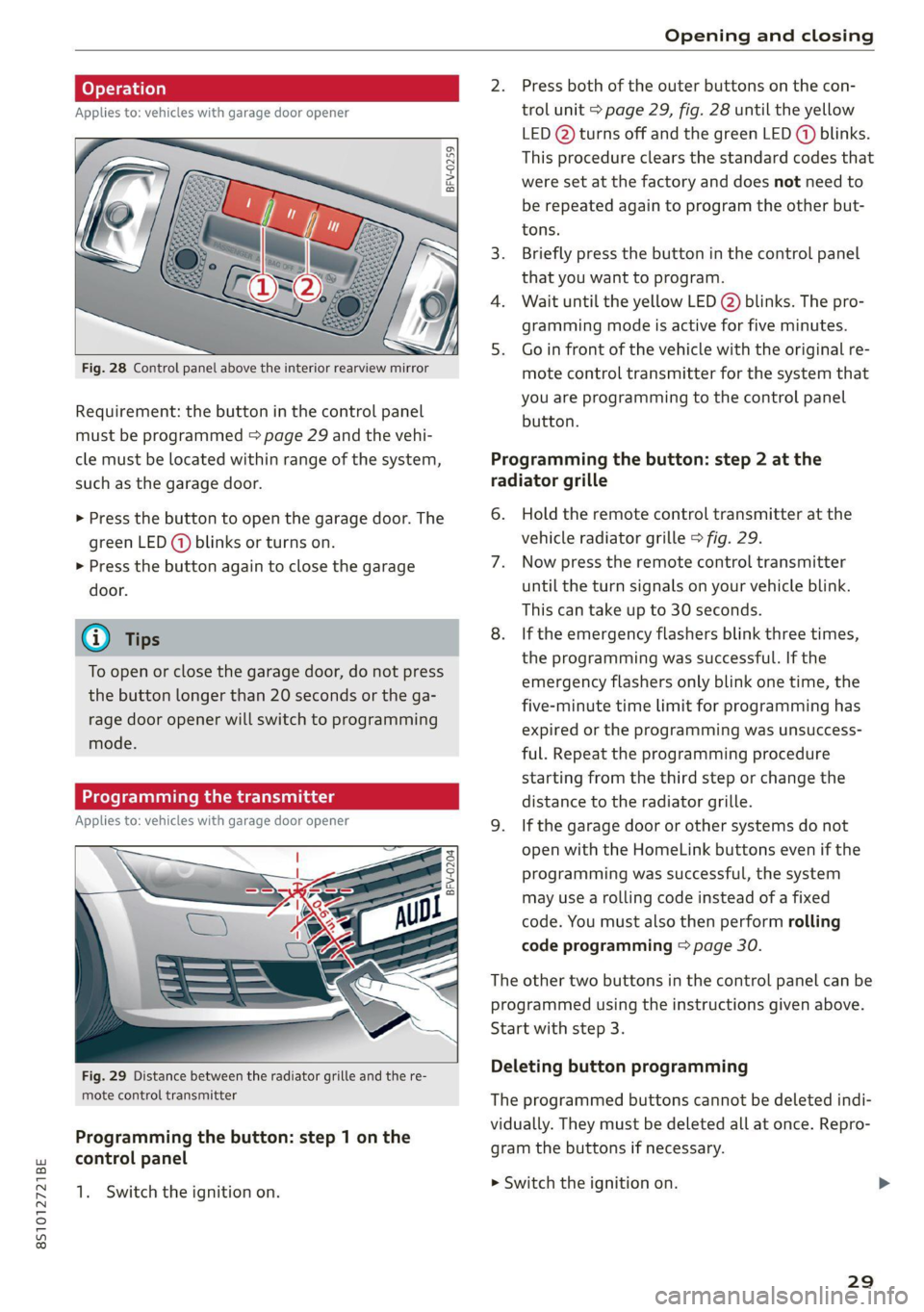
Fig. 28 Control panel above the interior rearview mirror mote control transmitter for the system that
| . you are programming to the control panel
Requirement: the button in the control panel batten.
must be programmed > page 29 and the vehi-
cle must be located within range of the system, Programming the button: step 2 at the
such as the garage door. radiator grille
> Press the button to open the garage door. The 6. Hold the remote control transmitter at the
green LED (@) blinks or turns on. vehicle radiator grille > fig. 29.
> Press the button again to close the garage 7. Now press the remote control transmitter
door. until the turn signals on your vehicle blink.
This can take up to 30 seconds.
G) Tips 8. If the emergency flashers blink three times,
the programming was successful. If the
emergency flashers only blink one time, the
five-minute time limit for programming has
expired or the programming was unsuccess-
ful. Repeat the programming procedure
starting from the third step or change the
distance to the radiator grille.
Applies to: vehicles with garage door opener 9. Ifthe garage door or other systems do not
open with the HomeLink buttons even if the
programming was successful, the system
may use a rolling code instead of a fixed
code. You must also then perform rolling
code programming > page 30.
To open or close the garage door, do not press
the button longer than 20 seconds or the ga-
rage door opener will switch to programming
mode.
BFV-0204
The other two buttons in the control panel can be
programmed using the instructions given above.
Start with step 3.
Deleting button programming Fig. 29 Distance between the radiator grille and the re-
mote control transmitter The programmed buttons cannot be deleted indi-
vidually. They must be deleted all at once. Repro-
gram the buttons if necessary.
Programming the button: step 1 on the
control panel
1. Switch the ignition on. mowiteh the ignition on
29
Page 32 of 280
Opening and closing
> Press both of the outer buttons on the control
unit until the yellow LED @) turns off and the
green LED (@) blinks.
Reprogramming buttons
> Switch the ignition on.
> To reprogram an individual button, press the
desired button until the green LED (@) turns off
and the yellow LED (2) starts to blink (after ap-
proximately 20 seconds). Release the button
immediately. The programming mode is active
for five minutes.
> Continue with step 5.
@ Tips
— The distance needed between the remote
control transmitter and the garage door
opener module in the radiator grille
=> fig. 29 depends on the system you are
programming.
— Depending on the system model, you may
need to release the button on the remote
control transmitter while it is programming
and press it again. Hold every position you
try when programming for at least 15 sec-
onds before trying a new position. Keep an
eye on the vehicle turn signals while doing
this.
Rolling code programming
Applies to: vehicles with garage door opener
On some systems, programming a rolling code is
also necessary.
Identifying a rolling code
> Press the button in the control unit that is al-
ready programmed again and hold it down.
>» Watch the green LED () > page 29, fig. 28. If
the green LED blinks quickly, the system (such
as a garage door) has a rolling code.
> Program the rolling code as follows:
Activating the system motor unit
> Locate the programming button on the system
motor unit. The exact location and color of the
button may vary depending on the brand.
> Press the programming button on the system
motor unit (usually this will activate a “display”
30
on the motor unit). You now have approximate-
ly 30 seconds to program the button in the
control panel.
Programming the button in the control
panel
> Press and hold the previously programmed but-
ton in the control panel for two seconds.
> To complete rolling code programming, press
and hold the button again for two seconds.
> On some systems, the button might need to be
pressed a third time to end the programming
procedure.
After programming, the system should recognize
the signal and operate when the button in the
control panel is pressed. Now you may program
the other buttons as needed.
@ Tips
— The rolling code can be programmed more
quickly and more easily with the help of a
second person.
— If any difficulties occur when programming
the rolling code, it may be helpful to read
the system operating manual.
Page 257 of 280
8S1012721BE
Fuses and bulbs
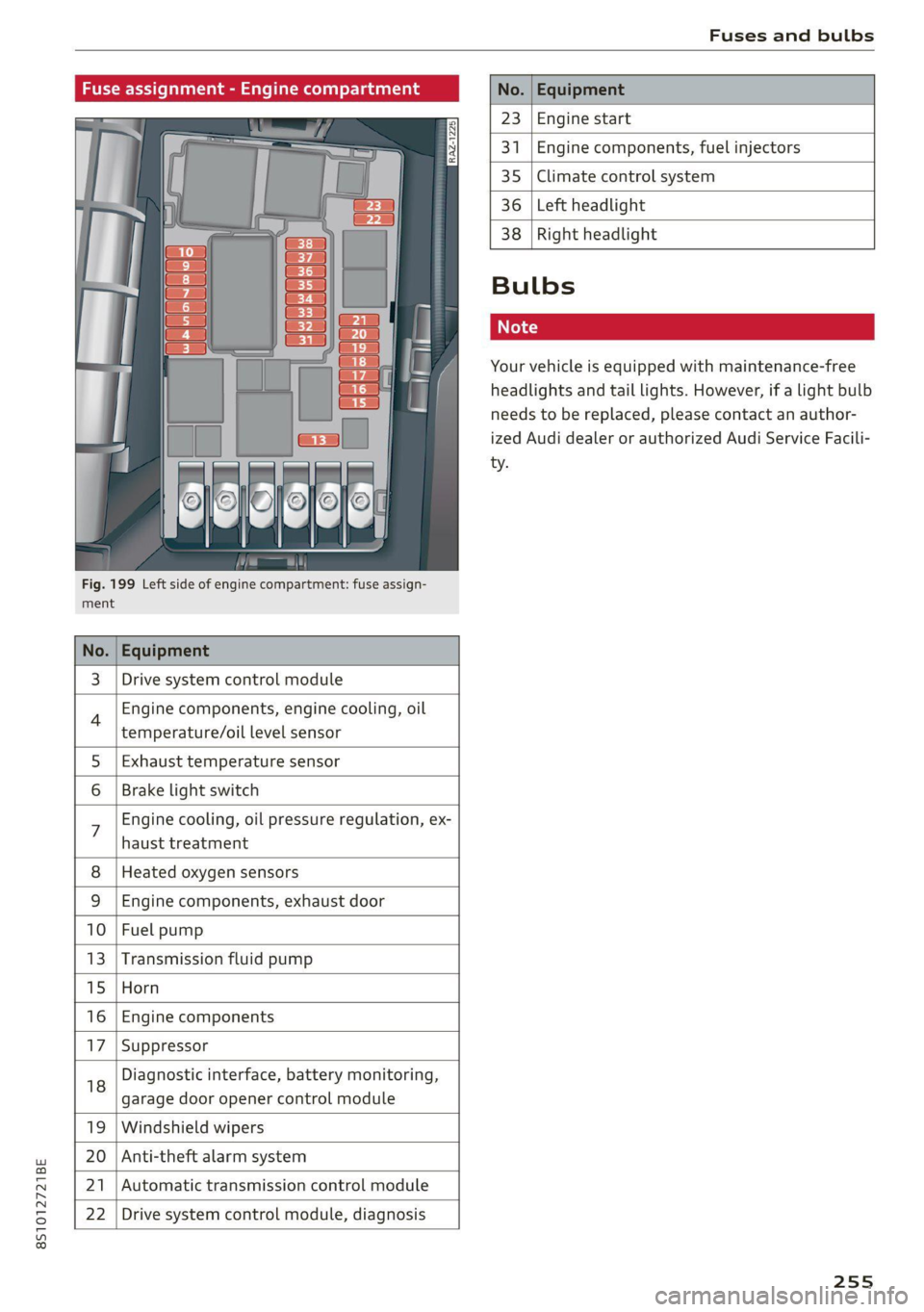
Fig. 199 Left side of engine compartment: fuse assign-
ment.
No.
23 Engine start
341 Engine components, fuel injectors
35 Climate control system
36 Left headlight
3 | Drive system control module
Engine components, engine cooling, oil
temperature/oil level sensor
5 | Exhaust temperature sensor
Brake light switch
haust treatment
Engine cooling, oil pressure regulation, ex-
8 | Heated oxygen sensors
9 |Engine components, exhaust door
10 | Fuel pump
13 |Transmission fluid pump
15 |Horn
16 | Engine components
17 |Suppressor
18
garage door opener control module
Diagnostic interface, battery monitoring,
19 | Windshield wipers
20 | Anti-theft alarm system
21 | Automatic transmission control module
22 | Drive system control module, diagnosis
38
Right headlight
Bulbs
Your vehicle is equipped with maintenance-free
headlights and tail lights. However, if a light bulb
needs to be replaced, please contact an author-
ized Audi dealer or authorized Audi Service Facili-
ty.
255
Page 271 of 280
8S1012721BE
Index
Free text'searchicccs . 2 cece ee emer ve mee ve 118
Media... .... cece eee eee eee eee 179
NaVigationts s ¢ ems « 4 zeus 5 2 sees § 2 meee 149
RadiOtes. ce scene e ae vv omnes © Hetero ww oe 165
Telephone.......... 0. cece eee eee 138
Freeze protection
Coolant.......... cece eee eee eee 207
Frequency band................... 164, 166
also refer to Frequency band........... 164
EUGL » sens ¢ 5 seme y © ees fe weee ts een 2 oe 196
AGdIRIVES « sce @ sires ¥ 0 oneneon 2 8 rere 3 8 oe 197
Current fuel consumption............... 15
Fue@ldisSplay sacs s s acu = ¢ eins 3 ¢ eaves Gg ee 10
FURL QaUGC Hii. 5 wise 2s wae es wee oe eer 2 12
Fuelstank capacity’. « sive oo snore x eee 6 « 264
Gasoline... 2.2... ee eee eee eee 196
Reducing fuel consumption............. 74
Saving fuel... 0.0... 2... eee eee eee eee 96
Fueling
Fuel filler door manual release.......... 200
FUCL GAUGE cs s sccm ss news 2s peee eo Bee 12
Fuel:tank. capacity’. « css ov een ex new oe 264
Opening the fuel filler door............ 197
With reserve canister (emergency fueling) . 199
Fuses
ASSIQNMENE's soso se cece 5 & sei s ¥ cere vs 254
Replacing ........ 0. cee eee eee ee eee 253
G
Garage:door Opener ais + 6 sven + 6 see © 6 saeco © 28
Garment hookS:sis 3 6 eva 3s ees ov oma vv oe 64
GasOlin@rs: owes ev ween 2 seems 2 mee ees 196
Additives ...... 0.0.0... eee eee eee 197
Gasoline mixture..............00--00. 196
GAWR
refer to Gross Axle Weight Rating (GAWR) . 264
Global commands (voice recognition sys-
HOM) cao a x seas wo samen aH catmans ww cK & Bae 123
Glossary of tire and loading terminology... 217
GIOVE COMPATEMENE wen s s wees ss waren ss ee 64
G meter
refer to Sport displays.................. 15
Gross Axle Weight Rating (GAWR)........ 264
Gross Vehicle Weight Rating (GVWR)...... 264
GVWR
refer to Gross Vehicle Weight
Rating (GVWR) « « esss 2 x wens 2 ean 2 Hen 264
H
HanaSTrGG: ¢ s aus 5 s sees sc ee Fo eee eae 129
Hands Free Profile.............00eee eee 129
Headlight range control system........... 36
Headlights............ 0.0... e eee eee eee 37
ClOANING « < s swan so sees ye ees gs wees eo: 237
Headlight range control system.......... 36
Washer system. ...... 0.0.0 cee eee eae 41
Heated
Exterior mirrors... 20... cee cece eee ee 39
REAP WINdOWen»: = s aoe « x wou 2 eee a ee 71
SeatSiene s wuss a x aan 2 aie © ¥ arene © w areine 5 71
Washer nozzles..........-.00--000 eee 41
Heating........... 0.002. ee 69
Hex socket ..... 0.0.0... cece eee ee eee 242
HFP
refer to Hands Free Profile............. 128
Hill descent control...............-.000- 85
Hill hold assist... 0.2.2... eee eee eee eee 80
also refer to Hill hold assist............. 80
Home address...........-00 000 e ee 150, 154
HomeLink
refer to Garage door opener............. 28
HOM... eee eee 6
Hotspot
refer to Wi-Fi vc ¢ = een 2 gees sv ees 146, 173
I
Ignition (indicator light)................. 16
Imbalance (wheels) ...........--..00005 223
Immobilizer
refer to Electronic immobilizer........... 19
Importing and exporting (contacts) ....... 138
Indicator lights. ..... 2.0.0... cee eee eee eee 7
Input
Using the MMI touch...............--. 112
Using theispelleticcis « « sane 6 3 sews o smenes 117
Input level (media) ..............0000005 180
Inspection interval owas « same + supe + 2 sem 212
269
Page 275 of 280
8S1012721BE
Random
refer to Shuffle....... 0.0... cee eee eee 180
Range. ... 22. eee eee 15
Reading lights.................022-000- 39
Rear lid
refer to Luggage compartment lid........ 25
Rearseats.... 0.0... cece eee eee 48
Rearispoile tics «5 enorv © waneae « mene 2 syerem 108
Cleaning... ... 2... cece eee eee eee 238
Rearview camera
refer to Parking aid................ 99, 100
Rearview mirror dimming................ 40
Rear window defogger..............00005 71
Recirculation mode..............000005- 70
Recuperation....... 00.0.0 cece ee eee eee 15
Refrigerant Gils + « wes » wasn © xmimns ann 264
Refueling sv cca os mua xs eae oo mea 2 wens 197
Remote control
Garage door opener.............000e0 ee 28
Remotercontrol:key wcicien . wcieoe ss weien s + cee 19
Convenience opening and closing......... 27
Key replacement... .....eeeeeceeeee ees 19
LED asccane vo scams 2 x awewaen © oy atewaire wanes stains 20
Mechanical key.......... 000.0 cece evans 20
Personalization: = vex « + seu ¢ s sew x eo 19
Replacing the battery.................. 20
Unlocking and locking..............0005 21
Removing the caps (wheel bolts) ......... 245
Removing the wheel hub covers.......... 245
REPaltS cximns & v sawn © # mma @ 2 sme © @ NEN 258
Replacement keys « « sss ¢ e sews « » aaron x eo 19
Replacement parts..............00-.00. 260
Replacing windshield wiper blades......... 42
Reporting Safety Defects................ 260
Reset
refer to Restart (MMI)..............04 194
Restart (MM) ess ss esas s een es ween st wes 194
Reverse (automatic transmission) .......... 82
Rewinding (audio/video file)............. 177
RIMS 20... eee 229
ClEGHING s 3 aeens «2 sem 5 ¥ emee Fe Heme Fe 237
Ringtone settings ..............0ee ee ane 139
Rolling ability
Electromechanical parking brake......... 79
Transmission idletec os ssw «sss wv owes 3 8s 82
ROOTLOAM = sasnces wv a amines eo nemoane oo venue © x voce 264
ROOPRACK sowie: ow awcvins wo cwcmess w nhawees we ecko a 68
also refer to Roof rack.........-.00e eee 68
Route criteria..... 2.2... eee eee eee 155
Route guidance
refer to Navigation.............e. eee 148
Running direction (tires)................ 247
S
Safety
TélEPhOTie « saves sc sean ¢ 2 peas Ye oa Ee 128
Safety belt microphone................. 140
Safety belts... 0... eee eee eee 49
Cleaning’: ¢ « ews 2 » eae 7s mews co eee ee 239
LOCK MG icin: ic x vwcuawe x 0 ceuiane w ome an ao 61
Securing child safety seats.............. 60
Saving fuel
Energy consumers................-00-. 15
Recuperation’s « esses + = sews + ¢ sews + eer « 15
Sart ((AdIO) aan = = mews = 2 assy S RGSS E RETR 165
Screwdriver ss ¢ = sen : o oeee : een st eens: 242
SD card reader..................00000. 170
SDS
refer to Voice recognition system........ 122
Search
refer to Free text search........... 118,179
Search area (point of interest)........... 1511
Search function
refer to Free text search........... 118,179
Searching for anentry...............4.. 119
Seat heating sans ss saws se eeu ee ews ee oes 71
Seats
AGUSTIN poses x snosces x 2 vmasewe 6X omanaim & x swans 46
Adjusting the rear seats..............-. 48
Gl@SNING:: « s seus +» eews ss ween to wees: 239
Easy. Seatientry, sciscws 6 inane so saves » eomee & @ 47
Folding. ....... 0... cece eee ee eee eee 66
Secondary phone.................. 129, 190
Selecting a source (media).............5 177
Selection’ Menu . . svc ss naee aos AUT, 115; 116
Selective door unlocking...............4. 18
Selective wheel torque control........... 104
Selector lever (automatic transmission)
Emergency operation... .......0.....0.. 88
Position... 0.2... eee eee 81
Service interval display................. 212
273