lane assist AUDI TT 2021 Owner´s Manual
[x] Cancel search | Manufacturer: AUDI, Model Year: 2021, Model line: TT, Model: AUDI TT 2021Pages: 280, PDF Size: 99.18 MB
Page 91 of 280
8S1012721BE
Assist systems
Assist systems
Speed warning system
Applies to: vehicles with speed warning system
The speed warning system helps the driver to
stay below a specified maximum speed. A warn-
ing threshold can be set in the Infotainment sys-
tem for this purpose.
Once the speed slightly exceeds the stored
threshold, the speed warning system will alert
the driver with an indicator in the instrument
cluster and a warning tone. Once the speed drops
below the stored maximum speed, the indicator
will turn off.
Setting a threshold is recommended if you would
like to be reminded when you reach a certain
maximum speed. Situations where you may want
to do so include driving in a country with a gener-
al speed limit or if there is a specified maximum
speed for winter tires.
@) Tips
Regardless of the speed warning system, you
should always monitor your speed using the
speedometer and make sure you are adhering
to the legal speed limit.
Setting the warning threshold
Applies to: vehicles with speed warning system
> Select in the Infotainment system: [MENU] but-
ton > Vehicle > left control button > Driver as-
sistance > Speed warning > Manual.
Messages
Applies to: vehicles with speed warning system
ol Manually set speed limit XX mph
(km/h) exceeded
The stored speed was exceeded.
Cruise control system
Applies to: vehicles with cruise control system
The cruise control system assists the driver in
maintaining a constant speed above approxi-
mately 15 mph (20 km/h). The system maintains
the desired speed by braking and accelerating.
ZA WARNING
— Always pay attention to the traffic around
your vehicle when the cruise control system
is in operation. As the driver, you are always
responsible for controlling your vehicle
speed and the distance between your vehicle
and
other vehicles.
— For safety reasons, cruise control should not
be used in the city, in stop-and-go traffic, on
winding roads, and when road conditions
are poor (such as ice, fog, gravel, heavy rain,
and conditions that could lead to hydroplan-
ing), because this increases the risk of an ac-
cident.
— Switch the cruise control off temporarily
when driving in turning lanes, highway exits,
or in construction zones.
—To reduce the risk of an accident, you should
only resume the stored speed if it is suitable
for the current traffic conditions.
@) Note
Before driving downhill a long distance ona
steep hill, decrease your speed and select a
lower gear. This makes use of the engine
braking effect and reduces the load placed on
the brakes.
@) Tips
The brake lights turn on when the brakes are
applied automatically.
89
Page 95 of 280

8S1012721BE
Assist systems
— If timing is paused, you can continue it later
even if you switch the ignition off.
— Saved lap times cannot be individually de-
leted from the total results.
— The saved lap timer values will remain after
switching the ignition off.
Audi side assist
Applies to: vehicles with Audi side assist
BFV-0079
Fig. 98 Diagram: coverage area of the sensors
BFV-0080
Fig. 99 Exterior mirror: display
Side assist helps you monitor your blind spot and
traffic behind your vehicle. Within the limits of
the system, it warns you about vehicles that are
coming closer or that are traveling with you with-
in sensor range @) > fig. 98: if a lane change is
classified as critical, the display @ in the exterior
mirror © fig. 99 turns on.
The display in the left exterior mirror provides as-
sistance when making a lane change to the left,
while the display in the right exterior mirror pro-
vides assistance when making a lane change to
the right.
Information stage
As long as you do not activate the turn signal,
side assist informs you about vehicles that are
detected and classified as critical. The display in
the mirror turns on, but is dim.
The display remains dim in the information stage
so that your view toward the front is not distur-
bed.
Warning stage
If you activate the turn signal, side assist warns
you about vehicles that are detected and classi-
fied as critical. The display in the respective mir-
ror blinks brightly. If this happens, check traffic
by glancing in the exterior mirrors and over your
shoulder > A\ in General information on
page 94.
You can adjust the brightness on of the dis-
play on the rearview mirror > page 95.
93
Page 96 of 280
Assist systems
General information
Applies to: vehicles with Audi side assist
BFV-0260
BFV-0082
Fig. 101 Rear of the vehicle: position of the sensors (exam-
ple)
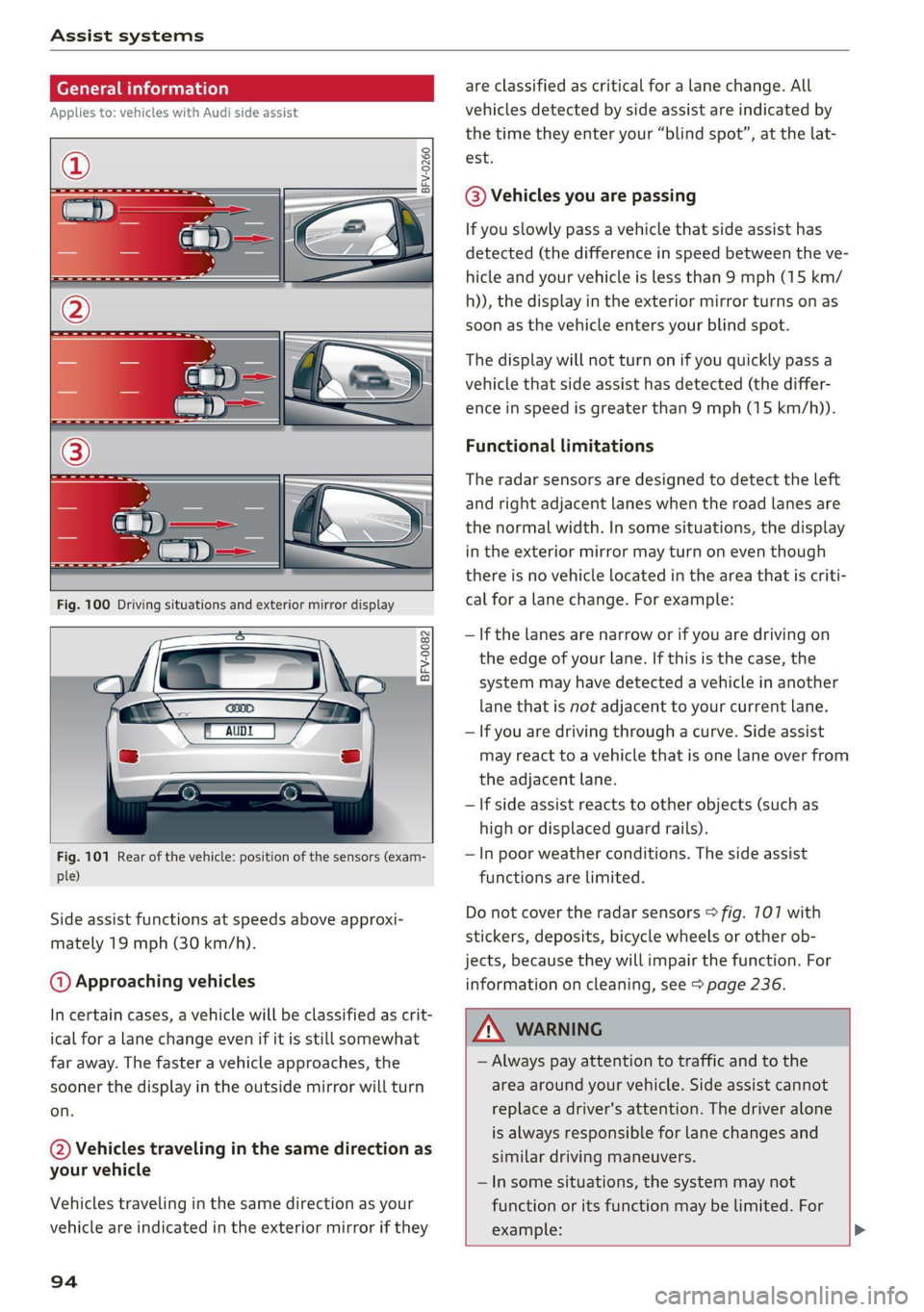
Side assist functions at speeds above approxi-
mately 19 mph (30 km/h).
@ Approaching vehicles
In certain cases, a vehicle will be classified as crit-
ical for a lane change even if it is still somewhat
far away. The faster a vehicle approaches, the
sooner the display in the outside mirror will turn
on.
@ Vehicles traveling in the same direction as
your vehicle
Vehicles traveling in the same direction as your
vehicle are indicated in the exterior mirror if they
94
are classified as critical for a lane change. All
vehicles detected by side assist are indicated by
the time they enter your “blind spot”, at the lat-
est.
@ Vehicles you are passing
If you slowly pass a vehicle that side assist has
detected (the difference in speed between the ve-
hicle and your vehicle is less than 9 mph (15 km/
h)), the display in the exterior mirror turns on as
soon as the vehicle enters your blind spot.
The display will not turn on if you quickly pass a
vehicle that side assist has detected (the differ-
ence in speed is greater than 9 mph (15 km/h)).
Functional limitations
The radar sensors are designed to detect the left
and right adjacent lanes when the road lanes are
the normal width. In some situations, the display
in the exterior mirror may turn on even though
there is no vehicle located in the area that is criti-
cal for a lane change. For example:
— If the lanes are narrow or if you are driving on
the edge of your lane. If this is the case, the
system may have detected a vehicle in another
lane that is not adjacent to your current lane.
— If you are driving through a curve. Side assist
may react to a vehicle that is one lane over from
the adjacent lane.
—If side assist reacts to other objects (such as
high or displaced guard rails).
— In poor weather conditions. The side assist
functions are limited.
Do not cover the radar sensors > fig. 7107 with
stickers, deposits, bicycle wheels or other ob-
jects, because they will impair the function. For
information on cleaning, see > page 236.
ZA\ WARNING
— Always pay attention to traffic and to the
area around your vehicle. Side assist cannot
replace a driver's attention. The driver alone
is always responsible for lane changes and
similar driving maneuvers.
— In some situations, the system may not
function or its function may be limited. For
example: >
Page 97 of 280

8S1012721BE
Assist systems
— If vehicles are approaching or being left
behind very quickly. The display may not
turn on in time.
— In poor weather conditions such as heavy
rain, snow or heavy mist.
— On very wide lanes, in tight curves, or if
there is a rise in the road surface. Vehicles
in the adjacent lane may not be detected
because they are outside of the sensor
range.
() Note
The sensors can be displaced by impacts or
damage to the bumper, wheel housing and
underbody. This can impair the system. Have
an authorized Audi dealer or authorized Audi
Service Facility check their function.
@ Tips
— If the window glass in the driver's door or
front passenger's door has been tinted, the
display in the exterior mirror may be incor-
rect:
—The system complies with United States FCC
regulations and ISED regulations
=> page 261.
Sic Rema
Applies to: vehicles with Audi side assist
MENU > Select in the Infotainment system: but-
ton > Vehicle > left control button >Driver as-
sistance > Audi side assist
If the system is activated, the displays in the ex-
terior mirrors will turn on briefly when the igni-
tion is switched on.
Adjusting the display brightness
Applies to: vehicles with Audi side assist
The display brightness can be adjusted in the In-
fotainment system.
MENU > Select in the Infotainment system: but-
ton > Vehicle > left control button >Driver as-
sistance > Audi side assist
The display brightness adjusts automatically to
the brightness of the surroundings, both in the
information and in the warning stage. In very
dark or very bright surroundings, the automatic
adjustment will set the display to the minimum
or maximum level. In such cases, you may notice
no change when adjusting the brightness, or the
change may only be noticeable once the sur-
roundings change.
Adjust the brightness to a level where the display
in the information stage will not disrupt your
view
ahead. If you change the brightness, the dis-
play in the exterior mirror will briefly show the
brightness level in the information stage. The
brightness of the warning stage is linked to the
brightness in the information stage and is adjust-
ed along with the information stage.
(i) Tips
— Side assist is not active while you are mak-
ing the adjustment.
— Your settings are automatically stored and
assigned to the remote control key being
used.
Messages
Applies to: vehicles with Audi side assist
If the side assist switches off automatically, a
message appears in the Infotainment system dis-
play.
& Audi side assist: currently unavailable. Sen-
sor vision restricted due to surroundings. See
owner's manual
The radar sensor vision is impaired. Do not cover
the area in front of the sensors with bike wheels,
stickers, dirt or other objects. Clean the area cov-
ering the sensors, if necessary > page 94,
fig. 107.
Audi side assist: currently unavailable. See
owner's manual
Side assist cannot be switched on at this time be-
cause there is a malfunction (for example, the
battery charge level may be too low).
Audi side assist: malfunction! Please contact
Service
95
>
Page 110 of 280

Intelligent Technology
steering wheel, and stop your vehicle in a safe lo-
cation as soon as possible. Do not continue driv-
ing. See an authorized Audi dealer or authorized
Audi Service Facility for assistance.
& Steering: malfunction! You can continue
driving
There is a malfunction in the steering system.
Steering may be more difficult or more sensitive.
Adapt your driving style. Have the steering sys-
tem checked immediately by an authorized Audi
dealer or authorized Audi Service Facility. Please
note that the red indicator light may turn on af-
ter restarting the engine. Do not continue driving
if it does.
@ Tips
If the a or El indicator light only stays on
for a short time, you may continue driving.
All wheel drive (quattro)
Applies to: vehicles with all wheel drive
The all-wheel drive system distributes the driving
power variably to the front and rear axle to im-
prove the driving characteristics. It works togeth-
er with selective wheel torque control, which can
activate when driving through curves
=> page 104.
The all-wheel drive system is designed for high
motor power. Your vehicle is exceptionally power-
ful and has excellent driving characteristics both
under normal driving conditions and on snow and
ice. Always read and follow safety precautions
>A.
Z\ WARNING
— Even in vehicles with all wheel drive, you
should adapt your driving style to the cur-
rent road and traffic conditions to reduce
the risk of an accident.
— The braking ability of your vehicle is limited
to the traction of the wheels. In this way, it
is not different from a two wheel drive vehi-
cle. Do not drive too fast because this in-
creases the risk of an accident.
108
— Note that on wet streets, the front wheels
can “hydroplane’” if driving at speeds that
are too high. Unlike front wheel drive
vehicles, the motor RPM does not increase
suddenly when the vehicle begins hydro-
planing. Adapt your speed to the road condi-
tions to reduce the risk of an accident.
Rear spoiler
Applies to: vehicles with retractable rear spoiler
a
id > z
oO
Fig. 113 Center console: button for the rear spoiler
The rear spoiler increases driving stability. The
rear spoiler extends automatically at speeds
above approximately 75 mph (120 km/h). It will
retract automatically when the speed drops be-
low approximately 50 mph (80 km/h).
You can also extend and retract the rear spoiler
manually.
> Extending: press > briefly.
> Retracting: press and hold 3% when driving at
speeds up to approximately 10 mph (20 km/h).
At speeds from approximately 10 mph (20
km/h) to 75 mph (120 km/h), press 3% briefly.
Messages
If the HB or Mturns on and a corresponding
message appears, the rear spoiler may not be
able to extend due to a malfunction. This could
change the vehicle's driving characteristics at
high speeds. Do not drive faster than 85 mph
(140 km/h).
The rear spoiler may be blocked. Clean the rear
spoiler compartment > page 237, close all vehi-
cle doors and lids, and wait several minutes until
the vehicle has completely turned off. If the indi-
cator light turns on again the next time the >