park assist AUDI TT COUPE 2009 Owners Manual
[x] Cancel search | Manufacturer: AUDI, Model Year: 2009, Model line: TT COUPE, Model: AUDI TT COUPE 2009Pages: 316, PDF Size: 71.16 MB
Page 18 of 316
Instruments and warning/indicator lights
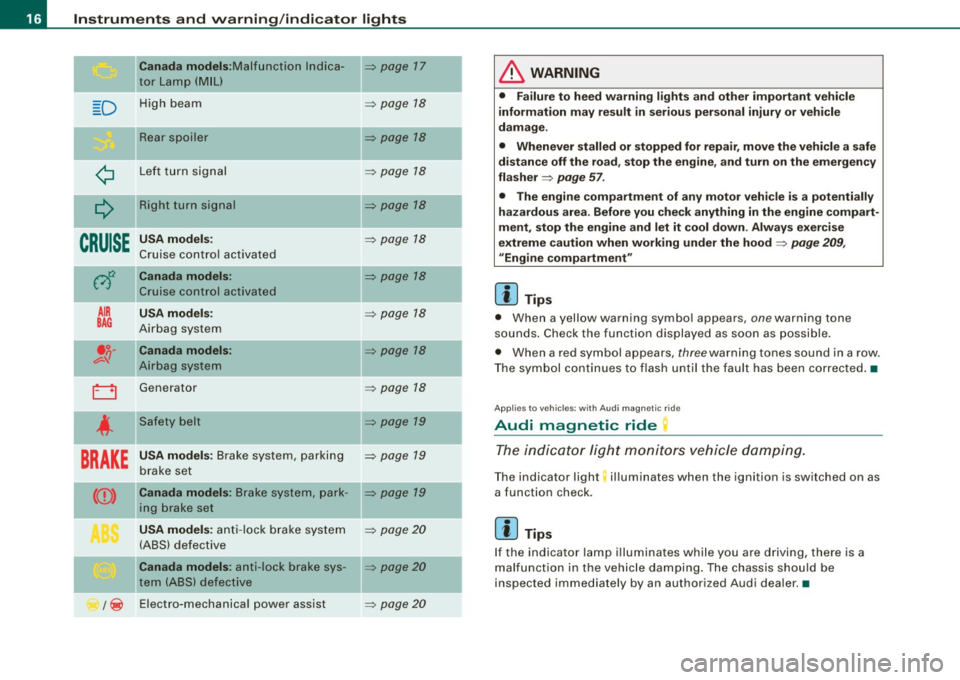
Canada models :M alfunct ion lndica -=> page 17
tor Lamp (MIU
D H ig h beam => page 18
Re ar s po iler => page 18
¢ L ef t tu rn s ignal => page 18
Q
Right turn signal => page 18
CRUISE
USA models: => page 18
Cruise con tro l ac tiva ted
0
Canada models: => page 18
Cr uise con trol activate d
AIR USA models : => page 18
BAG Airbag system
.o. Canada models : => page 18 v-q Airb ag system
0 Generat or => page 18
4
Safety belt => page 19
BRAKE
USA models : Brake system , parking => page 19
b rake se t
CCD> Canada models : Brake syst em, pa rk -=> pa ge 19
in g b rake set
USA models : anti -lo ck b rake s ystem => page 20
(A BS) defect ive
Canada models : anti- lock brake sys -=> page 20
tern (ABS) de fecti ve
/ ~ E
lectro-mechanica l po wer assist
=> page 20
-
-
-
-
& WARNING
• Failure to heed warning lights and other important vehicle
information may result in serious personal injury or vehicle
damage .
• Whenever stalled or stopped for repair, move the vehi cle a safe
distan ce off the road, stop the engine , and turn on the emergen cy
flasher
=> page 57.
• The engine compartment of any motor veh icle is a potentially
hazardous area. Before you check anything in the engine compart
ment , stop the engine and let it cool down . Always exer cise
extreme caution when working under the hood
=> page 209 ,
"Engine compartment "
[ i ] Tips
• When a yellow warn ing symbo l appears, one warning tone
so unds . C heck the function displayed as soon as possible.
• When a red symbol appears,
three warn ing tones sound in a row.
T he symbol contin ues t o flash until the faul t has been co rrec ted .•
Ap plies t o vehi cles: w it h Au di m agn etic r ide
Audi magnetic ride
Th e indi cato r lig ht monitor s vehicle dampin g.
The ind icator light; illuminates when the ignition is switched on as
a function check.
[ i ] Tips
If the indicator lamp i lluminate s while you are d riving, there is a
mal funct ion in the veh ic le da mpin g. Th e c hass is s hou ld b e
inspected immed iately by an authorized Audi dea ler. •
Page 22 of 316
Instruments and warning/indicator lights
& W ARN ING (continued )
increased br aking dist ances . Trying to brake as quickly as usual
c ould lead to an a ccident. •
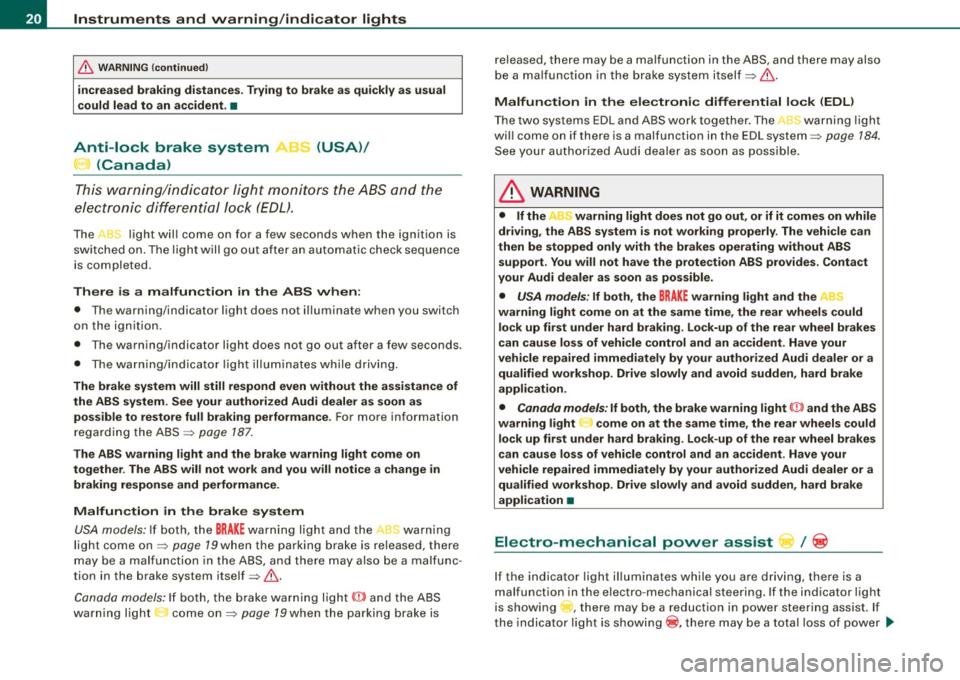
Anti-lock brake system , e (USA)/
(Canada)
T his war ning/ indic ator ligh t moni to rs the AB S and the
elect ronic diffe ren tial lock (EDL).
The J light wil l come on for a few seconds when the ignition is
swi tc hed on. The light w ill go out aft er a n aut omat ic check seque nce
is completed.
There is a malfunction in the
ABS when :
• T he warning/indicator light does not il luminate when you switch
on the ign ition.
• T he wa rning/indicator light does not go out after a few seconds.
• The wa rnin g/ind ica tor light il luminates wh ile driv in g.
The brake system will still respond even without the assistance of
the ABS system. See your authorized Audi dealer as soon as poss ible to restore full braking performan ce . For more information
regard ing the ABS ~ page 187.
The ABS warning light and the brake warning light come on
together . The ABS will not work and you will notice a change in
braking response and performance .
Malfunction in the brake system USA models: If both, t he
BRAKE warning light and the ,,[ warning
light co me on ~ page 79when the pa rking b ra ke is r eleased, there
may be a mal function in t he ABS , and t here may also be a malfunc
tion in the brake system itself ~ & .
Canada model s: If bo th, the b rake warn ing l ig ht
(Ci) and the ABS
warning light : come on~ page 79when the parking brake is released, there may be a malfunction in the ABS, and there may also
b e a ma lfunc tio n in t he b rake system itself~ & .
Malfun ction in the electronic differential lock (EDL )
T he two sys te m s ED L and ABS w ork together . The L warning ligh t
wi ll come on if there is a malfunction in the EDL system~ page 184.
See you r au thori zed A udi deale r as so on as possible.
& WARNING
• If the "warning light does not go out , or if it comes on while
driving , the ABS system is not working properly . The vehi cle can
then be stopped only with the brakes operating without ABS support . You will not have the protection ABS provides . Contact
your Audi dealer as soon as possible.
• USA models : If both , the
BRAKE w arning light and the
warning light come on at the same time, the rear wheels could lock up first under hard braking . Lock-up of the rear wheel brakes
can cause loss of vehicle control and an accident . Have your
vehicle repaired immediately by your authorized Audi dealer or a
qualified workshop. Drive slowly and avoid sudden, hard brake
appli cation .
• Canada models: If both, the brake warning light CCI» and the ABS
warning light come on at the same time , the rear wheels could
lock up first under hard braking. Lock -up of the rear wheel brakes
c an cause loss of vehi cle control and an a ccident . Have your
vehicle repaired immediately by your authorized Audi dealer or a
qualified workshop. Drive slowly and avoid sudden , hard bra ke
application •
Electro-mechanical power assist l / @
If the indicato r light i lluminates while you a re d riv ing, t here i s a
malfunction in the e lectro -mechanica l steering . If the indicator light
is showing , there may be a reduction in powe r stee ring assist. If
t h e ind icator light is show ing® , there may be a total loss o f power
~
Page 29 of 316

Sele cting the fun ctions
- Push in the uppe r (lower) protrusion on the function
se lector switch
@ =>page 26, fig. 12. The functions for
the trip compu ter are d isp layed in succession on the
respective memory levels.
R ese ttin g the function to z ero
- Push the [Reset ] button ® for at least two seconds .
You can reset the fo llowing values to zero using the [R eset] button:
• driving time
• distance
• average fuel mileage
• average speed
The trip computer only opera tes when the ignition is on . When you
turn on the ignit ion, the function that was in use when you last
turned the ignition off will be displayed.
[ i ] T ip s
• You can also set the va lues for the functions to zero in the menu
display (R es et) ~
page 27 .
• All stored values wil l be lost if the vehic le battery is
disconnected .•
Con tro ls and eq uip
ment
Menu display
Introduction Dri
ver in form ati on syst em
Fig . 13 W ip er leve r:
Co ntrols for the men u
di sp la y
Fig . 14 Di spl ay: Star t
menu
Some functions in your vehicle can be set, activated, and controlled
by Men us (e.g. Acoustic park assist*) . With these menus you can
also select the informa tion shown in the driver information system ,
which operates only with the ignition switched on . Operation is
controlled by the
I Res et I button and the rocker switch on the wiper
lever~fig .13 . .,_.
Vehicle care
I I Technical data
Page 30 of 316
Driver inf ormation sy ste m
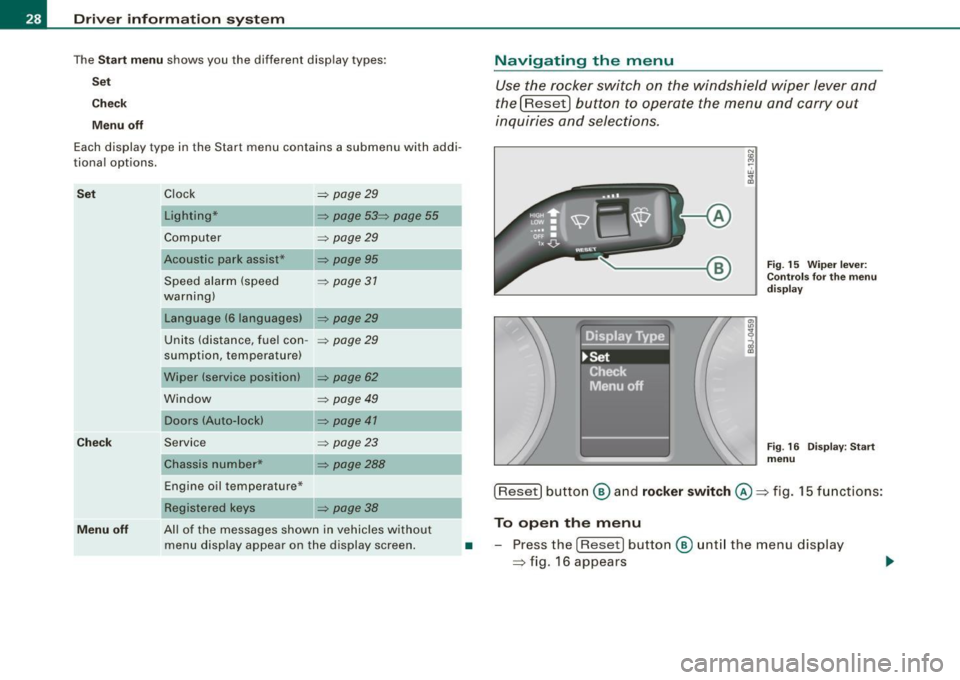
The Sta rt m enu shows you the different disp lay types:
Se t
Check
M enu off
Each display type in the Start menu contains a submenu with addi
tional options.
S et
Ch eck
Clock ~ page29
Lighting* ~ page 53~ page 55
Computer ~ page29
Acoustic park assist* ~ page95
Speed alarm (speed ~ page 37
warning)
Language (6 languages)
~ page29
Units (distance, fuel con -~ page29
sumption, temperature)
Wiper (service position)
~ page 62
Window ~ page 49
Doors (Auto-lock) ~ page 41
Service
Chassis number* ~ page23
~ page288
Navigating the menu
Use the rocker switch on the windshield wiper lever and
the[Reset) button to operate the menu and carry out
inquiries and selec tions.
-A
N
"' cc
Fig . 15 Wiper leve r:
Con trols fo r th e m enu
d is pla y
Fig . 16 Disp lay: Start
menu
Engine oil temperature* ___ __, [Reset] button ® an d rock er swit ch @ => fig. 15 functions:
Menu off
Registered keys ~ page 38
All of the messages shown in vehicles without
menu display appear on the display screen. To open the menu
• -Press the [Reset ) button ® unt il the menu display
=> fig. 16 appears
Page 35 of 316
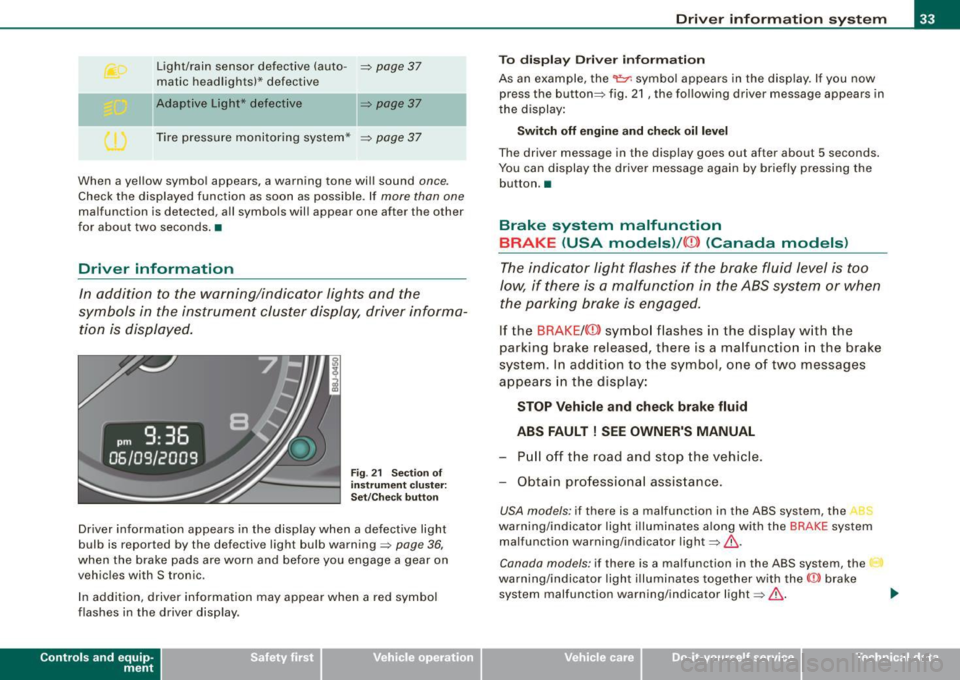
Light/rain sensor defective (auto-~ page 37
matic headlights)* defective
Ad aptiv e Li ght* def ective
~ page37
Tire pressure monitoring system*
~ page 37
When a yel low symbol appears, a warning tone wil l sound once.
Check the displayed function as soon as possible . If more than one
malfunction is detected, all symbols wil l appear one after the other
for about two seconds .•
Driver info rmation
In addition to the warning/indicator lights and the
symbols in the instrument cluster display, driver informa tion is displayed.
F ig . 21 S ectio n of
instrum en t c luster :
Set/C hec k butt on
Driver information appears in the display when a defective light
bulb is reported by the defective light bulb warning ~ page 36,
when the brake pads are worn and before you engage a gear on
vehicles with S tronic .
In addition, driver information may appear when a red symbol
flashes in the driver disp lay .
Con tro ls and eq uip
ment
Dri ver in form ati on syst em
To d is pl ay Driver inf orm ati on
As an example, the
t he display :
Switch off engine and che ck oil level
The driver message in the display goes out after about 5 seconds.
You can display the driver message again by br iefly pressing the
button. •
Brake system malfunction
BRAKE (USA models) /((D) (Canada models )
The indicator light flashes if the brake fluid level is t oo
low, if there is a malfunction in the ABS system or when the parking brake is engaged .
If the BRAKE /
s y stem. In addition to the symbol , one of two messages
appears in the display:
STOP Vehicle and check brake fluid
ABS FAULT! SEE OWNER'S MANUAL
- Pull off the ro ad an d stop the vehicle.
- Obtain professional assistance.
USA models: if there is a malfunction in the ABS system, the
warning/indicator light i llumina tes along with the BRAKE system
malfunction warning/indicator light~&.
Canada models: if there is a malfunction in the ABS system, the
warning/indicator light i llumina tes together with the CCD> brake
system malfunction warning/indicator light~& .
Vehicle care I I irechnical data
Page 36 of 316
Driver information system
Parking brake set
The parking brake warning light Brake /((D) (Canada models) illumi
nates when the parking brake is set. In addition , a warning tone will
sound after you have driven for longer than 3 seconds and faster
than 3 mph (5 km/h).
L1}. WARNING
• Always observe the warnings in => page 209, "Engine compart
ment", before opening the engine hood and checking the brake
fluid.
• Driving with low brake fluid is a safety hazard! Stop the car and
get professional assistance.
• If the brake system warning/indicator light illuminates
together with the ABS warning/indicator light, then the ABS system is malfunctioning. The rear wheels could quickly lock up
when you apply the brakes. This could lead to loss of control and
your vehicle could slide! Drive carefully to the nearest authorized
Audi dealer and have the malfunction corrected. •
Engine cooling system malfunction ¾
A malfunction in the engine cooling system must be
repaired as soon as possible.
When the _t symbol in the display flashes, then either the
engine coolant
temperature is too high, or the coolant level
is too low. In addition to the symbol, the following message
also appears in the display:
Switch off engine and check coolant level
-Pull off the road and stop the vehicle.
- Turn off the engine.
- Check coolant level
~ page 225.
-Add coolant if necessary ~ page 225.
-Continue driving only after the engine coolant
warning/indicator light goes out.
- Contact your authorized Audi dealer for assistance if
necessary .
If t he engine coolant lev el is correct, then th e radia tor fan may be
the cause of the malfunction.
If the gene rator warning/indicator light should also illuminate
=> page 18, then the fan belt may be damaged.
L1}. WARNING
• If your vehicle should break down for mechanical or other
reasons, park at a safe distance from moving traffic, turn off the
engine and turn on the hazard warning lights
=> page 57, "Emer
gency flasher A" .
• Never open the hood if you see or hear steam or coolant
escaping from the engine compartment -you risk being scalded.
Wait until you can no longer see or hear steam or coolant escaping.
• The engine compartment of any vehicle is a dangerous area.
Before you perform any work in the engine compartment, turn off
the engine and allow it to cool. Follow the warning stickers
=> page 209, "Engine compartment" .
0 Note
Do not continue driving if the-~- symbol illuminates. There is a
malfunction in the engine cooling system -you could damage your
engine .•
Page 97 of 316

-Wit h a manual transm issi on, engage 1st gea r, or with a n
a utomatic transmission place the se lector lever in P
=> & .
- Remove the ignition key from the ignit io n lock.
Wha t el se you should do wh en parking yo ur v ehi cle on
a n incli ne or d ecline
Turn the steering whee l so that if the vehicle shou ld start to rol l, it
wi ll roll into the curb.
I f you are park ing on a
decline (the front of you r ve hicle facing
downhill) , turn the front wheels to the right so that they poin t
toward the curb .
If you are park ing on an in cline (the font of your vehicle facing
uphill!, turn the front whe els to the left so that they point
away from
the curb .
& WARNING
This is how you can reduce the ri sk of injury when le avi ng your
vehicle .
• Never p ark the vehi cle w here it can come
in cont act w ith dry
gra ss, s pilled fuel or any other flammable mater ial s.
• Never allow anyone -espe cially small ch ildren -to remain
in the
vehicle when it is locked . Locked doors make it more difficult for
re scu ers to ac ce ss the pa ssenger compartment in the e vent of an
emergency . Danger to life!
• Never lea ve childr en un super vis ed in the vehicle . Children
c ould release the parking brake or move the gearsh ift l ever out of
gear . The vehicle could start to r oll away a nd cau se an a ccident .
• No matter what the season i s, the temperature
in a parked
v ehi cle can reach dangerou s level s. •
Controls and equip
ment
On th e road
Acoustic parking system
Applies to veh ic les : wit h 4 -ch anne l a cou stic park ass is t
Rear acoustic park assist
Acoustic park assist gives a warning a bout o bstacles
behind the vehicle.
Description
The rear acoustic park assist (4 -channel acoustic park assist) deter
mines the d istance of the vehic le from an obstac le using u ltrasonic
sensors. The sensors are in the rear bumper. The volume and the
pitch of the chimes can be adjusted through the menu display
=> page 27.
The range at which the sensors start to m easure is about :
To the side
Center rear
Acti v atio n
2 feet (0 .60 m)
5 feet (1.60 ml
The pa rking assist is activated when rever se ge ar is engaged . A brief
tone confirms that the system is activated .
Backing up
Distance warning when backing up starts when an obstacle is
detec ted in the range of the park ass ist system . As the distance
decreases, the time interval between the aud ible tones becomes
shorter .
When the distance is less than 1 foot (0.30 m) , the tone becomes
continuous . At this point you should stop backing up.
Please note that low objects a lready signalled by a warning can
disappear from the sys tem's detection range and wil l not continue
t o be signa lled . ..,
I • •
Page 98 of 316

On the ro ad
Pote nt ial malf un cti ons
If a warning buzzer sounds for a few seconds when the ign ition is
switched on, there is a system malfunction with the acoustic park
assist. If the malfunction persists until the ignition is switched off,
there will be no acoustic warning at the next attempt to activate the system. Have the problem corrected.
There is no confirmation tone when reverse gea r is engaged if there
is a system malfunction .
For the parking assist to operate, the sensors must be kept clean
and free of ice.
& WARNING
• Sen sor s hav e blind spots in w hic h obj ec ts can not b e dete cted.
P ay s pecial attenti on to small childr en and anim als . They cannot
al ways be dete cte d b y the sensor s -dan ger of an accident !
• The p arking a ssis t cann ot r eplace th e driver' s attention . The
d rive r alone is re spon sible f or p ark ing an d simil ar d riv ing mane u
ver s. A lway s wat ch whe re you are driving .
(D Note
Low obstacles a lready signa lled by a warn ing can disappear from
the system's detection range as they are approached and wi ll not
continue to be signalled. Objects such as barrier chains, trailer draw
bars, thin pa inted vertical poles , or fences may not be detected by
the system -risk of damage.
[ i J Tip s
For the parking assist to operate, the sensors must be kept clean
and free of snow and ice. •
Cruise control
Switching the system on
The cruise control system makes it possible t o drive at a
constant speed sta rting at 20 mph (30 km/h) .
Ai------
I
Fig . 8 1 Contr ol l ever
w ith se t butt on
Fig . 8 2 Displ ay:
Se lec te d spee d
Pull the lever to position G) ~ fig. 8 1 to switch the
system on.
Drive at the speed y ou wis h to se t.
Press but ton
@ to set that speed.
The display~ fig. 82 will show the set speed. The display may vary
depending on the type of display in your vehicle . The indicator light
~
Page 108 of 316
• ..__T_ ra_ n_s_ m_ i_ s _s_ i_ o _n ___________________________________________________ _
• The manual shift program (tiptronic) is switched off in the fail
safe mode.
If the transmission switches to fail-safe mode, you should take the
vehicle to an authorized Audi dealership as soon as possible to have
the condition corrected .•
A pp lies to vehi cles: wit h S tronic ®
Emergency release for selector lever
If the vehicle's power supply fails, the selector lever can
be released in an emergency.
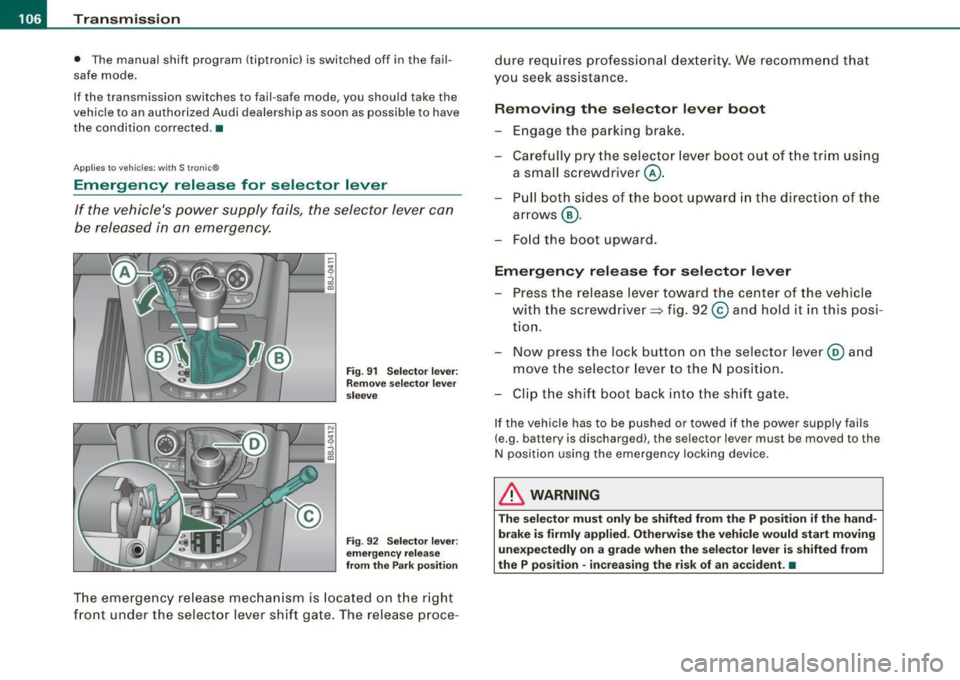
rr- ~v r::.~=::::::= ::;~~,:,:J ::: __ -tg
i
Fig. 91 Selector lever:
Remove selector lever
sleeve
Fig . 92 Selector lever:
emergency release
from the Park position
The emergency release mechanism is located on the right
front under the selector lever shift gate. The release proce- dure
requires professional dexterity. We recommend that
you seek assistance.
Removing the selector lever boot
-Engage the parking brake.
- Carefully pry the selector lever boot out of the trim using
a small screwdriver @.
- Pull both sides of the boot upward in the direction of the
arrows @.
- Fold the boot upward.
Emergency release for selector lever
-Press the release lever toward the center of the vehicle
with the screwdriver ~ fig. 92
© and hold it in this posi
tion.
- Now press the lock button on the selector lever@ and
move the selector lever to the N position.
- Clip the shift boot back into the shift gate.
If the vehicle has to be pushed or towed if the power supply fails
(e.g . battery is discharged), the selector lever mus t be moved to the
N position using the emergency locking device.
& WARNING
The selector must only be shifted from the P position if the hand
brake is firmly applied. Otherwise the vehicle would start moving
unexpectedly on a grade when the selector lever is shifted from
the P position -increasing the risk of an accident. •
Page 190 of 316
___ ln_ t _e_ ll-'"ig ...,_ e_ n_t _t_ e_ c_ h _ n_o _ l_o _,.g= y,_ __________________________________________ _
ABS operation
When a vehicle speed of about 10 mph (20 km/h) is reached, an au to
matic test sequence is run. Some noise from the pump may be
audible .
I f the speed of a whee l slows down too much relative to vehic le
speed and it starts to lock, brake pressure to this wheel is reduced.
This adj ustment process can be felt as a
pulsing motion of the brake
pedal ,
accompanied by some no ises. You as the driver are intention
a lly being given the infor mation tha t the wheels are tending t o lock
(ABS control range). In order for ABS to be ab le to operate optima lly
in this range, you must keep the b rake pedal depressed -do not
"pump the brakes".
Brake assistant
The brake power assist un it increases the pressure that you
genera te wi th the brake pedal. I t wo rks only when the e ngine is
running.
Automatic full braking
T his function al lows fu ll bra king in spite of high brake pedal forces
(e .g. whe n the brakes are seve rely s tressed beca use the veh ic le is
fully loaded) . T he driver not ices this function through a reduction of
pedal force a nd increased pedal t ravel. When the brake peda l is
re leased, fu ll braking assist switches off again automatically .
If there is an ABS failure, the brake assistant and automatic fu ll
brak in g ass ist are not available.
& WARNING
• ABS cannot suspend the la ws of physic s. You should keep this
in mind in parti cular on an icy or wet road . If ABS control of braking
intervenes , you should adjust your speed immediately to road and
traffic condit ions . Do not be tempted by the increased safety
provided to take risks -danger of an accident.
• Please keep in mind that the risk of an accident is increased by
driving too fast , particularly in bends and on icy or wet roads , and
& WARNING (continued )
by driving too close to the vehicle ahead . The increased risk of an
accident cannot be redu ced by the brake a ssistant -danger of an
accident .
[ i ] Tips
If a ma lfunction occurs in the ABS, this is signalled by an indicator
l ight, se e =>
pag e 20.
E ectro-mechan-;cal power assist
The electro -me chanical po wer assist helps the driver
w hen steering.
The degree o f pow er assis t is electronically matched t o ve h ic le
speed .
The power stee ring system as sists the driver so that he can steer the
vehic le with reduced physica l effort.
P ower steering wil l not work if the engine is off. As a result, the
s te eri ng wheel wi ll be hard to turn .
& WARNING
If the system develops a problem , you must seek qualified profes
s ional assist ance .
0 Note
If there is an electronic ma lfunction, servotronic wi ll st ill function
li ke a conve ntio nal power stee rin g system, prov iding a constant
steering support force that is no longer proportionate to the vehicle
speed. This is most no ticeable when turni ng the s teering wheel at
l ow speeds (for examp le when parking), -more effort will be
r e q uired than usual. ._