ABS AUDI TT COUPE 2014 User Guide
[x] Cancel search | Manufacturer: AUDI, Model Year: 2014, Model line: TT COUPE, Model: AUDI TT COUPE 2014Pages: 284, PDF Size: 34.42 MB
Page 178 of 284
Downloaded from www.Manualslib.com manuals search engine Media
- The AUX adapter cable is available from
Audi dealers or specialist retailers.
- It cannot be guaranteed that mobile devices
which do not meet the specification USB 2.0
will function properly.
- USB hubs are not supported.
- Some iPod versions (e.g. iPod shuffle) can-
not be connected with the USB adapter for
devices with Apple dock connector*. You can
connect these devices using the AUX adapt
er cable.
- It is not possible to play videos via the Audi
music interface if the device is connected
using a USB adapter ¢page 174, Fig. 161.
- iPod/iPhone/iPad malfunctions also affect
the operation of the MMI. In this case,
please reset your iPod/iPhone/iPad.
- Please refer to the iPod/iPhone/iPad operat
ing instructions for important information
on how
to
use your iPod/iPhone/iPad. We
recommend that you update the iPod/
iPhone/iPad software to the Latest status.
- For more information on the Audi music in
terface and on which devices are supported,
please see the Audi mobile device database
at www.audi.com/bluetooth or contact an
Audi dealer.
AUX input/USB charging socket
Applies to vehicles: with AUX input/USS charging socket
You can charge the batteries of your mobile devi
ces using the USB charging socket. You can con
nect mobile devices using the analogue AUX in
terface.
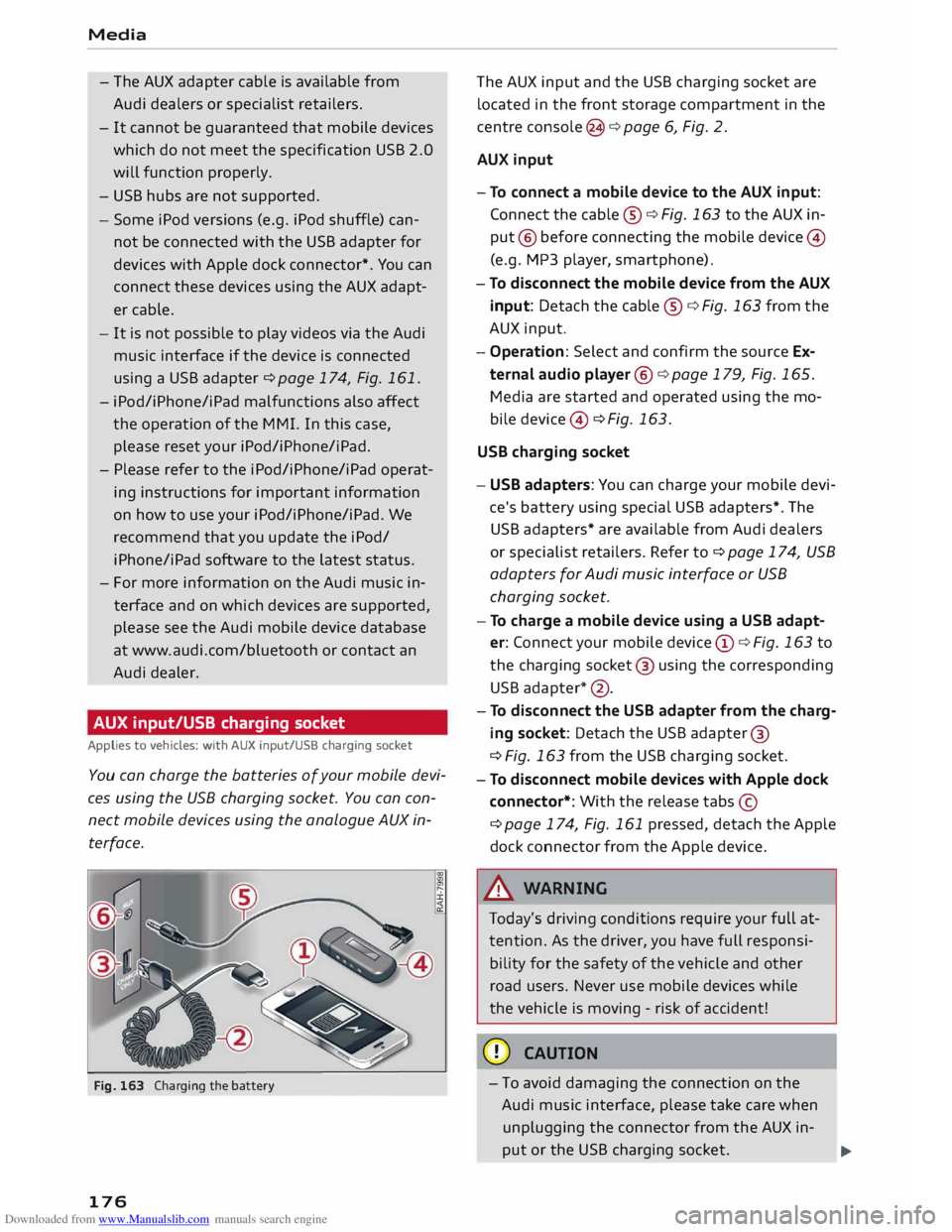
Fig. 163 Charging the battery
176 The
AUX input and the USB charging socket are
located in the front storage compartment in the
centre console (3 ¢ page 6, Fig. 2.
AUX input
- To connect a mobile device to the AUX input:
Connect the cable ®¢ Fig. 163 to the AUX in
put @ before connecting the mobile device@
(e.g. MP3 player , smartphone).
- To disconnect the mobile device from the AUX
input: Detach the cable ®¢ Fig. 163 from the
AUX input.
- Operation: Select and confirm the source Ex
ternal audio player @¢ page 179, Fig. 165.
Media are started and operated using the mo
bi le device @ ¢ Fig. 163.
USB charging socket
- USB adapters: You can charge your mobile devi
ce's battery using special USB adapters*. The
USB adapters* are available from Audi dealers
or specialist retailers. Refer to¢ page 174, USB
adapters for Audi music interface or USB
charging socket.
- To charge a mobile device using a USB adapt
er: Connect your mobile device@¢ Fig. 163 to
the charging socket@ using the corresponding
USB adapter *@ .
- To disconnect the USB adapter from the charg
ing socket: Detach the USB adapter ®
¢ Fig. 163 from the USB charging socket.
- To disconnect mobile devices with Apple dock
connector*: With the release tabs©
¢page 174, Fig. 161 pressed, detach the Apple
dock connector from the Apple device.
A WARNING
Today's driving conditions require your full at
tention. As the driver, you have full responsi
bility for the safety of the vehicle and other
road users. Never use mobile devices while
the vehicle is moving -risk of accident!
CD CAUTION
- To avoid damaging the connection on the
Audi music interface, please take care when
unplugging the connector from the AUX in-
put or the USB charging socket.
.,.
Page 206 of 284
Downloaded from www.Manualslib.com manuals search engine Seat
belts
Seat belts
Why is it so important to
use seat belts?
Seat belts provide effective protection
The common belief that passengers can brace
their weight with their hands in a minor collision
is false.
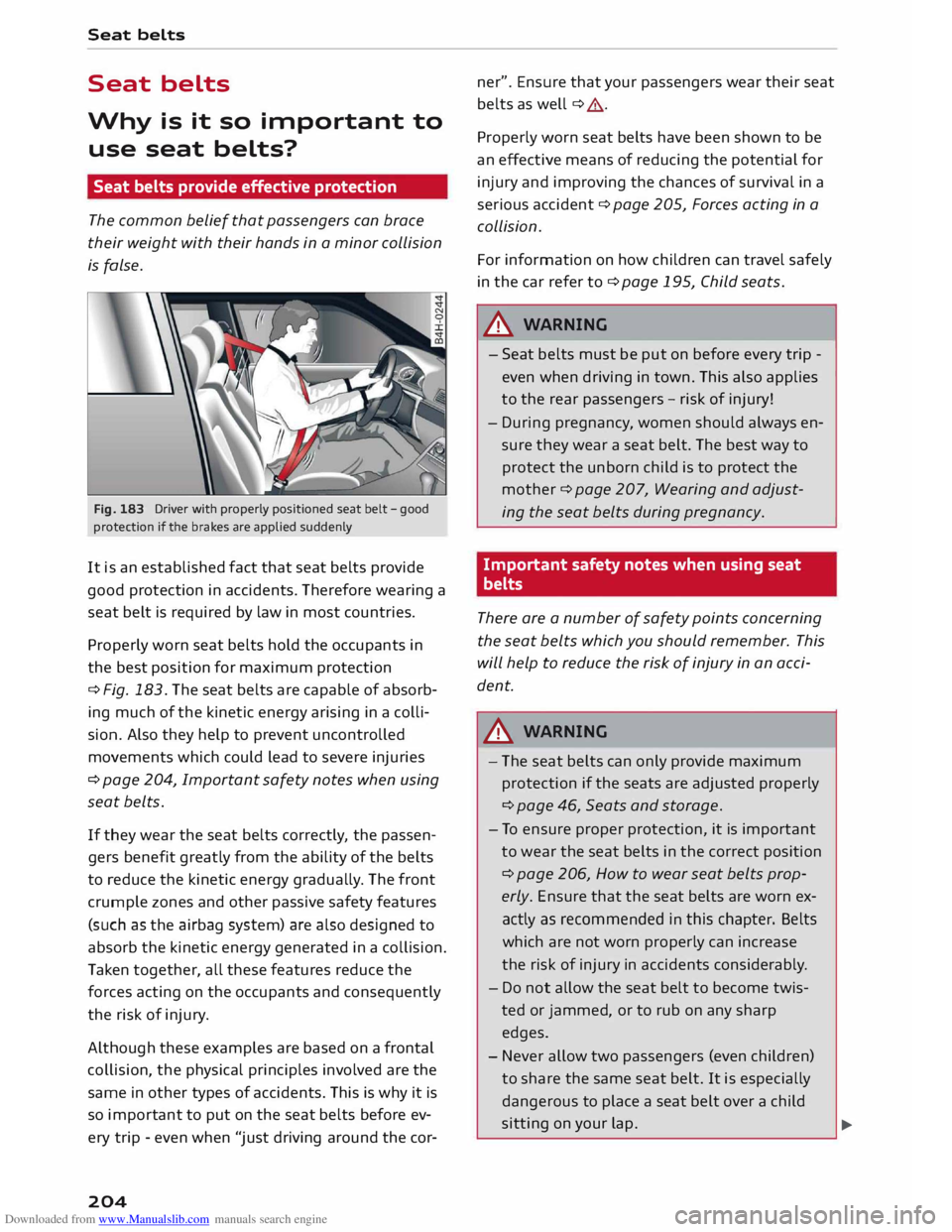
Fig. 183 Driver with properly positioned seat belt -good
protection if the brakes are applied suddenly
It is an established fact that seat belts provide
good protection in accidents. Therefore wearing a
seat belt is required by law in most countries.
Properly worn seat belts hold the occupants in
the best position for maximum protection
¢ Fig. 183. The seat belts are capable of absorb
ing much of the kinetic energy arising in a colli
sion. Also they help to prevent uncontrolled
movements which could lead to severe injuries
¢ page 204, Important safety notes when using
seat belts.
If they wear the seat belts correctly, the passen
gers benefit greatly from the ability of the belts
to reduce the kinetic energy gradually. The front
crumple zones and other passive safety features
(such as the airbag system) are also designed to
absorb the kinetic energy generated in a collision.
Taken together, all these features reduce the
forces acting on the occupants and consequently
the risk of injury.
Although these examples are based on a frontal
collision, the physical principles involved are the
same in other types of accidents. This is why it is
so import ant to put on the seat belts before ev
ery trip -even when "just driving around the cor-
204 ner".
Ensure that your passengers wear their seat
belts as well ¢ ,&.
Properly worn seat belts have been shown to be
an effective means of reducing the potential for
injury and improving the chances of survival in a
serious accident ¢ page 205, Forces acting in a
collision.
For information on how children can travel safely
in the car refer to¢ page 195, Child seats .
.lD.. WARNING
- Seat belts must be put on before every trip -
even when driving in town. This also applies
to the rear passengers -risk of injury!
- During pregnancy, women should always en
sure they wear a seat belt. The best way to
protect the unborn child is to protect the
mother ¢ page 207, Wearing and adjust
ing the seat belts during pregnancy.
Important safety notes when using seat
belts
There are a number of safety points concerning
the seat belts which you should remember. This
will help to reduce the risk of injury in an acci
dent.
.lD.. WARNING
- The seat belts can only provide maximum
protection if the seats are adjusted properly
¢page 46, Seats and storage.
- To ensure proper protection, it is important
to wear the seat belts in the correct position
¢ page 206, How to wear seat belts prop
erly. Ensure that the seat belts are worn ex
actly as recommended in this chapter. Belts
which are not worn properly can increase
the risk of injury in accidents considerably.
- Do not allow the seat belt to become twis
ted or jammed, or to rub on any sharp
edges.
- Never allow two passengers (even children)
to share the same seat belt. It is especially
dangerous to place a seat belt over a child
sitting on your lap.
�
Page 207 of 284
Downloaded from www.Manualslib.com manuals search engine 0
N
co
....
\D Lfl
N
Lfl
.... -
Do not wear the belt over hard or fragile ob
jects (such as glasses or pens, etc.) because
this can cause injuries.
- Loose, bulky clothing (such as an overcoat
over a jacket) impairs the proper fit and
function of the belts.
- The belts must be kept clean, otherwise the
retractors may not work properly
¢ tab. Cleaning the interior on page 238.
- The slot in the seat belt buckle must not be
blocked with paper or other objects, as this
can prevent the latch plate from engaging
properly.
- The latch plate of the belt must always be
engaged in the correct buckle for that seat,
otherwise the belt will not be fully effective.
- Check the condition of the seat belts at reg
ular intervals. If you notice that the belt
webbing, fittings, retractor mechanism or
buckle of any of the belts is damaged, the
belt must be replaced by a qualified work
shop.
- The seat belts must not be removed or
modified in any way. Do not attempt to re
pair a damaged belt yourself.
- Seat belts which have been worn in an acci
dent and stretched must be replaced by a
qualified workshop. The belt anchorages
should also be checked. Seat
belts
Forces acting in a
collision
The physical principles involved in a frontal
impact
Very large forces are generated during a colli
sion; these forces have to be absorbed.
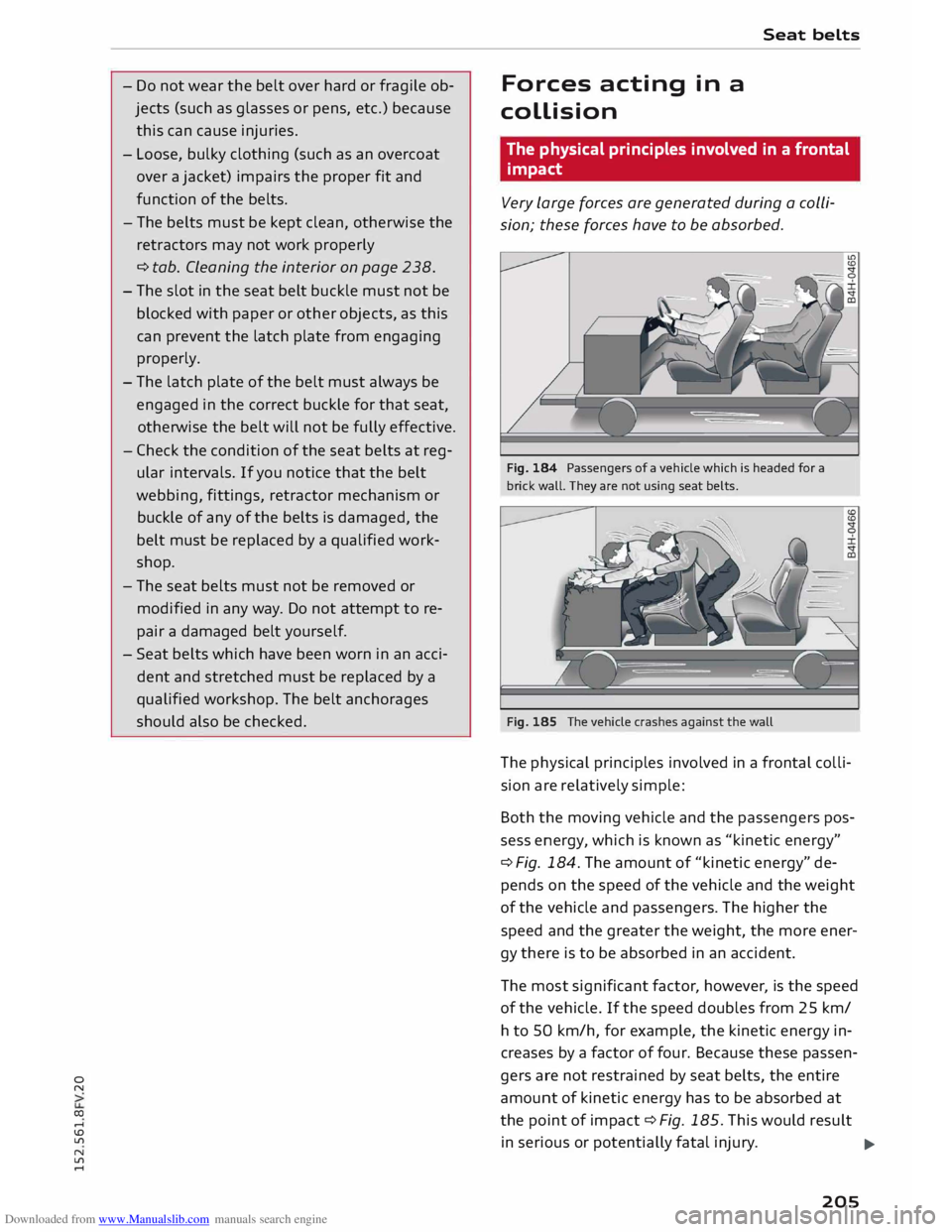
Fig. 184 Passengers of a vehicle which is headed for a
brick wall. They are not using seat belts.
Fig. 185 The vehicle crashes against the wall
The phys ical principles involved in a frontal colli
sion are relatively simple:
Both the moving vehicle and the passengers pos
sess energy, which is known as "kinetic energy"
¢ Fig. 184. The amount of "kinetic energy" de
pends on the speed of the vehicle and the weight
of the vehicle and passengers. The higher the
speed and the greater the weight, the more ener
gy there is to be absorbed in an accident.
The most significant factor, however, is the speed
of the vehicle. If the speed doubles from 25 km/
h to 50 km/h, for example, the kinetic energy in
creases by a factor of four. Because these passen
gers are not restrained by seat belts, the entire
amount of kinetic energy has to be absorbed at
the point of impact ¢ Fig. 185. This would result
in serious or potentially fatal injury.
..,.
205
Page 214 of 284
Downloaded from www.Manualslib.com manuals search engine Airbag
system
Description of front airbags
The airbag system is not a substitute for the seat
belts.
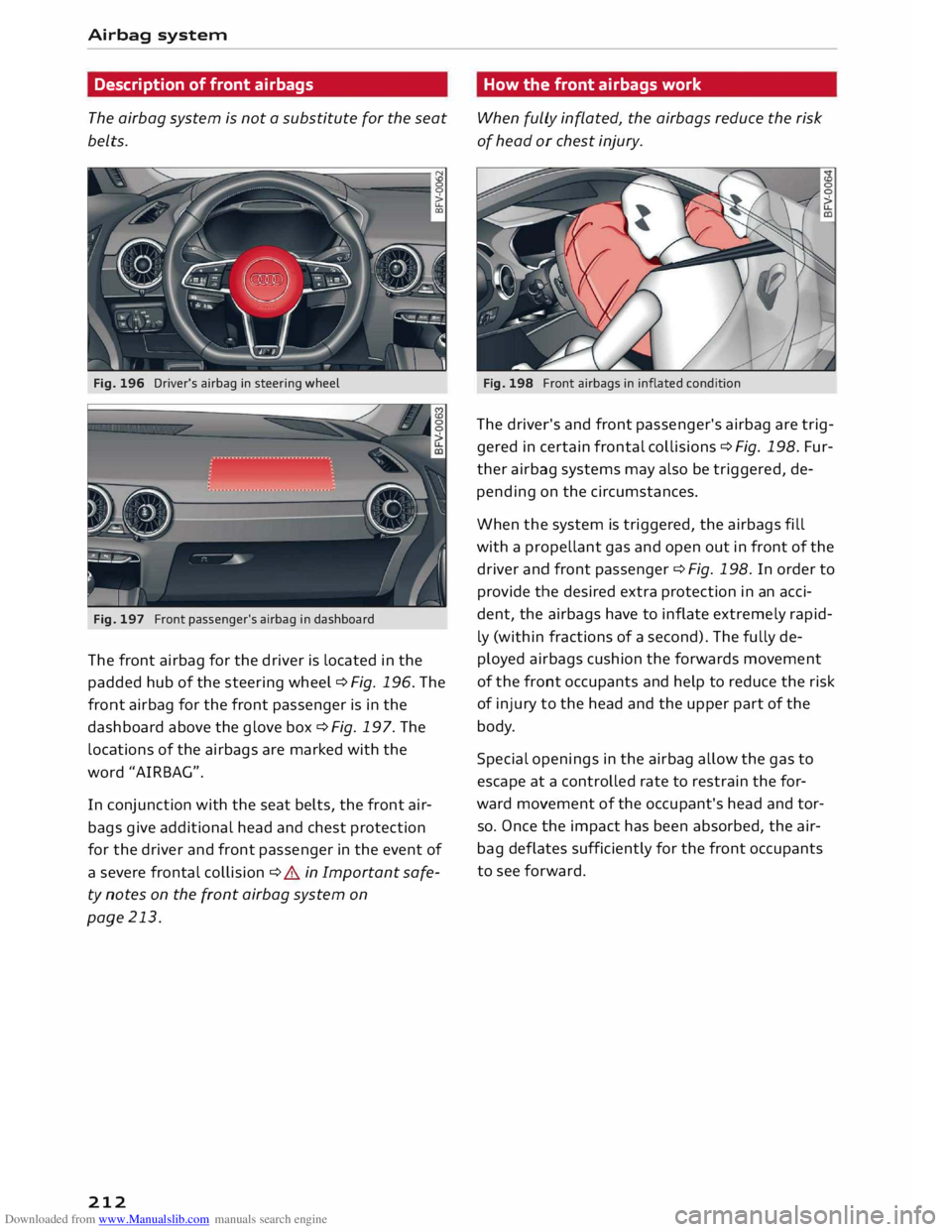
Fig. 196 Driver's airbag in steering wheel
Fig. 197 Front passenger's airbag in dashboard
The front airbag for the driver is located in the
padded hub of the steering wheel ¢Fig. 196. The
front airbag for the front passenger is in the
dashboard above the glove box ¢Fig. 197. The
locations of the airbags are marked with the
word "AIRBAG".
In conjunction with the seat belts, the front air
bags give additional head and chest protection
for the driver and front passenger in the event of
a severe frontal collision ¢ A in Important safe
ty notes on the front airbag system on
page 213.
212 How
the front airbags work
When fully inflated, the airbags reduce the risk
of head or chest injury.
Fig. 198 Front airbags in inflated condition
The driver's and front passenger's airbag are trig
gered in certain frontal collisions ¢Fig. 198. Fur
ther airbag systems may also be triggered, de
pending on the circumstances.
When the system is triggered, the airbags fill
with a prope llant gas and open out in front of the
driver and front passenger ¢ Fig. 198. In order to
provide the desired extra protection in an acci
dent, the airbags have to inflate extremely rapid
ly (within fractions of a second). The fully de
ployed airbags cushion the forwards movement
of the front occupants and help to reduce the risk
of injury to the head and the upper part of the
body.
Special openings in the airbag allow the gas to
escape at a controlled rate to restrain the for
ward movement of the occupant's head and tor
so. Once the impact has been absorbed, the air
bag deflates sufficiently for the front occupants
to see forward.
Page 228 of 284
Downloaded from www.Manualslib.com manuals search engine Checking
and topping up fluids
Brake fluid
&
8cm DOT 4 0
0
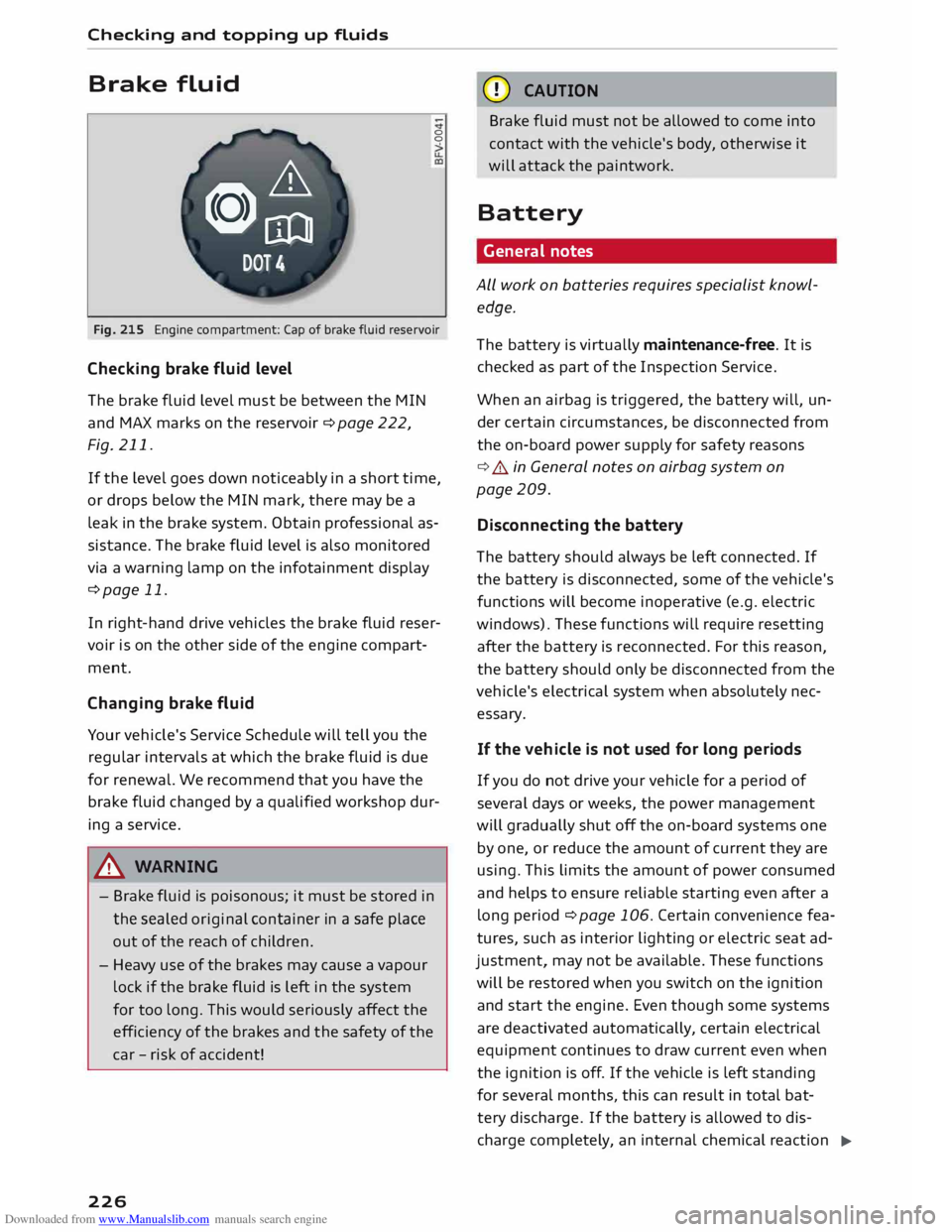
Fig. 215 Engine compartment: Cap of brake fluid reservoir
Checking brake fluid level
The brake fluid Level must be between the MIN
and MAX marks on the reservoir ¢ page 222,
Fig. 211.
If the Level goes down noticeably in a short time,
or drops below the MIN mark, there may be a
Leak in the brake system. Obtain professional as
sistance. The brake fluid Level is also monitored
via a warning Lamp on the infotainment display
¢page 11.
In right-hand drive vehicles the brake fluid reser
voir is on the other side of the engine compart
ment.
Changing brake fluid
Your vehicle's Service Schedule will tell you the
regular intervals at which the brake fluid is due
for renewal. We recommend that you have the
brake fluid changed by a qualified workshop dur
ing a service.
A WARNING
- Brake fluid is poisonous; it must be stored in
the sealed original container in a safe place
out of the reach of children.
- Heavy use of the brakes may cause a vapour
Lock if the brake fluid is left in the system
for too Long. This would seriously affect the
efficiency of the brakes and the safety of the
car -risk of accident!
226 CD
CAUTION
Brake fluid must not be allowed to come into
contact with the vehicle's body, otherwise it
will attack the paintwork.
Battery General notes
ALL work on batteries requires specialist knowl
edge.
The battery is virtually maintenance-free. It is
checked as part of the Inspection Service.
When an airbag is triggered, the battery will, un
der certain circumstances, be disconnected from
the on-board power supply for safety reasons
¢ .&.. in General notes on airbag system on
page 209.
Disconnecting the battery
The battery should always be Left connected. If
the battery is disconnected, some of the vehicle's
functions will become inoperative (e.g. electric
windows). These functions will require resetting
after the battery is reconnected. For this reason,
the battery should only be disconnected from the
vehicle's electrical system when absolutely nec
essary.
If the vehi cle is not used for long periods
If you do not drive your vehicle for a period of
several days or weeks, the power management
will gradually shut off the on-board systems one
by one, or reduce the amount of current they are
using. This Limits the amount of power consumed
and helps to ensure reliable starting even after a
Long period ¢ page 106. Certain convenience fea
tures, such as interior Lighting or electric seat ad
justment, may not be available. These functions
will be restored when you switch on the ignition
and start the engine. Even though some systems
are deactivated automatically, certain electrical
equipment continues to draw current even when
the ignition is off. If the vehicle is Left standing
for several months, this can result in total bat-
tery discharge. If the battery is allowed to dis
charge completely, an internal chemical reaction
..,_
Page 236 of 284
Downloaded from www.Manualslib.com manuals search engine Wheels
and tyres
tread pattern), summer tyres give less grip on ice
and snow.
... Winter tyres must be fitted on all four wheels.
... Only use winter tyres of the correct type ap-
proved for your vehicle.
... Please
note that the maximum permissible
speed for winter tyres may be lower than for
summer tyres¢.&_ . Your specialist retailer can
advise you of the maximum speed for your
tyres.
... After fitting the wheels you must always check
the tyre pressures ¢page 233.
Winter tyres lose their effectiveness when the
tread is worn down to a depth of 4 mm. The per
formance of winter tyres is also severely impaired
by ageing, even if the tread is still much deeper
than 4 mm.
.&_ WARNING
- Never exceed the maximum approved speed
for your tyres. This causes the tyres to over
heat and can even result in a blow-out -risk
of accident!
- Always adapt your driving style to the pre
vailing road and traffic conditions. Drive
carefully and reduce your speed on icy or
slippery roads. Even winter tyres lose their
grip on black ice.
@) For the sake of the environment
Summer tyres should be fitted again as soon
as possible; they give better handling on
roads which are free of snow and ice. They are
quieter, do not wear so quickly and reduce
fuel consumption.
(Qj) Note
All-weather tyres can also be used instead of
winter tyres. Please note that winter tyres
with the & symbol are required by law during
the winter season in some countries.
Snow chains
Snow chains will improve braking ability as well
as traction in winter conditions.
234 ...
Snow chains can be used on the front wheels
only. This also applies to vehicles with four
wheel drive* .
... Check that the snow chains are correctly seated
after driving for a few yards; follow the instruc
tions given by the manufacturer .
... Keep your speed below 50 km/h. Please ob-
serve the applicable local regulations.
For technical reasons snow chains may only be
used on tyres with certain wheel rim/tyre combi
nations.
Rim size
Rim offset Tyre
size
7Jx17 47mm 225/50
Only use snow chains with fine-pitch links. The
links must not protrude more than 13.5 mm
from the tyres (including tensioner).
You must remove the snow chains on roads which
are free of snow; otherwise the vehicle handling
may be impaired and the tyres may be damaged.
.&_ WARNING
Unsuitable or incorrectly mounted snow
chains can cause you to lose control of the ve
hicle -risk of accident!
CD CAUTION
Snow chains can damage the rim/hubcap* if
they make direct contact with it. Remove the
hubcaps* beforehand. Use snow chains which
have a protective coating.
Tyre pressure Loss
indicator
Tyre pressure loss indicator in instrument
cluster
Applies to vehicles: with tyre pressure Loss indicator
The tyre pressure Loss indicator in the instrument
cluster informs the driver if the tyre pressure is
too low or a system malfunction has occurred.
The tyre pressure loss indicator makes use of the
ABS sensors to compare the rolling circumfer
ence and the vibration of the tyres. If changes in
the inflation pressure are detected on one or
more tyres, the driver is alerted by an indicator
..,.
Page 241 of 284
Downloaded from www.Manualslib.com manuals search engine 0
N
co
....
\D Lfl
N
Lfl
.... Care
of vehicle and cleaning
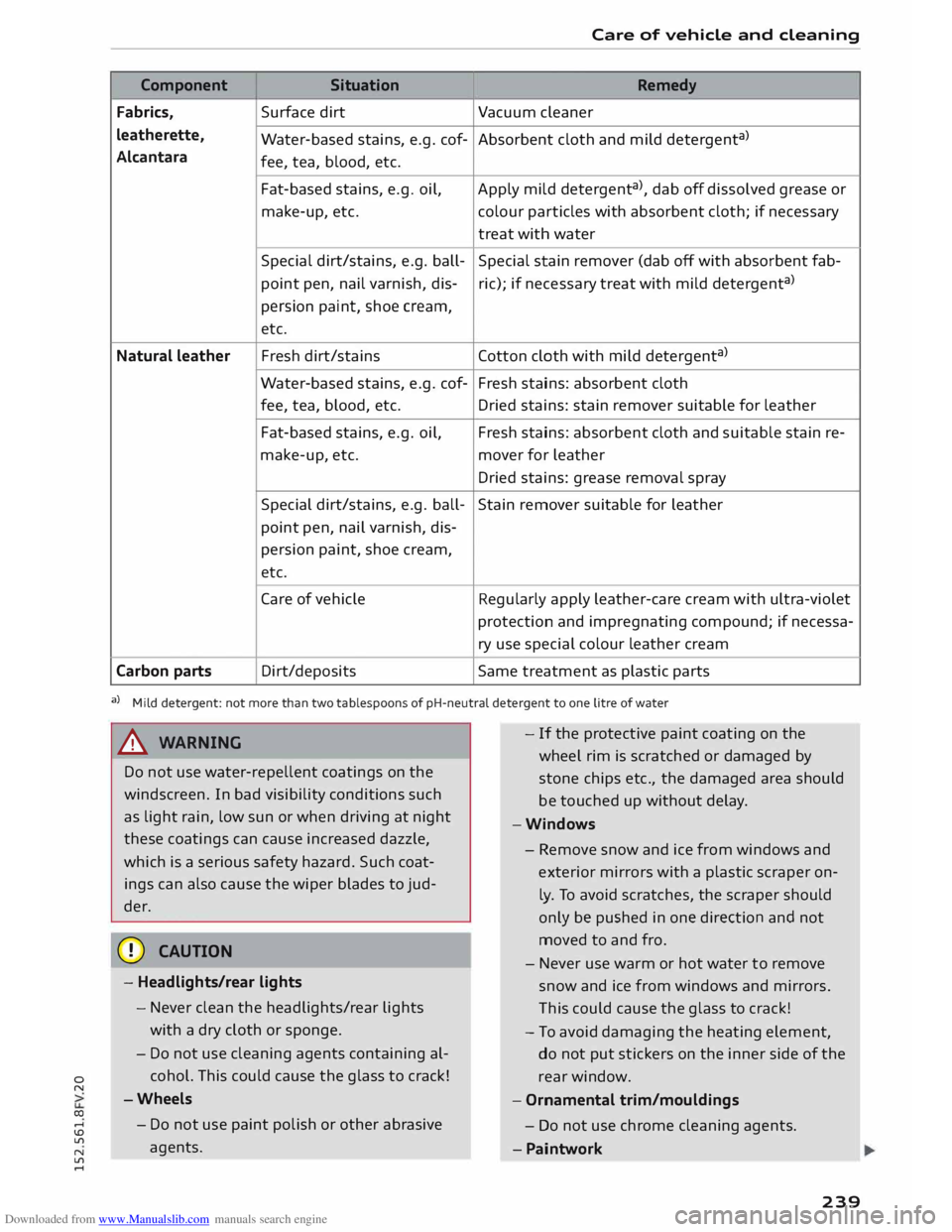
Component Situation
Remedy
Fabrics, Surface
dirt
Vacuum cleaner
leatherette, Water-based stains, e.g. cof- Absorbent cloth and mild detergent a
)
Alcantara fee, tea, blood, etc.
Fat-based stains, e.g. oil,
Apply mild detergent a
), dab off dissolved grease or
make-up, etc. colour
particles with absorbent cloth; if necessary
treat with water
Special dirt/stains, e.g. ball- Special stain remover (dab off with absorbent fab-
point pen, nail varnish, dis-ric);
if necessary treat with mild detergent a
)
persion paint, shoe cream,
etc.
Natural leather Fresh
dirt/stains Cotton cloth with mild detergent a
)
Water-based stains, e.g. cof- Fresh stains: absorbent cloth
fee, tea, blood, etc.
Dried stains: stain remover suitable for leather
Fat-based stains, e.g. oil, Fresh stains: absorbent cloth and suitable stain re-
make-up, etc. mover for leather
Dried stains: grease removal spray
Special dirt/stains, e.g. ball-
Stain remover suitable for leather
point pen, nail varnish, dis-
persion paint, shoe cream,
etc.
Care of vehicle Regularly apply leather-care cream with ultra-violet
protection and impregnating compound; if necessa-
ry use special colour leather cream
Carbon parts Dirt/deposits
Same treatment as plastic parts
a) Mild detergent: not more than two tablespoons of pH-neutral detergent to one litre of water
A WARNING
Do not use water-repellent coatings on the
windscreen. In bad visibility conditions such
as light rain, low sun or when driving at night
these coatings can cause increased dazzle,
which is a serious safety hazard. Such coat
ings can also cause the wiper blades to jud
der.
CD CAUTION
- Headlights/rear lights
- Never clean the headlights/rear lights
with a dry cloth or sponge.
- Do not use cleaning agents containing al
cohol. This could cause the glass to crack!
-Wheels
- Do not use paint polish or other abrasive
agents. -
If the protective paint coating on the
wheel rim is scratched or damaged by
stone chips etc., the damaged area should
be touched up without delay.
-Windows
- Remove snow and ice from windows and
exterior mirrors with a
plastic
scraper on
ly. To avoid scratches, the scraper should
only be pushed in one direction and not
moved to and fro.
- Never use warm or hot water to remove
snow and ice from windows and mirrors.
Th is could cause the glass to crack!
- To avoid damaging the heating element,
do not put stickers on the inner side of the
rear window.
- Ornamental trim/mouldings
- Do not use chrome cleaning agents .
- Paintwork
239
Page 265 of 284
Downloaded from www.Manualslib.com manuals search engine Numbers
and
Symbols
360 °
display . . . . . . . . . . . . . . . . . . . . . . . . . .
94
A
A/C (automatic air conditioner) . . . . . . . . . . .
55
A/C (manual air conditioner) . . . . . . . . . . . . . 54
ABS see Anti-Lock brake system 102
Accelerator pedal . . . . . . . . . . . . . . . . . . . . . 200
Accepting an entry suggestion . . . . . . . . . . 114
Accessories . . . . . . . . . . . . . . . . . . . . . . . . . .
260
Active Lane assist . . . . . . . . . . . . . . . . . . . . . .
84
Driver messages . . . . . . . . . . . . . . . . . . . . . .
86
Indicator Lamp . . . . . . . . . . . . . . . . . . . . . . .
85
Setting steering vibration . . . . . . . . . . . . . .
87
Setting time of warning................
87
Switching on/off . . . . . . . . . . . . . . . . . . . . .
85
Adaptive Light Indicator lamp . . . . . . . . . . . . . . . . . . . . . . . 17
Adjusting volume
Multi-function steering wheel.. . . . . . .
20, 21
Airbag .............................. 209
Deactivating front passenger's airbag . . . 211
Front airbags . . . . . . . . . . . . . . . . . . . . . . . 210
Head-protection airbag . . . . . . . . . . . . . . . 215
Side airbags . . . . . . . . . . . . . . . . . . . . . . . . 214
Warning lamp . . . . . . . . . . . . . . . . . . . . . . . 14
Air conditioner (automatic)
Adjusting air outlets . . . . . . . . . . . . . . . 55, 56
Air distribution, air outlets . . . . . . . . . . . . . 55
Air recirculation mode . . . . . . . . . . . . . . . . . 56
AUTO (automatic mode) . . . . . . . . . . . . . . . 55
Blower . . . . . . . . . . . . . . . . . . . . . . . . . . . . .
55
Controls . . . . . . . . . . . . . . . . . . . . . . . . . . . .
55
Defrosting windows . . . . . . . . . . . . . . . . . . .
56
Drive select . . . . . . . . . . . . . . . . . . . . . . . . . . 90
Key-coded settings . . . . . . . . . . . . . . . . . . . .
55
Rear window heating . . . . . . . . . . . . . . . . . .
56
Selecting temperature . . . . . . . . . . . . . . . . . 55
Air conditioner (manual) Adjusting air outlets . . . . . . . . . . . . . . . 54, 56
� Adjusting
temperature . . . . . . . . . . . . . . . . 54
� Air
distribution, air outlets . . . . . . . . . . . . . 54
,-j
� Air
recirculation
mode . . . . . . . . . . . . . . . . . 54
� Blower
. . . . . . . . . . . . . . . . . . . . . . . . . . . . . 53
,-j Index
Controls . . . . . . . . . . . . . . . . . . . . . . . . . . . . 53
Defrosting windows . . . . . . . . . . . . . . . . . . . 54
Key-coded settings. . . . . . . . . . . . . . . . . . . . 53
Rear window heating . . . . . . . . . . . . . . . . . . 54
Air distribution, setting
Automatic air conditioner . . . . . . . . . . . . . .
55
Manual air conditioner . . . . . . . . . . . . . . . . .
54
Air outlets, adjusting . . . . . . . . . . . . . . . . . . .
56
Air recirculation mode
Automatic air conditioner . . . . . . . . . . . . . .
56
Manual air conditioner . . . . . . . . . . . . . . . . .
54
Alarm system
see Anti-theft alarm system . . . . . . . . . 25,
31
All-season tyres
see ALL-weather tyres . . . . . . . . . . . . . . . . .
233
All-weather Lights . . . . . . . . . . . . . . . . . . . . . . 3 7
All-weather tyres . . . . . . . . . . . . . . . . . . . . . 233
Alterations to the vehicle . . . . . . . . . . . . . . .
260
Alternative frequency (radio) . . . . . . . . . . . . 166
Alternative route . . . . . . . . . . . . . . . . . . . . . 155
Alternator (warning lamp) . . . . . . . . . . . . . . . 13
AMI see Audi music interface .......... 174,
175
Annou ncements (traffic programme) . . . . . 190
Anti-dazzle exterior mirrors . . . . . . . . . . . . . .
42
Anti-dazzle interior mirror . . . . . . . . . . . . . . .
42
Anti-freeze Coolant . . . . . . . . . . . . . . . . . . . . . . . . . . . . 224
Winds creen washer system . . . . . . . . . . . . 229
Anti-lock brake system . . . . . . . . . . . . . . . . .
102
Anti-theft alarm system . . . . . . . . . . . . . . . . . 31
Anti-theft wheel bolts . . . . . . . . . . . . . . . . . 244
Armrest, front . . . . . . . . . . . . . . . . . . . . . . . . .
47
Ashtray . . . . . . . . . . . . . . . . . . . . . . . . . . . . . . 48
A5R
see Traction control system . . . . . . . . . . . . 102
Assigning function to button (multi-function
steering wheel) . . . . . . . . . . . . . . . . . . . . . . . . 20
Audi connect . . . . . . . . . . . . . . . . . . . . . . . . .
137
Activating . . . . . . . . . . . . . . . . . . . . . . . . . .
137
Closing . . . . . . . . . . . . . . . . . . . . . . . . . . . .
140
Configuring . . . . . . . . . . . . . . . . . . . . . . . .
143
Connecting a mobile phone . . . . . . . . . . . .
137
Connection settings . . . . . . . . . . . . . . . . . .
187
Data protection . . . . . . . . . . . . . . . . . . . . .
146
Functions . . . . . . . . . . . . . . . . . . . . . . . . . .
140
263
Page 275 of 284
Downloaded from www.Manualslib.com manuals search engine 0
N
co
....
\D Lfl
N
Lfl
.... Multi-function
steering wheel
Button . . . . . . . . . . . . . . . . . . . . . . . . . . . . .
20
How to use the multi-function steering
wheel . . . . . . . . . . . . . . . . . . . . . . . . . . . 19,
21
Navigation cues . . . . . . . . . . . . . . . . . . . . . . 20
Pause . . . . . . . . . . . . . . . . . . . . . . . . . . . 20, 21
Speech dialogue system . . . . . . . . . . . . . . . 20
Switching between displays . . . . . . . . . 19,
21
Switching between tabs . . . . . . . . . . . . 19,
21
Multicollision brake assist system . . . . . . . . 103
Multi Media Interface (MMI) . . . . . . . . . . . . 109
Music collection
see Jukebox . . . . . . . . . . . . . . . . . . . . . . . .
170
Mute ......................... 20, 21, 190
myAudi ......................... 137, 138
Calling up a destination . . . . . . . . . . . . . . . 151
Configuring Audi connect services . . . . . . 139
Importing contacts . . . . . . . . . . . . . . . . . . 133
Logging on in the vehicle . . . . . . . . . . . . . . 140
PIN . . . . . . . . . . . . . . . . . . . . . . . . . . . . . . .
140
Special destinations . . . . . . . . . . . . . . . . . .
153
N
Natural commands . . . . . . . . . . . . . . . . . . . .
122
Navigation . . . . . . . . . . . . . . . . . . . . . . . . . . .
147
Audi connect . . . . . . . . . . . . . . . . . . . . . . .
152
Avoiding road(s) . . . . . . . . . . . . . . . . . . . . .
155
Better route . . . . . . . . . . . . . . . . . . . . . . . .
160
Country information . . . . . . . . . . . . . . . . .
158
Deleting a destination . . . . . . . . . . . . . . . .
152
Destination from map . . . . . . . . . . . . . . . .
149
Directory . . . . . . . . . . . . . . . . . . . . . . . . . . .
149
Display alternative
routes . . . . . . . . . . . . .
155
Economical route . . . . . . . . . . . . . . . . . . . .
155
Entering a destination using coordinates . 151
Entering an add ress . . . . . . . . . . . . . . . . . . 148
Entering stopover . . . . . . . . . . . . . . . . . . . 152
Exclude route . . . . . . . . . . . . . . . . . . . . . . . 155
Fast route . . . . . . . . . . . . . . . . . . . . . . . . . .
155
Favourites . . . . . . . . . . . . . . . . . . . . . . . . . .
149
Home address . . . . . . . . . . . . . . . . . . . . . .
149
Input help . . . . . . . . . . . . . . . . . . . . . . . . .
153
Last destination . . . . . . . . . . . . . . . . . . . . . 148
Map display . . . . . . . . . . . . . . . . . . . . . . . .
156
Map preview . . . . . . . . . . . . . . . . . . . . . . . .
147
Map settings . . . . . . . . . . . . . . . . . . . . . . .
158 Index
MMI control console . . . . . . . . . . . . . . . . . 147
MMI touch . . . . . . . . . . . . . . . . . . . . . 147, 148
myAudi destination . . . . . . . . . . . . . . . . . .
151
Online search . . . . . . . . . . . . . . . . . . . . . . .
151
Online traffic data . . . . . . . . . . . . . . . . . . .
152
Options menu. . . . . . . . . . . . . . . . . . . . . . .
152
Parking . . . . . . . . . . . . . . . . . . . . . . . . . . . . 152
Search area . . . . . . . . . . . . . . . . . . . . . . . . .
151
Search function . . . . . . . . . . . . . . . . . . . . .
148
Show location on map . . . . . . . . . . . . . . . . 152
Special destination . . . . . . . . . . . . . . . . . . 150
Speech dialogue
system . . . . . . . . . . . . . .
119
Stopp ing route guidance . . . . . . . . . . . . . .
152
Storing a destination in the directory . . . .
153
Traffic information . . . . . . . . . . . . . . . . . . .
160
Troubleshooting . . . . . . . . . . . . . . . . . . . . .
162
see also Map . . . . . . . . . . . . . . . . . . . . . . .
156
Navigation cue . . . . . . . . . . . . . . . . . . . . . . .
154
During a telephone call . . . . . . . . . . . . . . . 154
Traffic . . . . . . . . . . . . . . . . . . . . . . . . . . . . .
154
Navigation map update . . . . . . . . . . . . 142, 147
Network connection (Wi-Fi) . . . . . . . . . . . . . 143
Network selection (telephone mode) . . . . .
134
Network settings . . . . . . . . . . . . . . . . . . . . .
134
Noise compensation (GALA) . . . . . . . . . . . . .
190
Notes Audi connect . . . . . . . . . . . . . . . . . . . 137,
145
Audi music interface . . . . . . . . . . . . . . . . .
175
CD/DVD............................ 168
Copyright (media drives) . . . . . . . . . . . . . .
168
Media drives . . . . . . . . . . . . . . . . . . . . . . . .
168
Navigation . . . . . . . . . . . . . . . . . . . . . . . . .
147
Navigation map update . . . . . . . . . . . . . . .
147
Softw are licences . . . . . . . . . . . . . . . . . . . .
191
Speech dialogue system .......... 116, 117
Tele phone . . . . . . . . . . . . . . . . . . . . . . . . . . 123
Traffic safety..... . . . . . . . . . . . . . . . . . . . 192
Number s/characters, entering (using the
speller) . . . . . . . . . . . . . . . . . . . . . . . . . . . . .
113
0
Octane rating (petrol)
Oil 217
see Engine oil . . . . . . . . . . . . . . . . . . . . . . . 223
Oil change intervals . . . . . . . . . . . . . . . . . . . 229
Oil change service . . . . . . . . . . . . . . . . . . . . .
223
Oil dipstick . . . . . . . . . . . . . . . . . . . . . . . . . . 223
273
Page 279 of 284
Downloaded from www.Manualslib.com manuals search engine 0
N
co
....
\D L/'l
N
L/'l
.... Speech
dialogue system . . . . . . . . . . . . . . . .
116
How to use . . . . . . . . . . . . . . . . . . . . . . . . .
116
Individual speech training . . . . . . . . . . . . .
186
Input help . . . . . . . . . . . . . . . . . . . . . . . . . 116
Multi-function steering wheel . . . . . . . . . . . 20
Notes . . . . . . . . . . . . . . . . . . . . . . . . . . . . . 117
Overview . . . . . . . . . . . . . . . . . . . . . . . . . . . 116
Overview of commands . . . . . . . . . . . . . . . 116
Settings . . . . . . . . . . . . . . . . . . . . . . . 116, 186
Switching on/off . . . . . . . . . . . . . . . . . . . . 116
Volume ..................... 20, 116, 190
Speech dialogue system commands
Audi connect . . . . . . . . . . . . . . . . . . . . . . .
118
Global commands ................... 117
Map............................... 119
Media . . . . . . . . . . . . . . . . . . . . . . . . . . . . . 121
Natural commands . . . . . . . . . . . . . . . . . . 122
Navigation . . . . . . . . . . . . . . . . . . . . . . . . .
119
Radio . . . . . . . . . . . . . . . . . . . . . . . . . . . . . 121
Telephone . . . . . . . . . . . . . . . . . . . . . . . . . . 118
Text messages . . . . . . . . . . . . . . . . . . . . . .
119
Speed dependent volume control (GALA) . .
190
Speed display . . . . . . . . . . . . . . . . . . . . . . . .
156
Speed limiter . . . . . . . . . . . . . . . . . . . . . . . . . 82
Speedometer . . . . . . . . . . . . . . . . . . . . . . . 8, 18
Speed warning . . . . . . . . . . . . . . . . . . . . . . . . 80
Speller . . . . . . . . . . . . . . . . . . . . . . . . . . . . . .
113
Sport mode . . . . . . . . . . . . . . . . . . . . . . . . . .
104
Start/stop system . . . . . . . . . . . . . . . . . . . . . .
63
Driver messages . . . . . . . . . . . . . . . . . . . . . .
66
Engine cuts in automatically . . . . . . . . . . . .
64
Engine does not switch off . . . . . . . . . . . . .
64
Indicator lamps . . . . . . . . . . . . . . . . . . . . . .
64
Switching off/on . . . . . . . . . . . . . . . . . . . . . 65
Switching off/starting the engine . . . . . . . . 64
START ENGINE STOP button . . . . . . . . . . . . .
60
Starting engine . . . . . . . . . . . . . . . . . . . . . . . . 60
Starting with jump leads . . . . . . . . . . . . . . . 248
Start location (presentation mode) . . . . . . . 153
Station list (radio) . . . . . . . . . . . . . . . . . . . . .
163
Station memory
see Favourites . . . . . . . . . . . . . . . . . . . . . .
165
Station sorting (radio) . . . . . . . . . . . . . . . . .
166
Steering Electro-mechanical power steering . . . . . 101
Warning lamp . . . . . . . . . . . . . . . . . . . . . . . 13 Index
Steering wheel Adjusting . . . . . . . . . . . . . . . . . . . . . . . . . . .
60
Paddle levers (automatic gearbox) . . . . . . .
75
see also Multi-function
steering wheel . . . . . . . . . . . . . . . . .
19, 20, 21
Stopover . . . . . . . . . . . . . . . . . . . . . . . . . . . .
152
Stopping route guidance . . . . . . . . . . . . . . . 152
Storage compartments . . . . . . . . . . . . . . . . . 49
Storage location (di rectory) . . . . . . . . . . . . .
131
Store current position . . . . . . . . . . . . . . . . .
157
S tronic gearbox
see Automatic gearbox . . . . . . . . . . . . . . . .
70
S tronic (automatic gearbox) . . . . . . . . . . . . .
70
Subtitles . . . . . . . . . . . . . . . . . . . . . . . . . . . . 181
Subwoofer (sound) . . . . . . . . . . . . . . . . . . . .
190
Summer time . . . . . . . . . . . . . . . . . . . . . . . .
186
Sun visors . . . . . . . . . . . . . . . . . . . . . . . . . . . . 42
Supplementary heater (vehicles with diesel
engine) . . . . . . . . . . . . . . . . . . . . . . . . . . . . . .
57
Suspension control . . . . . . . . . . . . . . . . . . . . .
90
Indicator lamp . . . . . . . . . . . . . . . . . . . . . . . 17
Switching between calls . . . . . . . . . . . . . . . . 129
Switching between tabs
see Multi-function steering wheel .
19, 20, 21
Switching off engine . . . . . . . . . . . . . . . . . . . . 61
Switching on ignition . . . . . . . . . . . . . . . . . . .
60
Switching telephone on/off . . . . . . . . . . . . . 134
Symbols Directory . . . . . . . . . . . . . . . . . . . . . . . . . . .
149
Map..... .......................... 156
Navigation . . . . . . . . . . . . . . . . . . . . . . . . .
156
Route criteria . . . . . . . . . . . . . . . . . . . . . . .
155
Traffic . . . . . . . . . . . . . . . . . . . . . . . . . . . . .
161
Traffic information . . . . . . . . . . . . . . . . . . .
160
see also Warning lamps . . . . . . . . . . . . . . . . 9
System settings . . . . . . . . . . . . . . . . . . . . . .
186
Systems (sound) . . . . . . . . . . . . . . . . . . . . . .
190
System update . . . . . . . . . . . . . . . . . . . . . . .
186
T
Tailgate see Boot lid . . . . . . . . . . . . . . . . . . . . . . . . . . 32
Technical data . . . . . . . . . . . . . . . . . . . . . . . .
257
Telephone . . . . . . . . . . . . . . . . . . . . . . . . . . . 123
Connection settings . . . . . . . . . . . . . . . . . . 187
Favo urites . . . . . . . . . . . . . . . . . . . . . . . . . . 129
277