park assist AUDI TT COUPE 2014 Owner's Manual
[x] Cancel search | Manufacturer: AUDI, Model Year: 2014, Model line: TT COUPE, Model: AUDI TT COUPE 2014Pages: 284, PDF Size: 34.42 MB
Page 97 of 284
Downloaded from www.Manualslib.com manuals search engine 0
N
co
....
\D L/'l
N
L/'l
.... Switching
on/off
Applies to vehicles: with parking system plus
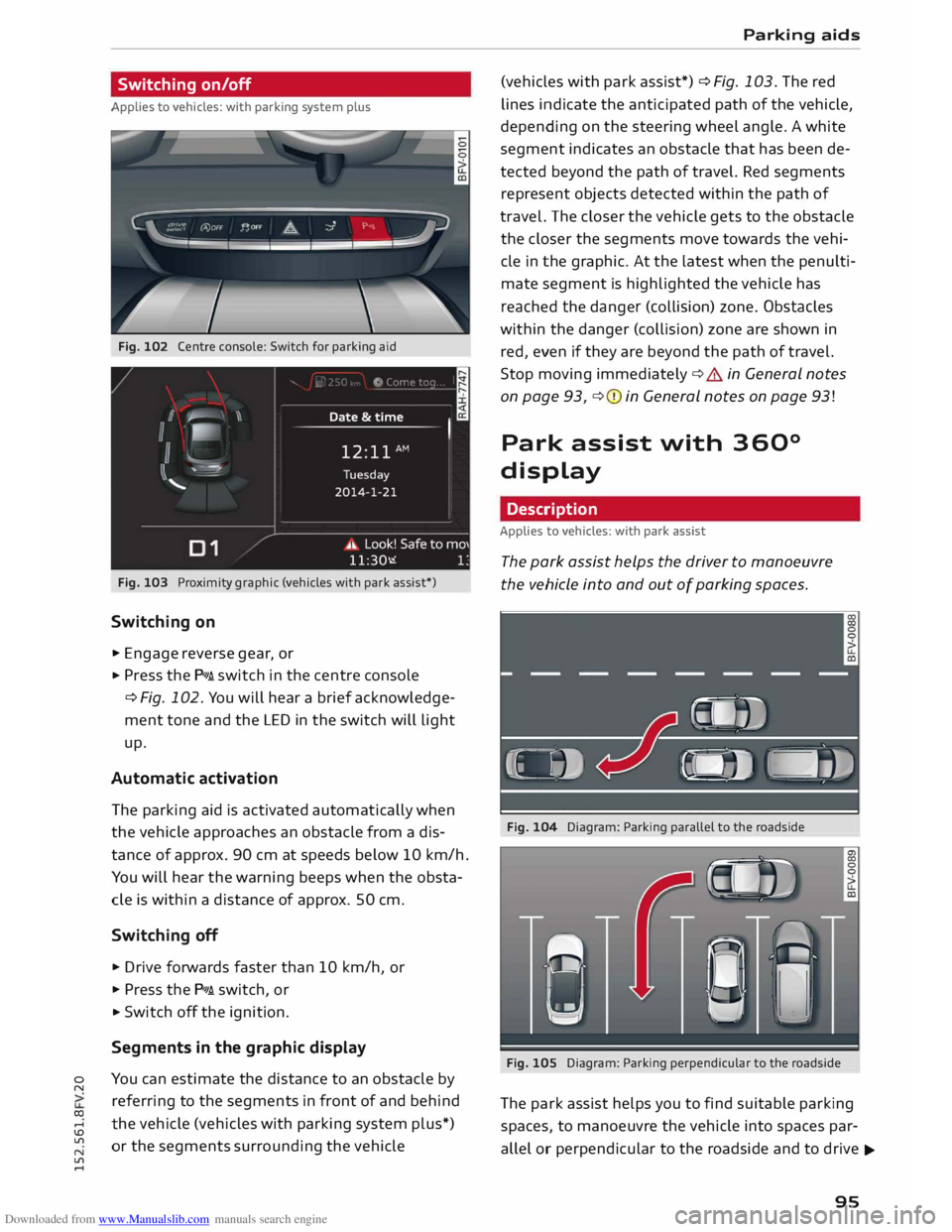
Fig. 102 Centre console: Switch for parking aid
Fig. 103 Proximity graphic (vehicles with park assist*)
Switching on
.,. Engage reverse gear, or
... Press the P111A. switch in the centre console
¢ Fig. 102. You will hear a brief acknowledge
ment tone and the LED in the switch will light
up.
Automatic activation
The parking aid is activated automatically when
the vehicle approaches an obstacle from a dis
tance of approx. 90 cm at speeds below 10 km/h.
You will hear the warning beeps when the obsta
cle is within a distance of approx. 50 cm.
Switching off
... Drive forwards faster than 10 km/h, or
.,. Press the P111A. switch, or
... Switch off the ignition.
Segments in the graphic display
You can estimate the distance to an obstacle by
referring to the segments in front of and behind
the vehicle (vehicles with parking system plus*)
or the segments surrounding the vehicle Parking
aids
(vehicles with park assist*) ¢ Fig. 103. The red
lines indicate the anticipated path of the vehicle,
depending on the steering wheel angle. A white
segment indicates an obstacle that has been de
tected beyond the path of travel. Red segments
represent objects detected within the path of
travel. The closer the vehicle gets to the obstacle
the closer the segments move towards the vehi
cle in the graphic. At the Latest when the penulti
mate segment is highlighted the vehicle has
reached the danger (collision) zone. Obstacles
within the danger (collision) zone are shown in
red, even if they are beyond the path of travel.
Stop moving immediately ¢.&. in General notes
on page 93, ¢(I) in General notes on page 93!
Park assist with 360°
display
Description
Applies to vehicles: with park assist
The park assist helps the driver to manoeuvre
the vehicle into and out of parking spaces.
Fig. 104 Diagram: Parking parallel to the roadside
Fig. 105 Diagram: Parking perpendicular to the roadside
The park assist helps you to find suitable parking
spaces, to manoeuvre the vehicle into spaces par
allel or perpendicular to the roadside and to drive ...,.
95
Page 98 of 284
Downloaded from www.Manualslib.com manuals search engine Parking
aids
out of spaces parallel to the kerb. The parking
space can be located between two vehicles or be
hind one vehicle. The park assist takes over the
steering while the driver is parking the vehicle in
the usual way.
The parking system plus is an integral compo
nent of the park assist ¢ page 94 and helps you
during the parking manoeuvre.
The park assist sensors are located on the sides
of the front and rear bumpers. Please ensure that
the sensors are kept free of stickers, deposits and
any other substances which could impair the
function of the system. Notes on cleaning
¢page 236.
In short parking spaces, the parking aid warning
tone will sound continuously when the vehicle is
less than approx. 0.20 m away from the obstacle.
Stop moving immediately!
A WARNING
- Please observe the safety warnings ¢ & in
General notes on page 93.
- Please note that the park assist only han
dles the steering. As the driver you are al
ways responsible for braking and accelerat
ing.
- It is the driver's responsibility to decide
whether a parking space shown in the dis
play is suitable for the vehicle.
- The front of the vehicle swings out during
the parking manoeuvre. Please take all nec
essary measures to ensure that other road
users are not endangered.
- The steering wheel turns rapidly on its own
when parking the vehicle and leaving the
space. Injury may result if a person reaches
between the spokes on the steering wheel
when it is turning.
CD CAUTION
- Please observe the safety warnings ¢0 in
General notes on page 93.
- In certain situations, the park assist will
guide the vehicle onto or across the kerb,
for instance if other vehicles are parked on
the kerb. You should always be ready to take
96 over
the steering wheel in order to prevent
damage to the tyres and/or wheel rims.
- Certain conditions in and around the park
ing space can cause unexpected results
when parking.
- Objects such as pillars, posts, etc.
Road surfaces such as loose gravel, snow,
ice, etc.
CD CAUTION
- The sensors may not always be able to de
tect objects such as trailer draw bars, thin
rails, fences, posts, waste bins and trees,
etc. This could result in damage to your car.
- Please note that the system may not always
be able to detect the surface of certain ob
jects or substances, such as wire fences or
powder snow, etc. You should therefore
check that the parking space is really large
enough before parking the vehicle.
- Please note that low obstacles detected by
the system may no longer be registered by
the sensors as the car moves closer, so the
system will not give any further warning.
Failure to respond to a parking system
warning can result in damage to your vehi
cle and other property. Please bear this in
mind, for example, when using the park as
sist to park behind a truck. Always keep a
close watch on the area in front of and be
hind the vehicle while parking, and inter
vene promptly if necessary.
- To prevent damage to the sensors when
washing the vehicle with a high-pressure
cleaner or a steam cleaner, do not hold the
cleaner less than 10 cm away from the sen
sors and do not keep the cleaner pointed di
rectly at the sensors.
({D Note
- The electronic stabilisation control (ES()
must not be switched off during the parking
manoeuvre ¢page 104.
- The park assist cannot be used to park the
vehicle on tight bends.
Page 99 of 284
Downloaded from www.Manualslib.com manuals search engine 0
N
co
,-j
\D U'l
N
U'l
,-j Switching
on and off
Applies to vehicles: with park assist
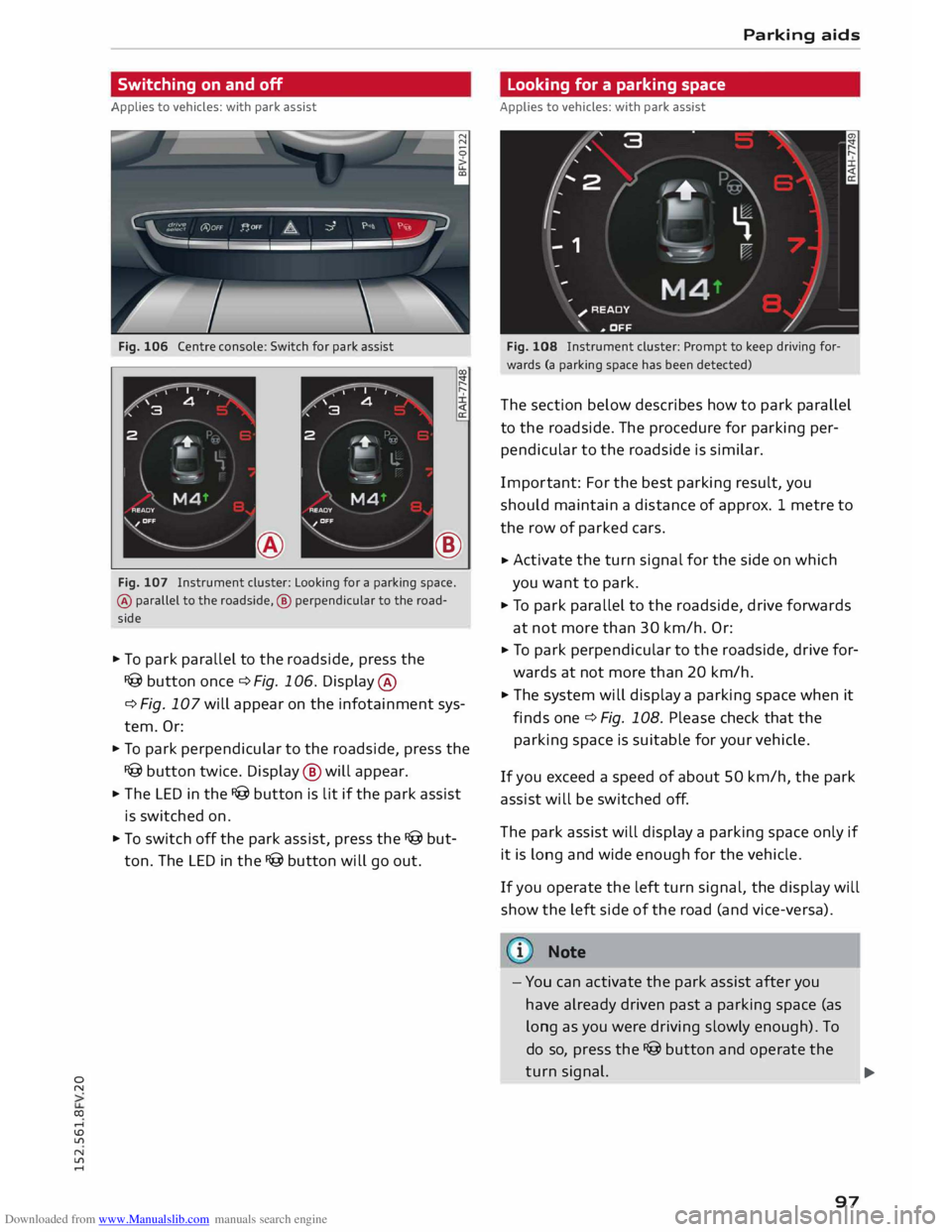
Fig. 106 Centre console: Switch for park assist
®
Fig. 107 Instrument cluster: Looking for a parking space.
® parallel to the roadside, ® perpendicular to the road
side
.. To park parallel to the roadside, press the
I@ button once c::> Fig. 106. Display ®
c:> Fig. 107 will appear on the infotainment sys
tem. Or:
.. To park perpendicular to the roadside, press the
I@ button twice. Display @ will appear.
.. The LED in the I@ button is lit if the park assist
is switched on.
.. To switch off the park assist, press the I@ but
ton. The LED in the I@ button will go out. Parking
aids
Looking for a parking space
Applies to vehicles: with park assist
Fig. 108 Instrument cluster: Prompt to keep driving for
wards (a parking space has been detected)
The section below describes how to park parallel
to the roadside. The procedure for parking per
pendicular to the roadside is similar.
Impor tant: For the best parking result, you
should maintain a distance of approx. 1 metre to
the row of parked cars.
.. Activate
the turn signal for the side on which
you want to park.
.. To park parallel to the roadside, drive forwards
at not more than 30 km/h. Or:
.. To
park perpendicular to the roadside, drive for
wards at not more than 20 km/h.
.. The system will display a parking space when it
finds one c::> Fig. 108. Please check that the
parking space is suitable for your vehicle .
If you exceed a speed of about 50 km/h, the park
assist will be switched off.
The park assist will display a parking space only if
it is long and wide enough for the vehicle.
If you operate the left turn signal, the display will
show the left side of the road (and vice-versa).
Note
- You can activate the park assist after you
have already driven past a parking space (as
long as you were driving slowly enough). To
do so, press the I@ button and operate the
turn signal.
97 ...
Page 100 of 284
Downloaded from www.Manualslib.com manuals search engine Parking
aids
- The best parking results will be achieved if
you position the vehicle as parallel as possi
ble to the line of parked cars or the kerb be
fore you start the actual parking manoeu
vre.
- If there are suitable parking spaces on both
sides of the road (for instance on a one-way
street), you can change the direction of the
turn signals to park on the other side, even
if you have already activated the park assist.
Parking parallel to the roadside
Applies to vehicles: with park assist
The driver is responsible for parking the vehicle.
�' 3 "
I
- IR t;
-
- 1 '"*-� )
,-...-
\ D�
)__
�
READY
\. ,. OFF
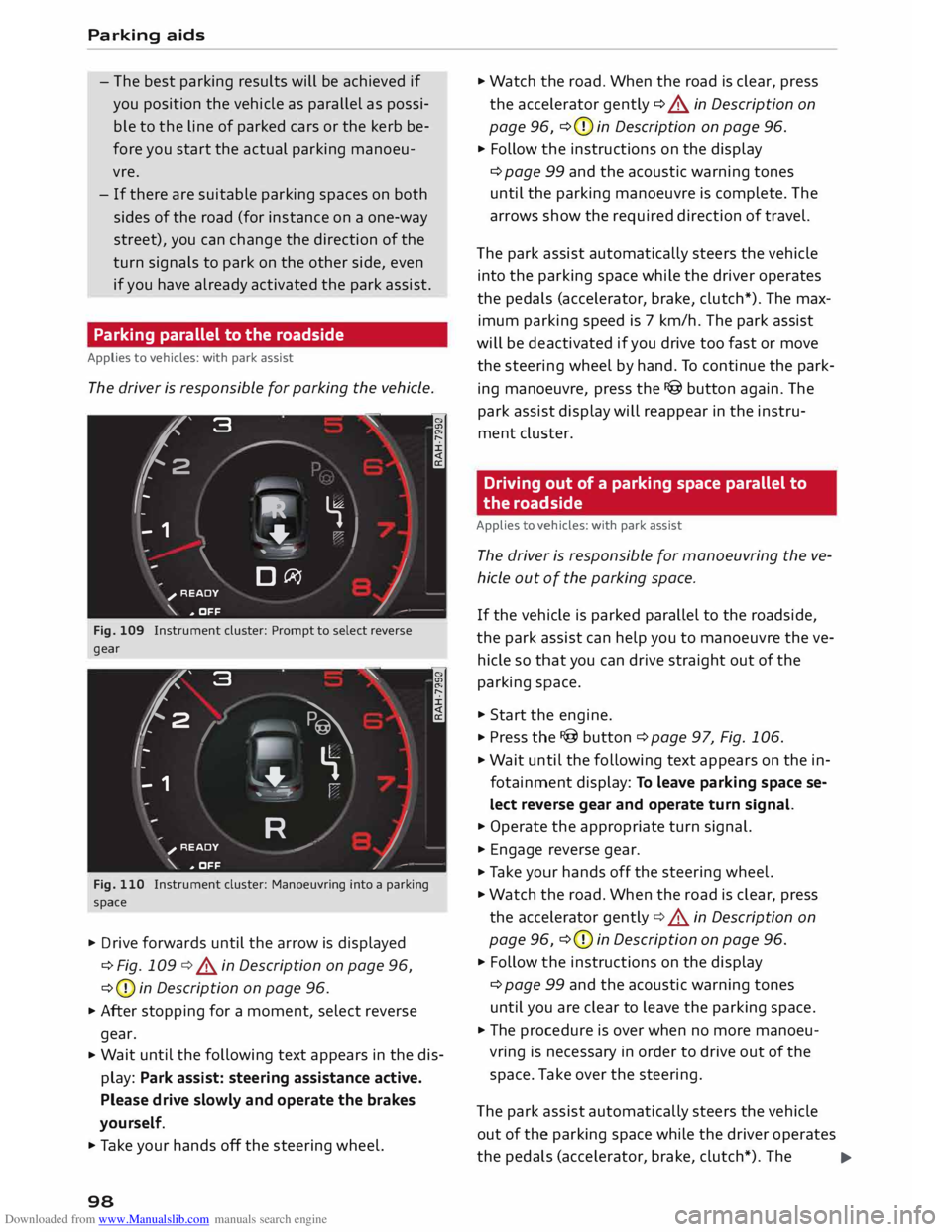
Fig. 109 Instrument cluster: Prompt to select reverse
gear
t' 3
2 ,
I I
-
-
- 1 "
� \
�
"'+-
, -- ':" ' I
R )__
�
READY
_,..-
\. ,. OFF
Fig. 110 Instrument cluster: Manoeuvring into a parking
space
... Drive forwards until the arrow is displayed
¢ Fig. 109 ¢&. in Description on page 96,
¢ (D
in Description on page 96.
... After stopping for a moment, select reverse
gear.
... Wait
until the following text appears in the dis
play: Park assist: steering assistance active.
Please drive slowly and operate the brakes
yourself.
... Take your hands off the steering wheel.
98 ...
Watch the road. When the road is clear, press
the accelerator gently ¢ &. in Description on
page 96, ¢(D
in Description on page 96.
... Follow the instructions on the display
¢ page 99 and the acoustic warning tones
until the parking manoeuvre is complete. The
arrows show the required direction of travel.
The park assist automatically steers the vehicle
into the parking space while the driver operates
the pedals (accelerator, brake, clutch*). The max
imum parking speed is 7 km/h. The park assist
will be deactivated if you drive too fast or move
the steering wheel by hand. To continue the park
ing manoeuvre, press the I@ button again. The
park assist display will reappear in the instru
ment cluster.
Driving out of a parking space parallel to
the roadside
Applies to vehicles: with park assist
The driver is responsible for manoeuvring the ve
hicle out of the parking space.
If the vehicle is parked parallel to the roadside,
the park assist can help you to manoeuvre the ve
hicle so that you can drive straight out of the
parking space .
... Start the engine .
.., Press the !@button ¢page 97, Fig. 106 .
... Wait until the following text appears on the in
fotainment display: To leave parking space se
lect reverse gear and operate turn signal.
... Operate the appropriate turn signal.
... Engage reverse gear .
.., Ta ke your hands off the steering wheel.
... Watch the road. When the road is clear, press
the accelerator gently¢&. in Description on
page 96, ¢(D
in Description on page 96 .
... Follow the instructions on the display
¢ page 99 and the acoustic warning tones
until you are clear to leave the parking space .
... The procedure is over when no more manoeu
vring is necessary in order to drive out of the
space. Take over the steering.
The park assist automatically steers the vehicle
out of the parking space while the driver operates
the pedals (accelerator, brake, clutch*). The
..,.
Page 101 of 284
Downloaded from www.Manualslib.com manuals search engine maximum
manoeuvring speed is S km/h. The
park assist will be deactivated if you drive too
fast or move the steering wheel by hand. To con
tinue the parking manoeuvre, switch the engine
off/on. Then press the I@ button again. Alterna
tively, drive out of the parking space without us
ing the park assist.
Driver messages
Applies to vehicles: with park assist
I@ Park
assist: steering assistance active.
Please drive slowly and operate the brakes your
self
The park assist is ready. You can now park the ve
hicle. Watch the road c:::> A in Description on
page 96.
Ill Park assist: ended.
II Park assist: ended. Please take over steer
ing.
The park assist has finished the parking manoeu
vre.
Ill Park assist: cancelled. Continue steering ve
hicle!
The park assist has interrupted the parking ma
noeuvre.
Ill Park assist: cancelled. Steering input detec
ted. Continue steering vehicle!
The steering assistant has been deactivated be
cause the driver has intervened in the steering.
To continue the parking manoeuvre, press the
I@ button again.
[S] Reduce
your speed! For the best results when
passing the line of parked cars where you want to
park, do not drive faster than 30 km/h (if parking
parallel to the roadside) or 20 km/h (if parking
perpendicular to the roadside) c:::> page 97.
Ill Park assist: cancelled. Speed too high. Con
tinue steering vehicle!
You were driving too fast into the parking space.
0
"' Do not exceed 7 km/h when driving into the park-
� ing space.
....
\D Lfl
N
Lfl
.... Parking
aids
• Park assist: currently unavailable. Stabilisa
tion control (ESC) off
Switch the ESC on to use the park assist.
� To leave parking space select reverse gear
and operate turn signal.
The park assist is ready. You can leave the parking
space. Watch the road c:::> A in Description on
page 96.
• Park assist: cancelled. Stabilisation control
(ESC) input. Continue steering vehicle!
Ta ke over the steering. Finish parking without the
park assist or drive out of the parking space.
The park assist has interrupted the parking ma
noeuvre, because the ESC has been switched off.
Ta ke over the steering or switch on the ES(
c:::> page 104 and start the parking manoeuvre
again ¢page 97.
Ill Park assist: ended. Please take over steering
and continue driving.
The park assist has finished manoeuvring the ve
hicle out of the parking space. Please take over
the steering.
Ill Park assist: cancelled. Space too small
The assist function is unable to automatically
steer the vehicle out of the parking space be
cause the space is too small. Manoeuvre the vehi
cle out of the parking space without using the
park assist.
• Park assist: time limit exceeded
Ill Park assist: cancelled. Time limit exceeded.
Continue steering vehicle!
The parking manoeuvre was not completed with
in about six minutes after the park assist was ac
tivated. To continue the parking manoeuvre,
press the I@ button again.
• Park assist: currently unavailable
Ill Park assist: currently unavailable. Continue
steering vehicle!
The park assist cannot be used to park the vehi
cle. Try repeating the parking manoeuvre or
switching the ignition off and on again.
..,.
99
Page 102 of 284
Downloaded from www.Manualslib.com manuals search engine Parking
aids
II Park assist: not stopped long enough
After you select reverse gear, the vehicle has to
remain stationary for a moment so that the park
assist can activate the steering. Follow the direc
tions given in the display.
Ill Park assist: fault. Please contact workshop
II Park assist: fault. Continue steering vehicle!
Please contact workshop
Please contact a qualified workshop. The park as
sist cannot be used to park the vehicle if a system
fault occurs.
II Park assist: cancelled. Space too small. Con
tinue steering vehicle!
The park assist cannot be used to park the vehicle
in this space. Park the vehicle without using the
park assist or look for a bigger space.
Ill Park assist: stabilisation control (ESC) input
The detected space could not be used because
the stabilisation control intervened.
Adjusting graphic display
and warning beeps
Applies to vehicles: with parking system plus/park assist
The settings for the graphic display and acoustic
signals are controlled via the infotainment sys
tem.
.., Select the following on the infotainment sys
tem: IM EN u I button > Car > left control button
> Driver assist> Parking aid.
Warning beeps
Front volume -Volume for the front and side*
zones
Rear volume -Volume for the rear zone
In-car entertainment fader -The volume of the
current audio or video source is reduced when the
parking aid is switched on.
You will hear a short test tone each time you
make a new setting.
100 @
Note
The settings will be automatically stored and
assigned to the remote control key in use.
Fault warnings
Applies to vehicles: with rear parking aid/parking system
plus/park assist
Rear parking aid: fault. Obstacles cannot be de
tected
Front parking aid: fault. Obstacles cannot be
detected
Parking aid: fault. Obstacles cannot be detected
If the LED in the P,1
1i button starts flashing when
you switch the system on, a system fault has oc
curred. If the fault is not corrected before you
switch off the ignition, it will only be indicated by
the flashing LED in the P111i button the next time
you switch on the parking aid by engaging re
verse gear. The fault warning can be displayed in
the second tab of the driver information system
as long as the fault is active.
Parking system plus*/parking system plus
and park assist*
If a sensor or loudspeaker malfunctions, the J;l4:
symbol will be shown on the infotainment sys
tem in front of or behind the vehicle. If a rear
sensor malfunctions, obstacles will only be dis
played in zones @and @ ¢ page 94, Fig. 101. If
a front sensor malfunctions, obstacles will only
be displayed in zones © and@ .
Drive to a qualified workshop soon and have the
fault rectified.
Page 122 of 284
Downloaded from www.Manualslib.com manuals search engine Speech
dialogue system
Function Say:
Starting route guidance after enter-
Start route guidance
ing a destination
Cancelling the active route guidance
Stop route guidance
Calculating alternative routes
Calculate alternative routes
Entering a special destination with
Special destination > Change search area > enter desired cote-
search area with assistance from
gory or subcategory when requested, e.g. "Restaurant"
the system
Categories for entering special des-
Audi Service / Railway station/ Airport/ Hotel/ Hospital /
ti nations
Parking space/ Service area/ Restaurant/ Filling station etc.
Search areas for entering special
In immediate vicinity/ In vicinity of route / In vicinity of desti-
destinations nation/ In vicinity of stopover / In new town/ In new country
Entering an online destination* Online destination (XV), e.g. "Online destination Palace Hotel"
Correcting an entry
No, I meant (XV)
Closing the full list of commands
Close
You can say the following commands to make ad
ditional navigation settings:
Function
General map options
Map type
Displaying the route list
Displaying remaining distance/time
while route guidance is active
Highest speed query
Setting the navigation cues during
active route guidance
Dynamic traffic avoidance
Excluding the next section of the
route
Excluding a certain section of the
route
(©) Note Say:
Map / Day map/ Night map/ Change map colours automati-
cally
20 driving position map/ 20 north position map/ 30 map/
Destination map/ Overview map/ Standard map/ Traffic
map / Google Earth map
Route list
Destination info
How fast can I go here?
Voice guidance on/ Voice guidance off/ Voice guidance com-
pact / Voice guidance complete/ Voice guidance traffic
Manual traffic avoidance / Automatic traffic avoidance /
Switch off traffic avoidance
Exclude route
Exclude route for (XV) metres/kilometres/yards/miles / Ex-
elude next street/ Exclude next section of route
spell destinations to enter them for route
guidance.
- Depending on the selected menu language
and the country you are in, you may have to -
Please observe the notes in the chapter
Notes on Audi connect ¢ page 145.
120
Page 227 of 284
Downloaded from www.Manualslib.com manuals search engine 0
N
co
....
\D Lfl
N
Lfl
.... Coolant
addi-Frost protec-
tive tion
Countries with min. 40 %,
min. -25 °C
warm climate max. 45 %
Countries with min.
50 %,
max. -40 °C
cold climate max.
60 %
CD CAUTION
- Have your qualified workshop check the
cooling system before the winter season to
make sure that the anti-freeze concentra
tion is adequate for the conditions to be ex
pected. This applies particularly if you drive
into a colder climate zone.
- To prevent damage to the engine, do not
use a different type of anti-freeze additive if
the approved type of additive is not availa
ble. In this case use only water and bring
the coolant concentration back up to the
correct level as soon as possible by putting
in the specified additive.
- Always top up with fresh, unused coolant.
- Radiator sealants must not be added to the
coolant.
Topping up coolant
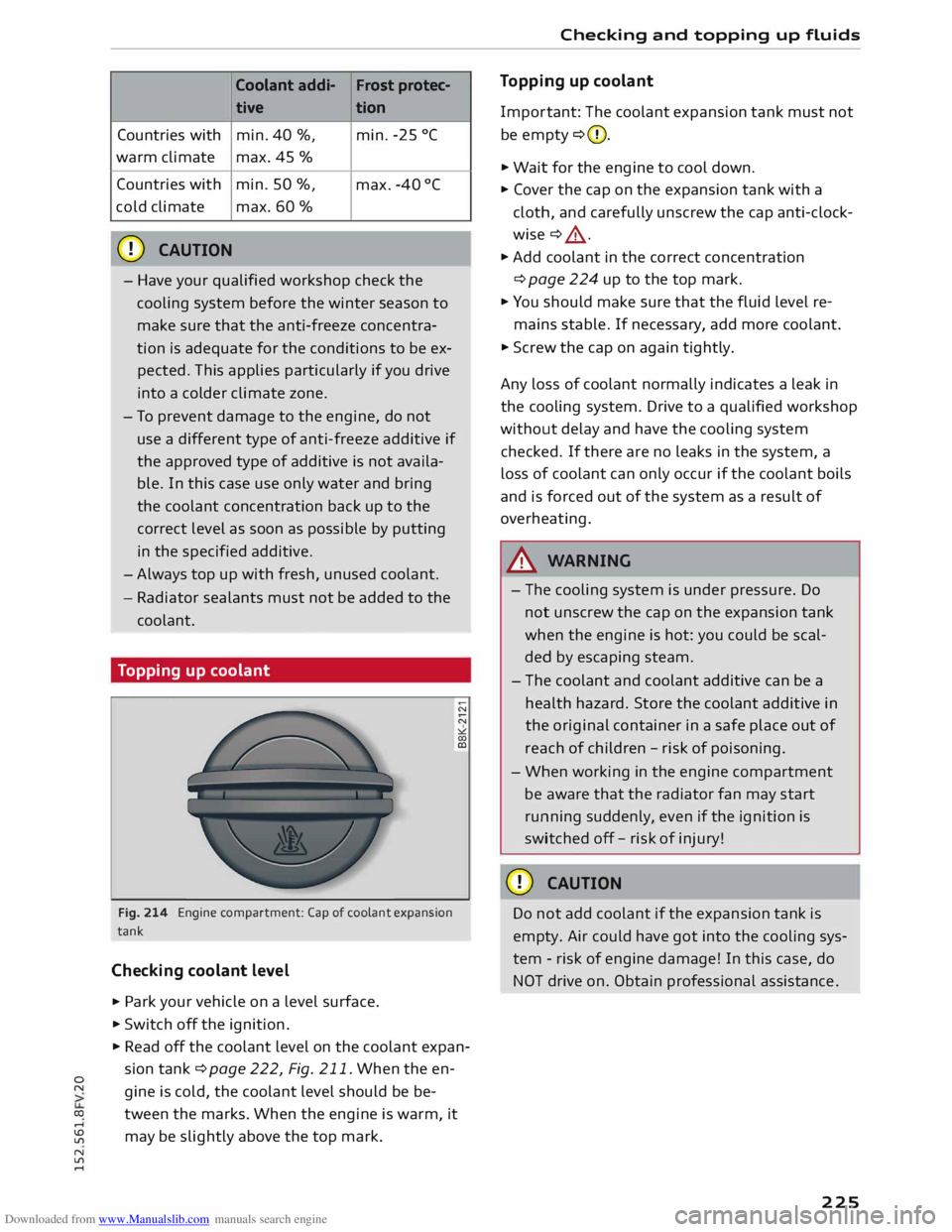
Fig. 214 Engine compartment: Cap of coolant expansion
tank
Checking coolant level
.. Park
your vehicle on a level surface .
.. Switch off the ignition .
.. Read off the coolant level on the coolant expan
sion tank ¢ page 222, Fig. 211. When the en
gine is cold, the coolant level should be be
tween the marks. When the engine is warm, it
may be slightly above the top mark. Checking
and topping up fluids
Topping up coolant
Impor tant: The coolant expansion tank must not
be empty ¢(D.
.. Wait for the engine to cool down.
.. Cover the cap on the expansion tank with a
cloth, and carefully unscrew the cap anti-clock
wise ¢ .&_ .
.. Add coolant in the correct concentration
¢ page 224 up to the top mark.
.. You should make sure that the fluid level re-
mains stable. If necessary, add more coolant.
.. Screw the cap on again tightly.
Any loss of coolant normally indicates a leak in
the cooling system. Drive to a qualified workshop
without delay and have the cooling system
checked. If there are no leaks in the system, a
loss of coolant can only occur if the coolant boils
and is forced out of the system as a result of
overheating.
A WARNING
- The cooling system is under pressure. Do
not unscrew the cap on the expansion tank
when the engine is hot: you could be scal
ded by escaping steam.
- The coolant and coolant additive can be a
health hazard. Store the coolant additive in
the original container in a safe place out of
reach of children -risk of poisoning.
- When working in the engine compartment
be aware that the radiator fan may start
running suddenly, even if the ignition is
switched off-risk of injury!
CD CAUTION
Do not add coolant if the expansion tank is
empty. Air could have got into the cooling sys
tem -risk of engine damage! In this case, do
NOT drive on. Obtain professional assistance .
225
Page 229 of 284
Downloaded from www.Manualslib.com manuals search engine 0
N
co
....
\D Lfl
N
Lfl
.... destroys
the battery. To avoid this, the battery
should be recharged at least once a month
¢ page 228. Do not disconnect the battery; oth
erwise the anti-theft alarm system* will be out of
operation.
Winter conditions The battery is drained more in cold weather,
which means that the starting power is reduced.
For this reason, have the battery checked and
charged if necessary before the start of winter.
A WARNING
-
-All work on batteries requires specialist
knowledge. For queries regarding the vehi
cle battery please seek the assistance of a
qualified workshop -risk of chemical
burns / risk of explosion!
- The battery must not be opened. Do not at
tempt to make any changes to the electro
lyte level of the battery. Otherwise, there is
a risk that a mixture of oxygen and hydrog en
gas can accumulate and cause an explosion.
Important safety warnings for handling a
car battery
All work on batteries requires specialist knowl
edge.
The vehicle battery is located under the floor
panel in the luggage compartment.
® Wear
safety glasses!
A Battery
acid is extremely corrosive. Wear
protective gloves and safety glasses.
@ Keep
open flames, sparks, uncovered
lights and lit cigarettes away from the
battery!
� A
highly explosive mixture of gases is giv-
en off when the battery is under charge!
® Keep
children away from the battery and
battery acid.
A WARNING
Always be aware of the danger of injury and
chemical burns as well as the risk of accident Checking
and topping up fluids
or fire when working on the battery and the
electrical system.
- Wear safety glasses. Do not allow acid or
lead particles to come into contact with
eyes, skin or clothing.
- Battery acid is extremely corrosive. Wear
protective gloves and safety glasses. Do not
tilt the battery -acid can leak out of the va
pour vent. If electrolyte should splash into
the eyes rinse at once for several minutes
using clear water. Then seek medical care
immediately. Neutralize any acid splashes
on the skin or clothing with soap solution,
and rinse off with plenty of water. If acid is
swallowed by mistake, consult a doctor im
mediately.
- Keep open flames, sparks, uncovered lights
and lit cigarettes away from battery. Avoid
sparks (including those from static charges)
when handling cables and electrical equip
ment. Never cross the battery poles. The re
sulting high-energy sparks can cause injury.
-A highly explosive mixture of gases is given
off when the battery is under charge. Only
charge battery in a well ventilated area.
- Keep children away from the battery and
battery acid.
- Switch off all electrical equipment and the
ignition before starting any work on the ve
hicle's electrical system. The minus cable of
the battery must be disconnected. When
changing a light bulb, it is sufficient to only
turn off the light.
- Before disconnecting the battery, turn off
the anti-theft alarm system*! Otherwise the
alarm will be triggered.
- When disconnecting the battery from the
vehicle's electrical system, first disconnect
the minus cable and then the plus cable.
- Before reconnecting the battery, turn off all
electrical equipment. First connect the plus
cable, then the minus cable. The battery ca
bles must NOT be connected to the wrong
battery poles -this can cause an electrical
fire.
- Never charge a frozen or thawed out battery
- risk of explosion and chemical burns! A
battery must be replaced once it has frozen.
..,..
227
Page 246 of 284
Downloaded from www.Manualslib.com manuals search engine Mobility
- If the tyre is too badly damaged, you should
seek professional assistance.
(f!j} For the sake of the environment
A used can of sealing compound can be re
turned to your qualified workshop for dispos
al.
ij) Note
After repairing a tyre, remember to buy a new
tyre sealant can at a qualified workshop.
Changing a wheel
Preparations
Certain preparations must be made before you
change the wheel.
� Please refer to the important safety notes
¢page 241.
� Apply the parking brake.
� Manual
gearbox: Engage first gear.
� Automatic gearbox: Move the selector lever to
position P.
� Take out the tools ¢ page 242 and spare wheel
¢page 247.
A WARNING
If you have to change the tyre on a gradient,
block the wheel opposite the wheel being
changed by placing a stone or similar object
under it to prevent the vehicle from rolling
away.
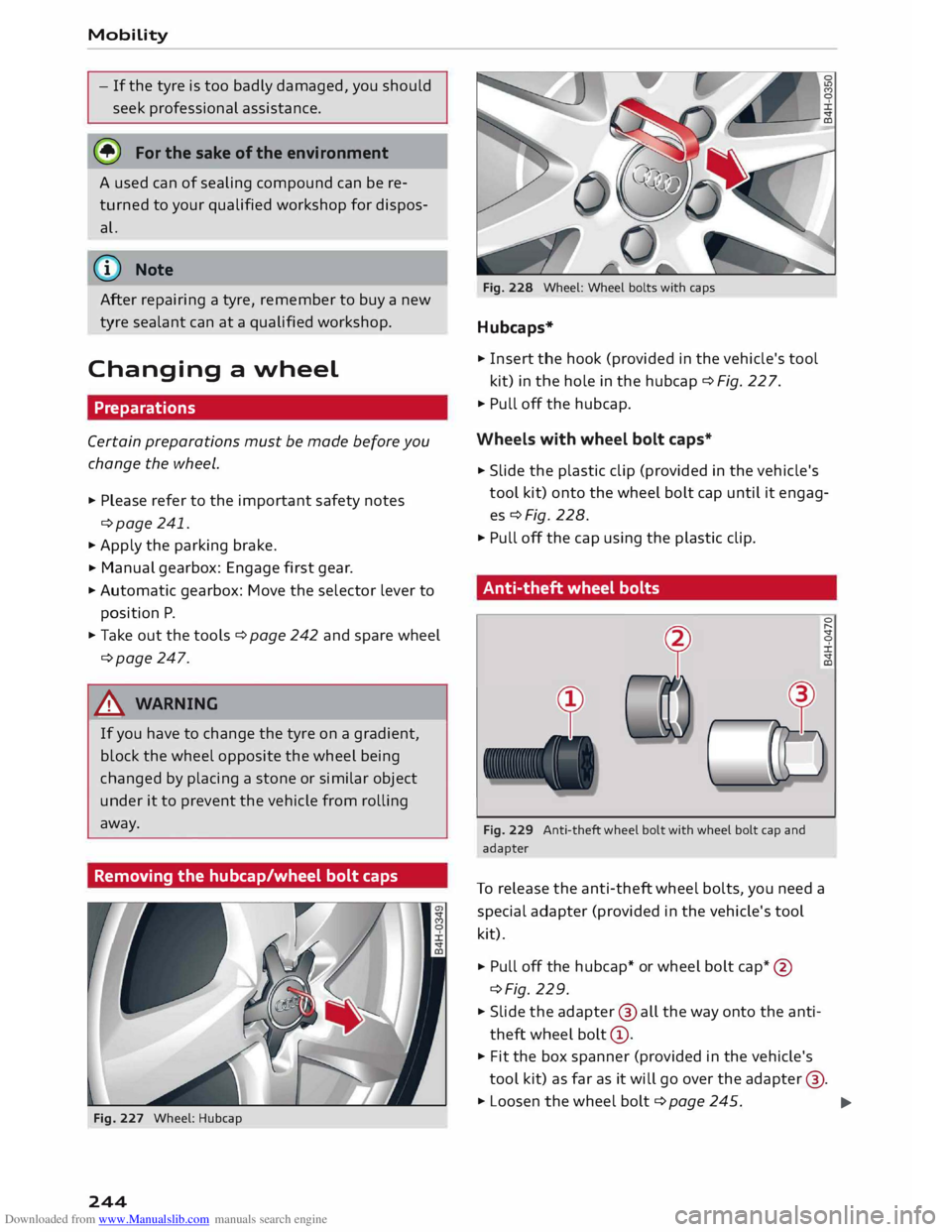
Removing the hubcap/wheel bolt caps
Fig. 227 Wheel: Hubcap
244 Fig.
228 Wheel: Wheel bolts with caps
Hubcaps*
� Insert the hook (provided in the vehicle's tool
kit) in the hole in the hubcap ¢ Fig. 22 7.
� Pull off the hubcap.
Wheels with wheel bolt caps*
� Slide
the plastic clip (provided in the vehicle's
tool kit) onto the wheel bolt cap until it engag
es¢ Fig. 228.
� Pull off the cap using the plastic clip.
Anti-theft wheel bolts
Fig. 229 Anti-theft wheel bolt with wheel bolt cap and
adapter
To release the anti-theft wheel bolts, you need a
special adapter (provided in the vehicle's tool
kit).
� Pull
off the hubcap* or wheel bolt cap*@
¢Fig. 229.
� Slide the adapter @ all the way onto the anti
theft wheel bolt@.
� Fit
the box spanner (provided in the vehicle's
tool kit) as far as it will go over the adapter @.
� Loosen the wheel bolt ¢page 245.
..,.